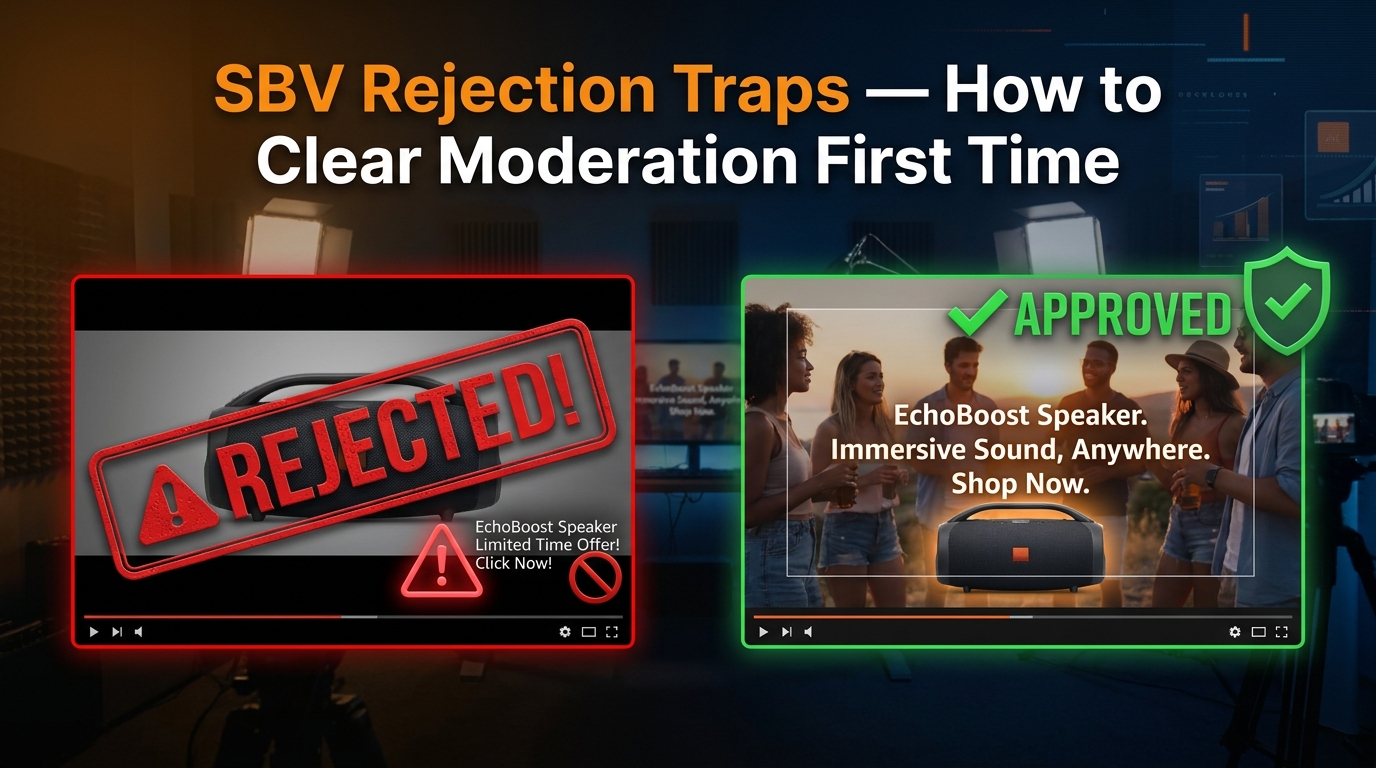
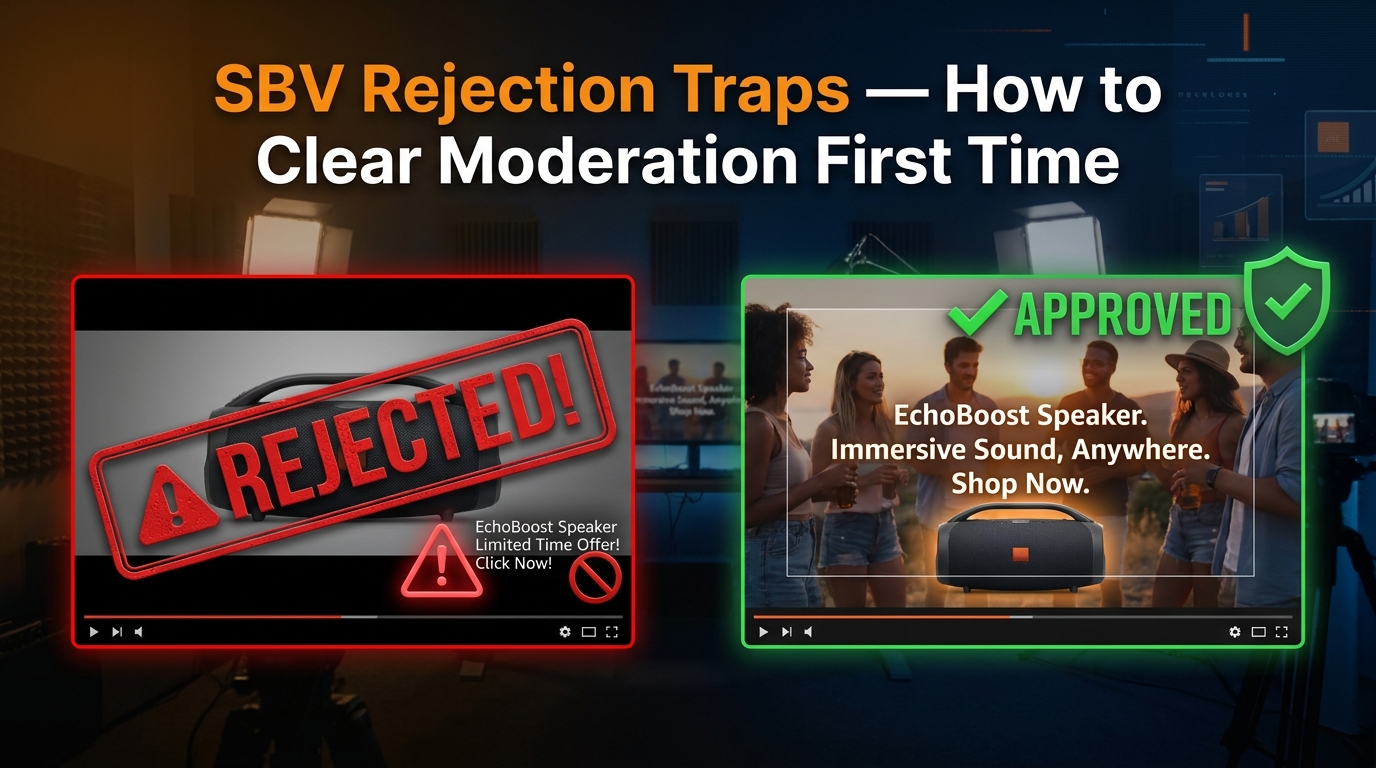
You spend a week producing a Sponsored Brand Video. The scriptwriter nails the hook. The product shots are clean. The editor exports a gorgeous 15-second cut. You upload it to Amazon Ads, set your targeting, and hit submit — then wait.
Twenty-four hours later: Rejected.
The rejection reason? A catch-all phrase like “does not meet creative acceptance policies.” No specific line item. No timestamp. No frame reference. Just a wall of policy language and a button that says Edit Ad.
This is the everyday reality for brands running Sponsored Brands Video (SBV) campaigns on Amazon in 2026. The ad format is one of the highest-performing placements in the entire Amazon Ads ecosystem — SBV consistently delivers higher click-through rates and better return on ad spend than static Sponsored Brands — but it comes with a moderation layer that can be opaque, unforgiving, and expensive to navigate by trial and error.
The problem isn’t that Amazon’s rules are unreasonable. Most of them are logical once you understand the reasoning. The problem is that the rules are scattered across multiple help pages, the rejection messages rarely pinpoint the actual violation, and the 24–72 hour review window means every failed submission costs you real campaign time — especially painful when you’re approaching a product launch or seasonal peak.
This article takes a different approach to the topic. Rather than listing specs you can already find on the ad specs page, we’re going to walk through the patterns behind rejections: what the moderation system is actually looking for, which violations are auto-rejected versus manually flagged, where the most experienced advertisers consistently get tripped up, and how to build a production workflow that exits the rejection cycle for good.
Whether you’re a brand manager producing your first SBV or a PPC agency running dozens of video campaigns simultaneously, understanding the logic behind Amazon’s SBV moderation — not just the rules themselves — is the difference between clearing moderation on the first submission and burning days on revision loops.
How Amazon’s SBV Moderation Machine Actually Works
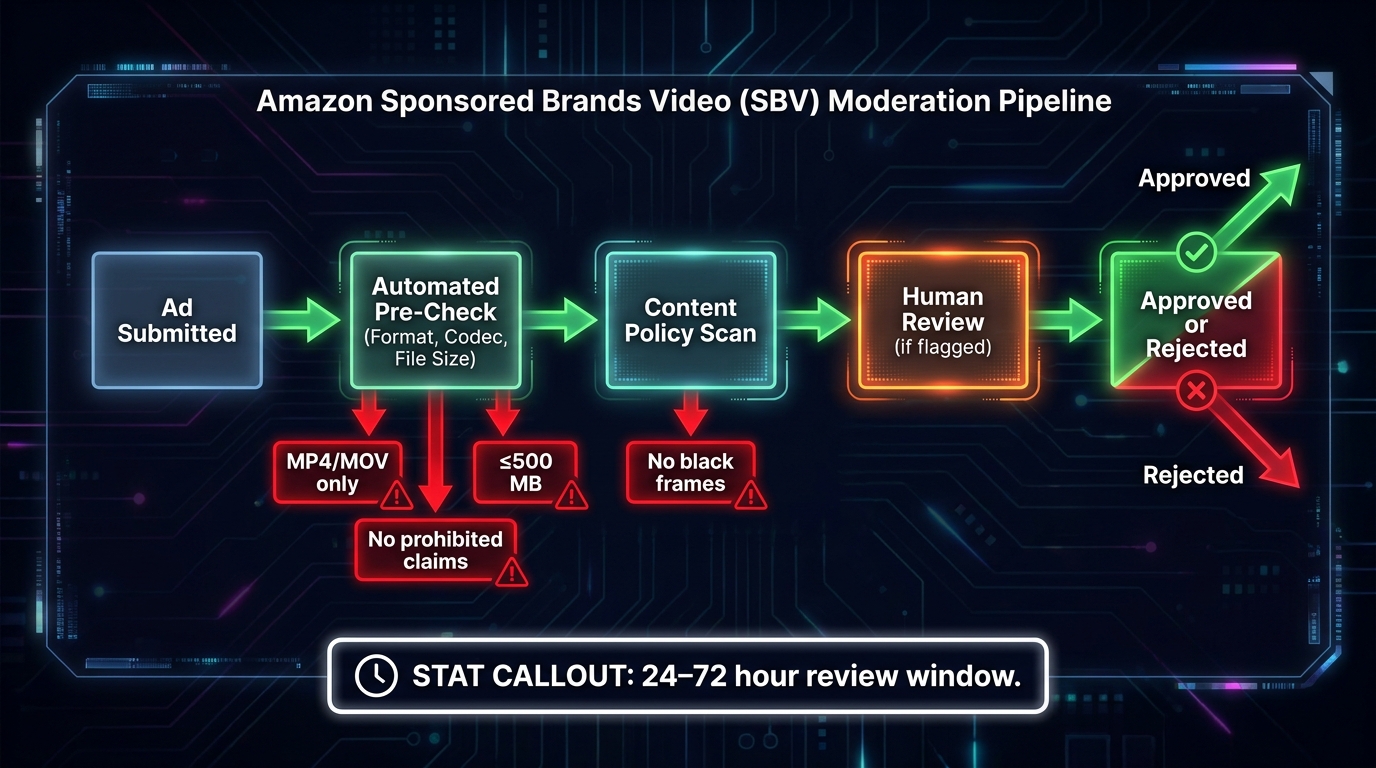
Before you can fix what’s going wrong, you need to understand what’s actually reviewing your ad. Amazon’s SBV moderation is not a single system — it’s a layered pipeline that moves through automated checks before human reviewers ever see your creative, if they see it at all.
Stage 1: Automated Technical Pre-Check
The moment you submit an SBV creative, it enters an automated pre-check that validates against a set of hard technical parameters. This stage happens quickly — often within minutes — and it’s purely mechanical. The system is checking whether your file conforms to the published specifications before anything else happens.
If your file fails at this stage, the rejection is typically faster than the standard 24–72 hour window. You’ll receive a policy violation notice, but the actual trigger is technical rather than editorial. Common failures here include unsupported file formats, codec mismatches, files that exceed the 500 MB size limit, or videos submitted with an aspect ratio other than 16:9. This stage has no nuance — it’s binary.
Stage 2: Automated Content Policy Scan
Ads that pass the technical pre-check move to an automated content scan. This is where machine-learning models evaluate frame-level content, on-screen text, and metadata against Amazon’s creative acceptance policies. The system is specifically looking for patterns associated with known rejection categories: black or blank frames, letterboxing artifacts, text placed outside the safe zone, and flagged keyword patterns in on-screen copy.
This stage is where many experienced advertisers get surprised. A video that looks perfectly fine on a desktop preview can fail the content scan because of elements that aren’t visible to the naked eye — a two-frame black leader at the start of the video, a barely-perceptible crop that technically qualifies as pillarboxing, or on-screen text that enters the lower-right quadrant during a transition.
Stage 3: Human Review
Ads that pass the automated scans — or are flagged for ambiguous content that the automated system can’t definitively reject — enter a human review queue. This is where the standard 24–72 hour window applies. Human reviewers apply Amazon’s policy guidelines with discretion, which means two things: borderline cases can go either way, and the same creative submitted twice to the human review queue may receive different outcomes depending on the reviewer.
Amazon recommends submitting SBV creatives approximately one week before your intended campaign launch date. That buffer exists precisely because of the review-rejection-revision cycle. Brands that account for this buffer in their production timelines avoid the panic of a rejected ad two days before a Prime Day promotion.
What “Instant Rejection” Actually Means
When practitioners talk about “instant rejections,” they’re typically referring to automated pre-check failures or content scan failures — rejections that happen in minutes rather than hours. These are the most consistent and predictable rejections because they’re rule-based rather than judgment-based. They’re also the most preventable, because every single trigger is documented in Amazon’s published specs.
The practical implication: most instant rejections are entirely within your control before you submit. The sections that follow break down exactly which triggers cause them.
The Technical Spec Traps: Format, Codec, and File Configuration
Amazon’s technical requirements for SBV are specific, and they’re not flexible. The moderation system does not partially accept non-conforming files or apply tolerances. If your video doesn’t match the exact specification on any hard-limit parameter, it will be rejected.
Here’s the full mandatory technical specification as of 2026:
- Duration: 6–45 seconds. Amazon strongly recommends 20 seconds or less — longer videos see progressively lower completion rates, which affects performance data even if they pass moderation.
- Aspect ratio: 16:9 only, with square pixels. No vertical formats, no 1:1 square, no custom ratios.
- Dimensions: 1280×720 (HD), 1920×1080 (Full HD), or 3840×2160 (4K). Non-standard resolutions — even close ones like 1280×534 — will fail.
- File format: MP4 or MOV only.
- Video codec: H.264 or H.265 (HEVC).
- Frame rate: 23.976, 24, 25, 29.97, or 29.98 fps. Variable frame rate files are a common failure point — always export at a fixed frame rate.
- File size: Maximum 500 MB.
The Codec Trap That Catches Video Editors
One of the most common technical rejection patterns among intermediate-level advertisers involves codec export settings. Many video editing and motion graphics tools export H.264 files that technically conform to the codec requirement but use a profile or level not supported by Amazon’s ingest pipeline. The most frequently flagged: H.264 files exported at High Profile Level 4.2 or above, or files that use a bitrate configuration incompatible with Amazon’s streaming requirements.
The safe export settings for most SBV work are H.264 at High Profile Level 4.0 or below, with a video bitrate between 1 Mbps and 50 Mbps. If you’re using DaVinci Resolve, Premiere Pro, or Final Cut Pro, explicitly set the profile and level in your export settings rather than relying on “automatic” or “match source” presets — those can produce technically valid but Amazon-incompatible files.
Variable Frame Rate: The Hidden Failure Mode
Footage shot on modern smartphones — including professional-grade footage from iPhones and Android flagship devices — is often recorded in variable frame rate (VFR) mode. This is a feature designed to smooth motion during screen recordings and certain video modes. When these files are uploaded directly as SBV creatives without being converted to a constant frame rate (CFR), they frequently fail Amazon’s technical pre-check.
The fix is straightforward: run all footage through a transcoding step that enforces a fixed frame rate before the final export. Tools like HandBrake (free) or Adobe Media Encoder can perform this conversion reliably. Building this step into your production workflow eliminates this rejection cause entirely.
File Size and the 500 MB Wall
At 4K resolution with high-quality encoding, a 45-second video can easily exceed 500 MB. The most common scenario where this becomes a problem: brands creating premium lifestyle content at 4K who apply minimal compression to preserve visual quality. The solution isn’t to sacrifice quality — it’s to target the shortest effective duration (Amazon’s own recommendation of 20 seconds or less), export at 1080p (which is the effective delivery resolution for most Amazon placements anyway), and use efficient bitrate settings that stay well below the file size ceiling.
The Black Frame Problem: Why Your Opener Is the Most Dangerous Moment
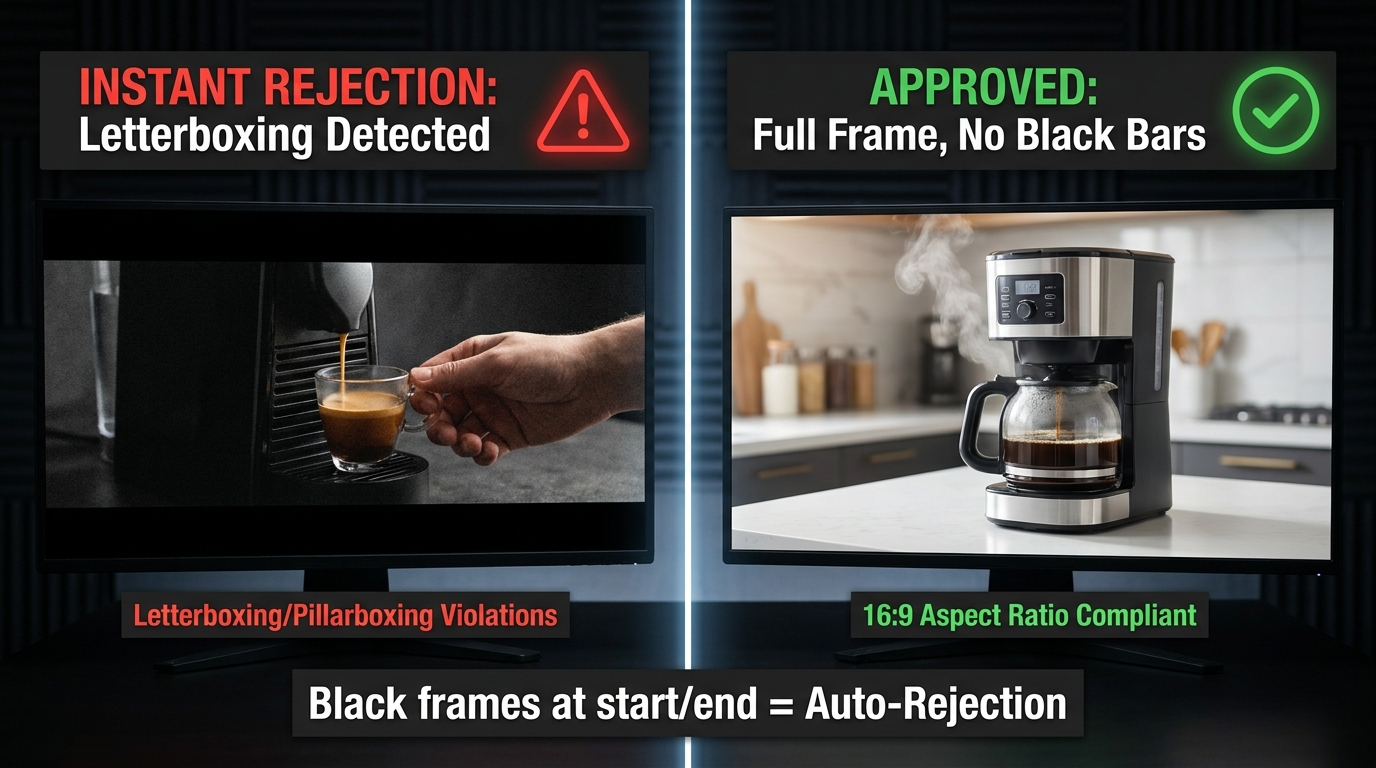
Amazon is explicit: Sponsored Brands Video ads must not contain black or blank frames at the start or end of the video. This is one of the most consistently enforced rules in the entire SBV policy framework, and it’s one of the most common causes of automated rejection.
The rule exists because SBV ads autoplay in search results. When a shopper scrolls past a sponsored placement, the video begins playing immediately without user interaction. A black frame opener — even a single frame — creates a dead moment in the customer experience, effectively making the ad appear broken during the most critical window of attention capture.
Where Black Frames Come From
Most black frame violations are not intentional. They come from three primary sources in standard video production workflows:
Edit suite default handles: Many non-linear editing systems (NLEs) add a default black frame or handle at the start and end of sequences. In a broadcast or streaming context, this is standard practice. For SBV, it’s an instant rejection trigger. Check your export settings explicitly — look for “add handles” or “pad duration” options and disable them.
Fade-to-black transitions: Ending a video with a fade to black, while visually elegant, produces exactly the kind of black frames that trigger rejection. If your creative ends with a branded end card, ensure the final frame holds on solid content — logo, product, or brand color — rather than fading out.
Motion graphics rendering artifacts: After Effects and similar compositing tools can produce blank frames at the start of a composition if the work area isn’t precisely set. A common scenario: a composition begins with a title card that has a one-frame delay in its in-animation. The final render exports a black frame before the animation begins.
How to Audit for Black Frames Before Submission
The most reliable method is to use a media analysis tool to inspect the first and last ten frames of your export before submission. Adobe Premiere’s Source Monitor, DaVinci Resolve’s Scopes panel, or a free tool like MediaInfo can all identify blank frames. The quickest manual check: scrub your exported video’s first and last three seconds at 1:1 playback speed. The first visible frame should be full content. The last visible frame should be full content.
If you’re producing SBV at volume — multiple creatives per ASIN or across a large catalog — this audit step should be codified into your QA checklist rather than left to individual editor judgment.
Letterboxing, Pillarboxing, and the Aspect Ratio Graveyard
Amazon requires SBV creatives to be full-bleed 16:9 with no horizontal or vertical black, color, or blurred bars. This rule encompasses letterboxing (horizontal bars at the top and bottom), pillarboxing (vertical bars on the left and right), and windowboxing (bars on all four sides). It also covers “faux” letterboxing — cases where a production team adds aesthetic black bars to simulate a cinematic widescreen look.
This is one of the most misunderstood rules in SBV creative, because letterboxing is a standard part of broadcast and streaming video aesthetics. Many video production teams create content that looks deliberate and high-quality with letterbox bars applied as a stylistic choice. On Amazon, that’s an automatic rejection.
The Source Footage Problem
Letterboxing often enters an SBV creative not from a stylistic choice, but from a source footage mismatch. The most common scenario: a brand has an existing TV commercial or YouTube ad shot at a non-standard widescreen ratio (like 2.39:1 or 2.35:1) that they want to repurpose for SBV. When that 2.39:1 footage is placed in a 16:9 sequence, the editing software automatically adds letterbox bars to preserve the original framing.
The fix requires a creative decision: reframe the original footage to fill the 16:9 canvas (which involves cropping and re-compositing the shots), or produce a native 16:9 version of the creative from the beginning. Repurposing 2.39:1 content for SBV without reframing will almost always produce a rejected ad, regardless of how good the underlying creative is.
Color and Blur Bars: The Less Obvious Violations
Amazon’s rule specifically mentions not just black bars, but “color or blurred bars.” This matters because some brands attempt to work around the letterboxing prohibition by filling the bars with a brand color or a blurred version of the video content. Both approaches violate the same rule. The policy requires full-bleed native content across the entire frame — there is no compliant workaround for a non-16:9 source asset beyond actually reframing the content.
Square Pixel Verification
Amazon’s spec requires 16:9 at square pixels. This is a specification that’s easy to satisfy with modern cameras and editing tools, but it can be violated by older footage shot with anamorphic or non-square pixel codecs. If you’re working with archival footage or content captured on certain professional broadcast cameras, verify the pixel aspect ratio in your media metadata (MediaInfo or VLC’s codec information panel will show this) before including it in your SBV creative.
The Safe Zone Nobody Uses Correctly
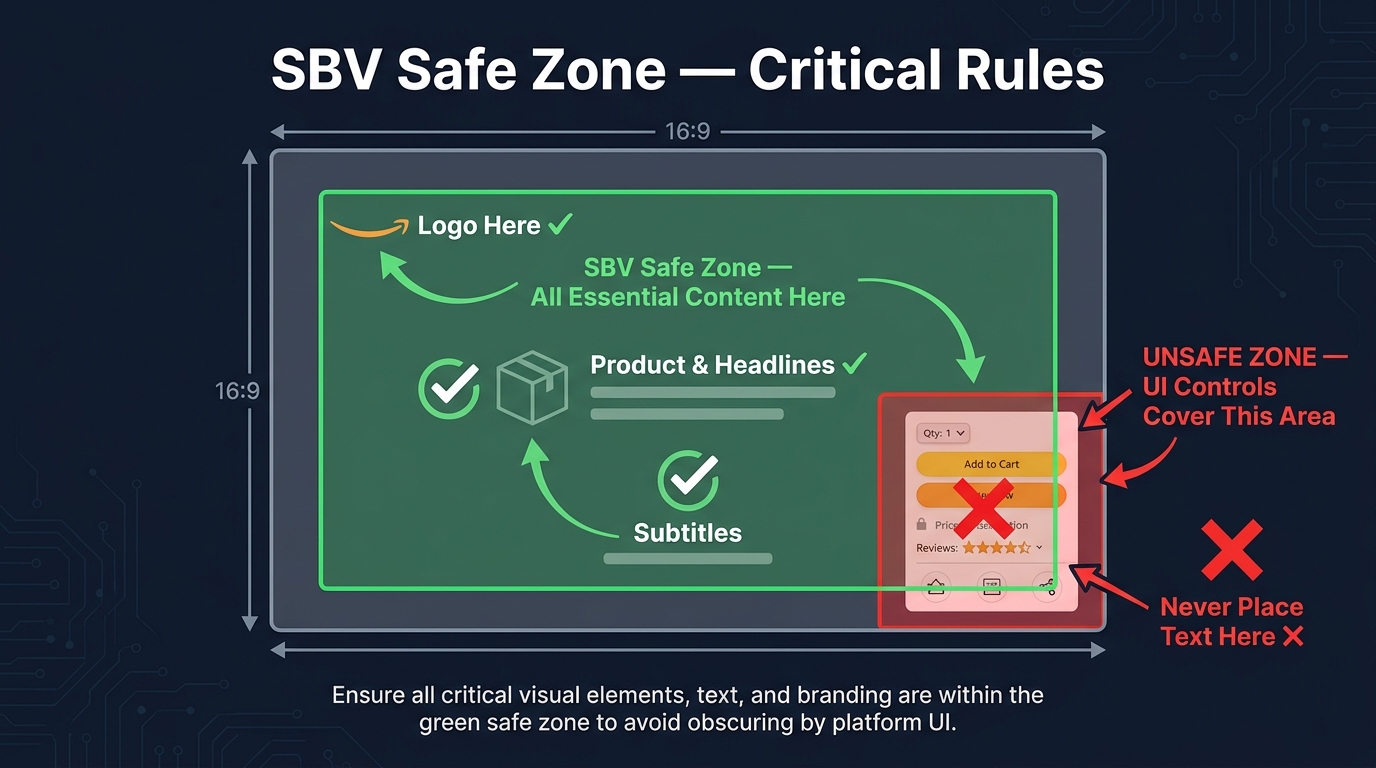
Amazon’s SBV spec includes a safe area template — a defined region within the 16:9 frame where text, logos, and other key visual elements should be placed to avoid being covered by the Amazon shopping UI. The critical rule: do not place important text, logos, or call-to-action elements in the lower-right corner of the video.
When an SBV ad plays in Amazon’s search results, the shopping interface overlays UI elements on the video — pricing information, star ratings, and interactive controls. On mobile devices in particular, these elements occupy the lower-right portion of the video frame. Any critical creative element placed in that zone can be partially or entirely obscured during playback, degrading the customer experience and, in some cases, triggering a moderation rejection for placing key information in an obscured zone.
What the Safe Zone Rule Actually Requires
The rule is specifically about the lower-right corner — not the entire bottom of the frame, and not the lower-left. However, experienced SBV practitioners apply a more conservative interpretation in practice: keep all critical elements (brand logo, headline text, product claims, call-to-action copy) within the central 80% of the frame, away from all four edges.
This conservative approach exists because Amazon displays SBV across multiple placements and device types, and the exact position of UI overlay elements varies. What’s cleanly visible on a 1920×1080 desktop browser may be partially obscured on a 375×667 mobile screen. Centering key creative elements eliminates the variability.
The Logo Placement Pattern That Keeps Getting Rejected
One of the most consistently misunderstood applications of the safe zone rule involves brand logos on end cards. Many brands use a standard corporate video template that places the logo in the lower-right corner of the final frame — the classic television “bug” position. When that template is applied to SBV without modification, the logo lands in exactly the position Amazon’s spec flags as unsafe.
The solution is simple but requires explicit communication with your video production team: brand logos on SBV end cards should be positioned in the upper-left, upper-center, or center of the frame. Not lower-right. The end card is often the most brand-critical moment of the video — the moment shoppers associate your product with your brand — and having it obscured by Amazon’s UI is both a policy risk and a performance risk.
Text Density in the Safe Zone
Being inside the safe zone isn’t sufficient on its own. Amazon also evaluates the legibility of on-screen text — text must be readable at the display sizes used across Amazon placements, which includes mobile screens where SBV renders at relatively small dimensions. Text that’s technically within the safe zone but is too small to read, too densely packed, or placed against a low-contrast background can still trigger a moderation flag for poor creative quality.
A practical guideline: use a minimum font size equivalent to 36pt at 1080p resolution, maintain at least a 4.5:1 contrast ratio between text and background, and limit on-screen text to one or two key messages at a time. SBV is not a slideshow — dense text copy that works in a static banner fails in an autoplay video format.
Audio Rules That Silently Kill Approvals
Audio is one of the least-discussed categories of SBV rejection, which is ironic given that a significant percentage of SBV ads are watched without sound. Amazon’s audio specifications exist both for the ads that play with audio and for the compliance architecture around how audio is formatted and delivered. Violating them is a rejection trigger even when audio is not the primary communication channel for the creative.
Technical Audio Requirements
Amazon’s SBV audio specifications require:
- Codec: PCM, AAC, or MP3
- Channels: Stereo or mono only (no 5.1 surround or multichannel formats)
- Minimum bitrate: 96 kbps
- Sample rate: Minimum 44.1 kHz
- Streams: One audio stream only — multiple audio tracks will cause failure
The single audio stream requirement catches production teams who include multiple audio tracks in their export — for example, a music bed on track 1 and voiceover on track 2, exported as separate stems rather than mixed down to a single stereo or mono track. This is standard practice in broadcast delivery and completely incompatible with Amazon’s SBV requirements.
The Muted Video Question
Because SBV autoplays on mute in most contexts, many brands produce SBV creatives that rely entirely on visual communication, with no meaningful audio component. This is a legitimate strategic choice. However, Amazon still requires a valid audio stream in the file — submitting a video with no audio track, or with a corrupted audio track, will fail technical review.
If your SBV creative is intentionally audio-light, include a minimal audio element — a soft ambient track or a clean music bed at low volume — to satisfy the technical requirement without conflicting with your visual-first communication strategy. The audio will autoplay muted anyway; its primary function in this context is technical compliance, not storytelling.
Audio Quality Signals
Amazon’s content review also evaluates audio quality as a component of overall creative quality. Ads with audible clipping, excessive background noise, or distorted audio can be flagged during human review under “does not meet creative acceptance policies” — particularly if the audio issue is severe enough to create a poor customer experience. If your SBV creative includes voiceover or product demonstration audio, ensure it’s recorded at a consistent level with no clipping artifacts before export.
Prohibited Claims: What You Cannot Say or Show
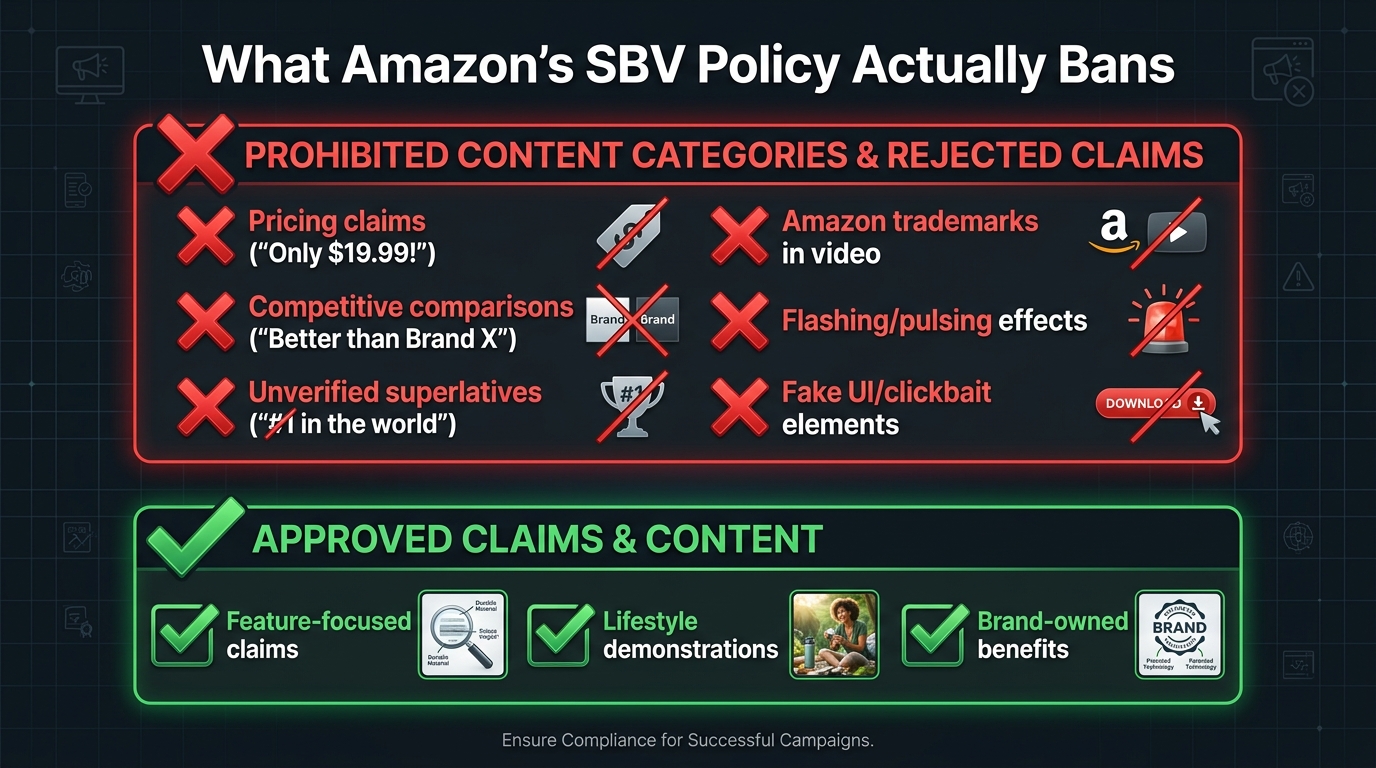
Amazon’s SBV creative acceptance policy maintains a list of content categories and claim types that will trigger rejection regardless of how well the video conforms to technical specifications. These are policy-level rejections, and they require content changes rather than technical fixes.
Pricing and Promotional Claims
Any mention of specific pricing, discounts, or promotional offers in the video creative itself is prohibited. This includes on-screen text like “$19.99,” “Save 30%,” “Limited Time Offer,” or “Today Only.” It also includes spoken pricing in voiceover and visual representations of price tags, discount badges, or sale stickers within the video frame.
The reasoning is clear: Amazon’s own product listing infrastructure handles pricing information dynamically. Pricing in the video creative would be inaccurate the moment a price changes, creating a misleading customer experience. The policy closes this gap by prohibiting pricing from the creative entirely.
The practical implication for brands that run SBV around promotional events like Prime Day or Lightning Deals: the video itself cannot reference the deal. The campaign targeting and the product detail page carry the promotional messaging. The creative must be promotion-agnostic to pass moderation and remain compliant for the ad’s full run duration.
Unverified Superlatives and Exaggerated Claims
Claims like “the best,” “the most effective,” “#1,” “world-class,” or “guaranteed to work” require substantiation that is independently verifiable — and for SBV, that substantiation cannot live only in the video. Amazon’s policy requires that claims be accurate, verifiable, and not misleading. Vague superlatives without a specific qualifying context (“the #1 rated blender in the U.S.” with a cited source) fall under unsubstantiated claims and are a moderation rejection risk.
The common fix is specificity: instead of “the best coffee maker on the market,” use a verifiable, specific claim derived from your product’s actual attributes: “Brews at the precise 205°F optimal extraction temperature” or “650+ five-star reviews” with the review count reflecting your actual listing data.
Amazon Trademark and Intellectual Property Restrictions
SBV creatives cannot use Amazon’s trademarks, logos, or branded visual elements. This includes the Amazon smile logo, the Amazon wordmark, Prime branding, and any other Amazon-owned intellectual property. The restriction applies to both on-screen visual elements and audio mentions of Amazon branding in a manner that implies endorsement or official partnership.
This rule catches brands who include screenshots of their Amazon listing — which naturally contains Amazon branding — within their SBV creative. The screenshot approach is also problematic for a separate reason covered in the next section.
Distracting, Inappropriate, and Low-Quality Content
Amazon’s policy prohibits content that is violent, gory, sexually explicit, frightening, or otherwise unsuitable for a general audience. It also prohibits creative elements designed to simulate clickbait mechanisms — animated cursors, fake notification badges, simulated “click here” prompts, or elements that mimic interactive UI controls to manipulate user behavior.
Ads with rapidly flashing, blinking, or pulsing visual effects are flagged both for creative quality reasons and for accessibility compliance. This applies to strobing effects used in transitions, text animations with high-frequency flash rates, and background effects that create a disorienting viewing experience.
The Competitive Comparison Trap
Comparative advertising — showing or claiming that your product is better than a named competitor — is one of the most nuanced areas of Amazon’s SBV policy, and it’s a trap that catches brands who assume that standard marketing practices apply on Amazon the same way they apply in other media environments.
What’s Explicitly Prohibited
Amazon’s moderation consistently rejects SBV creatives that include:
- Explicit naming of competitor brands in the video (“unlike Brand X, our product…”)
- Display of competitor product packaging, logos, or trademarks in the video frame
- Side-by-side comparisons that position a specific competitor’s product against yours
- Claims that directly rank your product above named competitors (“#1 vs. the competition”)
The policy reflects both Amazon’s desire to maintain a neutral marketplace environment and the practical difficulty of verifying comparative claims at moderation scale. Even if your comparative claim is accurate and substantiated, the moderation review process applies a categorical prohibition rather than a case-by-case evaluation of claim accuracy.
The Category Comparison Workaround
What is allowed — and what experienced SBV advertisers use effectively — is category-level differentiation without named competitors. Demonstrating your product’s advantages against a generic category alternative (“unlike typical blenders that struggle with frozen ingredients, our motor handles…”) is compliant as long as no specific competitor brand is named or visually represented.
Similarly, claims substantiated by third-party test data, independent certifications, or verifiable consumer research data can position your product’s performance without crossing into comparative advertising territory. The rule of thumb: if a competitor brand’s name or product could be removed from your messaging without changing its core point, you’re likely in compliant territory. If the message only makes sense with the competitor named, you’re in violation territory.
Screenshots of Amazon Search Results
A subtle competitive comparison violation that catches many brands: including screenshots of Amazon search results pages in their SBV creative to show their product ranking. This is prohibited for two reasons. First, it may contain competitor brand names or listings in the search results. Second, it uses Amazon’s branded UI without permission. This type of creative — however compelling it may seem as social proof — will almost always fail moderation.
Text Overlays, Captions, and Readability Standards
On-screen text in SBV is not just a creative choice — it’s a policy compliance area. Amazon evaluates text overlays during the moderation review for legibility, placement, and content. Getting this wrong is one of the most common causes of human review rejections (as opposed to automated technical rejections).
The Language Matching Requirement
All text in SBV creatives must match the primary language of the marketplace where the ad will run. An English-language ad submitted to Amazon.com must have English on-screen text. If the same video will run across multiple international Amazon marketplaces, separate language-specific versions must be produced and submitted for each marketplace.
This rule has practical implications for brands that produce a single “global” video creative and attempt to use it across multiple Amazon regional marketplaces. The video must be localized at the language level, not just at the targeting level.
Legibility Standards in Practice
Amazon’s reviewers evaluate whether text is actually readable at the display sizes used across Amazon placements. The variables that affect legibility: font size (too small fails), font weight (too light against a busy background fails), contrast (insufficient color contrast against background fails), and duration (text that appears for fewer than one second is unlikely to be readable and may be flagged).
The practical guidance from experienced SBV producers: use bold, high-contrast text in a large, clean sans-serif font. Hold text on screen for a minimum of two to three seconds. Ensure the background behind text is either a solid color, a strongly blurred background, or a dark overlay panel that provides consistent contrast. Test your video at 375px wide (simulating a mobile device at reduced resolution) before submission.
Text as the Only Information Source
Because SBV autoplays muted, many effective SBV creatives use on-screen text as the primary communication vehicle — essentially functioning as a captioned product demonstration. This is not only compliant, it’s strategically sound given the muted autoplay environment. Amazon’s own guidance acknowledges this by not requiring audio content to be the primary communication channel.
The caveat: text-heavy SBV creatives must still satisfy all the legibility and safe zone requirements. A “muted-first” strategy doesn’t reduce the text compliance requirements — it increases their importance, since text is doing all the communicative work.
The Resubmission Game: How to Recover Fast When Rejected
Even with the best pre-flight process, SBV rejections happen. When they do, the speed and quality of your response determines whether a rejected ad becomes a minor inconvenience or a campaign-disrupting problem.
Reading the Rejection Notice Correctly
Amazon’s rejection notices for SBV typically cite the relevant policy category rather than a specific technical parameter or frame timestamp. The most common rejection message formats reference “creative acceptance policies” with a link to the policy page, or cite a specific category like “audio/video quality” or “prohibited content.”
The challenge is that these category-level rejection reasons don’t always tell you exactly what the problem is. The diagnostic approach: cross-reference the rejection category against the full list of possible violations within that category, and conduct a systematic audit of your creative against each potential trigger. A rejection under “audio/video quality” should prompt you to check black frames, letterboxing, resolution conformance, codec settings, frame rate consistency, and safe zone adherence — not just the first issue you notice.
The Resubmission Timeline
Once you’ve fixed the identified issue and resubmitted, the ad re-enters Amazon’s moderation queue from the beginning. Re-submissions typically receive a response within a similar 24–72 hour window, though in practice many practitioners report faster responses on resubmissions that fail the automated checks (because the failure is detected early in the pipeline).
For campaign launches with hard deadlines, build a two-rejection buffer into your timeline. If you’re targeting a Monday launch, submit your creative the Monday before. If it’s rejected and corrected by Wednesday, you have a second submission window and can still hit your launch date. Agencies running SBV at scale often maintain this buffer as standard procedure.
When to Appeal vs. When to Fix and Resubmit
Amazon provides a formal appeal mechanism within the Amazon Ads console for ad review decisions. However, appeals are most effective in specific, narrow circumstances: when a rejection appears to be a clear system error (your ad is rejected for a policy violation it demonstrably does not contain), or when a human reviewer has applied a policy inconsistently compared to currently running ads in the same category.
For the vast majority of SBV rejections, the faster and more reliable path is to fix the creative and resubmit rather than pursue an appeal. Appeal cycles can take three to five business days and may not produce a different outcome if the creative genuinely violates the cited policy. Fix-and-resubmit cycles, by contrast, can be completed in 48 hours with a clean, compliant asset.
Building a Rejection Log
For brands running SBV across a large catalog or agencies managing multiple brand accounts, maintaining a structured rejection log significantly reduces repeat errors. Each rejection entry should record: the creative filename, the rejection category cited, the specific policy violation identified through diagnosis, and the fix applied. Over time, this log reveals patterns — most brands have one or two chronic violation categories that account for the majority of their rejections, and addressing those upstream in the production workflow produces an immediate improvement in approval rates.
Building a Pre-Flight Checklist for Zero-Rejection SBV Production
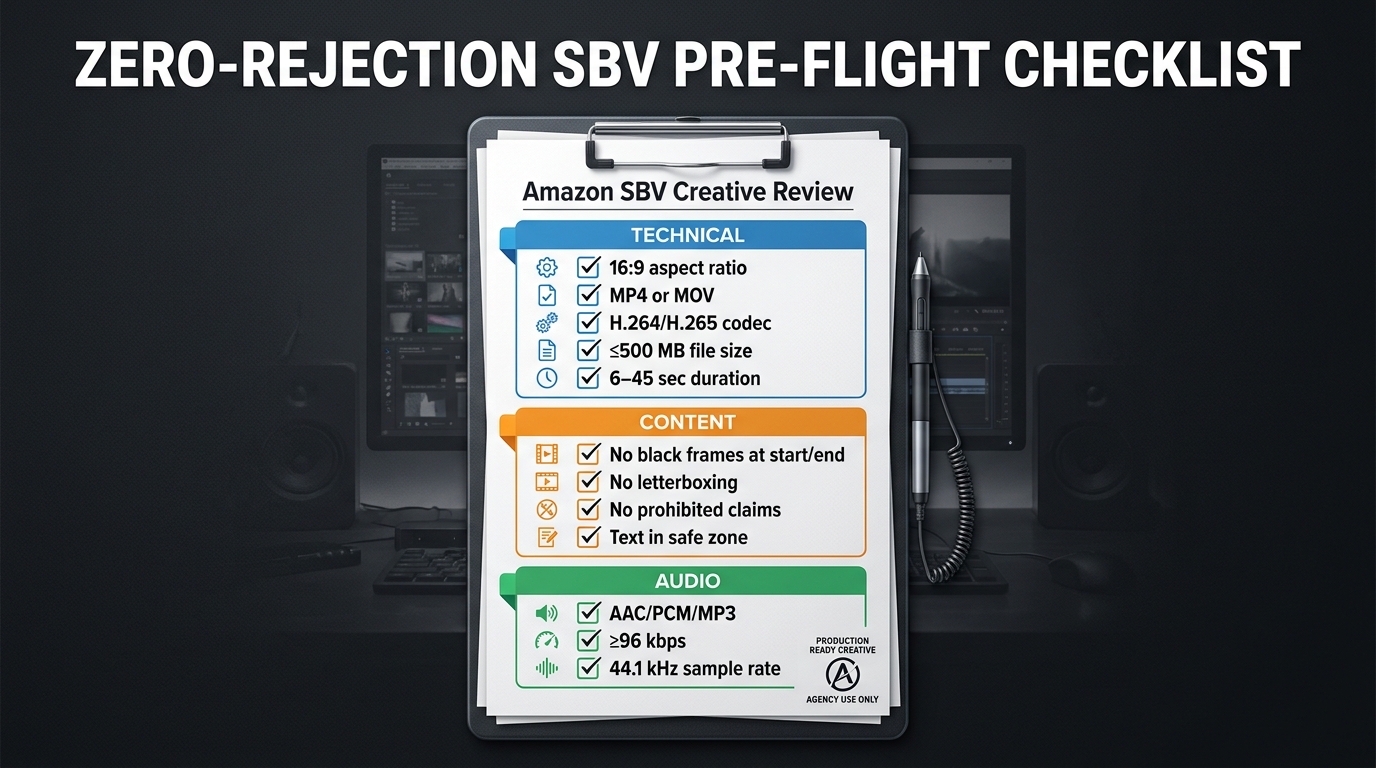
The most effective way to eliminate SBV rejections is to move compliance upstream — into the creative brief, the production process, and the export workflow — rather than treating it as a post-production problem. A structured pre-flight checklist, applied before every SBV submission, makes first-submission approval the standard outcome rather than the optimistic hope.
Category 1: Technical Specs (Pre-Export)
These items should be confirmed in your project settings before rendering the final export:
- Sequence/composition set to 1920×1080 or 1280×720, 16:9, square pixels
- Frame rate set to a fixed value (23.976, 24, 25, 29.97, or 29.98 fps)
- Total duration between 6 and 45 seconds (20 seconds or less strongly preferred)
- Export format set to MP4 or MOV
- Video codec set to H.264 (High Profile, Level 4.0 or below) or H.265
- Audio mixed down to a single stereo or mono track, AAC or PCM codec, minimum 96 kbps, 44.1 kHz sample rate
- No handles or padding added to the beginning or end of the export
Category 2: Content Checks (Pre-Export)
These items should be verified during the final creative review, before rendering:
- First frame: full-bleed content visible, no black or blank frames
- Last frame: full-bleed content visible, no black or blank frames, no fade-to-black ending
- Aspect ratio: no letterbox, pillarbox, or windowbox bars anywhere in the video
- No color bars or blurred bars used as workarounds for non-16:9 source footage
- Logo and brand elements: positioned away from the lower-right corner
- All on-screen text: within the safe zone, legible at mobile scale, minimum two-second hold duration
- No pricing, discount, or promotional claims in video or on-screen text
- No competitive brand names, logos, or product comparisons
- No Amazon trademarks, logos, or UI elements
- No flashing, strobe, or rapid pulsing visual effects
- No fake UI elements, simulated cursors, or clickbait mechanisms
- Content appropriate for a general audience (no violent, explicit, or frightening content)
- All text matches the language of the target marketplace
Category 3: Post-Export Verification
These items should be confirmed after rendering the final export file, before uploading:
- Open the exported file in a media player and scrub through the first and last three seconds to visually confirm no black frames
- Check file size: confirm it is below 500 MB
- Verify file metadata using MediaInfo or equivalent: confirm codec, frame rate (fixed, not variable), and pixel aspect ratio
- Preview the video at reduced size (simulate mobile) to confirm text legibility
- Confirm audio plays correctly on the final export (no silent track, no distortion)
Integrating the Checklist Into Your Workflow
The checklist is most effective when it’s assigned to a specific role in your production workflow — not left as a shared responsibility that nobody specifically owns. In an agency setting, this is typically a dedicated QA step performed by a compliance reviewer or senior editor before any SBV is submitted. For in-house brands, it can be the responsibility of whoever owns the Amazon Ads account, performed as the final step before uploading.
Consider using a shared digital checklist tool (Notion, Airtable, or even a Google Sheet) that creates a record for each SBV submission. This creates accountability, enables pattern analysis when rejections do occur, and ensures the checklist is applied consistently rather than relying on individual memory.
The Performance Case for Getting This Right
It’s worth stepping back from pure compliance mechanics to consider the broader performance context. The effort required to produce rejection-proof SBV creative is not just about avoiding frustration — it directly affects campaign economics.
Every day a SBV campaign is delayed by a rejection cycle is a day of lost impressions at top-of-search placements. For campaigns running during time-sensitive periods — product launches, category promotions, seasonal peaks — a single rejection cycle can cost more in lost opportunity than the entire production budget of the video.
Beyond timing, the creative qualities that satisfy Amazon’s moderation requirements — clear product visibility from the first frame, legible and well-placed text, clean audio, no black frames, full-bleed visuals — are also the creative qualities that produce stronger performance metrics. The compliance requirements and the performance requirements for SBV are almost perfectly aligned: what passes moderation is also what converts shoppers.
Amazon’s own guidance consistently reinforces this. The recommendation to show the product clearly within the first few seconds, to keep videos to 20 seconds or less, to use the video to “demonstrate how the product and brand fit into customers’ lives” — these are both compliance guidelines and performance guidelines. The brand that builds a production workflow designed around compliance will, almost inevitably, also build a production workflow that produces higher-performing creative.
Conclusion: Stop Treating SBV Compliance as an Afterthought
The SBV rejection patterns documented in this article are not mysterious or arbitrary. Every rule Amazon enforces has a logical basis in customer experience, marketplace integrity, or content suitability. Black frame and letterboxing rules exist because autoplay ads that look broken create a poor customer experience. Safe zone rules exist because Amazon’s UI physically occupies that space on shoppers’ screens. Pricing and comparative claim rules exist because inaccurate claims in video creative are much harder for Amazon to dynamically correct than inaccurate text on a product page.
Understanding the why behind each rule makes compliance intuitive rather than mechanical. And when compliance is intuitive, it gets built into the creative brief, the production process, and the export workflow — not left as a last-minute checklist item that gets skipped when deadlines are tight.
The brands and agencies that have eliminated SBV rejection loops share one common characteristic: they treat creative compliance as part of the creative process, not as a post-production obstacle. They brief their video teams with Amazon’s safe zone template open. They export with verified settings rather than default presets. They audit their files before uploading rather than hoping the moderation system gives them useful feedback.
The actionable takeaways from this piece:
- Build and document your SBV export settings as a saved preset in your editing and rendering tools — never rely on default exports.
- Add a five-minute post-export verification step to every SBV production: open the file, scrub the first and last three seconds, check metadata with MediaInfo.
- Design your SBV end cards with the logo in the upper-left or center — never lower-right.
- Strip pricing, discount, and competitive comparison language from SBV scripts at the briefing stage, not at the compliance review stage.
- Submit SBV creatives at least one week before campaign launch to absorb a rejection-resubmission cycle without affecting your go-live date.
- Maintain a rejection log and review it quarterly — most brands have one or two chronic violation categories, and fixing them at the source eliminates the majority of their rejection volume.
Amazon’s SBV format will continue to be one of the highest-value placements in its advertising ecosystem. The brands that invest in getting compliance right from the start will spend more of their time capitalizing on that value — and less of it waiting for moderation queues to clear.