Tag: AI Image Generation

  • The AI Image Workflow Decision Map: How to Know Which Images Amazon Will Approve (Before You Build Them)

    The AI Image Workflow Decision Map: How to Know Which Images Amazon Will Approve (Before You Build Them)

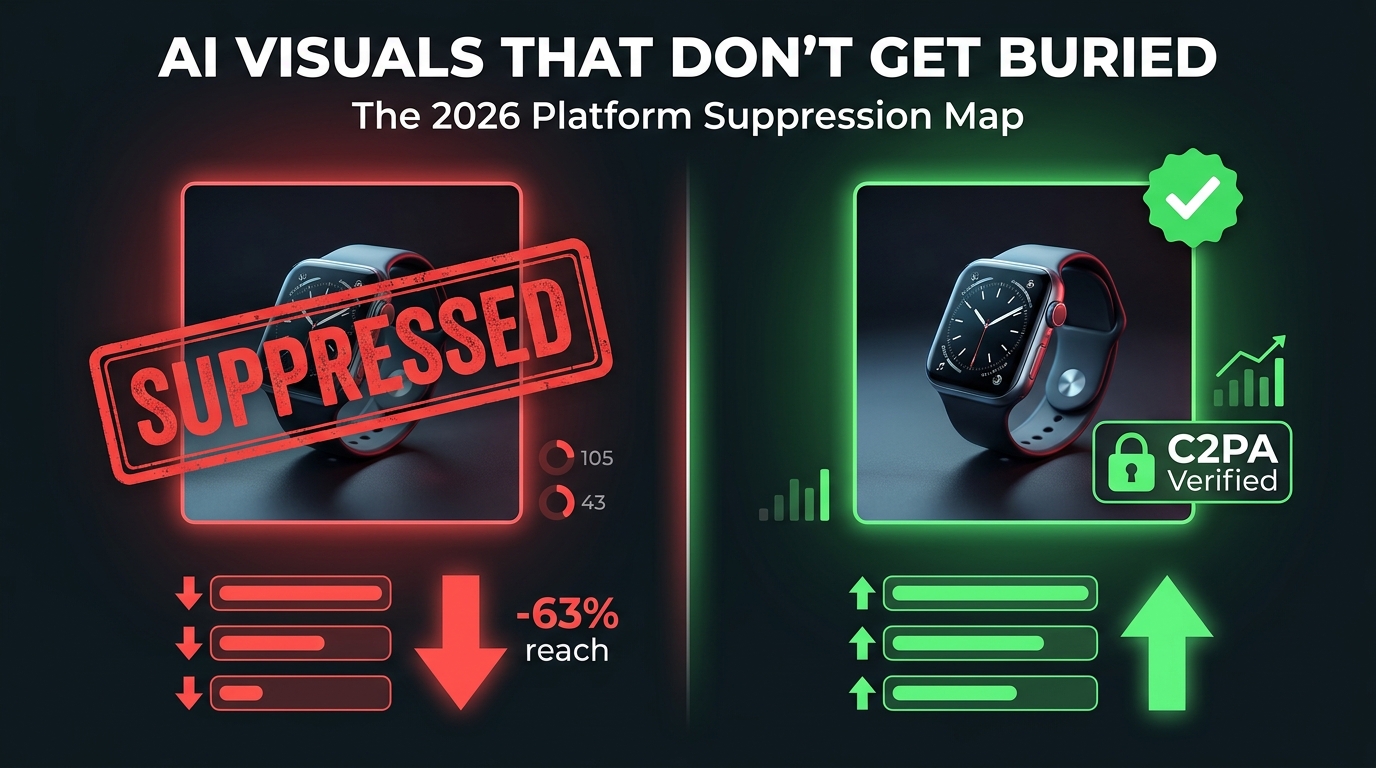
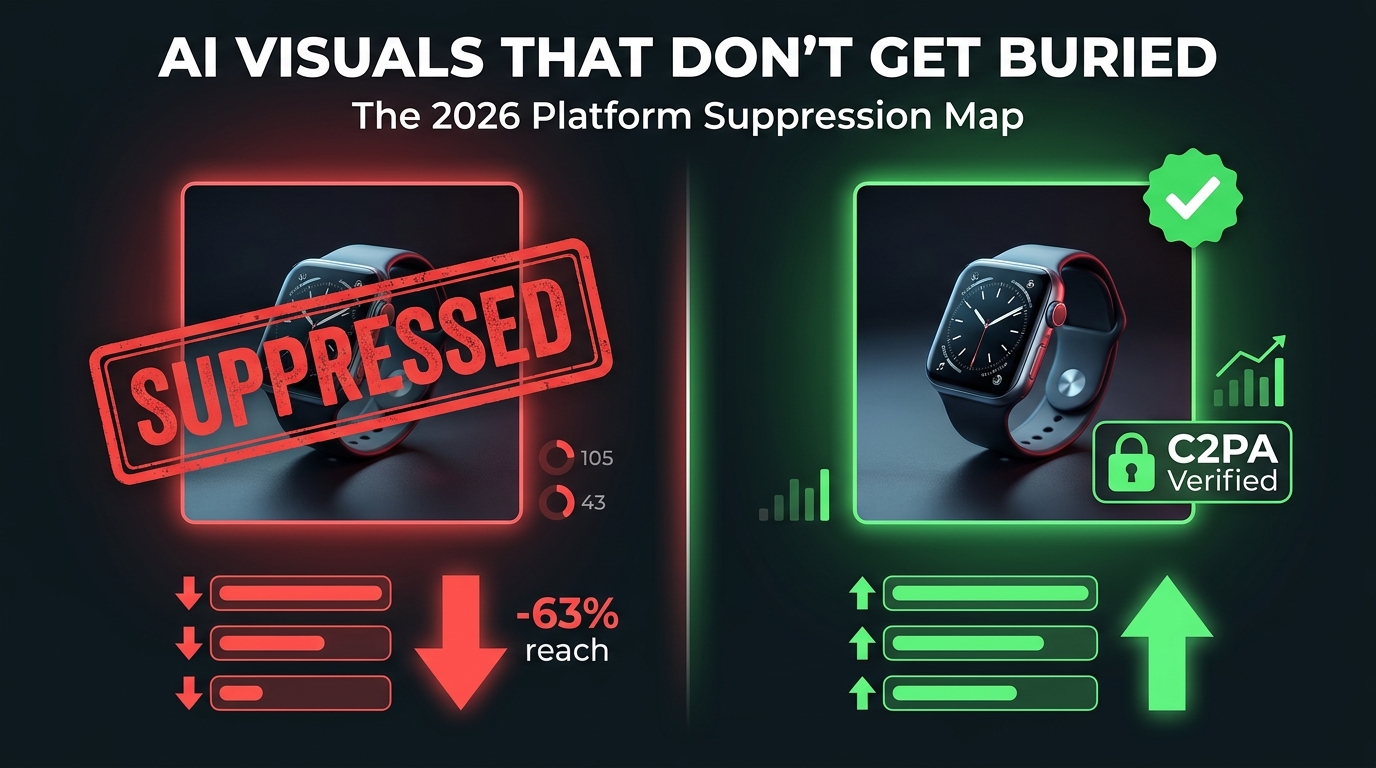
    Split-screen showing approved vs suppressed AI Amazon product images — the decision map for compliant AI image workflows

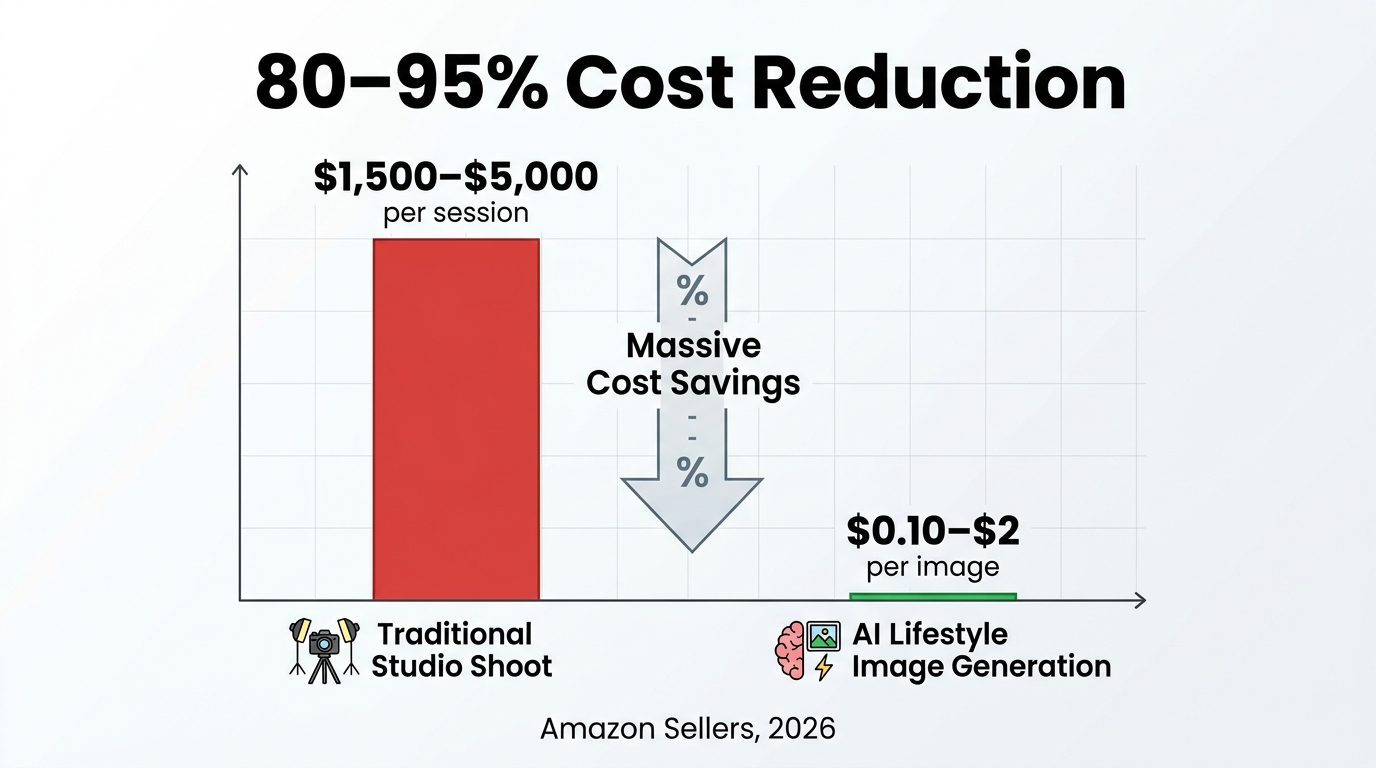
    By mid-2026, AI-generated product imagery has gone from a competitive edge to table stakes. Virtually every serious Amazon seller is using some form of AI in their creative workflow — whether that’s background replacement in Photoshop, lifestyle scene generation in Midjourney, or infographic creation in Canva’s AI tools.

    The problem isn’t adoption. The problem is assumption. The most common belief in seller communities right now is that if an image looks polished and professional, it’s probably fine to upload. That assumption is costing sellers listings, inventory, and in some cases, their accounts.

    Amazon’s enforcement engine now analyzes over 300 million product images per month for guideline compliance and misrepresentation issues, with specific detection logic trained on AI-altered photographs. Suppression can be automated, fast, and issued without a warning. And the gap between what sellers think the rules allow and what Amazon actually enforces is wider than most realize.

    This isn’t a review of AI tools. It’s a decision-making framework — a systematic way to determine which images in your listing can be AI-generated, which ones can be AI-enhanced, which ones need a human photographer, and exactly how to build the QA gates that keep your catalog clean.

    Whether you’re running a 10-ASIN catalog or a 500-ASIN operation, the principles here apply. What changes is the scale of the damage when you get it wrong.

    Amazon’s Two-Track Image System: The Rule Most Sellers Have Backwards

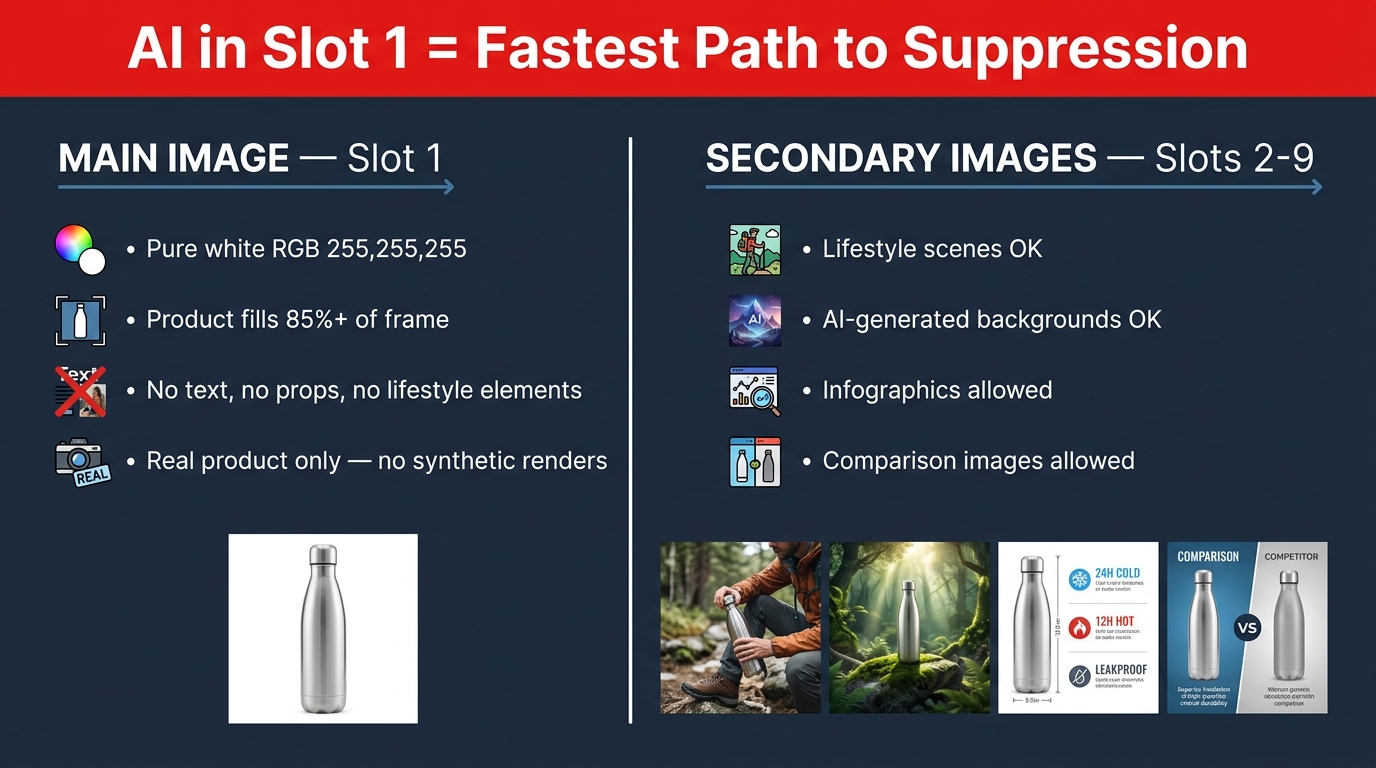
    Infographic showing Amazon's two-track image rule — main image slot 1 strict requirements vs. secondary image slots flexibility

    The single most important structural concept in Amazon’s image policy is one that most sellers treat as a single unified ruleset: the division between the main image (Slot 1) and all secondary images (Slots 2–9). These two categories operate under fundamentally different rules, different enforcement mechanisms, and different tolerances for AI involvement.

    Getting them confused — in either direction — is where most compliant-intent workflows go wrong.

    Slot 1: The Strictest Real Estate in E-Commerce

    The main image is the image that appears in search results, the cart, and purchase confirmations. It is the single most scrutinized asset in your listing, and Amazon’s rules here are not guidelines — they are hard requirements enforced algorithmically:

    • Background: Pure white, specifically RGB 255, 255, 255. Near-white (RGB 250, 250, 250) is enough to trigger suppression. Off-white lifestyle backgrounds are an immediate violation.
    • Product fill: The product must occupy at least 85% of the image frame. Excessive white space around a small product is a suppression trigger.
    • No text or graphics: No logos, no promotional labels, no watermarks, no “New” or “Sale” overlays.
    • No props or accessories: Nothing in the frame that isn’t included in the purchase. A wooden cutting board under a knife? Violation. A coffee mug next to a coffee machine that’s sold separately? Violation.
    • Accurate product representation: The item shown must be the item sold. Not a superior version. Not a render that makes the plastic look like metal.

    On the question of AI specifically: Amazon does not categorically ban AI-processed main images. But it does ban main images that are substantially AI-generated without accurately depicting the real physical product. The practical effect is near-identical. If the main image of your product was generated from a text prompt rather than a photograph of the actual item, you are in violation — regardless of how realistic it looks.

    Slots 2–9: Where AI Actually Belongs in Your Workflow

    Secondary images operate under a fundamentally different philosophy. Amazon explicitly encourages the use of lifestyle photos, infographics, comparison tables, packaging shots, dimension callouts, and use-case demonstrations in these slots. And it allows AI-generated content across all of these formats — with one overarching condition: the product must still be accurately depicted.

    This is where the majority of your AI investment should go. Secondary images are responsible for conversion after the click. A shopper who finds your listing via search has already seen your main image. What happens in slots 2–9 determines whether they buy. This is where AI-generated lifestyle scenes, context shots, and benefit-focused infographics do measurable work — and where Amazon’s rules give you meaningful room to operate.

    The practical rule of thumb: Treat Slot 1 as the domain of your real-world camera. Treat Slots 2–9 as the domain of your AI tools. Build your workflow architecture around that boundary, and most compliance problems disappear before they start.

    The Five Image Types and Where AI Actually Fits

    Within the nine image slots Amazon provides, there are really five distinct image types that serve different conversion functions. Understanding which type can safely be AI-generated versus AI-enhanced versus must-be-photographed is the core of an intelligent workflow.

    1. The Hero/Main Image

    AI role: Enhancement only — never generation.

    The main image must begin with a real photograph of the actual product. Where AI has a legitimate role is in the post-production of that photograph: background cleaning to achieve true RGB 255,255,255, minor color correction to match the physical product accurately, removal of dust or staging artifacts, and upscaling for pixel density requirements.

    What AI cannot do here is generate the image from scratch, “improve” the product beyond its real appearance, or replace a real photo with a synthetic render — even a hyper-realistic one. The moment your main image was created primarily by a generative model rather than a camera capturing the real item, you have a compliance problem regardless of visual quality.

    2. Lifestyle Images

    AI role: Full generation is permitted — within accuracy constraints.

    Lifestyle images are Amazon’s most AI-friendly format. You can place your product (which must still be the real product, accurately depicted) into any AI-generated environment that accurately represents a plausible use case. A real product image, composited into an AI-generated kitchen scene, a hiking trail, an office, or a bathroom — all of this is within policy.

    The constraint is accuracy of use. If your AI-generated lifestyle image shows the product being used in a way that misrepresents its capabilities — implying waterproofing that doesn’t exist, suggesting it works with appliances it isn’t compatible with, or depicting a use case that could mislead about the product’s function — you are in violation. Amazon’s guidance here is clear: the lifestyle scene must be plausible and non-misleading for the actual product being sold.

    3. Infographic Overlays

    AI role: Generation of background and layout — copy must be human-verified.

    Infographic images — those that overlay product features, dimensions, materials, or key benefits over a product image — are one of the highest-conversion image types in most categories. They can be AI-generated in terms of their visual layout and design elements. The copy and claims that appear on those infographics, however, must be verifiably accurate and substantiated.

    Amazon prohibits unsubstantiated claims in infographic images, just as it does in the listing copy itself. “Clinically proven,” “doctor recommended,” “3x more effective” — any claim without substantiation is a compliance risk regardless of which AI tool generated the graphic. Think of infographic compliance as copy compliance expressed visually.

    4. Comparison Images

    AI role: Layout and design generation — factual accuracy is non-negotiable.

    Before/after comparisons, feature comparison tables, and competitor comparison charts are all permitted in secondary image slots. AI can generate the visual design of these. What it cannot do is fabricate the comparison data. Amazon specifically calls out misleading before/after imagery as a violation, and that prohibition applies equally whether the before/after was created in Photoshop by a human designer or generated by a diffusion model from a text prompt.

    5. Packaging and Dimension Shots

    AI role: Background enhancement only — packaging must be photographed accurately.

    Packaging shots and dimension callouts serve a specific trust function for shoppers making purchasing decisions about physical items. These must be based on real photographs of the actual packaging. Dimensions and specifications overlaid on these images must be accurate to the manufactured product. AI can clean, enhance, and background-replace these shots, but it cannot generate the packaging from a text description.

    Tool Selection Is a Legal Decision, Not a Creative One

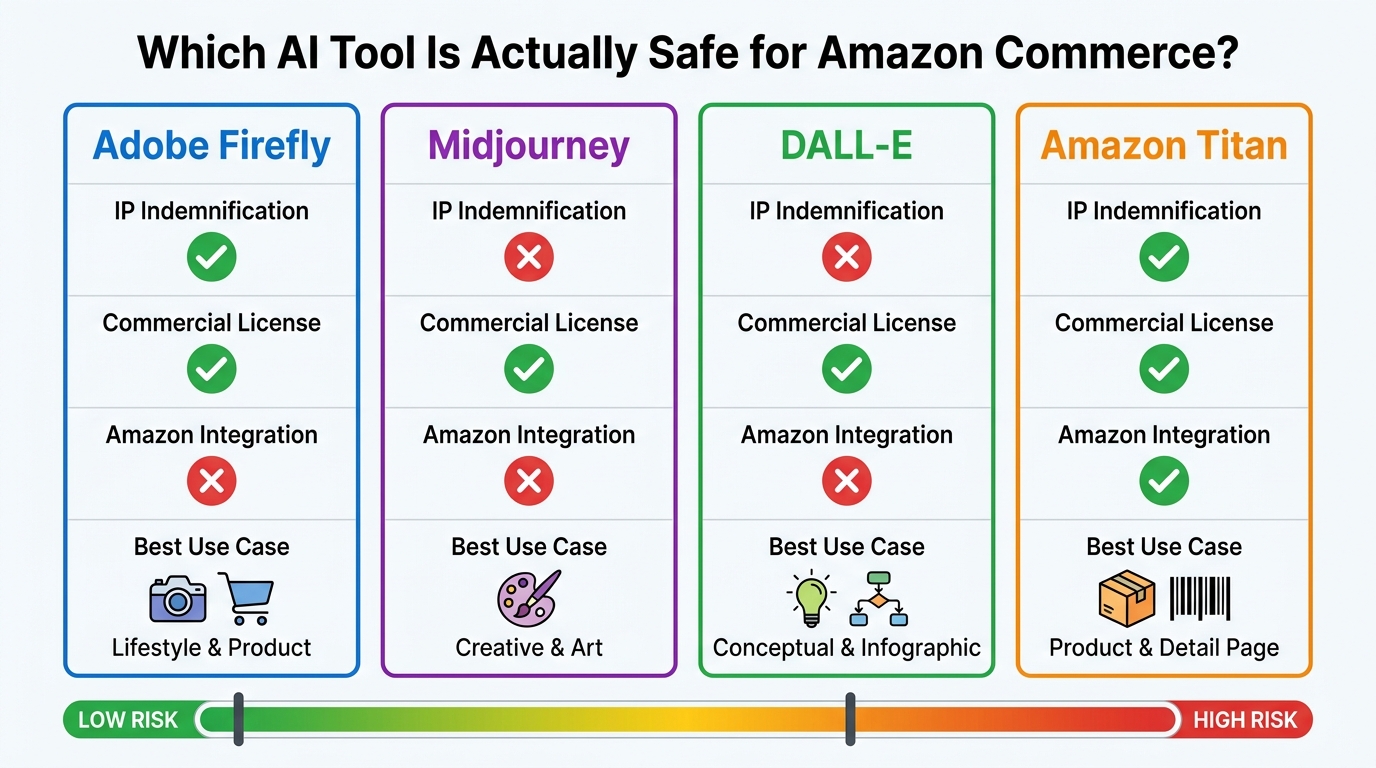
    Tool comparison infographic for AI image generation — Adobe Firefly vs. Midjourney vs. DALL-E vs. Amazon Titan for commercial Amazon use

    Most Amazon sellers choose their AI image tools based on output quality, price point, or what they’ve seen recommended in Facebook groups and YouTube tutorials. That’s an understandable decision-making process — and almost certainly the wrong one for a commercial operation.

    The question that actually matters when selecting AI image tools for an Amazon business isn’t “does it make beautiful images?” The question is: “Who bears the legal risk if a rights claim is filed against this content?”

    The IP Indemnification Landscape in 2026

    Here is where the major tools actually stand:

    Amazon Titan Image Generator (via AWS Bedrock): Amazon offers what it describes as uncapped IP indemnification for copyright claims against outputs generated by its generally available Amazon generative AI services — including Titan Image Generator. Titan images also include an invisible watermark embedded by default, creating a documentation record that aligns with emerging AI transparency requirements. For sellers building at scale, this is the highest-protection option available. The tradeoff is that it requires AWS access and technical setup that casual sellers may find prohibitive.

    Adobe Firefly (paid commercial plans): Adobe explicitly offers IP indemnification coverage for commercial outputs generated through Firefly on paid enterprise and business tiers. Firefly is also trained on licensed content from Adobe Stock and public domain material, which reduces (though doesn’t eliminate) the underlying training data risk. For most sellers who don’t want to build on AWS, Firefly on a commercial plan is the most widely accessible option with meaningful legal protection.

    Midjourney: Midjourney’s terms of service allow commercial use for paid subscribers, but the platform does not offer IP indemnification. If a third party files a copyright or trademark claim against an image generated in Midjourney, the liability sits with the user. Midjourney is exceptionally capable for high-quality lifestyle imagery, and its output is often the highest-quality among consumer tools — but it carries commercial legal risk that most enterprise operations should weigh carefully.

    DALL-E (via OpenAI API or ChatGPT): OpenAI does not provide general IP indemnification for DALL-E outputs. The commercial license allows use in business contexts, but the rights exposure on a per-image basis remains the user’s responsibility. DALL-E does tend to produce cleaner text rendering within images, making it useful for infographic-style assets — but the same IP risk caveat applies.

    What This Means in Practice

    The intelligent approach for a commercial Amazon operation is to build a tiered tool strategy: use Amazon Titan or Adobe Firefly (commercial) as the primary generation engine for any image that will go live in product listings, and reserve Midjourney or DALL-E for internal concepting, mood boarding, or creative testing where IP exposure is less consequential.

    This isn’t about being overly conservative. It’s about recognizing that the cost of defending an IP claim — even an unfounded one — typically far exceeds the subscription cost difference between tools.

    The Product Accuracy Trap: Where Good-Looking Images Fail

    The product accuracy trap — five ways AI-generated Amazon images fail compliance by misrepresenting the real product

    The most counterintuitive enforcement pattern Amazon sellers encounter is this: images that look the most polished and professional are sometimes the most likely to trigger a compliance action. The reason is that high-capability AI tools are very good at making products look better than they actually are — and Amazon’s enforcement system is specifically trained to detect that gap.

    Amazon’s automated detection currently analyzes images for mismatches between what the image depicts and what the listing’s text data describes. Cross-referencing is happening across the product detail page, external webpages associated with the brand, customer review photos, and A+ content. When there’s a material discrepancy, the system flags the listing.

    The Five Most Common Accuracy Failures

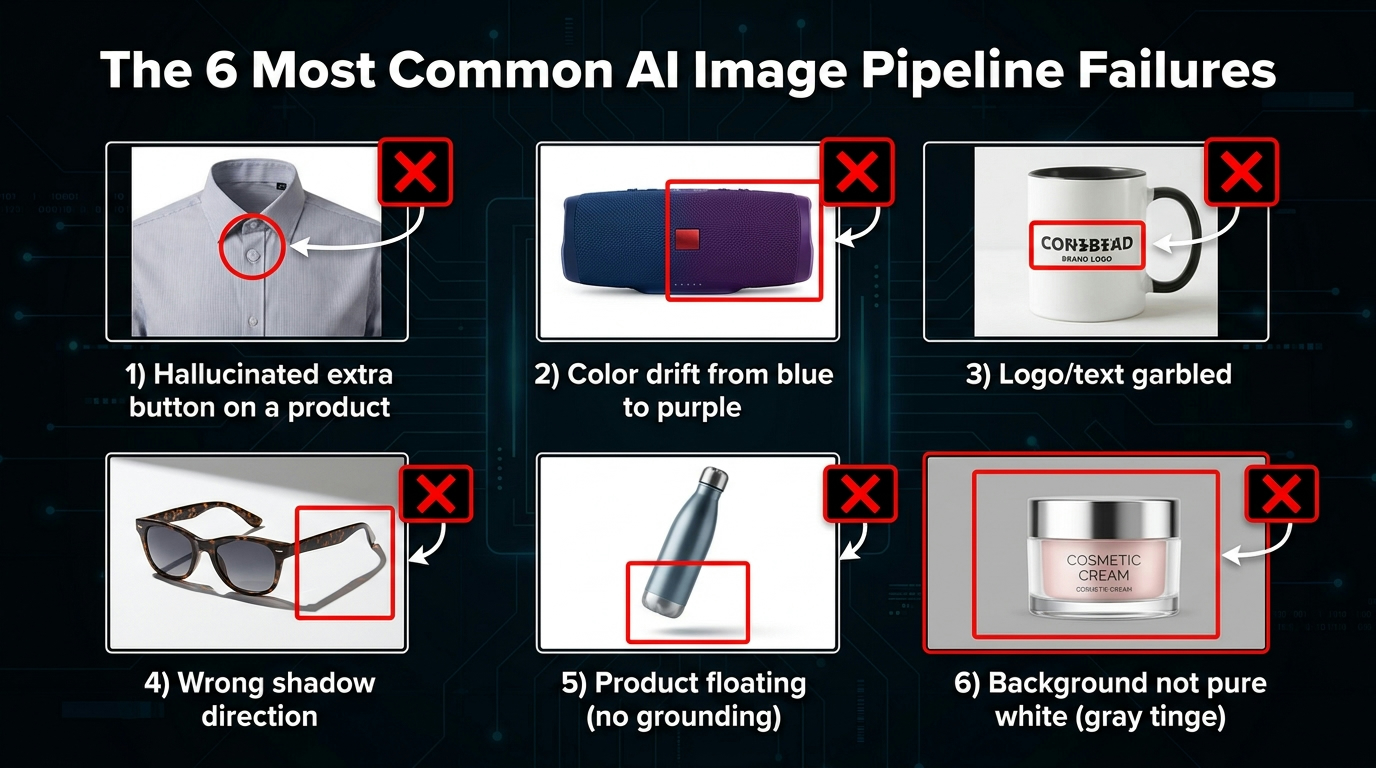
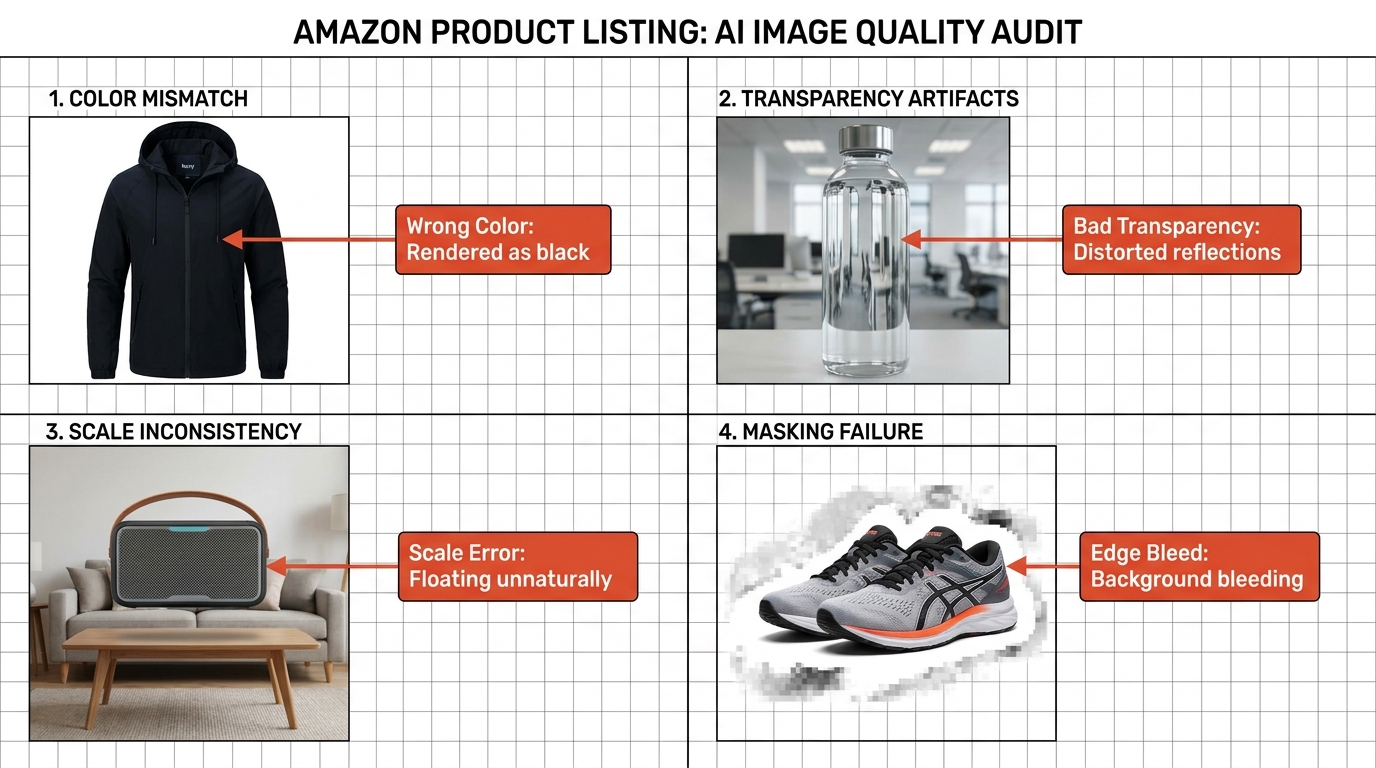
    1. Scale distortion in lifestyle scenes. This is the most frequent failure mode. When sellers place a product into an AI-generated lifestyle scene, the model doesn’t always scale the product proportionally against environmental objects. A small travel candle that looks like a large jar candle in a kitchen scene, a supplement bottle that appears twice its actual size on a bathroom counter — these misrepresentations are detectable and flaggable.

    The fix: always include a reference object of known dimensions in your generation prompt, and always compare the output against the real product dimensions before upload.

    2. AI-invented product features. Generative models complete images based on what looks visually plausible, not what’s physically accurate. A product with a matte finish can be rendered by AI with a glossy surface. A product with three color options might be depicted in a fourth color that doesn’t exist. Stitching details, texture patterns, hardware finishes — all of these are areas where AI improvises to fill visual information gaps.

    The fix: generate from a reference image of the actual product, not from a text description alone. Use tools that allow you to anchor generation to a source photograph.

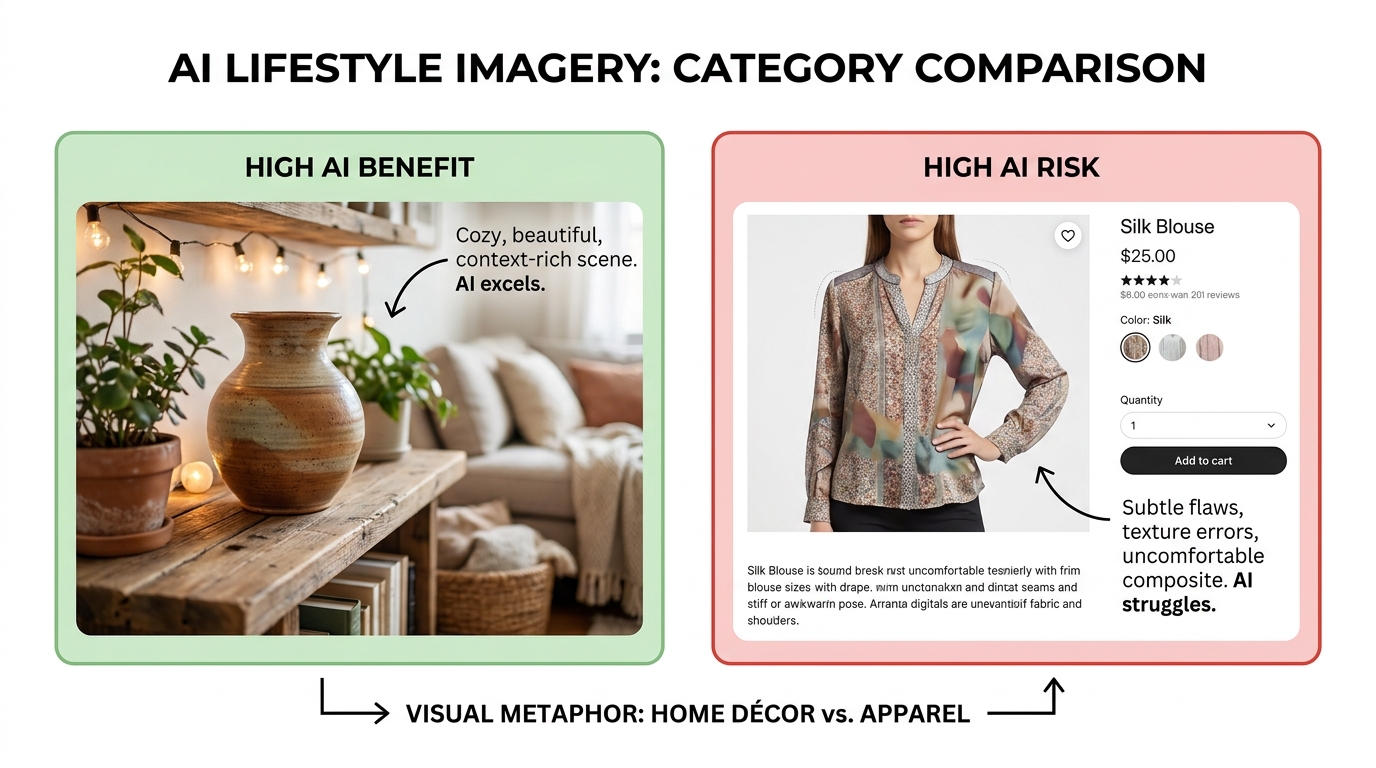
    3. Color accuracy drift. AI image models do not work in a color-managed pipeline the way commercial printing or photography workflows do. The output color of a product in an AI-generated scene frequently diverges from the real product’s color — sometimes subtly, sometimes dramatically. For products where color is a primary purchasing decision (apparel, home décor, paint accessories, beauty products), this is a category-A compliance risk.

    The fix: validate output images against the product’s actual color using eyedropper tools in Photoshop or Figma. If the generated color is more than 10 delta-E away from the real product, the image needs correction before upload.

    4. Misleading before/after imagery. Amazon explicitly prohibits before/after images that imply results that the product doesn’t deliver. AI-generated “after” states — a brighter room after using a paint product, cleaner teeth after using a whitening product, a tidier desk after using an organizer — must not exaggerate the product’s actual effect. When AI generates these “after” states, it tends to maximize contrast and improvement because that’s what looks compelling. That optimization instinct directly conflicts with Amazon’s accuracy requirements.

    5. Background props implying bundled items. When an AI generates a lifestyle scene around a product, it fills the environment with contextually appropriate objects. A kitchen tool surrounded by other kitchen tools. A laptop stand shown with a laptop, keyboard, and monitor. If any of those surrounding items aren’t included in the purchase, their prominent depiction in the image can trigger a “contents not included” violation.

    The Pre-Generation Brief: The Step That Separates Professional Workflows from Amateur Ones

    The single most valuable operational practice separating high-volume Amazon creative teams from individual sellers who “just use AI” is the discipline of creating a detailed pre-generation brief before any AI tool is opened. This document — which doesn’t need to be elaborate — is what ensures that every image generated by any AI tool is grounded in the physical reality of the actual product.

    Think of it as enforced photography-first thinking, applied to an AI workflow. Professional product photographers don’t approach a shoot without a shot list that specifies angles, lighting setups, and the physical characteristics of the product being shot. Pre-generation briefs serve the same function in an AI context.

    What a Pre-Generation Brief Includes

    At minimum, your brief for each product should document:

    • Physical dimensions: Exact measurements in inches or centimeters, with the longest dimension noted for scale reference.
    • Color specification: The actual hex code or Pantone reference for each colorway. Not “blue” — the specific shade, saturation, and finish (matte, gloss, satin, metallic).
    • Material finish: Plastic vs. metal, matte vs. glossy, texture description in natural language that the AI can use as a visual anchor.
    • Key features to preserve: List every visual feature that the customer might use to evaluate the product — logo placement, button position, port locations, stitching pattern, label design.
    • Reference photograph: At minimum one hero reference photograph of the real product that all AI generations must be grounded in.
    • What is NOT in the box: Any accessory, accompanying item, or environmental prop that should not appear prominently in generated images because it could imply inclusion.
    • Permitted use scenarios: The specific use contexts that are accurate to the product and can be depicted in lifestyle scenes.
    • Prohibited claims: Any performance claim, superlative, or comparison that lacks substantiation and must not appear in infographic overlays.

    Teams that build this brief discipline report a 60–70% reduction in revision cycles. More importantly, they report near-elimination of TOS-triggered suppressions in their AI-generated secondary images, because every generated image is anchored to physical reality from the start rather than being corrected after the fact.

    The QA Gate: A 12-Point Compliance Check Before Upload

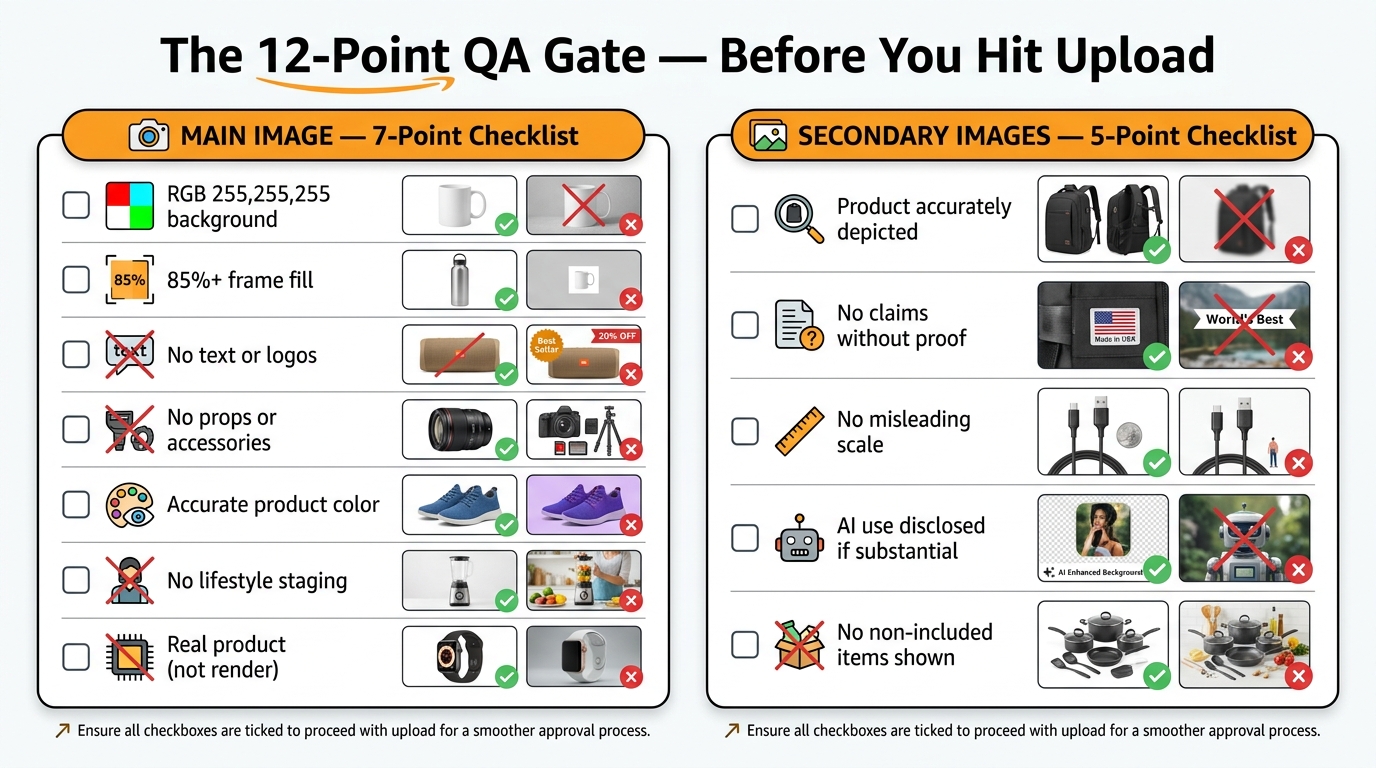
    12-point Amazon image compliance checklist — main image and secondary image requirements before upload

    A QA gate is the mandatory human review step that happens after AI generation and before any image is uploaded to Seller Central. The fact that this step is “mandatory” needs emphasis — AI image workflows without a human QA step are workflows that will eventually fail at scale.

    The following checklist is designed to be applied to every image before upload. It’s divided into main image checks and secondary image checks, reflecting the different compliance standards that apply to each.

    Main Image: 7-Point Checklist

    1. Background purity: Use an eyedropper tool to sample at least four corners and the center of the background. All samples must read RGB 255, 255, 255. Any variance triggers a re-edit.
    2. Product fill percentage: The product footprint should occupy at least 85% of the frame. If in doubt, measure it. This is quantifiable, not subjective.
    3. No text elements: No logo, no label, no overlay text, no promotional text of any kind visible in the image.
    4. No props in frame: Scan the image for any object that is not the product itself. Shadows of secondary objects, reflections, and partial views of staging props all count.
    5. Color accuracy verification: Compare the product’s color in the image against the actual product or the color specification from your brief. Evaluate under standardized conditions (neutral lighting, calibrated display).
    6. No AI-invented features: Cross-reference the image against the physical product for surface finish, branding, hardware details, and structural elements. If the image shows anything the real product doesn’t have, the image doesn’t go live.
    7. Image dimensions and format: JPEG format, sRGB color space, minimum 1000 pixels on the longest side (2000+ recommended for zoom functionality), maximum 10,000 pixels, file size under 10MB.

    Secondary Images: 5-Point Checklist

    1. Product accuracy: Even in lifestyle and AI-generated scenes, the product itself must accurately represent the item being sold. Run the same color, finish, and feature check as for the main image.
    2. Claim substantiation: Every text claim visible in infographic images must have documented substantiation. If your team doesn’t have the substantiation on file, the claim comes off the image.
    3. Scale plausibility: Check whether the product size in the lifestyle scene is plausible relative to other objects in the frame. Compare against the product dimensions in your brief.
    4. No non-included items prominently depicted: Scan lifestyle scenes for items that could be interpreted as bundled with the product. If they’re present and aren’t sold with it, they need to be diminished visually or removed.
    5. AI disclosure assessment: Determine whether the image is “substantially AI-generated” versus AI-enhanced. Document this determination for each image in your workflow records. Apply disclosure labeling as required by Amazon’s evolving transparency guidelines.

    Disclosure: What Amazon Actually Requires — and How to Build an Audit Trail

    Amazon’s AI disclosure requirements have evolved significantly through 2026, and understanding the nuance is important because sellers are routinely either over-disclosing (creating unnecessary friction) or under-disclosing (creating genuine compliance exposure).

    The Distinction Between Enhanced and Substantially Generated

    Amazon’s current framework draws a distinction between images that have been AI-enhanced and images that are AI-generated. The practical line sits between these two scenarios:

    AI-enhanced (routine editing): Background removal and replacement with a pure white background, brightness and contrast adjustment, cropping and framing, color correction to match the actual product, removal of dust or staging artifacts. Amazon does not require disclosure for these standard post-production operations when performed by AI tools. This is equivalent to what a human retoucher would do, and Amazon treats it accordingly.

    Substantially AI-generated: Images where the primary visual content — the environment, the composition, the context, key visual elements — was created by a generative AI model rather than captured by a camera. Lifestyle scenes generated in Midjourney or Firefly with the product composited in, infographic layouts created entirely by AI tools, comparison visuals generated from text prompts. For these, Amazon’s 2026 guidelines indicate that disclosure is expected, particularly for content that represents a substantial AI contribution to the final image.

    Building an Audit Trail

    Beyond Amazon’s specific disclosure requirements, building a documented audit trail of your AI image workflow is a risk management practice that matters independently of any single platform’s rules. EU AI Act requirements, US FTC evolving guidance on AI-generated advertising content, and the general direction of consumer protection regulation all point toward increasing documentation requirements.

    A practical audit trail for each AI-generated image includes:

    • The tool used and version/model
    • The prompt or generation parameters
    • The reference photograph or source input used
    • The date of generation
    • The QA reviewer’s name and sign-off date
    • The disclosure status determination (enhanced vs. substantially generated)

    This documentation takes less than two minutes per image to complete in a simple spreadsheet. In the event of a dispute, a suppression review, or a regulatory inquiry, it is the difference between having a credible defense and having nothing.

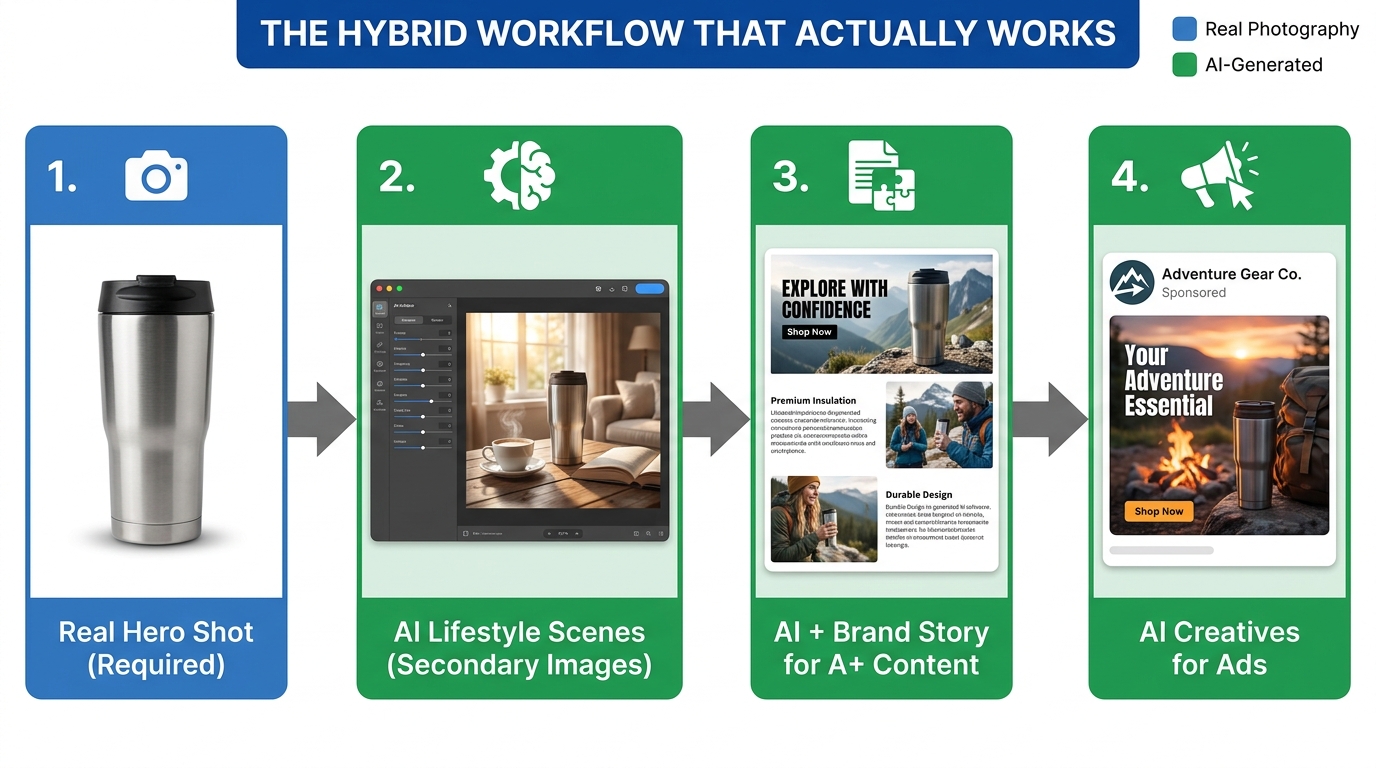
    The Compliant Workflow Stack: Five Phases in Sequence

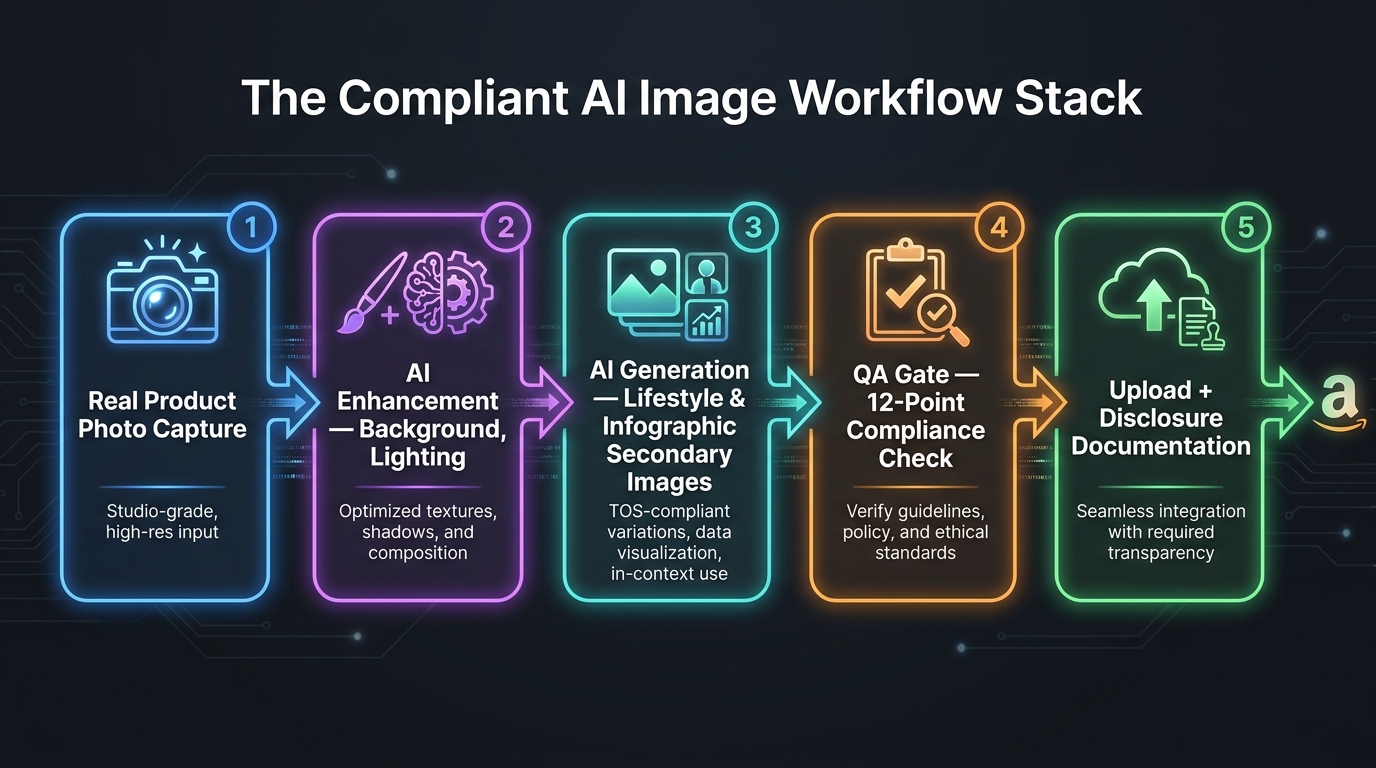
    Five-phase compliant AI image workflow stack for Amazon product listings

    With the rules, tool selection logic, and QA criteria established, here is how they integrate into a five-phase production workflow. This sequence applies whether you’re managing one ASIN or one thousand.

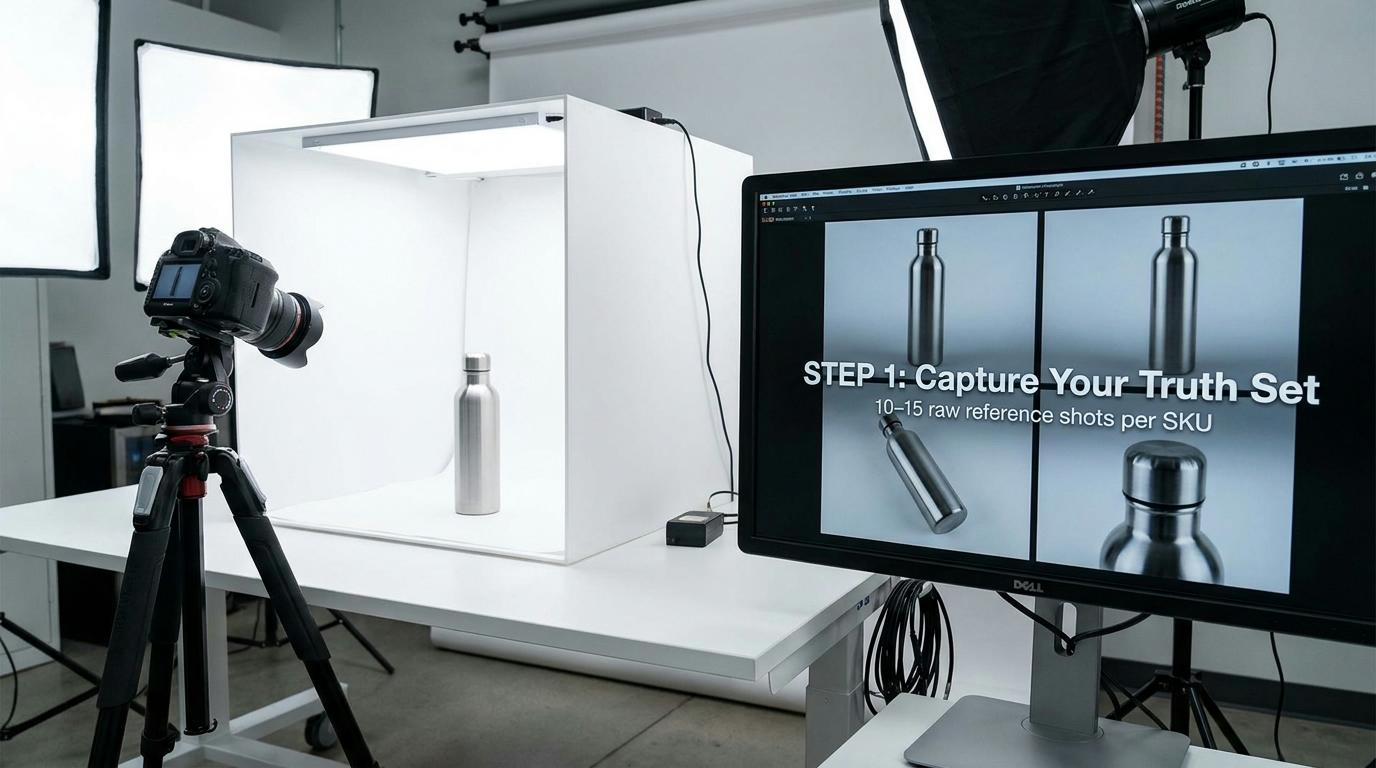
    Phase 1: Real Product Photo Capture

    Every compliant AI image workflow begins with a real photograph of the actual physical product. This is not optional, and it is not replaceable by AI generation — even for sellers who will ultimately use AI for every secondary image in their listing.

    This photograph serves three functions. First, it is the foundation for the main image (after background cleanup and color correction). Second, it is the reference input that grounds all subsequent AI generation in the physical reality of the product. Third, it is the compliance anchor — the document that demonstrates the product being depicted is real and accurately represented.

    The investment in quality photography at this phase pays compounding returns across every downstream AI generation. A well-lit, multi-angle set of reference photographs allows the AI tools in Phase 3 to produce accurate outputs with significantly fewer iterations than they can from a poorly lit, single-angle snap from a phone.

    Phase 2: AI Enhancement of Base Photos

    Once the real product photographs exist, AI tools enter the workflow for enhancement. This is the lowest-risk phase of AI involvement and the most universally useful.

    Background removal and replacement to achieve true RGB 255,255,255 is the core function here. Adobe Photoshop’s Generative Fill, Remove.bg, and similar tools handle this reliably. Color correction to match the product’s actual color specification, upscaling for resolution requirements, and artifact removal are also appropriate here. These enhanced photographs become the main image candidates and the product source images for Phase 3.

    Phase 3: AI Generation of Secondary Images

    This is where the primary creative work happens and where AI tools deliver the most commercial value. Using the reference photographs from Phase 1 and the enhanced product images from Phase 2, generate:

    • Lifestyle scenes in your chosen generation tool (Firefly or Titan for commercial safety), using the product image as an anchor reference
    • Infographic layouts with benefit copy and feature callouts
    • Comparison and before/after visuals where substantiated claims support them
    • Dimension and scale reference images

    During this phase, the pre-generation brief (documented in your planning stage) is your active reference. Every generation prompt should reference specific elements from the brief: the exact color, dimensions, finish, and permitted use scenarios. Generation that drifts from the brief doesn’t enter Phase 4 — it goes back for regeneration.

    Phase 4: QA Gate

    Every image produced in Phase 3 passes through the 12-point compliance checklist before proceeding. This is a human step, not an AI step. The QA reviewer applies the main image or secondary image checklist as appropriate, documents the disclosure status of each image, and makes a go/no-go decision on upload.

    Images that fail QA go back to Phase 3 for regeneration with corrected prompts or parameters. Images that pass QA are documented (audit trail) and move to Phase 5. In a well-designed workflow, Phase 4 should reject between 15–25% of AI-generated images. If your rejection rate is near zero, your QA gate is probably too lenient.

    Phase 5: Upload and Disclosure Documentation

    Compliant images are uploaded to Seller Central in the correct sequence (main image in Slot 1, secondary images in the order optimized for your category’s conversion pattern). Disclosure labeling is applied as required. Audit trail records are updated with the upload date and live URL for each image.

    At this phase, a final confirmation check against the live listing is valuable: view the listing as a customer would, compare the live images against what the customer will actually receive, and confirm there are no misrepresentations visible at the listing level that weren’t caught during QA.

    Common Failure Patterns and How to Diagnose Them

    Even well-designed workflows fail sometimes. Understanding the different types of Amazon image enforcement actions — and what specifically triggers each one — allows you to diagnose problems quickly and distinguish between a fixable mistake and a systemic workflow flaw.

    Suppression vs. Flag vs. Rejection: What Each Means

    Listing suppression: The listing is removed from search results and becomes invisible to shoppers. Sales stop immediately. Suppression is typically triggered by main image violations — wrong background, excessive white space, prohibited text overlay, or product misrepresentation. It’s Amazon’s most aggressive automated enforcement action and can happen without a human reviewer ever seeing the listing. Resolution requires correcting the non-compliant image and submitting a re-review request.

    Image flag/review: The image remains live but is queued for manual review. The listing continues to generate sales during review, but if the review results in a violation finding, suppression or image removal follows. Flags are more commonly triggered by secondary image issues — borderline claims, lifestyle scenes with ambiguous items, or AI disclosure concerns.

    Image rejection at upload: The image is rejected during the upload process and never goes live. This typically indicates a technical violation — wrong file format, incorrect dimensions, file size exceeding limits, or a main image background that fails the automated RGB check. Rejection at upload is the least harmful outcome because it stops non-compliant images before they can create a suppression event.

    The Misrepresentation Trap in Lifestyle Images

    The most insidious failure pattern in AI-generated secondary images involves lifestyle scenes that accurately depict the product visually but inaccurately imply something about its capabilities through context. An outdoor furniture cushion shown in an outdoor setting where it’s clearly raining — implying weather resistance it doesn’t have. A supplement shown alongside an athlete completing a race — implying performance enhancement beyond what the product is approved to claim. A wireless charger shown with a phone model it isn’t compatible with.

    These misrepresentations don’t come from AI deciding to deceive anyone. They come from AI generating what looks visually compelling and contextually appropriate, without any understanding of the product’s actual specifications or limitations. The gap between “contextually plausible” (AI’s optimization target) and “factually accurate for this specific product” (Amazon’s requirement) is where most lifestyle image failures live.

    The solution is contextual review in Phase 4 that goes beyond visual accuracy and asks: “Does this scene imply anything about the product’s performance, compatibility, or capabilities that isn’t true?” That’s a question that requires domain knowledge about the product — and it’s a question that no AI QA tool can answer reliably yet. It requires a human reviewer who understands what the product actually does.

    The Over-Reliance on AI for Main Image Background Cleanup

    A specific failure pattern worth naming directly: the use of AI background replacement tools on main images that then fail the RGB 255,255,255 test because the tool has introduced very slight gradients, shadows, or off-white areas around the product that are invisible to the human eye but detectable by Amazon’s automated checking.

    Tools like Photoshop’s Remove Background, Remove.bg, and similar AI-powered background removal tools work on probability thresholds. They identify “background” based on visual contrast and context, then replace it — but the replacement doesn’t always land at perfect pure white. Slight shadows at product edges, gradient effects near transparent product elements (glass, water bottles, clear packaging), and depth-of-field remnants can all leave patches of near-white that fail Amazon’s check.

    The fix is simple but requires explicit process: after any AI background replacement, flood-fill the background layer with a clean RGB 255,255,255 value in a layer below the product, rather than relying solely on the AI replacement. This creates a guaranteed-compliant background regardless of what artifacts the AI tool left behind.

    Building Your Decision Map: A Framework for Every Image Decision

    The practical output of everything in this post is a set of decision rules that can be applied to every image your operation needs to produce. Rather than evaluating each image from scratch, the decision map lets you route images through the right production path from the beginning.

    The Core Decision Tree

    For every product image, start with three questions:

    Question 1: Is this the main image (Slot 1)?
    If yes → this image must begin with a real photograph. AI role is enhancement only. Apply main image 7-point checklist before upload. If the answer is no, proceed to Question 2.

    Question 2: What type of secondary image is this?
    If lifestyle → AI generation is permitted. Use a reference photograph as an anchor. Apply scale check, context accuracy check, and non-included items check. If infographic → AI layout generation is permitted. All copy claims must be human-verified and substantiated. If comparison/before-after → AI layout generation is permitted. Data must be factually accurate and defensible. If packaging/dimension → AI enhancement only. Real packaging must be photographed and accurately represented.

    Question 3: Which tool am I using, and what is my IP exposure?
    High-stakes commercial images → Amazon Titan (via Bedrock) or Adobe Firefly on a commercial plan. Lifestyle and creative secondary images where you want higher creative quality → Midjourney or DALL-E, with explicit understanding that IP risk remains with you. Internal concepting and testing → any tool.

    These three questions, applied consistently, route every image to the right production process before any AI tool is opened. That’s what a decision map actually does — it front-loads the thinking so the production process is executing against clear rules rather than making compliance decisions on the fly.

    Scaling the Framework Across a Large Catalog

    For sellers managing hundreds of ASINs, the decision map needs to be embedded into the creative brief template and the project management system, not just kept in someone’s head. Every image brief should include a pre-filled routing decision — main or secondary, image type, tool assignment, IP tier — so that every member of the creative team is executing against the same framework regardless of which ASIN they’re working on.

    The QA gate checklist should be a physical document (even a simple Notion page or Google Sheet) that is completed and signed off for every image before upload. At scale, the value of this isn’t just compliance — it’s the institutional memory it creates. When a suppression event does occur (and at sufficient catalog scale, some will), documented QA records tell you exactly which images were reviewed, by whom, and against which criteria. That’s the starting point for any meaningful root-cause analysis.

    Conclusion: The Workflow Is the Strategy

    AI has genuinely changed what’s possible in Amazon product imagery. The volume of high-quality lifestyle images, infographic assets, and creative variants that a single seller can produce has increased by an order of magnitude. Production costs have dropped dramatically. The creative ceiling for smaller sellers has risen significantly.

    None of that changes the fact that Amazon’s enforcement infrastructure has grown commensurately. The same technology that makes image generation fast and cheap also makes image compliance checking fast and automated. Amazon now scans over 300 million product images monthly with systems trained specifically on AI-generated content detection and product misrepresentation.

    The sellers who are winning in this environment aren’t the ones using the most sophisticated AI tools. They’re the ones who have built the most disciplined workflows around those tools — the pre-generation briefs, the QA gates, the audit trails, the tool selection logic tied to IP risk rather than aesthetic output. They treat the workflow itself as the strategy, not the tool.

    The decision map in this post isn’t complicated. It comes down to knowing which images live in Slot 1 and which live in Slots 2–9, understanding what AI can and cannot do in each category, selecting tools based on your actual legal risk exposure, and installing a human QA gate that checks outputs against physical reality before anything goes live.

    Apply that framework consistently, and you have an AI image operation that passes Amazon TOS not as a one-time achievement, but as a repeatable, scalable, documented process.

    Immediate Actions to Audit Your Current Workflow

    • Audit your current main images: Eyedropper sample the background RGB of your live main images. If any aren’t at 255,255,255, add them to your correction queue today.
    • Identify which tool generated each of your secondary images: If you’re using Midjourney or DALL-E for live commercial content, assess whether the IP exposure is acceptable for your operation’s risk profile.
    • Create a pre-generation brief template: Build one template that covers dimensions, color specs, reference photo, and prohibited claims. Apply it to every future AI image generation session.
    • Build a QA gate document: Copy the 12-point checklist from this post into whatever project management tool your team uses. Make it required before any image upload.
    • Start your AI image audit trail: A simple spreadsheet with tool, date, QA reviewer, and disclosure status for each AI-generated image is enough to start. Build the habit now before it’s required by policy.
  • How to Build an AI Image Workflow That Amazon’s Enforcement System Won’t Touch

    How to Build an AI Image Workflow That Amazon’s Enforcement System Won’t Touch

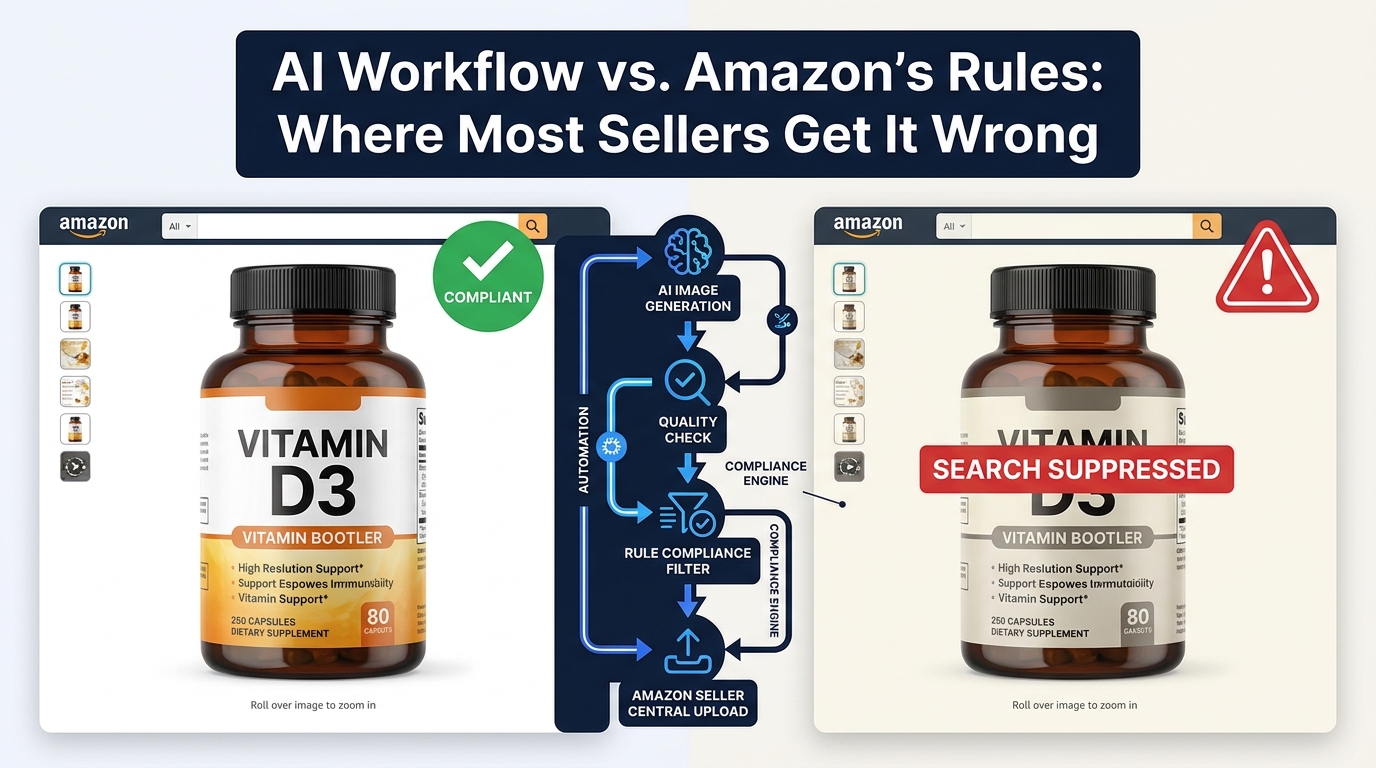
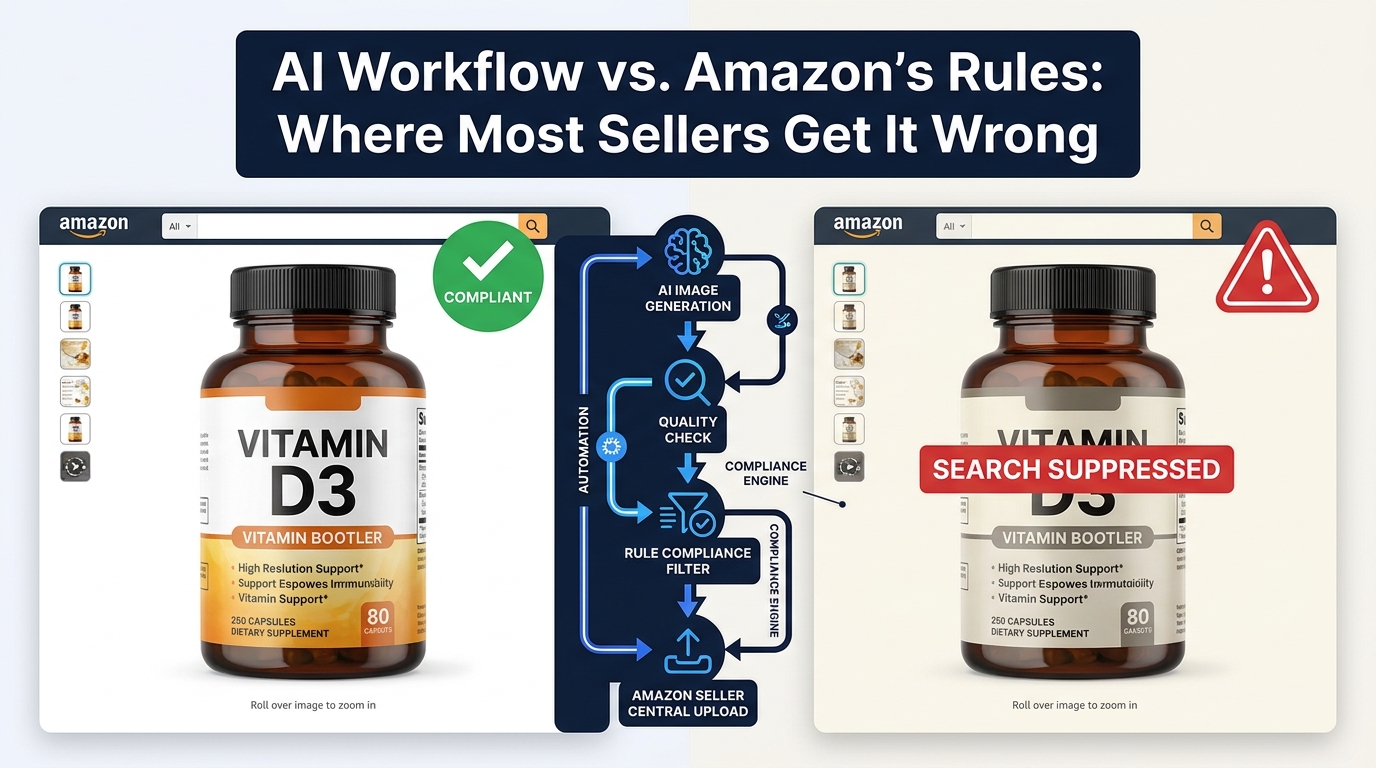
    AI image workflow compliance vs Amazon enforcement: compliant listing versus search suppressed listing comparison

    AI image generation has moved from experimental novelty to standard practice across Amazon’s seller ecosystem. By 2026, the majority of active sellers are using some form of AI-assisted imagery — whether that’s a background removal tool, a lifestyle scene generator, an AI model compositor, or Amazon’s own native creative tools inside the Ads console. The capability has never been more accessible.

    The problem is that most sellers are building their AI image workflows backwards. They start with “what can this tool generate?” rather than “what does Amazon’s enforcement system actually scan for?” Those two questions lead to very different workflows — and the gap between them is where listings get suppressed, images get rejected, and, in serious cases, accounts face action.

    Amazon’s automated enforcement in 2026 is faster, more granular, and more technically precise than it was two years ago. Computer vision models scan listing images at upload and on an ongoing basis. They check background color values at the pixel level, measure product fill ratios within the frame, detect signs of synthetic rendering, and cross-reference what’s shown in an image against what the product detail page actually claims to sell. Enforcement that once took days now happens in minutes — sometimes faster than a seller can refresh Seller Central.

    This guide is not about whether you can use AI images on Amazon. You can. It’s about how to structure a workflow that uses AI at every appropriate stage, stays within the rules that Amazon’s system enforces, and builds in compliance as a technical property of the pipeline itself rather than a manual afterthought you hope doesn’t get missed.

    There is a meaningful difference between “we use AI for images” and “we have a workflow where every AI-generated or AI-assisted image is guaranteed to be compliant before it touches Seller Central.” This guide will help you close that gap.

    The Two-Track Rule: Why Amazon’s Policy Treats Main Images and Secondary Images Completely Differently

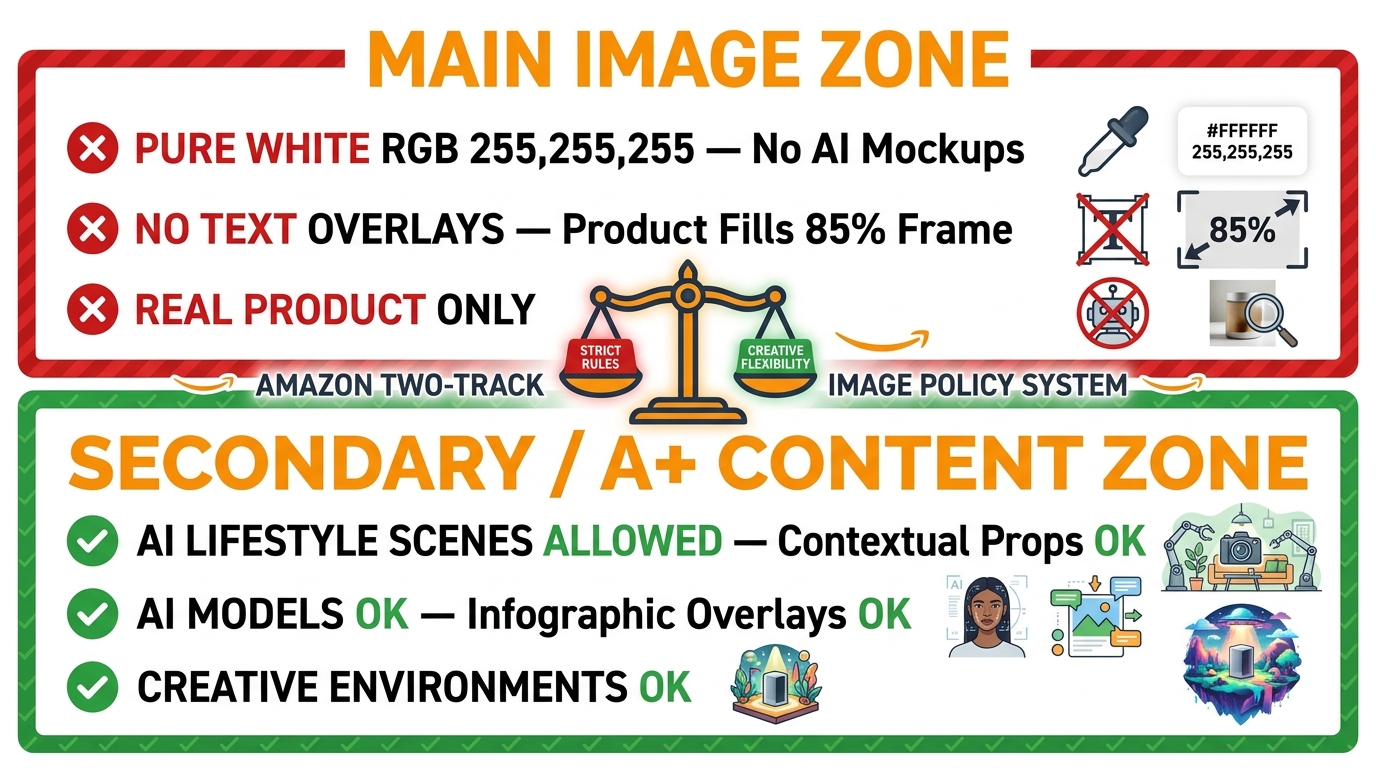
    Amazon two-track image policy infographic: strict main image rules versus permissive secondary and A+ content rules

    The single most important thing to understand about Amazon’s image rules — and the thing that most AI workflow guides gloss over — is that Amazon operates a fundamentally two-track policy. The rules governing your main (hero) image and the rules governing your secondary images and A+ content are not just different in degree. They are different in kind.

    Getting these two tracks confused is the root cause of most compliance failures in AI image workflows. A seller who understands exactly where each track begins and ends can use AI aggressively, efficiently, and without risk. A seller who treats both tracks as operating under the same rules will either under-use AI (leaving creative value on the table) or over-apply it to the main image (and trigger suppression).

    Track One: The Main Image — Maximum Constraint

    Amazon’s main product image rules in 2026 exist essentially unchanged from their core intent, but enforcement precision has tightened considerably. The requirements are non-negotiable:

    • Pure white background: The background must be RGB 255,255,255. Not 253,253,253. Not 250,250,250. Not “off-white.” The specific hex value is #FFFFFF, and Amazon’s computer vision system is capable of detecting deviations that would be imperceptible to the human eye at normal display sizes. A background that looks white on your monitor but reads as 252,252,252 at the pixel level will trigger a non-compliance flag.
    • Real product only: The item depicted must be the actual product being sold. Not a 3D render of the product. Not an AI-generated representation of what the product looks like. Not a mockup. The real, physical item as it actually exists. This is the main image rule that has the most direct implications for AI workflows — AI-generated or AI-rendered main images are not acceptable.
    • Product fill ratio: The product should occupy approximately 85% of the image frame. Too much white space and the image fails the threshold; too tightly cropped and important product details may be cut off. Most compliance failures here come from background removal tools that leave excessive white padding around a small product silhouette.
    • No text, graphics, or overlays: No watermarks, no brand logos, no “new” badges, no pricing callouts, no promotional text of any kind. This includes subtle watermarking that exists as part of a photographer’s or agency’s standard output.
    • No props or additional objects: The main image should show the product and nothing else. Contextual props, staging items, or environmental elements that would be acceptable in secondary images are not permitted on the main image.

    Where does AI fit into main images? Specifically and narrowly: AI tools are acceptable for editing and enhancing photographs of real products. AI background removal to achieve that pure white standard is not only acceptable but is now the dominant workflow for doing it efficiently. AI-powered edge cleanup, shadow correction, and color calibration are all legitimate main image workflows. What AI cannot do is replace the real product photograph with a synthetic representation.

    Track Two: Secondary Images and A+ Content — Significant Creative Freedom

    The secondary image slots (positions 2 through 9) and Amazon’s A+ Content module operate under substantially different rules — and this is where AI’s full creative capability can be deployed without constraint, provided the images remain accurate and non-misleading.

    For secondary images and A+ content, AI-generated and AI-assisted imagery is permitted for:

    • Lifestyle and contextual scenes: AI-generated environments, rooms, outdoor settings, and contextual scenes showing the product in use. The product itself should be real and accurately represented; the environment around it can be entirely AI-generated.
    • AI-generated models: Amazon permits the use of AI-generated models in lifestyle images, subject to standard content guidelines (accuracy in skin tone representation, appropriate dress standards, etc.).
    • Infographic overlays: Callout text, dimension annotations, feature labels, and benefit comparisons are all permitted in secondary images and A+ content — something that is explicitly prohibited in the main image.
    • Composite and comparison images: Before/after comparisons, size reference images, and multi-product views can all be AI-assisted without compliance risk in these secondary positions.
    • Mood and contextual backgrounds: Studio-quality environmental backgrounds, brand aesthetic scenes, and aspirational settings that communicate product use cases are fully permitted.

    The primary compliance constraint in the secondary track remains truth in advertising: whatever your secondary images show must not misrepresent what the buyer will receive. You cannot use AI to make the product look larger, more feature-rich, or higher quality than it actually is. But the creative latitude for storytelling, context, and visual brand communication is wide.

    Inside Amazon’s Automated Enforcement: What the Scanner Actually Checks

    Amazon automated image enforcement system diagram showing computer vision detection layers for background, fill ratio, AI artifacts, and product matching

    Amazon doesn’t publish technical documentation on its enforcement algorithms. What’s known about how automated image scanning works comes from a combination of official policy documentation, Seller Central error messages, and the observed patterns reported by sellers who have experienced suppression and successfully diagnosed the cause.

    Understanding what the scanner is checking — at least at the functional level — is essential for building a workflow that pre-empts failures before images are submitted.

    Background Color Detection

    This is the most precise and unforgiving check in Amazon’s main image scan. Amazon’s system evaluates the pixel values in the background region of the main image against the target value of RGB 255,255,255. The detection is not limited to sampling a few pixels — it evaluates the background area comprehensively.

    The practical implication: background removal tools that output a “visually white” result are not sufficient. You need a tool that explicitly outputs true pure white (RGB 255,255,255) in background regions and that handles edge pixels cleanly. Many background removal tools produce slight color fringing or semi-transparent edge pixels that composite over white in a way that looks correct on screen but reads as slightly non-white to a pixel-level scanner.

    The fix: after any AI background removal step, your pipeline should include a programmatic background color verification step that checks the actual pixel values in the background region — not just a visual review — before the image proceeds to upload.

    Product Fill Ratio Analysis

    Amazon’s scanner detects how much of the image frame the product actually occupies. This is a classic computer vision task: segment the product from the background, measure the bounding area of the product segmentation, and calculate the ratio against the total frame area.

    The most common failure mode here is a background removal workflow that produces a correctly white background but leaves excessive white space around a small product. A product that occupies only 50–60% of the frame may pass visual inspection but fail the automated fill ratio threshold.

    Some tools address this with automatic crop-and-frame functionality — after removing the background, they automatically reframe the product to ensure adequate fill. If your workflow doesn’t include this step, it’s a gap worth closing.

    AI Artifact and Synthetic Rendering Detection

    This is the enforcement layer that has evolved most significantly in 2026. Amazon now deploys computer vision models capable of distinguishing between photographs of real products and AI-generated or 3D-rendered representations.

    What does the scanner look for? The patterns that distinguish AI-generated imagery include: unnaturally smooth surface textures, inconsistent micro-shadow behavior, edge sharpness that doesn’t conform to optical physics, depth-of-field patterns that don’t match real lens characteristics, and repetitive texture artifacts that are characteristic of generative models.

    This does not mean that AI cannot touch main images at all — AI-powered photo editing that starts from a real photograph typically doesn’t produce these synthetic artifacts in a way that triggers flags. What triggers this check is using AI to generate the product image from scratch, or using AI to significantly reconstruct product surfaces in ways that produce synthetic-looking output.

    Product-Listing Correspondence Check

    Beyond the image itself, Amazon’s enforcement system cross-references what is visually depicted in listing images against the product’s title, category, and detail page claims. An image showing a product significantly different in color, size, or configuration from what the title and bullet points describe is a compliance risk.

    This check matters specifically for AI workflows because AI lifestyle generators can inadvertently introduce product modifications: changing a product’s color to better match a background scene, altering the apparent size, or including accessories that are not part of the actual product. Each of these is a potential match failure between the image and the listing data.

    Text and Watermark Detection

    OCR-based scanning detects text in main images — including promotional copy, watermarks, and even subtle branding that photographers embed in their deliverables. In AI workflows, this can surface unexpectedly if generation prompts inadvertently produce text-like patterns or if AI-enhanced images retain photographer metadata visible in the image itself.

    The Main Image Red Lines: Where AI Has Zero Margin for Error

    Given the enforcement architecture described above, the rules for AI usage in main image workflows are essentially these: AI can edit real photographs; AI cannot create main images.

    This is a crisp, workable distinction — but in practice it creates specific edge cases that sellers get wrong.

    The 3D Render Problem

    High-quality 3D product renders have been used as Amazon main images for years, with varying levels of enforcement. In 2026, enforcement against render-based main images has become significantly more consistent. Amazon’s AI-artifact detection is better calibrated to identify renders specifically — even photorealistic ones produced from premium 3D software.

    If your catalog has historically used 3D renders for main images, this is the year to replace them with real product photography. The compliance risk of continuing with renders has increased materially. The good news is that AI-assisted photography workflows have reduced the cost and time required to produce main image-quality real product photos — making the transition operationally achievable even for large catalogs.

    The AI Enhancement Overreach Problem

    AI photo enhancement tools exist on a spectrum from “subtle touch-up” to “full surface regeneration.” At the subtle end — exposure correction, color calibration, minor blemish removal, edge cleanup after background removal — AI enhancement is safe and appropriate. At the aggressive end — where the tool is reconstructing product surfaces, changing material textures, or using inpainting to “improve” how the product looks — you risk creating an image that Amazon’s scanner treats as synthetic and that also potentially misrepresents the product.

    The practical rule of thumb: if you would be comfortable showing the AI-enhanced main image to the customer alongside the actual product they’ll receive, and the difference is invisible, the enhancement is probably within acceptable bounds. If the enhancement makes the product look materially better or different from what the customer will receive, it’s both a compliance risk and a returns risk.

    The Background Replacement Subtlety

    Background replacement tools for main images — which remove whatever background exists in a raw product photo and replace it with pure white — are not just acceptable but are now standard practice. The compliance concern with these tools isn’t whether you use them; it’s whether the output actually meets the pure white standard.

    Many background replacement tools use a soft-edge algorithm that produces semi-transparent pixels at the product edge. When these semi-transparent edge pixels are composited over white in your design tool, they look fine. But when Amazon processes the uploaded file, what it may see are edge pixels with RGB values like 240,240,240 — technically not white, technically a background color violation. Your pipeline needs to account for this by forcing edge pixels to full opacity against the white background, or by using a background replacement tool that outputs hard-edged white directly.

    Where AI Has Full Creative License: Secondary Images, Lifestyle, and A+ Content

    If main image compliance is about constraint and precision, secondary image strategy is about creative ambition. This is where a well-designed AI workflow creates genuine competitive advantage — not by bending rules, but by producing, at scale and speed, the kind of rich visual content that drives conversion.

    AI Lifestyle Scene Generation

    The lifestyle secondary image — the product placed in a real-world context, shown in use, embedded in an aspirational environment — has consistently demonstrated higher conversion impact than white-background secondary images in most product categories. A consumer goods product shown in a kitchen setting. A fitness accessory shown in use during a workout. A home décor piece shown in a styled living room.

    These images have historically required professional photography budgets: studio time, location fees, model fees, prop sourcing, and post-production. For large catalogs with many SKUs, the economics frequently meant that only hero products received proper lifestyle photography.

    AI lifestyle generation changes that calculus. Tools like Amazon’s own Image Generator (available through the Amazon Ads console), along with third-party platforms purpose-built for product placement in AI-generated environments, can produce credible lifestyle images for every SKU in a catalog — not just the hero products. The product photograph used as a starting point needs to accurately represent the real item; the environment, styling, and context around it can be AI-generated.

    Infographic and Feature Call-Out Images

    Secondary image slots are frequently used for infographic-style images: text callouts identifying key product features, dimension annotations, comparison charts, and benefit-focused visual copy. AI workflows can automate the generation of these images at scale, particularly for catalogs with consistent product structures — the same callout template populated with different feature details for each SKU.

    This is an area where AI excels at scale but where human review remains important: the product claims made in infographic secondary images need to be accurate for each specific ASIN. An AI-generated infographic that claims a feature the product doesn’t have is a policy violation regardless of how visually polished it is.

    A+ Content Visual Modules

    Amazon’s A+ Content (formerly Enhanced Brand Content) allows brand-registered sellers to replace the standard product description with rich visual modules. These modules support full-width imagery, comparison charts, lifestyle photography, and mixed text-image layouts.

    A+ Content image requirements are more permissive than listing images — they function essentially as brand creative content rather than product-specific compliance photography. AI-generated imagery is well-suited for A+ Content production, particularly for creating consistent visual brand language across a catalog.

    The compliance constraints that apply to A+ Content relate mainly to content accuracy (no claims the product can’t support) and prohibited content categories (restricted categories like health claims have additional content rules). The image generation method itself — AI-generated or otherwise — is not a primary compliance concern at this level.

    Building Your Compliance-First AI Pipeline: The Five-Stage Architecture

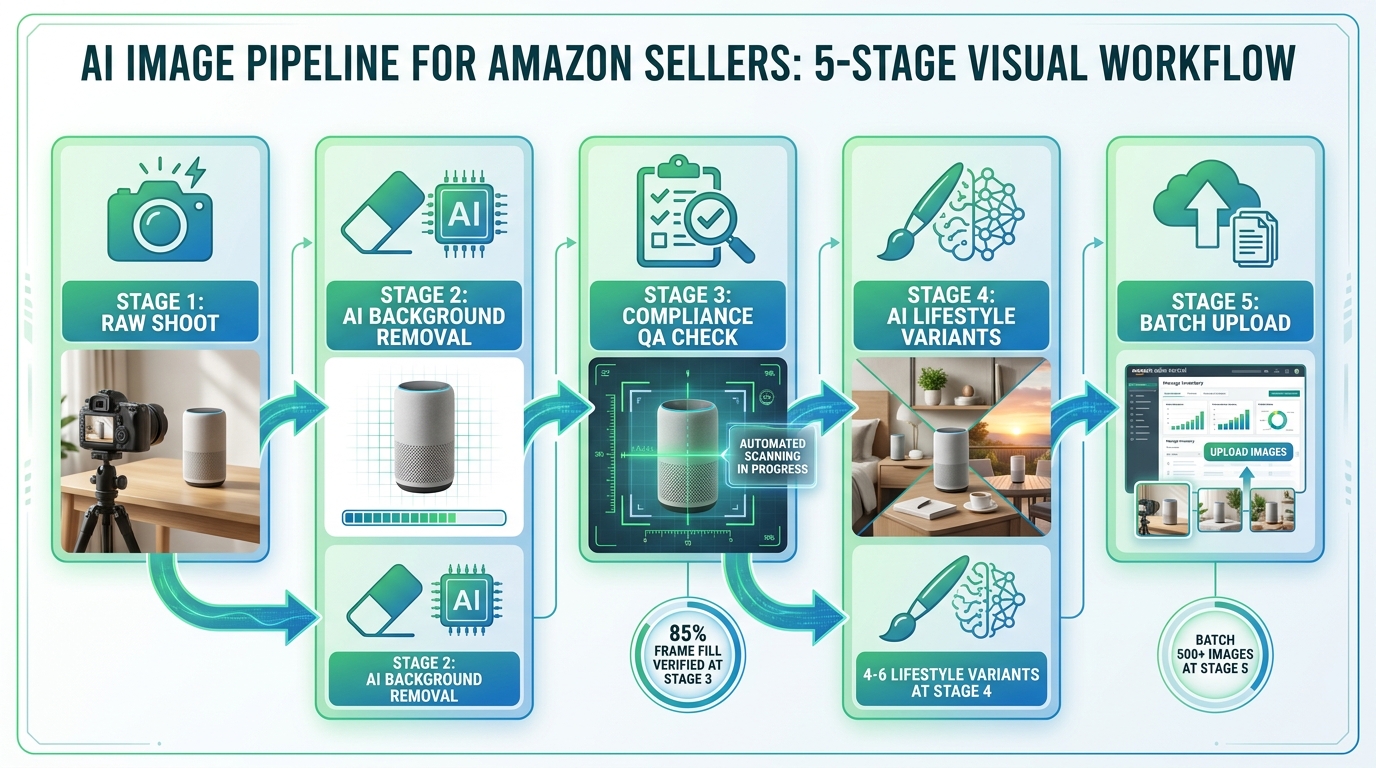
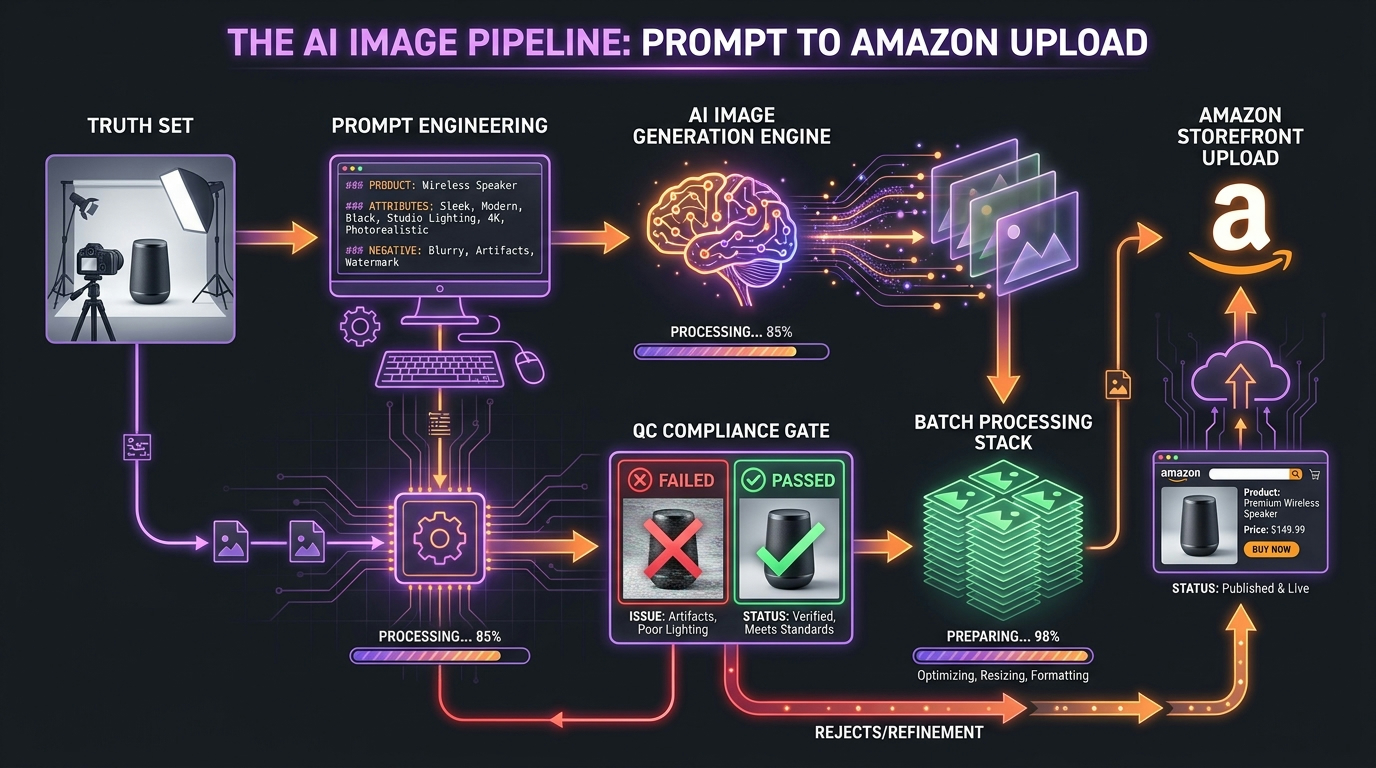
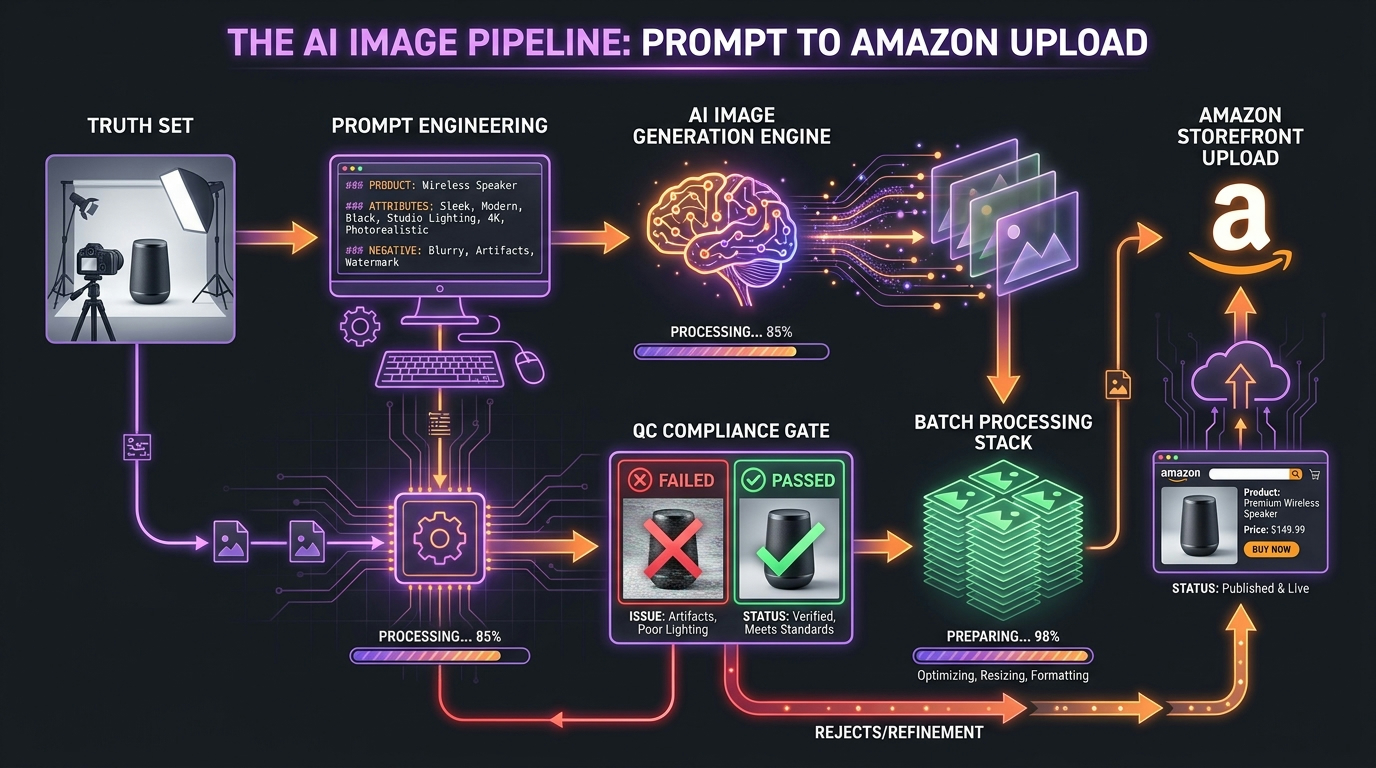
    5-stage AI image pipeline for Amazon sellers: raw shoot, AI background removal, compliance QA, lifestyle variants, batch upload

    The specific tools in your AI image stack matter less than the architecture of the pipeline they sit within. A compliance-first pipeline treats Amazon’s technical requirements not as a checklist to run through at the end, but as constraints encoded into each stage of the process — making it structurally impossible for non-compliant images to reach Seller Central.

    Here’s the five-stage architecture that accomplishes this:

    Stage 1: Raw Shoot — Building the Correct Foundation

    Everything in the pipeline flows from the quality of the original product photograph. AI tools downstream can correct a lot, but they cannot generate compliance properties that the raw image fundamentally lacks. A raw product photo that is blurry, poorly lit, inaccurately colored, or shot at a resolution below 1,000px on the longest side cannot be reliably made compliant through AI processing alone.

    The practical standard for raw shoot inputs into an AI pipeline: minimum 2,000px on the longest side (4,000px is better), accurate product color rendering, clean product surface (dust, fingerprints, and packaging damage that you wouldn’t want in the final image should be addressed at the shoot, not in post), and if possible, shot against a controlled background (even a light gray sweep) to give background removal tools clean material to work with.

    The good news is that modern smartphone cameras at the flagship level produce raw material that meets these standards for most product categories. A dedicated product photography setup — a lightbox, two side lights, and a white or light gray background — combined with a recent flagship phone is sufficient for generating the raw inputs that the rest of this pipeline requires.

    Stage 2: AI Background Removal and White Canvas Creation

    This is the stage where AI earns its keep most clearly for main images. The goal of this stage is to output a product image isolated on an exactly-RGB-255,255,255 background, with clean edges, correct product fill ratio, and no edge pixel artifacts.

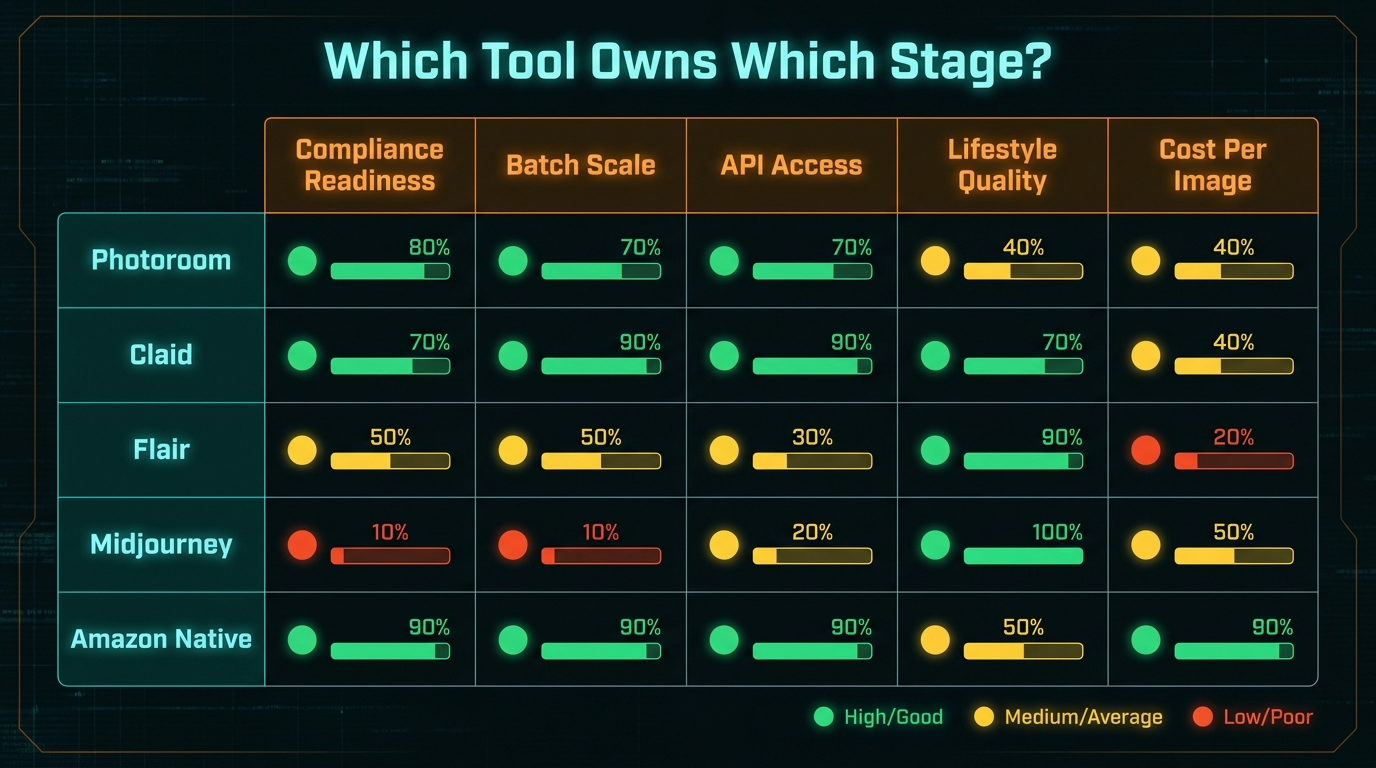
    The tools for this step — Removal.AI, PhotoRoom, Remove.bg, and several others built specifically for e-commerce workflows — have reached a level of quality where the output is routinely better than what manual Photoshop masking would produce for most product types. The key capability to require of whichever tool you choose: explicit control over background color output (not “white” but specifically RGB 255,255,255) and edge rendering options that produce clean, non-fringing product silhouettes.

    After background removal, your pipeline should auto-crop and reframe the product to achieve approximately 85% frame fill. Many of the dedicated e-commerce background tools handle this automatically. If yours doesn’t, a simple post-processing step that measures the product bounding box and crops to achieve the target ratio is worth building in.

    Stage 3: Automated Compliance QA Check

    This is the stage that most workflows skip — and it’s the most valuable addition to a compliance-first pipeline. Before any image moves forward, an automated QA step runs a set of checks that mirror what Amazon’s enforcement scanner looks for:

    • Background color verification: Sample pixels from multiple background regions and confirm RGB values are 255,255,255. Flag any deviation for human review.
    • Product fill ratio measurement: Calculate the percentage of frame area occupied by the product. Flag images below 80% for reframing.
    • Resolution check: Confirm the image is at least 1,000px on the longest side (1,600px minimum recommended, 2,000px+ preferred).
    • Text and logo detection: Run OCR and logo detection on the image. Flag any detected text or watermarks for review.
    • File format and naming verification: Confirm correct file format (JPEG is most reliable for Amazon), correct file naming convention (ASIN or other product identifier, no special characters).

    This QA step can be implemented with computer vision APIs (Amazon’s own Rekognition service from AWS is a logical choice given the context), open-source image processing libraries like OpenCV, or purpose-built compliance checking tools. The implementation complexity is not high; the value is significant. Images that fail any QA check are routed back for correction before they ever reach Seller Central, which means your suppression rate drops to near zero.

    Stage 4: AI Lifestyle and Secondary Image Generation

    With a verified, compliant main image in place, Stage 4 generates the secondary image set. This is where AI operates with the most latitude and produces the most creative value.

    The input for this stage is typically the product’s white-background cutout from Stage 2 (the product image without any background), which gets composited into AI-generated or AI-selected environments. The prompt or scene selection strategy at this stage should be guided by category-specific best practices: what lifestyle contexts have demonstrated conversion performance in your product category? What use cases does your customer base identify with?

    A well-designed Stage 4 produces a set of lifestyle variants for each SKU in a consistent visual style. The Amazon Ads Image Generator (accessed through the Creative Studio in the advertising console) is a natural tool for this step if you’re generating lifestyle images for ad creatives. For listing secondary images, third-party tools with product-in-scene compositing capabilities are currently more flexible.

    Stage 5: Batch Upload and Catalog Management

    The final stage manages the transfer of QA-verified images into Seller Central at scale. For catalogs with hundreds or thousands of SKUs, manual upload is not a viable workflow. Amazon’s Seller Central supports bulk image upload via feed files, and the SP-API enables programmatic image upload and management for sellers with sufficient technical resources or third-party catalog management tools.

    At this stage, the critical compliance consideration is ASIN matching — confirming that each image file is correctly associated with the right ASIN before upload. An error at this stage that puts the wrong product’s image on a live listing is both an immediate policy violation and a customer experience problem that can generate negative reviews and return requests before you catch it.

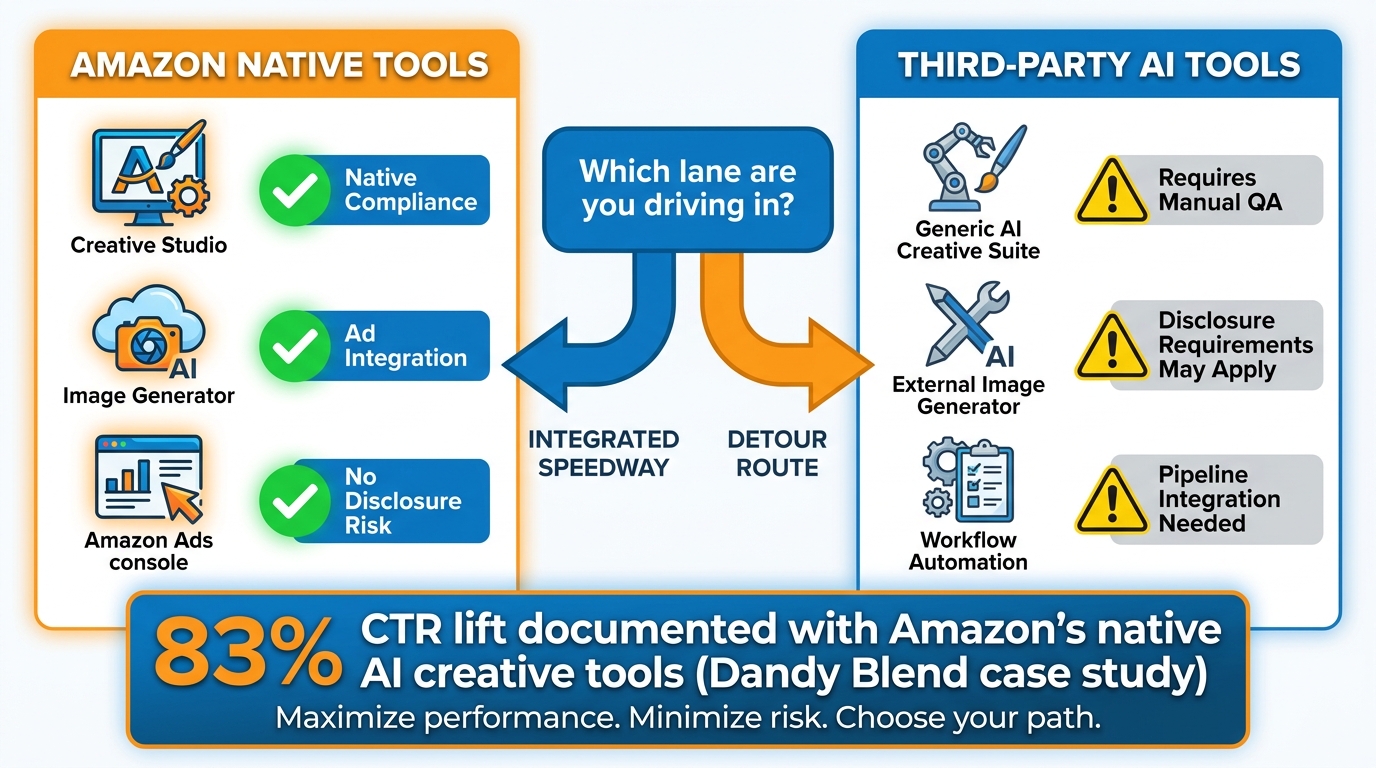
    Amazon’s Own AI Tools vs. Third-Party: Knowing Which Lane to Drive In

    Amazon native AI tools versus third-party AI tools comparison: compliance, integration, and disclosure requirements

    One of the most practical decisions in designing an AI image workflow for Amazon is where to use Amazon’s own tools versus third-party AI platforms. The answer isn’t “one or the other” — it’s understanding what each is optimized for and routing work accordingly.

    What Amazon’s Native Tools Are Built For

    Amazon has deployed AI image generation tools in two primary contexts: the Image Generator and Creative Studio (accessed through the Amazon Ads console, aimed at ad creative production) and AI-assisted listing tools within Seller Central (including the AI listing generator and various enhancement features).

    The native tools have specific advantages:

    Native compliance context: When Amazon’s own tool generates an image for use in its own ad system, it applies its own content rules within the generation process. Images produced by Amazon’s Creative Studio tools for Sponsored Brands and Sponsored Display ads are generated within a guardrailed context where the most obvious policy violations are difficult to produce accidentally.

    Ad system integration: For images destined for Sponsored Products, Sponsored Brands, or Sponsored Display campaigns, the Amazon Ads tools have direct integration into the campaign creation workflow. There’s no separate upload step, no format conversion, and no compliance review lag — images go directly into the ad unit.

    Performance data: Images created through Amazon’s ad creative tools are eligible for Amazon’s own performance reporting and A/B testing infrastructure. You can run creative tests against each other and get direct ROAS and CTR attribution, which third-party tools operating outside Amazon’s ad ecosystem cannot provide at the same level of granularity.

    The performance data from Amazon’s own tools is compelling: one documented case study (Dandy Blend’s Sponsored Brands campaign) recorded an 83% CTR lift when switching to AI-generated lifestyle creatives produced through Amazon’s image tools. Sponsored Brands ads using custom lifestyle images combined with Store spotlight formats have shown conversion rates 57.8% higher than those using standard product images alone, according to Amazon’s own campaign data.

    Where Third-Party Tools Are More Capable

    Amazon’s native tools are optimized for ad creative production within the Amazon Ads ecosystem. For listing image workflows — the main image, the secondary gallery, A+ Content modules — third-party tools currently offer more capability:

    Listing image production: Amazon’s native AI tools are not primarily designed to produce listing gallery images. Background removal, product-in-scene lifestyle compositing, and infographic generation for listing images is better handled by third-party tools built specifically for e-commerce product photography workflows.

    Batch processing at scale: Third-party tools generally offer better batch processing capabilities for large catalogs. If you’re processing 500 or 5,000 SKUs, you need workflow automation features — template-based generation, bulk export, catalog integration — that Amazon’s native tools don’t currently provide at the listing image level.

    Creative control and brand consistency: For brands with established visual identities, third-party tools generally offer more control over the visual output — specific color palettes, lighting styles, background environments, and brand aesthetic elements that must be consistent across a catalog.

    The Disclosure Question

    As Amazon’s policy has tightened around AI disclosure, the question of when and how to disclose that images were AI-generated or AI-assisted has become more relevant. Amazon’s Brand Registry tools and some upload workflows now include AI disclosure fields.

    The clearest guidance: images generated by Amazon’s own tools within its own systems don’t require separate seller-level disclosure. For third-party AI-generated images uploaded to listings, the disclosure requirements are evolving and may vary by program. Amazon’s KDP already requires explicit AI disclosure; standard marketplace listing policy on this point continues to develop.

    The conservative approach — and the one that minimizes compliance risk — is to disclose AI usage in image creation through whatever mechanism Amazon provides in your upload workflow, and to maintain documentation of which images were AI-generated versus photographed, in case Amazon’s disclosure requirements become more formal and auditable.

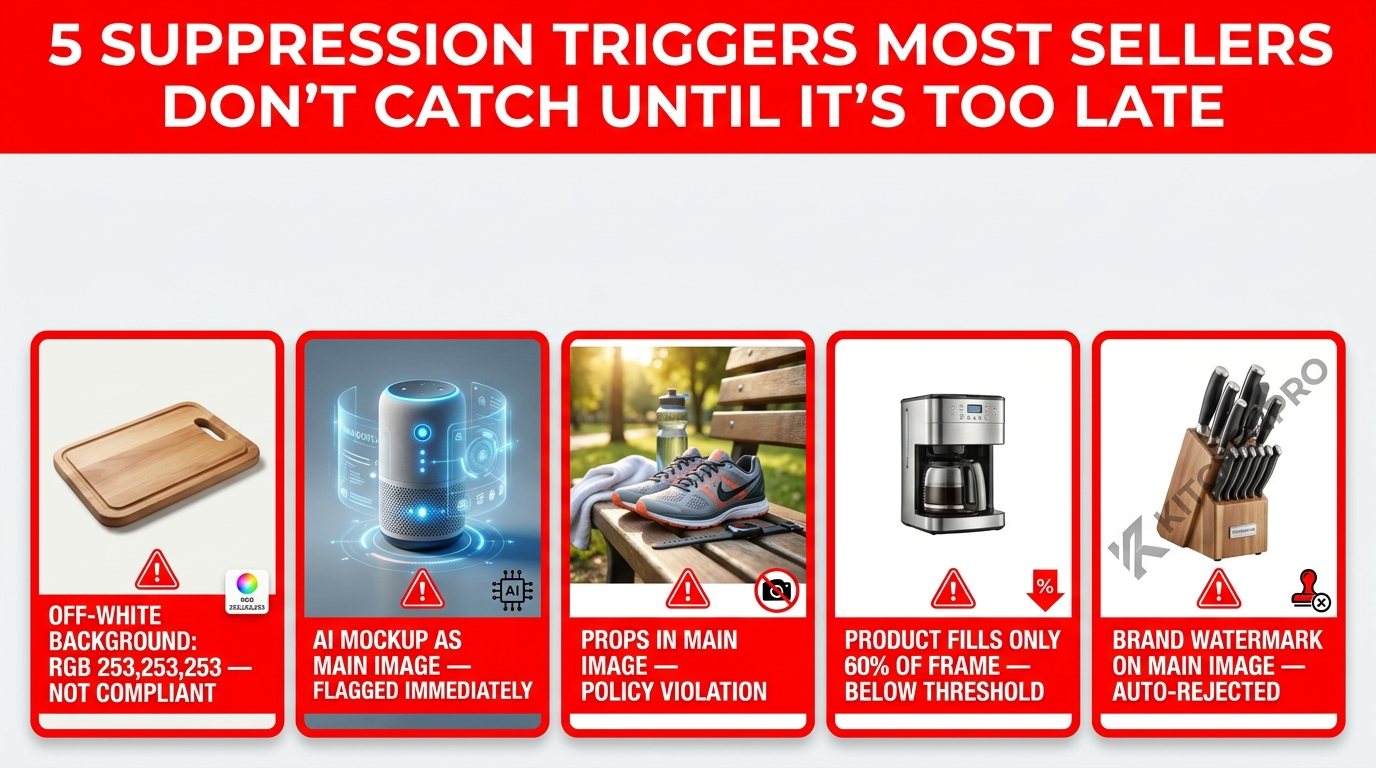
    Common Workflow Mistakes That Trigger Suppression (And How to Fix Each One)

    5 common Amazon image workflow mistakes that trigger listing suppression: off-white background, AI mockup main image, lifestyle props, low fill ratio, watermark

    Understanding compliance architecture in the abstract is useful. But the practical value comes from knowing the specific failure modes that actually cause suppression — the mistakes that real workflows make repeatedly, the ones that trigger the “Search Suppressed” status that costs revenue while you diagnose and fix them.

    Mistake 1: The Off-White Background That Passed Visual Review

    This is the most common suppression trigger in AI-assisted main image workflows. A background removal tool outputs what appears to be a white background. The seller approves it visually. It passes human review at every stage. Amazon’s automated scanner flags it as non-compliant.

    Why it happens: Many background removal tools output a background that reads as white on a standard display but registers as RGB 252–253 at the pixel level due to anti-aliasing and blending algorithms. Amazon’s scanner checks actual pixel values.

    The fix: Add a Stage 3 QA step that programmatically samples background pixels and confirms exact RGB 255,255,255 values. If background pixels deviate from pure white, route the image back for re-processing or use a “fill with pure white” post-processing step to force correct values.

    Mistake 2: Using an AI Mockup or 3D Render as the Main Image

    Sellers who invested in 3D product renders several years ago frequently continue to use them as main images because they look excellent and the original compliance risk was low. In 2026, Amazon’s synthetic image detection is reliably identifying high-quality renders as non-photographic, and suppression rates for render-based main images have increased significantly.

    The fix: Audit your catalog for SKUs where the main image is a 3D render or AI-generated representation rather than a photograph of the actual product. Prioritize replacement starting with your highest-revenue ASINs. A real product photography workflow does not need to be expensive — a well-lit tabletop setup with an AI background removal step in Stage 2 can produce compliant main images efficiently.

    Mistake 3: Lifestyle Scene Accidentally Assigned as the Main Image

    In batch upload workflows, especially when processing large catalogs quickly, image position assignments sometimes get swapped. A lifestyle secondary image — which is perfectly compliant in position 2 or 3 — gets uploaded as the main image and immediately fails the background, props, and context requirements for position 1.

    The fix: Build ASIN-image position mapping verification into your Stage 5 batch upload process. Each image file should be tagged with both its ASIN and its intended position number. A pre-upload check that confirms main images meet main image criteria (white background, no props) before submission catches this class of error.

    Mistake 4: Photographer or Agency Watermarks in Deliverables

    Some photography agencies and freelancers deliver images with subtle watermarks or copyright marks embedded — either visible in a corner or embedded in a way that becomes detectable by OCR scanning even if not immediately obvious to human reviewers.

    The fix: Add OCR and watermark detection to your Stage 3 QA checklist. Require photography vendors to deliver clean, watermark-free files as a contractual standard. Confirm with your agency that their deliverables do not include any embedded text or graphic marks before they enter your pipeline.

    Mistake 5: AI Lifestyle Images That Subtly Misrepresent the Product

    This mistake doesn’t always trigger automated suppression immediately — it may surface later as customer complaints, high return rates, or a policy flag during a listing audit. When AI lifestyle generators composite a product into a scene, they sometimes alter the product’s apparent color (to better match the scene’s lighting), apparent size (relative to scene elements), or apparent material texture (to better match the aesthetic of the environment).

    The fix: Include a human review step specifically for secondary lifestyle images that checks the product’s appearance in the composited scene against the actual product. Is the color accurate? Is the size relationship to scene elements plausible? Does the product surface look like what the buyer will receive? This review should be standard before any AI-generated lifestyle image enters the live listing.

    Testing and Pre-Screening: How to Validate Images Before They Hit Seller Central

    Beyond the pipeline QA steps described in Stage 3, there are several approaches to pre-screen images against Amazon’s enforcement criteria before they go live. The goal of pre-screening is to identify compliance risks before they translate into suppressed listings — catching problems in a controlled environment rather than discovering them when a live ASIN disappears from search.

    Amazon’s Image Upload Preview

    Seller Central’s image upload interface provides visual feedback on images as they’re being prepared for submission. While this feedback catches some obvious issues, it does not replicate the full depth of Amazon’s post-upload enforcement scanning. An image can pass Seller Central’s upload-time check and still be flagged by the compliance system within 24–48 hours. Do not treat upload success as compliance confirmation.

    Test ASIN Image Validation

    One approach used by sellers managing large catalog image updates is to upload the new image set to a low-volume test ASIN before rolling it out across the full catalog. This provides real-world exposure to Amazon’s enforcement system on a low-stakes ASIN and reveals whether the image style, generation method, or specific characteristics of the images trigger compliance flags under live conditions.

    The limitation: this approach is slow and cannot be parallelized across a large catalog at the same time. It’s most useful when validating a new workflow or a new generation style before deploying it at scale, rather than as a routine per-image validation method.

    AWS Rekognition-Based Pre-Screening

    Amazon’s own AWS Rekognition computer vision service provides image analysis capabilities that overlap with the kind of image quality checks Amazon runs on marketplace listings. Specifically, Rekognition can detect image quality issues, faces and objects in images, text in images via its DetectText API, and general image content moderation flags.

    Using Rekognition as a pre-screening step in your pipeline provides a degree of “would Amazon flag this?” signal before images reach Seller Central. It’s not a perfect proxy for Amazon’s marketplace-specific image scanner — they are different systems — but it’s a meaningful additional check that catches broad categories of issues using infrastructure from the same parent company.

    Visual Comparison Against Amazon’s Page Background

    A simple but effective pre-screen: render your main image on a canvas with Amazon’s exact background color (RGB 255,255,255) and examine it at multiple zoom levels. Any background color deviation becomes immediately visible when the image is composited against the identical background color it will sit against on the live product detail page. This catches visual background issues that might be missed when reviewing the image against a slightly different shade of white in your design tool.

    Scaling the Workflow: Batch Processing Without Losing Compliance Control

    The compliance architecture described in the previous sections is straightforward to implement for a small number of images. The challenge is maintaining that same compliance reliability when the workflow scales to hundreds or thousands of SKUs — where manual review at every stage is not operationally viable.

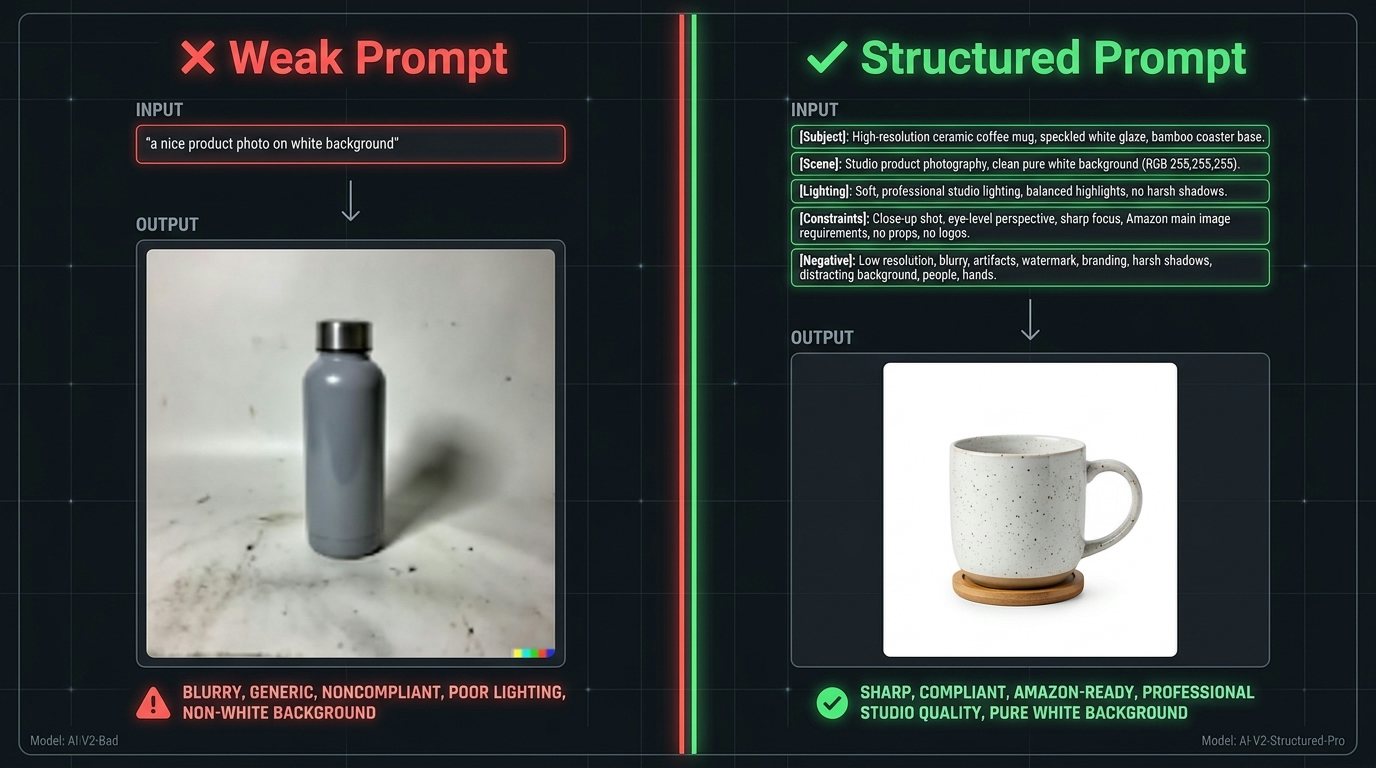
    Template-Based Generation for Consistency

    At scale, AI image generation should operate from templates rather than from unconstrained generation. A template specifies: the image dimensions and aspect ratio, the background specification for main images (pure white, enforced in the template settings), the product fill ratio target, the lifestyle scene style and category for secondary images, and the infographic layout and font system for callout images.

    Template-based generation ensures that the output of Stage 4 is consistent across thousands of SKUs — not just in visual style, but in the specific technical properties (dimensions, background color, file format) that determine compliance. When generation happens inside a template constraint system, the compliance QA in Stage 3 is validating against known, expected outputs rather than reviewing unconstrained generation results.

    Tiered Human Review at Scale

    Even in a highly automated pipeline, human review doesn’t disappear at scale — it shifts to exception handling. In a well-designed batch workflow, the automated QA system handles 100% of technical compliance checks and passes or fails each image automatically. Images that pass all automated checks proceed to upload without additional human review. Images that fail any automated check are routed to a human review queue for diagnosis and reprocessing. A sample of automatically-passed images — perhaps 5–10% of the batch, randomly selected — receives human spot-check review to validate that the automated checks are performing correctly and to catch any edge cases the automation is missing.

    This tiered model allows a large catalog to be processed at scale while maintaining a meaningful human quality gate — focused where it adds the most value rather than uniformly applied across every image.

    Version Control for Image Assets

    At catalog scale, image version control becomes critical. When Amazon flags a listing for image compliance issues, you need to be able to identify exactly which image version is live, when it was uploaded, what processing steps it went through, and what the QA results were for that specific file. Without version control, diagnosing and correcting a suppression issue in a large catalog becomes a manual investigation that wastes significant time.

    A simple implementation: maintain a log file or database entry for each image that records the ASIN, image position, file name, upload date, QA results for each check, generation method (photographed, AI-enhanced, AI-generated), and current live status. When suppression occurs, the log provides immediate diagnostic information without requiring manual review of your entire asset library.

    What Amazon’s Enforcement Is Moving Toward — And How to Build Ahead of It

    Amazon’s image enforcement capability in 2026 is more sophisticated than it was two years ago — and it will be more sophisticated two years from now than it is today. Building a workflow that is compliant with current rules is necessary but not sufficient; building a workflow that is architecturally positioned to remain compliant as rules and enforcement evolve is the more durable investment.

    Disclosure Requirements Are Going to Become More Formal

    Amazon’s KDP already requires explicit disclosure of AI-generated content. This model — where AI involvement in content creation must be formally declared — is likely to extend to marketplace product images as Amazon’s ability to detect AI-generated images improves and as regulatory pressure on AI disclosure in commercial contexts increases.

    Building documentation of your image generation methods now — which images are photographed, which are AI-enhanced, which are AI-generated in secondary positions — positions your catalog for this likely requirement without requiring a retroactive audit. Treat image provenance documentation as standard catalog hygiene, not as a future compliance task.

    Product-Image Correspondence Verification Will Tighten

    Amazon’s cross-referencing of image content against listing data is an area of active development. As the technology for extracting structured product attributes from images improves, Amazon will increasingly be able to verify not just “is this a compliant image?” but “is this image consistent with the product’s listed color, size, configuration, and category?”

    This has implications for AI-generated lifestyle images where the product appearance is altered even slightly in the compositing process. The practice of maintaining accurate product representation in all images — not just main images — is already a policy requirement; the enforcement mechanism for verifying it is becoming more automated and comprehensive.

    Real-Time Enforcement Is Becoming the Default

    Historical Amazon image enforcement operated on a lag: you could upload a non-compliant image and it might remain live for days or weeks before being flagged. In 2026, automated enforcement increasingly operates in near real-time, with some compliance checks running at upload. The direction of travel is toward instantaneous enforcement — where a non-compliant image is rejected or suppressed at the moment of submission rather than after it goes live.

    The practical implication: the value of pre-submission compliance QA in your pipeline increases as Amazon’s enforcement speed increases. The window for “upload it and see if it gets flagged” is closing. Compliance needs to be verified before submission, not discovered through the enforcement system after the fact.

    Conclusion: Build Compliance In, Not On Top

    The fundamental shift in thinking that leads to an AI image workflow that Amazon’s enforcement won’t touch is this: compliance is an architectural property, not a checklist item. Workflows that bolt compliance checking onto the end — “we’ll review for compliance before uploading” — are fragile. Workflows where compliance is structurally enforced at each stage are robust at any scale.

    The two-track policy framework is the conceptual foundation: main images are photographed reality, AI-enhanced within narrow limits; secondary images and A+ content are where AI’s full creative capability is legitimately deployed. Everything else flows from understanding those two tracks and building a pipeline that never confuses which track a given image is operating in.

    Your Compliance-First AI Image Workflow Checklist

    • Audit your current main images: Are any of them 3D renders, AI-generated representations, or AI-reconstructed photographs? Replace those first.
    • Implement programmatic background verification: Add a pixel-level RGB check for background color to your QA stage. Visual review of “looks white” is not sufficient.
    • Set product fill ratio targets: Confirm your background removal and cropping tools are outputting ~85% product fill. Add automated fill ratio measurement to your QA pipeline.
    • Build a text and watermark detection step: Run OCR on all main images before upload. Flag any detected text for review.
    • Deploy AI aggressively in secondary positions: Lifestyle scenes, infographics, comparison images, A+ Content modules — this is where AI creates genuine scale economics and conversion value. Stop rationing AI usage here.
    • Test AI lifestyle images for product accuracy: Before publishing, verify that the product’s color, size, and appearance in composited lifestyle images matches what the buyer will receive.
    • Document image provenance: Maintain a log of generation method for each image. This positions your catalog for formal AI disclosure requirements as they evolve.
    • Use Amazon’s native tools for ad creatives: For Sponsored Brands and Sponsored Display, Amazon’s Creative Studio tools offer native compliance guardrails and direct ad integration.
    • Build version control for your image assets: You need to know exactly what’s live on every ASIN to diagnose and remediate suppression issues quickly at scale.
    • Treat pre-submission QA as non-optional at scale: As Amazon moves toward real-time enforcement, the window for catching compliance issues after they go live is shrinking. Build it into the pipeline before submission, every time.

    Amazon’s rules around AI images are not obstacles to using AI effectively in your listing workflow. They are parameters that, once clearly understood, define exactly where AI creates value without risk and where it creates risk without additional value. Work within the parameters, and AI becomes one of the most operationally significant tools available to a serious Amazon catalog operation.

  • Who Actually Wins When Amazon Lets AI Build Your Lifestyle Photos — A Category-by-Category Breakdown

    Who Actually Wins When Amazon Lets AI Build Your Lifestyle Photos — A Category-by-Category Breakdown

    Split scene comparing traditional photography studio versus AI-generated lifestyle images on a laptop, with overlay text: Who Actually Wins the AI Photo Race?

    For years, the gap between a $100,000 annual ad budget and a $10,000 one on Amazon was nowhere more visible than in the photography. Big brands ran full studio shoots with professional lighting, hired models, and location-scouted lifestyle settings. Smaller sellers took product shots on a folding table in their spare bedroom. That asymmetry showed up directly in click-through rates, conversion rates, and ultimately in ranking.

    Amazon’s 2026 policy adjustments around AI-generated imagery didn’t come with a dramatic announcement — no press release, no Seller Central banner reading “AI images now allowed.” The shift was more gradual: updated image guidelines, the expansion of AI tools inside the Amazon Ads console, the rollout of Titan Image Generator through Creative Studio, and a compliance framework that began to acknowledge AI-assisted production as a normal part of the creative workflow.

    But “allowed” and “advantageous” are two very different things. And the question nobody is asking clearly enough is: which sellers actually benefit from this, and which ones are walking into a trap?

    The answer depends heavily on your product category, your current image quality baseline, how you use AI (in ads versus listings), and whether your workflow can actually catch the failure modes that AI image generation introduces before they cost you suppression events or return rate spikes. This article breaks it down by category, by seller size, and by the specific use cases where AI lifestyle images help — versus where they quietly hurt.

    What Amazon’s 2026 Policy Actually Changed — and What Didn’t

    The clearest way to understand Amazon’s 2026 stance on AI-generated lifestyle images is to separate what was always the rule from what genuinely shifted.

    The Rule That Hasn’t Changed: Hero Images Are Sacrosanct

    The main image — slot one in your listing’s image gallery — remains subject to the strictest requirements Amazon enforces. It must show the actual physical product, photographed on a pure white background (RGB 255, 255, 255), with the product filling at least 85% of the frame. No lifestyle scenes, no props, no watermarks, no AI-generated backgrounds. This hasn’t changed in 2026, and there is no credible indication it’s about to.

    What this means in practice: AI cannot replace your hero image. Any tool that claims to generate a policy-compliant main image from scratch — without a real product photograph as the base — is selling you a suppression risk. The hero shot still requires a real camera pointed at a real product.

    What Has Genuinely Shifted

    Secondary images — slots two through nine in your gallery — and all ad creative formats are where the policy movement is meaningful. Amazon’s updated compliance framework in 2026 takes the position that the tool used to create an image is less important than whether the image accurately represents the product. AI-assisted background replacement, lighting correction, scene composition, and lifestyle context generation are all considered acceptable for secondary images and ad creatives, provided the product itself is not misrepresented.

    Specifically, AI edits that alter color, dimensions, included accessories, material texture, or functionality cross the line. A background swap that places your product in a living room scene is fine. A background swap that also quietly saturates your beige product into a more photogenic cream crosses into misrepresentation territory.

    The New Disclosure Layer

    Third-party compliance guides (and emerging Seller Central documentation) point to a 2026 framework requiring sellers to indicate when product content — including images — is substantially generated by AI rather than lightly edited. This is not a checkbox in the image uploader currently; it exists more as a policy position that could be enforced retroactively. The safest interpretation is that images where the product is real but the environment is AI-generated sit in a clearly permissible zone. Images where the product itself is AI-rendered without a real photograph underneath carry meaningful policy risk.

    The Cost Math: What Photography Actually Used to Cost

    Bar chart infographic showing traditional studio photography costs of $1,500–$5,000 versus AI image generation at $0.10–$2, with bold text: 80–95% Cost Reduction

    Before evaluating whether AI lifestyle images are worth adopting, it helps to understand what the old model actually cost — and why those costs were so gatekeeping for smaller sellers.

    The Traditional Studio Cost Stack

    A standard professional product photography session in 2024–2025 ran between $1,500 and $5,000 per session for a competent freelance or mid-tier studio setup. That’s before factoring in model fees ($200–$800 per hour for experienced commercial talent), location rental for lifestyle settings ($500–$2,000 per day), post-production retouching ($50–$150 per final image), and the logistical overhead of sample shipping, scheduling, and art direction.

    For a seller with a catalog of 50 SKUs and multiple variants each, a comprehensive lifestyle shoot could represent $15,000–$40,000 in production spend — a cost that large brands absorbed without flinching and small sellers couldn’t justify. The result was predictable: small sellers competed with functional pack shots while big brands dominated the visual shelf with aspirational imagery.

    What AI Changes the Math To

    AI product photography tools in 2026 — both Amazon’s native offerings and third-party platforms — bring that per-image cost down to approximately $0.10–$2.00 per generated image, depending on the tool and usage tier. Time compression is equally dramatic: what previously required a two-week production cycle (booking, shooting, retouching, delivery) now runs from product upload to final image in minutes to hours.

    Multiple industry analyses put the aggregate cost reduction at 80–95% versus traditional studio shoots. Amazon’s own internal data shows that advertisers using AI-generated images in Creative Studio were able to advertise up to five times more products than they previously could — a direct consequence of removing the per-SKU production bottleneck.

    The Important Caveat

    Cost reduction is not value creation. A cheaper image that triggers returns, earns negative reviews about “product not as shown,” or gets suppressed for policy violations costs far more than a well-executed studio shot. The real question isn’t whether AI is cheaper — it clearly is. It’s whether the quality output is good enough for your product category, your customer expectations, and your compliance obligations. That answer varies significantly by what you’re selling.

    Category Winners: Where AI Lifestyle Images Outperform

    Side-by-side comparison showing HIGH AI BENEFIT home décor lifestyle scene versus HIGH AI RISK apparel with distorted fabric texture and color artifacts

    Not every product category responds equally to AI-generated lifestyle imagery. The categories that benefit most share a common set of characteristics: the purchase decision is context-driven, color and texture accuracy at fine detail levels matters less than placement and setting, and the emotional resonance of the image (does this fit my life?) matters more than technical precision.

    Home Décor and Furniture

    This is the strongest category fit for AI lifestyle photography, and the reasons are structural. Shoppers buying a throw pillow, a wall sconce, a coffee table, or an area rug are primarily asking: “Does this fit in a room like mine?” They want to see scale, setting, and style compatibility. AI excels at generating convincing room scenes — cozy living rooms, minimal Scandinavian kitchens, warm bedroom vignettes — and placing a real product photograph composited into that environment.

    Because home décor products are often non-reflective solids (fabric, wood, ceramic, stone), the AI rendering of the product within the scene is generally accurate. Color consistency on solid-surface items holds reasonably well across AI tools. Industry reports place CTR lifts from lifestyle versus white-background-only images at 20–40% for this category, and that lift is achievable with AI-generated scenes at a fraction of traditional photography cost.

    Kitchen and Dining

    Kitchen gadgets, cookware, food storage, and dining accessories are strong performers with AI lifestyle imagery for similar reasons. Shoppers want to see the product in use — a cutting board on a well-lit counter, a spice rack mounted in an actual kitchen, a blender staged near fresh produce. The use-case clarity that lifestyle images provide in this category directly reduces the cognitive friction of the purchase decision.

    Because kitchen items are typically matte-finish plastics, ceramics, or stainless steel, AI rendering of textures and surfaces performs adequately. The bigger challenge is scale accuracy — a blender that appears to be the size of a coffee mug in an AI-generated scene can erode trust quickly — but most modern tools handle scale reasonably well when provided with accurate product dimensions.

    Pet Products

    Pet beds, feeders, toys, and grooming tools benefit enormously from lifestyle context. Shoppers want to see an animal using the product — and while generating convincing animals in AI scenes is more technically demanding than generating a room, the category tolerance for minor realism imperfections is generally higher. A dog bed staged in a cozy corner of a living room, with an AI-generated pet composited naturally, resonates far more than the same product on a white background.

    Sports, Fitness, and Outdoor Equipment

    Yoga mats, gym equipment, camping gear, and fitness accessories benefit from aspirational scene-setting. A yoga mat on a white background tells you nothing about whether it feels like a real yoga mat. The same mat in a sunlit studio with a clean hardwood floor and soft morning light — even AI-generated — helps the shopper imagine use. Because these products tend to be simple geometrically (flat mats, round balls, angular equipment), AI compositing is generally accurate.

    Category Risks: Where AI Lifestyle Images Underperform or Create Real Problems

    The categories where AI lifestyle photography introduces meaningful risk share a different set of characteristics: the purchase decision is heavily dependent on fine material detail, exact color accuracy, complex surface rendering, or the realistic simulation of how the human body interacts with the product.

    Apparel and Fashion: The Highest-Risk Category

    Apparel is where AI lifestyle photography most frequently creates problems. The issues are multiple and compound each other. First, fabric texture rendering in AI systems is often inaccurate — what should read as a crisp cotton weave gets rendered as something ambiguous, what should look like matte denim gets a subtle sheen that changes the perception of the product entirely. Second, color fidelity on apparel is where AI fails most often: reds oversaturate, navies flatten into black, beige and cream read as gray in poorly calibrated outputs.

    Third — and most problematically — AI-generated human models in apparel lifestyle scenes carry their own distortion risks. Hands are a known failure mode, proportions can shift subtly, and the physical interaction between clothing and a body (drape, weight, fit, movement) is extraordinarily difficult for AI to render authentically. Experienced apparel shoppers notice these artifacts quickly, and the cognitive dissonance they create can tank conversion rates rather than improve them.

    The downstream consequence is returns. A buyer who purchases a “navy” jacket and receives a dark charcoal-black one — because the AI slightly darkened the product in the lifestyle scene — generates a return, a negative review, and a seller metric that Amazon’s algorithm reads as signals of listing quality problems.

    Jewelry and Accessories

    Jewelry presents a compounding set of AI rendering challenges. Reflective metal surfaces, gemstone translucency, fine engraving detail, and delicate chain rendering are all areas where current AI models produce outputs that range from plausible to obviously artificial. A diamond ring under studio lighting has a specific relationship between facets, light, and shadow that AI hasn’t yet reliably reproduced at the detail level jewelry shoppers expect. For fine jewelry in particular, AI lifestyle scenes are a fast path to negative reviews about misrepresented appearance.

    Electronics and Tech Products

    Electronics present a different kind of risk: text rendering. Screens, displays, buttons, ports, and printed labels are all areas where AI-generated product imagery introduces errors — logos rendered incorrectly, screen displays showing impossible UIs, port layouts that don’t match the actual device. For electronics, lifestyle context matters, but product accuracy matters more, and AI currently cannot guarantee accurate small-detail rendering. Electronics sellers should use AI for environmental scene building — a laptop on a desk in a home office — while ensuring the product itself is a real, retouched photograph composited into the scene.

    Small Sellers vs. Big Brands: Is This Actually a Leveling Field?

    Small Amazon seller at laptop seeing AI-generated lifestyle images with a '5x more products advertised' callout, representing the potential leveling of the competitive playing field

    The most frequently repeated claim about AI lifestyle images is that they level the playing field between small sellers and large brands. Like most simple narratives about complex systems, this is partially true and partially misleading.

    Where the Field Genuinely Levels

    The most concrete leveling effect is in advertising reach. Amazon’s own internal data shows that sellers using AI image generation in Creative Studio advertised up to five times more products than before. This is a real and meaningful change: previously, small sellers with 40-SKU catalogs couldn’t afford lifestyle creative for every product and therefore restricted their advertising to their top 10 performers. AI generation removes the per-SKU production cost barrier, which means more of the catalog becomes advertisable.

    Similarly, A+ Content — which requires lifestyle imagery to be effective — was previously inaccessible at scale for small sellers. A small brand with 200 ASINs couldn’t fund A+ creative for all of them at $400–$800 per module in photography costs. AI brings that cost down to a level where even small sellers can maintain visual consistency across their full catalog.

    Jungle Scout’s 2025 seller survey (cited in multiple 2026 industry analyses) found that approximately 41% of third-party Amazon sellers have already integrated AI image generation into their standard creative workflow. For small sellers (annual revenue under $500,000), the adoption rate was directionally similar — suggesting this isn’t only a large-brand capability.

    Where the Playing Field Remains Tilted

    The advantages large brands retain are not in production cost — they’re in quality control infrastructure, creative direction expertise, and testing capacity. A large brand using AI lifestyle images has a creative director who reviews outputs before publishing, a legal team checking compliance, and an analytics function running A/B tests to validate that AI images are actually improving ROAS before scaling.

    A small seller using the same AI tool, with the same access, but without that surrounding infrastructure is more likely to publish images with subtle quality problems that they haven’t QA-checked, run into compliance issues they weren’t aware of, and measure success by “looks good to me” rather than by actual conversion lift data.

    The leveling is real, but it’s conditional. Small sellers who develop systematic workflows around AI image generation — with quality checkpoints, compliance review steps, and performance tracking — can close a meaningful portion of the visual gap with large brands. Small sellers who use AI image generation as a quick shortcut often discover that cheap content that doesn’t perform is worse than no content at all.

    Where AI Images Actually Fail: The Quality Problems Sellers Face

    Quality control audit grid showing four AI image failure modes: Wrong Color on navy jacket, Bad Transparency on glass bottle, Scale Error on floating product, and Edge Bleed around product edges

    The failure modes of AI image generation for Amazon sellers fall into predictable categories. Understanding them is the prerequisite for building a workflow that catches them before they go live on your listing.

    Color and Material Inaccuracy

    This is the most common and most consequential failure mode. AI image generation models are not calibrated against your specific product’s colorimetry — they’re producing their best statistical guess at what the product looks like based on the input image and the scene context they’re generating. The result is consistent drift in certain color ranges.

    Navy reliably skews darker. Warm whites and creams shift toward cool grays. Reds and oranges oversaturate. Matte black products often develop a slight sheen. For products where exact color is a purchase criterion — throw pillows, upholstered furniture, paint-complementary accessories, clothing — this drift directly causes returns and negative reviews. The fix is not just to review the AI output visually, but to compare it against a calibrated color reference of the physical product before publishing.

    Transparency and Reflectivity

    Glass, crystal, acrylic, and highly polished metal surfaces present rendering challenges that current AI models handle inconsistently. A glass candle holder that should show the ambient scene through its body often gets rendered with a flat opacity that makes it look plastic. A polished stainless surface that should show a soft environmental reflection instead gets rendered as flat gray. These artifacts are immediately visible to the trained eye and erode perceived product quality — which is the opposite of what lifestyle images are supposed to achieve.

    Edge Bleeding and Compositing Artifacts

    When AI tools composite a product image into a generated lifestyle scene, the boundary between the product and the generated environment is a frequent source of artifacts. Soft edges, fringe pixels, and background “bleeding” around the product create an obvious artificial appearance. More critically for Amazon: background color bleed on a hero-image edit can cause an image that appears white to have subtle gray tones at the pixel level, triggering automated suppression by Amazon’s image processing systems.

    Scale Inconsistency

    AI lifestyle scenes often get scale wrong in ways that are subtle but damaging. A small product staged to appear larger in context (inadvertent or not) creates purchase expectations the physical product can’t meet. A large product staged in a context that makes it appear smaller creates confusion about dimensions. Amazon’s primary image standards forbid props or design elements that create false impressions of product size — and an AI-generated lifestyle scene that accidentally creates that impression carries the same compliance risk as a manually designed image that does so intentionally.

    Amazon’s Automated Detection Systems

    Amazon’s image processing infrastructure runs automated checks on submitted images. These systems flag pure-white background violations on main images, detect watermarks, identify obvious compositing artifacts in certain contexts, and can suppress listings based on image quality signals. Sellers who assume that AI-generated images will sail through these checks without review are learning otherwise — Amazon’s detection capabilities are improving alongside AI generation capabilities, and the compliance gap between “looked good in Canva” and “passed Amazon’s automated review” is real.

    AI Images in Ads vs. Listings: Two Very Different Use Cases

    One of the most persistent misunderstandings about AI lifestyle images on Amazon is treating “listing images” and “ad creative images” as equivalent. They’re not — the policy environment is different, the performance mechanics are different, and the risk profile is different.

    AI Images in Amazon Ads: The Strongest Legitimate Use Case

    Amazon’s own performance data is most clearly validated in the ad context. Sponsored Brands campaigns using AI-generated lifestyle images delivered a 10.3% higher ROAS compared to campaigns without AI images, according to Amazon Ads’ internal beta testing data cited in multiple 2026 industry analyses. Mobile Sponsored Brands placements with contextual AI lifestyle images showed up to 40% higher click-through rates versus standard product images.

    Why does the ad context work so well? Partly because the competitive baseline is low — a huge proportion of Amazon ads use plain white-background product images, which means any meaningful lifestyle scene creates instant visual differentiation in search results. Partly because ad performance is testable: you can run a plain image and a lifestyle image against each other with statistical validity in a matter of days and know which one wins before committing to catalog-wide changes.

    Amazon’s Creative Studio makes this frictionless: select a product ASIN, click generate, and the system produces multiple lifestyle creative variants from the product detail page information. The output goes directly into the ad console without touching the listing images. This is the lowest-risk, most measurable way to deploy AI lifestyle images — and the data says it works.

    AI Images in Listing Secondary Slots: Higher Stakes, More Complexity

    Using AI-generated lifestyle images in the secondary image slots of your actual listing is a higher-stakes decision. These images influence organic conversion rate — which affects your A9/A10 ranking directly. A well-executed AI lifestyle image in a secondary slot can lift CVR by 20–40% for appropriate categories (per EvolveAMZ’s 2026 analysis). A poorly executed one — wrong colors, obvious compositing artifacts, scale problems — can depress CVR and generate negative reviews that persist long after you’ve replaced the image.

    The key operational discipline is to treat listing AI image deployment the way you’d treat any listing change: as a measured test, not a bulk rollout. Test on a subset of ASINs, monitor conversion rate and return rate over a defined window, and validate that the change is performing in the right direction before applying it across the catalog.

    A+ Content: The Underrated Sweet Spot

    A+ Content modules are arguably the best use case for AI lifestyle imagery in listing content. A+ sits below the fold, carries brand storytelling weight rather than primary purchase decision weight, and has traditionally been under-resourced by small sellers because of photography costs. AI-generated lifestyle imagery for A+ Content — brand story panels, use-case scenario images, feature callout backgrounds — is low compliance risk, high visual impact, and delivers brand-building value at a scale previously inaccessible to most sellers.

    Analyses of premium A+ Content implementation in 2026 suggest conversion lifts of 8–12% for listings that upgrade from no A+ to well-designed AI-assisted A+ versus traditional A+ at no measurable quality difference when the product category is appropriate.

    The Disclosure Question: What It Means for Your Operation

    The 2026 compliance framework’s emerging AI disclosure requirement is the piece of the policy shift that sellers are paying the least attention to — and that carries the most long-term risk to ignore.

    What “Substantially Generated by AI” Likely Means

    The operative phrase in Amazon’s evolving disclosure framework is “substantially generated by AI.” Industry compliance guides interpret this as covering images where the environment, scene, or context is AI-generated — even if the product itself is a real photograph composited into that scene. This would cover the majority of “background replacement + lifestyle scene generation” workflows.

    What it likely doesn’t cover: minor AI-assisted retouching, color correction, background cleanup, or upscaling of real photographs. These are more accurately described as AI-assisted editing of authentic images rather than AI-generated content. The practical boundary is whether a human photographer originally captured the scene context, or whether the scene was algorithmically generated.

    The Current Enforcement Gap

    As of mid-2026, enforcement of AI disclosure requirements is not systematic or consistent. Sellers cannot currently check a box labeled “AI-generated lifestyle scene” when uploading images in Seller Central — the infrastructure for formalized disclosure doesn’t yet exist in the interface. The risk sellers face is not current enforcement but retroactive enforcement: if Amazon moves to systematic disclosure requirements and audits existing inventory, listings that used AI-generated scenes without disclosure could face suppression or other penalties.

    The pragmatic response is to document your AI image generation workflow internally — which images were AI-generated, which tools were used, when they were published — so that if Amazon asks, you have a clear record and can respond promptly. This is basic compliance hygiene that costs nothing but time and protects against an enforcement scenario that is probable within the next 12–18 months.

    Trust and Consumer Perception

    Beyond formal compliance, there’s a softer risk that disclosure requirements are designed to address: consumer trust. Buyers who discover that a product looked different in “lifestyle” context than in person don’t typically think “that was AI-generated imagery.” They think “this seller misled me.” The review that results doesn’t distinguish between AI and human deception — it just reads “not as pictured” and damages your listing’s conversion rate for months.

    The practical implication is that the tolerance for AI lifestyle image inaccuracy is set not by Amazon’s policy team but by your return rate, your negative review velocity, and your conversion rate. Those metrics don’t care whether the image was algorithmically generated or studio-shot — they only measure whether the image set accurate expectations that the physical product met.

    Building a Hybrid Workflow That Actually Works

    Flowchart showing the four-step hybrid photography workflow: Real Hero Shot, AI Lifestyle Scenes for Secondary Images, AI plus Brand Story for A+ Content, and AI Creatives for Ads

    The sellers who are extracting genuine value from AI lifestyle photography in 2026 are not using it as an either/or replacement for traditional photography. They’re building structured hybrid workflows that assign each image type to the production method it’s best suited for.

    Step 1: Protect the Hero Shot

    Your main image is non-negotiable. Invest in a proper hero photograph: real product, white background, correct lighting, accurate color calibration. This image is your compliance anchor, your listing’s first impression, and the foundation that the rest of your image strategy builds on. If you’re on a tight budget, a well-lit white-background photo produced with a quality smartphone and basic photo editing is sufficient for compliance — it doesn’t need to be expensive, but it does need to be real.

    Step 2: Use AI for Secondary Lifestyle Scenes — With QA Gates

    Secondary images (slots 2–8) are where AI lifestyle generation delivers real value for appropriate categories. The workflow that works: upload a clean, color-accurate product photograph, generate multiple scene variants across different lifestyle contexts, conduct a structured quality review (color accuracy against reference, scale plausibility, edge quality, material accuracy), select the two or three strongest outputs, and publish as secondary images.

    The QA gate is not optional. Sellers who skip structured quality review and publish raw AI outputs are the ones generating returns and suppression events. Build a simple checklist — color match, scale plausibility, edge quality, material render quality — and run every AI output through it before it touches a live listing.

    Step 3: Scale A+ Content With AI Confidently

    For A+ Content, AI-generated imagery is the most justified use case with the lowest risk profile. Brand story panels, feature illustration backgrounds, lifestyle module imagery — these are areas where AI output quality is more than sufficient, compliance risk is lower, and the production economics are most favorable. Use A+ Content deployment as your AI scaling engine: it’s where you can move fast, produce at volume, and see real results without the return-rate risk that comes from secondary listing image misrepresentation.

    Step 4: Test AI Lifestyle Creatives in Ads First

    Before committing AI lifestyle imagery to listing secondary slots, validate performance in Sponsored Brands campaigns first. Create a parallel creative set: your existing images versus AI-generated lifestyle alternatives. Run them against each other with equal budget allocation for two to three weeks. If the AI creative produces measurably higher CTR and ROAS, that’s your validation signal that the imagery is resonating — and it’s now a lower-risk candidate for secondary listing slots on the same products.

    This test-first approach also builds internal data that helps you make category-by-category decisions rather than applying a blanket AI adoption policy across a diverse catalog where different product types will respond very differently.

    Tool Selection Considerations

    Amazon’s native Creative Studio is the default starting point for most sellers — it’s free, integrated into the ad console, and calibrated to Amazon’s own image standards. Its outputs are optimized for Sponsored Brands and Display formats specifically. For listing secondary images and A+ Content, third-party tools (including Pixelcut, Autophoto.ai, and similar platforms) often provide more fine-grained control over scene generation, but require more explicit compliance verification before use on live listings.

    The practical guidance: use Amazon’s native tools for ad creative, where their integrated workflow eliminates friction. Use third-party tools for listing content, where you need more control over output quality and scene parameters — and apply your QA checklist rigorously before publishing.

    The Competitive Reality: Who’s Getting Left Behind

    The arrival of AI lifestyle photography as a mainstream production method on Amazon creates a new form of competitive risk that is different from the old version. Previously, the seller who couldn’t afford professional lifestyle photography was visually disadvantaged against the brand that could. The solution was clear: find budget, hire photographers, close the visual gap.

    The 2026 version of this competitive dynamic is more nuanced. The sellers who get left behind aren’t necessarily those who lack resources — they’re those who misapply AI image generation in ways that create compliance, quality, or trust problems, or who simply fail to adopt it at all while competitors are using it to expand their advertising reach by a factor of five.

    The Inaction Risk

    Sellers who are waiting for AI lifestyle image tools to be “more proven” before adopting them are already two to three years behind where the tooling actually is. Amazon’s own data from Sponsored Brands campaigns is real and validated: lifestyle images improve CTR and ROAS measurably. The cost economics are not speculative — 80–95% cost reduction versus studio photography is documented across multiple independent analyses. Waiting for more certainty in this area is a decision to concede visual ground to competitors who are moving now.

    The Overcorrection Risk

    The opposite error — wholesale replacement of professional photography with AI generation across an entire catalog, including hero images and high-risk categories like apparel — introduces compliance, quality, and trust risks that can manifest as suppression events, return rate spikes, and negative review accumulation. The sellers who are winning with AI lifestyle photography are moving selectively: right categories, right image slots, right quality controls, right measurement framework.

    Neither extreme is correct. The seller who does nothing is leaving real performance gains on the table. The seller who does everything without discipline is manufacturing a different set of problems. The competitive advantage belongs to the seller who understands the specific mechanics well enough to deploy selectively.

    What This Means for Product Photographers

    It would be incomplete to discuss the impact of AI lifestyle photography on Amazon without acknowledging its implications for the professional photographers whose business model was built around serving Amazon sellers.

    The demand for hero image photography — real product, white background, color-accurate — is not going away. Amazon’s policy guarantees the hero shot remains a real-photography requirement, which means every serious Amazon seller still needs a skilled photographer for their primary images. The category of photographers most at risk is not the product photographer per se, but specifically the lifestyle and contextual photographer whose work was deployed in secondary images and ad creative.

    What the market for professional photography on Amazon is shifting toward is differentiation: the quality ceiling for lifestyle photography that AI cannot reach. Complex multi-product scenes with interactive elements, authentic human lifestyle moments that require real talent and real models, brand story photography that carries narrative depth and emotional authenticity — these are areas where professional photographers retain a clear advantage that AI tools cannot approximate.

    The volume play — generating 50 background-replacement lifestyle images for a commodity catalog — is increasingly where AI wins. The differentiation play — creating iconic, brand-defining imagery for a premium product launch — is still firmly in human territory. Photographers who understand where that line sits and position their services above it are navigating this transition more successfully than those still competing on production speed and cost in categories AI has already commoditized.

    Conclusion: Selective Adoption Beats Wholesale Replacement

    Amazon’s 2026 policy shift on AI-generated lifestyle photography didn’t rewrite the rules of visual commerce on the platform — it clarified them in ways that favor sellers who understand the nuances. The core principle is unchanged: images must accurately represent the product. The mechanism for producing those images has expanded dramatically.

    The sellers who win in this environment share a common characteristic: they’re making decisions about AI lifestyle photography based on their specific product category, their specific image slots, and their specific customer’s tolerance for approximation versus exactness. They’re not applying a blanket “use AI everywhere” or “avoid AI entirely” policy. They’re using AI in advertising creative — where the data supporting it is clear and the risk is low. They’re using AI in secondary slots for appropriate categories — home goods, kitchen, pet, fitness — with structured quality controls. They’re deploying AI in A+ Content across their catalog because the risk-reward ratio is unambiguous. And they’re maintaining real photography for hero images because that’s what Amazon’s policy requires and what trust demands.

    Actionable Takeaways

    • Audit your catalog by category first. Before generating a single AI lifestyle image, map your ASINs to their risk profile. High-confidence AI categories (home décor, kitchen, pet, fitness) versus high-risk categories (apparel, jewelry, electronics with complex surfaces). Apply AI selectively.
    • Start in ads, not listings. Use Amazon Creative Studio to test AI lifestyle creatives in Sponsored Brands campaigns before touching listing secondary images. Let ROAS and CTR data tell you whether the imagery is resonating before committing it to the listing.
    • Build a QA checklist for AI outputs. Color match, scale accuracy, edge quality, material render accuracy, and compliance check against Amazon’s secondary image rules. Every AI output should pass this checklist before publishing.
    • Document your AI generation workflow. Record which images were AI-generated, which tools were used, and when they were published. This is compliance insurance against enforcement scenarios that are plausible within the next 12–18 months.
    • Use A+ Content as your AI scaling engine. It’s the highest-value, lowest-risk deployment for AI lifestyle imagery. If you’re behind on A+ Content coverage, AI-generated scenes are the most efficient way to close that gap across your catalog.
    • Protect your hero shot. Never compromise on main image quality and compliance. A suppressed listing from a non-compliant hero image costs far more than any savings from skipping professional photography on that slot.

    AI lifestyle photography isn’t a shortcut — it’s a production capability that requires as much strategic thought as any other major change to your listing optimization process. The sellers who approach it that way are building a durable competitive advantage. Those who treat it as a cost-cutting shortcut are finding out why the shortcut doesn’t always lead where they expected.