Tag: AI Workflow Automation

  • When Multi-Agent AI Breaks: The Operator’s Field Manual for Coordination, Control, and Cost

    When Multi-Agent AI Breaks: The Operator’s Field Manual for Coordination, Control, and Cost

    Multi-agent AI workflow control room with interconnected agent nodes and red warning indicators showing coordination failures

    The Coordination Gap That’s Quietly Killing AI Projects

    There’s a statistic that should give every operator pause before they architect their next AI system: UC Berkeley’s MAST study, analyzing over 1,600 execution traces across seven production multi-agent frameworks, found failure rates ranging from 41% to 87%. Not prototype failures. Not edge-case failures. Production failures, in live systems, on real workloads.

    What makes these numbers more troubling is why they fail. The dominant assumption in most AI teams is that failures are model failures — the LLM misunderstood the prompt, hallucinated a fact, or produced malformed output. The data tells a different story. The primary failure categories are system design issues, inter-agent misalignment, and verification gaps — all coordination-layer problems that have nothing to do with the quality of the underlying model.

    This means that how you architect the space between agents matters more than which model you put inside them.

    This guide is written for operators: the engineers, technical leads, and AI platform owners who are responsible for building systems that actually run in production, not just pass demos. We’ll cover the architectural decisions that determine whether your multi-agent system is controllable and observable, the cost dynamics that compound in ways most teams don’t anticipate, the security risks that live at every agent handoff, and the human oversight patterns that let you scale autonomy without losing control.

    This isn’t a framework tutorial. It’s a field manual for the problems that surface after you’ve deployed.

    The Architecture Decision You Have to Make Before You Write Any Code
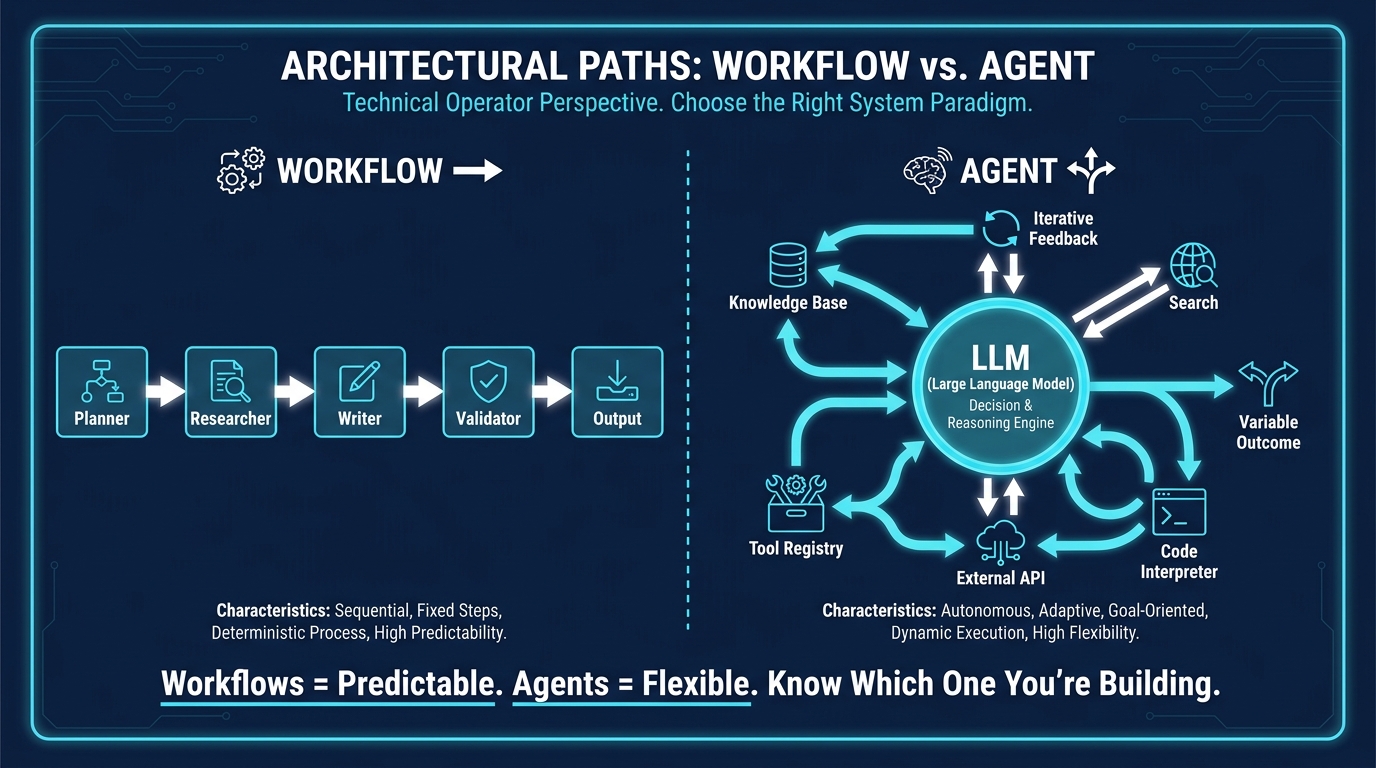
    Side-by-side diagram comparing deterministic workflow chains versus dynamic agent decision loops

    Before selecting a framework, choosing a model, or designing a single agent role, operators need to answer a foundational question that most teams skip: Are you building a workflow or an agent system?

    Anthropic’s engineering team, which has worked with dozens of teams building production systems, draws a distinction that matters operationally: workflows are systems where LLMs and tools are orchestrated through predefined code paths, while agents are systems where LLMs dynamically direct their own processes and tool usage, maintaining control over how they accomplish tasks. Both are valuable. Confusing them is where projects go wrong.

    When Workflows Are the Right Answer

    Workflows are defined by predictability. Each step is explicitly sequenced, the flow is determined by code rather than by model reasoning, and the output of each stage is the input to the next in a known, testable manner. If your task can be decomposed into fixed subtasks — generate a draft, then check it against a policy, then format it for output — you almost certainly want a workflow, not an agent.

    The operational advantages are significant. Workflows are easier to test because each node has a defined contract. They’re easier to debug because failures localize to specific steps. They’re more cost-predictable because you can enumerate the calls in advance. And they’re more compliant with governance requirements because the decision path is deterministic and auditable.

    Common production-proven workflow patterns include:

    • Sequential pipeline: Fixed step-by-step chains where each agent’s output feeds the next. Ideal for repeatable business processes like document processing, content generation pipelines, or data enrichment flows.
    • Prompt chaining with gates: A variant of sequential pipelines where programmatic checks validate intermediate outputs before proceeding, preventing downstream errors from compounding.
    • Parallelization: Multiple agents process different aspects of the same input simultaneously, with results aggregated. Useful when tasks are independent — running competitive analysis, legal review, and technical validation on a contract at the same time rather than sequentially.

    When You Actually Need Agent Autonomy

    Agents are appropriate when the task space is genuinely open-ended: when the path to completion can’t be known in advance, when decisions need to be made based on intermediate results, or when the workflow itself needs to adapt based on what the system discovers. Research tasks, complex multi-step problem-solving, and scenarios requiring tool use conditioned on real-time feedback are legitimate use cases for dynamic agent behavior.

    The tradeoff is real and should be stated plainly in your architecture document: agents trade latency and cost for flexibility. Every time an LLM decides what to do next rather than following a predetermined code path, you’re accepting variability in behavior, increased token consumption, and more complex observability requirements.

    The Production Pattern That Works Most Often

    In practice, the most reliable production multi-agent systems use a supervisor/planner-worker pattern: a central orchestrator agent that plans and routes tasks, delegating to specialized sub-agents that are essentially stateless workers with narrow, well-defined responsibilities. This hybrid gives you the flexibility of agent reasoning at the planning layer while preserving workflow-like predictability at the execution layer.

    Anthropic’s guidance on this is direct: start with the simplest solution possible, and only increase complexity when needed. Many teams fail not because they built too little but because they built agent systems for problems that a simple three-step prompt chain would have solved more reliably and cheaply.

    State Is the Hard Part: Why Most Agent Handoffs Fail

    If you survey teams running multi-agent systems in production and ask them where they spend most of their debugging time, the answer is overwhelmingly consistent: state management and agent handoffs. Not prompt quality, not model selection, not tool reliability. The space between agents.

    The root cause is a deceptively simple architectural habit: treating state as implicit conversation history rather than as an explicit, typed data structure that is actively managed. When Agent A passes its entire message history to Agent B, you’re not doing state management — you’re doing context dumping. The receiving agent has to infer what actually matters from an unstructured blob of text, which introduces ambiguity, context window pressure, and compounding errors as the workflow progresses.

    Explicit State Models Are the Production Default

    Production systems in 2026 have converged on treating shared state as a first-class architectural object. This means defining a typed schema — a structured data model — that represents the canonical workflow state. Each agent reads from this shared state store, performs its task, and writes back structured results. Handoffs are not “send everything to the next agent.” They are typed transitions: “here is the specific subset of state this agent needs to receive, and here is the contract for what it must write back.”

    LangGraph formalizes this with its StateGraph model, where every node receives a typed state object and returns a typed state update. This design makes the state transitions explicit, testable, and inspectable at every step — which is foundational for debugging and for building replay and recovery capabilities.

    The Three State Failure Patterns to Watch For

    Understanding the most common failure modes helps teams build defenses before they encounter them in production:

    • State bloat: The shared state object grows unbounded as agents add context without pruning it. This drives up token costs on every subsequent agent call (since each agent loads the full state into its context window) and can eventually exceed context limits, causing silent truncation or hard failures. The fix is explicit state pruning policies — define what gets archived versus what stays in the active state object.
    • Conflicting writes: When multiple agents run in parallel and can both write to the same state fields, you get race conditions and overwrites. In distributed systems, this is a classic problem solved by transactions and locks. In multi-agent systems, it’s often ignored until it produces corrupted state. Design your state schema so that parallel agents write to distinct fields, with a merge step that explicitly resolves conflicts.
    • Semantic drift: The meaning of a state field changes as it passes through agent hands. Agent A writes summary as a technical overview; Agent C expects summary to be a customer-facing description. The type system doesn’t catch this — both are strings. The fix is documentation-first state schemas, where every field has a semantic contract, not just a type.

    Checkpointing and Recovery

    Long-running multi-agent workflows need durable state checkpointing. If an agent fails at step seven of a fifteen-step workflow, you need to be able to resume from step seven — not restart from step one. This requires a workflow engine that persists state snapshots at defined intervals, with replay capabilities that can reconstruct the workflow from any checkpoint.

    LangGraph’s persistence layer and durable workflow engines like Temporal address this directly. Teams building on raw API calls without this infrastructure typically discover the need for it the hard way, after a long-running task fails in the final stages for the third time and they’re paying for the retry from scratch.

    The Framework Tradeoffs Nobody Tells You

    The three dominant multi-agent orchestration frameworks in 2026 — LangGraph, CrewAI, and AutoGen/AG2 — are genuinely different products for different operator needs. Most framework comparisons focus on feature lists. Operators need to understand the operational tradeoffs: what each framework makes easy, what it makes hard, and what that means for your maintenance burden over a 12-month horizon.

    LangGraph: Maximum Control, Maximum Responsibility

    LangGraph is the choice for teams that need deterministic, production-grade orchestration where the control flow cannot be left to model interpretation. Its core mental model is an explicit state graph: you define nodes, edges, and a typed shared state schema. The LLM reasons within nodes; it does not control the graph structure.

    The operational advantage is significant: LangGraph gives you the most inspectable, debuggable, and controllable multi-agent architecture available. Every state transition is auditable. The graph structure is readable by a human. Integration with LangSmith provides distributed tracing out of the box.

    The tradeoff is that LangGraph requires more upfront investment. You need to model your workflow as an explicit graph, define your state schema in advance, and write the routing logic explicitly. For teams with a clear, stable workflow that needs to run reliably at scale, this investment pays back. For teams prototyping in a fast-changing environment, it can feel like over-engineering in the early stages.

    CrewAI: Fast Role-Based Workflows with a Governance Ceiling

    CrewAI’s mental model is a team of agents with defined roles, goals, and tools. You describe what each agent does and who coordinates them; the framework handles much of the orchestration mechanics. This makes it the fastest path to a working multi-agent prototype, particularly for business workflow automation where the “team” metaphor maps naturally to the task — a research agent, a writing agent, a fact-check agent.

    The governance ceiling appears at scale. Because CrewAI abstracts much of the orchestration, operators have less visibility into and control over exactly how tasks are decomposed, delegated, and resolved. For regulated industries, complex compliance requirements, or systems where you need to audit every decision, this abstraction becomes a liability. CrewAI works well when you need speed-to-prototype and your governance requirements are modest. It struggles when you need to explain exactly what happened and why.

    AutoGen/AG2: Conversational Collaboration for Code-Heavy Workloads

    AutoGen’s paradigm is agent-to-agent conversation: agents exchange messages with each other to collaborate on a task, with the conversation driving the workflow. This makes it exceptionally well-suited for research-style tasks and software development workflows where agents need to iteratively refine outputs through dialogue — a coder agent produces code, a critic agent reviews it, the coder revises based on feedback.

    The operational challenge with AutoGen is conversation length management. When agents converse, context windows fill up fast, and the longer the conversation, the more prone the system is to losing coherence or looping. Teams running AutoGen in production need explicit conversation management policies: when to summarize, when to reset context, and how to prevent unbounded conversation depth.

    The Rule No Framework Can Override

    Anthropic’s engineering team states this plainly: frameworks simplify standard low-level tasks but often create extra layers of abstraction that obscure the underlying prompts and responses, making them harder to debug. Their recommendation — start by using LLM APIs directly, and only adopt a framework when the manual implementation overhead genuinely justifies it — is worth taking seriously.

    The best operators know their framework’s internals well enough to step outside it when needed. Incorrect assumptions about what’s happening under the hood are among the most common sources of production failures.

    Cost Compounds Faster Than Your Team Expects
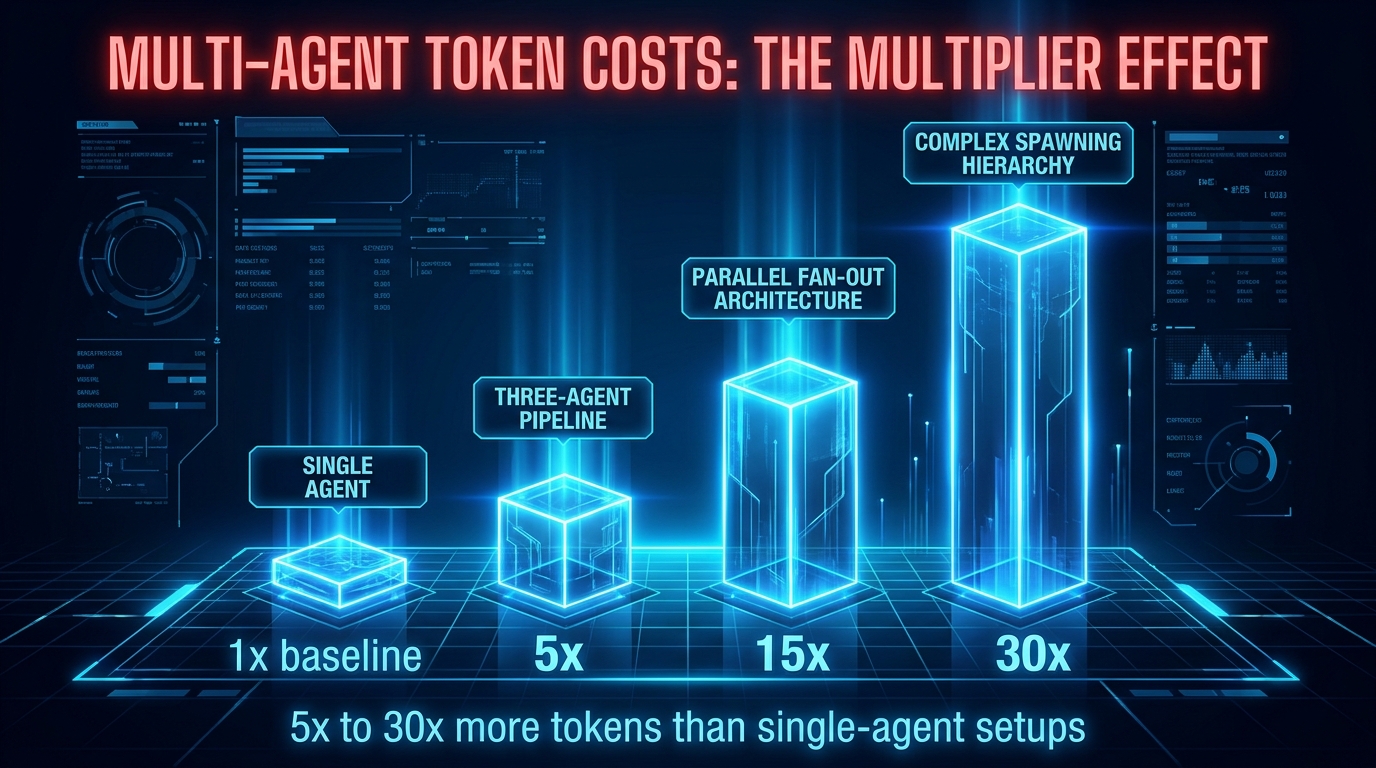
    Bar chart showing token cost multipliers for multi-agent AI architectures from single agent baseline to 30x for complex spawning hierarchies

    Single-agent AI has a predictable cost profile: you make a call, you pay for the tokens. Multi-agent AI has a multiplication problem that most operators don’t model until they see their first month’s API bill.

    Current data puts the token overhead for multi-agent systems at 5x to 30x a comparable single-agent setup, depending on architecture. A simple three-to-five agent pipeline typically runs at 5x the token cost of a direct single-agent approach. Parallel fan-out architectures with multiple concurrent agents can reach 15x. Complex hierarchical systems with spawning sub-agents — where a planner agent creates new agents to handle sub-tasks — can reach 30x or higher on complex inputs.

    Per-task costs in the $4 to $30 range for moderate workflows and $25 to $100+ for complex architectures are well-documented in production environments. At low volume, this is manageable. At the scale where multi-agent systems become interesting, this arithmetic demands deliberate cost architecture.

    The Four Cost Drivers to Engineer Against

    Understanding the mechanisms of cost multiplication helps operators address them at the design stage rather than after deployment:

    • Repeated context loading: Every agent call that loads the full shared state or conversation history into its context window pays for every prior token, again. A 10-agent sequential pipeline where each agent loads the full prior context doesn’t just cost 10x a single call — it costs 1 + 2 + 3 + … + 10 times the base call cost. The fix is selective context passing: give each agent only the state fields it needs, not the entire history.
    • Verification and retry loops: When agents validate each other’s outputs and request revisions, you pay for multiple model calls to accomplish what a single well-designed prompt might handle. Excessive retry loops are both a cost signal and a quality signal — they usually indicate that the upstream agent’s output specification or the validation agent’s criteria are insufficiently precise.
    • Spawning without bounds: Planner agents that can dynamically create sub-agents are powerful but dangerous from a cost perspective. Without hard limits on spawning depth and agent count, a complex input can trigger an exponential expansion of the agent graph, each leg consuming tokens. Set hard limits — both on the number of agents that can be created and on the maximum nesting depth of sub-agent hierarchies.
    • Model misallocation: Using frontier models for every agent in a workflow is the most common, most avoidable cost waste. Routing tasks — deciding which agent handles what — doesn’t require GPT-4 class reasoning. Formatting agents, summarization agents, and classification agents can often run on smaller, cheaper models with no meaningful quality loss. Model routing by task complexity is a cost governance primitive, not an optimization afterthought.

    Hard Budgets and Circuit Breakers

    Effective cost governance in multi-agent systems treats token budgets as financial controls, not soft suggestions. This means implementing hard per-task, per-agent, and per-workflow token caps at the orchestration layer — not as prompt instructions (agents don’t reliably enforce their own token consumption) but as platform-level enforcement. If a workflow exceeds its token budget, it fails gracefully with an informative error rather than running to completion at five times the projected cost.

    Circuit breakers extend this further: they detect anomalous cost patterns — a workflow consuming 10x its typical token volume, or an agent retry count exceeding threshold — and pause execution for human review. This is especially important during the first weeks after deploying a new workflow in production, when edge cases that weren’t covered in testing can trigger expensive runaway loops.

    Prompt and context caching — where identical or near-identical context passed to multiple agents in the same session can be served from cache rather than recalculated — provides meaningful savings on workflows with shared system context or background information. Most major model providers now support this; it’s worth verifying your framework passes cache-eligible context correctly.

    Observability or Blindness: You Cannot Debug What You Cannot Trace
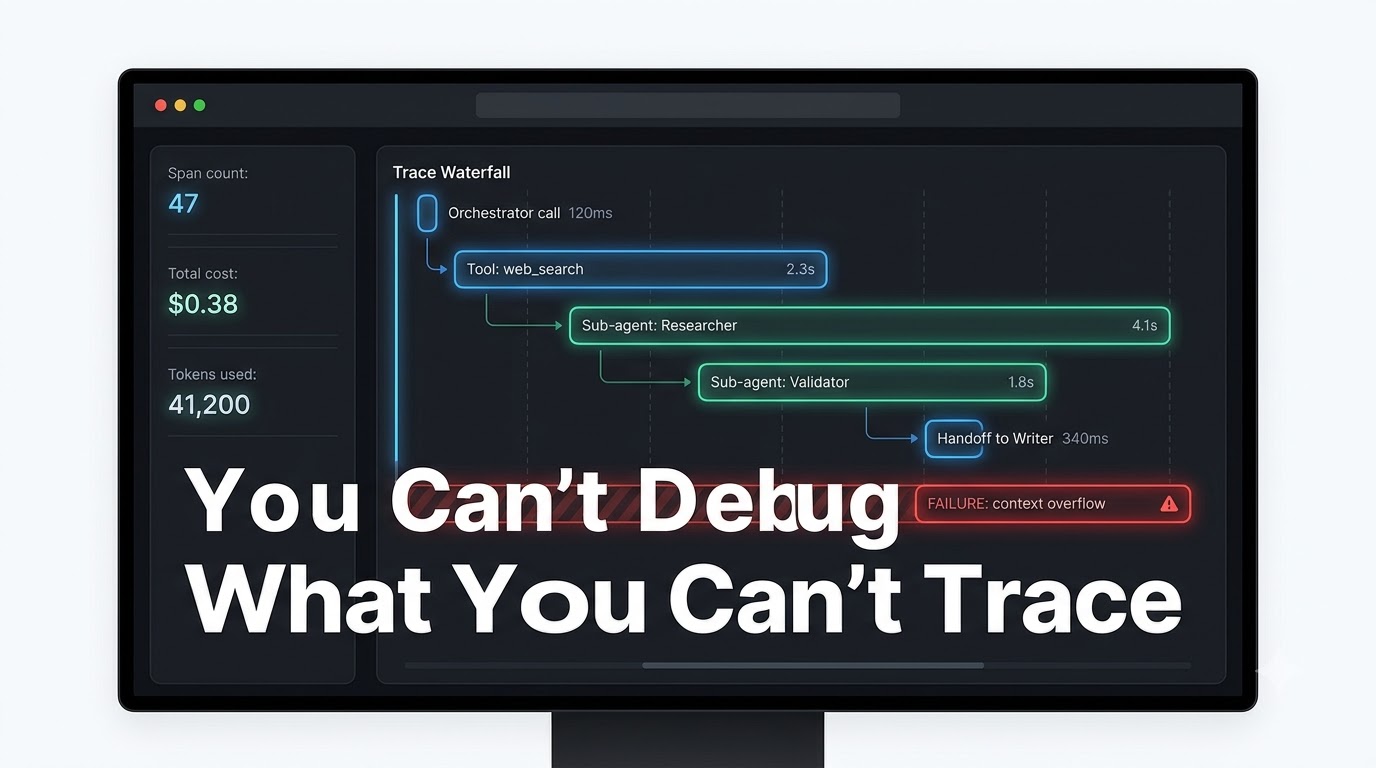
    Multi-agent AI observability dashboard showing trace waterfall diagram with agent steps, timing, costs, and a red failure indicator

    A single-agent system fails in a visible way: you made a call, you got a bad response, you know exactly what the model received and what it returned. A multi-agent system fails in a distributed way: by the time the final output is wrong, the root cause may have originated three or four agent calls earlier, been silently amplified by each subsequent agent, and arrived at the output layer looking like a model quality problem when it was actually a context contamination problem in step two.

    This is why the expert consensus in 2026 is categorical: observability is not optional infrastructure for multi-agent systems. It is foundational architecture. Teams that treat tracing and monitoring as a later concern — something to add after the system is working — spend months debugging in the dark.

    What Production Tracing Actually Requires

    Effective observability for multi-agent workflows requires tracing at a different granularity than standard application monitoring. You need to capture, at minimum:

    • Span-level traces per agent call: Each agent invocation is a span, with a parent span for the overall workflow. The trace tree shows you the full execution graph — which agents ran, in what order, for how long, with what cost.
    • Full input/output logging per agent: Not just “Agent B ran.” What exact input did Agent B receive? What exact output did it return? What tools did it call, with what arguments, and what did those tools return? Without this, you cannot reconstruct failure scenarios.
    • Token and cost attribution per span: Which agent in a workflow consumed what proportion of the total tokens? This both supports cost optimization and surfaces agents whose token consumption is anomalously high — often a signal of poorly scoped instructions or state bloat.
    • State snapshots at key checkpoints: Capturing the shared state object at the beginning and end of each major stage gives you the ability to replay workflows from any point, test modified agents against historical state snapshots, and conduct post-mortems on failed runs without needing to reproduce the input conditions.

    The OpenTelemetry Layer

    The emerging standard is OpenTelemetry-based tracing applied to multi-agent workflows, with LLM-specific instrumentation libraries extending standard OTEL spans to capture model-specific metadata: token counts, model IDs, temperature settings, prompt templates, and evaluation scores. Tooling in this space has matured significantly — platforms like LangSmith, Arize Phoenix, and Weights & Biases now offer purpose-built multi-agent trace visualization that shows the full agent interaction graph as a single coherent trace, rather than disconnected individual model calls.

    Honeycomb’s Agent Timeline product takes this further by allowing operators to annotate traces with business context — correlating a trace showing a failed agent handoff with the downstream business outcome it affected, which closes the loop between technical observability and business impact measurement.

    Eval-Driven Debugging

    The most sophisticated teams are building evaluation pipelines that run automatically against production traces. When a workflow produces an output that scores below threshold on a quality metric, the system automatically captures the full trace, the input, the output, and the intermediate state at each step — creating a labeled failure case that can be added to a regression test suite and used to identify the exact agent and step where quality degraded.

    This “trace to eval” pipeline turns production failures from debugging emergencies into structured data. Over time, it builds an empirical map of which agent interactions are most fragile under which input conditions — the kind of knowledge that turns reactive firefighting into proactive system improvement.

    Trust Boundaries and the Security Risk Hidden in Every Handoff
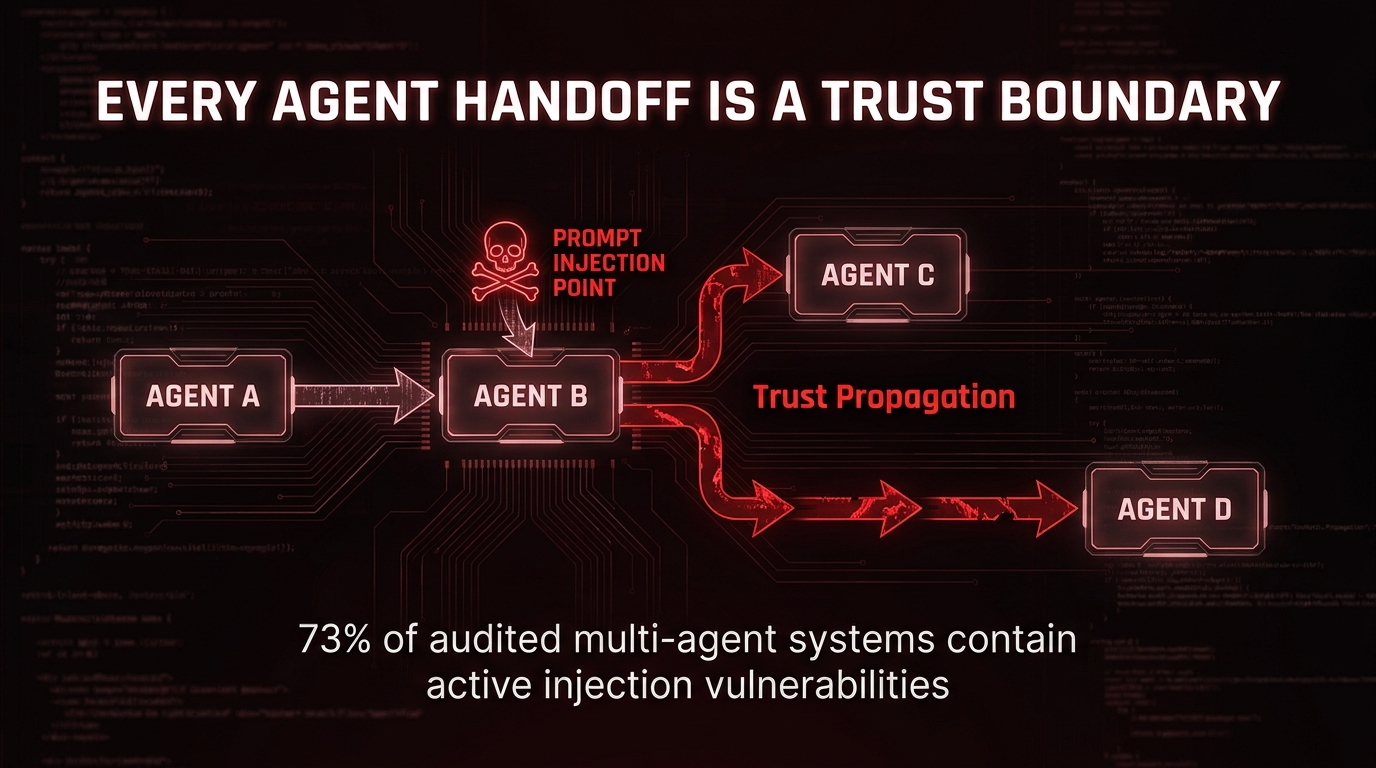
    Multi-agent AI security diagram showing prompt injection point at Agent B with contamination spreading downstream through agent chain

    Multi-agent systems have a security property that single-agent systems do not: the output of one agent becomes the input of another. If an attacker can influence the output of Agent B, they have an indirect channel into every downstream agent that receives Agent B’s output as input. This is not a hypothetical attack surface. It is the dominant production AI security risk in 2026, sitting at the top of the OWASP Top 10 for LLM applications.

    Audits of production multi-agent systems in 2026 found prompt injection vulnerabilities present in approximately 73% of systems reviewed. The attack vector is straightforward: content that an agent processes as data — a web page it scrapes, a document it analyzes, a database record it reads — contains embedded instructions that hijack the agent’s behavior. In a single-agent system, this affects that one call. In a multi-agent system, the hijacked agent’s output flows downstream, and any agent that trusts that output without validation is now operating under attacker influence.

    The Zero-Trust Mindset for Agent Architecture

    The expert consensus has moved clearly in one direction: treat every agent handoff as a trust boundary. The receiving agent should not assume that the context it receives from a prior agent is clean. This doesn’t mean every agent runs full adversarial validation on every input — that would be prohibitively expensive and create latency problems. It means designing the system architecture to contain the blast radius of a compromised agent.

    Practical zero-trust principles for multi-agent systems:

    • Principle of least privilege for tools: Each agent should only have access to the tools and external systems it specifically needs for its task. An agent that reads from a database should not also have write access unless that is explicitly required by its role. Over-permissioned tools turn a compromised agent into a much larger incident.
    • Input validation at handoff boundaries: Define a typed schema for each agent’s expected inputs and validate incoming messages against it before the agent processes them. Inputs that don’t conform to the schema should be rejected, not silently coerced. This catches both injection attempts and upstream agent errors.
    • Privileged action separation: High-blast-radius actions — writing to databases, sending external communications, modifying files, making API calls with side effects — should be executed by a dedicated action-execution layer that sits outside the agent reasoning chain. Agent reasoning produces a structured action proposal; a separate, more rigidly controlled layer executes it after validation.
    • Sentinel agents for governance: The most mature deployments include dedicated security or governance agents that review the outputs of reasoning agents before those outputs are passed downstream or executed. The sentinel doesn’t have tools or write access — its only job is to evaluate whether an output contains policy violations, injection signatures, or anomalous instructions.

    Identity and Auditability for Multi-Agent Systems

    As agent systems take consequential actions — sending emails, submitting transactions, modifying records — the question of “which agent did this, on whose authorization” becomes both a security question and a compliance question. Production systems need cryptographically signed agent identities and an immutable audit trail that records not just what was done, but which agent proposed it, which agent or human authorized it, and which agent executed it.

    This is not just a governance formality. When an incident occurs, the audit trail is how you reconstruct the causal chain, identify the point of failure or compromise, and demonstrate to regulators or customers what happened and why. Multi-agent systems without this infrastructure cannot meet compliance requirements in regulated industries, full stop.

    Human-in-the-Loop Oversight That Scales Without Becoming a Bottleneck
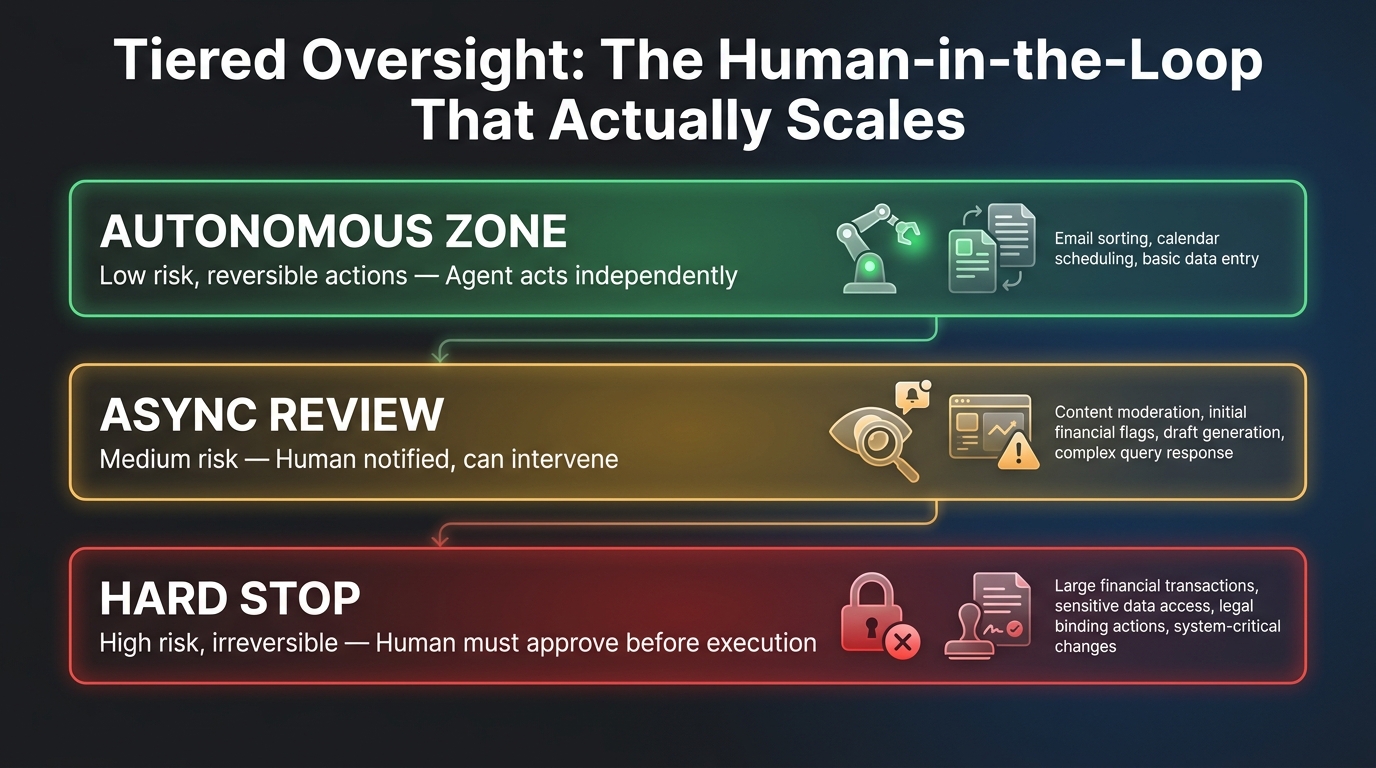
    Three-tier human oversight model for AI agents showing autonomous zone, async review tier, and hard stop tier with example actions

    About 70% of organizations running AI agents in 2026 operate a model where the agent recommends and a human approves before any irreversible or external-facing action is executed. This is the right instinct. The problem is that naive human-in-the-loop implementation doesn’t scale — it turns into a queue of agent outputs that a human must review and approve, becoming a bottleneck that negates the speed and automation value the multi-agent system was supposed to provide.

    The shift that’s happening across enterprise deployments is from “human in the loop on every step” to “human on the loop for exceptions.” Agents operate autonomously within defined boundaries; humans are notified and can intervene when the system detects that those boundaries have been exceeded. This is a governance design problem, and solving it well is one of the characteristics that distinguishes teams that get value from multi-agent AI from teams that get a slow, expensive, human-bottlenecked process.

    Tiered Risk Classification: The Foundation of Scalable Oversight

    Scalable human oversight starts with classifying every action type your multi-agent system might take into three risk tiers:

    • Tier 1 — Autonomous: Low-risk, reversible, internal actions where the cost of an error is low and correctable. Reading data, generating drafts for human review, updating internal notes, running analyses. Agents act without human approval; the action log is available for retrospective review.
    • Tier 2 — Async review: Medium-risk actions with moderate consequences or moderate reversibility. Sending internal communications, creating external-facing drafts, updating customer records, scheduling actions with a future execution window. The agent proposes the action and proceeds, but the responsible human receives a notification with a review window — if the human takes no action within the window, the action proceeds; if they flag it, execution is paused.
    • Tier 3 — Hard stop: High-risk, irreversible, or policy-sensitive actions. Sending external communications to customers or partners, executing financial transactions, deploying to production, deleting records, changing access permissions. Execution is blocked until a human explicitly approves the proposed action.

    The specific actions that belong in each tier will vary by organization and domain, but the structure is consistent across most production deployments. Importantly, the tier assignment should be enforced at the platform level, not by prompting the agent to self-assess its risk. Agents are not reliable risk classifiers for their own actions. The platform decides; the agent executes.

    Escalation Routing and Approval Latency

    Tier 3 approvals create a latency problem: the workflow is blocked waiting for a human. Designing this well means minimizing both the frequency of Tier 3 triggers (by scoping agent authorities appropriately) and the time-to-approve when they do trigger (by routing approvals to the right person with the right context).

    Smart approval routing sends the approval request to the human most likely to be able to evaluate it quickly — the product owner for content approvals, the finance lead for transaction approvals — with a pre-formatted summary of the proposed action, the context that led to it, and the options available (approve, reject, edit, escalate). The goal is to give the approver everything they need to decide in under 30 seconds, not a raw dump of agent conversation history.

    Timeout policies matter too. If an approval request goes unresponded for a defined window, the workflow should fail safely — not proceed without approval, not silently abandon the task, but surface explicitly as a timed-out approval with the relevant human notified of the pending item in their queue.

    The Audit Trail as Organizational Memory

    Every approval gate interaction — the proposed action, the human decision, the timestamp, the reviewer identity, the context at the time of decision — is valuable organizational data. Over time, approval gate logs reveal patterns: which action types are most frequently rejected (signal that the agent’s judgment needs recalibration), which approval requests take the longest to process (signal that routing or context presentation needs improvement), and which reviewers are approving at rates significantly higher or lower than peers (signal for calibration discussions).

    Teams that review approval gate telemetry monthly consistently find opportunities to either expand autonomous operation (moving frequently-approved action types to Tier 2 or Tier 1) or tighten agent authority (recognizing that certain action types are being rejected more than anticipated). This continuous calibration is what allows human oversight to remain meaningful as the agent system scales, rather than degrading into rubber-stamping.

    When to Flatten Your Hierarchy: The Over-Engineering Trap

    Multi-agent architecture has an aesthetic pull. Hierarchical systems with specialist agents, orchestrators, validators, and governance layers look sophisticated in architecture diagrams. Teams that build them feel like they’re doing serious AI engineering. This aesthetic pull is one of the most reliable predictors of project failure.

    The failure mode is architectural over-complexity: building a six-agent hierarchical system for a problem that a two-step prompt chain would solve more reliably, more cheaply, and with less operational overhead. Every additional agent you add is a coordination cost, a potential failure point, an additional source of context window consumption, and another moving piece to monitor and debug.

    The Simplest System That Solves the Problem

    Anthropic’s engineering guidance is blunt on this point: for many applications, optimizing a single LLM call with retrieval and in-context examples is sufficient. Most teams building agentic systems should regularly ask: does this actually require agent autonomy, or would a well-designed prompt chain with a few tool calls accomplish the same thing?

    The signals that a system is over-architected for its problem:

    • Most agent handoffs carry the same context forward unchanged. If Agent C mostly passes Agent B’s output to Agent D with minor formatting changes, Agent C is probably unnecessary.
    • Failure rates are higher than a single-agent equivalent. Each agent you add to a chain multiplies the failure probability. If a sequential five-agent pipeline each have a 95% success rate, the end-to-end success rate is 0.95^5 ≈ 77%. A simpler system with two agents might achieve higher end-to-end reliability even if each individual step is slightly lower quality.
    • The system requires constant human intervention to stay on track. If operators frequently need to restart workflows, manually correct intermediate outputs, or override agent decisions, the system’s autonomous capability is largely theoretical. Simplifying the architecture often produces better actual autonomy than adding more agents to compensate for coordination failures.
    • Development time is dominated by framework configuration rather than task logic. When the team spends more time wiring agents together than improving the actual task performance, the framework is adding complexity without adding value.

    Hierarchical Systems Are Earned, Not Designed In Advance

    The most reliable path to a well-architected multi-agent system is iterative expansion rather than upfront comprehensive design. Start with the simplest system that could plausibly work — often a single agent with several tools, or a two-agent planner/executor pattern. Identify the specific bottlenecks and failure modes in that system. Add architectural complexity only in response to specific observed problems, not in anticipation of problems you might encounter later.

    Teams that start simple and evolve their architecture based on empirical feedback consistently build more reliable systems than teams that begin with elaborate multi-agent designs. The former are adapting to reality; the latter are adapting reality to their design — a much harder problem.

    The Operator’s Pre-Production Checklist

    Before a multi-agent workflow ships to production, there’s a set of questions that experienced operators have learned — usually the hard way — to answer explicitly rather than assume. This checklist is not exhaustive, but covering these points will prevent the majority of production failures documented in the MAST study and in incident postmortems from the past year.

    Architecture and State

    • Is shared state defined as an explicit typed schema, or are agents passing raw conversation history?
    • Are state mutation rules defined — which agents can write to which state fields, and in what order?
    • Is there a checkpointing mechanism that enables workflow recovery without full restart?
    • Have you defined a maximum state size and a pruning policy for state fields no longer needed by downstream agents?

    Cost Governance

    • Is there a documented per-task cost estimate, based on a realistic token count across all agents in the workflow?
    • Are hard token budgets enforced at the platform level, not as prompt instructions?
    • Are agent tool permissions scoped to minimum necessary access?
    • Is model routing configured so that low-complexity tasks use smaller, cheaper models?
    • Are circuit breakers in place to pause execution when cost anomalies are detected?

    Observability

    • Are span-level traces implemented for every agent call, with parent spans capturing the full workflow trace?
    • Is full input/output logging in place for each agent, including tool calls and tool responses?
    • Is there a cost attribution mechanism that shows token usage per agent per workflow run?
    • Are state snapshots captured at key checkpoints for replay and post-mortem capability?
    • Is there an alerting policy for trace anomalies — unusually high token consumption, excessive retry counts, or abnormal failure rates?

    Security

    • Has each agent’s tool access been reviewed against the principle of least privilege?
    • Are there input validation schemas enforced at agent handoff boundaries?
    • Is privileged action execution separated from agent reasoning, with a validation layer between proposal and execution?
    • Is there an immutable audit trail for all consequential actions, including which agent proposed, who authorized, and what was executed?
    • Has the system been evaluated for prompt injection attack surfaces, particularly in agents that process external content?

    Human Oversight

    • Have all action types been classified into the three risk tiers (autonomous, async review, hard stop)?
    • Are Tier 3 approvals enforced at the platform level, not by agent self-assessment?
    • Is approval routing configured to reach the appropriate reviewer with sufficient context to decide quickly?
    • Is there a timeout policy for unresponded approval requests, with safe-failure behavior?
    • Is there a regular cadence for reviewing approval gate telemetry to calibrate tier assignments?

    What Separates the Systems That Work From the Rest

    The MAST study’s 41–87% failure rates are not an argument against multi-agent AI. They’re a map of where the complexity actually lives — and it lives in coordination, governance, and state management, not in model quality or framework selection.

    The teams running multi-agent systems that deliver reliable, sustainable production value share a consistent set of operating principles. They’re not using the newest or most powerful frameworks; they’re using the most appropriate ones with a deep understanding of the tradeoffs. They treat state as a first-class architectural concern, not an afterthought. They enforce cost governance and security at the platform layer, not by trusting agents to manage themselves. They build observability before they build complexity. They start simple and earn their way toward more sophisticated architectures through empirical evidence, not architectural ambition.

    Most importantly, they’re honest about what agents are good at and what they’re not. Agents are extraordinarily capable at handling open-ended tasks with complex decision trees in a way that would be impractical to code explicitly. They’re poor at reliably enforcing their own resource limits, security boundaries, and quality standards — those need to be built into the surrounding system.

    The operator’s job is to build that surrounding system: the state model, the observability layer, the cost governance, the security architecture, the human oversight tiers. Do that work well, and the multi-agent system inside it has a real chance to perform. Skip it, and you’ll spend months debugging coordination failures in the dark, wondering why the model keeps making mistakes that have nothing to do with the model.

    The coordination gap is real. It’s also closed by design, not by accident.

  • From Zap Hell to Orchestration Layer: How to Restructure Your AI Workflows Before They Break You

    Before vs After: AI Workflow Architecture — Zap Hell chaos vs clean three-layer orchestration

    There’s a moment most automation-heavy teams eventually hit. Nobody schedules it. Nobody plans for it. But it arrives with quiet violence: a critical workflow breaks at 2 a.m., nobody knows who owns it, the Zap has seventeen steps, three of them are undocumented API calls, and the person who built it left the company eight months ago.

    This is Zap Hell. And in 2026, it’s no longer just a productivity inconvenience — it’s an architectural liability. Because now those same tangled automation chains aren’t just connecting a CRM to a spreadsheet. They’re routing decisions made by AI agents, triggering language model calls, and executing actions that affect real customers in real time.

    The stakes of getting workflow architecture wrong have risen dramatically. Yet the design patterns most teams are using haven’t evolved at the same pace. They’re still bolting AI steps onto automation chains designed for a simpler era — one app triggering another, one webhook calling a function — and wondering why everything feels fragile, expensive to maintain, and impossible to debug.

    This piece is about the structural shift that needs to happen: moving from point-to-point automation chains to a properly layered orchestration architecture. Not a tool recommendation list. Not a vendor pitch. A genuine rethinking of how workflows should be designed, owned, and operated when AI is involved.

    We’ll cover how to diagnose what you have, why the old model breaks under AI workloads, what a three-layer architecture actually looks like in practice, how to choose the right tools for each tier, and how to migrate without blowing up what’s already working. Let’s start with the diagnosis.

    What “Zap Hell” Actually Looks Like — and Why Most Teams Don’t See It Coming

    Diagnostic infographic: Signs You're in Zap Hell — automation sprawl warning indicators

    Zap Hell doesn’t arrive fully formed. It compounds incrementally, which is precisely what makes it so dangerous. The first Zap someone builds is always elegant. A new lead hits the CRM, a notification fires in Slack, a row gets added to a spreadsheet. Clean. Fast. Satisfying. Then, six months later, that same lead trigger also needs to update a Notion database, fire a webhook to a marketing tool, and now — because the team added an AI assistant — generate a personalized outreach email via GPT-4o before any of that happens.

    Nobody redesigned the architecture. They just added steps. And then added more.

    The Compounding Symptoms

    By the time most teams recognize they’re in Zap Hell, the symptoms are already severe. Here’s what the pattern typically looks like across organizations at the point of recognition:

    • Single-owner concentration: A significant portion of mission-critical automation is owned by one or two people. When they’re unavailable, the workflow is effectively a black box. Nobody else knows why certain steps exist, what the failure conditions are, or what downstream systems depend on the output.
    • Silent failure as the default state: Zapier and most lightweight automation tools are not designed to surface non-fatal errors loudly. If an AI step returns a malformed response that still technically “succeeds” — wrong format, truncated output, off-context reasoning — the Zap continues and nobody knows. The data corruption happens silently.
    • Depth without documentation: Workflows routinely reach ten, fifteen, even twenty sequential steps. Each step was logical at the time of addition, but there is no written rationale for the chain. When something breaks at step fourteen, the diagnostic process becomes archaeological.
    • Sprawl across accounts and workspaces: Across a mid-sized organization, automation tools proliferate across departments. Marketing has its own Zapier account. Sales has another. An ops manager built a completely separate Make.com workspace. These systems overlap, duplicate each other, and sometimes conflict — and nobody has a map of what exists where.
    • Cost opacity: Task-based pricing models (where every action step in every workflow run counts as a billable task) make it nearly impossible to forecast costs as AI steps multiply. A single AI-augmented workflow that runs thousands of times per month can generate enormous task counts, and most teams have no visibility into this until the invoice arrives.

    The AI Amplification Problem

    All of these symptoms existed before AI entered the automation stack. But AI workloads amplify every one of them. An LLM call inside a workflow isn’t just another action step — it introduces non-determinism, latency variance, token cost, and semantic error potential that no trigger-action automation tool was designed to handle gracefully.

    When a Zapier step calls OpenAI and the model returns a response that’s technically a 200 OK but semantically useless — a hallucinated data field, a misunderstood instruction, an output in the wrong schema — the workflow continues. It doesn’t retry with a different prompt. It doesn’t flag the anomaly. It passes the bad output downstream, where it either causes a visible failure several steps later or, worse, silently corrupts a record that gets used in a business decision.

    According to a 2026 HFS Research and Unqork survey, 43% of enterprises expect AI to generate new forms of technical debt, and 50% cite legacy integration complexity as a top concern. The same research found that most organizations spend two to seven times their software license cost on implementation and integration overhead. That ratio gets significantly worse when the workflows being maintained are tangled automation chains with embedded AI steps and no observability layer.

    The problem is structural. Which means the solution has to be structural too.

    Why Point-to-Point Automation Fails Under AI Workloads

    To understand why the architectural shift matters, it helps to be precise about what point-to-point automation is actually doing — and where its design assumptions break down.

    The trigger-action model that powers Zapier, Make, and similar tools is fundamentally a linear event-driven pipeline. Something happens (the trigger), a series of predetermined steps execute in sequence, and a final output is produced. This model is brilliant for deterministic, predictable operations: “When a form is submitted, create a CRM record, send a confirmation email, and notify Slack.” Each step’s inputs and outputs are known in advance. Failures are usually binary — either an API call succeeds or it doesn’t.

    Where the Model Breaks

    AI workloads violate nearly every assumption that makes this model elegant:

    Non-determinism. LLMs don’t always return the same output for the same input. Temperature settings, model versioning, API provider changes, and context window variations all introduce variance. A workflow that works perfectly today may produce subtly different outputs tomorrow without any code change. Linear automation chains have no mechanism for detecting or handling this drift.

    Long-running execution. AI agents don’t complete tasks in milliseconds. A workflow that involves a research agent browsing the web, synthesizing content, and writing a structured report might run for several minutes — or longer. Zapier’s design assumes steps complete quickly. Long-running tasks hit timeout limits, lose state on failure, and have no checkpoint mechanism to resume from the point of interruption.

    Conditional complexity. Real AI workflows aren’t straight lines. They branch. An AI agent might determine that the input data requires a different processing path, that a human needs to review an ambiguous case, or that a prior step needs to be retried with different parameters. Linear pipelines can only handle this with increasingly convoluted conditional logic — the automation equivalent of deeply nested if-else statements.

    State loss on failure. In a traditional Zapier chain, if step eight fails, the workflow stops. Any intermediate state generated by steps one through seven is effectively discarded. The next run starts from scratch. For a simple five-step automation, this is manageable. For a multi-agent workflow that has already made three API calls, generated two documents, and updated a database record, losing all of that progress on a single downstream failure is both costly and potentially dangerous.

    No governance primitives. Who can modify a workflow? Who needs to approve a change? What happens if an agent takes an action that crosses a compliance boundary? Lightweight automation tools were not built with enterprise governance in mind. They optimize for creation speed, not operational control.

    The Scale Ceiling

    These limitations stay manageable at small scale. A team with twenty Zaps can survive Zap Hell through heroic individual effort and tribal knowledge. A team with two hundred Zaps — many of them incorporating AI steps, multi-step agent chains, and connections to sensitive systems — cannot. The complexity compounds faster than human memory can track it, and the blast radius of any single failure expands with every additional workflow in the ecosystem.

    According to current industry reporting, 57% of organizations now have AI agents running in production, but observability is consistently rated as the lowest-performing part of their AI engineering stack. They’ve shipped the agents but not built the infrastructure to watch them. That combination is precisely what turns manageable automation into something that fails unpredictably and expensively at scale.

    The Three-Layer Architecture That Replaces Spaghetti Flows

    The Three-Layer Orchestration Architecture: Trigger Layer, Orchestration Engine, Execution Workers

    The architectural shift that’s emerging across mature engineering teams in 2026 isn’t about replacing every tool you have. It’s about clearly separating concerns into distinct layers — and using different tools for each layer based on what that layer actually needs to do well.

    The model that’s proving most durable is a three-tier stack:

    Layer 1: The Trigger and Integration Layer

    This is the entry point for events and the connector to external systems. It’s where Zapier, Make, n8n, and similar tools belong. This layer handles SaaS connectivity, webhook reception, scheduled triggers, and straightforward data transformation between systems. It is deliberately kept thin — its job is to receive signals and route them to the orchestration layer, not to contain business logic or AI reasoning.

    The critical discipline here is not overloading this layer. If you’re doing meaningful processing, decision-making, or AI calls inside a Zapier chain, you’ve already crossed the boundary into territory that belongs in layer two. Keep the integration layer responsible for connectivity and event dispatch only.

    Layer 2: The Orchestration Engine

    This is the brain of the system. It receives events from the trigger layer, manages workflow state, handles routing and branching logic, coordinates agent calls, manages retries and error recovery, and enforces governance rules. The orchestration layer knows where a workflow is in its execution, what has already happened, and what needs to happen next — even if the process is interrupted and resumed hours later.

    Tools that belong in this layer include Temporal and Apache Airflow for durable, long-running workflow orchestration; LangGraph for AI-specific stateful agent orchestration; and Prefect or Dagster for data pipeline orchestration. The common characteristic is that they all provide explicit state management, checkpoint and retry capabilities, and visibility into what’s happening inside a running workflow.

    Layer 3: The Execution Workers

    This is where work actually gets done — AI agent calls, LLM inference, RPA bot actions, external API requests, database writes. Execution workers are discrete, composable units that do one thing well and report their results back to the orchestration layer. They don’t make routing decisions. They don’t manage state. They execute a task, return a structured result, and wait for the next instruction.

    This separation is what makes the architecture resilient. If an execution worker fails, the orchestration engine knows exactly where in the workflow the failure occurred, can apply retry logic, can route to a fallback worker, or can surface a human-in-the-loop decision — without losing any of the progress that came before.

    Why the Separation Matters in Practice

    The three-layer model creates something the trigger-action model fundamentally lacks: a single source of truth for workflow state. At any point in time, you can query the orchestration layer and see exactly what every active workflow is doing, where it is in its execution, what inputs it received, and what outputs it has produced so far. This is the architectural foundation that makes debugging, auditing, governance, and iterative improvement possible.

    Without it, you’re operating blind — managing a fleet of autonomous processes with no control tower.

    Auditing What You Have: The Automation Inventory Method

    Before you can restructure your workflow architecture, you need an honest picture of what you’re actually running. Most teams that attempt to modernize their automation stack underestimate how much exists, how distributed it is, and how poorly documented it is. A structured audit is not optional — it’s the foundation everything else builds on.

    Step 1: Full Landscape Discovery

    Start by identifying every automation tool in use across the organization. This isn’t just the official company Zapier account — it includes individual accounts, free-tier Make.com workspaces, team-specific n8n instances, any custom webhook infrastructure, and any AI tool with built-in automation features. Treat this like a shadow-IT discovery exercise, because that’s effectively what it is.

    For each tool, export or list every active workflow. Capture: the workflow name, the owner (if known), the trigger type, the number of steps, the external systems connected, the approximate run frequency, and whether there are any documented error handling rules. Even partial information is valuable at this stage — gaps in the data are themselves diagnostic signals.

    Step 2: Classification by Risk and Criticality

    Not every workflow needs the same treatment. A Zap that sends a birthday notification to a Slack channel is very different from a Zap that processes customer refund requests or routes AI-generated responses to support tickets. Once you have the inventory, classify each workflow across two dimensions:

    • Business criticality: What happens if this breaks? Is it a minor inconvenience or a customer-facing failure? Does it affect revenue, compliance, or data integrity?
    • Complexity and brittleness: How many steps does it have? How many external dependencies? Does it include AI steps? Is there any error handling? Is it documented?

    Workflows that are high criticality and high complexity get immediate architectural attention. Workflows that are low criticality and low complexity can remain as-is with basic governance applied. The middle quadrants require judgment calls based on trajectory — is a workflow likely to grow in complexity over the next six months?

    Step 3: Identify Concentration Risks

    Map every workflow to its owner. You’re looking for concentration — workflows where a single person is the only one who understands the design and can perform maintenance. Any critical workflow with a single point of human knowledge is a ticking clock. When that person takes leave, changes roles, or leaves the company, the workflow effectively becomes unmaintainable without reverse engineering.

    Document this honestly. The goal is not to blame individuals for building things without documentation — in most cases, they were moving fast and building useful tools under time pressure. The goal is to surface the systemic risk so it can be addressed deliberately.

    Step 4: Cost and Performance Baselining

    Pull billing data for all automation tools and calculate the cost per workflow where possible. For task-priced tools, identify which workflows are consuming the most tasks and whether the cost is proportionate to the business value they deliver. Flag any workflows that include LLM calls — these tend to be dramatically more expensive per run than pure integration workflows, and the costs can grow non-linearly as usage scales.

    This baseline will be essential when making the case for architectural investment. The hidden cost of maintaining fragile, undocumented automation is real and significant — the HFS/Unqork research finding that organizations spend two to seven times their license costs on implementation and integration overhead is consistent with what teams find when they actually model the true cost of their automation sprawl.

    Choosing the Right Tool for Each Layer

    Tool comparison matrix: Zapier, n8n, Temporal, LangGraph — which tool belongs on which orchestration layer

    The three-layer architecture is tool-agnostic in principle. In practice, different tools are genuinely better suited for different layers, and making the wrong assignment creates its own problems. Here’s how the current landscape maps to each tier.

    Trigger and Integration Layer: Zapier, Make, n8n

    Zapier remains the strongest option for non-technical teams that need fast SaaS connectivity. Its library of pre-built connectors is unmatched, and its interface allows non-engineers to create working integrations in minutes. The key architectural discipline is treating it as a dumb pipe — use it for event capture and simple routing, not for logic or AI reasoning. Zapier’s per-task pricing model makes it expensive at scale, so monitor consumption carefully and consider whether high-frequency workflows should live elsewhere.

    Make (formerly Integromat) offers more visual logic and branching capability than Zapier, making it a reasonable choice for moderately complex integration scenarios. Its pricing model is more predictable for high-volume workflows, and its scenario design interface supports conditional paths more naturally than Zapier’s linear Zap structure.

    n8n sits at the boundary between the integration layer and light orchestration. Its self-hosted deployment model gives engineering teams full control over data residency, security, and customization. It has native AI node support, handles more complex branching logic than Zapier or Make, and can be meaningfully cheaper at scale due to its node-based (rather than task-based) pricing. For technical teams that want more control without jumping all the way to a durable workflow engine, n8n is often the most pragmatic choice.

    Orchestration Engine Layer: Temporal, Airflow, Prefect, Dagster

    Temporal has become the default recommendation for teams that need durable workflow execution — meaning workflows that can run for minutes, hours, or days without losing state if the underlying infrastructure is interrupted. Temporal’s core concept is that workflow code is itself the state machine: it’s replayed from an event history log, which means a workflow can be resumed from any point after a failure without any data loss. This makes it exceptionally well-suited for AI workflows that involve long-running agent tasks, external API dependencies with variable latency, and multi-step processes where partial completion needs to be preserved.

    Apache Airflow remains the most widely deployed workflow orchestration tool in data engineering, and it’s a strong choice for workflows that look more like data pipelines — scheduled batch processes, ETL operations, ML training pipelines. Its Directed Acyclic Graph (DAG) model is well-understood, and its ecosystem of operators covers most common integration needs. Where Airflow falls short is in dynamic, event-driven workflows and real-time agent orchestration — it was designed for scheduled batch execution, not reactive event handling.

    Prefect and Dagster offer more modern developer experiences than Airflow, with better support for dynamic workflows, stronger observability tooling, and less operational overhead. Both are strong choices for teams that want the control of a proper orchestration engine without Airflow’s maintenance complexity.

    AI Agent Orchestration Layer: LangGraph, CrewAI, AutoGen

    For workflows that are primarily about coordinating AI agents — rather than integrating SaaS applications or running data pipelines — a specialized AI orchestration framework becomes necessary. These tools understand the specific primitives of LLM-based systems: prompt management, tool calling, agent memory, multi-turn reasoning, and human-in-the-loop interruption.

    LangGraph has emerged as the dominant choice for production multi-agent orchestration in 2026. Its graph-based state machine model gives engineers explicit control over workflow structure, conditional routing, and state persistence. In practice, LangGraph functions as the “workflow OS” — the control plane that decides what each agent does next, based on the current workflow state. It integrates natively with LangSmith for tracing and evaluation, which matters significantly for production reliability.

    CrewAI excels at defining role-based agent teams that collaborate on shared tasks. Rather than specifying workflow logic explicitly, CrewAI lets you define a crew of agents with distinct roles, tools, and goal orientations, and coordinates their interaction. The emerging 2026 pattern is to use LangGraph as the top-level orchestrator and embed CrewAI crews as execution nodes within that graph — combining LangGraph’s structural rigor with CrewAI’s flexibility for dynamic role-based work.

    Microsoft AutoGen is increasingly relevant for scenarios that require dynamic agent-to-agent conversation and collaborative problem-solving, particularly in enterprise Microsoft environments. Its conversation-centric model differs from LangGraph’s state machine approach — it’s better for open-ended multi-agent dialogue and worse for deterministic, step-by-step workflows.

    Building Durable Workflows: State, Retries, and Error Recovery

    The single biggest functional difference between a trigger-action automation chain and a properly orchestrated workflow is how each handles failure. In a Zap chain, failure at any step means the workflow stops and the run is marked as errored. What happened before the failure may or may not be captured, and restarting typically means starting over from the beginning. In a durable workflow, failure at any step is a manageable event — the orchestration engine knows exactly what state the workflow was in, can apply configurable retry logic, and can resume from the point of failure once the underlying problem is resolved.

    What State Management Actually Means

    State management in orchestrated workflows means maintaining a persistent record of everything that has happened in a workflow execution. This record includes: what steps have completed, what data was produced at each step, what the current step is, and what steps remain. This record is stored externally from the workflow execution process, so it survives infrastructure failures, process restarts, and deployment updates.

    For AI workflows, state management has additional dimensions. An agent workflow might need to track: the conversation history passed to each LLM call, the tool call results returned by each function call, the intermediate reasoning steps produced by chain-of-thought prompting, and any human-in-the-loop decisions made during the workflow. Without persistent state tracking, each failure or interruption requires reconstructing this entire context from scratch — which is both expensive (in terms of LLM token costs and latency) and often impossible (because intermediate states can’t be deterministically recreated).

    Retry Design Patterns for AI Workflows

    Not all retries are equal. For deterministic API calls, a simple exponential backoff retry with a maximum attempt count is usually sufficient. For LLM calls, retry strategy needs to account for the specific failure mode:

    • Rate limit errors (HTTP 429): Retry with exponential backoff after the Retry-After header interval. These are transient and almost always resolve on retry.
    • Timeout errors: Retry with extended timeout, potentially with a simplified prompt if the failure may be related to input complexity.
    • Schema validation failures: Retry with a structured output enforcement prompt, potentially switching to a model with stronger instruction-following characteristics.
    • Semantic errors (output is technically valid but contextually wrong): These require human-in-the-loop intervention or a fallback logic path — they cannot be resolved by simply retrying the same call.

    The category of semantic error is particularly important because it’s the one that traditional monitoring systems completely miss. A workflow that returns a 200 OK with output that’s factually incorrect, off-topic, or in the wrong format will not trigger any alert in a system that only monitors for exceptions. This is why semantic validation — checking the content and structure of AI outputs, not just their HTTP status — needs to be built into the orchestration layer as a first-class concern.

    Circuit Breakers and Fallback Paths

    For production AI workflows, retry logic alone is insufficient. You also need circuit breakers — mechanisms that detect when a dependency (an LLM API, an external service, an internal function) is consistently failing and automatically route around it, rather than hammering it with retries until it recovers.

    In practice, this means designing explicit fallback paths for every critical workflow step. If the primary LLM provider is experiencing degraded performance, the fallback might be a different model, a cached response, a simplified heuristic, or a human-in-the-loop request. The specific fallback strategy matters less than the existence of one — workflows that have no fallback path are fragile by design, regardless of how robust their retry logic is.

    Observability Is Not Optional: Tracing AI Flows in Production

    AI workflow observability dashboard showing traced execution tree, LLM token usage, and error rate trends

    The 2026 industry consensus on AI workflow observability is stark: traditional application performance monitoring (APM) is fundamentally insufficient for AI agent systems. Standard APM tools track exceptions, latency, and resource utilization. They were built for systems where failures are binary — something either works or it doesn’t. AI workflows fail in a third way: they succeed at the infrastructure level while failing at the semantic level. A workflow that completes without errors but produces wrong, misleading, or harmful outputs is invisible to conventional monitoring.

    The Three Layers of AI Workflow Observability

    Mature teams are building observability stacks that operate across three distinct layers, each tracking different aspects of workflow behavior:

    LLM Tracing Layer. Tools like LangSmith, Langfuse, and Braintrust provide visibility into individual LLM calls within a workflow. They capture the full prompt sent to the model, the complete response received, token counts, latency, model version, and any structured output validation results. This layer is essential for debugging prompt behavior, detecting prompt regressions when models are updated, and understanding token cost drivers.

    Workflow Orchestration Layer. The orchestration engine itself provides visibility into workflow execution state — which steps completed, which are in progress, which are waiting for retry, and which have encountered errors. LangGraph’s built-in state inspection, Temporal’s workflow history viewer, and Airflow’s DAG run tracking all serve this function. This layer answers the question: “Where is this workflow in its execution?”

    Infrastructure and Integration Layer. Standard APM tools (Datadog, New Relic, OpenTelemetry-based stacks) remain valuable for tracking the execution infrastructure — latency and error rates on API calls to external systems, resource utilization on worker services, and integration health across connected applications. This layer answers the question: “Is the system that’s supposed to run these workflows healthy?”

    Practical Tracing Implementation

    In practice, implementing useful observability for AI workflows requires explicit instrumentation — it doesn’t happen automatically. Every LLM call should emit a structured trace that includes the model name and version, the prompt template identifier (not just the filled prompt), the input token count, the output token count, the latency, and a structured output validation result.

    Every workflow step should emit events when it starts, when it completes, when it retries, and when it fails — with enough contextual information attached that a developer can reconstruct exactly what happened and why, without needing to reproduce the original inputs.

    Critically, AI workflow observability should include evaluation metrics, not just operational metrics. Run frequency, error rate, and latency tell you how the system is performing. Evaluation metrics — output quality scores, user feedback signals, downstream outcome tracking — tell you whether the system is accomplishing its purpose. Both are necessary for meaningful production oversight.

    Alert Design for Non-Deterministic Systems

    Setting meaningful alerts for AI workflows requires different thresholds than traditional software. You cannot alert on “output doesn’t match expected value” because outputs legitimately vary. Instead, alert on:

    • Schema validation failure rate — when structured outputs fail validation above a baseline threshold, something has changed in the model or the prompt
    • Token count anomalies — unexpected spikes in token usage often indicate prompt injection, infinite loops, or model behavior changes
    • Latency percentile degradation — p95 and p99 latency trends indicate infrastructure problems before they become user-visible
    • Retry rate elevation — when retry rates spike, a dependency is degrading before it fails outright
    • Human-in-the-loop queue depth — when the queue of items waiting for human review grows, it indicates either increased volume or decreased agent confidence

    Human-in-the-Loop: Where to Add Checkpoints Without Killing Speed

    One of the most common mistakes teams make when designing orchestrated AI workflows is treating human-in-the-loop (HITL) as a binary choice: either the workflow is fully automated, or it isn’t. In reality, effective HITL design is about precisely calibrating where human judgment is needed and ensuring that human involvement at those points doesn’t become a bottleneck that negates the speed benefits of automation.

    The Four HITL Patterns

    There are four distinct patterns for incorporating human judgment into automated workflows, and they’re appropriate in different situations:

    Approval Gates. The workflow pauses at a defined checkpoint and waits for explicit human approval before proceeding. This is appropriate for high-stakes, irreversible actions — sending a communication to a large audience, committing a significant financial transaction, publishing content that can’t be unpublished. The workflow holds state indefinitely until the approval arrives, which is only possible with a proper orchestration engine that supports durable execution.

    Exception Routing. The workflow runs autonomously for the vast majority of cases, but routes specific cases to human review when they exceed a confidence threshold or match a risk criteria. This is appropriate when 90% of cases are straightforward and can be handled automatically, but a meaningful minority require judgment that the AI system isn’t reliable enough to provide. The key design challenge is defining the routing criteria precisely enough that the “exception” bucket doesn’t expand to swallow all cases.

    Review-and-Release. The workflow completes fully, but outputs are queued for human review before they’re released or acted upon. This is appropriate for content generation, data enrichment, and decision support workflows where the AI’s work is valuable but needs a final human check before it enters production systems. This pattern preserves workflow speed while adding a quality control layer.

    Feedback Loops. Human judgments made during workflow execution are captured and used to improve future workflow performance. This is less a pause mechanism and more an ongoing learning architecture — every human correction or override becomes training signal for prompt improvement, routing threshold adjustment, or model fine-tuning.

    Designing for Asynchronous Human Involvement

    The practical challenge with HITL workflows is that humans don’t respond instantaneously. An automated workflow can process a step in milliseconds; a human reviewing an AI output might take minutes, hours, or days. For the workflow to handle this gracefully, the orchestration layer needs to support asynchronous pause and resume — starting a task, emitting a notification to a human reviewer, and then waiting (while holding state) for the response to arrive.

    This is precisely what durable execution engines like Temporal are designed for. A Temporal workflow can pause at a human-in-the-loop checkpoint for an arbitrarily long time, holding all of its state in the event history, and resume automatically when the human provides their input. This works even if the underlying server restarts, the code is deployed, or the orchestration engine itself is updated while the workflow is waiting.

    Migration Patterns: Moving from Zap Chains to a Real Orchestration Layer

    90-day migration roadmap: Audit phase, Rebuild phase, Govern phase for Zap to Orchestration migration

    Architectural restructuring almost never happens as a clean cutover. Production systems need to keep running while the new architecture is built alongside them. The migration patterns that work in practice are incremental, risk-stratified, and built around clear criteria for when a workflow is ready to graduate from the old architecture to the new one.

    Phase 1: Audit and Classify (Weeks 1–4)

    Execute the automation inventory methodology described earlier. By the end of this phase, you should have a complete map of every workflow in the organization, classified by criticality and complexity, with ownership documented and cost baselines established. Don’t skip this phase in the interest of moving faster — teams that jump straight to rebuilding without a complete picture routinely discover halfway through that they’ve missed critical dependencies.

    Define your migration criteria during this phase. A good set of criteria for promoting a workflow to the orchestration layer might be: the workflow includes one or more AI steps, OR the workflow has more than eight sequential steps, OR the workflow connects to a compliance-sensitive system, OR the workflow has no documented error handling, OR the workflow has experienced more than two unplanned failures in the past quarter.

    Phase 2: Rebuild Priority Workflows (Weeks 5–10)

    Start with two or three workflows from the high-criticality, high-complexity quadrant. These are your proof-of-concept cases — they have the most to gain from proper orchestration, and the experience of rebuilding them will surface the architectural patterns that apply across your specific stack.

    The rebuild process for each workflow follows a consistent pattern. First, document the current workflow completely — every step, every dependency, every known failure mode, every downstream consumer of its output. Second, design the new workflow in the target architecture — what goes in the integration layer, what goes in the orchestration engine, what execution workers need to be built. Third, build and test in parallel with the existing workflow, not as a replacement. Run both versions simultaneously and compare outputs until confidence is established. Fourth, cut over with a rollback plan ready.

    Resist the temptation to also redesign the workflow’s business logic during the rebuild. Architectural migration and logic redesign are two separate projects. Mixing them dramatically increases the risk of the migration and makes it harder to identify whether problems are architectural or functional.

    Phase 3: Govern What Remains (Weeks 11–16)

    Once high-priority workflows have been migrated, turn attention to governance of the remaining automation stack. This doesn’t mean migrating everything — many simple, low-risk workflows can remain as Zaps with appropriate governance applied. What governance means in practice:

    • Every workflow has a documented owner responsible for maintenance and on-call response
    • Every workflow touching sensitive data has access controls and audit logging enabled
    • Modification of critical workflows requires a review and approval process (not just individual action)
    • New workflows above a defined complexity threshold require architectural review before deployment
    • A quarterly audit process reviews workflow inventory for drift, abandoned automations, and emerging sprawl

    The goal of governance is not to slow down automation creation — it’s to create the conditions where automation can keep growing without becoming an unmanageable liability.

    Governance, Ownership, and Preventing the Next Wave of Sprawl

    The fundamental reason Zap Hell develops is not that people build bad automations. It’s that automation creation is treated as a purely tactical activity — something you do to solve an immediate problem — rather than a product or infrastructure activity that requires ongoing stewardship. The result is a landscape where nobody is responsible for the health of the overall system, only for the individual workflows they personally built.

    The Automation Ownership Model

    Every workflow in your ecosystem should have a defined owner. That owner is responsible for the workflow’s continued operation, maintenance, and eventual deprecation. But individual ownership alone is insufficient for critical workflows — you also need at least one secondary owner who understands the workflow well enough to maintain it independently. This is the automation equivalent of bus-factor reduction in software engineering: make sure no critical system has a single point of human knowledge.

    For enterprises running significant automation volumes, a formalized automation center of excellence (CoE) is increasingly the governance structure of choice. The CoE doesn’t own all workflows — that would create a bottleneck — but it sets architectural standards, reviews new workflows above a complexity threshold, maintains the tooling and infrastructure that workflows run on, and owns the audit and governance process. Individual teams own their workflows; the CoE owns the ecosystem.

    Access Controls and Policy Enforcement

    Modern enterprise automation tools have invested significantly in access control capabilities. Zapier’s enterprise tier, for example, now supports app access policies (controlling which apps can be connected to which Zaps), action restrictions (limiting what types of actions specific users can configure), managed app connections (centralizing credential management rather than distributing it across individual user accounts), and log streaming to SIEM tools for security monitoring.

    These controls are only useful if they’re actually configured and enforced. A common governance failure pattern is for enterprise tools to have robust access control capabilities that are never deployed because the initial setup was done by someone focused on functionality, not security. As part of your restructuring project, audit the access control configuration of every automation tool in your stack and bring it into alignment with your broader IT security policy.

    Deprecation as a First-Class Practice

    Workflow sprawl doesn’t just come from creating too many automations — it also comes from never removing the ones that are no longer needed. Outdated workflows that remain active are not just a maintenance burden; they’re a security risk (they hold live API credentials to systems they no longer need to access) and a cost center (they consume compute and task credits for work that provides no value).

    Build deprecation reviews into your governance cadence. On a quarterly basis, review the full workflow inventory and flag any automation that hasn’t run in the past 90 days, any automation whose owner has left the organization, and any automation that duplicates functionality now provided by a newer workflow. Deactivate flagged workflows and schedule them for deletion unless an active owner identifies a reason to keep them.

    Architecture Review for New Workflows

    One of the most effective ways to prevent future sprawl is to embed governance at the point of creation rather than cleaning up afterward. For workflows above a defined complexity threshold — say, more than ten steps, or any workflow that includes an AI component — require a lightweight architecture review before deployment. This review doesn’t need to be a lengthy committee process; a thirty-minute conversation with a second engineer to confirm the design is sound, the ownership is clear, and the observability is adequate is often sufficient.

    The value of this review is not just catching design problems — it’s ensuring that at least two people understand every critical workflow before it goes live. That alone dramatically reduces the concentration risk that leads to Zap Hell.

    The Compounding Returns of Getting Architecture Right

    The case for investing in workflow architecture restructuring is sometimes framed purely as risk reduction — you’re avoiding the disasters that Zap Hell eventually produces. That’s true, but it understates the opportunity. The more significant value of a properly layered orchestration architecture is what it enables that was simply impossible before.

    Iteration Speed at Scale

    When workflows have clear structure, documented ownership, proper observability, and explicit state management, the cost of changing them drops dramatically. You can modify a workflow step, deploy the change, and immediately see in your tracing tools whether the change improved or degraded performance. You can A/B test different prompt strategies within the same workflow by routing a percentage of executions to an experimental variant. You can refactor a workflow’s internal logic without fear of accidentally breaking a downstream dependency that nobody knew existed.

    This is the architectural precondition for continuous improvement of AI workflows — and it’s not achievable with spaghetti automation chains.

    Reusable Components Across Workflows

    One of the quiet efficiency gains that comes with a layered architecture is the emergence of reusable execution workers. If you’ve built a well-designed AI agent that summarizes documents, that agent can be called by any workflow that needs document summarization — not just the specific workflow it was originally built for. The same applies to data validation functions, external API integrations, notification handlers, and countless other components.

    In a Zap chain ecosystem, every workflow tends to rebuild functionality from scratch, because there’s no mechanism for sharing components. In an orchestrated architecture, reuse becomes natural — and every time a component is reused, the organization gets more value from the original investment in building it well.

    Governance That Grows With You

    The governance structures that a proper orchestration architecture makes possible are not just bureaucratic overhead — they’re what allows automation to scale without becoming a liability. The teams that have successfully scaled automation to hundreds of workflows with AI components aren’t doing it through heroic individual effort or careful manual coordination. They’re doing it through architectural discipline that keeps the complexity manageable as the system grows.

    “The difference between an automation strategy that scales and one that collapses isn’t the tools you use — it’s whether you treat workflow infrastructure with the same engineering discipline you’d apply to any other production system.”

    That discipline starts with recognizing that Zap Hell is not an inevitable consequence of moving fast. It’s a predictable consequence of treating automation as a collection of individual point solutions rather than as a system that needs architecture, ownership, and governance. The organizations that make that shift — from thinking about individual workflows to thinking about workflow infrastructure — are the ones that will be able to move fast at scale, rather than slowing to a crawl as complexity compounds.

    Practical Takeaways for Teams Starting Today

    If you’re reading this in the middle of an active Zap Hell situation, here’s where to start — in order:

    1. Run the inventory first. Don’t touch anything until you know what you have. One week of structured discovery prevents months of unintended consequences.
    2. Classify by criticality and complexity. Not everything needs the same treatment. Focus your architectural effort where the risk is highest.
    3. Pick one workflow to rebuild right. A single well-designed orchestrated workflow teaches more than any amount of theory. Build it, instrument it, run it in parallel with the old version, and observe the difference.
    4. Don’t migrate everything at once. Incremental, risk-stratified migration is the pattern that works. A big-bang replacement of your entire automation stack is a project that will either get canceled or cause catastrophic failures.
    5. Invest in observability from day one. The cost of adding tracing and monitoring to a workflow at build time is a fraction of the cost of debugging a production failure in an unobserved workflow.
    6. Make ownership explicit and durable. Every workflow needs an owner. Every critical workflow needs two. Write it down, review it quarterly, and update it when people change roles.
    7. Design the governance before the sprawl returns. Architecture reviews for complex new workflows, access control enforcement, and quarterly deprecation reviews are what prevent the next wave of Zap Hell before it starts.

    The shift from Zap Hell to a genuine orchestration layer is not a one-time project. It’s a change in how your organization thinks about automation — from a collection of quick solutions to a strategic infrastructure capability. That change compounds over time. The teams that make it early will have a meaningful structural advantage over those that don’t, not because they have better tools, but because they have a system that can keep pace with the complexity of what they’re building.