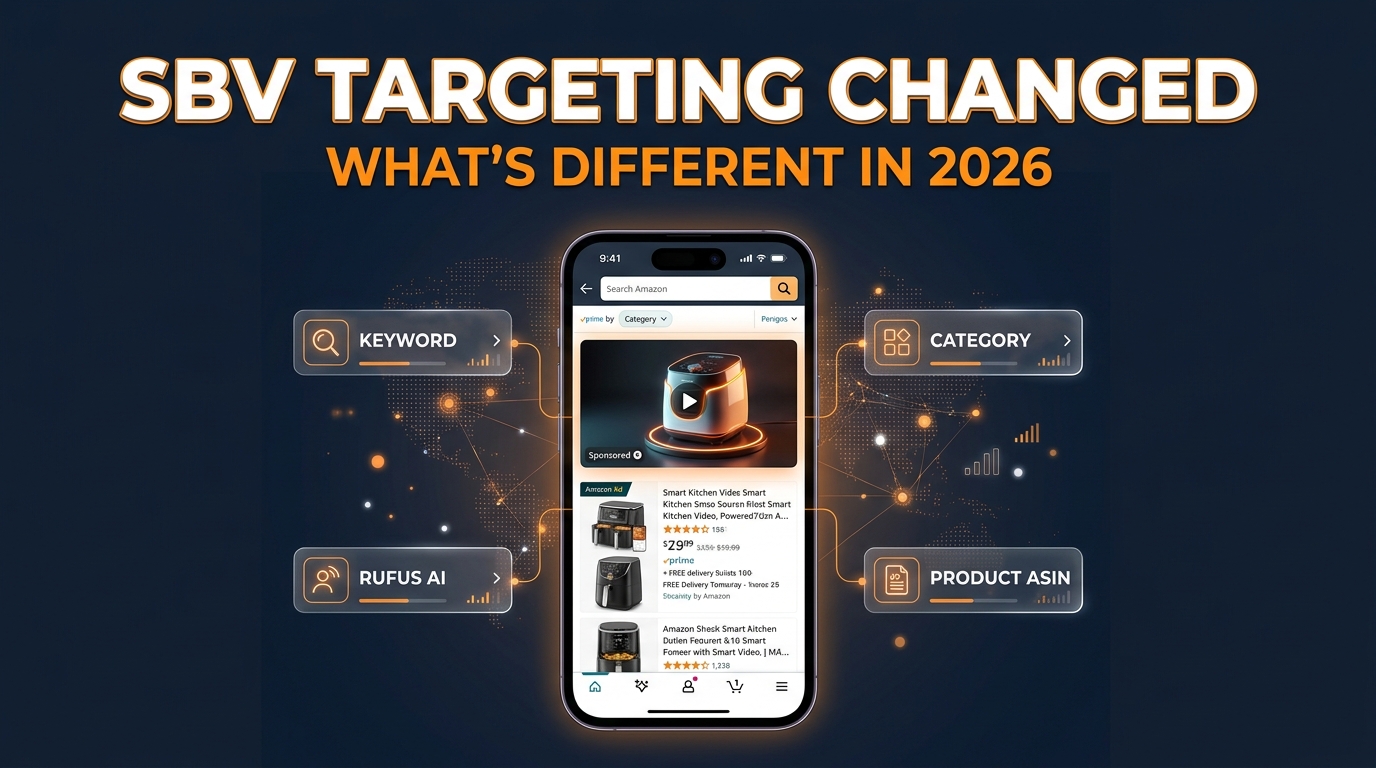
Tag: Amazon Ads 2026

  • Amazon’s SBV Creative Rules: The Rejection Patterns Nobody Warns You About (And How to Clear Moderation First Time)

    Amazon’s SBV Creative Rules: The Rejection Patterns Nobody Warns You About (And How to Clear Moderation First Time)

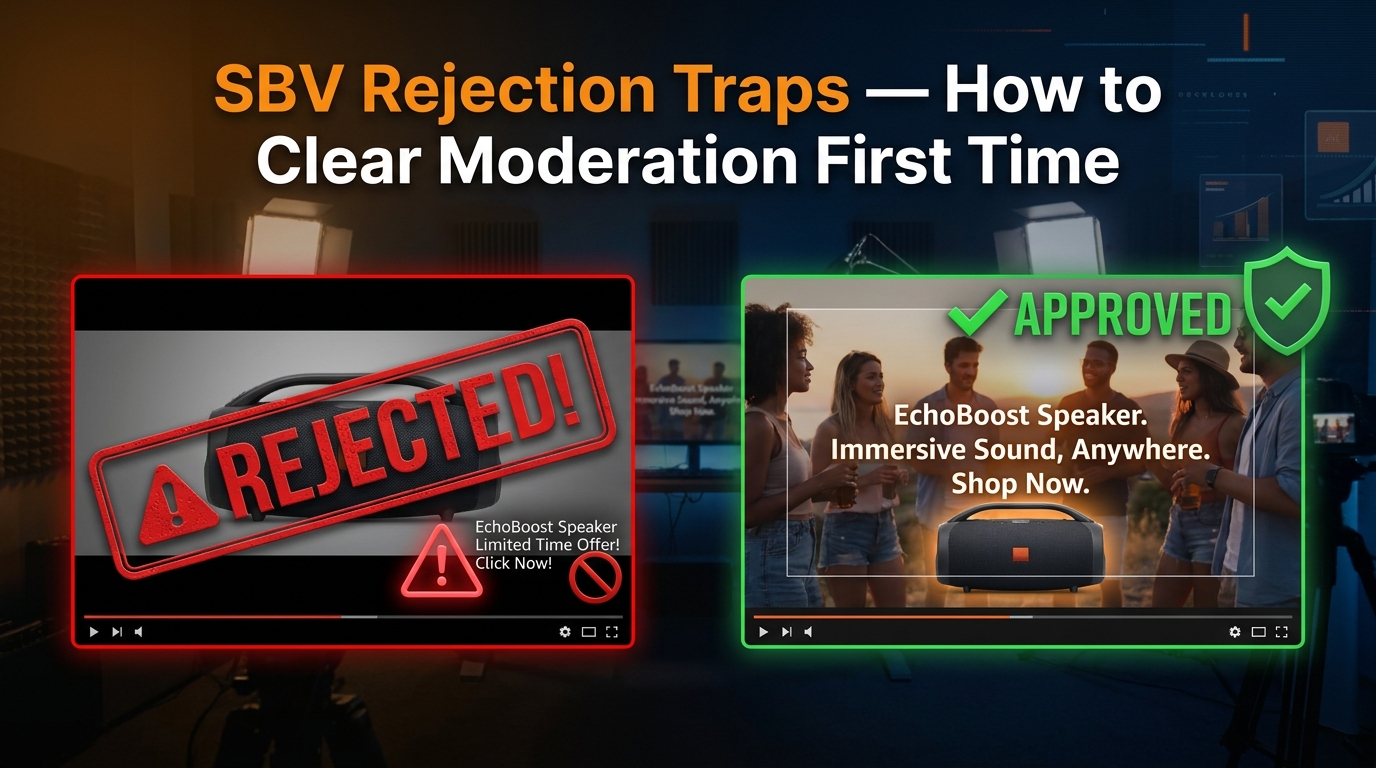
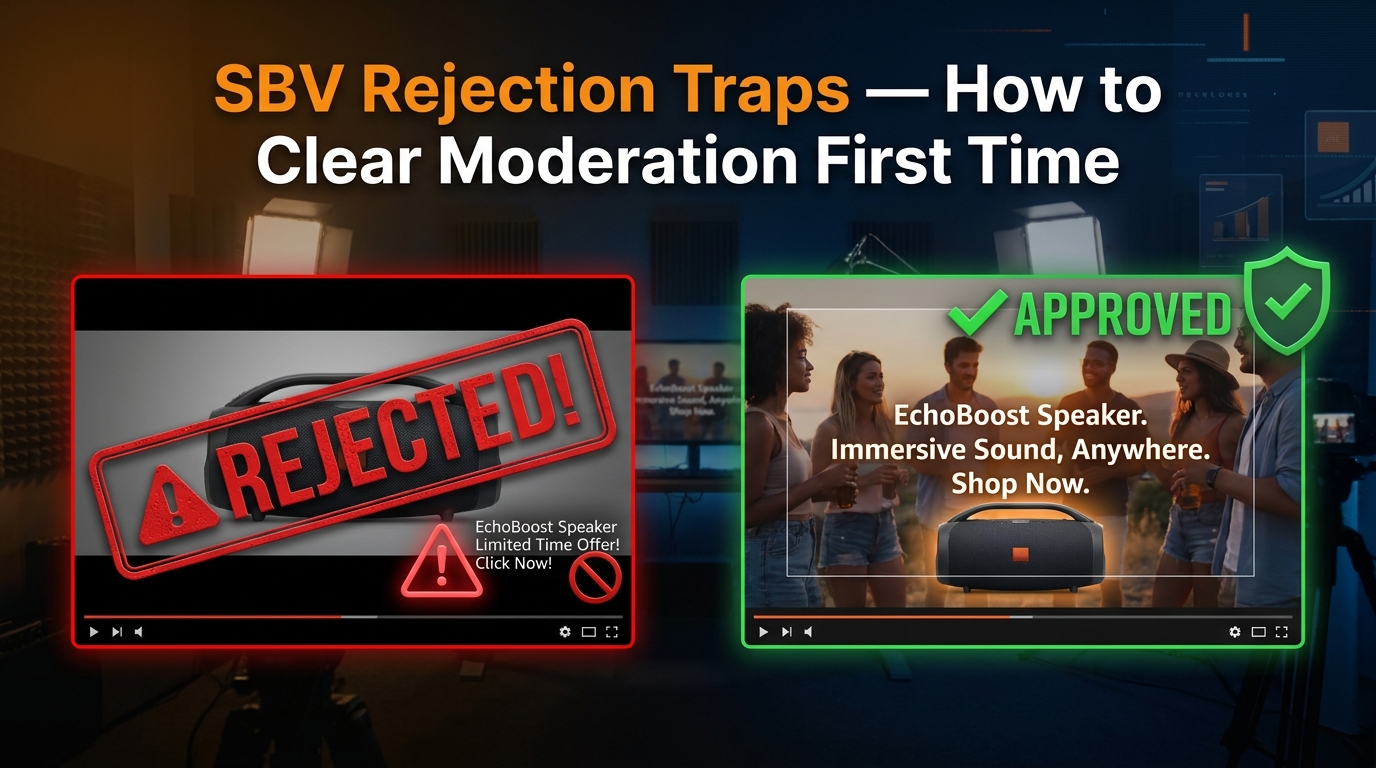
    Amazon SBV creative compliance — rejected vs approved video ad comparison

    You spend a week producing a Sponsored Brand Video. The scriptwriter nails the hook. The product shots are clean. The editor exports a gorgeous 15-second cut. You upload it to Amazon Ads, set your targeting, and hit submit — then wait.

    Twenty-four hours later: Rejected.

    The rejection reason? A catch-all phrase like “does not meet creative acceptance policies.” No specific line item. No timestamp. No frame reference. Just a wall of policy language and a button that says Edit Ad.

    This is the everyday reality for brands running Sponsored Brands Video (SBV) campaigns on Amazon in 2026. The ad format is one of the highest-performing placements in the entire Amazon Ads ecosystem — SBV consistently delivers higher click-through rates and better return on ad spend than static Sponsored Brands — but it comes with a moderation layer that can be opaque, unforgiving, and expensive to navigate by trial and error.

    The problem isn’t that Amazon’s rules are unreasonable. Most of them are logical once you understand the reasoning. The problem is that the rules are scattered across multiple help pages, the rejection messages rarely pinpoint the actual violation, and the 24–72 hour review window means every failed submission costs you real campaign time — especially painful when you’re approaching a product launch or seasonal peak.

    This article takes a different approach to the topic. Rather than listing specs you can already find on the ad specs page, we’re going to walk through the patterns behind rejections: what the moderation system is actually looking for, which violations are auto-rejected versus manually flagged, where the most experienced advertisers consistently get tripped up, and how to build a production workflow that exits the rejection cycle for good.

    Whether you’re a brand manager producing your first SBV or a PPC agency running dozens of video campaigns simultaneously, understanding the logic behind Amazon’s SBV moderation — not just the rules themselves — is the difference between clearing moderation on the first submission and burning days on revision loops.

    How Amazon’s SBV Moderation Machine Actually Works

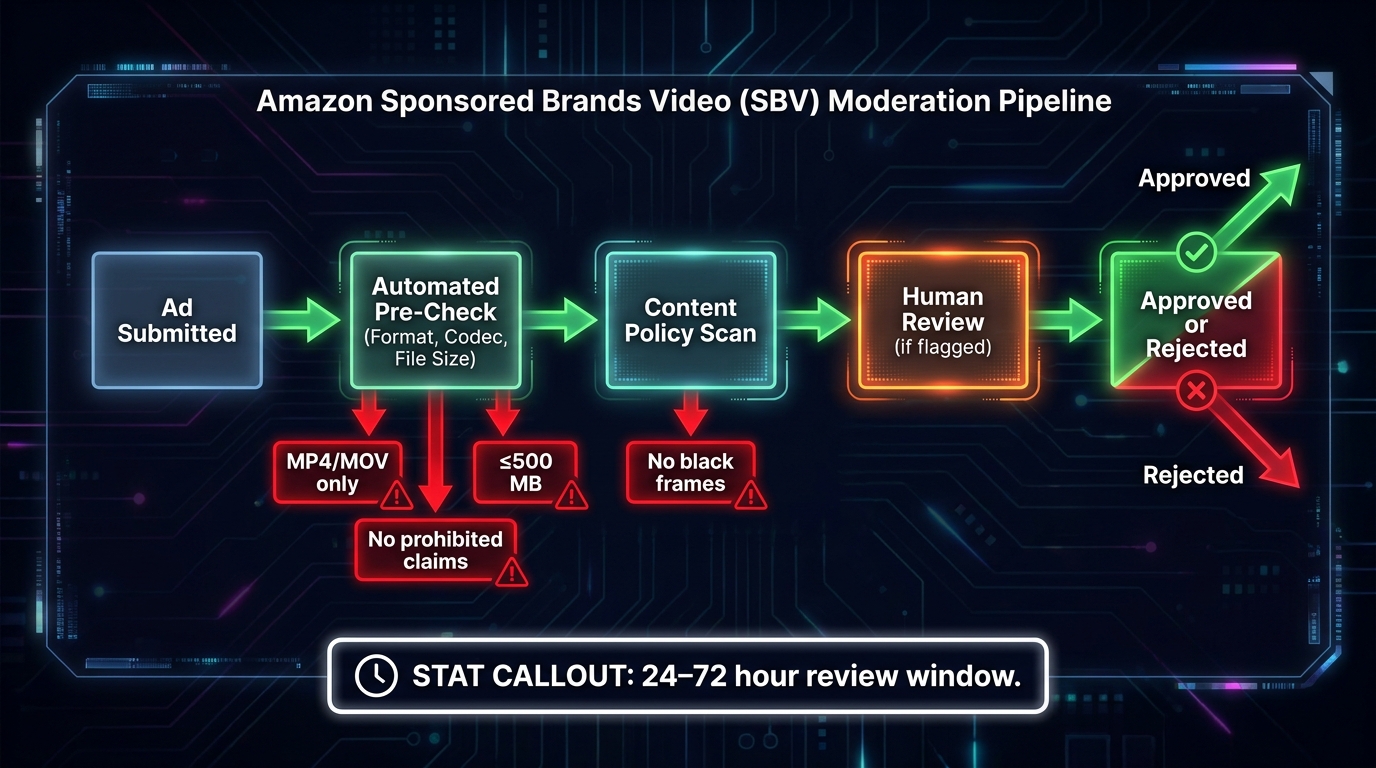
    Amazon SBV moderation pipeline flowchart showing automated pre-check, content policy scan, and human review stages

    Before you can fix what’s going wrong, you need to understand what’s actually reviewing your ad. Amazon’s SBV moderation is not a single system — it’s a layered pipeline that moves through automated checks before human reviewers ever see your creative, if they see it at all.

    Stage 1: Automated Technical Pre-Check

    The moment you submit an SBV creative, it enters an automated pre-check that validates against a set of hard technical parameters. This stage happens quickly — often within minutes — and it’s purely mechanical. The system is checking whether your file conforms to the published specifications before anything else happens.

    If your file fails at this stage, the rejection is typically faster than the standard 24–72 hour window. You’ll receive a policy violation notice, but the actual trigger is technical rather than editorial. Common failures here include unsupported file formats, codec mismatches, files that exceed the 500 MB size limit, or videos submitted with an aspect ratio other than 16:9. This stage has no nuance — it’s binary.

    Stage 2: Automated Content Policy Scan

    Ads that pass the technical pre-check move to an automated content scan. This is where machine-learning models evaluate frame-level content, on-screen text, and metadata against Amazon’s creative acceptance policies. The system is specifically looking for patterns associated with known rejection categories: black or blank frames, letterboxing artifacts, text placed outside the safe zone, and flagged keyword patterns in on-screen copy.

    This stage is where many experienced advertisers get surprised. A video that looks perfectly fine on a desktop preview can fail the content scan because of elements that aren’t visible to the naked eye — a two-frame black leader at the start of the video, a barely-perceptible crop that technically qualifies as pillarboxing, or on-screen text that enters the lower-right quadrant during a transition.

    Stage 3: Human Review

    Ads that pass the automated scans — or are flagged for ambiguous content that the automated system can’t definitively reject — enter a human review queue. This is where the standard 24–72 hour window applies. Human reviewers apply Amazon’s policy guidelines with discretion, which means two things: borderline cases can go either way, and the same creative submitted twice to the human review queue may receive different outcomes depending on the reviewer.

    Amazon recommends submitting SBV creatives approximately one week before your intended campaign launch date. That buffer exists precisely because of the review-rejection-revision cycle. Brands that account for this buffer in their production timelines avoid the panic of a rejected ad two days before a Prime Day promotion.

    What “Instant Rejection” Actually Means

    When practitioners talk about “instant rejections,” they’re typically referring to automated pre-check failures or content scan failures — rejections that happen in minutes rather than hours. These are the most consistent and predictable rejections because they’re rule-based rather than judgment-based. They’re also the most preventable, because every single trigger is documented in Amazon’s published specs.

    The practical implication: most instant rejections are entirely within your control before you submit. The sections that follow break down exactly which triggers cause them.

    The Technical Spec Traps: Format, Codec, and File Configuration

    Amazon’s technical requirements for SBV are specific, and they’re not flexible. The moderation system does not partially accept non-conforming files or apply tolerances. If your video doesn’t match the exact specification on any hard-limit parameter, it will be rejected.

    Here’s the full mandatory technical specification as of 2026:

    • Duration: 6–45 seconds. Amazon strongly recommends 20 seconds or less — longer videos see progressively lower completion rates, which affects performance data even if they pass moderation.
    • Aspect ratio: 16:9 only, with square pixels. No vertical formats, no 1:1 square, no custom ratios.
    • Dimensions: 1280×720 (HD), 1920×1080 (Full HD), or 3840×2160 (4K). Non-standard resolutions — even close ones like 1280×534 — will fail.
    • File format: MP4 or MOV only.
    • Video codec: H.264 or H.265 (HEVC).
    • Frame rate: 23.976, 24, 25, 29.97, or 29.98 fps. Variable frame rate files are a common failure point — always export at a fixed frame rate.
    • File size: Maximum 500 MB.

    The Codec Trap That Catches Video Editors

    One of the most common technical rejection patterns among intermediate-level advertisers involves codec export settings. Many video editing and motion graphics tools export H.264 files that technically conform to the codec requirement but use a profile or level not supported by Amazon’s ingest pipeline. The most frequently flagged: H.264 files exported at High Profile Level 4.2 or above, or files that use a bitrate configuration incompatible with Amazon’s streaming requirements.

    The safe export settings for most SBV work are H.264 at High Profile Level 4.0 or below, with a video bitrate between 1 Mbps and 50 Mbps. If you’re using DaVinci Resolve, Premiere Pro, or Final Cut Pro, explicitly set the profile and level in your export settings rather than relying on “automatic” or “match source” presets — those can produce technically valid but Amazon-incompatible files.

    Variable Frame Rate: The Hidden Failure Mode

    Footage shot on modern smartphones — including professional-grade footage from iPhones and Android flagship devices — is often recorded in variable frame rate (VFR) mode. This is a feature designed to smooth motion during screen recordings and certain video modes. When these files are uploaded directly as SBV creatives without being converted to a constant frame rate (CFR), they frequently fail Amazon’s technical pre-check.

    The fix is straightforward: run all footage through a transcoding step that enforces a fixed frame rate before the final export. Tools like HandBrake (free) or Adobe Media Encoder can perform this conversion reliably. Building this step into your production workflow eliminates this rejection cause entirely.

    File Size and the 500 MB Wall

    At 4K resolution with high-quality encoding, a 45-second video can easily exceed 500 MB. The most common scenario where this becomes a problem: brands creating premium lifestyle content at 4K who apply minimal compression to preserve visual quality. The solution isn’t to sacrifice quality — it’s to target the shortest effective duration (Amazon’s own recommendation of 20 seconds or less), export at 1080p (which is the effective delivery resolution for most Amazon placements anyway), and use efficient bitrate settings that stay well below the file size ceiling.

    The Black Frame Problem: Why Your Opener Is the Most Dangerous Moment

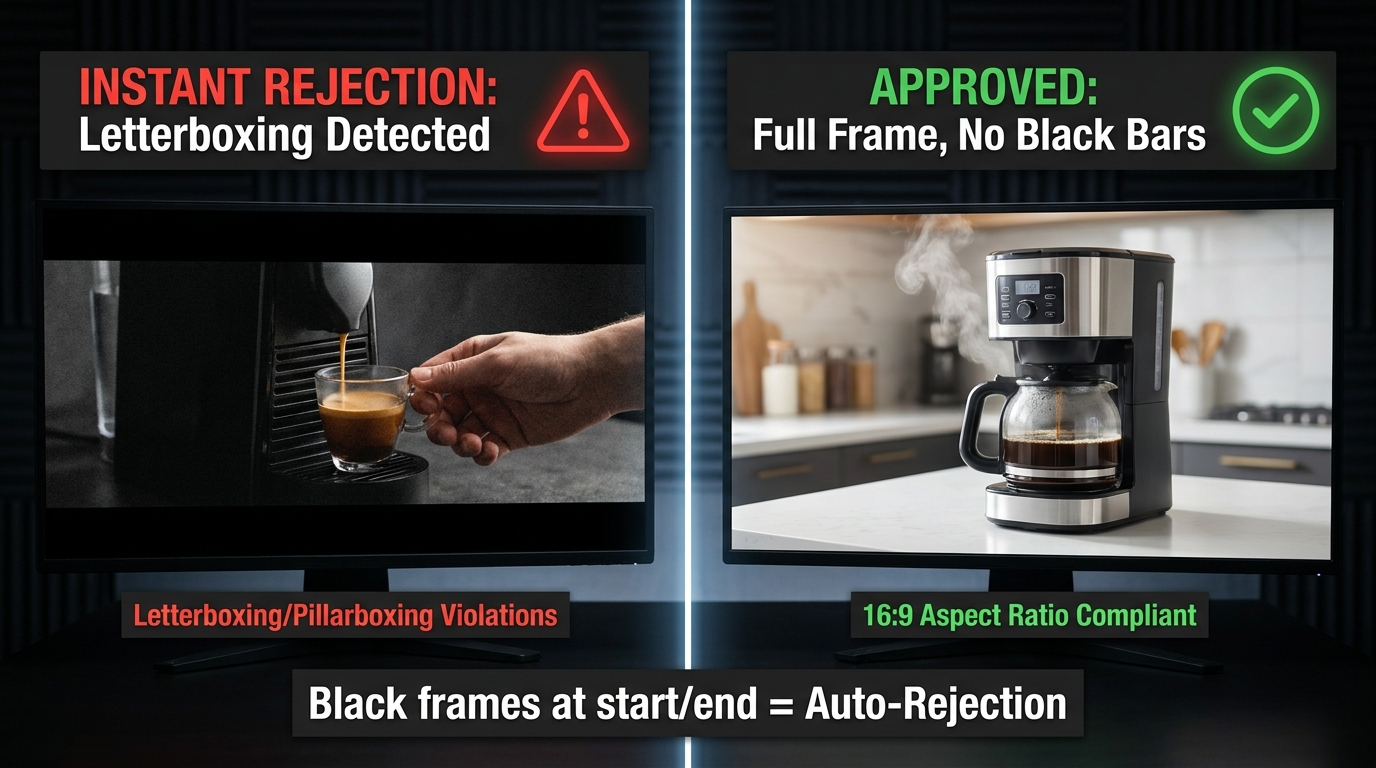
    Side-by-side comparison of letterboxed rejected video ad versus approved full-frame SBV creative

    Amazon is explicit: Sponsored Brands Video ads must not contain black or blank frames at the start or end of the video. This is one of the most consistently enforced rules in the entire SBV policy framework, and it’s one of the most common causes of automated rejection.

    The rule exists because SBV ads autoplay in search results. When a shopper scrolls past a sponsored placement, the video begins playing immediately without user interaction. A black frame opener — even a single frame — creates a dead moment in the customer experience, effectively making the ad appear broken during the most critical window of attention capture.

    Where Black Frames Come From

    Most black frame violations are not intentional. They come from three primary sources in standard video production workflows:

    Edit suite default handles: Many non-linear editing systems (NLEs) add a default black frame or handle at the start and end of sequences. In a broadcast or streaming context, this is standard practice. For SBV, it’s an instant rejection trigger. Check your export settings explicitly — look for “add handles” or “pad duration” options and disable them.

    Fade-to-black transitions: Ending a video with a fade to black, while visually elegant, produces exactly the kind of black frames that trigger rejection. If your creative ends with a branded end card, ensure the final frame holds on solid content — logo, product, or brand color — rather than fading out.

    Motion graphics rendering artifacts: After Effects and similar compositing tools can produce blank frames at the start of a composition if the work area isn’t precisely set. A common scenario: a composition begins with a title card that has a one-frame delay in its in-animation. The final render exports a black frame before the animation begins.

    How to Audit for Black Frames Before Submission

    The most reliable method is to use a media analysis tool to inspect the first and last ten frames of your export before submission. Adobe Premiere’s Source Monitor, DaVinci Resolve’s Scopes panel, or a free tool like MediaInfo can all identify blank frames. The quickest manual check: scrub your exported video’s first and last three seconds at 1:1 playback speed. The first visible frame should be full content. The last visible frame should be full content.

    If you’re producing SBV at volume — multiple creatives per ASIN or across a large catalog — this audit step should be codified into your QA checklist rather than left to individual editor judgment.

    Letterboxing, Pillarboxing, and the Aspect Ratio Graveyard

    Amazon requires SBV creatives to be full-bleed 16:9 with no horizontal or vertical black, color, or blurred bars. This rule encompasses letterboxing (horizontal bars at the top and bottom), pillarboxing (vertical bars on the left and right), and windowboxing (bars on all four sides). It also covers “faux” letterboxing — cases where a production team adds aesthetic black bars to simulate a cinematic widescreen look.

    This is one of the most misunderstood rules in SBV creative, because letterboxing is a standard part of broadcast and streaming video aesthetics. Many video production teams create content that looks deliberate and high-quality with letterbox bars applied as a stylistic choice. On Amazon, that’s an automatic rejection.

    The Source Footage Problem

    Letterboxing often enters an SBV creative not from a stylistic choice, but from a source footage mismatch. The most common scenario: a brand has an existing TV commercial or YouTube ad shot at a non-standard widescreen ratio (like 2.39:1 or 2.35:1) that they want to repurpose for SBV. When that 2.39:1 footage is placed in a 16:9 sequence, the editing software automatically adds letterbox bars to preserve the original framing.

    The fix requires a creative decision: reframe the original footage to fill the 16:9 canvas (which involves cropping and re-compositing the shots), or produce a native 16:9 version of the creative from the beginning. Repurposing 2.39:1 content for SBV without reframing will almost always produce a rejected ad, regardless of how good the underlying creative is.

    Color and Blur Bars: The Less Obvious Violations

    Amazon’s rule specifically mentions not just black bars, but “color or blurred bars.” This matters because some brands attempt to work around the letterboxing prohibition by filling the bars with a brand color or a blurred version of the video content. Both approaches violate the same rule. The policy requires full-bleed native content across the entire frame — there is no compliant workaround for a non-16:9 source asset beyond actually reframing the content.

    Square Pixel Verification

    Amazon’s spec requires 16:9 at square pixels. This is a specification that’s easy to satisfy with modern cameras and editing tools, but it can be violated by older footage shot with anamorphic or non-square pixel codecs. If you’re working with archival footage or content captured on certain professional broadcast cameras, verify the pixel aspect ratio in your media metadata (MediaInfo or VLC’s codec information panel will show this) before including it in your SBV creative.

    The Safe Zone Nobody Uses Correctly

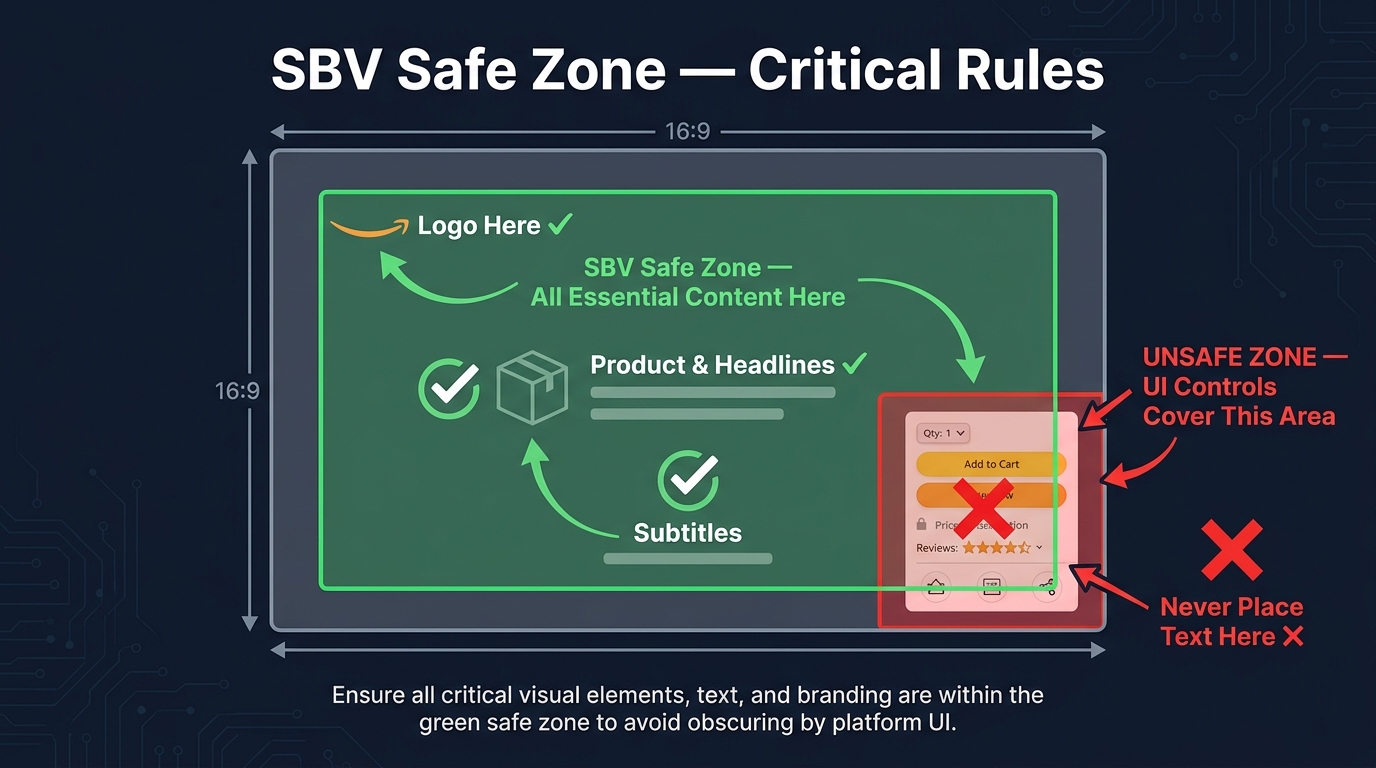
    Amazon SBV safe zone diagram showing the lower-right corner as unsafe and correct logo placement in upper-left

    Amazon’s SBV spec includes a safe area template — a defined region within the 16:9 frame where text, logos, and other key visual elements should be placed to avoid being covered by the Amazon shopping UI. The critical rule: do not place important text, logos, or call-to-action elements in the lower-right corner of the video.

    When an SBV ad plays in Amazon’s search results, the shopping interface overlays UI elements on the video — pricing information, star ratings, and interactive controls. On mobile devices in particular, these elements occupy the lower-right portion of the video frame. Any critical creative element placed in that zone can be partially or entirely obscured during playback, degrading the customer experience and, in some cases, triggering a moderation rejection for placing key information in an obscured zone.

    What the Safe Zone Rule Actually Requires

    The rule is specifically about the lower-right corner — not the entire bottom of the frame, and not the lower-left. However, experienced SBV practitioners apply a more conservative interpretation in practice: keep all critical elements (brand logo, headline text, product claims, call-to-action copy) within the central 80% of the frame, away from all four edges.

    This conservative approach exists because Amazon displays SBV across multiple placements and device types, and the exact position of UI overlay elements varies. What’s cleanly visible on a 1920×1080 desktop browser may be partially obscured on a 375×667 mobile screen. Centering key creative elements eliminates the variability.

    The Logo Placement Pattern That Keeps Getting Rejected

    One of the most consistently misunderstood applications of the safe zone rule involves brand logos on end cards. Many brands use a standard corporate video template that places the logo in the lower-right corner of the final frame — the classic television “bug” position. When that template is applied to SBV without modification, the logo lands in exactly the position Amazon’s spec flags as unsafe.

    The solution is simple but requires explicit communication with your video production team: brand logos on SBV end cards should be positioned in the upper-left, upper-center, or center of the frame. Not lower-right. The end card is often the most brand-critical moment of the video — the moment shoppers associate your product with your brand — and having it obscured by Amazon’s UI is both a policy risk and a performance risk.

    Text Density in the Safe Zone

    Being inside the safe zone isn’t sufficient on its own. Amazon also evaluates the legibility of on-screen text — text must be readable at the display sizes used across Amazon placements, which includes mobile screens where SBV renders at relatively small dimensions. Text that’s technically within the safe zone but is too small to read, too densely packed, or placed against a low-contrast background can still trigger a moderation flag for poor creative quality.

    A practical guideline: use a minimum font size equivalent to 36pt at 1080p resolution, maintain at least a 4.5:1 contrast ratio between text and background, and limit on-screen text to one or two key messages at a time. SBV is not a slideshow — dense text copy that works in a static banner fails in an autoplay video format.

    Audio Rules That Silently Kill Approvals

    Audio is one of the least-discussed categories of SBV rejection, which is ironic given that a significant percentage of SBV ads are watched without sound. Amazon’s audio specifications exist both for the ads that play with audio and for the compliance architecture around how audio is formatted and delivered. Violating them is a rejection trigger even when audio is not the primary communication channel for the creative.

    Technical Audio Requirements

    Amazon’s SBV audio specifications require:

    • Codec: PCM, AAC, or MP3
    • Channels: Stereo or mono only (no 5.1 surround or multichannel formats)
    • Minimum bitrate: 96 kbps
    • Sample rate: Minimum 44.1 kHz
    • Streams: One audio stream only — multiple audio tracks will cause failure

    The single audio stream requirement catches production teams who include multiple audio tracks in their export — for example, a music bed on track 1 and voiceover on track 2, exported as separate stems rather than mixed down to a single stereo or mono track. This is standard practice in broadcast delivery and completely incompatible with Amazon’s SBV requirements.

    The Muted Video Question

    Because SBV autoplays on mute in most contexts, many brands produce SBV creatives that rely entirely on visual communication, with no meaningful audio component. This is a legitimate strategic choice. However, Amazon still requires a valid audio stream in the file — submitting a video with no audio track, or with a corrupted audio track, will fail technical review.

    If your SBV creative is intentionally audio-light, include a minimal audio element — a soft ambient track or a clean music bed at low volume — to satisfy the technical requirement without conflicting with your visual-first communication strategy. The audio will autoplay muted anyway; its primary function in this context is technical compliance, not storytelling.

    Audio Quality Signals

    Amazon’s content review also evaluates audio quality as a component of overall creative quality. Ads with audible clipping, excessive background noise, or distorted audio can be flagged during human review under “does not meet creative acceptance policies” — particularly if the audio issue is severe enough to create a poor customer experience. If your SBV creative includes voiceover or product demonstration audio, ensure it’s recorded at a consistent level with no clipping artifacts before export.

    Prohibited Claims: What You Cannot Say or Show

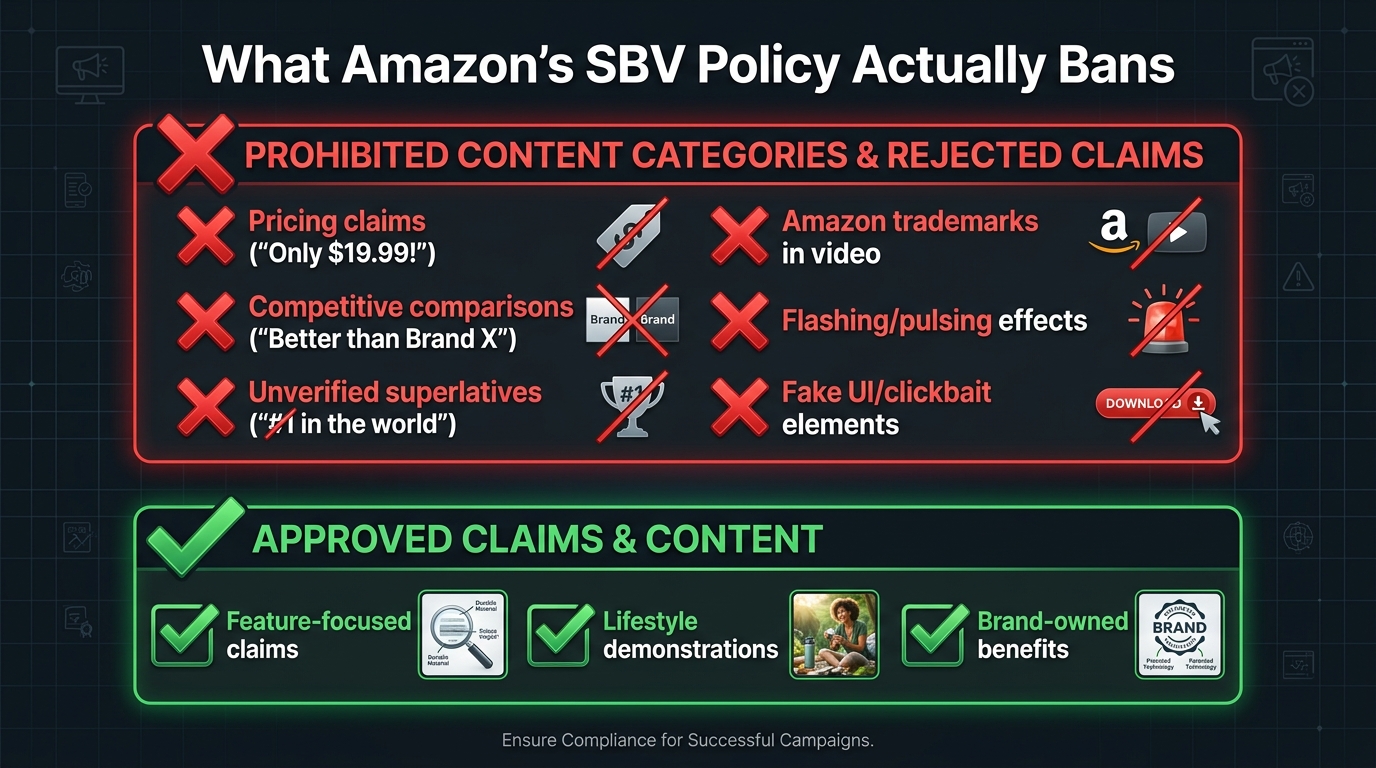
    Amazon SBV prohibited content checklist showing banned claims versus compliant alternatives

    Amazon’s SBV creative acceptance policy maintains a list of content categories and claim types that will trigger rejection regardless of how well the video conforms to technical specifications. These are policy-level rejections, and they require content changes rather than technical fixes.

    Pricing and Promotional Claims

    Any mention of specific pricing, discounts, or promotional offers in the video creative itself is prohibited. This includes on-screen text like “$19.99,” “Save 30%,” “Limited Time Offer,” or “Today Only.” It also includes spoken pricing in voiceover and visual representations of price tags, discount badges, or sale stickers within the video frame.

    The reasoning is clear: Amazon’s own product listing infrastructure handles pricing information dynamically. Pricing in the video creative would be inaccurate the moment a price changes, creating a misleading customer experience. The policy closes this gap by prohibiting pricing from the creative entirely.

    The practical implication for brands that run SBV around promotional events like Prime Day or Lightning Deals: the video itself cannot reference the deal. The campaign targeting and the product detail page carry the promotional messaging. The creative must be promotion-agnostic to pass moderation and remain compliant for the ad’s full run duration.

    Unverified Superlatives and Exaggerated Claims

    Claims like “the best,” “the most effective,” “#1,” “world-class,” or “guaranteed to work” require substantiation that is independently verifiable — and for SBV, that substantiation cannot live only in the video. Amazon’s policy requires that claims be accurate, verifiable, and not misleading. Vague superlatives without a specific qualifying context (“the #1 rated blender in the U.S.” with a cited source) fall under unsubstantiated claims and are a moderation rejection risk.

    The common fix is specificity: instead of “the best coffee maker on the market,” use a verifiable, specific claim derived from your product’s actual attributes: “Brews at the precise 205°F optimal extraction temperature” or “650+ five-star reviews” with the review count reflecting your actual listing data.

    Amazon Trademark and Intellectual Property Restrictions

    SBV creatives cannot use Amazon’s trademarks, logos, or branded visual elements. This includes the Amazon smile logo, the Amazon wordmark, Prime branding, and any other Amazon-owned intellectual property. The restriction applies to both on-screen visual elements and audio mentions of Amazon branding in a manner that implies endorsement or official partnership.

    This rule catches brands who include screenshots of their Amazon listing — which naturally contains Amazon branding — within their SBV creative. The screenshot approach is also problematic for a separate reason covered in the next section.

    Distracting, Inappropriate, and Low-Quality Content

    Amazon’s policy prohibits content that is violent, gory, sexually explicit, frightening, or otherwise unsuitable for a general audience. It also prohibits creative elements designed to simulate clickbait mechanisms — animated cursors, fake notification badges, simulated “click here” prompts, or elements that mimic interactive UI controls to manipulate user behavior.

    Ads with rapidly flashing, blinking, or pulsing visual effects are flagged both for creative quality reasons and for accessibility compliance. This applies to strobing effects used in transitions, text animations with high-frequency flash rates, and background effects that create a disorienting viewing experience.

    The Competitive Comparison Trap

    Comparative advertising — showing or claiming that your product is better than a named competitor — is one of the most nuanced areas of Amazon’s SBV policy, and it’s a trap that catches brands who assume that standard marketing practices apply on Amazon the same way they apply in other media environments.

    What’s Explicitly Prohibited

    Amazon’s moderation consistently rejects SBV creatives that include:

    • Explicit naming of competitor brands in the video (“unlike Brand X, our product…”)
    • Display of competitor product packaging, logos, or trademarks in the video frame
    • Side-by-side comparisons that position a specific competitor’s product against yours
    • Claims that directly rank your product above named competitors (“#1 vs. the competition”)

    The policy reflects both Amazon’s desire to maintain a neutral marketplace environment and the practical difficulty of verifying comparative claims at moderation scale. Even if your comparative claim is accurate and substantiated, the moderation review process applies a categorical prohibition rather than a case-by-case evaluation of claim accuracy.

    The Category Comparison Workaround

    What is allowed — and what experienced SBV advertisers use effectively — is category-level differentiation without named competitors. Demonstrating your product’s advantages against a generic category alternative (“unlike typical blenders that struggle with frozen ingredients, our motor handles…”) is compliant as long as no specific competitor brand is named or visually represented.

    Similarly, claims substantiated by third-party test data, independent certifications, or verifiable consumer research data can position your product’s performance without crossing into comparative advertising territory. The rule of thumb: if a competitor brand’s name or product could be removed from your messaging without changing its core point, you’re likely in compliant territory. If the message only makes sense with the competitor named, you’re in violation territory.

    Screenshots of Amazon Search Results

    A subtle competitive comparison violation that catches many brands: including screenshots of Amazon search results pages in their SBV creative to show their product ranking. This is prohibited for two reasons. First, it may contain competitor brand names or listings in the search results. Second, it uses Amazon’s branded UI without permission. This type of creative — however compelling it may seem as social proof — will almost always fail moderation.

    Text Overlays, Captions, and Readability Standards

    On-screen text in SBV is not just a creative choice — it’s a policy compliance area. Amazon evaluates text overlays during the moderation review for legibility, placement, and content. Getting this wrong is one of the most common causes of human review rejections (as opposed to automated technical rejections).

    The Language Matching Requirement

    All text in SBV creatives must match the primary language of the marketplace where the ad will run. An English-language ad submitted to Amazon.com must have English on-screen text. If the same video will run across multiple international Amazon marketplaces, separate language-specific versions must be produced and submitted for each marketplace.

    This rule has practical implications for brands that produce a single “global” video creative and attempt to use it across multiple Amazon regional marketplaces. The video must be localized at the language level, not just at the targeting level.

    Legibility Standards in Practice

    Amazon’s reviewers evaluate whether text is actually readable at the display sizes used across Amazon placements. The variables that affect legibility: font size (too small fails), font weight (too light against a busy background fails), contrast (insufficient color contrast against background fails), and duration (text that appears for fewer than one second is unlikely to be readable and may be flagged).

    The practical guidance from experienced SBV producers: use bold, high-contrast text in a large, clean sans-serif font. Hold text on screen for a minimum of two to three seconds. Ensure the background behind text is either a solid color, a strongly blurred background, or a dark overlay panel that provides consistent contrast. Test your video at 375px wide (simulating a mobile device at reduced resolution) before submission.

    Text as the Only Information Source

    Because SBV autoplays muted, many effective SBV creatives use on-screen text as the primary communication vehicle — essentially functioning as a captioned product demonstration. This is not only compliant, it’s strategically sound given the muted autoplay environment. Amazon’s own guidance acknowledges this by not requiring audio content to be the primary communication channel.

    The caveat: text-heavy SBV creatives must still satisfy all the legibility and safe zone requirements. A “muted-first” strategy doesn’t reduce the text compliance requirements — it increases their importance, since text is doing all the communicative work.

    The Resubmission Game: How to Recover Fast When Rejected

    Even with the best pre-flight process, SBV rejections happen. When they do, the speed and quality of your response determines whether a rejected ad becomes a minor inconvenience or a campaign-disrupting problem.

    Reading the Rejection Notice Correctly

    Amazon’s rejection notices for SBV typically cite the relevant policy category rather than a specific technical parameter or frame timestamp. The most common rejection message formats reference “creative acceptance policies” with a link to the policy page, or cite a specific category like “audio/video quality” or “prohibited content.”

    The challenge is that these category-level rejection reasons don’t always tell you exactly what the problem is. The diagnostic approach: cross-reference the rejection category against the full list of possible violations within that category, and conduct a systematic audit of your creative against each potential trigger. A rejection under “audio/video quality” should prompt you to check black frames, letterboxing, resolution conformance, codec settings, frame rate consistency, and safe zone adherence — not just the first issue you notice.

    The Resubmission Timeline

    Once you’ve fixed the identified issue and resubmitted, the ad re-enters Amazon’s moderation queue from the beginning. Re-submissions typically receive a response within a similar 24–72 hour window, though in practice many practitioners report faster responses on resubmissions that fail the automated checks (because the failure is detected early in the pipeline).

    For campaign launches with hard deadlines, build a two-rejection buffer into your timeline. If you’re targeting a Monday launch, submit your creative the Monday before. If it’s rejected and corrected by Wednesday, you have a second submission window and can still hit your launch date. Agencies running SBV at scale often maintain this buffer as standard procedure.

    When to Appeal vs. When to Fix and Resubmit

    Amazon provides a formal appeal mechanism within the Amazon Ads console for ad review decisions. However, appeals are most effective in specific, narrow circumstances: when a rejection appears to be a clear system error (your ad is rejected for a policy violation it demonstrably does not contain), or when a human reviewer has applied a policy inconsistently compared to currently running ads in the same category.

    For the vast majority of SBV rejections, the faster and more reliable path is to fix the creative and resubmit rather than pursue an appeal. Appeal cycles can take three to five business days and may not produce a different outcome if the creative genuinely violates the cited policy. Fix-and-resubmit cycles, by contrast, can be completed in 48 hours with a clean, compliant asset.

    Building a Rejection Log

    For brands running SBV across a large catalog or agencies managing multiple brand accounts, maintaining a structured rejection log significantly reduces repeat errors. Each rejection entry should record: the creative filename, the rejection category cited, the specific policy violation identified through diagnosis, and the fix applied. Over time, this log reveals patterns — most brands have one or two chronic violation categories that account for the majority of their rejections, and addressing those upstream in the production workflow produces an immediate improvement in approval rates.

    Building a Pre-Flight Checklist for Zero-Rejection SBV Production

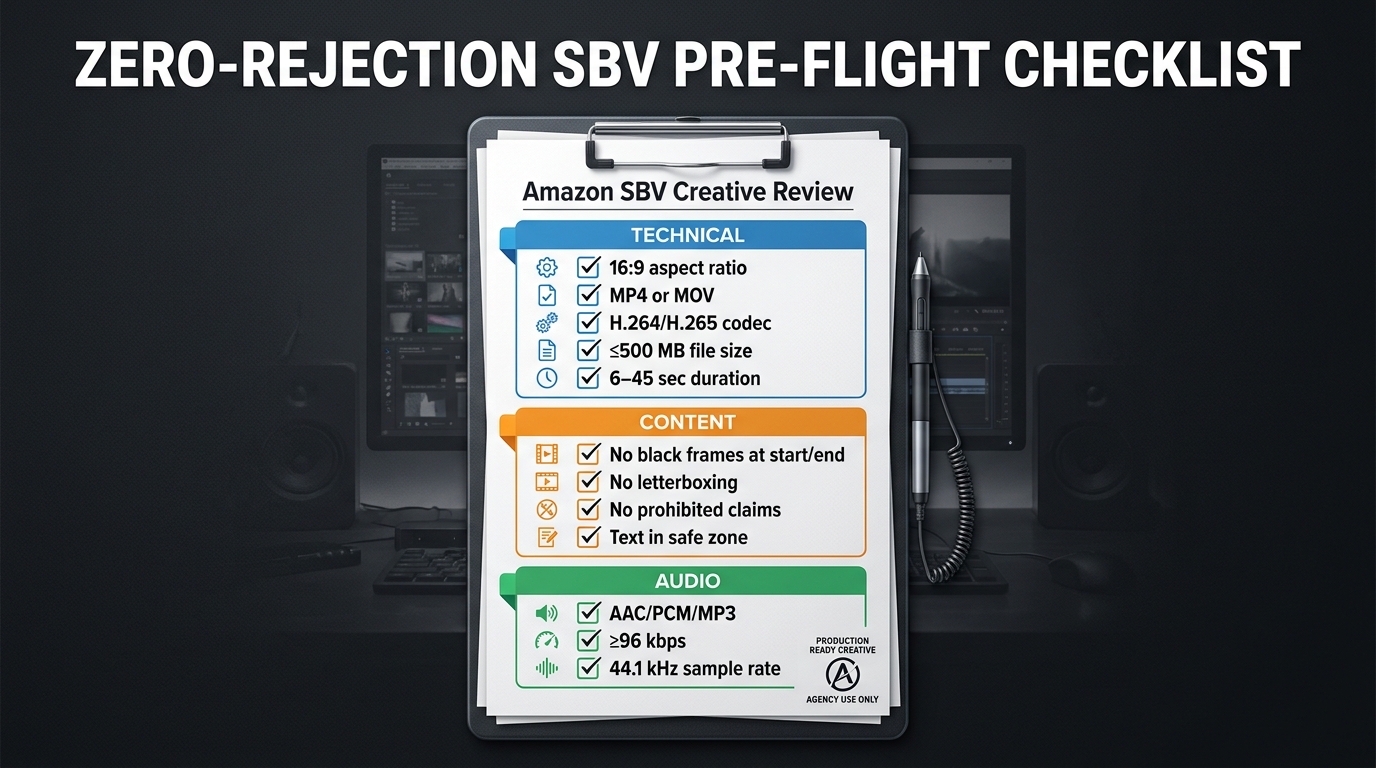
    Zero-rejection SBV pre-flight checklist showing technical, content, and audio requirements

    The most effective way to eliminate SBV rejections is to move compliance upstream — into the creative brief, the production process, and the export workflow — rather than treating it as a post-production problem. A structured pre-flight checklist, applied before every SBV submission, makes first-submission approval the standard outcome rather than the optimistic hope.

    Category 1: Technical Specs (Pre-Export)

    These items should be confirmed in your project settings before rendering the final export:

    • Sequence/composition set to 1920×1080 or 1280×720, 16:9, square pixels
    • Frame rate set to a fixed value (23.976, 24, 25, 29.97, or 29.98 fps)
    • Total duration between 6 and 45 seconds (20 seconds or less strongly preferred)
    • Export format set to MP4 or MOV
    • Video codec set to H.264 (High Profile, Level 4.0 or below) or H.265
    • Audio mixed down to a single stereo or mono track, AAC or PCM codec, minimum 96 kbps, 44.1 kHz sample rate
    • No handles or padding added to the beginning or end of the export

    Category 2: Content Checks (Pre-Export)

    These items should be verified during the final creative review, before rendering:

    • First frame: full-bleed content visible, no black or blank frames
    • Last frame: full-bleed content visible, no black or blank frames, no fade-to-black ending
    • Aspect ratio: no letterbox, pillarbox, or windowbox bars anywhere in the video
    • No color bars or blurred bars used as workarounds for non-16:9 source footage
    • Logo and brand elements: positioned away from the lower-right corner
    • All on-screen text: within the safe zone, legible at mobile scale, minimum two-second hold duration
    • No pricing, discount, or promotional claims in video or on-screen text
    • No competitive brand names, logos, or product comparisons
    • No Amazon trademarks, logos, or UI elements
    • No flashing, strobe, or rapid pulsing visual effects
    • No fake UI elements, simulated cursors, or clickbait mechanisms
    • Content appropriate for a general audience (no violent, explicit, or frightening content)
    • All text matches the language of the target marketplace

    Category 3: Post-Export Verification

    These items should be confirmed after rendering the final export file, before uploading:

    • Open the exported file in a media player and scrub through the first and last three seconds to visually confirm no black frames
    • Check file size: confirm it is below 500 MB
    • Verify file metadata using MediaInfo or equivalent: confirm codec, frame rate (fixed, not variable), and pixel aspect ratio
    • Preview the video at reduced size (simulate mobile) to confirm text legibility
    • Confirm audio plays correctly on the final export (no silent track, no distortion)

    Integrating the Checklist Into Your Workflow

    The checklist is most effective when it’s assigned to a specific role in your production workflow — not left as a shared responsibility that nobody specifically owns. In an agency setting, this is typically a dedicated QA step performed by a compliance reviewer or senior editor before any SBV is submitted. For in-house brands, it can be the responsibility of whoever owns the Amazon Ads account, performed as the final step before uploading.

    Consider using a shared digital checklist tool (Notion, Airtable, or even a Google Sheet) that creates a record for each SBV submission. This creates accountability, enables pattern analysis when rejections do occur, and ensures the checklist is applied consistently rather than relying on individual memory.

    The Performance Case for Getting This Right

    It’s worth stepping back from pure compliance mechanics to consider the broader performance context. The effort required to produce rejection-proof SBV creative is not just about avoiding frustration — it directly affects campaign economics.

    Every day a SBV campaign is delayed by a rejection cycle is a day of lost impressions at top-of-search placements. For campaigns running during time-sensitive periods — product launches, category promotions, seasonal peaks — a single rejection cycle can cost more in lost opportunity than the entire production budget of the video.

    Beyond timing, the creative qualities that satisfy Amazon’s moderation requirements — clear product visibility from the first frame, legible and well-placed text, clean audio, no black frames, full-bleed visuals — are also the creative qualities that produce stronger performance metrics. The compliance requirements and the performance requirements for SBV are almost perfectly aligned: what passes moderation is also what converts shoppers.

    Amazon’s own guidance consistently reinforces this. The recommendation to show the product clearly within the first few seconds, to keep videos to 20 seconds or less, to use the video to “demonstrate how the product and brand fit into customers’ lives” — these are both compliance guidelines and performance guidelines. The brand that builds a production workflow designed around compliance will, almost inevitably, also build a production workflow that produces higher-performing creative.

    Conclusion: Stop Treating SBV Compliance as an Afterthought

    The SBV rejection patterns documented in this article are not mysterious or arbitrary. Every rule Amazon enforces has a logical basis in customer experience, marketplace integrity, or content suitability. Black frame and letterboxing rules exist because autoplay ads that look broken create a poor customer experience. Safe zone rules exist because Amazon’s UI physically occupies that space on shoppers’ screens. Pricing and comparative claim rules exist because inaccurate claims in video creative are much harder for Amazon to dynamically correct than inaccurate text on a product page.

    Understanding the why behind each rule makes compliance intuitive rather than mechanical. And when compliance is intuitive, it gets built into the creative brief, the production process, and the export workflow — not left as a last-minute checklist item that gets skipped when deadlines are tight.

    The brands and agencies that have eliminated SBV rejection loops share one common characteristic: they treat creative compliance as part of the creative process, not as a post-production obstacle. They brief their video teams with Amazon’s safe zone template open. They export with verified settings rather than default presets. They audit their files before uploading rather than hoping the moderation system gives them useful feedback.

    The actionable takeaways from this piece:

    1. Build and document your SBV export settings as a saved preset in your editing and rendering tools — never rely on default exports.
    2. Add a five-minute post-export verification step to every SBV production: open the file, scrub the first and last three seconds, check metadata with MediaInfo.
    3. Design your SBV end cards with the logo in the upper-left or center — never lower-right.
    4. Strip pricing, discount, and competitive comparison language from SBV scripts at the briefing stage, not at the compliance review stage.
    5. Submit SBV creatives at least one week before campaign launch to absorb a rejection-resubmission cycle without affecting your go-live date.
    6. Maintain a rejection log and review it quarterly — most brands have one or two chronic violation categories, and fixing them at the source eliminates the majority of their rejection volume.

    Amazon’s SBV format will continue to be one of the highest-value placements in its advertising ecosystem. The brands that invest in getting compliance right from the start will spend more of their time capitalizing on that value — and less of it waiting for moderation queues to clear.

  • The SBV Targeting Matrix: How to Build Sponsored Brand Video Combos That Actually Win in 2026

    The SBV Targeting Matrix: How to Build Sponsored Brand Video Combos That Actually Win in 2026

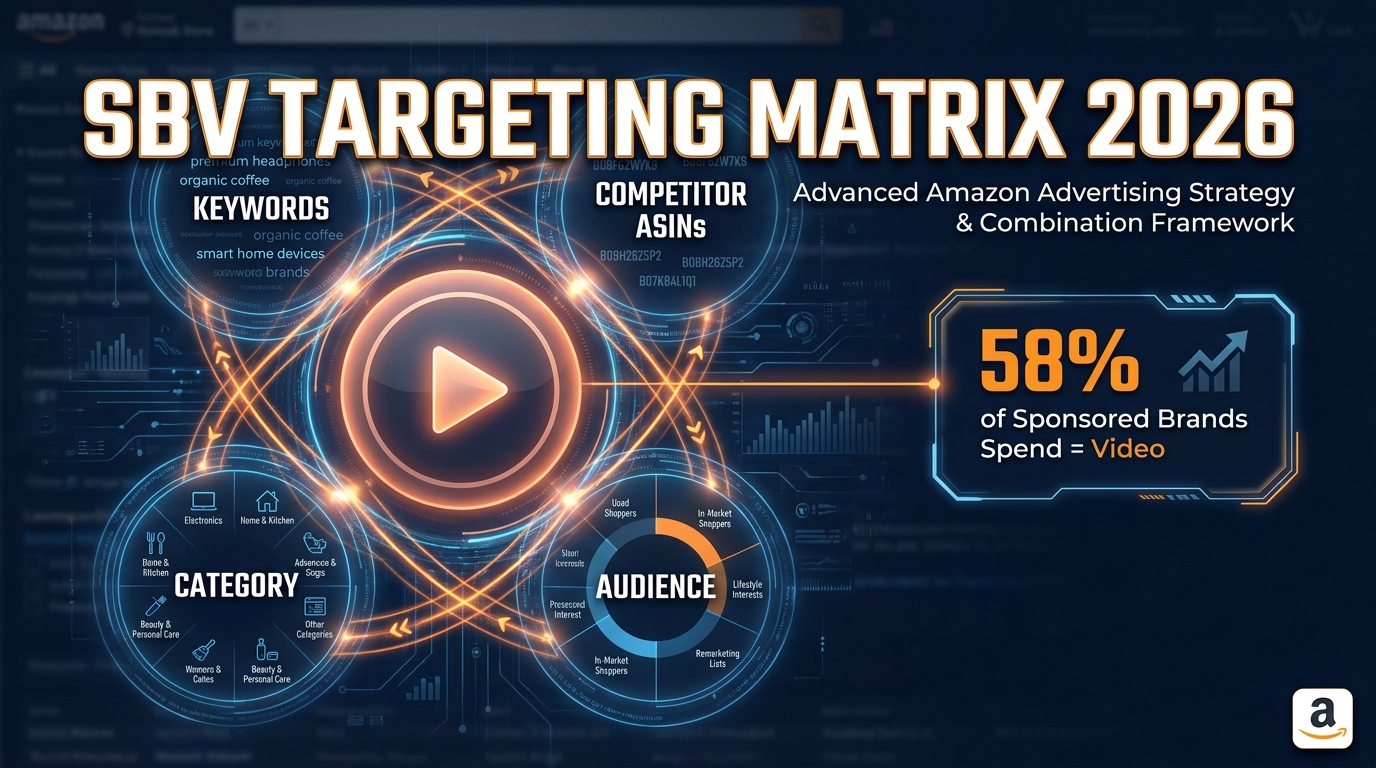
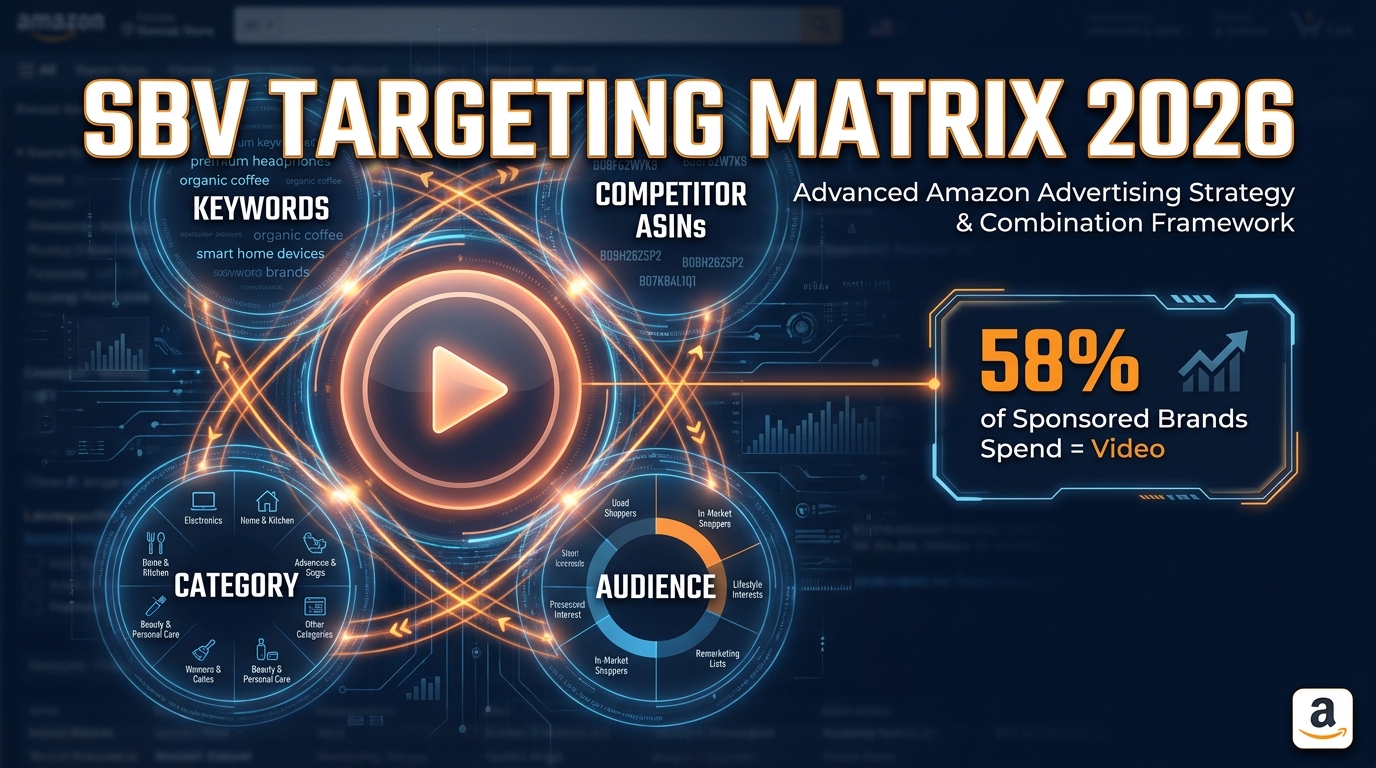
    SBV Targeting Matrix 2026 — Sponsored Brand Video targeting combos dashboard

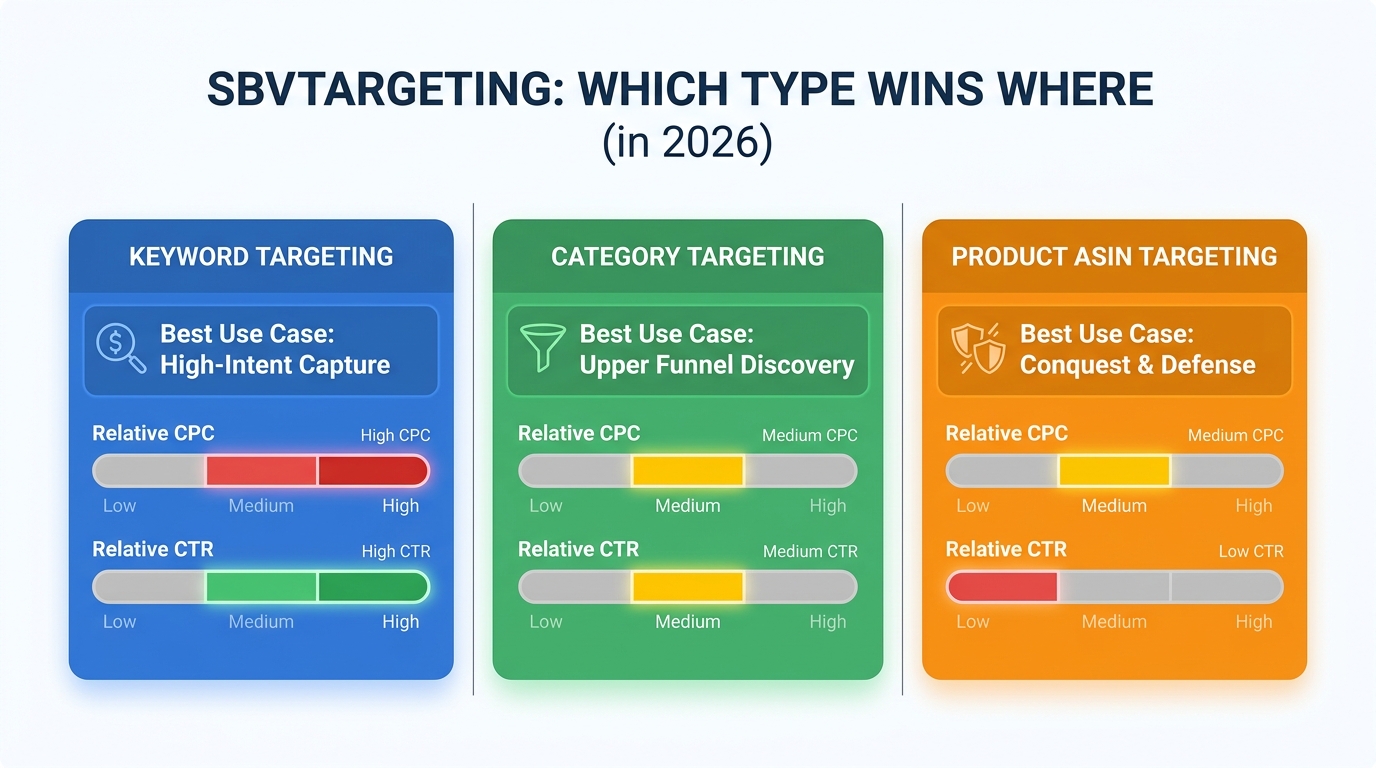
    Sponsored Brand Video is no longer a novelty format sellers reluctantly test with leftover budget. In 2026, it commands 58% of total Sponsored Brands spend across major Amazon advertising accounts, and agencies managing $4 million or more in monthly Amazon ad spend now route 90–95% of their Sponsored Brands budget directly into SBV. The format has earned that trust. It generates 2.6 times more clicks than static Sponsored Brands creatives. It autoplays directly in search results, captures mobile scroll attention faster than any banner, and it puts your product in motion at the exact moment a shopper is forming a purchase decision.

    But here’s what most coverage of Sponsored Brand Video misses entirely: the format itself isn’t the advantage anymore. At this point, every serious Amazon advertiser knows SBV outperforms static SB. The new battleground is targeting architecture — specifically, which targeting inputs you combine, in which campaign structures, against which shopper intents.

    A single-layer SBV campaign running broad keywords will pick up volume. But it won’t win the category. The advertisers who are extracting the best ACoS numbers, the strongest new-to-brand customer rates, and the most durable ROAS from SBV in 2026 are running deliberate targeting combos: specific pairings of keyword types, product targets, category refinements, and audience layers that are matched — intentionally — to specific shopper moments and video creative types.

    This article breaks down the four highest-performing targeting combos in SBV for 2026, the structural logic behind each, how to align your creative to your targeting intent, and how to build a budget architecture that lets all four run simultaneously without cannibalizing each other.


    Why Targeting Combos Matter More Than the Format Itself

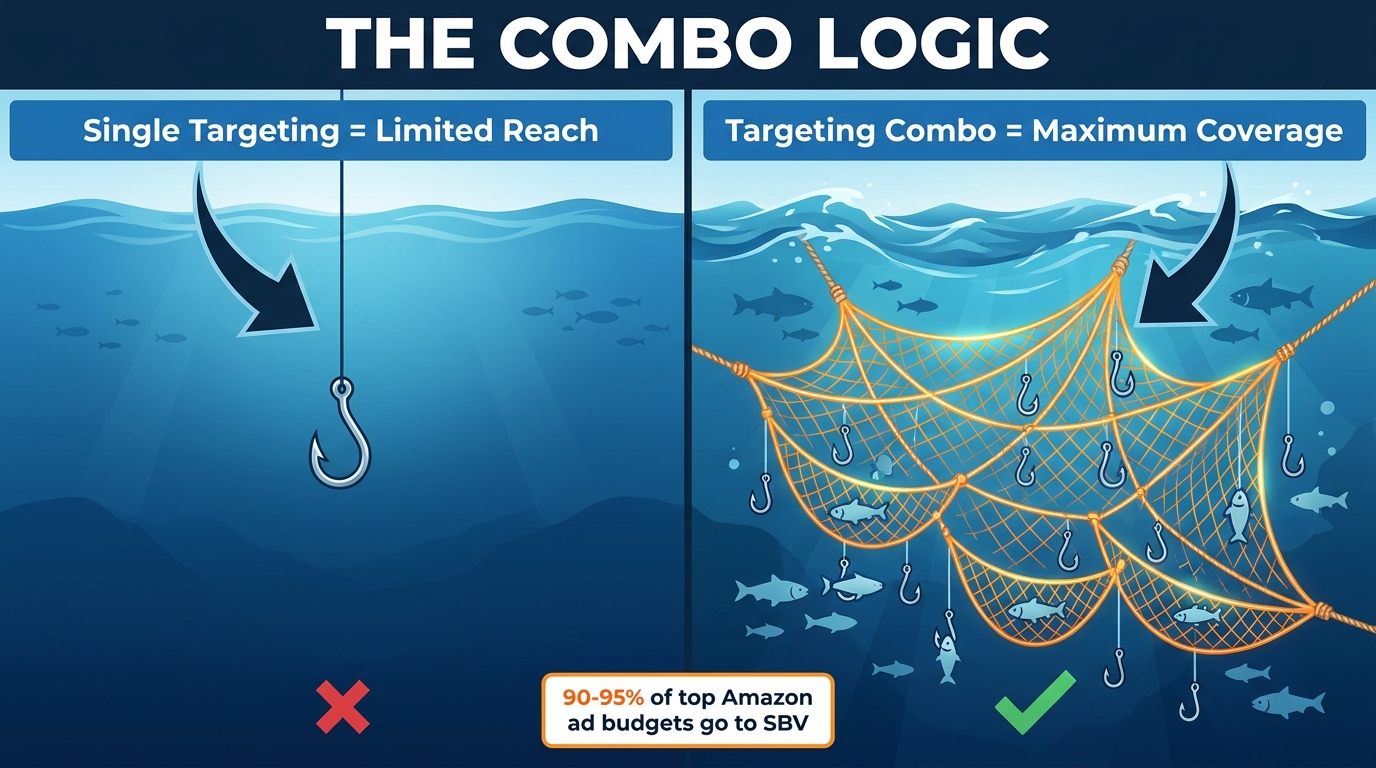
    The Combo Logic — single targeting vs multi-layer targeting comparison for Sponsored Brand Video

    The case for targeting combinations in SBV isn’t abstract. It comes from a fundamental truth about how Amazon’s ad auction works: the platform rewards relevance, and relevance is contextual. A shopper searching “best stainless steel water bottle” is in a different decision state than someone browsing an ASIN page for a competing brand’s product. Both are potential buyers. But they respond to different creative angles, they convert at different rates, and they carry different lifetime value profiles.

    A single targeting approach treats them identically. A well-constructed targeting combo treats them differently — serving each segment the most relevant version of your SBV campaign, with appropriate bids, appropriately tuned creative signals.

    The Structural Problem with Single-Layer SBV

    When you run a Sponsored Brand Video campaign with only broad keyword targeting and no product targeting layer, you’re essentially fishing with one hook. You’ll catch what swims past it. You won’t intercept anything, position against anyone, or defend anything proactively.

    The consequences show up in your data in predictable ways: high impression volume, mediocre CTR on competitive terms, and a search term report that’s a mix of high-intent buyers and window-shoppers. Your budget gets distributed across all of them at roughly the same efficiency — or worse, at worse efficiency — because broad match is capturing terms you haven’t optimized against.

    Meanwhile, competitors who’ve built structured targeting combos are appearing on the same search pages with tighter message-to-query alignment, lower wastage, and in the case of product targeting, on product detail pages where your brand name never even appears in the organic auction.

    What Amazon’s 2026 Auction Rewards

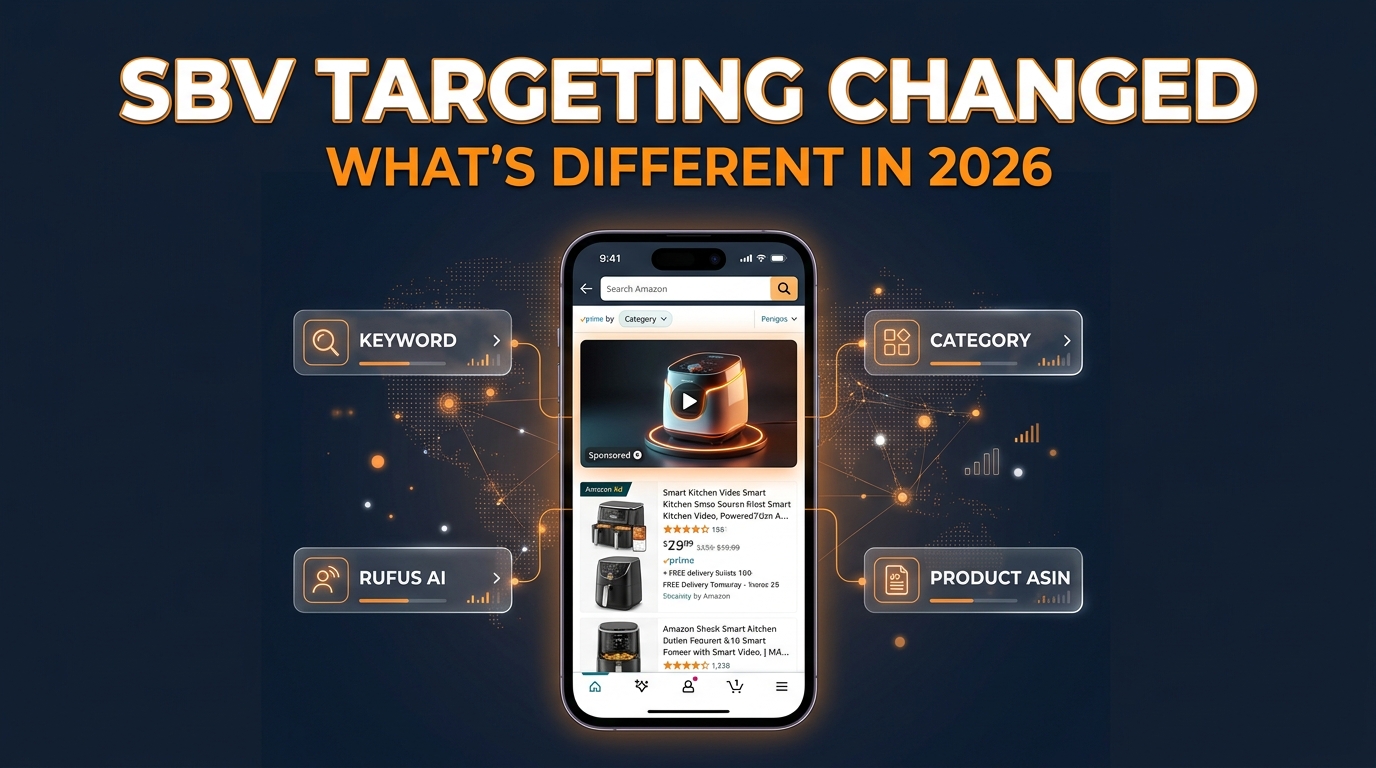
    Amazon’s ad auction in 2026 has become significantly more signal-rich. Product targeting — which requires the “Drive page visits” objective in SBV campaigns — now unlocks placement on both search results and product detail pages simultaneously. Category targeting with refinement filters (price range, star rating, brand exclusions) narrows the competitive set Amazon is placing you against. Audience layering via DSP and in-market signals introduces behavioral context that pure keyword targeting can’t reach.

    The platforms that consistently deliver the lowest-cost qualified traffic in 2026 are those that match targeting signal to shopper intent with precision. The combo approach is how you do that inside a single advertising channel.


    The Foundation: Campaign Structure That Supports Combo Targeting

    Before getting into the specific combos, it’s worth being precise about the structural requirements that allow them to work. You cannot run all four targeting types inside a single SBV campaign and expect clean data. The goal of combo targeting isn’t to throw everything at one campaign — it’s to run separate, deliberately structured campaigns that each own a specific targeting intent and a specific shopper moment.

    One Product Per Campaign, One Intent Per Ad Group

    The highest-performing SBV structures in 2026 follow a consistent pattern: one product (or tightly related product variant) per SBV campaign, and one intent — keyword or product targeting — per ad group within that campaign. This structure enables clean performance attribution. When campaign A (keyword targeting, exact match, branded terms) is performing differently from campaign B (competitor ASIN product targeting), you know precisely why and can act on each independently.

    Mixing keyword and product targeting within the same ad group conflates two different shopper contexts. The CTR patterns are different, the conversion paths are different, and the optimal bid strategies are different. Keep them separate from the start and you avoid having to untangle them later.

    Campaign Objectives: “Drive Page Visits” Is Not Optional

    This is a structural prerequisite that often trips up advertisers who came up in Sponsored Products: to access product targeting in Sponsored Brand Video, you must select the “Drive page visits” campaign objective — not “Grow impression share.” If you launch an SBV campaign under “Grow impression share,” product targeting is simply unavailable. You’re locked into keyword-only targeting, which is half the capability set.

    The practical implication is that most effective SBV combo strategies default to “Drive page visits” across the board. The click destination should be a single product detail page, not your Storefront. Sending traffic to a Store adds a navigation step between the click and the conversion, and most advanced practitioners in 2026 have moved away from Store linking for SBV unless the campaign objective is explicitly brand awareness at scale.

    Match Type Segmentation Within Keyword Campaigns

    Within keyword-based SBV campaigns, match type segmentation still matters — but not for the reason beginners assume. The reason to separate exact, phrase, and broad match into different campaigns (or at minimum different ad groups) isn’t bid control alone. It’s search term visibility. Broad match and phrase match campaigns will surface new search terms continuously. Exact match campaigns will tell you precisely which known terms are converting at what cost. Running them together without segmentation means your search term report is a blended picture where you can’t accurately attribute performance to a specific match type’s contribution.

    In practice: start discovery-oriented campaigns (broad/phrase) at moderate bids, harvest converting search terms into exact match campaigns at elevated bids, and use negative keywords aggressively in broad campaigns to prevent the two audiences from overlapping.


    Combo #1 — The Interception Play: Exact Keywords + Competitor ASIN Product Targeting

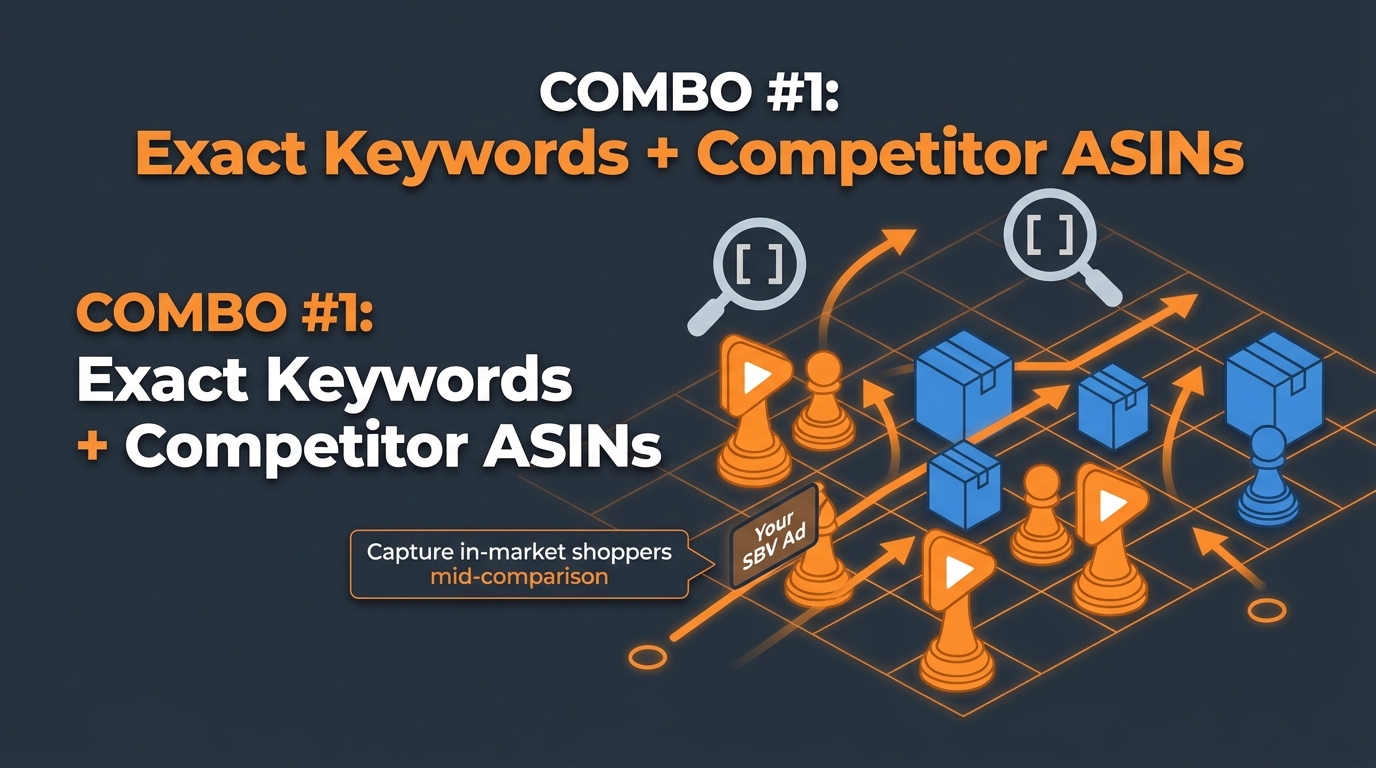
    Combo 1: Exact Keyword plus Competitor ASIN targeting — the SBV interception play

    This is the most aggressive targeting combo in the SBV toolkit, and it’s also the one that most directly threatens competitors’ ad spend efficiency. The logic: exact keyword campaigns capture shoppers actively searching for a product type with declared intent; competitor ASIN product targeting campaigns intercept the same shopper profile on a competitor’s product detail page, during the comparison phase. Together, they cover the shopper at two critical decision moments — search and comparison — with your SBV creative as the interruption.

    Why the Two Layers Reinforce Each Other

    Shoppers who enter a high-intent search query and see your SBV in results but don’t click immediately will often end up on a competitor product page moments later — especially if the competitor’s organic listing wins that search result. Without competitor ASIN product targeting, you disappear from that shopper’s experience entirely at the comparison stage. With it, your video re-enters their view while they’re actively reading competitor reviews, studying competitor price points, and most critically, looking for reasons to switch.

    This is the interception mechanic: your SBV doesn’t need to win the first impression to convert the shopper. It needs to be present at the decision moment. Competitor ASIN targeting ensures you are.

    Building Your Competitor ASIN Target List

    Effective competitor ASIN targeting requires a well-researched target list, not a mass blast. The highest-performing approach uses three tiers of targets:

    • Direct substitutes: Products in your exact category and price band with strong review counts (500+ reviews, 4.0–4.5 stars). These shoppers are actively comparing and haven’t decided. Your video can be the differentiating demonstration they’re looking for.
    • Weak competitors: Products in your category with sub-4.0 ratings, older review dates, or noticeably weaker imagery. These shoppers are often quietly disappointed by what they’re looking at — your video arrives at exactly the right moment of receptiveness.
    • High-volume category leaders: The ASINs getting the most organic traffic in your category. Bidding on these is more expensive but the traffic volume justifies it if your product has a genuine differentiation story to tell in 15–20 seconds.

    Bid Strategy for the Interception Combo

    Keyword and ASIN targeting bids should be set independently based on their respective conversion data, not at parity. Exact keyword campaigns generally bid higher because search intent is explicit and conversion windows are shorter. Competitor ASIN product targeting typically requires slightly lower bids, because the shopper’s intent is real but the context is comparison rather than active search — conversion rates are often 15–30% lower than exact keyword campaigns, and your bid ceiling should reflect that.

    A common mistake is over-bidding competitor ASIN targeting to “win every placement” on a top competitor’s page. This inflates spend without proportionally improving conversions. Set initial bids conservatively — 60–70% of your equivalent exact keyword bid — then adjust upward only for the specific ASINs showing strong conversion data after 2–3 weeks.

    Creative Alignment for the Interception Combo

    The SBV creative running against this combo needs to do one specific job: win a direct comparison fast. The first 3 seconds must establish your product visually and signal superiority over the category. Avoid purely brand-building intros (your logo for 3 seconds, then a slow reveal) — those work against you when the shopper is actively on a competitor’s page. Lead with the strongest differentiator: durability test, material quality, feature comparison, or verified social proof from a real use case.


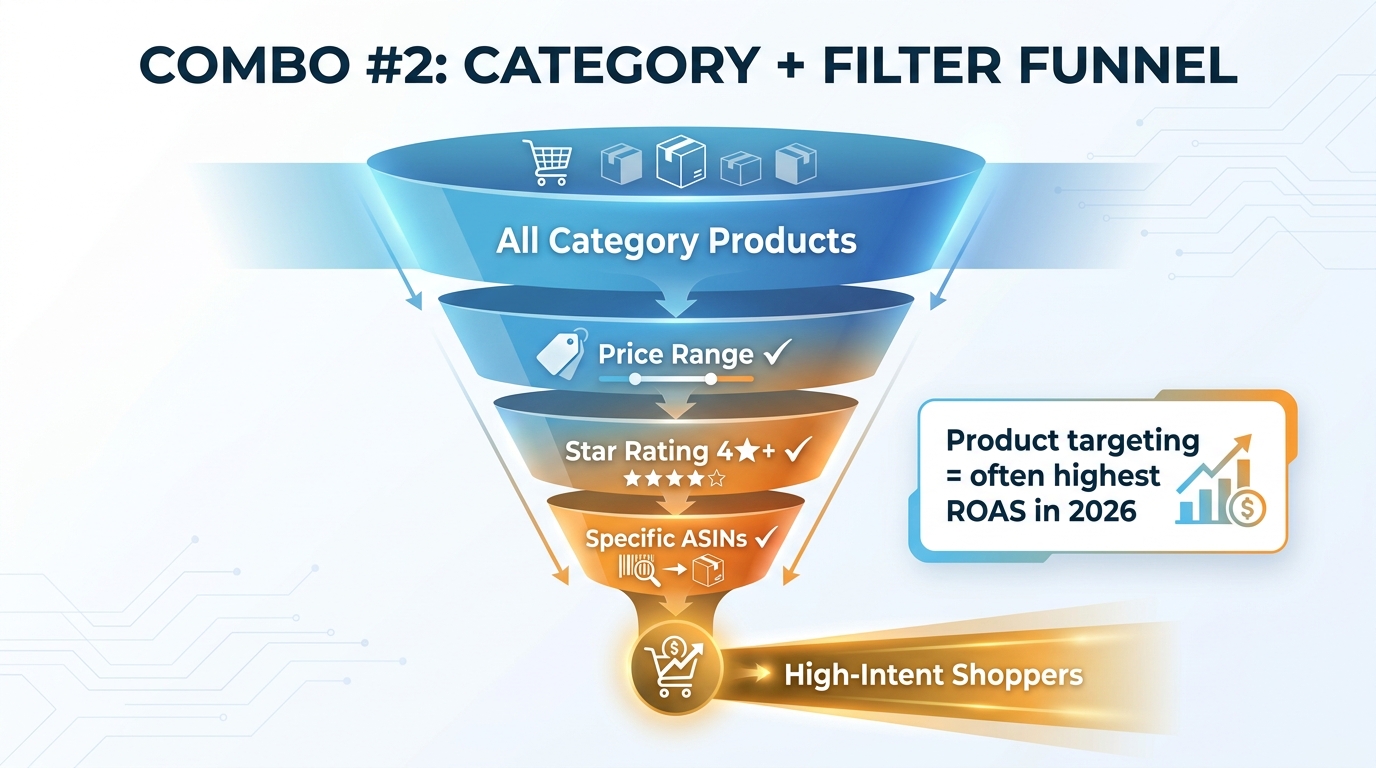
    Combo #2 — The Filter Funnel: Category Targeting + Price and Star Rating Refinements

    Combo 2: Category targeting with price and star rating filter funnel for Sponsored Brand Video

    Category targeting without refinement is a scatter gun. You’re bidding to appear next to every product in a category, which can mean appearing next to sub-$10 commodities when you’re a premium product, or appearing next to highly-rated market leaders when your product has 150 reviews and a 4.2-star average. Both scenarios waste spend and suppress CTR because the shopper context mismatches your value proposition.

    The filter funnel solves this by layering refinements onto category targeting — creating a narrower but significantly more qualified audience for your SBV to reach.

    Price Range Refinement: The Positioning Signal

    Price range filters in category targeting aren’t just about efficiency — they’re a strategic positioning tool. By setting minimum and maximum price thresholds for the products your SBV will appear next to, you’re selecting the competitive set you want to be seen against.

    For premium products: set the filter floor at your price point or slightly below it. You’re appearing next to competitors at similar price tiers, which means the shopper has already self-selected for price tolerance — they’re not bargain hunting, they’re evaluating value. Your SBV creative’s job is to win the quality argument, not the price argument.

    For value-tier products: consider targeting a slightly higher price band than your own product. A shopper browsing a $45 product who sees your SBV advertising a $29 alternative with comparable features is an extremely receptive audience. The price differential becomes part of your conversion argument without you needing to explicitly state it in the video.

    Star Rating Refinement: Qualifying the Audience Quality

    Star rating filters cut two ways in the filter funnel combo. Setting a floor of 4.0 stars means your SBV appears next to products that are performing well — but that’s actually where you want to be for consideration-stage shoppers. A shopper on a 4.2-star product is in genuine deliberation mode. They’re comparing, they haven’t committed, and they’re receptive to seeing an alternative make its case.

    Setting a ceiling of 4.5 stars (avoiding 5-star products with thousands of reviews) is a practical efficiency tactic: hyper-dominant listings with near-perfect review profiles attract highly loyal shoppers who are essentially going through a checkout confirmation motion. Your conversion rate will be low there regardless of how good your video is.

    A strong filter funnel setup looks like this: target your core category, set price range to 80–150% of your product’s price, and filter for 4.0–4.6 star products. This concentrates your impressions on the segment of the market where genuine switching behavior is most likely.

    When to Run Filter Funnel vs. Competitor ASIN Targeting

    These two combos are not in competition — they serve different scaling purposes. Competitor ASIN targeting gives you precision against specific known targets and is ideal for products where you’ve done detailed competitive research. The filter funnel scales reach across a broader qualified audience without requiring you to enumerate every specific ASIN. Use both: competitor ASIN targeting for your top 15–25 direct rivals, and filter funnel category targeting as a wider net that captures emerging competitors and shoppers you haven’t specifically mapped yet.


    Combo #3 — The Loyalty Fence: Branded Keyword Defense + Complementary ASIN Targeting

    Most Amazon advertisers run some version of branded keyword defense — bidding on their own brand name to protect search real estate from competitor conquest campaigns. Fewer think about pairing that defense with complementary ASIN targeting to close the loyalty loop. This combo isn’t about conquest. It’s about retention, upsell, and expanding wallet share from an already-warm audience.

    Branded Keyword Defense With SBV: Different Goals, Different Metrics

    When you run SBV against branded keywords, the conversion rate is typically the highest of any SBV campaign — because the shopper has already named you. They’re not browsing; they’re looking for you specifically. This should change how you think about the SBV creative for this campaign. It doesn’t need to win a comparison. It doesn’t need to establish brand recognition. It needs to reinforce the purchase decision the shopper has already made and move them to checkout efficiently.

    Branded defense SBV creative works best when it showcases specific product benefits the shopper may not have fully considered — a bundle option, a key feature they might have missed, or social proof from verified buyers that confirms they’re making a good choice. The 15-second version of “you’ve already decided well, here’s why that’s true” is a more effective branded defense than a general brand awareness video.

    The ACoS on branded SBV campaigns will often look the best in your account — but be careful not to let that create over-dependency on branded spend. These shoppers may have converted anyway without the ad. The real test is incrementality: check your new-to-brand rate on branded SBV campaigns. If it’s near zero, the campaign is primarily accelerating existing intent rather than creating new demand.

    Complementary ASIN Targeting: Expanding the Basket

    Complementary ASIN targeting is the underused half of this combo. Instead of targeting competitors, you target products that work with yours — accessories, consumables that pair with your device, protective cases for your electronics product, refill pods for your product system, replacement parts, or simply products in an adjacent use-case category that the same customer would logically buy.

    A shopper on the product detail page of a compatible product is in a purchase mindset. They’re not comparing you to anything — there’s no competitive tension. Your SBV arrives as a relevant, useful discovery: “You’re buying this. You might also need this.” The conversion mechanics here are closer to a cross-sell than a conquest.

    Building a good complementary ASIN list requires thinking through your customer’s use case holistically. If you sell yoga mats, target yoga blocks, straps, and bags. If you sell coffee subscriptions, target French press brewers, pour-over equipment, and coffee grinders. If you sell laptop stands, target mechanical keyboards, webcams, and USB hubs. The broader your complementary ecosystem, the more surface area this combo creates.

    Bidding and Budget for the Loyalty Fence

    Branded keyword defense typically commands high bids — competitors are actively trying to conquest your brand terms, and the conversion value justifies paying to defend. Complementary ASIN targeting, by contrast, is often significantly underpriced because fewer advertisers are competing for those placements. Starting bids 40–50% below your branded keyword CPCs and scaling based on conversion data is the right approach. You may find some complementary ASIN placements converting at lower ACoS than your highest-performing keyword campaigns — because the shopper context is already purchase-ready.


    Combo #4 — The Prospecting Engine: Broad Match Keywords + In-Market Audience Signals

    The first three combos are primarily mid-to-bottom funnel: they target shoppers in active consideration. The prospecting engine combo reaches earlier — finding shoppers who are in-category but haven’t yet searched your specific product type, or who have shown behavioral signals of being in-market without entering an explicit search query. This is where SBV’s awareness capabilities are most useful, and where most advertisers leave the most volume on the table.

    What Broad Match Actually Captures in 2026

    Broad match keyword targeting in SBV has changed meaningfully since 2024. Amazon’s match type algorithms have become significantly more semantic — a broad match keyword like “outdoor cooking” may now serve your SBV for searches like “portable grill for camping,” “best charcoal smoker,” or “backyard BBQ equipment” depending on your product’s category context. This is both the power and the risk of broad match: reach is genuinely expanded, but the quality of that reach varies widely.

    The key to making broad match work in a prospecting combo is treating it as a discovery mechanism rather than a conversion mechanism. Set expectations accordingly: broad match SBV campaigns will have lower CTR, higher spend per click, and longer conversion windows than exact match campaigns. Their job is to surface new search terms, build brand recall in a wide audience, and feed harvested terms into your exact match campaigns. Judge them on those metrics, not on direct ACoS alone.

    In-Market Audience Layering via Amazon DSP

    Amazon’s in-market audience segments allow advertisers to layer behavioral intent signals — derived from browsing and purchase history — on top of keyword-based targeting. In 2026, Amazon’s AI-powered targeting has made these signals increasingly granular: in-market segments can now be as specific as “shoppers who viewed 3+ products in category X in the last 14 days without purchasing” or “repeat purchasers in category Y with a history of trading up to premium price tiers.”

    For SBV specifically, this layering is most effective when used with broad match keyword campaigns. A broad match SBV campaign running alone will cast a wide net that captures a lot of general traffic. Layering in-market audience signals narrows that net toward the shoppers who already have behavioral indicators of purchase intent — making your broad match spend significantly more efficient without sacrificing the discovery function.

    Note: full audience layering on SBV requires a DSP relationship or integration. Advertisers running purely through Seller Central don’t have access to the same audience depth. But even within the Seller Central environment, Amazon’s standard product targeting and category targeting options now incorporate some behavioral signal weighting that approximates audience layering for sellers without DSP access.

    The Flywheel Effect of the Prospecting Combo

    The prospecting engine combo, run consistently, creates a flywheel for your other campaigns. As broad match SBV generates impressions and clicks from a wide audience, Amazon’s systems accumulate conversion signal data on your product — which improves quality score, which lowers your effective CPCs across all match types, which improves organic ranking signal. The brand recall effect from high impression volume also means shoppers who don’t click the first time are more likely to convert when they encounter your product in organic results or in exact match campaigns later.

    This is the most capital-intensive combo to run correctly — broad match campaigns with proper audience layering require a larger budget tolerance and a longer measurement window — but it’s also the combo that creates compounding returns over time in ways the other three combos alone cannot.


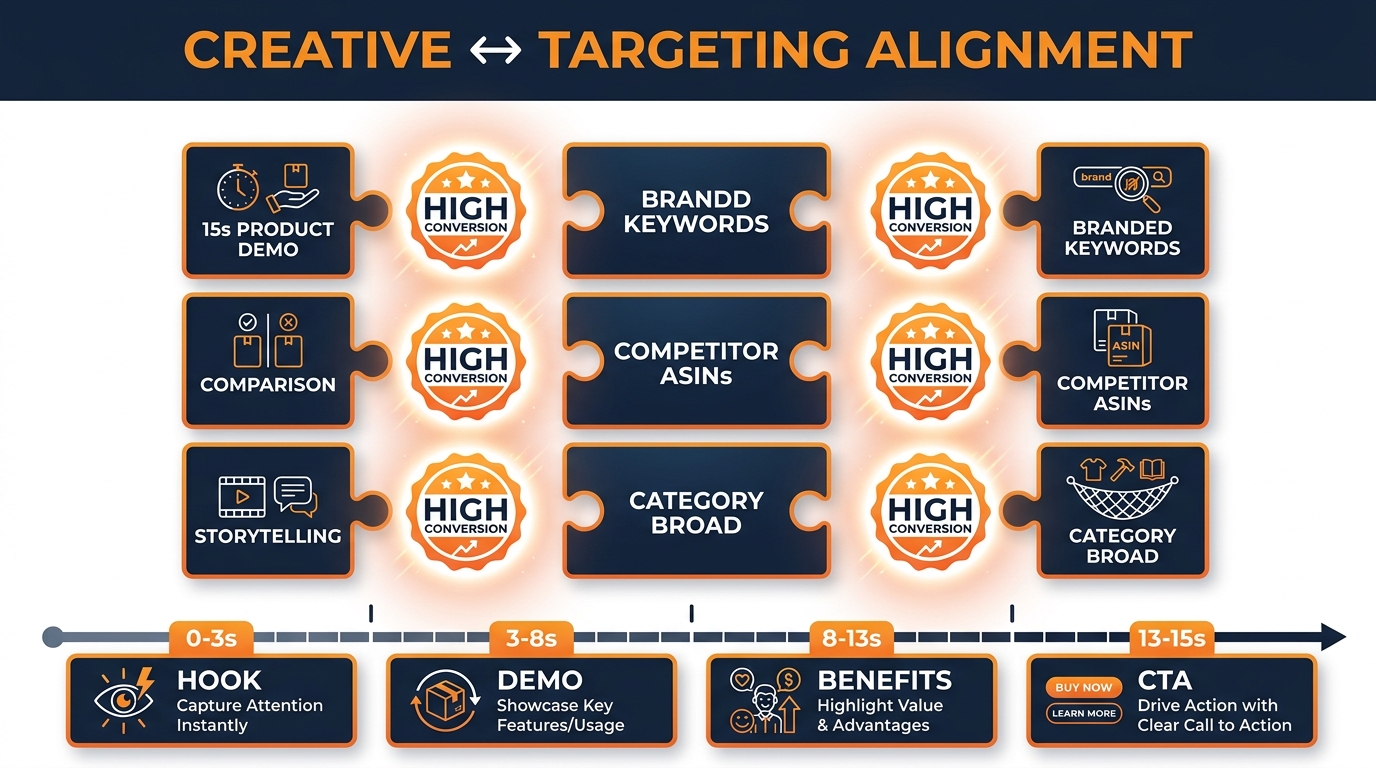
    Creative-to-Targeting Alignment: Your Video Must Match the Intent You’re Targeting

    Sponsored Brand Video creative to targeting alignment — puzzle showing video type matched to targeting intent

    The four targeting combos above require four different creative approaches. Running identical video creative across all four campaigns is one of the most common and costly mistakes in advanced SBV strategy. Each targeting context creates a different shopper moment, and the video creative that performs best in each context is specifically calibrated to that moment.

    The 15-Second Framework by Targeting Combo

    Amazon’s official specifications allow SBV creative to run 6–45 seconds, with 20 seconds or less strongly recommended. Independent performance data from agencies running at scale in 2026 consistently points to 15–20 seconds as the optimal window. Here’s how to structure those seconds differently for each combo:

    Interception combo (Exact Keywords + Competitor ASINs): The first 2–3 seconds must be a visual product reveal that communicates superiority immediately. Don’t open with your logo. Open with the product doing the thing the shopper is trying to solve. Seconds 4–10: feature demonstration with on-screen text callouts (size, material, durability, speed — whatever the decision variable is). Seconds 11–15: social proof (star rating, number of reviews, or a direct comparison claim).

    Filter funnel combo (Category + Refinements): These shoppers are browsing, not searching for you specifically. The opening needs to establish relevance to the category first, then transition to your differentiation. Seconds 1–4: product in natural use environment (contextual relevance). Seconds 5–12: key benefit demonstration with comparison language (“unlike standard [category product], ours…”). Seconds 13–15: clean CTA with price point visible.

    Loyalty fence combo (Branded Keywords + Complementary ASINs): Two different creatives are ideal here. For branded keywords: open with the product they already know, then lead into the feature they might have missed or the bundle option. For complementary ASINs: lead with the pairing story (“perfect with your [related product]”), show the combined use case, then the individual product. These are the most narrative-friendly of the four combo types.

    Prospecting engine combo (Broad Match + In-Market): Top-of-funnel creative. Brand visibility matters more here than direct conversion triggers. Open with problem identification (the pain the shopper might have), transition to product as solution, end with brand recall elements. Don’t over-optimize for immediate CTR — this creative’s job is to plant recognition seeds that mature across touchpoints.

    Technical Creative Requirements That Kill Performance

    Beyond strategy, the technical execution of SBV creative has direct performance implications that get overlooked. Key requirements for 2026:

    • Silent-first design: SBV autoplays without sound on most placements. If your video’s entire value proposition is in spoken dialogue, you’re invisible to the majority of shoppers. Every key message needs to be communicated visually or through on-screen text overlays.
    • Mobile-first composition: The majority of Amazon shopping in 2026 happens on mobile. Vertical or square product compositions in the video frame outperform wide-shot, landscape compositions on mobile placements. Products should be large in frame, not small subjects in a wide scene.
    • Text overlay legibility at speed: On-screen text that communicates features, specifications, or social proof must be readable within 1–2 seconds of appearance. Use high-contrast text (white on dark background or dark on light background), large font sizes, and limit each text card to 5–7 words maximum.
    • No black frames at the start: Amazon’s guidelines explicitly discourage opening with black frames. The very first frame of your SBV is competing against every other element on the search results page for visual attention. Lead with movement, color, or product visibility from frame one.

    Negative Targeting as a Precision Instrument

    Negative targeting in SBV campaigns is not a cleanup task. It’s a precision instrument that, when used proactively, changes the competitive dynamics of your targeting combos. Advertisers who treat negative targeting as a reactive step — adding negatives only after seeing wasted spend in the search term report — are permanently one step behind. The advertisers running the tightest SBV operations in 2026 build negative keyword and negative ASIN lists before campaigns launch.

    Strategic Negative Keywords by Campaign Type

    Each of the four targeting combos has a predictable set of negative keywords that should be applied from day one:

    Interception combo: Negative out your own branded keywords. You don’t want your competitor-targeting ASIN campaign spending budget on shoppers searching for you by name — you have a dedicated branded campaign for that. Also negative out heavily modified queries that indicate off-category intent: “repair kit,” “replacement part,” “manual” (if you’re targeting product browsers, not people trying to fix something they already own).

    Filter funnel combo: Negative out terms indicating price sensitivity below your threshold (“cheap,” “affordable,” “budget,” “under $X” if X is below your price point). Also negative out brand names — both your own and specific competitors — to prevent your category campaign from overlapping with your targeted campaigns.

    Loyalty fence combo: Negative out non-branded queries from the branded keyword defense campaign to keep it clean. From complementary ASIN campaigns, negative out your own ASINs (you don’t want to pay to appear on your own product pages in competition with organic placement).

    Prospecting engine combo: Apply your entire harvested negative list from existing campaigns at launch. Every unproductive search term you’ve already identified across other ad types should be negative in your broad match SBV from day one. This saves you the cost of rediscovering known dead ends.

    Negative ASIN Targeting

    Negative ASIN targeting — excluding specific product pages from your product targeting campaigns — is underused and high-value. Common targets for negative ASINs include:

    • Your own product ASINs (prevent self-cannibalization in category and competitor ASIN campaigns)
    • ASINs in the wrong price tier (if your filter funnel isn’t granular enough, manual negative ASIN exclusions can remove the specific low-price outliers that get through)
    • Out-of-stock or “currently unavailable” competitor ASINs (these generate impressions but near-zero conversions since the shopper has no immediate alternative need)
    • ASINs with predominantly negative reviews (sub-3.0 stars) — shoppers on these pages are often in “return research” mode, not purchase mode

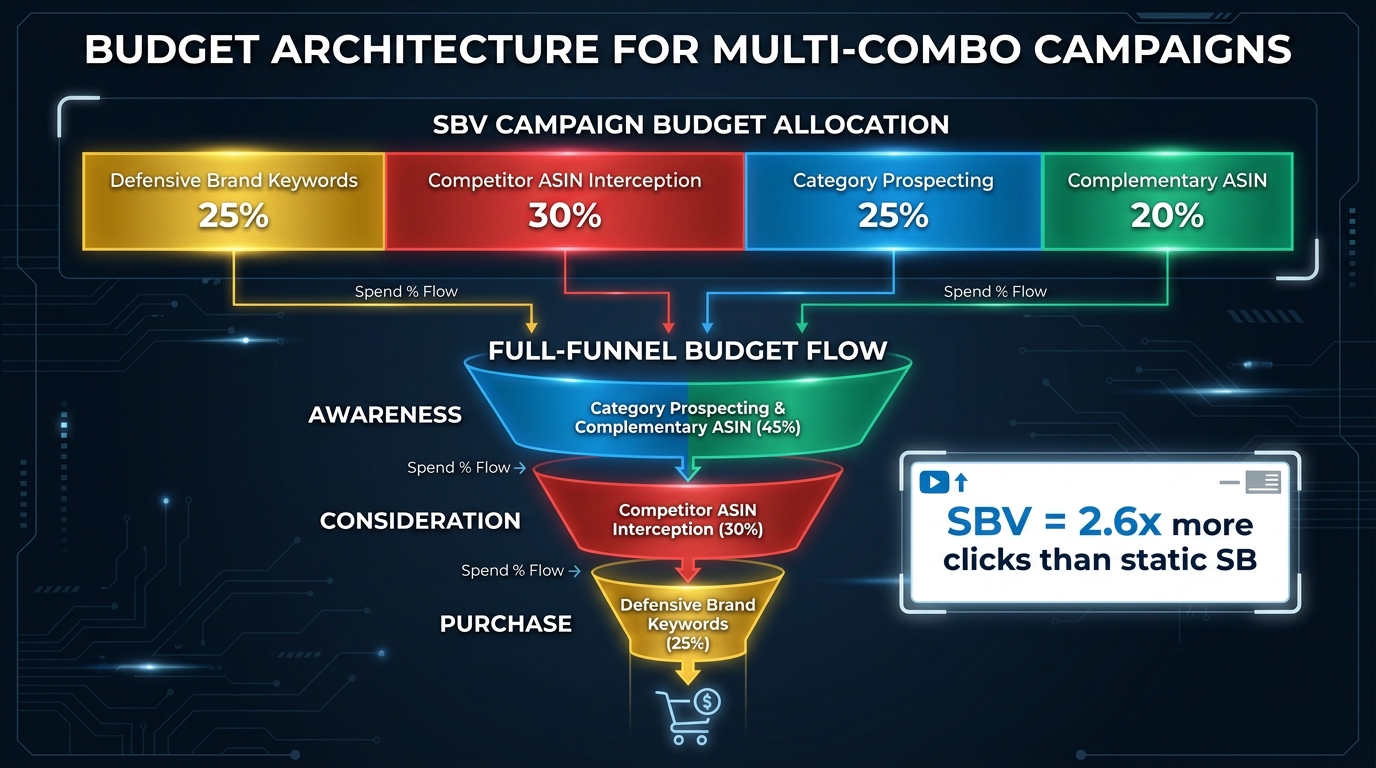
    Budget Architecture for Multi-Combo SBV Campaigns

    Budget architecture for multi-combo Sponsored Brand Video campaigns — allocation chart across targeting types

    Running four targeting combos simultaneously requires deliberate budget architecture. Without it, Amazon’s optimization algorithms will naturally favor the campaigns with the highest historical conversion rate — typically branded keyword defense — and underspend on prospecting campaigns that have inherently longer conversion windows. Left unchecked, this self-reinforcing cycle produces an account that’s efficient on paper but stagnant in growth.

    A Starting Budget Allocation Framework

    There’s no universal allocation that works across all categories, product maturity stages, or competitive intensities. But the following starting framework is consistent with what high-performing accounts managing SBV at scale in 2026 tend to use as a baseline:

    • Interception combo (Exact Keywords + Competitor ASINs): ~30% — This is the primary conversion engine and typically earns a significant budget share, especially in competitive categories.
    • Filter funnel combo (Category + Refinements): ~25% — Scalable reach at qualified efficiency; this is where growth campaigns live.
    • Loyalty fence combo (Branded Keywords + Complementary ASINs): ~20–25% — Higher conversion rates justify consistent spend; complementary ASIN budget can flex up if basket-building data is strong.
    • Prospecting engine combo (Broad Match + In-Market): ~20–25% — This is the investment budget. Lower immediate ROAS, longer-term flywheel effect. Underfunding this consistently stunts new-to-brand acquisition.

    These percentages should shift based on product lifecycle stage. A newly launched product needs a heavier prospecting and filter funnel allocation (50–60% of budget toward awareness and consideration). A mature product with strong organic ranking can weight more heavily toward interception and loyalty fence combos (defending and converting established demand).

    Portfolio Bidding vs. Individual Campaign Bidding

    Portfolio bidding — Amazon’s feature that allows you to set budget caps and bid optimization rules across a group of campaigns — has become more useful for multi-combo SBV management in 2026. You can create a portfolio for each combo type and set portfolio-level budget caps that prevent any single combo from consuming the full SBV budget when Amazon’s algorithm over-serves one campaign type.

    The practical setup: one portfolio per combo, with a budget cap set at 10–15% above the intended allocation. This gives each combo room to take advantage of high-opportunity traffic moments without blowing the budget ceiling. Review portfolio spend allocation weekly and rebalance when actual spend drifts more than 20% from target allocation.

    Day-Parting and Day-of-Week Adjustments

    Amazon’s bid adjustment features allow time-of-day and day-of-week multipliers on certain campaign types. In 2026, the data from large SBV accounts shows consistent patterns: prospecting campaigns perform better on weekday mornings (10am–2pm), when shoppers are browsing leisurely. Interception campaigns (competitor ASIN targeting specifically) perform better on evenings and weekends, when comparison shopping is more deliberate and less time-pressured. Branded defense campaigns have relatively flat performance curves by time of day.

    These patterns will vary by category — consumer electronics, for example, shows different temporal behavior than consumables or pet products. Use at least 30 days of hourly impression and conversion data before applying time-of-day adjustments, and treat them as optimizations rather than defaults.


    Measuring What Actually Matters in SBV Targeting Combos

    The metrics that matter for multi-combo SBV campaigns are not the same as the metrics for Sponsored Products optimization. The tendency to judge every Amazon ad campaign by ACoS alone produces systematically bad SBV strategy — because SBV, particularly in the prospecting and filter funnel combos, creates value across a longer time horizon than its immediate attributed conversions capture.

    New-to-Brand Rate: The Metric That Separates Growth from Recycling

    Amazon’s new-to-brand (NTB) metric tracks the percentage of purchases attributed to an ad campaign that came from first-time buyers of your brand on Amazon. For SBV combos specifically, this is the most important indicator of whether a campaign is growing your customer base or recirculating existing demand.

    Benchmark NTB rates by combo type:

    • Prospecting engine combo: Should show NTB rates of 70%+ consistently. If it’s below 60%, your broad match terms are capturing too much existing demand rather than finding new buyers.
    • Interception combo: Should show NTB rates of 50–70%. You’re targeting competitor-adjacent shoppers — most should be first-time brand buyers.
    • Filter funnel combo: Similar to interception, NTB 50–65% is a healthy target.
    • Loyalty fence combo: NTB here should be lower — 20–40% for branded keyword defense, 50–65% for complementary ASIN campaigns. Lower NTB on branded defense is normal; higher NTB on complementary ASIN is a healthy indicator.

    Return on Ad Spend vs. Total Advertising Cost of Sale

    Both ROAS and ACoS are incomplete pictures for SBV combo assessment. Total ACoS (TACoS) — which factors organic revenue into the denominator — is a better metric for evaluating the full impact of SBV, because the brand recall and impression volume generated by well-run SBV combos has measurable impact on organic conversion rates over time.

    Track TACoS at the product level, not just the campaign level. As SBV spending increases, a product’s TACoS should trend downward over 60–90 days if the campaign structure is working — because organic conversion improves as the product gains awareness and social proof reinforcement. If TACoS stays flat or increases despite growing SBV investment, the creative or targeting alignment needs diagnosis.

    Video Completion Rate and Its Role in Targeting Diagnostics

    Amazon provides view-through rate (VTR) data for SBV — the percentage of impressions where the video was watched to completion. Most sellers ignore this metric entirely. Used correctly, it’s a targeting quality diagnostic.

    When VTR is high but CTR is low on a particular targeting combo, the creative is engaging but the targeting context is misaligned — shoppers are watching but not converting, which often means the video is reaching the wrong segment. When both VTR and CTR are low, the creative isn’t engaging enough for the context. When VTR is low but CTR is high, you have an unusually strong call-to-action that’s driving clicks before full video view — that’s actually fine, but test a shorter creative version.

    Use VTR and CTR together as a 2×2 diagnostic matrix across your four targeting combos. The combinations will tell you clearly where the creative-targeting alignment is working and where it isn’t.


    Putting It All Together: A Four-Week Launch Protocol

    The targeting combos described in this article are most effective when launched in a specific sequence. Launching all four simultaneously without data creates budget competition and messy performance signals. This four-week protocol sequences launches to build a clean data foundation.

    Week 1 — Launch branded defense + exact keyword campaigns only. These are your highest-signal campaigns with predictable conversion behavior. They establish a performance baseline and generate the first rounds of search term data. Set bids at category average CPCs and let data accumulate.

    Week 2 — Add competitor ASIN targeting and complementary ASIN targeting. Now you have product targeting layers running alongside your keyword campaigns. Watch for budget cannibalization — if the ASIN targeting campaigns spend all their daily budget before 10am, your bids are too high or your ASIN list needs refinement. Adjust to ensure all active campaigns reach their daily budget cap naturally over a full day of serving.

    Week 3 — Launch filter funnel category targeting with refinements. Use price and star rating data from Week 1–2 competitor analysis to set your filter parameters. Run this in parallel but in a separate portfolio with its own budget cap so it doesn’t compete directly with the precision campaigns from Weeks 1–2.

    Week 4 — Add broad match prospecting campaigns with in-market layering where available. By Week 4, you have three weeks of search term, ASIN performance, and category data. Use this to pre-populate your broad match negative keyword list extensively. The broad match campaign now launches with dozens of negatives applied, which significantly reduces the time and spend required for the initial discovery phase.

    After the four-week launch sequence, establish a biweekly optimization rhythm: harvest new search terms from broad campaigns into exact campaigns, update negative lists, rebalance bid multipliers based on accumulated conversion data, and review portfolio budget allocation versus actual spend.


    What to Watch as Amazon’s SBV Capabilities Evolve

    Amazon continues to expand Sponsored Brand Video capabilities in ways that will directly affect targeting combo strategy in 2026 and beyond. Several developments are worth tracking closely:

    Dynamic TV Creative integration: Amazon’s 2026 Upfronts announcement of Dynamic TV Creative — which uses browsing and shopping data to personalize repeat ad exposures across Prime Video and retail media — signals that the same behavioral data that powers SBV targeting will eventually be applied to a unified full-funnel creative delivery system. Advertisers already familiar with SBV targeting combos will be better positioned to leverage this when it reaches the self-serve layer.

    Broader audience signal access for Seller Central advertisers: Amazon has been incrementally expanding the audience targeting features available to Seller Central advertisers, reducing the gap between what DSP advertisers can do and what self-serve advertisers can access. In-market audience layering, currently more robust through DSP, will likely become more accessible through Campaign Manager over time.

    Video format diversification: Amazon is testing multiple SBV placement types, including product page video placements that are distinct from search results placements. As these expand, the structural logic of separating campaigns by placement type — currently common in Sponsored Products — will apply equally to SBV. Start thinking about SBV placement segmentation now, before it becomes a required optimization.

    AI-driven creative personalization: Amazon’s creative services and third-party tools are beginning to automate A/B testing of SBV creative elements — thumbnail variations, opening frame options, on-screen text variations — at the campaign level. As this capability matures, the creative-targeting alignment principles described in this article will be applied dynamically rather than manually, but the underlying logic (right message for right intent) remains the same.


    Conclusion: The Targeting Combo Mindset

    The Sponsored Brand Video format is not a strategy. It’s a vehicle. What you put in it — which shoppers you reach, at which moment, with which creative message, at which bid level — determines whether that vehicle gets you somewhere worth going or circles the same intersection burning fuel.

    The targeting combos outlined in this article represent the four primary shopper moments where SBV can win in 2026: active search interception, category browse qualification, loyalty reinforcement, and top-of-funnel prospecting. Each requires a different targeting architecture, a different creative approach, and a different measurement lens. Running all four simultaneously, with deliberate budget allocation and a four-week staggered launch, creates the kind of multi-layer market presence that compounds over time.

    The accounts doing this well in 2026 are not necessarily outspending competitors. Many of them are outspending on a few campaigns while dramatically underinvesting in others. The advantage comes from spending the right amount in the right targeting context — which starts with knowing which targeting context you’re actually in.

    Your Immediate Action Checklist

    • Audit your current SBV campaigns: are you running keyword-only, or do you have product targeting campaigns (requires “Drive page visits” objective)?
    • Build your competitor ASIN target list across three tiers: direct substitutes, weak competitors, and high-volume category leaders.
    • Set up filter funnel category targeting with price range (80–150% of your product’s price) and star rating (4.0–4.6) refinements.
    • Create separate SBV creatives for each targeting combo — particularly differentiate your interception creative (comparison-focused) from your prospecting creative (problem-solution focused).
    • Audit your negative keyword lists across existing SBV campaigns and expand proactively before launching new combos.
    • Establish new-to-brand rate tracking as a primary metric, alongside TACoS at the product level, for all SBV campaign performance reviews.
    • Review video creative for silent-first compliance: does your video communicate its full value proposition visually, without relying on audio?

    The gap between SBV accounts that perform and those that merely spend is, in most cases, not the format. It’s the targeting architecture. Build the combos, align the creatives, and measure what actually moves.