Tag: Amazon Sponsored Brands

  • Why Most Amazon Sponsored Brands Videos Get Scrolled Past (And How to Build for the Way the Ad Actually Plays)

    Why Most Amazon Sponsored Brands Videos Get Scrolled Past (And How to Build for the Way the Ad Actually Plays)

    Most Amazon Sponsored Brands videos are made the way TV commercials get made. Someone writes a script with a hook, a story, a reveal, and a logo at the end. Someone films it, adds music, and uploads it. Then the ad goes live and quietly loses money.

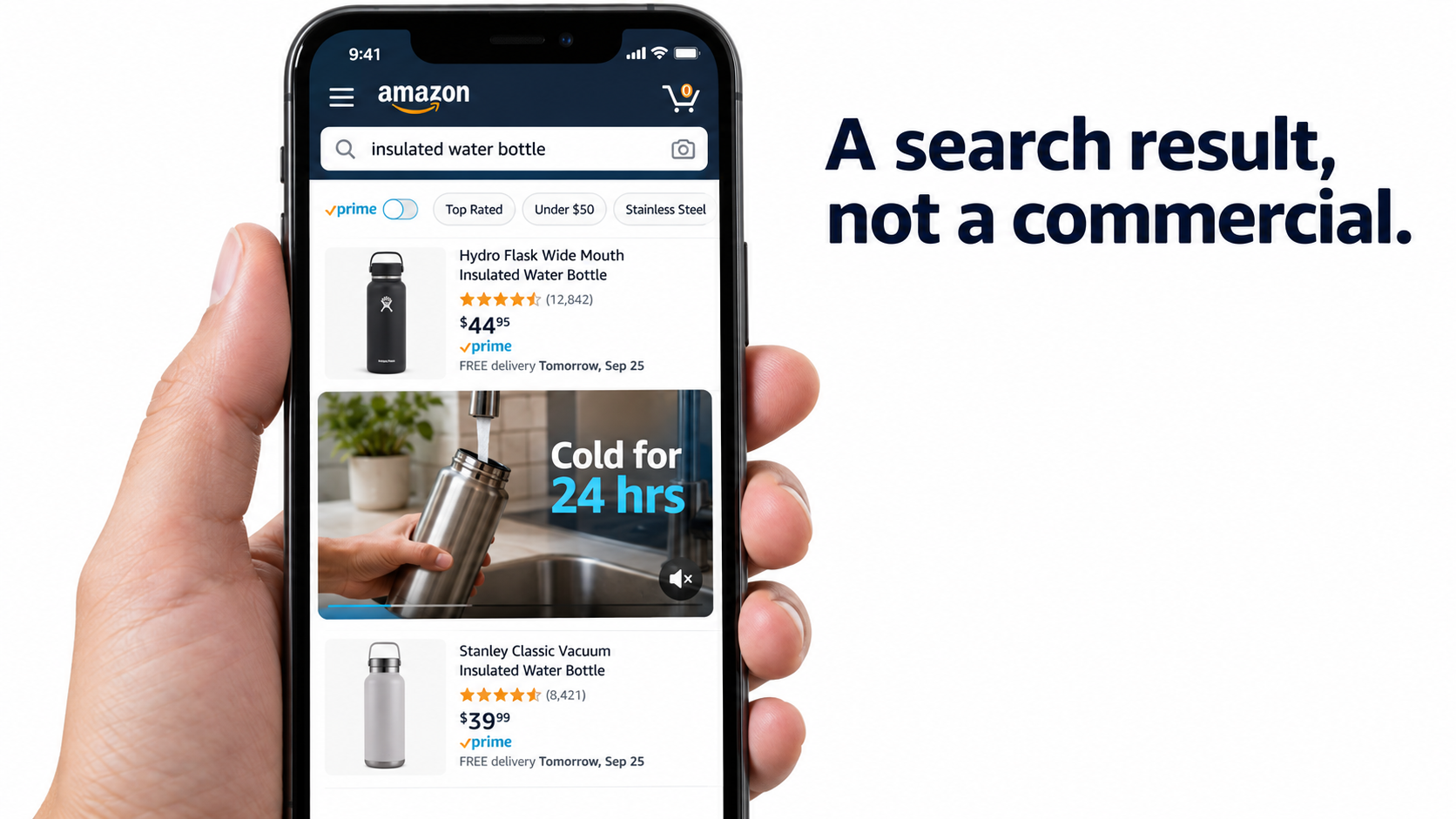
    The problem usually isn’t production quality. It’s that the ad gets built for a setting it never plays in. A Sponsored Brands video doesn’t run on a TV with sound and a viewer sitting still. It runs inside a search results page. It starts playing without sound once half of it scrolls into view, next to product listings the shopper was already comparing. It is up against listings that answer questions faster than most videos do.

    This guide skips the usual “video is engaging, so use video” pitch and starts from the mechanics. How does the Sponsored Brands video unit actually behave? What does Amazon fill in automatically, and what do you control? What do the 2026 specs and policies say? Which video format suits which job now that Amazon also offers Sponsored Products video, display video, and a fixed-price branded keyword option called reserve share of voice?

    The approach is simple: work out how the ad really plays, then build the creative, the targeting, and the testing around that. Every spec and benchmark cited here comes from Amazon Ads’ published documentation or case studies. Where public data doesn’t exist, this guide says so and gives you a way to produce your own instead of an invented number.

    The guide is written for brand-registered sellers and agency operators who already run Sponsored Products and want Sponsored Brands video to earn its share of the budget. If your current videos are getting impressions but few clicks, or clicks but a weak ACOS, the cause is almost always somewhere in the next ten sections.
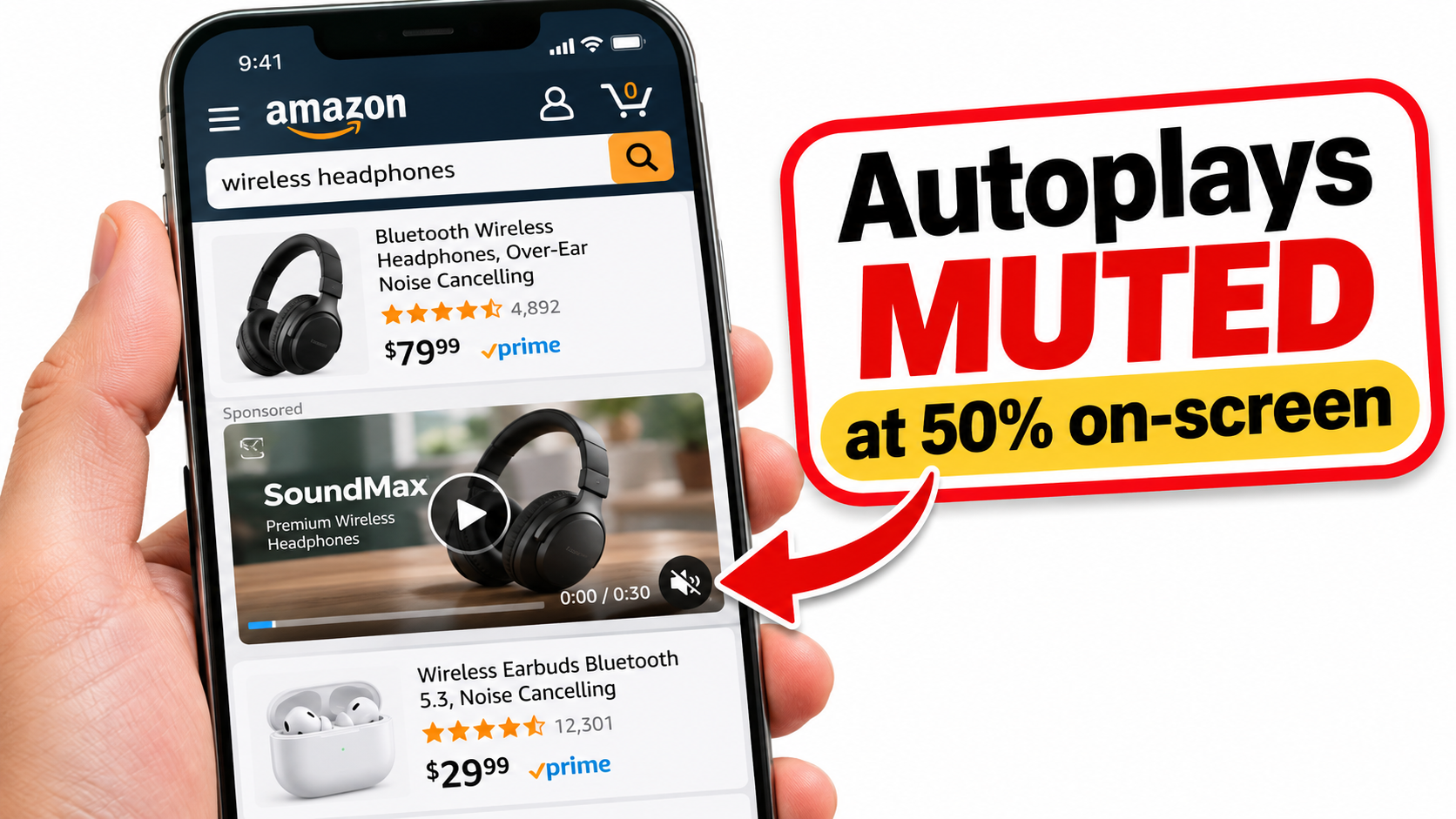
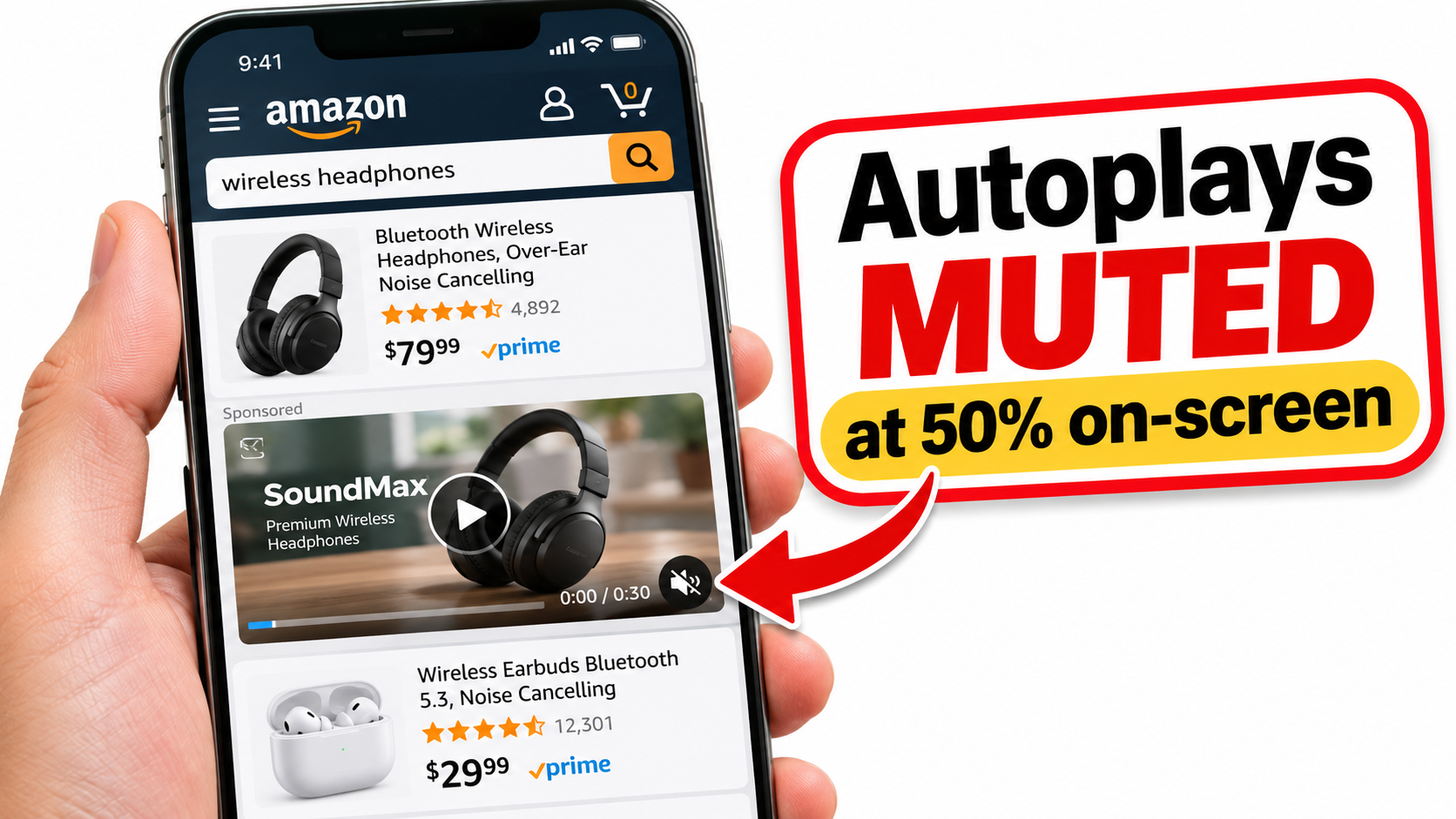
    Smartphone showing an Amazon mobile search results page with a Sponsored Brands video autoplaying muted between product listings

    1. A Sponsored Brands Video Is a Search Result, Not a Commercial

    Amazon calls Sponsored Brands video a “storytelling tool” for brands to “initiate, cultivate, and maintain relationships with shoppers.” That’s accurate. But the story gets told in a very specific place, and the place determines what the story can be.

    Where the ad actually runs

    According to Amazon’s ad specs, Sponsored Brands video creatives show up in desktop and mobile shopping results and can also appear within product detail pages. Shoppers are reached through keyword, category, and product targeting, and the ad is billed per click. Brand Store campaigns can run both above and below the fold of search results.

    So every time your video plays, the person seeing it is in the middle of a task. They typed a query or opened a product page, and they’re scanning for something that fits. Your video doesn’t interrupt entertainment. It interrupts a comparison.

    Why that matters for creative

    A TV spot can spend its first five seconds building atmosphere because the viewer isn’t going anywhere. A shopper in search results scrolls past anything that doesn’t instantly connect to their query. Amazon’s own creative guidance points the same way: “Showcase your product or something interesting within the first few seconds to catch the shopper’s attention,” and wait “until later in the video to include your brand name and logo.”

    Read that carefully, because it runs against a lot of brand instinct. Amazon is telling advertisers not to open with the logo. In search, the product is the hook. The brand gets remembered because the product was worth noticing, not because the logo appeared early.

    The question your video has to answer

    Picture someone who searched “insulated water bottle for kids.” Your video plays muted beside a dozen static listings. In about two seconds, without sound, the frame has to answer: Is this the thing I searched for, and what’s different about it?

    That’s a hard brief, and a very different one from “tell our brand story.” Brands that get good results from Sponsored Brands video usually treat each video as a moving product listing with some brand personality, not as a short film that happens to mention a product.

    Takeaway

    • Write the brief around the search query, not the brand manifesto.
    • Assume the viewer is mid-comparison and gives you two seconds.
    • Put the product, in use, in the first frame.

    2. Anatomy of the Ad Unit: What Amazon Controls and What You Control

    Before planning any creative, it helps to know exactly which parts of the ad you own. Amazon’s spec documentation splits the Sponsored Brands video unit into six components. Some you write, some Amazon generates, and some are fixed UI you have to design around.
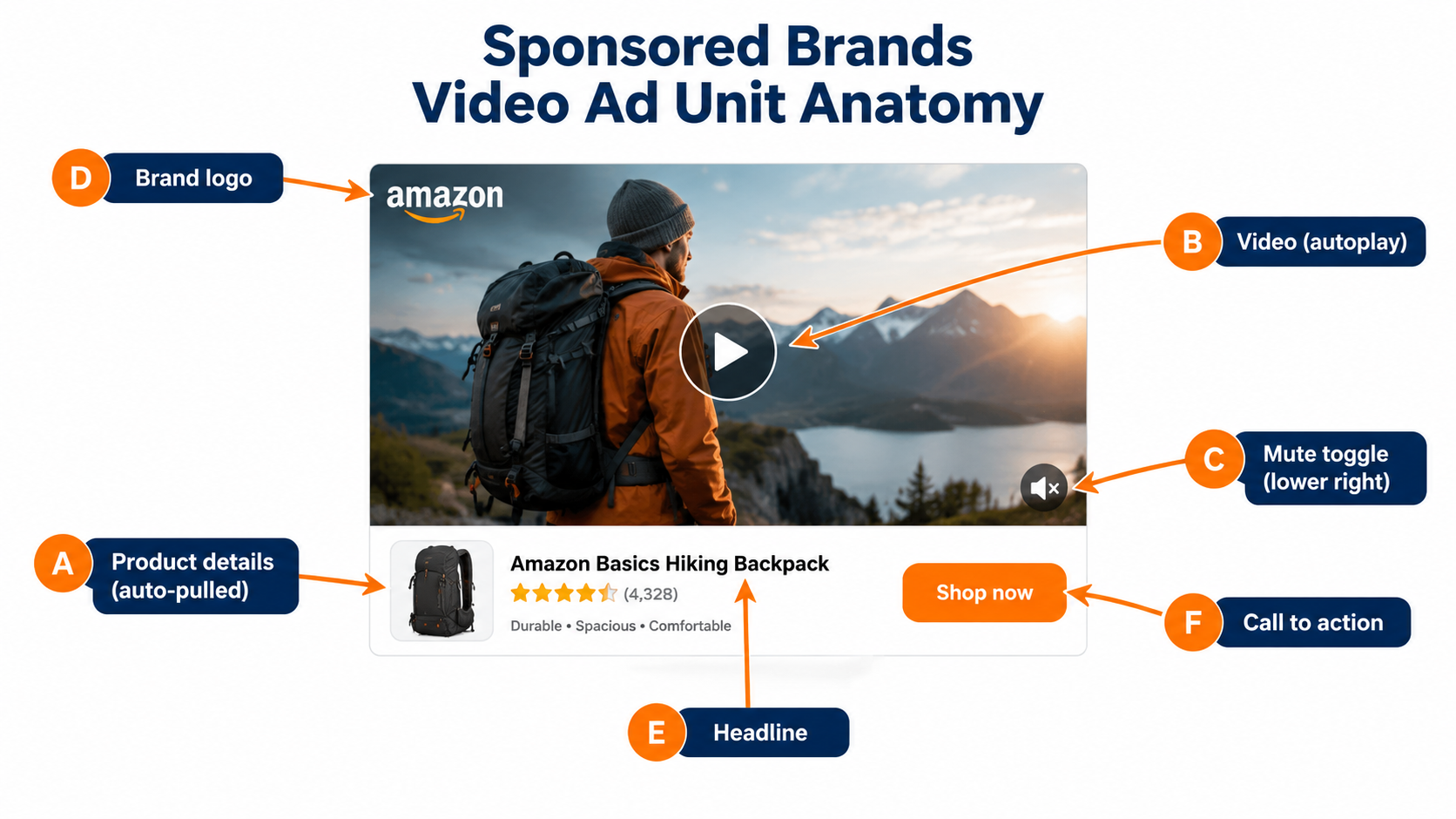
    Labeled diagram of a Sponsored Brands video ad unit showing product details, autoplay video, mute toggle, brand logo, headline, and call to action

    The six components

    1. Product details (automatic). Amazon pulls the main product image and related details from the detail page. You can’t write this directly. It reflects whatever your listing shows.
    2. Video (yours). It autoplays once 50% of its pixels are on screen.
    3. Mute toggle (fixed UI). It sits over the lower-right corner. Videos always start muted, and shoppers have to tap to hear audio. If the video has no audio track, the toggle doesn’t show.
    4. Custom brand logo (yours). Amazon recommends a clear, readable logo.
    5. Headline text (yours). Custom copy that states your value.
    6. Call to action (Amazon-rendered). It tells shoppers an action leads to your Brand Store or product page.

    The parts people forget they “own”

    Component A is the one advertisers miss most. Because the product details come from the detail page, your listing is part of your ad creative. A weak main image, an unclear title, or a low rating shows up right next to your video, and no amount of editing fixes it.

    So before you spend on video production, look at the listing the video will promote. If the main image wouldn’t win a click by itself, the video is starting from behind.

    The parts that limit your design

    The mute toggle is fixed in the lower-right corner. That’s why Amazon specifically says to avoid putting text or other important information there and offers a safe-area template. A price claim, a key feature, or a logo placed in that corner can get covered on the devices that matter most.

    The autoplay trigger matters too. The video starts when half of it is visible, so on mobile the shopper may see the first second while only part of the frame is on screen. Put the key visual in the center of the frame, not at the edges.

    Putting the pieces together

    Think of the unit as one composition. The headline, the auto-pulled product details, and the first frame of video all appear at once. The best-performing combinations don’t repeat each other. If the headline says “Keeps drinks cold 24 hours,” the video can show ice still in the bottle at the end of a hot day instead of putting the same claim on screen again.

    3. The Muted-First Creative Brief

    Amazon states plainly that videos always start without audio. Shoppers can turn sound on, but you should plan as if most won’t. That single fact should change how you script, shoot, and edit.

    Design for silence, add audio as a bonus

    Write the script, then mute the cut and watch it. If the video doesn’t make sense, the visuals are leaning on the voiceover. Fix that in the edit before you launch, not after the data comes in.

    Ways to make a silent video understandable:

    • Show the result, not the setup. A stain disappearing, a cord untangling, a bag fitting into an airline sizer. Visual change reads without sound.
    • Use short, large on-screen text. Three to five words per card, high contrast, away from the lower-right corner.
    • Demonstrate scale. Hands, common objects, and real settings show size faster than a dimension chart.
    • Cut on the action. Each shot should move the claim forward. Slow pans and lifestyle B-roll eat seconds and explain nothing.

    Language rules apply to text and voice

    Amazon requires videos to match the marketplace’s language: English on-screen text or voiceover for English-speaking locales, Italian for Italy, and so on. For multi-marketplace sellers, Amazon suggests subtitles or separate versions for each marketplace.

    In practice, a muted-first video makes localization cheaper. When the meaning sits in visuals and a few text cards, a new market only needs new text cards, not a new shoot. That’s a real cost argument for keeping the voiceover light.

    Where audio still helps

    Audio isn’t useless. A shopper who taps to unmute is showing real interest, and a clear voiceover can close the sale. The rule isn’t “skip audio.” It’s “never let understanding depend on audio.”

    Also remember: if your video has no audio at all, Amazon doesn’t show the mute toggle. That removes one UI element from the frame. For simple demonstration videos where sound adds nothing, that cleaner frame is worth considering.

    A muted-first script template

    1. Frame 1 (0–2s): The product doing its main job, centered, matching the target query.
    2. Proof beat (2–8s): One visible demonstration of the main differentiator.
    3. Second beat (8–15s): A secondary benefit or use case, shown not told.
    4. End card (15–20s): Brand name and logo, consistent colors, no critical text in the lower right.

    4. Length: Why 45 Seconds Is Allowed and 20 Is the Target

    Amazon’s spec permits Sponsored Brands videos between 6 and 45 seconds, with 20 seconds or less highly recommended. That gap between allowed and recommended deserves attention.
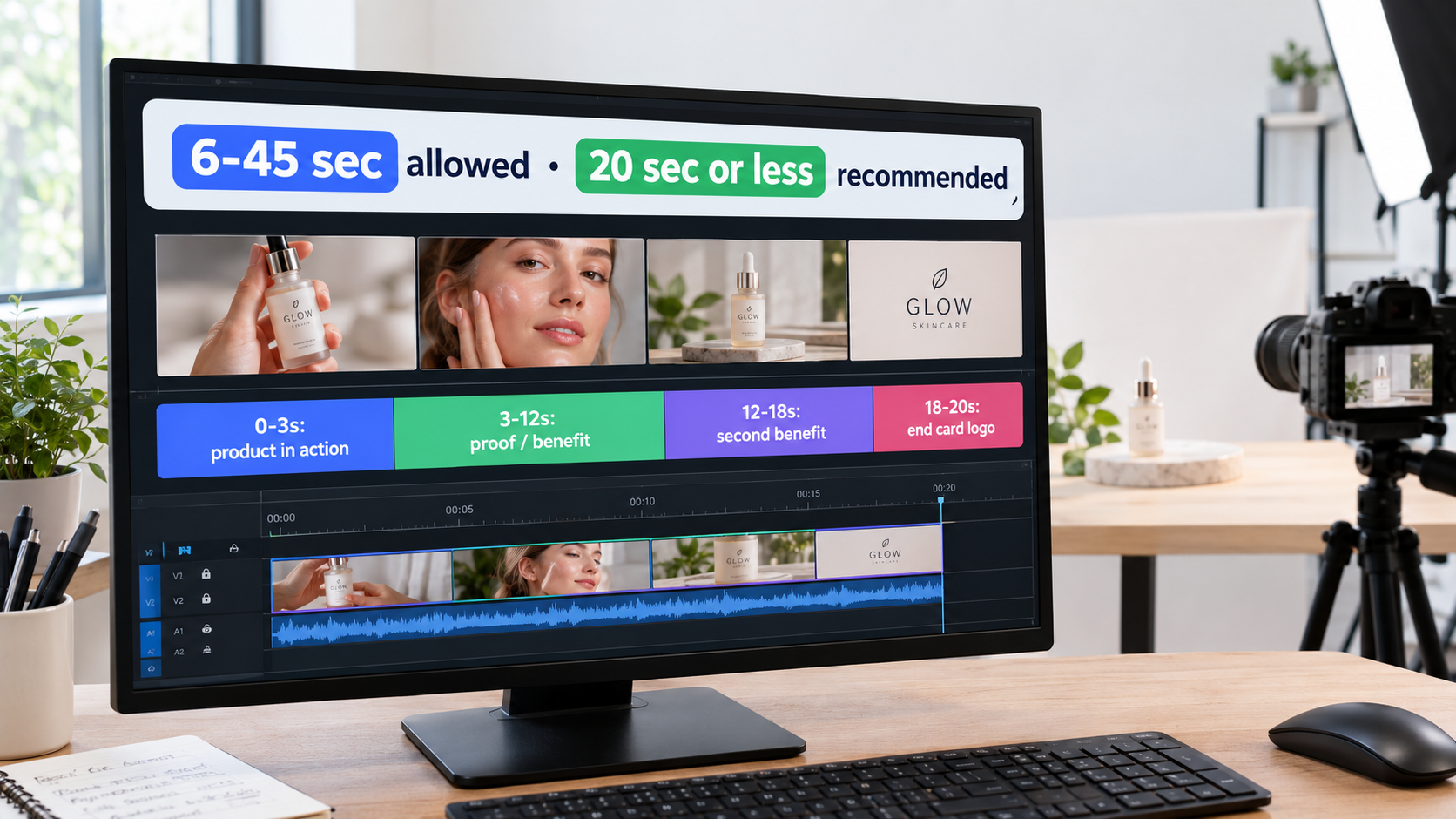
    Video editing timeline split into hook, proof, benefit, and end card segments with a callout noting 6 to 45 seconds allowed and 20 seconds or less recommended

    Why shorter usually fits the job

    Amazon’s guidance says it directly: the video’s goal “is not to provide all the details about the product, but rather to create a sense of excitement and curiosity that will drive viewers to your product or Stores page for more information.” The detail page already holds the details. The video only needs to earn the click.

    Each extra second is a second where a scrolling shopper can leave. If your strongest proof sits at second 30, most viewers will never see it. A 15-second cut that front-loads the proof will usually be seen in full more often, though you should confirm that with your own reporting.

    When longer can make sense

    There are fair reasons to use the extra length:

    • Products that need a demonstration to be believed, such as multi-step tools or devices whose value only appears in use.
    • Brand Store campaigns showing range, where a quick tour of several products may need more time.
    • Detail page placements, where the shopper is already researching a related product and may be more patient.

    Even then, the first few seconds have to work alone. A long video should be a short video that keeps going, not a slow build.

    Use cut-downs as a test

    The cheapest length test is to build both versions from one shoot. Edit a 15-second cut and a 30-second cut with the same opening frame, run them in otherwise identical ad groups, and compare click-through rate and conversion. That gives you an answer for your category, which matters more than any general rule.

    Seconds-per-idea discipline

    A useful editing rule: one idea per three to five seconds. A 20-second video holds four or five ideas at most, including the end card. If your script has eight selling points, it’s actually two or three videos. Split them and test which single angle pulls best.

    5. Spec Traps and Rejection Risks You Can Avoid Before Upload

    A rejected video costs more than the re-edit. It costs days of missing placements, often during a launch or seasonal push. Most rejections and technical failures trace back to a short list of specs and policies anyone can check in advance.

    The technical specs, in one place

    From Amazon’s published Sponsored Brands video specs:

    • Duration: 6–45 seconds (20 seconds or less recommended)
    • Dimensions: 1280×720, 1920×1080, or 3840×2160 px
    • Aspect ratio: 16:9 (square pixel) only
    • File size: 500 MB or less
    • Format: .MP4 or .MOV
    • Codec: H.264 or H.265, Main or Baseline profile
    • Frame rate: 23.976, 23.98, 24, 25, 29.97, 29.98, or 30 fps
    • Video bit rate: minimum 1 Mbps, 4 Mbps or higher recommended
    • Scan type: progressive
    • Audio: PCM, AAC, or MP3; stereo or mono; minimum 96 kbps; minimum 44.1 kHz sample rate

    The vertical video trap

    Here’s the trap that catches the most brands in 2026: 16:9 only. Many brands now produce mostly vertical 9:16 content for TikTok, Reels, and Shorts. The obvious shortcut is to drop that vertical clip into a horizontal frame with blurred or colored side bars.

    Amazon’s policy forbids exactly that. The specs say to avoid “horizontal or vertical black, color, or blurred bars,” meaning letterboxing and pillarboxing. Social content has to be reframed or reshot for horizontal, not just padded.

    If you plan shoots with this in mind, it’s easy. Film wide enough to crop both a 16:9 and a 9:16 version from the same footage, and keep the action in the center of the frame. One shoot can then supply both channels without breaking either platform’s rules.

    Other common problems

    • Language mismatch: English text in a video sent to a non-English marketplace, or the other way around.
    • Safe-area violations: key text or claims in the lower-right corner under the mute toggle.
    • Audience suitability: Amazon requires all content to suit a general audience and follow applicable laws and its creative acceptance policies.
    • Interlaced exports: some older editing presets export interlaced video, but the spec requires progressive scan.

    Pre-upload checklist

    1. Export at 1920×1080, H.264, progressive, 4+ Mbps.
    2. Watch the whole cut muted. Is it still clear?
    3. Overlay Amazon’s safe-area template. Is the lower right clear?
    4. Confirm no bars on any edge.
    5. Confirm on-screen text and voice match the target marketplace’s language.
    6. Review the Amazon Ads policies page for category-specific rules before submitting.

    6. Detail Page or Brand Store? Picking the Destination Changes the Whole Campaign

    Amazon offers two ways to connect Sponsored Brands video to shoppers, and the choice changes more than the click destination.
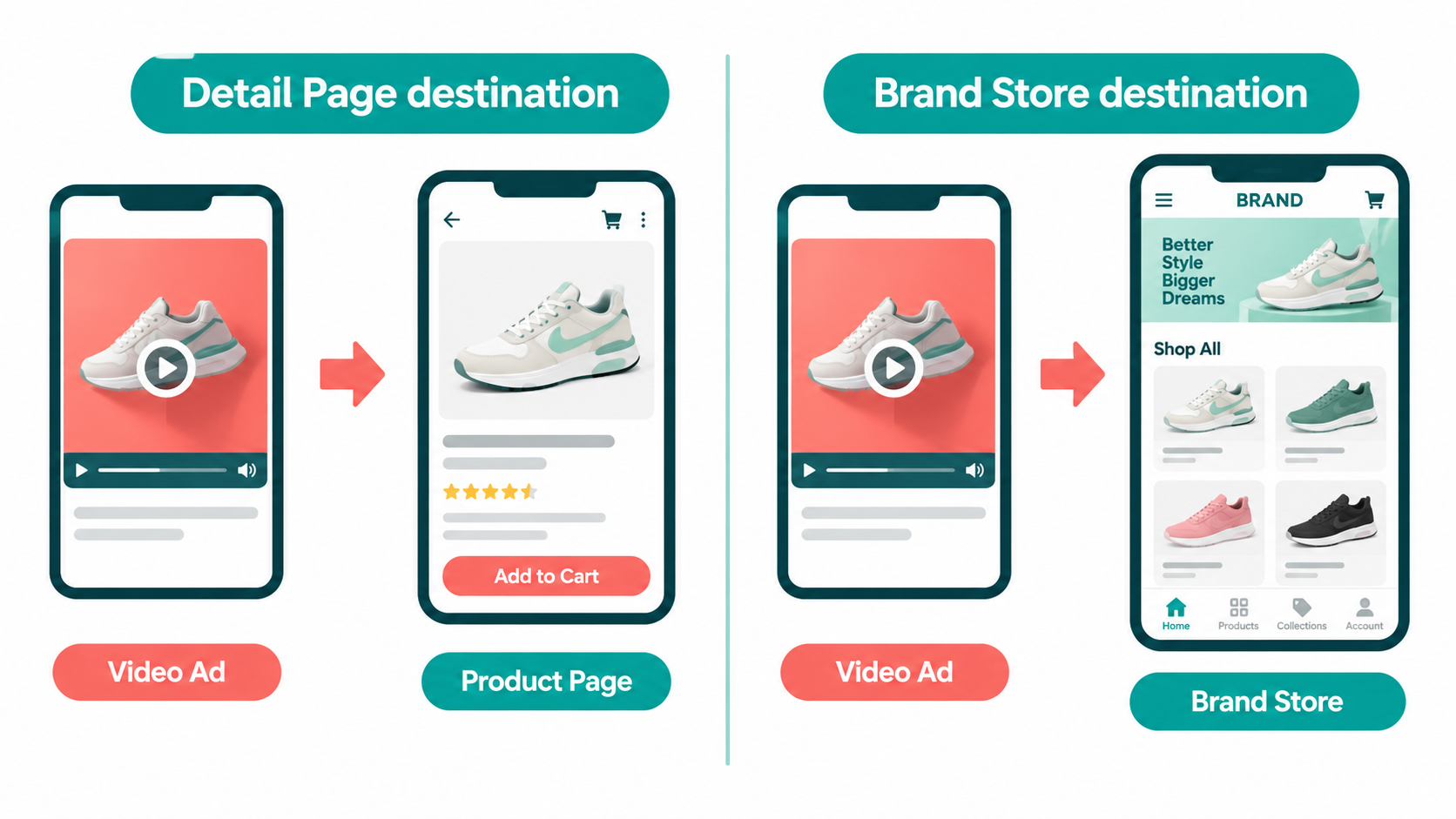
    Split illustration comparing a Sponsored Brands video sending shoppers to a single product detail page versus a multi-product Brand Store

    Product Detail Page campaigns

    Amazon describes the detail page campaign as “best for connecting shoppers with your product.” These ads show in shopping results and on detail pages. The path is short: video, click, product page, add to cart.

    This is the right choice when:

    • One hero ASIN drives most of your revenue and you want to defend or grow it.
    • The target query is narrow and points to one product type.
    • You’re launching a new product and need direct sales velocity.
    • The video demonstrates one product’s specific feature.

    Brand Store campaigns

    Amazon describes the Store campaign as a way to “increase brand equity and build lasting value” by sending shoppers from shopping results to your Brand Store. Per the specs, these can show both above and below the fold in search results.

    This works best when:

    • The query is broad (“camping gear,” “skincare for dry skin”) and no single product clearly fits.
    • Your catalog has several products that serve the same buyer.
    • The goal is brand discovery and cross-selling more than one immediate conversion.
    • Your Store is well built, with clear navigation and pages that match the video’s theme.

    The mismatch problem

    The most common destination mistake is a single-product video sending traffic to a general Store homepage. The shopper clicked because of one product, landed on a grid of twenty, and has to hunt for it. Every extra step loses buyers.

    The reverse mistake also happens: a range video (“our whole kitchen line”) sending clicks to one detail page. The shopper expected choices and got one option.

    Match the video’s promise to what’s on the landing page. If you choose Store, send traffic to a Store page that reflects the video’s theme, not automatically to the homepage.

    What the case studies suggest

    Amazon’s case studies show both models working inside a wider program. HP used Sponsored Brands video alongside Sponsored Brands, Sponsored Products, and display ads, and reported 224% year-over-year growth in impressions and a 142% year-over-year increase in clicks, with a 42% increase in clicks on Sponsored Brands video placements. The lesson isn’t that one destination wins. It’s that video worked as one part of a coordinated mix, not as a standalone test.

    7. Targeting: Matching the Video to the Query

    Sponsored Brands video supports keyword, category, and product targeting. Because the creative is so specific, targeting decisions have more effect here than in Sponsored Products, where the ad is basically the listing.

    One video should not chase every keyword

    A Sponsored Products ad adapts in a sense: the listing is the same whatever the query, and relevance comes from the listing itself. A video makes a specific visual claim. A video showing a backpack fitting under an airline seat is great for “personal item travel backpack” and largely irrelevant for “hiking daypack,” even if the product suits both.

    The fix is to group keywords by shopper intent, not product, and give each intent cluster its own video. Same product, different first frame, different headline. That’s more work up front, but it’s the most direct way to raise click-through rate.

    Keyword targeting approaches

    • Non-branded, problem-led queries: Best paired with demonstration videos that show the problem being solved. This is where video does most of its discovery work.
    • Branded queries: Shoppers already know you. The video can reinforce range, introduce new products, or block competitors. (Section 9 covers a fixed-price option for this.)
    • Competitor brand queries: Use carefully. The video has to give a clear, visible reason to switch, and every claim has to be accurate and follow Amazon’s policies.

    Product and category targeting

    Because Sponsored Brands video can appear within detail pages, product targeting puts your video in front of shoppers looking at a specific competing or complementary product. Here the shopper has already picked a product type, so the video should answer “why this one instead?” through visible comparison of features, materials, or use cases.

    Category targeting is broader and works best with videos that sell the brand or a hero product’s main differentiator without relying on one specific query.

    Read the search term report as creative feedback

    Your search term report isn’t only for adding negatives. It shows which queries the video actually earns clicks on. If a video built for “kids water bottle” keeps converting on “leakproof bottle for backpack,” that’s a sign: shoppers care about leaks. Your next video might open with a bottle upside down in a bag.

    Takeaway

    • Build ad groups around intent clusters, one video per cluster.
    • Use the search term report to find the next creative angle.
    • Match the claims in product-targeted videos to the competitor being targeted.

    8. Sponsored Brands Video vs. Sponsored Products Video vs. Display Video: Give Each Format a Job

    In 2026, “Amazon video ads” covers several formats. Amazon’s own video ad lineup lists Sponsored Brands video, Sponsored Products video, display ads with video, streaming TV ads (including Prime Video), online video ads, and Amazon Live. Running them all with the same clip and no clear role for each leads to overlap and muddy reporting.
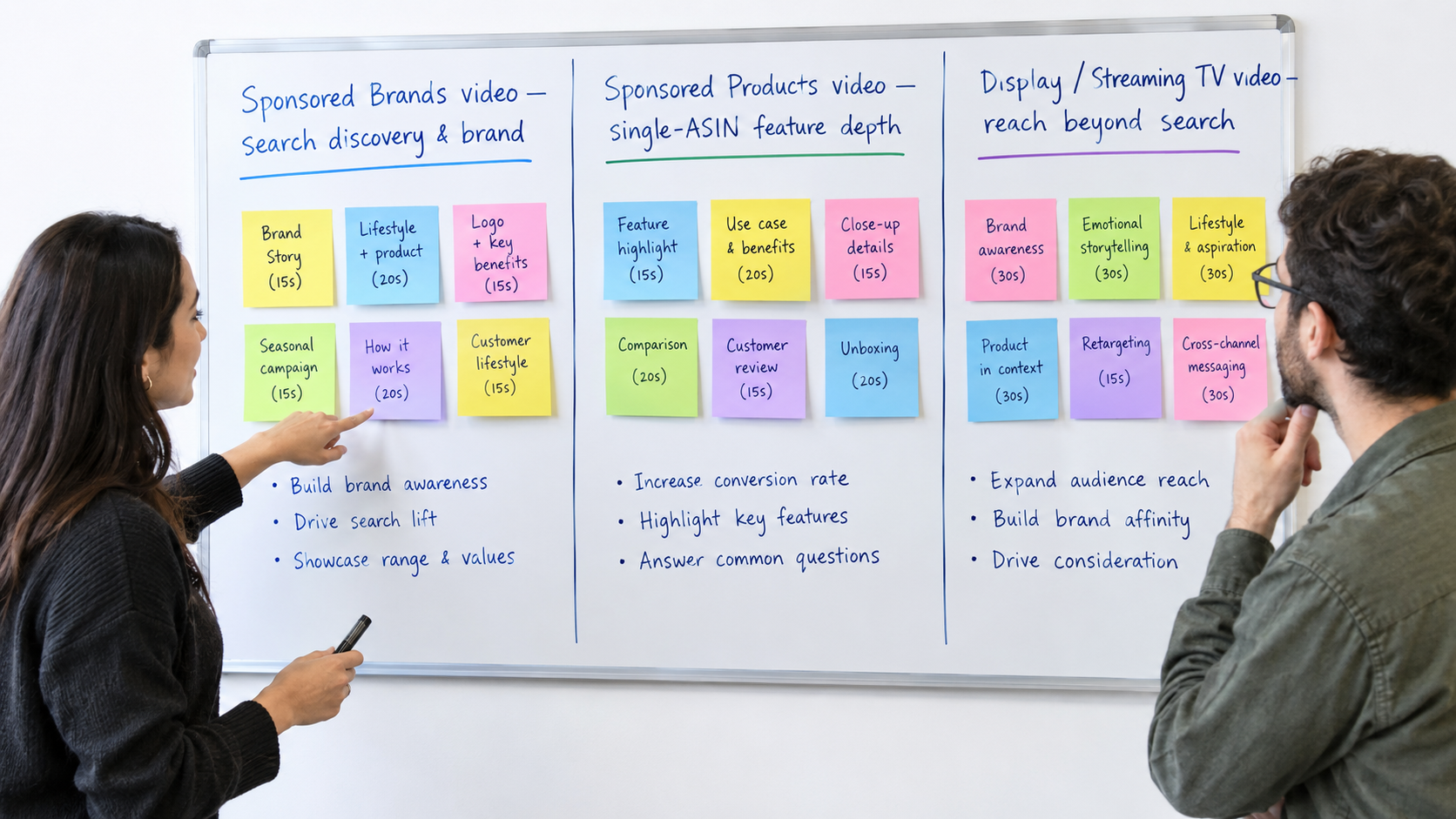
    Whiteboard dividing roles between Sponsored Brands video, Sponsored Products video, and display or streaming TV video

    How Amazon describes each format

    • Sponsored Brands video: “Tell your brand story on Amazon with rich, autoplay video ads that appear in Amazon.com search results and product detail pages.”
    • Sponsored Products video: “Interactive long-form video content that showcases specific product features for a single product (ASIN) across Amazon and select premium apps and websites.”
    • Display ads with video: Autoplay video on the Amazon homepage and detail pages, IMDb, Amazon Publisher Services sites and apps, and other premium sites across the open internet.
    • Streaming TV ads: Full-screen, non-skippable video before, during, or after streaming content on connected TV, desktop, and mobile.

    A practical job split

    Based on those descriptions, a sensible division of roles looks like this:

    • Sponsored Brands video owns search-led discovery and brand association. Short, muted-first, built around an intent cluster, and able to send traffic to a detail page or Store.
    • Sponsored Products video owns single-ASIN depth. Amazon specifically calls it long-form and feature-focused, which is a different brief from the short, curiosity-driven Sponsored Brands video. Your detailed feature walkthrough belongs here.
    • Display and streaming video own reach beyond the search box. They find people who aren’t searching yet, which builds the branded search demand that Sponsored Brands can later capture.

    Why the split matters for creative

    Using one video everywhere means it’s tuned for nowhere. A 45-second feature tour is too slow for a muted search placement. A 12-second hook clip is too thin for a feature-focused format. Shoot once with all formats in mind, then edit separate cuts for each job.

    Why the split matters for measurement

    Clear roles also make reporting easier to read. If Sponsored Brands video is judged on discovery metrics such as new-to-brand performance and click-through rate on non-branded terms, while Sponsored Products video is judged on conversion for a specific ASIN, you stop comparing formats that were never meant to do the same thing.

    9. Branded Search Defense: Reserve Share of Voice and Where Video Fits

    One of the newer Sponsored Brands options deserves its own section because it changes how branded keywords get bought. Amazon now offers Sponsored Brands reserve share of voice, a goal-based campaign type that lets advertisers secure top-of-search visibility for branded keywords at a fixed, upfront price.
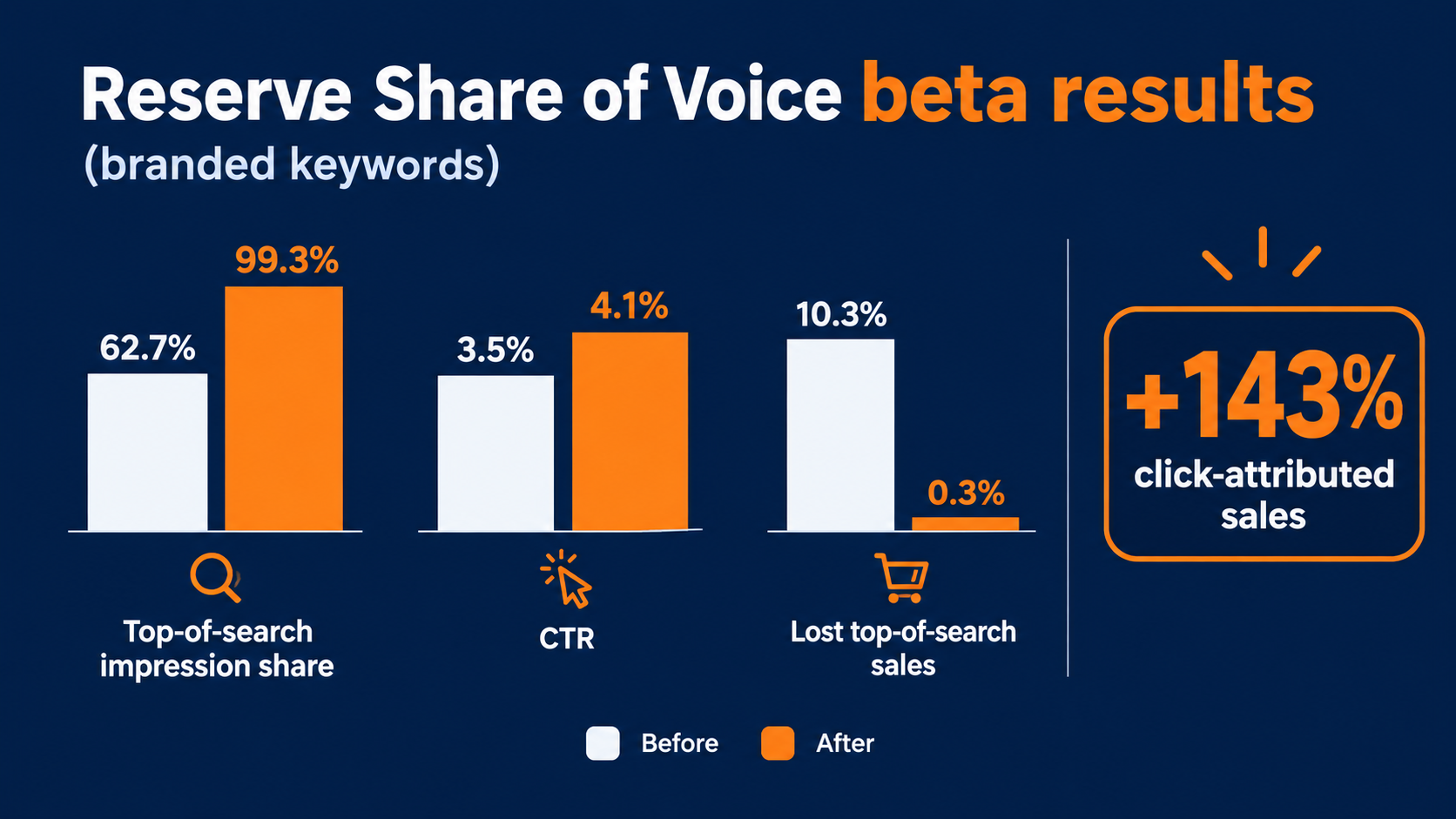
    Bar chart of Amazon reserve share of voice beta results showing impression share rising from 62.7% to 99.3%, CTR from 3.5% to 4.1%, and lost top-of-search sales falling from 10.3% to 0.3%

    How it works

    According to Amazon’s guide, you choose and reserve exact-match branded terms in Amazon Ads Agent. The system checks eligibility and quotes a fixed price based on historical traffic and availability. You set the reservation length, confirm the budget, and use existing Sponsored Brands creative, including video. When shoppers search those terms, your ad shows in the Sponsored Brands top-of-search placement on desktop and mobile.

    What the beta showed

    Amazon reports that in a beta comparing participants on the same branded search queries, reserve share of voice:

    • Raised Sponsored Brands top-of-search impression share on reserved keywords from 62.7% to 99.3%
    • Raised click-through rate from 3.5% to 4.1%
    • Increased click-attributed sales by 143%
    • Cut lost top-of-search sales from 10.3% to 0.3%

    The first figure is the striking one. Even advertisers actively bidding on their own brand names were missing that top-of-search slot more than a third of the time. That gap is where competitors appear on searches for your name.

    Where video fits

    Amazon’s guide includes a pro tip to pair reserve share of voice with video. Branded searchers already know you, so the video’s job changes. It doesn’t have to explain the category. It can:

    • Introduce a new product to existing fans
    • Show your range so a single-product buyer finds a second item
    • Reinforce what made them search for you, such as quality, design, or a signature feature

    Amazon’s broader creative advice for these campaigns includes leading with brand recognition, showing best products, keeping messages simple, using the Brand Store as the destination, and refreshing creative over time. Note how this differs from non-branded video, where Amazon advises holding the logo until later. Branded and non-branded videos are different briefs, and they should be different cuts.

    When to reserve

    Amazon suggests reserving branded keywords before peak moments such as product launches, seasonal events, or Prime Day. Fixed pricing removes bid uncertainty during the weeks when competitor bids on your brand name are most likely to rise.

    10. Measuring Sponsored Brands Video Without Fooling Yourself

    Public benchmarks for Sponsored Brands video are thin and vary widely by category, price point, and season. Instead of borrowing someone else’s averages, build a measurement setup that produces benchmarks for your own account.

    Judge each campaign against its job

    Video campaigns get cut too early when they’re held to Sponsored Products ACOS targets. A non-branded discovery video is reaching shoppers who may never have heard of you, so expect a different cost profile than a Sponsored Products campaign on an exact-match term that already converts.

    Set targets by role:

    • Non-branded discovery video: click-through rate on target queries, new-to-brand share of sales, and an ACOS ceiling you can accept for customer acquisition.
    • Branded defense video: top-of-search impression share, click-through rate, and conversion rate.
    • Product-targeted conquest video: conversion rate and cost per acquisition compared with the competitor ASINs targeted.

    For reference, Amazon’s Loftie case study reported a ROAS of $5.66 and an ACOS of 17.68% from a sponsored ads campaign. That’s one brand’s result from a broader sponsored ads program, not a Sponsored Brands video benchmark, and it shouldn’t be treated as one. It’s useful mainly as a reminder that efficient results are possible when creative, targeting, and listings line up.

    Diagnose by funnel stage

    When a video underperforms, find the stage where it breaks before you change anything:

    • Low impressions: a bid, budget, or targeting problem, not a creative one.
    • Impressions but low CTR: the first frame and headline aren’t matching the query. Fix the opening seconds.
    • Clicks but low conversion: the landing page doesn’t deliver on the video’s promise, or the listing (price, reviews, images) loses the comparison. Check destination fit first.

    Test one variable at a time

    The most useful video test changes only the opening frame. Keep the headline, targeting, bid, and destination fixed. Swap the first two seconds between two versions and compare click-through rate over a meaningful amount of traffic. Then move to the next variable: headline, length, destination.

    Testing everything at once tells you something changed. Testing one thing tells you what changed.

    Refresh on a schedule

    Amazon’s reserve share of voice guide recommends refreshing creative over time, and the same applies across Sponsored Brands video. Shoppers in your category see the same placements over and over. Plan a refresh cycle, and use search term reports and CTR trends to decide which angle to try next.

    11. A 30-Day Launch Plan for Your Next Sponsored Brands Video

    Here’s how the sections above fit into a practical launch sequence. Adjust the timing to your production capacity, but keep the order.

    Days 1–5: Groundwork

    • Audit the listing that will appear in the ad unit: main image, title, rating, price competitiveness.
    • Pull 60–90 days of search term data and group queries into two or three intent clusters.
    • Choose the destination for each cluster: detail page for narrow intent, a themed Store page for broad intent.
    • List branded keywords and check whether reserve share of voice fits an upcoming launch or seasonal peak.

    Days 6–14: Production

    • Write one muted-first script per intent cluster using the four-beat template.
    • Shoot wide so you can crop both 16:9 (Amazon) and 9:16 (social) versions without bars.
    • Edit a roughly 15-second cut and a longer cut for each script.
    • Build separate branded cuts with the logo earlier and range-focused content.

    Days 15–17: Quality control

    • Run the pre-upload checklist: specs, muted viewing, safe area, no bars, language match.
    • Write headlines that add to the video instead of repeating it.
    • Submit early to leave room for moderation before your target launch date.

    Days 18–30: Launch and first test

    • Launch one ad group per intent cluster with the shorter cut.
    • Duplicate the strongest cluster with the longer cut to test length.
    • Check the funnel stage (impressions, CTR, conversion) weekly, and fix the weakest stage first.
    • Note the search terms that convert and turn them into the next video brief.

    After day 30

    By the end of the month you should have your own benchmarks: CTR by intent cluster, conversion by destination, and an early read on length. Those numbers will be more useful than any industry average, because they come from your category, your price point, and your listings.

    Conclusion: Build for How the Ad Really Plays

    Sponsored Brands video doesn’t underperform because video doesn’t work on Amazon. It underperforms when the creative is made for a setting it never appears in. The ad autoplays muted when half of it is on screen. It sits next to an auto-pulled product listing, under a fixed mute toggle, inside a search results page where shoppers are mid-comparison. Creative that respects those conditions has a real chance. Creative that ignores them is paying for impressions that get scrolled past.

    The main points:

    • Your listing is part of your ad. Fix the main image, title, and reviews before paying for production.
    • Muted-first, product-first. Show the product doing its job in the first two seconds. Hold the logo for the end on non-branded campaigns.
    • Aim for 20 seconds or less. Amazon allows 6–45, but the video’s job is to earn the click, not explain everything.
    • 16:9 only, no bars. Shoot wide so social and Amazon cuts come from one session.
    • Match the destination to the promise. Single-product videos go to detail pages. Range videos go to themed Store pages.
    • One video per intent cluster. Generic videos lose to specific ones.
    • Give each video format a job. Sponsored Brands video for search discovery, Sponsored Products video for single-ASIN depth, display and streaming for reach.
    • Protect your brand name. Amazon’s beta data shows even active advertisers were missing top-of-search on their own branded terms a large share of the time. Reserve share of voice plus a branded video closes that gap.
    • Measure by role and test one variable at a time. Build your own benchmarks instead of borrowing averages.

    Start with one intent cluster, one muted-first script, and one clean test. Within a month you’ll know more about what Sponsored Brands video can do for your brand than any general benchmark can tell you.
  • Your Sponsored Brands Video Is a Search Result, Not a Commercial — So Stop Building It Like One

    Your Sponsored Brands Video Is a Search Result, Not a Commercial — So Stop Building It Like One

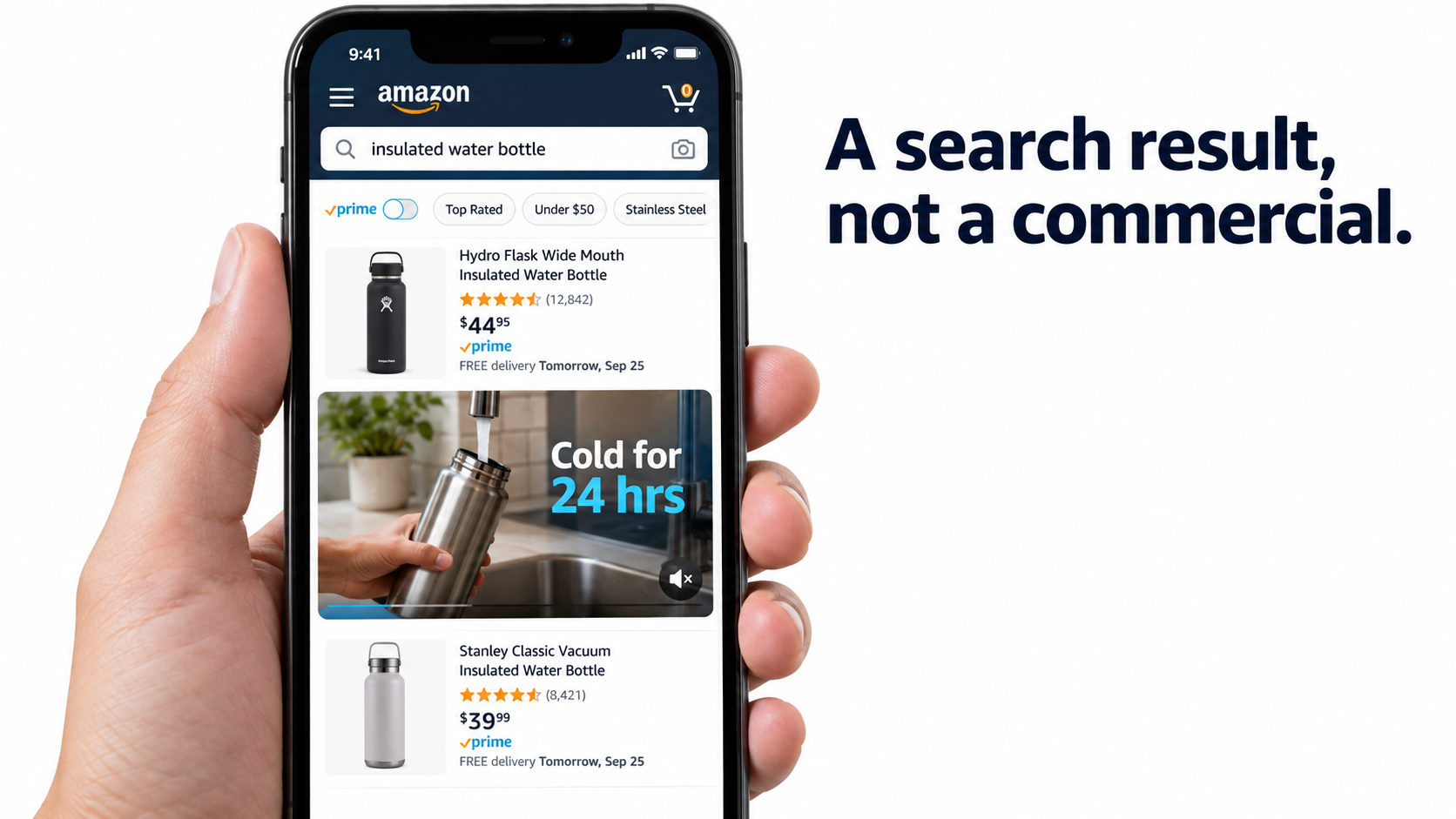
    Most Amazon Sponsored Brands video ads fail before anyone sees the product. That isn’t because the footage looks bad. Often it’s beautiful: slow product reveals, lifestyle scenes, a logo animation, a voiceover with a clear story. The trouble is that the ad was built for the wrong place.

    A Sponsored Brands video (SBV) doesn’t play before a show or in a social feed where people are relaxing. It plays inside a list of search results, with the sound off, next to competing products that show prices, star ratings, and Prime badges. The shopper typed a query a second ago and is scanning fast. Your video is one more result they can scroll past.

    That changes how you should plan, shoot, edit, target, and measure these ads. You’re not making a commercial that happens to run on Amazon. You’re making a moving search result. It has to answer the query faster and more clearly than the static listings around it.

    This guide works through that idea from start to finish. It covers how the placement actually behaves, why every video should map to a group of related searches, what the first two seconds must do, how to design for silent autoplay, which creative choices get ads rejected, how to choose between the detail page and the Brand Store as the destination, how to set up campaigns and bids, and which metrics tell you whether the creative is working.

    The approach is practical. Where Amazon has published data, it’s cited. Where the advice comes from how the format works, it’s labeled that way. Specs and policies change, so treat any numbers here as a starting point and check them against the current Amazon Ads console before you spend money on production.

    Smartphone showing an Amazon mobile search results page with a muted autoplaying Sponsored Brands video of a water bottle and the overlay text Cold for 24 hrs

    Why Sponsored Brands Video Gets Misunderstood

    Amazon describes Sponsored Brands as an ad product that helps “shoppers discover your brand with video, image, or collections,” with ads appearing “above, alongside, or within shopping results” on desktop and mobile. That description is the most useful thing to remember about the format. The ad lives among the results.

    Many brands still hand SBV briefs to agencies or editors whose experience is in YouTube pre-roll, connected TV, or social ads. Those formats reward emotional build-up, brand storytelling, and sound design. Search results don’t. The confusion shows up in three recurring mistakes.

    Mistake 1: Treating the video as brand awareness only

    Amazon does position Sponsored Brands as a way to grow brand discovery, and the video format helps with that. But the shopper who sees it has already told Amazon what they want. A search for “insulated water bottle 32 oz” is close to a purchase. A video that spends ten seconds on mood before showing the bottle wastes the strongest intent signal in digital advertising.

    Mistake 2: Assuming someone is watching

    On TV, the viewer is watching the screen by default. In search, the shopper is looking at a grid. Your video competes with thumbnails, prices, and review counts. Every frame has to earn attention, and the very first frame most of all.

    Mistake 3: Using one video for every keyword

    A commercial is made once and shown to everyone. A search result is relevant to one query. Brands that run a single “hero” SBV across hundreds of keywords end up with an ad that loosely fits everything and clearly answers nothing. Relevance, not production value, is what gets the click.

    The rest of this guide follows one principle: build each SBV to be the best answer to a specific set of searches, readable with the sound off, in under three seconds.

    Anatomy of the Placement: Where SBV Runs and How It Behaves

    Before you write a script, understand the conditions your video plays in. These conditions matter more to creative decisions than any brand guideline does.

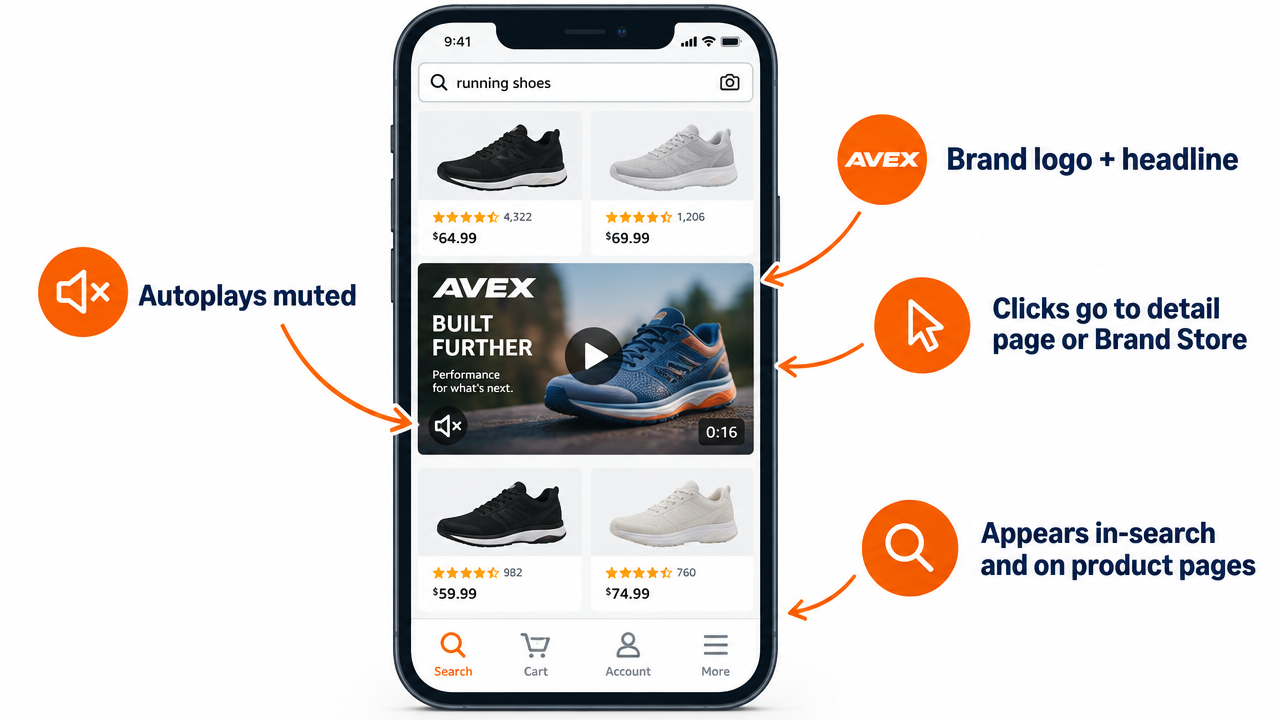
    Infographic of a mobile search grid with a 16:9 Sponsored Brands video tile labeled autoplays muted, brand logo and headline, clicks go to detail page or Brand Store

    Where the ads appear

    Amazon says Sponsored Brands ads can appear at the top of search results, within results, and on product pages, on both desktop and mobile. In practice, SBV most often appears as a wide video unit placed among the organic results rather than above them. It can also show on product detail pages when you use product targeting.

    That in-grid position is why the “search result” framing matters. Your video isn’t a banner above the results. It interrupts the list the shopper is scrolling through, so it needs to look like it belongs there.

    How playback works

    SBV autoplays muted once it’s on screen. Shoppers can unmute, and Amazon reports unmutes as a metric, but you should assume most impressions happen in silence. Any message carried only by voiceover or dialogue will reach very few people.

    The unit usually shows the video with your brand logo or name, a short headline in some formats, and the featured product’s listing details: title, price, star rating, and Prime eligibility. So the shopper sees your creative next to the same decision signals they see on organic listings. If your rating or price isn’t competitive, great video won’t fully make up for it.

    Format options

    Amazon’s Sponsored Brands video offering has grown over time. Broadly, you’ll find:

    • Single-product video: The video features one ASIN, and clicks usually go to that product’s detail page. This is the most common and most direct setup.
    • Brand or multi-product video: The video appears alongside several products, and clicks can go to your Brand Store or a Store subpage. This suits brands with a range of related products.

    Format names and options change as Amazon updates the console. Check what’s available in your marketplace and account type when you build the campaign.

    What this means for creative

    Put together, the placement conditions give you a clear brief. The video must:

    1. Show the product in the first frame, because autoplay starts right away and scrolling is fast.
    2. Communicate without sound, because it’s muted by default.
    3. Match the query, because it sits among results the shopper judges for relevance.
    4. Support the listing signals shown next to it, not contradict them.

    The Intent-Cluster Principle: One Video Per Group of Searches

    This is the biggest strategic change most SBV programs can make, and the one that most separates the “search result” mindset from the “commercial” mindset. Instead of one video for the whole product, build several videos and match each to a group of searches that share the same underlying need.

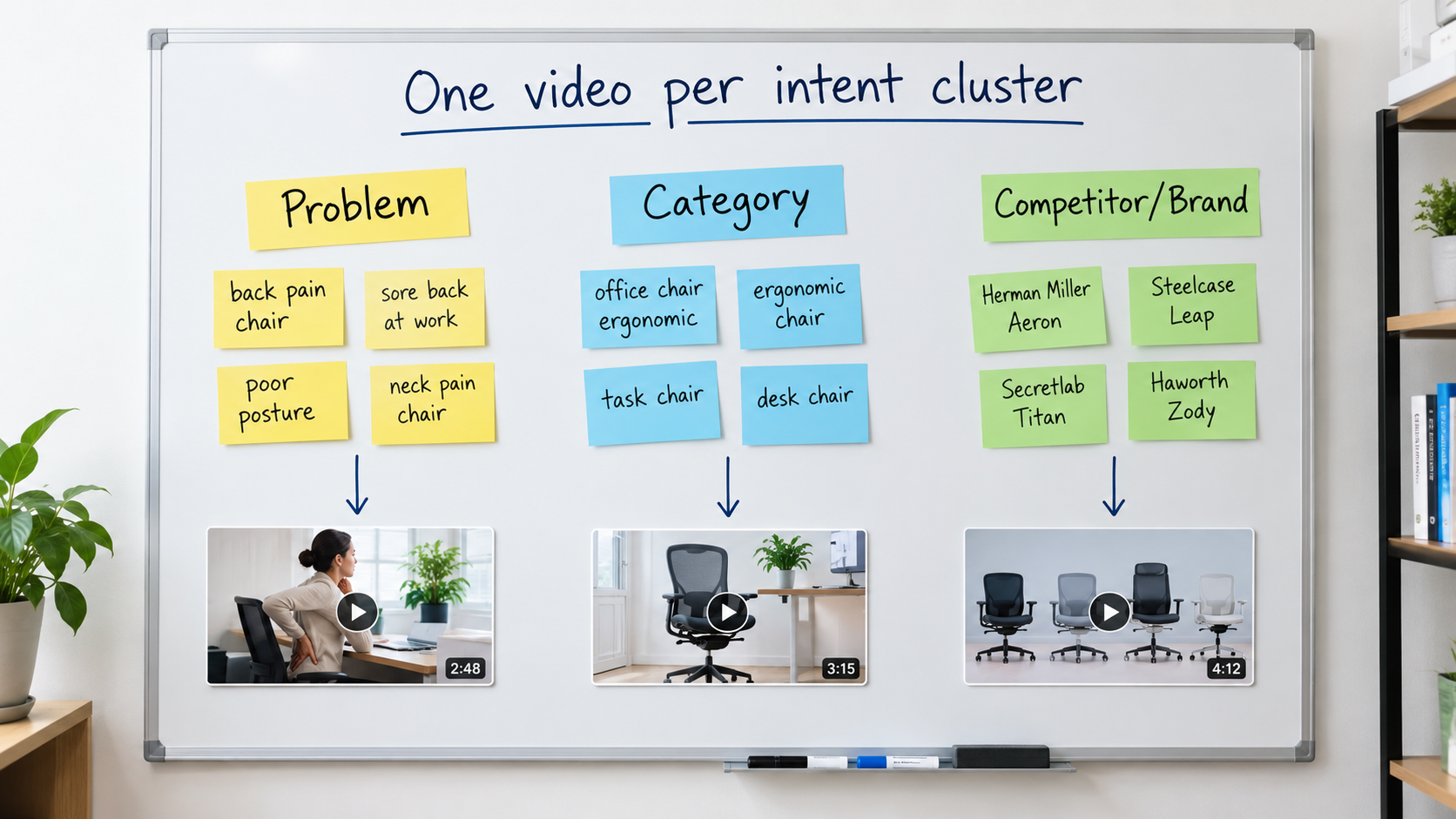
    Whiteboard with keyword clusters for problem, category, and competitor searches, each connected to its own video thumbnail, headed One video per intent cluster

    What an intent cluster looks like

    Take a hypothetical ergonomic office chair. Its search terms usually fall into a few groups:

    • Problem-led searches: “chair for lower back pain,” “office chair lumbar support.” These shoppers care about relief.
    • Category searches: “ergonomic office chair,” “mesh desk chair.” These shoppers are comparing options and care about features and value.
    • Use-case searches: “gaming chair for long hours,” “home office chair small space.” These shoppers care about fit for their situation.
    • Competitor or brand searches: Terms that include other brand names. These shoppers already have a reference point and need a reason to switch.

    A single video can’t lead with back-pain relief, a feature comparison, compact size, and a competitive advantage all at once. Each group needs a different opening message.

    How to build clusters from your own data

    You probably already have what you need. Pull your Sponsored Products search term report and your Brand Analytics search query data if you have access. Then:

    1. Filter to terms with meaningful impressions and at least some conversions.
    2. Label each term by the need it expresses, not just by the words in it.
    3. Group terms with the same label and add up the impressions for each group.
    4. Rank groups by volume and conversion rate. The top two or three become your first video briefs.

    Writing the brief per cluster

    For each cluster, write one sentence that answers the shopper’s unspoken question. For the back-pain cluster, that might be “Adjustable lumbar support that moves with you.” For the small-space cluster, “Fits under a 26-inch desk.” That sentence becomes the first text overlay and shapes the opening shot.

    The rest of the video can share footage across versions. Often only the first three to five seconds and the text overlays change. That keeps production costs manageable while making each version clearly relevant to its searches.

    Mapping clusters to campaigns

    Give each cluster its own campaign or ad group with its matching video, so relevance stays tight and reporting stays clean. If you mix clusters in one ad group, you won’t be able to tell whether a video worked because of its creative or despite a poor keyword fit.

    The First Two Seconds: Passing the Frame-One Test

    If SBV is a search result, frame one is its thumbnail. For many shoppers who scroll past, the opening second is all they’ll see. That makes the first frame the most valuable real estate in your creative, and it’s the part most often wasted.

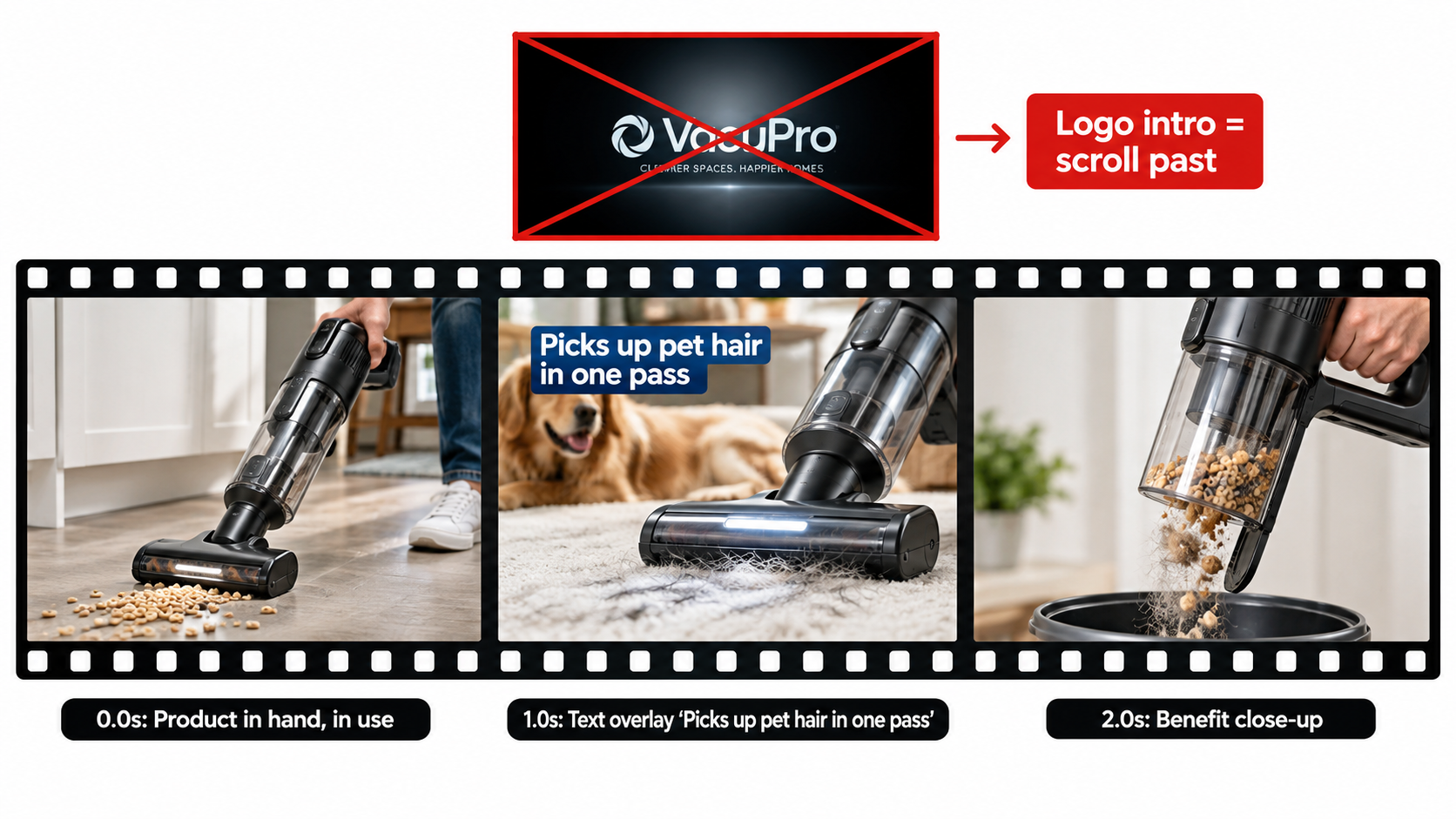
    Storyboard of the first three frames of a cordless vacuum video ad with product in use at 0 seconds, a benefit text overlay at 1 second, and a crossed-out logo intro frame

    What frame one should show

    Use a simple test. Pause the video at 0.0 seconds and show the still to someone who has never seen your product. Can they say within a second what the product is and roughly why it’s useful? If not, the opening doesn’t work.

    Openings that pass the test usually have these things in common:

    • The product is visible and fills a large part of the frame. Not a hand reaching toward something off-screen, not a wide room shot with the product in a corner.
    • It’s shown in use or in context where that helps. A vacuum picking up debris explains itself faster than a vacuum on a white background.
    • Contrast with the page is high. Amazon’s result pages are mostly white. Openings with strong color or clear subject separation are easier to notice in the grid.

    What to cut from the opening

    Some habits carried over from other video formats hurt SBV:

    • Logo intros. Your brand name already appears in the ad unit. A two-second animated logo uses the most valuable seconds on information the shopper already has.
    • Fade-ins from black. A black or blank first frame looks like a loading error in the grid. Amazon’s creative guidance has also pointed advertisers away from blank or black opening frames.
    • Slow lifestyle build-ups. A person waking up, stretching, and making coffee before the product appears works on TV. In search, the shopper has usually scrolled on by the time the product shows up.

    Structure after the opening

    Once the opening has stopped the scroll, a simple structure works well for most products:

    1. 0–2 seconds: Product in view with the cluster’s main benefit as a text overlay.
    2. 2–8 seconds: Show that benefit happening, with proof you can see.
    3. 8–15 seconds: Two or three supporting features, each with a short overlay.
    4. Final seconds: A clean product shot that leads into the listing details shown in the ad unit.

    Short videos tend to suit this format because shoppers are scanning, not settling in to watch. Amazon has historically accepted videos across a range of lengths, and many practitioners aim for about 15 to 30 seconds. Whatever length you choose, make sure the main point lands early. Treat the later seconds as a bonus for the few who keep watching.

    Designing for the loop

    Because the video may replay while on screen, a shopper who pauses on the unit can catch the opening more than once. A clean cut from the last frame back to the first reinforces the message. Endings that fade to black or linger on a logo slate make the loop feel clumsy.

    Designing for Silence: Text, Captions, and Safe Zones

    Muted autoplay is the default, so text on screen isn’t optional. For most viewers, the text overlays are the script. Treat sound as a bonus for the small share of shoppers who unmute.

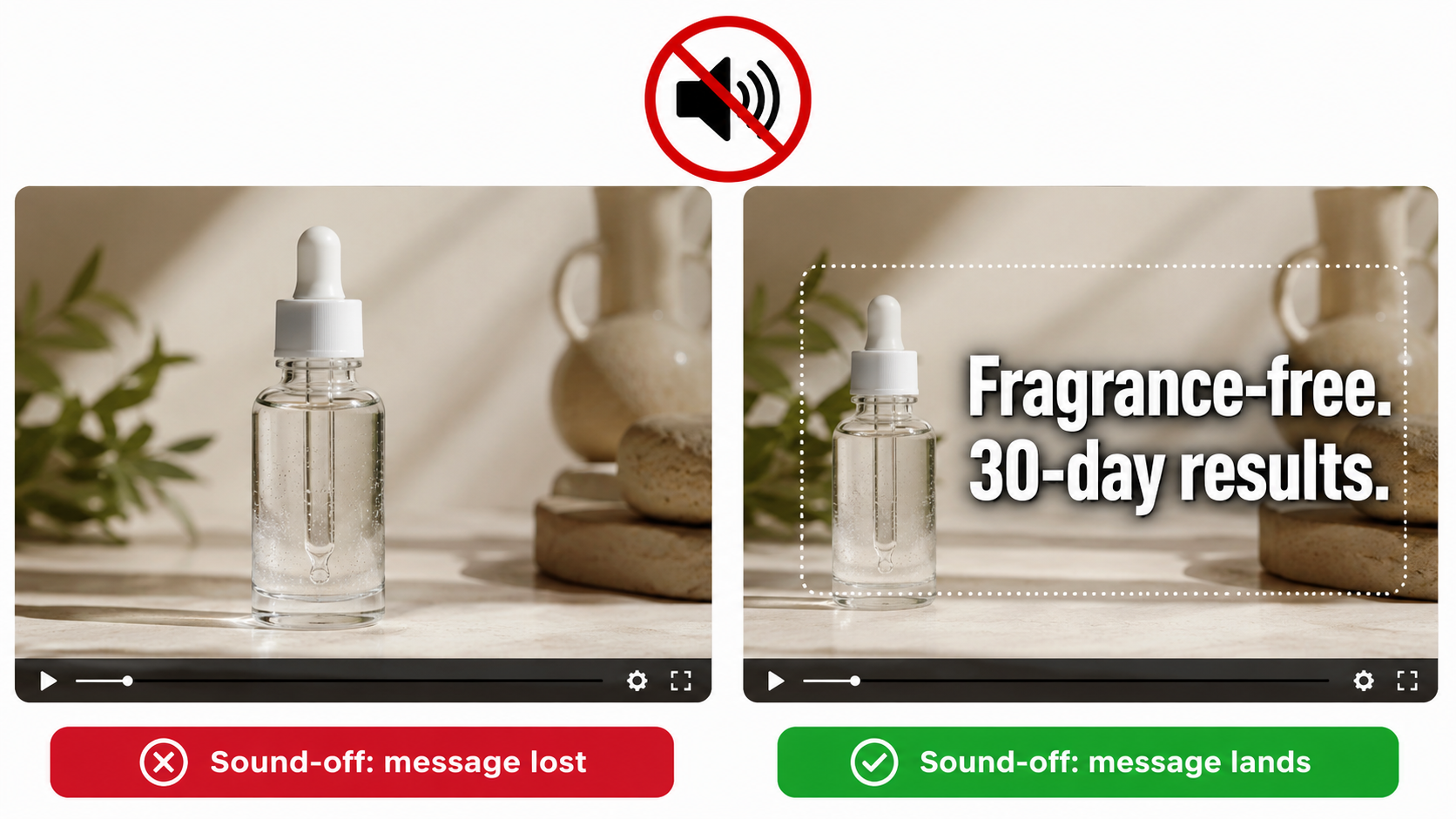
    Split comparison of a skincare serum video frame without text labeled message lost versus with a caption inside a safe zone labeled message lands

    The sound-off script

    Write the overlay copy first and the voiceover second, if you use one at all. A good test is to watch the edit muted, at phone size, on a busy background. If you can’t follow the product story, the video isn’t ready.

    Good overlay copy for SBV tends to be:

    • Short. Three to seven words per card. Shoppers read overlays in a glance, not like paragraphs.
    • Specific. “Holds 40 lbs” beats “Super strong.” “Dishwasher-safe lid” beats “Easy to clean.”
    • Timed to the visuals. The overlay should name what the footage is showing at that moment. When text and image say the same thing, the message lands faster.
    • On screen long enough. A common rule of thumb is to leave each card up long enough to read twice at a normal pace.

    Legibility at small sizes

    On mobile, the video unit may be only a few centimeters tall. Text that looks fine on an editing monitor can become unreadable. Use a heavy, simple sans-serif font. Keep strong contrast with a solid or semi-transparent backing bar. Avoid thin strokes and script fonts.

    Amazon’s moderation has also rejected ads where on-screen text is too small, blurry, or cut off, so legibility affects approval as well as performance.

    Safe zones

    Parts of the video frame may be covered by interface elements or cropped differently across placements and devices. Keep key text and the product itself away from the edges, inside a central safe area. Letterboxing (black bars added to fit a different aspect ratio) looks unpolished and is typically not allowed. Shoot or reframe for the required 16:9 aspect ratio from the start rather than fixing it in the edit.

    Audio still matters, but less

    Audio isn’t worthless. Shoppers who unmute are showing strong interest, and a clear voiceover can help close the sale. Just make sure the audio supports the overlays and doesn’t carry information they leave out. Keep music unobtrusive and properly licensed. Rights problems with music are a practical risk for any brand running ads at scale.

    Specs and Moderation: Why Good Videos Get Rejected

    A strong video that sits in moderation review, or gets rejected, earns nothing. Much of the SBV frustration sellers talk about comes from preventable rejections. Building to spec and policy from the brief stage saves weeks.

    Technical specs to plan around

    Amazon publishes a Sponsored Brands video spec sheet, and it gets updated. Historically the main requirements have included:

    • Aspect ratio: 16:9.
    • Resolution: HD minimum (1280×720), with 1920×1080 or higher preferred.
    • Length: A set range of seconds. Amazon has generally allowed videos from a few seconds up to around 45 seconds for this format.
    • File type and size: Common formats such as MP4 or MOV, with a maximum file size.
    • Frame rate and audio: Standard frame rates and audio sampling requirements.

    Always confirm current specs in the Amazon Ads console or the official spec page before you export. Building to outdated specs is a common and avoidable delay.

    Common content-policy problems

    Moderation rejections usually come from content, not technical specs. Areas that often cause trouble include:

    • Unsupported claims. Superlatives like “#1,” “best,” or “clinically proven” typically need substantiation Amazon can verify, or they get flagged.
    • Time-sensitive or pricing messages. Text such as “Sale ends Friday” or specific discount claims can go out of date and create policy problems. Let the ad unit handle price.
    • Customer review quotes and star graphics. Showing reviews or ratings inside the creative is restricted and is a frequent reason for rejection.
    • Off-Amazon references. URLs, social handles, or “visit our website” calls to action conflict with the ad’s purpose on Amazon.
    • Mismatch with the advertised product. The video must clearly relate to the ASIN or products being advertised. Showing a different model, variant, or bundle than the one linked can trigger rejection.
    • Quality issues. Blurry footage, black frames, clipped text, or poor audio can all lead to rejection.
    • Restricted categories. Some product categories face extra rules or need additional approvals.

    A pre-submission checklist

    Before uploading, check the edit against a short list:

    1. Is the advertised product clearly visible and the same variant that’s linked?
    2. Can every claim on screen be backed by documentation?
    3. Is there any pricing, dates, review content, or off-Amazon reference?
    4. Does the first frame show content (not black or blank)?
    5. Is all text legible at phone size and inside safe margins?
    6. Do the file specs match the current console requirements?

    Keep a log of every rejection and the reason Amazon gives. Over time, that log becomes your brand’s internal guide to what passes, and it will speed up future production a lot.

    Choosing the Destination: Detail Page or Brand Store?

    Where a click goes affects conversion rate, the shopper’s experience, and how you measure performance. Many brands pick a destination by default. It should be a deliberate choice for each cluster.

    When the detail page makes sense

    Sending clicks straight to a product detail page is the most direct path to purchase. It fits when:

    • The search intent is specific and one product clearly answers it.
    • The product has a strong rating, good review count, and competitive price.
    • You’re measuring against a return-on-ad-spend or cost-of-sale goal and need clean attribution to one ASIN.

    For most problem-led and specific category clusters, the detail page is the natural destination. The video promises a solution, and the product page delivers it.

    When the Brand Store makes sense

    Amazon notes that Sponsored Brands can drive traffic to your Brand Store and that, “paired with Brand Stores,” the product supports discovery and longer-term engagement. A Store destination fits when:

    • The search is broad (for example, “camping gear”) and a range of products fits better than one.
    • Your products come in sizes, bundles, or complementary items that shoppers benefit from comparing.
    • You want to build brand familiarity and repeat purchases, not just a single sale.

    The risk is friction. A shopper who expected one product and lands on a busy Store page may leave. If you use a Store destination, send clicks to a focused subpage that matches the video’s message, not your Store homepage.

    Match the destination to the promise

    The rule is simple: the first thing the shopper sees after clicking should continue what the video promised. If the video leads with “fits under a 26-inch desk,” the landing page should make that dimension easy to find, ideally in the main image or first bullet. A mismatch between ad and landing page quietly drags down conversion, and it’s easy to miss because each piece looks fine on its own.

    Measurement differences

    Detail page traffic makes attribution easier because sales tie back to a specific product. Store traffic spreads sales across several ASINs and sometimes across longer consideration windows. When you compare the two, look beyond immediate cost of sale. Include new-to-brand orders and the mix of products bought, or Store campaigns will look worse than they really are.

    Campaign Architecture and Bidding for Video

    Creative gets the attention, but campaign structure decides whether the right video shows for the right search at a sensible cost. The intent-cluster principle should guide structure as well as creative.

    Keyword targeting

    Keyword-targeted SBV campaigns are the natural home for cluster-matched videos. A setup that works for many brands:

    • One campaign per cluster, each with its matching video.
    • Exact and phrase match for high-converting core terms, so relevance stays tight.
    • Broad match in a separate, lower-bid campaign to find new terms. Move winning terms into the exact-match cluster campaigns.
    • Negative keywords to stop clusters overlapping, so the back-pain video doesn’t compete with the small-space video on the same search.

    Product targeting

    Product targeting puts your video on competitor or complementary product pages. This is where the “competitor cluster” video belongs. On a rival’s detail page, your opening should state a clear, supportable difference, such as a larger capacity, a longer warranty, or a feature they don’t have, without naming or disparaging the competitor in ways policy doesn’t allow.

    Targeting your own product pages is a defensive option too. It keeps competitor ads off your listings and can steer shoppers toward bundles or higher-tier versions.

    Bidding considerations

    SBV has historically been bought mostly on a cost-per-click basis, and Amazon has added impression-based (vCPM) buying for some Sponsored Brands goals focused on awareness and reach. Choose the model that fits the job:

    • CPC for performance-focused cluster campaigns, where you pay for shoppers who show intent by clicking.
    • Impression-based buying for reach or share-of-voice goals, where being seen on key searches matters as much as the click.

    Amazon also offers Sponsored Brands reserve share of voice, which lets brands secure top-of-search visibility. That fits big launches or peak seasons better than everyday campaigns.

    Budget separation

    Keep SBV budgets separate from Sponsored Products and static Sponsored Brands. Video usually has different click-through and conversion patterns. If budgets are pooled, a strong Sponsored Products campaign can hide a weak video, or the other way around, and you lose the ability to judge each fairly.

    Reading the Metrics: What Tells You the Creative Is Working

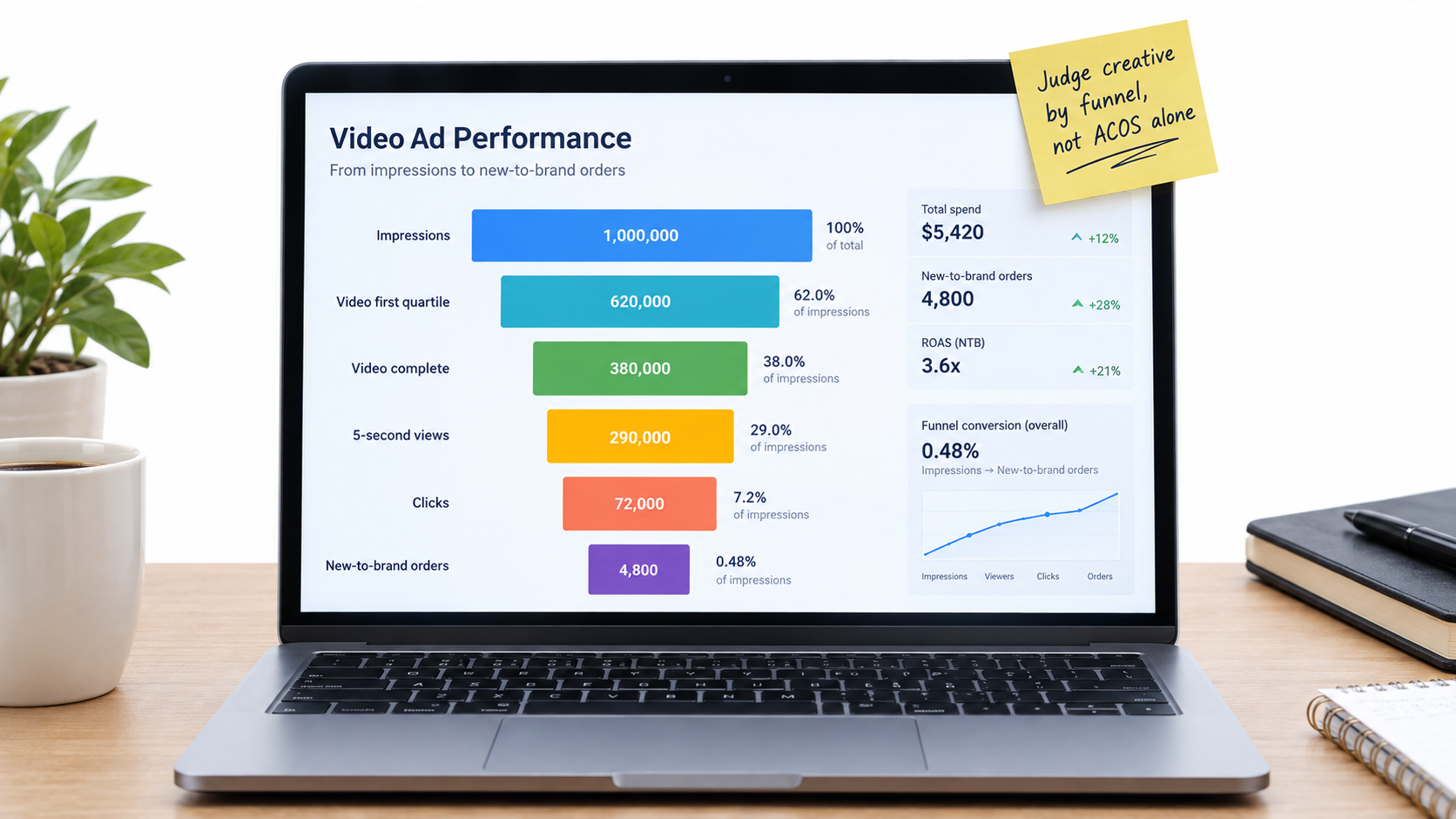
    SBV gives you more diagnostic data than static ads do, because you can see how shoppers interacted with the video before clicking. Most advertisers look only at cost of sale and ignore the rest. That leaves them unable to tell a creative problem from a targeting problem or a listing problem.

    Laptop dashboard with a video ad funnel from impressions through quartile views, 5-second views, clicks, and new-to-brand orders, with a sticky note reading judge creative by funnel not ACOS alone

    The video funnel

    Sponsored Brands video reporting includes metrics such as:

    • Impressions and viewable impressions: How often the ad loaded and how often it was actually on screen.
    • Video quartile views: How many views reached 25%, 50%, 75%, and 100% of the video.
    • 5-second views and 5-second view rate: How many shoppers watched at least five seconds, a useful signal that the opening held attention.
    • Video unmutes: How many shoppers turned the sound on, a sign of strong interest.
    • Clicks and click-through rate: Whether attention turned into action.
    • New-to-brand orders and sales: Purchases from customers who hadn’t bought from your brand recently.

    Metric names and availability can change, so check your console’s reporting columns.

    Diagnosing problems stage by stage

    Read the funnel in order. Where it drops off tells you what to fix:

    • Low 5-second view rate: The opening isn’t stopping the scroll. Rework frame one and the first overlay.
    • Good early views, sharp drop by midpoint: The middle section is slow or repetitive. Tighten the edit or shorten the video.
    • Healthy views, low CTR: The video holds attention but doesn’t prompt action. The message may be interesting but not relevant to the search, or the listing signals next to it (price, rating) may be putting shoppers off.
    • Good CTR, weak conversion: The problem is probably after the click, such as a mismatched landing page, weak listing content, or pricing. Changing the creative won’t fix that.

    Beyond cost of sale

    Judging SBV only on advertising cost of sale (ACOS) can undervalue it. Video often reaches shoppers earlier in their decision and brings in customers new to the brand. New-to-brand metrics help show that. If a video campaign has a slightly higher ACOS but a much higher share of new-to-brand orders, it may be building future repeat sales that a narrow ACOS view misses.

    Branded search volume is another useful signal to watch. If searches for your brand name rise after you scale video, the ads are likely building awareness even when direct attribution looks modest.

    Give tests enough data

    Video metrics bounce around at low volume. Don’t pause a video after a few hundred impressions. Set a minimum threshold, such as a set number of clicks or a set spend per variant, before deciding. Compare variants within the same cluster and time period so seasonality and targeting don’t skew the results.

    Testing Cadence and the Economics of Production

    The cluster approach means more videos. That raises a fair question: how do you produce enough variants without a big budget? The answer is to rethink how you produce video, not to lower the quality bar.

    Build a modular footage library

    Rather than commissioning finished videos one by one, shoot a library of modular clips in a single session:

    • Several opening shots, each showing a different benefit or use case.
    • Close-ups of each major feature in action.
    • Context shots showing the product in different settings and with different users.
    • Clean closing product shots.

    From one library, an editor can put together many cluster-specific versions by swapping openings and overlays. The cost of each extra variant drops sharply once the library exists.

    Use Amazon’s creative tools where they fit

    Amazon Ads now offers AI-powered creative tools in the console. The Sponsored Brands page, for example, highlights free AI image generation for branded creatives, and Amazon has added video generation tools as well. These can be useful for quick tests, seasonal refreshes, or smaller brands without production budgets. Treat AI-generated output like any other creative. Check it against the frame-one test, the silent-viewing test, and moderation policies before launch.

    A sensible testing cadence

    A workable rhythm for many brands looks like this:

    1. Launch: Two openings per top cluster, same body footage, run side by side.
    2. First review: Once each variant passes your data threshold, compare 5-second view rate and CTR. Keep the winner.
    3. Iterate: Test a new challenger against the winner, changing one thing at a time, such as the opening shot, the first overlay, or the length.
    4. Refresh: Watch for creative fatigue. If a proven video’s performance slips over time with steady targeting, bring in a new variant.

    Change one thing at a time

    If you change the opening, overlays, music, and length together, you won’t know what caused a result. Disciplined, single-variable tests build knowledge you can reuse across products. After a few rounds, you’ll learn patterns specific to your category, such as whether in-use openings beat close-up openings or whether numbers in overlays beat descriptive words.

    What the Published Case Studies Actually Show

    Amazon publishes Sponsored Brands case studies, and they’re worth reading carefully: for what they report, and for what they don’t.

    HP: reach and clicks across a broad catalog

    Amazon reports that HP, using Sponsored Brands video together with Sponsored Brands, Sponsored Products, and display ads, saw impressions grow 224% year over year and clicks rise 142% year over year. That included a 42% increase in clicks for Sponsored Brands video placements.

    The takeaway is that video worked as part of a combined program, not alone. HP ran video alongside other sponsored ad types, so the results reflect a coordinated approach. For most brands, the lesson is to treat SBV as one layer in a full-funnel plan, not as a stand-alone fix.

    Loftie: efficiency for a small business

    Amazon’s case study on Loftie, described as a small business, reports a sponsored ads campaign with a return on ad spend of $5.66 and an advertising cost of sale of 17.68%. Those figures show that sponsored ads, Sponsored Brands included, can deliver efficient returns for smaller brands, not just large enterprises.

    NF Imports: long-term brand building

    Amazon also highlights NF Imports, a brand in Japan that has used sponsored ads since 2015. Amazon reports that 80% of its sales came from new customers over a multi-year period and that sales grew 30% across the period studied. The pattern is consistent use over years, not short bursts.

    How to read case studies sensibly

    Case studies are chosen to show success. They don’t tell you the median result, and they rarely break down which creative choices drove the numbers. Use them as evidence of what’s possible and as clues about structure. The recurring themes are combined ad types, consistent investment, and attention to new customers. Don’t treat them as benchmarks your campaigns should hit.

    Your own data, gathered through disciplined cluster-based testing, is a far better guide than any published case study. The playbook in this article is built to help you produce that data quickly.

    Putting It Together: A Practical SBV Workflow

    Here is the approach condensed into a workflow you can run for each product line.

    Step 1: Research

    Pull search term and search query data. Group terms into intent clusters and rank them by volume and conversion. Pick the top two or three clusters.

    Step 2: Brief

    For each cluster, write the one-sentence answer to the shopper’s question. Define the opening shot and first overlay. Note any claims that need documentation.

    Step 3: Produce

    Shoot a modular library in one session. Edit cluster versions by swapping openings and overlays. Check every cut against the frame-one test, the silent-viewing test, current specs, and moderation policies.

    Step 4: Structure

    Build one campaign per cluster with tight match types and cross-cluster negatives. Choose the destination (detail page or focused Store subpage) based on the video’s promise. Keep video budgets separate.

    Step 5: Measure

    Read the full funnel: 5-second view rate, quartile completion, CTR, conversion, and new-to-brand share. Find where the drop-off happens and fix that stage.

    Step 6: Iterate

    Run single-variable tests against the current winner. Refresh when performance fades. Keep a rejection log and a learnings log that the whole team can use.

    Conclusion: Win the Search, Not the Screening

    The brands that get the most from Sponsored Brands video aren’t necessarily the ones with the biggest production budgets. They’re the ones that understand where their video plays: muted, among competing results, in front of a shopper who just said exactly what they want.

    That understanding changes almost every decision. It moves the product into the first frame. It turns text overlays into the main script. It splits one hero video into several cluster-matched versions. It links each video to a landing page that continues its promise. And it replaces a single cost-of-sale number with a funnel that shows where things are going wrong.

    Key takeaways to act on:

    • Treat SBV as a search result. Build each video to answer a specific set of searches better than the listings around it.
    • Map videos to intent clusters. Start with your two or three highest-value clusters and give each its own opening and overlays.
    • Pass the frame-one test. Product visible, benefit clear, no logo intro, no black frames.
    • Design for silence. Write overlays first, keep them short and specific, and make them readable at phone size.
    • Prevent rejections early. Check claims, pricing, reviews, off-Amazon references, and current specs before export.
    • Match destination to promise. Use detail pages for specific intent and focused Store pages for broad intent.
    • Read the whole funnel. Use 5-second views, quartiles, CTR, and new-to-brand data to find the real bottleneck.
    • Test one variable at a time. Build a modular footage library so variants are cheap to make.

    Specs, formats, and policies on Amazon will keep changing through 2026 and beyond. The underlying logic won’t: a shopper scanning search results rewards the ad that answers the query fastest. Build your videos to be that answer, and the format works for you rather than against you.