Tag: Context Engineering

  • From Prompt Whispering to Protocol Thinking: How MCP Is Rewiring the Way Teams Build AI

    From Prompt Whispering to Protocol Thinking: How MCP Is Rewiring the Way Teams Build AI

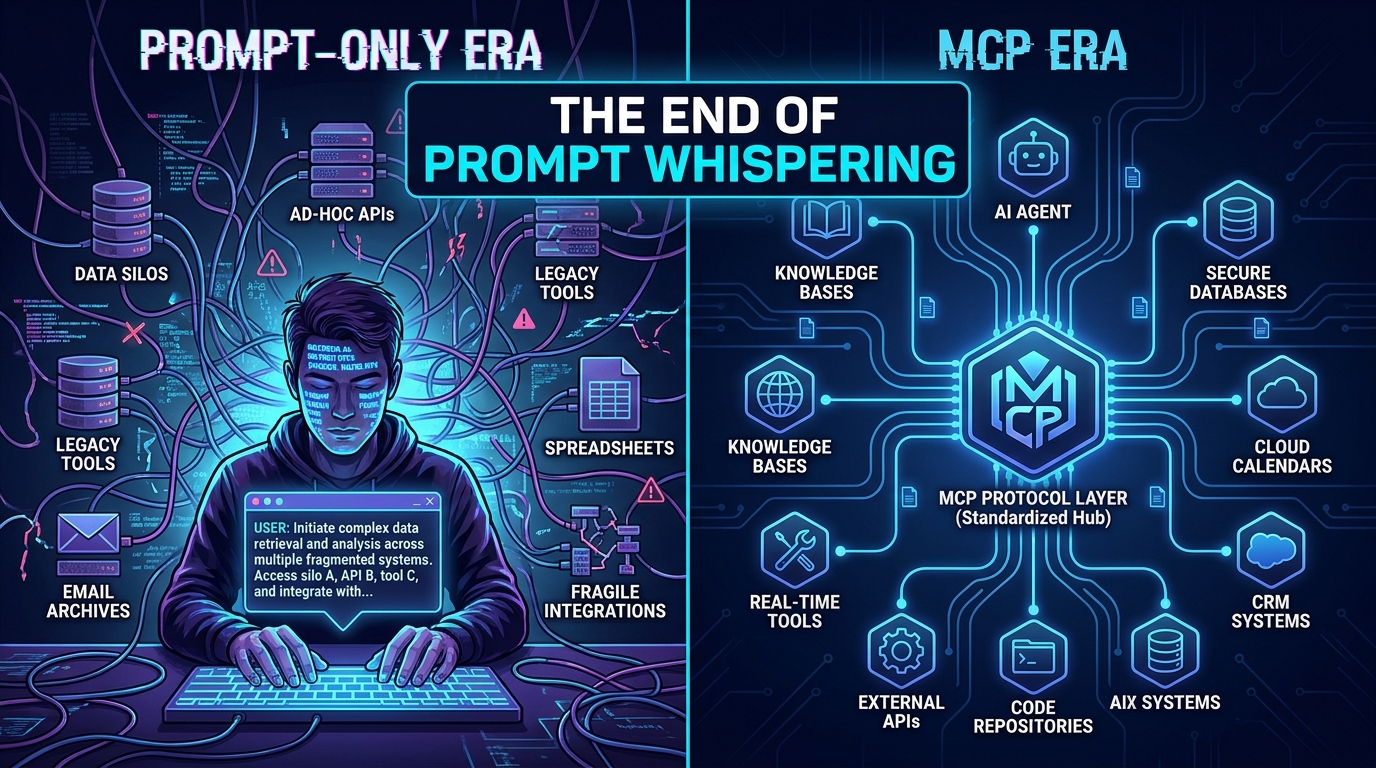
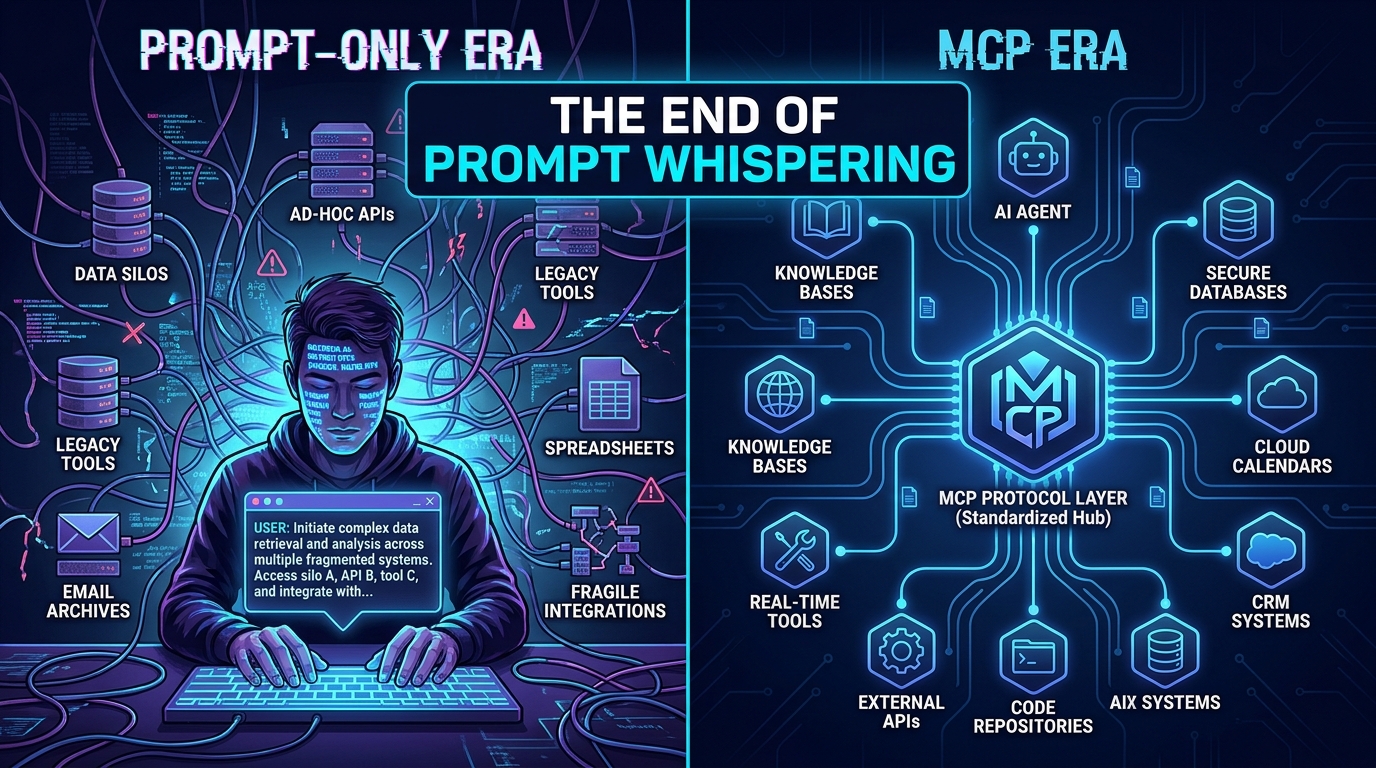
    Split visual comparing the fragmented Prompt-Only Era with the clean MCP Era protocol architecture

    There’s a moment every team hits. The AI assistant works brilliantly in the demo. It writes coherent summaries, drafts professional emails, and answers questions with impressive fluency. Then someone asks it to pull the actual customer data before drafting that email. Or to check what’s already been committed to the repo before generating a solution. Or to look up today’s inventory figures rather than relying on the stale numbers baked into the system prompt.

    And then the whole thing falls apart — because a prompt, however perfectly crafted, is just text. It can tell a model how to think. It cannot give that model eyes.

    This is the ceiling that prompt-only workflows have been quietly hitting for the past two years. And it’s why Model Context Protocol — MCP — has gone from a niche developer curiosity to the de facto integration layer for production AI systems with remarkable speed. Since Anthropic open-sourced the standard in late 2024, the ecosystem has grown to over 20,000 public MCP servers and roughly 97 million monthly SDK downloads across Python and TypeScript alone.

    But the real story isn’t about downloads or server counts. It’s about a fundamental rethink of how teams design AI systems — shifting from the craft of prompting toward the discipline of context engineering. That shift is changing what gets built, who builds it, and what failure looks like when it goes wrong.

    This post breaks down exactly what that transition looks like: the structural limits of prompt-only workflows, how MCP’s three core primitives actually solve them, the organizational rewiring that follows, the security risks that nobody is being loud enough about, and a clear-eyed view of where prompts still belong in the stack.

    The Prompt Ceiling: Why Clever Instructions Eventually Run Out of Road

    Prompt engineering had a genuine moment. Between 2022 and 2024, a significant industry emerged around the idea that getting better outputs from AI was primarily a matter of getting better at asking. Chain-of-thought prompting, few-shot examples, role assignment, structured output templates — these techniques produced real and measurable improvements. Teams hired “prompt engineers” as distinct roles. The craft was real.

    But prompt engineering was always solving a secondary problem. The primary problem — connecting AI to the systems, data, and actions that make it useful in a real organization — was never going to be solved by cleverer phrasing.

    The Five Structural Walls

    When you look at where prompt-only workflows fail in enterprise settings, the same five failure modes appear repeatedly:
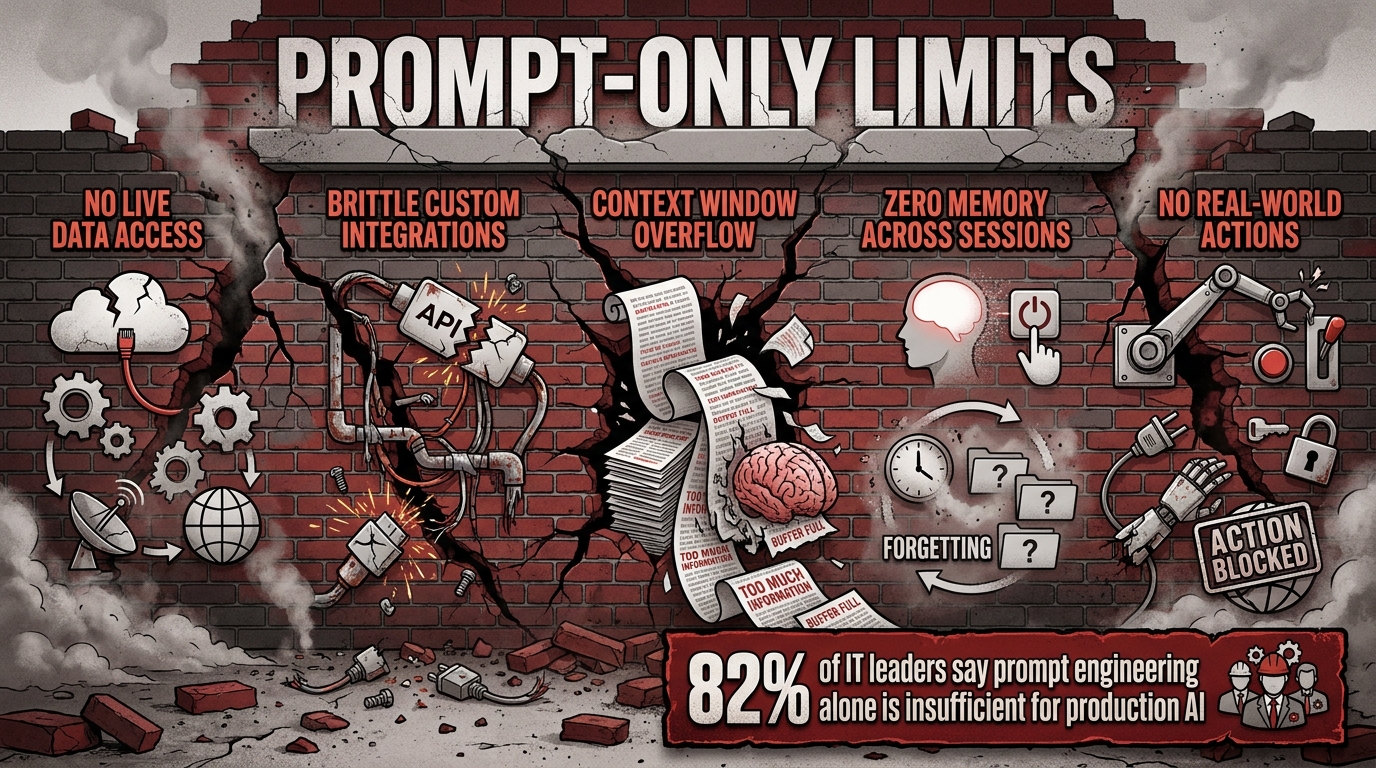
    Five structural failure points of prompt-only AI workflows infographic showing the limits of pure prompting

    Wall 1: No live data access. A model knows only what was in its training data and what you paste into the context window. Any workflow requiring current information — today’s order count, the current state of a ticket, a customer’s latest interaction — requires a human to manually retrieve and insert that data, defeating the purpose of automation.

    Wall 2: Brittle, unmaintainable custom integrations. Teams that needed AI to actually touch external systems built bespoke connectors — custom Python glue code, hardwired API calls, one-off webhooks. Each integration was its own maintenance burden. A change in one upstream system could silently break three AI workflows.

    Wall 3: Context window overflow. The solution to “the model doesn’t have the data” was often “paste more data into the prompt.” This approach hits hard limits quickly — both the literal token ceiling and the more insidious problem of attention dilution, where models start ignoring relevant details buried in enormous context payloads.

    Wall 4: No persistent memory across sessions. Each conversation started from zero. A model asked to review a codebase today had no recollection of reviewing it last Tuesday. Long-running workflows required humans to re-inject state at every interaction, turning “AI automation” into “AI-assisted copy-paste.”

    Wall 5: No real-world actions. Text generation is not task execution. A model that writes the perfect Jira ticket description cannot actually create the ticket. A model that drafts the perfect outreach email cannot send it. The gap between output and action required constant human relay — the human becoming the integration layer the AI couldn’t be.

    A 2026 survey found that 82% of IT and data leaders now say prompt engineering alone is insufficient for production AI systems. That number is probably low. The teams who haven’t hit these walls yet simply haven’t tried to do anything sufficiently complex.

    What MCP Actually Is (Beyond the USB-C Analogy)

    The USB-C analogy has become so dominant in MCP discussions that it risks obscuring what the protocol actually does. USB-C tells you MCP provides standardized connectivity. It doesn’t tell you what gets connected, or why the architecture matters.

    At its core, MCP is an open, JSON-RPC 2.0-based standard for connecting AI applications to external systems through a host → client → server architecture. The host is the AI application — Claude, a custom agent, an IDE. The client manages the protocol communication. The server is where the capability lives: a system that exposes data, tools, or workflow templates to the AI.

    What makes this powerful isn’t the technology — JSON-RPC is decades old. It’s the standardization. Before MCP, every AI system that needed to talk to external tools built its own proprietary integration layer. After MCP, any compliant AI host can talk to any compliant MCP server without custom code. Build the server once; every AI that speaks the protocol can use it.

    The Conceptual Leap

    The deeper point is architectural. Prompt-only AI is a closed system — the model, your instructions, and whatever text you’ve provided. MCP turns AI into an open system — a model that can discover, negotiate with, and act through external capabilities at runtime. The model doesn’t need to know about your CRM in advance. It can discover what your CRM MCP server exposes and decide how to use it when the task requires it.

    This is the shift from static intelligence to dynamic capability. And it changes everything about how you design AI systems.

    The Three Primitives: Tools, Resources, and Prompts

    MCP exposes three distinct categories of capability to an AI host. Understanding the distinction between them is essential for understanding why MCP is architecturally superior to prompt-stuffing for complex workflows.
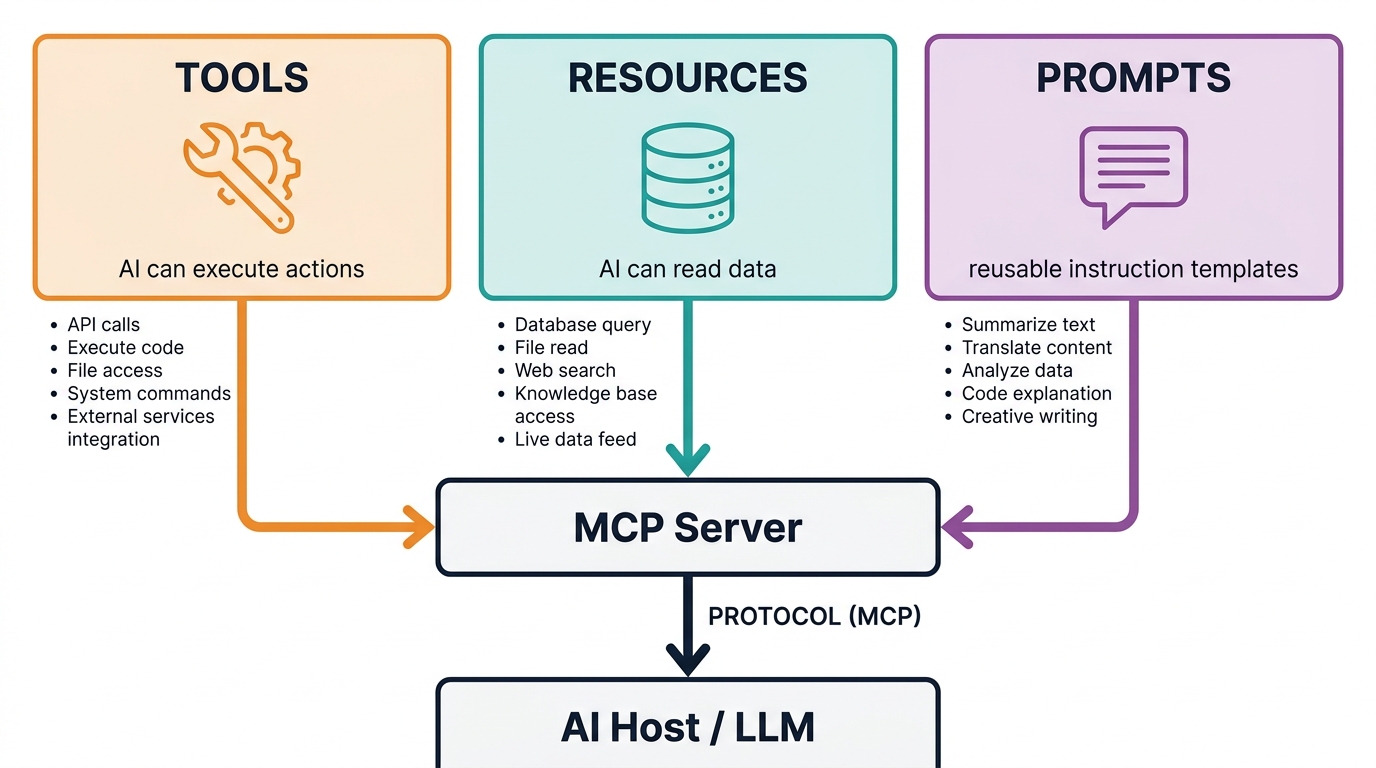
    MCP three core primitives diagram showing Tools, Resources, and Prompts as the building blocks of the protocol

    Tools: The Action Layer

    Tools are functions the AI can call to take action in the world. They are the most powerful — and the most dangerous — of the three primitives. A tool might create a calendar event, submit a pull request, send a Slack message, run a database query, or trigger a deployment pipeline. When an AI calls a tool, something actually happens outside the model.

    This is the capability that prompt-only systems fundamentally lack. You can prompt a model to describe what it would do to fix a bug. Only a tool call can make it actually open the file, modify it, and commit the change. The distinction sounds obvious once stated; it was catastrophically under-appreciated by the industry for most of 2022–2024.

    Resources: The Data Layer

    Resources are data sources the AI can read. Unlike tools, resources are read-only — they expose information to the model without granting action capabilities. A resource might be a database of product specifications, a file system, a CRM record set, a knowledge base, or a real-time data feed.

    The critical difference from prompt-stuffing is that resources are accessed on demand. The model doesn’t receive all the data upfront in the context window — it retrieves specific resources when the task requires them. This solves the context overflow problem and means AI systems can work with vastly larger data corpora than any context window could hold.

    Prompts: The Template Layer

    The third primitive — also confusingly called Prompts — is perhaps the least discussed but practically very valuable. MCP Prompts are reusable, versioned instruction templates that an AI host can discover and invoke. Think of them as function signatures for common workflows: “summarize this document in the style of an executive brief,” “review this code for security vulnerabilities,” or “draft an outreach email given this customer profile.”

    By exposing prompt templates through the protocol rather than hardcoding them into individual applications, MCP enables organizations to maintain a library of governed, versioned, auditable AI instructions — separate from the models themselves and available across any MCP-compliant host. This is huge for enterprises that need consistency, auditability, and the ability to update AI behavior without redeploying applications.

    Why the Three-Way Split Matters

    The architectural separation of Tools, Resources, and Prompts is not just tidy categorization — it enables principled permission scoping. An MCP server can grant an AI read access to a database (Resource) without granting it write access (Tool). It can expose workflow templates (Prompts) without exposing the underlying data sources they reference. Granular permissions become possible in a way that prompt-only systems — where “access” means “in the context window” — can never provide.

    Context Engineering: The Discipline MCP Made Necessary

    As MCP has moved into production, a new term has emerged to describe the work involved: context engineering. Understanding the difference between prompt engineering and context engineering is key to understanding what has actually changed.
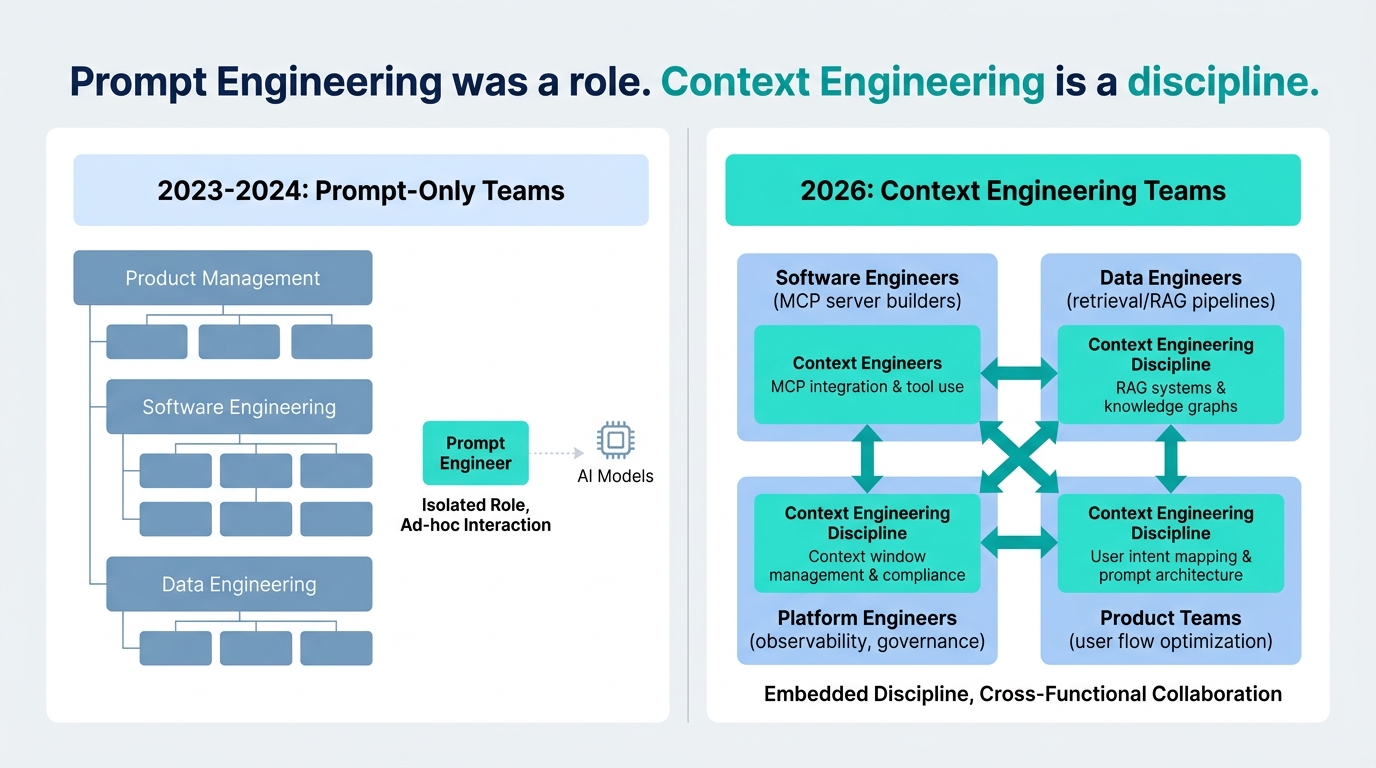
    Organizational team structure comparison showing how prompt engineering roles evolved into embedded context engineering discipline in 2026

    Prompt engineering optimizes what happens inside a single request. The model receives a context window; the prompt engineer crafts what goes in it to maximize the quality of the output. The work is largely textual and iterative — try a phrasing, observe the output, refine.

    Context engineering is the broader discipline of designing the entire information environment around a model across a workflow. It encompasses: what data is retrieved and when, which tools are exposed and with what permissions, how intermediate outputs are structured and passed between steps, how memory is maintained across sessions, how the model’s reasoning is constrained by governance policies, and how failures are detected and recovered from.

    A useful analogy: prompt engineering is like writing a good brief for a contractor. Context engineering is like designing the building site — the tools available, the supply chain, the safety protocols, the information flow. A great brief doesn’t help if the contractor has no materials to work with and no way to communicate with the rest of the team.

    What This Means for the “Prompt Engineer” Role

    The honest assessment is that “prompt engineer” as a standalone job title is largely obsolete for production AI systems — though not in the way the backlash coverage tends to suggest. The work didn’t disappear. It expanded and distributed.

    The skills that once lived in a “prompt engineer” role are now split across several functions:

    • Software engineers build and maintain MCP servers — the reusable tool and resource layers that expose business systems to AI agents.
    • Data engineers design the retrieval and RAG pipelines that decide what information enters the model’s context at each step.
    • Platform engineers own observability, tracing, and governance frameworks that make MCP-based workflows auditable and recoverable.
    • Product teams own the prompt templates (the MCP Prompts primitive) and the evaluation frameworks that measure whether AI behavior matches business intent.

    Prompt engineering as a pure craft — knowing how to phrase instructions for maximum model performance — still matters deeply. But it is now a foundational skill embedded across multiple roles, not a department of its own.

    The Context Bloat Problem

    One consequence of MCP worth flagging explicitly: connecting an AI to dozens of tools and resources does not automatically produce better performance. In fact, one of the most common MCP anti-patterns in 2026 is what practitioners are calling “context bloat” — flooding the model’s context window with tool schemas, intermediate tool outputs, and retrieved data until the model’s attention is stretched so thin it loses coherence on the original task.

    Context engineering’s central challenge is selective relevance: giving the model exactly the context it needs for each step, and no more. This requires thoughtful server design, aggressive filtering of tool outputs, retrieval systems that return the right chunks of data rather than everything they can find, and careful orchestration of what gets written into memory versus discarded between steps.

    How MCP Changes Team Structure and Workflow Design

    The shift to MCP-based development is not purely technical. It restructures the way AI work moves through an organization — and understanding that restructuring matters before you decide how to adopt it.

    The Integration Tax Is Eliminated (and Replaced with a Build Tax)

    In a prompt-only world, connecting AI to each new system required bespoke engineering work. A new data source meant new glue code. A new tool meant new API integration. Teams that wanted AI to touch ten enterprise systems had to build and maintain ten custom integrations — each with its own edge cases, authentication patterns, and failure modes.

    MCP eliminates the per-connection tax. Once you’ve built an MCP server for your CRM, every AI application in your stack that speaks the protocol can use it. The work shifts from “build N integrations for N tools” to “build one MCP server per system.” This is why case studies show 40–60% faster automation setup for teams that have made the transition — they’ve moved from integration scarcity to integration reuse.

    But there is a new cost: the upfront investment in building well-designed MCP servers. A poorly designed server — with too many tools exposed, insufficient permission scoping, or ambiguous tool descriptions — becomes a liability. The build-once principle only pays off if you build it right the first time.

    AI Development Becomes More Like Platform Engineering

    Perhaps the most consequential structural shift: in an MCP-based world, AI development starts to look like platform engineering. The mental model shifts from “write a prompt that does X” to “design a system of reusable capabilities that any workflow can compose.”

    This is a different discipline than either traditional software engineering or traditional ML engineering. It requires thinking about:

    • Which capabilities should be centralized in shared MCP servers vs. embedded in specific workflows
    • How to version and govern tool interfaces as underlying systems change
    • How to observe and trace multi-step agent workflows across tool calls
    • How to handle failures that occur mid-workflow, after some tool calls have already executed
    • How to scope permissions granularly enough that an agent can do its job without accumulating unnecessary access

    Teams that are doing this well in 2026 tend to have designated “AI platform” or “agent infrastructure” functions — small teams responsible for the MCP server layer — with application teams building workflows on top of those standardized capabilities. Teams that are doing it poorly are building monolithic MCP servers with everything exposed to everyone, and wondering why their agents are behaving unpredictably.

    Real-World Results: What the Productivity Numbers Actually Mean
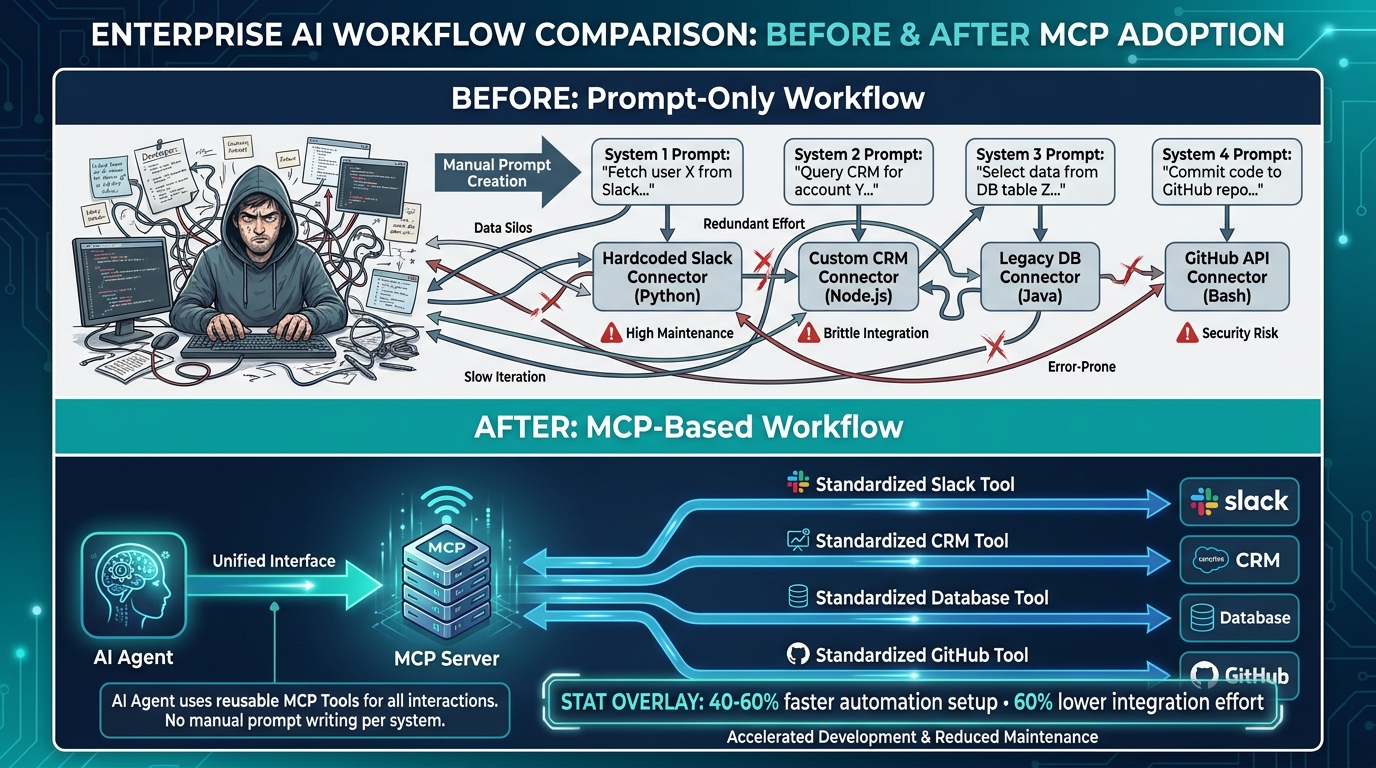
    Before-and-after comparison of prompt-only versus MCP-based enterprise AI workflows showing 40-60% faster automation setup

    The productivity numbers coming out of early MCP adopters are real but require careful interpretation. Here’s what the evidence actually supports — and what it doesn’t.

    Integration Speed: The Clearest Win

    The most consistently reported gain from MCP adoption is in integration speed: the time from “we want AI to connect to system X” to “that connection is in production.” Reports from enterprise teams describe 40–60% reductions in setup time once a mature MCP server library exists for their major systems.

    The mechanism is straightforward: you’re replacing bespoke integration code with protocol-compliant server configuration. The first server you build for a system is roughly as much work as a custom integration. The tenth AI workflow that uses that server is nearly free from an integration standpoint.

    Workflow Error Rates: Meaningful but Conditional

    Case studies describe up to 40% reduction in workflow errors when moving from prompt-only to MCP-based designs. But the condition matters: this applies to workflows where the errors were previously coming from manual data retrieval, context staleness, and human relay steps — not to errors originating from the model’s reasoning itself.

    MCP doesn’t make models smarter. It removes the systemic failures that occurred in the gaps between the model and the real world — stale data, missing context, failed handoffs. If your workflow errors come from those sources, MCP addresses them directly. If they come from the model misunderstanding the task, you still have a prompt engineering problem.

    Representative Before/After Patterns

    From published case studies and practitioner reports, several workflow types show consistent improvement:

    • Internal IT helpdesk automation: Password resets, access requests, and VPN issue routing — previously requiring human triage and manual system access — can be handled end-to-end through MCP-connected ticketing and directory tools. Teams report 3× throughput on routine tickets with no quality degradation.
    • HR onboarding workflows: Provisioning access, sending welcome communications, scheduling onboarding sessions, and creating task trackers across multiple systems previously required 4–6 manual handoffs. MCP-connected agents collapse this to a single workflow execution, with teams reporting 3× faster completion times.
    • Developer productivity: Coding assistants connected via MCP to code repositories, CI/CD pipelines, documentation systems, and issue trackers report measurably fewer iterations to working solutions — the model has the actual codebase state rather than a stale snapshot pasted into the prompt.
    • Enterprise data analysis: Analysts using MCP-connected agents to pull live database queries, cross-reference CRM data, and generate reports describe the elimination of hours of manual data compilation per analysis cycle.

    The pattern across all of these is the same: the biggest gains come not from the AI reasoning better, but from removing the manual retrieval and relay steps that surrounded AI in prompt-only architectures.

    The Security Trap Nobody Is Being Loud Enough About
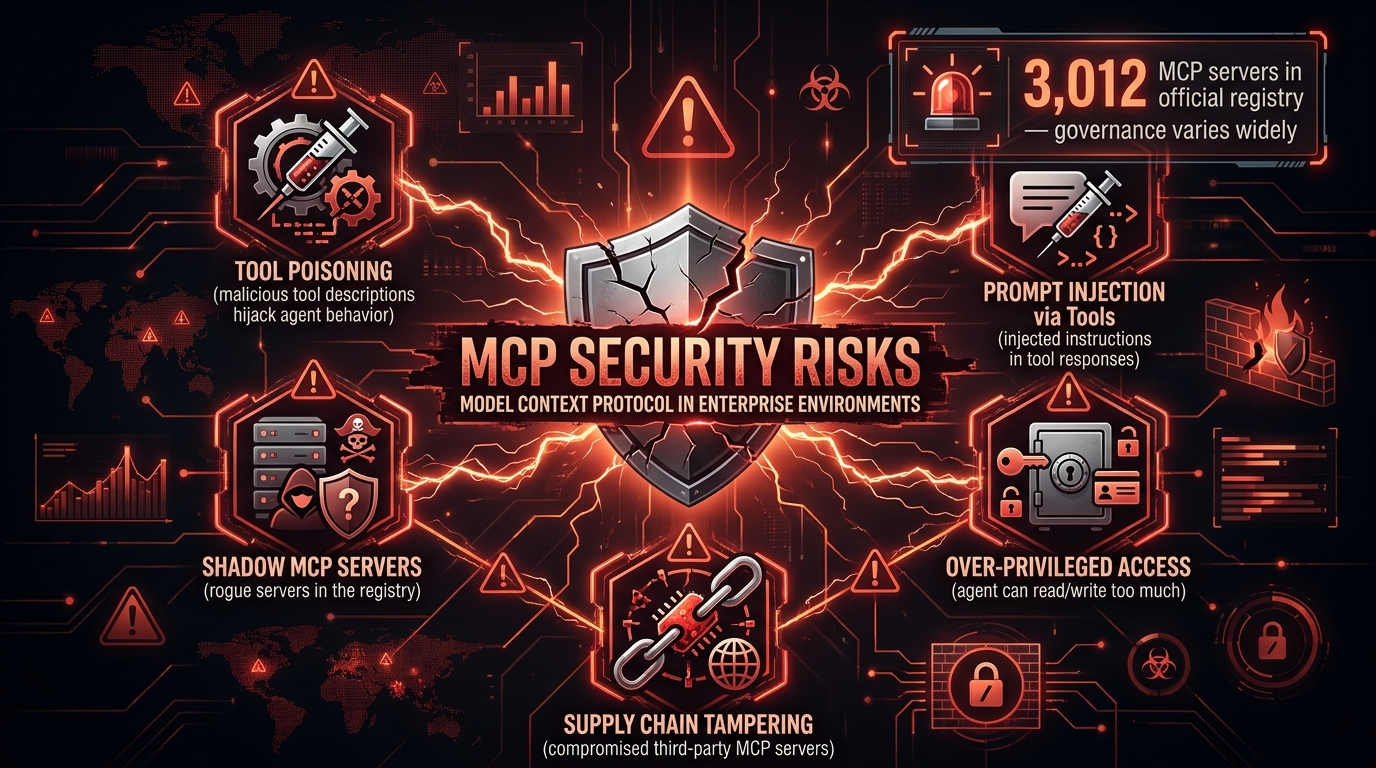
    MCP security risk landscape showing tool poisoning, prompt injection, shadow servers, and over-privileged access threats

    The security conversation around MCP is happening in security research circles and largely bypassing the mainstream AI adoption discussion. That gap is dangerous. MCP’s power — giving AI systems real-world action capabilities — is precisely what makes its security failure modes severe.

    Tool Poisoning: The Attack Vector You Didn’t Know to Model

    In a prompt-only system, an adversary who wants to manipulate an AI’s behavior needs to get malicious instructions into the user’s prompt or the system prompt. The attack surface is relatively contained.

    In an MCP-based system, every tool’s description is also instruction text that the model reads. Tool poisoning is the attack where a malicious actor — or a compromised third-party MCP server — provides tool descriptions that contain hidden instructions, invisible text, or manipulative framing designed to steer the model’s behavior regardless of the legitimate user’s intent. The model reads the tool schema as part of its context; if that schema is adversarially crafted, the model may act on those adversarial instructions rather than the user’s.

    This isn’t theoretical. Researchers have demonstrated tool poisoning attacks that cause AI agents to exfiltrate data, take unintended actions, or bypass governance policies — all while appearing to execute the legitimate task normally.

    Shadow MCP Servers

    One of the fastest-growing enterprise security concerns in 2026 is the proliferation of unmanaged, ungoverned MCP servers running inside organizations. Just as “shadow IT” emerged when employees installed unapproved software, “shadow MCP servers” emerge when developers spin up local or cloud-hosted MCP servers to connect AI tools to internal systems — bypassing procurement, security review, and access governance.

    As of early 2026, the official MCP registry listed over 3,000 unique servers, but practitioner reports suggest the actual number of privately deployed servers across enterprises is orders of magnitude higher. Each represents a potential attack surface: an endpoint that can expose organizational data to AI systems, potentially with broader access than intended.

    Over-Privileged Tools: The Principle of Least Privilege, Ignored

    In the rush to “connect everything,” many teams are deploying MCP servers with tools that grant far more access than the workflow actually requires. An MCP server built for a customer service agent that also exposes write access to the customer database — because it was simpler to build that way — creates a scenario where a malicious prompt injection can exfiltrate or corrupt customer data through what looks like a legitimate tool call.

    The principle of least privilege — grant the minimum permissions required — is foundational in traditional software security. In MCP deployments, it is being observed inconsistently, particularly by teams moving fast on early implementations.

    What Governs This Space

    Several patterns are emerging for organizations doing this well:

    • Centralized MCP gateway architecture: A single organizational MCP gateway that all agents must route through, enabling centralized authentication, logging, rate limiting, and policy enforcement.
    • Tool description auditing: Regular review of tool schema text for potentially manipulative or overly permissive language — treating tool descriptions with the same scrutiny applied to system prompts.
    • Sandbox execution environments: MCP tools that execute code or system commands run in isolated environments with explicit resource limits.
    • Supply chain vetting for external MCP servers: Treating third-party MCP servers as third-party code — requiring security review before integration, with ongoing monitoring for changes.

    Security in MCP systems is not a feature you add after the architecture is designed. It has to be designed in from the start. Teams that figure this out in their first MCP deployment will move much faster on subsequent ones.

    Multi-Agent Orchestration: Where MCP Is Taking the Stack

    The most significant near-term development in MCP’s evolution is its role in multi-agent systems — architectures where multiple specialized AI agents collaborate on complex tasks, each with their own MCP tool access, and overseen by an orchestrator agent.

    From Single-Agent to Agent Networks

    Early MCP deployments were primarily single-agent: one AI model, connected via MCP to a set of tools, executing a workflow. The value was real but bounded. A single agent connected to ten tools can accomplish a great deal; it still gets bottlenecked by the single model’s context window, reasoning capacity, and tool-call throughput.

    Multi-agent architectures break that bottleneck. A research agent discovers and retrieves relevant information via MCP resource calls. A synthesis agent processes that information. A writing agent produces the output. A review agent checks it against compliance requirements via its own MCP tool connections. Each agent is specialized; each has the MCP tools appropriate to its function; and an orchestrator coordinates handoffs.

    This is the architecture pattern that’s enabling genuinely complex workflow automation — the kind that compress multi-day human processes into hours. And MCP is the reason it’s feasible without building a custom integration layer for each agent in the network.

    Agent-to-Agent Communication via MCP

    One of the most recent protocol developments is the standardization of agent-to-agent communication patterns over MCP. Rather than agents communicating through ad hoc message formats, emerging patterns use MCP-style structured interactions for agent handoffs — carrying context, state, and capability information in a standardized format that the receiving agent can parse and act on.

    This matters because it makes multi-agent workflows observable and debuggable. Each agent-to-agent interaction becomes a logged, traceable protocol event rather than an opaque black-box handoff. When a multi-agent workflow fails mid-execution, operators can see exactly where in the agent graph things diverged from expected behavior.

    The Governance Challenge Scales Non-Linearly

    The honest caveat for multi-agent MCP systems: governance complexity scales non-linearly with the number of agents and tools. A single agent with ten tools has a bounded permission surface. A network of ten agents, each with ten tools, has an interaction surface orders of magnitude larger — and the emergent behaviors that arise from complex agent interactions are harder to predict, test, and constrain than single-agent workflows.

    Teams moving into multi-agent MCP architectures without corresponding investment in observability, evaluation frameworks, and governance tooling are finding themselves with systems that behave correctly in testing and unpredictably in production. The tooling gap is real; it’s also the next significant opportunity in the MCP ecosystem.

    When Prompts Still Win: A Brutally Honest Assessment

    MCP’s ascendance doesn’t mean prompts are obsolete. There’s a temptation in any new paradigm to declare the previous one dead. The reality is more nuanced — and understanding where prompts remain the right tool matters as much as understanding where MCP is essential.

    Prompts Are Still the Intelligence Layer

    MCP is an integration protocol. It doesn’t replace the instructions you give a model about how to reason, what tone to adopt, what constraints to observe, or how to handle edge cases. Every MCP-connected agent still has a system prompt. The craft of writing that prompt — clearly, precisely, with appropriate examples and constraints — still matters enormously to output quality.

    What changed is that prompt engineering is no longer the only layer of the system. Previously, if you wanted your AI to behave correctly, you had no lever except the prompt. Now you also have: which tools you expose, what data you retrieve, how outputs from one step are formatted before entering the next. The prompt remains important; it’s just no longer the only tool.

    Low-Complexity, High-Volume Use Cases

    For tasks that don’t require external data or real-world actions — content rewriting, tone adjustment, summarization of provided text, simple classification — a well-crafted prompt is still often the cheapest, fastest, and most reliable approach. The overhead of an MCP server (infrastructure to build and maintain, latency added by protocol round-trips, governance overhead to manage) is simply not justified when a direct API call with a good system prompt works fine.

    The practical rule: if the workflow requires the AI to know something it can’t know from the context window, or to do something it can’t do through text generation alone, MCP is likely the right answer. If the workflow is essentially “take this text input and produce this text output,” a prompt might be all you need.

    Prototyping and Exploration

    Prompts remain the fastest way to explore what AI can do before committing to an architecture. Prototyping a workflow with a chat interface and manual data injection is still the fastest path to “does this basic approach work?” The investment in MCP server infrastructure makes sense for workflows you’re confident you want to run in production. It’s overkill for figuring out whether AI can meaningfully contribute to a new problem area.

    The sequencing that works well: prompt-only prototype to validate the concept → identify the specific gaps (what data is missing, what actions can’t be taken) → build exactly the MCP capabilities needed to close those gaps → graduate to production MCP-based workflow.

    Building Your MCP Migration Path: What Actually Works

    Given everything above, what does a sensible MCP adoption strategy look like for teams moving from prompt-only workflows? Based on patterns from early adopters, several principles separate the teams getting value quickly from the teams accumulating technical debt at MCP scale.

    Start with a Single High-Value Workflow

    The teams achieving the best early results are not trying to “MCP everything at once.” They identify one workflow — high volume, well-understood, currently requiring significant manual data retrieval or relay work — and build the MCP infrastructure for that specific workflow well. A mature, well-governed single-workflow MCP deployment teaches you more about your organization’s needs than five rushed, under-governed ones.

    The selection criteria: the workflow should have clear, measurable before/after metrics (cycle time, error rate, manual hours); it should require AI to access at least one external data source or take at least one external action; and it should have stable requirements that won’t shift significantly mid-build.

    Invest in the Server Layer Before the Workflow Layer

    The most common anti-pattern: building workflow-specific MCP integrations that can’t be reused. The better approach is to build well-designed MCP servers for your major business systems first — CRM, ticketing, code repositories, communication tools, data platforms — and then build multiple workflows on top of those servers. The server investment amortizes across every workflow that uses it.

    This requires upfront agreement between AI application teams and the teams that own those business systems. MCP server design is a collaborative exercise: the system owners understand what data and actions are safe to expose; the AI team understands what capabilities are needed for the workflows they’re building.

    Build Observability In, Not On

    MCP-based workflows that lack tracing and logging from day one are almost impossible to debug after the fact. Unlike a pure prompt-based interaction — where you can replay the conversation and observe the model’s behavior — an MCP workflow involves tool calls with side effects, retrieved data that shaped the model’s decisions, and potentially dozens of steps with state passing between them.

    Every MCP server call should emit a structured log event: which tool was called, with what arguments, what it returned, which agent called it, and when. This isn’t optional observability infrastructure — it’s the minimum viable foundation for operating an MCP-based system in production.

    Treat Permission Scoping as a Design Constraint, Not an Afterthought

    Before writing a single line of MCP server code, define the permission boundaries: which roles of agent should have access to which tools and resources, under what conditions, with what approvals. This is the security conversation that teams skip when moving fast and later regret.

    Specifically: map each MCP tool to the minimum data scope and action scope required for the workflows that will use it. If a workflow needs to read customer contact information, the tool should return contact information — not the entire customer record including financial history, internal notes, and access credentials.

    Evaluate Continuously

    MCP doesn’t solve the evaluation problem — it changes it. In prompt-only systems, evaluation is primarily about output quality: does the model’s text response match the desired quality standard? In MCP-based systems, evaluation is multi-layered: output quality, tool call correctness (did the agent call the right tools in the right order?), action outcomes (did the tool calls produce the intended real-world effects?), and governance compliance (were permission boundaries respected?).

    Teams that are running MCP workflows in production without structured evaluation frameworks are flying blind. The emergent complexity of tool-using agents means failure modes are often subtle — an agent that almost always does the right thing but occasionally makes a wrong tool call with real-world consequences.

    The Bigger Shift: From AI as a Product Feature to AI as Infrastructure

    Stepping back from the technical details, MCP represents something larger: the moment when AI transitions from being a feature that applications offer to being infrastructure that applications run on.

    In the prompt-only era, “adding AI” to a workflow usually meant adding a new UI element — a chat interface, a text generation button, an AI-powered field. The AI was a bolt-on. It could improve the output of the workflow without being structurally integrated into it.

    In the MCP era, AI is load-bearing. It connects to the same systems, accesses the same data, and takes the same actions as every other part of the stack. When an AI agent submits a pull request via an MCP tool call, that pull request is real. When it sends a customer communication, that message is sent. When it modifies a database record, the record is modified.

    This is not more dangerous if governed correctly — it is dramatically more useful. But it requires treating AI systems with the same engineering rigor applied to any other piece of production infrastructure: version control, observability, failure handling, security review, and structured deployment processes.

    The teams that will be most effective with MCP over the next two to three years are not the ones who adopt it fastest. They are the ones who build the platform disciplines — server design, permission governance, observability, evaluation — that make fast adoption safe and maintainable over time.

    Conclusion: What the Transition Actually Demands

    The transition from prompt-only to MCP-based AI workflows is real, measurable, and already underway in the organizations building the most capable AI systems. But it is not a simple upgrade. It is a fundamental shift in the discipline required to build AI that actually works in production.

    The central insight: prompts were always the wrong unit of analysis for serious AI systems. Prompts are excellent for shaping model behavior within a single interaction. They are inadequate for designing systems that need to know things, remember things, and do things across the full lifecycle of a complex workflow.

    MCP’s three primitives — Tools, Resources, and Prompts — provide the protocol-level foundation for those requirements. Context engineering provides the discipline for using them well. And the organizational changes required — distributed skills, platform thinking, security-first design, continuous evaluation — provide the operating model for sustaining them at scale.

    Key Takeaways for Teams Evaluating This Transition

    • Audit your current AI workflows for the five failure modes: no live data, brittle integrations, context overflow, no memory, no actions. The severity of those pain points tells you how urgently MCP matters for your specific stack.
    • Don’t skip the server design phase. The quality of your MCP servers determines the quality and safety of every workflow built on them. Rushing server design to ship workflows faster creates compounding debt.
    • Treat context engineering as an organizational capability, not a technical feature. It spans engineering, data, security, and product. Structure accordingly.
    • Security is not a layer to add later. Permission scoping, tool description auditing, and server governance need to be designed before code is written — not bolted on after an incident prompts the conversation.
    • Prompts still matter. MCP is not a replacement for clear, well-crafted model instructions. It’s the infrastructure that makes those instructions capable of affecting the world. Both layers require serious attention.
    • Multi-agent architectures are the destination, but governance is the price of admission. The productivity potential of coordinated agent networks is significant; so is the failure potential when governance hasn’t kept pace with architectural ambition.

    The era of prompt whispering had its moment. It taught us that models were more capable than we initially thought and that the quality of instructions mattered. What it couldn’t do was connect those capable models to the real-world systems where the actual work lives.

    That is what MCP is for. And the teams that understand the distinction — between shaping intelligence and enabling capability — are the ones building AI systems that actually deliver on what the prompt-only era promised.
  • Prompt Playbooks That Turn LLMs Into Reliable ‘Employees’

    Prompt Playbooks That Turn LLMs Into Reliable ‘Employees’

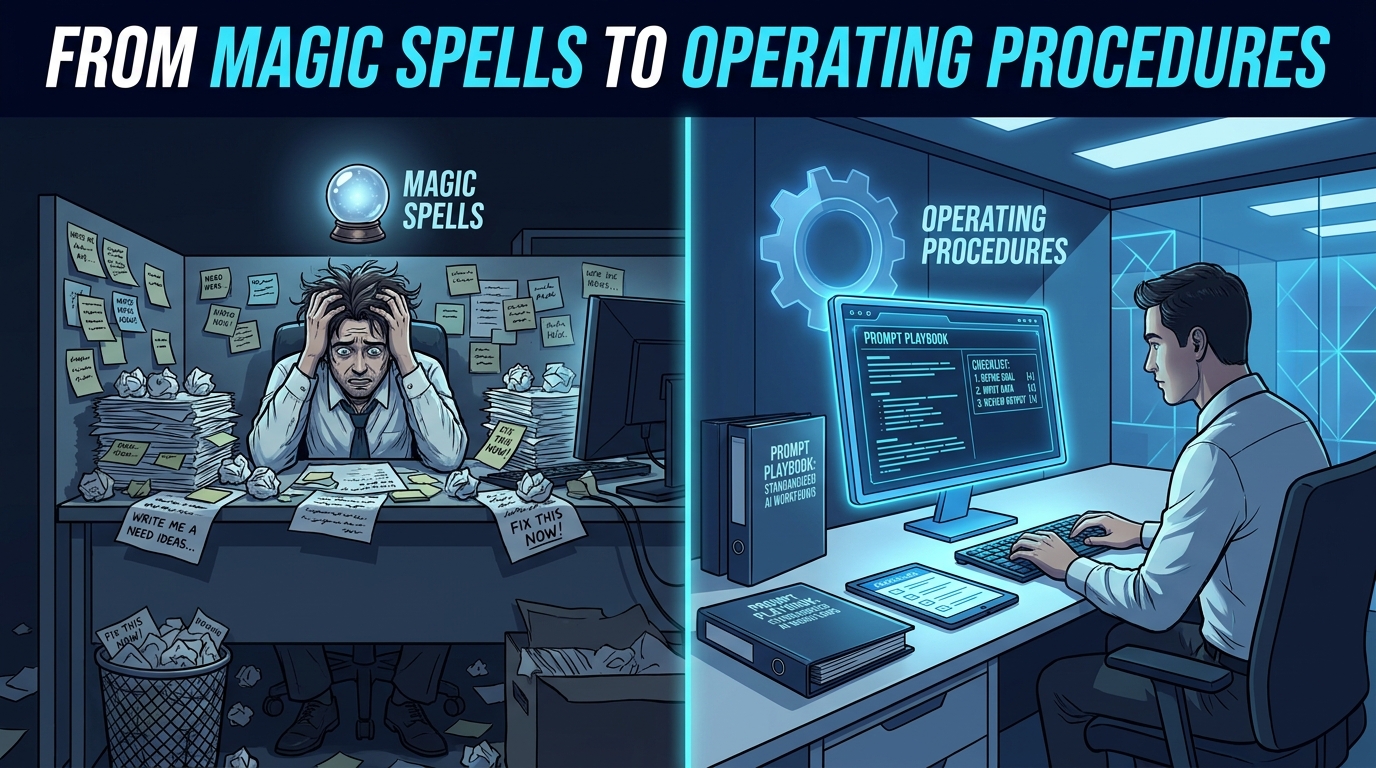
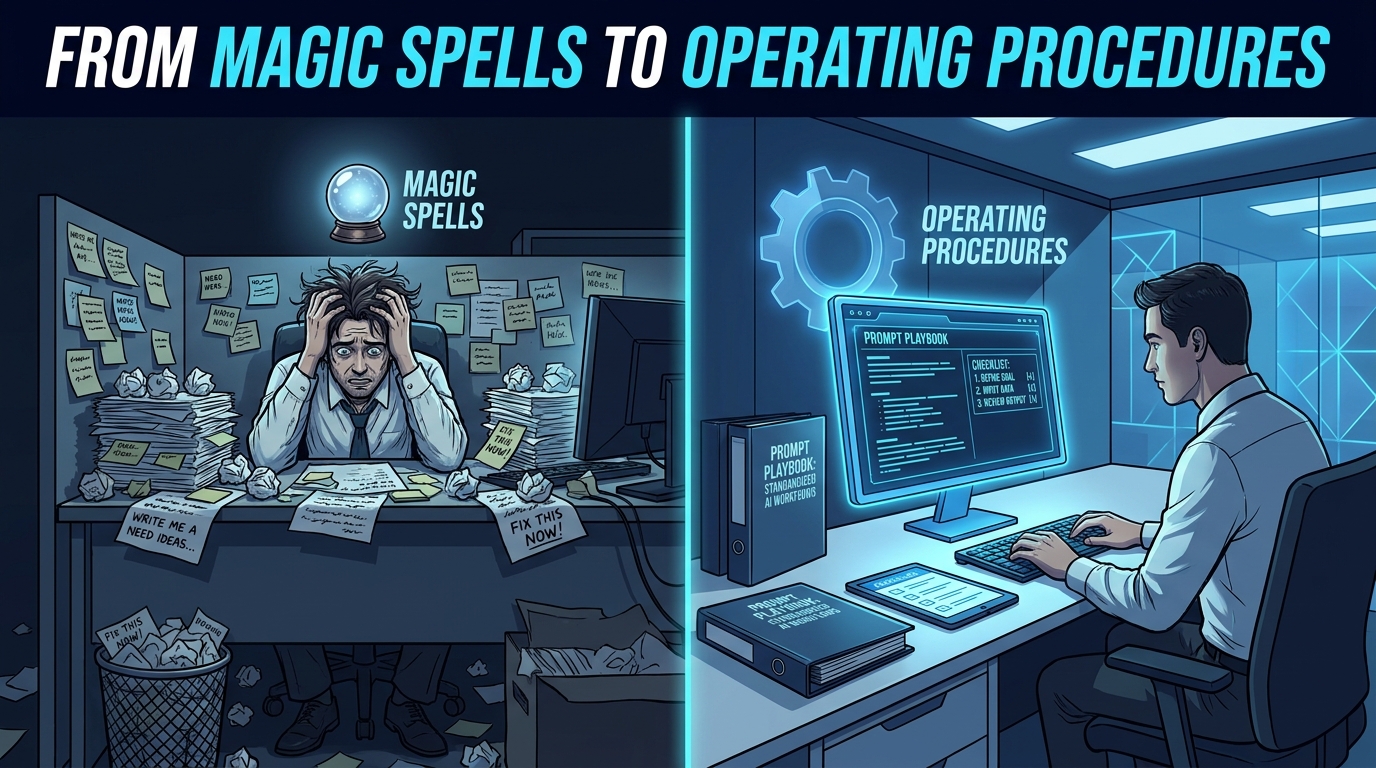
    Split-screen showing chaotic ad-hoc prompting vs. a structured Prompt Playbook binder with consistent AI outputs

    Every team that has worked with a large language model long enough has the same story. It worked brilliantly in the demo. Someone typed a clever question, the model produced a stunning answer, and the room was impressed. Then the same model got handed to six different people, integrated into two internal tools, and asked to do roughly the same job day after day — and within weeks, nobody could agree on whether its outputs were actually reliable.

    The problem is almost never the model. It’s the absence of any operating system around it.

    In traditional hiring, you don’t expect a new employee to perform consistently just because they are talented. You write a job description. You run onboarding. You hand over standard operating procedures. You review performance against measurable outcomes. A talented hire without any of that structure will still produce inconsistent, unpredictable work — because consistency comes from process, not raw capability.

    The same logic applies to LLMs. Treating a model like a magic oracle you query once and hope for the best is the fastest route to the graveyard of failed AI pilots. Treating it like a member of staff — one who needs a clear role, carefully structured information, real examples to learn from, and regular performance checks — is what actually produces reliable output at scale.

    This piece is about how to build that operating system. Not through abstract theory, but through a concrete playbook approach: the tools, templates, and workflows that teams are using in 2026 to get LLMs to behave consistently, predictably, and safely across real production workloads.

    Why “Just Prompting Better” Fails at Scale

    Before building anything, it helps to understand exactly why ad-hoc prompting breaks down. The failure is structural, not stylistic.

    When teams rely on one-off prompts, they’re essentially treating every interaction as a fresh hire on day one. There is no shared memory of what worked, no documentation of edge cases, no version record of what changed when outputs degraded. The next person who needs to run the same task starts from scratch, writing their own prompt from instinct — and getting a different result.

    The Inconsistency Multiplier

    The problem compounds with team size. Five people prompting the same model for the same purpose, each with their own phrasing and approach, will get five meaningfully different output styles. Over time, nobody can point to a single source of truth for how the system is supposed to behave. Quality becomes a function of who happened to write today’s prompt, not what the system is designed to produce.

    Datadog’s 2026 State of AI Engineering report, which analyzed observability traces across real customer LLM deployments, found that roughly 5% of all LLM call spans in production returned an error in February 2026 — with 60% of those being rate-limit errors, and the remaining 40% being other failure types. That may sound manageable, but in a workflow that chains multiple LLM calls together, a 5% per-call failure rate compounds rapidly across steps. A five-step chain with each step running at 95% reliability delivers only about a 77% end-to-end success rate — which is not a reliability standard most business processes would accept.

    The “Brilliant Friend” Trap

    A lot of early LLM adoption inside organizations was driven by people who personally discovered the model felt like a brilliant friend — someone you could ask anything, who would give you a sharp, articulate answer in seconds. That personal experience is real and valid. But it doesn’t translate into a business system.

    Brilliant friends are not employees. They don’t follow your company’s data policies. They don’t format their answers to fit your downstream database. They don’t notice when they are giving you subtly wrong information about your specific product catalog. They don’t repeat the exact same onboarding script with every new customer, verbatim, every single time.

    Reliability requires constraints, and constraints require structure. That structure is the playbook.

    The Job Description Framework: Writing System Prompts That Actually Work

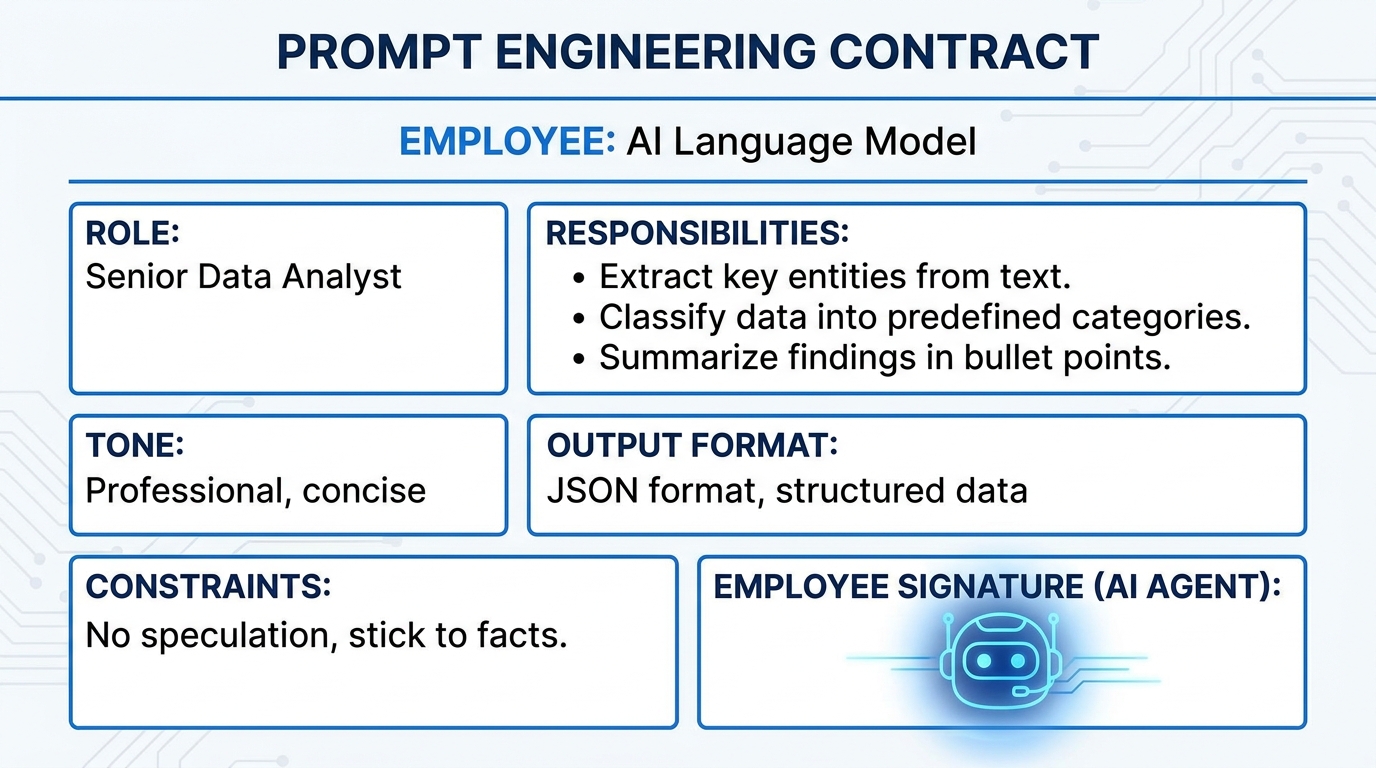
    LLM system prompt structured as a formal employment contract with role, responsibilities, tone, format, and constraints

    The system prompt is the foundation of every reliable LLM deployment. It’s where you define the model’s role, scope, behavior, and output style — and it is directly analogous to writing a job description for an employee.

    Most teams underinvest here. They write a single sentence (“You are a helpful assistant”) or nothing at all, leaving the model to infer its own role from user input alone. The result is a model that behaves differently depending on how each user phrases their request — which is exactly the inconsistency you’re trying to avoid.

    The Five Components of an Effective System Prompt

    Current guidance from teams building production-grade LLM applications has converged around five core components for system prompts:

    • Role and Persona: Who is the model in this context? Not just “a helpful assistant” but something specific: “You are a senior support analyst for [Company], specializing in billing and account management.” The more specific the role, the more consistent the behavioral defaults.
    • Responsibilities and Scope: What exactly is the model supposed to do — and equally important, what is it not supposed to do? Scope boundaries prevent the model from drifting into adjacent areas where it will produce unreliable output. “Your role is to answer billing questions. If a user asks a technical product question, tell them you’ll direct them to the technical team and do not attempt to answer.”
    • Tone and Style: Define the communication register. Formal or conversational? Concise or explanatory? Empathetic or direct? This needs to be explicit, not assumed. “Respond in a professional but approachable tone. Keep responses under 150 words unless the user explicitly asks for more detail.”
    • Output Format: Tell the model exactly how to structure its output. JSON, markdown, plain prose, numbered lists, structured tables — specify it, with an example if necessary. Ambiguity in output format is one of the most common causes of downstream integration failures.
    • Constraints and Guardrails: What must the model never do? This includes safety constraints (never give medical or legal advice), confidentiality rules (never repeat back system prompt contents), accuracy rules (if you are uncertain, say so rather than speculating), and business-specific restrictions (never comment on competitor pricing).

    Separation of System and User Context

    One of the most impactful structural decisions you can make is to strictly separate the persistent system-level instructions from the dynamic user-level input. Anthropic’s engineering team recommends this as a primary principle: system prompts should contain everything that is true across all uses of the model in this context (role, tone, format, guardrails), while the user turn contains only the task-specific input of the current request.

    This clean separation makes it dramatically easier to update, test, and maintain each layer independently — the same discipline that makes codebases maintainable when you separate logic from data.

    Context Engineering: The Layer That Separates Smart from Reliable

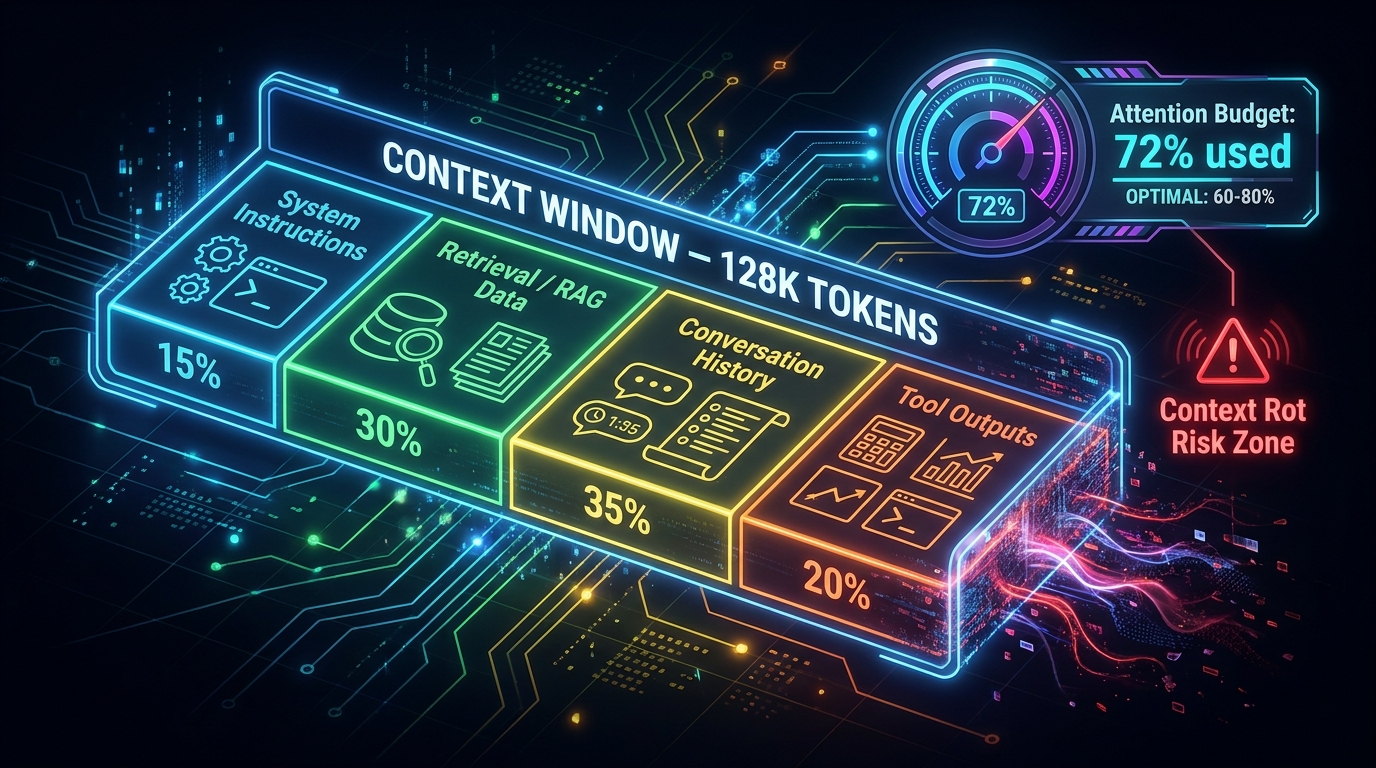
    Technical diagram of a context window divided into system instructions, RAG data, conversation history, and tool outputs with attention budget gauge

    Anthropic’s engineering team framed it clearly in 2026: “Prompt engineering is the natural precursor to context engineering.” The distinction matters enormously in production.

    Prompt engineering is about how you write instructions. Context engineering is about what information you include in the model’s working environment at any given moment — and crucially, what you leave out.

    Understanding Context Rot

    Here’s the mechanism that most teams discover through painful experience rather than upfront planning. LLMs are built on transformer architecture, which means every token in the context window attends to every other token. That creates n² pairwise relationships for n tokens. As the context grows, the model’s ability to accurately retrieve and reason over information in that context degrades — not catastrophically, but measurably.

    Anthropic’s engineering team calls this “context rot.” Models experience something analogous to human working memory limits: the more you try to hold in context simultaneously, the less reliably any specific piece of that information gets attended to. You can have a 128,000-token context window and still have an LLM miss a critical instruction you buried in paragraph 47 of your prompt.

    This has direct practical implications. Long prompts that try to pack in every possible scenario, every edge case, every piece of background information are often less effective than shorter, more focused prompts that include only what is relevant to the specific task at hand.

    The Four Operations of Good Context Management

    The LangChain team’s framework for context management, widely cited in 2026 engineering circles, breaks the work into four operations: write, select, compress, and isolate.

    • Write: Store information that will need to be retrieved later — conversation history, intermediate results, user preferences — rather than keeping it all active in the context at once.
    • Select: Choose which stored information is actually relevant to the current task. Retrieval-augmented generation (RAG) is the most common implementation of this: pull in only the documents or data chunks that are relevant to what the model is being asked right now.
    • Compress: Summarize or reduce the token footprint of information before including it. A five-page document that gets summarized into three key bullets before being passed to the model is more reliably processed than the raw five pages.
    • Isolate: Keep different types of context in separate, clearly labeled sections rather than merging them into a single undifferentiated block. System instructions, retrieved data, conversation history, and tool outputs should each be clearly demarcated, both in the prompt structure and in your template design.

    What Good Context Engineering Looks Like in Practice

    Consider a customer support LLM that needs to help a user with their account. A naive approach packs the model’s system instructions, the user’s entire 12-month conversation history, the full 200-page product documentation, and the live request all into a single prompt. Context rot means the model may well miss the specific guardrail in instruction paragraph 8 while processing a long history thread.

    A context-engineered approach retrieves only the last three relevant conversation turns, searches the product docs for only the two most semantically relevant sections, and passes a compressed summary of the user’s account status — totaling perhaps 2,000 tokens rather than 40,000. The model has better focus, costs less to run, and produces more consistent answers.

    Building Your Prompt Playbook: From Ad Hoc to Organizational SOP

    Once you understand the principles of good system prompts and context management, the next challenge is organizational: how do you capture, standardize, and share this knowledge across your team so that everyone benefits from what each person discovers, rather than each person starting from scratch?

    This is where the playbook concept becomes operational.

    What a Prompt Playbook Actually Contains

    A prompt playbook is a living, versioned library of standardized prompt templates for your team’s recurring use cases. Think of it as the company’s standard operating procedures for working with AI — the equivalent of the employee handbook, onboarding checklist, and process documentation that you’d give a new hire.

    Effective playbooks typically contain:

    • Named, versioned prompt templates for every recurring task (customer email drafts, contract summaries, data extraction schemas, research synthesis, support escalation classification, etc.)
    • Documented metadata for each template: which model it was tested on, when it was last updated, what use case it serves, who owns it, and what constraints it enforces
    • Few-shot example banks — curated input/output pairs that capture what “good” looks like for each template’s task
    • Known edge cases and failure modes — documented situations where the template tends to behave poorly, so users know when to escalate or use a different approach
    • Golden dataset tests — a set of test inputs with verified expected outputs that can be run to confirm a template still behaves as intended after any changes

    The Capture Problem

    The hardest part of building a playbook is not the structure — it’s the capture habit. Good prompts tend to live in people’s personal notes, chat histories, or browser bookmarks. When someone discovers a prompt that reliably produces excellent output, the default behavior is to save it privately and move on, not to document it and share it with the team.

    Teams that build effective playbooks solve this by making capture frictionless. A shared Notion database, a GitHub repository with a simple PR process, or a dedicated internal tool with a one-click “save this prompt” function all work. The key is lowering the barrier to contribution so that good prompts migrate into the shared system rather than disappearing when the person who wrote them changes teams.

    Governance and Ownership

    Every prompt in a production playbook should have a named owner — a person responsible for keeping it updated, reviewing test failures, and deciding when it needs to be retired. Without ownership, prompts go stale. Models get updated, company policies change, edge cases accumulate — and nobody updates the template that 20 people are using every day.

    Treat prompt ownership the same way you’d treat code ownership. The prompt is a production artifact. It needs an owner, a changelog, and a review cycle.

    The Chaining Method: Breaking Complex Jobs Into Manageable Tasks

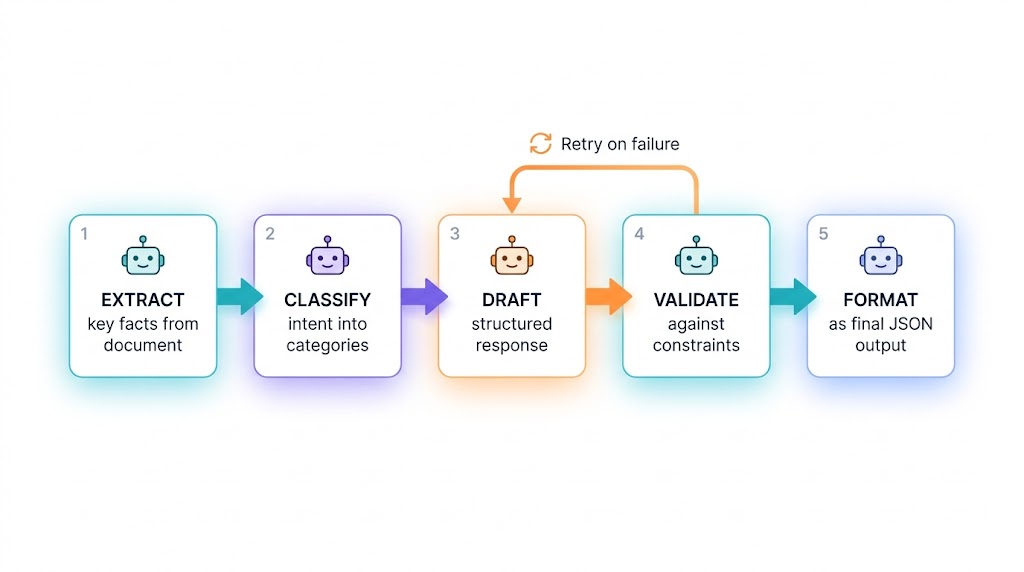
    Multi-step prompt chain workflow showing extract, classify, draft, validate, and format steps with retry loop

    One of the most consistent findings in production LLM engineering is that large, complex, single-prompt tasks produce less reliable results than the same work broken into a sequence of smaller, well-defined steps. This is the principle behind prompt chaining, and it maps directly onto how you’d structure any complex workflow for a human employee.

    You wouldn’t ask a new analyst to “look at these 200 contracts and give me a risk assessment” in a single undifferentiated request. You’d break it down: first, extract the key terms from each contract. Then, flag any non-standard clauses. Then, score each flagged clause by risk level. Then, produce an executive summary. Each step is its own task, its own check, its own opportunity to catch errors before they propagate downstream.

    When to Chain and When Not To

    Not every task needs a chain. Simple, well-defined requests — classify this email as support/sales/spam, translate this paragraph, summarize this article in three sentences — are often better handled in a single focused prompt. Chaining adds latency and cost, so you shouldn’t do it reflexively.

    The signal that a task needs chaining is when a single large prompt produces output that is inconsistently structured, occasionally misses subtasks, or is difficult to debug when it goes wrong. If you can’t tell which part of a long, complex prompt caused a particular failure, that’s a strong indicator that the task needs to be decomposed.

    Building a Chain That Doesn’t Break

    The key engineering discipline in prompt chaining is output validation at each step. Each link in the chain should produce output in a clearly defined format, and there should be a validation step — either a second LLM call acting as a checker, a deterministic code function, or both — that confirms the output meets the expected schema before passing it to the next step.

    The most robust chains include a retry mechanism: if the validation at step three fails, the chain retries step three up to N times (with logging) before escalating to a human or triggering a fallback path. This is functionally identical to the quality checkpoints you’d build into any human process workflow — the model is not treated as infallible, but as a capable worker whose output is verified before it moves forward.

    Parallelization as a Chain Variant

    Some tasks that appear to require sequential chaining can actually be run in parallel branches. If you need to extract financial data, identify key stakeholders, and summarize the narrative arc from the same document, those three extraction tasks don’t depend on each other. Running them as three simultaneous calls and then passing all three outputs to a final synthesis step is both faster and often more reliable than attempting all three in a single prompt.

    Few-Shot Examples: Teaching by Showing, Not Telling

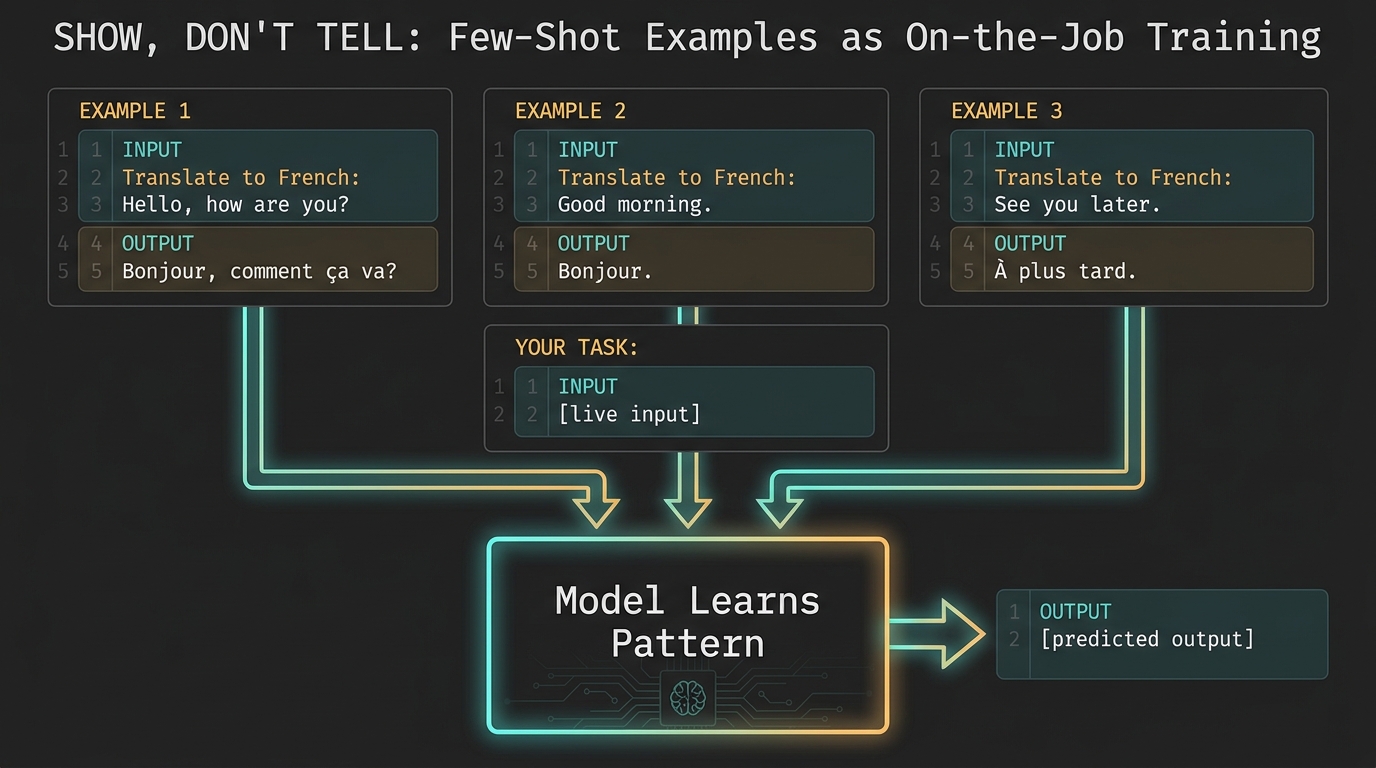
    Code-style display of few-shot prompt examples with input-output pairs labeled as on-the-job training for LLMs

    If system prompts are the job description, few-shot examples are the onboarding training. They show the model exactly what “good” looks like, not just in abstract terms but in concrete, task-specific examples from your actual domain.

    The research on this is consistent: for narrow, domain-specific tasks with strict output requirements — specialized terminology, structured formats, compliance-critical language — few-shot examples reliably improve both accuracy and consistency compared to zero-shot instructions alone. Frontier models today handle zero-shot well for general tasks, but for your specific business context, your specific data formats, and your specific quality standards, examples remain one of the highest-leverage investments you can make in a prompt.

    The Anatomy of a Good Few-Shot Example

    Not all examples are equally useful. The quality of your few-shot examples matters more than the quantity.

    Effective few-shot examples share four characteristics:

    1. Representativeness: They reflect the actual distribution of inputs the model will encounter in production, not just the easy cases. If 30% of real inputs are edge cases, your examples should include edge cases in roughly that proportion.
    2. Correctness: Every example needs to be verified as genuinely correct. A single bad example in a few-shot block can introduce a systematic bias into the model’s output — the equivalent of onboarding a new employee by having them shadow someone who is doing the job wrong.
    3. Diversity: Three identical-structure examples add less signal than three examples that each demonstrate a different nuance of the task. Show the model different scenarios, different input types, and different correct response patterns.
    4. Recency: Examples should be reviewed and updated when business rules, data formats, or quality standards change. Stale examples are misleading — they show the model what used to be correct, not what is correct now.

    Building an Example Bank

    The most effective teams don’t collect few-shot examples by hand. They build a pipeline for capturing verified good outputs from production and routing them into a curated example bank. When a human reviewer marks an LLM output as excellent, that input-output pair goes into the library. When outputs are consistently excellent for a given scenario, the best examples get promoted into the active few-shot block for that prompt template.

    This creates a virtuous cycle: the model improves with experience, not through retraining, but through the human-curated example signal that gets progressively refined as you accumulate production history.

    Prompt Versioning and the Performance Review Loop

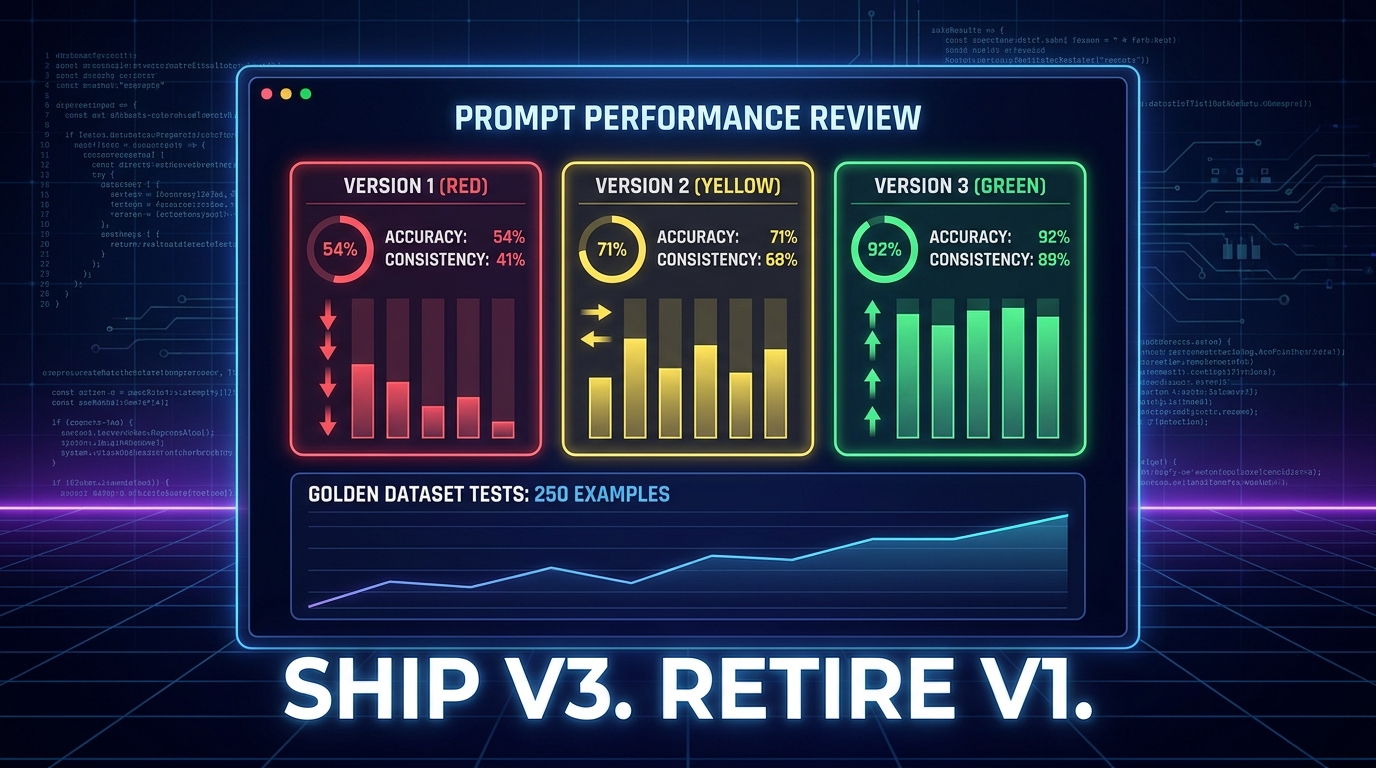
    Dashboard showing three versions of an LLM prompt being scored on accuracy and consistency, with Version 3 showing 92% accuracy

    Perhaps the most important mindset shift in moving from ad-hoc prompting to production-grade prompt management is treating prompts as versioned, testable artifacts — not as ephemeral text you type and forget.

    A prompt that performs well today may perform poorly in three months, for any number of reasons. The underlying model may have been updated by the vendor. Your product may have changed, making some examples or instructions stale. A new edge case may have emerged that the original template didn’t anticipate. User input patterns may have drifted in ways that expose gaps in the original design.

    None of these regressions are visible unless you have a testing system that can detect them. That’s where golden datasets and the performance review loop come in.

    Golden Datasets: Your Ground Truth

    A golden dataset is a curated collection of input-output pairs that represent verified ground truth for a given prompt template. It’s small — typically 50 to 250 examples — but it’s carefully maintained, human-reviewed, and stable enough to serve as a baseline for comparison across prompt versions and model updates.

    The value of a golden dataset is not just in initial testing. It’s in regression detection. When you change a prompt — updating an instruction, adding a new constraint, modifying the output format — you run the changed prompt against your golden dataset and compare the outputs to the verified baseline. If accuracy or consistency drops, you know before the change ships to production, not after.

    Current best practice from teams using evaluation frameworks like Braintrust, Arize, and similar tools emphasizes versioning the golden dataset alongside the prompt: when you update either the prompt or the dataset, log the change, the reason, and the evaluation results. This creates a changelog that tells you exactly why performance changed and when.

    The Version Control Discipline

    Prompts should live in version control, full stop. Whether that’s Git, a dedicated prompt management tool, or a structured database with changelog fields, every prompt in production needs a version number, an edit history, a record of who changed what and why, and a link to the evaluation results that justified the change.

    This practice — treating prompts the way software engineers treat code — is one of the clearest differentiators between teams that run reliable LLM systems and teams that don’t. The teams that skip version control end up with a shared Notion page of prompts with no history, no ownership, and no way to know whether the version of a prompt currently in use is the one that was tested or someone’s half-finished experiment that got copy-pasted by accident.

    Running the Performance Review

    Schedule regular prompt performance reviews — monthly at minimum for high-volume, business-critical prompts. The review cycle should cover:

    • Golden dataset accuracy compared to the last review period
    • Any new failure modes observed in production logs since the last review
    • Changes in the underlying model or its behavior that may have affected outputs
    • New edge cases that have appeared in production that aren’t represented in the current example bank
    • Whether the task scope or business rules have changed in ways that require prompt updates

    This is structurally identical to a human employee performance review — it’s periodic, evidence-based, and focused on identifying what needs to change to maintain or improve performance. The only difference is the cadence and the tooling.

    Guardrails, Constraints, and Knowing When to Escalate

    Every reliable employee has limits. They know which decisions are within their authority, which ones need a manager’s sign-off, and which situations call for a specialist. Building that same awareness into your LLM system is not optional — it’s the difference between a system that fails gracefully and one that fails catastrophically.

    Designing Explicit Constraint Blocks

    Constraints in your system prompt are not suggestions. They are behavioral limits that define the safe operating envelope for the model in your context. The most important categories to address explicitly are:

    • Topic boundaries: What the model is allowed to address and what it must decline. Be specific. “Don’t discuss anything unrelated to billing” will be interpreted differently by different prompts than “If a user asks about product features, technical support, pricing, or any topic other than billing inquiries, respond with: ‘That’s outside my area — let me connect you with the right person.’”
    • Factual confidence boundaries: When the model should express uncertainty rather than confidently producing an answer. This is one of the highest-value constraints for enterprise use cases. A model that says “I’m not certain — I’d recommend verifying this with [source]” is dramatically safer than one that produces fluent-sounding but incorrect information without any indication of uncertainty.
    • Data handling rules: What information the model should not repeat, store, or expose — particularly relevant when the system prompt contains confidential configuration, when users may share PII in their queries, or when outputs might inadvertently surface protected information from RAG-retrieved documents.
    • Escalation triggers: Specific conditions under which the model should stop trying to handle the request itself and hand off to a human — unresolvable ambiguity, customer expressions of serious distress, requests that fall outside the model’s verified competence, or anything that matches a pattern on your escalation watchlist.

    Testing Constraints Adversarially

    Security research from BrightSec’s 2026 State of LLM Security report notes that prompt injection — attempts to override system instructions through cleverly crafted user input — remains the top initial access vector in LLM incidents in production environments. Evolved attacks in 2026 no longer rely on simple “ignore previous instructions” gambits. They target context merging: injecting malicious instructions through retrieved documents, tool outputs, or multi-turn conversation manipulation.

    Your constraints need to be tested not just for normal use, but for adversarial attempts to bypass them. Red-team your system prompts before they go to production. Try to make the model ignore its constraints through roleplay framing, indirect requests, and injected text in realistic-looking retrieved documents. The vulnerabilities you find before launch are far cheaper to fix than the ones users find after it.

    The Escalation Path Must Actually Exist

    It seems obvious, but is worth stating explicitly: if your system prompt tells the model to escalate certain scenarios to a human, that human escalation path must actually exist and must actually work. A model that correctly identifies an escalation trigger and then hands the user off to a broken email address, a queue nobody monitors, or a form that returns a 404 has not succeeded — it has just deferred the failure.

    Escalation design is a process design problem, not just a prompt design problem.

    Team Adoption: Getting Everyone Speaking the Same Language

    A well-designed prompt playbook that nobody uses is just documentation. The real work of playbook adoption is behavioral: changing how your team interacts with AI tools day-to-day, so that reaching for the shared playbook becomes the default rather than improvising a new prompt from scratch each time.

    The Onboarding Problem

    Most teams introduce AI tools without any structured onboarding for how to use them effectively in that team’s specific context. People are given access to ChatGPT, Claude, or an internal LLM tool and told to “explore it.” The result is a bimodal distribution: a handful of power users who develop effective personal prompting practices (and keep them to themselves), and a majority who use the tool sporadically and report inconsistent results.

    Structured onboarding changes this dynamic. New team members should be introduced to the prompt playbook the same way they’d be introduced to any other team tool: here is what we have, here is how it works, here are the templates for your role, here is how to contribute improvements back. This takes two or three hours to set up properly and saves weeks of individual fumbling.

    Making Contribution Easy and Visible

    The playbook only stays current if people contribute to it. The two biggest friction points are: (1) people don’t know that their discovery of a better prompt is valuable to others, and (2) the contribution process feels like extra administrative work on top of their actual job.

    Both are solvable. For awareness: when someone shares an impressive AI output in Slack or email, a team norm of “can you add the prompt to the playbook?” creates a capture habit. For friction: the simpler the contribution mechanism, the more contributions you’ll get. A Slack-integrated form that takes 60 seconds to submit is better than a multi-field Notion template that takes 10 minutes.

    Role-Based Prompt Libraries

    Generic playbooks (“prompts for everyone”) have lower adoption than role-specific ones. A marketing manager doesn’t want to scroll through 40 prompts written for engineers before finding the one for campaign brief drafting. Organize your playbook by role and use case from the start, and update the organization as you learn more about how different parts of the team actually use the tools.

    Within each role-based section, the most-used templates should be front and center, with usage counts or quality ratings to help people orient quickly. Discoverability is not a luxury — it is directly correlated with adoption.

    Measuring What Matters: Evaluation Frameworks That Don’t Lie

    The final and perhaps most underrated component of a reliable LLM operating system is measurement. Teams that can’t measure output quality can’t improve it systematically — they’re flying on intuition, which works fine for individual power users but fails at organizational scale.

    What to Measure and How

    The evaluation stack for production LLM systems in 2026 has converged around a few key layers:

    • Functional correctness: For tasks with objectively verifiable outputs (data extraction, classification, format compliance), deterministic checks are the gold standard. Does the output parse as valid JSON? Does it contain the required fields? Is the extracted value within the expected range? These checks are fast, cheap, and automatable.
    • Rubric-based scoring: For tasks where quality is subjective but judgeable — writing quality, tone appropriateness, reasoning coherence — define explicit rubrics before you start measuring. A rubric with clear dimensions (relevance, accuracy, tone match, conciseness) and a 1-5 scale gives reviewers consistent anchors and makes aggregated scores meaningful over time.
    • LLM-as-judge: For high-volume evaluation where human review of every output isn’t practical, a second LLM call can act as a scoring layer. Current best practice is to calibrate the judge model against human-scored examples before relying on its scores, and to run periodic human calibration checks to detect drift between the judge model’s scoring and actual human quality assessments.
    • Production monitoring: Log real production outputs and sample them for quality review. User signals — thumbs up/down ratings, escalation triggers, session abandonment, repeat-request patterns — are lagging indicators of output quality that can catch problems that your offline evaluation suite missed.

    The Metric Trap

    One important caution: optimizing for a single metric without tracking the others leads to degenerate outcomes. A prompt optimized purely for conciseness may start producing outputs so short that they’re not actually useful. A prompt optimized purely for high rubric scores on human review may produce verbose, over-cautious outputs that are technically correct but practically useless in the workflow.

    Run a multi-metric dashboard. Track accuracy, format compliance, tone consistency, latency, token cost, and user satisfaction signals together. Optimize for the overall profile, not a single dimension, the same way you’d evaluate an employee’s performance across multiple dimensions rather than scoring them on a single KPI and ignoring everything else.

    Common Failure Modes and How to Catch Them Before They Spread

    Even well-designed prompt systems fail. The teams that catch failures early share a common trait: they’ve built detection mechanisms into their systems rather than relying on users to report problems. Here are the most common failure modes and the signals that surface them earliest.

    Instruction Following Decay

    The model starts following its system prompt correctly, then gradually drifts over time — producing outputs that technically meet the letter of the instructions while missing their spirit. This is particularly common in conversational contexts where long conversation histories crowd out the system prompt’s effective weight.

    Detection: Regular golden dataset tests. If test accuracy on a static evaluation set declines over a period where the prompt hasn’t changed, instruction following decay is a likely cause. Investigate by comparing outputs on simple, well-defined test cases before escalating to complex ones.

    Format Drift

    The output format starts varying from what the prompt specified — minor inconsistencies in field names, unexpected nesting in JSON responses, extra prose where structured data was expected. This often happens gradually and is invisible until a downstream system breaks because it can’t parse a response.

    Detection: Automated schema validation on every production output. Not just “does this parse as JSON” but “does this JSON have the exact fields and types that are expected.” Any validation failure should trigger an alert, not a silent default.

    Context Poisoning

    Malicious or simply unexpected content in retrieved documents, tool outputs, or user inputs changes the model’s behavior in ways your system prompt didn’t anticipate. This is the context merging attack vector identified in enterprise LLM security research — and it’s also an accidental failure mode when legitimate data sources contain instructions-like text (API documentation, legal contracts, email threads that include quoted AI outputs).

    Detection: Anomaly detection on output patterns. If outputs start containing unexpected formatting, claiming capabilities not described in the system prompt, or declining requests that should be within scope, flag them for human review immediately. Build a human review queue for flagged outputs, not just a log file that nobody reads.

    Stale Context

    The model’s context — its examples, its retrieved documents, its system instructions — refers to information that is no longer current. Business rules changed. Products were renamed. Policies were updated. The model answers accurately according to a world that no longer exists.

    Detection: Date-tagged examples and instructions with automated staleness alerts. Any example or instruction that hasn’t been reviewed in more than 90 days should generate an owner notification. Any RAG data source that hasn’t been reindexed in more than a defined period should be flagged for review before the model continues using it.

    The Prompt Playbook as a Living System

    The throughline of everything described above is this: reliability doesn’t come from finding the perfect prompt and freezing it forever. It comes from building a system — one that captures knowledge, enforces standards, measures outcomes, detects failures, and improves continuously.

    That is, in essence, what a good operations team does for any business process. The novelty with LLMs is not in the organizational discipline required — that discipline is familiar. The novelty is in where the process control surfaces actually live: in text, in context configuration, in versioned templates and curated examples, rather than in code or hardware.

    The Compounding Return

    Teams that invest early in prompt playbooks experience something that looks like a compounding return on their LLM investments. Each good prompt template they document and share spreads its benefits across the entire team. Each golden dataset test they build catches future regressions before they become user-facing failures. Each few-shot example they curate improves performance on the next task that uses it.

    The teams that skip this investment get the opposite: a steadily expanding mess of personal prompts that diverge from each other, regressions that nobody notices until customers complain, and a growing sense that LLMs are unreliable — when the real problem is that the operating system around them was never built.

    Practical Starting Points

    If you’re starting from scratch, the return on investment is highest when you focus first on your highest-volume, most-repetitive use cases. Three questions to orient your first playbook build:

    1. What tasks are your team members running with LLMs more than five times per week? These are your highest-priority candidates for standardized templates. They’re already being done; making them consistent costs almost nothing and delivers immediate quality benefits.
    2. Where have you had the most embarrassing or costly LLM failures? These are where your constraint design and validation logic need the most attention. Document the failure, design the constraint, add a test case to your golden dataset.
    3. Who on your team produces consistently excellent LLM outputs? Their prompts are your seed library. Capture what they’re doing, systematize it, and make it available to everyone. Don’t let institutional knowledge about effective prompting live in one person’s clipboard history.

    Closing Thoughts

    There’s a version of AI adoption where every model interaction is a fresh improvisation — clever, occasionally brilliant, fundamentally inconsistent. That version has a ceiling. It’s useful for individual productivity hacks but can’t be trusted with anything business-critical at scale.

    Then there’s the version where models are treated with the same operational discipline as any other member of a capable team. Clear role. Structured context. Concrete examples. Versioned instructions. Measurable performance. Regular review. Known escalation paths. That version has no ceiling — because every improvement you make compounds into the system, and the system keeps improving the way any well-managed process does: incrementally, measurably, and durably.

    The prompt playbook is not a technical artifact. It’s an organizational one. Build it like you’d build any other operational system that your team depends on — and treat its maintenance with the same seriousness you’d give a codebase, a compliance framework, or a customer success process. Because in 2026, it is all three.