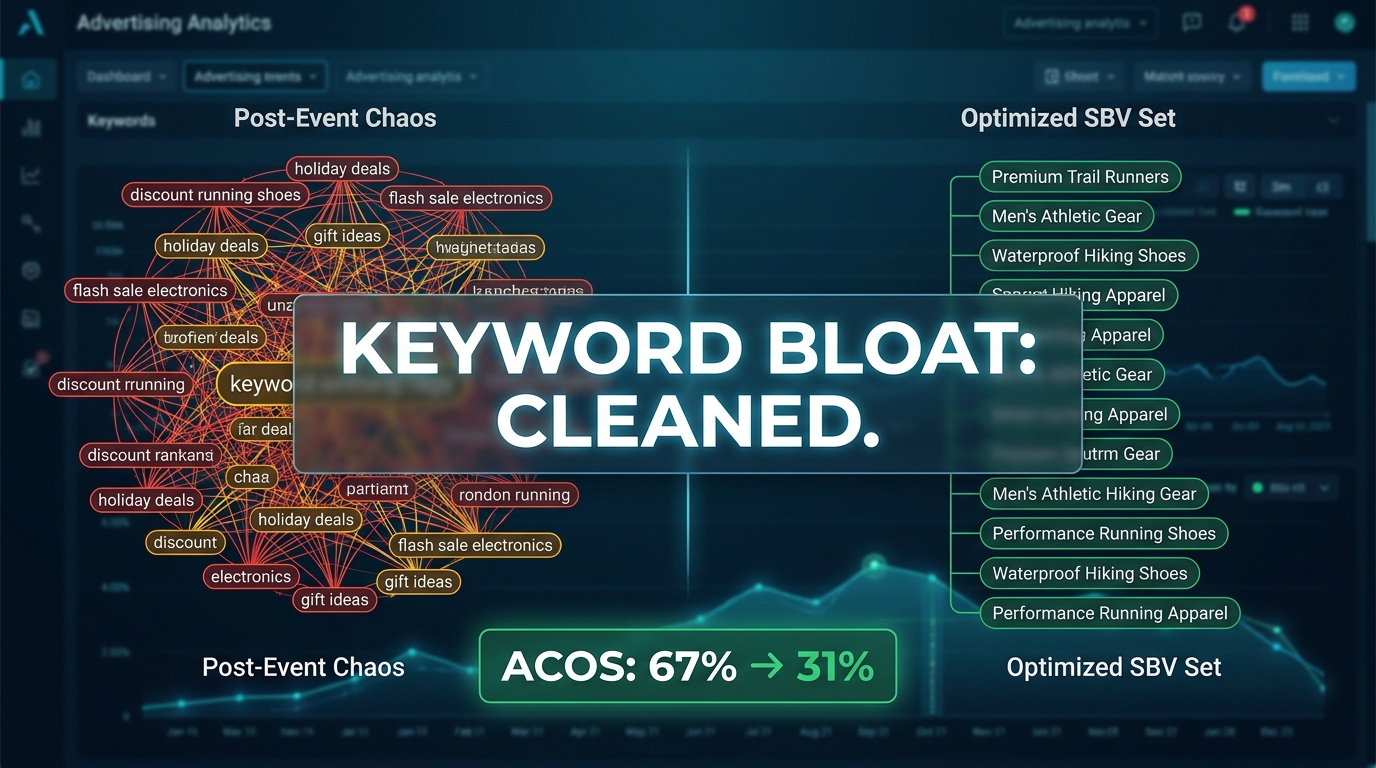
The sale is over. The lightning deals ran. The video ads rolled. And for a brief, chaotic window, you threw broad terms, competitor conquesting keywords, seasonal phrases, and a handful of hopeful long-tails into your Sponsored Brands Video campaigns — because event traffic is too unpredictable to be precious about keyword selection, and leaving impressions on the table during Prime Day or Black Friday feels like a cardinal sin.
Then the dust settles. You pull your reports. The spend number looks like a small car. The conversion rate has slid. Your ACoS is somewhere between uncomfortable and terrifying. And somewhere inside a campaign structure that made sense six weeks ago, there are now hundreds of search terms — many of which have absorbed real budget without returning a single sale.
This is the SBV post-event hangover. And it is, without question, one of the most underestimated problems in Amazon advertising right now.
Most sellers treat keyword cleanup as a secondary task — something to get to after the event debrief, the inventory recount, and the profitability review. But the longer bloated keyword sets sit untouched in your Sponsored Brands Video campaigns, the more expensive they become. Amazon’s serving algorithm uses recent performance signals. A campaign polluted with low-converting, high-spend search terms is actively teaching the system to keep delivering you the wrong traffic.
This guide lays out a precise, repeatable framework for diagnosing bloated SBV keyword sets, making fast triage decisions backed by real data thresholds, restructuring what survives, and building the negative keyword architecture that prevents you from ending up here again after the next event. It is not a surface-level checklist. It is a working methodology built for sellers and agency operators who are managing live campaigns and cannot afford to make this up as they go.
Why SBV Keyword Sets Balloon During Events — and Why You Let It Happen
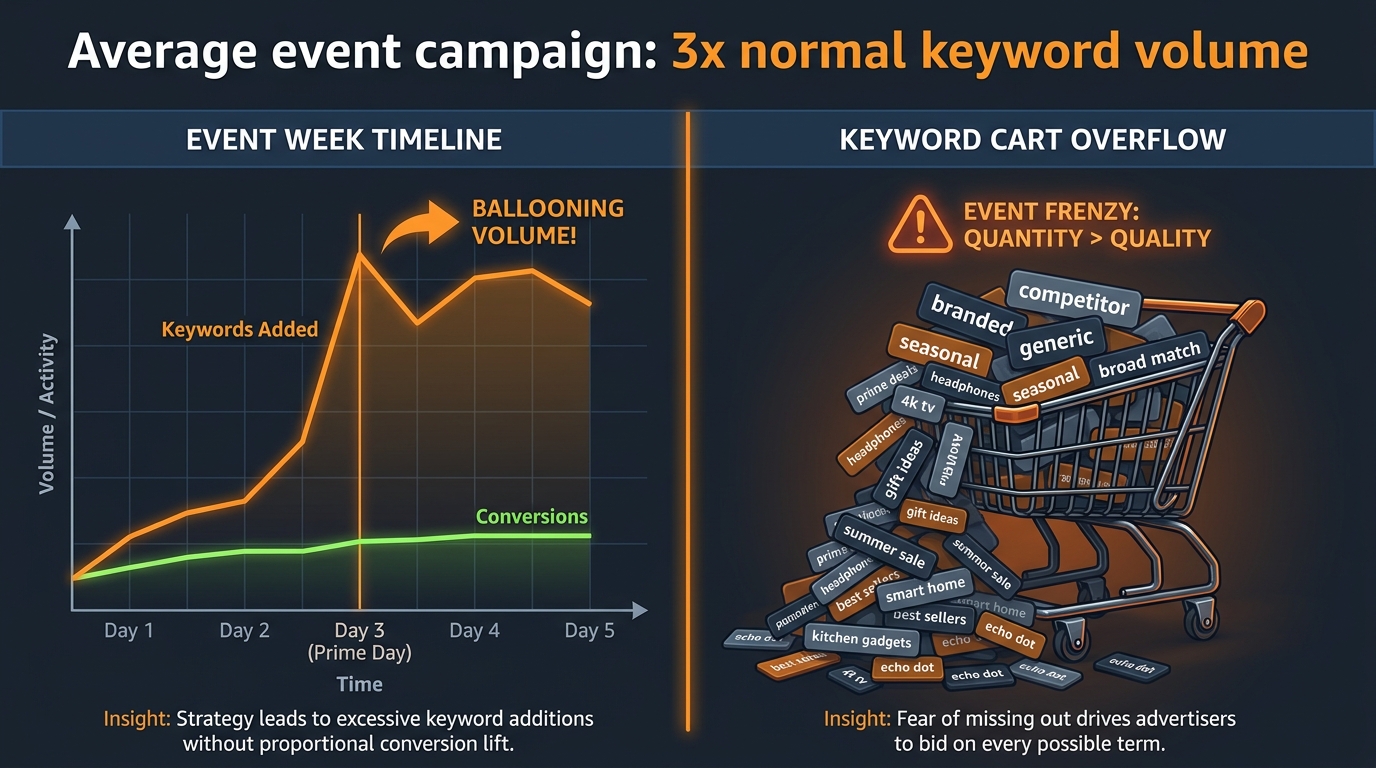
Understanding why keyword sets explode during events is important — not to assign blame, but because the root cause determines where and how you need to clean up afterward. There are three distinct drivers, and they compound on each other.
The Defensive Expansion Instinct
Event traffic is genuinely different from baseline traffic. Shoppers browse more broadly, compare more aggressively, and respond to price signals rather than brand loyalty. To capture that traffic, advertisers rationally expand their targeting — adding broader match types, reaching into adjacent categories, and bidding on competitor terms they would not normally touch. This is not irrational behaviour. During high-purchase-intent windows, wider nets do catch more fish.
The problem is that very few teams remove those nets when the event ends. The broad-match terms stay live. The competitor conquesting keywords keep running. The discovery campaigns that were meant to surface new opportunities during a traffic spike continue serving ads to shoppers who have completely different intent profiles three weeks after the sale.
Auto Campaign Contamination
Many SBV campaigns use auto targeting or broad match as a feeder — Amazon surfaces the campaign against a wide range of search queries, the advertiser harvests converting search terms into manual exact match campaigns. During events, this feeder structure explodes in volume. Auto campaigns pick up enormous numbers of new search terms because event-period traffic is simply higher in total volume, more diverse in query structure, and spiking in ways that look relevant to Amazon’s matching logic even when they are not truly aligned with your product.
Post-event, those harvested terms — many of which converted during the event spike precisely because intent was inflated by deals, not by genuine product fit — sit in your keyword list waiting to underperform against normal-baseline traffic.
The “More is Safer” Bias
There is a widely held assumption in Amazon PPC that having more keywords is a form of insurance. If one term dries up, another fills the gap. If you missed a trend, broad coverage will catch it. This logic is understandable for Sponsored Products campaigns where bid management at keyword level is highly granular. But for Sponsored Brands Video, it creates particular damage. SBV campaigns have a single creative and typically a single landing page. When a diverse, bloated keyword set drives heterogeneous traffic to one video and one destination, the creative-query mismatch signals pile up. Click-through rate drops. Conversion rate drops. And the campaign’s delivery efficiency — how Amazon prioritizes your bids in auction — deteriorates.
Amazon’s 2026 ad environment has moved decisively toward rewarding creative relevance and intent alignment over sheer keyword volume. The more mismatched queries your SBV campaigns serve against, the more Amazon’s system learns to de-prioritize your bids even on the terms that should be winning.
What Bloated SBV Keyword Sets Actually Cost in Real Numbers
Before diving into the mechanics of cleanup, it is worth being concrete about what bloat actually costs. Vague concerns about “wasted spend” are easy to deprioritize. Specific numbers are harder to ignore.
The Wasted Spend Calculation
Practitioners across agency-managed Amazon accounts consistently find that between 35% and 45% of spend in post-event campaigns is attributable to search terms that generated zero attributed orders — not low-converting terms, but literally zero. These are not borderline performers that might come good with more data. They are dead weight that the algorithm is nevertheless serving against because no one has closed the door on them.
On a campaign spending $10,000 per month post-event, that represents $3,500 to $4,500 in spend that returns nothing in attributed sales. Over a 90-day cleanup lag — which is common for teams without a structured audit process — that is $10,500 to $13,500 in recoverable budget that went to clicks with no commercial return.
The ACoS Multiplier Effect
Keyword bloat does not just inflate your ACoS through direct wasted spend. It also suppresses the performance of your best terms. When budget is being absorbed by low-quality queries, your high-intent, high-converting exact match terms are competing for the same daily budget cap. They lose impressions. They lose auction priority. Their performance data becomes harder to read because it is diluted by the noise around them.
Agencies that have documented structured SBV cleanups consistently report ACoS reductions of 20% to 50% after aggressive pruning — not because they found magic new keywords, but because they stopped subsidizing the ones that were actively destroying their averages. A campaign that was running at 55% ACoS pre-cleanup can realistically hit 28–32% after a disciplined triage, simply by removing the drag.
The Algorithm Signal Degradation
This is the cost that does not show up directly in your spend report but compounds over time. Amazon’s Sponsored Brands serving algorithm is a learning system. It optimizes delivery based on which queries, placements, and audiences have historically driven conversions. When you feed it a signal set contaminated by event-period anomalies and low-quality search terms, it builds a distorted model of what “good traffic” looks like for your campaign. Fixing that model requires time and clean data — and the longer bloated campaigns run, the longer the recovery takes once you clean them up.
The 48-Hour Triage: What to Pull First and What to Ignore
When the event closes, the first instinct for most advertisers is to pull everything at once — all campaigns, all match types, the full 90-day search term report — and try to make sense of the entire picture simultaneously. This is a reliable path to analysis paralysis. A better approach is a disciplined 48-hour triage that identifies the highest-priority action items before going deep on the full audit.
The Reports You Actually Need Immediately
In the first 48 hours post-event, pull exactly two reports:
- Sponsored Brands Search Term Report — filtered to the event window only (the 7 to 10 days of the event period). Do not pull 90-day data yet. You want to isolate what happened during the event before normalizing it against baseline performance.
- Campaign Performance Report — at campaign level, not keyword level. This gives you a fast read on which campaigns have the worst spend-to-sales ratios post-event, so you know where the triage effort will have the highest impact.
Do not pull keyword-level reports in the first 48 hours. You do not have enough clean data to make keyword-level decisions yet — the event attribution window has not fully closed (Amazon’s standard 7-day click attribution means sales from event-week clicks may still be attributing through the early post-event period). Making keyword pauses based on incomplete attribution data is a common mistake that removes terms that were actually working.
The Four Things to Look For in the First Pass
When you open the Sponsored Brands Search Term Report for the event window, you are looking for four specific patterns — not yet making decisions, just flagging what needs attention:
- High-spend, zero-order terms — Search terms with more than 15 clicks and no attributed orders during the event window. Flag these immediately. They are the highest-priority candidates for negating.
- Obvious intent misfires — Terms that are clearly not aligned with your product category. These often surface from auto campaigns matching on tangentially related queries during high-traffic event periods. They can be negated immediately without waiting for attribution to settle.
- Branded terms from competitor campaigns — If you were running competitor conquesting during the event, those terms need separate evaluation. Many will have poor economics at normal-traffic CPCs even if they seemed viable during event-period bidding.
- Event-specific modifier terms — Queries containing “Prime Day,” “deal,” “sale,” “discount,” “limited time,” and similar event modifiers. These terms were matching during the event because of shopper behavior specific to that moment. They should be monitored for pruning, not kept as permanent fixtures in your keyword set.
What to Leave Alone for Now
Do not touch your bids in the first 48 hours. Do not restructure ad groups. Do not pause keywords based on event-week data alone. The first 48 hours are for flagging and segmenting, not for acting on incomplete data. The time to make structural decisions is after the full attribution window has closed and you have at least 14 days of post-event performance data to compare against your pre-event baseline.
Reading the Sponsored Brands Search Term Report Like a Surgeon
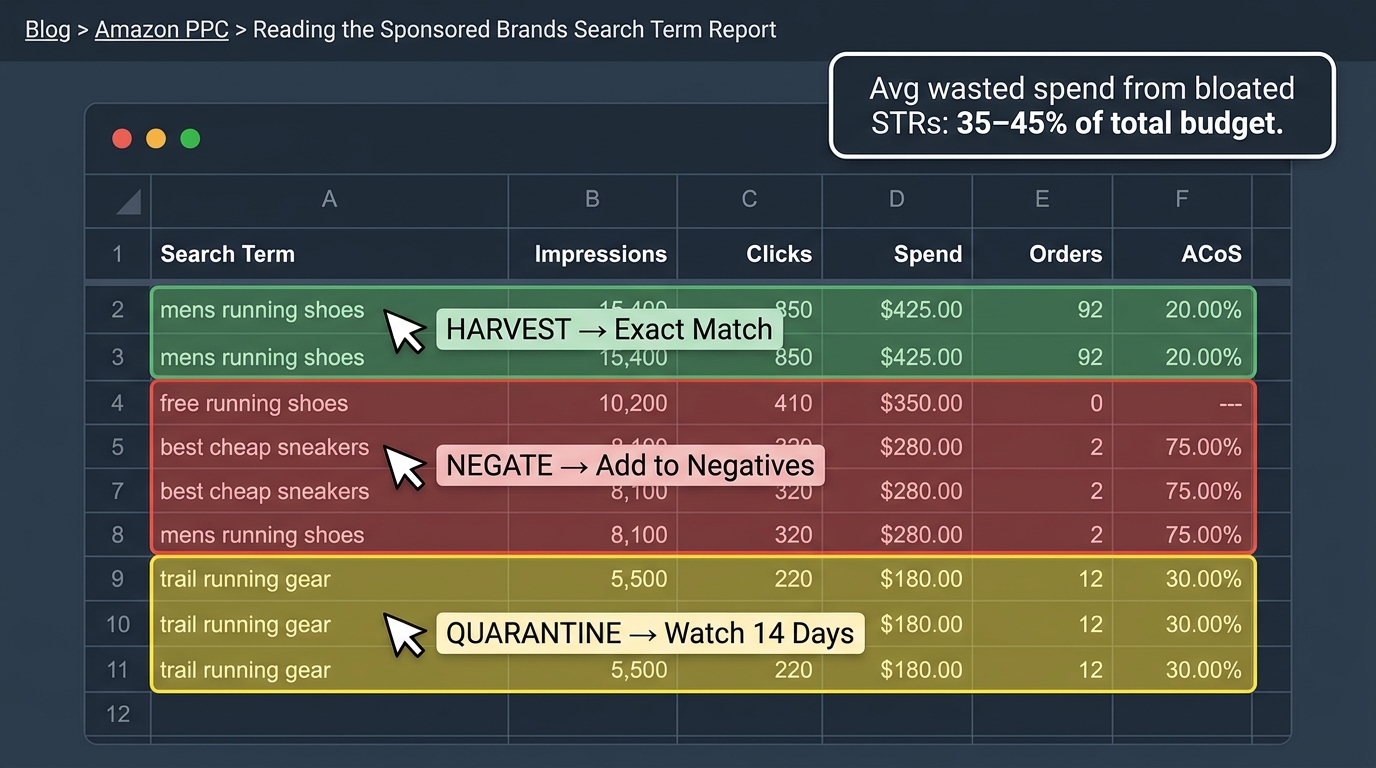
Once the attribution window has closed (at minimum 10 to 14 days post-event), you can go deep on the full search term data. This is the phase most advertisers rush or misread. The Sponsored Brands Search Term Report is not just a list of what people searched — it is a diagnostic tool that, when read correctly, tells you exactly where your campaign structure is leaking money.
Setting Up Your Data Window Correctly
Amazon’s Sponsored Brands Search Term Report currently supports a lookback window of up to approximately 65 days. For post-event analysis, you want to pull three overlapping windows and compare them against each other:
- Pre-event baseline — 21 to 28 days before the event started. This is your “normal” campaign behavior.
- Event window — The event period itself, typically 2 to 7 days depending on the promotion type.
- Post-event recovery — 14 to 21 days after the event ended. This is where you are now, and this data is the most actionable.
The comparison between pre-event baseline and post-event recovery reveals which terms have genuinely changed in performance — either improved because of sustained ranking lift from event traffic, or deteriorated because event-era intent has evaporated and CPCs have not adjusted accordingly.
The Five Columns That Matter (and Two That Don’t)
Most advertisers look at too many columns simultaneously and end up optimizing for the wrong things. For the SBV cleanup audit specifically, you need five columns and can largely ignore two:
Columns that matter:
- Search Term — The actual query. Obviously essential.
- Impressions — Volume signal. Low-impression terms need more data before decisions can be made.
- Clicks — The primary pruning trigger. Terms with significant clicks and no orders are your biggest waste candidates.
- Spend — Weighted by click volume. High-spend, low-order terms are your most urgent priorities.
- Orders (14-day) — The conversion signal. This is your truth column.
Columns to deprioritize in the initial cleanup:
- Impressions Share — Useful for longer-term analysis but misleading in post-event periods when impression volumes were inflated.
- Click-Through Rate (CTR) — Event-period CTR is anomalous. A term that showed strong CTR during Prime Day because shoppers were clicking everything will show a very different CTR once event behavior normalizes.
N-Gram Analysis: The Cleanup Accelerator
If you are managing a campaign with hundreds of search terms in the report, reading each one individually is not a viable workflow. N-gram analysis — breaking each search term into its component 1-word, 2-word, and 3-word phrases and aggregating performance across all terms containing each phrase — dramatically accelerates the decision-making process.
Instead of evaluating 340 individual search terms, you evaluate patterns. If every search term containing the word “cheap” has generated clicks and no orders across the full report, you can make one negative keyword addition — negative phrase “cheap” — that addresses dozens of terms simultaneously. If every search term containing your product category name preceded by a competitor’s brand name has poor economics, one competitor brand negative phrase handles the entire cluster.
N-gram analysis is not a feature inside Amazon’s native reporting, but it can be performed in Excel or Google Sheets in about 20 minutes using text parsing functions, or through third-party PPC tools that build it natively. For large accounts managing multiple SBV campaigns, it is one of the highest-leverage efficiency tools available during a cleanup sprint.
The Three-Bucket Sorting System: Keep, Kill, and Quarantine
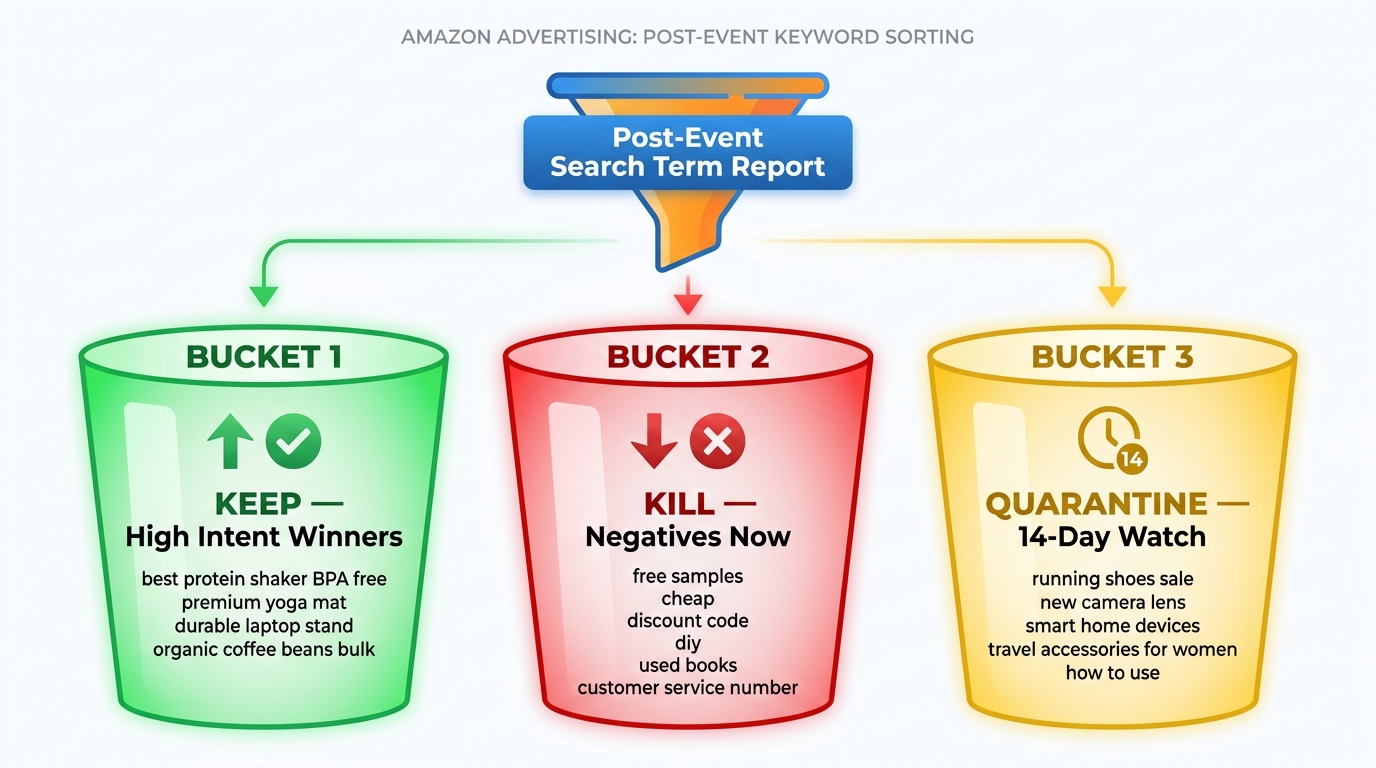
Once you have your clean post-event search term data segmented by the three windows described above, every search term in your report needs to go into one of three buckets. The buckets are not vague categories — they each carry a specific action and a specific timeline.
Bucket 1: Keep (Harvest Into Exact Match)
These are search terms that demonstrated converting intent both during and after the event — they are not event-specific anomalies but genuine demand signals that your SBV creative is satisfying. To qualify for the KEEP bucket, a search term should meet two basic criteria:
- Generated at least one order in the post-event baseline period (not just the event window)
- ACoS is at or below your target ACoS for the campaign, or within 1.5× target with clear conversion trend
KEEP terms are harvested into a dedicated exact match SBV campaign where they can receive precise bid management without competing against broad or auto traffic for the same budget. This is the opposite of the defensive expansion you did before the event — you are now building a tightly controlled, proven keyword set from the best signals that event traffic surfaced.
Bucket 2: Kill (Negate Immediately)
KILL terms are those with clear evidence of poor fit that does not need additional data to confirm. The criteria:
- Generated 20+ clicks with zero attributed orders in the combined event and post-event window
- Obvious intent misfire — the query is not commercially aligned with your product
- Event-specific modifiers (“Prime Day deal,” “sale today,” “limited offer”) that have no value once the event is over
- Terms that are consuming more than your maximum acceptable spend per conversion based on your margin
KILL terms become negative keywords — either negative exact for precision control or negative phrase where the pattern itself (not just one specific query) is the problem. These get added immediately. Every day they stay live is money leaving your account without return.
One important nuance: for Sponsored Brands campaigns specifically, negative keywords operate at the ad group level, not campaign level, in most account structures. Make sure you are adding negatives to the right ad group, not assuming campaign-level blocking applies uniformly across all ad groups under the same campaign.
Bucket 3: Quarantine (14-Day Watch Period)
QUARANTINE is the category that most cleanup frameworks skip entirely, and it is the category that causes the most problems when it is absent. Not every borderline term deserves an immediate verdict. Some search terms:
- Generated clicks but attribution is still within the conversion window
- Have reasonable intent but very low click volume (fewer than 8 clicks) — not enough data to decide
- Converted during the event but not yet in the post-event baseline — potentially event-specific, potentially genuinely good
- Show declining ACoS trend across the post-event period — improving, but not yet at target
Quarantine terms go on a specific watch list with a 14-day review date. They do not get negated. They do not get promoted to exact match. They continue running in their current match type configuration while you collect more data. At the 14-day review, they either earn promotion to KEEP or get moved to KILL. The quarantine period also prevents the common cleanup mistake of negating terms too aggressively and accidentally removing keywords that would have recovered to profitability post-event.
Thresholds That Actually Work for SBV Pruning Decisions
The biggest gap in most post-event cleanup workflows is the absence of explicit, numeric thresholds for decision-making. Without them, every keyword evaluation becomes a judgment call, different operators make different decisions, and the cleanup is inconsistent. These thresholds give you a repeatable, defensible standard.
The Click Threshold for Negating
The standard practitioner recommendation for Amazon PPC is to negate a search term that has accumulated a meaningful number of clicks without generating an order. But what counts as “meaningful”? The answer depends on your expected conversion rate.
For SBV campaigns, where creative-driven browsing behavior typically generates lower CVR than Sponsored Products (because shoppers are encountering your brand at a higher-funnel stage), a useful baseline threshold is:
- 15–20 clicks with zero orders in the post-event baseline period = candidate for negating
- 25+ clicks with zero orders across the combined event and post-event window = negate immediately
These thresholds need to be adjusted upward for high-ticket products where conversion cycles are longer, or downward for impulse-purchase categories where CVR is typically higher and you have less tolerance for non-converting traffic.
The Spend Threshold for Immediate Action
Clicks alone are not sufficient for priority-setting — you also need a spend trigger that flags terms consuming budget at a rate that cannot be justified by any reasonable expected return. A practical formula:
Maximum spend per term before negating = (Target CPA) × 2
If your target cost-per-acquisition is $18 (based on your margin), any search term that has consumed $36 or more without a single order is a KILL candidate regardless of click count.
This spend-based threshold catches high-CPC terms that might only generate a handful of clicks but have already consumed a disproportionate share of budget — common in competitive categories where event-period CPCs were elevated and have not fully normalized post-event.
The ACoS Ceiling for Keeping Terms
For terms that are converting but at above-target ACoS, the decision is less binary. A useful framework:
- ACoS at 1× to 1.5× target — Keep, but reduce bid by 15 to 25% and monitor for 14 days.
- ACoS at 1.5× to 2× target — Quarantine. Reduce bid significantly and collect 14 more days of data before deciding.
- ACoS above 2× target — Kill or pause unless there is a specific strategic reason (brand awareness, competitive defense) to maintain the term at a loss.
Strategic loss-tolerance is a legitimate consideration for some SBV campaigns — particularly competitor conquesting keywords where the goal is share capture rather than immediate ROAS. But that strategy needs to be explicit and budgeted, not an accidental outcome of not running the cleanup.
Harvesting Winners Into Tight, Intent-Based Campaign Structures
Cleanup is only half the work. The KEEP terms that survive your three-bucket sort need a proper home — and sending them back into the same bloated campaign structure they came from defeats the entire purpose of the exercise. Post-event keyword cleanup is an opportunity to rebuild SBV campaign architecture around proven intent signals rather than speculative broad coverage.
The One Intent Per Campaign Rule
Amazon’s own guidance for Sponsored Brands Video in 2026 is explicit on this point: each SBV campaign should serve a single product against a single intent theme. That means a campaign built around “best [category] for [use case]” queries should not also be targeting “[brand name] alternative” competitor terms and “[product type] under $30” price-conscious queries. The creative serves all of these — but the intent signals are entirely different, and a single video cannot be optimally relevant to all of them simultaneously.
Post-cleanup restructuring means taking your KEEP terms and sorting them into intent clusters before building new exact match campaigns. Common intent cluster categories for SBV:
- Problem-aware queries — Shoppers describing a problem your product solves (“knee pain running shoes,” “kitchen storage small apartment”)
- Product-aware queries — Shoppers who know the product category they want (“stainless steel water bottle insulated 32oz”)
- Brand-aware queries — Shoppers who know your brand or are comparing you (“[your brand] vs [competitor brand]”)
- Deal-intent queries — Lower-intent, price-conscious searches. These should be evaluated very carefully for SBV; the format works best with higher-intent, considered shoppers.
Bid Strategy for Freshly Harvested Exact Match Terms
When you move proven search terms from a broad or auto-derived discovery campaign into a new exact match SBV campaign, resist the temptation to immediately set aggressive bids. The new campaign has no performance history. Amazon’s algorithm needs time to calibrate delivery before you bid competitively.
A practical approach: start new exact match SBV campaigns at 70 to 80% of the bid you were winning at in the original broad campaign, then adjust upward in 10 to 15% increments every 7 to 10 days as performance data accumulates. This prevents overpaying for impressions before the algorithm has learned the campaign’s relevance signals, and it gives you a cleaner performance baseline to compare against.
Align the Creative to the Intent Cluster
If you are creating multiple intent-clustered SBV campaigns from your post-event harvest, this is the moment to evaluate whether your current SBV creative actually serves each cluster. A video that leads with a problem-solving narrative is well-suited to problem-aware queries. A video that leads with product features and specifications is better suited to product-aware queries who are already in comparison mode. If your creative does not match the intent cluster, the campaign will underperform regardless of how well the keyword set is structured.
Post-event is therefore not just a cleanup opportunity — it is a creative alignment audit. Note which intent clusters your current video does not serve well, and flag those for creative production or adaptation in the next cycle.
Building the Negative Keyword Architecture That Prevents Re-Bloat
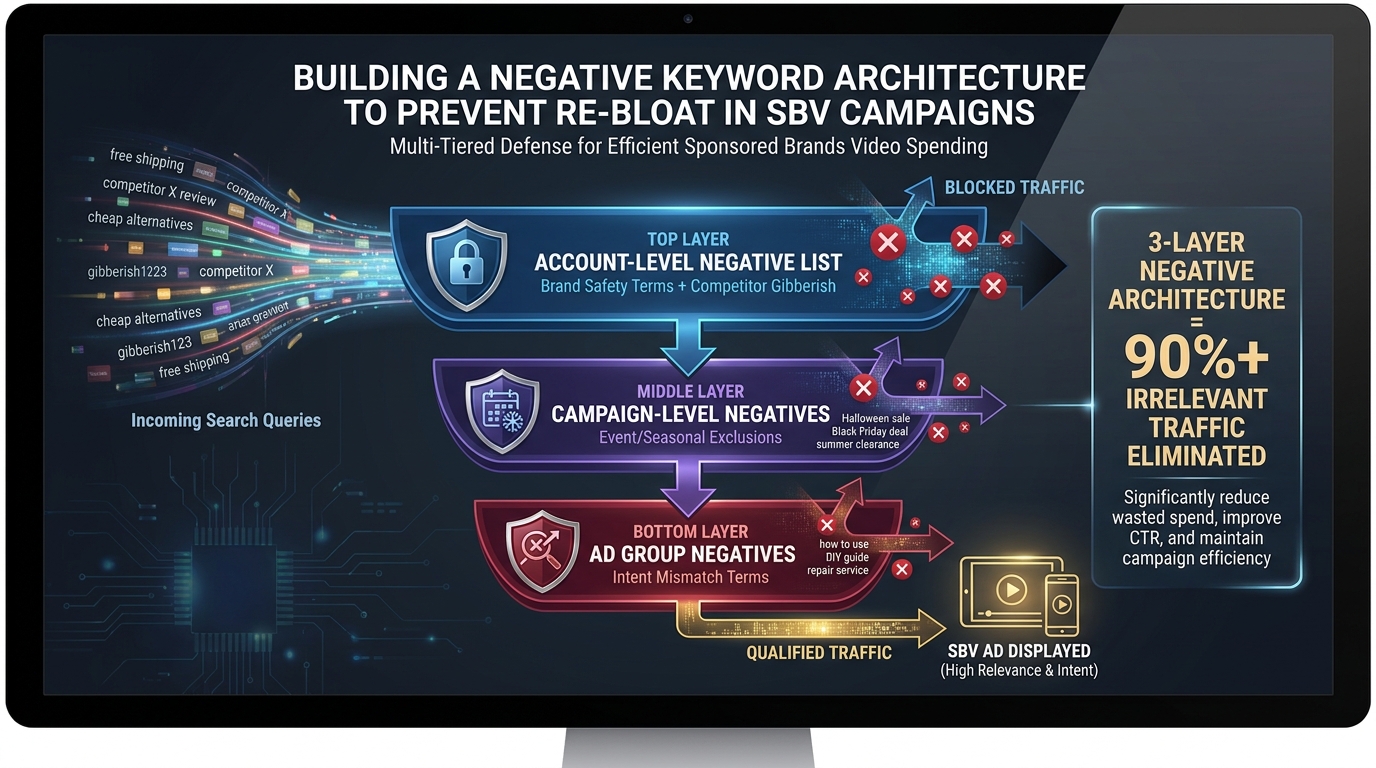
The reason most sellers end up doing emergency cleanup after every event is not that events are unusually disruptive — it is that they have no structural defense against the terms that events generate. A well-built negative keyword architecture is the infrastructure that makes every subsequent cleanup significantly faster and less expensive.
The Three-Layer Negative System
Effective negative keyword management for SBV campaigns operates across three distinct levels, each serving a different function:
Layer 1: The Evergreen Brand Safety List
This is a persistent negative list that lives at the account or portfolio level and covers terms that should never trigger your SBV campaigns under any circumstances — regardless of the event, the traffic level, or the targeting strategy. It includes: irrelevant category terms, brand safety exclusions (competitor brand names where you do not want to be conquesting), terms indicating non-commercial intent (“free,” “DIY how to,” “tutorial,” “review without purchase intent”), and your own brand’s exact match terms (if you have separate branded campaigns, you do not want broad campaigns cannibalizing them).
This list should be reviewed quarterly but changes infrequently. It is the foundation.
Layer 2: The Event Exclusion List
This list is built before each major promotional event and activated in the post-event period. It contains event-specific query modifiers that have no value once the sale is over. Terms like “Prime Day,” “Cyber Monday,” “Black Friday deal,” “limited time offer,” “flash sale,” and similar event-anchored queries should go on the event exclusion list immediately after each event. This prevents post-event campaigns from serving against residual traffic that is searching for deals that no longer exist.
The event exclusion list is temporary — it can be paused or removed before the next event if you want to re-engage event traffic — but it should be active in the 30 to 60 days following any major promotional period.
Layer 3: Campaign and Ad Group Level Negatives
These are the granular, campaign-specific negatives that emerge from each cleanup sprint. Terms that are irrelevant to the specific intent of a particular campaign, competitor keywords that you are actively excluding from certain campaigns (while keeping in others), and the specific low-quality search terms surfaced by the current cleanup. These are your most dynamic and frequently updated negatives — they grow after every event cleanup and every weekly audit.
How to Build the Event Exclusion List Before the Next Event
One of the most forward-looking moves you can make during post-event cleanup is to document the event-specific terms you are negating this time and save them as a pre-built exclusion list for the next event. Before Prime Day 2026 ends, you should be able to activate a “post-Prime Day exclusion package” that blocks the most common event-modifier search patterns within hours of the event closing — not two weeks later when you finally get around to the cleanup sprint.
This event exclusion library grows in quality with each cycle. After three to four major events, you have a robust pre-built list that handles 70 to 80% of the negative keyword work automatically, and your manual cleanup time shrinks to the truly campaign-specific decisions.
The Weekly Cadence: Making Cleanup a System, Not a Sprint
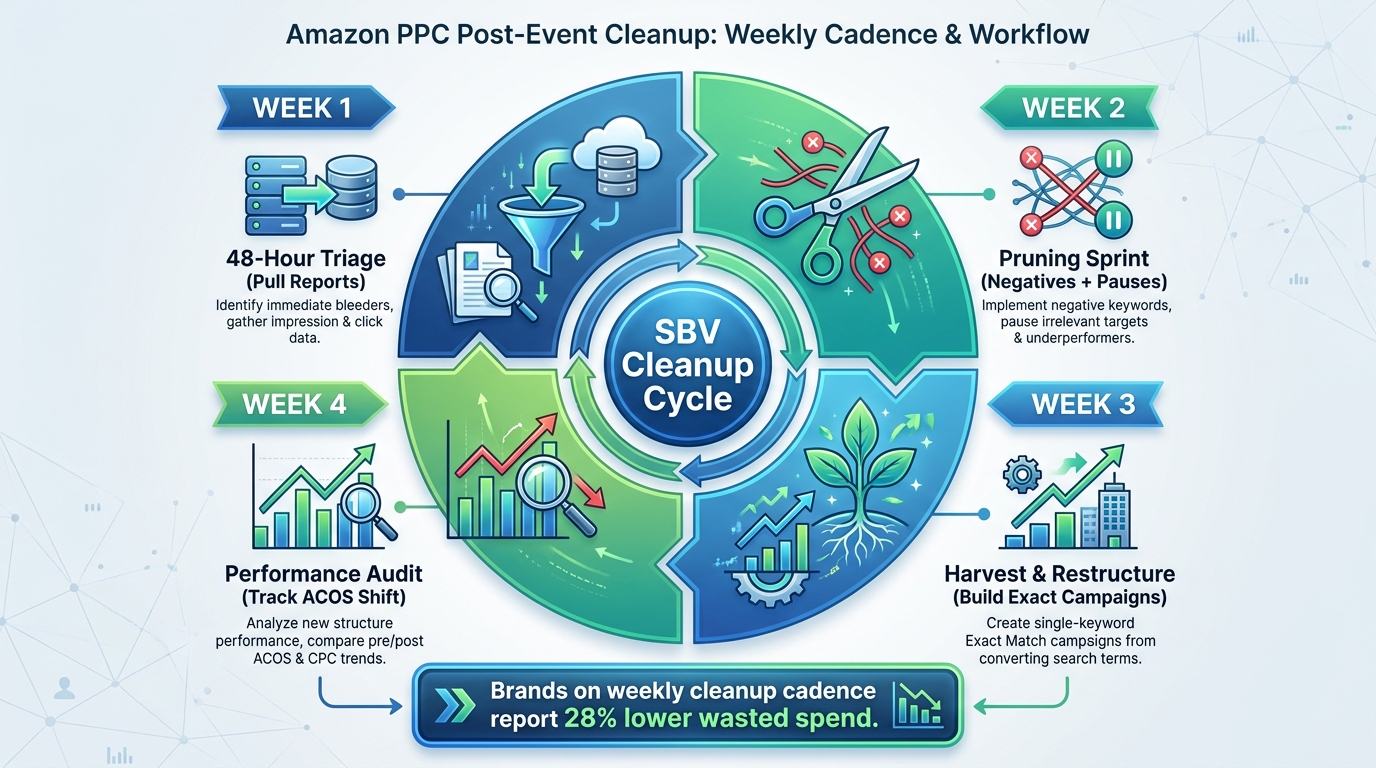
Post-event cleanup should not be a reactive, once-and-done sprint that you run when things get bad enough to notice. The goal is to build it into a weekly cadence that keeps SBV keyword sets lean permanently — so the next event does not require a two-week emergency recovery but a relatively minor adjustment.
Week One: The 48-Hour Triage Plus Deep Audit
This is the week immediately following the event. The 48-hour triage described earlier happens on days one and two. The full search term report analysis — the three-window comparison, the n-gram review, the three-bucket sort — happens on days three through five. By end of week one, you should have:
- All immediate KILL terms added as negatives
- All QUARANTINE terms documented on a 14-day watch list
- All KEEP terms identified and ready for campaign restructuring
Week Two: Structural Cleanup and Initial Harvest
With your negatives live and your KEEP list identified, week two focuses on campaign restructuring. Build the intent-clustered exact match campaigns for harvested terms. Adjust bids on the surviving broad or auto campaigns that are still in your structure (they should still run to continue surfacing new signals, but at reduced budget while clean data accumulates). Review your Quarantine list for any terms that have now had enough post-event data to graduate to a clear decision.
Week Three and Onward: The Maintenance Cadence
After the intensive two-week post-event sprint, the cleanup process transitions to a lighter weekly maintenance rhythm. Each week:
- Pull the 14-day search term report for all active SBV campaigns (not just those that were bloated during the event)
- Apply your click and spend thresholds to flag new negative candidates
- Review quarantined terms against their 14-day target date
- Check performance of newly harvested exact match campaigns and adjust bids as needed
- Review whether any terms from the event exclusion list are still showing impressions (they should not be)
The weekly cadence typically takes 60 to 90 minutes per account once the systems are in place. Teams that invest in this regularity consistently report substantially lower wasted spend than those who only do cleanup reactively after events — not because they are finding dramatically different insights each week, but because they are catching small leaks before they become large ones.
Common Cleanup Mistakes That Undo All Your Work
A cleanup framework is only as effective as the discipline with which it is applied. These are the errors that appear most frequently — often made by experienced advertisers who understand the theory but slip on specific execution details.
Negating Too Early or Too Broadly
Over-negating is a real and under-discussed problem. Sellers who are frustrated by post-event bloat sometimes negate aggressively — blocking terms based on 3 to 5 clicks with no orders, or adding very broad negative phrase patterns that catch relevant queries they actually want. The result is a keyword set so tightly restricted that campaigns can no longer scale even on high-intent traffic.
Stick to your thresholds. Do not negate below 15 clicks for zero-order terms unless the intent misfire is obvious. Do not use negative broad match for anything except the most clearly irrelevant patterns — it is too blunt an instrument for precision campaign management.
Confusing Event-Period CVR With Permanent Performance
This is the flip side of the above. Some advertisers look at event-period conversion rates and decide to keep terms that performed well during the spike — without checking whether those terms are still converting at acceptable rates in the post-event baseline. Event CVR is inflated. Deal-seeking shoppers convert more easily during promotions because price friction is temporarily removed. The same keyword at the same bid may produce 40% worse CVR two weeks after the event. Always validate event performance against the post-event baseline before making any KEEP decisions.
Rebuilding the Same Structure You Just Cleaned
The most ironic mistake: doing a thorough cleanup and then immediately reloading the same bloated keyword strategy into the newly clean campaigns. This happens when advertisers run keyword generation tools, see a large list of suggested terms, and add them wholesale without filtering for intent alignment or checking overlap with existing campaigns. Every keyword you add to an SBV campaign should be intentional. Ask: which intent cluster does this serve? Does my video creative satisfy this query? Is this term already covered by another campaign?
Not Documenting What You Negated and Why
Negative keywords added without documentation are a silent operational risk. Six weeks after a cleanup sprint, a different team member or a different agency adds a new campaign, runs the keyword suggestions tool, and adds back the exact terms you just negated — because there is no record of why they were removed. Every negative keyword addition should be logged with the date, the performance data that triggered it, and the match type applied. This is not bureaucracy — it is institutional memory that compounds in value with every event cycle.
The Diagnostic Scorecard: How to Know Your SBV Set Is Clean
At the end of a post-event cleanup, you need a way to assess whether the work is actually done — not just whether you completed the tasks, but whether the outcome is what you intended. A simple diagnostic scorecard answers this objectively.
Five Metrics That Signal a Clean SBV Structure
- Spend concentration — The top 20% of your active keywords should be generating at least 60% of your attributed orders. If spend is spread roughly evenly across all terms, you still have too much variance in quality. Keywords should not all pull the same weight — the winners should be winning decisively.
- Zero-order term percentage — In any rolling 30-day window, no more than 10% of your click spend should be going to search terms with zero attributed orders. Above 20% is a red flag. Above 30% means the cleanup is not complete.
- Impression-to-click conversion by intent cluster — Each intent cluster campaign should show a CTR within 20% of your account average for that format. Significant outliers signal that the keyword set and creative are not aligned.
- ACoS trend — Post-cleanup ACoS should be falling or stable over a 14-day rolling window. If it is still rising after two weeks of cleanup, there are still significant waste drivers in the account that the cleanup has not reached.
- Negative keyword list growth rate — In the four weeks following a major cleanup, your negative keyword list should be growing slowly (as weekly maintenance surfaces new terms) but not explosively. Rapid negative list growth post-cleanup indicates that broad match campaigns are still generating high volumes of irrelevant traffic — which means the discovery targeting itself needs adjustment, not just more negatives.
Lean SBV Keyword Sets as a Lasting Competitive Edge
The argument for rigorous post-event SBV cleanup is often framed purely as a cost-reduction exercise — stop the waste, bring ACoS down, recover the budget. That framing is accurate but incomplete. The real competitive argument is about data quality and algorithmic advantage.
Amazon’s Sponsored Brands Video system, like every modern ad-serving platform, gets better at serving your campaigns when it has clean, consistent, high-quality conversion signals to learn from. A lean, intent-coherent keyword set generates that signal. A bloated, noisy keyword set generates noise — and in a system that continuously updates its models based on recent performance, noise is poison.
Brands that run tight SBV structures consistently — not just in the weeks after an event but as a permanent operational standard — are building a compounding advantage. Their campaigns learn faster. Their quality signals are cleaner. Their bids are more efficient because the algorithm is delivering against terms that actually convert. And when the next event arrives, they can expand into broad and auto discovery campaigns confidently, knowing that their foundation is clean enough to absorb the temporary chaos without permanently distorting their performance data.
The sellers who treat keyword cleanup as a reactive emergency will always be behind. The sellers who treat it as a structural discipline — something that happens on a schedule, according to documented thresholds, with clear accountability for outcomes — are the ones whose SBV campaigns perform better in the 90 days after an event than they did in the 90 days before it.
Actionable Takeaways
- Run your 48-hour triage immediately post-event, but do not make keyword decisions until attribution windows close (10 to 14 days minimum).
- Use the three-window comparison (pre-event baseline, event window, post-event recovery) for every cleanup audit — do not evaluate event performance in isolation.
- Apply the three-bucket system (Keep, Kill, Quarantine) with specific, numeric thresholds — not judgment calls.
- Harvest KEEP terms into intent-clustered exact match SBV campaigns, not back into the same broad structure they came from.
- Build and maintain a three-layer negative keyword architecture: evergreen brand safety, event exclusion list, and campaign-specific negatives.
- Document every negative keyword addition with the data that justified it — this prevents re-bloat in subsequent campaigns.
- Adopt a 60 to 90-minute weekly maintenance cadence so that cleanup becomes a steady-state system rather than an emergency response.
- Evaluate cleanup success against the five-metric diagnostic scorecard, not just task completion.
The event is always going to generate noise. What separates efficient advertisers from wasteful ones is not how much noise they generate — it is how fast and how precisely they clean it up.