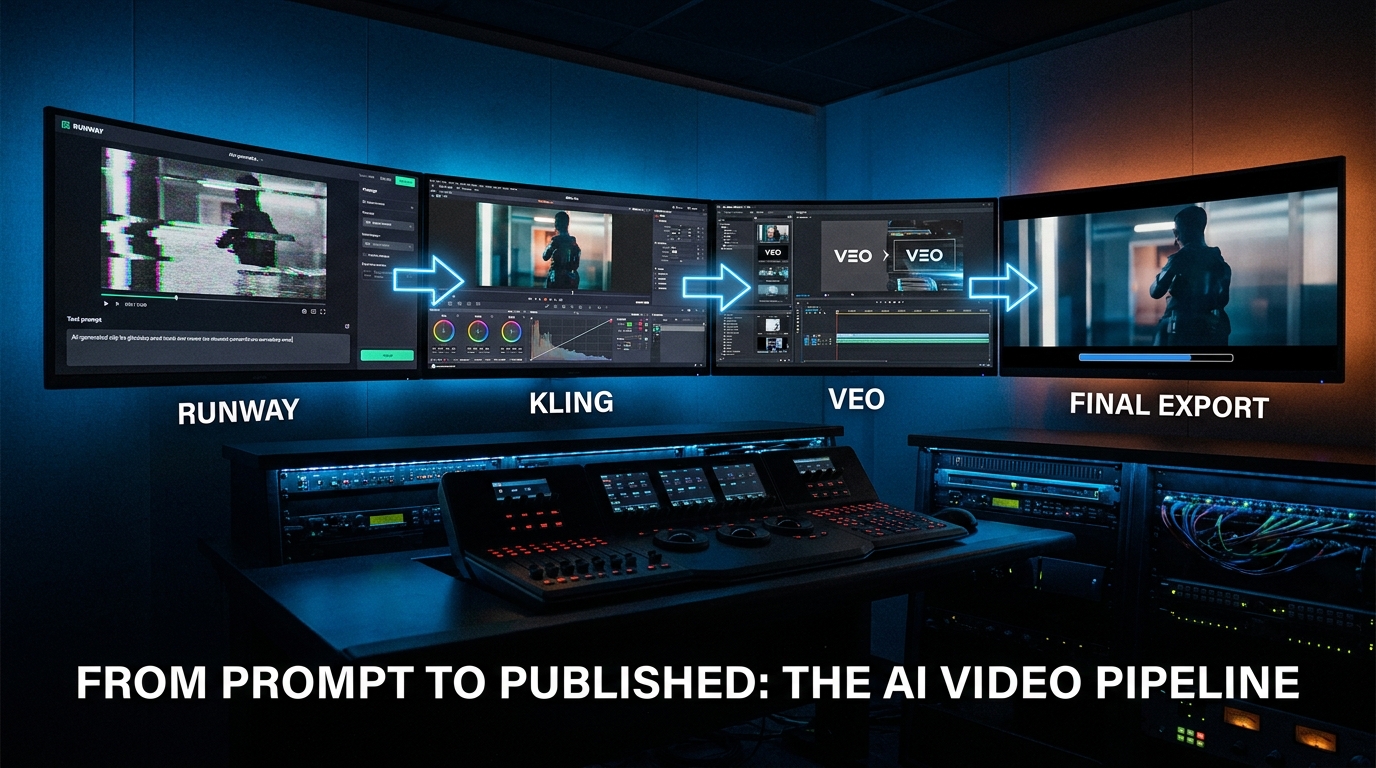
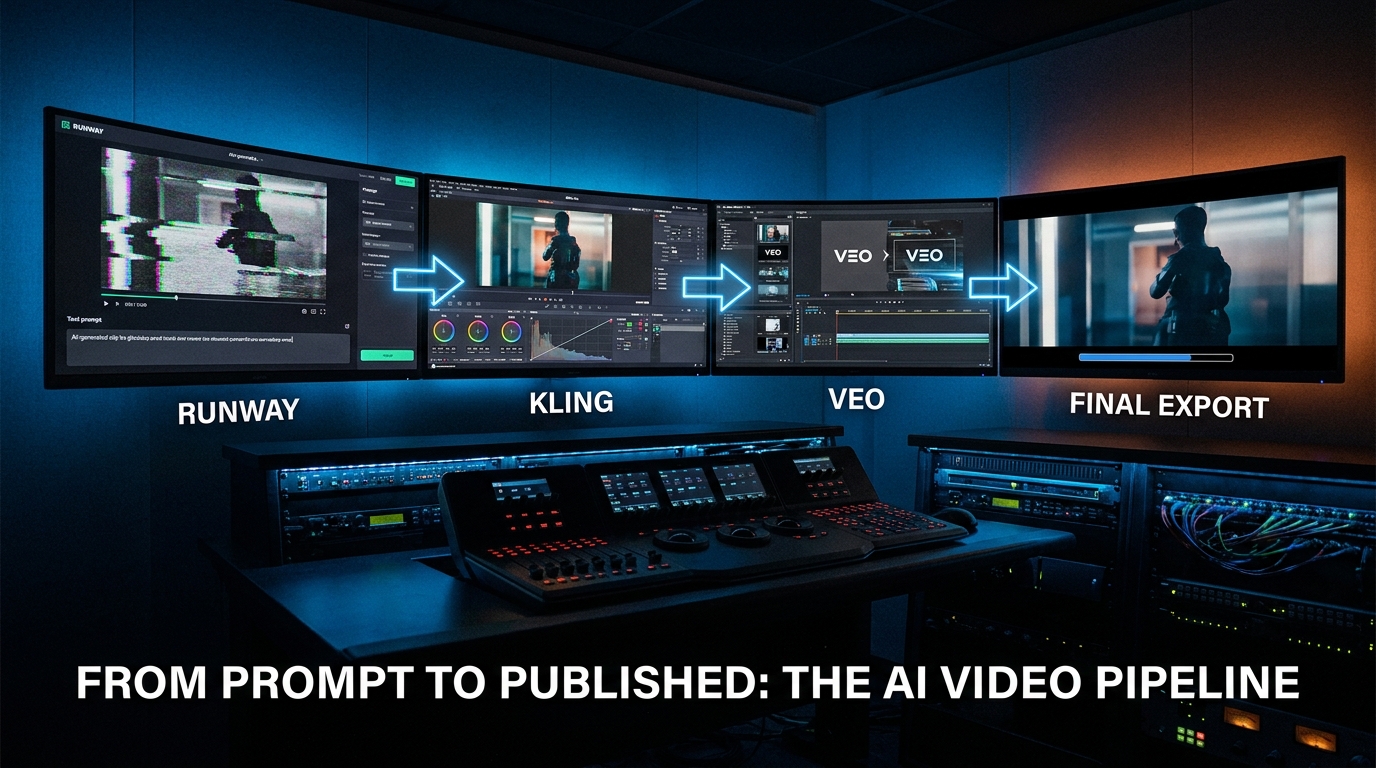
Ask most video producers about their “AI video workflow” and you’ll hear one of two things. Either they’re enthusiastically demoing a single 10-second clip they prompted and got lucky with, or they’re quietly describing how they tried three tools, generated 200 unusable clips, and went back to shooting on camera. Both responses reflect the same underlying confusion: that AI video generation is the workflow, rather than one stage inside it.
That confusion is expensive. In 2026, the teams producing the most short branded video (SBV) output per person aren’t the ones using the newest model or the biggest compute budget. They’re the ones who stopped treating text-to-video as a finished product and started treating it as a raw material step inside a deliberate production pipeline.
This post breaks down exactly what those pipelines look like in practice — which tools handle which shots, where brand consistency actually breaks down, what the cost math genuinely looks like (including the numbers vendors don’t advertise), and which problems still aren’t solved no matter how good your prompt is. If you’ve already read the theoretical AI video roundups, this is the version that tells you what happens after you hit generate.
Why SBV Is the Hardest Use Case for AI Video
Short branded video occupies an awkward middle ground that makes it uniquely demanding for AI generation tools. It’s too short to tolerate scene incoherence (you notice every cut), too commercial to allow brand inconsistency (colors, logos, and product appearance must be exact), and too performance-driven to accept visual quality drops (poor generation quality directly affects click-through and conversion rates).
Long-form AI video — documentary-style content, training materials, explainer animations — has more room to breathe. A five-minute product explainer can absorb one or two rough shots in the middle. A 15-second social ad cannot. Every frame is primary real estate. That’s why SBV stress-tests AI tools in ways that other formats don’t.
The Three Core SBV Requirements AI Tools Still Struggle With
The industry has consolidated around three failure categories for brand video specifically:
- Temporal consistency: Keeping visual elements stable from one frame to the next — the same product color, the same character face, the same lighting angle — is still one of the hardest problems in video generation. Models that handle individual frames beautifully often introduce subtle drift across a 5-second clip that becomes visible on larger screens.
- Brand fidelity: AI models cannot natively understand your brand guidelines. They don’t know your Pantone color codes, your approved logo usage zones, or your product’s exact label design. Without explicit reference conditioning, generated clips will approximate your brand rather than reproduce it — and in commercial work, approximation is a legal and marketing risk.
- Prompt-to-output adherence: The gap between what you described and what generated remains wider in video than in image generation. Complex scene descriptions with multiple elements, specific camera movements, and layered action frequently produce outputs that fulfill two of five instructions and ignore the rest. Vague inputs amplify this dramatically.
Understanding these three constraints isn’t pessimism — it’s the foundation for building a workflow that works around them rather than hoping they’ll disappear on their own.
The Four-Stage SBV Pipeline: What It Actually Looks Like
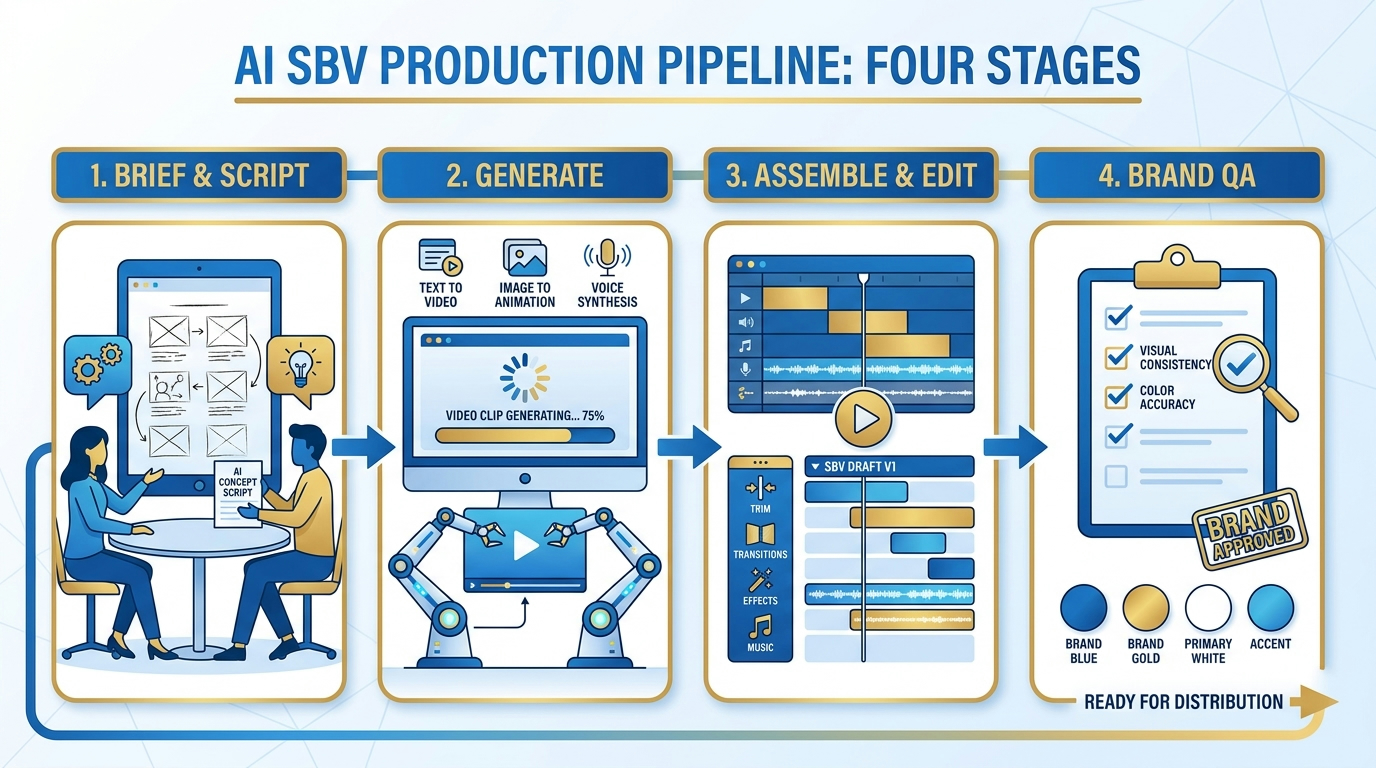
The dominant production pattern that has emerged from high-output SBV teams in 2026 is a four-stage pipeline. It’s not glamorous and it’s not purely AI — but that’s precisely why it works at commercial quality levels.
Stage 1: Brief and Shot Architecture
The most common mistake in AI video production is treating generation as step one. It’s step three at the earliest. Before any model is opened, teams that consistently produce usable SBV content spend significant time on the brief and shot architecture — a document that functions less like a traditional creative brief and more like a shot list with generation parameters embedded.
A working SBV brief for AI generation includes:
- Shot-level breakdown: Not scene descriptions, but individual shots — each one short enough to generate as a discrete clip (typically 3–10 seconds). A 30-second ad might decompose into 6–9 individual shots at this stage.
- Per-shot model designation: Which tool will generate each shot? This is decided in the brief, not during generation. (More on this in the tool routing section.)
- Reference assets for each shot: What image, color swatch, character reference, or product photo will anchor each generation? Shots without references are flagged as high-risk.
- Negative space rules: What the clip must NOT contain — competing products, certain color associations, motion patterns that conflict with brand language. These feed directly into negative prompts.
- Accept/reject criteria: Measurable conditions for passing QA written before generation starts, not afterward.
Teams that skip this stage spend 60–70% of their time in revision loops. Teams that complete it properly cut total project time by a consistent margin, and — critically — produce clips that actually pass brand review rather than looking “AI-ish” but commercially unusable.
Stage 2: Controlled Generation
With the shot architecture locked, generation becomes a narrow, constrained task rather than an open-ended creative experiment. Each shot has its model, its reference inputs, its positive prompt, and its negative prompt specified before anything is generated.
The standard iteration pattern that has emerged from production teams is: generate 5–15 variants per shot, select the closest to brief, then iterate with targeted adjustments. Experienced teams don’t generate one clip and hope — they treat generation as a probabilistic sampling process and plan their iteration budget accordingly. On average, a usable commercial-grade clip requires 8–12 generation attempts at current model capability levels.
This has direct implications for time and cost planning, which we’ll address in the cost math section. For now, the key workflow insight is that “generation” is not a single click — it’s a series of structured sampling rounds with evaluation criteria applied between each round.
Stage 3: Assembly and Post-Production
AI-generated clips go into a traditional editor — Premiere Pro, DaVinci Resolve, or CapCut for lighter mobile-first content. This is not a sign of pipeline failure. It’s the intended design. The AI generates raw visual material. The edit is where brand overlays, motion graphics, licensed music, voiceover, color grading, and logo placement are applied.
Teams that try to get AI tools to handle post-production elements (text overlays, specific logo placement, precise color matching) within the generation stage consistently produce lower-quality outputs and longer turnaround times. The generation tools are optimized for visual content creation, not for pixel-accurate brand asset placement. That work belongs in post.
Stage 4: Brand QA
The final stage before export is a structured quality review against the accept/reject criteria defined in Stage 1. This is where most teams bleed time they think they’ve already saved. We’ll cover QA architecture in detail in its own section — it deserves it, because it’s where the pipeline most often collapses.
Tool Routing by Shot Type: Runway, Kling, and Veo in Practice
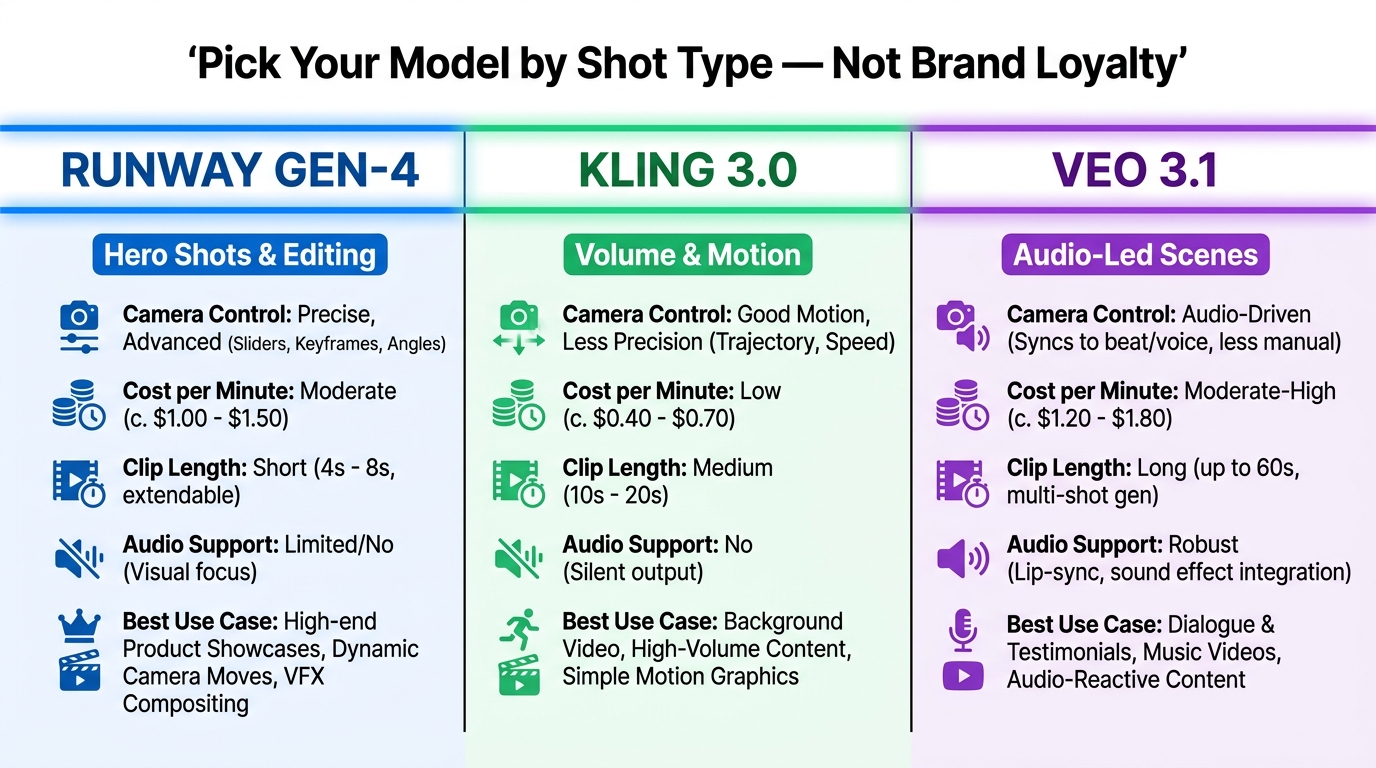
The biggest shift in professional AI video production in 2026 is the death of tool loyalty. The question is no longer “which tool should we use?” but “which tool handles this specific shot type best?” Teams that pick one generator and use it for everything consistently produce outputs that are mediocre across the board. Teams that route shots to the right model produce genuinely commercial-grade content.
Here’s how the current tool landscape maps to SBV shot types based on production team reports and hands-on workflow data:
Runway Gen-4 / Gen-4.5: Hero Shots and Camera-Controlled Sequences
Runway remains the strongest choice when the brief requires precise camera behavior — specific dolly movements, controlled rack focus, deliberate panning sequences, or any shot where the camera itself is part of the creative language. Its Motion Brush and Act-Two controls give editors a level of influence over clip behavior that other tools don’t match for this use case.
It’s also the strongest option when you need an integrated editing environment. Runway functions less like a single model and more like a production suite — clip generation, motion refinement, and assembly tools exist within one stack, which reduces handoff friction for smaller teams. Pricing starts at approximately $15/month at entry level, with clip lengths in the 10–18 second range depending on generation mode.
Best for: Brand hero shots, product close-ups with controlled camera movement, cinematic opener sequences, polished social ad creative that needs editing-suite integration.
Weakest at: Cost-efficient high volume, long multi-shot sequences, native audio generation.
Kling 3.0: Volume, Motion Realism, and Multi-Shot Storytelling
Kling 3.0 has emerged as the workhorse model for high-output SBV production in 2026. Its multi-shot generation capability — the ability to generate a sequence of connected shots with character and environment consistency built in — makes it the most production-ready option for teams generating large clip libraries rather than single hero assets.
The native audio support (dialogue and ambient sound synchronized to generation) has also made it the preferred tool for UGC-style ad content and talking-head brand spots. Character reference workflows — where a consistent actor or avatar is locked via reference image and maintained across multiple shots — are more reliable in Kling 3.0 than in most competing tools at similar price points.
The practical constraints: a 15-second per-clip cap limits its utility for longer narrative sequences without stitching, and credit costs from iterative re-renders add up faster than the tool’s base pricing suggests. The workflow pattern that works best is draft-fast-then-render-final: generate rough versions quickly in draft quality, select the best, then render the final shot at production quality. This significantly reduces credit waste.
Best for: Multi-shot social ad sequences, UGC-style branded content, character-driven storylines, high-volume variant production, dialogue-heavy scenes with native audio.
Weakest at: Shots requiring precise camera control, outputs longer than 15 seconds without cuts.
Veo 3.1: Audio-Led Scenes and High-Fidelity Prompt Adherence
Google’s Veo 3.1 has carved a specific niche in the SBV workflow: scenes where audio is integral to the visual generation, and shots where prompt adherence to complex scene descriptions needs to be highest. Its native audio-video synchronization — generating ambient sound, music-adjacent tones, and dialogue alongside visual content — is the strongest in the current tool set.
For brand videos that need to feel like they were captured in a real environment (product-in-use footage, lifestyle context shots, outdoor brand moments), Veo 3.1’s photorealism is competitive with Runway for a different class of shot. It’s not a camera-control tool in the way Runway is, but for shots where environmental authenticity matters more than cinematographic precision, it frequently produces superior results.
The practical constraint is access variability. Veo availability through different API pathways has fluctuated in 2026, making it less reliable as a primary pipeline tool for teams that need predictable throughput. Most teams use it for specific high-value shots rather than as their volume generator.
Best for: Lifestyle context shots, ambient audio-led scenes, environmental brand moments, shots requiring high-fidelity adherence to complex prompts.
Weakest at: Predictable pipeline availability, camera-control-heavy cinematographic sequences.
The Routing Decision in Practice
In a typical 30-second SBV production, a team might use Runway for the opening hero shot (3 seconds, controlled dolly move toward product), Kling for the middle sequence of 4–5 character-driven story beats (each 4–6 seconds), and Veo for the lifestyle context shot in the penultimate beat (6 seconds, outdoor environment with ambient audio). The brand overlay, logo, and CTA are applied in post across all clips.
This multi-model routing adds a layer of pipeline management complexity — different tools, different credit systems, different export specs — but the output quality differential over single-model workflows is significant enough that high-output teams consider it a fixed part of their production architecture.
The Brand Consistency Problem — and the Reference-First Fix
Brand consistency is where AI video production most frequently fails commercial quality standards, and where the gap between teams with a disciplined reference system and those without is most visible. The underlying problem is structural: AI generation models learn from aggregate visual data, not from your brand guidelines. Without explicit conditioning inputs, every clip is generated from the model’s best interpretation of your text prompt — which will drift from your actual brand assets in ways that range from subtle (slightly wrong shade of blue) to obvious (product label text garbled beyond legibility).
Building the Brand Reference Kit
Production teams that consistently pass brand review maintain a video-specific brand reference kit — a set of visual assets that are fed as reference inputs into every generation prompt, not just described in text. This kit typically includes:
- Color reference frames: Actual image crops showing the approved brand palette in context (not just hex codes). Models respond to visual color references more accurately than color name descriptions.
- Product reference sheet: Multiple approved product images from different angles, in approved lighting conditions, with correct label/packaging visible. These are fed as image-to-video seed inputs for any shot containing the product.
- Character or talent reference sheet: Three to five approved reference photos of the same person (or designed avatar) from different angles and expressions. This is the primary defense against face drift (covered in the next section).
- Environment reference board: Approved visual environments — the style, lighting condition, and setting that represents the brand’s visual world. Used to anchor context shots and lifestyle sequences.
- Negative reference examples: Screenshots of generated outputs that have been rejected in QA, with annotations explaining why. These feed into the negative prompt library and help teams avoid regenerating the same failures.
The reference kit is built once per brand and maintained across projects. Teams with a mature kit in place cut their average clip revision rate by roughly 40–50% compared to working from text prompts alone — because the model has concrete visual anchors rather than open-ended descriptions to work against.
When Reference Conditioning Reaches Its Limits
Reference conditioning significantly improves brand consistency but doesn’t eliminate deviation entirely. Products with complex packaging (multi-color labels, small-print text, intricate graphic elements) remain difficult to reproduce accurately via image-to-video workflows. Text rendered within generated video frames — a product label’s tagline, a pricing callout, any legible on-screen words — is still unreliable from generation and should always be added in post-production as motion graphics rather than generated.
This is not a future problem to be solved. It’s a current production reality. The workflow accommodation is to generate clips with blank or blurred label areas where text would appear, then composite the correct text in post. It’s a workaround, but it’s a reliable one.
Character and Face Drift: The Failure Mode Nobody Talks About
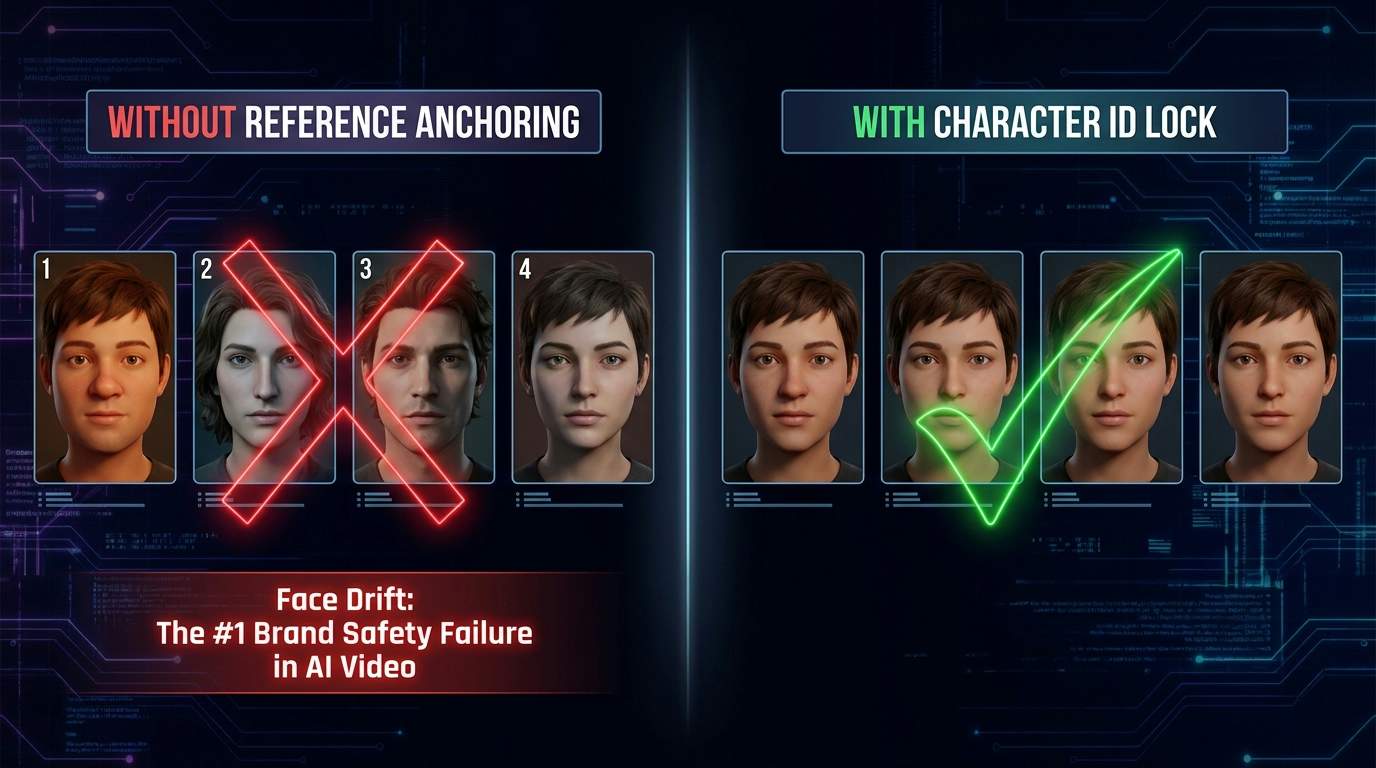
If brand color drift is the visible consistency problem, face drift is the subtle one that causes SBV to fail quietly — often not caught until brand review or, worse, after publication. Face drift describes the phenomenon where a character’s facial features change incrementally across generated shots: slightly different nose shape, subtly different skin tone, different hair texture on a second clip versus the first. Each individual clip looks plausible. Put them in sequence and the “same” character appears to be three different people.
For any branded video featuring a consistent spokesperson, brand mascot, or recurring character, face drift is a production-critical failure mode. It signals to viewers (often subconsciously) that something is wrong with the video, even if they can’t articulate what. It also creates legal risk: if generated faces drift toward specific real individuals, content liability becomes complicated.
Why Face Drift Happens
Video generation models sample from a probability distribution at each frame. Without strong temporal anchoring, that distribution drifts over the course of a clip — and drifts further across separate clips that aren’t explicitly linked by a shared reference. Each new generation prompt starts from scratch unless you actively carry visual state forward.
The mechanism isn’t a bug — it’s how probabilistic generation works. The model is not “remembering” your character between clips. It’s interpreting your text description of a character (or a reference image) and producing a plausible visual interpretation each time. Small differences in prompt phrasing, generation seed, or temperature settings produce measurably different facial outputs.
The Character ID Lock Workflow
The practical fix is a character ID lock system: a documented set of generation parameters and reference assets that are reused identically for every clip featuring that character. This includes:
- Fixed reference image(s): Two to three approved reference photos of the character, used as image-to-video seeds for every clip featuring them. Same images, every time.
- Fixed character description string: A verbatim text description of the character’s appearance saved as a template — not rewritten per shot, but copy-pasted identically. Even small wording variations produce visual drift.
- Seed locking (where available): Some tools allow you to lock the generation seed for a character, which pins the underlying probabilistic starting point across multiple generations. This dramatically improves cross-clip consistency.
- Shot-type limitation: Characters with consistent reference anchoring still drift most on extreme close-ups and side-on profiles. Production teams often limit locked characters to medium shots (waist-up or closer, but not extreme macro) to minimize drift risk.
Teams using a character ID lock system report significantly lower face-drift rejection rates in QA — with some well-documented pipelines running 200+ clips across a campaign with consistent character identity. This isn’t magic; it’s process discipline applied to a probabilistic system.
Prompt Engineering for SBV: What Actually Works in Production
Prompt engineering for video generation has evolved significantly from the early “describe the scene and see what happens” era. In production SBV workflows, prompting is treated as structured technical writing — not creative expression. The goal is not to convey a creative vision to the model; the goal is to constrain the model’s output space as tightly as possible around the desired result.
The Shot-First Prompt Structure
The most reliable prompt structure for SBV generation follows a consistent order: camera instruction → subject → action → environment → style and mood → negative prompt. This sequence has been validated across multiple model families and consistently outperforms free-form descriptive prompts in production settings.
An example prompt following this structure:
Close-up shot, slowly pulling back — a woman’s hand places a glass water bottle with a clean white label on a marble kitchen counter. Bright morning light from window at left. Minimal kitchen background, clean white surfaces. Commercial product advertisement style, crisp and modern. Negative: artificial lighting, cluttered background, logo text visible on bottle, hands with rings or jewelry.
Notice what this prompt does not do: it doesn’t attempt to describe emotional tone through adjectives (“luxurious,” “premium,” “fresh”), because these terms add interpretive noise rather than visual constraints. Every element of the prompt is a concrete visual instruction. Mood adjectives are reserved for style tokens at the end, where they influence the overall visual register rather than specific elements.
Common Prompt Failures and Their Root Causes
The most consistent prompt failure patterns in SBV production are:
- Overloaded action sequences: Describing more than one primary action happening simultaneously produces confused outputs. “A woman picks up the product, smiles at camera, and hands it to a friend” will generate inconsistently. Break this into three shots.
- Color descriptions without references: “Vibrant cobalt blue” produces a different shade than your brand’s specific blue. Use reference images. Color names are approximate; reference images are specific.
- Implied camera motion: “The camera slowly reveals the product” is underspecified. Write the exact camera move: “camera dollies left-to-right at ground level, revealing product from behind foreground blur.” Specificity reduces variance.
- Conflicting style tokens: “Cinematic yet authentic, professional but natural-looking” contains contradictory signals. Pick one style register per shot, not both.
Building a Prompt Template Library
High-volume SBV teams maintain a living prompt template library — a documented set of proven prompt structures, with known generation outputs and iteration notes, organized by shot type. When a new brief arrives, the first step is checking whether a similar shot type exists in the library. Building from a tested template with a known success rate is faster and more reliable than starting from scratch every time.
The library typically categorizes by: product close-up shots, lifestyle context shots, talking-head dialogue shots, B-roll motion shots, and transition/connector shots. A mature library with 30–50 tested templates covers most SBV shot architectures encountered in regular production.
The QA Layer: Where Most Teams Lose the Time They Saved
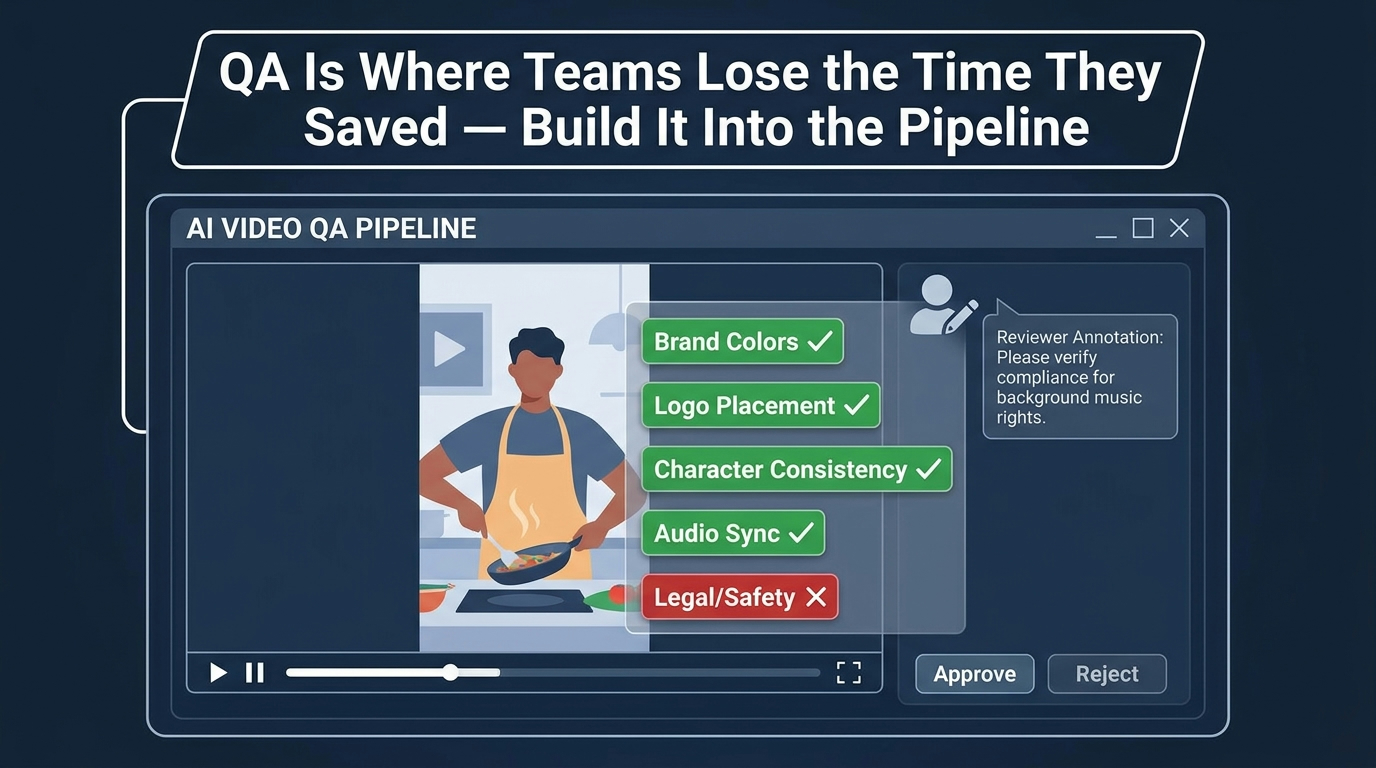
The promise of AI video generation — 27-minute turnarounds, 91% cost reductions — is real in controlled conditions. The caveat that vendors don’t prominently feature is the QA overhead that makes those numbers possible only with a structured review process. Teams that generate clips and publish them without a formal QA stage don’t experience the promised time savings. They experience a chaotic revision cycle that often takes longer than traditional production methods.
The QA layer is where most SBV pipelines either crystallize into a repeatable system or collapse into an ad hoc review process that scales poorly. Getting this right is arguably the highest-leverage investment in the entire workflow.
Three Tiers of QA
Production-grade SBV QA runs across three tiers, each handling a different class of failure:
Tier 1 — Automated technical checks: Frame rate consistency, resolution compliance, export spec verification, duration accuracy, audio sync (where applicable). These checks can be partially automated using video processing scripts or built-in tool exports. They catch generation failures before human review time is spent on technically defective clips.
Tier 2 — Brand compliance review: A human reviewer (or a structured checklist process) evaluates each clip against the accept/reject criteria defined in Stage 1. Color match, character consistency, product representation accuracy, environment compliance, and absence of flagged elements. This is where the pre-defined criteria matter most — without them, reviewers make inconsistent calls and revision loops multiply.
Tier 3 — Legal and safety review: Any content featuring recognizable styles, specific music, generated faces, or claims about products requires a final check for compliance and liability risk. Brand-safety flags — unexpected associations between the generated content and prohibited categories — are caught here. This tier is especially important for SBV content destined for paid distribution, where platform content policies add another review layer.
The Pre-Defined Criteria Rule
The single most effective QA practice is defining acceptance criteria before generation begins, not after. Teams that define “what good looks like” in Stage 1 can complete Tier 2 review in minutes per clip. Teams that evaluate clips against an implied standard held in the reviewer’s head debate every output and frequently cycle clips back through generation multiple times for reasons that weren’t specified to the generator in the first place.
Written QA criteria don’t need to be elaborate. For a product close-up shot, they might be: correct product visible and in focus for at least 80% of clip duration, label area uncluttered, no competing products in frame, camera motion smooth and deliberate, no visible AI generation artifacts in background. Five criteria, clearly stated, cuts review time dramatically and creates a paper trail for brand sign-off conversations.
When to Abandon a Shot and Reschedule
One of the hardest workflow decisions in SBV production is recognizing when a shot should be abandoned from AI generation and scheduled for live capture instead. Teams that treat AI generation as mandatory for every shot, regardless of complexity, waste significant time trying to force outputs that current models genuinely cannot produce reliably.
Shots that consistently underperform in AI generation and benefit from live capture: extreme close-ups of specific product text or fine detail, shots requiring precise brand-color accuracy in lighting-dependent environments, dialogue scenes where specific real individuals must appear (not avatars), and shots with complex physical interactions between a person and a branded product. These represent a minority of SBV shot types, but they exist in most campaigns.
The Cost Math: What AI Video Actually Costs vs. Traditional Production
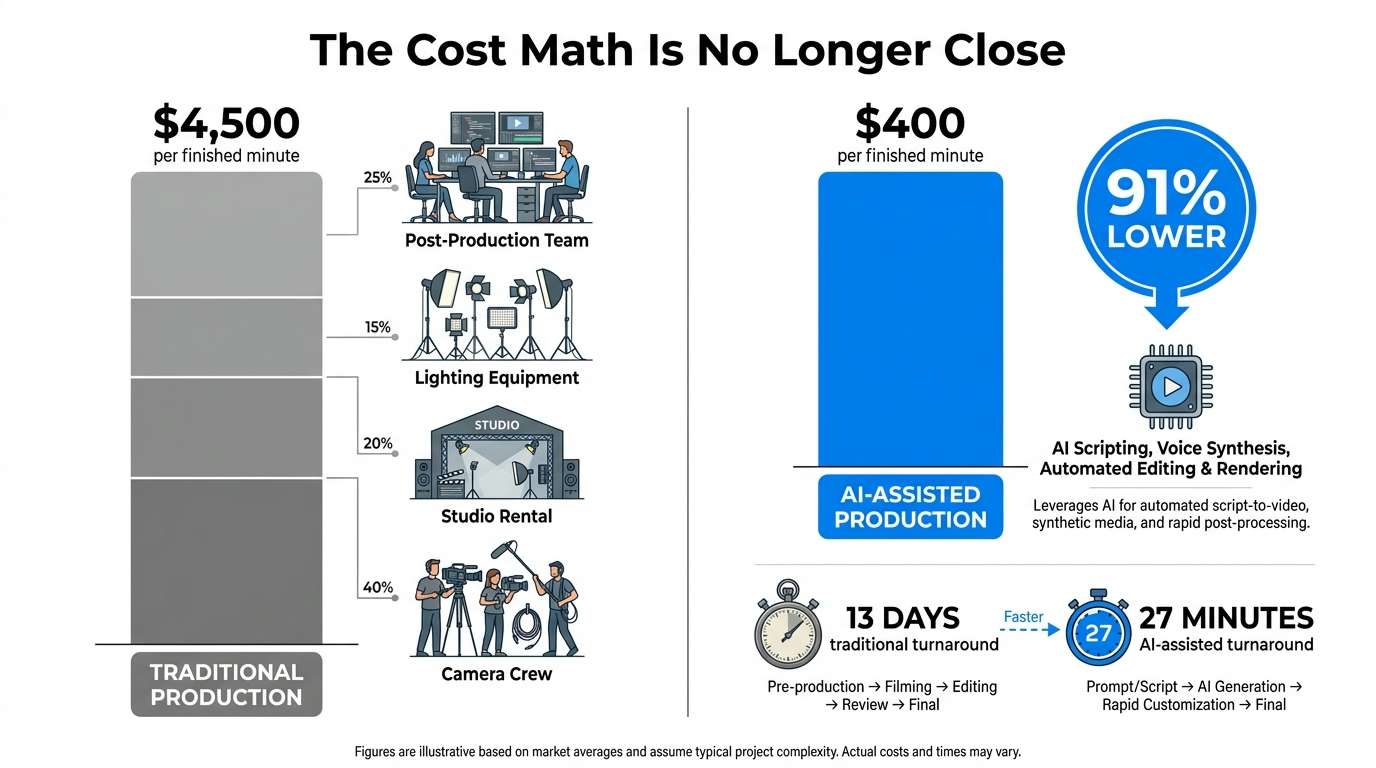
The headline numbers on AI video cost savings are striking and, in the right context, accurate: traditional branded video production runs approximately $4,500 per finished minute when crew, studio, equipment, and post-production are fully costed. AI-assisted production in a mature pipeline delivers finished content at approximately $400 per finished minute — a 91% reduction. Turnaround drops from roughly 13 days for a traditional production to approximately 27 minutes of active generation time for equivalent SBV content.
But those numbers require unpacking, because they describe different things and can lead to poor planning if taken at face value.
What the $400/Minute Figure Includes (and Doesn’t)
The $400/minute AI figure typically accounts for tool subscription costs and compute credits — essentially the direct cost of running the generation. It generally does not account for the following costs that every production team actually incurs:
- Pipeline labor: The time of the producer, prompt engineer, editor, and QA reviewer who manage the four-stage pipeline. In a lean two-person setup, this adds meaningful labor cost per finished minute of SBV content.
- Iteration overhead: At 8–12 generation attempts per usable clip, compute credit costs are substantially higher than a single-generation estimate suggests. Teams that budget generation credits based on one attempt per clip routinely exceed their cost projections by 300–500%.
- Post-production time: Assembly, color grading, motion graphics, audio, and brand element placement in the editor are real labor costs not captured in generation tool pricing.
- Reference asset creation: Building the brand reference kit requires time and sometimes professional photography or design work. This is a one-time cost per brand but shouldn’t be invisible.
The Accurate Comparison Framework
A more useful cost framework compares total output cost — all labor, tools, and iteration — against traditional production equivalents at the same volume. When this comparison is made honestly, the savings are real but more moderate than the headline figures suggest: most teams report total cost reductions of 60–75% rather than 91%, with the larger savings concentrated in high-volume campaigns (10+ video variants from a single creative concept) where the pipeline amortizes most efficiently.
The 91% cost reduction figure is achievable but represents optimal conditions: a mature pipeline with a tested prompt library, a complete brand reference kit, a well-calibrated QA process, and a campaign that generates many variants from a shared asset base. It’s an accurate ceiling, not a realistic average starting point.
Where the ROI Is Strongest
Based on production team reporting, AI video ROI is most compelling in three specific scenarios:
- Variant-heavy campaigns: Creating 15–30 platform-specific variants (different aspect ratios, different first-frame hooks, different CTAs) from one creative concept, where the per-variant marginal cost of AI production is close to zero once the pipeline is set up.
- High-cadence content calendars: Brands publishing SBV content at 4–8 videos per week find that AI production is the only economically viable way to sustain that frequency without unsustainable agency fees.
- Test-and-iterate creative strategies: A/B testing multiple creative approaches for paid social campaigns, where traditional production would make testing prohibitively expensive, but AI generation makes testing multiple hooks per week routine.
Scaling the Pipeline: From One Video to Volume
The pipeline described above works for producing a single SBV campaign. Scaling it to consistent volume output — the 4–8 videos per week mentioned above — requires additional infrastructure that most teams discover only after hitting the ceiling of their initial setup.
Systematizing the Brief Process
At volume, brief creation itself becomes a bottleneck. Teams that write each brief from scratch spend disproportionate time on upstream planning rather than generation. The solution is brief templates: pre-structured documents with shot architecture slots, reference asset dropzones, model routing fields, and QA criteria fields already set up. A well-designed brief template reduces brief creation time from 2–4 hours to 30–60 minutes for a standard SBV campaign.
Some teams further systematize by building brief templates around content type (product launch, sale event, lifestyle, educational, testimonial) rather than by brand, since content-type templates transfer across brand clients more efficiently than brand-specific templates.
Credit and Compute Management
At scale, generation credit management becomes a real operational concern. Teams running 30–50 video productions per month across multiple tools need to track credit consumption per project, model, and shot type to identify where iteration costs are highest and where prompt quality improvements would deliver the greatest return.
The iteration rate (generation attempts per accepted clip) is the single most valuable metric to track for pipeline optimization. A team averaging 12 iterations per clip that improves to 8 iterations through prompt library refinement cuts its generation costs by 33% without changing tools or briefs. Most teams don’t track this metric and therefore have no systematic way to improve it.
The “Evergreen Asset” Library
High-volume SBV pipelines eventually develop an evergreen asset library — a curated set of approved AI-generated clips that can be reused or remixed across campaigns without regeneration. A product beauty shot generated for one campaign can become the opener for five subsequent campaigns with different overlays. A brand environment clip generated for a spring campaign can recur across the year with seasonal color grading adjustments in post.
Building this library deliberately — generating clips specifically designed for reuse rather than as one-off campaign assets — significantly improves volume output efficiency over time. Teams that manage their evergreen library proactively produce more content with less generation overhead as their library grows.
What’s Still Broken: An Honest Assessment
AI video for SBV has made genuine, substantial progress since 2024. The pipelines described in this post produce commercially viable branded content at a fraction of traditional production cost. And yet there are real, persistent limitations that no amount of workflow optimization currently overcomes — limitations that teams need to account for honestly rather than pretending they’ll be fixed by the next model update.
Long-Clip Coherence Degrades Rapidly
Beyond approximately 8–10 seconds of continuous generation, most current models begin to show visible coherence degradation: objects change shape subtly, backgrounds shift, motion becomes inconsistent. The standard mitigation — shorter clips stitched in post — works well for SBV specifically because short-form video naturally works in 3–8 second shots. But any SBV format requiring a single continuous shot longer than 10 seconds (certain platform formats, specific creative approaches) is still difficult to execute reliably.
Fine Product Detail Remains Unreliable
Products with complex visual detail — intricate packaging, multi-element logos, fine typography, or specific material textures that must be exact — still cannot be reliably reproduced by image-to-video generation at quality levels sufficient for brand approval. The practical workflow (generate the shot without the product detail, composite the correct detail in post) works but adds overhead and limits certain creative approaches where product detail in motion is part of the brief.
Audio Quality Is Platform-Dependent
Native audio generation in tools like Veo 3.1 and Kling 3.0 has improved significantly in 2026, but the quality of generated dialogue and ambient audio varies considerably by generation session. Audio that sounds acceptable through laptop speakers often reveals problems under broadcast or professional audio monitoring. Teams distributing SBV to contexts with high audio standards should treat AI-generated audio as a draft reference rather than a final deliverable, and plan for professional audio finishing even when the generation audio appears clean.
Platform Content Policies Are a Moving Target
SBV distributed to paid social platforms — Meta, TikTok, YouTube — increasingly encounters content policy friction that traditional production workflows don’t face. AI-disclosure requirements are tightening across platforms, with some requiring explicit labeling of AI-generated content in ad formats. Brand-safety moderation systems also have higher false-positive rates on AI-generated content than on live footage, creating cases where brand-appropriate content gets flagged for review because the generation style triggers moderation systems tuned to detect synthetic media. Building platform policy review into Stage 4 QA is no longer optional for teams running paid distribution.
Where the SBV Pipeline Goes From Here
The near-term trajectory of AI video for SBV points in two directions simultaneously: better individual model outputs, and deeper workflow integration. The individual model improvements — longer coherent shots, better product fidelity, more reliable audio — are coming, and each iteration makes the pipeline described here easier to run. But the more significant change is structural.
The shift from “AI video tool” to “AI video workflow layer” is already underway. Tools are increasingly offering API access, brand kit integrations, and batch generation interfaces designed for pipeline use rather than one-off prompting. This is the direction the market is moving, and it’s where the efficiency ceiling rises significantly — not when individual clip quality improves, but when the entire brief-to-publish sequence can be managed through an integrated system rather than stitched together across five separate platforms.
Teams that are building disciplined pipelines now — with reference kits, routing logic, prompt libraries, and structured QA — are developing the operational knowledge that will transfer directly to those integrated systems when they arrive. The teams that are still treating AI video as a “generate and see” experiment will face a steeper transition when the pipeline becomes the standard.
Actionable Takeaways
If you take one thing from this breakdown, make it this: the competitive advantage in SBV production isn’t the tool you use — it’s the pipeline you build around it. Here’s where to start:
- Build your brand reference kit before your next project. Character references, product shots from multiple angles, approved color frames, and environment boards. This single step reduces revision cycles more than any prompt technique.
- Design your brief as a shot list, not a creative document. Shot-level breakdowns with per-shot model routing, reference inputs, and accept/reject criteria specified before generation starts.
- Route shots to the right model, not the familiar one. Runway for camera-controlled hero shots, Kling 3.0 for volume and character-consistent sequences, Veo 3.1 for audio-led or high-fidelity environment shots.
- Implement the draft-then-render workflow for Kling. Generate rough drafts to identify the best structural outputs, then render only those at production quality. This cuts credit costs significantly.
- Track your iteration rate per clip. 8–12 attempts per accepted clip is the industry benchmark. If you’re higher, your prompts need work. If you’re lower, either your QA criteria are too loose or you got lucky.
- Write your QA criteria before you generate, not after. Define acceptance before reviewing outputs. Reviewers evaluating against an implied standard create inconsistent decisions and revision loops that eliminate the pipeline’s time advantage.
- Never generate text that needs to be exact. Product labels, pricing, legal copy, and CTAs should always be added as motion graphics in post. Composite over blank areas in your generated clips.
- Build your evergreen asset library deliberately. Generate shots for reusability, not just for the current campaign. A library of 50–100 approved generic environment and context clips pays dividends across every subsequent project.
The 27-minute video is real. So is the 13-hour revision cycle that happens without a pipeline. The difference is almost entirely in the structure you bring to the process before you touch a generation tool.