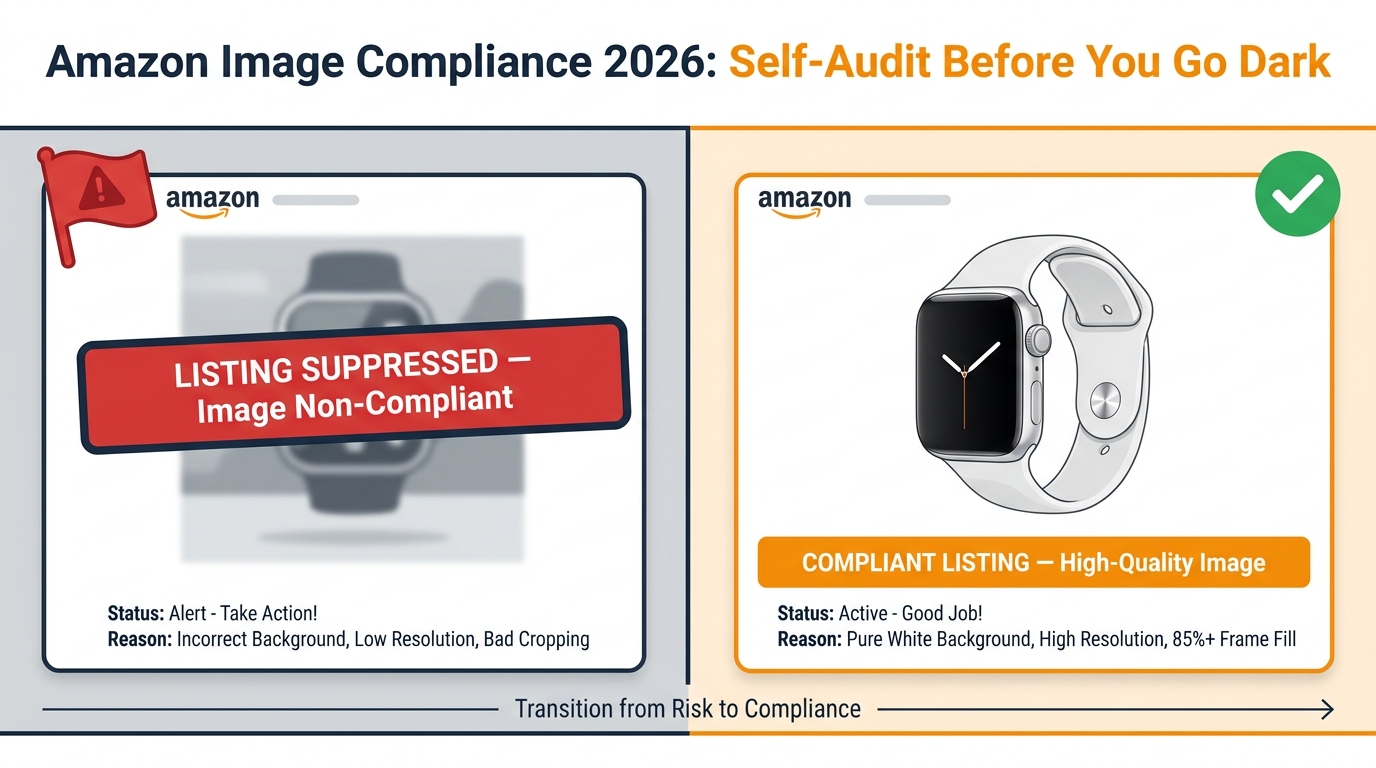
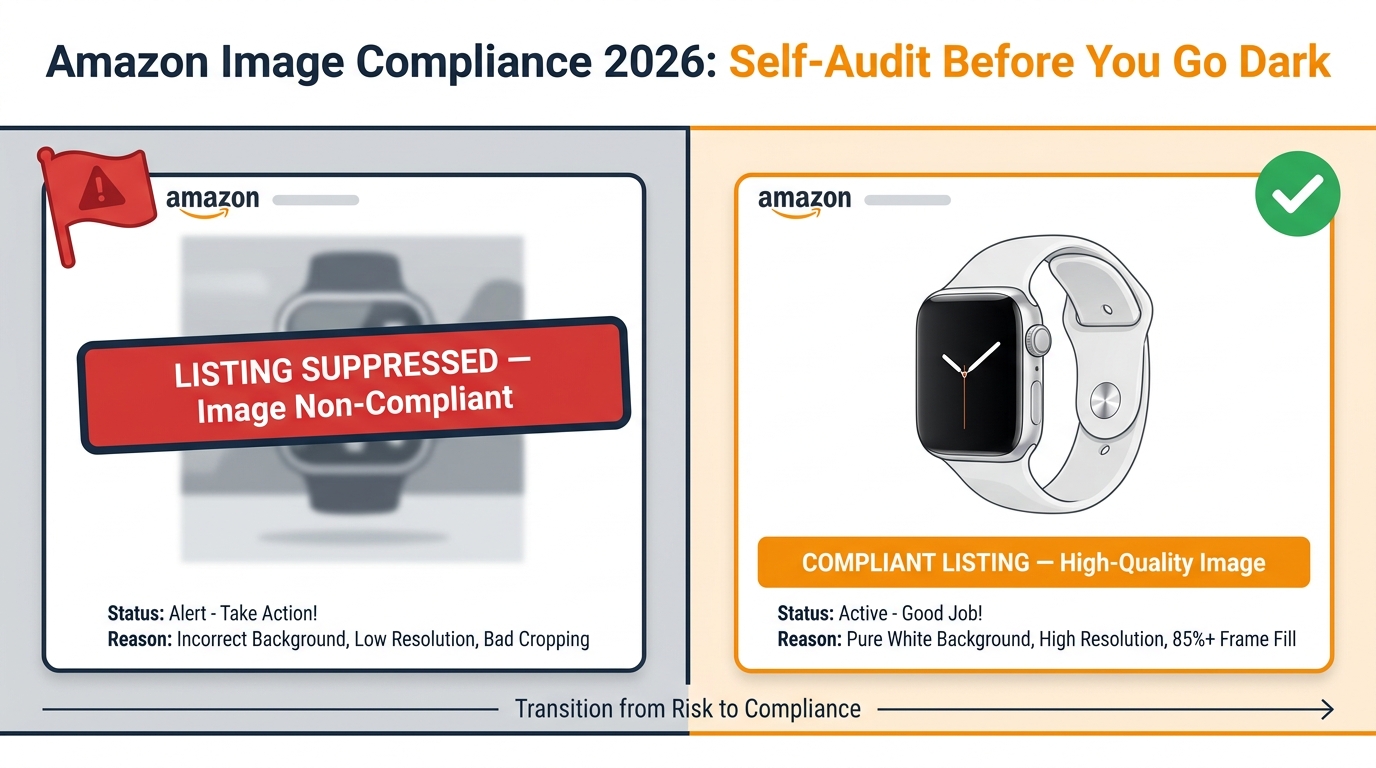
Nobody gets a warning shot. One day your ASIN is live and generating sales; the next it has vanished from search results, your ad spend is wasted on a listing that won’t convert, and the suppression notice in Seller Central traces back to a product image that looked perfectly fine to you. That is the reality of Amazon’s image enforcement in 2026 — faster, more automated, and far less forgiving than it was even eighteen months ago.
Amazon’s image guidelines have always existed, but the gap between “technically on the books” and “actively enforced” is closing at speed. Sellers who have not revisited their image stacks recently are operating on assumptions that may already be out of date. The rules around resolution, background purity, AI-generated content, category presentation, and A+ module compliance have all shifted in ways that don’t always make the front page of seller forums until after listings start disappearing.
This post is not about creative strategy or conversion rate optimization — there are other places for that. This is an operational self-audit. It covers every dimension of Amazon’s current image requirements that can get a listing suppressed, every category-specific trap that catches experienced sellers off guard, and the specific new compliance layer introduced in July 2026 around AI-generated imagery. Work through it section by section against your own catalog and address every gap before Amazon’s automated scanner does it for you.
Why Image Compliance Is Now a Revenue Risk, Not Just a Quality Issue
For years, image guidelines felt like a background consideration — something you attended to at launch, then filed away. That mental model no longer holds. Amazon’s image review system has become significantly more automated, operating closer to real-time than the old batch-review process sellers were used to. The practical consequence is that a non-compliant image uploaded today can trigger a suppression notice within hours, not days or weeks.
What “Suppressed” Actually Means Commercially
When Amazon suppresses a listing for an image violation, the product is removed from search results. It does not appear in organic rankings, it does not appear in Sponsored Products placements, and it cannot win the Buy Box. Any active PPC campaigns attached to the ASIN continue to consume budget in some configurations while delivering zero impressions — meaning the ad spend damage compounds the revenue loss.
The suppression persists until a compliant image is uploaded and processed. Amazon’s help documentation states that the listing remains removed from search until a compliant main image is in place. For sellers in competitive categories with tight inventory cycles, a multi-day suppression during a peak period can set back ranking velocity in ways that take weeks to recover from, not just the days the listing was dark.
The Enforcement Shift: Automated and Continuous
The structural change in 2026 is not a single dramatic policy rewrite. It is a gradual but significant tightening of how existing rules are applied. Multiple seller community reports and agency audits published in the first half of 2026 describe Amazon’s image-review system as conducting more frequent, pixel-level checks — catching background purity failures, frame-fill insufficiency, text overlays, and resolution issues that human reviewers would previously have passed.
This matters for sellers who have large legacy catalogs. An ASIN that was uploaded three years ago with an image that would have passed review then may not pass the automated checks running today. The risk is not just new listings — it is the entire catalog, including ASINs that have been live and selling quietly for years.
Compliance as a Catalog Management Function
The practical implication is that image compliance needs to move from a launch-time checklist into an ongoing catalog management function. Sellers with hundreds or thousands of ASINs need a systematic way to audit image stacks against current requirements, flag violations before Amazon does, and prioritize fixes by revenue at risk. The sellers who will avoid suppression events in the second half of 2026 are the ones who have already built that process — not the ones who are relying on their memory of what the rules said when they launched.
The Core Main Image Rules That Still Trip Up Experienced Sellers
Amazon’s main image requirements are the most strictly enforced and the most commonly violated. They are also the area where seller knowledge tends to be most inconsistent — the rules sound simple until you get into the specific technical definitions, which is where the violations actually live.
The Pure White Background Standard
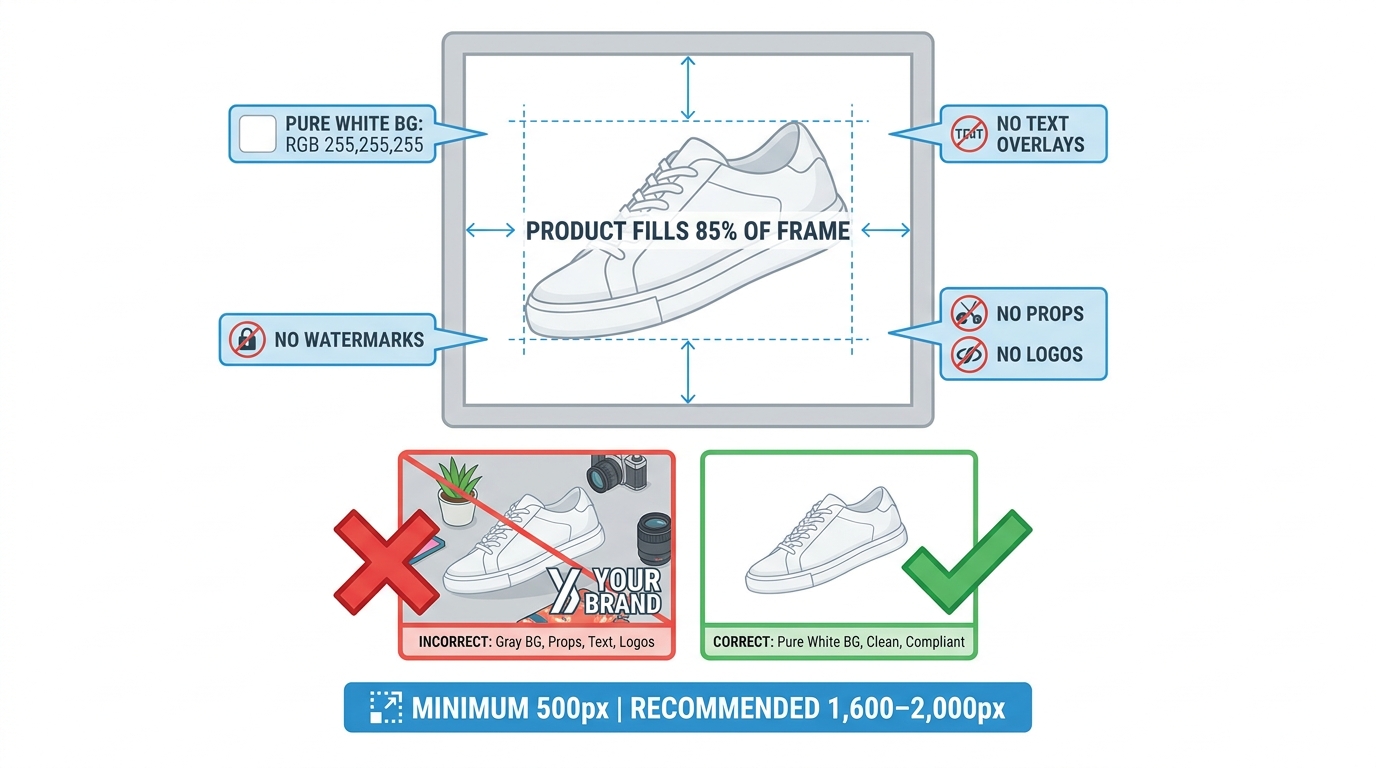
Amazon requires main product images to have a pure white background. The specific value is RGB 255, 255, 255. This sounds straightforward but causes consistent problems in practice because near-white is not white. A background that reads as white to the human eye at a glance may test at RGB 240, 240, 240 or similar values — a shade that human reviewers historically let pass but that automated image analysis is increasingly catching.
The most common sources of near-white backgrounds in practice: lightbox photography with insufficient lighting calibration, JPEG compression that introduces background noise, photos shot against an off-white seamless, and AI editing tools that add subtle gradients or shadows to the background during object isolation. If you are using automated background-removal tools in your image workflow, verify the output value with a color picker — do not assume the tool is hitting exactly 255, 255, 255 on every export.
Product Fill: The 85% Frame Rule
Amazon guidance consistently describes the product as needing to fill approximately 85% of the image frame. This means the product should be large, centered, and dominant within the square image space. The violations that trigger this rule are typically: products shot from too far back, excessive negative space around small items, and products positioned off-center.
The fill requirement also interacts with the white background rule in a specific way — a product that fills only 60% of the frame leaves a large expanse of background that must be genuinely white, and any imperfection in that background becomes more visible and more likely to be flagged. Maximizing frame fill reduces background surface area and gives you less to get wrong.
The Prohibited Overlay List
The main image must show only the product being sold. Amazon prohibits the following on main images: text of any kind (including brand names, model numbers, promotional copy, and size callouts), logos and watermarks, props that are not included in the sale, multiple units when a single unit is listed, packaging-only shots for items where the product itself should be shown, and inset graphics or secondary images-within-images. These rules are not new, but sellers regularly add text overlays to main images in the belief that they are in secondary image slots, or upload packaging shots for consumables where Amazon expects the product itself to be visible.
Format and File-Naming Requirements
Amazon accepts JPEG (the recommended format), PNG, TIFF, and non-animated GIF. JPEG is preferred for file size efficiency and consistent rendering. Images must be named according to Amazon’s convention: the product identifier (typically the ASIN or UPC), followed by a period, the variant code, another period, and the file extension. Files that deviate from this naming convention may upload without an error message but can cause processing issues or prevent the image from being associated correctly with the listing variant.
The New AI Synthetic Performer Disclosure Rule (July 2026)
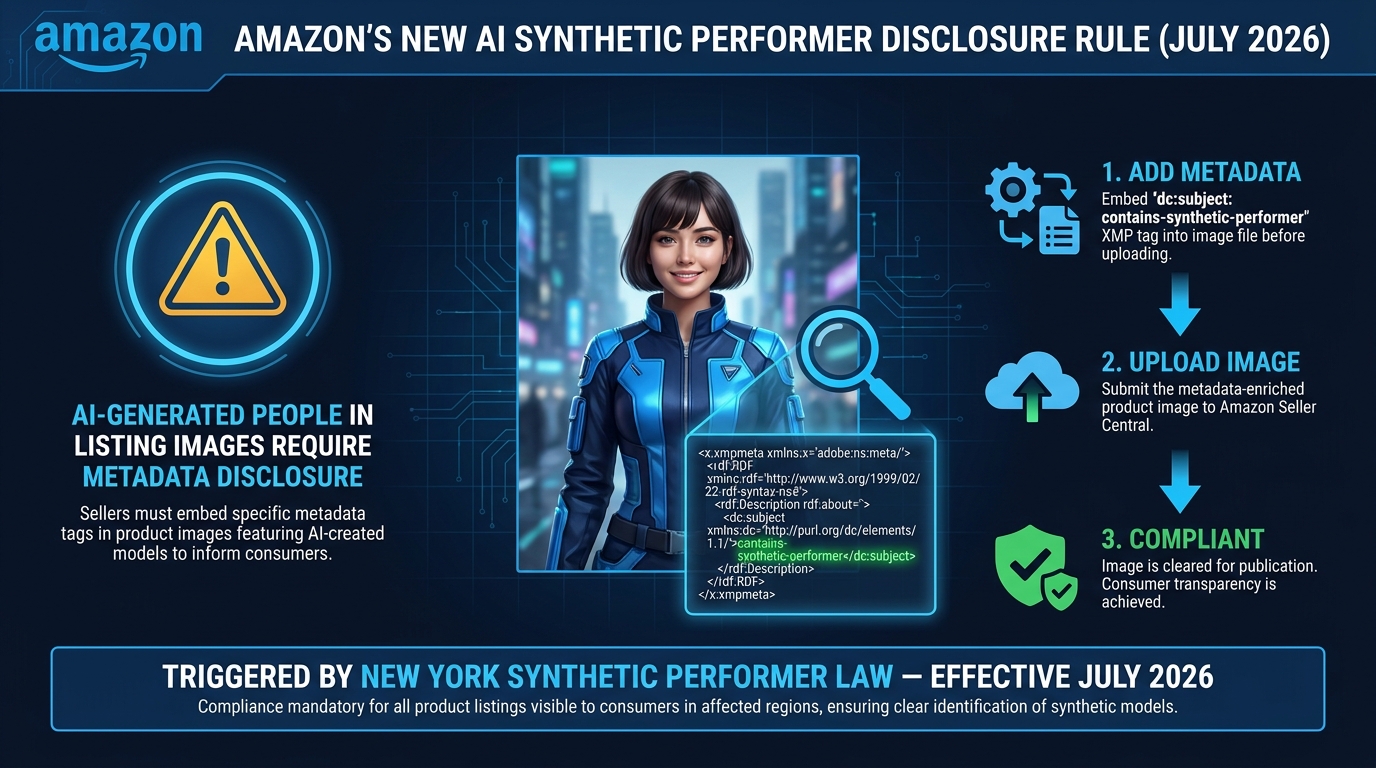
This is the single biggest new compliance requirement added to Amazon’s image framework in 2026, and many sellers are not yet aware of it. Starting in late July 2026, Amazon began notifying third-party sellers about a new disclosure requirement for product listing images, videos, and A+ content that contain photorealistic AI-generated people.
What Triggered This Rule
The requirement originates from New York State’s synthetic performer disclosure law, which took effect in June 2026. The law requires disclosure when AI-generated photorealistic human likenesses substitute for real human performers in advertising contexts. Amazon has indicated it is aligning its platform requirements with this law, and has rolled it out globally across its stores — meaning sellers in all markets, not just those selling in New York, are subject to the requirement.
CNBC reported that Amazon communicated the requirement to sellers in late July 2026, describing it as applying when listing images or videos contain photorealistic AI-generated people. This is a narrow but important definition — it applies specifically to photorealistic AI-generated human likenesses, not to real people whose images have been edited using AI tools, and not to cartoon characters, illustrated figures, or non-human AI-generated content.
The Technical Requirement: Metadata, Not a Visible Label
The disclosure is not a visible badge or overlay on the image itself. It is embedded in the image file’s metadata before upload. Sellers must add the exact keyword contains-synthetic-performer to the XMP dc:subject field of the image file using a metadata editor. Tools that support this include Adobe Bridge (via the IPTC Keywords or Subject field), ExifTool (command-line), and some batch image-processing tools that support XMP write operations.
The specific technical steps: open the image in a metadata editor, navigate to the XMP data section, locate the dc:subject field (sometimes labeled “Subject” or “Keywords” depending on the tool), add contains-synthetic-performer as a keyword value, save the file, and then upload to Seller Central. The metadata must be embedded before the upload — Amazon’s system reads it at ingestion time.
Who This Affects and What the Risk Is
This rule is directly relevant to any seller who has used AI image generation tools — Midjourney, DALL-E, Stable Diffusion, Adobe Firefly, or commercial product photography services that use AI models — to create listing images that feature a person. This has become increasingly common as AI-generated lifestyle photography has dropped in cost and improved in quality. Sellers who used AI model imagery to avoid hiring human models are now required to tag those images before they can be used on the platform.
The enforcement consequence is consistent with other image violations: Amazon may remove the non-disclosed image and, if no compliant main image remains, may suppress the listing from search. For A+ content, the module containing the non-disclosed AI image may be rejected or removed. If you have used AI-generated models in your listing imagery and have not added the metadata tag, this should be the first item you address in your audit.
What Is Explicitly Excluded
Amazon’s framing explicitly excludes several cases that sellers may be concerned about: real human models whose photos have been retouched, color-corrected, or otherwise edited using AI tools do not require the disclosure. AI-generated product images without any people do not require it. Illustrated or cartoon figures do not require it. The scope is specifically photorealistic AI-generated human likenesses — meaning images where the person depicted was entirely synthesized by an AI system and does not correspond to a real individual who was photographed.
Category-Specific Rules Most Sellers Get Wrong
Amazon’s core main image rules apply universally, but individual categories carry additional or different requirements that override general guidance. These category-specific rules are documented in Seller Central’s category-specific image standards pages, but they are easy to miss — particularly for sellers who expanded into new categories without re-reading the image standards for those categories specifically.
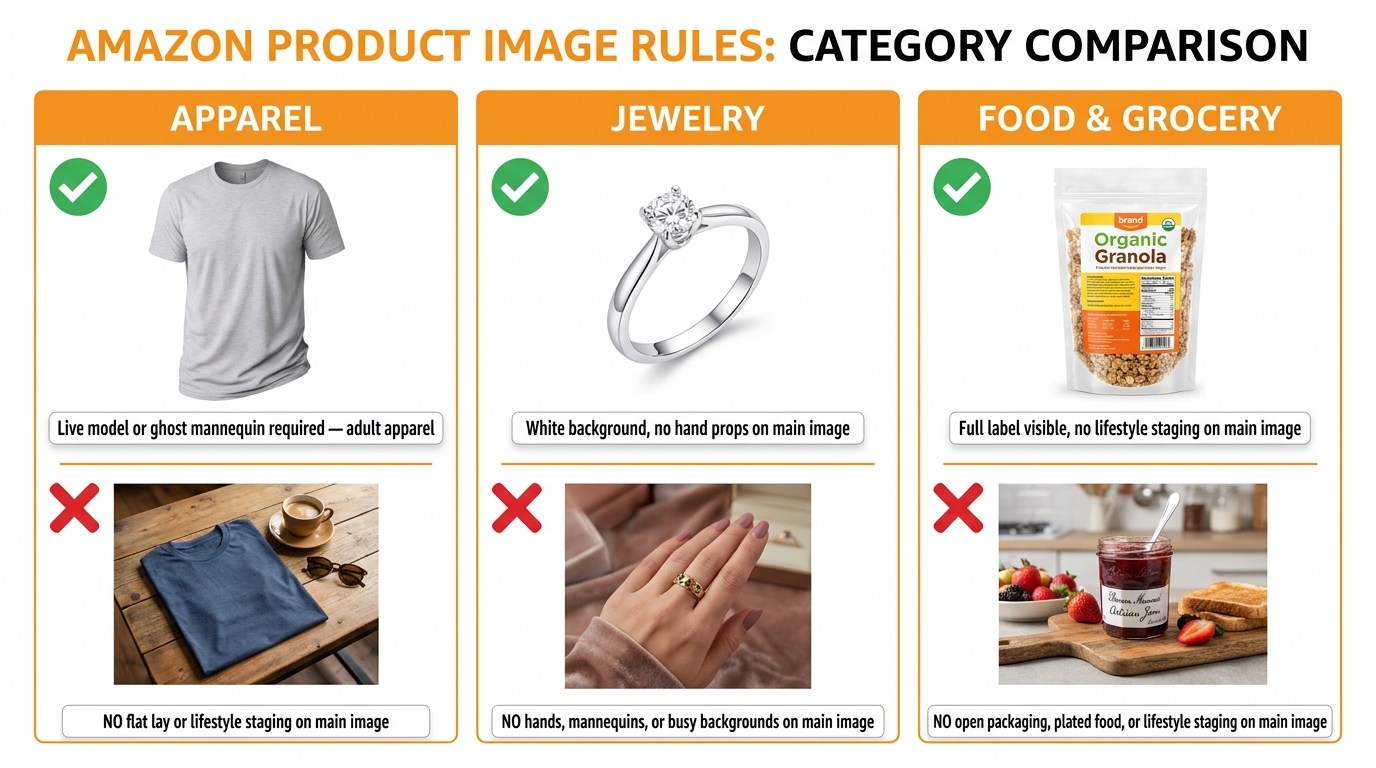
Apparel: The Model and Mannequin Rules
Apparel is the category with the most distinct main image requirements. For adult clothing, Amazon generally requires main images to show the garment either on a live model or on a ghost mannequin (also called an invisible mannequin). Flat-lay presentation — garments photographed laid flat on a surface — is generally not accepted for adult apparel main images, though it may be used in secondary image slots.
The exception is children’s and baby clothing, where flat-lay or off-model presentation is more commonly accepted and in some subcategories is preferred. The distinction matters because sellers who cross-list styles across adult and children’s categories cannot use a single image approach for their entire catalog — they need category-appropriate presentation for each product.
For model images in apparel, the model must be standing (not sitting or in motion in most cases), the garment must be the primary subject, and the background must still be pure white. Apparel sold as a set must show the complete set — not just the top or the bottom in isolation.
Jewelry: Specifics That Catch Sellers Out
Jewelry main images require the product on a pure white background with no props, hands, or mannequin parts visible. This catches many jewelry sellers who default to hand or wrist models for rings, bracelets, and watches — that presentation, which is standard in editorial jewelry photography, is not compliant for the main image slot on Amazon. It can be used in secondary image positions, but the main image must show the piece in isolation on white.
For jewelry presented on a stand or bust (common for necklaces), the stand or bust itself needs careful evaluation — Amazon’s guidance indicates that props that are not part of the item being sold should not appear, and display props occupy a grey area that is increasingly being flagged. The safest approach for necklace main images is to show the piece on a flat white surface or hanging against white, rather than on a jewellery bust.
Food and Grocery: Labeling Visibility
Food and grocery products must show the actual product, not a lifestyle arrangement or serving suggestion on the main image. For packaged food, the product label must be fully visible and legible — partially obscured packaging is a common violation. The product must be shown as it would arrive to the customer, which means an item sold in a box should show the box (with label visible), not the contents plated or styled.
Food listings also carry specific restrictions around claims in imagery — images suggesting health benefits, comparative claims, or third-party endorsements that are not substantiated are more likely to trigger A+ and secondary image rejections in the food category than in general merchandise categories.
Electronics and Multi-Pack Listings
Electronics main images should show the actual unit — not a render, not an out-of-box arrangement with multiple accessories, and not the retail box only (unless the box is specifically what’s being sold). Multi-unit or multi-pack listings should show all units that are included in the sale, which sometimes conflicts with the frame-fill requirement — sellers must balance showing all included items while keeping the image composition clean and the product(s) visually dominant.
The Resolution and Zoom Standard Gap: Where the Official Minimum Falls Short
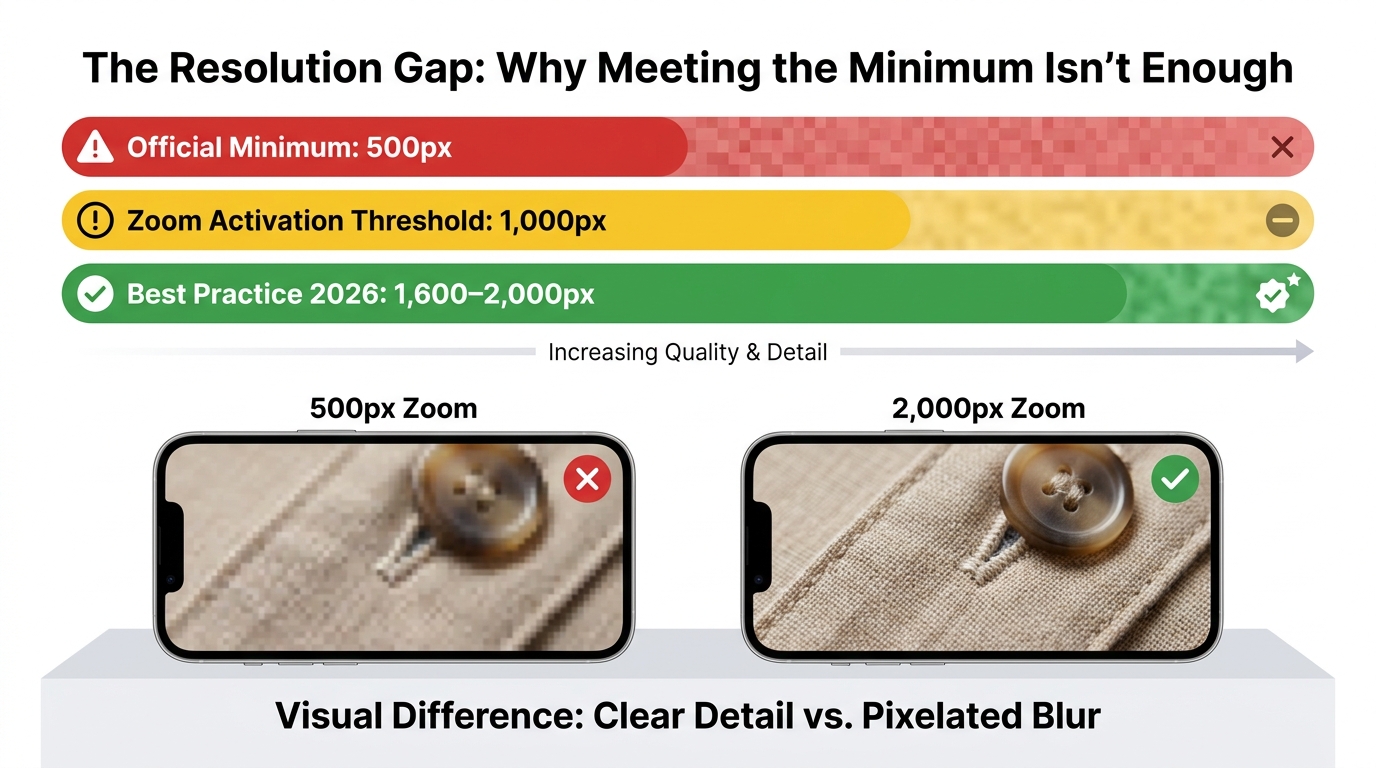
Amazon’s official technical requirement sets the minimum image size at 500 pixels on the longest side. This figure appears in Seller Central help documentation and represents the absolute floor below which Amazon will not accept an image. But meeting that minimum in 2026 is functionally insufficient in almost every competitive category, and understanding exactly why matters for sellers who are auditing existing catalog images against current standards.
The Zoom Activation Threshold
Amazon’s product image zoom feature — the ability for shoppers to hover over or tap an image to see a magnified view — activates when the image is at least 1,000 pixels on the longest side. Below that threshold, zoom does not function and the shopper sees only the base image at whatever size it renders in the listing. This is not a new requirement, but it means that any image between 500 and 999 pixels is technically compliant but practically degraded — it passes the policy check but delivers a worse shopping experience and, by extension, a worse conversion rate.
For competitive categories where multiple sellers are competing for the same clicks, the inability to zoom because you uploaded a 700-pixel image is a meaningful commercial disadvantage. The correct minimum for any seller who wants zoom capability is 1,000 pixels on the longest side.
Why 1,600–2,000 Pixels Is the Practical Standard in 2026
Most seller guides, agency standards, and professional product photography studios have converged on 1,600 to 2,000 pixels on the longest side as the practical target for 2026. The reasons are layered. First, at 1,000 pixels, zoom quality is adequate but not impressive — the image enlarges to roughly 2x but detail sharpness is limited. At 1,600 pixels and above, zoom quality becomes genuinely informative for high-detail products like electronics, textiles, and jewelry. Second, Amazon displays images at varying sizes across device types and screen resolutions, and a 2,000-pixel source image renders cleanly on high-DPI mobile displays in ways that a 1,000-pixel image does not. Third, Amazon’s own image quality assessment tools score images in part on resolution, and higher-resolution images tend to score better in those assessments.
The upper limit Amazon imposes is 10,000 pixels on the longest side. Uploading images above that threshold causes upload failure. Somewhere in the 1,600 to 3,000 pixel range delivers the optimal combination of quality, zoom performance, file size, and upload reliability for most product types.
Auditing Your Existing Image Resolution
When auditing an existing catalog, the resolution check requires looking at the source file dimensions — not how the image renders on the listing page. A 700-pixel image that looks acceptable on a desktop display may be technically non-compliant for zoom and visually degraded on mobile zoom. Check the actual pixel dimensions of every main image file in your catalog and flag anything below 1,000 pixels for replacement. Anything below 1,600 pixels should be assessed against your competitive landscape — if your category competitors are all running 2,000-pixel images and your listings are at 1,000 pixels, you are at a disadvantage even though you’re technically above the zoom threshold.
Secondary Images, Infographics, and Lifestyle: Where the Lines Now Are
The restrictions on Amazon’s main image slot are strict. Secondary image slots — positions two through nine in the listing image carousel — operate under a different and considerably more permissive set of guidelines, but there is a common seller misconception that secondary slots are unregulated. They are not, and enforcement against secondary image violations has become more consistent in 2026.
What Secondary Slots Allow
Amazon’s secondary image positions allow: lifestyle photography showing the product in use, infographic-style images with text callouts highlighting product features, dimensional diagrams, comparison charts between variants, packaging or unboxing imagery, and close-up detail shots. Text overlays, logos, and icons are permitted in secondary slots when they are used to communicate product information rather than promotional claims.
This is the correct zone for content that would be prohibited on the main image: size comparison references, material callouts, “what’s in the box” compositions, and in-context lifestyle shots. Sellers who have been putting this content on their main images (a common mistake) should move it to secondary positions rather than removing it entirely — it has real conversion value in the right slot.
What Secondary Slots Prohibit
Even in secondary image positions, Amazon prohibits several types of content that are consistently flagged in 2026 enforcement. These include: any content that makes health claims that are not substantiated and compliant with Amazon’s health claim policies, references to competitor products or brands, claims of Amazon’s endorsement or best-seller status (using Amazon’s trademarks or ranking badges), time-sensitive promotional pricing or urgency claims (“Limited Time Offer”, countdown timers), and any content that would mislead the buyer about what is included in the sale.
Unsubstantiated superlatives — “The Best”, “#1 Rated”, “Premium Quality” — in secondary images are increasingly being flagged, particularly in health, beauty, and dietary supplement categories where claim scrutiny is highest. If your secondary images contain language like this without specific, documented substantiation, they are a compliance risk.
The 2026 Enforcement Pattern for Secondary Images
The shift in 2026 is not that Amazon has created new secondary image rules. It is that enforcement is now happening at the individual image level rather than only at the overall listing level. Previously, a listing might pass review even if one secondary image contained borderline content, because the review was holistic. Current reports indicate more granular, image-slot-level enforcement — meaning a single non-compliant secondary image can trigger that image’s removal while the rest of the listing remains live. This is actually a more targeted form of enforcement than wholesale listing suppression, but it creates catalog management complexity for sellers who need to track compliance at the individual image position level.
A+ Content Image Rules: Module-Level Rejection Is the New Normal
A+ Content (formerly Enhanced Brand Content) operates under its own content policies that overlap with but are distinct from the main listing image guidelines. The significant shift in 2026 is the move to module-level rejection — where individual A+ modules within a page can be rejected or removed without the entire A+ submission being declined.
What Triggers A+ Module Rejection
Amazon’s A+ content review process in 2026 is flagging module-level issues in several categories. The most commonly reported rejection triggers are: comparative claims that reference competitor ASINs or brands (even implicitly), health or efficacy claims that are not substantiated in compliance with Amazon’s content policies, images with unreadable text (text too small or low-contrast to read clearly), reuse of images that have already been rejected in previous A+ submissions, references to time-limited pricing or promotions, and images that fail resolution standards (A+ module images have their own size requirements, typically specified at the module level in the A+ builder).
For the AI disclosure requirement: A+ content that contains photorealistic AI-generated people is subject to the same contains-synthetic-performer metadata requirement as main listing images. The metadata must be embedded in the image file before it is uploaded to the A+ builder.
The Resolution Requirements Inside A+ Builder
A+ Content modules have specific image dimension requirements that vary by module type. The A+ Content builder in Seller Central shows the required dimensions for each module as you build the page. These requirements are not the same as main image requirements — some A+ modules require wider, landscape-format images rather than square images, and the minimum pixel requirements for each module are defined by the module’s display dimensions. Uploading an undersized image to an A+ module will produce a quality warning in the builder, and if the image is significantly below specification, it may render poorly enough to trigger review rejection.
Practical A+ Compliance Steps
Check all active A+ pages in your brand catalog against current content standards. Pay particular attention to pages that were built before 2025 — older A+ content is more likely to contain language or comparative claims that have since become more strictly enforced. Any A+ module that includes a photorealistic AI-generated person needs the metadata disclosure added to the source image file before the page goes through its next review cycle. And review your A+ image resolutions against the builder’s specified requirements for each module type — do not assume that the images you uploaded are still rendering correctly if the module templates have changed since the content was built.
The Automated Scanner: How Amazon’s Image Review System Actually Catches Violations
Understanding what Amazon’s automated image review system is actually checking helps sellers understand why certain violations get caught quickly and others take longer. While Amazon does not publish a technical specification for its image-review systems, the pattern of violations that are caught quickly versus those caught during manual review cycles tells a consistent story about how automated enforcement works.
What Gets Caught Fast
Violations that automated systems catch most rapidly tend to be measurable, pixel-level issues. Background non-compliance (non-white background values), insufficient image resolution (images below minimum pixel counts), and image files that don’t conform to accepted format specifications are all checks that a computer vision system can perform in milliseconds. These violations are typically caught at upload time or very shortly after, often within minutes to a few hours of the image appearing on the listing.
Text detection on main images is another area where automated enforcement appears highly effective. Optical character recognition tools can scan images for text content at scale, flagging main images that contain text overlays, watermarks, or promotional callouts. Sellers who have added even small text elements to main images — a brand name in the corner, a “New” badge, a size callout — are likely to have those violations caught quickly in the current environment.
What Goes Through Manual Review
More nuanced violations — claims substantiation issues in secondary images, borderline lifestyle props in main images, complex compositional judgment calls — are more likely to enter a manual review queue rather than being caught by automated scanning. This explains why some sellers report violations being flagged weeks after an image was uploaded, rather than immediately. The automated layer catches technical violations fast; the manual layer catches content policy violations on a slower cycle.
The AI synthetic performer disclosure — the contains-synthetic-performer metadata requirement — appears to be enforced through a combination of automated metadata reading (checking for the presence or absence of the required tag) and potentially AI-based image analysis that identifies photorealistic human figures. This suggests it will be enforced on a faster cycle as the metadata-reading component is straightforward to automate.
The Re-Upload Risk
An important operational note: when you replace an image on an existing listing, the new image goes through the same review process as a new upload. Sellers sometimes assume that because a listing has been live for a long time, image changes will pass through faster or with less scrutiny — that assumption is incorrect. Every image replacement triggers a fresh compliance check, which means updating one image in a set can result in a compliance action on the new image even if the image it replaced was never flagged. This is not a reason to avoid updating images, but it is a reason to ensure replacement images are fully compliant before uploading rather than uploading quickly and fixing later.
Mobile Thumbnail Optimization: The Invisible Conversion Lever
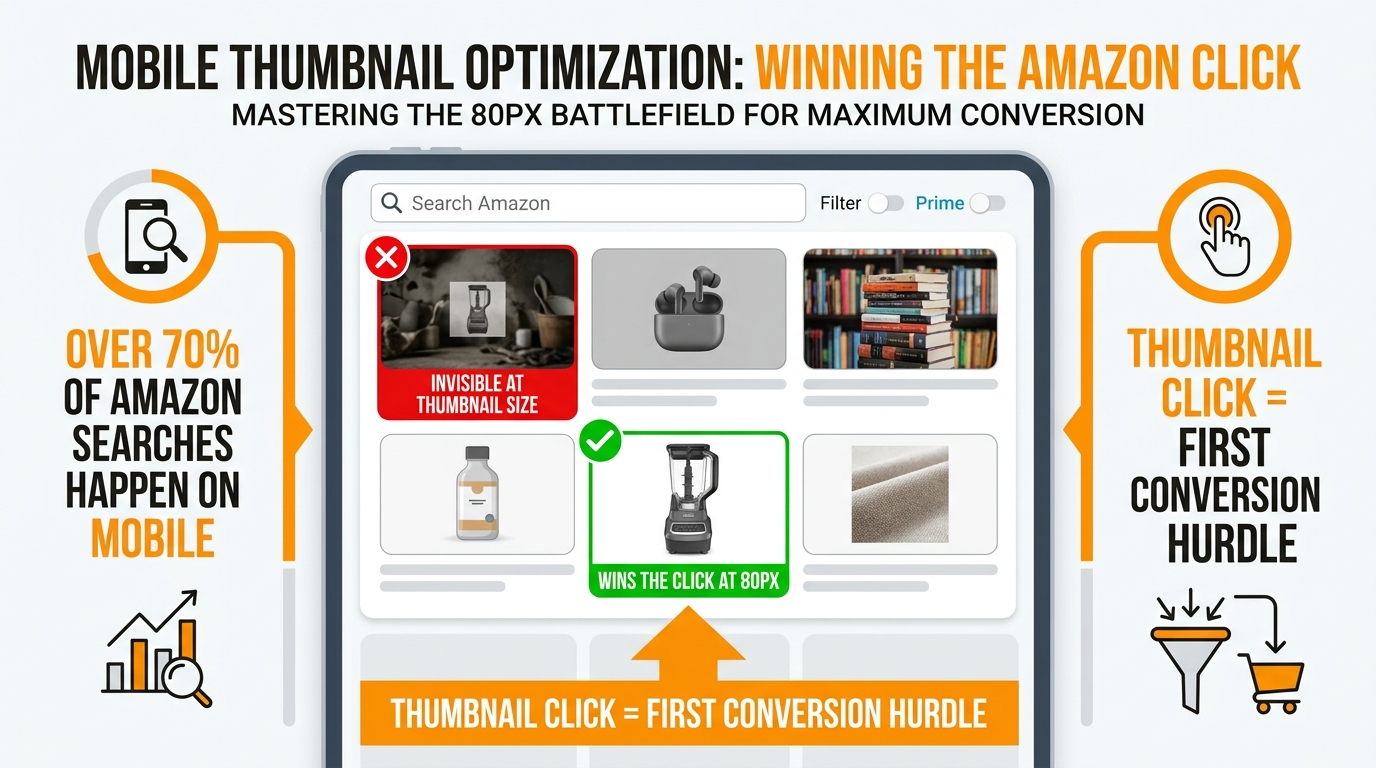
More than 70% of Amazon shopping sessions happen on mobile devices. On mobile, the first thing a customer sees for any given product is a thumbnail image — a small, square crop of the main product image rendered at roughly 80 to 120 pixels in the search results grid. Whether that thumbnail generates a click is the first conversion decision in the purchase funnel, and most image audit processes completely ignore it.
The Thumbnail Test
Take your main product image and reduce it to 80 pixels square in any image editor. What you see at that size is what your customer sees when they scan mobile search results. Is the product clearly identifiable? Is it centered and prominent in the frame? If the product is small, positioned in a corner, or blending into other elements, it is losing clicks to competitors whose thumbnails are bolder and more immediately clear.
The 85% frame fill requirement that Amazon specifies for main images is also the key driver of good thumbnail performance. A product that fills most of the image frame at full size will still be clearly recognizable when the image is scaled down to thumbnail dimensions. A product that occupies 50% of the frame at full size will be hard to identify in the thumbnail grid. This is one area where compliance and commercial performance are perfectly aligned — meeting Amazon’s frame-fill requirement also gives you the best possible thumbnail performance.
Color and Contrast Considerations
Products that are white or light-colored face a specific thumbnail challenge: on a pure white background, a light-colored product can disappear at thumbnail scale, blending into the background in ways that make the listing appear blank or uninteresting at a glance. This is not a compliance issue — white products on white backgrounds are compliant — but it is a commercial issue that sellers of white, cream, or light-grey products need to address.
The compliant solution for light-colored products is to ensure the product has enough definition, shadow, or surface texture to distinguish it clearly from the white background at small sizes. Subtle drop shadows (permitted in some secondary image positions but not on the main image), very precise lighting that creates depth on the product surface, and careful composition that ensures the product’s edges are clearly defined all help. If your white or light-colored product genuinely disappears against the white background at thumbnail size, this is worth a targeted photoshoot to resolve.
Speed of Visual Recognition
Shoppers in mobile search results are scrolling fast. Research on visual attention in e-commerce contexts consistently shows that product images have a fraction of a second to register. Images that require cognitive effort to parse — cluttered compositions, ambiguous subject positioning, products that are too small in frame — lose that attention moment. The simplest mobile thumbnail optimization is also the most compliant one: one product, centered, filling most of the frame, on clean white. No ambiguity, no clutter, no competition with supporting elements for visual attention.
Building a Pre-Upload Image Audit Process for Your Catalog
An effective image audit process for a live catalog needs to be systematic enough to cover every ASIN but light enough to be repeatable without consuming excessive operational resources. The following structure works for catalogs of any size, from a few dozen SKUs to tens of thousands.
Step 1: Inventory Your Current Image Stack
Start with a complete inventory. Use Seller Central’s inventory reports or a third-party catalog management tool to export a list of all active ASINs, their current image URLs, and their image counts. For each ASIN, you need to know: how many images are in the listing, what is the current main image, and what are the secondary image positions. Flag any ASIN with fewer than four images — the image slots you have not filled are conversion opportunities left on the table, and they are often a sign of a listing that has not been maintained.
Step 2: Technical Compliance Check
For the main image of each ASIN, run the following checks:
- Pixel dimensions: Flag anything below 1,000 pixels. Prioritize fixing anything below 500 pixels (which should not exist in a live catalog but does occasionally appear in older listings).
- Background value: Sample the background with a color picker tool and confirm RGB 255, 255, 255. Flag anything with a background value below 250 in any channel.
- Frame fill: Estimate or measure the product’s coverage of the frame. Flag anything below 75% as a likely compliance and conversion risk.
- Prohibited elements: Manually review each main image for text, logos, watermarks, props, and other prohibited content. This cannot be fully automated without specialized image-analysis tools, but a visual scan at scale is possible with organized review workflows.
- AI synthetic performer: If your image production workflow has used AI image generation tools that produce human figures, identify those images and verify the
contains-synthetic-performermetadata tag is embedded before upload.
Step 3: Category Compliance Review
Group your ASINs by category and review main images against category-specific requirements. This is most critical for apparel (model/mannequin rule), jewelry (no hands/props on main), and food (product as sold, label visible). Build a simple category-by-category compliance matrix that lists the category-specific requirements alongside your current image presentation for each group, and flag the gaps.
Step 4: Secondary Image and A+ Review
Review secondary images for prohibited claims, competitor references, and resolution compliance. Review all active A+ pages for outdated content, claims that no longer meet current standards, and any AI-generated human imagery that requires the metadata disclosure. Prioritize A+ pages for your highest-revenue ASINs — a rejected module on a best-seller’s page has significantly more commercial impact than a rejection on a slow-moving SKU.
Step 5: Prioritization and Scheduling
Not everything can be fixed at once. Build a prioritization matrix that ranks ASINs by: current sales revenue (highest revenue = highest priority), violation severity (suppression-risk violations first, optimization opportunities second), and fix complexity (simple re-crops and background fixes first, full re-shoots later). Create a fix schedule with assigned ownership and deadlines, and track progress against it. Review the queue weekly until it is clear.
How to Recover a Suppressed Listing Fast
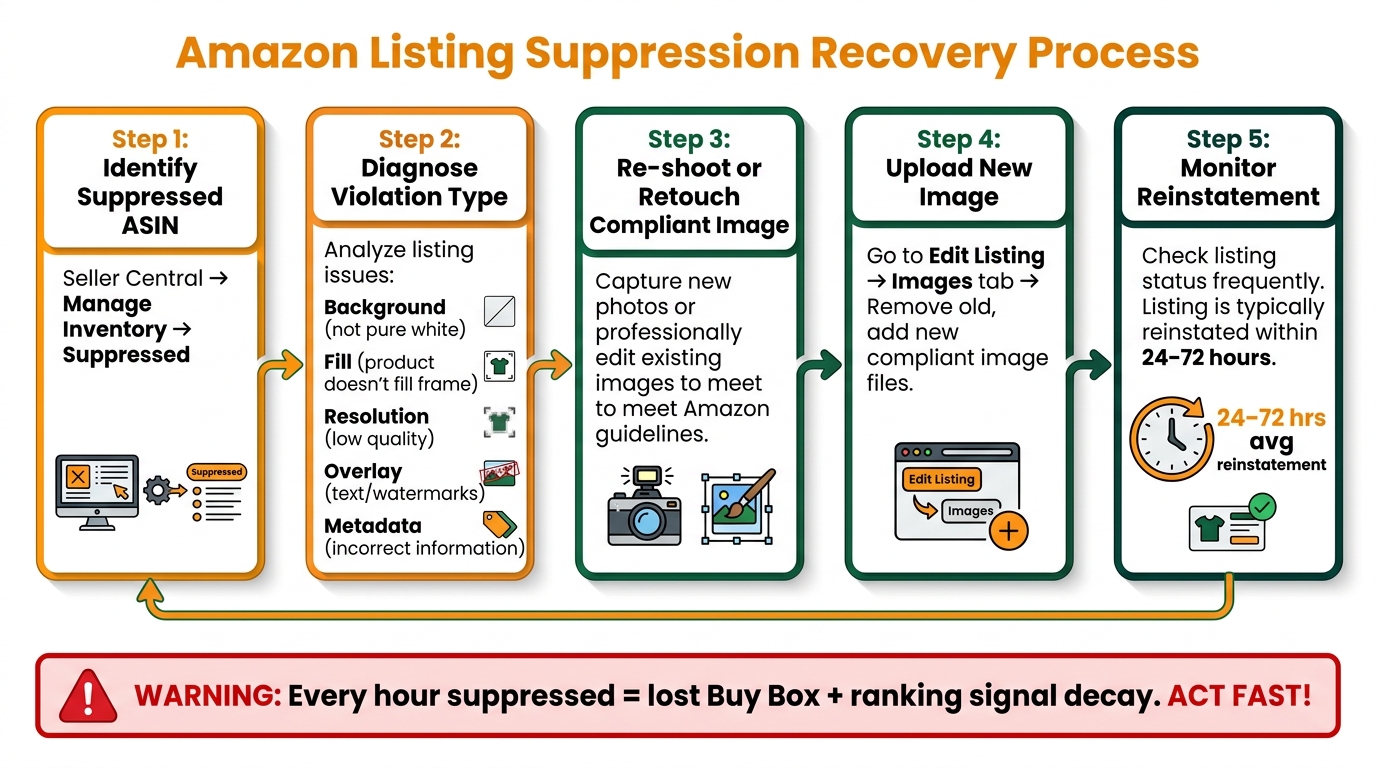
If suppression has already happened, speed of recovery determines how much revenue damage you sustain and how quickly your ranking signals recover. The process is straightforward but each step needs to happen in the right sequence.
Identify the Exact Violation
In Seller Central, navigate to Inventory → Manage Inventory → Suppressed. The suppressed listings view will show you which ASINs are affected. Amazon typically provides a reason code or description for the suppression — read it carefully. Common image-related suppression reasons include “Main image does not meet our image standards,” “Image contains prohibited content,” and “Product image is missing.” The reason code determines your fix path — a background violation needs a different fix than a resolution violation or an overlay violation.
If the reason is unclear or generic, compare your current main image against the complete compliance checklist above. In most cases, the violation will be identifiable visually once you know what you’re looking for.
Prepare the Replacement Image
Fix the specific violation identified — do not simply upload a different version of the same image if the problem hasn’t been corrected. If the background was near-white, get it to true 255, 255, 255. If the image had text, remove it. If the resolution was below minimum, source a higher-resolution file. If the AI disclosure metadata is missing, embed it before uploading. Verify the replacement image against the full technical checklist before uploading — the goal is to upload once and have it pass, not to iterate through multiple uploads while the listing remains suppressed.
Upload and Monitor
Upload the replacement image via Manage Inventory → Edit → Images. After uploading, allow 15–30 minutes for initial processing. After that window, check whether the listing has reappeared in search. Amazon’s help documentation indicates listings are typically reinstated relatively quickly once a compliant image is in place, but processing times vary. In practice, most image-related suppressions resolve within 24 to 72 hours of a compliant image upload.
If the listing has not been reinstated after 48 hours and your replacement image is genuinely compliant, contact Seller Support with your case. Document the compliance of the new image (screenshot with color picker values, pixel dimensions, absence of prohibited elements) and request a manual review of the reinstatement. Having that documentation ready speeds up the support interaction considerably.
Post-Recovery: Assess the Ranking Impact
After reinstatement, monitor your keyword rankings for the affected ASIN over the following two weeks. A suppression of even two to three days can cause organic ranking positions to drop as the listing stops accumulating click and conversion signals during the suppression window. If rankings have declined materially, consider a targeted PPC boost on key terms to accelerate the recovery of ranking velocity while organic signals rebuild.
What to Watch for in the Rest of 2026
The image compliance landscape is not static. Several developments in the second half of 2026 are likely to affect sellers who are not monitoring the policy environment.
Continued AI Disclosure Scope Expansion
The contains-synthetic-performer requirement currently applies to photorealistic AI-generated people. As AI-generated content becomes more prevalent and as more jurisdictions adopt synthetic media disclosure laws, it is reasonable to expect Amazon to expand the scope of its disclosure requirements over time. Sellers who are building AI-generated image workflows should design those workflows with disclosure infrastructure built in from the start — retrofitting metadata tagging across a large image library is considerably more painful than including it in the production process.
Higher Resolution Expectations
The market standard for image resolution keeps moving upward. The 2,000-pixel recommendation that is common today in seller guidance is likely to continue migrating toward 2,500 or 3,000 pixels as display technology advances and as higher-resolution source images become the norm in competitive categories. Sellers who invest in high-resolution photography now are building an asset that will remain compliant and competitive longer than those who continue to meet the minimum and no more.
Video and Interactive Media Compliance
Amazon’s video content policies for product listings are becoming more aligned with the image compliance framework. The AI synthetic performer disclosure applies to videos as well as images, and the same technical metadata approach is required. As video adoption on listings continues to grow, expect video-specific compliance requirements to receive the same enforcement attention that image compliance has received in 2026.
Automated Compliance Monitoring Tools
The operational burden of maintaining image compliance across large catalogs is driving adoption of third-party image compliance monitoring tools that connect to the Amazon API, periodically scan listing images against compliance rules, and alert sellers to violations before Amazon’s own systems trigger suppression. These tools are maturing rapidly and are becoming cost-effective even for mid-sized catalogs. If you are managing more than 200 ASINs and doing image compliance audits manually, evaluating these tools is worth time in the second half of 2026.
The Bottom Line: Run the Audit Now, Not After the Suppression
Amazon’s image compliance environment in 2026 is characterized by faster, more automated enforcement against a set of rules that have not fundamentally changed but are being applied far more rigorously than they were even eighteen months ago. The sellers who will avoid suppression events are those who treat image compliance as an ongoing operational function rather than a one-time launch checklist.
The self-audit structure above covers every dimension that matters: core main image technical requirements, the new AI synthetic performer disclosure that took effect in July 2026, category-specific rules for apparel, jewelry, and food, the resolution gap between Amazon’s official minimum and what actually performs in the market, secondary image and A+ content compliance, mobile thumbnail performance, and the recovery process when suppression does occur.
Run this audit against your catalog this week. Prioritize by revenue at risk. Fix the suppression-risk violations first and the optimization gaps second. And build the review into a recurring cycle — not because Amazon’s fundamental rules are changing dramatically, but because your catalog is always changing, your image production workflow is always evolving, and the enforcement environment is always tightening.
Key Takeaways for Sellers
- Main image background must be RGB 255, 255, 255 — near-white is not white and is actively being caught by automated scanners.
- The AI synthetic performer disclosure (
contains-synthetic-performerXMP metadata) is required for all listing images, videos, and A+ content containing photorealistic AI-generated people — enforcement began July 2026.- Minimum 1,000px for zoom activation; 1,600–2,000px is the practical standard for competitive listings in 2026.
- Category-specific rules for apparel (model/mannequin), jewelry (no hand props on main), and food (product as sold, label visible) are enforced separately from general image standards.
- A+ Content is now subject to module-level rejection — individual non-compliant modules can be removed without the whole page being taken down.
- Secondary image violations are increasingly caught at the individual image-slot level, not just at the listing level.
- Suppression recovery is straightforward but time-sensitive — each hour of suppression means lost Buy Box access, lost ranking signals, and potentially wasted ad spend.
- Build a repeating image compliance audit into your catalog management calendar — not just at launch.