
Tag: listing optimization

  • Why Your Amazon Images Are Silently Killing Your Conversion Rate (And How to Fix Every Slot)

    Why Your Amazon Images Are Silently Killing Your Conversion Rate (And How to Fix Every Slot)

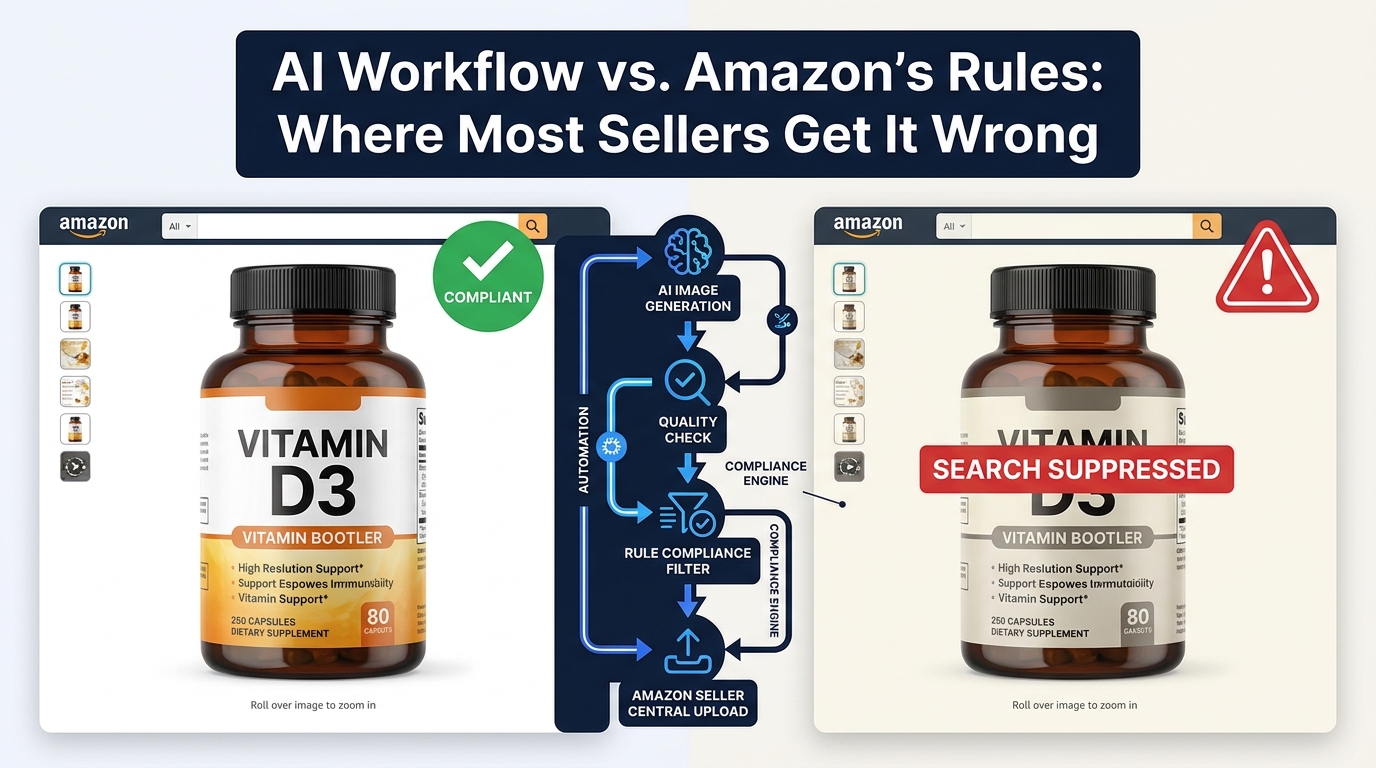
    Split-screen Amazon listing comparison showing low vs high converting product images with CVR data

    There are two kinds of Amazon sellers who read articles about listing images. The first kind has genuinely poor images — blurry supplier photos, non-white backgrounds, mismatched lighting. They know something is wrong because their conversion numbers tell them so. The second kind has done the homework: they have a clean hero shot on pure white, they’ve filled all seven image slots, their infographics are tidy, and their listing looks professional. And yet, their conversion rate is still underwhelming.

    This article is mostly for the second group. Because the gap between compliant images and compelling images is where most Amazon sellers are leaving the most money on the table in 2026.

    Compliance is table stakes. Following Amazon’s technical specifications gets your listing visible. It does not, by itself, get your listing clicked. It does not move a browsing shopper from passive interest to genuine purchase intent. That shift — from compliant to compelling — requires a completely different mental model. You’re not just satisfying a checklist. You’re constructing a visual sales argument, slot by slot, that answers every doubt a buyer might have before they ever read a single word of your bullet points.

    The data backs this up. Professional photography drives 2–3x higher conversion rates compared to listings with amateur or generic visuals. A+ Content with optimized images can increase sales by up to 20% over standard listings. A single main image test can move CTR from 2.1% to 3.4% — a 62% increase — without changing a single word of copy. These are not small numbers in a competitive marketplace.

    What follows is a ground-level examination of every image slot, the psychology driving buyer behavior, the specific mistakes that sabotage otherwise solid listings, and the testing infrastructure you need to keep improving. Let’s start at the very beginning: what happens in the buyer’s brain before they’ve consciously decided anything.

    The Psychology of 50 Milliseconds: How Buyers Decide Before They Think

    Infographic showing the 50ms buyer psychology principle — buyers judge products before reading any copy

    Research on visual perception consistently shows that humans form first impressions of visual stimuli in approximately 50 milliseconds. On Amazon, that means a shopper scrolling through search results has already begun evaluating your product — assessing quality, trustworthiness, and relevance — before their conscious brain has processed a single character of your title.

    This is not a metaphor. It’s the literal neurological reality of your marketplace. And it has profound practical implications for how you think about your hero image.

    The Trust Signal Problem

    When a buyer sees a product image, their brain isn’t asking “does this look nice?” It’s running a much more primal calculus: can I trust this? Sharp focus, accurate color reproduction, professional lighting, and a product that fills the frame all function as unconscious trust signals. They communicate that the seller is serious, the product is real, and the brand has invested in quality presentation.

    Conversely, a dark photo, an off-white background, a product that looks small and lost in an oversized frame, or any hint of blurriness triggers an equally automatic suspicion response. Shoppers don’t consciously think “this seller looks unprofessional.” They just feel reluctant — and they click somewhere else.

    Images as Sensory Substitutes

    In a physical retail environment, customers pick things up. They feel the weight, test the texture, open the packaging, press the buttons. Online shopping strips all of that away. The only sensory information available to a potential buyer is what your images provide. This means your image set isn’t just a gallery — it’s a substitute for the in-store experience.

    The most effective Amazon image stacks understand this implicitly. They anticipate the specific sensory questions a customer would ask if they were holding the product. How big is this, really? What does the material feel like? How does it work? What does it look like when someone my age uses it? Every image slot is an opportunity to answer one of those questions before the customer has to ask it — or worse, leaves to find the answer on a competitor’s listing.

    The Risk Reduction Imperative

    Behavioral economics research consistently demonstrates that loss aversion — the fear of making a bad purchase — is a more powerful motivator than the anticipation of gain. Applied to Amazon shopping, this means buyers aren’t just looking for reasons to buy your product. They’re actively scanning for reasons not to buy it. Every unanswered question, every ambiguous image, every detail left to the imagination increases the perceived risk of the purchase.

    Your image set’s job is to systematically eliminate that risk. Show the product from every relevant angle. Demonstrate scale unambiguously. Show it in use in a realistic context. Answer the “but what about…” questions before they’re asked. The listing that eliminates the most purchase-blocking doubts wins the conversion.

    Your Hero Image: The Click-or-Skip Decision

    The hero image — the first image, the one that appears in search results — is functionally a different animal from all your other images. Its job is not to convince. Its job is to get the click. Everything else on your listing handles the convincing. The hero image is purely responsible for getting the shopper off the search results page and onto yours.

    This is an important distinction that many sellers blur. They design their hero image to communicate features, highlight benefits, or establish brand identity. Those are all valuable objectives — for images two through seven. The hero image has one objective: click-through rate.

    Technical Requirements Are Not Optional

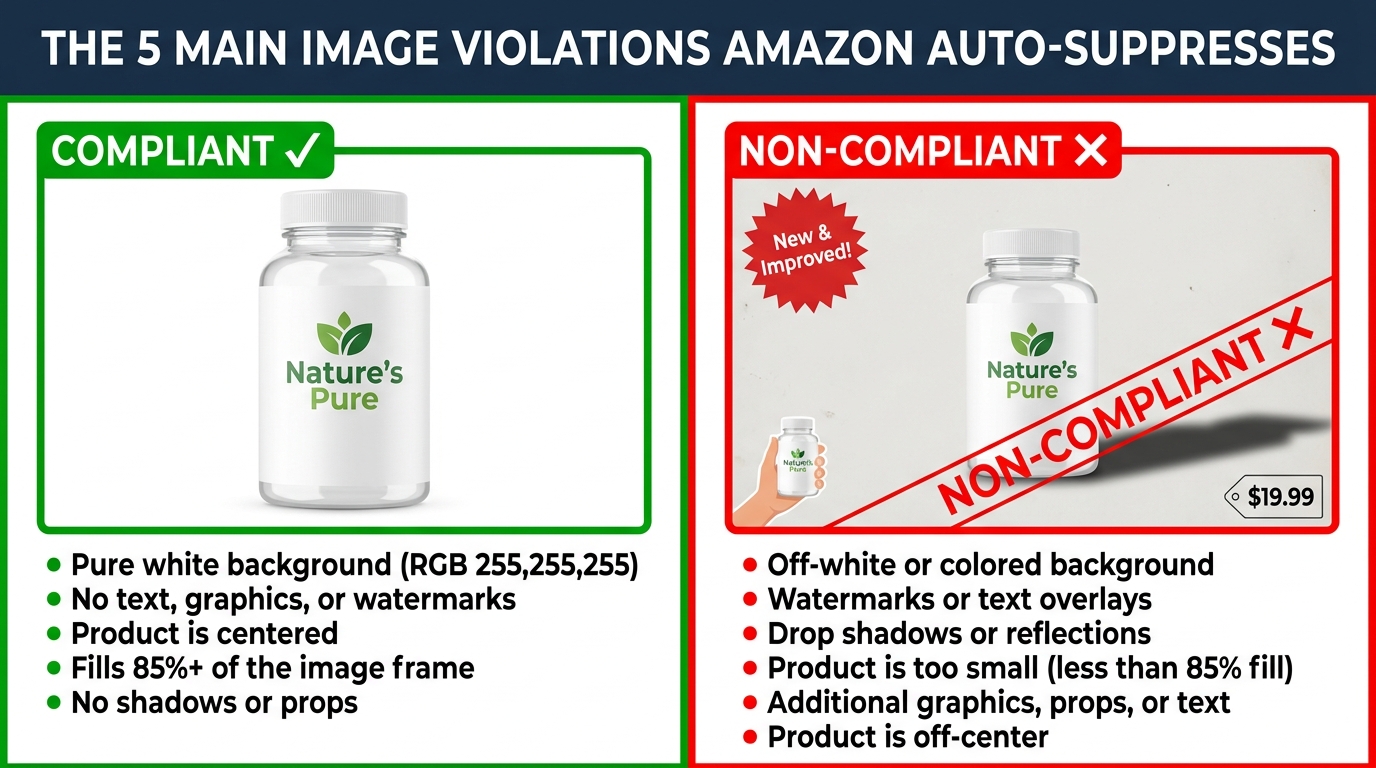
    Amazon’s requirements for the main image are strict and actively enforced:

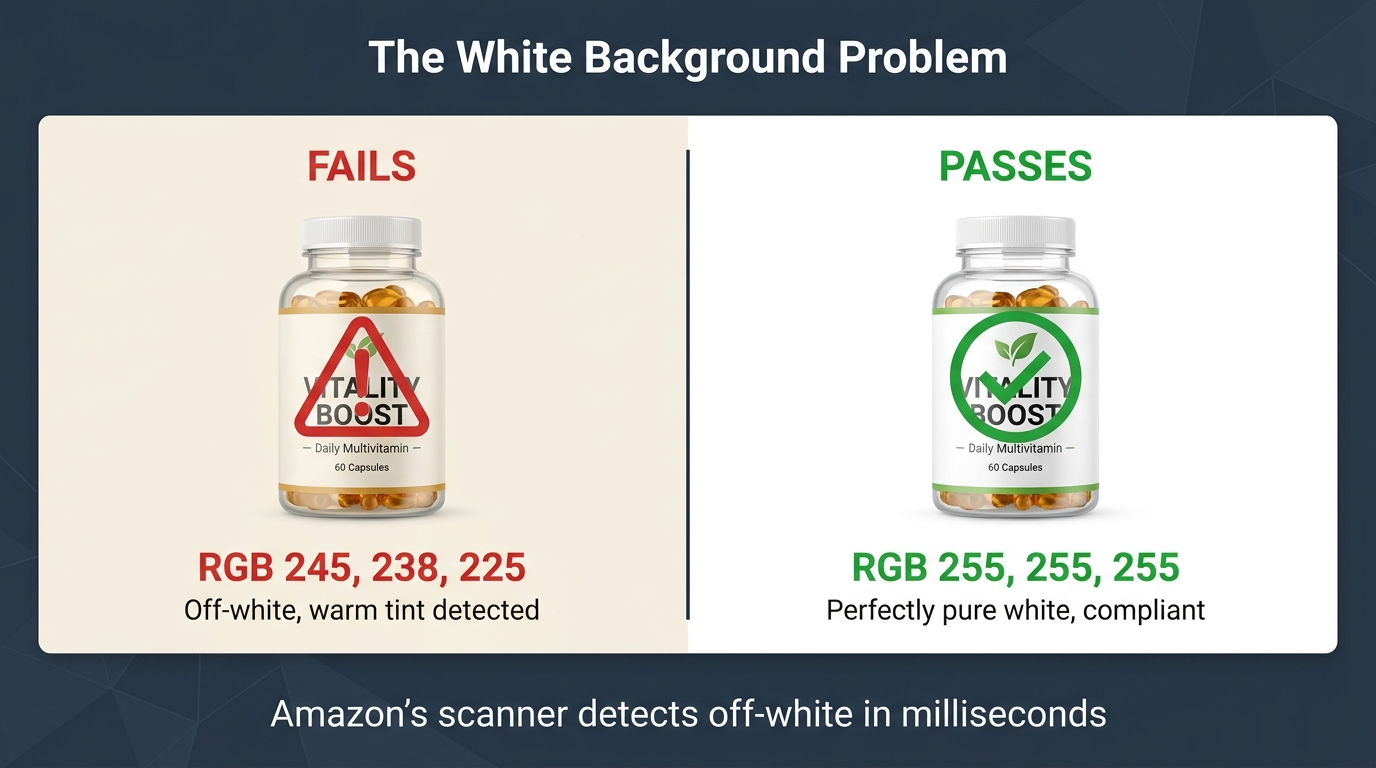
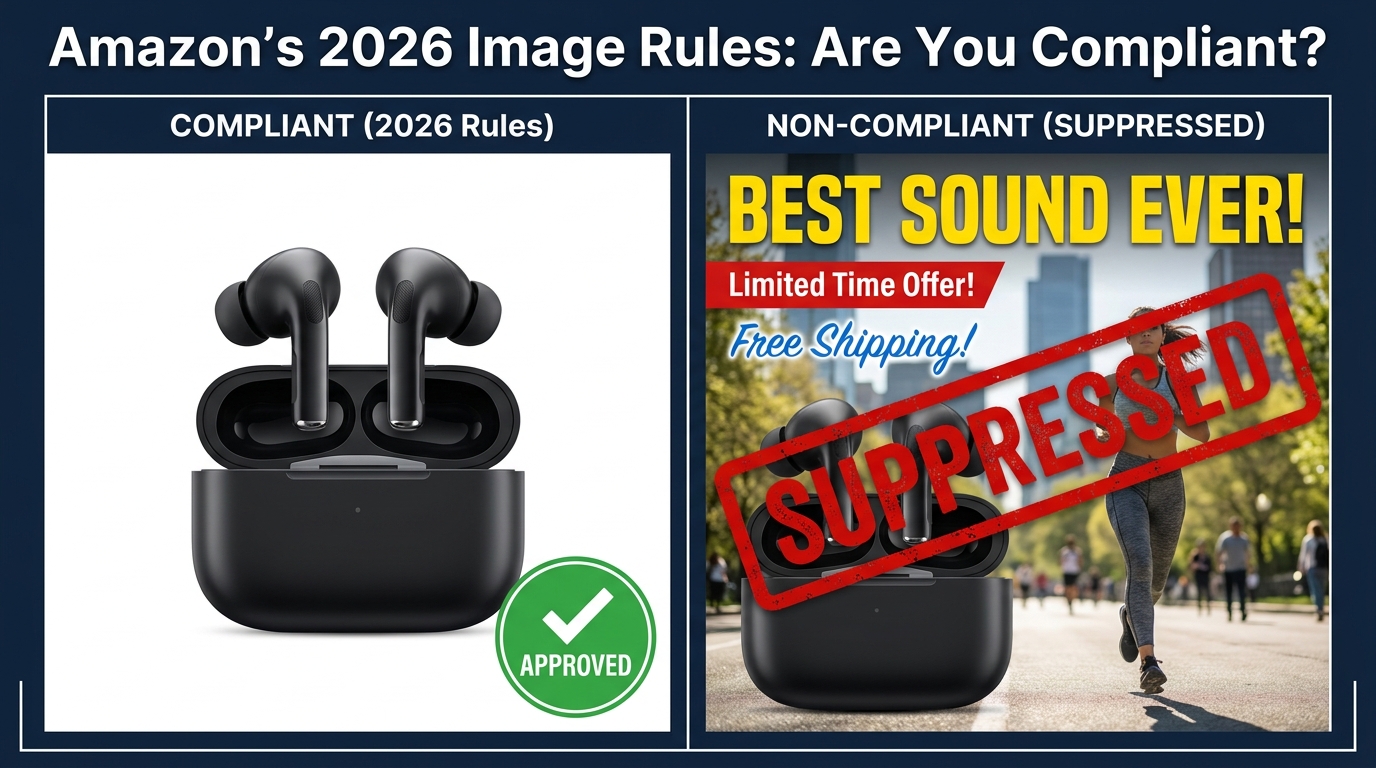
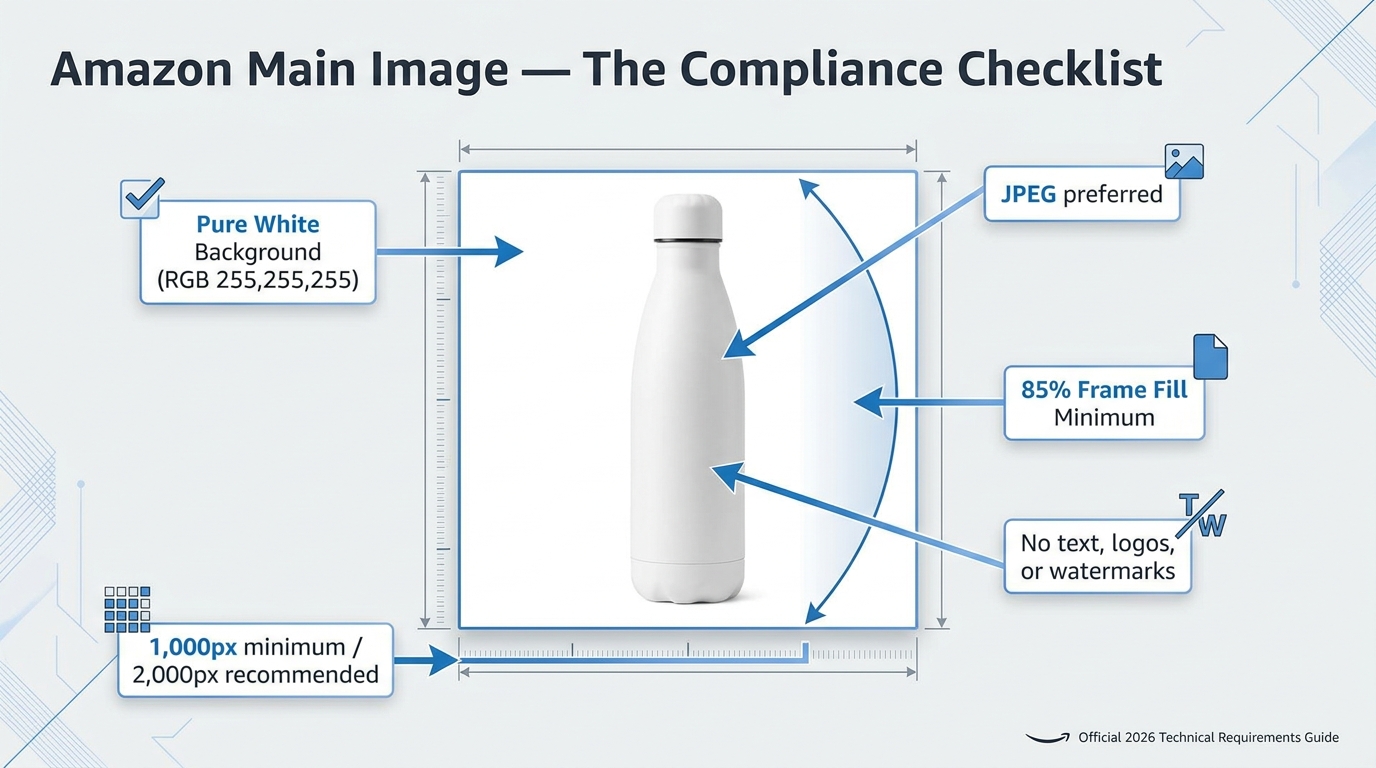
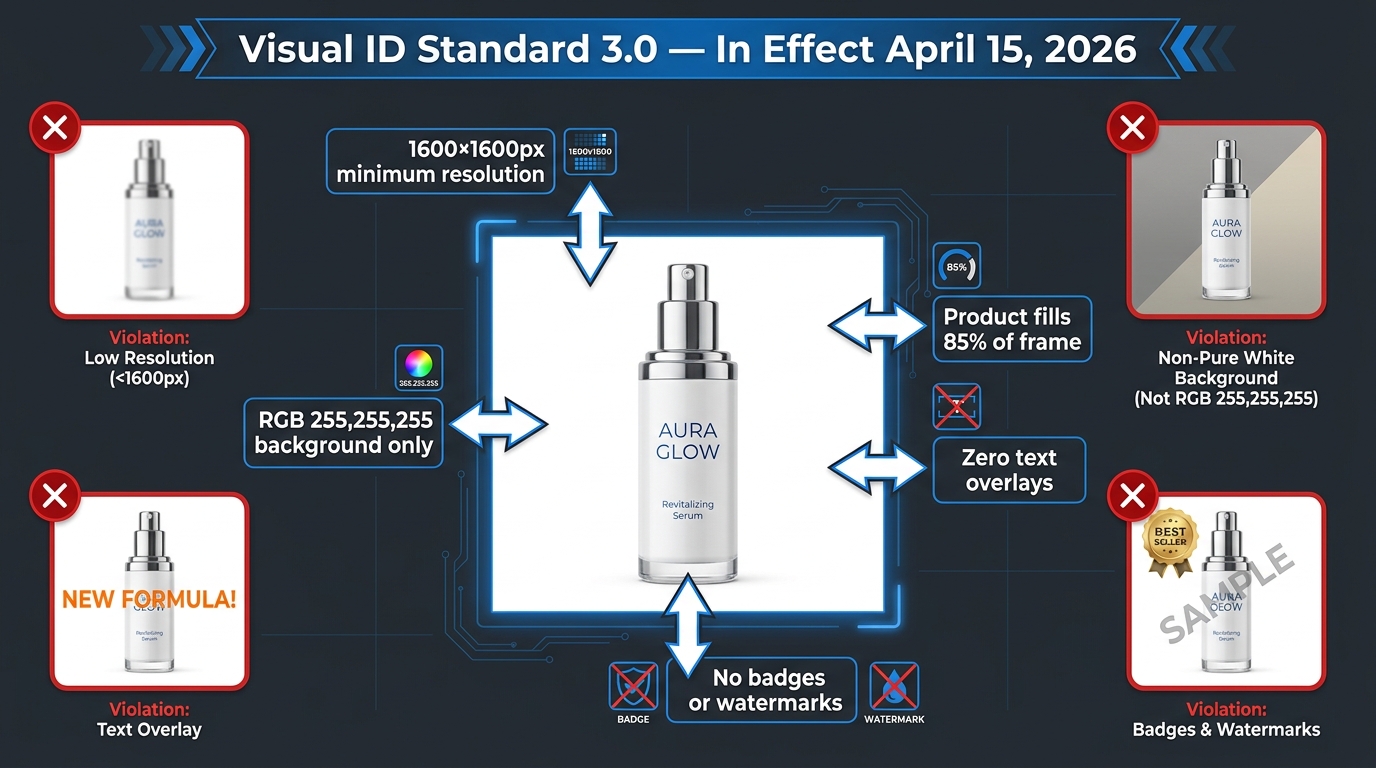
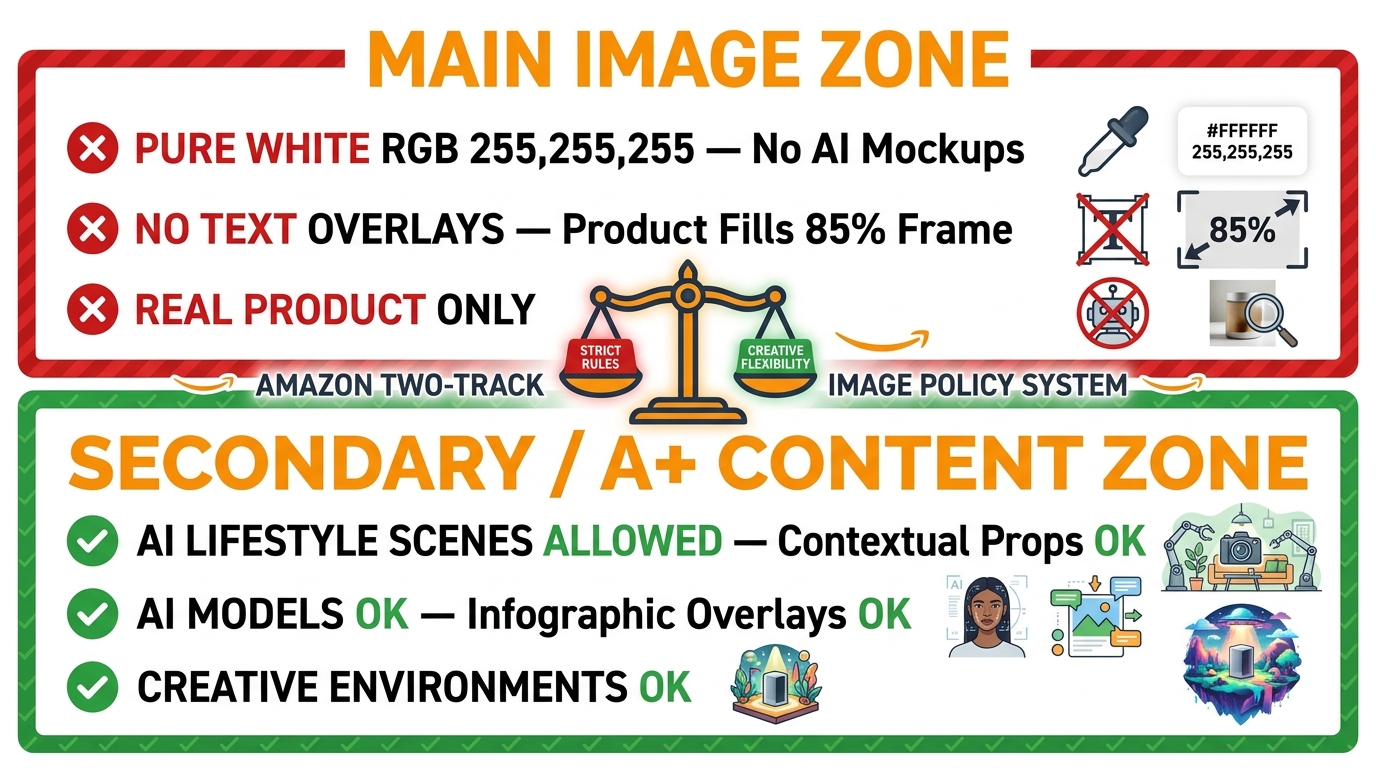
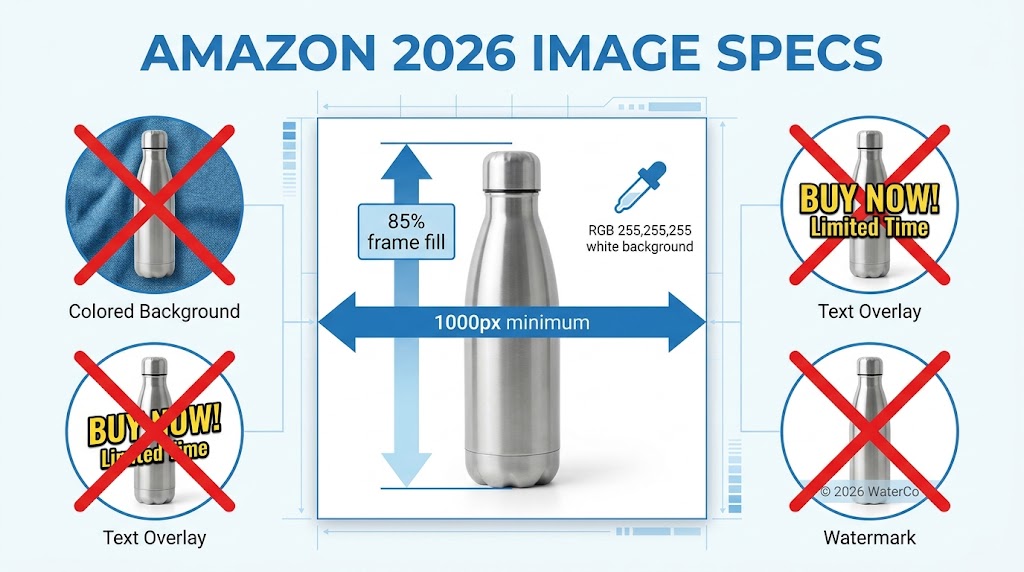
    • Background must be pure white at RGB 255, 255, 255. Not off-white. Not light gray. Not 254, 255, 255. Amazon’s image processing bots check pixel values, and deviations — even imperceptible ones to the human eye — can trigger automatic listing suppression.
    • The product must occupy at least 85% of the image frame. Images where the product looks small, distant, or surrounded by negative space fail to communicate quality and have reduced thumbnails in search results, where space is already at a premium.
    • Minimum resolution of 1,000 pixels on the longest side, with 1,600–2,000+ pixels strongly recommended. Below 1,000 pixels, Amazon’s zoom feature is disabled. Since 66% of shoppers use the zoom feature to inspect products, disabling it is a significant conversion handicap.
    • No text, logos, badges, watermarks, or promotional graphics. No “Best Seller” banners, no discount callouts, no lifestyle props. The main image must show the product — and nothing but the product — on that pure white background.

    Differentiation Within the Rules

    Given that every seller in your category is operating under the same constraints — white background, no text, full product — how do you differentiate? Several levers remain within compliance:

    Angle. The default supplier photo usually shows the product from a straight-on, slightly elevated three-quarter angle. Most competitors are using this same perspective. Testing a different angle — a direct front view, a slightly lower perspective that creates more presence, a slightly overhead angle for flat products — can make your thumbnail visually distinct in a sea of identically-shot competitors.

    Fill ratio. Aim for maximum allowable product fill. A product that takes up 90%+ of the frame looks more imposing and premium than one at 86%. In a small search result thumbnail, this difference is immediately visible.

    Lighting. Subtle shadows and three-dimensional lighting create depth and weight. Flat, shadowless product images often look like PNG cutouts. Careful studio lighting that reveals the product’s form and texture — without adding non-white elements — creates a more premium visual impression.

    Variant selection. If your product comes in multiple colors or sizes, your hero image should feature the variant most likely to appeal to your target buyer first. Showing your least-differentiated version in the hero wastes the first impression.

    The 7-Slot Framework: Mapping Your Images to the Buyer Journey

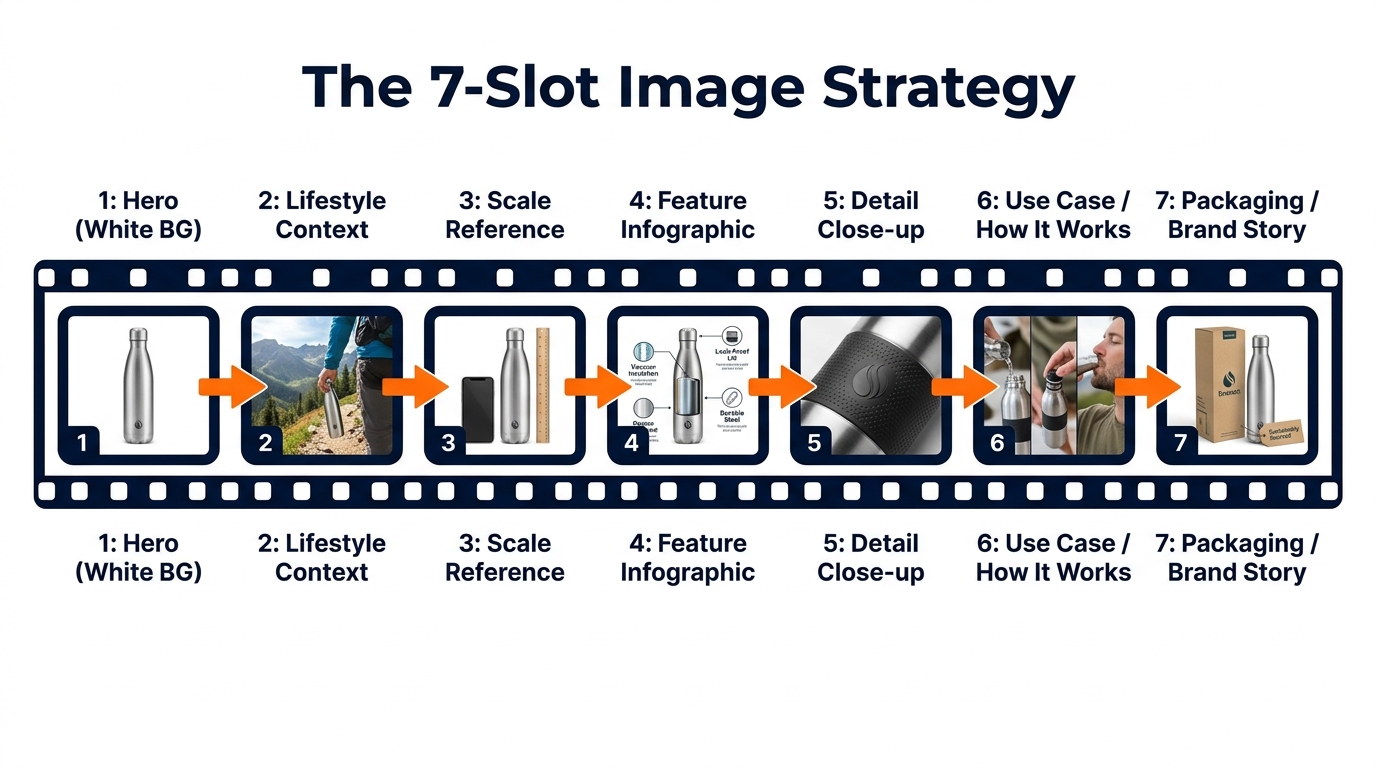
    Infographic diagram showing Amazon's 7-image slot strategy mapped to the buyer journey

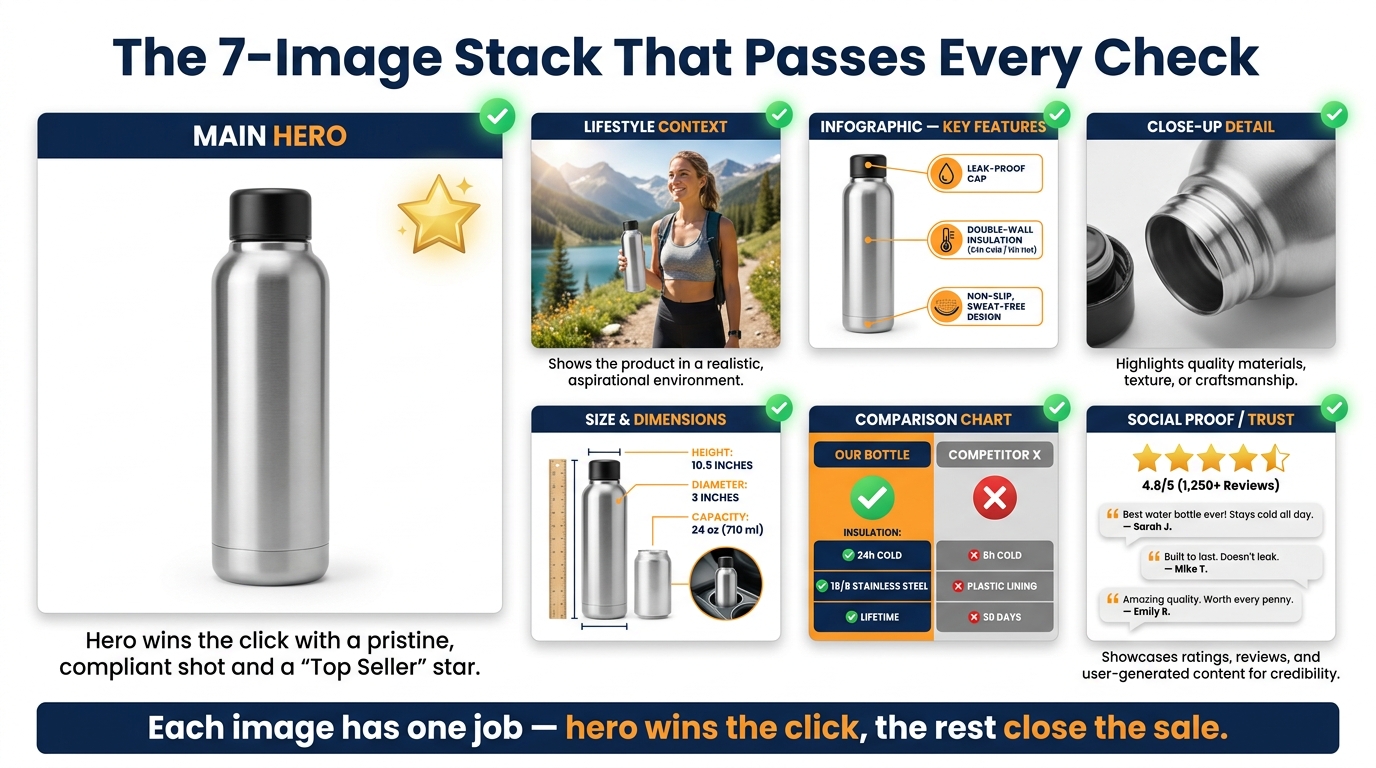
    Amazon allows up to nine product images, plus a video. Most successful sellers use all seven primary image slots at minimum. But using all seven slots isn’t the same as using them strategically. The sequence matters. Each image should answer the next logical question a buyer has after viewing the previous one.

    Think of the image stack as a visual sales conversation. You’ve captured attention with the hero. Now you have a shopper on your product page who wants to be convinced. Walk them through that journey deliberately.

    Slot 1: The Hero (White Background)

    As covered above: pure white, 85%+ fill, high resolution, no graphics. Optimized for search result thumbnails and first-impression quality signals.

    Slot 2: Lifestyle Context

    The first secondary image should immediately answer “what does this look like in the real world?” Show the product being used by a person or placed in an environment that reflects your target customer’s life. This image performs a critical emotional function: it invites the buyer to project themselves into the scene. They stop evaluating the product abstractly and start imagining themselves owning it. Research from Amazon’s own data suggests that contextual images correlate with up to 40% higher conversion rates compared to product-only secondary images.

    Slot 3: Scale Reference

    Ambiguous size is one of the most common reasons shoppers abandon Amazon purchases and leave negative reviews. Slot 3 should establish scale unambiguously, by showing the product next to a familiar reference object (a hand, a coin, a standard household item) or against a measuring tape. Dimension infographics — the product with labeled measurements overlaid — also work well here. The goal is that after seeing this image, the buyer has zero doubt about how large or small this product actually is.

    Slot 4: Feature Infographic

    This is where you make the product’s key benefits legible at a glance. Feature callouts, labeled arrows, material specifications, compatibility information. Unlike slots 2 and 3 which build emotional connection and practical understanding, slot 4 speaks to the analytical buyer who wants to verify that the specifications match their needs. Well-designed infographics here can preempt the most common questions and answers submitted on your listing.

    Slot 5: Detail Close-up

    What is the one detail of your product that competitors can’t match — or that looks significantly better up close than it does at full size? This slot exists to show that detail in its best possible form. Stitching on a bag. The grain of a wood surface. The mechanism of a clasp. The texture of a material. Whatever makes your product worth more than the cheaper version, show it at maximum zoom.

    Slot 6: Use Case / How It Works

    For products where usage isn’t immediately obvious, or where the purchase decision hinges on whether the product will work for a specific scenario, slot 6 demonstrates the product in action. Before-and-after comparisons work well here if your product solves a problem. Step-by-step visual instructions for products with a learning curve also reduce friction by preempting “will I be able to figure this out?” anxiety.

    Slot 7: Packaging / Brand Story

    The final slot is where you complete the experience and reduce post-purchase anxiety. Show the product packaging clearly. If the product is frequently gifted, show it gift-ready. If it’s sold with accessories, show the full contents of what arrives. This image answers the final question: “What exactly am I going to receive?” Buyers who know exactly what’s in the box have lower return rates, fewer negative reviews, and higher likelihood of leaving positive feedback.

    Infographics That Actually Convert (Not Just Look Good)

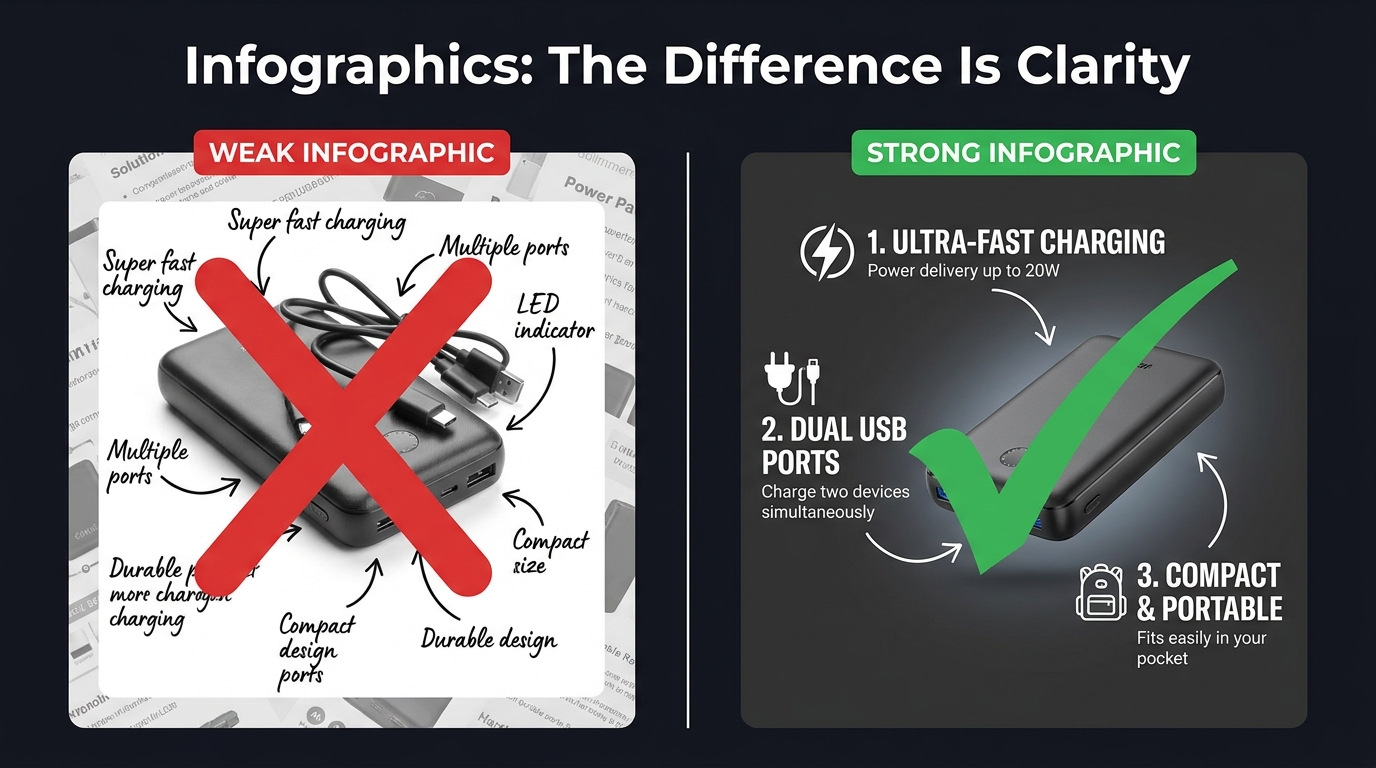
    Comparison of weak vs strong Amazon product infographics showing clarity and text legibility differences

    Product infographics have become near-universal among serious Amazon sellers. The problem is that most of them are designed to look comprehensive rather than communicate clearly. They’re cluttered with feature callouts, competing visual elements, decorative design choices that obscure rather than illuminate, and fonts that look beautiful at desktop scale but become completely illegible as a mobile thumbnail.

    An infographic that can’t be read is worse than no infographic at all. It signals effort without delivering information — a combination that reads as noise rather than signal.

    The Legibility Hierarchy

    Effective infographics follow a strict visual hierarchy. The product image itself occupies 50–60% of the frame. Feature callouts are limited to four to six maximum — not because you don’t have more features, but because each additional callout competes for attention with every other callout. When everything is highlighted, nothing is highlighted.

    Font size matters more than most sellers realize. At minimum, your largest text elements should be readable when the image is displayed at 100 pixels wide — the approximate size of a mobile search thumbnail. Use clean, geometric sans-serif typefaces. Script and decorative fonts look elegant at full size; they become illegible marks at small sizes.

    Rufus AI and Image Text Recognition

    There’s a functional reason to optimize infographic legibility beyond human readers. Amazon’s AI assistant Rufus, which handles an increasing share of on-platform product discovery queries, uses OCR (optical character recognition) to read text from listing images. Well-designed infographics with clear, legible text give Rufus more data to index about your product — which can positively influence visibility in AI-driven search results. Cursive fonts, overly decorative typography, and low-contrast text-on-background combinations are invisible to OCR systems. Clean, high-contrast, sans-serif text is fully readable.

    “Us vs. Them” Comparison Charts

    One of the highest-performing infographic formats on Amazon is the product comparison chart — a table that compares your product against a generic “standard alternative” across a series of features. You cannot name competitors directly, but you can compare against “similar products” or “the competition” using feature checkboxes.

    These charts work because they reframe the buying decision. Instead of evaluating your product in isolation, the buyer is now evaluating it against a weaker alternative. The comparison does the persuasion work so your bullet points don’t have to. The most effective versions of these charts are selective: they highlight the specific dimensions on which your product wins, not a comprehensive feature list where your product might be neutral or weaker.

    Before-and-After as Proof

    For problem-solution products — cleaning supplies, skincare, organization tools, fitness equipment — before-and-after images embedded within an infographic are among the most persuasive visual formats available. They make the benefit concrete. Shoppers don’t have to imagine the outcome; they can see it. The key is that the “after” image needs to be genuinely dramatic enough to justify the format. A subtle improvement shown as a before-and-after signals that the improvement isn’t actually that meaningful.

    Lifestyle Images: What Separates Scroll-Stoppers from Stock Photo Clones

    Lifestyle photography is arguably the most frequently misunderstood element of an Amazon image stack. Many sellers treat it as decoration — a nice-to-have that makes the listing look more professional. The reality is that lifestyle images perform specific, measurable psychological work, and when that work is done poorly, they actively hurt conversions.

    The Aspiration Alignment Problem

    The function of a lifestyle image is to allow a shopper to see themselves in the scene. This only works if the scene accurately reflects the aspirational self-image of your actual target customer. Generic lifestyle photography — stock models who don’t look like your buyer, environments that feel staged rather than real, scenarios that don’t match how your customer actually uses the product — creates a psychological disconnect rather than a connection.

    A kitchen gadget marketed to home cooks needs lifestyle images that feel like a real kitchen, not a photoshoot kitchen. A travel bag needs lifestyle images from actual travel contexts, not a model posing with a bag in front of a white backdrop. The gap between “this feels like my life” and “this looks like an advertisement” is the gap between a lifestyle image that converts and one that doesn’t.

    People in the Frame Increase Conversions

    Multiple studies on e-commerce photography have confirmed that images including human subjects — hands, faces, full figures in context — consistently outperform product-only images in secondary listing slots. There are several reasons for this. Human faces direct attention and create emotional resonance. Hands holding or using a product provide unconscious scale reference. People in context model the usage scenario, reducing ambiguity. And humans are simply neurologically interesting to other humans in a way that isolated objects are not.

    The key is that the person in your lifestyle image should match your buyer’s demographic as closely as possible. A product targeting middle-aged women that features exclusively 25-year-old male models is producing cognitive friction, not connection.

    Environment as a Trust Signal

    The background and environment of your lifestyle images communicate as much as the product itself. A clean, well-lit kitchen tells the buyer that your product belongs in quality households. A cramped, cluttered background with poor lighting signals that the product is a budget purchase. The production quality of your lifestyle photography sets a price anchor in the buyer’s mind before they’ve seen the price. Premium environments justify premium pricing.

    The Supplier Photo Trap: Why Generic Images Force You Into Price Wars

    There is a specific and painful competitive dynamic that happens to sellers who rely on supplier-provided photos. Because supplier photos are typically distributed to every reseller who purchases that product, multiple listings in the same category are showing identical images. The buyer sees the same photo three or four times across different listings. At that point, the only visible differentiator is price.

    This is the supplier photo trap: using generic images doesn’t just fail to differentiate you — it actively positions you as a commodity, a price-per-unit proposition. You become interchangeable with every other seller offering the same product. Your only competitive lever is margin erosion.

    The Investment Calculation

    Professional product photography is frequently cited by sellers as an expensive upfront investment that they’d rather defer. The math, however, rarely supports deferral. A professional product photography session for a single ASIN typically costs between $300 and $800 for a full image set including hero, lifestyle, and infographic components. For a product generating $5,000 in monthly revenue at a 15% conversion rate, a 1 percentage point improvement in conversion rate (from 15% to 16%) — well within the range that professional photography routinely delivers — generates roughly $333 in additional monthly revenue. The photography pays for itself in under three months.

    The cost of not investing in professional images — sustained below-market conversion rates, depressed organic ranking (which responds to conversion signals), and the race to the bottom on pricing — compounds indefinitely.

    What to Look for in a Product Photographer

    Not all product photographers are equally suited for Amazon. The criteria that matter for Amazon specifically are somewhat different from those that matter for brand lookbooks or editorial photography:

    • Amazon compliance knowledge. A photographer who knows the RGB 255, 255, 255 rule and how to achieve it reliably in post-processing is worth significantly more than one who doesn’t. Some photographers charge extra to “clean up” backgrounds in editing; others build it into their standard workflow.
    • Experience with mobile thumbnail optimization. Ask to see examples of their work in Amazon search results. How does the product look as a small thumbnail? Does the product fill the frame?
    • Lifestyle photography capability. Separate from hero shots, lifestyle photography requires scouting or building appropriate sets, coordinating with models, and understanding how to direct “real use” scenarios. Not all product photographers have this skill set.
    • Turnaround and revision policy. Listing optimization is iterative. You may need to update images as you gather conversion data. A photographer who charges full rate for every revision is going to slow your optimization cycle.

    Mobile-First Image Design: The 6-Inch Screen Test

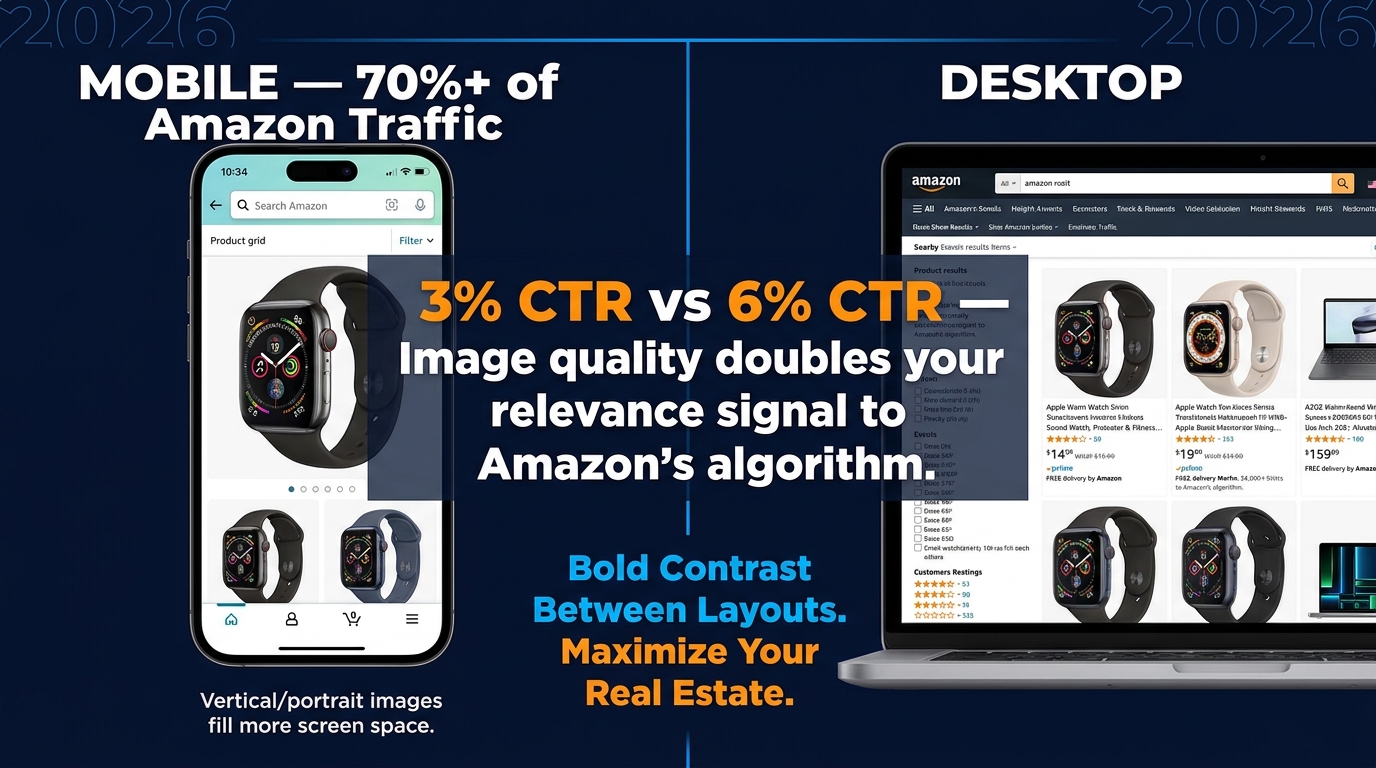
    Mobile phone mockup showing Amazon product listing optimization for mobile shoppers with 79% mobile stat

    The majority of Amazon traffic in 2026 arrives on mobile devices. Depending on the category, mobile browsing accounts for somewhere between 60% and 79% of Amazon sessions. This isn’t a trend that’s still emerging — it’s been the dominant channel for several years. And yet, a significant number of Amazon sellers are still designing and evaluating their listing images on desktop monitors.

    The result is image sets that look excellent on a 27-inch display and are borderline unusable on a 6-inch phone screen. This is a fixable problem, but fixing it requires changing how you evaluate your work.

    The Thumbnail Test

    Before finalizing any hero image, run what photographers and Amazon optimization specialists call the thumbnail test. Reduce your proposed hero image to 200 pixels wide and evaluate it at that size. Does the product still read clearly? Is it identifiable at a glance? Does it look sharp or pixelated? Does it look larger and more premium than the thumbnails around it in a mock search results grid?

    If the product is hard to identify at thumbnail size, or if it looks smaller and less impressive than competitors’ thumbnails, the hero image needs to be reworked regardless of how it looks at full resolution. The hero image will first be seen as a thumbnail. Optimize for the format it will actually appear in.

    Text Legibility on Mobile

    Infographic text that’s readable at 1,500 pixels wide may become completely illegible at the 400-pixel width of a mobile product image display. The practical rule of thumb: if you cannot read the text when the image is displayed at the width of a typical smartphone screen (roughly 375 to 414 pixels), the text will not be read by most of your buyers.

    This has real consequences. An infographic designed to communicate five key benefits actually communicates zero if the text is illegible on the device your buyers are using. The solution is to be ruthless about text size, to limit the amount of text per image, and to rely more heavily on iconography — which scales better than text — for secondary information delivery.

    Vertical vs. Horizontal Framing

    Amazon’s standard product image ratio is a square (1:1). On mobile, the product detail page displays the main image as a square occupying the full width of the screen. This is actually favorable for product photography — the square format is generous, and a product photographed to fill it well will look impressive on mobile. Where sellers run into trouble is with secondary images that are composed with wide horizontal elements that lose impact when constrained to the square format. Design all secondary images to work within the square frame, with the most important visual information concentrated in the center of the frame where mobile cropping is least likely to affect it.

    A/B Testing Your Way to Better CTR with Manage Your Experiments

    Amazon Seller Central Manage Your Experiments A/B testing dashboard showing Version B winning with 62% higher CTR

    Most Amazon sellers optimize their images once at launch and leave them alone. The highest-performing sellers treat images as a continuously iterated variable — something to test, measure, and improve on a regular cadence. Amazon’s native A/B testing tool, Manage Your Experiments, makes this process accessible to brand-registered sellers without requiring any third-party tools.

    What Manage Your Experiments Actually Tests

    Manage Your Experiments allows brand-registered sellers to run controlled split tests on several listing elements including main images, A+ Content, titles, and product descriptions. For image testing specifically, you create two versions of the element you want to test, Amazon splits your traffic between the two versions, and after a statistically significant sample period (typically four to eight weeks), the tool reports which version performed better on key metrics including click-through rate, conversion rate, and revenue per visitor.

    The main image is the highest-priority element to test first, because it directly affects CTR from search results — the metric that controls how much organic traffic your listing receives. A CTR improvement is not just a revenue increase; it’s an input into Amazon’s A10 ranking algorithm. A listing that gets clicked more often ranks higher, which generates more traffic, which generates more clicks. The compounding effect of CTR improvement is significantly larger than the immediate revenue impact.

    What to Test First

    The most productive main image tests focus on variables with the highest potential for differentiation:

    Angle and orientation. Test your current standard angle against an alternative perspective. A three-quarter view against a straight front view. An elevated view against an eye-level view. Angle changes often produce the largest CTR differences because they affect how the product appears in thumbnail comparison with competitors.

    Single item vs. multi-item context. For some products, showing a single clean unit on white background beats showing the product alongside related accessories. For others, context props (a glass of water next to a supplement bottle, a cutting board next to a knife set) perform better. Without testing, you’re guessing.

    Packaging on vs. packaging off. For products where unboxed and boxed presentations are both plausible, test both. Some categories reward the “ready to use” unboxed appearance. Others benefit from the retail packaging shot that signals the product makes a good gift.

    Reading the Results Correctly

    Manage Your Experiments provides statistical confidence scores along with the performance data. Do not make decisions based on preliminary data before statistical significance is reached. It is extremely common for one variation to appear to be winning decisively after two weeks, then for the results to normalize or reverse as the sample size grows. Wait for Amazon’s confidence threshold — they recommend at least 90% statistical confidence — before treating any result as conclusive.

    Also important: document your tests. Keep a running record of what you tested, what won, and by how much. Over time, this record reveals patterns — perhaps angles consistently outperform flat presentations for your product type, or lifestyle contexts in your hero image consistently underperform clean white backgrounds even though conventional wisdom says otherwise. Your accumulated test data is genuinely proprietary competitive intelligence.

    A+ Content: Extending the Visual Story Below the Fold

    For brand-registered sellers, A+ Content (formerly Enhanced Brand Content) extends the visual real estate of your product listing beyond the seven standard image slots. A+ modules appear below the product description and bullet points, occupying a significant portion of the page before reviews begin. They’re widely treated as secondary to the main image stack, but the data suggests that’s a mistake.

    Amazon’s own reporting indicates that Basic A+ Content increases sales by up to 8% on average. Premium A+ Content — available to sellers who have published A+ on a qualifying number of ASINs — can lift sales by up to 20%. Those are meaningful numbers on any ASIN with established revenue, and they’re achievable purely through optimizing content that many sellers either haven’t published or haven’t updated since their initial listing launch.

    Treating A+ as Continuation, Not Repetition

    The most common mistake sellers make with A+ Content is repeating information already communicated in the main image stack. If your slot 4 infographic already covers the key features, restating those same features in your A+ modules adds length without adding value. Shoppers who scroll to A+ Content have already seen your main images. They’re looking for something new — deeper information, greater detail, reassurance on a point the main images couldn’t fully address.

    Effective A+ Content strategies use the expanded visual space for:

    • Brand narrative. Who makes this product, why does it exist, what’s the philosophy behind it? A+ is where brand story can be told with enough visual depth to feel authentic rather than promotional.
    • Comparison tables. Product comparison modules within A+ allow structured comparison of multiple SKUs in your line, or comparisons against non-specific generic alternatives. These are particularly valuable for product lines where buyers commonly ask “which version should I buy?”
    • Deep feature explainers. Technical products, products with unique mechanisms, or products with complex usage protocols benefit from the expanded space A+ provides for detailed explanation. Where a main image infographic is limited to four or five bullet points, A+ can support a full feature breakdown with larger imagery and richer detail.
    • Social proof integration. Some A+ templates allow the incorporation of quote-style testimonials or user scenario imagery that reinforces the lifestyle messaging from your main image stack.

    Premium A+ Content: When It’s Worth It

    Premium A+ Content unlocks interactive modules including video embeds, interactive hotspot images (where buyers can click areas of a product image to reveal feature details), and larger format imagery. The interactive hotspot module in particular represents a meaningful evolution in on-page conversion tools — it transforms a static product image into an exploratory experience that keeps buyers engaged on your listing longer.

    Longer time-on-page is a positive signal in Amazon’s ranking algorithm. A listing that holds buyer attention — through interactive A+ modules, video, and a compelling image sequence — will rank above an identical listing with lower engagement metrics. The relationship between listing quality and organic visibility is circular: better content drives better engagement, better engagement drives better ranking, better ranking drives more traffic.

    Image Mistakes That Trigger Suppression, Cost Rankings, and Kill Sales

    Beyond the strategic considerations, there are specific technical and compliance errors that do immediate, measurable damage to listing performance. Some of these trigger automatic suppression — Amazon removes your listing from search results until the issue is corrected. Others are more subtle, degrading conversion rates without triggering any alerts.

    Immediate Suppression Triggers

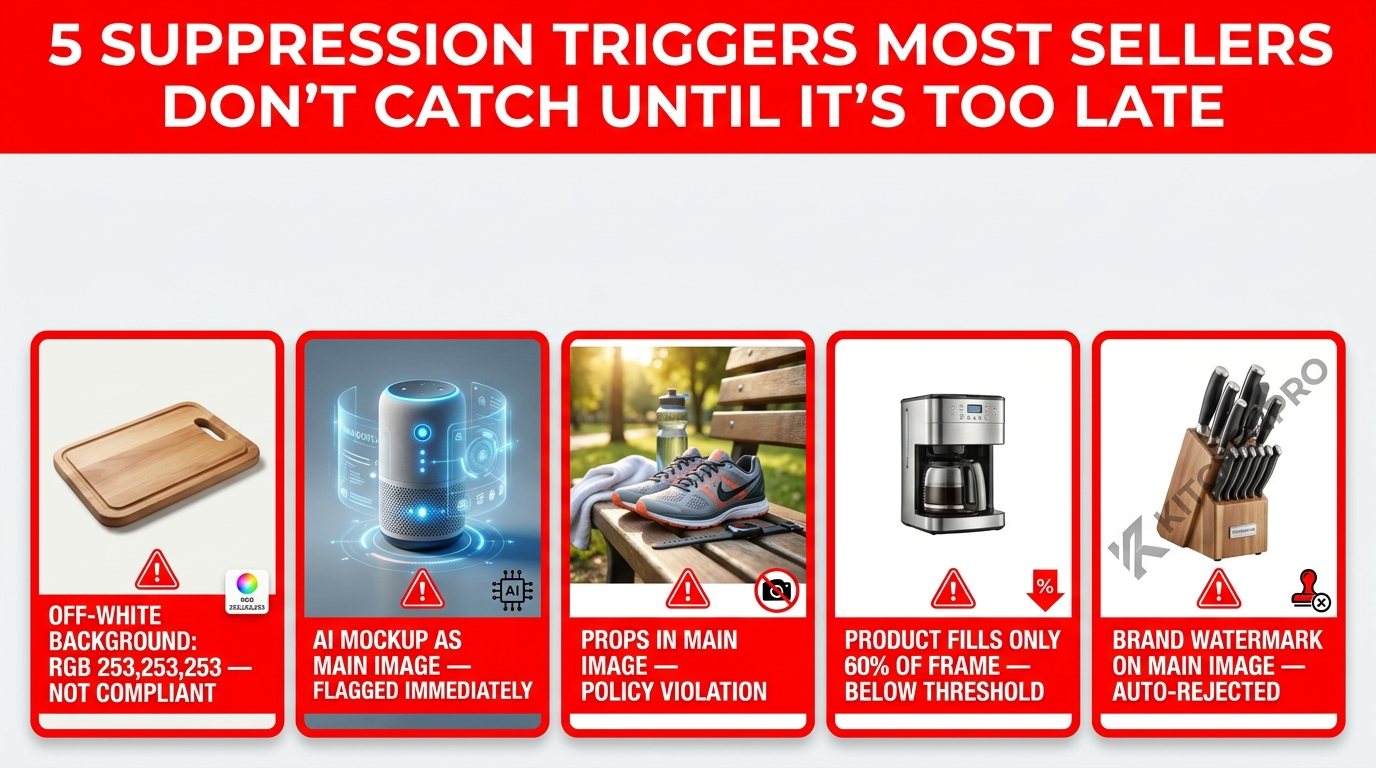
    • Non-white backgrounds on the main image. Even a background that appears white to the human eye can be slightly off the required RGB 255, 255, 255 value. Always verify the background color value in image editing software, not by visual inspection.
    • Promotional text on the main image. “Sale,” “Best Seller,” discount percentages, “Free Shipping” badges — any of these on the primary image will trigger suppression.
    • Images below 1,000 pixels on the longest side. This is the minimum for display; in practice, images below this threshold may not trigger immediate suppression but will degrade zoom functionality and perceived quality.
    • Showing products not included in the listing. If your listing is for a single item and your main image shows two items, that’s a suppression trigger. The main image must accurately represent what the buyer will receive.

    Non-Suppression Errors That Still Cost Sales

    • Using supplier stock photos. As discussed, not a compliance violation but a serious strategic mistake that commoditizes your listing.
    • Insufficient image variety. Running five images when nine are available is leaving persuasion tools on the table.
    • Misaligned lifestyle imagery. Lifestyle images that don’t reflect your actual target demographic create psychological friction rather than connection.
    • No video. Amazon allows one video on standard listings and multiple videos for Brand Registry members. Listings with product videos have meaningfully lower return rates — some sources cite up to 30% reduction in returns for categories where product mechanics are demonstrated — and higher conversion rates because video is the closest simulation of actually using the product before purchase.
    • Infographics with low-contrast or decorative fonts. Illegible infographics don’t communicate features — they communicate visual noise, and they’re invisible to Rufus AI’s OCR indexing.
    • Ignoring image order. The sequence in which Amazon displays secondary images is controlled by the seller. Many sellers upload images in whatever order they happened to be processed, rather than the strategic sequence that follows the buyer journey. Audit your current image order and resequence if necessary.

    The “Newly Updated” Image Risk

    A less-discussed hazard: updating images on a high-performing listing without testing the new version first. Sellers who redesign their entire image stack and replace it wholesale — without A/B testing — frequently experience conversion rate drops from perfectly compliant, professionally produced new images that simply communicate less effectively than the previous version. The old images had accumulated organic performance data. The new images, whatever their aesthetic quality, are unproven.

    The correct protocol for image updates on existing listings is: test the new version against the existing one using Manage Your Experiments before replacing anything. Only replace the existing images if the test data confirms the new version performs better.

    The Amazon Image Audit: A Section-by-Section Checklist

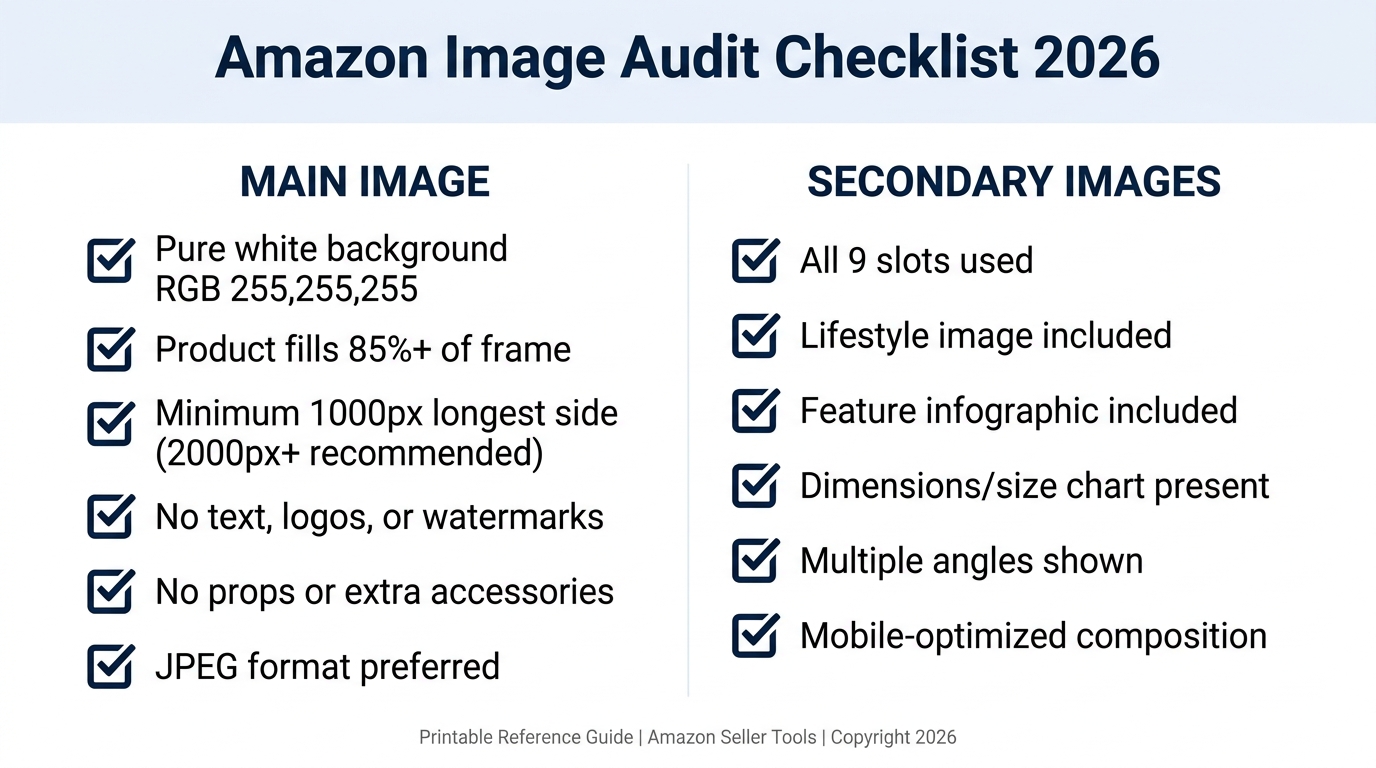
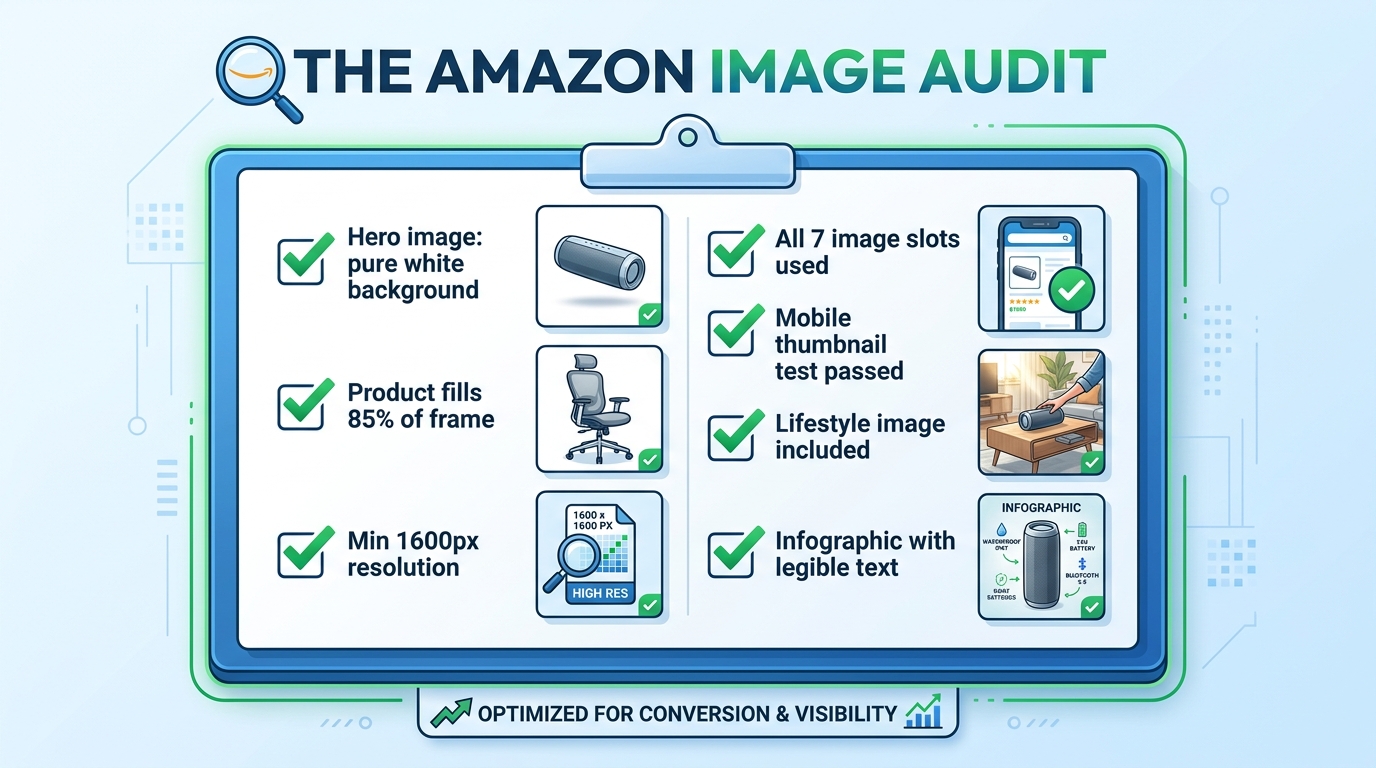
    Amazon listing image audit checklist showing all required image optimization criteria with green checkmarks

    Rather than leaving the “what to do next” question abstract, here is a practical audit framework to assess the current state of any listing’s image set. Work through this systematically on every ASIN in your catalog.

    Hero Image Audit

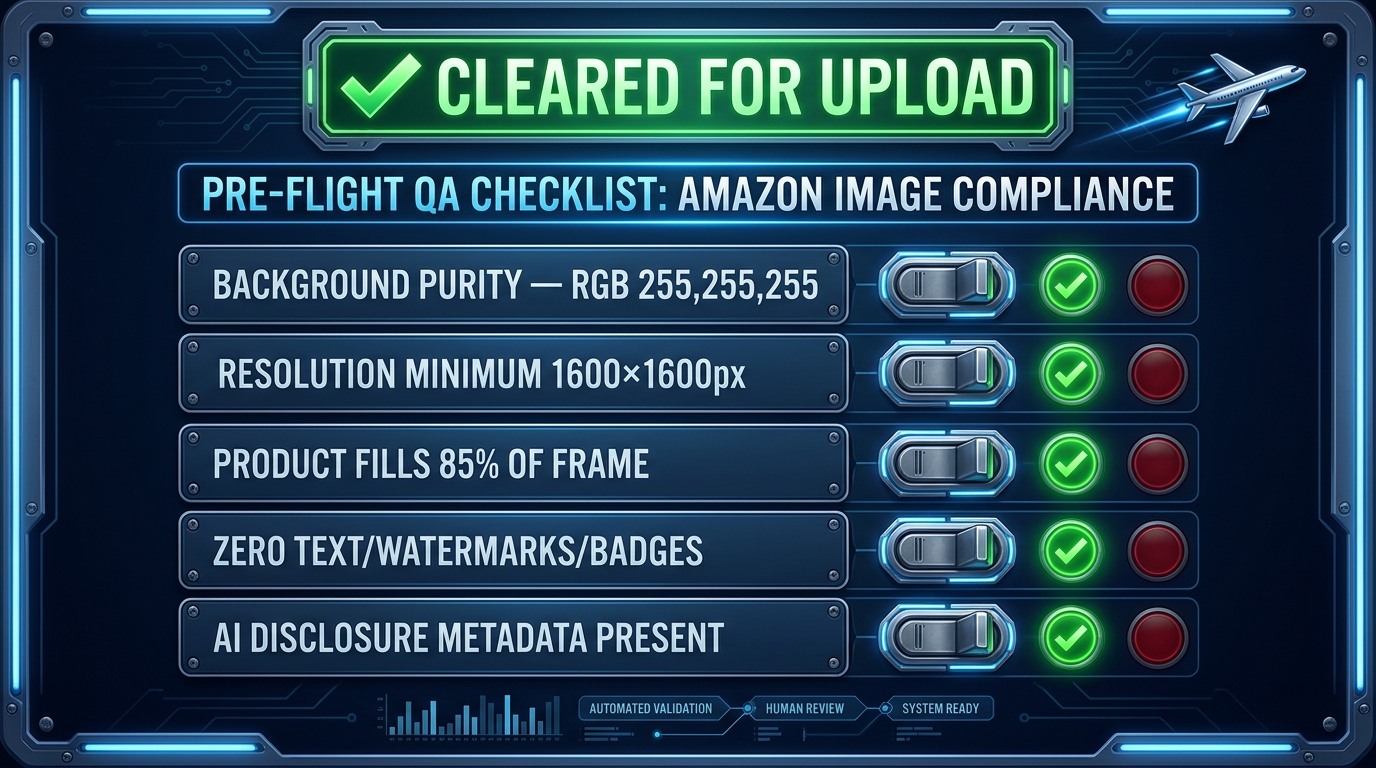
    • Verify background RGB value is exactly 255, 255, 255 in image editing software
    • Measure product fill ratio — is the product occupying at least 85% of the frame?
    • Check image dimensions — is the longest side at least 1,600 pixels?
    • Confirm no text, watermarks, props, or logos are present
    • Run the thumbnail test — reduce to 200px wide and evaluate clarity
    • Compare your thumbnail against the top three competitors in your search result — are you visually distinct?

    Secondary Image Audit

    • Count your current images — are you using all available slots?
    • Evaluate the sequence — does the order follow a logical buyer journey progression?
    • Assess lifestyle image demographic match — does the person/environment reflect your actual target buyer?
    • Check scale reference — is there an image that unambiguously communicates product size?
    • Review infographic text legibility — display at 400px wide and verify all text is readable
    • Check for video — is at least one product video uploaded?

    A+ Content Audit

    • Is A+ Content published on this ASIN?
    • Does the A+ Content add new information not already in the main image stack?
    • Is the A+ imagery consistent in style and quality with the main images?
    • Are comparison modules present to help buyers choose between variants or understand relative value?
    • Have Premium A+ modules been evaluated for eligibility?

    Testing Cadence

    • Is an active Manage Your Experiments test currently running on the hero image?
    • Are test results documented and archived?
    • Is there a scheduled review date for secondary image performance?

    Work through this audit once per quarter at minimum. High-volume ASINs — those generating significant revenue or ad spend — merit more frequent review, especially when competitive dynamics in the category change. A competitor launching with a dramatically better image set is a signal to accelerate your own testing cadence.

    Bringing It All Together: Your Images Are a System, Not a Collection

    The most important conceptual shift in this entire article is this: your Amazon listing images are not seven separate photographs. They are a single, sequenced visual argument for why a buyer should choose your product over every alternative available to them in that moment.

    Every slot has a defined job. The hero image earns the click. The lifestyle image earns the emotional connection. The scale reference removes a common purchase blocker. The infographic validates the analytical buyer. The close-up justifies the price premium. The use-case demonstration eliminates usage anxiety. The packaging shot completes the transaction mentally before the buyer has added to cart.

    When any slot is absent, or when it’s doing a job that belongs to a different slot, the system breaks down. Buyers fall through the gaps — they reach the end of your image stack with an unanswered question, and they go find the answer on a competitor’s listing. Often, they buy there instead.

    The sellers who understand this — who approach every image as a strategic tool within a larger system — convert at rates that make their competitors wonder what they’re doing differently. The answer is usually not that they have better products. It’s that they’ve built a visual argument systematic enough to close the sale before the buyer even gets to the bullet points.

    Start with the audit. Fix the compliance issues first. Then address the strategic gaps. Then test. Then improve. The compound effect of iterating through that cycle — audit, fix, test, improve — is the only sustainable path to conversion rates that hold up regardless of what competitors do next.

  • 2026 Image Suppression: The Seller’s Diagnostic and Fix Manual

    2026 Image Suppression: The Seller’s Diagnostic and Fix Manual

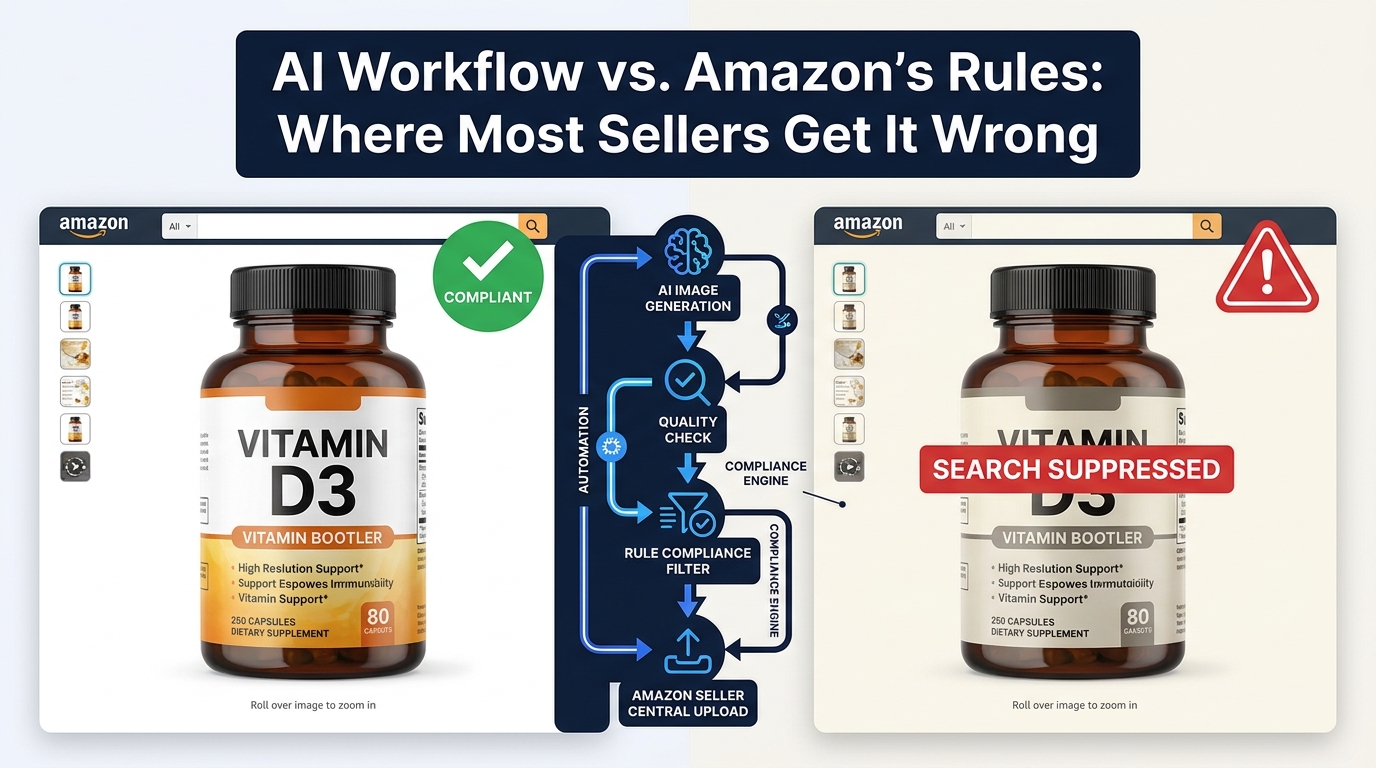
    2026 image suppression diagnostic guide — split screen showing a suppressed listing versus a visible ranking listing with RGB scanner overlays

    Your product is live. Your listing looks fine in the backend. Your price is competitive. And yet — sales have flatlined, impressions have cratered, and your listing is generating exactly zero organic traffic. You check your inventory. Nothing’s wrong. You check your ads. They’re running. Then, buried in a notification you almost missed, you spot it: Search Suppressed.

    Image suppression is one of the most financially damaging and least understood problems facing ecommerce sellers in 2026. It’s not just an Amazon issue. It’s showing up across Shopify stores, WooCommerce catalogs, Google image search, and even social media feeds where product images quietly disappear from algorithmic reach without any warning. The seller never knows. The customer never finds the product. Revenue evaporates.

    What makes 2026 categorically different from prior years is the technological depth at which suppression now operates. Platforms aren’t just checking image dimensions and file types anymore. Amazon’s updated A9 algorithm now reads hidden C2PA content credentials embedded in your JPEG metadata. Instagram is suppressing posts with third-party watermarks. Google is quietly deindexing images on pages that don’t meet quality thresholds. And Shopify stores are silently hiding products because a catalog visibility toggle flipped wrong during a migration.

    This guide doesn’t take a single-platform view. It treats image suppression the way an engineer treats a system failure — as a diagnostic problem that has specific triggers, testable causes, and repeatable fixes. Whether you’re an Amazon FBA seller with a suppressed hero image, a DTC brand watching its Google Shopping images vanish, or a Shopify merchant whose products disappeared from search after an update, this manual walks you through every layer — what’s actually happening, why, and exactly how to fix it.

    Understanding How Platform Algorithms Suppress Images in 2026

    The first thing sellers need to accept is that image suppression is rarely accidental. Platforms suppress images because their systems — increasingly powered by machine learning — have detected something that violates a policy, a technical standard, or a quality threshold. The suppression is intentional, even when the violation was not.

    The Shift to Automated, AI-Powered Enforcement

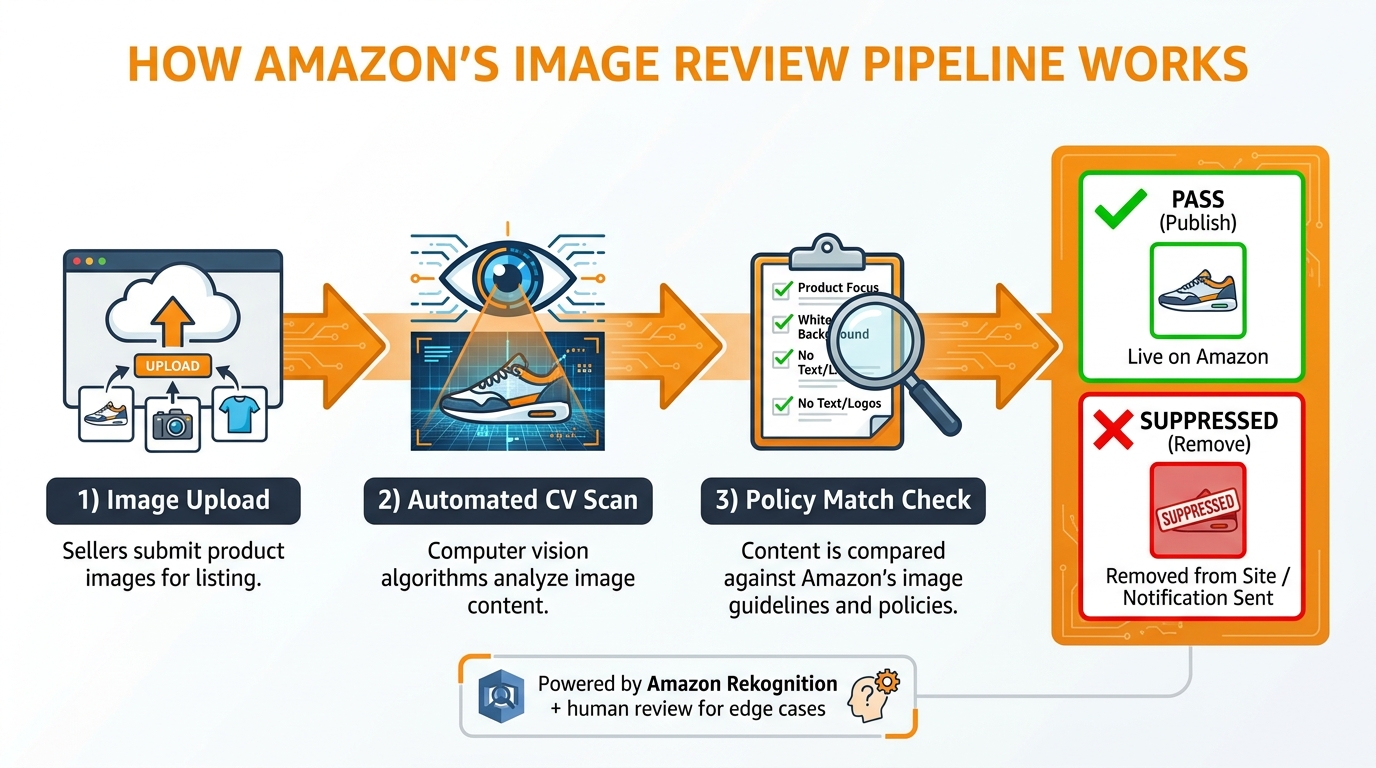
    Two years ago, listing reviews were largely reactive. A human moderator would flag something following a complaint, or a seller could stay under the radar for months with minor compliance failures. In 2026, that era is effectively over. Every major ecommerce and social platform has deployed automated compliance engines that scan images at scale — in real time, or near real time — against a layered set of rules.

    Amazon’s A9 algorithm update represents the most aggressive example of this shift. The system now processes not just pixel-level image data, but embedded file metadata — including the increasingly widespread C2PA (Coalition for Content Provenance and Authenticity) tags written into images by Adobe Creative Cloud, Photoshop, and other mainstream editing tools. If your image was touched by a generative AI tool, there is likely a metadata trail that Amazon’s systems can now read. That trail is enough to trigger an automated suppression.

    Google operates differently, suppressing images through indexing decisions rather than explicit “suppressed” labels. An image that lives on a low-quality page, lacks descriptive alt text, or is blocked by a robots.txt directive simply doesn’t get indexed — meaning it never appears in Google Image Search or Google Shopping. It’s not flagged; it’s just absent.

    Why 2026 Is a Turning Point

    Three converging trends have made image suppression a much bigger problem this year than it was even eighteen months ago. First, the explosion of AI-generated and AI-edited imagery has forced platforms to implement detection systems that cast a wide net — and those nets catch legitimate sellers along with bad actors. Second, platform monetization pressures have created incentives to push organic content into paid channels, and image quality enforcement is one lever for doing that. Third, ecommerce competition has intensified to the point where a suppressed listing isn’t just an inconvenience — it’s a revenue emergency, because competitors in the same category are getting the impressions you’re not.

    Understanding this context matters because it changes how you approach the problem. Suppression isn’t a bug. It’s a feature — one designed to enforce specific standards that you need to meet precisely if you want visibility.

    Amazon Main Image Suppression: The Pure White Problem and Beyond

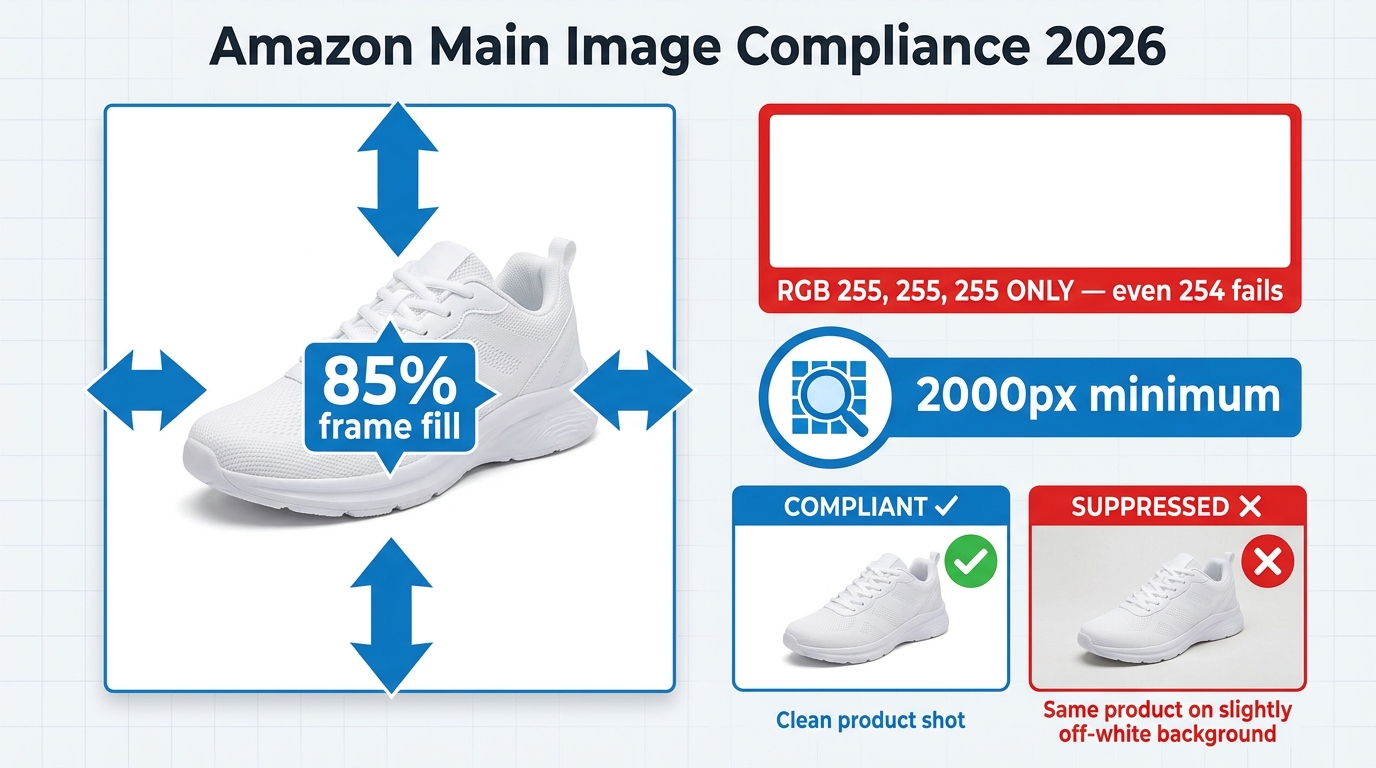
    Amazon main image compliance infographic for 2026 showing 85% frame fill requirement, pure white RGB 255,255,255 background, and 2000px minimum resolution with compliant vs suppressed comparison

    Amazon’s main image — the one that appears in search results, on the product detail page, and in ads — carries more compliance weight than any other element of your listing. When it fails, the entire listing goes dark. Not just the image. The listing. Understanding exactly what “failure” means in 2026 is the first step toward prevention and recovery.

    The Background Rule Is More Precise Than You Think

    Amazon requires a pure white background on all main images. Most sellers know this. What they don’t know is how precise “pure white” actually is. The specification is RGB 255, 255, 255 — all three color channels at maximum value simultaneously. A background reading RGB 254, 255, 255 is technically off-white. So is 253, 253, 253, which is a common output from auto-white-balance tools and AI background removal apps. Amazon’s 2026 scanning systems detect these deviations at the pixel level.

    The problem is compounded by JPEG compression. Even if your image starts at perfect RGB 255, 255, 255, saving it as a JPEG can introduce compression artifacts that push background pixels slightly off-white. This is why professional Amazon photographers either save at maximum JPEG quality (quality 100 in Photoshop) or use PNG files, which are lossless and preserve exact pixel values. If you’re using an AI background removal tool and saving the output as a JPEG at standard quality settings, you may be introducing the very artifacts that are triggering suppression.

    The 85% Frame Fill Requirement

    Amazon requires the product to occupy at least 85% of the image frame. This isn’t aesthetic guidance — it’s enforced algorithmically. A product that’s too small in the frame will trigger suppression. Common causes include:

    • Canvas expansion during editing: When you use a generative AI tool to extend the background, you often inadvertently shrink the product’s proportional footprint in the frame.
    • Incorrect cropping: Sellers who resize from lifestyle images sometimes preserve too much negative space around the product.
    • Multi-product shots: If you’re showing a product with accessories or packaging, the primary product may be undersized relative to the total composition.
    • Tall or wide products on square canvases: A long, narrow product shot on a 1:1 canvas may naturally fall under the 85% threshold if framing isn’t tightly considered.

    You can check this manually by overlaying a crop guide in Photoshop that represents 85% of the canvas area — the product should fill it. There are also third-party Amazon compliance checkers (SellerSprite, Pixelcut Pro) that measure this automatically.

    Resolution Requirements for Zoom Eligibility

    The minimum resolution for Amazon listing images is 1,000 pixels on the longest side. But that minimum is essentially a baseline for publication — not for performance. To enable the product zoom feature that’s proven to increase conversion, you need at minimum 2,000 pixels on the longest side. Amazon’s own published guidance recommends 2,000–3,000 pixels. Listings with images below 1,600 pixels on the longest side are increasingly flagged by the platform’s quality scoring systems, even if they aren’t technically suppressed.

    Other Main Image Triggers

    Beyond background and resolution, the following elements will also trigger suppression in 2026:

    • Text, logos, or watermarks anywhere in the image — including brand logos, “bestseller” badges, or social media handles
    • Props, accessories, or additional items not included in the product and not essential to demonstrate its use
    • Packaging shown without the product visible (for non-food categories)
    • Models or mannequins in adult apparel — certain clothing categories have model requirements, others have model prohibitions
    • Shadows that bleed to the image edge — a shadow reaching the frame boundary is interpreted as a non-compliant background element
    • Borders, frames, or colored backgrounds of any kind, including pale gray “studio” backgrounds

    C2PA Metadata — The Hidden AI Trigger Most Sellers Have Never Heard Of

    C2PA metadata detection visualization showing Amazon A9 algorithm scanning image file metadata for AI-generated content tags including Photoshop Generative Fill markers

    This is the issue that caught the most sellers off guard in early 2026, and it’s still not widely understood. C2PA stands for Coalition for Content Provenance and Authenticity — an industry standard for embedding information about how an image was created and modified directly into its file metadata. Major adopters include Adobe (across its entire Creative Cloud suite), Google, Microsoft, and dozens of camera manufacturers.

    How C2PA Tagging Works

    When you open an image in Photoshop and use any generative AI feature — including Generative Fill, Generative Expand, or even the Neural Filters — Photoshop writes C2PA credentials into the image metadata. These credentials describe what tools were used and what modifications were made. They’re invisible to the naked eye but readable by any software that knows to look for them. In 2026, Amazon’s scanning system now looks for them.

    The practical consequence is this: a seller who hires a photographer, gets a clean product shot on white seamless paper, then uses Photoshop’s Generative Fill to extend the background slightly — a genuinely minor edit — may now have that image flagged as containing synthetic AI alterations. The metadata says the AI touched it. Amazon’s system reads the metadata. The listing gets suppressed.

    Which Tools Write C2PA Tags

    As of 2026, C2PA credentials are written by the following commonly used tools:

    • Adobe Photoshop — any use of Generative Fill, Generative Expand, or Content-Aware Fill with generative options enabled
    • Adobe Firefly — all image generation outputs
    • Microsoft Designer and Bing Image Creator
    • Some Canon, Nikon, and Sony cameras — hardware-level C2PA signing for authentication (this does not indicate AI alteration; these camera-signed images should be safe)
    • Stable Diffusion implementations with C2PA-enabled wrappers

    Importantly, C2PA tagging is not universal. Many AI background removal tools (remove.bg, Photoroom, ClipDrop) do not write C2PA tags. The issue is specifically tied to tools that write provenance credentials as part of an industry transparency initiative.

    How to Detect and Strip C2PA Metadata

    You can check whether an image contains C2PA credentials using the free tool at contentcredentials.org/verify — simply upload your image and it will tell you whether provenance data is present and what it contains.

    To remove C2PA metadata before uploading to Amazon:

    1. In Photoshop, go to File → Export → Export As (not Save As). In the Export As dialog, there is a “Metadata” dropdown — set it to “None.”
    2. Alternatively, use a dedicated metadata stripping tool like ExifTool (command line: exiftool -all= yourimage.jpg) which removes all metadata including C2PA credentials.
    3. In Lightroom Classic, export with “Include” set to “Copyright Only” or “None” under the metadata settings.

    Once metadata is stripped, re-check the image at contentcredentials.org to confirm it’s clean before uploading. This single step has resolved suppression for many sellers who couldn’t understand why their otherwise-compliant images were being flagged.

    Amazon Secondary Images: Lifestyle, Infographics, and Slot-Specific Rules

    Sellers often fixate on the main image when troubleshooting suppression, but secondary images (image slots 2 through 7) carry their own compliance requirements — and violations in these slots can affect listing quality scores even when they don’t trigger hard suppression.

    What’s Allowed in Secondary Slots

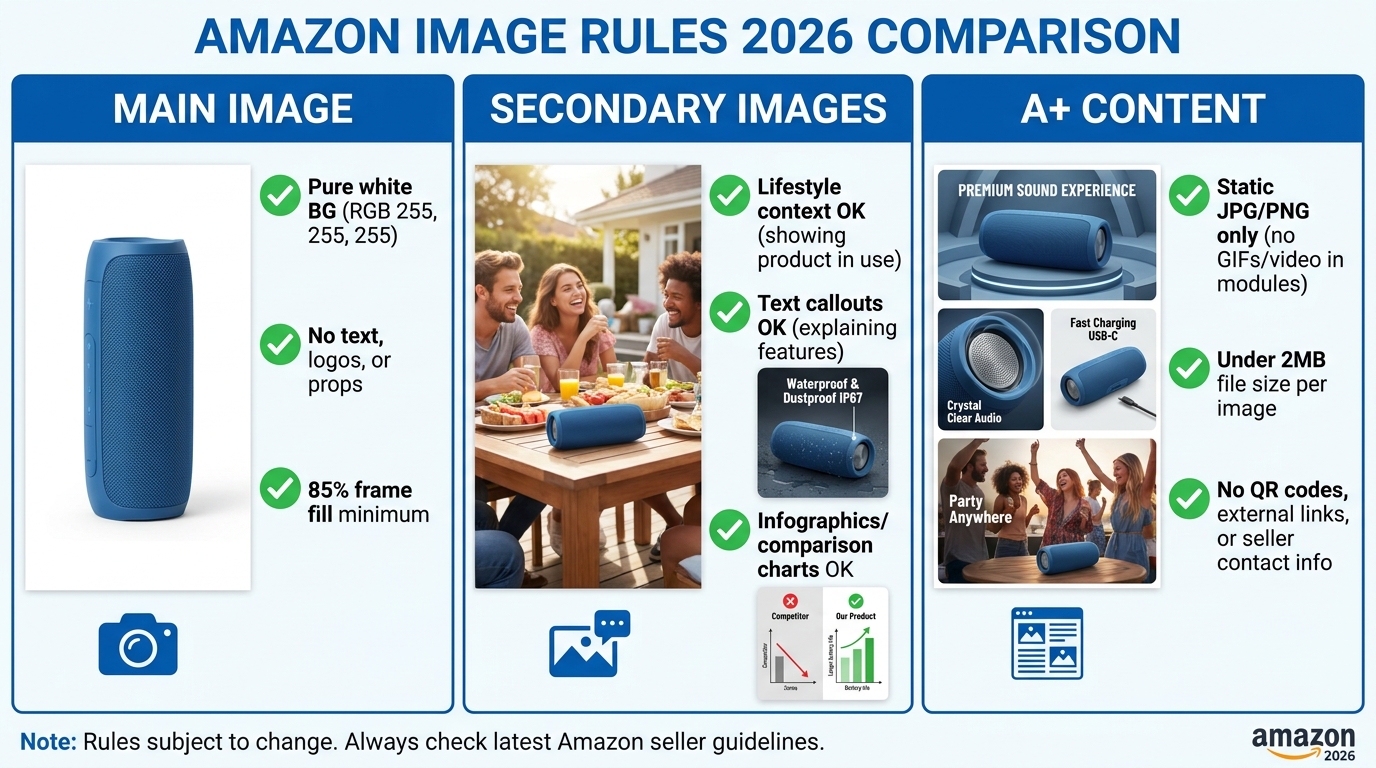
    Secondary images have considerably more creative freedom than main images. Lifestyle photography, dimension infographics, feature callout graphics, comparison charts, and instructional use-case images are all permitted and actively encouraged. These slots are where you build conversion — the main image gets the click, and secondary images do the selling.

    That said, certain rules still apply in 2026:

    • Text density in infographics: Amazon hasn’t published an exact threshold, but enforcement patterns suggest that images where text occupies more than roughly 20% of the image area by pixel count are more likely to be flagged as “text-heavy” and potentially suppressed. Keep callouts concise and use white space strategically.
    • Lifestyle image content: Models and contexts must accurately represent the product and its use. Lifestyle scenes that imply product capabilities the item doesn’t have, or that include sexually suggestive content, are suppressed.
    • Slot-specific placement: Certain category-specific rules govern which image types belong in which slots. For some categories, size guides are required in a specific slot. Check your category style guide in Seller Central for slot-by-slot requirements.
    • Image quality minimums: Secondary images must meet the same resolution minimums as main images (1,000 pixels on the longest side, recommended 2,000+). Blurry, pixelated, or low-resolution infographics will be removed.

    The Competitive Intelligence Play

    One thing most sellers overlook: Amazon may replace your secondary images with images sourced from other sellers or brand submissions if it determines your secondary content is low quality. This is especially common on shared ASINs where multiple sellers list against the same product. If another seller submits higher-quality images under the same ASIN, their images may take precedence across the listing. The fix is to use Brand Registry to lock control of your content — registered brand owners have considerably more authority over which images display.

    Shopify and WooCommerce: Technical Image Failures and Catalog Visibility

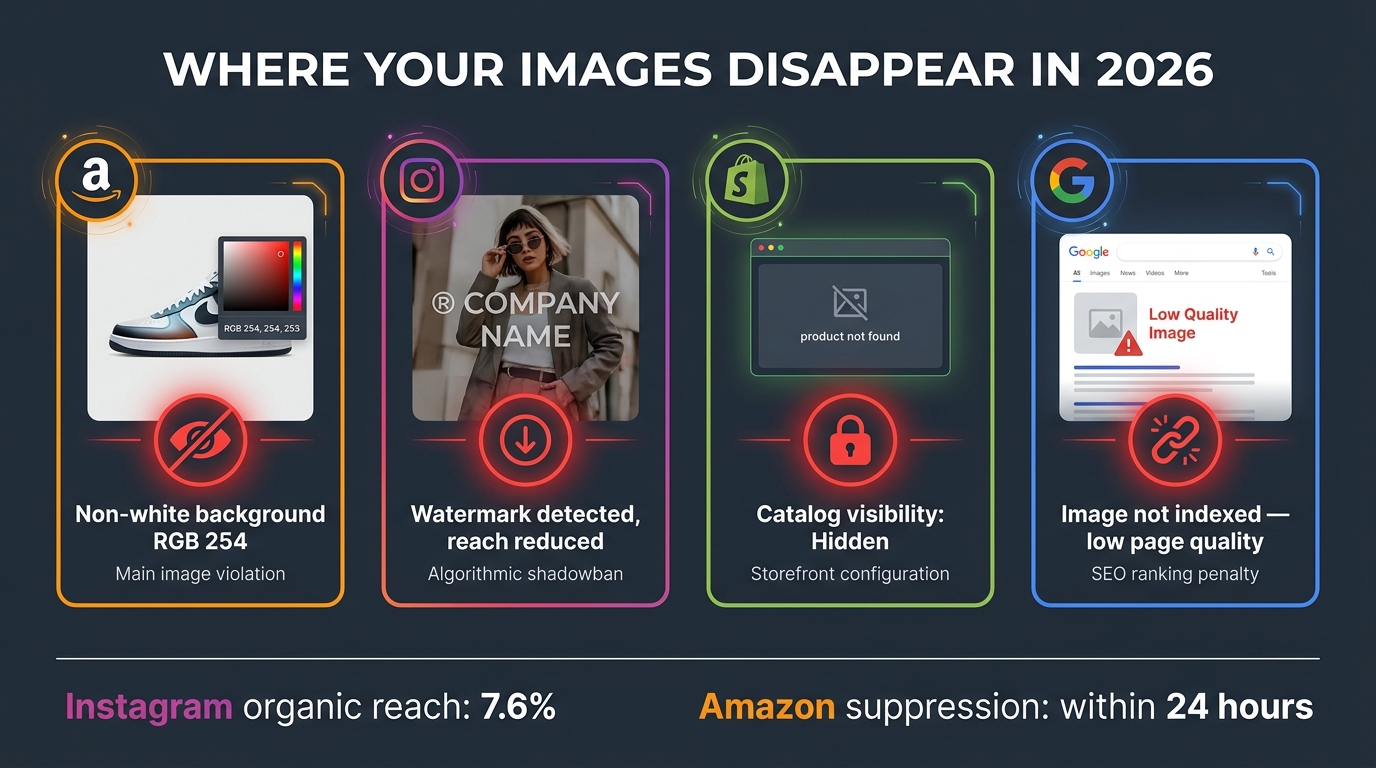
    Platform comparison infographic showing image suppression triggers across Amazon, Instagram, Shopify, and Google in 2026 with specific error examples and suppression indicators

    Shopify and WooCommerce image suppression operates very differently from Amazon’s algorithmic enforcement. On these self-hosted or SaaS platforms, suppression is almost always a technical misconfiguration rather than a policy violation. The result is the same — invisible products — but the causes and fixes are entirely different.

    Shopify Product Images Not Displaying

    When Shopify product images fail to appear, the cause usually falls into one of these categories:

    Product status set to Draft or Unlisted. This is the single most common cause of invisible Shopify products. A product in “Draft” status is not published to any sales channel. Navigate to Products → All Products, find the product, and check the “Status” field in the top right. Change from Draft to Active, and ensure the “Online Store” sales channel is checked under the “Sales channels” section.

    Online Store sales channel not enabled. Even with an active product, if the Online Store sales channel hasn’t been enabled for that specific product, it won’t appear on your storefront. This is a common consequence of bulk imports where channel assignment settings weren’t configured correctly.

    Image file type or size issues. Shopify supports JPEG, PNG, GIF, and WebP files up to 20MB. Images above this threshold fail silently — they show as uploaded in the admin but don’t actually display on the frontend. This catches sellers who are uploading high-resolution RAW conversions or oversized TIFFs converted to JPEGs without compression.

    CDN caching delays. Shopify serves images through its CDN (Content Delivery Network). After uploading or replacing an image, there can be a delay of up to several hours before the new image propagates through the CDN globally. If you’re testing from the same browser or device repeatedly, hard refresh with Ctrl+Shift+R (or Cmd+Shift+R on Mac) to bypass your local cache.

    Theme-level CSS conflicts. Some custom theme modifications or third-party app injections can accidentally hide image containers via CSS. Open your browser developer tools (F12), inspect the image element, and check for display: none, visibility: hidden, or opacity: 0 CSS rules being applied by your theme or apps.

    WooCommerce Image Suppression Causes

    WooCommerce stores have a different set of common culprits:

    Catalog visibility set to “Hidden.” In WooCommerce, every product has a “Catalog Visibility” setting found under Products → Edit Product → Product Data → Advanced. Options include “Shop and search results,” “Shop only,” “Search results only,” and “Hidden.” A product set to “Hidden” won’t appear in any automatic listing or search. This setting is easy to accidentally set during imports or bulk edits.

    Image regeneration needed after theme switch. When you switch themes in WordPress, the theme may use different image sizes than your previous theme. Products that had images uploaded under the old theme may display broken or missing images until you regenerate image thumbnails. Use the Regenerate Thumbnails plugin (or WP-CLI command wp media regenerate) to rebuild image sizes for all your products.

    Featured image not set. WooCommerce uses the “featured image” (set in the product editor’s sidebar) as the primary product image. If a product was imported with gallery images but no featured image designation, it may show a placeholder or nothing at all on the shop page. Always verify the featured image is set for every product.

    Plugin conflicts. Image display issues in WooCommerce are frequently caused by incompatibilities between plugins — particularly image optimization plugins, page builder plugins (Elementor, Beaver Builder), or lazy loading plugins that interfere with WooCommerce’s image rendering. Systematically deactivate plugins one at a time to isolate the conflict, then update or replace the offending plugin.

    Permissions and server-level file access issues. On self-hosted WordPress, image files need correct file permissions (typically 644 for files, 755 for directories) and must be accessible by the web server. Misconfigured permissions following a server migration or security hardening can cause images to display as broken links even though the files exist in the uploads folder.

    Social Media Image Reach Suppression: Meta, TikTok, and Platform Rules

    Social media image suppression differs from ecommerce suppression in a fundamental way: the image isn’t removed or flagged with an error. Instead, the platform’s algorithm simply stops distributing it. Your post exists. You can see it. Your followers can find it if they come to your profile. But it’s not being served in feeds, explore pages, or recommendation engines — which is where discovery actually happens. This is reach suppression, and in 2026 it’s more systematic than ever.

    Instagram and Facebook in 2026

    Meta has implemented several changes in 2026 that significantly affect how image posts are distributed:

    Third-party watermarks and platform logos. Posts containing watermarks from other platforms — notably the TikTok logo, YouTube branding, or even visible Canva or Adobe Express watermarks — are systematically deprioritized by Meta’s algorithm. The platform treats these as reposted content from competitors and reduces distribution accordingly. Instagram’s average organic reach already sits at approximately 7.6% of followers per post in 2026; posts with detected cross-platform watermarks may receive significantly less than that baseline.

    External link indicators in images. Meta has become increasingly aggressive about suppressing content it perceives as driving traffic off-platform. Images with visible URLs, “link in bio” callouts, or QR codes pointing to external sites are experiencing reduced algorithmic distribution. This is part of a broader Meta strategy that restricts clickable external links on business pages unless the account is subscribed to Meta Verified.

    Non-original and reposted content. Meta’s 2026 content originality systems can identify duplicate or near-duplicate image content. If you’re posting the same image across multiple accounts, reposting images originally published elsewhere, or sharing stock imagery used widely across the platform, you’ll experience compressed reach. Original photography, especially content that was generated or captured for that specific account, consistently outperforms.

    TikTok Image and Product Image Rules

    TikTok Shop product images have their own suppression mechanisms. Product listings with low-quality main images — blurry, text-heavy, or featuring competitor branding — are deprioritized in TikTok Shop’s browse and search features. TikTok’s product image guidelines are broadly similar to Amazon’s (clean backgrounds, product prominence, no misleading imagery) but are enforced with different consistency and different speed. TikTok’s enforcement tends to be more inconsistent but can result in product removal from the Shop entirely when violations are severe.

    For standard TikTok video thumbnails (not Shop product images), images featuring excessive text, inflammatory content, or misleading clickbait framing are algorithmically suppressed before a video even gets its initial distribution push — meaning suppression happens at upload, not after performance data is collected.

    Google Image Indexing Issues: What’s Really Blocking Your Product Images

    Google doesn’t suppress images in the way Amazon does. There’s no “search suppressed” flag, no notification, and no appeal process. When Google stops indexing your product images, the only evidence is the absence of traffic from Google Image Search and Google Shopping — both of which can be significant sources of discovery for physical products.

    Why Google Stops Indexing Images

    Low page quality. Google evaluates images in the context of the page they’re on. If a product page has thin content — minimal description, no reviews, no structured data — Google may index the page itself but decline to index the images on it. This is increasingly common on DTC Shopify stores with auto-generated product pages that contain only a product title, price, and one-line description.

    Technical crawl blocks. Images served from a subdomain or CDN URL that’s blocked in robots.txt will not be indexed regardless of how strong the surrounding page content is. Check your robots.txt for any rules that disallow Googlebot from crawling your image CDN paths. This is surprisingly common on Shopify stores where older robots.txt configurations blocked CDN subdomains.

    Missing or weak alt text. Alt text is the primary signal Google uses to understand what an image depicts. An image with no alt text, or with generic alt text like “product-image-1,” gives Google nothing to work with. In competitive niches, images with strong descriptive alt text — including the product name, key features, and relevant modifiers — consistently outperform in Google image search rankings.

    Image file format and size issues. Google strongly prefers WebP format for image indexing in 2026, citing faster loading and better Core Web Vitals scores. JPEG and PNG are still indexed, but oversized images (above 3–5MB) on pages that load slowly may be deprioritized in indexing queues. Modern image CDNs and Shopify’s built-in image optimization already handle WebP conversion — but self-hosted WooCommerce stores often need to implement this manually via plugins like Imagify or ShortPixel.

    Structured data not implemented. Product schema markup with an image property significantly increases the likelihood of your product images appearing in Google Shopping and rich results. Pages without structured data are less likely to have their images surfaced in visual search. In 2026, with Google’s March Core Update tightening rich result eligibility, properly implemented JSON-LD Product schema with image URLs is essentially table stakes for product image visibility.

    Your Image Audit Framework: A Platform-by-Platform Checklist

    Step-by-step workflow flowchart for diagnosing and fixing suppressed Amazon listings in 2026, from finding the suppressed listing through reinstatement

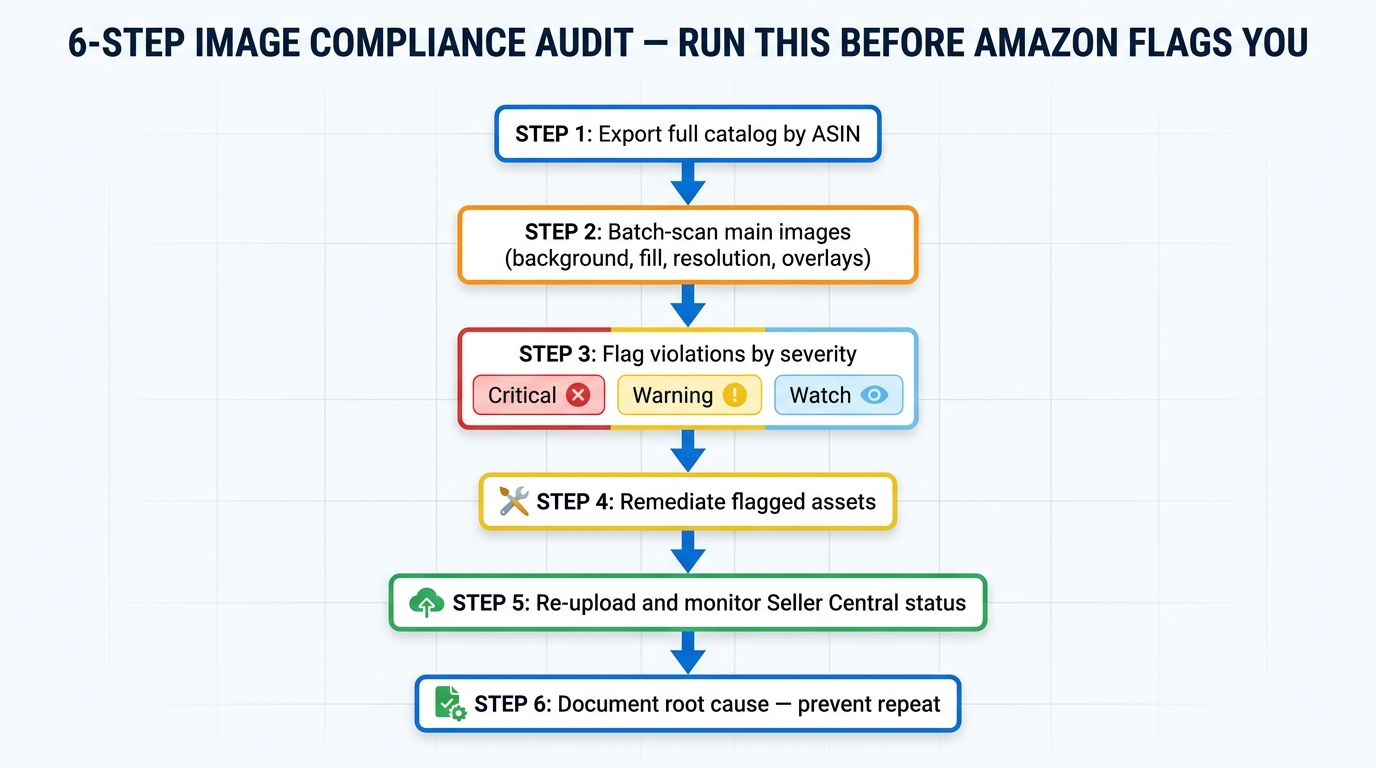
    Before you touch a single image, you need to know exactly what you’re dealing with and on which platform. The audit phase is where sellers usually cut corners, and it costs them — they fix one thing, upload new images, and get suppressed again for a different violation they didn’t catch the first time. A systematic audit catches all violations at once.

    Amazon Image Audit Checklist

    For every product on Amazon, work through the following before touching any images:

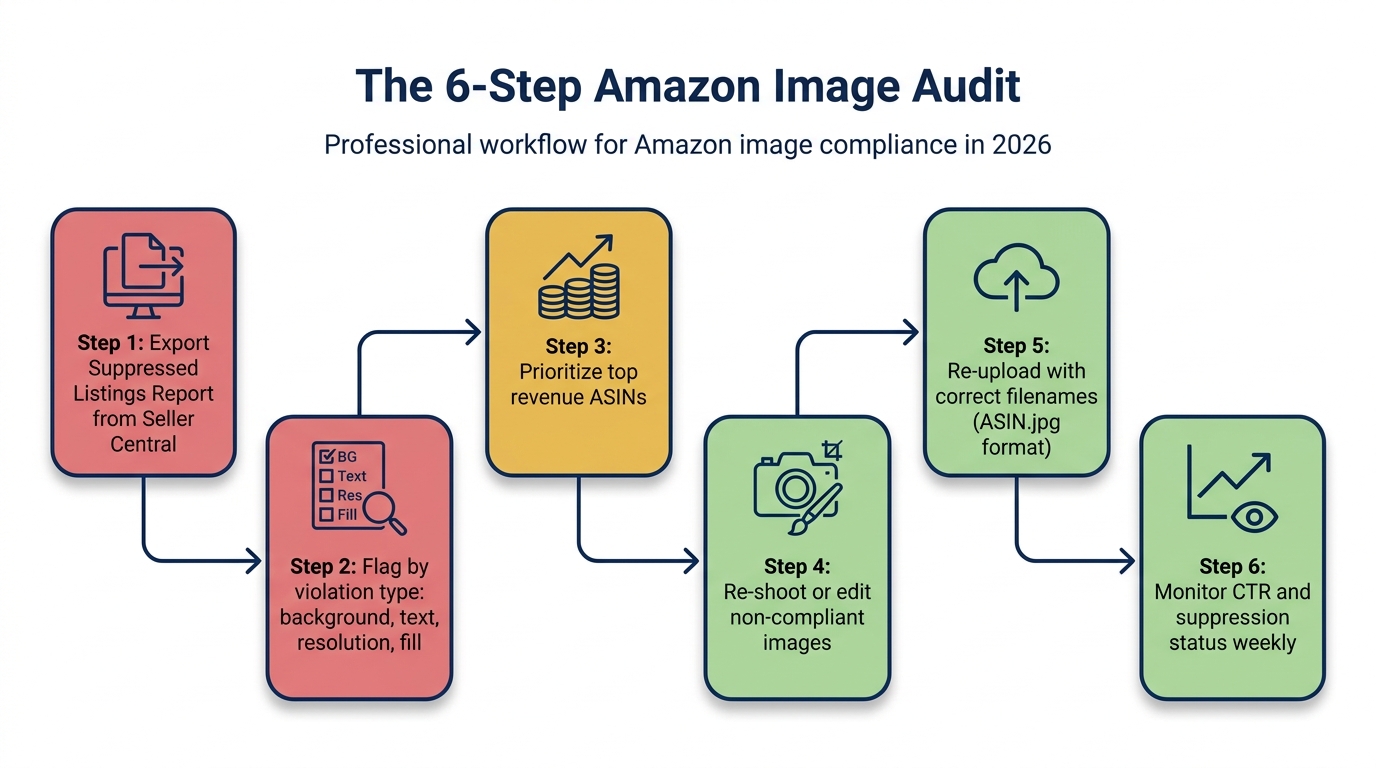
    1. Go to Seller Central → Inventory → Manage Inventory → Suppressed. This filtered view shows you every listing currently in suppressed status. Note the suppression reason listed for each — this tells you which specific policy is being violated.
    2. Download all images for the affected listing via the listing editor or your image hosting source.
    3. Check main image background: Open in Photoshop. Use the eyedropper tool (set to “3 by 3 average” sample size) and click on multiple points of the background. The Color Picker should show exactly 255, 255, 255 for all channels. Alternatively, use the Histogram panel — a pure white background should show a sharp spike at the far right of the histogram with no clipping on the edge. Any gray or colored pixels constitute a failure.
    4. Check product frame fill: In Photoshop, create a new layer filled with a contrasting color and set to 85% of canvas dimensions. Place it centered on the canvas. Your product should extend beyond this guide frame in all directions.
    5. Check resolution: Go to Image → Image Size. Confirm the longest side is at minimum 1,000 pixels (ideally 2,000+).
    6. Check for C2PA metadata: Upload the image to contentcredentials.org/verify. If credentials are detected, strip them using ExifTool or Photoshop’s Export As (metadata: None) before re-uploading.
    7. Check for prohibited elements: Zoom into the image at 100% and look for any text, logos, watermarks, borders, or frame-edge shadows.

    Shopify Audit Checklist

    1. Check all product statuses in Products → All Products. Filter by “Draft” to find unpublished products.
    2. Verify Online Store sales channel is enabled for each affected product.
    3. Confirm image file sizes are under 20MB and in a supported format (JPEG, PNG, WebP).
    4. Test the product URL in an incognito browser window to isolate caching issues.
    5. Open browser developer tools and inspect image containers for CSS display or visibility overrides.
    6. Check theme/app update log for any recent changes that might have broken image display.

    WooCommerce Audit Checklist

    1. Check each affected product’s catalog visibility setting (Products → Edit → Product Data → Advanced).
    2. Verify featured image is set for all products — not just gallery images.
    3. Run the Regenerate Thumbnails plugin to rebuild image sizes after any theme change.
    4. Check file permissions on the wp-content/uploads directory via FTP or cPanel File Manager.
    5. Deactivate all non-essential plugins and test; reactivate one by one to identify conflicts.
    6. Test in the WordPress default theme (Twenty Twenty-Four) to confirm the issue is theme-related.

    Google Image Indexing Audit

    1. Use Google Search Console → URL Inspection for your product page URL. Check whether the page itself is indexed, and look at the “Page fetch” section for any resource loading failures.
    2. Review your robots.txt file for any rules blocking image directories or CDN subdomains.
    3. Check alt text across all product images — use a crawler like Screaming Frog to audit at scale.
    4. Verify Product schema markup using Google’s Rich Results Test tool.
    5. Check image file sizes using PageSpeed Insights — large images are frequently cited as performance issues that affect indexing priority.

    Fixing Suppressed Listings: Step-by-Step Reinstatement Process

    With a complete audit in hand, you know exactly what’s broken. The reinstatement process differs by platform and by the type of suppression, but in every case the sequence is: fix, verify, resubmit, monitor.

    Reinstating a Suppressed Amazon Listing

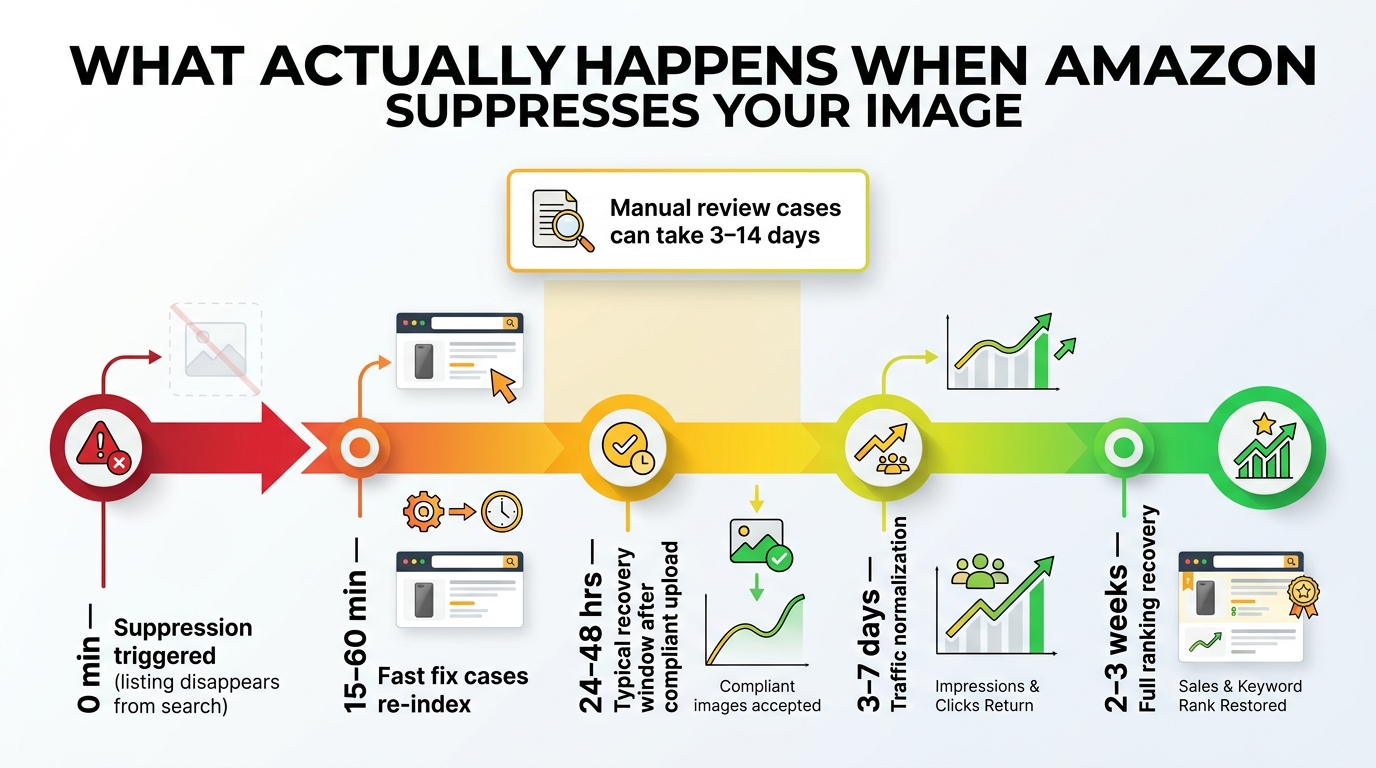
    The most common Amazon image suppression — background non-compliance — can typically be resolved without any appeal. Fix the image, upload a compliant version, and the algorithm will review and reinstate within 24 to 72 hours in most cases. Here’s the detailed process:

    Step 1: Fix the image. Using Photoshop, open your product image. If the background is off-white, create a new layer below the product, fill it with RGB 255, 255, 255 using the Paint Bucket tool, and flatten the image. If the product has been isolated with a feathered mask, the soft edges may still produce off-white anti-aliasing artifacts — switch to a hard-edged mask for the product boundary. Export using File → Export → Export As, set format to JPEG (quality 10/maximum), and set metadata to “None” to strip any C2PA tags.

    Step 2: Verify compliance before uploading. Run the exported image through your checklist: background RGB check in MS Paint (eyedropper tool), frame fill estimate, file size verification, and C2PA check at contentcredentials.org.

    Step 3: Upload via Seller Central. Go to Inventory → Manage Inventory. Find the suppressed listing, click Edit, and navigate to the Images section. Delete the non-compliant image and upload your fixed version. Save the listing.

    Step 4: Monitor for reinstatement. After uploading, allow 24 to 48 hours for Amazon’s systems to review the new image. Check Seller Central notifications and the Suppressed filter daily. Most compliant images are reinstated within this window. If after 72 hours the listing is still suppressed despite a clearly compliant image, proceed to appeal.

    Step 5: Appeal if reinstatement doesn’t happen automatically. Contact Seller Support and open a case citing the specific listing (ASIN), stating that the main image has been updated to comply with all main image guidelines. Attach a screenshot of your image with the background color values visible. Escalate to Selling Partner Support if needed. Amazon’s turnaround on image appeals averages 3 to 7 business days.

    Restoring Shopify Product Visibility

    Shopify fixes are usually immediate. Changing a product from Draft to Active, enabling a sales channel, or re-uploading a correctly formatted image takes effect within minutes. The only exception is CDN caching — if you’ve replaced an image but it still shows the old version in your browser, wait 2 to 4 hours and hard-refresh. If the issue persists after 24 hours, contact Shopify support because the CDN may need a manual cache purge for your specific image URLs.

    Recovering WooCommerce Product Images

    After fixing the root cause (visibility settings, permissions, plugin conflict, or thumbnail regeneration), force WordPress to clear all caches. If you’re using a caching plugin like WP Rocket, W3 Total Cache, or LiteSpeed Cache, go into the plugin settings and clear all caches manually. Also purge your CDN cache if you’re using one (Cloudflare, BunnyCDN, etc.). Then test in a private browser window — not an incognito tab on a browser that has cached the site — to see clean page loads without cached data.

    Prevention: Building an Image Pipeline That Won’t Get Flagged

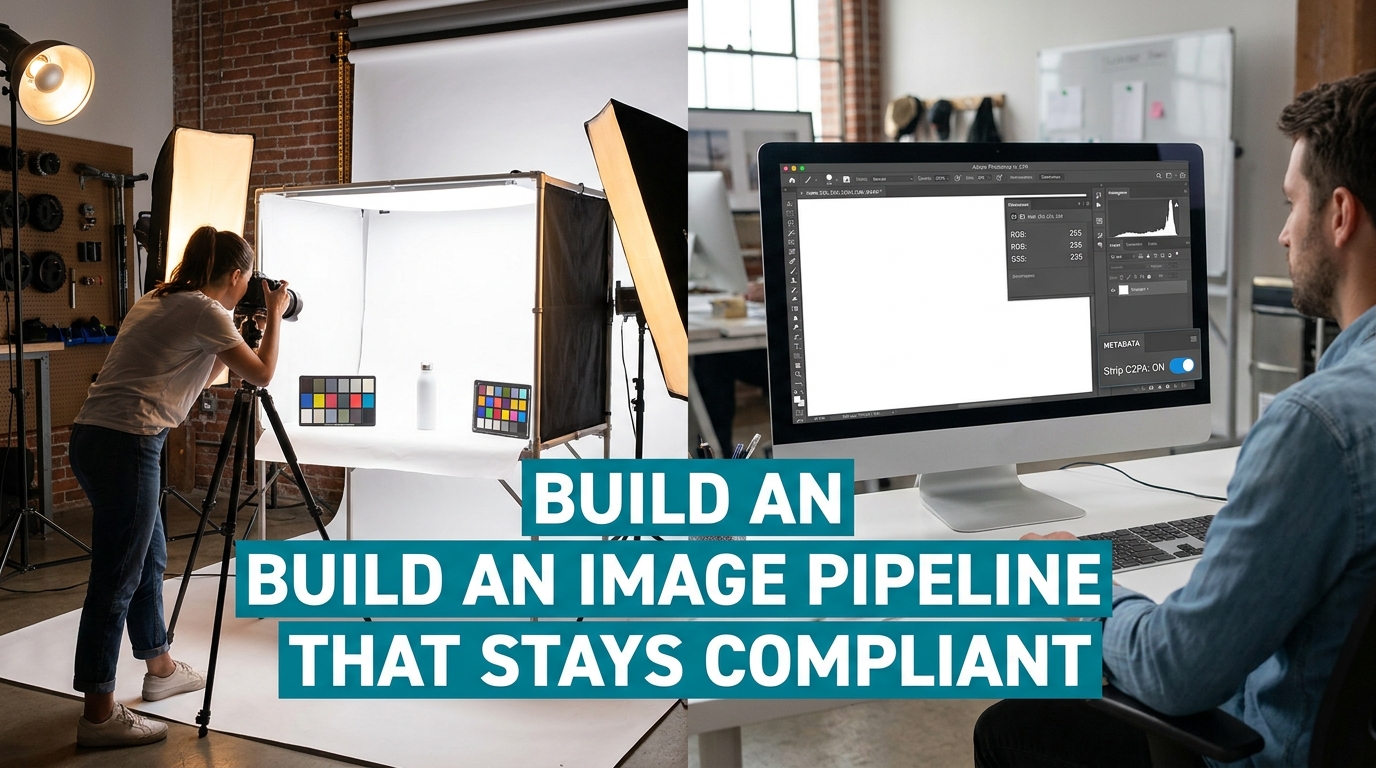
    Professional ecommerce photography studio setup showing a product on pure white seamless paper alongside a computer monitor with Photoshop histogram showing exact RGB 255,255,255 white background and C2PA strip toggle enabled

    Suppression is expensive. You lose sales during the time you’re suppressed, you spend time and potentially money fixing the problem, and repeat suppression signals erode your listing’s quality score. The far better investment is building a production process that systematically prevents suppression before it happens.

    Set Up a Compliant Photography Workflow

    The most reliable way to eliminate background compliance issues is to shoot on actual white seamless paper under controlled lighting — not to rely on AI background removal. A proper product photography setup costs far less than a month of lost sales from a suppressed listing:

    • Use white seamless photography paper (available in rolls from photography suppliers) as your background.
    • Light the background independently from the product — aim for the background to meter at one to two stops overexposed relative to the product to ensure true white after any exposure adjustments.
    • Shoot tethered to a calibrated monitor so you can verify background color in real time during the shoot.
    • Export from Lightroom with metadata set to “Copyright only” (which excludes C2PA synthetic alteration tags while preserving legitimate copyright information).

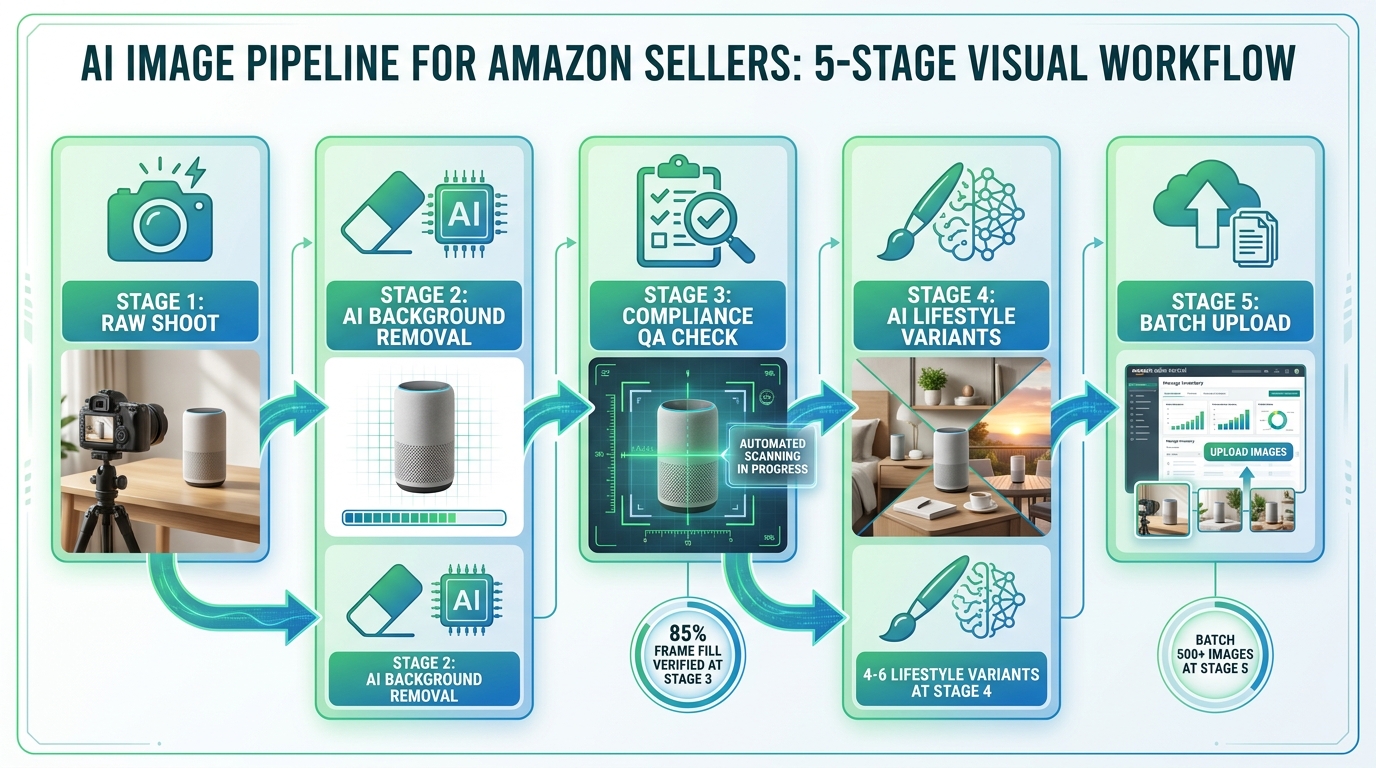
    If you are using AI tools for any aspect of image editing, restrict their use to secondary images (slots 2–7) rather than the main image. Lifestyle generation, background scene creation, and infographic design are safer in secondary slots where the compliance rules are less absolute.

    Implement a Pre-Upload Verification System

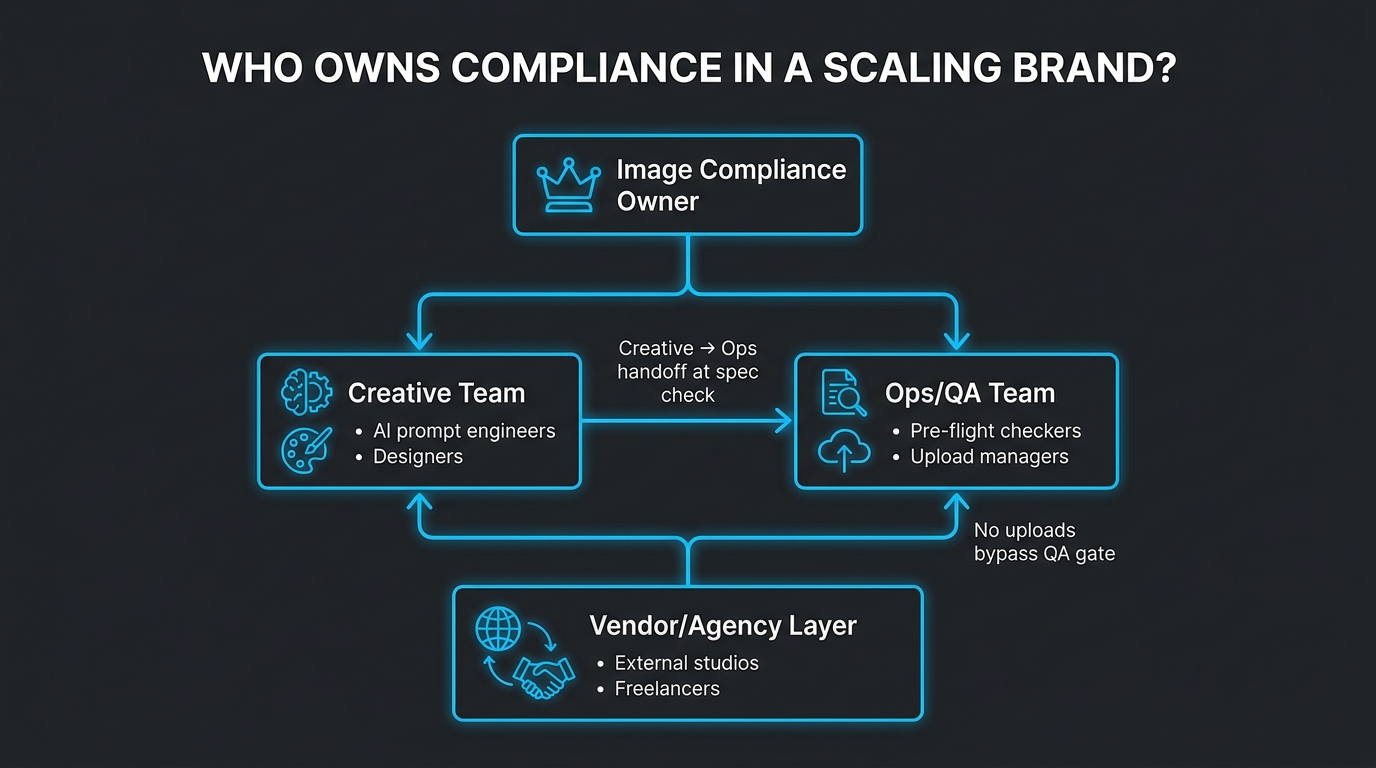
    Before any image goes live on any platform, it should pass through a defined verification checklist — not a mental note, but an actual documented checklist that a team member completes and signs off on. For Amazon specifically, this checklist should include background RGB verification, frame fill measurement, resolution confirmation, prohibited element scan, and C2PA metadata check. Treat it like a quality control step, not an afterthought.

    There are third-party tools that automate parts of this. SellerSprite’s image compliance tool checks background color and frame fill. Pixelcut Pro includes an Amazon compliance checker. These aren’t replacements for human judgment but they’re useful first-pass filters that catch the most common errors.

    Use Brand Registry Proactively

    Amazon Brand Registry gives registered trademark holders meaningful control over how images appear on their listings. Brand-registered sellers can submit images through A+ Content and the product listing editor with greater confidence that their submissions will be prioritized over other sellers’ images on the same ASIN. If you’re selling branded products and haven’t enrolled in Brand Registry, image control — not just the other brand-protection benefits — is a compelling reason to do so.

    Monitor Suppression Proactively with Automated Alerts

    Don’t wait to discover a suppressed listing through declining sales. Set up proactive monitoring:

    • Amazon Seller Central: Check the Suppressed filter in Manage Inventory weekly — or daily during peak sales periods. Amazon sends suppression notifications but these can be delayed or buried in seller communications.
    • Third-party monitoring tools: Platforms like Helium 10, Jungle Scout, and SellerBoard include suppression monitoring features that alert you via email or dashboard when a listing status changes.
    • Google Search Console: Set up email alerts for coverage issues — these will notify you when pages fall out of the index, which may indicate image-related quality issues.
    • Shopify inventory: Periodically audit your product list filtering by status to catch products that have accidentally reverted to Draft.

    Stay Current on Policy Updates

    Platform image policies are not static. Amazon has updated its main image requirements multiple times in the past three years, and the C2PA metadata crackdown in early 2026 caught sellers completely by surprise because there was no advance announcement — just a wave of suppression notifications. Make it a monthly habit to review Amazon’s Style Guides for your categories (found in Seller Central Help), follow Amazon seller communities and forums for early-warning discussions, and subscribe to ecommerce industry publications that track policy changes.

    The Business Case for Getting This Right

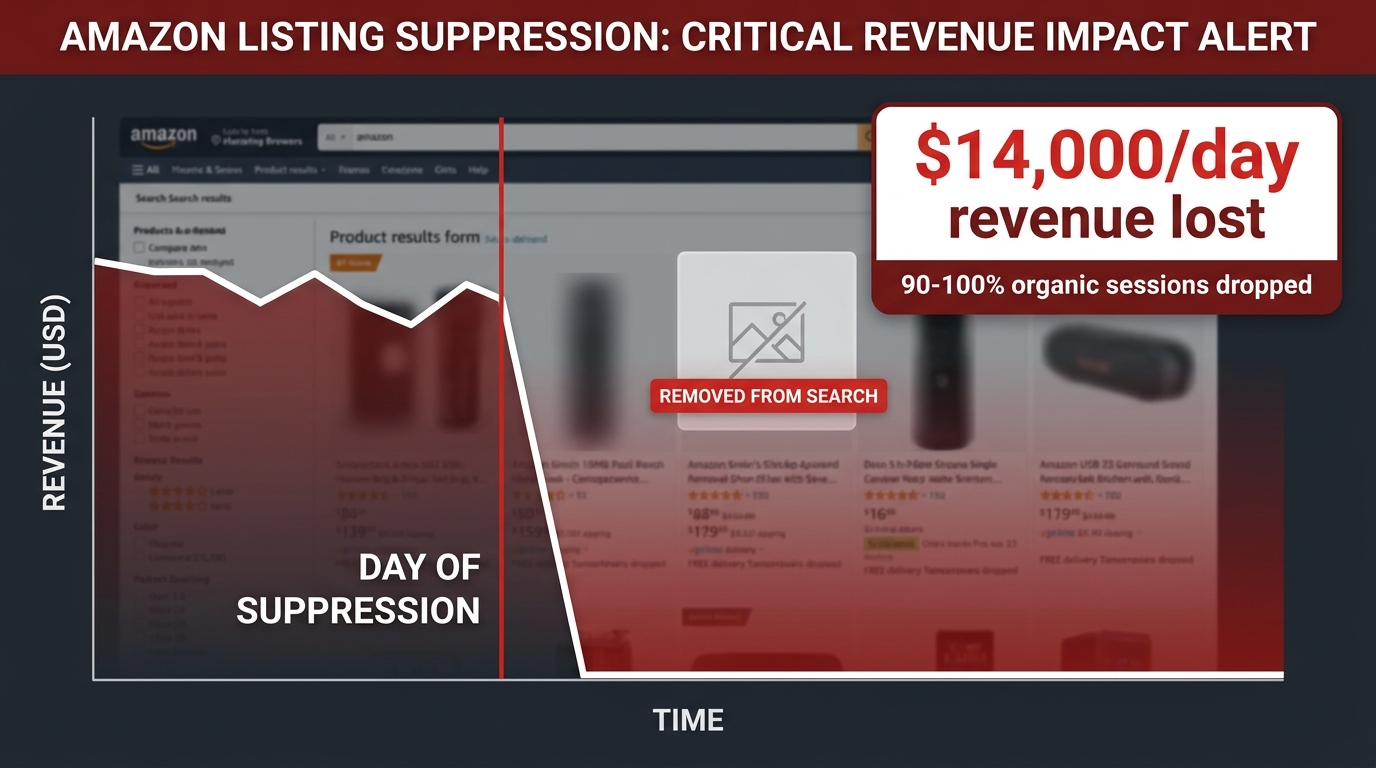
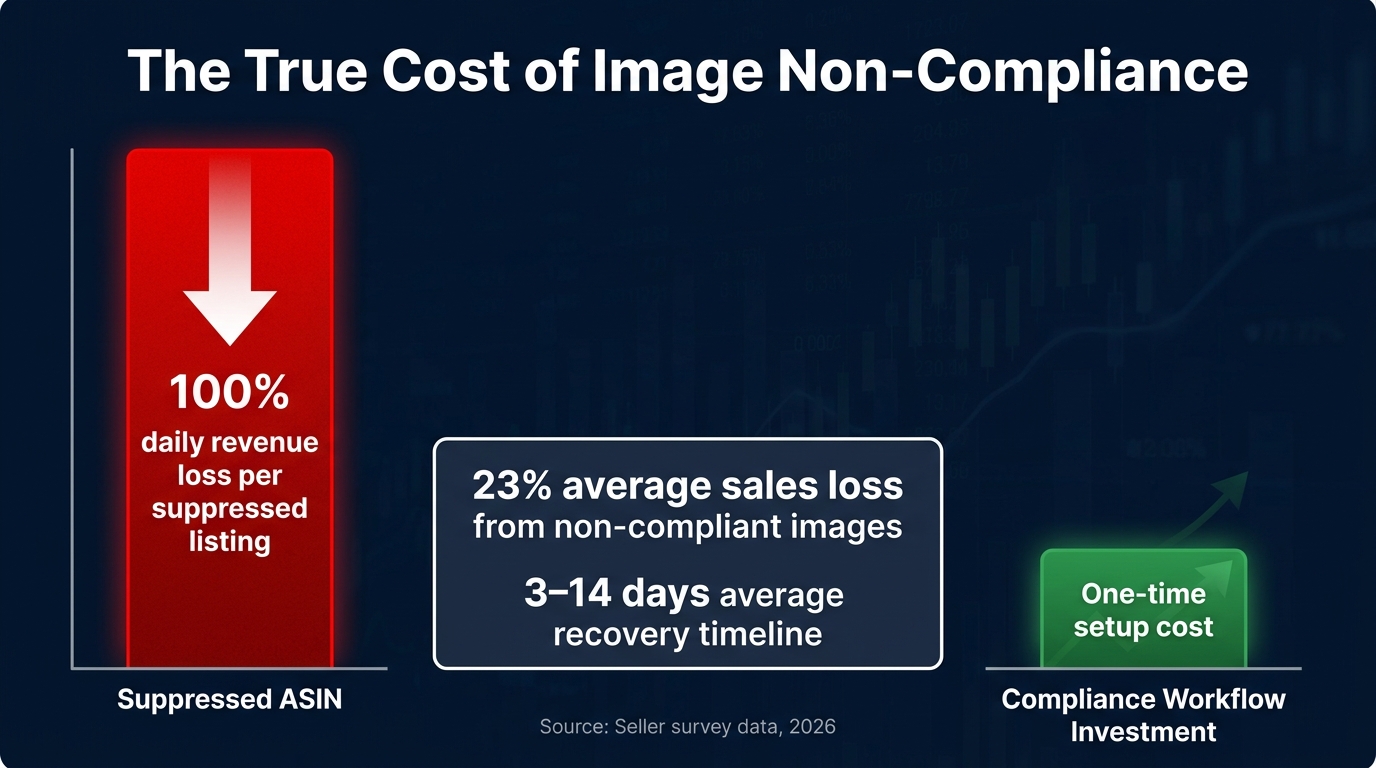
    It’s worth stepping back and quantifying what image suppression actually costs. On Amazon, a suppressed listing generates zero organic impressions — meaning you’re invisible to every customer who doesn’t already know your ASIN. For sellers running Sponsored Products campaigns, ad spend may continue during suppression depending on campaign settings, but with suppressed organic visibility, the total listing performance collapses. A seller generating $50,000 per month from a listing that goes suppressed for just five days loses an estimated $8,000 to $10,000 in revenue — not counting the longer tail of ranking recovery, since Amazon’s algorithm penalizes listings that go dark even after reinstatement.

    On DTC channels, the math is different but no less significant. A Shopify product that’s invisible in Google image search and Google Shopping loses an acquisition channel that costs nothing per click. A social media product post that’s algorithmically suppressed doesn’t just fail to reach new customers — it affects your account’s overall reach score, potentially depressing future posts as well.

    This is why treating image compliance as infrastructure — rather than a one-time task — is the right frame. The sellers who treat it as a production step built into their workflow, not a problem they address reactively, are the ones who maintain stable visibility while competitors cycle in and out of suppression crises.

    Conclusion: Diagnose, Fix, Prevent — in That Order

    Image suppression in 2026 is more technically complex than it’s ever been, driven by AI content detection, metadata reading, algorithmic reach suppression, and platform-specific rule sets that change without notice. But it’s also more fixable than sellers realize — because most suppressions stem from specific, identifiable, correctable causes.

    The key shift is moving from reactive to diagnostic. When your images disappear, the instinct is to panic, delete everything, and start over. The better approach is to treat it like a system failure: identify which platform is suppressing you, consult the specific failure mode, and apply the targeted fix. Then build the monitoring and production systems that make the next suppression event something you catch before it costs you sales.

    Your Action Checklist

    • Today: Log into every selling platform and run the Suppressed filter. Identify any active suppressions right now.
    • This week: Download all main images from your top five Amazon ASINs. Run them through Photoshop background verification and contentcredentials.org for C2PA check.
    • This week: Audit your Shopify and WooCommerce stores for product status, catalog visibility, and image file size compliance.
    • This month: Build and document a pre-upload image verification checklist for your team or contractor.
    • Ongoing: Set up automated suppression monitoring on Amazon. Schedule a monthly policy review to catch guideline changes before they catch you.

    Visibility is the prerequisite for everything else in ecommerce — conversions, reviews, advertising performance, and rank. Image suppression eliminates that prerequisite silently and quickly. With the diagnostic framework laid out in this guide, you have everything you need to find suppression, fix it, and stop it from recurring.

    The sellers who win in 2026 aren’t the ones with the best products. They’re the ones whose products can actually be found.

  • Unlocking Sales with Amazon Product Optimization

    Unlocking Sales with Amazon Product Optimization

    If you're still treating your Amazon listings like a one-and-done task, you're already falling behind. The old playbook of setting up a product page and hoping for the best simply doesn't work anymore. Amazon product optimization is an ongoing, active process. You have to treat your product page like a living asset, constantly fine-tuning it to win over both shoppers and Amazon's A10 algorithm.

    The New Rules of Amazon Product Optimization

    Forget everything you thought you knew about simply stuffing keywords into your listing. Success on Amazon in 2026 is a whole new ballgame, and the A10 algorithm has rewritten the rules. The focus has shifted dramatically toward customer experience and genuine organic performance. Your job is no longer just to be found—it’s to convert, satisfy, and earn trust.

    This modern approach to Amazon product optimization rests on a few core pillars that successful sellers have mastered. It's about thinking holistically about the entire customer journey on your page.

    Key Pillars of Modern Amazon Optimization

    To really grasp this shift, it helps to break down the essential components. These are the areas where you need to be focusing your energy right now to stay competitive and get the algorithm on your side.

    Optimization Pillar Primary Goal Key Action
    Deep Keyword Mastery Attract highly qualified, ready-to-buy traffic. Dig for long-tail phrases and customer questions, not just broad, generic terms.
    Compelling Visuals Answer questions and build desire before they read. Create a full suite of images, infographics, and videos that show, not just tell.
    Strategic A+ Content Tell a brand story and stand out from competitors. Use rich media to build trust, explain benefits, and justify your price point.
    Reputation Management Build social proof and customer confidence. Proactively manage reviews and answer Q&A to show you're an engaged, reliable brand.

    Ultimately, these pillars all support one core principle that I've seen play out time and time again.

    The core principle is simple: a listing that excels at converting visitors into happy customers will be rewarded with higher rankings. The A10 algorithm prioritizes listings that demonstrate authority and generate consistent sales velocity.

    This is a huge evolution. Back in the day, the A9 algorithm was all about PPC and basic keyword relevance. Now, in 2026, the A10 algorithm cares far more about customer authority, organic sales, and even external traffic from sources like social media and blogs. It rewards brands that build a real audience.

    The payoff for getting this right is massive. For example, well-executed A+ Content is shown to deliver up to a +20% conversion boost, which is absolutely critical when over 50% of purchases happen on mobile. Brands that dominate the Buy Box consistently capture up to 70-80% of all sales in their categories. Top agency reports on Amazon marketing for 2026 show just how brands are adapting to this new reality.

    This guide will walk you through the actionable checklist you need to compete. We'll cover everything from deep keyword research and backend settings to creating stunning AI-powered visuals. To get a head start, see how AI can transform your product photography in our guide on creating high-converting Amazon listing images.

    Building Your Foundation with Keywords and Backend Fields

    Laptop displaying 'Keyword Foundation' software on screen, with a plant and notebook on a wooden desk.

    Before you even think about writing a catchy title or compelling bullet points, the real work of Amazon product optimization has to happen behind the scenes. This is all about building a solid keyword foundation and properly setting up your backend fields. Get this right, and you’re essentially giving Amazon's A10 algorithm a crystal-clear roadmap to who your product is for, making sure you show up in front of the right shoppers.

    I see so many sellers focus only on the big, obvious keywords—the "short-tail" terms like "yoga mat." And sure, they have a place. But the money is in the "long-tail" keywords. These are the super-specific, multi-word phrases like "extra thick non slip yoga mat for hot yoga." A shopper searching for that knows exactly what they want, and that intent translates directly to higher click-through rates and a much better return on your ad spend.

    Uncovering High-Intent Keywords

    The first step is a mental shift. You have to stop thinking about what you call your product and start thinking about the problems your customers are trying to solve. Modern keyword research is really part detective work, part data crunching.

    A great place to start is the Amazon search bar itself. Just begin typing your main product term and watch what Amazon's auto-suggest pops up. These are real searches from real customers, and they're often a goldmine of long-tail keyword ideas.

    From there, it's time to dig deeper.

    • Spy on Your Competitors: Pull up the top 10 listings for your primary keyword. Don't just skim them—analyze their titles, bullets, and especially their customer Q&A sections. What words do they use over and over? What questions do shoppers keep asking? These reveal pain points you can target.
    • Run Reverse ASIN Lookups: Grab the ASINs of your top three competitors and plug them into a dedicated SEO tool. A reverse ASIN search will spit out a list of the exact keywords they're ranking for, both organically and with ads. It's like getting a copy of their playbook.
    • Mine for Gold in Reviews: Go read the 3-star reviews on competing products. Why 3-star? Because they are often the most balanced, highlighting what's good but also what's missing. These "I wish it had…" comments are pure keyword gold.

    This whole process will give you a powerful list of keywords that goes way beyond the basics. You'll find phrases that tap into specific needs and help you connect with shoppers your competition is completely ignoring.

    Optimizing Your Backend Search Term Fields

    With your master keyword list in hand, you can start putting it to work. Your most valuable keywords will go in your title and bullets, but the backend fields are your secret weapon. This is where you can tell Amazon about all the other relevant terms without making your public-facing copy sound like a robot wrote it.

    The backend search term field is one of the most powerful—and most overlooked—tools you have. It's your private line to the A10 algorithm, letting you index for synonyms, common misspellings, and related concepts that just don't fit naturally into your main listing.

    Think of it as your strategic keyword overflow. You have a strict character limit, so you need a plan. Here's a quick checklist to do it right:

    • Search Terms (Generic Keywords): This is the main event. Fill this field with your secondary and long-tail keywords. Use all lowercase, separate words with a single space, and don't repeat anything that's already in your title, bullets, or other backend attributes. No commas, no semicolons—just a space-separated string of words.
    • Subject Matter: This helps Amazon's algorithm categorize your product more precisely. Add 3-5 relevant phrases that describe the product's use case or topic. For example, "outdoor patio furniture" or "mindfulness meditation guide."
    • Other Attributes: Don't skip these! Fields like "Target Audience" (e.g., "professional chefs," "beginner gardeners") and "Intended Use" are becoming more important for filtered search and voice search through Amazon's AI, Rufus. The more specific you are, the better.

    When you fill out these backend fields correctly, you’re giving Amazon a ton of valuable data. This helps you show up in more filtered searches and for a much wider range of customer queries, setting the stage for a truly optimized and profitable product.

    Crafting High-Conversion Titles, Bullets, and Descriptions

    A professional flat lay of a modern workspace with a tablet, pen, document, and 'High-Conversion COPY' text.

    Alright, you’ve done the crucial behind-the-scenes work. Your backend keywords are dialed in, building a solid SEO foundation for your product. Now comes the part where we turn that technical groundwork into persuasive copy that connects with real shoppers. This is where Amazon product optimization gets its personality.

    Your title, bullet points, and description are your front-line sales team. They have to grab a customer's attention in a sea of search results and guide them from a casual glance to a confident purchase. Think of it as a mini sales funnel on a single page: the title hooks them, the bullets answer their immediate questions, and the description seals the deal. If one part is weak, the whole system falters, and you leave sales on the table.

    Your Title: The Ultimate Click Magnet

    I tell every seller I work with: your product title is the single most valuable piece of real estate you have on Amazon. It’s the first thing anyone sees in the search results, and it has to do two jobs at once—satisfy the A10 algorithm and entice a human to click. A title overstuffed with keywords might get you seen, but a readable, benefit-rich title is what actually earns the click.

    The trick is finding that sweet spot. You want to front-load your most important keyword phrase and the product's core identity while ensuring it all makes sense. A formula I've seen work time and time again is:

    [Brand Name] [Primary Keyword Phrase] – [Key Feature or Benefit], [Size/Color/Quantity]

    For instance, a title like "EcoPure Water Filter Pitcher – Removes Lead and Chlorine for Better Tasting Water, 10 Cup Capacity, White" is worlds better than "Water Filter Pitcher Filter Water." It immediately tells the shopper the brand, what it does, why that matters, its size, and color. It answers five questions before they've even clicked.

    Amazon gives you a technical limit of around 200 characters, but don't feel you need to use all of it. In my experience, the first 60-80 characters are what count, especially on mobile. That's your prime real estate.

    Turning Features into Benefit-Driven Bullets

    This is where I see so many listings fall flat. Sellers just list out dry, technical specs in their five bullet points. Here's the thing: customers don't buy features; they buy the solutions and outcomes those features provide. Your job is to be a translator.

    So instead of just stating a feature like "Made with 304 Stainless Steel," you reframe it as a direct benefit: "BUILT TO LAST A LIFETIME: Crafted from rust-proof 304 stainless steel, so you never have to worry about replacing a flimsy or broken part again." See the difference? You’ve just sold them durability and peace of mind, not just a grade of metal.

    I like to structure bullets to tell a story and preemptively tackle customer concerns:

    • Bullet 1: Start with the main problem your product solves. Hook them immediately.
    • Bullet 2: Show off your unique solution or what makes your product different.
    • Bullet 3: Paint a picture of a specific use case or a positive experience.
    • Bullet 4: Build trust by talking about quality, materials, a warranty, or your brand's commitment.
    • Bullet 5: End on a strong note, maybe with a call-to-action or by reinforcing the core value.

    This approach walks a customer through their own decision-making process, building their confidence with every point.

    Remember, your bullet points aren't just a list; they are a conversation with your customer. Each one should anticipate and answer a question, moving them closer to clicking "Add to Cart."

    The Product Description: Your Final Pitch

    Even if you have access to A+ Content, your standard text description still gets indexed by Amazon and matters for SEO. And for sellers who aren't brand registered, this space is your last, best chance to make your case. Too often, it’s just a dreaded wall of text.

    The fix is surprisingly simple: use a little basic HTML to make it scannable. A few simple tags can completely change the reading experience. You can use <br> for line breaks and <b> to bold key phrases, guiding the reader’s eye.

    A simple structure that consistently performs well:

    • Start with a bold headline that repeats the main benefit.
    • Follow with a short, engaging paragraph that expands on the problem you're solving.
    • Use a mix of short sentences and paragraphs to explain features and benefits.
    • Bold important callouts like "Easy to Clean" or "Perfect for Gifting" to break up the text.
    • Wrap up with a final statement about your brand and exactly what's included in the box.

    This simple formatting transforms a dense block of text into an easy-to-scan sales pitch, ensuring your final message gets heard loud and clear.

    Mastering Visuals with AI-Powered Product Imagery

    A computer displaying product images, a camera on a tripod, and a cardboard box for AI product image creation.

    After you've dialed in your copy, your images have to do the real work. On Amazon, your product photos aren't just there to look pretty—they're your number one sales tool. They are often the first, and most powerful, impression a shopper gets. A top-notch visual strategy is no longer optional for Amazon product optimization; it's what stops the scroll, answers questions at a glance, and builds the trust needed to make a sale.

    Think of your image stack as a visual conversation with your customer. It begins with that perfect main image, your digital handshake, and then unfolds to tell a complete story through a series of carefully chosen shots.

    The Anatomy of a High-Impact Image Stack

    A truly effective image set does more than just show off your product. It gets ahead of every question, doubt, or curiosity a customer might have. A winning gallery is a mix of different image types, each with a specific job to do.

    • The Main Image: This is your hero shot, plain and simple. It needs to be on a pure white background, filling 85% of the frame, and make it instantly obvious what your product is. Its only goal is to be so clear and compelling that it earns the click from a sea of competitors on the search results page.
    • Lifestyle Photos: These shots put your product in a real-world setting, helping customers picture it in their own lives. A portable blender shown on a kitchen counter during a hectic morning routine tells a much richer story than a picture of the blender floating in a white void.
    • Infographics and Feature Callouts: Here's your chance to break down key benefits and specs into something scannable and easy to understand. Use them to highlight dimensions, materials, or unique features your copy mentions, reinforcing the product's value and justifying its price.
    • Comparison Charts: How does your product measure up against others? A simple chart can instantly show off your unique selling points, either against a competitor or other models in your own lineup. This helps shoppers make a quick, confident decision.

    For years, putting together this full suite of images was a major headache for sellers. It meant shelling out for expensive photoshoots, hiring graphic designers, and dealing with long turnaround times. It was a huge barrier to effective Amazon product optimization.

    High-quality product images are no longer just a "nice-to-have"—they are the core of your listing's performance. Listings featuring a full suite of 7 or more optimized images consistently see 20-40% higher engagement, directly fueling the sales velocity that the A10 algorithm rewards.

    The numbers don't lie. In-depth research on scaling an Amazon business has found that professional visuals can increase conversion rates by as much as 30% when everything else is dialed in. The problem has always been the price tag and the hassle. Freelancers can charge thousands of dollars for a single listing, an impossible expense for many sellers. Luckily, AI has completely flipped the script.

    The AI Workflow for Agency-Quality Visuals

    AI-driven platforms like AlgoFuse.ai have leveled the playing field, giving every seller the ability to generate a complete, high-converting image stack in just a few minutes. This workflow gets around the old-school bottlenecks of cost, time, and needing a designer on speed dial.

    The process itself is surprisingly simple. Instead of spending hours trying to write the perfect AI prompt or a detailed design brief, you just provide a few key inputs, like your product's ASIN or main keywords.

    The platform then does the heavy lifting, automating the entire creative process:

    1. First, it scans top-performing competitors for your keywords across all 19 Amazon marketplaces to see what visual styles are resonating with customers right now.
    2. Next, it automatically applies current best practices, making sure your main image is compliant and all your secondary images are designed for maximum impact.
    3. Finally, it generates a full suite of visuals, including lifestyle scenes, detailed infographics, and comparison charts, all based on your product’s specific features and benefits.

    This AI-powered approach delivers an entire agency-quality image package with a single click. It allows you to test, tweak, and even localize your visuals for international markets at a speed that was unimaginable just a few years ago.

    Manual Image Creation vs AI-Powered AlgoFuse.ai

    To really understand how big of a shift this is, it helps to see a direct comparison between the traditional method and the new AI-powered workflow. The table below breaks down the key differences in cost, time, and effort.

    Metric Manual Process (Freelancer/Agency) AI-Powered Process (AlgoFuse.ai)
    Cost Per Listing $500 – $3,000+ ~$15 (up to 95% less)
    Turnaround Time 1 – 4 weeks ~5 minutes
    Revisions Slow, often with additional costs Instant, with minimal token usage
    Expertise Needed Requires design briefs and direction None—fully automated best practices
    Scalability Limited by freelancer/agency capacity Unlimited—generate for entire catalog
    Localization Requires separate projects per market Built-in for global marketplaces

    As you can see, this isn't just a small step forward; it's a fundamental change in how sellers can manage their visual merchandising. Being able to create stunning, data-backed images on demand gives everyone a fighting chance—from brand-new sellers working on a tight budget to large aggregators who need to optimize hundreds of listings at once. This is the future of visual Amazon product optimization.

    Alright, you've nailed down your keywords, your copy is sharp, and your images are ready to go. Now it's time for the masterclass—the final layers that turn a good listing into one that truly dominates its category.

    This is where we move beyond the basics and get into strategic Amazon product optimization. We're talking about A+ Content, smart pricing, and building a rock-solid reputation with reviews. Think of these as the closers. Your title and images got them in the door, and the bullet points answered their first few questions. These next pieces are what will get them to confidently click "Add to Cart."

    Go Beyond Bullets with Strategic A+ Content

    A+ Content is your brand's dedicated space on the product page. It's your chance to tell a story, tackle any lingering doubts, and show off what makes your product special in a rich, visual way. When done right, it's a serious conversion driver—we've seen it boost sales by as much as 20% in some categories.

    The trick is to use the modules with purpose, not just as decoration.

    • Tell Your Brand Story First: Kick things off with a full-width banner that explains who you are. Are you a small family-run business? An innovator obsessed with sustainable materials? This is your chance to connect with the shopper on a human level.
    • Show, Don't Just Tell: Instead of more text, use comparison charts. They're fantastic for showing how your product stacks up against an older version or even the competition. You can also use a series of lifestyle images with text overlays to walk customers through the key benefits, making it much more digestible than a block of text.
    • Handle Objections Before They Happen: Is your product priced higher than others? Use a module to break down the premium materials or superior tech that justifies the cost. Worried people might think setup is complicated? Create a simple, step-by-step visual guide.

    I've seen so many sellers treat A+ Content like an afterthought, just throwing in a few extra images. That's a huge missed opportunity. It's your single best tool for building brand trust right on the page. Use it to answer the big question: "Why should I choose you?"

    For a long time, creating compelling A+ Content meant hiring a designer. Thankfully, that's changed. Modern tools have put professional-grade branding within reach for everyone. For instance, AI platforms like AlgoFuse.ai can generate stunning A+ modules in minutes, turning your product info into layouts that are designed to sell.

    Win the Buy Box with Smart Pricing

    Pricing on Amazon can feel like walking a tightrope. Go too high, and you'll lose the Buy Box. Go too low, and you're just giving away your profits. The real goal is finding that competitive sweet spot that drives sales and protects your margins.

    First thing's first: do your homework. Look at the top 5-10 competitors for your main keyword. Don't just glance at the price—dig deeper. How many reviews do they have? Are they FBA or FBM? Do they have great A+ Content? A well-established product with 5,000 reviews can easily command a higher price than a brand-new one.

    • Know Your Numbers: Before you set a price, you have to know your all-in costs. That means your cost of goods, inbound shipping, Amazon referral fees, FBA fees, and your ad spend.
    • Use a Repricer: Manually trying to keep up with competitor prices is a recipe for disaster. You can use Amazon's built-in Automate Pricing tool or a third-party repricer to set rules. This keeps you competitive without getting dragged into a race to the bottom.

    Build Unshakable Trust with Reviews and Q&A

    On Amazon, social proof isn't just important—it's everything. A listing with hundreds of positive reviews will almost always beat one with just a handful, even if the products are identical. This is why having a proactive strategy for getting reviews is a non-negotiable part of Amazon product optimization.

    The easiest and safest way to do this is by using the "Request a Review" button in Seller Central after a sale. Amazon sends a standardized, fully compliant email asking the customer for both a product review and seller feedback. It's simple, but it works.

    Don't sleep on your Q&A section, either. It’s a goldmine. Check it daily. When a potential customer asks a question, be the first to jump in with a clear, helpful answer. Not only does this help that one person, but it also signals to every future visitor that you're an active, responsive brand they can trust.

    Getting your listing live isn't the end of the job—it's just the beginning. The real work, the kind that builds a sustainable brand on Amazon, is in the constant tweaking and testing that comes next. A listing that just sits there is a listing that's slowly getting buried. This commitment to continuous Amazon product optimization is what I’ve seen separate the seven-figure sellers from those who just tread water.

    Think of it as a monthly rhythm. You have to regularly get your hands dirty in the data to see what’s actually happening on the ground. The idea is to find those small, smart changes that add up to major gains over time.

    Your Monthly Optimization Checklist

    First, pull up your Amazon Search Term reports. Are shoppers finding you with the keywords you thought they would? More often than not, you'll uncover some surprising new phrases that are driving real traffic. This report is a goldmine because it’s not theory; it’s the exact language your customers are using.

    Next, look at your unit session percentage rate—your conversion rate, plain and simple. If you’re pulling in tons of clicks but not enough sales, that’s a red flag. Something on your page is stopping people from clicking "Add to Cart." Maybe your price is off, your images aren’t compelling, or a new competitor just launched with a killer offer. A sudden dip in conversions is your cue to investigate.

    And speaking of competitors, you need to be watching them. What did they just change? Did they roll out new A+ Content? Tweak their main image? Drop their price by a dollar? These aren't just random changes; they're clues you can use to sharpen your own strategy.

    I tell my clients to treat this monthly review like a pilot’s pre-flight check. You wouldn't take off without making sure every instrument is working perfectly. Your Amazon listing is your business's engine—it needs the same level of attention.

    This routine is what lets you stop guessing and start making informed moves. You’ll know when it's time to test a new main image, rewrite a bullet point to address a common question, or shift your ad budget to a keyword that’s suddenly converting like crazy. If you need to whip up some new images for testing, you can generate a few options in minutes with a trial of AlgoFuse.ai.

    Taking Your Brand Global: Expansion and Localization

    Once you have a solid optimization process humming along in your primary market, it’s tempting to look at international expansion. But I’ve seen too many brands fail by simply copy-pasting their US listing into the UK or German marketplace. That approach just doesn't work.

    Going global means you have to go local. And that's about so much more than just a direct translation.

    • Localize Your Keywords: Don't just translate your best keywords. You have to do the research to find out what customers in Germany, Japan, or the UK are actually searching for. The language and slang are always different.
    • Adapt Your Imagery: That sunny California lifestyle photo might fall flat in a European market. Show local models and use backdrops that feel familiar and relevant to that specific audience.
    • Adjust Your Copy: Your clever American idioms won't make sense overseas. Rewrite your copy to connect with the unique culture and buying habits of each new market.

    This is a non-negotiable step for a successful international launch. The data shows that brands who commit to this level of localization see huge performance boosts. Using Premium A+ modules, for instance, can increase conversions by up to 20%. That's a massive advantage, especially as Amazon's search AI increasingly prioritizes listings with rich, detailed content.

    This diagram really breaks down the core pieces of your listing that you need to be constantly monitoring and refining.

    Diagram showing the Listing Dominance Process Flow, highlighting Brand Story, Price, and Reviews.

    From your Brand Story to your Pricing and Reviews, each part works together. Keeping them all in sync and constantly improving them is the key to dominating your category.

    Frequently Asked Questions About Amazon Optimization

    Even the most thorough checklist can leave you with a few lingering questions when you get into the nitty-gritty of Amazon product optimization. I've seen these same questions pop up time and again, so let's clear them up based on real-world experience.

    How Often Should I Update My Listing?

    This is a question I get all the time, and the honest answer is: it depends. But one thing is for sure—a "set it and forget it" mindset is a surefire way to get left behind.

    As a baseline, plan to do a deep dive into your listing and your top competitors at least once a month. This means you're actively looking at your keyword performance, conversion rates, and what changes your rivals are making to their images, copy, and pricing.

    That said, don't wait a month if you see a problem. If sales suddenly tank or a new competitor starts stealing your thunder, you need to react immediately. True optimization isn't just a scheduled check-in; it's a constant process of reacting to the market.

    What Is the Most Important Thing to Optimize for a New Product?

    When you're launching a new product, it's all about one thing: getting found. You can have the best product in the world, but if shoppers can't find it, you have zero chance of making a sale.

    From day one, your entire focus should be on discoverability. For me, that boils down to three non-negotiables:

    • A Killer Main Image: This is your billboard in a crowded search results page. It has to be sharp, clear, and compelling enough to stop a scrolling thumb and earn that click.
    • A Keyword-Rich Title: Your title is your most powerful SEO weapon. Front-load your most critical keyword phrase so both Amazon's A9 algorithm and shoppers know exactly what your product is at a glance.
    • Comprehensive Backend Keywords: This is your secret advantage. Fill out every character of your backend search terms with all the relevant synonyms, use cases, and long-tail keywords you've researched.

    Reviews are absolutely essential for long-term success, but you can't get reviews without getting seen first. The launch phase is a sprint to master search visibility and get that initial traffic flowing.

    How Do I Measure the Impact of My Optimization Changes?

    If you don't track your changes, you're just guessing. The biggest mistake I see sellers make is changing everything at once—new title, new bullets, new images—and then having no idea what actually worked (or didn't).

    Instead, test one element at a time. For instance, roll out a new title and let it run for two weeks. Keep a close eye on your click-through rate (CTR) and session count in your business reports. Did they go up?

    Once that test is done, update your bullet points and then monitor your unit session percentage (your conversion rate) for the next two weeks. The key metrics to live by are:

    • Sessions: Are more eyeballs landing on your page?
    • Click-Through Rate (CTR): Is your main image and title doing its job in search?
    • Unit Session Percentage: Are your images and copy convincing shoppers to click "Add to Cart"?

    This deliberate, one-change-at-a-time approach lets you pinpoint exactly what moves the needle. As you get comfortable tracking this, you can learn more about advanced keyword strategies in our in-depth guide to Amazon SEO.


    Ready to create stunning visuals that convert browsers into buyers? With AlgoFuse.ai, you can generate an entire agency-quality image stack—from infographics to A+ Content—in just five minutes. Get started for free and create your first listing today.

  • AI Product Image Generator A Guide for Amazon Sellers

    AI Product Image Generator A Guide for Amazon Sellers

    Think of an AI product image generator as a specialized tool that takes a single, clean photo of your product and instantly creates a full suite of professional listing images. It can generate everything from lifestyle shots and infographics to your all-important main image, effectively replacing the need for expensive photoshoots with a smarter, faster process. For anyone selling on Amazon, this means getting top-tier visuals in minutes, not weeks.

    Your New Advantage in Ecommerce Imagery

    In the fiercely competitive world of Amazon, your product images do all the heavy lifting. They're your digital storefront, your silent salesperson, and often the one thing that convinces a shopper to click "Add to Cart." For years, creating a complete set of high-converting images was a frustrating cycle of hiring photographers, finding graphic designers, and going through endless rounds of revisions.

    That old, expensive model is no longer the only option. The arrival of a dedicated AI product image generator puts the creative power right back where it belongs: in your hands. This isn't just about saving a bit of cash; it’s about gaining a critical advantage in speed and strategy that used to be impossible for most sellers.

    Before we dive into the workflow, let's look at how this new approach stacks up against the old way of doing things.

    Traditional vs AI-Powered Image Generation

    Metric Traditional Freelancer/Agency AI Product Image Generator (AlgoFuse.ai)
    Turnaround Time 2-4 weeks ~5 minutes
    Cost Per Listing $500 – $3,000+ $15 – $30
    Revision Process Slow; multiple day turnarounds Instant; generate new options in seconds
    Scalability Cost & time increase with each product Consistent cost & time, easy to scale
    Creative Basis Designer's intuition, subjective feedback Data-driven from top competitor listings

    The table makes it clear: the shift to an AI-powered workflow isn't just an incremental improvement. It represents a fundamental change in how you can approach your visual merchandising on Amazon.

    Speed Reimagined from Weeks to Minutes

    The most obvious benefit is the massive time savings. A traditional photoshoot, from finding the right person to getting your final edited images, can easily eat up two to four weeks. An AI product image generator can deliver a complete set of seven marketplace-ready images in about five minutes.

    Think about what that speed does for your business. You can:

    • Launch new products the moment they land, catching trends while they're hot.
    • Instantly refresh aging listings for a holiday promotion or to fight back against a new competitor.
    • A/B test entirely different visual angles without committing weeks and thousands of dollars to new creative.

    Shifting from Guesswork to Data-Driven Visuals

    But here's the real game-changer: modern AI tools are built on a foundation of data. Instead of just relying on a photographer's creative eye or your own best guess, a platform like AlgoFuse.ai actually analyzes what's already winning on Amazon. It scans thousands of top-performing listings for your main keyword, identifying the exact visual elements and styles that are proven to drive clicks and sales.

    Key Takeaway: The AI doesn't just create a pretty picture; it engineers an image designed to perform based on real-time market data. This data-first approach transforms your visual strategy from an art project into a measurable science.

    This process ensures your new images—from the hero shot's composition to the layout of an infographic—are already optimized to match what customers are looking for and what Amazon's algorithm favors.

    Unlocking Brand Consistency and Scalability

    As your brand expands, keeping a consistent visual identity across tens or hundreds of SKUs becomes a huge operational headache. An AI product image generator completely solves this. You can define a core visual style and apply it across your entire catalog, ensuring every single listing looks professional and feels like it belongs to your brand.

    This creates a repeatable, scalable system for your visuals. Whether you're launching your second product or your two-hundredth, you can produce high-quality, on-brand imagery without your costs or timelines spiraling out of control. It's a complete workflow shift, moving from one-off creative projects to a reliable engine for growth.

    Creating Your First Data-Driven Image Set

    Getting started with an AI product image generator is surprisingly simple, and it all boils down to one thing you already have: a decent photo of your product. This is your starting block, and the quality of everything that comes after hinges on this single image.

    Don't worry, you don't need a fancy studio setup. Just find a neutral background, like a plain white wall or even a sheet of poster board. Good, even lighting is key—try to avoid harsh shadows. Honestly, the camera on a modern smartphone is more than enough to get a sharp, clear shot.

    The whole point is to give the AI an unobstructed look at your product. From there, it can spin up a whole set of visuals designed to compete on Amazon.

    From a Single Photo to a Full Listing

    Once you've got your product photo, the real fun begins. You'll upload that image and give the AI just one more bit of information: your main Amazon keyword or the ASIN of a competitor you want to analyze. That’s it. This one action kicks off a powerful workflow that’s driven entirely by real-world market data.

    This isn't about slapping your product on a random stock background. The moment you provide that keyword, the AI dives into Amazon and analyzes what the top-selling products are doing. It's looking for patterns in:

    • Main Image Styles: What angles, lighting, and compositions are the big players using?
    • Infographic Layouts: How are competitors using text and icons to show off their product's best features?
    • Lifestyle Themes: What kind of scenes and environments are helping shoppers connect with the product and imagine it in their own lives?

    This is what makes a purpose-built e-commerce tool so different from a generic AI art generator. The images it creates aren't just a creative guess; they're based on what's already proven to work and make sales in your exact niche.

    Think of the AI as your own personal market researcher, creative director, and graphic designer all working together. It crunches data from thousands of successful listings to build a visual strategy for your product in minutes.

    In about five minutes, the entire process is done. You get a complete set of seven marketplace-ready images—a compliant main image, detailed infographics, and compelling lifestyle shots—all from that one photo and keyword.

    The difference between this and the old way of doing things is pretty stark.

    Diagram comparing traditional imagery creation (photoshoot, weeks, expensive) to AI imagery generation (minutes, affordable).

    As you can see, we're talking about a massive reduction in time and cost. What used to take weeks and cost thousands of dollars now takes minutes and costs next to nothing.

    The Science Behind the Scenes

    So what’s actually happening under the hood? It’s a clever mix of computer vision and market analysis. When you upload your photo, the AI first cleanly cuts your product out from its original background. This creates a perfect digital asset—the "actor" it can now place on any "stage."

    At the same time, the keyword analysis is building that stage. If your keyword is "coffee grinder," the AI doesn't just find a generic kitchen picture. It generates a kitchen scene with the specific type of lighting, countertop materials, and background props that are common among the top-selling coffee grinders. It learns that for a yoga mat, a calm, minimalist indoor space converts better than a busy park scene.

    This data-first approach is applied to every single image. For infographics, the AI might see that top competitors are all using a three-icon layout to call out their main benefits. For lifestyle shots, it might notice that showing the product being used by a certain demographic is a winning formula.

    The result is a strategically built image set designed from the ground up with one goal in mind: to rank higher and convert more shoppers. You can see this workflow in action yourself when you sign up and try it for free.

    Refining AI-Generated Images to Perfection

    A person types on a wireless keyboard while working on photo editing software on a dual monitor setup.

    Getting that first set of images from an AI product image generator feels like magic. In minutes, you have a nearly complete listing. But here’s something I’ve learned from experience: that first draft is your starting block, not the finish line. The real art is in the edits that follow—tweaking, regenerating, and guiding the AI until the images don’t just look good, they look perfectly on-brand.

    Think of the AI’s initial output as a fantastic, educated guess. It knows what generally works on Amazon. Your job is to inject your specific brand DNA and creative direction. The good news is, you don't need to be a Photoshop wizard. Modern tools are designed for exactly this kind of back-and-forth.

    The Iteration Loop: Your Key to Greatness

    So, let's say the AI creates a gorgeous lifestyle shot of your new kitchen gadget. It's set in a sleek, minimalist kitchen, but your brand is all about that rustic, farmhouse charm. Do you start over? Absolutely not.

    This is where the real power lies. You just select that image and tell the AI to regenerate it, maybe adding a simple prompt like "in a rustic farmhouse kitchen." A single click can give you several new options, one of which will likely nail the cozy vibe you had in your head.

    It's the same for infographics. If the text on a feature callout feels a little off from your brand’s voice, you don’t have to fire off an email to a designer and wait. You just edit the text directly inside the tool, and the image updates right there.

    Pro Tip: Don’t hesitate to hit "regenerate" a few times. I've found that each new version teaches the AI more about what you're looking for. This rapid trial-and-error is what makes this process so much faster and more affordable than the old way of doing things.

    This isn't just a niche trick; it's rapidly becoming the industry standard. AI image editing was the fastest-growing software category of 2024, exploding with a 441% year-over-year traffic increase. With nearly 20% of Americans already using AI to create images, your customers are seeing more polished visuals than ever. Keeping up isn't optional anymore. You can dive deeper into these trends by checking out the latest AI image statistics.

    Smart Edits Don’t Have to Be Expensive

    This whole process of fine-tuning works so well because of how token-based pricing is structured. In the past, every round of revisions with a photographer or graphic designer meant more hours and more money. The economics of AI are completely different.

    Generating an entire seven-image listing from scratch might cost you 90 tokens. But making a small, critical change—like swapping a background or updating the text on one image—could cost as little as 5 tokens. This model encourages you to get everything just right.

    • Swap Backgrounds: That beach scene isn’t working? Try a mountain view for just a few tokens.
    • Adjust Demographics: Need your lifestyle shot to resonate with a different audience? Regenerate it with models that better reflect your target customer.
    • A/B Test Main Images: Create a few variations of your hero image with different angles or props. The cost is so low, it’s a no-brainer.

    This approach gives you the freedom to experiment in ways that were once far too costly or time-consuming. You can test visual hypotheses and optimize every single image without ever worrying about blowing your budget.

    Taking Full Control of Your Visual Story

    At the end of the day, the editing dashboard is your creative command center. It puts you in the director's chair, giving you final say over every visual element that represents your product. This is how you ensure every image is not just a pretty picture, but a strategic asset designed to convert.

    This level of hands-on control is what separates a good listing from a great one. Whether you’re dialing in the perfect aesthetic or localizing images for an international marketplace, these refinement tools are what let you build a powerful, cohesive brand story. Once you’ve perfected your visuals, you can keep all your projects organized and accessible in your dedicated AlgoFuse.ai dashboard.

    Advanced Strategies to Turn Your Images Into Conversion Engines

    A good set of images gets you in the game. But a great set? That's what wins the sale. The difference is moving beyond just showing what your product is and instead showing what it does for the customer. This is where we shift from description to persuasion, using our images to answer questions, overcome objections, and guide a shopper straight to the "Add to Cart" button.

    This is where an ai product image generator becomes a secret weapon. Forget just making pretty lifestyle shots. You can now instantly create powerful selling tools—think comparison charts, feature callouts, and visual how-tos—that directly tackle a shopper's biggest hesitations. Your images stop being passive decoration and start actively selling.

    Telling a Visual Story That Sells

    Think of your image stack on Amazon as a silent salesperson telling a story. Each image has a specific job, and when they work together, they build a compelling case for why your product is the only one they need. If you lose their attention, you've lost the sale.

    Here’s how I think about the flow of images on a listing that consistently converts:

    • The Scroll-Stopper: This is your main image. Its only goal is to pop on a crowded search results page. It has to be clean, clear, and compelling enough to earn that first click. No distractions.
    • The "Aha!" Moment: Your second image should immediately show the product solving a real-world problem. A lifestyle shot or a simple infographic here helps the customer instantly visualize the benefit in their own life.
    • The Differentiator: Now it's time to show why you're better. Use infographics and callouts to highlight the 2-3 key features that set you apart from the competition. Is it stronger? Easier to use? More durable? Show, don't just tell.
    • The Quality Proof: Get up close. Use stylized close-ups to show off premium materials, intricate craftsmanship, or a unique design detail. This builds perceived value and justifies your price.
    • The Final Handshake: Seal the deal and remove any last-minute doubts. This is the perfect spot for a comparison chart against competitors, a "what's in the box" graphic, or an image that tells your brand story and builds trust.

    When you structure your images this way, the purchase feels like the obvious and logical next step for the shopper.

    Building High-Impact A+ Content Modules

    Premium A+ Content is where you can truly let your brand shine, and frankly, it's one of the best conversion boosters Amazon gives us. We all know that listings with A+ Content just convert better—it's not even a debate anymore. An AI image generator makes creating this rich, immersive content almost trivially easy.

    Instead of paying a designer for every single module, you can prompt the AI to create assets tailored specifically for A+ layouts.

    • Full-Width Banners: Prompt something like, "wide, cinematic lifestyle photo of [my product] on a marble kitchen island, with soft morning light from a window." This creates an aspirational feel that screams "premium brand."
    • Comparison Charts: You don't need the AI to generate the final chart with text. Instead, have it create a branded, professional-looking table template. Then, you can easily drop in your text comparing your product's features against key competitors.
    • Feature Stacks: To break up text-heavy sections, generate a series of smaller, cohesive images. Each one can illustrate a single benefit you're discussing, making the entire section more scannable and impactful.

    The explosive growth in AI image generation is a clear signal of where e-commerce is headed. The market is expected to surge from $9.10 billion in 2024 to an incredible $63.29 billion by 2030, all driven by the demand for richer visual content. This is exactly what A+ Content is built for. You can dig into the data behind these AI image generator market trends to see just how big this shift is.

    By using an AI tool for these assets, you can create a complete, top-tier brand experience in hours, not weeks. This allows you to roll out conversion-lifting A+ Content across your entire catalog, giving you a massive advantage over slower-moving competitors.

    Go Global by Looking Local: Scaling Your Brand with Image Localization

    Split image: urban street with person, outdoor cafe with coffee and cake, text 'LOCALIZE GLOBALLY'.

    Expanding your brand into new countries is one of the biggest growth opportunities for any seller. But it's also where many stumble. An image that sells like crazy in the United States could be a total dud in Germany or Japan. Success isn't just about translating your bullet points; it's about making your entire listing feel like it was made for that specific culture.

    This is exactly where an AI product image generator can become your secret weapon for global expansion.

    Not long ago, this kind of visual localization was a logistical nightmare. You'd have to fly to different countries for photoshoots, hiring local models, photographers, and stylists to get the right look. The costs were astronomical, putting true global branding out of reach for all but the largest corporations. AI completely changes the game.

    From a Single Product to a Worldwide Presence

    Let’s say you sell premium coffee beans. For your U.S. listing, you might have a lifestyle image of someone holding a big travel mug in a bustling, modern kitchen. It works perfectly. But that same image in Japan? It might not connect. A better approach could be a shot featuring a smaller, more elegant ceramic cup in a quiet, minimalist space. With an AI image generator, you can create both of those scenes in minutes, all from a single photo of your product.

    This is possible because a smart tool like AlgoFuse.ai is built to understand the subtle differences between Amazon marketplaces. It knows the visual styles, the types of environments, and even the model demographics that resonate best with shoppers in each country. You just tell the AI you’re targeting Amazon.de or Amazon.co.jp, and it gets to work creating scenes that feel genuinely local.

    How AI Nails the Cultural Details

    This goes way beyond just changing the background. A good AI tool handles the small, critical details that build trust and make a shopper feel understood.

    • Environments: The AI can place your skincare product in a bathroom that looks like it belongs in a Berlin apartment, not a sprawling Los Angeles home.
    • Props: It can surround your kitchen gadget with food and utensils that are common in that specific culture, making the scene feel instantly familiar.
    • Models: You can generate lifestyle shots with models who actually look like the local population, making your product feel more relatable and trustworthy.

    By getting these details right, your listings don't just feel translated—they feel native. This is how you meet regional marketplace standards and, more importantly, connect with customers on a deeper, emotional level.

    You're not just making a few new pictures. You're building a scalable visual strategy for every market you enter. An AI product image generator cuts the cost and complexity of global expansion by an order of magnitude, turning what used to be a months-long project into a single afternoon of work.

    The Business Case for AI-Powered Localization

    It's hard to overstate just how significant this shift is. The market for AI image generators is expected to skyrocket from roughly USD 3.16 billion in 2025 to over USD 30 billion by 2033. This explosive growth is happening because businesses have realized AI can slash image production costs by up to 95% compared to traditional photoshoots, all while delivering top-tier quality.

    With North America already making up over 41% of the market, the pressure to adopt these tools is only going to grow. You can dive deeper by reading the full report on the AI image generator market.

    For an Amazon seller, this is huge. Expanding into a new country is no longer a high-stakes bet. You can now test your product's appeal in a new market with a fully localized listing for a tiny fraction of the old cost. If it works, you've unlocked a new revenue stream. If it doesn't, you've learned a valuable lesson without a massive financial loss. This makes your global strategy faster, smarter, and far more profitable.

    Jumping into any new tool, especially one that handles your Amazon images, is bound to bring up some questions. It’s smart to be skeptical—these images are your most critical sales assets. Let's walk through some of the most common concerns I hear from sellers about using an AI product image generator.

    Can AI Images Really Compete with Professional Photography?

    Not only can they compete, but in many strategic ways, they often pull ahead. Modern tools, particularly an ai product image generator built with e-commerce in mind, create visuals that are virtually indistinguishable from high-end studio shots.
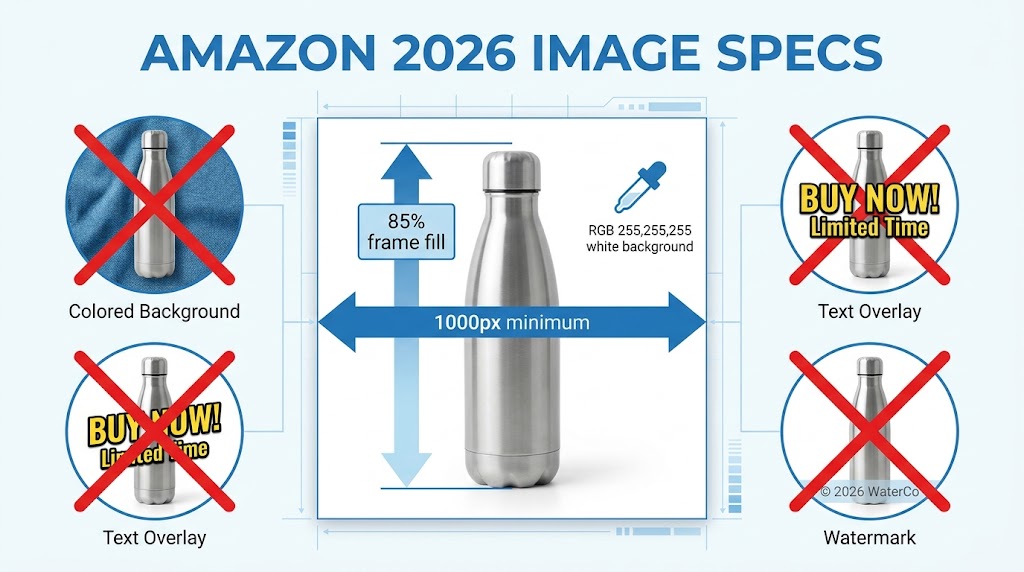
    But the real edge isn't just about quality; it's about strategy.

    Instead of just aiming for a "nice-looking" photo, these AI systems are trained on what’s actually working on Amazon. They analyze the lighting, shadows, and layouts of top-performing listings in your category. This means your images are designed for conversion right from the start.

    Plus, you get a level of speed and flexibility that a traditional photoshoot just can't offer. You can generate a dozen variations to find the perfect angle or background, something that would cost a fortune with a human photographer. The technology is surprisingly good at creating the whole package:

    • Clean, compliant main images that stand out in crowded search results.
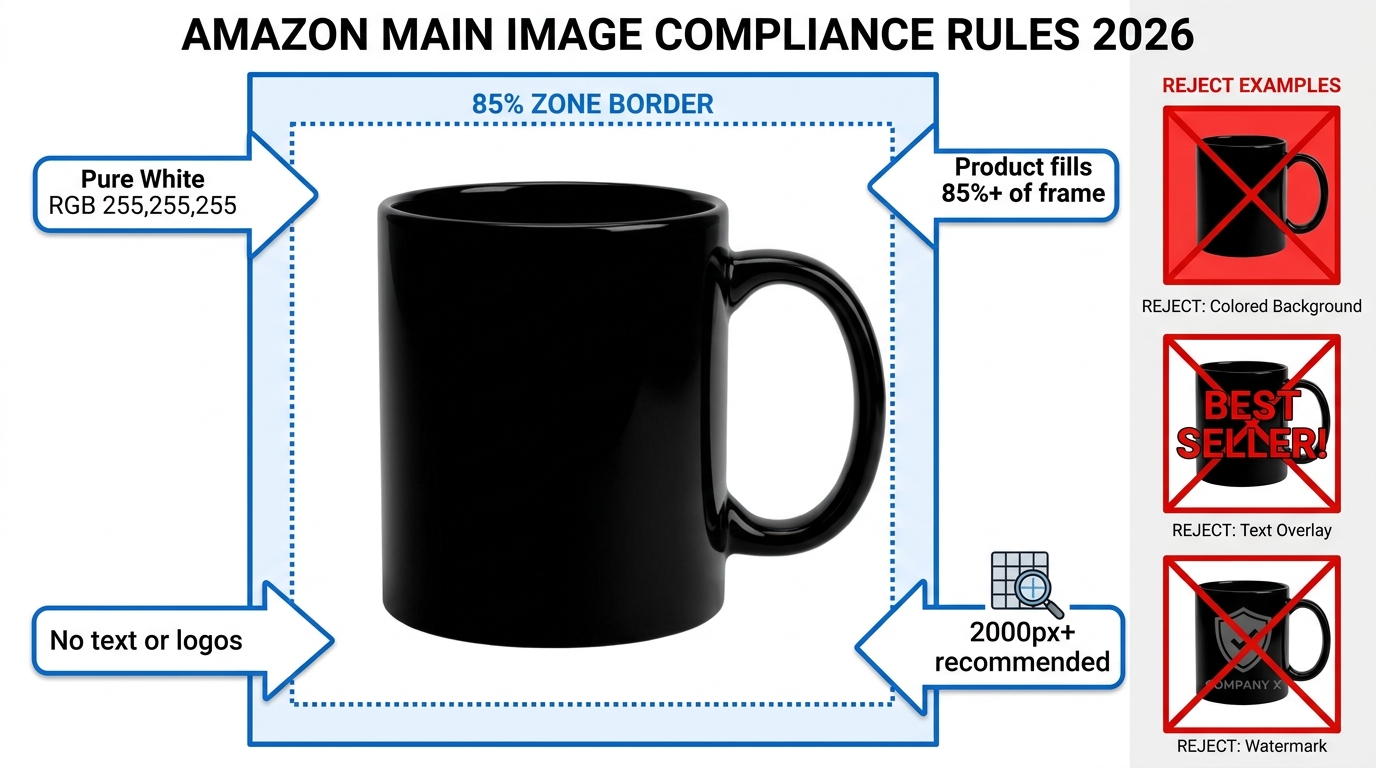
    • Sharp infographics that clearly communicate your product’s value.
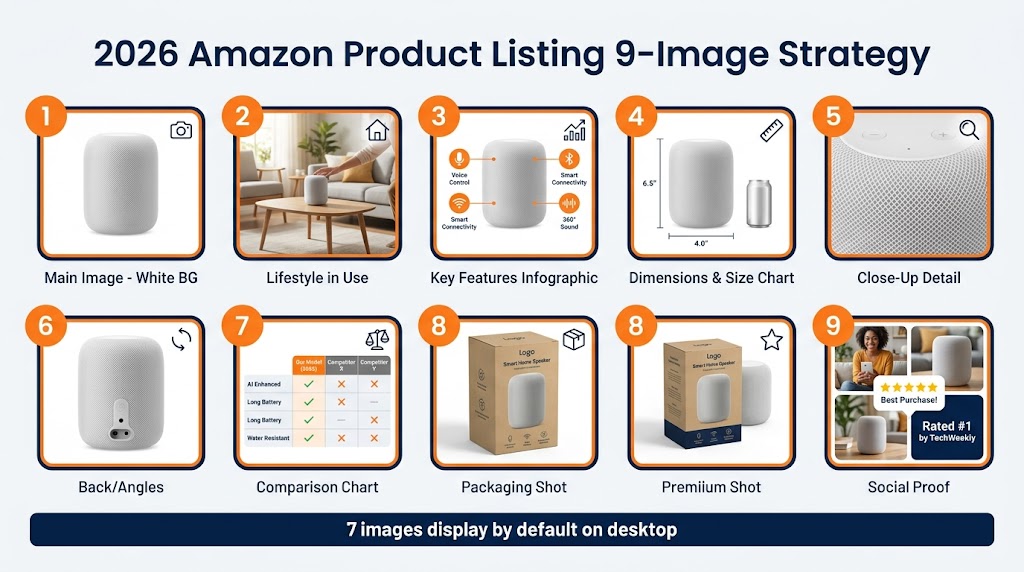
    • Believable lifestyle scenes that help shoppers imagine the product in their day-to-day life.

    Ultimately, the final images aren't just professional; they're data-driven and built specifically to perform on the Amazon marketplace.

    Do I Need Design Skills to Use This Type of Tool?

    Absolutely not. That’s one of the biggest reliefs for most sellers. Platforms like AlgoFuse.ai were built for entrepreneurs and brand managers, not for graphic designers. The entire workflow is meant to feel intuitive.

    You start with a simple, clean photo of your product. Then, you tell the AI your main keyword or give it a competitor's ASIN to analyze. That’s really it. The AI does all the heavy lifting.

    It studies the market, pinpoints the visual cues that work in your niche, and then generates a complete set of images. You don't need to mess with layers in Photoshop or write a complex brief. You just review the images in a simple dashboard and make changes with a few clicks.

    The whole point is to give you the power to create agency-quality visuals on your own terms. You're the creative director, without needing any of the technical design skills.

    How Does the Pricing Work and Is It Cost-Effective?

    Most of these advanced AI platforms run on a token-based system, which is where the savings really start to make sense. You move away from big, upfront project fees and into a much more flexible, on-demand model.

    For example, with a platform like AlgoFuse.ai, generating a full set of seven Amazon listing images might only cost you around 90 tokens. Most starter plans give you hundreds of tokens, and new users often get enough free tokens to produce their entire first listing without spending a dime.

    Now, compare that to the old way of doing things. A freelance photographer and graphic designer can easily run you $500 to over $2,000 for just one product.

    The cost-effectiveness really shines during the revision process. Need to tweak the text on an infographic or try a different lifestyle scene? That might only be 5 tokens. With a designer, that's another round of feedback and another line item on your invoice. For sellers launching multiple products, the savings can climb upwards of 95%, not to mention the turnaround time shrinking from weeks to mere minutes.

    Can the AI Create Images That Match My Brand Identity?

    Yes, and you can get surprisingly specific. This is all handled through a simple process of refining and iterating on what the AI gives you.

    The AI’s first attempt is based on what’s broadly successful for your keyword, but the editing features are where you dial in your specific brand look.

    Let's say the initial lifestyle photos look a bit too sleek and modern, but your brand has more of a warm, rustic vibe. You can just hit "regenerate" and guide the AI toward different environments, color schemes, or moods. For infographics, you can edit the text directly to make sure it matches your brand's voice.

    It becomes a quick feedback loop where you steer the AI's powerful engine until the output is not only optimized for Amazon but also a perfect reflection of your brand.


    Ready to see just how quickly you can get this done? AlgoFuse.ai gives you all the tools you need to generate a full set of high-converting, data-driven images in about five minutes. Get started for free today and create your first listing on us.