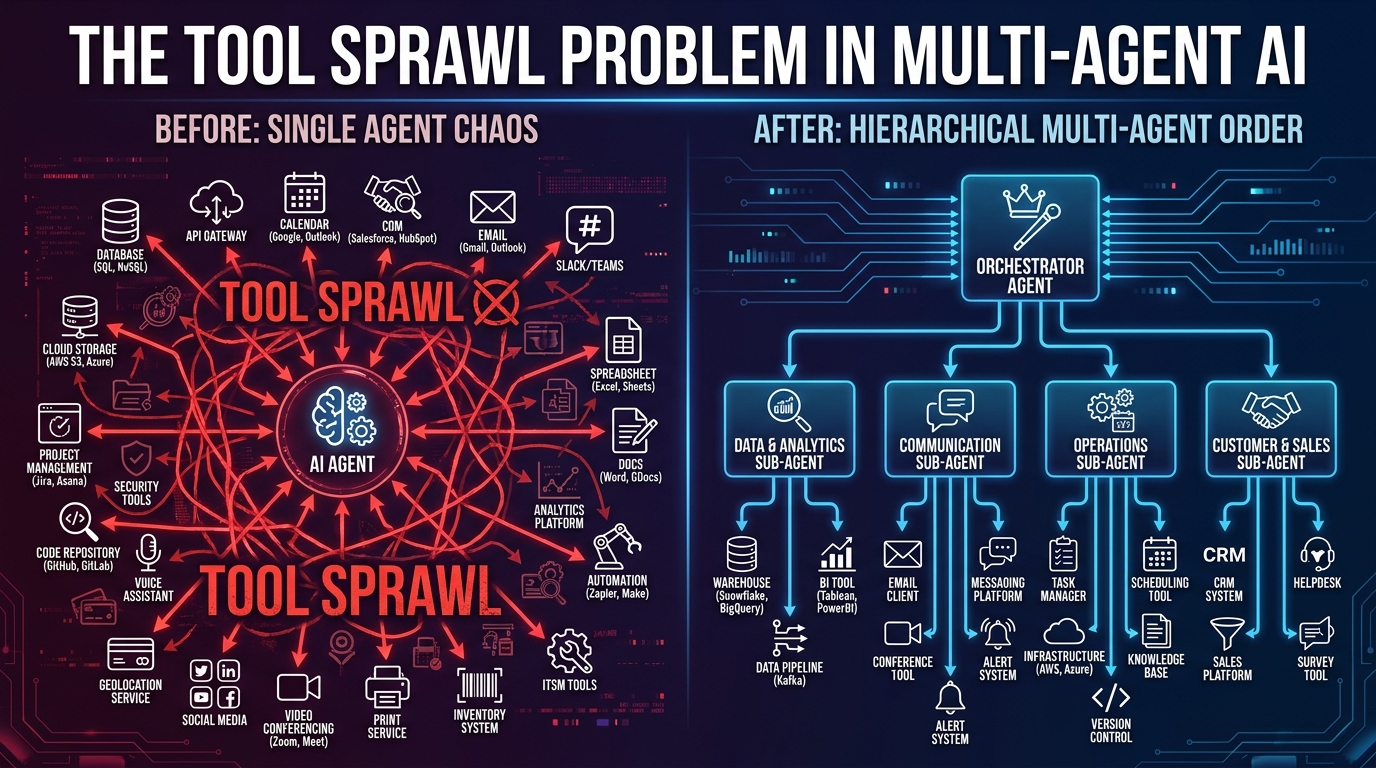
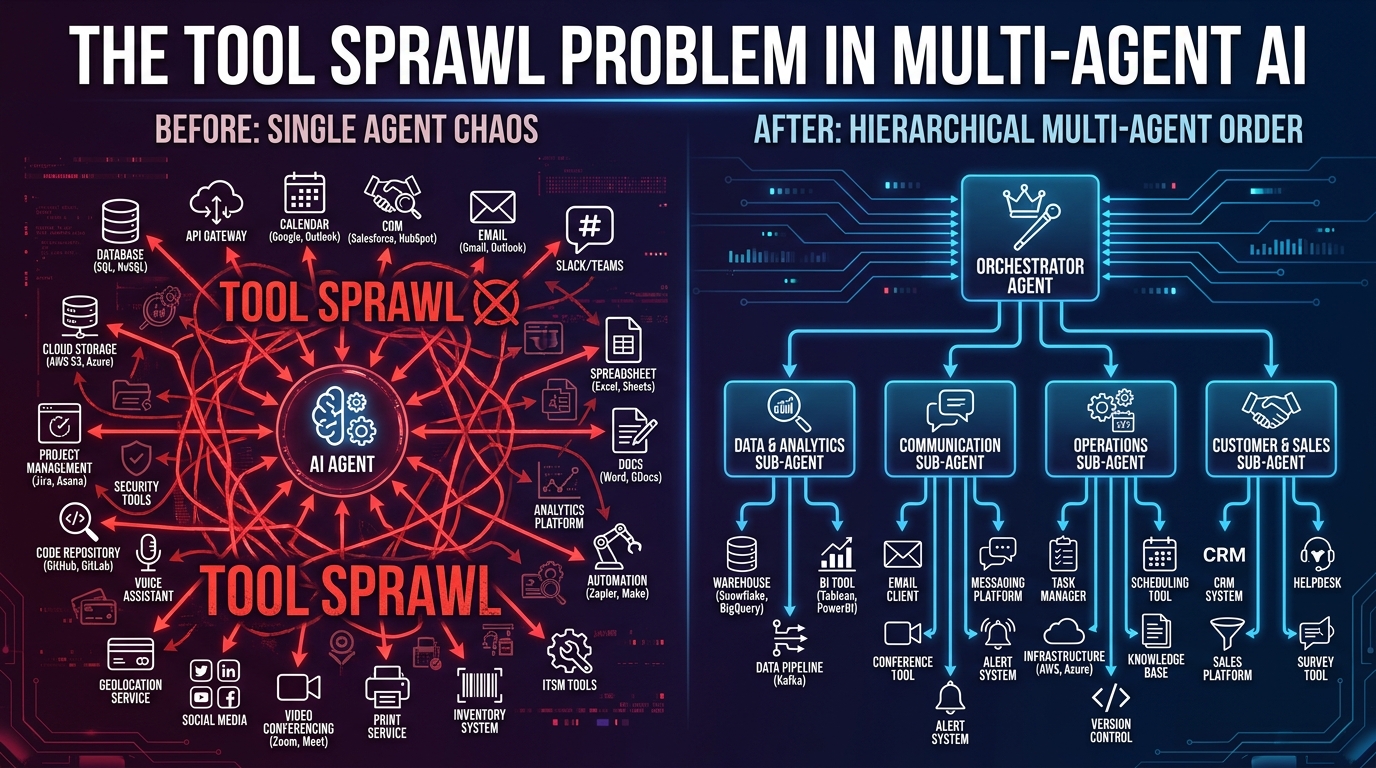
There is a particular kind of confidence that hits engineering teams around the six-week mark of a multi-agent build. The orchestrator is wired up. The sub-agents are firing. The demo runs clean. And because it runs clean, someone — usually the person closest to the product — asks: Can we also add the Salesforce connector? And maybe pull in Jira? And while we’re at it, the billing system needs to be in scope too.
This is how tool sprawl starts. Not with a bad decision, but with a series of individually reasonable ones.
By the time the system hits production, it is not uncommon to find a single agent wired to thirty, forty, sometimes sixty tools it will never actually call on any given task. The context window is bloated before a single token of real work is generated. The agent’s tool-selection logic — never perfect to begin with — degrades under the weight of too many options. Latency climbs. Costs balloon. And when something goes wrong, the trace spans read like a map of a city no one designed.
The engineering community has a name for this now: tool sprawl. And in 2026, it has become one of the most documented, most discussed, and most underestimated failure modes in production multi-agent systems. A Q1 2026 survey of enterprise AI deployments found that the average large enterprise runs approximately 12 distinct AI agents, with nearly half operating in silos and exhibiting overlapping, poorly governed tool access. The percentage of multi-agent pilots that fail within six months of production deployment sits at roughly 40%.
The fix is not better models. It is not a smarter orchestration framework. It is discipline — architectural discipline around what tools exist, which agents can see them, and when they are loaded. This post is about building that discipline before you ship, and recovering it if you already haven’t.
What Tool Sprawl Actually Looks Like in Production
Tool sprawl does not announce itself. It accumulates. The pattern typically unfolds in three distinct phases, and recognizing them early is the fastest way to avoid the mess they create.
Phase One: The Generous Scope
In early development, it feels safe — even sensible — to give agents broad access. You are still discovering what the workflow needs. Restricting tools at this stage feels like premature optimization. So the agent gets everything: the CRM, the database, the file system, the email client, the calendar API, the internal knowledge base, the billing system, and a handful of MCP servers someone found on GitHub.
This is fine for prototyping. It becomes a structural liability the moment you stop prototyping.
Phase Two: The Feature Creep Multiplier
Every stakeholder who touches a multi-agent workflow eventually asks for one more integration. The support team wants ticket creation. Finance wants expense categorization. The data team wants a direct hook into the warehouse. Each request is legitimate in isolation. Each one adds another tool to the agent’s manifest. No one removes the tools that were added for previous use cases, because removal feels risky — what if something depends on it?
The MCP ecosystem has made this dramatically worse. A Q1 2026 census of MCP servers across public registries found 17,468 distinct MCP servers available for agent integration. The barrier to adding a new tool has never been lower. That accessibility is genuinely useful. It is also the reason tool lists metastasize.
Phase Three: The Silent Degradation
This is the phase most teams notice too late. The system is in production. It mostly works. But accuracy on complex tasks has quietly dropped. Certain prompts return wrong tool calls — the agent reaching for a search API when it should be writing to a database, or calling a read endpoint when a write was intended. Token costs are higher than projected. Response times are inconsistent.
None of these symptoms trigger an obvious alert. There is no “too many tools” exception in your logs. The degradation is statistical, not categorical. And that makes it extraordinarily hard to diagnose without purpose-built observability from the start.
The core mechanism is straightforward: when you give an LLM more tools to choose from, tool-selection accuracy drops. Research across production deployments consistently identifies a practical ceiling of roughly 5 to 8 tools per agent before selection errors become a meaningful reliability risk. Above 15 tools, the signal-to-noise ratio in tool descriptions degrades to the point where the model frequently selects plausible-but-wrong options — a failure mode that compounds across multi-step workflows in ways that are difficult to trace.
The Compounding Reliability Math Nobody Likes to Run
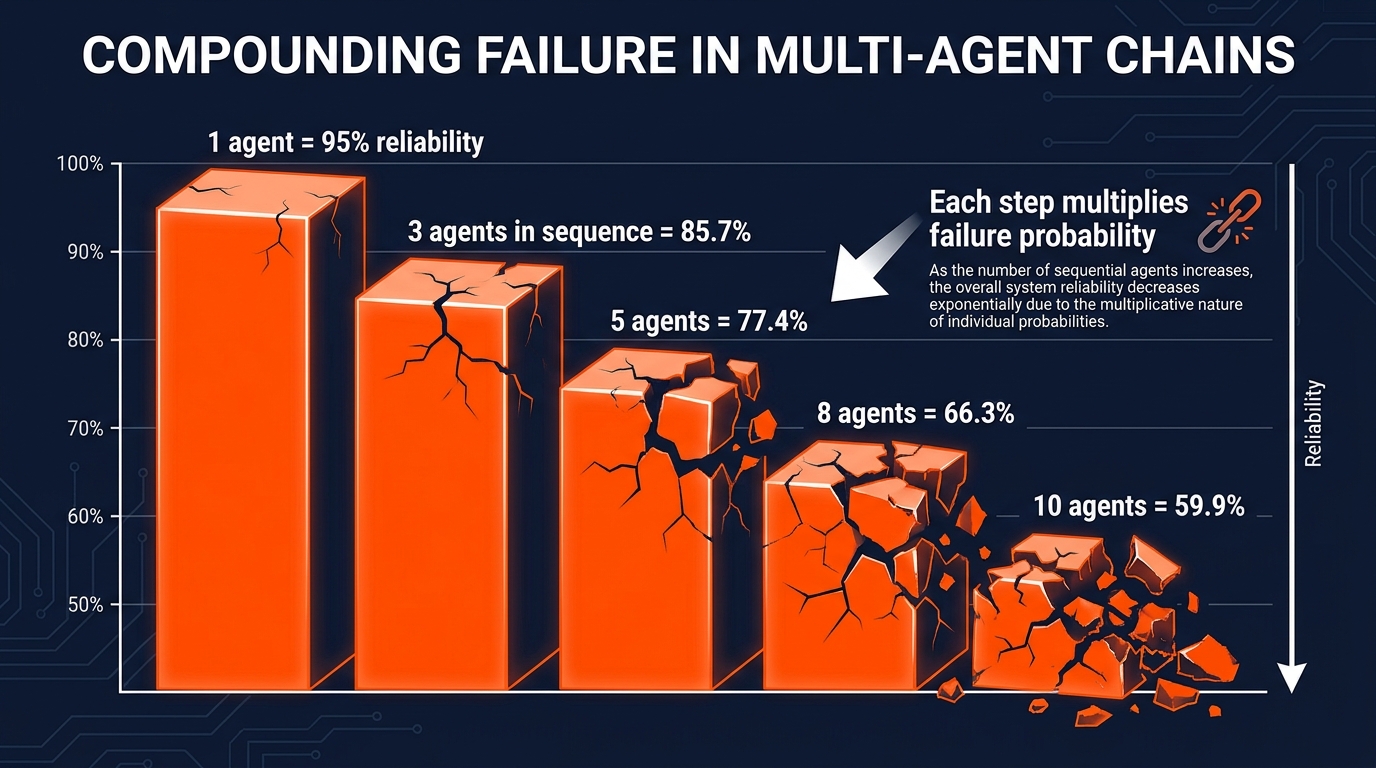
One of the most uncomfortable facts in multi-agent engineering is that system reliability is multiplicative, not additive. Every agent in a sequential chain introduces its own failure probability. Those probabilities compound.
If each agent in your pipeline has a 95% step-level success rate — which is optimistic for complex real-world tasks — the math looks like this:
- 1 agent: 95.0% end-to-end success
- 3 agents in sequence: 85.7%
- 5 agents: 77.4%
- 8 agents: 66.3%
- 10 agents: 59.9%
A ten-agent workflow where every individual step is 95% reliable will fail to complete successfully four times out of ten. In production, that is not a reliability problem. It is an unusable system.
Tool Sprawl Degrades the Per-Step Rate
The compounding math becomes even more damaging when tool sprawl is involved, because sprawl directly lowers the per-step success rate. An agent that calls the wrong tool does not get a partial credit — the error propagates downstream, carrying corrupted context into the next step. Recent analysis of production multi-agent systems found that when agent topology does not match task shape, collapse rates can reach 90.7%.
This is the core reason tool discipline matters so much in multi-agent systems specifically: a single poorly scoped agent in the middle of a pipeline can corrupt the reliability of every agent that follows it. The failure is not local; it is systemic.
The Coordination Overhead Tax
Beyond individual step failures, tool sprawl adds a coordination overhead that compounds latency at scale. Every time an agent must select from a large tool set, that selection requires more context processing, more model inference, and in some architectures, multiple sampling passes. Multiply that overhead across every step in a workflow, across every concurrent workflow run, and the cost trajectory becomes nonlinear fast.
One documented 2026 production consolidation effort found that simplifying agent topology — reducing trace spans from 18–34 down to 5–8 per run — dropped median task cost from $0.62 to $0.11 and median latency from 47 seconds to 14 seconds. The model did not change. The underlying tools did not change. The architecture around them did.
Context Window Contamination: The Hidden Token Tax
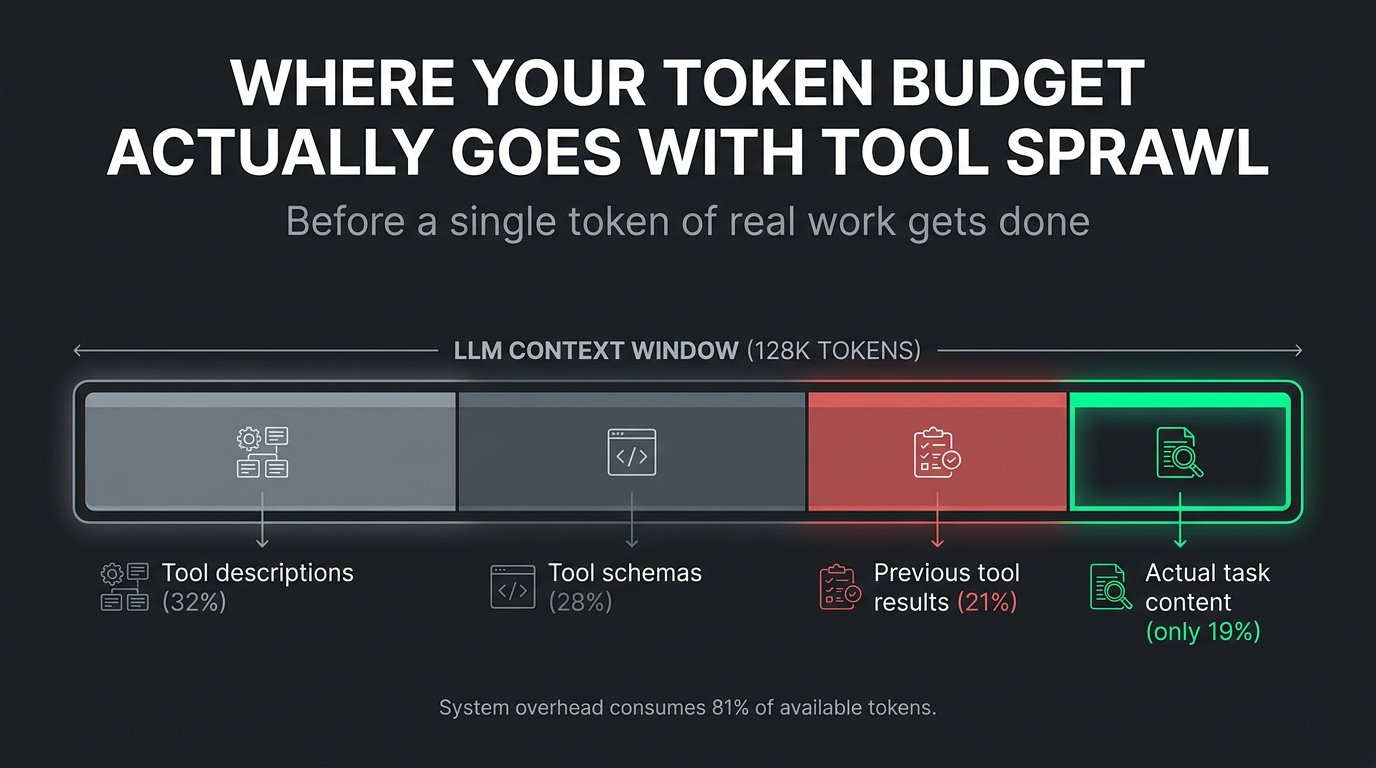
Here is a test worth running on any multi-agent system you are currently operating: count the tokens consumed by tool definitions before the first meaningful user-task token is processed. The results are often alarming.
Tool definitions in an LLM context are not free. Each tool requires a name, a description, a parameter schema, and often example invocations. A well-documented tool might consume 300–500 tokens. An agent wired to 30 tools is starting every single call with 9,000–15,000 tokens of overhead — before the system prompt, before conversation history, before the actual task content. On a 128K context model, that is already 7–12% of the available window consumed by tool schema alone.
The Cascade Effect on Long-Running Workflows
The contamination problem compounds in long-running agentic workflows. Frameworks like LangGraph and CrewAI, by default, append every step’s output — including full tool call records and responses — to the agent’s state. In a ten-step workflow where each step involves two or three tool calls with verbose JSON responses, the accumulated state can consume the majority of the context window before the final steps execute. This produces one of the most frustrating failure modes in multi-agent systems: the silent degradation at the end of a long workflow.
The model does not announce that it is operating on compressed context. It does not throw an exception when it hits the window limit. It simply begins to reason less accurately, hallucinating tool behaviors, misremembering earlier steps, or selecting actions that contradict decisions made earlier in the same run. The output looks plausible. It is wrong.
What This Means for Tool Design
Every tool you add to an agent’s context is a permanent tax on every call that agent makes. The discipline here is treating tool descriptions the same way good engineers treat code comments: concise, precise, purposeful, and regularly pruned. Verbose tool documentation that reads beautifully in a README is costly overhead when it runs in a context window ten thousand times a day.
There is also a second-order consideration that most teams miss: the quality of tool descriptions affects selection accuracy more than the quantity. An agent with ten tightly written, clearly differentiated tool descriptions will outperform an agent with thirty loosely described tools every time. The investment in schema quality pays compound returns across the entire system’s operational life.
The Topology Trap: Why Architecture Shape Matters as Much as Tool Count
Multi-agent workflows fail not only because of too many tools, but because the structure of the agent graph does not match the structure of the underlying task. This mismatch — what practitioners now call the topology trap — is one of the least discussed root causes of multi-agent production failures.
Task Shape vs. Agent Shape
Every task has a natural shape. Some tasks are sequential: output A feeds input B, which feeds input C, with strict ordering. Others are parallel: five independent subtasks that can be executed simultaneously and merged at the end. Still others are hierarchical: a planner decomposes a goal into subgoals, each handled by a specialist, with results synthesized back up. When your agent architecture mirrors the task’s natural shape, coordination overhead is minimized and tool routing is clear. When it does not, you get bottlenecks, redundant work, and agents calling tools they should not need.
The most common mismatch in practice is building parallel architectures for sequential tasks. Teams reach for parallelism because it sounds faster. But if task step B requires the output of step A to determine which tool to call, forcing parallelism means either guessing or re-doing work. The apparent speed gain evaporates, and the tool call surface expands because each parallel agent must defensively cover multiple branches of the task instead of one narrowly scoped path.
The Orchestrator Bottleneck
Many teams default to a centralized orchestrator — one manager agent that routes all work to sub-agents. This pattern is sound in principle but creates a specific failure mode at scale: the orchestrator becomes a single point of both performance bottleneck and context accumulation. Every delegated task result flows back through the orchestrator’s context. If the orchestrator is also the entity managing tool selection across the entire workflow, you have effectively concentrated all the tool-sprawl risk into a single agent.
The fix is not to eliminate the orchestrator, but to make it deliberately narrow. The orchestrator should know which sub-agent to call, not which tools those sub-agents use. Tool knowledge belongs inside the sub-agent boundary, scoped to its domain. The orchestrator should never need a direct connection to a tool it does not personally invoke.
Matching Topology to Task: A Practical Heuristic
Before building any multi-agent architecture, map the task’s dependency graph explicitly. If the graph is a straight line, build a sequential chain with prompt chaining, not a full multi-agent system — the single-agent baseline will likely be cheaper and more reliable. If the graph has genuine parallelism (truly independent subtasks), parallelize. If the graph is hierarchical, build a one-level hierarchy and resist the urge to add additional layers unless the data explicitly requires them. Each additional orchestration layer adds coordination overhead and multiplies the tool-management surface.
The Least-Privilege Principle, Applied to Agent Tools
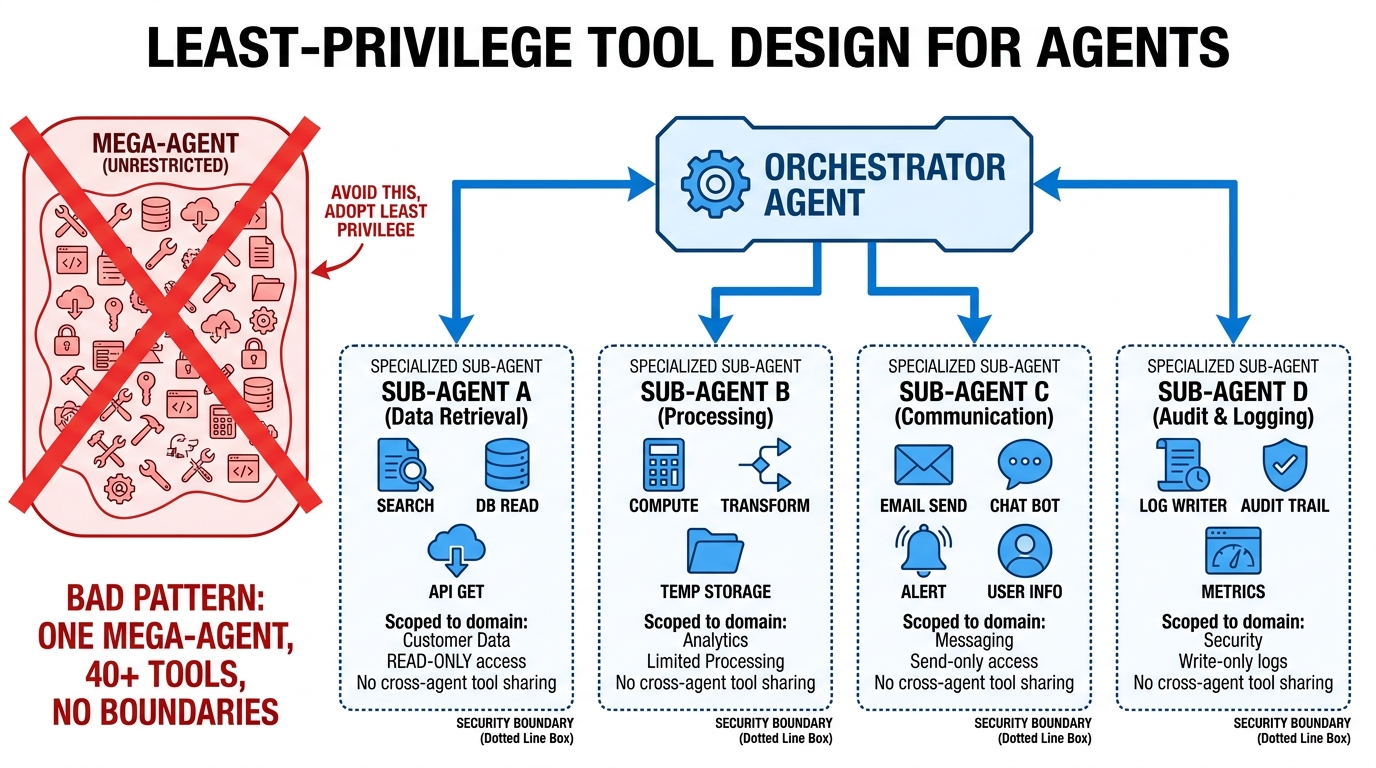
Security engineers have enforced the principle of least privilege for decades: a process should have access to only the resources it needs to complete its current task, and nothing more. It is time for multi-agent architects to apply the same discipline to tool access.
The instinct in most multi-agent builds is to be generous with tool access because it feels safer. What if the agent needs this tool for an edge case? What if we restrict too much and the workflow breaks? This instinct is precisely backwards. Generous tool access creates more failure modes, not fewer, because it increases the space of wrong actions an agent can take.
Defining the Minimum Viable Tool Set
Every agent in a well-architected multi-agent system should be able to answer the question: What is the exact set of tools I need to complete my assigned task? If the answer includes tools needed by other agents in the same system, that is a boundary problem — those tools belong with those agents, not shared across the graph.
The practical exercise is to enumerate each agent’s core task, then work backward to the minimal set of tools that task requires. This exercise consistently reveals two things. First, most agents need far fewer tools than they were initially given. Second, many “tools” that appear in the initial list are actually multi-step operations that should themselves be broken into smaller, more precisely scoped tool definitions.
A research agent, for instance, might be given a generic “web access” tool that can search, retrieve, parse, and summarize arbitrary web content. Decomposing that into a targeted search tool, a URL fetch tool, and a text extraction tool — each with tight parameter schemas — dramatically improves selection accuracy and makes failures much easier to attribute and debug.
Read vs. Write Permissions as a First-Order Concern
One of the fastest wins in agent tool design is enforcing read/write separation explicitly. Most agentic tasks spend the majority of their steps reading: gathering information, retrieving context, validating current state. Write operations — creating records, sending messages, triggering actions in external systems — are typically a small fraction of total steps but carry the majority of risk.
Giving every agent read/write access to every system because “they might need to write eventually” violates least privilege and creates serious security and reliability exposure. An agent that can write to the CRM, send email, and create support tickets has a much larger blast radius when it makes a wrong tool selection than one that can only read from those systems and must hand off to a dedicated action agent for writes.
Building this separation into the architecture — not just into prompts or guidelines, but into the actual tool permissions assigned to each agent — gives you a genuine safety layer that does not depend on model behavior. That matters, because model behavior under edge-case inputs is never fully predictable.
Tool Registry and Agent Gateway: The Control Plane That Actually Works
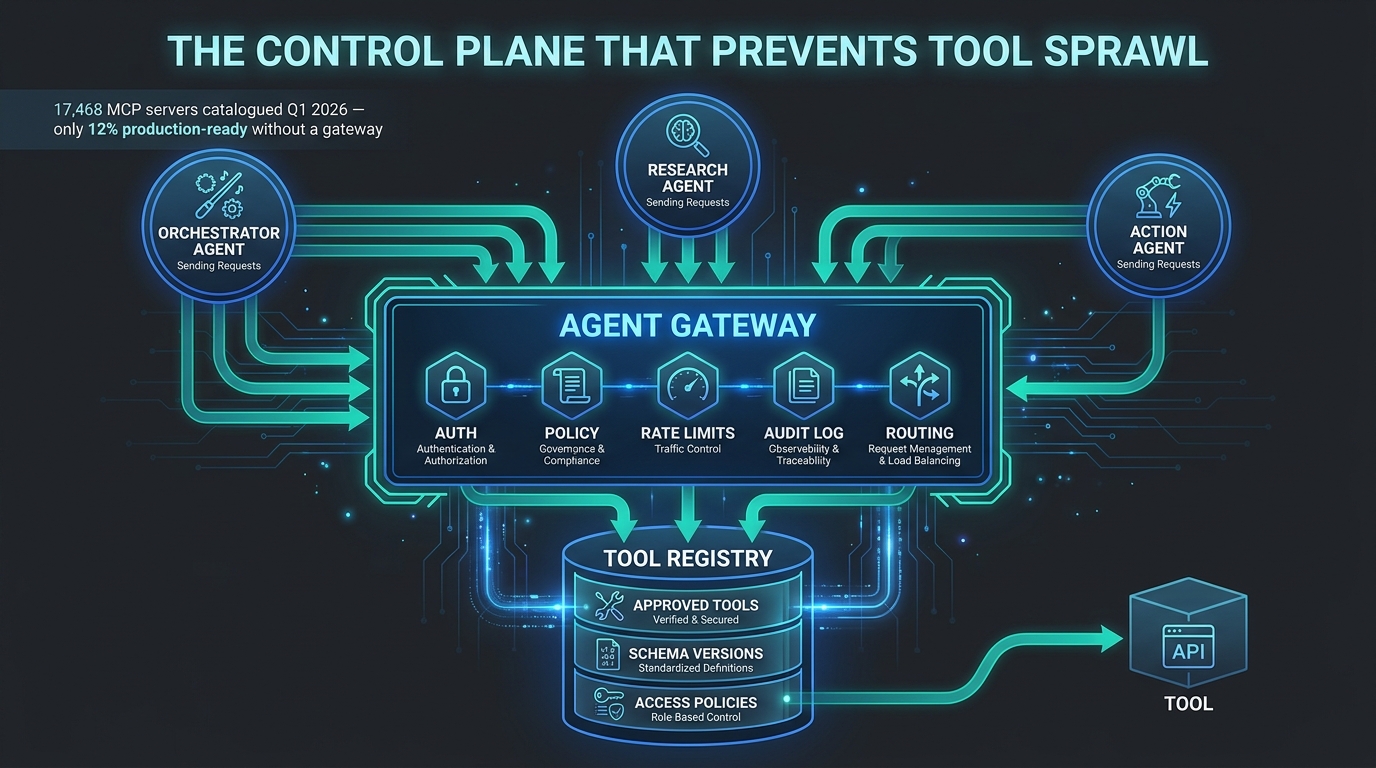
For teams operating at any real scale — multiple agents, multiple workflows, multiple teams contributing tools — ad hoc tool management becomes unworkable fast. The solution that has emerged across 2026 production deployments is a two-component control plane: a tool registry paired with an agent gateway.
The Tool Registry: Single Source of Truth for Agent Capabilities
A tool registry is a centralized catalog of every approved tool available to agents in a system. Each entry contains the tool’s name, schema, ownership, version history, access policy, and production readiness status. Agents do not hard-code their tool lists — they query the registry to discover what is available to them, filtered by their assigned permissions and the current task context.
The registry pattern solves several problems simultaneously. It eliminates the “which version of this tool does this agent use?” confusion that plagues ad hoc multi-agent systems. It gives platform and security teams a single point of control for approving, deprecating, or restricting tools without touching agent code. And it provides an audit surface: if a tool is called unexpectedly in production, the registry log tells you exactly which agent called it, when, and in what context.
The scale of the problem this addresses is significant. That Q1 2026 census of MCP servers found 17,468 servers across public registries — with only a fraction production-ready under enterprise governance standards. Without a registry layer, every team in an organization can independently wire their agents to any of those servers. With one, the catalog of approved, tested, policy-compliant tools is defined once and enforced everywhere.
The Agent Gateway: Policy Enforcement at the Boundary
If the registry is the catalog, the gateway is the door. An agent gateway sits between all agents and all tools, intercepting every tool call and enforcing authentication, authorization, rate limits, and policy rules before the call is allowed through. No tool call happens outside the gateway’s visibility.
This architectural pattern has clear analogues in API management and service mesh design — it is the same principle as an API gateway in microservices, applied to the agent-to-tool interaction layer. The gateway does not contain business logic. It enforces policy. That separation of concerns is what makes it maintainable: security policies change independently of agent behavior, and neither side needs to know the internal details of the other.
Production implementations of this pattern — including work done with Solo.io’s agentgateway project — have shown that centralizing MCP and LLM traffic through a gateway improves cost visibility, enables governance across heterogeneous agent types, and removes the need to modify individual agents or MCP servers when policies change. The gateway abstracts the policy layer entirely.
What This Architecture Does Not Solve
It is worth being direct about the limitations. A registry and gateway control plane is an infrastructure-layer solution. It does not fix poorly designed tool schemas. It does not prevent an agent from making a logically wrong tool call when the tool is technically permitted. And it adds an operational surface that must itself be maintained, monitored, and versioned.
Teams that implement this pattern without also investing in schema quality and agent-level tool minimization will find that they have built an excellent auditing layer over a still-sprawling tool estate. The control plane is necessary but not sufficient. It works best as the enforcing layer around sound architectural decisions already made upstream.
Dynamic Tool Loading vs. Static Tool Injection: A Decision Framework
One of the most important architectural decisions in multi-agent tool management is whether each agent receives its tool set statically at initialization or dynamically at the point of each task. Both patterns have legitimate use cases, and choosing the wrong one for your workload has meaningful consequences for both cost and reliability.
Static Tool Injection: When It Makes Sense
In static injection, agents are initialized with a fixed, predetermined set of tools. Every call that agent makes sees the same tool manifest. This is the simpler pattern and the right default for workflows where the task domain is well-defined and the tool set is small — ideally under eight tools.
Static injection is predictable. The context overhead per call is constant and known. Testing is straightforward because tool availability does not vary across runs. And for agents that always operate in the same domain — a customer support agent that only ever queries tickets, reads account records, and creates follow-up tasks — the fixed set is not a constraint; it is a design feature.
The failure mode of static injection is when it gets applied to general-purpose agents. A general-purpose agent with a static 40-tool manifest is paying the full context tax on every call, regardless of what the current task actually needs. The math makes this untenable at scale.
Dynamic Tool Loading: The Right Pattern for General Agents
Dynamic loading — retrieving tool definitions at task time based on the current context, intent, or task metadata — solves the context bloat problem for general-purpose agents. Instead of including all tool schemas in every call, the agent’s orchestration layer queries the registry for the relevant subset, fetches only those definitions, and injects them into the context for that specific call.
This pattern requires more infrastructure. The retrieval mechanism itself needs to work reliably, quickly, and with semantic understanding of the task context — a tool retrieval step that adds 500ms of latency before every agent call defeats much of the purpose. The most effective implementations use embedding-based semantic search over tool descriptions, retrieving the top-k most relevant tools for the current intent rather than pattern-matching on keywords.
Expert guidance in 2026 consistently favors dynamic loading over static injection for any agent that will operate across more than one domain or handle task variety beyond a narrow scope. The retrieval overhead is real but manageable; the context savings across thousands of daily runs are substantial.
A Practical Decision Heuristic
The framework is simple: if your agent does one thing and does it consistently, static injection with a minimal tool set is correct. If your agent handles varied requests across multiple domains, dynamic loading with a centralized registry is worth the infrastructure investment. And if you find yourself justifying static injection for a general-purpose agent because dynamic loading “sounds complicated,” that is typically a signal that the agent’s scope is too broad to begin with.
MCP as the Consolidation Layer: What It Solves and What It Doesn’t
Model Context Protocol has become the dominant standard for tool access in multi-agent systems in 2026, with adoption across OpenAI, Google, Microsoft, and AWS and 97 million monthly SDK downloads reported at its peak. MCP’s promise is real: a standardized way for models to access tools, data sources, and external services without every integration requiring bespoke glue code.
For teams wrestling with tool sprawl, MCP appears at first glance to be a direct solution. One protocol, one integration model, one way to connect any agent to any tool. If everything speaks MCP, the proliferation problem should solve itself.
It does not. And understanding why is important for any team treating MCP adoption as a tool-sprawl mitigation strategy.
What MCP Actually Standardizes
MCP standardizes the interface between models and tools. It defines how a model requests tool invocation, how parameters are passed, how results are returned, and how errors are communicated. It does not standardize what tools exist, how many an agent should use, what they should be permitted to do, or how they should be governed across an organization.
In practice, MCP makes it dramatically easier to add new tools to an agent’s repertoire — which, without accompanying governance, makes tool sprawl faster, not slower. The Q1 2026 census of 17,468 MCP servers is partly a testament to MCP’s success as a standard and partly a warning label. Most of those servers were created by developers exploring the protocol’s possibilities. A significant portion have no security posture, no versioning discipline, and no organizational ownership structure suitable for production use.
The 2026 Spec Changes That Matter
The 2026-07-28 MCP release candidate addresses some of this by introducing a stateless core designed to scale on standard HTTP infrastructure. This makes multi-agent, multi-tool topologies more operationally tractable — stateless tool servers are simpler to deploy, scale, and recover than stateful ones. The spec also strengthens OAuth/OIDC-aligned authentication, tightening the security posture that earlier MCP deployments left under-specified.
The clearest architectural guidance from 2026 MCP practice is a division of responsibility: use MCP for the model-to-tool layer (standardizing how agents invoke capabilities), and use a separate agent-to-agent (A2A) protocol for agent-to-agent coordination (delegation, negotiation, result sharing between agent nodes). Conflating these two layers — trying to make MCP do both — creates architectural confusion and governance gaps that are difficult to remediate after the fact.
The Right Way to Think About MCP and Sprawl
MCP is a tool for integration quality, not tool quantity. Adopting MCP reduces the cost of each individual integration. The discipline of deciding which integrations to make, how many an agent should access, and under what governance they operate — that discipline is entirely separate from the protocol and must be enforced at the architecture and policy level. MCP is necessary infrastructure. It is not a substitute for the harder organizational work of tool governance.
Observability-First Shipping: Measuring What Actually Matters
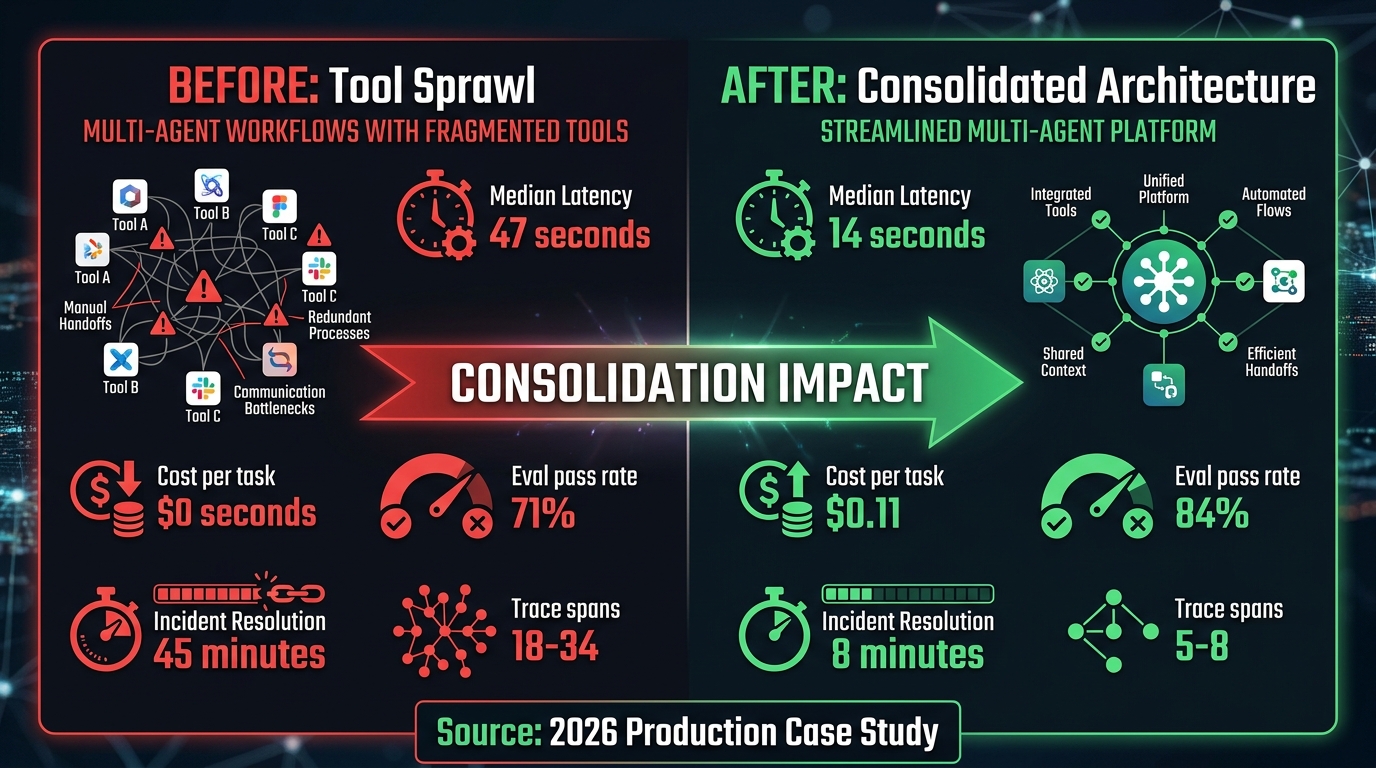
One of the clearest markers of teams that successfully ship multi-agent workflows — versus teams that ship and then spend months firefighting — is the presence or absence of purpose-built observability from day one. Observability in multi-agent systems is not optional, and it is not the same as the observability you already have for monolithic services or single-LLM deployments.
Why Standard Monitoring Falls Short
Traditional application monitoring tells you whether services are up, whether requests are succeeding, and how long they are taking. Multi-agent workflows require a different category of instrumentation because the most important failures are semantic, not technical. The service can be up. Requests can succeed. Latency can be within spec. And the agent can still be consistently selecting the wrong tool, producing subtly wrong outputs, and propagating errors downstream through a pipeline that looks, from the outside, like it is working fine.
The documented improvement in mean time to root-cause — from 45 minutes down to roughly 8 minutes in the consolidation case study cited earlier — came primarily from trace span reduction, not from better monitoring tools. Fewer spans meant that when something went wrong, the failure was localized in a smaller search space. Observability quality is a direct function of architectural simplicity. You cannot instrument your way out of a system that is too complex to reason about.
The Metrics That Matter
In multi-agent production systems, the metrics worth tracking fall into four categories:
- End-to-end task success rate: Not per-agent accuracy, but the rate at which complete workflows produce correct, usable outputs. This is the number that reflects actual user value, and it is the number most teams measure too late.
- Tool call accuracy: For each agent, what percentage of tool calls are to the correct tool? This metric, tracked over time and segmented by agent and task type, is the earliest signal of tool-selection degradation from context bloat or scope creep.
- Token cost per successful task completion: Total token cost normalized to successful completions. This denominates cost by value, not just by volume, and surfaces the hidden cost of failed runs that consume tokens without producing usable output.
- Trace span count per run: A high and rising span count is a leading indicator of architecture complexity growth. The teams that caught tool sprawl early were tracking this metric and setting alert thresholds on it before problems became visible in downstream metrics.
Human-in-the-Loop Checkpoints as Observability Tools
Beyond instrumentation, the most operationally mature multi-agent deployments in 2026 use human-in-the-loop checkpoints not just as safety mechanisms but as signal collection points. Every time a human reviews and approves or overrides an agent decision, that event is a labeled data point about the accuracy of that agent’s behavior in that context.
Teams that track override rates by agent and by tool type are building a continuously updated picture of where their workflows are unreliable. That picture, reviewed weekly, often reveals that specific tools are being called correctly 99% of the time — and certain other tools are being misused chronically. The fix is either better schema descriptions, narrower agent scope, or, frequently, the recognition that a tool should not be in that agent’s manifest at all.
The discipline of treating human feedback as structured observability data — rather than one-off corrections — is one of the clearest differentiators between teams shipping reliable multi-agent systems and teams perpetually fighting fires in them.
The “Agents as Tools” Inversion That Changes Everything
There is a counterintuitive architectural pattern that deserves more attention than it typically gets: treating entire agents as tools that other agents can invoke, rather than building monolithic multi-agent systems where every agent has direct access to the full tool surface.
In this pattern, a specialist agent — say, a data retrieval agent with deep access to your warehouse, your CRM, and your analytics layer — is exposed to an orchestrator not as a peer participant in the workflow, but as a callable capability. The orchestrator calls data_retrieval_agent(query=...) the same way it would call a tool. The specialist agent handles its own tool access internally, exposing only a clean interface to the outside world.
Why This Pattern Reduces Sprawl
The “agents as tools” inversion naturally enforces the scoping that least-privilege design requires. Because each specialist agent is encapsulated behind an interface, the orchestrator never needs to know — or have access to — the tools that specialist uses internally. The orchestrator’s tool manifest contains only the callable agents it coordinates, not the underlying capabilities each one wraps. This single architectural choice can reduce the orchestrator’s effective tool surface from dozens of specific capabilities to a handful of well-defined agent interfaces.
It also dramatically simplifies debugging. When a workflow fails, the failure trace points to a specific agent-as-tool invocation. The failure is contained within that agent’s scope and diagnosable in isolation, without needing to trace through the full workflow graph to understand which underlying tool call was the actual root cause.
Versioning and Upgrading Agent Capabilities
The encapsulation benefit extends to lifecycle management. When a specialist agent’s underlying tool set changes — a new API version, a deprecated endpoint, a revised data schema — none of that change propagates to the orchestrator or to other agents in the system. The interface stays stable; the internals change independently. This is the same modularity principle that makes microservices maintainable, applied to the agent layer.
Teams that have adopted this pattern consistently report that it dramatically reduces the coordination cost of upgrading individual components of a multi-agent system, because interface stability means changes are local by default.
Building the Habit Before You Need It: An Engineering Checklist
The most effective time to prevent tool sprawl is during initial system design, before the first agent makes its first tool call in production. The patterns described throughout this post are significantly harder to retrofit than they are to build from the start. The following checklist captures the key decision points where architectural discipline prevents future pain.
Before You Build
- Map the task dependency graph. Write out every step of the workflow explicitly. Identify which steps can run in parallel, which are strictly sequential, and which require human review. Let the task structure determine the agent structure — not the other way around.
- Default to single-agent. Ask honestly whether a single well-prompted LLM with a minimal tool set could handle this workflow. If the answer is yes, that is your starting point. Add agents only when you have measured evidence that the single-agent approach is insufficient.
- Define each agent’s minimum viable tool set before writing any code. For each agent in your planned architecture, document: what is its single responsibility, what specific tools it needs to fulfil that responsibility, and what tools it should explicitly not have access to. Treat this document as a design constraint, not a suggestion.
- Separate read tools from write tools at the permission level. Do not rely on prompt instructions to keep agents from writing when they should only be reading. Enforce this at the tool permission layer.
Before You Ship
- Count your trace spans in staging. If a workflow produces more than 8–10 spans per run for a single task, that is a signal worth investigating before production. It often reveals redundant agent invocations or unnecessary tool calls that can be eliminated without changing workflow outcomes.
- Run a tool utilization audit. After a week of staging traffic, produce a count of how often each tool in each agent’s manifest is actually called. Tools called in fewer than 5% of runs are candidates for removal from that agent’s default manifest — and possibly for dynamic loading if they are genuinely needed for edge cases.
- Establish baseline eval pass rates and cost-per-completion targets. Ship with pre-committed alert thresholds on these metrics. Without targets established before launch, there is no objective basis for distinguishing normal operational variance from systematic degradation.
- Document the governance owner for every tool in the registry. Every tool in production should have a named owner responsible for its schema, its uptime, and its deprecation. Tools without owners become orphaned liabilities that no one is willing to remove.
After You Ship
- Review tool utilization monthly. Agent workflows drift. New task patterns emerge. Tools that were once frequently called become rarely used. Tools that were added for edge cases become load-bearing for common cases. Monthly review catches this drift before it becomes architectural debt.
- Treat rising span counts as a primary incident trigger. A significant increase in average trace spans per run — even without a corresponding increase in error rates — indicates that the workflow is doing more coordination work to accomplish the same task. That is almost always a warning sign worth investigating.
- Run quarterly “can we remove this?” reviews on the tool registry. The default organizational inertia is to add tools and never remove them. A deliberate removal practice — requiring justification for keeping a tool rather than for removing it — counteracts this inertia.
Conclusion: Narrow First, Expand Deliberately
The multi-agent AI landscape in 2026 is characterized by a growing gap between ambition and operational reality. The ambition — autonomous, interconnected agent systems that handle complex enterprise workflows end to end — is legitimate and achievable. The operational reality — sprawling tool estates, cascading reliability failures, context windows consumed by schema before real work begins, and debugging experiences that resemble archaeology more than engineering — is also legitimate and widespread.
The gap between the two is not filled by better models, smarter frameworks, or more expressive protocols. It is filled by engineering discipline: the willingness to start narrow, to enforce scoping as a design constraint rather than an optimization, to measure what matters rather than what is easy, and to resist the gravitational pull of adding one more tool because it might come in handy.
The data is consistent. Teams that ship reliable, cost-effective multi-agent workflows in production share a common trait: they treat architectural simplicity as a first-class concern, not an afterthought. They run fewer agents with fewer tools. They instrument before they scale. They audit regularly and remove aggressively. They build agents as encapsulated modules with clean interfaces, not as sprawling processes with broad permissions.
This is not a limitation on what multi-agent systems can do. It is the foundation that makes it possible for them to do it reliably, at scale, over time.
Build narrow first. Measure everything. Expand only where the data says to. That is the architecture that ships — and keeps shipping — in production.
Key Takeaways
- Keep each agent’s tool set to 5–8 tools maximum. Above 15, selection accuracy degrades materially and context costs compound nonlinearly.
- Model your agent topology on your task dependency graph — not on your organizational structure or your instinct for parallelism.
- Enforce read/write separation at the permission layer, not the prompt layer. Prompts are not a security boundary.
- Implement a tool registry + agent gateway control plane before you scale beyond three agents or two teams contributing tools.
- Use dynamic tool loading for general-purpose agents operating across multiple domains. Static injection only for narrow, domain-specific agents.
- MCP standardizes the interface to tools, not the discipline around their use. Governance must be built separately and deliberately.
- Trace span count is a leading indicator of architectural complexity growth. Set thresholds before launch, not after problems appear.
- Treat every human override of an agent decision as structured observability data. Review override rates by agent and tool type monthly.