Q3 is the quarter that separates Amazon advertisers who plan from those who react. Between Prime Day’s compressed auction windows, back-to-school category surges, and the lead-up to Q4, Sponsored Brands Video (SBV) spend concentrates faster and harder in July through September than at almost any other time of year. And in 2026, you’re doing all of that on a platform that looks and behaves meaningfully differently than it did twelve months ago.
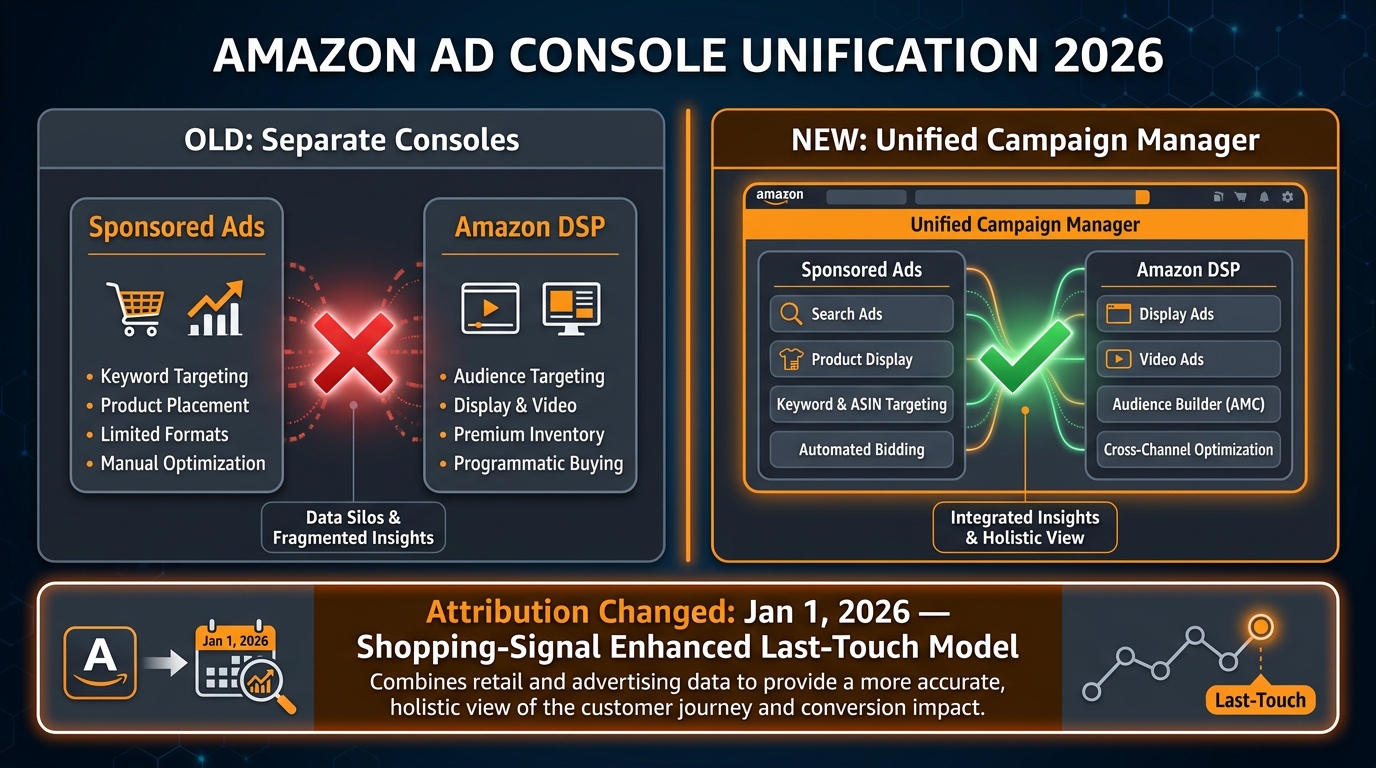
Amazon’s Ad Console has gone through three overlapping shifts that collectively change how you set up campaigns, read performance data, and make optimization decisions. The Unified Campaign Manager has merged Sponsored Ads and DSP workflows under one roof. The shopping-signal enhanced attribution model went live on January 1, 2026, rewriting how view-through conversions get credited. And SBV placements themselves have expanded — your ads are now showing up in surfaces that didn’t exist as formal inventory last year, including search adjacencies tied to Rufus, Amazon’s conversational AI shopping assistant.
Most advertisers have noticed the changes. Fewer have actually rebuilt their workflows to account for them. The operators who are winning Q3 right now aren’t spending more — in many cases they’re spending the same or less. They’re winning because their campaign architecture, creative strategy, bid logic, and reporting interpretation are all calibrated to how the console actually works today, not how it worked in 2024 or early 2025.
This is a ground-level operator’s manual for that calibration. It covers campaign structure, creative best practices, bid management in a rising-CPC environment, the new reporting reality post-attribution-shift, and a four-week ramp schedule for Prime Day. Everything is specific to Q3 2026 conditions — not generic SBV advice you’ve read before.
What Actually Changed in Amazon’s Ad Console — The Three Shifts That Matter
Before you can optimize for Q3, you need an accurate mental model of the platform you’re working with. There are three structural changes that matter more than anything else for SBV operators right now.
1. The Unified Campaign Manager: One Interface, New Complexity
Amazon has been rolling out a Unified Campaign Manager that brings Sponsored Products, Sponsored Brands (including SBV), Sponsored Display, and Amazon DSP line items into a single buying and reporting environment. Previously, DSP campaigns and Sponsored Ads campaigns lived in entirely separate interfaces with separate reporting logic, separate optimization levers, and separate planning tools.
For SBV specifically, this matters in two ways. First, campaign planning now shows real-time supply and inventory forecasts that pull from both the Sponsored Ads and DSP auction pools, giving you a more complete picture of available impressions before you commit budget. Second, performance reporting now sits alongside streaming TV, audio, and programmatic display data — which sounds useful until you realize that the default views often blend metrics in ways that obscure SBV-specific performance.
The practical implication: if you’re managing SBV in the new interface and your ROAS numbers look confusing, check whether you’re looking at a campaign-level view that aggregates across ad types or a format-specific view. The unified interface’s flexibility is also its biggest risk for operators who don’t set up custom report views from day one.
The other major shift in Campaign Manager is the consolidation of AI-assisted bid suggestions, automation rules, and creative recommendations into a single sidebar panel. These tools aren’t new in concept, but they’re now surfaced far more prominently — and the default automation settings have shifted toward heavier algorithm control. Unless you’ve explicitly reviewed your campaign automation settings recently, there’s a real chance Amazon is making optimization decisions you didn’t authorize.
2. Shopping-Signal Enhanced Attribution: What Your January Numbers Are Telling You
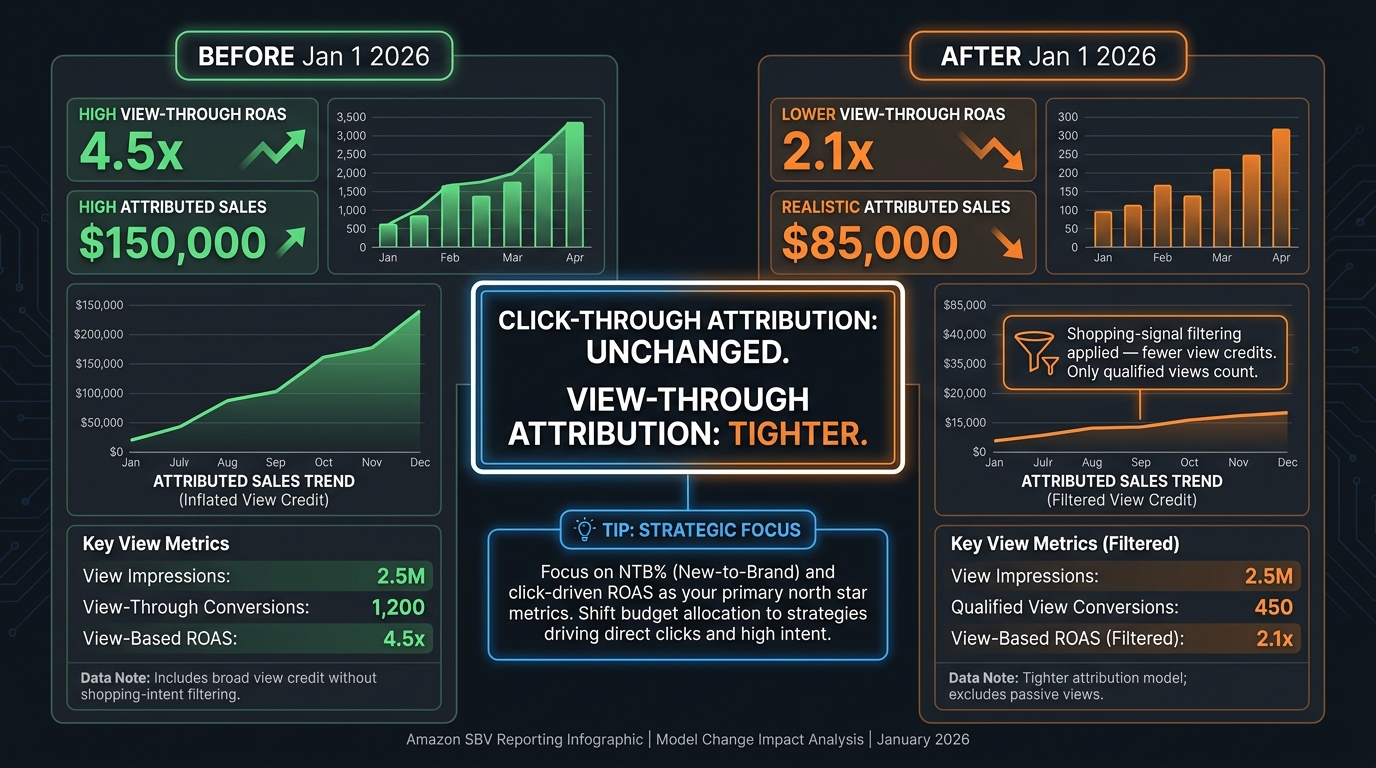
On January 1, 2026, Amazon switched Sponsored Brands (including SBV), Sponsored Display, and certain DSP placements over to a shopping-signal enhanced last-touch attribution model. The mechanics are worth understanding precisely because they directly affect how you read SBV performance.
Under the previous model, view-through attribution was relatively permissive: if a shopper saw your SBV ad and then purchased your product within the attribution window, that sale was credited to the ad view — even if significant time passed or other touchpoints intervened. The new model uses Amazon’s proprietary shopping behavior signals to evaluate whether an ad view actually influenced the purchase decision. If the signals suggest the view was incidental — say, the shopper saw the ad but had already added the product to their cart from an organic search — the conversion credit is withheld or reduced.
The result: view-through attributed sales numbers have dropped materially for most advertisers since January. Click-through attribution, importantly, is unchanged. This means ROAS calculations that depended heavily on view-through sales look worse now, not because your campaigns are performing worse, but because the measurement methodology tightened.
This is not a minor footnote. Advertisers who set SBV target ROAS thresholds in 2025 and haven’t recalibrated them will be making optimization decisions — pausing campaigns, cutting bids, reallocating budget — based on numbers that are structurally lower than what they used to be. The underlying performance hasn’t changed. The reporting of that performance has.
3. The Bulksheet 2.0 Workflow
Amazon retired its legacy bulksheet format in late 2023 and has since been incrementally expanding Bulksheets 2.0. As of mid-2026, the updated format supports a wider range of campaign settings — including SBV-specific creative fields and audience bid adjustments — that the original bulksheets couldn’t touch. If your team is still working from bulksheet templates built in 2024, those templates are almost certainly missing fields that the new format requires for certain campaign types, and the silent failures that result (campaigns going live without bid adjustments, for example) are easy to miss in large-scale builds.
For agencies and brand teams managing multiple ASINs or catalog-wide SBV coverage, auditing your bulksheet templates against the current field spec is not optional work. It’s the foundation everything else sits on.
The SBV Placement Map Has Expanded — Know Where Your Ads Are Actually Showing
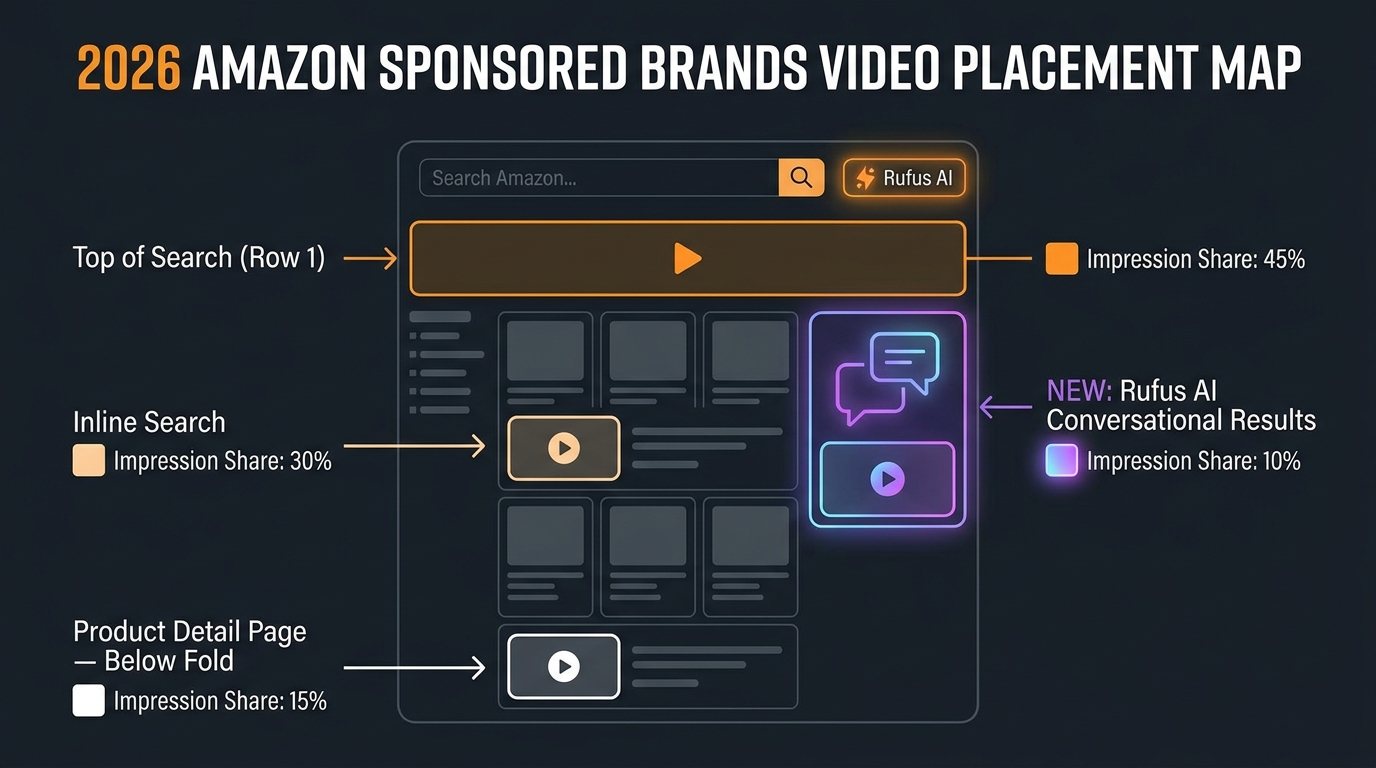
One of the most consequential and least-discussed changes to SBV in the past several months is the quiet expansion of where these ads actually appear. In prior years, SBV was effectively a top-of-search and inline-search format. In 2026, the inventory is broader — and not all placements perform equally.
Top of Search (Row 1)
This remains the highest-value SBV placement and commands the largest share of competition and CPC spend. Top-of-search video ads appear before the first organic result and autoplay immediately on page load — the placement has maximum attention because shoppers haven’t yet committed to any specific result. Conversion rates here are strong, but the CPCs are proportionally elevated, and Q3 auction pressure makes this placement especially expensive in the weeks surrounding Prime Day.
Inline Search
Inline placements appear between rows of organic search results — typically after rows 3–5 of organic listings. Shoppers at this point have scanned multiple results without clicking, which makes them a high-intent audience actively comparing options. SBV in inline positions often achieves competitive conversion rates at lower CPCs than top-of-search, making this the efficiency sweet spot for Q3 budget management.
Product Detail Page (PDP) Placements
SBV now appears on product detail pages, primarily in the below-the-fold inventory zones. These placements are valuable for conquest campaigns — your brand’s video showing up on a competitor’s listing — and for upsell/cross-sell scenarios within your own catalog. PDP SBV typically has lower click-through rates than search-based placements, but the cost is correspondingly lower, and the audience intent profile (someone already deep in a product evaluation) can make it a powerful addition to a full-funnel SBV mix.
The Rufus Adjacency
Amazon’s Rufus AI assistant is increasingly integrated into the shopping search experience, and early evidence suggests that sponsored inventory — including SBV — is beginning to appear in or adjacent to Rufus-powered conversational results. This inventory is not yet formally documented as a standalone placement in standard campaign reports, but advertisers running broad keyword coverage are seeing impression patterns consistent with non-traditional placements. It’s worth monitoring your impression share by placement segment closely in Q3 and flagging anomalous patterns for investigation.
Building Your Q3 SBV Campaign Architecture
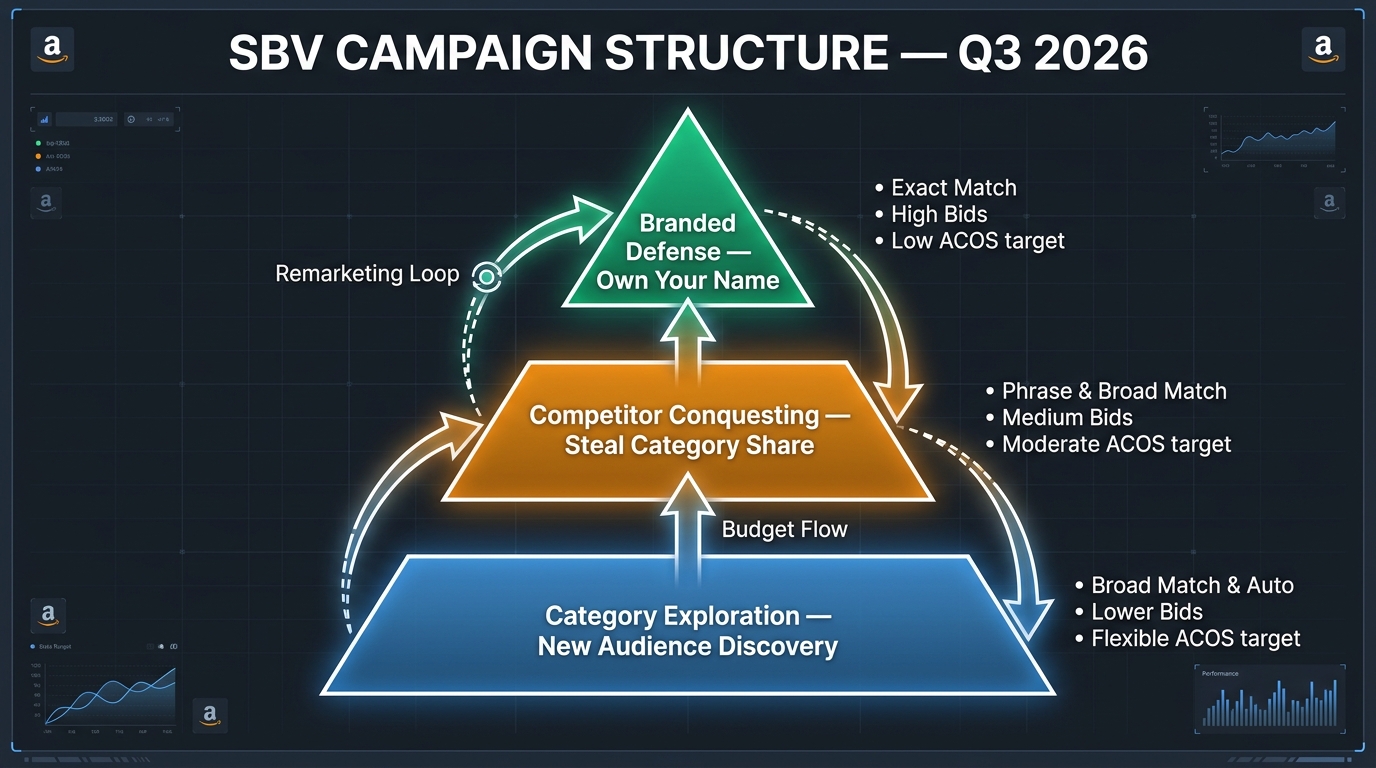
Given the placement landscape above, the most effective Q3 SBV structure separates campaigns by intent tier rather than by product line. This gives you granular bid and budget control at the level that actually matters — the type of search query driving the impression — and prevents your branded defense budget from being consumed by low-converting category exploration traffic.
Tier 1: Branded Defense Campaigns
Your brand-name keywords are the cheapest, highest-converting search terms you own. Running SBV against your own branded queries serves two functions: it prevents competitors from conquesting your name (a video ad landing above an organic brand result is far more disruptive than a static headline ad), and it reinforces your brand narrative for repeat purchasers who are searching directly for you.
For Q3, set branded defense campaign budgets conservatively — these campaigns are efficient enough that over-spending is rarely the problem. The priority is coverage: exact match on every branded term variant, phrase match on common misspellings and product model numbers, and a separate exact-match campaign for branded terms combined with category modifiers (e.g., “[brand] protein powder” if that’s your category).
Bid setting for branded defense: start with a fixed bid that’s 10–15% above the minimum suggested bid in the console, and apply a placement bid adjustment of +50–75% for top-of-search. The goal is to own the top placement on your own brand name without participating in the broader category auction at that rate.
Tier 2: Competitor Conquesting Campaigns
Competitor keyword targeting is where Q3 strategy gets interesting. In categories with multiple viable alternatives, shoppers searching competitor brand names are in an active decision-making phase — they’re not loyal buyers, they’re evaluating options. SBV’s autoplay, product-first creative format is particularly effective in this context because it can demonstrate your product’s differentiation before the shopper ever processes a single word of a listing title.
Structure competitor campaigns with exact match on the top 10–15 competitor brand names and product names in your category. Keep these in separate ad groups from your category keywords — the conversion profile and optimal bid are different, and mixing them muddies your optimization signal.
A critical note for Q3: competitor conquesting CPCs spike dramatically around Prime Day because every brand is doing the same thing simultaneously. Build a budget cap rule in Campaign Manager that prevents your conquesting campaigns from consuming more than 25–30% of your total SBV budget on any single day during the Prime Day window. The CPCs during peak days rarely produce ROAS that justifies uncapped spend, and the efficiency damage can follow you into the post-event period when you’ve depleted budget that could’ve been deployed more effectively.
Tier 3: Category Exploration Campaigns
Category keywords — terms that describe what you sell without naming any brand — are your new customer acquisition engine. These campaigns typically run at lower efficiency than branded or competitor campaigns, but they’re the mechanism by which you reach shoppers who don’t know your brand exists yet.
For SBV specifically, category exploration campaigns benefit from auto-targeting as a discovery layer. Run a separate auto-targeting SBV campaign alongside your manual keyword campaigns, pull the search term report weekly, and promote high-converting terms from auto to manual with tested bids. This is a slower loop than Sponsored Products auto-to-manual migration because SBV requires more data to form statistically valid conclusions, but it’s a reliable way to find non-obvious keyword opportunities that manual research misses.
Use “Dynamic bids — down only” for category exploration campaigns during Q3. The volatility in CPCs during and around Prime Day makes “dynamic bids — up and down” a risk that’s difficult to budget-cap without limiting your reach on the terms that are actually converting.
Creative That Converts in a Muted, Mobile-First Environment
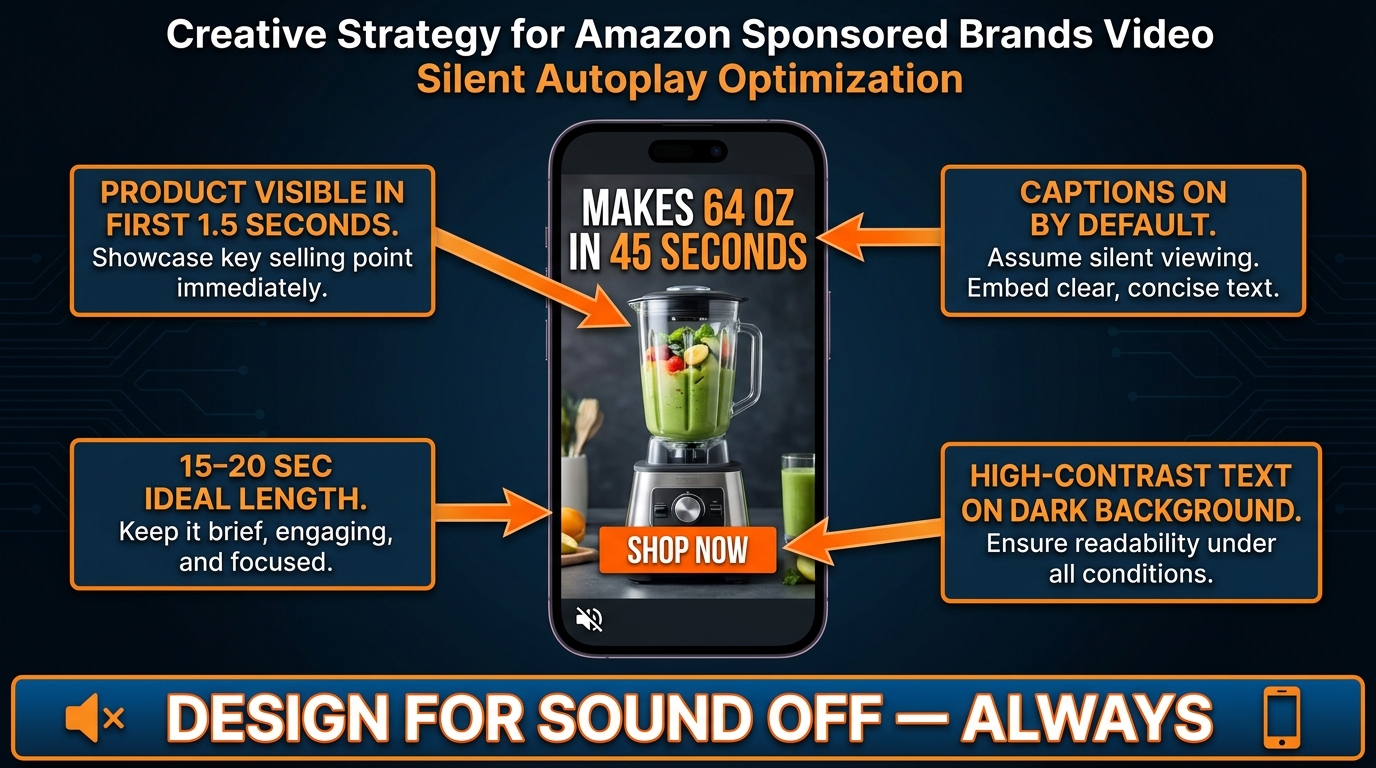
The technical specs for SBV haven’t changed dramatically in 2026: 6–45 seconds, 16:9 aspect ratio, MP4 or MOV, maximum 500MB, minimum resolution 1280×720. Amazon still recommends 20 seconds or fewer for best performance. But understanding the specs is the starting point, not the finish line. The creative decisions that separate high-performing SBV from average SBV are behavioral, not technical.
The 1.5-Second Rule
The frequently cited advice to show your product in the first three seconds has become the floor, not the standard. SBV autoplays muted as shoppers scroll through search results — which means your video is competing for visual attention against product images, ratings, and pricing that a shopper can process in under a second. In a mobile feed, if your product isn’t identifiable by frame two or three, a significant portion of your audience has already scrolled past.
The benchmark to aim for in 2026: your hero product should be clearly visible and recognizable within the first 1.5 seconds of the video. Not in a product shot that fades in at the two-second mark — actually visible, with sufficient size and contrast to register on a phone screen being scrolled at reading speed.
The most reliable creative structure for achieving this is what practitioners call the “product-first reveal”: the video opens directly on the product against a clean, high-contrast background, with a benefit statement appearing as text overlay within the first two seconds. No brand intro, no animated logo, no scene-setting — product first, benefit second, everything else after that if time allows.
The Silent-First Framework
SBV ads autoplay muted. Shoppers can tap to unmute, but the research on shopping video behavior consistently shows that the majority of views happen without sound. Your SBV creative needs to be fully comprehensible without audio — not “mostly comprehensible with some audio-dependent moments,” but entirely self-contained as a silent experience.
This means every piece of information that matters for conversion needs to be on screen as text or demonstrated visually. If your current SBV relies on a voiceover to communicate a key benefit (“Now with 2x the protein of leading competitors”), that benefit is invisible to most of your audience. High-contrast text overlays, benefit bullet points that appear as the video progresses, and a clear on-screen CTA at the end are not nice-to-haves. They’re the primary communication mechanism for the majority of your impressions.
The practical checklist for a silent-first SBV review:
- Watch the video with the sound off on a phone screen (not a desktop monitor).
- Every claim, benefit, and feature communicated via audio should also appear as on-screen text.
- The primary call-to-action (“Shop Now,” “See All Sizes,” “Limited Time Deal”) must be visible on screen — not only implied by the product page it links to.
- Text must be large enough and high-contrast enough to read without zooming at standard mobile scroll speed.
- The video should communicate its core proposition in the first 10 seconds even if the viewer never watches the final 5–10 seconds.
Length and Pacing for Q3 Intent
The sweet spot for SBV length in competitive Q3 conditions is 15–18 seconds. At that length, you have enough time for a product reveal, two or three benefit callouts as text overlays, a use-case demonstration or lifestyle context moment, and a closing CTA. Beyond 20 seconds, completion rates drop and the per-second cost of serving the remaining creative increases without a corresponding increase in conversion signal.
For Prime Day specifically, shorter is better. Shoppers during peak Prime Day hours are processing deals at higher velocity than normal browsing sessions — their attention window for any single piece of creative is compressed. If you have a 25-second evergreen SBV that’s performing well in normal conditions, consider creating a 12–15 second Prime Day variant that front-loads the deal mechanics (discount percentage, limited availability) and cuts the slower narrative sections.
Bid Management in a Rising CPC Environment
Amazon SBV CPCs are structurally higher in 2026 than they were in 2024–2025, driven by three concurrent forces: more advertisers running SBV campaigns (the format has gone from a specialty tactic to a standard media buy), more compressed search inventory as ad placements take up larger screen real estate, and AI-assisted bidding tools that tend to push bids toward the platform’s revenue-maximizing equilibrium rather than the individual advertiser’s efficiency point.
The Prime Day CPC Reality Check
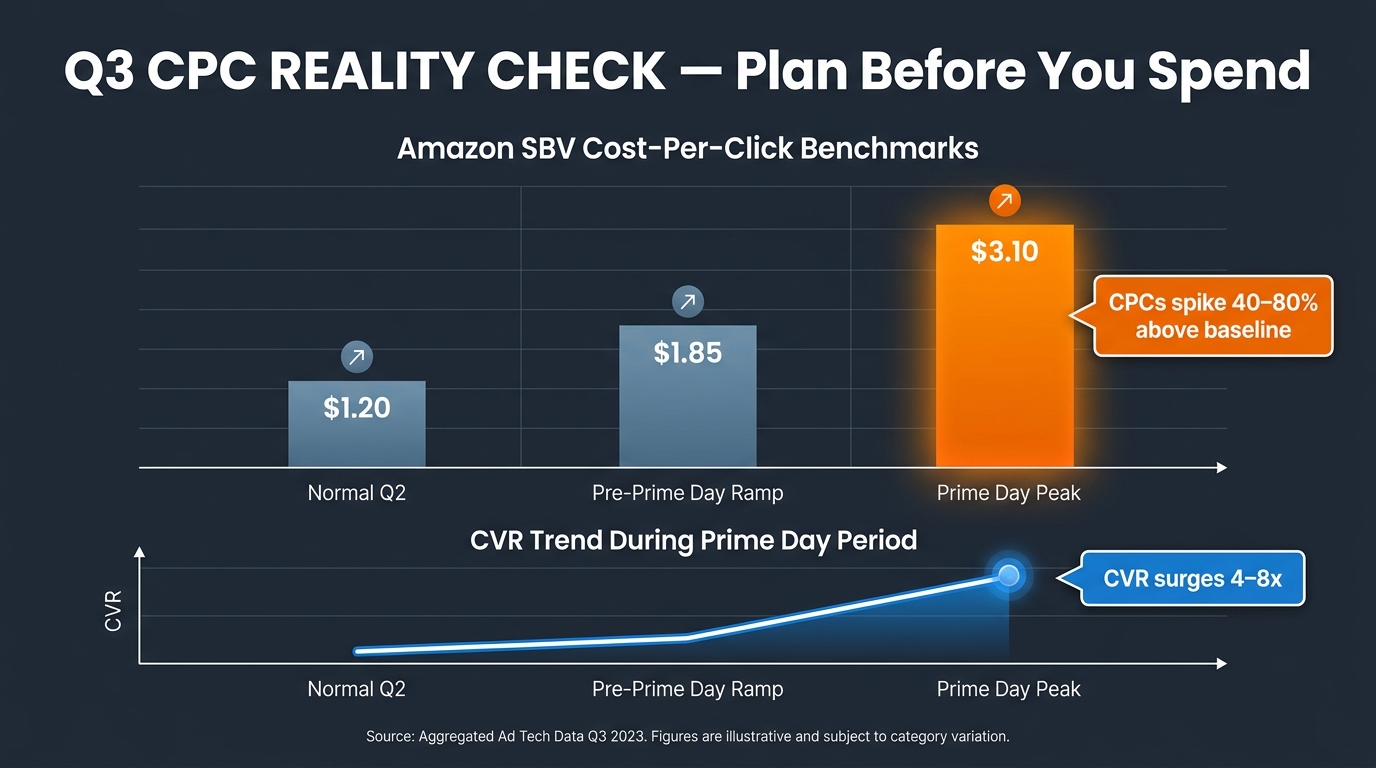
During Prime Day windows, Sponsored Products CPCs have been documented at $2.50–$8.00 for top keywords, up 15–25% from 2025. For SBV, the CPC premium during peak days typically runs 40–80% above baseline — and in highly competitive categories (supplements, electronics accessories, home goods), the upper end of that range is not unusual.
The counterintuitive piece: conversion rates during Prime Day surge 4–8x above normal baseline. Which means the ROAS math can still work even at 60% higher CPCs — but only if you’ve entered the auction with a realistic budget, a bid structure that prevents runaway spend on low-intent queries, and creative that converts efficiently at the higher intent levels shoppers bring to peak shopping events.
The brands that get destroyed on Q3 ROAS are typically the ones who didn’t build budget caps, applied the same max bids to all campaigns regardless of intent tier, and ran the same creative they’ve been running since April without a Prime Day-specific variant. All three of those mistakes compound each other.
The Guardrail Bidding Method
The most durable SBV bid management framework for Q3 is what’s being called the guardrail method: let Amazon’s automated bidding handle intra-day optimization within a hard floor and ceiling you define, rather than either fully manual bidding (too slow to respond to auction changes) or fully automated bidding (too willing to overspend on Amazon’s behalf).
The setup works as follows. At the campaign level, set your default bid at roughly 80% of what historical data suggests a converting click is worth at your target ACOS. This is your floor — the minimum you’re willing to pay. Then apply placement bid adjustments that modulate up or down from that base depending on where in the placement hierarchy you want to concentrate spend:
- Top of search: +40–60% bid adjustment for branded defense, +20–30% for category campaigns
- Inline search: No adjustment (base bid)
- Product pages: -20–30% bid adjustment (lower CPCs acceptable because of lower CVR)
Set a daily budget cap rule in Campaign Manager that pauses the campaign if spend exceeds 110% of your planned daily budget — this prevents a single high-traffic day from consuming a week’s worth of budget. Review the cap weekly during Q3, not monthly, because Prime Day week requires a deliberate budget exception rather than the rule doing your thinking for you.
Hour-of-Day Bid Adjustments
SBV conversion rates are not uniform across the day. In most categories, late morning (9am–12pm local time) and evening (7pm–10pm) outperform mid-afternoon hours by material margins. Using third-party dayparting tools or Amazon’s scheduling features to suppress bids during your category’s low-conversion windows — typically early morning and late afternoon — is one of the clearest efficiency levers available in Q3.
The caveat: Prime Day behavior deviates significantly from normal day-of-week and hour-of-day patterns. Run higher bids throughout the Prime Day window rather than applying your normal dayparting schedule, and restore standard scheduling once you’re 48 hours past the end of the event.
Keyword Architecture That Works With the New Console
Keyword strategy for SBV operates differently than for Sponsored Products, and the new console interface has created some traps for operators who manage both ad types with similar logic.
Match Type Strategy for Q3
SBV auctions are noisier than SP auctions for most keywords because the video format attracts broader initial interest — shoppers may click a video ad out of curiosity rather than purchase intent, inflating apparent CTR while deflating conversion rate. This means broad match on SBV campaigns is generally more wasteful than it is on Sponsored Products, and exact match should carry a much larger share of your SBV spend than it does in your SP mix.
A practical Q3 match type allocation for SBV:
- Exact match: 60–70% of budget — your proven converters, tightly controlled
- Phrase match: 20–25% of budget — expansion with moderate query relevance control
- Broad match: 10–15% of budget — discovery only, with aggressive negative filtering
During Prime Day week specifically, consider pulling broad match down to 5% or eliminating it entirely. The CPC cost of broad match waste during peak auction periods is significantly higher than during normal weeks, and your budget is better concentrated on proven converters.
Negative Keyword Discipline
SBV negative keyword management is one of the highest-leverage and most under-executed tasks in Amazon PPC. Because SBV appears prominently in search results, it attracts impressions on tangentially related queries that would never generate a sale — informational queries, comparison queries (“X vs Y”), queries that contain your keyword but indicate a fundamentally different product need.
Build your Q3 negative keyword list from three sources: your own search term report from the past 90 days (filter for queries with 5+ clicks and zero conversions), your competitor’s product terms that appear in your auto campaign (you don’t want to pay for clicks from shoppers who searched a specific competitor model and ended up on your detail page by accident), and common category-adjacent terms that don’t match your product’s actual use case.
Apply negative keywords at both the campaign level (for terms you never want any ad group to appear on) and the ad group level (for terms that are relevant to some ad groups but not others). The new Campaign Manager interface makes this granular — use it.
Product Targeting as a Complement
Product targeting (targeting specific ASINs rather than keywords) deserves its own SBV campaign separate from keyword campaigns. SBV on PDPs — particularly competitor PDPs — functions as a visual interruption for shoppers who have reached a decision page and haven’t yet committed. The creative requirements are slightly different here: rather than leading with broad category benefit messaging, PDP-targeted SBV should lead with your competitive differentiation — why your product is the better choice for someone who just read through a competitor’s listing.
Keep ASIN-targeted SBV in dedicated campaigns so you can set bids and evaluate performance separately from keyword-driven traffic. PDP placements typically justify 20–35% lower bids than equivalent keyword placements, and mixing them creates a blended cost structure that masks your actual efficiency at each placement type.
The Bulk Sheet 2.0 Workflow for Scale
For advertisers managing SBV across large catalogs — ten or more active SBV campaigns, or quarterly builds involving dozens of new ASINs — the updated Bulksheets 2.0 format is the operational backbone that makes scale manageable. The new format has meaningful differences from the legacy version that are worth understanding before you build your Q3 campaigns at volume.
The key structural change in Bulksheets 2.0 is the addition of explicit SBV creative fields. You can now specify video file associations, headline text, logo image, and landing page URL directly in the bulksheet row for each SBV creative — rather than having to configure these manually in the console after uploading the campaign skeleton. For teams building ten or more SBV campaigns at once, this alone saves several hours of post-upload work per build cycle.
Audience bid adjustment fields are also now included in Bulksheets 2.0. This means you can specify your Amazon Audiences targeting adjustments (for remarketing audiences, in-market segments, and lifestyle audiences) directly in the bulksheet, rather than layering them in post-upload. In Q3, where audience-adjusted bidding on high-intent segments — particularly shoppers who have viewed your product page in the past 7–14 days — can meaningfully improve SBV efficiency, having this in the bulksheet template from the start prevents the common mistake of launching campaigns without audience adjustments in place.
Practical recommendations for the Q3 build:
- Download a fresh Bulksheets 2.0 template from the current console rather than using a saved template from 2024 or early 2025 — the field spec has been updated and legacy templates will throw silent errors on SBV-specific fields.
- Build a Q3-specific bulksheet master template that includes your three campaign tiers (branded defense, competitor conquesting, category exploration), pre-populated bid adjustment logic, and a standard negative keyword list.
- Use the template’s custom label columns to tag Q3 spend by initiative (e.g., “Prime Day Ramp,” “Back-to-School,” “Core Q3”) so you can filter campaign performance by strategic intent in reporting, not just by campaign name.
Reading SBV Reporting After the Attribution Shift
The January 1, 2026 attribution model change has made standard SBV reporting more complicated to interpret, and the operators who are making the best optimization decisions right now are the ones who have rebuilt their KPI hierarchy to reflect the new reality.
The Metrics That Matter Now
The shopping-signal enhanced model reduces view-through conversion credit selectively — it affects instances where Amazon’s signals suggest the ad view wasn’t a meaningful influencing factor. What this means in practice is that view-through ROAS has become a noisier signal, subject to swings based on factors outside your direct control (how Amazon’s signal model evaluates the shopping context, changes in attribution logic, etc.).
The metrics that have become more reliable as primary optimization signals:
- Click-through ROAS (CTROAS): Unchanged by the attribution model shift. If you can isolate click-through attributed sales in your reporting view, this is now your cleanest ROAS signal for SBV.
- New-to-Brand (NTB) percentage: Amazon’s NTB metric measures what share of attributed purchases came from customers who hadn’t purchased from your brand in the trailing 12 months. For SBV as a discovery format, NTB% is a better measure of upper-funnel impact than ROAS, and it’s unaffected by the view attribution changes.
- Click-Through Rate (CTR): A rising CTR on a stable impression base tells you your creative is improving at capturing attention — an important leading indicator that precedes conversion improvement by 2–4 weeks.
- Detail Page Views (DPV): How many clicks led to a product detail page view. Tracking DPV alongside purchase conversion rate helps separate traffic quality issues (clicks that don’t result in DPVs, suggesting targeting misalignment) from listing conversion issues (DPVs that don’t result in purchases, suggesting the listing itself is underperforming).
The View-Through Trap
The temptation after the attribution shift is to panic-optimize on view-through ROAS that now looks lower than it did six months ago. Resist it. If you pause or reduce bids on SBV campaigns purely because view-through attributed sales have declined, you may be cutting campaigns that are genuinely driving conversion influence — you’re just no longer getting credit for all of it.
A more disciplined approach: before making any bid or budget decision based on ROAS for an SBV campaign, look at whether click-through ROAS is also declining. If click-through ROAS is holding steady or improving while view-through ROAS has dropped, the attribution model change is the likely explanation, not a deterioration in underlying campaign performance. Optimization decisions should be driven by the click-through signal in that scenario, not the view-through signal.
Build a custom reporting view in Campaign Manager that surfaces click-through attributed sales and view-through attributed sales as separate columns. The default reporting view combines them, and the blended number is the most misleading way to evaluate SBV performance right now.
Q3 Competitive Intelligence for SBV
No SBV strategy exists in a vacuum — you’re bidding in an auction that your competitors are also participating in, and understanding their patterns gives you leverage that pure keyword and bid optimization can’t provide. Q3 specifically creates competitive intelligence opportunities because competitor behavior around Prime Day follows patterns that are worth mapping in advance.
Monitoring Competitor SBV Presence
Amazon’s Brand Analytics tools, specifically the Search Query Performance report and the Search Terms report, show you which keywords are generating high impression share for your category. Cross-referencing these with the auction insights report (available at the campaign level for your active SBV campaigns) tells you where you’re winning top placements and where you’re being outbid.
The practical move pre-Q3: run an auction insights pull on your top 20 branded and category keywords in June, and identify the 3–5 competitors who appear most frequently in the top placement. These are the advertisers your bidding strategy needs to account for most directly. If any of them have materially increased their impression share since Q1, they’ve either raised bids or added new campaigns — both of which signal an aggressive Q3 posture that will inflate your CPCs in shared auction segments.
Exploiting Competitor Gaps
Prime Day creates predictable competitor behavior that generates exploitable gaps. Advertisers who didn’t plan adequately for Prime Day often exhaust their daily campaign budgets by early afternoon — which means top-of-search placements that were fully contested at 10am are available at lower CPCs by 2pm. If your SBV campaigns are still running with budget in the afternoon on Prime Day, you’re often paying less for the same placements that were far more expensive in the morning session.
Consider budget scheduling that intentionally conserves 30–40% of your Prime Day SBV budget for afternoon deployment. The shopping volume is highest in the morning, but the afternoon efficiency window — when competitor budgets have exhausted and yours haven’t — can produce dramatically better ROAS per dollar of spend. This requires discipline: resist the instinct to spend everything as fast as possible on Prime Day morning.
The Post-Prime Day Recovery Window
Many advertisers cut ad spend sharply in the 3–5 days following Prime Day, treating it as a post-event cool-down period. This creates a window where SBV inventory is less contested and CPCs revert toward (or below) baseline while conversion intent is still elevated from shoppers who were browsing during Prime Day but didn’t complete purchases.
Keep a minimum budget allocation running for your branded defense and top-performing category SBV campaigns for the five business days following Prime Day. The cost per conversion in this window often outperforms even the most efficient non-Prime day campaigns, because the demand signal from the event lingers while the supply side (competitor bids and budgets) has temporarily retracted.
The Pre-Prime Day Ramp: A Four-Week Setup Schedule
Prime Day in 2026 falls in Q3, and the campaigns that perform best on Prime Day are invariably the ones built and validated six weeks before it — not the ones set up the week before. Here’s a week-by-week framework for the four weeks prior to the event.
Week 1 (Four Weeks Out): Architecture and Creative Audit
- Audit all existing SBV campaigns against the Q3 architecture model: branded defense, competitor conquesting, category exploration. Identify gaps, redundant campaigns, and campaigns with targeting overlap that’s inflating your effective CPCs.
- Pull the past 90 days of search term reports and identify the top 20 performing and top 20 wasted-spend keywords. These form the basis of your Q3 positive and negative keyword lists.
- Review all active SBV creative against the silent-first framework. Identify any video where a key benefit claim exists only in the audio track, and flag it for revision or replacement.
- Download a fresh Bulksheets 2.0 template and build your Q3 campaign skeleton in the sheet, ready for upload once bids and keywords are finalized.
Week 2 (Three Weeks Out): Build and Launch New Campaigns
- Upload your Q3 campaign architecture via Bulksheets 2.0. Launch all three tiers with moderate initial bids — you want two weeks of performance data before Prime Day, not one.
- Launch your Prime Day-specific SBV creative variants. If you have a 20-second evergreen video, create a 12–15 second version that front-loads deal messaging.
- Set up all campaign automation rules and budget caps. Define your max daily spend limits for each campaign tier for both Prime Day week and normal-run weeks.
- Build your custom reporting view in Campaign Manager: click-through ROAS, NTB%, CTR, and DPV as primary columns. View-through sales as a secondary column, not the headline metric.
Week 3 (Two Weeks Out): Performance Review and Bid Refinement
- Review the initial performance data from the newly launched campaigns. Identify under-performing keywords (high spend, low conversion) and apply negative matches or bid reductions.
- Identify your top three to five converting keywords across all SBV campaigns — these are the terms that will anchor your Prime Day bidding. Raise bids on these terms to secure top placements during the event window.
- Conduct an auction insights pull across your top keywords and note which competitors have increased their impression share since your Week 1 audit. Adjust your competitor conquesting budget plan accordingly.
- Finalize and upload your Prime Day-specific creative variants and confirm they’re approved and active before the event window opens.
Week 4 (One Week Out): Final Configuration and Checks
- Increase daily budgets across all SBV campaigns to your Prime Day allocation — not on Prime Day morning, but five days before, so there’s no risk of budget approval delays limiting your spend during the event.
- Disable your normal dayparting schedule and switch to the 24-hour high-bid schedule for the duration of Prime Day week.
- Brief your optimization team (or set calendar reminders for yourself) to check campaign performance at 8am, 12pm, and 4pm during Prime Day. The three check-in points correspond to the morning launch, midday budget exhaustion risk, and afternoon efficiency window.
- Confirm all budget cap automation rules are active and set correctly. One uncapped campaign during Prime Day can consume a month’s SBV budget in 48 hours.
Conclusion: The Q3 SBV Operator’s Checklist
The advertisers who will win Q3 SBV are the ones who treat the platform’s current state as the operating environment — not the platform as it was a year ago. Amazon’s Ad Console in 2026 is a more capable, more complex, and in some ways more opaque system than it was. The attribution model has changed. The interface has unified in ways that create new default behaviors. The placement inventory has expanded into surfaces that aren’t fully documented. And CPCs are higher than they’ve ever been going into Prime Day.
None of that makes SBV a harder bet. In fact, SBV is delivering stronger relative performance versus static Sponsored Brands in 2026 than at almost any point since the format launched — roughly 58% of total SB spend is now flowing through video, and the conversion advantage over static creatives is well-documented. The format works. The challenge is managing it competently on a platform that has changed more in the past six months than in the two years before that.
Use this as your pre-Q3 checklist:
- ✅ Architecture: Three separate campaign tiers — branded defense, competitor conquesting, category exploration — with separate budgets, bids, and negative keyword logic.
- ✅ Creative: Product visible in 1.5 seconds. All key benefits communicated as on-screen text. Primary CTA on screen. Silent-first test passed on a phone screen.
- ✅ Bids: Guardrail bidding structure with placement adjustments by tier. Prime Day budget caps in Campaign Manager. Dayparting disabled for Prime Day week.
- ✅ Keywords: Exact match carrying 60–70% of SBV budget. Broad match down to 10% or eliminated for Prime Day week. Negative keyword list refreshed from the past 90 days of search term data.
- ✅ Reporting: Custom view with click-through ROAS and NTB% as primary metrics. View-through sales as secondary column only. Year-over-year comparison baseline adjusted for the Jan 1 attribution model change.
- ✅ Competitive: Auction insights pulled on top 20 keywords. Competitor budget-exhaustion window identified. Post-Prime Day recovery campaigns pre-planned.
- ✅ Schedule: All Q3 campaign builds complete by Week 2. Prime Day creative variants approved and live. Four-week ramp schedule populated with named accountabilities.
Q3 rewards preparation. The platform has changed — but so has the opportunity. Operators who have recalibrated to the new Ad Console reality are finding that well-structured SBV campaigns are reaching customers at scale and cost that would have been impossible with static formats. The window to build that advantage before Prime Day is closing. Build the architecture now, and the rest of Q3 will run on systems rather than scrambles.