Tag: Process Design

  • The Automation Ladder: Which Tasks Deserve AI, Which Need Plain Rules, and Which Should Stay Human

    The Automation Ladder: Which Tasks Deserve AI, Which Need Plain Rules, and Which Should Stay Human

    Most advice on AI automations starts with tools. Pick a platform, connect a model, and start building. That order is backwards, and it explains why many first automations get abandoned after a few weeks.

    The better starting question is simpler: what kind of task is this? Some tasks need a language model. Many need a plain if-then rule. A few should not be automated at all.

    This article offers a framework we call the automation ladder. It helps you decide how much intelligence each task needs, where humans stay in the loop, and how to keep a workflow trustworthy after launch.

    A note on sources: our research tools returned no usable data when this piece was prepared. So this article contains no statistics or quotes. It rests on design principles and reasoning you can test against your own processes.
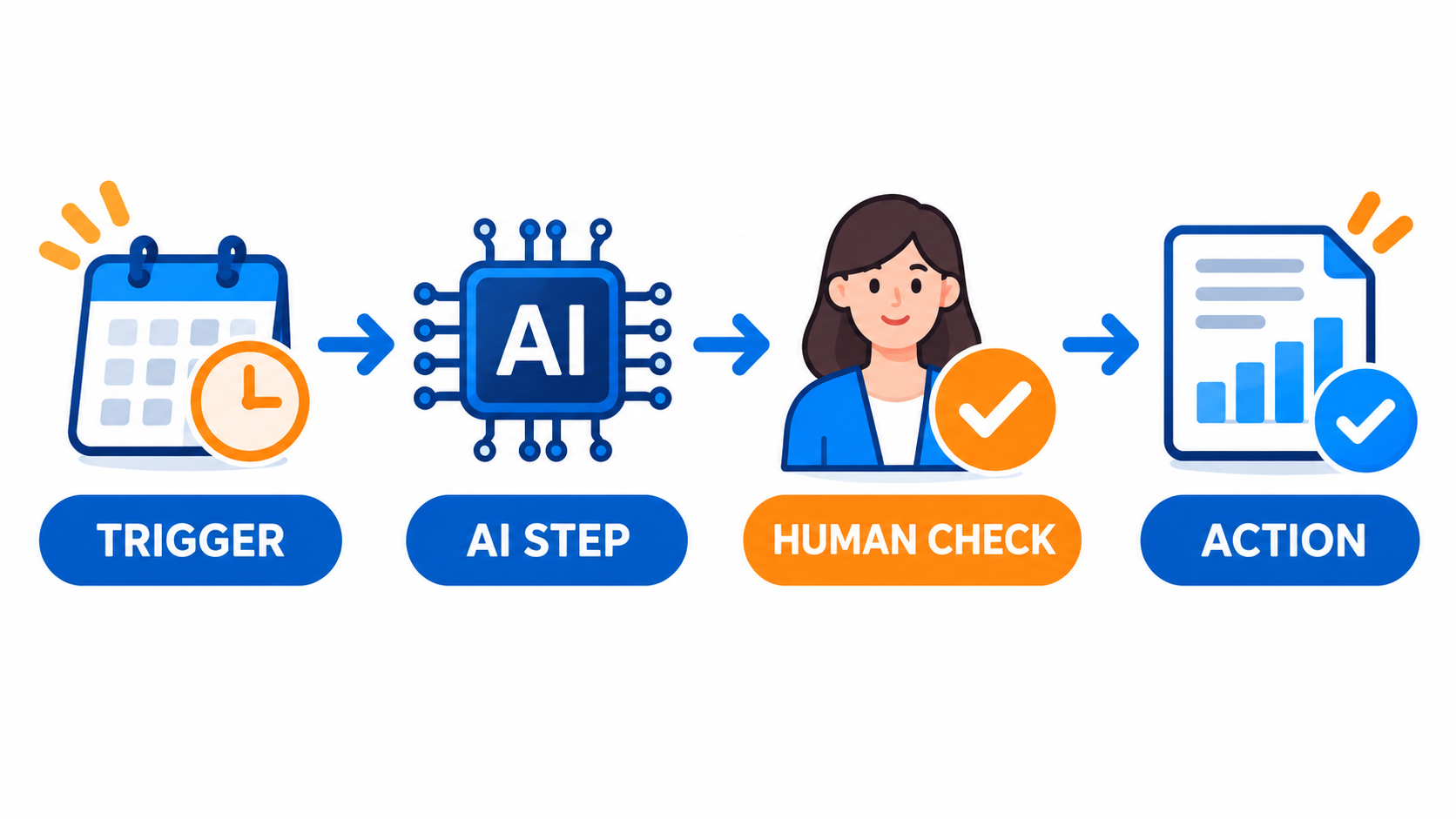
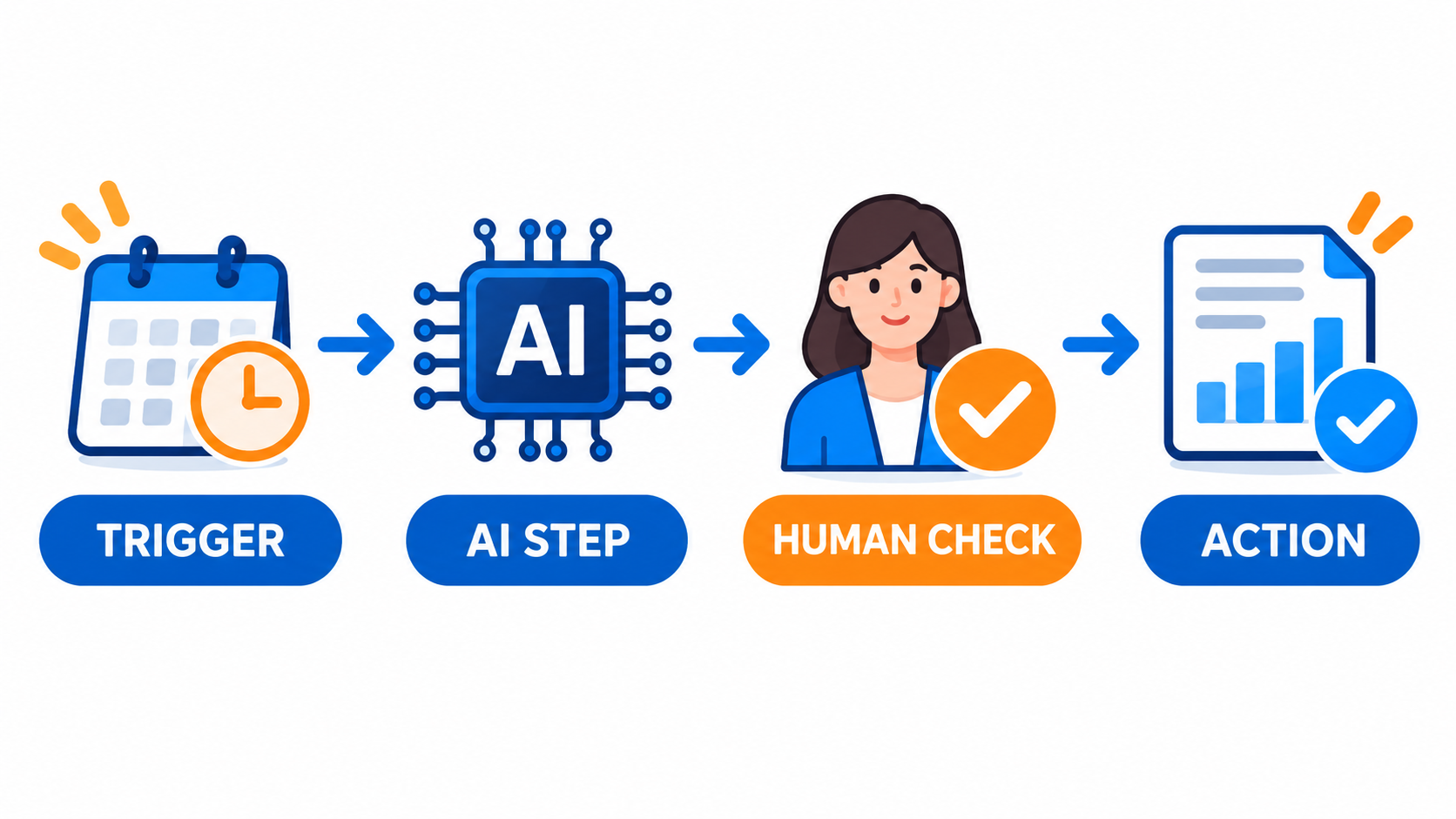
    Workflow diagram showing trigger, AI step, human check and action

    What “AI automation” actually means

    The phrase covers three different things, and mixing them up causes bad decisions.

    Deterministic automation

    A trigger fires, and fixed rules run. “When a form is submitted, add a row to the sheet and send a confirmation.” The output is identical every time. It is cheap, fast and easy to debug.

    AI-assisted steps inside a fixed flow

    The structure of the workflow is still fixed, but one step uses a model. Examples include classifying an email, extracting fields from an invoice, or drafting a reply. The model handles messy input. The rest of the flow stays predictable.

    Agentic workflows

    The model decides which steps to take, which tools to call and when to stop. This is the most flexible and the hardest to control. It earns its place only when the path genuinely cannot be mapped in advance.

    Most business value sits in the middle category. It is also the one people underuse, because they jump straight to agents.

    Where AI beats rules, and where it does not
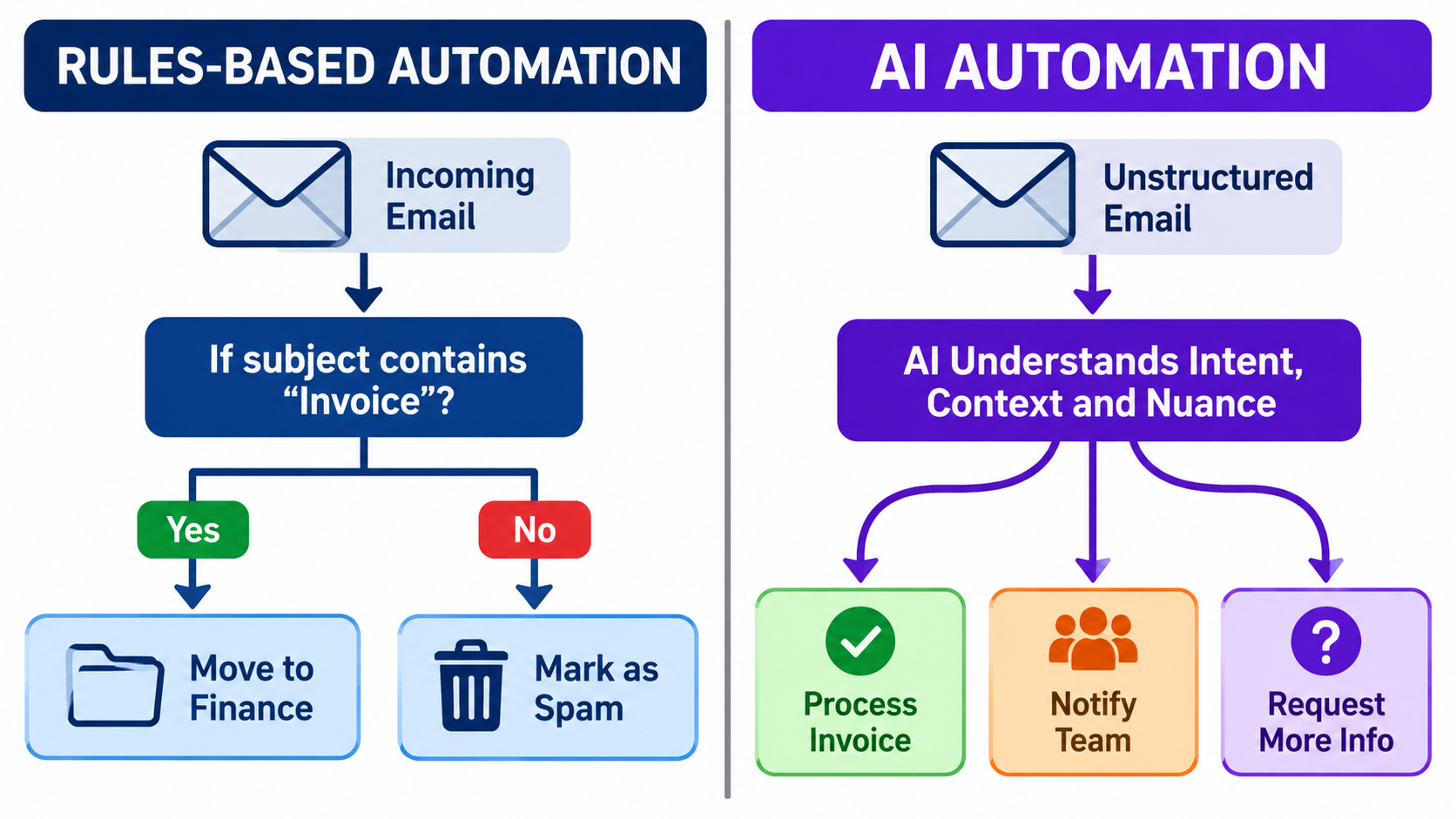
    Comparison of rules-based automation and AI automation

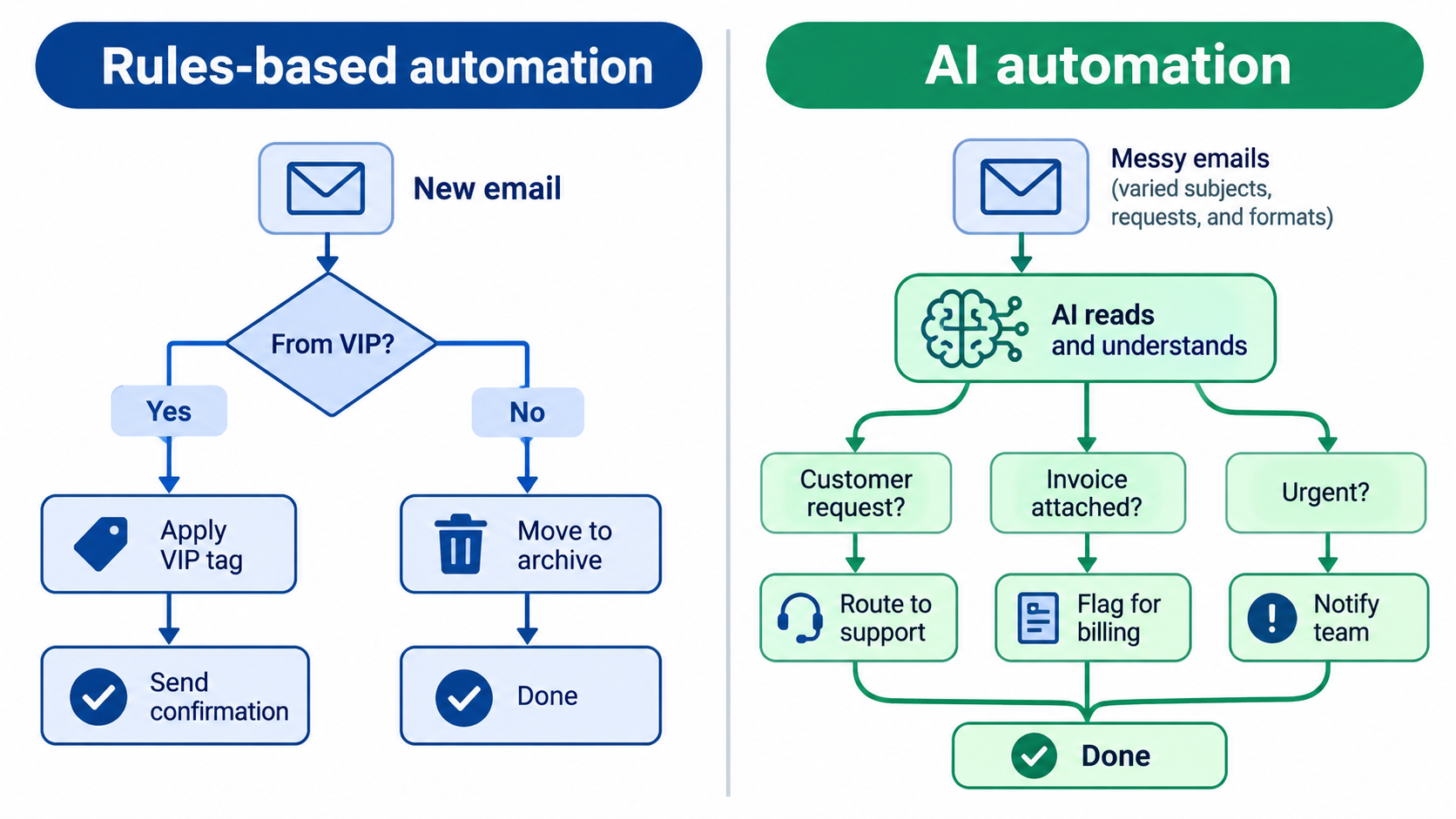
    Rules work when input is structured and the decision logic can be written down. Models work when input is unstructured and the decision depends on meaning.

    Signs you need a model

    • The input is free text, images, PDFs or audio.
    • Humans currently “just know” the answer but struggle to write the rule.
    • The same intent arrives in many different phrasings.
    • Output needs to be a summary, draft or extracted field rather than a yes/no.

    Signs rules are enough

    • The input comes from a form, database or API with fixed fields.
    • You can describe the logic in five sentences.
    • A wrong answer is costly and must be reproducible.
    • You need an audit trail that explains each decision.

    A useful test: if you can write the logic as a spreadsheet formula, use the formula. Models add cost, latency and variance. Spend those only where they buy something.

    Score tasks before you build anything
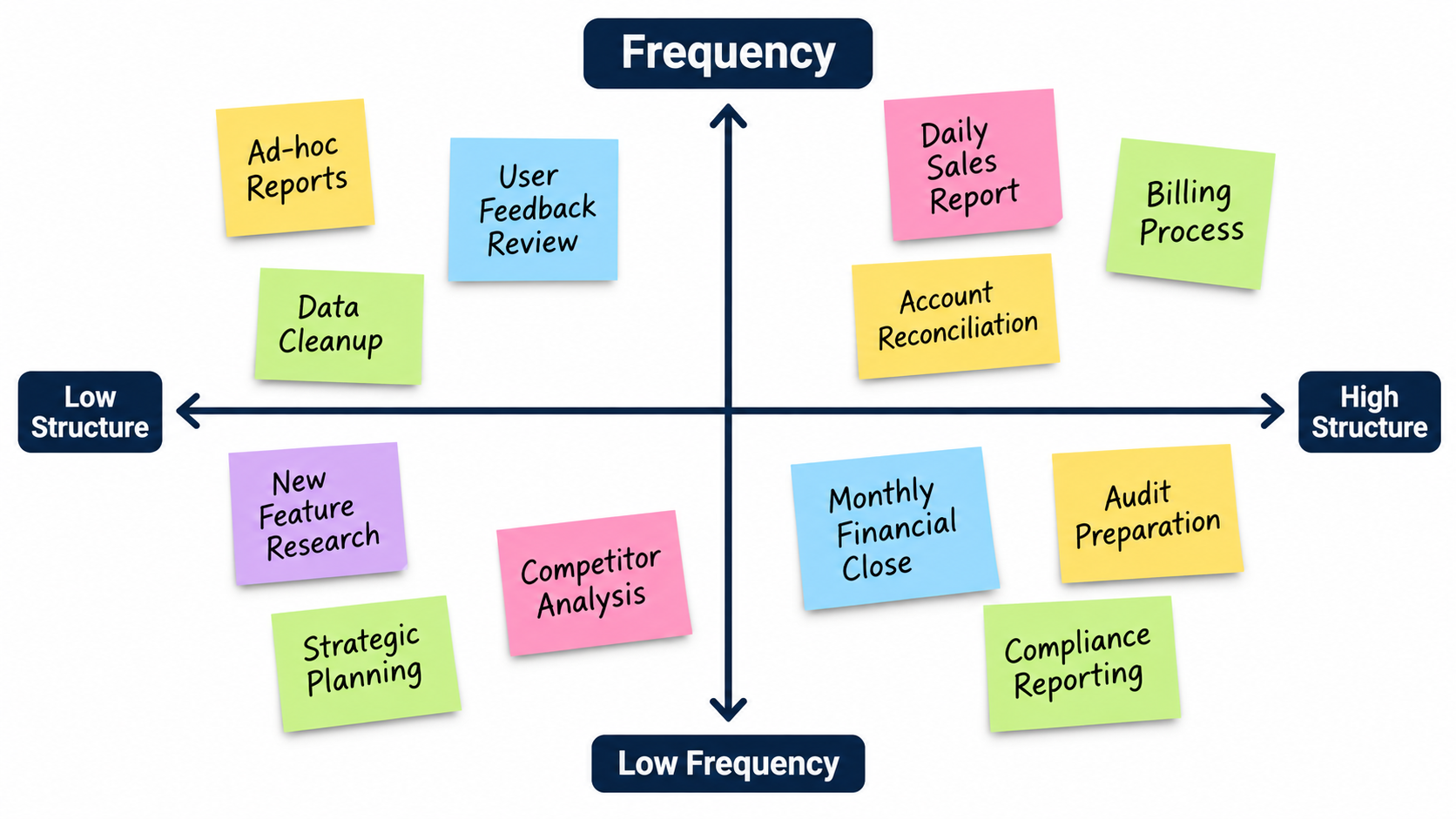
    Scoring matrix for choosing which tasks to automate

    List every repetitive task on your team. Then score each on four factors, from one to five.

    1. Frequency. How often does it happen? Daily tasks repay build time quickly. Quarterly tasks rarely do.
    2. Structure. Are the inputs and outputs consistent? Higher structure means easier automation.
    3. Cost of error. Score this one inverted. A mistake in an internal summary is cheap. A mistake in a customer refund or legal notice is not.
    4. Clear owner. Does one person know what “good” looks like and will review results? Without an owner, quality decays.

    High scores on frequency, structure and ownership, plus low cost of error, mark your first candidates. Tasks like sorting inbound requests, tagging support tickets, pulling data from documents and drafting internal meeting notes often fit.

    Low-scoring tasks are not hopeless. They may just need to be redesigned first. Standardizing a messy intake form often removes the need for AI entirely.

    The automation ladder

    Think of each task as sitting on a rung. Start at the lowest rung that solves the problem.

    Rung 1: Eliminate

    Ask whether the task needs to exist. Reports nobody reads and approvals that never get rejected are common targets. Deleting a step beats automating it.

    Rung 2: Simplify

    Standardize inputs, merge duplicate steps, and fix the source of the mess. A cleaner process is easier to automate and easier to explain.

    Rung 3: Rule-based automation

    Connect the tools and run fixed logic. This is the reliable workhorse of any operation.

    Rung 4: AI step in a fixed flow

    Add a model for the one part that needs language or vision understanding. Constrain its output to a defined format, such as a category from a fixed list or specific JSON fields.

    Rung 5: Agentic workflow

    Let the model plan and use tools. Reserve this for open-ended work such as research or multi-step troubleshooting, and wrap it with limits on what it can touch.

    Most teams should spend the majority of their effort on rungs 1 through 4. Each step up adds capability and adds failure modes.

    Design patterns that hold up

    Constrain the output

    Ask the model to choose from a list, fill a schema, or return a score. Free-form output is hard to route downstream. Structured output lets ordinary rules take over after the AI step.

    Keep prompts as versioned assets

    Store prompts somewhere with a change history. When behavior shifts, you need to know what changed and when. Treat a prompt edit like a code edit.

    Give the model the right context, not all the context

    Pass only the information the step needs. Less noise usually means better answers and lower cost. It also limits exposure of sensitive data.

    Build a fallback path

    Every AI step should have an answer to “what if this fails or is uncertain?” The usual answer is routing to a person with the original input attached.

    Make steps idempotent

    If a run repeats, it should not send two emails or create two records. Retries are normal. Duplicate side effects are the kind of bug that damages trust fast.

    Where humans belong in the loop

    “Human in the loop” is often used as a slogan. It works better as a design decision with three options.

    Approve before action

    The AI drafts, a person approves, and then the action runs. Use this for anything customer-facing, financial or irreversible, especially in the first weeks.

    Review after action

    The action runs automatically and a person samples results. This suits low-risk, reversible tasks like tagging or internal routing.

    Exception only

    The system acts alone when confident and escalates otherwise. This needs a trustworthy uncertainty signal, which models alone do not always provide. Combine model confidence with rule checks, such as “the extracted total must equal the sum of line items.”

    A sensible path is to start with approval, move to sampled review once error rates are known, and only then consider exception-only handling.

    Monitoring: the part most builders skip
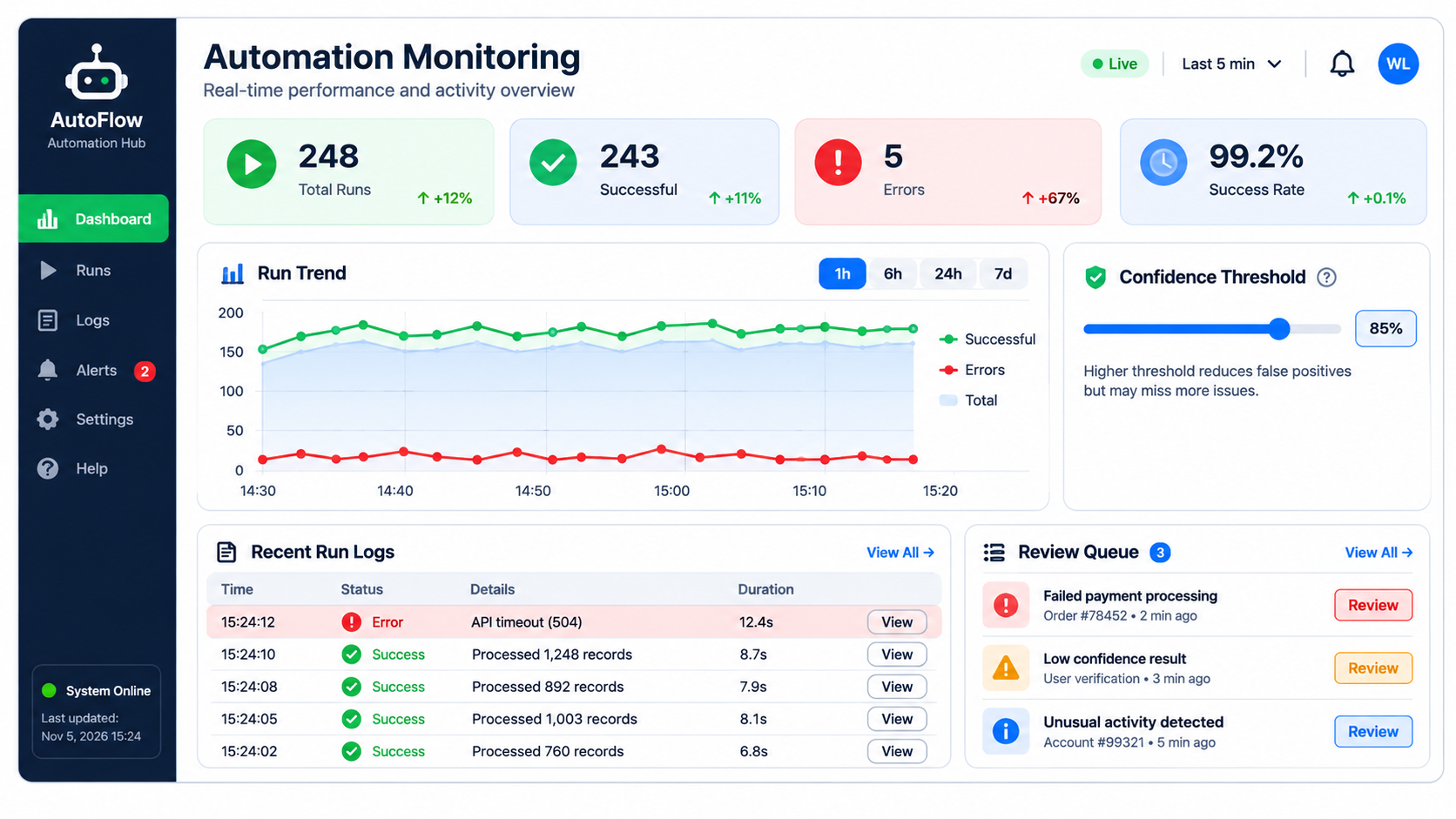
    Automation monitoring dashboard with error alert and review queue

    Traditional automations fail loudly. An API call errors and the run stops. AI automations often fail quietly. The model returns a plausible but wrong answer, and the flow continues happily.

    What to track

    • Run volume and failures. Sudden drops or spikes signal upstream changes.
    • Override rate. How often do humans change the AI’s output? A rising rate is an early warning.
    • Escalation rate. Too low may mean overconfidence. Too high means the automation saves little.
    • Cost per run. Model usage can creep as inputs get longer.
    • Time to completion. Measure it against the manual baseline you recorded before launch.

    Keep a small test set

    Collect twenty to fifty real examples with known correct answers. Rerun them whenever you change the prompt, switch models, or see drift. It takes an afternoon to build and prevents many regressions.

    Counting the real cost

    The cost of an automation is more than the subscription. Include these.

    • Build time, including testing on messy real inputs.
    • Usage fees for models and platform tasks, which scale with volume.
    • Maintenance, since connected apps change fields, permissions and formats.
    • Review time, the human minutes spent on approvals and sampling.

    Compare that total with a baseline you measured before building: minutes per task, tasks per week, and error rate. Without a baseline, “it feels faster” is the only evidence you will have, and it is weak.

    Also weigh benefits that do not show as hours saved, such as faster response times or fewer dropped requests. Name them up front so you can check them later.

    Risks worth taking seriously

    Data exposure

    Know what data goes to which model provider and under what terms. Strip or mask personal and confidential fields where you can.

    Prompt injection

    If an automation reads outside content, such as inbound email or web pages, that content may contain instructions aimed at your model. Do not give an AI step that reads untrusted text the power to take sensitive actions on its own. Separate reading from acting.

    Over-permissioned connections

    Use accounts with the minimum access needed. An automation that can only draft emails cannot send one by mistake.

    Single points of knowledge

    If only the builder understands the flow, it becomes a liability when they leave. Document the purpose, inputs, owner and failure handling on one page.

    A four-week rollout plan

    Week 1: Baseline and select

    Score your task list and pick one candidate. Time the manual process on ten real instances. Write down what a correct output looks like.

    Week 2: Build the narrowest version

    Automate the common case only. Send everything unusual to a person. Assemble your small test set.

    Week 3: Run in shadow or approval mode

    Have the automation produce outputs while people still do the work or approve each result. Log disagreements and fix prompts or rules.

    Week 4: Go live with limits

    Release with a volume cap, alerts and a named owner. Review the metrics weekly for the first month, then monthly.

    Then pick the next task. Compounding small, reliable automations beats one sprawling system nobody trusts.

    Common mistakes to avoid

    • Starting with an agent when a fixed flow with one AI step would do.
    • Automating a broken process and speeding up the mess.
    • Skipping the baseline, which makes results impossible to prove.
    • Removing humans too early, before error rates are known.
    • Ignoring maintenance, so integrations quietly break.
    • Automating for its own sake instead of for a named outcome.

    Conclusion: climb only as high as you need

    AI automations pay off when they match the task. Use rules where logic is clear, add a model where input is messy, and keep people where mistakes are costly. Climb the ladder one rung at a time.

    Actionable takeaways

    1. List your repetitive tasks and score them on frequency, structure, cost of error and ownership.
    2. Try eliminating and simplifying before automating.
    3. Constrain model outputs to formats that rules can handle downstream.
    4. Start with human approval, then move to sampled review.
    5. Track override rate, escalation rate and cost per run.
    6. Keep a small test set and rerun it after every change.
    7. Measure a baseline first so you can prove the result.

    Pick one task this week, time it, and build the smallest version that works. That single, measured win will teach you more than any tool comparison.
  • The Automation Ladder: Deciding What AI Should Do, What Rules Should Do, and What Stays Human

    The Automation Ladder: Deciding What AI Should Do, What Rules Should Do, and What Stays Human

    Most advice on AI automations starts with tools. Which platform, which model, which template. That is the wrong starting point, and it is why so many automations get built, demoed, and quietly switched off a month later.

    The better starting question is smaller and less exciting: what kind of work is this? Some work is fully predictable and needs no AI at all. Some work is messy and benefits enormously from a language model. Some work should never be fully handed off. Mixing these up is the root of most disappointment.

    This article offers a framework, which I call the automation ladder, for sorting work into the right rung. It covers how to score candidates, how to design checkpoints, what breaks in practice, and how to monitor what you launch.

    A note on sources: this piece is built on process-design reasoning and common implementation patterns, not on survey statistics. I have deliberately avoided quoting numbers I could not verify. Treat the examples as illustrations and test them against your own data.

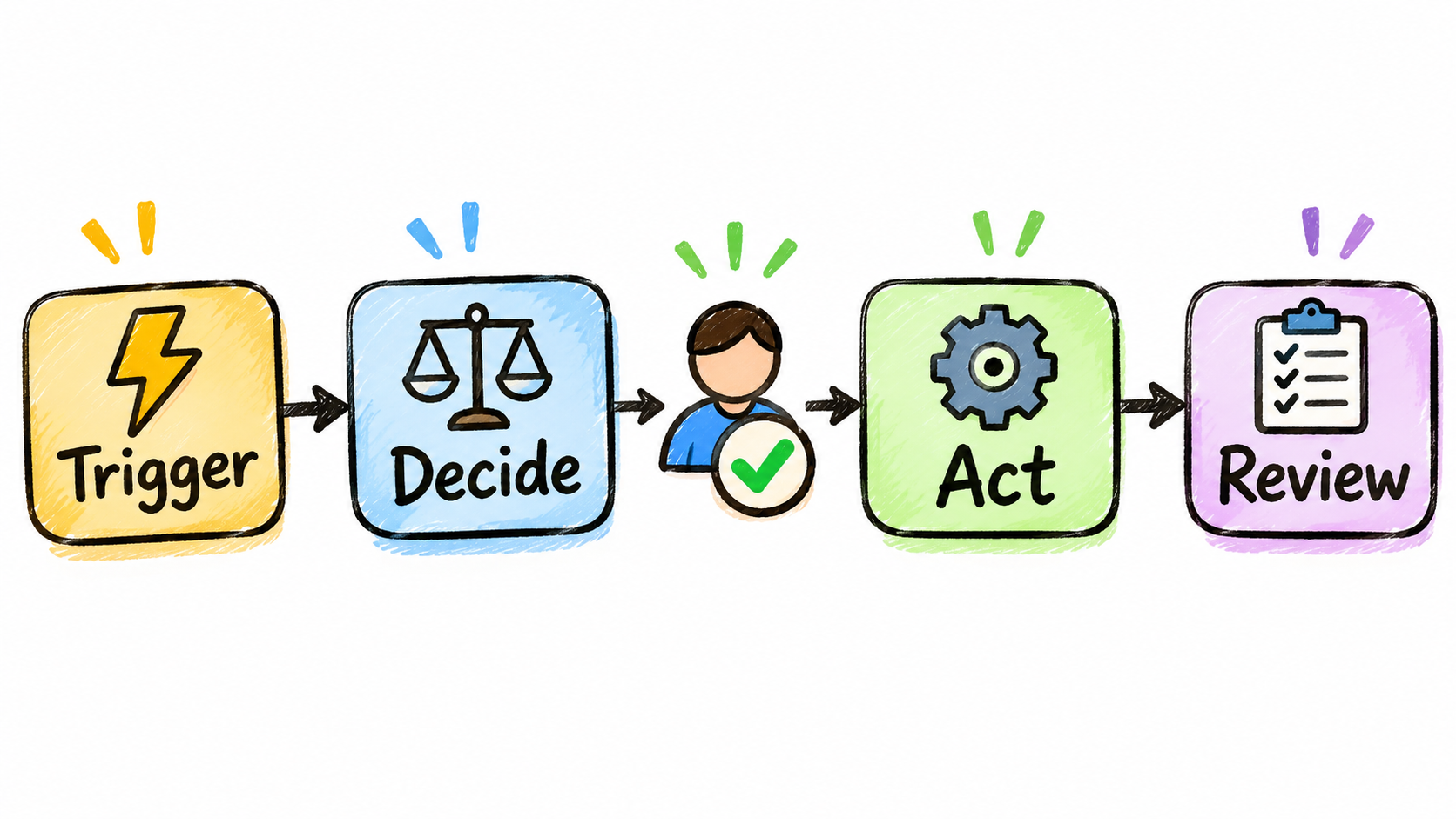
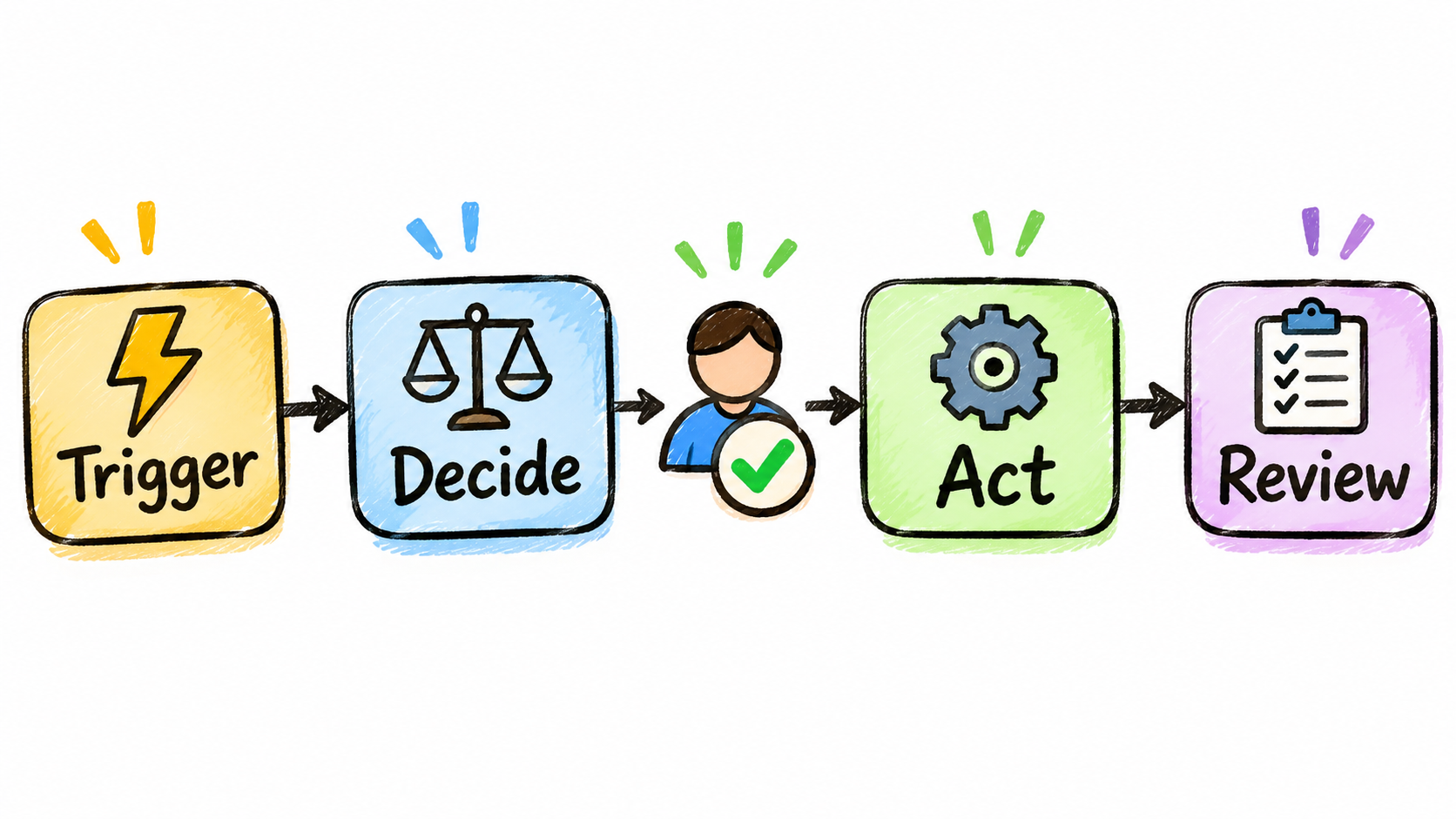
    Hand-drawn workflow map with Trigger, Decide, Act and Review boxes and a human checkpoint

    1. What “AI automation” Actually Means

    The phrase covers two different things that are often blended together. The first is classic automation: when X happens, do Y. The second is AI-assisted judgment: read this, interpret it, and produce something.

    A useful automation usually contains both. A trigger fires, a model interprets unstructured input, and deterministic steps carry out the result. The model is one component, not the whole system.

    The four moving parts

    • Trigger: an email arrives, a form is submitted, a row changes, a schedule hits.
    • Interpretation: a model classifies, extracts, summarizes, or drafts.
    • Action: a system is updated, a message is sent, a record is created.
    • Review: a person or a rule checks the result when stakes or uncertainty are high.

    Thinking in these four parts makes it easier to see where AI is genuinely needed. Often it is needed in exactly one step.

    2. Rules vs. AI: The Decision Most Teams Skip

    If a task can be described completely as a set of if-then rules, use rules. They are cheaper, faster, repeatable, and easy to debug. A model adds cost and variance, and you should only accept both when you get something in return.

    Comparison of rules-based automation and AI automation handling messy emails

    When rules win

    Routing an invoice over a certain amount to a manager. Copying a new customer from a form into a CRM. Sending a reminder three days before a deadline. None of these need interpretation.

    When AI earns its place

    Input is unstructured and varied: customer emails, call transcripts, PDFs with inconsistent layouts, free-text survey answers. A rule can’t anticipate every phrasing. A model can read the text and return a category, a field, or a draft.

    The hybrid pattern

    The most reliable setup uses the model to convert messy input into structured output, such as a category from a fixed list or a set of named fields. Rules then take over. This limits how much freedom the model has downstream, which limits how badly it can go wrong.

    Ask of each step: would a clear checklist handle this? If yes, no model. If no, constrain the model’s output as tightly as you can.

    3. The Automation Ladder

    Not every task should jump straight to full autonomy. The ladder describes five rungs, and the right move is usually to climb one rung at a time.

    1. Rung 1 – Assist: AI produces a suggestion; a person does the work. Example: a drafted reply the agent can edit.
    2. Rung 2 – Prepare: AI completes the groundwork, such as pulling context or filling a form, and a person approves every item.
    3. Rung 3 – Act with sampling: the system acts on its own, and a person reviews a sample after the fact.
    4. Rung 4 – Act with exceptions: the system acts, and anything low-confidence or unusual is routed to a person.
    5. Rung 5 – Autonomous: the system acts and is monitored only through aggregate metrics.

    Most workflows should live at rung 2 to 4. Rung 5 is appropriate only for low-cost, reversible actions. Starting at rung 1 also generates something valuable: a record of what people change, which tells you where the model is weak.

    Earning promotion

    Move a workflow up a rung only when you have evidence, for example that reviewers accept the output unchanged in nearly all cases over a meaningful period. Define that threshold before launch, not after you are tired of reviewing.

    4. Scoring Candidates Before You Build

    Enthusiasm is a poor filter. A simple score keeps you honest about which processes deserve effort.

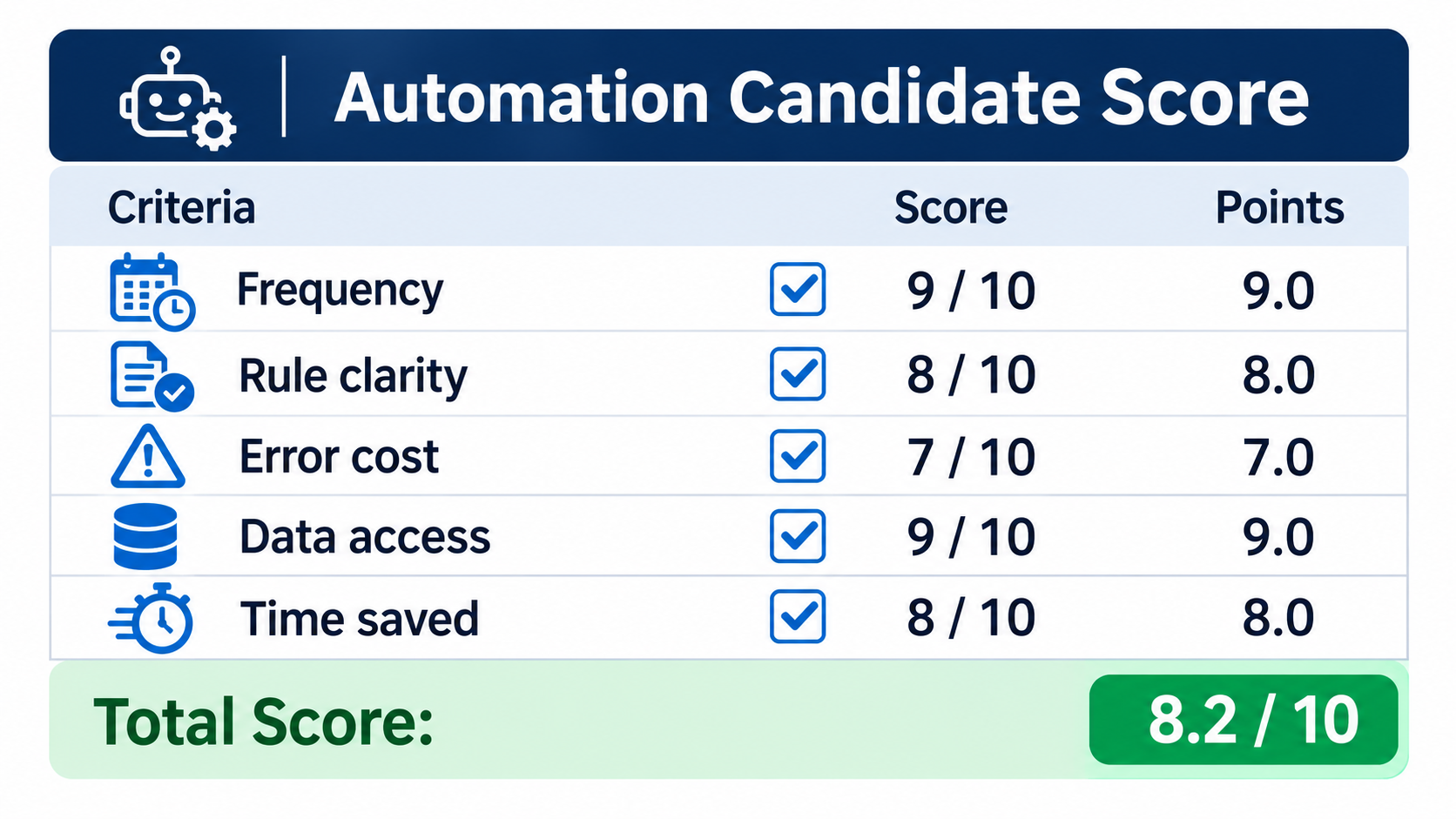
    Automation candidate scorecard with five criteria

    Five criteria

    • Frequency: how often does the task occur? Rare tasks rarely repay the build time.
    • Rule clarity: can a new hire follow written instructions and get it right?
    • Cost of an error: a misfiled note and a wrong refund are very different problems.
    • Data access: can the system actually reach the information it needs?
    • Time per instance: small savings multiplied by high volume still count.

    Score each from 1 to 5, inverting the error-cost score so that low-risk work scores high. Start with the highest totals. Tasks that are frequent, clear, low-risk, and data-accessible are your first builds.

    The hidden eighth hour

    Beware tasks that look small but depend on tacit knowledge. If the person doing it says “it depends” more than twice while explaining it, document the dependencies first. Automating an undocumented process only makes its inconsistencies faster.

    5. Anatomy of a Reliable Workflow

    Reliable automations share a few design habits, regardless of platform.

    Constrain the output

    Ask the model for a fixed format, such as one of six categories or a set of named fields, and validate it. If the response doesn’t match, retry or route to a person rather than passing it on.

    Give it the context it needs, and no more

    Provide the relevant policy text, the customer’s record, and a few examples of good output. Dumping an entire knowledge base into every call raises cost and can distract the model.

    Make steps idempotent

    If a run fails halfway and restarts, it should not send the email twice or create a duplicate record. Check whether the action already happened before doing it.

    Keep a log of every decision

    Store the input, the model’s output, and the action taken. When something goes wrong, and it will, this log is the difference between a ten-minute fix and a week of guessing.

    6. Where Humans Belong in the Loop

    Human review is often framed as a failure of automation. It is better seen as a design choice, placed where it is most valuable.

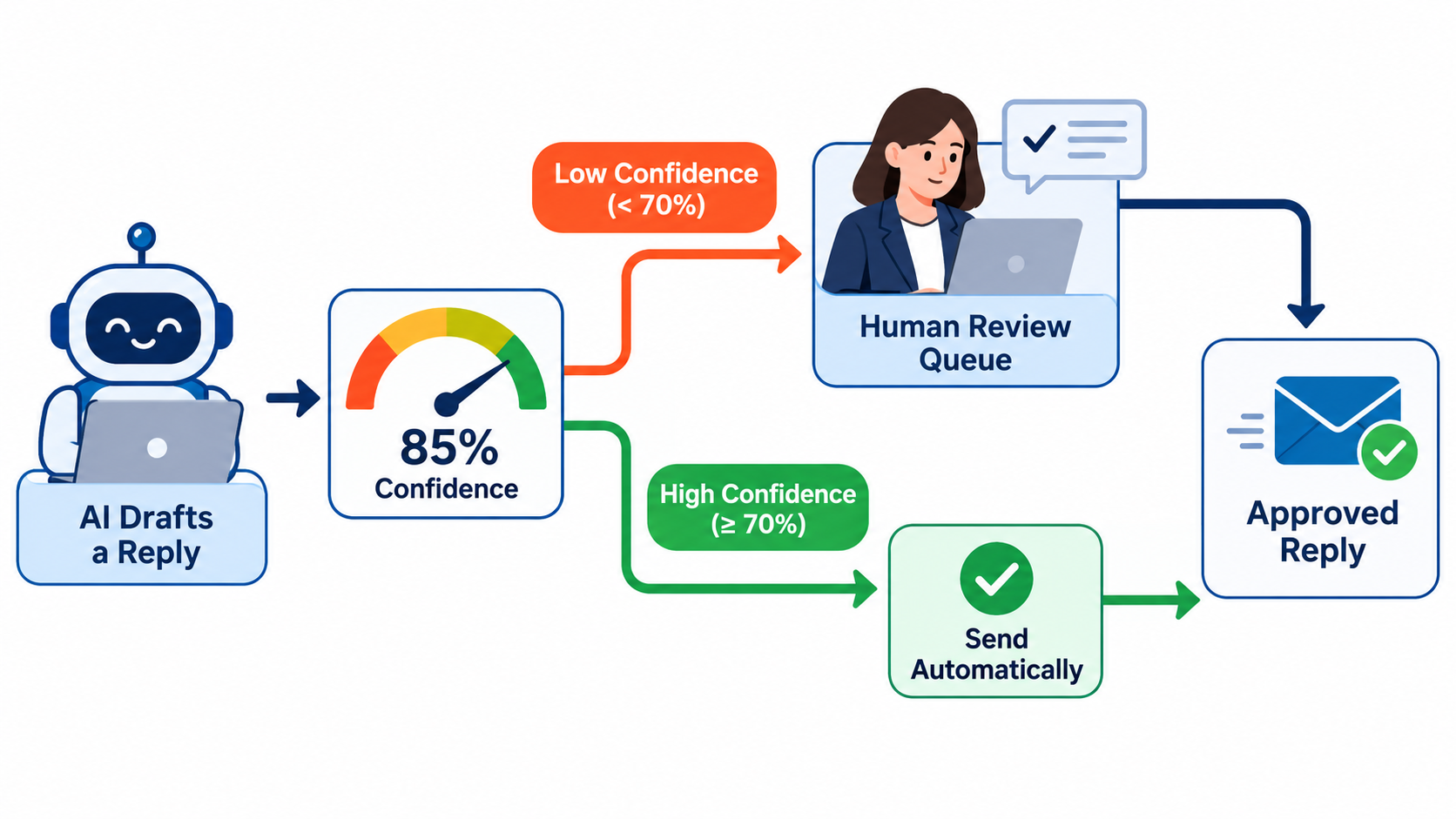
    Human-in-the-loop approval flow with confidence-based routing

    Route by risk, not by habit

    Some items should always go to a person: anything involving money above a threshold, legal language, a complaint from a major account, or a request that mentions harm. Write these as explicit rules that sit outside the model.

    Route by uncertainty

    Models can be asked to flag when the input is ambiguous or when they lack information. This signal is imperfect, so combine it with checks such as missing fields or mismatched data. Low-confidence items go to the review queue.

    Make review fast

    A reviewer who has to reconstruct the context will start approving without reading. Show the original input, the proposed action, and the reason side by side, with one-click approve or edit. Capture the edits; they are your best training signal for improving prompts.

    7. The Failure Modes That Show Up in Practice

    Most failures are unglamorous. Knowing them in advance lets you design around them.

    • Silent drift: input changes, such as a new product line or form field, and output quality quietly degrades.
    • Confident errors: the model produces a plausible but wrong answer, particularly for facts it was never given.
    • Integration breakage: an API changes or a credential expires, and the workflow stops without anyone noticing.
    • Loops and duplicates: an automation triggers itself or repeats an action after a retry.
    • Scope creep: a workflow built for one case is stretched to others without retesting.

    Defenses

    Ground the model in supplied source material instead of asking it to recall facts. Add alerts for failed runs and for zero runs, since silence can be a failure. Cap the number of actions per hour so a runaway loop causes limited damage. Retest whenever the inputs change.

    8. Understanding the Real Cost

    Costs come in more forms than a subscription fee. Count all of them, or the business case will be flattering and wrong.

    Cost components

    • Platform or runtime fees and per-run charges.
    • Model usage, which grows with the length of the inputs and outputs and with how often you call it.
    • Build time, including testing against real, messy examples.
    • Review time, which does not disappear at rungs 2 to 4.
    • Maintenance, since workflows need updates as systems change.

    A simple payback calculation

    Estimate the minutes saved per instance, multiply by monthly volume, and price it at the loaded hourly cost of the person doing the work. Subtract running costs and review time. Divide the build effort by the monthly net benefit to get a payback period. If the answer depends on optimistic assumptions, run it again with pessimistic ones. If it still works, build it.

    Also consider benefits that aren’t hours: faster response times, fewer dropped follow-ups, more consistent quality. These are real but harder to measure, so decide in advance how you will check them.

    9. Monitoring After Launch

    An automation is a small piece of operations, not a one-time project. It needs an owner and a dashboard.

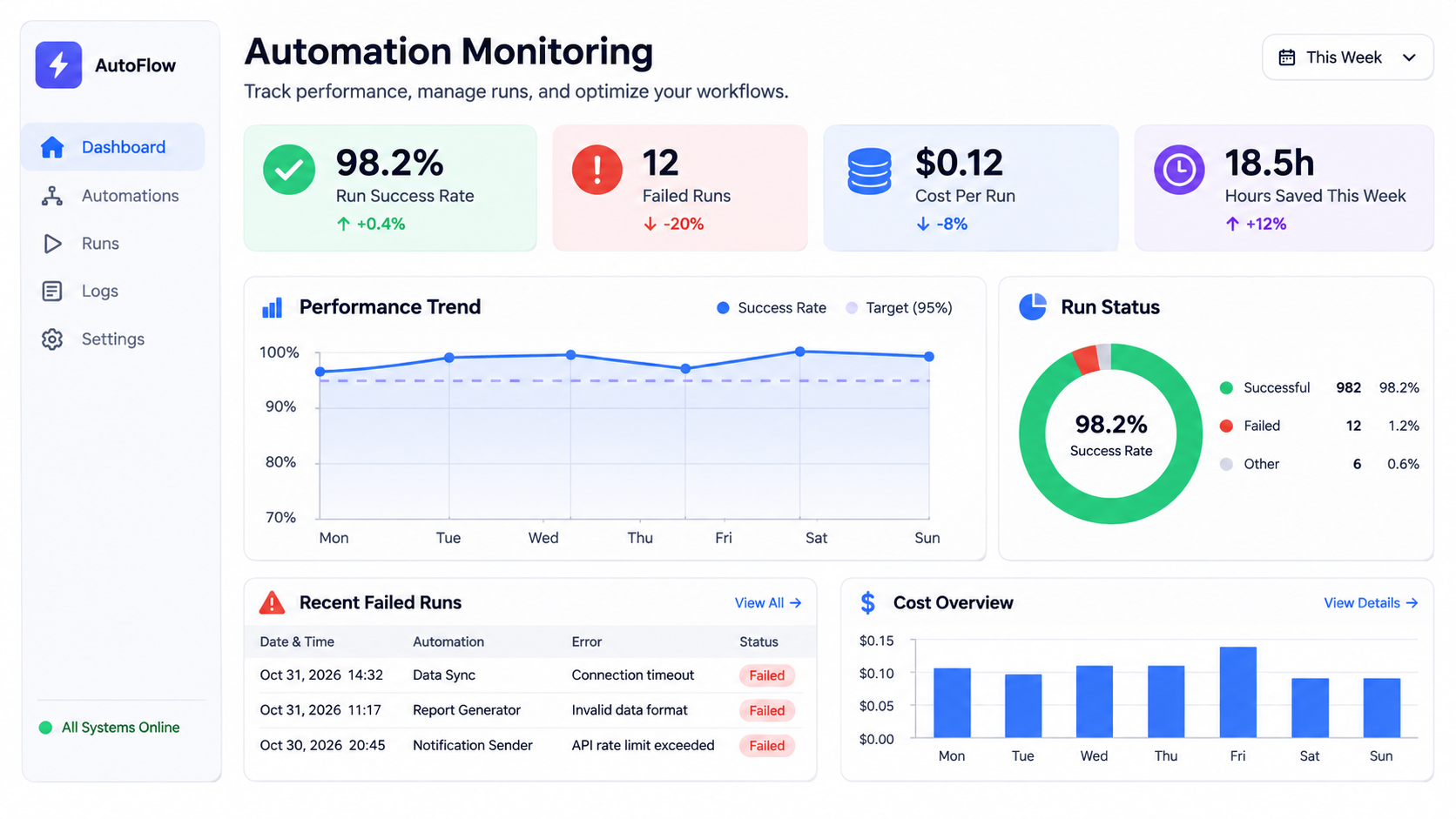
    Automation monitoring dashboard with success rate, failures, cost per run and hours saved

    Metrics worth tracking

    • Run success and failure counts.
    • Share of items routed to human review.
    • Edit rate: how often reviewers change the output.
    • Cost per run.
    • Estimated time saved, checked occasionally against reality.

    Sampling and audits

    Even at higher rungs, pull a small random sample regularly and check it by hand. Sampling catches problems that aggregate metrics smooth over. Put the audit on a calendar, or it will not happen.

    Name an owner

    Every workflow needs one named person who is notified of failures and who decides on changes. Workflows owned by “the team” are owned by nobody.

    10. A Rollout Plan That Builds Trust

    People trust automation when it has proven itself in front of them. A staged rollout helps.

    1. Document the manual process. Write down the steps, exceptions, and what a good result looks like.
    2. Collect real examples. Gather a set of past cases, including the awkward ones, as a test set.
    3. Build at rung 1 or 2. Let the system suggest while people act.
    4. Measure agreement. Track how often people accept suggestions unchanged, and study the misses.
    5. Promote deliberately. Move up a rung when your pre-set threshold is met.
    6. Review quarterly. Check that the process, tools, and volume still match the design.

    Bring the people doing the work into the design

    The person who handles the task daily knows the exceptions. Involve them early, and make clear that the aim is to remove the dull parts of their work. Resistance usually falls when people see the tool handling the tasks they like least.

    Conclusion: Climb One Rung at a Time

    AI automations pay off when they are matched to the right kind of work and introduced gradually. The tools matter less than the thinking behind them.

    Actionable takeaways

    • Use rules wherever a clear checklist works; use AI for messy, unstructured input.
    • Constrain model output into fixed categories or fields, and validate it.
    • Score candidates on frequency, clarity, error cost, data access, and time saved.
    • Start at the assist or prepare rung and promote on evidence.
    • Route to humans by risk and by uncertainty, and make review fast.
    • Log every decision, alert on failures and silence, and name an owner.
    • Count review and maintenance in the cost, not just the subscription.

    Pick one process this week, score it, and build the smallest version at rung 1. What you learn from the reviewers’ edits will be worth more than any template.