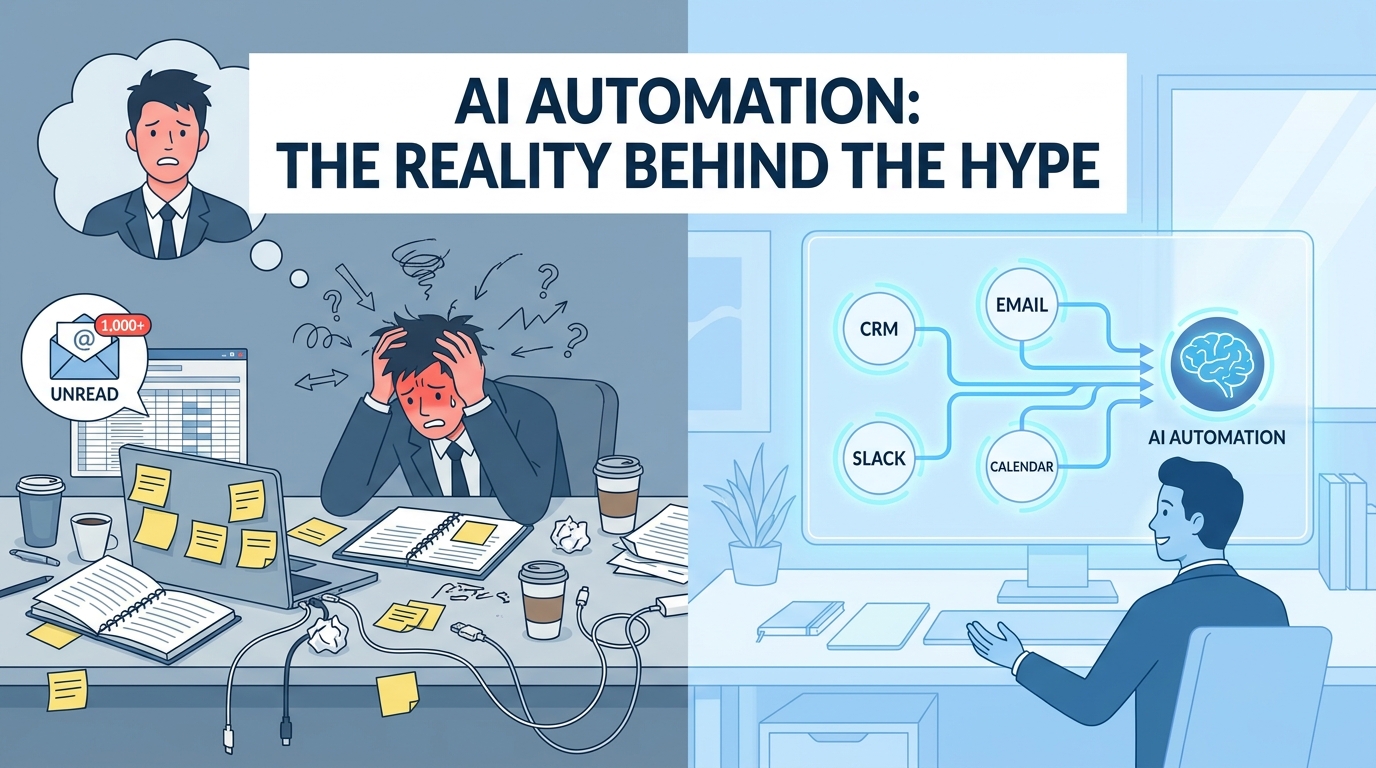
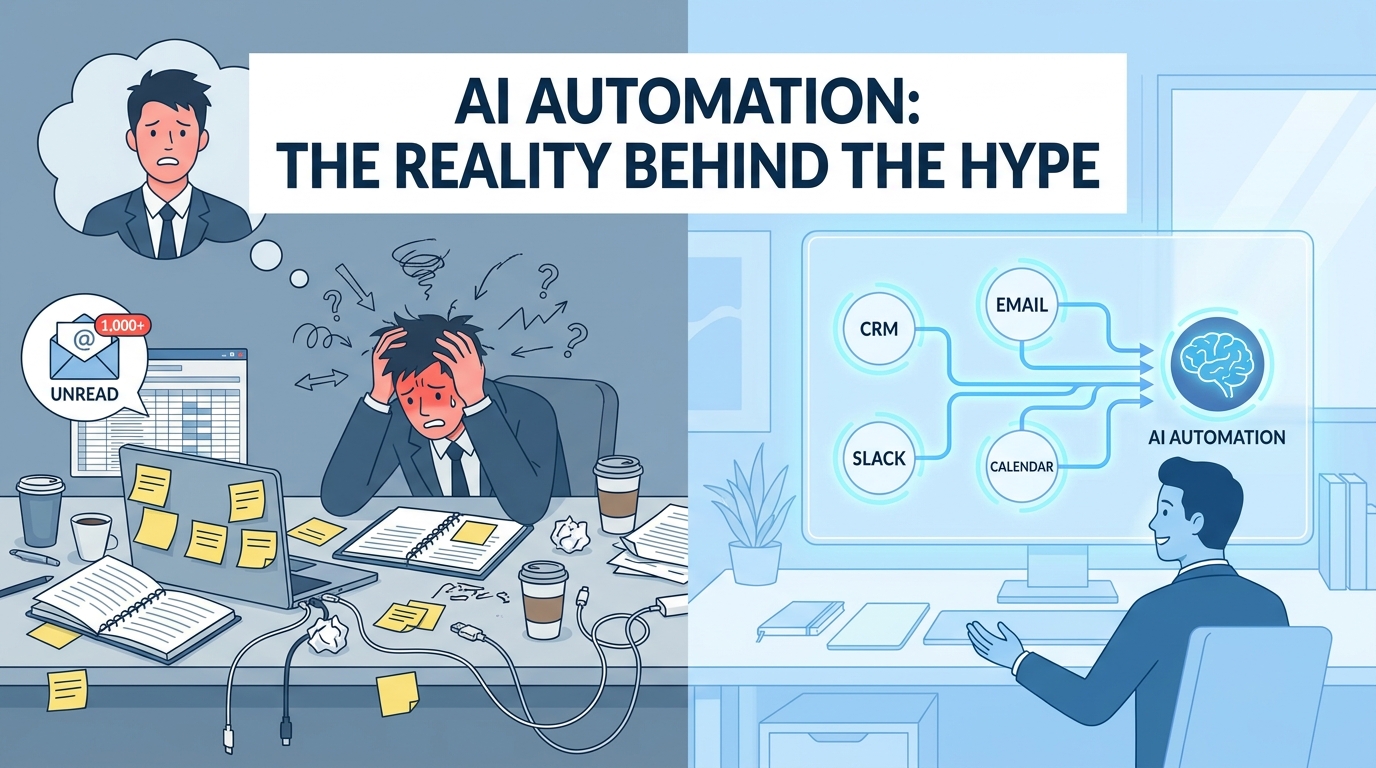
Every vendor selling AI automation tools will show you the same demo. A lead comes in. An AI reads it, scores it, routes it to the right rep, drafts the follow-up email, and logs everything to the CRM — all while the sales team is asleep. It looks effortless. It looks inevitable. And for some teams, it actually works exactly like that.
For most teams, though, it doesn’t. Not because the technology is broken — it mostly isn’t — but because the distance between a compelling demo and a reliable, production-ready workflow is enormous, and almost nobody maps that territory honestly.
The conversation around AI automations in 2026 has matured past the “what is it?” phase. Most business operators now understand, broadly, what AI automation means: using machine intelligence to handle tasks that used to require human judgment, embedded directly into the processes your team already runs. What hasn’t kept pace with that conceptual awareness is the operational knowledge — the specifics of how you actually build something that works, doesn’t break, scales beyond your first five workflows, and generates outcomes you can measure with confidence.
This post covers that territory. It’s not a technology overview and it’s not a vendor comparison. It’s a practitioner’s map of the decisions, tradeoffs, and common failure modes that determine whether your AI automation program becomes a genuine operational advantage — or just an expensive collection of half-finished workflows and disappointed stakeholders.
Whether you’re running your first automation or trying to scale a program that’s stalled out at ten workflows, there’s ground here worth covering.
The Automation Readiness Problem Most Teams Skip Entirely
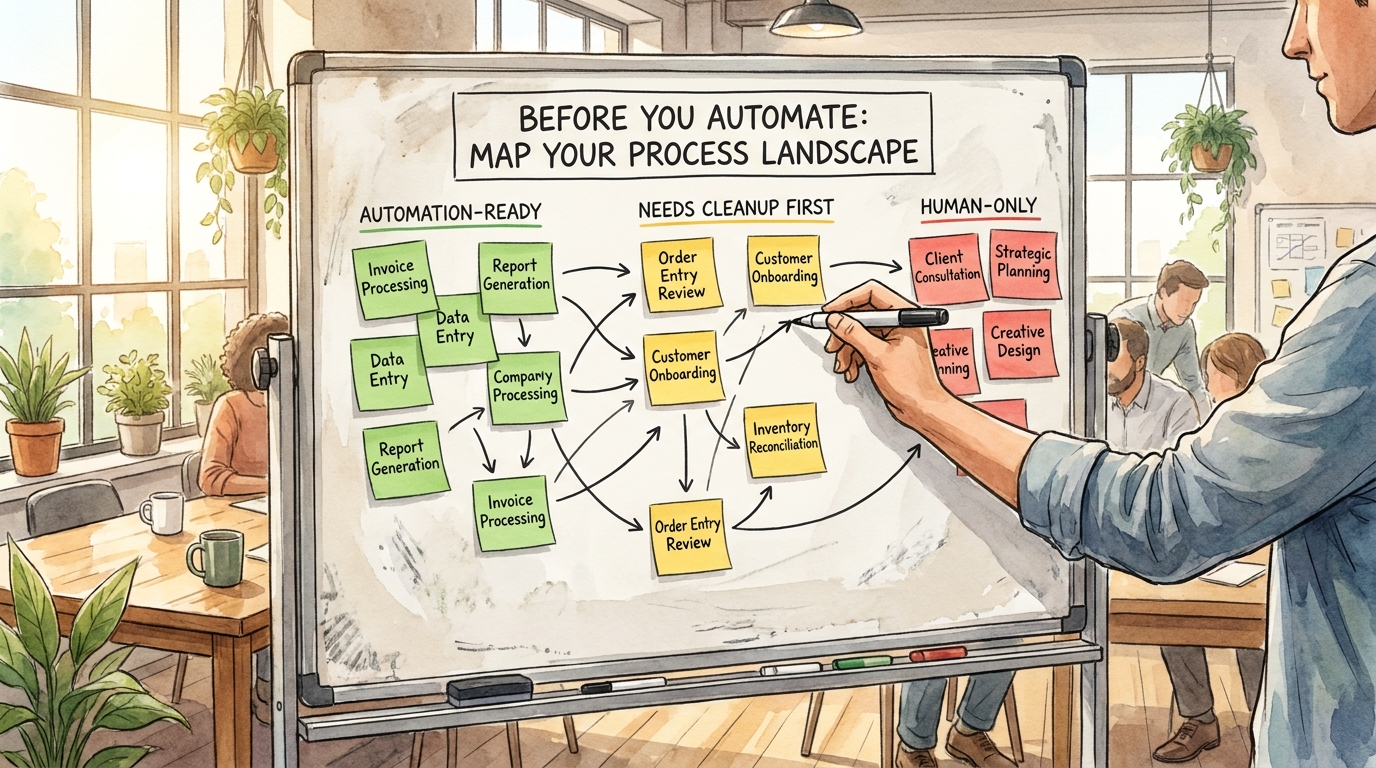
Before a single workflow gets built, there’s a diagnostic question that almost every team skips: Is this process actually ready to be automated?
That question sounds obvious. It isn’t. Most organizations rush to automate processes that are fundamentally broken at the human level first. They’re inconsistent, poorly documented, dependent on tribal knowledge, or riddled with exceptions that nobody has ever written down. Automating a broken process doesn’t fix it — it just executes the broken version faster, at scale, with less visibility into what’s going wrong.
The Three-Category Process Audit
A useful first step before any automation build is sorting every candidate process into one of three categories:
- Automation-Ready: The process is consistent, well-documented, has clear inputs and outputs, and exceptions are rare and predictable. These are your highest-confidence candidates.
- Needs Cleanup First: The process works, but it relies on undocumented judgment calls, varies by team member, or has exception paths that haven’t been mapped. These processes need standardization before automation — otherwise you’ll be constantly firefighting edge cases your workflow can’t handle.
- Human-Only (for now): The process is inherently relational, contextually complex, or ethically sensitive in ways that make full automation inappropriate or premature. This doesn’t mean it stays this way forever — it means automation should augment rather than replace the human in these workflows.
The discipline here is being honest about which category a process actually belongs to, not which category you want it to belong to because you’re eager to ship something.
Why Documentation Debt Kills Automation Programs
The single biggest predictor of a failed automation build isn’t the technology — it’s documentation debt. When a process lives primarily in someone’s head, there’s no reliable way to translate it into a workflow that behaves consistently. Every edge case the human handles intuitively becomes a gap in the automation that surfaces as an error, an escalation, or worse, a mistake that nobody notices until it’s caused real damage.
Teams that succeed at automation at scale treat process documentation as a pre-requisite, not an afterthought. Before they write a single workflow, they document the current state: who does what, when, in response to what inputs, and with what decision criteria. They map the exceptions. They identify the judgment calls. Only then do they design the automation — and that design process itself often reveals that the process needs redesign before it can be reliably automated.
The Consistency Test
A practical way to assess readiness: have three different people describe how they’d handle the same scenario in the process you’re considering automating. If you get three meaningfully different answers, the process isn’t ready to automate. The automation will simply encode one person’s version and break for everyone else’s edge cases. Standardize first, automate second.
The Five Layers of a Real AI Automation Stack
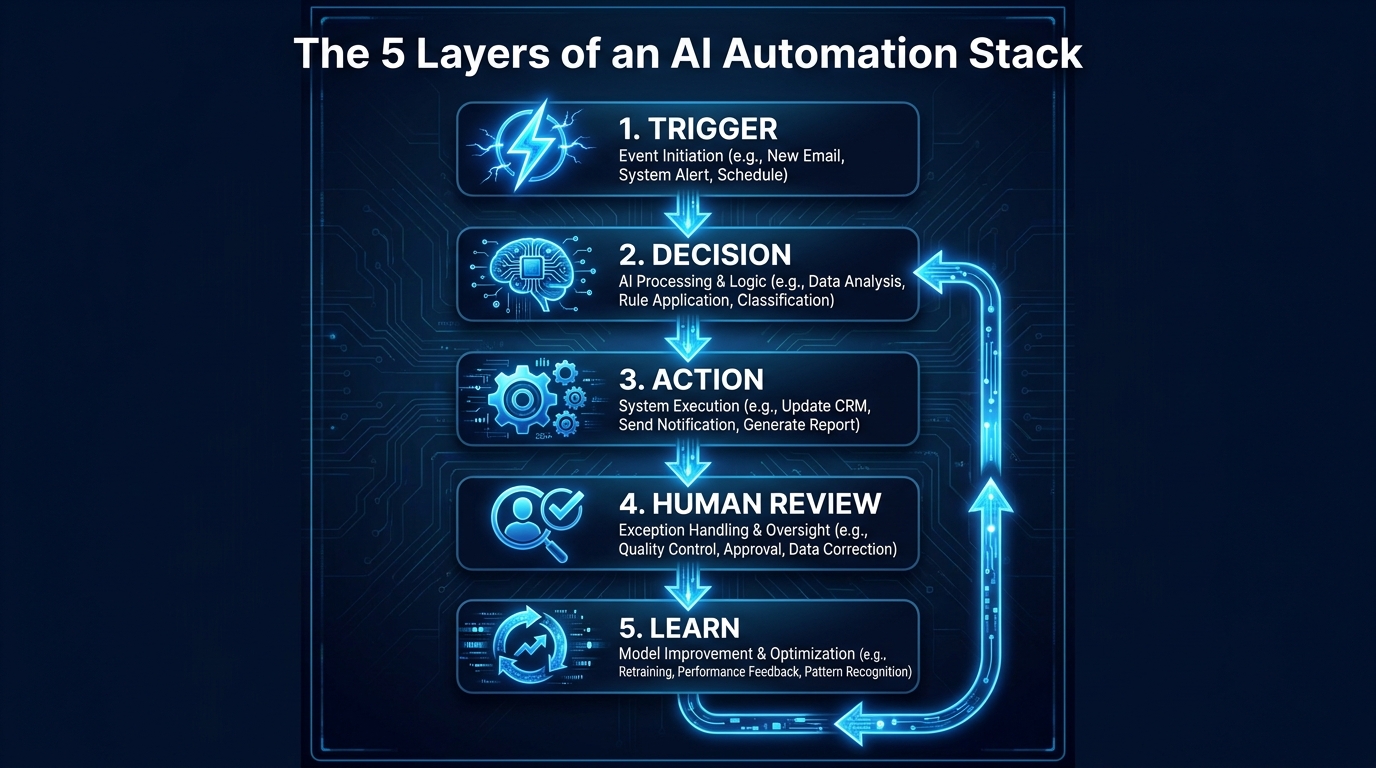
Most people think about AI automations as a single thing: a bot that does a task. In practice, every robust AI automation is a layered system, and understanding those layers is what separates workflows that last from workflows that collapse the first time something unexpected happens.
Layer 1: The Trigger
Every automation starts with a trigger — the event or condition that kicks the workflow into motion. Triggers can be time-based (run every Monday at 8am), event-based (a new lead submits a form), threshold-based (inventory drops below 50 units), or behavioral (a user hasn’t logged in for 14 days).
The most common mistake at the trigger layer is being too broad or too narrow. A trigger that fires too broadly creates noise — your workflow runs constantly on inputs it wasn’t designed for, generating errors or junk outputs. A trigger that’s too narrow means you miss events you intended to capture. Defining your trigger conditions precisely, and testing them against realistic edge cases before launch, is foundational work that pays off in stability.
Layer 2: The Decision
This is the AI layer — where machine intelligence does the thing that rule-based automation couldn’t. It might be reading an email and determining whether it’s a support request, a sales inquiry, or a billing question. It might be scoring a lead based on behavioral signals. It might be extracting structured data from an unstructured document.
The key design principle at this layer is knowing the confidence threshold at which you’ll trust the AI’s decision versus escalate to a human. Not every AI decision is created equal. A decision made with 95% confidence can usually be acted on automatically. A decision made at 60% confidence probably shouldn’t be. Building explicit confidence thresholds into your decision layer — and routing low-confidence outputs to a human review queue — is what separates a well-designed workflow from a liability.
Layer 3: The Action
Actions are the outputs the workflow produces: send an email, update a CRM record, create a task, move a file, post a Slack message, generate a report. The critical principle here is idempotency — designing your actions so that if they run twice (due to a system error or retry logic), they don’t cause double-sends or duplicate records. This sounds like an engineering concern, but it affects everyone who builds workflows. Nothing erodes trust in an automation faster than a customer receiving the same email five times.
Layer 4: Human Review
Almost every meaningful AI automation needs a human review checkpoint — either for high-stakes decisions, low-confidence outputs, or exception cases. The design of this checkpoint matters enormously. If the review interface is clunky, buried in an unfamiliar tool, or requires the reviewer to do significant context-gathering before they can make a decision, humans will stop reviewing. They’ll approve everything automatically to clear the queue, which defeats the purpose entirely.
Good human review interfaces surface all the relevant context in a single view, make the approve/reject/modify action dead simple, and log the human’s decision so the system can learn from it over time.
Layer 5: The Feedback Loop
The feedback loop is what turns an automation into an asset that improves over time. Every human correction, every error, every escalation is a signal. Workflows that capture those signals and feed them back into the decision layer — either by fine-tuning the AI model or by updating the logic — get better. Workflows that don’t have a feedback loop degrade as the world changes around them and nobody updates the logic to match.
This layer is the most commonly skipped. It requires intentional design, and it requires someone to own the workflow not just at launch but on an ongoing basis.
Department by Department: Where AI Automation Is Generating Real Results
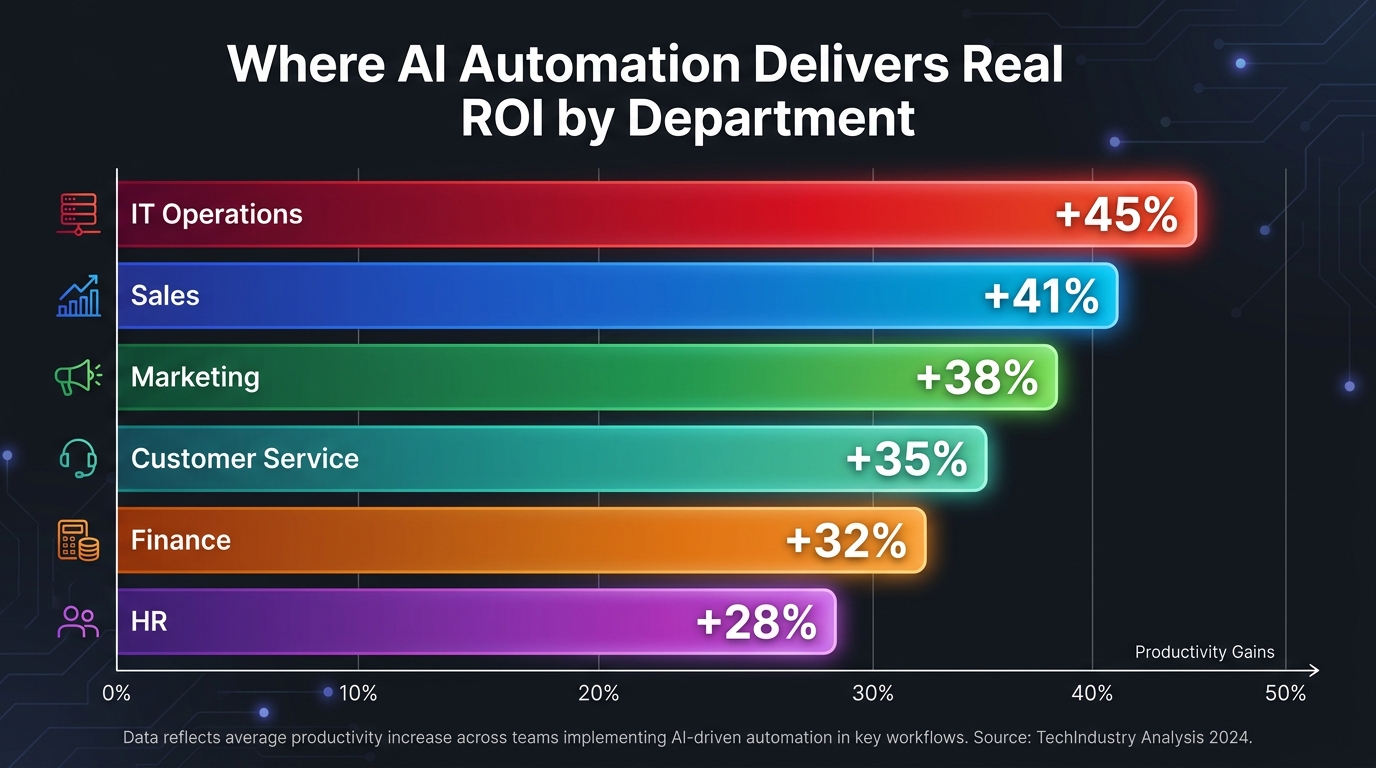
Rather than talking about AI automation in the abstract, it’s worth getting specific about where, functionally, the most reliable and measurable results are being generated. The landscape isn’t uniform — some departments have a longer track record, clearer use cases, and better tooling. Others are earlier on the curve.
Sales: The Department That Moved First
Sales was one of the first functions to adopt AI automation at scale, and for good reason: the processes are high-volume, the outcomes are measurable, and the pain points are acute. Admin work in sales — data entry, CRM updates, contact enrichment, follow-up scheduling — consumes enormous amounts of time that reps would rather spend in actual conversations.
Real estate brokerage Rush Home, for example, built an AI agent that scores a database of more than 11,000 leads using Claude, then emails each agent a ranked morning brief with follow-up tactics drawn from CRM notes. The agent runs continuously, updating scores as leads interact with the team. This isn’t a one-time analysis — it’s a living system that prioritizes the right leads automatically, every day.
The pattern that works in sales automation: eliminate the admin layer between conversations, not the conversations themselves. Enriching leads, routing them intelligently, logging call outcomes, drafting follow-up emails — these are the high-ROI targets. Attempting to automate the actual sales conversation is where things get complicated and results get inconsistent.
Customer Service: Volume Plus Consistency
Customer service automation has a longer history than most — chatbots and automated routing systems predate the current AI wave by years. What’s changed is the quality of the decision layer. Earlier generation systems routed by keyword matching. Current AI-powered systems can understand intent, context, sentiment, and prior history to route tickets with a level of accuracy that meaningfully reduces misrouting, repeat contacts, and escalations.
PayPal, during a period of intense demand growth, used AI-powered customer service chatbots to handle 65% of message-based customer inquiries — freeing human agents to handle the genuinely complex cases that required judgment and relationship. The key insight here is that AI didn’t replace the service team; it filtered the volume so human agents could focus on work that actually required them.
The most effective customer service automations share a common design: they handle the high-volume, low-complexity cases autonomously, and they recognize the limits of their own competence — routing to a human smoothly and with full context when a query exceeds those limits.
Marketing: From Scheduling to Segmentation
Marketing automation has a mature toolset — email scheduling, A/B testing, triggered campaigns — but AI layers are making it substantially more sophisticated. The current generation of marketing automations can segment audiences dynamically based on behavioral signals, personalize content at the individual level, identify which leads are approaching a buying decision based on engagement patterns, and flag underperforming assets before they drag down campaign metrics.
ActiveCampaign’s internal team built a workflow that automatically enriches every inbound contact by pulling company and industry data from Apollo, Similarweb, and ChatGPT, attaching it to each lead before it enters the pipeline. The result: reps get leads with real context already attached, outreach is more relevant from the first touch, and routing accuracy improves because the data is there to route against.
Finance and Operations: The Quiet Winners
Finance and operations teams tend to operate with less fanfare than sales and marketing, but they’re often where the highest-confidence automation wins live. Invoice processing, expense categorization, vendor payment scheduling, inventory threshold alerts, and financial reconciliation are all processes with clear inputs, clear rules, and clear outputs — making them excellent automation candidates.
The AI layer adds meaningful value in these contexts primarily in the document understanding and exception detection layers: reading an unstructured invoice and extracting the relevant data, or flagging a transaction that deviates from expected patterns. These are tasks that human finance teams do well but slowly — and that AI can do at high accuracy at scale.
HR: The Most Sensitive Automation Territory
HR automation requires the most careful approach of any department, because the decisions being made affect people’s livelihoods and experiences. Resume screening, interview scheduling, onboarding workflows, and benefit enrollment are all reasonable automation candidates. Performance evaluation, termination decisions, and compensation changes are not — at least not without very deliberate human oversight and ethical guardrails.
The most effective HR automations handle the logistics: scheduling interviews, sending onboarding document packages, routing new hire paperwork, checking benefit enrollment deadlines. They free HR professionals to spend more time on the human work — coaching, culture-building, complex employee relations — rather than administrative task management.
The Human Handoff Problem — Why Most Automations Break Here
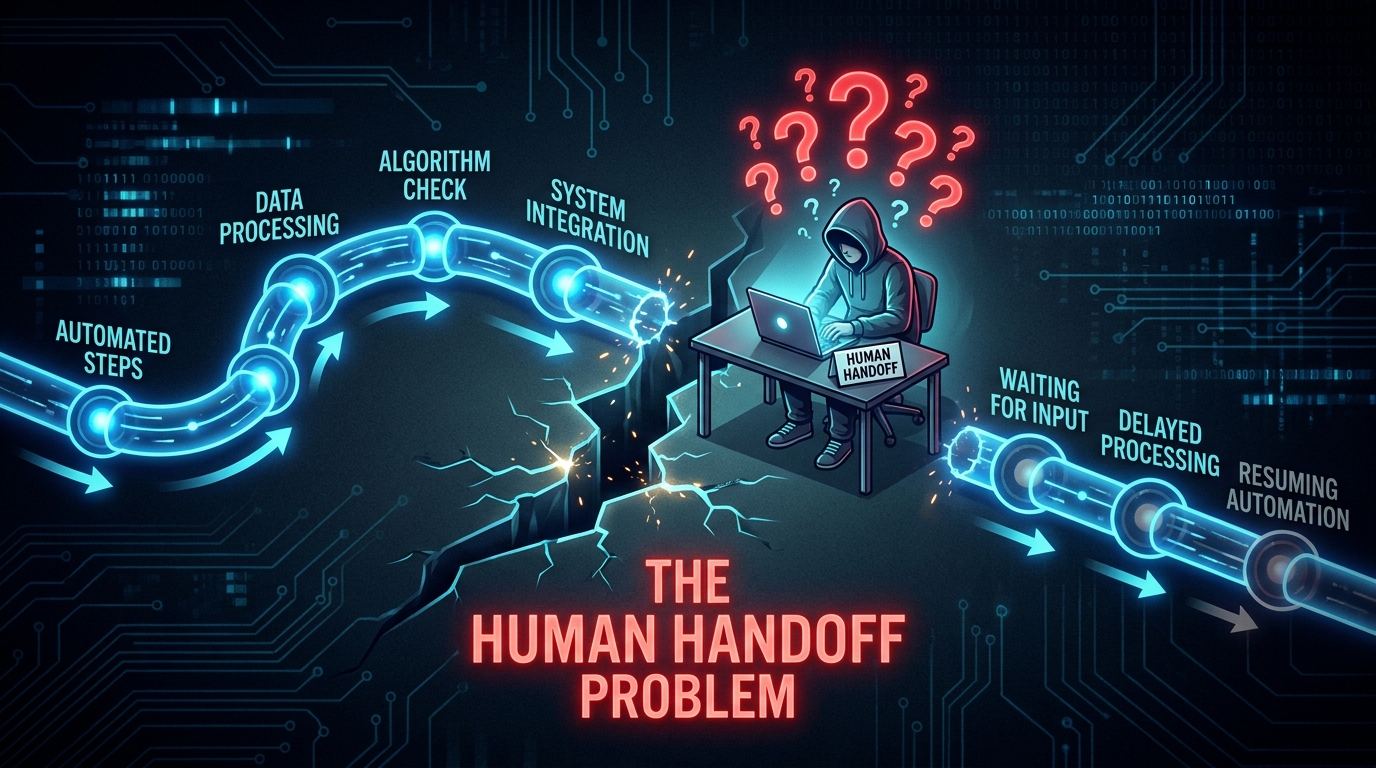
Ask any team that has built more than ten AI automations to name the point where things most reliably go wrong. The answer, almost universally, is the same: the moment the workflow hands off to a human.
This is counterintuitive. You’d expect the AI decision layer to be the fragile point — and it can be. But in practice, the human handoff is where workflows stall, where context gets lost, where approvals take a week instead of an hour, and where the entire downstream automation sits idle waiting for an action that may or may not come.
Why Handoffs Fail
The human handoff fails for a consistent set of reasons. The notification goes somewhere the human doesn’t check. The task appears without enough context for the human to act on it confidently. The action required is buried in a tool or interface the human isn’t comfortable with. There’s no clear deadline, so it sits in the queue indefinitely. Or the human is simply overloaded, and the workflow item is indistinguishable from the other 40 things in their inbox.
Each of these is a design failure, not a human failure. The automation was built assuming ideal conditions. In practice, humans are busy, distracted, working across multiple tools, and operating under cognitive load that wasn’t accounted for at design time.
Designing Handoffs That Actually Work
The design principles for human handoffs are different from the design principles for automated steps. Where automated steps need to be precise and fast, handoff steps need to be clear, contextual, and frictionless.
Clear means the human understands exactly what they’re being asked to do and why. The notification or task description shouldn’t require them to go investigate. It should explain the situation, the relevant context, and the specific action required — in plain language, in one place.
Contextual means all the information the human needs to make a confident decision is surfaced in the same view. Not spread across three tabs in two different tools. Not requiring a CRM lookup to understand the history. Right there, alongside the action button.
Frictionless means the action the human needs to take is as simple as possible — ideally a single click or a very short form. Every additional step is an opportunity for the workflow to stall.
Timeout Logic and Escalation Paths
Every human handoff also needs a defined timeout. If the human hasn’t acted in X hours, what happens? The workflow should have an answer to that question built in. It might escalate to a backup reviewer. It might send a reminder. It might flag the item for a manager. What it should never do is just wait indefinitely, because that’s effectively the same as the automation failing silently.
Building timeout logic into human handoff steps is unglamorous work. It’s rarely discussed in automation demos. But it is the difference between a workflow that’s genuinely reliable and one that seems to work great in testing and then mysteriously stalls in production.
Building for Failure: Error Handling, Monitoring, and Recovery
Most automation builders think about the happy path. A lead comes in, gets scored, gets routed, gets a follow-up email — smooth, clean, end-to-end. The happy path is what gets demoed. But what happens when the lead data is malformed? When the AI returns a confidence score below your threshold? When the CRM API times out? When the email service hits a rate limit?
If you haven’t designed for those scenarios, the answer is usually: chaos. Data gets lost. Emails never send. Records get created in inconsistent states. And because the failure is silent — the workflow just stops — nobody notices until a customer complains or a rep realizes their pipeline has a hole in it.
The Error Taxonomy You Need
Before you can handle errors well, you need to categorize them. A useful taxonomy for automation errors:
- Retriable errors: Temporary failures (API timeout, rate limit) that should be automatically retried after a delay. Most modern automation platforms handle this natively, but you need to configure the retry logic deliberately — how many retries, at what intervals, with what backoff behavior.
- Recoverable errors: Failures that can’t be automatically retried but can be routed to a human who can resolve them — a malformed input, a missing required field, a record that can’t be found. These need a clear escalation path and an alert mechanism.
- Fatal errors: Failures that represent a fundamental problem with the workflow design itself — unexpected input types, logic gaps, integration incompatibilities. These need to be logged and surfaced immediately to whoever owns the workflow.
Monitoring That Actually Tells You Something
Most teams initially monitor their automations by watching for obvious breakage — errors thrown, workflows failing to complete. That’s the floor, not the ceiling. The monitoring approach that gives you genuine operational confidence tracks a richer set of signals: completion rate by workflow step, time-in-queue at human handoff points, AI decision distribution (to catch model drift), and output quality sampling.
Model drift is particularly worth calling out. An AI automation trained on data from six months ago may begin making systematically worse decisions as the world changes — without throwing any explicit errors. The workflow keeps running, keeps taking actions, but the quality of those actions quietly degrades. Catching this requires sampling outputs over time and checking them against ground truth, not just monitoring for technical failures.
Graceful Degradation
The best-designed automations degrade gracefully. If the AI decision layer is unavailable, the workflow doesn’t fail silently — it routes to a human and logs that the AI was bypassed. If an integration goes down, the data gets queued, not lost. If a rate limit is hit, the workflow pauses and resumes cleanly, not mid-execution.
Graceful degradation isn’t exciting to design. It’s invisible when it works, and it only becomes visible when something goes wrong. But it is the operational maturity that separates automation programs that teams trust from ones they treat with constant suspicion.
Tools, Platforms, and the Build-vs-Buy Decision in 2026
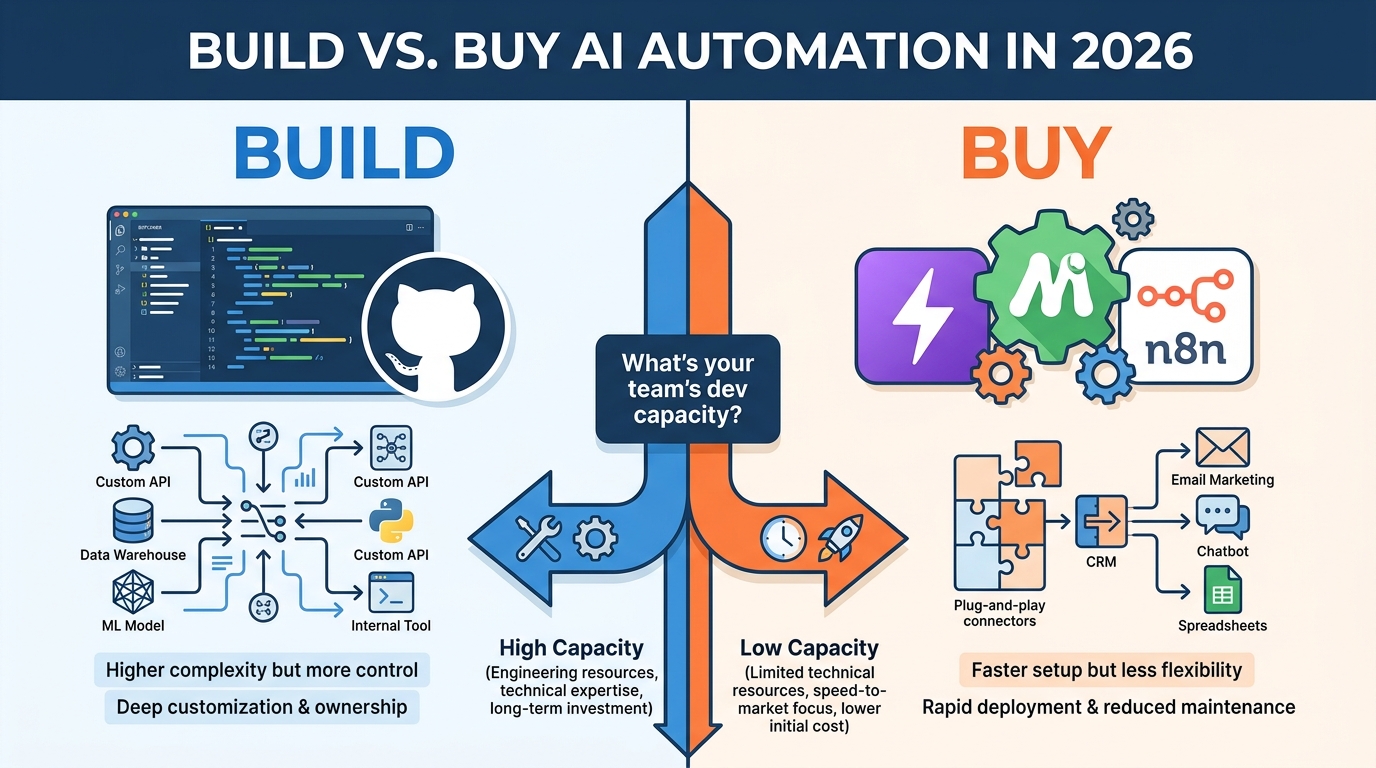
The tooling landscape for AI automation in 2026 is both richer and more confusing than it’s ever been. There are dozens of platforms, each with different strengths, pricing models, and capability ceilings. Understanding where the real decisions lie will save you significant time and money.
The No-Code / Low-Code Tier
Platforms like Zapier, Make (formerly Integromat), and n8n sit at the accessible end of the build spectrum. They offer visual workflow builders, pre-built connectors for hundreds of applications, and embedded AI capabilities — all without requiring engineering resources to implement basic to intermediate automations.
These platforms have matured substantially. Zapier’s AI features now allow you to embed LLM decision steps directly into workflows without writing a line of code. Make offers complex branching logic and error handling that would have required custom development two years ago. n8n, as a self-hosted option, has gained traction among teams that want flexibility without vendor lock-in or per-task pricing that scales uncomfortably.
The ceiling of these platforms is real, though. When your workflows need to handle large data volumes, complex state management, deeply custom AI models, or multi-step reasoning that requires context from many sources, you’ll run into limits that no-code can’t solve.
The Mid-Tier: Code-Required Orchestration
Platforms like LangChain, CrewAI, and Microsoft’s AutoGen sit in the middle ground — they give you programmatic control over AI orchestration without requiring you to build everything from scratch. These are typically the right tools for teams with some engineering capacity who need more than no-code can provide but don’t want to build a full custom stack.
This tier is where most “agentic” automations live — workflows where an AI can decide what actions to take, execute them, observe the results, and decide on next steps dynamically. The tooling here is improving rapidly, but it still requires meaningful engineering investment to implement robustly.
The Full Custom Stack
Some organizations, typically those for whom a core automation is a genuine competitive differentiator or sits in a regulatory environment with specific requirements, build their automation infrastructure from scratch using cloud infrastructure, custom models, and proprietary orchestration logic. This is rarely the right choice for most teams — the cost and maintenance burden are high, and the no-code and mid-tier options cover the majority of use cases effectively.
The Build vs. Buy Framework
The decision between building and buying isn’t primarily a technology question — it’s an organizational one. Ask yourself:
- Does this automation touch data that can’t leave your infrastructure? If yes, hosted platforms may be off the table for compliance reasons, and self-hosted or custom build becomes necessary.
- Is this workflow a competitive differentiator or commodity? If it’s commodity work — lead routing, invoice processing, interview scheduling — there’s almost no reason to build from scratch. Buy. If the workflow itself represents IP or a unique capability, the build case gets stronger.
- What’s your team’s ongoing maintenance capacity? Custom-built automations require ongoing maintenance that vendor platforms handle for you. Don’t underestimate the total cost of ownership for a custom build.
- How fast do you need to be live? No-code platforms can have a functional workflow running in days. Custom builds take weeks to months. In most cases, shipping something that works quickly and iterating beats engineering perfection that ships late.
How to Map, Prioritize, and Sequence Your First Ten Automations
Most teams approach their automation roadmap by thinking about what’s technically possible. A more productive question is: what’s operationally valuable? The intersection of high-frequency processes, significant time cost, automation-readiness, and clear measurability is where your highest-ROI automations live.
The Process Inventory
Start with a process inventory. Have each team lead list the ten most time-consuming recurring tasks their team handles. You’re looking for processes that share these characteristics: they happen frequently (at least weekly, ideally daily), they follow a consistent pattern (even if that pattern is complex), they have clear inputs and outputs, and they’re currently consuming meaningful human time.
Don’t limit this to “boring” processes. Some of the highest-ROI automations involve fairly sophisticated work — lead qualification, document extraction, customer churn prediction — that teams have been doing manually because nobody thought to question whether it had to be done that way.
The Prioritization Matrix
Score each candidate process across two dimensions: value impact (time saved, error reduction, revenue impact, customer experience improvement) and automation complexity (consistency of process, data quality, integration requirements, exception rate). The highest-priority automations sit in the high-value, low-complexity quadrant. These are your first five builds.
The high-value, high-complexity processes are your medium-term roadmap — they’re worth the effort but require more preparation. Low-value processes, regardless of complexity, generally shouldn’t make the first ten cuts. Automation time is finite and should be allocated to where it moves the needle.
Sequencing for Learning
The order in which you build automations matters for reasons beyond priority. Early automations teach your team how to build, monitor, and own workflows. They surface the organizational issues — documentation gaps, tool integration challenges, review queue design problems — that will affect every subsequent workflow. Choosing early automations that are lower-stakes (failures are recoverable, edge cases aren’t catastrophic) gives your team a productive learning environment.
By the time you’re building your eighth or tenth automation, you’ll have developed internal playbooks, established monitoring practices, and clarified who owns what. That institutional knowledge compounds — which is part of why organizations that have been building automations for eighteen months dramatically outperform those who are trying to stand up ten workflows simultaneously for the first time.
The Governance Gap: Compliance, Data Privacy, and Ownership
Here’s the conversation most automation programs skip until something forces it: who actually owns a workflow, and what are the rules around what it’s allowed to do?
In many organizations, automation ownership is ambiguous by default. The person who built it has moved on. The business team that requested it doesn’t feel technical enough to own it. IT isn’t sure it’s in their purview since it was built by a business team on a no-code tool. Nobody is auditing it. Nobody is updating it when the underlying process changes. It just runs — until it doesn’t, or until it does something it shouldn’t.
Assigning Workflow Ownership
Every automation needs a designated owner. Not a team — a specific person. That person is responsible for the workflow’s output quality, its compliance with relevant policies, its adaptation when the process changes, and its retirement when it’s no longer needed. This sounds bureaucratic, but it’s the practical mechanism that keeps automation programs from accumulating technical debt invisibly.
Ownership also implies authority. The workflow owner should have the ability to pause, modify, or retire the workflow without requiring a lengthy approval process. Fast iteration requires fast decision-making.
Data Privacy and the Automation Boundary
AI automations often handle sensitive data — customer PII, financial records, employee information, healthcare data. Understanding where that data goes, who can access it, and how long it’s retained is not optional.
The no-code platform layer creates particular complexity here. When you build a workflow in Zapier or Make that passes customer data through an LLM for classification, you need to know: does that data get used for model training? Is it retained by the platform? What’s the data processing agreement with the vendor? These aren’t hypothetical questions — they’re compliance requirements in most jurisdictions operating under GDPR, CCPA, or industry-specific regulations.
A practical first step: before deploying any automation that handles personal data, map the data flow — every system the data touches, every API call it passes through — and assess each hop against your organization’s data handling requirements. This is slower. It’s worth it.
The Audit Trail Requirement
In regulated industries and increasingly in general enterprise contexts, automated decisions need to be explainable and auditable. If an AI automation routes a customer’s credit application to a denial queue, there needs to be a log of why. If an automated system sends a contract amendment, there needs to be a record of what triggered it.
Building audit trail logging into your automations from the start is far easier than retrofitting it later. Every significant decision or action the workflow takes should be logged with the relevant inputs, the decision made, and the output — in a system of record that’s durable and queryable.
Measuring What Actually Matters Beyond “Time Saved”
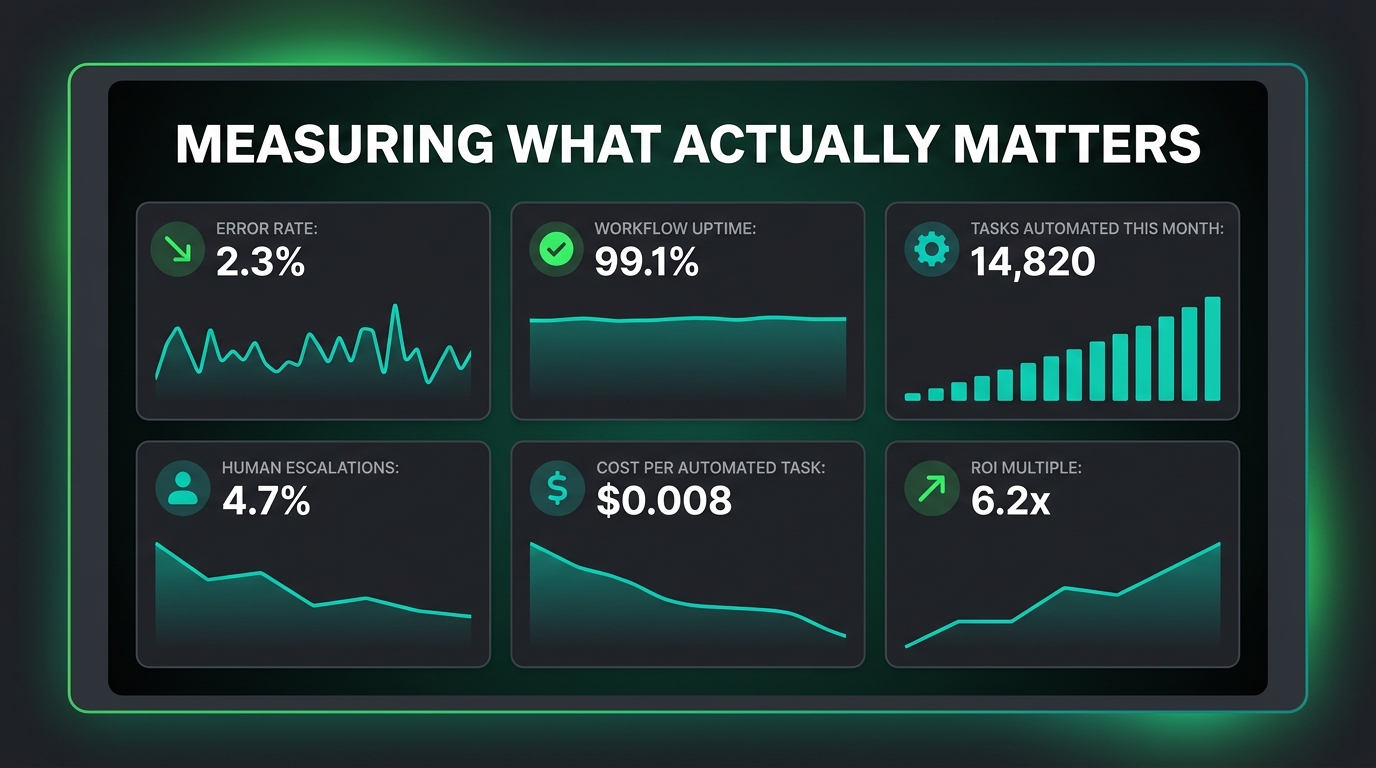
“Time saved” is the metric almost every automation is justified with, and it’s almost always the wrong primary metric. Time saved is an input, not an outcome. What did that time get redirected to? What decisions got made faster? What errors were avoided? What customer experiences improved? Those are the outcomes worth measuring.
A Better Measurement Framework
A more complete framework for measuring AI automation performance operates at three levels:
Workflow Health Metrics — These tell you whether the automation is running correctly. They include: completion rate (what percentage of triggered workflows complete successfully), error rate (what percentage fail at each step), time-in-queue at human handoffs (how long items wait before a human acts), and escalation rate (what percentage of items get routed to human review).
Process Impact Metrics — These tell you whether the automation is actually changing the underlying process for the better. They include: processing time before vs. after automation, error rate in the process output (not just in the workflow itself), volume handled per team member, and consistency of outputs across different times, team members, and input sources.
Business Outcome Metrics — These tell you whether the automation is moving the needle on what actually matters to the organization. For a sales lead automation: lead response time, conversion rate, pipeline velocity. For a customer service automation: customer satisfaction score, first contact resolution rate, ticket resolution time. For a finance automation: invoice processing time, payment error rate, month-end close cycle time.
The Baseline Problem
One of the most common measurement failures in automation programs is the absence of a pre-automation baseline. Teams launch a workflow and start measuring outcomes — but without a documented baseline of how the process performed before the automation, it’s impossible to attribute any improvement to the automation itself versus other changes happening in the business simultaneously.
Before launching any automation, spend thirty days measuring the current-state process. Document how long it takes, how many errors occur, what the output quality looks like. That baseline is the control condition against which you’ll measure the automation’s impact. It seems obvious. It’s routinely skipped. Don’t skip it.
The Quality Decay Signal
Output quality from AI automations isn’t static. Models drift as the world changes. Triggers that were well-calibrated in January may be misfiring by July. A workflow that launched with a 3% error rate may have drifted to 15% by the time anyone notices — because nobody was regularly sampling outputs and comparing them to expected quality.
Building regular output quality audits into your measurement practice — even as simple as manually reviewing a random sample of 50 workflow outputs each month — creates the feedback signal that catches quality decay before it becomes a customer-facing problem.
The Skills Your Team Actually Needs (That Aren’t What You’d Expect)
The conversation about AI automation skills tends to focus on technical capabilities: Python, API integrations, prompt engineering, workflow builder proficiency. Those skills matter. But they’re not the most important ones. The capabilities that most consistently separate teams that build effective automation programs from those that don’t are largely non-technical.
Process Thinking
The most valuable skill in an AI automation program is the ability to look at how work gets done and see it as a series of steps with explicit inputs, outputs, and decision points. This is process thinking — the discipline of getting below the surface description of a task (“we handle customer complaints”) to a precise map of what actually happens, step by step, in every scenario.
People who are good at this — process designers, operations analysts, lean practitioners — are extraordinarily valuable in automation programs. They can translate the way work actually happens into the precise specifications that make a workflow reliable. They also tend to be the ones who identify, before building starts, the edge cases and exceptions that will cause problems later.
Workflow Judgment
Knowing when to automate and when not to is a judgment skill that develops with experience and can’t be fully taught from a framework. It’s the instinct that says “this process sounds simple but it’s actually full of relationship context that would be lost in automation” or “this looks complex but the logic is actually very consistent underneath the surface.” Developing this judgment is why starting with lower-stakes automations and building progressively is so important — you’re not just shipping workflows, you’re developing the organizational judgment about what to build.
Stakeholder Translation
Automation programs live or die by their relationship with the business teams whose processes they touch. The ability to translate between technical constraints and business requirements — to explain why a particular edge case matters in terms the business team cares about, or to understand what the business team actually needs when they describe a process in vague terms — is a critical capability that’s often underinvested in.
Teams that treat automation as purely a technical exercise, built in isolation and handed off to users, reliably produce workflows that users resent or work around. Teams that treat automation as a collaborative design process, with business stakeholders genuinely involved from the start, build workflows that get used, extended, and trusted.
What the Next Wave of AI Automation Actually Looks Like
The honest picture of where AI automation is heading in the near term isn’t science fiction — it’s a set of incremental but meaningful shifts in what’s practically achievable without heroic engineering effort.
Multi-Step Reasoning at the Decision Layer
Early AI automation decision layers were essentially single-step: classify this input, score this record, extract this data. The current generation of models can perform genuinely multi-step reasoning — they can read a complex document, identify relevant clauses, compare them to a set of criteria, reason about what the relevant edge cases are, and produce a structured recommendation. This expands the category of processes that can be reliably automated from “classify and route” to genuinely complex knowledge work.
Memory and Context Across Workflows
One of the significant limitations of earlier AI automation was statelessness — each invocation of the AI happened without memory of what came before. Emerging capabilities in persistent memory and context allow AI agents to accumulate context over time: to know that this customer called three times last month, that this vendor has a pattern of late invoices, that this type of support ticket has a high escalation rate. That accumulated context makes decisions dramatically more relevant and accurate.
Workflow Self-Repair
The frontier that’s generating the most genuine excitement among automation practitioners is the idea of workflows that can diagnose and repair their own failures — where an error in one step triggers not just an alert but an AI-driven analysis of what went wrong and a proposed (or automatically implemented) fix. This isn’t broadly available in production-ready form yet, but the building blocks are in place, and the first serious implementations are emerging in 2026.
Conclusion: The Discipline That Makes AI Automation Work
The technology behind AI automation is, at this point, genuinely capable. The tools are accessible. The use cases are established. The limiting factor in 2026 isn’t whether AI automation can work — it demonstrably can, across a wide range of business processes, in organizations of every size and sophistication level.
The limiting factor is discipline. The discipline to audit processes before automating them. To design for failure, not just for the happy path. To build human handoffs that humans will actually use. To monitor for quality decay, not just technical errors. To assign real ownership to every workflow. To measure outcomes, not just activity.
None of those disciplines are technically complex. They don’t require advanced engineering skills or specialized AI expertise. They require the same operational rigor that makes any complex system reliable: clear thinking, honest assessment, and consistent follow-through.
Teams that approach AI automation with that discipline build programs that compound over time — where each new workflow benefits from the organizational knowledge accumulated by everything that came before, and where the automations in production are genuinely trusted by the people they support.
Teams that approach AI automation as a series of individual technical projects — build, ship, move on — accumulate a different kind of compound: technical debt, silent failures, and growing organizational skepticism toward a technology that could genuinely serve them better.
The question isn’t whether AI automation is worth building. For most organizations, it clearly is. The question is whether you’re building it in a way that will still be serving you eighteen months from now — or whether you’re building it in a way that will be quietly causing problems you haven’t discovered yet.
Actionable Takeaways
- Audit before you automate. Sort every candidate process into automation-ready, needs cleanup, or human-only before writing a single workflow.
- Design your human handoffs first. Don’t treat the automation as primary and the human as an edge case. The handoff is often where workflows live or die.
- Build a five-layer stack. Every workflow needs a trigger, a decision layer with explicit confidence thresholds, an action layer with idempotency, a human review checkpoint, and a feedback loop.
- Document a pre-automation baseline. Measure current-state performance for 30 days before launching any automation, so you can actually attribute improvements to the workflow.
- Assign a named owner to every workflow. Not a team — a person. They own quality, compliance, adaptation, and retirement.
- Monitor for quality decay, not just technical errors. Sample outputs regularly. Models drift. Triggers miscalibrate. Neither will throw an error to tell you.
- Start lower-stakes, sequence for learning. Your first five automations should be ones where failures are recoverable. You’re building workflows and organizational capability simultaneously.