

Most Amazon sellers treat product images as a design problem. Hire a photographer. Get clean shots on white. Maybe add an infographic or two. Done.
That worked fine when search was keyword-driven and humans were doing all the evaluating. But Amazon’s AI shopping assistant, Rufus, has fundamentally changed the relationship between your visual assets and your discoverability — and the majority of sellers haven’t caught up to it yet.
Here’s the shift that matters: Rufus doesn’t look at your images the way a shopper does. It processes them as structured data sources. Every pixel, every text overlay, every scene in a lifestyle shot, every alt text field in your A+ Content module — Rufus is extracting meaning from all of it, cross-referencing it against its semantic knowledge graph, and deciding whether your product deserves to appear in a recommendation when someone asks a natural-language question like “What’s a good protein shaker that actually fits in a car cup holder and won’t leak?”
As of early 2026, Rufus is handling more than 13% of all Amazon search queries, mediating an estimated 15–20% of mobile shopper sessions per quarter, and driving what analysts project to be over $10 billion in annualized incremental sales. Shoppers who interact with Rufus are reportedly 60% more likely to purchase than those who don’t. The assistant has 250 million active users and interaction growth running at 210% year-over-year.
This isn’t a feature preview anymore. Rufus is a primary discovery mechanism — and it sees your images differently than you think it does.
This article breaks down exactly how Rufus processes visual content, what it extracts from each image type, where most sellers are leaving discovery on the table, and a slot-by-slot framework for building a Rufus-optimized image stack from scratch.
How Rufus Actually Processes Product Images: The Multimodal Stack
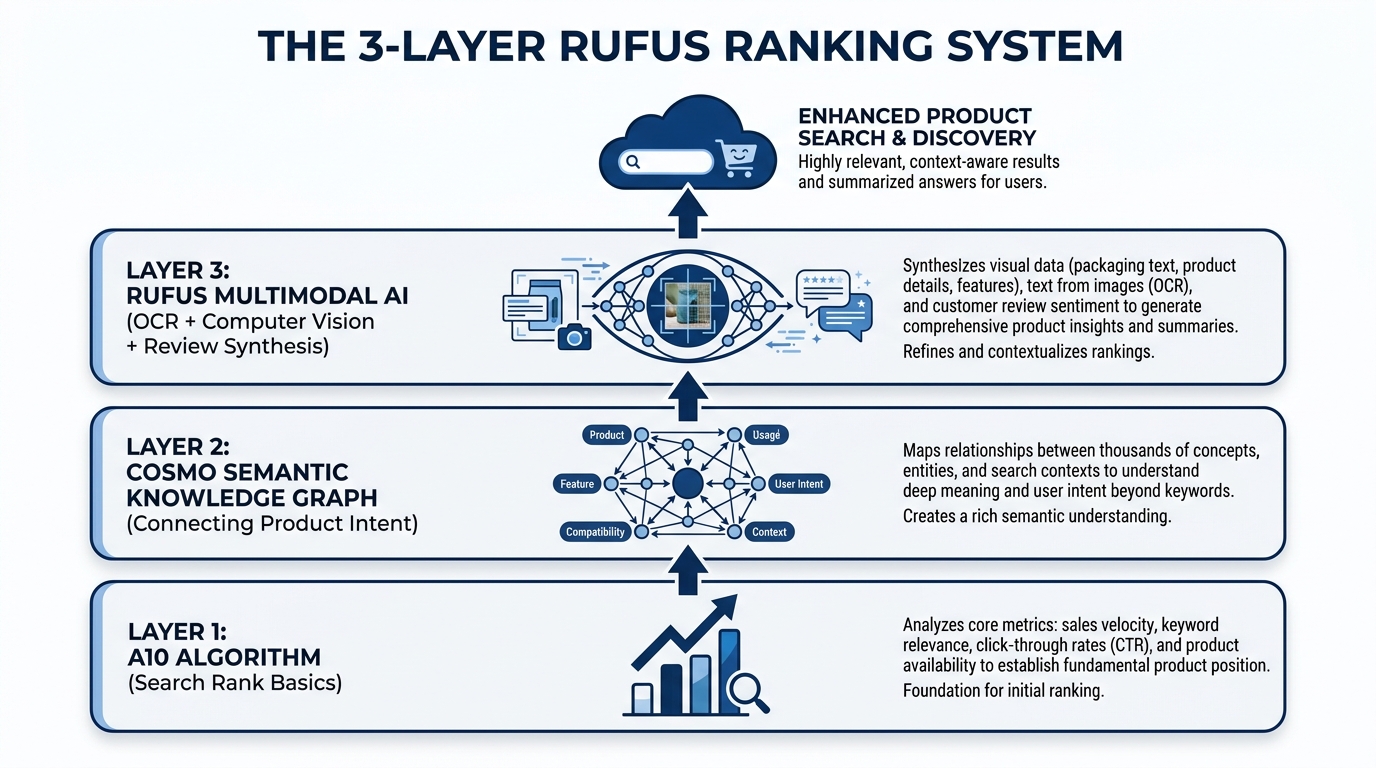
To optimize for Rufus, you first need to understand what kind of system you’re actually dealing with. Rufus is not a simple image ranker. It’s a multimodal AI assistant built on three interconnected layers, each of which processes your listing differently and feeds data to the next.
Layer 1: The A10 Foundation
Amazon’s A10 algorithm operates at the base of the stack. It handles the traditional signals you already know — sales velocity, click-through rates, keyword relevance from titles and backend fields, conversion history, return rates, and fulfillment performance. A10 creates your baseline discoverability, determining whether your product is even eligible to surface for a given search.
Images play an indirect role here. A poorly optimized image gallery hurts click-through rate and conversion, which feed back into A10 as negative signals. A highly optimized gallery improves both metrics, compounding A10 performance over time. But A10 is primarily a text and behavioral signal engine — it doesn’t evaluate image content directly.
Layer 2: The COSMO Semantic Knowledge Graph
Above A10 sits COSMO, Amazon’s proprietary semantic knowledge graph — and this is where image optimization starts to directly matter in a new way. COSMO isn’t a keyword index. It’s a knowledge structure built from millions of behavioral assertions about what customers actually want when they use different phrases.
COSMO connects product attributes, use cases, customer intents, and product categories into a web of semantic relationships. When a shopper says “best water bottle for hiking,” COSMO isn’t matching the phrase “hiking” to your keyword list. It’s checking whether the knowledge graph contains a strong connection between your product and the node cluster representing hiking intent — which includes attributes like capacity, material, durability, weight, and insulation.
Visual Label Tagging is the mechanism through which your images feed COSMO. Amazon’s computer vision system scans your listing’s image gallery and applies semantic labels to what it finds: product type, setting, use context, visible features, scale indicators, and user demographics. These labels become data points in COSMO’s graph, strengthening (or failing to strengthen) the connections between your product and relevant intent clusters.
A camping water bottle photographed only on a white background gets labeled as “water bottle — product isolated.” The same bottle photographed at a trailhead in a hiker’s backpack side pocket gets labeled with setting: outdoor, context: hiking, use-scenario: active-trail, format: portable. That’s a fundamentally richer set of graph connections — and Rufus draws on all of them when generating responses to natural-language shopping queries.
Layer 3: Rufus Multimodal Synthesis
Rufus sits at the top of the stack, and it’s where your images, alt text, reviews, Q&A, listing copy, and A+ content all converge into a single, synthesized understanding of your product. Rufus uses a vision-language model to process images holistically — not just extracting text from overlays, but understanding scenes, inferring product use cases, identifying product components, and even reading packaging details.
OCR (Optical Character Recognition) is Rufus’s tool for reading embedded text. When a shopper uploads a photo of a product they saw in a store and asks Rufus to find it or suggest alternatives, Rufus can read the brand name, product specs, and model numbers directly from label text in the photo. The same capability applies to your listing images — Rufus reads every text overlay on your infographics and incorporates that data into its product understanding model.
The result is a system where your images are not decorations. They are data inputs — and they either enrich Rufus’s model of your product or they don’t.
Visual Label Tagging: What COSMO Learns From Your Photos
Visual Label Tagging is the bridge between your image gallery and COSMO’s knowledge graph, and understanding it gives sellers a concrete framework for thinking about image strategy beyond aesthetics.
What Gets Tagged and What Doesn’t
Amazon’s computer vision system is applying semantic labels across 18 documented product categories, and those labels span several dimensions of product understanding. Here’s what the system is looking for in your images:
- Product identity: What the item is, clearly and unambiguously. If your product is misclassified at this stage — if, for example, your kitchen tool gets tagged as something in a different category — your downstream visibility collapses. AI misclassification is a real, documented problem for sellers with ambiguous or cluttered primary images.
- Setting and context: Where is the product being used? An image of a blender in a gym bag reads differently to COSMO than the same blender on a kitchen counter. Setting tags include: home, office, outdoor, gym, travel, camping, kitchen, office, and dozens of sub-contexts.
- User demographics: Who is using the product? Images that show a specific user — a parent with a child, an athlete, an older adult, a professional — generate demographic tags that connect your product to relevant intent clusters like “gifts for mom” or “office supplies for professionals.”
- Feature visibility: What product features are visually apparent? Visible handles, zippers, lids, buttons, ports, and components all generate feature tags. If your product has a key differentiating feature that isn’t visible in any image, it may not be tagged at all — even if it’s described in your bullet points.
- Scale and size indicators: Products shown next to common reference objects (a hand, a coin, a standard cup) generate size-context tags that allow Rufus to answer size-related shopper questions accurately.
The Knowledge Graph Connection
Once COSMO has your Visual Label Tags, it runs them through its web of semantic intent connections. Every tag is a potential match point for a shopper query. A product tagged with setting: camping, feature: insulation visible, use-context: outdoor hydration, and material: stainless steel inferred is going to show up in far more Rufus recommendation sets than the same product tagged only as water bottle: product isolated.
The practical implication is significant: each lifestyle image you add to your gallery is not just a conversion aid for human shoppers. It’s a tag-generation event for COSMO. Every new scene you photograph your product in adds a new cluster of intent connections to the knowledge graph. That’s compounding discoverability, and it’s entirely within your control.
Main Image Tactics: There’s More at Stake Than Compliance
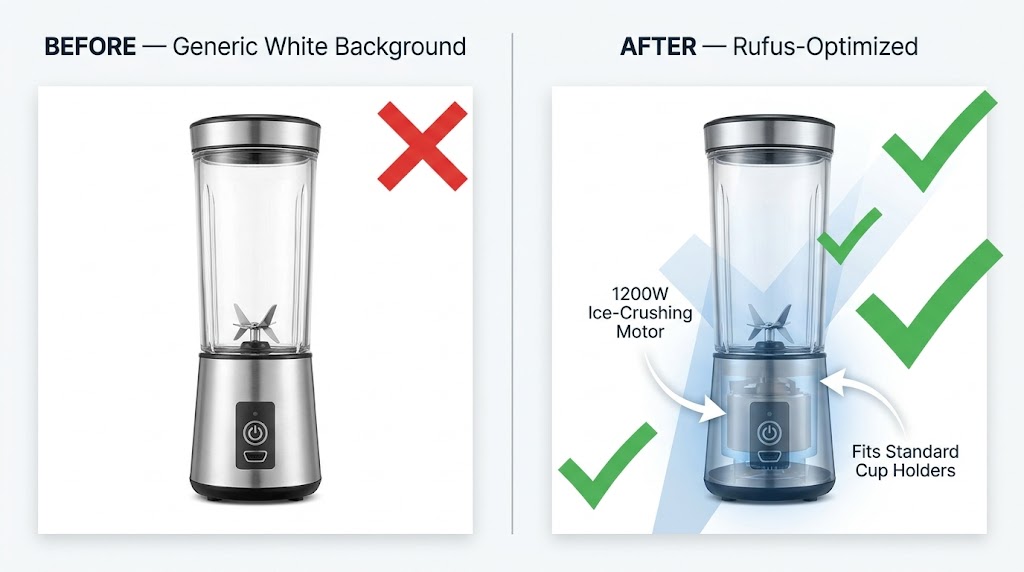
Your main image is the first thing both human shoppers and Rufus’s computer vision system process. Amazon’s compliance requirements are firm: pure white background (RGB 255, 255, 255), product filling at least 85% of the frame, no props or text overlays. Those rules aren’t going away.
But within those constraints, there are meaningful choices that dramatically affect how well Rufus understands — and therefore surfaces — your product.
Precision Beats Minimalism
The “cleaner is better” aesthetic that dominated Amazon photography for the past decade is no longer the whole story. Rufus’s computer vision model needs enough visual information to accurately categorize your product. That means your main image should be photographed to maximize feature clarity, not minimalism.
Consider what a vision model needs to correctly classify a multi-tool pocket knife versus a standard pocket knife versus a Swiss Army-style multi-tool. The differences are subtle — blade count, tool arrangement, handle shape. If your main image is a tight overhead shot showing only one side of the product, you may be giving the AI insufficient information to classify your item correctly. The same product photographed at a 45-degree angle showing the tool array, the clip, and the scale relative to a hand generates more classifiable information.
Practical rule: photograph your main image from the angle that makes your product most distinctively identifiable within its subcategory. Don’t just show the product — show what makes it that specific type of product.
Resolution Requirements in a Multimodal World
Amazon’s minimum image size is 1000×1000 pixels for zoom functionality to activate. For Rufus optimization, treat 2000×2000 pixels as your practical floor, and 3000×3000 or higher as ideal. Higher resolution means finer detail extraction from the computer vision model — visible texture, stitching, port sizes, label text on packaging — all of which becomes richer data input for Visual Label Tagging.
A sharp, 2500×2500 pixel main image of a travel bag will allow the AI to tag the zipper material, the external pocket structure, the handle type, and the approximate proportions — generating a far richer initial product classification than a 1000×1000 pixel shot of the same bag.
The “What Is This?” Test
Before finalizing your main image, run what practitioners have started calling the “What Is This?” test. Show your main image to someone unfamiliar with the product for three seconds, then take it away. If they can’t immediately answer what the product is, what it does, and roughly who it’s for — your main image is underperforming for both humans and AI. Rufus’s vision model is making the same rapid classification judgment, and an ambiguous main image is the single most damaging image problem a listing can have.
The Infographic Layer: OCR and the Text Rufus Is Already Extracting
Infographic images are the single highest-leverage image type for Rufus optimization — and the one where the gap between sellers who understand what’s happening and those who don’t is most pronounced.
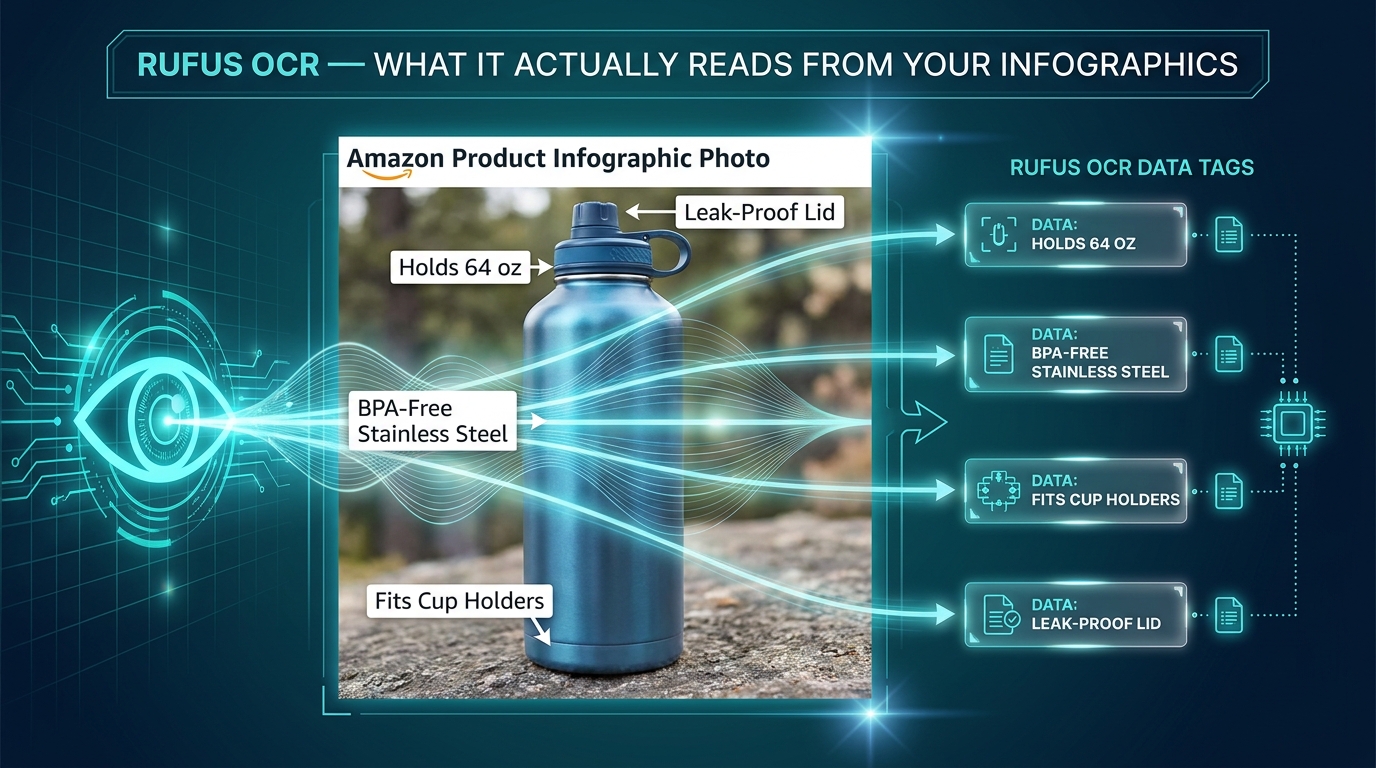
Rufus’s OCR capability means the text embedded in your infographic images is being read, indexed, and incorporated into its product understanding model. This isn’t a theoretical capability — it’s active, documented through Amazon’s patent filings, and confirmed by practitioner testing across categories. Every word that appears in your infographic images is a potential data point that Rufus can reference when answering shopper questions.
Writing for OCR, Not Just for Eyes
Most Amazon infographics are designed with human readability as the primary constraint. Clean fonts, balanced layouts, branded color schemes. That’s still important. But layered on top of that should be a second design constraint: is this text OCR-readable in a way that serves Rufus’s data extraction needs?
OCR performance degrades with decorative fonts, very small text, low contrast text on busy backgrounds, and stylized lettering. Amazon’s OCR layer is sophisticated, but it performs best on:
- High-contrast text (dark on light or light on dark, not mid-tone on mid-tone)
- Clean sans-serif or serif fonts at legible sizes (minimum 18–20pt equivalent at image resolution)
- Text that is horizontal, not rotated or curved
- Specific, noun-phrase driven language rather than vague marketing copy
That last point deserves more attention. “Premium Quality Construction” tells Rufus almost nothing useful. “Aircraft-grade 6061 Aluminum, 2mm Wall Thickness” tells it a great deal — material, grade, specification, and a size parameter, all in one phrase. Rufus can use the second phrase to answer questions like “what’s the most durable aluminum water bottle” or “are there aluminum bottles with thick walls.” It cannot use the first phrase for anything.
Noun Phrases That Actually Feed COSMO
The most effective text overlays for Rufus optimization follow a simple structure: measurable attribute + product-specific noun. Examples that generate strong COSMO connections:
- “Holds 64 oz — Fits Standard Car Cup Holders” (capacity + compatibility)
- “BPA-Free 18/8 Stainless Steel Construction” (material + safety attribute)
- “Fits Wrists 6.5″–8.5″ — Adjustable Clasp” (size range + feature)
- “1200W Motor — Crushes Ice in Under 10 Seconds” (power + performance claim)
- “Waterproof to IPX7 — Submersible Up to 1 Meter” (certification + specification)
Each of these phrases maps to answerable shopper questions. “What water bottle fits in a car cup holder?” — COSMO has a direct data point. “Are there stainless steel bottles that are BPA-free?” — COSMO has a direct data point. Generic phrases like “Superior Hydration” or “Built for Champions” map to nothing in COSMO’s intent graph.
Infographic Coverage: What to Include Across Your Slots
Sellers often dedicate one image slot to an infographic and consider it done. The more effective approach is to plan multiple infographic images covering different categories of product information:
- Dimension/size infographic: Show actual measurements with a scale reference. Include the measurements in text (not just arrows), because OCR reads text, not line lengths.
- Material/composition infographic: List materials, certifications, and construction details with specific, verifiable language.
- Feature breakdown infographic: Highlight each key feature with labeled callouts, using OCR-readable noun phrases rather than category headers.
- Compatibility/fit infographic: If your product fits, pairs with, or requires something specific, show and label it. “Compatible with AirPods Pro 2nd Gen” is the kind of text Rufus uses to surface your product for compatibility queries.
Lifestyle Images Done Right: Intent Matching Through Scene Context
If infographics are about feeding data to Rufus through OCR, lifestyle images are about feeding data through computer vision and Visual Label Tagging. The distinction matters, because the optimization approach is different.
Lifestyle images generate the contextual tags that connect your product to shopper intent clusters. A product photographed in ten different settings generates ten different sets of intent-connection tags in COSMO. Each tag cluster is a pool of potential shopper queries that your product can surface in.
Choosing Scenes Strategically, Not Aesthetically
Most brands choose lifestyle scenes based on what looks aspirational or on-brand. A premium kitchen appliance in a beautiful minimalist kitchen. A fitness supplement in a gym. A skincare product in a spa-inspired bathroom. Those aesthetic choices are fine — but they’re not strategic choices for Rufus optimization.
The strategic approach starts with your actual search intent data. Pull your Search Term Report from Seller Central and look at the long-tail queries that are generating impressions but low conversion. Many of those queries represent intent clusters your product could serve — but isn’t being tagged for because your images don’t show those scenarios.
Example: A portable blender’s search term report shows queries like “blender for travel,” “mini blender dorm room,” “blender that works in hotel room,” and “blender for camping.” These are distinct intent clusters. A single lifestyle shot in a kitchen doesn’t address any of them. Shooting the same blender in a hotel room, at a campsite, and in a dorm setting — and including those as separate image slots — generates distinct Visual Label Tag clusters for each context, making the product eligible to surface in Rufus responses to all four query types.
The User Demographic Signal
Lifestyle images that include people generate additional demographic tagging that pure product shots cannot. COSMO’s knowledge graph includes demographic-intent connections — shoppers searching for “gifts for teenage girls” or “office accessories for working moms” are triggering intent clusters that include demographic tags.
Include people in your lifestyle images when your product has meaningful demographic targeting. Show the actual user your product is built for. This isn’t just good marketing psychology — it’s a direct input into COSMO’s demographic tagging system, which determines whether your product surfaces for gift-giving and user-specific queries.
Text Overlays in Lifestyle Images
Here’s a tactic that most sellers miss entirely: lifestyle images can carry text overlays too. Unlike main images, secondary images have no restriction on overlaid text. A lifestyle image of a water bottle at a hiking trailhead can also include a small, clean callout that reads “Triple-Wall Vacuum Insulation — Stays Cold 24 Hours.” The computer vision model reads the scene and generates context tags. Rufus’s OCR reads the overlay and generates spec data. One image provides two types of data input simultaneously.
This dual-input approach is one of the highest-ROI tactics in Rufus image optimization — it requires no additional photography, just thoughtful graphic design on images you’re already producing.
The 9-Slot Narrative Sequence: Treating Your Gallery Like a Presentation
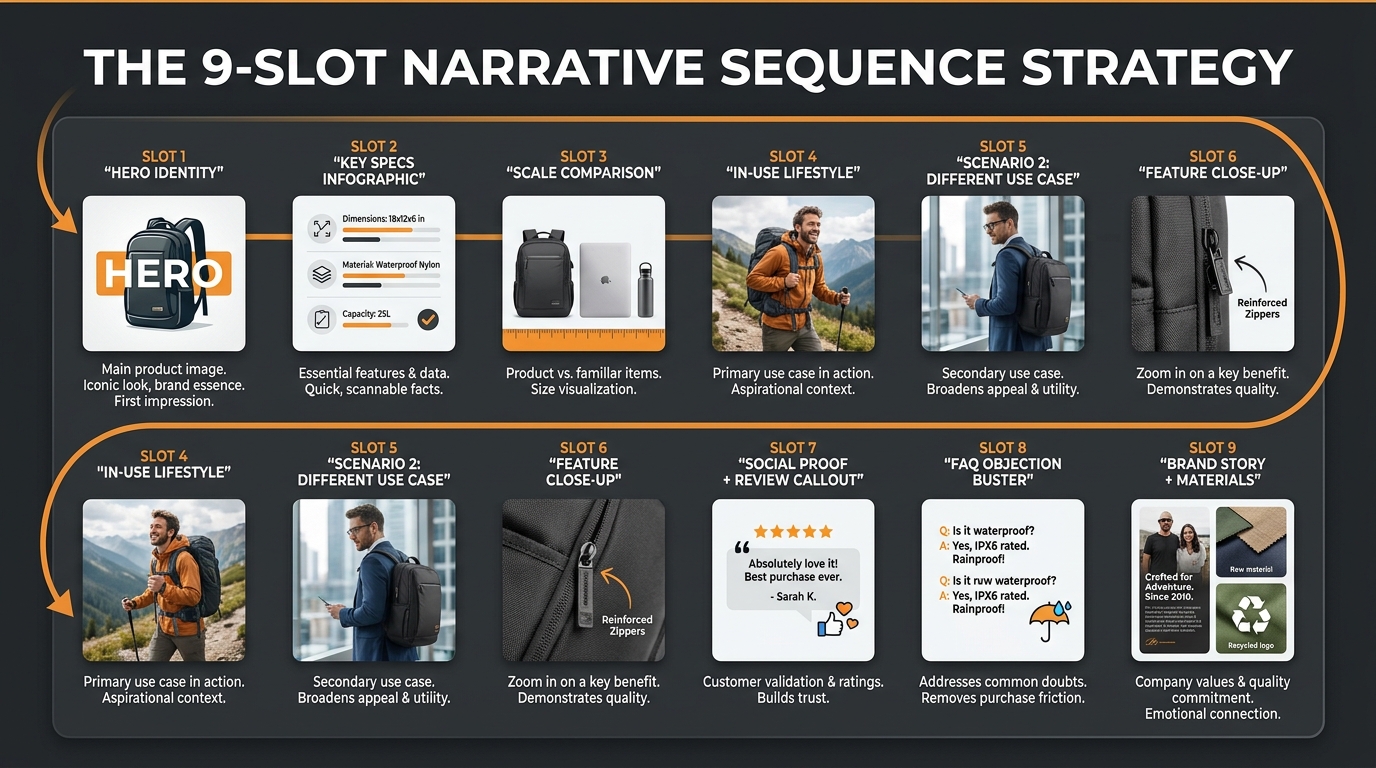
Amazon allows up to 9 product image slots, plus a video. The average seller uses 4–5. According to practitioner data, roughly 65% of sellers leave image slots empty — which means they’re leaving COSMO tag-generation opportunities on the table with every unfilled slot.
But filling all 9 slots randomly is not better than filling 5 slots strategically. The sequence of your images matters — both for human shoppers who view them left to right and for Rufus’s processing model, which tends to weight earlier images more heavily in initial product classification.
Here’s a framework for building a 9-slot gallery that serves both humans and Rufus’s multimodal AI simultaneously:
Slot 1 — Hero Identity
This is your mandatory white-background main image. Its job for Rufus is unambiguous product classification. Its job for shoppers is immediate recognition and interest. Optimize for resolution (2000px+), product angle (most distinctive and identifiable), and clarity. Pass the “What Is This?” test.
Slot 2 — Key Specs Infographic
Place your most OCR-rich infographic in slot 2. This is the highest-priority non-main image for Rufus data extraction. Include your most critical specifications — the ones that differentiate your product and answer the most common shopper comparison questions. Measurable attributes, certifications, compatibility notes. High-contrast text, clean font, specific noun phrases.
Slot 3 — Scale and Size Reference
A dedicated size-context image. Show the product next to a common reference object (a human hand, a standard mug, a 12-inch ruler) and label the key dimensions in text. This answers a consistent category of shopper questions (“How big is it actually?”) and generates size-intent tags that allow Rufus to match your product to size-specific queries.
Slot 4 — Primary Lifestyle / Use Case 1
Your most commercially important use-case scenario, photographed in its natural setting. Include at least one person if your product has a defined user profile. Add a subtle text callout highlighting the key benefit relevant to this scenario. This slot generates your primary COSMO intent connections.
Slot 5 — Use Case 2 (Different Context)
A second lifestyle scenario targeting a different intent cluster. If Slot 4 shows your product in a home kitchen, Slot 5 might show it at a campsite or in a hotel room. Every new setting is a new cluster of COSMO intent connections. Don’t repeat the same context — expand your tag coverage.
Slot 6 — Feature Close-Up
A high-resolution detail shot of your product’s most differentiating feature — the zipper mechanism, the lid seal, the texture of the grip, the precision of the measurements on the side. Include a labeled callout with specific language. This image addresses the “zoom-and-inspect” behavior of engaged shoppers while generating feature-specific tags for COSMO.
Slot 7 — Social Proof or Review Callout
An image incorporating a verified customer quote or review excerpt, combined with a lifestyle or product visual. Rufus synthesizes reviews and Q&A as part of its product understanding — placing a powerful review excerpt in your image gallery reinforces the same sentiment data Rufus is already pulling from your review set. It also addresses purchase hesitation for human shoppers at the consideration stage.
Slot 8 — FAQ / Objection Buster
Identify the top purchase objection or question your product receives in reviews and Q&A, and address it directly in a dedicated image. “Yes, it fits in a standard cup holder.” “Yes, the lid is dishwasher-safe.” “No, you don’t need any tools to assemble it.” This image type directly feeds Rufus’s ability to answer common shopper questions about your product — because when a shopper asks Rufus “does [product] fit in a cup holder?”, Rufus is synthesizing your listing’s entire content to generate that answer, including your image text overlays.
Slot 9 — Brand Story / Materials / Sustainability
Your final slot should serve long-tail search intent around brand trust, materials sourcing, ethical production, or product origin. For many categories, shoppers ask Rufus questions like “is this brand sustainable?” or “what is this made from?” A dedicated image with clear, OCR-readable text about your materials, country of manufacture, certifications (FDA, CE, organic, Fair Trade), or sustainability commitments provides Rufus with direct data to answer those queries.
The Video Slot
Add a product video. Rufus’s multimodal processing extends to video content in your listing gallery. A short, tight demonstration video (60–90 seconds) showing your product in use across two or three scenarios provides the richest possible context data — moving-image analysis combined with spoken or captioned content. If video is not currently part of your listing stack, it should be the next addition after filling all 9 image slots.
A+ Content Alt Text: The Hidden Data Field Most Sellers Ignore
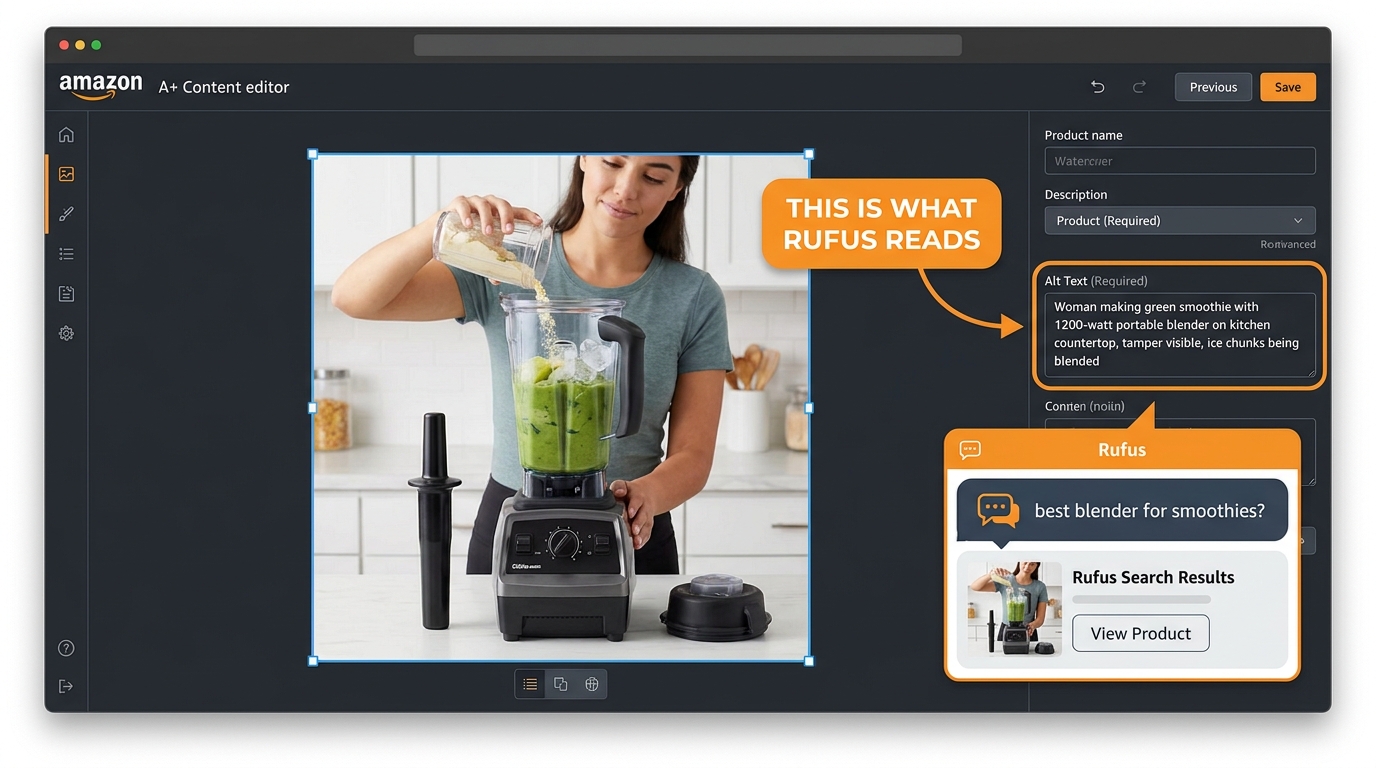
Alt text in A+ Content modules is, without question, the most underutilized high-leverage input in the entire Amazon listing ecosystem. Historically, sellers ignored it because it had minimal measurable impact on traditional search ranking. The field existed primarily for accessibility — screen readers. Most sellers either left it blank or filled it with something like “Product image 1.”
That era is over. Rufus reads alt text as a primary data source.
Why Alt Text Now Matters for Rufus
Rufus is a multimodal system — it processes both the visual content of images and the textual metadata associated with them. Alt text is part of that metadata layer. When you write descriptive, context-rich alt text for an A+ Content image, you’re providing Rufus with a pre-processed semantic description of what that image contains — one that it can incorporate into its product understanding model without having to rely solely on computer vision inference.
This is particularly valuable for visual content that’s challenging for computer vision to interpret accurately — complex multi-product scene images, before-and-after comparisons, infographics with dense visual information, or product shots where the key differentiating detail is subtle (like a specific stitching pattern or locking mechanism).
The Alt Text Formula That Works
Effective Rufus-optimized alt text follows a specific structure: [Who] + [action/context] + [product] + [key product feature] + [relevant circumstance or outcome].
Compare these two alt text examples for the same blender image:
Underperforming: “Blender product lifestyle image”
Rufus-optimized: “Woman making green smoothie with 1200-watt portable blender on kitchen countertop, using tamper to blend frozen fruit and ice, blender fits standard cup holder”
The second version contains: a user demographic (woman), an action (making smoothie), a product name with key spec (1200-watt portable blender), a setting (kitchen countertop), a use-case detail (using tamper, frozen fruit, ice), and a compatibility attribute (fits cup holder). Rufus can reference every one of those data points when answering shopper queries.
The first version contains: nothing useful.
Auditing and Rewriting Your A+ Alt Text
Open every A+ Content module you’ve published. Click into each image block and check the alt text field. For the majority of listings — especially older ones — you’ll find blank fields or placeholder text. This is one of the most time-efficient optimization tasks available to Amazon sellers in 2026, because it requires no photography, no design work, and no new content creation. It’s a text field you already have access to, and filling it correctly has a direct, documented impact on Rufus’s ability to understand and surface your product.
Work through each image systematically. Write alt text that describes the actual content of the image — who is in it, what they’re doing, what the product is doing, what setting they’re in, and what specific product attributes are visible or implied. Keep it under 250 characters for most platforms, though Amazon’s A+ text field accepts longer inputs. Use natural language, not keyword-stuffed fragments.
Common Image Mistakes That Suppress Rufus Visibility
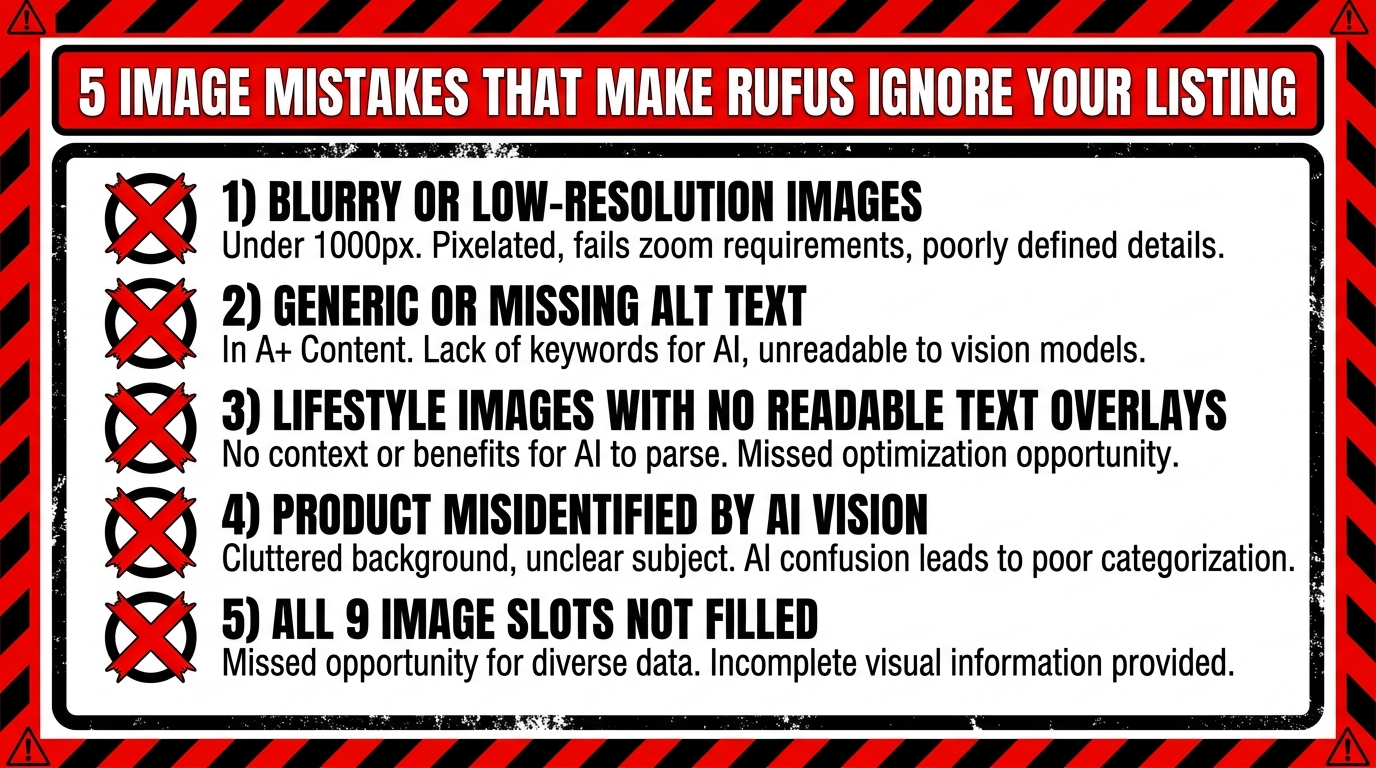
Understanding what to do is only half the picture. The other half is knowing what’s actively working against you. These are the most common image problems that suppress Rufus visibility in 2026 — many of which sellers don’t recognize as optimization failures at all.
Mistake 1: Product Misclassification at the Main Image Level
If Rufus’s computer vision model misidentifies your product at the primary image level, every downstream recommendation and response it generates will be based on a wrong classification. This happens most often with multifunctional products, products in unusual categories, or products with ambiguous primary use cases.
Signs your product may be misclassified: it surfaces for irrelevant queries but not relevant ones; Rufus describes it inaccurately in chat responses; your listing has normal keyword rank but poor Rufus recommendation inclusion. The fix is almost always to adjust your main image to make product identity unmistakable — cleaner angle, better crop, more identifiable composition.
Mistake 2: Lifestyle Images With No Semantic Anchoring
A beautiful lifestyle image that shows your product in a stunning setting but provides no additional data input — no text overlay, no specific user context, no identifiable setting — is a missed opportunity. It looks great to human shoppers but adds minimal new information to Rufus’s product model. Each image slot should be doing double duty: serving human shoppers and feeding the AI. If a lifestyle image isn’t doing both, revise it.
Mistake 3: Inconsistent Data Between Image Text and Listing Copy
Rufus cross-references data across your entire listing. If your infographic says “Holds 64 oz” and your bullet points say “58 oz capacity,” Rufus has a data conflict — and when data conflicts occur, the AI is likely to suppress or reduce confidence in the conflicting claims, or worse, surface the wrong information to shoppers who ask capacity questions.
Audit your infographic text against your listing copy regularly. Spec discrepancies are extremely common — especially when listings have been updated over time without corresponding image updates. Every discrepancy is a trust signal failure for Rufus.
Mistake 4: Unreadable Text Overlays
Decorative fonts, low-contrast color combinations, very small text, and curved or rotated lettering all degrade OCR accuracy. A beautiful branded infographic with elegant script text may be generating zero useful data for Rufus because the OCR layer can’t parse the lettering reliably. Test your infographics by attempting to read them on a phone screen at arm’s length. If you can’t read them instantly, neither can OCR with high confidence.
Mistake 5: Ignoring the Alt Text Fields Entirely
We’ve covered this in detail, but it bears repeating in the context of mistakes: blank or placeholder A+ alt text is the most common and most preventable image optimization failure on Amazon today. It requires zero budget, zero photography, and minimal time. It’s a pure knowledge gap problem — sellers who know about it fix it immediately, and those who don’t continue leaving meaningful Rufus data inputs blank across every product they sell.
Mistake 6: Low Resolution Images
Images below 1000×1000 pixels lose zoom functionality for human shoppers, but the impact on Rufus is equally significant. Low-resolution images provide less detail for computer vision to extract, resulting in thinner Visual Label Tag sets and reduced COSMO connectivity. There is no situation in 2026 where a low-resolution image is serving your listing better than a high-resolution one. Replace them.
How to Audit Your Current Images Against Rufus Criteria
Knowing the optimization framework is one thing. Applying it systematically to an existing catalog is another. Here’s a practical audit process that sellers can run on any listing — new or established — to evaluate Rufus readiness and prioritize improvements.
Step 1: The Slot Count Check
Open each listing and count your image slots. Are all 9 filled? Is there a video? Empty slots are your first priority — they’re literally unused data input opportunities. If you’re running fewer than 7 image slots on any listing, filling the remaining slots should be your highest-leverage immediate action.
Step 2: The Resolution Audit
Download your current listing images and check their pixel dimensions. Anything under 1500×1500 pixels should be queued for replacement. Prioritize the main image first, then infographics (since both OCR quality and COSMO tag richness degrade with lower resolution).
Step 3: The OCR Text Inventory
Print or screenshot each of your infographic images. Go through them and list every piece of text that appears. Then ask: is this text specific, measurable, and noun-phrase-driven? Or is it vague marketing language? Categorize each text element as “COSMO-useful” or “COSMO-useless.” Any “COSMO-useless” text should be replaced with specific, attribute-driven language in your next image revision.
Step 4: The Intent Coverage Map
Pull your Search Term Report. List the top 15–20 long-tail queries that are generating impressions. Map each query to the lifestyle image in your gallery that addresses that intent. If there are high-impression queries with no corresponding lifestyle image, you’ve identified a COSMO coverage gap. Plan a lifestyle shoot or use AI image editing tools to generate images addressing those missing intent clusters.
Step 5: The Alt Text Review
Go into every A+ Content module. Read each alt text field. Apply the formula: [Who] + [action/context] + [product] + [key feature] + [relevant detail]. Rewrite any field that doesn’t meet that standard. This step takes an afternoon and has immediate impact — it’s the single fastest-to-implement, lowest-cost optimization available in Rufus readiness work.
Step 6: The Consistency Cross-Check
Compare all specifications mentioned in your infographic images against your bullet points and product description. Note every discrepancy. Resolve all of them. In cases where the correct value is unclear (product has been updated, measurement methods differ), default to the most accurate current specification and update both the image and the copy to match.
Prioritizing Your Fixes
Not every listing needs the same depth of attention. Prioritize your audit and fix sequence based on revenue impact: start with your highest-volume, highest-revenue ASINs first. A 10% improvement in Rufus recommendation inclusion on a $50k/month ASIN has far more impact than a complete overhaul of a $2k/month listing. Work your way down the revenue stack systematically.
The Bigger Picture: Visual Optimization as a Discovery Channel
Stepping back from the tactical detail, there’s a strategic shift worth naming clearly: visual optimization is no longer just a conversion tool. It has become a discovery channel in its own right.
When Amazon launched its AI visual search feature — allowing shoppers to upload a photo and find matching or similar products — Rufus’s image processing became directly tied to product discovery in a way that had no equivalent in the keyword-only era. A shopper who photographs a competitor’s product and asks Rufus to find alternatives is triggering a visual search that Rufus answers by matching visual attributes across its product catalog. Products whose images provide rich visual data — clear feature visibility, high resolution, detailed contextual shooting — are more likely to surface in those visual search matches.
Similarly, when Rufus generates a response to a conversational query like “What’s the best lightweight laptop bag for daily commuting under $80?”, it’s not just running a keyword match. It’s querying COSMO’s intent graph, pulling products whose tags include context: commuting, category: laptop bag, attribute: lightweight, and price-tier: budget — and those tags come substantially from your images. The seller who has shot their laptop bag in a commuting context (a person on a subway platform, entering an office building) with an infographic overlay reading “Fits 15.6" Laptops — Weighs Only 1.2 lbs” has a significant discovery advantage over the seller whose identical product sits in a white-background photo with no additional visual data.
This is the real magnitude of Rufus image optimization: it’s not a listing tweak. It’s expanding the total surface area of queries your product can appear in — and for a discovery-first platform like Amazon, that’s the most direct path to incremental revenue growth available.
Conclusion: Your Images Are Your Newest Ranking Signal
The keyword optimization era taught Amazon sellers to think about discoverability in terms of text. Title keywords, bullet phrase strategy, backend search terms — the mental model was: write the right words, show up in the right searches.
Rufus hasn’t eliminated that model, but it has added a parallel system that operates on an entirely different type of input: visual data. Computer vision is now reading your scenes. OCR is now indexing your infographic text. Alt text fields are now primary data inputs, not afterthoughts. And the Visual Label Tags that COSMO assigns to your listing are substantially determined by what you put — and how you shoot — across your 9 image slots and A+ modules.
The sellers who understand this will use their image galleries as active optimization levers. They’ll treat each image slot as a data input opportunity. They’ll write infographic text for OCR accuracy alongside human readability. They’ll choose lifestyle scenes based on intent cluster strategy, not just aesthetic appeal. They’ll fill their alt text fields with specific, context-rich descriptions instead of leaving them blank.
The sellers who don’t will continue treating images as a design expense — and they’ll wonder why their identical (or superior) product keeps losing out to competitors in Rufus recommendation sets.
Here are the concrete starting points if you’re ready to close that gap:
- Audit your slot count today. Fill any empty image slots within the next 30 days, prioritizing highest-revenue ASINs first.
- Rewrite your A+ alt text. Apply the [Who + action + product + feature + detail] formula to every image in every A+ module you’ve published. This is a same-week action with no budget requirement.
- Replace vague infographic copy with noun-phrase-driven specifications. Every “superior quality” phrase should become a measurable specification. Every lifestyle image should carry at least one OCR-readable text callout.
- Map your lifestyle images to intent clusters. Use your Search Term Report to identify intent gaps in your current lifestyle coverage, and plan shoots or AI image tools to address them.
- Resolve every spec inconsistency between images and copy. Data conflicts undermine Rufus’s confidence in your listing. There should be zero discrepancies between what your images say and what your copy says.
- Add a video. If you have none, this is your next major visual asset investment. A tight, multi-context demonstration video generates richer multimodal data than any static image.
Rufus is processing your images right now — every time a shopper opens your listing, every time a natural-language query triggers a recommendation, every time a visual search surfaces products in your category. The question isn’t whether this is happening. It’s whether you’ve given Rufus the data it needs to work in your favor.