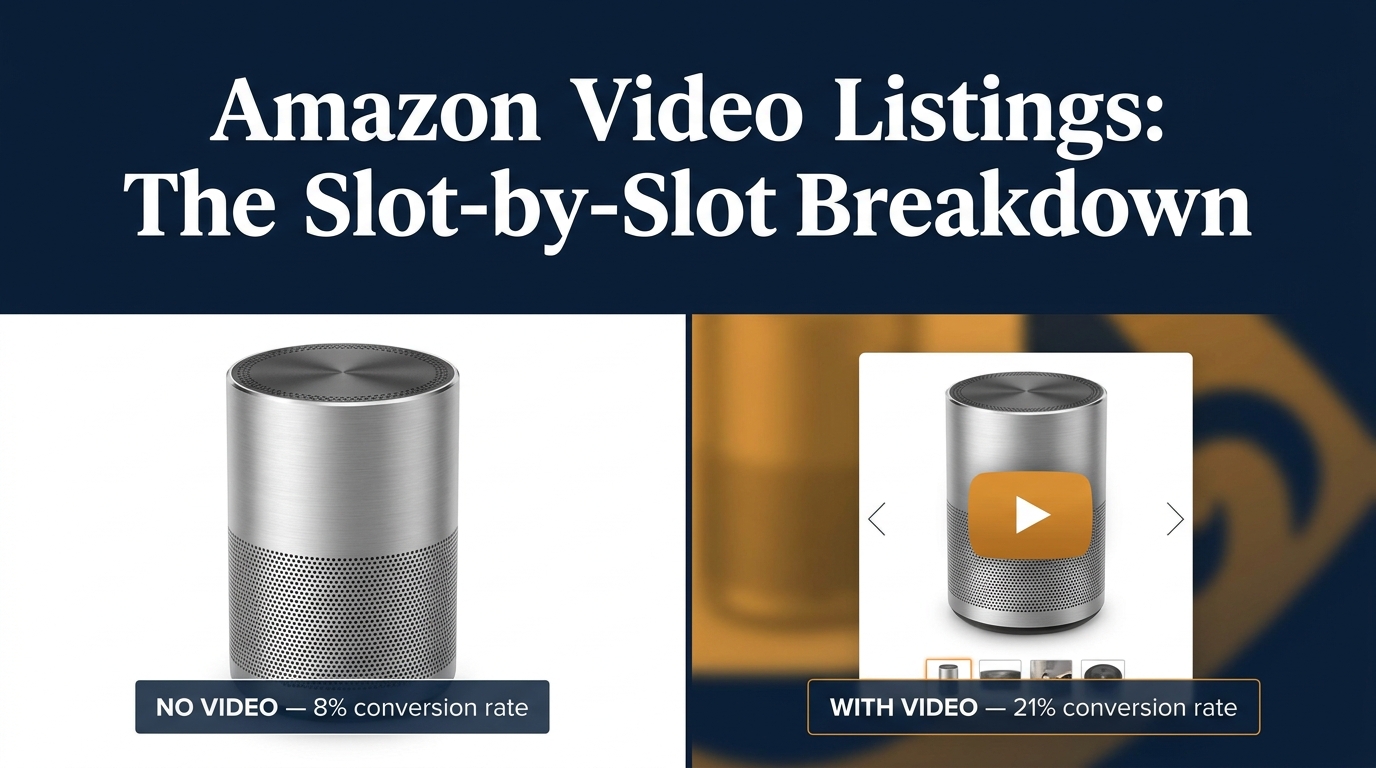
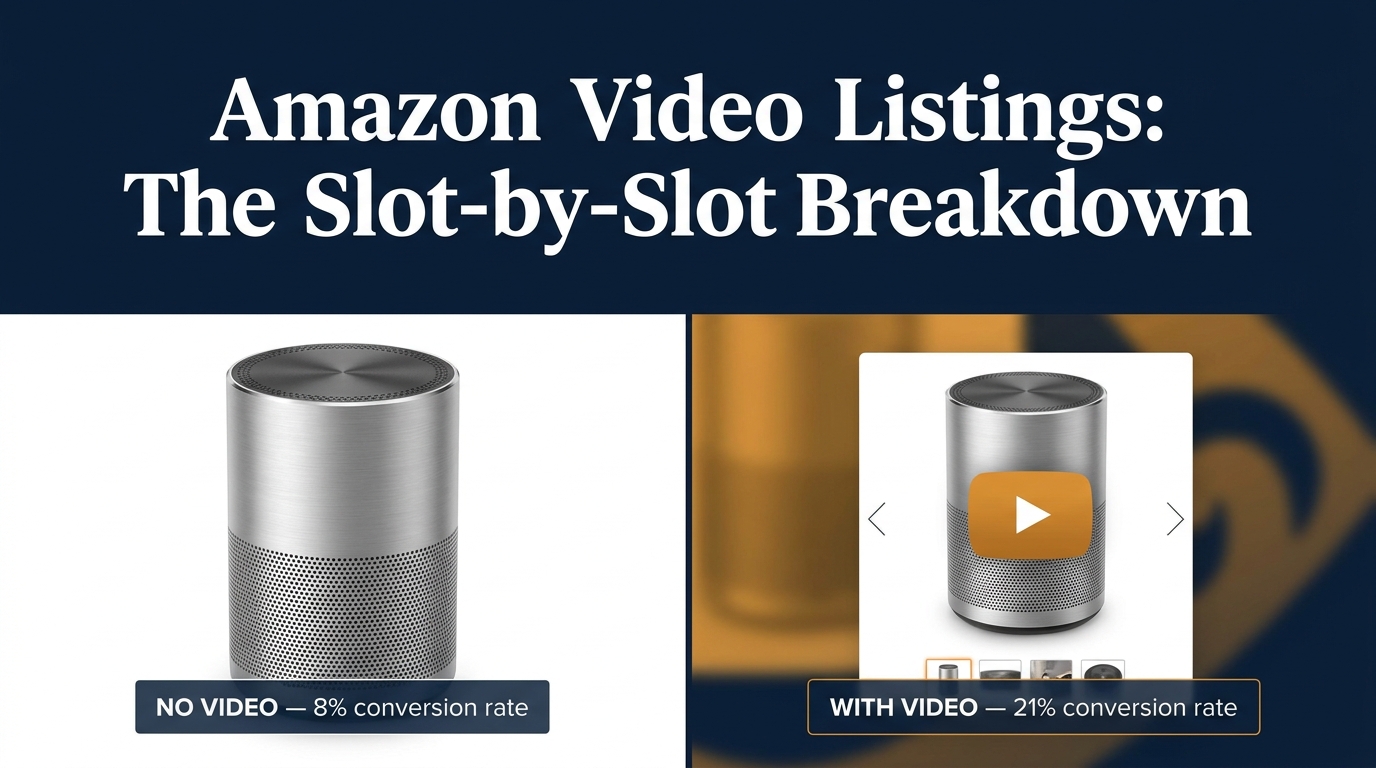
Here’s a scenario that plays out constantly in Amazon seller communities: a brand spends time and money producing a product video — good lighting, clear narration, crisp footage — uploads it to their listing, and then nothing moves. Conversion rate stays flat. Sessions look the same. The video feels like it should be helping, but the data says otherwise.
The problem is almost never the video itself. It’s the placement. Most sellers treat Amazon video like a single upload field: shoot something, drop it in, move on. In reality, Amazon has developed a multi-slot video ecosystem where each placement serves a different buyer psychology, appears at a different point in the purchase journey, and responds to completely different content strategies.
Uploading one polished product demo and leaving it there is the equivalent of printing one good ad and only ever running it in one newspaper. You’ve created something valuable, but you’ve left most of the opportunity behind.
This post maps every video slot Amazon currently offers, explains what each one actually does for your listing, walks through the technical and policy requirements that most sellers trip over before their video ever goes live, and covers what good video performance actually looks like in measurable terms. This isn’t a high-level pep talk about “adding video to your listings.” It’s a working framework for sellers who already know video matters and want to use it more deliberately.
The Four Distinct Video Slots on Amazon (and Why They Are Not Interchangeable)
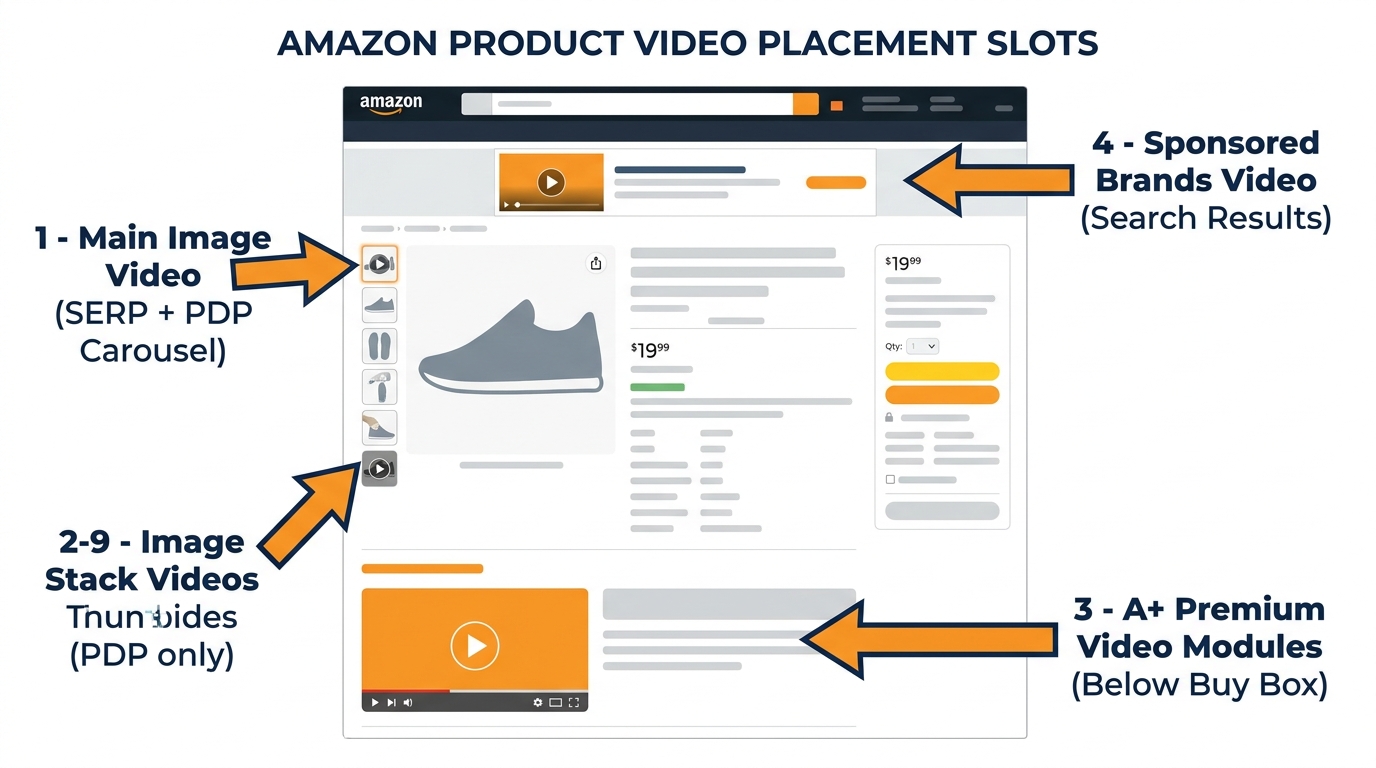
Before getting into tactics, it helps to understand the architecture. Amazon’s video placements in 2026 fall into four distinct categories, and confusing them is the root of most video underperformance.
Slot 1: Main Image Video
This is the highest-leverage video position on Amazon. When uploaded correctly, the main image video appears inside the product image carousel — the set of images at the top of the product detail page (PDP). Critically, it also surfaces in search engine results pages (SERPs), meaning potential customers see your video before they click through to your listing. It autoplays as a thumbnail in certain mobile and desktop SERP placements and in the carousel on the PDP itself. This slot is available to brand-registered sellers and is capped at one video per listing. Optimal length: 12–25 seconds.
Slot 2–9: Image Stack Videos
These are separate video uploads that appear within the product image stack below the main carousel. They are PDP-only — no SERP exposure — and are best used for supplementary content: detailed feature breakdowns, assembly demonstrations, size-and-scale comparisons, or use-case variations. Multiple videos can occupy these positions, giving sellers a genuine content library per ASIN rather than a single video file. Brand-registered sellers get the most flexibility here, though Amazon has gradually opened some access to non-brand sellers.
Slot 3: Premium A+ Content Video Modules
Premium A+ Content (sometimes called A++) is a separate program from standard A+ and has its own eligibility requirements. Sellers who qualify can embed video modules directly into the enhanced description section of the listing, below the buy box. This placement captures buyers who are already engaged enough to scroll down and read more — which makes it ideal for longer-form content like full demos, brand story videos, or educational explainers. Up to three video modules can live in a single Premium A+ layout.
Slot 4: Sponsored Brands Video
Unlike the three slots above, Sponsored Brands Video is a paid advertising format, not a listing feature. It operates through the advertising console, uses keyword targeting and a cost-per-click auction, and places videos in search results to drive traffic to your product or Brand Store. It serves a fundamentally different strategic purpose than listing videos: it’s a traffic driver, not a conversion closer. This distinction matters enormously for how you script, structure, and measure it.
Treating all four of these as the same thing — “Amazon video” — is where most sellers lose the thread. They produce one asset and expect it to do four different jobs. It can’t. Each slot requires a different piece of content.
The Main Image Video Slot: Your Highest-Leverage Real Estate
If you can only produce one piece of video content for a listing, it should go in the main image slot. The combination of SERP visibility and PDP carousel placement makes it the single most impactful piece of content you can add to a product page. Research from multiple seller data sources in 2026 puts the CTR lift from main image video at 8–18% compared to static image listings — and that’s organic, meaning you pay nothing for the additional clicks.
The 6-Second Rule
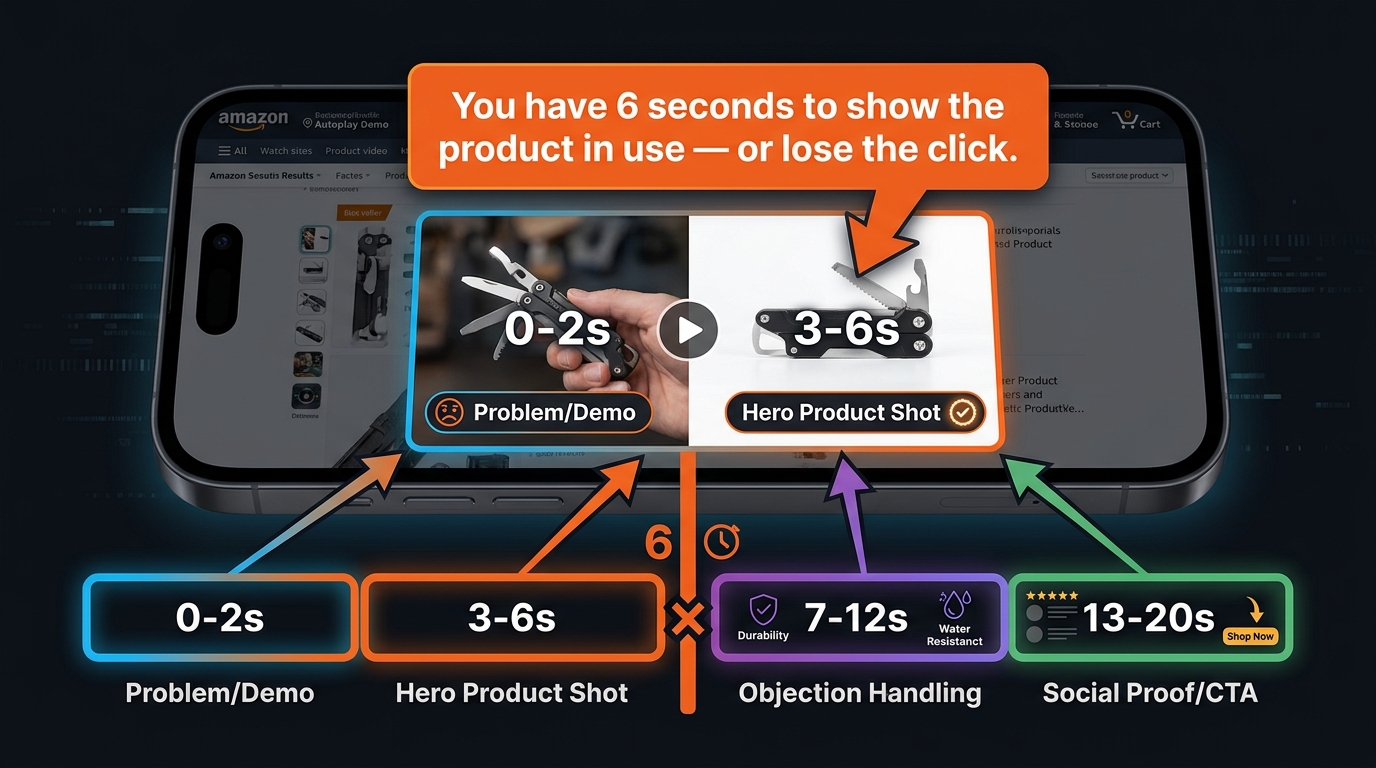
The defining constraint for main image video is that it must perform before most viewers decide to keep watching. The widely-cited benchmark in 2026 seller circles is six seconds: if the product hasn’t been shown in active use by second six, a substantial portion of viewers have already lost interest or moved on. This isn’t a soft creative guideline — it has measurable CTR consequences.
A practical framework for structuring a 12–25 second main image video looks like this:
- 0–2 seconds: Immediately show the core problem the product solves, or the product itself in clear action. No logos, no fade-ins, no “introducing…” narration.
- 3–6 seconds: Lock in the hero shot — the single most visually compelling view of the product doing what it does best.
- 7–12 seconds: Address the most common objection. For kitchen tools this might be “does it actually fit?” For tech products, “how complicated is setup?”
- 13–20 seconds: Social proof or product payoff — what does “after” look like? If your product makes something easier, cleaner, or more enjoyable, show that outcome.
- 20–25 seconds: Pack shot with key spec callouts (dimensions, material, compatibility) and a soft call to action.
SERP Placement: The Hidden Advantage
Most sellers think about video as something that helps once a customer is already on their listing. The main image slot flips this. Because it surfaces in certain SERP positions — particularly in video shelves and carousel modules on mobile — it influences the click decision before the buyer commits to a full PDP visit. That means a well-structured main image video effectively compresses the funnel: the shopper sees the product working, gains a basic level of confidence, and clicks through already partially sold.
This pre-qualification effect is part of why the unit session rate (the percentage of PDP visits that convert to a sale) tends to be meaningfully higher when the main image video has done its job on the SERP. You’re filtering for intent before the click, not just after it.
What This Slot Is Not Good For
A brand story does not belong in the main image slot. Neither does a lengthy explainer or a comparison against competitor products. These formats take too long to deliver value in a short-attention SERP environment. Save them for the image stack slots or A+ modules. The main image video is a hook, not a narrative.
Image Stack Videos (Slots 2–9): The Conversion Layer Most Sellers Ignore
Once a buyer lands on your product detail page, the context shifts. They’ve already chosen to investigate your product — now the job is to answer every remaining question before doubt turns into a back-click. Image stack videos, occupying positions 2 through 9 in the PDP carousel, are purpose-built for this moment.
Most sellers fill these slots with still images and consider the job done. That’s a missed opportunity. Buyers who scroll through multiple images are demonstrating active consideration — they’re still deciding. A second or third video in this sequence can catch that attention at a moment of genuine purchase uncertainty and answer exactly the question they’re wrestling with.
Content Strategy for the Image Stack
Think of these slots as a FAQ in video form. Map the most common pre-purchase questions buyers ask about your product — you can find these in your own Q&A section, competitor reviews, and customer service inquiries — and address each one with a short, specific video clip.
- Assembly or setup video: For products that require any assembly, a 30–45 second assembly walkthrough eliminates one of the most common deterrents to purchase in categories like furniture, fitness equipment, and DIY tools.
- Scale and size comparison: Apparel, home goods, and accessories suffer consistently from “it was smaller than I expected” reviews. A video showing the product next to a recognizable household object eliminates this objection cleanly.
- Use-case variation: If your product has multiple use scenarios, each one can have its own 15–20 second demonstration. A multi-use kitchen gadget, for instance, might have separate clips showing each function rather than trying to cram everything into one video.
- Material or quality close-up: For categories where tactile quality matters — bedding, clothing, leather goods — video can do what photography cannot: show how a material moves, drapes, or behaves under use conditions.
SEO Value in Video Metadata
One often-overlooked benefit of image stack videos is the metadata layer. When you upload videos to Seller Central via the “Upload and Manage Videos” tool, you can add titles and descriptions that include search-relevant terms. Amazon’s algorithm can index this metadata, which means well-titled videos with relevant keyword placement contribute to the discoverability of your listing — separate from your bullet points and backend search terms. This isn’t a primary ranking driver, but in competitive categories where sellers are fighting for marginal improvements, every indexed signal adds up.
Premium A+ Content Video Modules: What Eligibility Actually Requires
Premium A+ Content is a tier above standard A+ Content, and it’s the only place on a product detail page where full video modules — not just video clips embedded in carousels — can live. This distinction matters because Premium A+ video modules present video in a more intentional, controlled format: full-width or half-width video panels with accompanying text, image carousels alongside video, and longer runtime options. The placement is below the buy box in the enhanced content section, which means it targets buyers who are already engaged and reading deeper into the listing.
Eligibility Requirements in 2026
Premium A+ has a specific gatekeeping structure. To unlock it, sellers must:
- Be enrolled in Amazon Brand Registry — this is non-negotiable across all enhanced content types.
- Have an approved and published A+ Brand Story on at least one ASIN in their catalog.
- Have at least five approved A+ Content projects submitted and approved within the past 12 months.
This means Premium A+ is not available to new sellers or those who haven’t been actively publishing A+ Content throughout the year. The 12-month rolling window is an important detail: approvals don’t carry over indefinitely. Sellers who publish a burst of A+ Content to unlock Premium access and then go dormant may find their eligibility lapses if they don’t maintain the cadence.
Video Module Specifications for Premium A+
Amazon currently supports three video module formats within Premium A+:
- Full Video Module: Minimum resolution 960x540px. The video dominates the content block. Best for brand or product story content that benefits from a cinematic presentation.
- Video with Text Module: Minimum resolution 800x600px. Splits the content block between video and a text panel, allowing you to narrate key benefits while the video demonstrates them visually.
- Video with Image Carousel Module: Minimum resolution 800x600px. Pairs a video with a scrollable image strip — useful for showing multiple colorways, configurations, or use cases alongside a master demo.
All Premium A+ videos must be in MP4 format. Amazon’s review time for video submissions runs 24–72 hours, and the policy review is stricter here than for image stack videos because Premium A+ is more prominently positioned on the page.
What Actually Performs Well in A+ Video Modules
The buyer reading your A+ section is a high-intent shopper who hasn’t yet converted — but they’re doing their due diligence, not quickly scanning. That changes what good video content looks like in this placement. Short demos and fast hooks are less relevant here. Instead, A+ video modules reward:
- Product origin or brand story — particularly effective for brands with a meaningful founding story, artisan manufacturing process, or sustainability angle.
- Deep feature education — technical products benefit from a two-minute walkthrough that would be too long anywhere else on the listing.
- Before-and-after demonstrations — showing a clear transformation (cleaner grout, better organized space, improved posture) hits hardest with buyers in the consideration phase.
- Comparison to alternatives — Premium A+ does allow general category comparisons (your product vs. the “traditional” approach), though competitor brand mentions remain prohibited under Amazon’s video policy.
Sponsored Brands Video vs. Listing Video: Two Completely Different Jobs
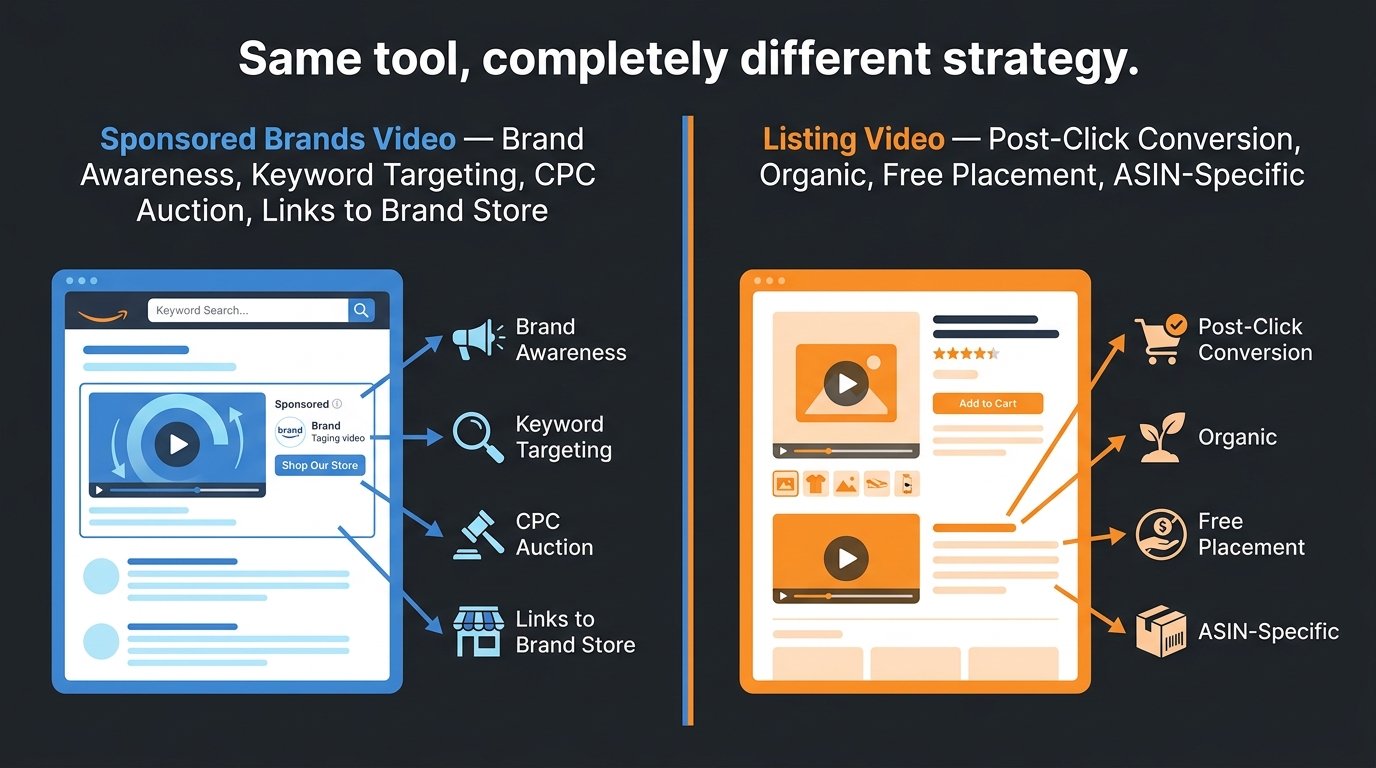
This is one of the most persistently confused distinctions in Amazon video strategy. Sellers routinely repurpose their listing videos as Sponsored Brands Video ads — or vice versa — and then wonder why results are underwhelming. The two formats are not interchangeable because they operate at completely different points in the purchase journey and serve completely different goals.
Sponsored Brands Video: A Traffic Driver
Sponsored Brands Video ads appear in search results — above, below, or within organic listings — and are paid placements competing in a keyword-based CPC auction. Their job is to attract clicks from shoppers who are actively searching but haven’t chosen a product yet. The video must work as an attention capture mechanism: stop the scroll, communicate a compelling reason to click, and drive traffic to your listing or Brand Store.
Key characteristics of effective Sponsored Brands Video content:
- Length: 6–30 seconds maximum. Amazon enforces a 45-second cap, but top-performing ads tend to run 15–20 seconds. Shorter is almost always better here.
- Product first: The product must appear within the first 1–2 seconds. There is no time for a logo reveal or brand intro when you’re competing against eight other listings on a SERP.
- No audio dependency: Many shoppers browse with sound off. Sponsored Brands Video ads should communicate their full message through visuals and on-screen text alone, with audio as an enhancement rather than a requirement.
- CTA orientation: Every second of a paid ad has a direct cost. The creative should move viewers toward a click, not educate them in detail. Depth belongs on the product page.
Listing Video: A Conversion Closer
Listing video (whether in the main image slot, image stack, or A+ modules) operates post-click. The buyer is already on your product page — the traffic is paid for or organically earned. Now the question is whether you convert them. This means listing video can and should be more thorough, more patient, and more objection-focused than Sponsored Brands Video.
A 45-second listing video that walks through setup, demonstrates three use cases, and shows scale is entirely appropriate. The same video in a Sponsored Brands slot would be dead on arrival — most viewers would scroll past it within the first 10 seconds.
The practical implication: if you’re producing video on a budget and can only create one piece of content, use it as a listing video (specifically in the main image slot) rather than as a Sponsored Brands ad. Your listing video works for free, indefinitely. Your Sponsored Brands video costs money every time someone clicks.
Measuring Each Format Separately
Because these two placements serve different strategic objectives, they require different success metrics. Sponsored Brands Video performance is measured primarily by CTR, CPC efficiency, and attributed sales from ad traffic. Listing video performance is measured by unit session rate (conversions per page visit), video view rate, and organic ranking signals. Blending these metrics together — tracking a single “video performance” number across both formats — is how sellers end up unable to diagnose what’s actually working.
How Amazon’s A10 Algorithm Treats Video Engagement Signals
Amazon doesn’t publicly document its ranking algorithm in detail, but the behavior of the system in 2026 makes certain things reasonably clear. The algorithm iteration commonly referred to as A10 — the framework that governs organic product ranking in search results — places meaningfully more weight on post-click engagement signals than the earlier A9 version did.
What A10 Is Measuring
Where A9 prioritized historical sales velocity and keyword relevance above most other signals, A10 layers in behavioral engagement data: how long shoppers spend on a listing, how deeply they scroll, whether they interact with images, and — crucially — whether they engage with video content. Video plays, watch duration, and re-plays are all part of this engagement picture.
The mechanism is straightforward: a shopper who watches 80% of your product video before adding to cart is demonstrating dramatically higher purchase intent and product-fit confidence than one who bounced after two seconds. That behavioral signal tells Amazon’s algorithm that the listing is doing a good job matching customer expectations — which rewards the listing with better organic placement over time.
The Indirect Ranking Benefit of Video
Beyond direct engagement signals, video contributes to organic ranking through a second-order effect: reduced return rates. Products with clear video demonstrations tend to generate fewer returns because buyers arrive with realistic expectations of what they’re receiving. Amazon tracks return rates by ASIN, and high return rates suppress listings in organic rankings. A thorough demonstration video that accurately represents the product — particularly one that shows size, material, and assembly — is a return-rate management tool as much as it’s a conversion tool.
Lower returns → higher seller metrics → better algorithmic positioning. The chain is indirect but real.
Dwell Time and the Session Quality Signal
One of the clearest ways to see A10’s engagement sensitivity in practice is to watch what happens to a listing’s organic ranking after a high-quality video is added. In categories where competing listings are video-free, adding a main image video that keeps shoppers on the page for 20+ additional seconds can produce an organic ranking lift within 2–4 weeks — even without a change in ad spend or external traffic. This dwell time effect has been consistently observed across Home & Kitchen, Beauty, and Sports & Outdoors categories in particular.
Video Content Strategy by Product Category
Not all categories respond to video the same way, and treating them identically is a recipe for mediocre results across the board. The type of video that drives the most conversions varies significantly based on how buyers in that category make decisions.
Beauty and Personal Care
This is the highest-converting category on Amazon platform-wide, with organic conversion rates reaching 15–25% for well-optimized listings. Video in beauty serves one primary purpose: demonstrating results. Before-and-after videos, application technique walkthroughs, and texture close-ups answer the questions static images genuinely cannot. Skin tone representation matters too — showing the product used across different skin tones and hair types removes a major uncertainty for a significant portion of buyers. In this category, user-generated style content (less produced, more authentic) consistently outperforms studio-polished product demos because authenticity is the trust signal buyers are looking for.
Home and Kitchen
Assembly, size, and function are the three dominant concerns in Home & Kitchen. The “it was smaller than I expected” return is endemic to this category, and a 10-second video showing the product next to a standard dinner plate or smartphone eliminates it almost entirely. Function videos — actually showing the product being used in a real kitchen or living space rather than against a white background — convert significantly better than clean studio shots because they answer the core question: “What will this look like in my home?”
Electronics and Tech
Setup complexity is the largest conversion barrier in electronics. A screen-recorded or camera-captured setup walkthrough — not a polished marketing overview of features — reduces purchase hesitation dramatically. In this category, buyers who abandon listings often do so because they can’t tell if the product will work with their existing setup. A compatibility demo, a “what’s in the box” inventory clip, and a quick setup walkthrough together address this better than any combination of bullet points.
Sports, Outdoors, and Fitness
Motion is the differentiator here. Products that come alive in use — resistance bands, hiking gear, sports accessories — look flat in static images and dynamic in video. The best videos in this category show the product under realistic use conditions: actual terrain for outdoor gear, actual workouts for fitness equipment, actual sweat and movement for athletic apparel. Nothing in a studio with fake grass. Buyers in these categories are evaluating durability and performance credibility, not brand aesthetics.
Clothing and Accessories
Fit and drape are the core questions that static imagery can never fully answer. A 15-second video of a model moving, sitting, turning, and showing the garment from multiple angles at multiple distances addresses size uncertainty more effectively than any combination of images and size charts. For accessories, a scale video showing the product being used by a real person — rather than in isolation — eliminates the most common source of post-purchase disappointment in the category.
Technical Specifications That Sink Otherwise Good Videos
Amazon’s video review process is not forgiving about technical non-compliance. A video that fails specification review goes into a rejection queue that can take 24–72 hours to return a verdict — meaning a failed upload costs you several days before you even find out there’s a problem. Getting the specs right before upload is non-negotiable.
Universal Technical Requirements
These specifications apply across all Amazon listing video types:
- Format: MP4 is the required format for all video uploads. MOV files may be accepted through some upload pathways but MP4 is the safest choice.
- Codec: H.264 or H.265. H.264 is the safer default for maximum compatibility with Amazon’s processing pipeline.
- Aspect ratio: 16:9 is standard for most placements. 1:1 square format is acceptable for some mobile placements but 16:9 should be the production default.
- Minimum resolution: 1280x720px (720p HD) for standard listing videos. Premium A+ Full Video Module requires a minimum 960x540px, while Video with Text and Image Carousel modules require 800x600px minimum — though producing at 1080p and downscaling is always preferable.
- Frame rate: 23.976, 24, 25, 29.97, or 30 fps. Anything outside this range risks rejection or processing artifacts.
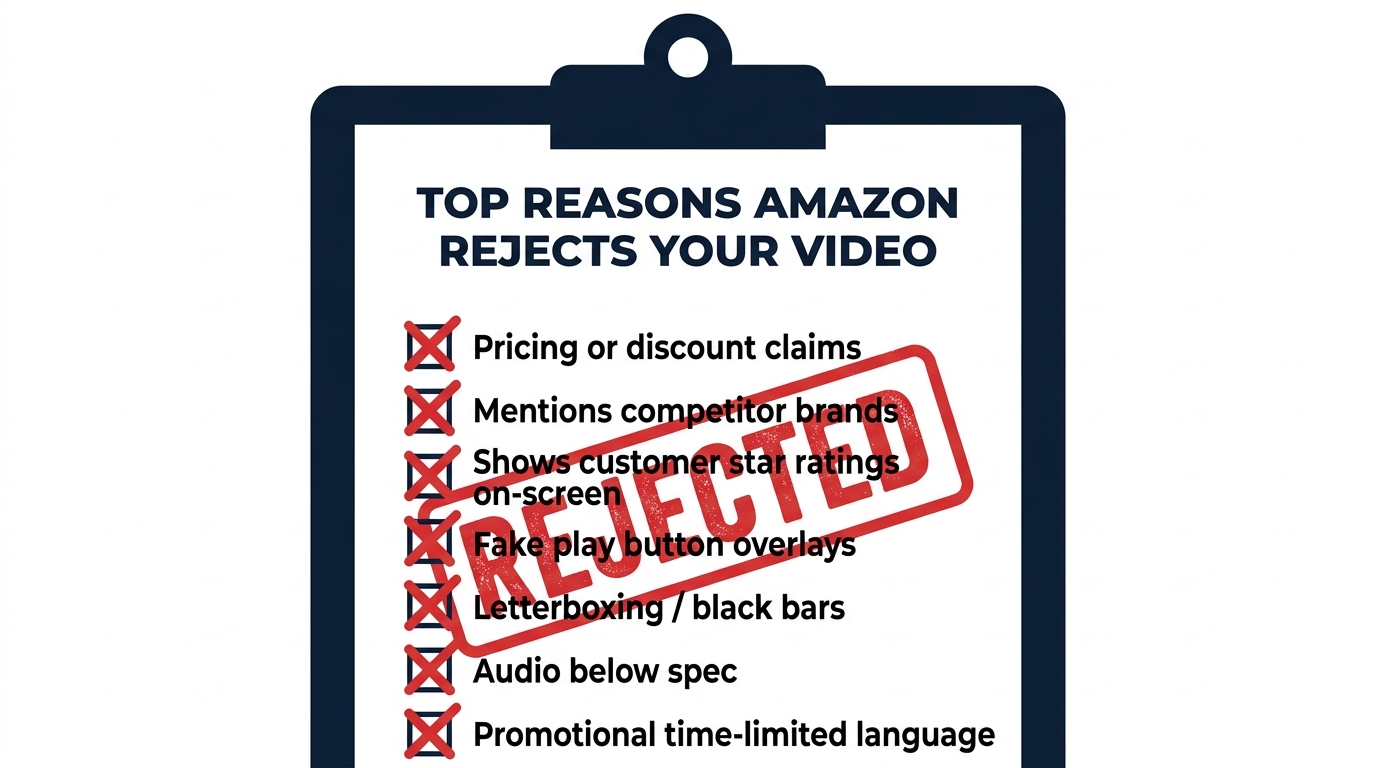
- No letterboxing: Black bars on any edge of the video — top, bottom, left, or right — trigger immediate rejection. Crop your content to fill the frame completely.
- No black leader frames: The video must not start or end with more than a split-second of black. Amazon’s review tool catches leader frames and flags them consistently.
- Audio: Stereo audio at 44.1kHz or 48kHz sample rate. Audio with excessive background noise, clipping, or silence where narration is expected tends to generate flags in the content review process even when it technically passes spec.
Slot-Specific Resolution Notes
The main image video slot and image stack slots have the most flexibility with aspect ratio, but the standard 16:9 1080p format covers every slot without adaptation. If you’re producing separate videos for different placements, Premium A+ module specs are the most finicky — always check the current Amazon Seller Central video guidelines before final export, as these specs have shifted over the past 18 months.
The Rejection Trap: Policy Violations That Kill Your Video Before It Goes Live
Technical compliance and policy compliance are two separate review gates on Amazon, and sellers who nail the specs still get rejected on content grounds with surprising frequency. Understanding Amazon’s video content policies in advance of production — not as an afterthought during upload — saves significant time and production cost.
The Most Common Policy Violation: Pricing and Promotional Claims
Any reference to price — a specific dollar amount, a percentage discount, a “limited time offer,” or language like “buy two get one free” — will cause immediate rejection. Amazon’s policy rationale is that videos must be evergreen: the listing page is dynamic (prices change constantly), so any video with pricing content would be misleading minutes after it goes live. This is a harder constraint than it sounds, because promotional language is deeply habitual in marketing content. “Best value kitchen knife” is fine; “only $24.99 for a limited time” is a rejection.
Competitor and Marketplace References
Mentioning competing brands by name, referencing other retail platforms (“also available at Walmart”), or making explicit comparisons that name competitors will trigger rejection. Amazon’s policy here is about maintaining the integrity of the marketplace — your listing page exists within Amazon’s ecosystem, and Amazon won’t host content that promotes elsewhere.
Note: general category comparisons are allowed. “Better than traditional single-blade razors” is acceptable. “Better than [competitor brand name] razors” is not.
Customer Reviews and Star Ratings
Displaying customer review quotes, star ratings, or review counts on screen — even your own authentic reviews — violates Amazon’s video policy. This surprises many sellers who consider their review content to be fair use for marketing purposes. Amazon treats review display in video as a separate content moderation concern, likely due to risks around selective quoting and review manipulation optics. Leave reviews out of your video entirely.
Fake UI Elements and Visual Deception
Overlaid graphics that mimic Amazon’s interface — fake “Add to Cart” buttons, fake shopping cart animations, fake play button overlays — are rejected on sight. So are countdown timers, fake urgency badges, and any visual elements designed to mimic Amazon’s native UI. Beyond policy compliance, this practice tends to perform poorly anyway: buyers can tell when they’re being psychologically manipulated, and fake urgency in video content erodes trust more than it drives conversions.
Audio-Only Policy Note
If your video includes narration, it must be entirely in English for the US marketplace. Background music is allowed, but must not contain lyrics that reference pricing, competitors, or third-party intellectual property without licensing. The audio content undergoes the same policy review as the visual content.
Production Without a Big Budget: What Actually Works
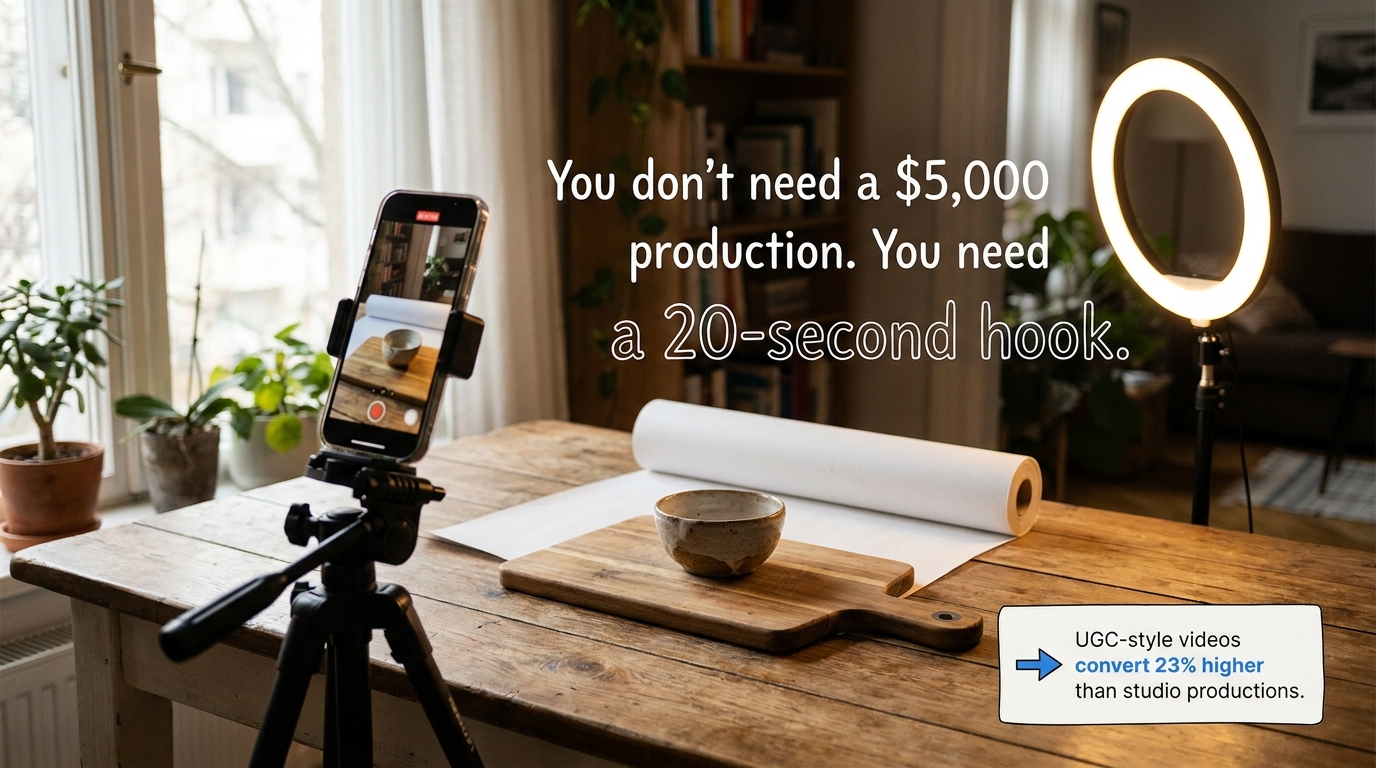
One of the more useful findings from 2026 Amazon video data is that user-generated-style content — less produced, more authentic — converts 23% higher than polished studio video. This isn’t a license to upload shaky, unlit phone footage. It’s a signal that buyers are responding to perceived authenticity rather than production polish. Understanding this distinction changes how you should approach video production.
The Minimum Viable Video Setup
A setup that produces commercially acceptable Amazon video can be assembled for under $300:
- Camera: A modern smartphone (any flagship from the past three years) shoots at 4K and handles the lighting environments Amazon requires without issue. You don’t need a dedicated camera.
- Tripod or stabilizer: Shaky footage is one of the most common reasons otherwise acceptable videos feel amateur. A $30–50 smartphone tripod with a fluid head eliminates this entirely.
- Lighting: A single good LED ring light or a softbox panel at a 45-degree angle produces clean, professional lighting for product video. Natural light near a large window works in a pinch but creates scheduling constraints.
- Backdrop: A roll of white seamless photography paper costs roughly $30 and produces the clean background most product categories require. For lifestyle categories, a well-composed real environment (kitchen, living room, outdoor space) outperforms a studio backdrop.
- Editing: DaVinci Resolve (free), CapCut (free), or iMovie handles the color correction, clip trimming, and subtitle overlay that most Amazon listing videos require. You don’t need Premiere Pro for a 25-second product demo.
Scripting for Conversion, Not Production Value
The most impactful skill in low-budget Amazon video is scripting before you shoot. Sellers who start filming without a clear shot list and script structure produce hours of raw footage and spend twice as long in editing. A tightly scripted 25-second video with clear transitions, a logical demo sequence, and an end-frame benefit summary outperforms an improvised 90-second walkthrough in every measurable way.
Before the camera turns on, write down these three things: (1) the single most compelling thing your product does, (2) the biggest reason a buyer might not purchase, and (3) what “success” looks like after using the product. Your video script is those three answers, shown in sequence.
When to Hire Out
There are genuine cases for professional video production — primarily for Premium A+ brand story videos where cinematic quality reinforces brand positioning, and for Sponsored Brands Video ads where the production quality reflects on your brand credibility in a competitive SERP context. For main image videos and image stack content, the ROI on professional production rarely justifies the cost over a well-executed in-house production. Focus professional production budget on the slots that benefit most from elevated quality.
Measuring What Matters: KPIs for Amazon Video Performance
Video on Amazon is not a “set it and forget it” investment. The placements require ongoing monitoring because performance degrades over time as competitor content improves, shopper expectations shift, and your own product’s market position evolves. Building a measurement framework from the start prevents the common situation where a seller uploads a video, stops looking at it, and has no idea whether it’s contributing to results.
Primary KPIs by Video Slot
Main Image Video:
- CTR from SERP (Click-Through Rate): This is the primary signal that your SERP-visible video is working. Benchmark CTR by category — if yours is below the average for your category, your first six seconds aren’t landing.
- Unit Session Rate (USR): The percentage of detail page sessions that result in a purchase. USR tells you whether your listing as a whole is converting traffic once it arrives. Video is a significant contributor to USR movement.
Image Stack Videos:
- Return Rate: A successful image stack video strategy — particularly assembly and scale demonstration videos — should produce a measurable reduction in the primary return reason. Track return reasons in Seller Central’s “Return Reports” and monitor for shifts after video is added.
- Q&A Volume: If buyers are asking pre-purchase questions that your videos answer, video is not doing its job. A drop in repetitive Q&A submissions after video deployment is a proxy signal for video effectiveness.
Premium A+ Video Modules:
- A+ Content Page Views vs. Pre-A+ Baseline: Compare session duration and scroll depth on your PDP before and after Premium A+ deployment. Longer session times indicate buyers are engaging with the extended content.
- Organic Ranking for Secondary Keywords: Premium A+ content — including video modules — can contribute to ranking improvements on non-primary keywords over time. Tracking ranking position for 10–20 target keywords on 60-day intervals reveals this effect.
Sponsored Brands Video:
- CTR: Industry average for Sponsored Brands Video CTR on Amazon sits in the 0.4–1.2% range in most categories. Below-average CTR with above-average impressions indicates the creative isn’t stopping the scroll.
- ROAS (Return on Ad Spend): The primary financial metric for paid video. Benchmark against your existing Sponsored Products ROAS to determine whether video ads are delivering incremental value or simply shifting spend between formats.
- New-to-Brand %: One of the unique metrics Amazon provides for Sponsored Brands: the percentage of attributed sales that came from buyers who hadn’t purchased from you in the past 12 months. High NTB% confirms the video is doing its awareness job.
A/B Testing Video Content
Amazon’s Manage Your Experiments (MYE) tool supports A/B testing for A+ Content and, in some cases, for main image content. This gives brand-registered sellers a structured way to test video variants — different hooks, different structural approaches, different video lengths — against a real traffic split rather than guessing based on gut feel. For high-traffic ASINs, a 30-day MYE experiment comparing two main image video approaches can provide statistically meaningful data about which content structure drives higher USR. This is one of the most underutilized optimization tools available to brand-registered sellers.
Building a Video Content Roadmap for Your Catalog
Video strategy gets genuinely complicated when you’re managing a catalog with dozens or hundreds of ASINs. Prioritizing where to invest first — and in what sequence — is as important as the production quality of individual videos.
Prioritization Framework
Start with your highest-traffic, highest-revenue ASINs. These are the listings where a 2–3% unit session rate improvement translates into the most incremental revenue. If you sell 500 units per month of a $45 product and improve USR from 12% to 15%, that’s roughly 125 additional units monthly — a meaningful number on a single ASIN. Apply that same improvement to your top 10 ASINs and the cumulative effect is significant.
Within those high-priority ASINs, deploy video in this sequence:
- Main image video first — highest single-asset ROI.
- Top-objection image stack video second — addresses the most common conversion barrier.
- Sponsored Brands Video third — once the listing is optimized for conversion, paid traffic amplifies rather than wastes impressions.
- Premium A+ video fourth — reserved for brand-building and deeper education on your most strategic products.
For lower-traffic ASINs, a single well-executed main image video is usually sufficient. Spreading production resources across every slot on every ASIN produces diminishing returns quickly. Depth on your best listings outperforms shallow coverage across your full catalog.
Evergreen Video vs. Refresh Cadence
Listing videos should be produced with evergreen content in mind — no seasonal references, no price language, no trend-dependent imagery — so they remain relevant for 18–24 months without re-production. That said, the market doesn’t stand still. Competitor videos improve, new product features get added, and buyer expectations shift. Build a quarterly review into your listing management process: watch your own videos with fresh eyes, check what top-performing competitors are doing in your category, and assess whether your content is still answering the questions buyers are actually asking. Proactive refreshes before performance visibly degrades are far less disruptive than emergency re-shoots after a conversion rate drop.
Conclusion: Stop Treating Amazon Video as a Single Tactic
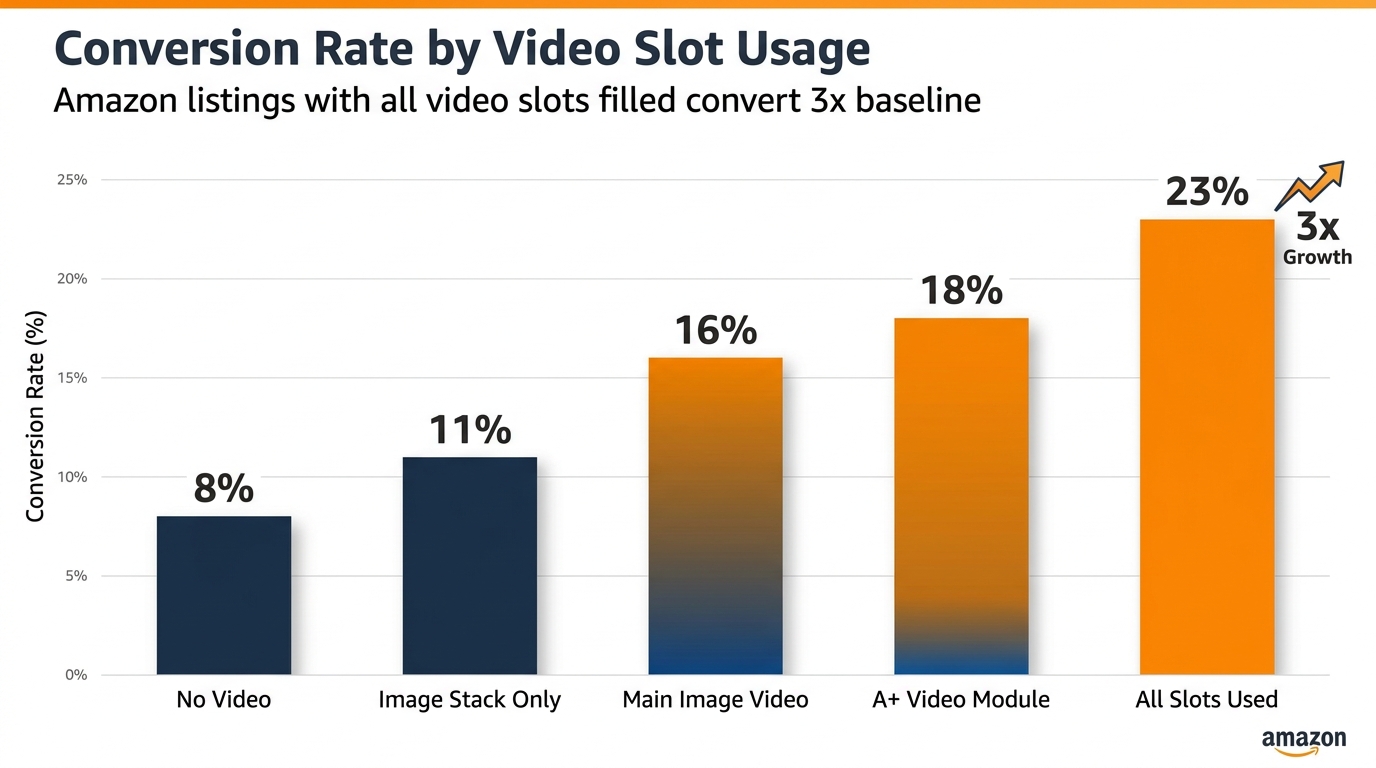
Amazon’s video ecosystem in 2026 is substantially more sophisticated than most sellers’ approach to it. The gap between sellers who upload one video and sellers who deploy a deliberate, slot-specific video strategy across their top ASINs is measurable in conversion rates, organic ranking positions, and return rates — and it’s a gap that’s widening as category competition intensifies.
The sellers winning with video aren’t winning because they have higher production budgets. They’re winning because they understand that each slot on Amazon’s product page represents a different moment in the buyer’s decision process, and they’ve matched the right content to each moment.
Here are the core takeaways to act on:
- Identify your highest-traffic ASINs and audit their video coverage — how many of the available slots are currently used, and what’s in them?
- Produce a main image video for your top five ASINs first, following the 6-second rule and keeping total length under 25 seconds.
- Map your most common customer objections and create one targeted image stack video for each, deployed on your top-revenue listings.
- Check your Premium A+ eligibility — if you have Brand Registry and the requisite A+ approvals, you’re leaving video module real estate unused if you haven’t built Premium A+ layouts.
- Separate your video measurement by slot — Sponsored Brands Video CTR and listing video unit session rate are different metrics serving different objectives, and blending them obscures what’s working.
- Review and refresh videos on a quarterly basis — evergreen production extends the lifespan, but the content should still be reviewed against what buyers are currently asking and what competitors are currently doing.
- Run MYE experiments on your main image videos if you have sufficient traffic — there’s no better way to determine which video structure converts better than a real A/B test against live traffic.
Video integration on Amazon is not a feature to check off a list. It’s an ongoing content strategy with multiple layers, each contributing in a distinct way to how shoppers find, evaluate, and ultimately choose your products. Build it deliberately, measure it rigorously, and treat it as a living part of your listing — not a one-time production task.