Tag: AI Image Optimization

  • How to Work Inside Amazon’s AI Image Rules — and Actually Win

    How to Work Inside Amazon’s AI Image Rules — and Actually Win

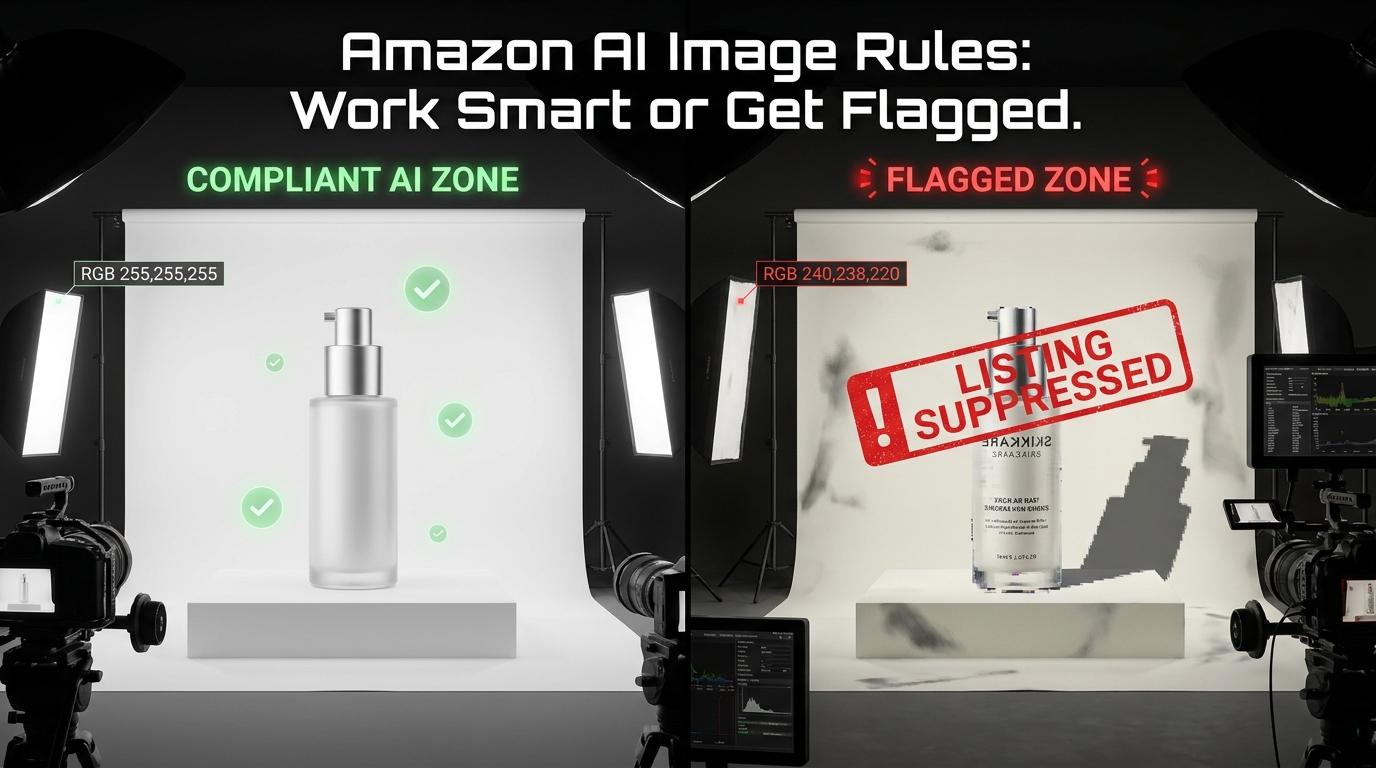
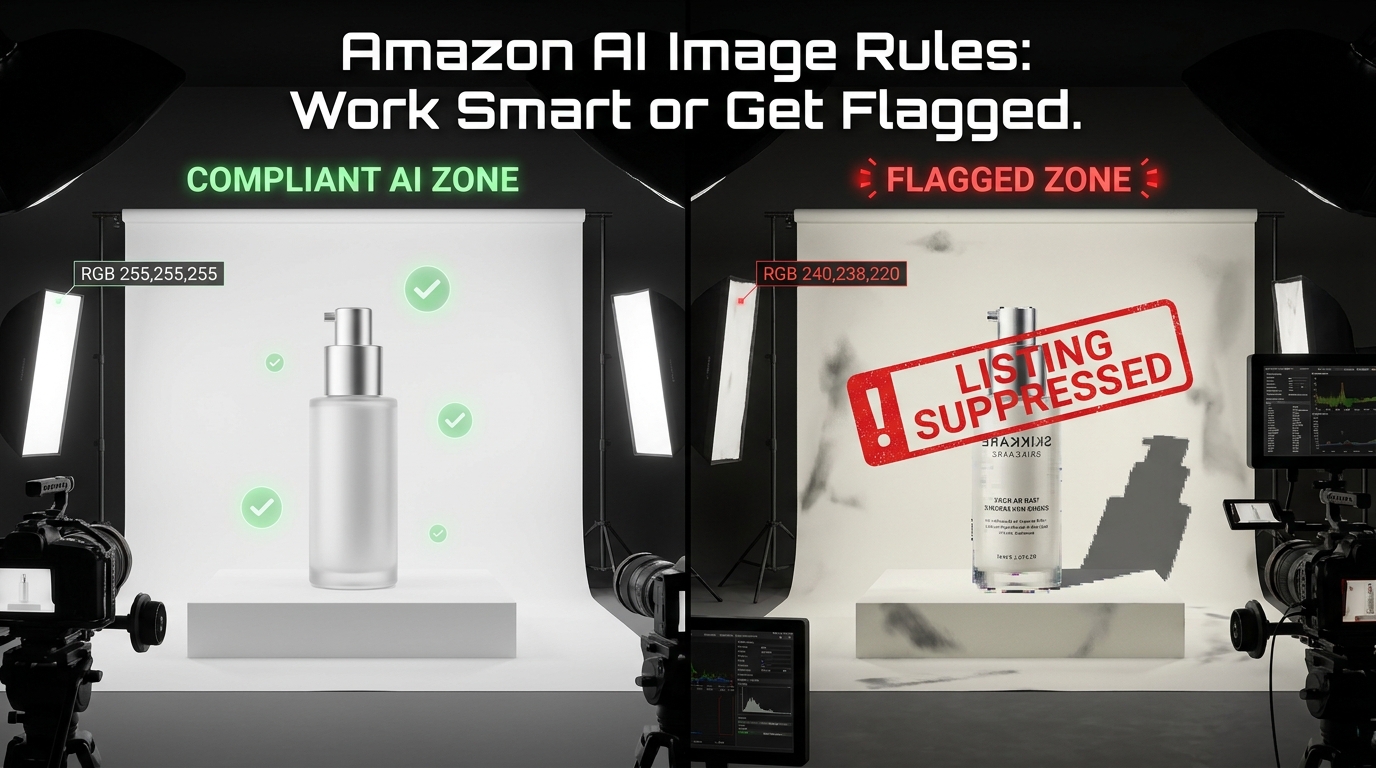
    Split-view showing compliant AI image zone versus flagged listing zone with suppression warning overlay for Amazon sellers

    Amazon’s AI image rules aren’t complicated. They’re available in writing, summarized by a thousand seller blogs, and reinforced by category-specific style guides that have existed for years. And yet listings still get flagged every single day — not because sellers don’t know the rules, but because they don’t have a system that applies the rules consistently at every stage of the image production pipeline.

    That’s the distinction almost every guide on this topic misses. Knowing a rule and operationalizing it are completely different problems. A seller can recite Amazon’s image requirements verbatim and still push a suppressed ASIN live, because the issue isn’t knowledge — it’s the gap between knowing and doing under the real-world pressures of a fast-moving catalog.

    This post is not about what the rules say. It’s about how to build the workflow intelligence that makes compliance automatic — where flags become rare events rather than routine recoveries. We’ll cover how to allocate AI usage across image types, what specifically triggers Amazon’s automated scanning systems, how to stress-test images before submission, and how to use Amazon’s own tools in a way that’s both compliant and genuinely performant.

    If you’re already familiar with Amazon’s policies and you’re still getting burned, this is the post for you. The goal isn’t to survive Amazon’s enforcement — it’s to make compliance your production standard so that enforcement is never a factor.

    The Three-Tier Image Framework: Where AI Can and Cannot Touch Your Listing
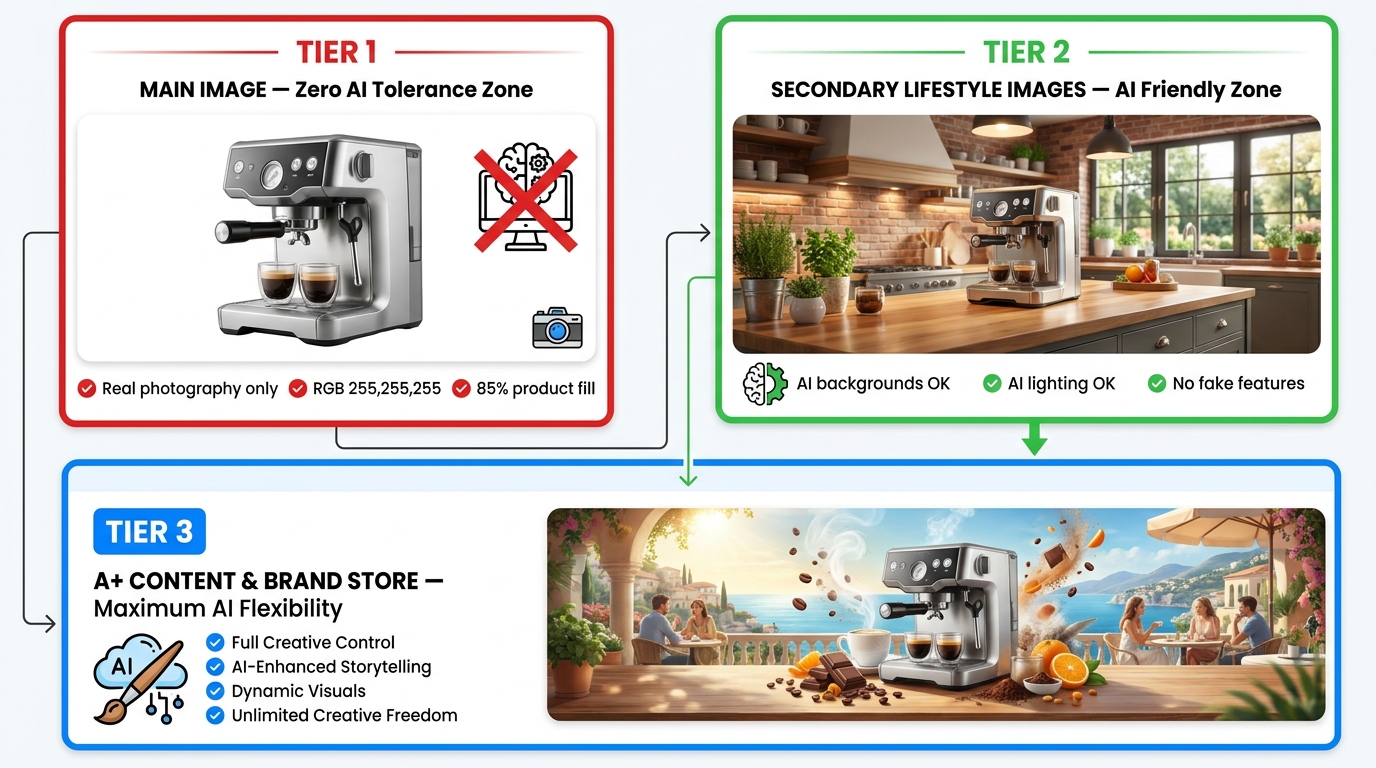
    Three-tier Amazon listing image hierarchy showing main image zone, secondary lifestyle image zone, and A+ content zone with compliance rules for each tier

    The first operational decision every seller needs to make — before touching any AI tool — is understanding that Amazon’s listing doesn’t have one image standard. It has three distinct image zones, each with its own risk profile, compliance ceiling, and AI-use rules. Treating them as uniform is where most multi-image catalog problems originate.

    Tier 1: The Main Image — A Near-Zero AI Tolerance Zone

    The main image slot is the strictest position in any Amazon listing. Amazon’s requirements here are well-documented and tightly enforced: pure white background (RGB 255,255,255 — not near-white, not off-white, not a 97% white that “looks the same”), product filling at minimum 85% of the image frame, no props, no additional items not included in the purchase, no text overlays, no logos, no watermarks. Resolution minimum is 1,000 pixels on the longest side, but most experts now recommend 2,000px as a practical floor given zoom functionality and future-proofing against re-spec changes.

    AI’s role in Tier 1 is almost entirely limited to post-processing cleanup — and even then, cautiously. Background removal tools and AI-powered background replacement to pure white are commonly used and generally fine, provided the output is pixel-verified and not gradient-edged. Where sellers get into trouble is using AI image generators to create the main image entirely from scratch. An AI-generated product rendering, however photorealistic, is not a photograph, and Amazon’s enforcement systems — which now incorporate ML-based artifact detection — are increasingly able to identify renders vs. real photography, particularly on hero shots where lighting consistency and shadow physics are readily compared.

    The practical rule for Tier 1: photograph the physical product, then use AI for cleanup only. Any AI that touches the product itself — its shape, color, scale, or implied features — is a compliance risk.

    Tier 2: Secondary/Lifestyle Images — The AI-Friendly Zone (With Boundaries)

    This is where AI earns its place in a seller’s workflow. Images 2 through 9 in the standard listing carousel are subject to much more lenient standards. Amazon’s core requirement for these slots is accuracy — that the images don’t misrepresent what the product is, what’s included, or what the product can do. Within that constraint, AI-generated backgrounds, environments, lifestyle scenes, and visual enhancements are broadly permitted.

    In practice, this means you can use AI to place your product in a kitchen, on a hiking trail, in a premium hotel bathroom, or on a café table — as long as the product itself is accurately rendered and the context doesn’t imply functionality the product doesn’t have. You can use AI to adjust lighting, improve scene quality, add models, and create seasonal variants. This is where most of the performance gains from AI imagery are realized, and it’s where Amazon’s own tools (covered in detail below) are explicitly designed to operate.

    Tier 3: A+ Content and Brand Store — Maximum Creative Latitude

    At the A+ Content and Brand Store level, Amazon’s creative latitude is at its widest. Here, sellers and brand-registered vendors can use AI-generated imagery, banner compositions, infographic overlays, comparison charts, and environmental scenes with relatively few restrictions beyond the core “not misleading” standard. The focus shifts from product-accurate photography to brand storytelling and conversion-focused content design.

    Critically, the AI-detection enforcement that operates on listing images is significantly less aggressive in A+ Content, where compositional complexity makes automated artifact detection harder. That said, the “accuracy” principle still applies: you cannot use A+ Content images to claim a product feature that doesn’t exist or to imply inclusion of items not sold with the product.

    The Specific AI Artifacts That Trigger Amazon’s Automated Scanners
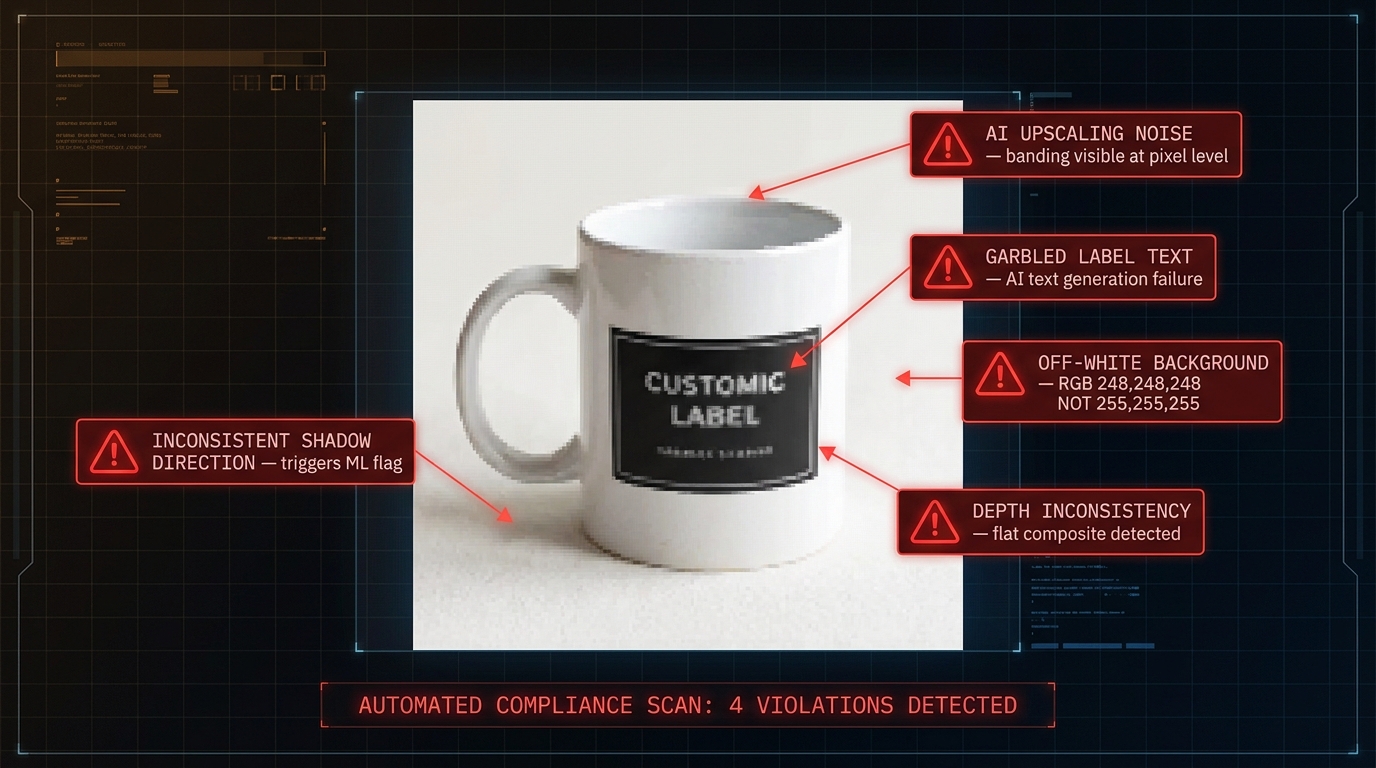
    Technical diagnostic view showing annotated AI image artifacts that trigger Amazon automated compliance scanning — shadow inconsistency, off-white background, garbled text, and upscaling noise

    Understanding what Amazon’s automated systems are looking for is the most direct path to understanding what not to do. Amazon deploys ML-based image scanning across its catalog, and the signals that trigger automated suppression or manual review flags fall into several well-documented categories.

    Background Compliance Signals

    The most common automated flag on main images is background non-compliance. Amazon’s system doesn’t evaluate background color visually — it runs pixel-level analysis. An image that looks white to the human eye can register as RGB 250,250,250 or lower, and that delta is detectable and actionable. When AI background replacement tools process a product image, they commonly leave “fringe” pixels around the product edge that transition from the original background to white — this gradient zone is a reliable suppression trigger. The fix is not “make it look whiter.” The fix is pixel-sampling the final export to confirm every non-product pixel reads 255,255,255.

    AI image upscaling is a specific sub-problem here. Many sellers use AI upscalers to meet Amazon’s resolution requirements on images that were originally photographed at lower resolution. These tools frequently introduce compression-style banding or noise, particularly in flat background areas, that creates measurable deviation from the pure white standard. If you’re upscaling, verify the background explicitly — don’t assume the tool handled it correctly.

    Shadow and Lighting Inconsistency

    Amazon’s ML systems are trained to detect lighting inconsistencies that signal composite imagery — specifically, cases where a product has been photographed in one lighting environment and placed into a different one without correcting the shadow direction, intensity, or color temperature. This is common when AI tools auto-place products into lifestyle backgrounds and the product shadow doesn’t match the scene’s apparent light source.

    For secondary lifestyle images this generally won’t cause suppression, but it will degrade the visual credibility of the image in ways that affect conversion rates. For main images, a composite where shadows suggest the product was photographed under studio lighting but the background is a lifestyle scene is an almost certain flag. The rule of thumb: match shadow direction and soft/hard quality to the scene’s light source, or remove product shadows entirely in clean composites.

    AI-Generated Text and Label Artifacts

    Current AI image generation tools have a well-known weakness with text — rendered product labels, instruction text, brand names, and ingredient lists frequently contain garbled, nonsensical, or malformed characters that are visually obvious at zoom levels. Amazon’s systems scan for text consistency and legibility in product images, and garbled on-image text is both a suppression signal and a customer-experience flag.

    The operational fix is to never rely on AI generators to produce readable product label text. Generate the scene without legible label detail, then composite the real product label on top as a post-processing step. Alternatively, shoot the product physically and use AI only for environmental generation, compositing the physical shot into the AI-generated scene. This hybrid approach is the current best practice for AI-enhanced product imagery and eliminates the text artifact problem at source.

    Depth and Scale Inconsistency

    AI-generated lifestyle scenes frequently produce products that appear visually “pasted” — the scaling relative to scene elements is off, the perspective doesn’t match, or the depth of field blur gradient doesn’t align with where the product sits in the apparent scene depth. These signals are softer than background or text issues in terms of automated enforcement, but they register in Amazon’s image quality scoring systems, and more importantly they register with shoppers in ways that reliably reduce CTR and conversion.

    Amazon’s Own AI Tools vs. Third-Party Generators: The Compliance Risk Is Not Equal
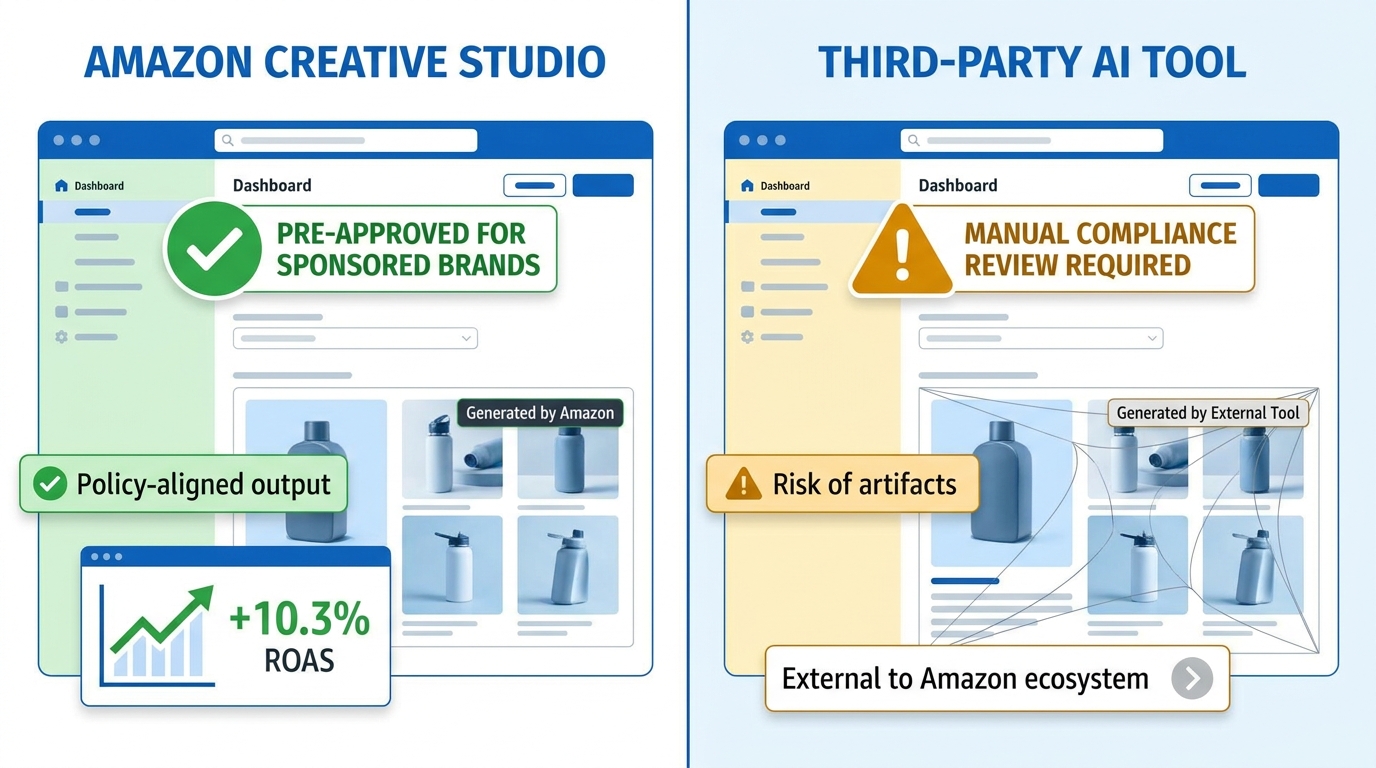
    Side-by-side comparison dashboard of Amazon Creative Studio versus third-party AI image generator showing compliance risk, ROAS data, and policy alignment differences

    This is a point that gets surprisingly little attention in the seller community: where your AI-generated images come from matters for compliance purposes, not just quality purposes. Using Amazon’s own AI image tools creates a fundamentally different compliance profile than using external third-party generators.

    Amazon Creative Studio and the Built-In Policy Alignment Advantage

    Amazon’s own image generation tools — accessed via Creative Studio, the Ads console, Sponsored Brands creative flows, and the DSP Responsive eCommerce Creative (REC) system — are built within Amazon’s own policy framework. They generate images from product detail page data, meaning the product representation comes from your existing listing content rather than a generic AI prompt. The scenes they produce are filtered through Amazon’s own compliance guidelines at the generation layer, not the review layer.

    Amazon’s internal performance data on these tools is notable: Sponsored Brands campaigns using AI-generated lifestyle images from Creative Studio have shown approximately 10.3% higher ROAS compared to campaigns using standard product-only images, according to Amazon Ads materials. Mobile Sponsored Brands placements using AI-generated creative have shown CTR improvements of up to 40% in some Amazon-reported beta data. These numbers come from Amazon’s own systems and should be read as directionally informative rather than universally guaranteed — your category, price point, and creative quality all affect outcomes — but the direction of the signal is consistent.

    More importantly for the compliance discussion: images generated within Amazon’s own Creative Studio are pre-screened against Amazon’s policies before they’re available for use. You are significantly less likely to face an automated flag on a Creative Studio output than on an identical-looking image generated in an external tool, because the output came from a system Amazon controls and trusts.

    Third-Party AI Generators: Performance Potential, Compliance Responsibility

    External tools — Midjourney, DALL-E, Stable Diffusion, and dozens of purpose-built product photography AI platforms — offer wider creative latitude, more photorealistic outputs for many product types, and more scene variety than Amazon’s native tools. For sellers who invest in learning these tools deeply, the creative output is often significantly higher quality than what Creative Studio currently produces.

    The trade-off is that compliance responsibility sits entirely with you. Amazon’s automated systems have no knowledge of what tool produced an image — they evaluate the output against policy standards, and they do so without preferential treatment for any external vendor. The artifact risks described in the previous section are entirely your problem to catch. The solution isn’t to avoid third-party tools — it’s to build a robust pre-submission QA process that catches what Amazon’s systems will catch, before you submit.

    A Practical Hybrid Framework

    The most effective approach for brand-registered sellers is a split workflow. Use Amazon’s native Creative Studio for advertising creatives and Sponsored Brands images, where the built-in compliance assurance and direct performance data make it a clear default choice. Use third-party AI tools for secondary listing images, A+ Content, and Brand Store assets, where creative quality matters more and compliance risk is lower. Reserve traditional photography for all main images, with AI used only for post-processing background work and color correction — never for primary product rendering.

    The Secondary Image Opportunity: Where AI Has Almost No Limits

    If the main image is where AI goes to die, the secondary image carousel is where it genuinely performs. The eight available secondary image slots on a standard Amazon listing are chronically underused by most sellers — and the ones who invest in them seriously, particularly with AI-enhanced lifestyle content, see measurable conversion rate improvements that compound directly into organic ranking and paid advertising efficiency.

    What Converts in Secondary Images

    Research and seller-community data consistently point to the same secondary image patterns that convert: contextual use scenes showing the product in its natural environment, scale reference shots that help shoppers understand size, feature callout images that highlight specific product attributes with clean visual annotation, and lifestyle images showing the product with an aspirational or relatable user.

    AI is particularly effective at contextual use scenes, because these are environments that would be expensive and logistically complex to shoot physically. A camping lantern shown in a forest clearing at dusk, a kitchen appliance shown in a premium modern kitchen, a skincare product shown in a spa-like bathroom — these scenes cost thousands of dollars to stage and shoot physically but can be generated and iterated in minutes with AI tools. The compliance check is simply: does the product in the image accurately represent the product being sold, with no features, colorways, or bundled items that aren’t real?

    Feature Callout Images and Infographic Overlays

    One of the most underappreciated uses of AI in secondary images is not generating entire scenes but generating clean backgrounds and layouts for feature callout images. An AI-generated white or gradient background with your real product photograph composited onto it, combined with clean typographic callouts highlighting key features, is one of the highest-converting secondary image formats on Amazon — and it’s entirely compliant, because the image is transparently informational rather than representational.

    The compliance boundary to watch: feature callouts must be accurate. If a callout says “antimicrobial coating” and the product doesn’t have one, that’s not an AI compliance issue — it’s a broader misrepresentation issue that falls under Amazon’s customer-trust policies and can result in far more serious consequences than an image flag.

    Comparison and Size Reference Images

    AI can generate comparison imagery that helps shoppers make purchase decisions — size comparison against a common object (a coin, a hand, a standard item), before/after effect imagery for consumables, and product variant comparisons showing colorway or size differences. These formats perform particularly well in categories where size misjudgment is a common return driver. Generating these with AI rather than staging them physically saves significant production cost while improving listing quality in one of the highest-ROI secondary image formats.

    The Main Image Problem: Why AI Enhancement Often Backfires on Hero Shots

    Given the performance stakes of the main image — it’s the most direct driver of search result CTR, which is the most direct driver of organic ranking velocity — it’s worth addressing in detail why AI enhancement of the main image so often creates more problems than it solves.

    The False Economy of AI Background Removal

    AI background removal tools are reliable enough that many sellers use them as a default step in main image processing. For simple products with clean contours — a book, a box, a bottle — they work well. For products with complex edges — textured surfaces, transparent elements, mesh materials, hair, fur, multiple interlocking components — AI background removal consistently produces visible fringe artifacts, edge halos, and missing product detail that is clearly visible at the zoom levels Amazon shoppers regularly use.

    The false economy is this: running a product image through an AI background remover feels like a QA step, but it actually introduces compliance risk that didn’t exist before. A product photographed on a slightly-off-white physical backdrop, processed through a poor AI background removal that leaves artifact fringe, will perform worse and face higher suppression risk than the original image with the “wrong” background color. If you’re going to use AI for background work on main images, invest in pixel-level output verification — specifically, eyedropper-sampling the exported image at multiple background points to confirm RGB 255,255,255. Don’t eyeball it.

    The Upscaling Trap

    AI upscaling to meet Amazon’s resolution requirements is another common source of hidden compliance problems. The upscaling itself is generally fine — AI super-resolution tools do an excellent job of enhancing perceived sharpness and recovering detail. The problem is what they do to flat background areas. Where a plain white background in a lower-resolution image is genuinely flat (all pixels at 255,255,255), an AI upscaler interpolates between pixels and can introduce subtle variation in what was previously a uniform surface. The result is a high-resolution image that passes visual inspection but fails a pixel-level background uniformity check.

    The fix is to run background replacement after upscaling, not before. Upscale the image, then apply background replacement to the upscaled version, then verify RGB. This order of operations prevents the upscaling step from contaminating the background compliance.

    When Real Photography Is Non-Negotiable

    There are product categories where AI image generation for main images simply cannot produce reliable compliance-safe output in 2026: jewelry (where metal finish, gemstone color, and scale are all high-stakes and easily misrepresented by AI rendering), clothing and apparel (where texture, drape, and fit under real-world light are critical and AI consistently misrepresents them), and complex electronics (where label text, port layouts, and indicator light positions are product-specific details that AI cannot reliably replicate). In these categories, the main image must be a physical photograph. AI belongs in the supporting role, not the principal one.

    Pre-Submission QA: The 11-Point Process That Catches Issues Before Amazon Does
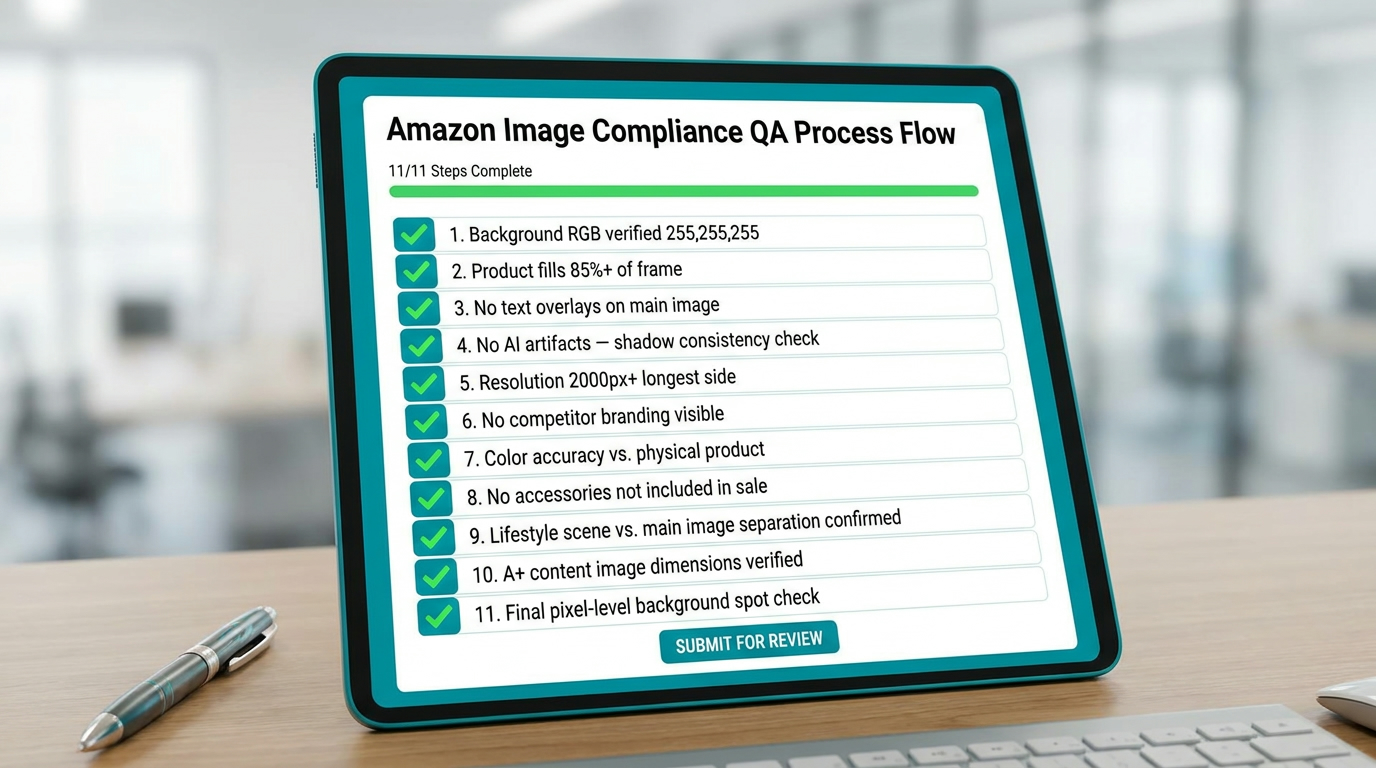
    11-step Amazon image compliance pre-submission QA checklist on a digital tablet interface with checkboxes and green verification marks

    The most cost-effective investment in avoiding listing suppression is a pre-submission QA process that systematically checks every compliance variable before an image ever reaches Amazon’s servers. What follows is a practical, step-by-step process that any seller or agency can implement — with tool suggestions where applicable.

    Step 1: Background RGB Verification

    Open the final image export in any image editing tool (Photoshop, GIMP, Canva Pro all work). Use the eyedropper or color picker tool to sample at least five background points: four corners and the center. Every point must read R:255, G:255, B:255. One failing sample means the image needs reprocessing before submission.

    Step 2: Product Fill Percentage Estimate

    The product should occupy approximately 85% or more of the image frame. A quick way to estimate: if the product has clear space of more than roughly 7–8% of the image width on each side, it may be undersized. For compliance-critical catalogs, some sellers use a simple grid overlay in Photoshop to measure this precisely.

    Step 3: Text and Overlay Check

    Main images cannot contain any text overlays, watermarks, logos (other than on the physical product itself), badges, “new,” “sale,” or promotional indicators, or foreign-language text. Scan the image carefully — AI-generated images sometimes include environmental text (a street sign in the background, text on a surface) that isn’t intentional but will trigger an overlay flag.

    Step 4: Shadow Consistency Analysis

    Identify the apparent light source direction from the product shadows. Confirm that the shadow direction, softness, and length are consistent with a single light source. Multiple competing shadow directions are an AI composite indicator.

    Step 5: Product Label and Text Legibility

    Zoom in on any text visible on the product — label copy, instruction text, brand name, ingredient lists, warning text. Every character must be legible and match the physical product. If AI-generated imagery produced this text area, it almost certainly needs to be replaced with a composited version from the real product.

    Step 6: Resolution Confirmation

    Check the pixel dimensions of the export. Minimum 1,000px on the longest side for listing; aim for 2,000px or higher for main images to enable full zoom functionality. JPEG export quality should be at 80%+ to avoid compression artifacts in background areas.

    Step 7: Color Accuracy Check Against Physical Product

    Place the digital image next to the physical product (or next to a color-accurate photograph of the physical product) and compare. AI-generated imagery can subtly shift color tones, especially in lighting conditions that don’t match the product’s actual surface properties. A blue product rendered 10% more saturated than it really is will generate returns and negative reviews from customers who feel misled.

    Step 8: Included Items Verification

    Every item visible in the image must be included in the purchase, or clearly labeled as a prop not included. This is an easy mistake in AI lifestyle imagery where a generated scene might include a complementary product (a glass next to a blender, a phone next to a charging stand) that isn’t part of the bundle. Amazon’s policies treat this as a misrepresentation of what the customer receives, and complaints generate flags faster than automated systems do.

    Step 9: Lifestyle vs. Main Image Slot Verification

    Confirm the right image type is in the right slot. A lifestyle image with a non-white background in the main image position will trigger an automated suppression. Double-check image slot assignments before batch uploading — this is one of the most common and most preventable suppression causes.

    Step 10: A+ Content Dimension Verification

    A+ Content images have specific dimension requirements that differ from listing images. Amazon will reject or auto-crop A+ images that don’t meet its module-specific size specs. Verify dimensions against the current A+ Content module requirements before uploading, particularly if images were generated for a different format and adapted.

    Step 11: Pixel-Level Background Spot Check on Final Export

    This is a repeat of Step 1 performed specifically on the final-format export — the actual file you’ll upload, not the working file. Color profiles can shift on export, particularly between RGB and sRGB, and what reads as 255,255,255 in your working file can sometimes shift on export if the color profile isn’t properly managed. Save in sRGB, export as JPEG, sample the background of the exported file before uploading.

    Testing Your Images Without Risking Suppression: Smart Experimentation on Amazon

    Image optimization is an ongoing process, not a one-time task. The sellers who extract maximum performance from their listings treat image selection as a testable hypothesis — not an opinion — and run structured experiments to identify which visuals drive better CTR and conversion. Doing this safely and compliantly requires understanding the testing infrastructure Amazon provides and where its limits are.

    Manage Your Experiments: The Compliant Testing Ground

    Amazon’s Manage Your Experiments (MYE) tool, available to Brand Registry sellers, is the only fully Amazon-sanctioned method for A/B testing listing content including images. The tool runs a 50/50 traffic split between two versions of a listing element — main image, title, bullet points, A+ Content — and runs until statistical significance is reached at approximately the 95% confidence level. Standard test duration ranges from 4 to 10 weeks depending on traffic volume.

    The MYE tool matters for compliance because images in an active experiment are explicitly covered under Amazon’s testing framework, meaning you’re not at risk of suppression for having a non-standard variant in test during the experiment period. However, this protection applies to the testing framework, not to images that violate hard policy rules — an image with a non-white background will still get flagged even inside an experiment.

    What to Test and How to Structure Hypotheses

    The most valuable image tests follow a principle of genuine differentiation — testing fundamentally different visual concepts rather than minor iterations of the same idea. Testing a studio shot with white background vs. the same photo with a slight vignette is not a meaningful test. Testing a pure product shot vs. a product-in-use contextual shot is a meaningful test that generates learnable signal about how your audience makes purchase decisions.

    Common high-ROI test structures: main image hero angle vs. three-quarter angle, product-only vs. product-with-scale-reference, single-product vs. multi-unit value proposition, studio lighting vs. natural light aesthetic. Each of these tests a different hypothesis about buyer psychology and generates results that are applicable across your catalog, not just the ASIN under test.

    Using Advertising Data as an Image Pre-Test

    Before committing to a full MYE test cycle, many experienced sellers use Sponsored Products and Sponsored Brands advertising data as a faster, lower-commitment signal on image quality. By running two separate campaigns with identical targeting but different image creatives, you can get directional CTR signal in 7–14 days rather than the 4–10 weeks required for a full MYE test. The data isn’t as clean — ad context differs from organic listing context — but it’s significantly faster for filtering out clearly underperforming images before they consume a full experiment cycle.

    When You Do Get Flagged: A Practical Recovery Protocol
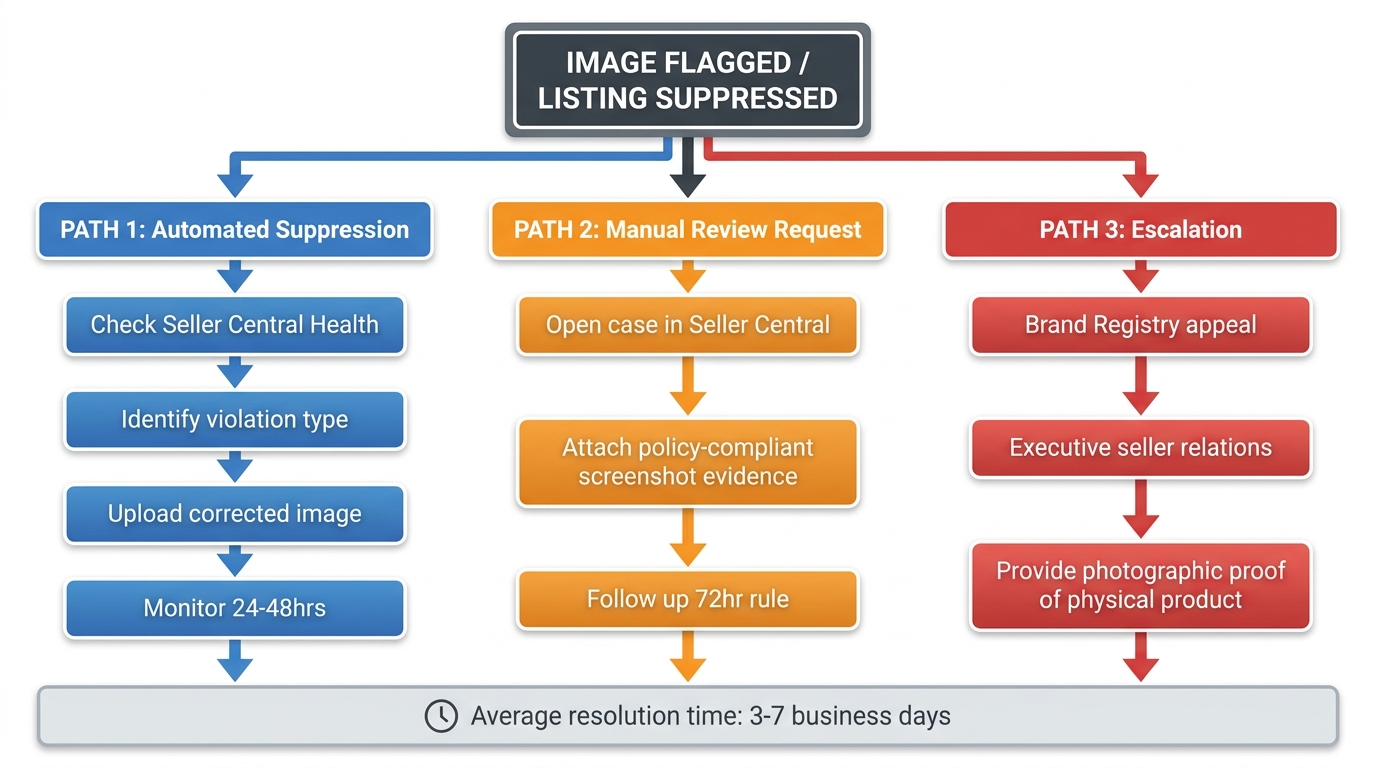
    Amazon listing suppression recovery flowchart showing three parallel paths: automated suppression, manual review request, and escalation with step-by-step resolution process

    Despite best efforts, image flags happen. When they do, the speed and quality of your response determines how much revenue impact you take. The sellers who handle suppression most effectively are those who have a documented recovery protocol ready to execute — not those who start troubleshooting from scratch every time.

    Step 1: Diagnose Before You Act

    The first action when a suppression notice appears is diagnosis, not immediate re-upload. Amazon’s suppression notices often specify the violation type — background non-compliance, prohibited content, resolution failure, missing image requirement. Read the notice carefully before doing anything else. Acting on incorrect assumptions about what was flagged (and uploading a “fix” that doesn’t address the actual violation) extends the suppression and wastes the case-opening window.

    Access your Account Health dashboard in Seller Central and cross-reference the suppression notice with the specific ASIN and image slot affected. Identify whether the suppression is automated (immediate, policy-rule-based) or manual (involves a human review and is usually accompanied by more specific language). These require different response paths.

    Step 2: Prepare and Upload the Corrected Image

    Once the violation type is confirmed, prepare a corrected image that definitively addresses it — ideally using a physically photographed product image for main image violations to eliminate any residual AI artifact risk. Run the corrected image through your full pre-submission QA checklist before uploading. Uploading a corrected image that has a different compliance issue is a common and costly mistake that extends resolution time significantly.

    For automated suppression of main images, uploading a compliant replacement is often sufficient to trigger automatic reinstatement within 24–48 hours. Amazon’s systems re-scan uploaded images against compliance criteria, and a clean upload resolves the vast majority of automated flags without further intervention needed.

    Step 3: Open a Seller Central Case When Automated Resolution Stalls

    If a compliant replacement image doesn’t resolve the suppression within 48 hours, open a Seller Support case. The case should include: the specific ASIN, the image slot affected, a screenshot of the suppression notice, and explicit confirmation of what you’ve done to address the cited violation. Be precise and factual — Seller Support cases resolved via vague descriptions take significantly longer than cases with specific, documented evidence.

    If the suppression involves a Brand Registry listing, use the Brand Registry support channel rather than standard Seller Support. Brand Registry cases are typically handled by a more specialized support team and resolve faster for image compliance issues.

    Step 4: Escalation for Complex Cases

    For suppressions that persist beyond 5–7 business days despite compliant image uploads and active support cases, escalation options include Brand Registry executive seller relations, Amazon Vendor Central pathways for hybrid sellers, and for high-volume sellers, escalation via an Amazon Account Manager if one is assigned to the account. Escalation cases require physical product evidence — photographs or videos of the actual product demonstrating the compliance of the re-submitted image — so have this documentation ready before escalating.

    Category-Specific Nuances: One Policy, Many Interpretations

    Amazon’s image policies are written as universal standards, but their enforcement and practical interpretation vary meaningfully by product category. Understanding these category-specific nuances prevents sellers from applying a one-size-fits-all approach that may be unnecessarily restrictive in some contexts and dangerously loose in others.

    Apparel and Softlines

    Apparel has among the strictest main image requirements of any Amazon category, with additional rules around product presentation on models vs. flat-lay vs. ghost mannequin formats. Amazon’s category style guide for apparel specifies which product types require a model, which may use flat-lay presentation, and size requirements for model photography. AI-enhanced apparel photography carries high risk — fabric texture, drape, and fit under real lighting conditions are almost always misrepresented by AI rendering, and the return rate signal from misrepresented apparel is a category-level metric Amazon monitors closely.

    Health and Beauty

    The Health and Beauty category has heightened sensitivity around before/after imagery, result claims in images, and anything that implies medical benefit. AI-generated imagery in this category that includes a “before/after” comparison showing health or beauty results will be flagged for claims review independent of technical compliance. Secondary images in H&B need to be particularly clean on the “accuracy” dimension — anything that implies a clinical or medical outcome needs to be supported by the product’s actual claims and Amazon’s health claims policy.

    Consumables and Grocery

    Grocery and consumables ASINs are subject to close scrutiny on serving size representation, portion accuracy, and packaging claims. AI-generated imagery that shows a serving or portion that doesn’t accurately represent the product’s actual content per package will generate customer complaints that escalate to catalog-level reviews. This category is also subject to stricter label legibility standards, since incorrect nutritional or ingredient information in product images carries regulatory risk beyond Amazon’s internal policies.

    Home and Furniture

    Furniture and large home goods are a category where AI lifestyle imagery is particularly well-suited — the scale and staging costs of physical furniture photography are enormous, and AI-generated room scenes are both more practical and often higher quality than physical staging. The compliance watch point in this category is scale accuracy — furniture product images must represent the actual dimensions of the product, and AI-generated room scenes frequently misrepresent furniture scale relative to the room, generating returns from customers whose pieces don’t fit the space they expected based on the image.

    Building Your Compliant AI Image Stack: Tools, Workflow, and Team Roles

    Pulling together everything covered in this post into a functioning workflow requires both the right tools and clearly defined team roles. The sellers and agencies who execute this consistently well are those who’ve turned what could be ad-hoc creative decisions into a documented, repeatable production system.

    The Recommended Toolchain

    Photography: Physical photography remains the foundation for main images across all categories. Smartphone photography at 4K resolution with a proper light box and white backdrop is sufficient for most product categories — you don’t need a professional studio if you have adequate light control and a stable setup.

    Background processing: For main image background removal and replacement, tools like Adobe Photoshop’s Remove Background, Canva Pro’s background removal, or dedicated tools like Pixelcut and Clipping Magic work well — but always follow with pixel-level RGB verification of the exported file.

    AI lifestyle scene generation: For secondary image lifestyle scenes, Amazon’s own Creative Studio is the recommended primary tool for advertising creatives. For listing secondary images, dedicated AI product photography platforms like Pebblely, Booth.ai, or StudioAI (purpose-built for e-commerce product photography) produce more reliable compliance-safe outputs than general-purpose generators like Midjourney or DALL-E, because they’re designed specifically for product imagery conventions.

    AI upscaling: Topaz Photo AI or Upscale.media for resolution enhancement when original photography is below 2,000px. Always re-verify background RGB after upscaling, not before.

    A+ Content design: Canva Pro or Adobe Express for A+ Content layout work, with AI-generated background scenes composited in from your preferred generator tool. These tools handle the dimension requirements and export profiles for A+ Content formats reliably.

    Team Roles and Decision Points

    In a small seller operation, a single person handles the entire image workflow. The risk there is that the same person who generates images also approves them, which eliminates the independent QA check that catches the compliance issues a creator naturally becomes blind to. Even in a one-person operation, build in a time-gap review — generate today, QA review tomorrow with fresh eyes.

    In larger operations, the workflow should have distinct roles: image production (generates and edits), compliance QA (applies the 11-point pre-submission checklist independently), and listing upload (responsible for correct slot assignment and final submission). This separation of concerns is what prevents the “I’ll fix it after” rationalization that precedes most preventable suppression events.

    Keeping Up With Policy Changes

    Amazon’s image policies evolve. Category style guides are updated, enforcement priorities shift, and new AI-detection capabilities get deployed. Build a quarterly review of Amazon’s category-specific style guides into your operational calendar — specifically the style guide for your primary categories, the Amazon Seller Central image standards page, and the Brand Registry image policy documentation if you’re brand-registered. This takes 30 minutes per quarter and prevents surprises that take days to fix.

    Compliance as a Competitive Moat, Not a Ceiling

    The most important reframe in this entire discussion is treating image compliance as a competitive advantage rather than a constraint. In a marketplace where a meaningful portion of sellers are operating with suppression risk baked into their daily workflow, the seller who has built a system that produces compliant, high-quality images consistently — without incident and without rework — has a structural operational advantage that compounds over time.

    The Compound Effect of Clean Operations

    Every suppression event costs revenue, ranking momentum, and operational attention. A listing that goes dark for 3–5 days while a suppression resolves loses sales velocity, loses organic ranking signal, and may lose paid advertising learning data in algorithm-driven campaigns. For high-velocity ASINs, even a 48-hour suppression can cost more in lost ranking recovery than a year’s worth of image QA investment would have prevented it.

    Conversely, a catalog that has never had an image suppression maintains cleaner account health metrics, builds a stronger relationship with Amazon’s systems, and faces less friction in Brand Registry reviews, A+ Content approval, and new product launch indexing. The seller who has built compliance into their production standard accumulates these small advantages invisibly — they never show up as a line item, but they compound into meaningful catalog-level performance over 12–24 months.

    The AI Opportunity That Compliant Sellers Capture

    Here is the final, practical point: the sellers who are most cautious about AI image rules are often those who haven’t built a production system clear enough to use AI safely. The sellers who embrace AI within a disciplined workflow — using it where it’s genuinely powerful (secondary images, A+ Content, advertising creatives), keeping it out of where it’s genuinely risky (main images without physical photography anchoring), and verifying output before submission — are not just staying compliant. They’re reducing production costs, increasing listing visual quality, running more creative tests, and improving conversion rates.

    Amazon’s AI image rules, read correctly, are not a constraint on AI use. They’re a constraint on careless AI use. The distinction matters enormously in practice. Build the workflow that turns them into a standard your entire catalog runs on reliably, and the rules stop being something you manage against and start being the system that generates your competitive advantage.

    Actionable Takeaways

    • Tier your AI usage explicitly: Define which image slots in your workflow can use AI generation, which require physical photography, and which can use AI post-processing only. Write this down and enforce it as a production standard, not a guideline.
    • Implement the 11-point QA checklist as a pre-submission requirement on every image. Build it into your workflow SOP so it happens consistently, not selectively.
    • Default to Amazon’s own Creative Studio for advertising creative images and Sponsored Brands. The compliance pre-screening and documented performance data (+10.3% ROAS, up to 40% higher mobile CTR) make it the lowest-risk, reliable-return choice for that specific use case.
    • Use AI aggressively in secondary images and A+ Content — this is where the creative upside lives, where enforcement is softer, and where production cost savings are most significant relative to traditional photography.
    • Build a suppression recovery protocol before you need it. Decide now who will handle a flag, what the first three actions are, and what documentation you’ll need. Having this ready reduces revenue loss per incident by days.
    • Review category style guides quarterly. Amazon’s enforcement priorities shift with minimal announcement. Staying current takes 30 minutes per quarter and prevents surprises that take days or weeks to fix.
    • Treat compliance clean-rate as a catalog KPI. Track suppression events per quarter as a proportion of your total ASIN count. A trend in the wrong direction signals a workflow problem — the fix is process, not policy knowledge.

  • Why Your Amazon Images Are Working Against You — And How AI Is Changing the Rules in 2026

    Why Your Amazon Images Are Working Against You — And How AI Is Changing the Rules in 2026

    Split-screen comparison of amateur vs. AI-optimized Amazon product photography showing CTR improvement from 0.4% to 2.1%

    Here is a fact that most Amazon sellers understand conceptually but fail to act on practically: the product image is not a supporting element of your listing — it is the listing, for the vast majority of shoppers who will decide whether to click within two seconds of seeing your thumbnail.

    And yet, in 2026, a surprising proportion of active Amazon sellers are still running images that were photographed years ago, never A/B tested, sized for desktop instead of mobile, and completely invisible to the AI systems that now mediate a significant portion of all product discovery on the platform.

    The gap between sellers who treat images as a box to check and sellers who treat them as a conversion engine is widening — fast. What changed? Three converging forces: Amazon’s own AI infrastructure now reads, scores, and ranks images algorithmically; generative AI tools have collapsed the cost and timeline of professional-quality image production; and buyer behavior has shifted so far toward mobile-first, scroll-heavy shopping that your image literally has less than three seconds and roughly 150×150 pixels to earn a click.

    This is not a post about making your listings look prettier. It is about understanding the precise technical, psychological, and algorithmic mechanics that determine whether your images drive revenue or drain ad spend. We will go slot by slot, tool by tool, and data point by data point.

    How Amazon’s AI Infrastructure Actually Reads Your Images

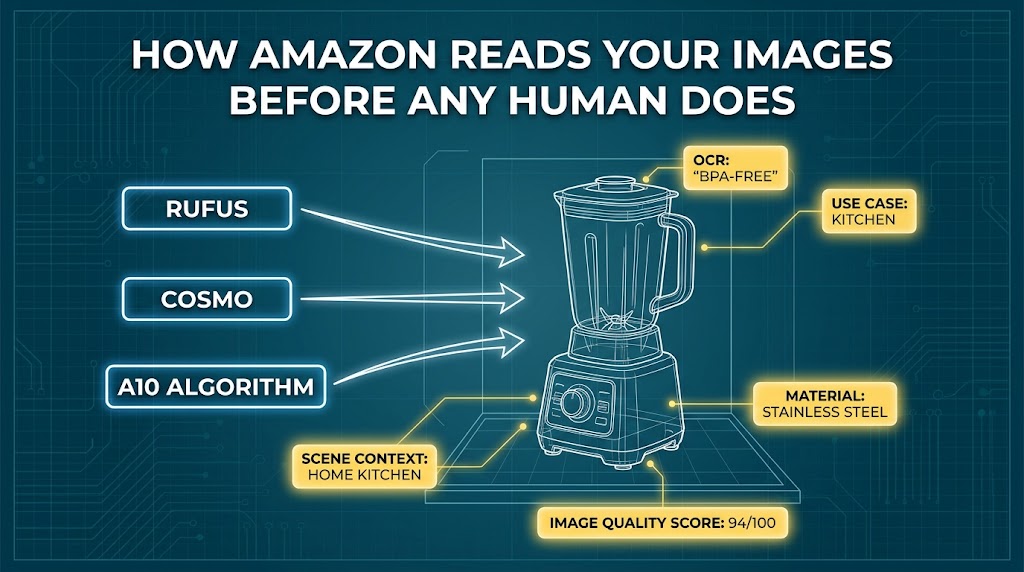
    Infographic showing how Amazon's Rufus, COSMO, and A10 algorithms analyze product images using computer vision and OCR

    Most conversations about Amazon image optimization focus entirely on human shoppers. What does the buyer see? What emotion does this image trigger? But in 2026, your images are being evaluated by at least three distinct AI systems before any human ever sets eyes on them — and those systems influence whether your listing gets surfaced in the first place.

    Rufus: Amazon’s Multimodal Shopping AI

    Amazon’s conversational shopping assistant, Rufus, is handling an estimated 15–20% of all mobile search queries on the platform as of Q1 2026, and that figure is growing quarterly. What many sellers do not appreciate is that Rufus does not just read your title and bullet points. It is a multimodal AI that processes your product images using computer vision and optical character recognition (OCR).

    Practically, this means: when a shopper asks Rufus “What’s a good blender for smoothies that won’t scratch my countertops?”, Rufus is scanning your secondary images for contextual cues. It can identify materials (stainless steel base, rubber feet), scene settings (kitchen counter, outdoor setting), and extract text from your infographic images — things like “BPA-Free,” “Dishwasher Safe,” or “1,200W Motor.” Listings whose images communicate these attributes clearly are more likely to be surfaced in Rufus recommendations.

    The implication is significant: your infographic text is not just buyer-facing copy. It is machine-readable product data. Sellers who are treating their image text overlays as decorative callouts are leaving discoverability on the table.

    COSMO and the A10 Algorithm

    Amazon’s COSMO (Common Sense Knowledge for E-commerce) model works alongside the A10 ranking algorithm to evaluate listing relevance and quality holistically. Amazon’s computer vision layer assigns what practitioners commonly refer to as an “image quality score” — an algorithmic assessment that accounts for resolution, background compliance, product fill ratio, color accuracy, and contextual relevance.

    This score is not publicly documented by Amazon, but its effects are well-documented in practice. Listings with non-compliant main images (backgrounds that are not a pure RGB 255,255,255 white, main images with text or props) face active search suppression. Those with lower technical quality scores see reduced visibility in visual search results, which has grown substantially as Amazon Lens (visual search via the app camera) gains adoption.

    Amazon Lens and Visual Search

    Amazon Lens allows shoppers to photograph a physical object and instantly surface matching products in the catalog. The matching process uses image embeddings — mathematical representations of shape, texture, color, and compositional features. High-resolution images (2,000×2,000 pixels or above) with sharp focus and accurate color representation score significantly higher in this matching process. In documented testing by Amazon Growth Lab, upgrading main image resolution to 2,000×2,000+ lifted CTR by 15–20% over lower-resolution equivalents for the same product.

    The takeaway for sellers: your images now need to satisfy two audiences simultaneously — the human shopper and the algorithmic infrastructure. In many cases, optimizing for the algorithm (higher resolution, cleaner backgrounds, richer contextual detail in secondary images) also improves human perception. But you have to be intentional about it.

    The Main Image: Thumbnail Psychology and the Three-Second Window

    If you distill the entire Amazon search experience to its most fundamental unit, it is this: a shopper sees a grid of thumbnails, and they click on one. Everything — your PPC spend, your organic rank, your review velocity — flows downstream from whether that one decision goes your way. The main image is the only thing you control in that moment.

    What “85% Product Fill” Actually Means

    Amazon’s technical guideline states that the product should fill at least 85% of the image frame on the main image. This is not arbitrary. At thumbnail scale — typically 150×150 to 200×200 pixels on a mobile device — a product that fills only 50% of the frame becomes visually indistinct. A competitor whose product fills 85% of the frame will appear larger, clearer, and more dominant in the same grid.

    Consider the math: on a 150×150 pixel thumbnail, a product filling 50% of the frame is rendered at roughly 75×75 effective pixels. A product filling 85% renders at approximately 127×127 pixels — nearly 3× the visual pixel area. That difference is the difference between a product that registers and one that gets scrolled past.

    Background Psychology: Why White Is Non-Negotiable

    Amazon’s requirement for a pure white background (RGB 255,255,255) on main images exists partly for consistency but also has a measurable psychological basis. White backgrounds eliminate visual noise that competes with the product, force the buyer’s eye directly onto the item, and create the visual “pop” that makes products look professional and trustworthy. Products photographed against off-white, gray, or lifestyle backgrounds in the main slot consistently underperform on CTR — and risk listing suppression.

    There is also a color contrast dynamic at play. Products with bold colors — red packaging, bright blue labels, high-contrast black and chrome — stand out more dramatically against white than against any other background. If your product’s color palette is naturally muted (beige, cream, taupe), this is where prop strategy, dramatic lighting angles, and packaging design choices matter significantly.

    The Angle Decision

    Product angle is one of the most undertested variables on Amazon main images, despite having outsized CTR impact. Angled shots (typically 15–30 degrees from horizontal) tend to outperform dead-front shots for most three-dimensional products because they communicate volume, depth, and dimensionality. One documented test by Amazon Growth Lab found that a 15-degree angle adjustment on a pair of eyewear lifted CTR from single digits to double digits over an eight-month tracking period.

    The right angle is category-dependent: flat products (books, supplements in pouches, pads) often perform better with top-down or slight elevation; boxed goods and appliances typically benefit from 3/4 angles. This is exactly the type of variable that systematic A/B testing surfaces — and that intuition alone rarely gets right.

    The Image Stack Architecture: Slot by Slot

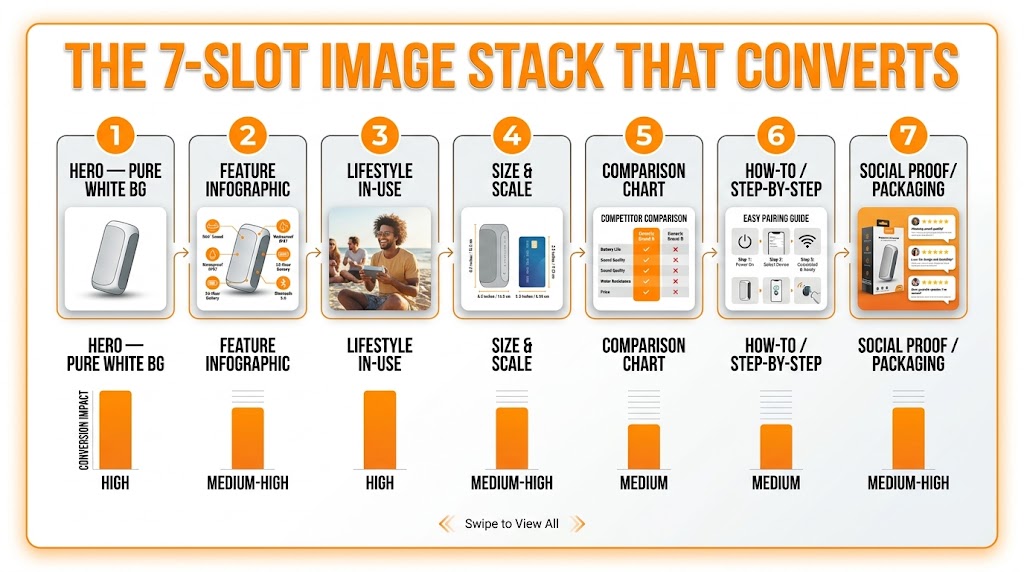
    Amazon 7-slot image stack diagram showing optimal sequence from hero white background through feature infographics, lifestyle, size comparison, and social proof

    The main image earns the click. The secondary image stack (slots 2 through 7, plus video) is responsible for earning the conversion. These are two entirely separate conversion tasks, and conflating them is one of the most common structural mistakes in Amazon image strategy.

    Eye-tracking research cited by Adverio indicates that 70% of Amazon shoppers view at least three secondary images before reading the bullet points. On mobile, where image carousels are the primary interaction interface, this rises to 80%+ of sessions where any engagement occurs. The image stack is often the entire sales argument — not a supplement to it.

    Slot 2: The Feature Infographic (The Hero Argument)

    Slot 2 is the most valuable secondary real estate on your listing. Most buyers who click through will see this image immediately after the main image as they begin swiping. This slot should deliver your single most compelling benefit claim — not a laundry list of features, but one clear, dominant statement backed by visual evidence.

    Think of slot 2 as the headline of your sales pitch. Examples that work: a supplement showing a key ingredient’s clinical dosage with a clean callout bubble; a camping tent showing its square footage with a human silhouette for scale reference; a skincare product showing before/after skin texture with the active ingredient prominently labeled. The job of slot 2 is to stop the swipe and create desire for more information.

    Slot 3: Lifestyle — Context and Aspiration

    Lifestyle images in secondary slots (2 through 7) are permitted under Amazon’s image guidelines, and they perform. Amazon’s own A/B testing data shows lifestyle images in secondary positions increase Add-to-Cart rates by 35% compared to listings with all-white secondary images. The psychological mechanism is straightforward: white background product shots tell buyers what the product is; lifestyle images tell buyers who they will be when they own it.

    The most effective lifestyle images are specific, not generic. A coffee grinder photographed on a marble counter next to a bag of single-origin beans performs better than the same grinder photographed in an ambiguous kitchen. A yoga mat photographed mid-session in a sun-lit home studio outperforms one propped against a wall. Specificity signals authenticity and helps buyers mentally place the product in their own context.

    Slot 4: Scale and Size Context

    Sizing confusion is one of the highest-frequency causes of return requests on Amazon. Slot 4 should almost always address scale and dimensions — either through a human reference point (a hand holding the product, a person using it), a ruler or tape measure overlay, or a side-by-side with a common reference object. A well-executed size context image does two things: it reduces the mental friction of purchase and preemptively resolves the most common objection your negative reviews likely already identify.

    Slots 5 Through 7: The Objection Handlers

    By the time a buyer reaches slots 5–7, they are seriously considering the purchase and are in due-diligence mode. These slots should directly address the questions that your 1-star and 2-star reviews most frequently raise. Comparison charts (with competitor categories, not specific competitor names — Amazon prohibits direct competitor references) belong here. Step-by-step usage instructions belong here. Ingredient panels, certification badges, compatibility guides, and packaging contents shots belong here.

    Listings with fully optimized 7-image stacks show 10–25% higher conversion rates compared to listings with 3 or fewer secondary images, according to internal Amazon data cited by EvolveAMZ. That is not a marginal difference. At scale, a 15% CVR improvement across a mid-size catalog is often the most significant lever a seller can pull without increasing ad spend.

    AI Image Generation Tools: What’s Actually Delivering Results in 2026

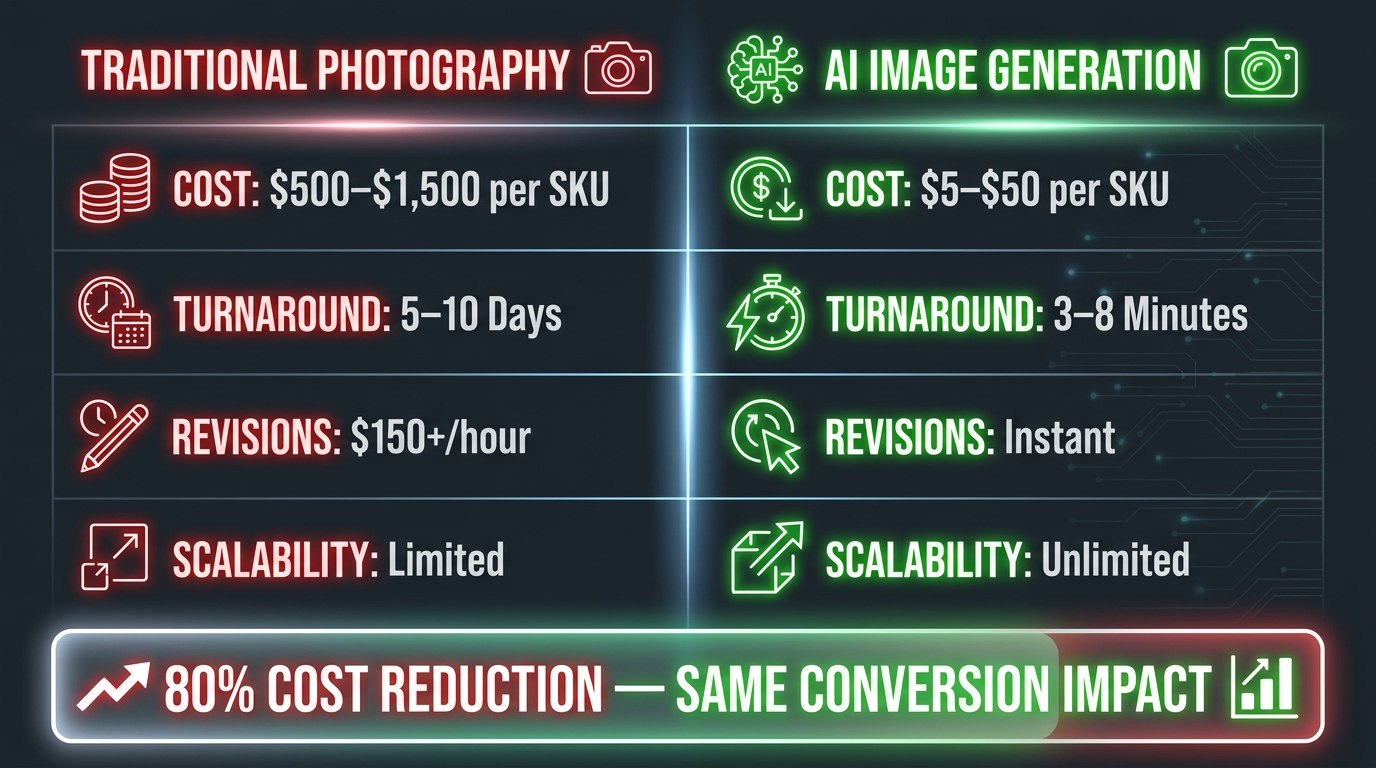
    Side-by-side comparison infographic: Traditional Photography costs $500-$1,500 per SKU vs AI Image Generation at $5-$50 per SKU with 80% cost reduction

    Generative AI image tools reached a quality inflection point in late 2024 and have continued maturing through 2026. The conversation has shifted from “Can AI images compete with traditional photography?” to “In which specific use cases does each approach make more sense?” The answer, for most Amazon sellers, has become heavily weighted toward AI — particularly for secondary and lifestyle images.

    Amazon AI Creative Studio

    Amazon’s own generative AI image tool, integrated directly into Seller Central as AI Creative Studio, has become the most accessible entry point for sellers who want to generate lifestyle backgrounds, seasonal variants, and sponsored ad creative without external costs. The tool allows sellers to upload their product image and generate it placed within a contextually appropriate environment — a living room, an outdoor setting, a commercial kitchen — in minutes.

    Performance data from Amazon Ads’ own reporting shows Sponsored Brands campaigns using AI Creative Studio-generated lifestyle imagery are delivering 10.3% higher ROAS compared to campaigns using static white-background images. Separately, a reported 40% higher CTR for lifestyle versus white-background images in sponsored placements, with 2.3× better performance on mobile versus desktop. These are not marginal improvements — they represent a meaningful return on what amounts to a near-zero additional production cost.

    As of Q1 2026, approximately 500,000 sellers are using generative AI for listing and content creation, with 50,000 advertisers having adopted AI-powered ad creative tools in the prior quarter alone, according to reporting by SellerLabs and BDSN. The adoption curve is steep.

    Third-Party AI Image Platforms

    Beyond Amazon’s native tools, a cohort of specialized platforms has emerged to serve seller-specific image needs that Amazon’s tool does not cover:

    • Rewarx Studio — Focuses on Amazon-compliant main image enhancement, upscaling, and background removal with specific optimizations for Amazon’s image quality score requirements.
    • WeShop.ai — Lifestyle background generation with a specific Amazon category awareness, including size and scale overlay generation.
    • ProductPinion — Combines AI image generation with consumer survey panels, allowing sellers to test AI-generated image variants with real buyers before committing to a live A/B test on Amazon.
    • Krea AI — Frequently cited for compliance correction workflows, particularly for sellers whose existing images have background or resolution issues triggering suppression.

    The economics are stark. Traditional product photography for an Amazon SKU ranges from $200–$1,500 per product depending on the studio, number of shots, and styling complexity. AI generation through these platforms runs $5–$50 per SKU. For sellers with catalogs of 50, 100, or 500+ SKUs, that is not an incremental saving — it is an order-of-magnitude change in what visual optimization costs to execute at scale.

    Where AI Generation Still Has Limits

    It is worth being specific about where AI-generated images still fall short. Main images, under Amazon’s current 2026 guidelines, must depict a real physical product — not an AI-generated representation. This rule exists to prevent misrepresentation, and violations can result in listing suppression or account action. Main images must come from actual photography of the physical product.

    Where AI excels is in secondary slots: lifestyle background placement, infographic overlay generation, scale reference creation, and ad creative generation. The appropriate workflow for most sellers in 2026 is: photograph the physical product cleanly, then use AI to generate the contextual, lifestyle, and compositional variations that fill out the image stack and power advertising.

    The A/B Testing Imperative: What the Data Actually Shows

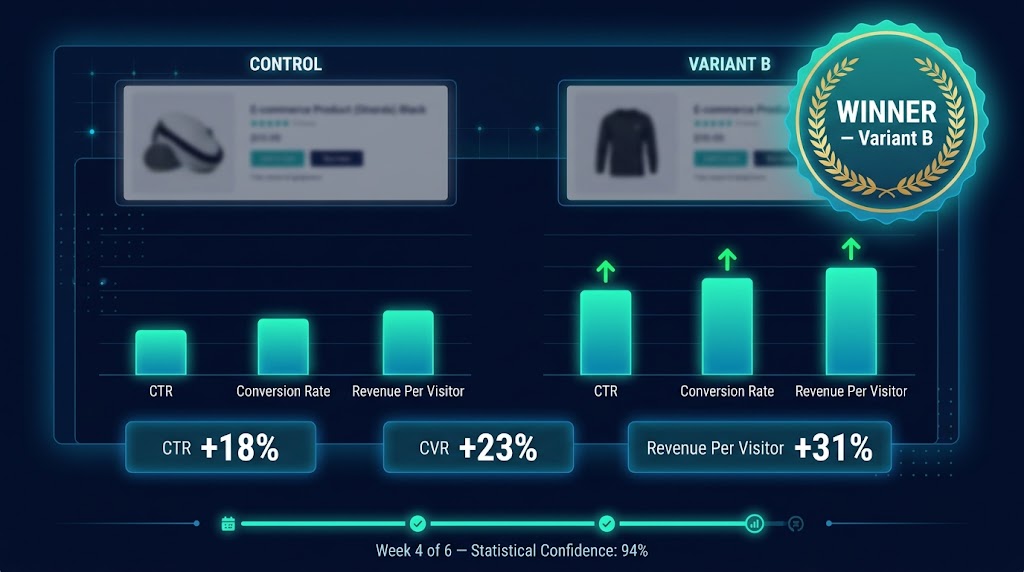
    Amazon Manage Your Experiments A/B test results dashboard showing CTR +18%, CVR +23%, Revenue Per Visitor +31% for winning variant B

    One of the most persistent misconceptions in Amazon image optimization is that experienced sellers or skilled designers can intuit which image will perform best. The documented evidence consistently contradicts this. The human creative judgment that produces a visually “beautiful” image and the human buying psychology that produces a click are not the same thing, and the gap between them is frequently larger than sellers expect.

    Amazon’s Native Testing Tools

    Amazon provides two primary native mechanisms for image testing:

    Manage Your Experiments (Seller Central) is available to brand-registered sellers and allows split-testing of main images, A+ content, titles, and bullet points. The tool requires a minimum traffic and sales velocity threshold to run (ASINs need sufficient volume to generate statistically meaningful results within the testing window), and Amazon recommends a minimum run time of four to six weeks per experiment. SalesDuo documents a potential 30% sales uplift from experiments run through this tool for eligible ASINs.

    Automated A/B Testing (Vendor Central) operates through the Merchandising tab and allows vendors to test main product page images, A+ content, and titles in an automated format. The system manages traffic allocation and result tracking natively, without requiring manual statistical analysis.

    The VisionClear Case Study

    One of the more thoroughly documented public case studies in Amazon image A/B testing involves a brand called VisionClear, which revamped their listing imagery to feature brighter white backgrounds, larger product prominence within the frame, enhanced brand-color integration, and the addition of headline and subcopy text to infographic slots. The A/B test against their original images showed 97% consumer preference for the new version — and translated into a 9% overall sales increase and a 17% increase specifically in search-driven sales. The brand subsequently rolled the updated visual approach across their entire catalog.

    What is notable about this result is that a 9% sales lift from image optimization alone — without any change to pricing, keywords, or advertising — represents pure margin improvement. There is no cost of goods increase, no incremental ad spend. The gain is structural.

    Pre-Amazon Testing: De-Risking Before You Go Live

    A growing approach among more sophisticated sellers involves testing image variants with real consumer panels before running them as live Amazon experiments. Tools like ProductPinion and PickFu allow sellers to expose multiple image variants to demographically targeted respondents and gather click preference and qualitative feedback data within 24–48 hours. This is particularly useful for main images on high-traffic ASINs, where running a losing image variant through Manage Your Experiments costs real revenue during the testing period.

    The workflow: generate two to three AI variants, test them with a consumer panel for directional preference, then run the top performer against the current control in a live Amazon experiment. This approach compresses the total optimization cycle and reduces the risk of testing a clearly inferior image on live traffic.

    Mobile-First Image Design: Designing for How People Actually Shop

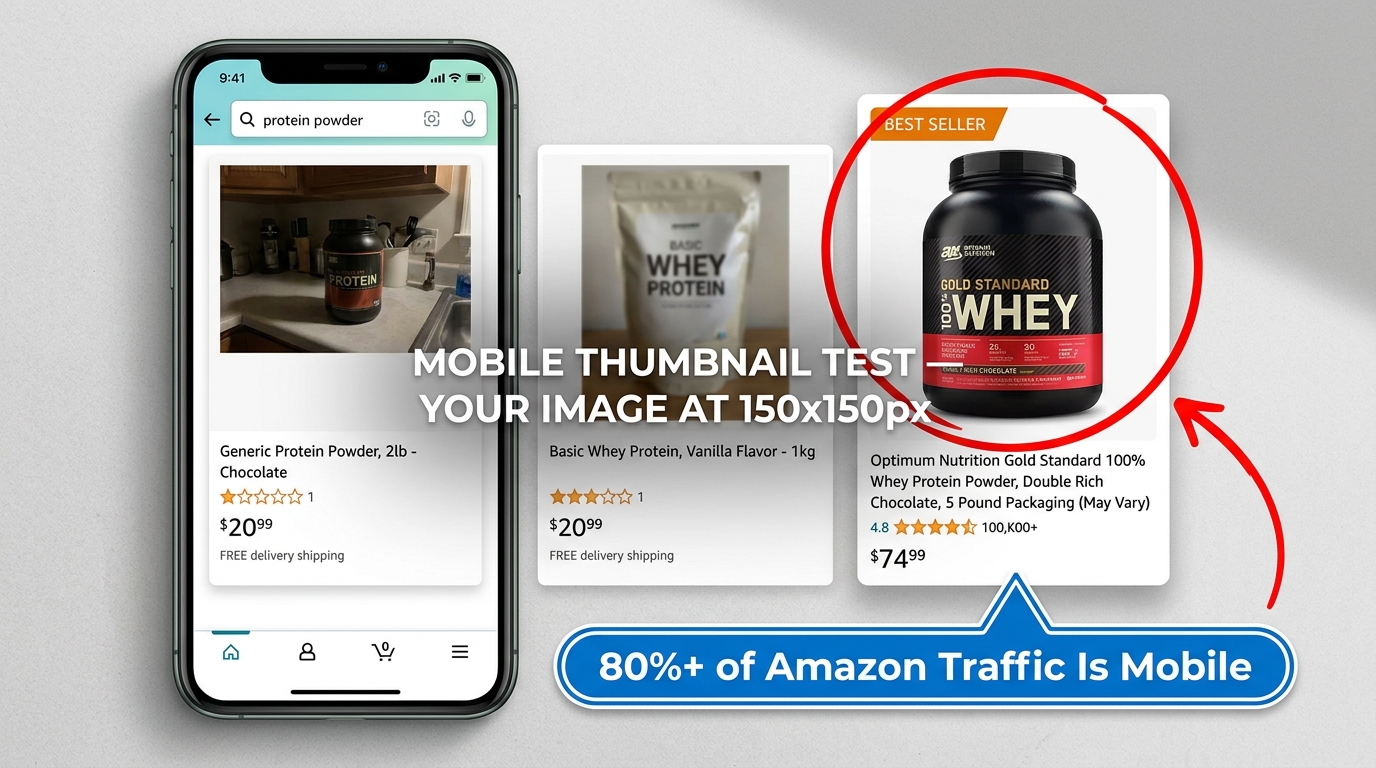
    Mobile phone mockup showing Amazon search results with one standout high-resolution product image dominating the thumbnail grid — 80%+ of Amazon traffic is mobile

    The majority of Amazon shopping sessions in 2026 occur on mobile devices. Estimates from multiple industry sources place mobile’s share of Amazon traffic at 70–80% depending on category. Yet the majority of Amazon sellers still design and evaluate their product images primarily on desktop screens — where images are displayed at 400–500 pixels and details are visible that simply do not exist at mobile thumbnail scale.

    The Thumbnail Stress Test

    The single most valuable image review process most sellers are not doing is the thumbnail stress test: open your listing in the Amazon mobile app, navigate to a relevant search results page, and look at your product in context. You are not looking at your listing — you are looking at how your listing thumbnail competes against the six to eight other products visible simultaneously on a phone screen.

    Ask these questions: Does your product read clearly at this size? Does it have more or less visual contrast than competitors? Does the product’s color, shape, or brightness make it the natural eye-stopping point in the grid, or does it blend in? Is there any detail in your image that is invisible or illegible at thumbnail scale? If your main image was designed to look great in a Seller Central preview at full resolution, it may be doing very little work where most of your customers are actually encountering it.

    Designing for the Swipe, Not the Scroll

    On mobile, the secondary image stack is consumed through a swipe carousel — a fundamentally different interaction than the desktop experience where secondary images appear as a vertical strip on the side of the main image. On mobile, each image in the stack must be independently legible and compelling as a standalone frame, because buyers swipe through them sequentially at pace.

    This changes the design requirements for secondary images. Infographics with multiple columns of dense text become unreadable on a 6-inch screen. The optimal mobile-first secondary image uses a single dominant visual element, one headline claim in large (minimum 24pt equivalent) text, and one or two supporting details maximum. Anything more complex competes with itself for attention at mobile resolution.

    Eye-tracking data from mobile session analysis indicates buyers spend 8–12 seconds total engaging with a product listing’s image carousel before either adding to cart or bouncing. That means your entire seven-image visual argument needs to land within a dozen seconds of swipe interaction. Every second spent on an image that does not advance the purchasing decision is a second your competitor gets to make their case instead.

    Mobile-Specific CTR Signals

    Amazon’s algorithm maintains a separate mobile performance signal for CTR and conversion, which means your listing can perform differently — and be ranked differently — on mobile versus desktop. Sellers optimizing exclusively for desktop metrics can find themselves losing mobile rank to competitors with less impressive full-resolution images but better thumbnail impact. The reverse is also possible: a thumbnail-optimized main image can deliver disproportionate mobile CTR that lifts overall ranking visibility.

    Infographic Science: Making Text-on-Image Work for Both Buyers and Algorithms

    Infographic images — secondary slot images that combine product photography with text callouts, data overlays, icon systems, and visual comparisons — represent one of the highest-leverage investments in Amazon image optimization. They also represent one of the areas most prone to being done poorly.

    What Makes an Infographic Actually Convert

    The failure mode for Amazon infographics is trying to include every product feature in a single image. A layout with twelve callout bubbles, three color-coded sections, a comparison table, and four icons delivers cognitive overload — buyers who encounter it are more likely to bounce than to read it. The images that convert well follow a different principle: one dominant idea, visually illustrated, with supporting copy that reinforces rather than complicates.

    Consider the difference between an infographic that says “Available in 6 sizes, 8 colors, with adjustable strap, padded lining, water-resistant material, and lifetime warranty” (seven separate claims competing for attention) versus one that leads with “Lifetime Warranty — Replace Any Part, Any Time, No Questions” with a single clean visual of the product and a branded badge. The second version communicates one compelling thing memorably rather than seven things forgettably.

    The Rufus OCR Connection

    There is now a second, algorithmic reason to be precise about infographic text. As noted earlier, Amazon’s Rufus AI uses OCR to extract text from product images and incorporates that data into its understanding of what a product is and does. This means every text element in your secondary images is potentially indexable — product attributes, specifications, certifications, and use-case claims that appear in your infographic text can contribute to Rufus’s ability to surface your listing in relevant conversational queries.

    Sellers who deliberately engineer their infographic text to mirror the language buyers use in natural language queries — rather than internal product spec language — are effectively creating a second channel of keyword visibility that operates entirely through visual content. “Great for lower back pain” in an ergonomic chair infographic is more likely to be matched to a Rufus query than “lumbar support curvature adjustment” even if both are factually accurate descriptions of the same feature.

    Certification Badges and Trust Signals

    Third-party certification badges, safety compliance marks, and trust signals (FDA registered, BPA-Free, Certified Organic, UL Listed, etc.) consistently improve conversion rates when placed in secondary infographic slots. The psychological mechanism is risk reduction — buyers in unfamiliar categories default to certifications as proxies for quality and safety. The appropriate placement is typically slot 6 or 7, where buyers in due-diligence mode encounter them, rather than slot 2, where the conversion job is desire-building rather than trust-building.

    Compliance Landmines: What Gets Listings Suppressed in 2026

    Amazon’s image policy has been enforced with increasing rigor through automated detection since 2024, and the suppression mechanisms are more sensitive in 2026 than most sellers realize. Understanding where the landmines are — and why they exist — is as important as knowing what to optimize.

    Main Image Violations

    The primary triggers for main image suppression in 2026 include:

    • Non-white backgrounds — Amazon’s system detects backgrounds that are off-white (gray-tinted, cream-tinted, or gradient) and classifies them as non-compliant. The target is exactly RGB 255,255,255. Studio photographs taken against what appears to be white paper often test as slightly off when measured — and AI background removal/replacement tools are the fastest correction method.
    • Text, graphics, or watermarks on main images — Any overlay text, logo placement, or watermark on a main image is grounds for suppression. This includes brand names printed directly on packaging images that extend outside the product itself.
    • Props that obscure or compete with the product — Lifestyle props in the main image (a person’s hand, a surface object, a background element) are prohibited. The product must be the sole subject.
    • Multiple products when the listing is for a single item — Showing bundle contents when the ASIN is listed as a single item triggers misrepresentation flags.

    Secondary Image Rules Often Misunderstood

    Secondary images are significantly more permissive than main images, but there are specific violations that catch sellers off guard. Direct competitive comparisons using competitor brand names or product images are prohibited, even in comparison charts. Claims that require regulatory substantiation (specific health benefit claims, “clinically proven” language without FDA-recognized evidence) can trigger compliance review that affects the entire listing, not just the image. And AI-generated lifestyle backgrounds in secondary images are permitted — but only when the product itself is the real photographed item placed into an AI environment, not when the entire product is AI-generated.

    The Detection Timeline Has Compressed

    One operationally significant change in 2026 is the speed of Amazon’s suppression detection. Listings that previously might have run non-compliant images for weeks before being flagged are now being reviewed within 24–72 hours of image upload. This matters for sellers managing large catalog updates, seasonal refreshes, or category expansion: building a compliance check step into the image upload workflow is no longer optional if you want to avoid suppression gaps during critical periods.

    The Real Economics of Image Optimization: ROI That Actually Calculates

    The business case for investing seriously in Amazon image optimization is unusually straightforward to model, because the primary impact metrics — CTR, conversion rate, and unit session percentage — are directly measurable and directly tied to revenue outcomes.

    The CTR Lever

    Amazon’s typical CTR benchmark for organic search results is 1–3%. For a product receiving 10,000 monthly impressions at 1% CTR, that is 100 sessions. At a 12% conversion rate, that is 12 sales. If a main image optimization test lifts CTR to 1.5% — a 50% improvement, well within the range of documented results — you have 150 sessions, 18 sales, and a 50% revenue increase from the same 10,000 impressions. No additional ad spend. No keyword changes. No pricing adjustments.

    Now apply that across a catalog of 50 SKUs at similar traffic levels, and the revenue impact of a systematic image optimization program becomes a significant number quickly. The asymmetry is notable: the cost of AI-assisted image refresh at $5–$50 per SKU means a 50-SKU catalog can be fully refreshed for $250–$2,500. A 50% CTR improvement across that catalog would, at the traffic volumes above, generate thousands of dollars in incremental monthly revenue.

    The Conversion Rate Lever

    Secondary image optimization primarily impacts conversion rate rather than CTR — buyers who have already clicked are deciding whether to add to cart. The documented range for conversion rate improvement from optimized 7-image stacks versus basic 3-image stacks is 10–25%. At a 12% baseline conversion rate, a 20% lift brings that to 14.4% — meaning 2.4 additional sales per 100 sessions. Across meaningful traffic volumes, this is significant incremental revenue from a change that involves no competitive bidding, no keyword research, and no Amazon algorithm changes.

    The PPC Efficiency Connection

    A less-discussed but important secondary benefit of image optimization is its effect on pay-per-click efficiency. Amazon’s ad auction system rewards listings with high CTR and strong conversion history with better quality score equivalents — meaning competitive bidders with better-optimized listings can frequently achieve better placement at lower bids. A 40% improvement in sponsored ad CTR through AI-optimized lifestyle creative (a figure Amazon Ads’ own data supports for Sponsored Brands campaigns) means your advertising dollar buys more visibility at the same cost.

    Sellers running poorly performing images against strong competitors are effectively subsidizing their competitors’ ad efficiency while paying full price for their own lower-performing placements.

    Video and the Emerging Visual Frontier

    Video has become a non-optional component of competitive Amazon listings in most categories above a certain volume threshold. The listing video slot — which appears in the image carousel and on the product detail page — has a measurable impact on conversion rate, and Amazon’s own engagement data shows that buyers who watch a listing video convert at significantly higher rates than those who only view static images.

    The 12-Second Demo Principle

    Counterintuitively, shorter and more functional videos consistently outperform longer, more polished brand videos in Amazon listing placements. A 12–15 second demonstration video that shows the product being used in a real context — with the core benefit made visible within the first three seconds — outperforms a 60-second brand story video with production values ten times higher. The reason is context: buyers encountering a video on a product detail page are in evaluation mode, not entertainment mode. They want to see if the product does what it claims to do, not watch a brand narrative.

    AI video tools are beginning to close the production gap here as well. Platforms like Runway and Amazon’s own AI Creative Studio are expanding into product video generation — allowing sellers to generate short demonstration-style clips from static product images without requiring video shoots. As of 2026, the quality of AI-generated product video has reached a point where it is viable for secondary placements and advertising, though it remains behind professional videography for primary listing placement in premium categories.

    360-Degree and Interactive Imagery

    Amazon’s 360-degree spin image feature, available in select categories, allows buyers to rotate a product view interactively. In categories where physical dimensions, material quality, or construction details are purchase drivers — furniture, footwear, electronics accessories — 360-degree spin images measurably reduce return rates by setting accurate expectations. The production cost has dropped significantly with AI-assisted 3D model generation, though this remains a more specialized application than standard image stack optimization.

    Where Most Sellers Actually Are — And the Gap That Needs Closing

    It is useful to characterize where the Amazon seller population sits in terms of image optimization maturity, because the gap between the average and the best-performing sellers has widened considerably as AI tools have become accessible.

    The Four Levels of Image Maturity

    Level 1 — Basic Compliance: The seller has a white background main image that meets minimum resolution requirements. Secondary images exist but are not strategically sequenced. No A/B testing has been conducted. This describes a larger portion of Amazon’s active catalog than most sellers would expect — including some established brands that have allowed their visual assets to age without refresh. At this level, any systematic optimization produces meaningful results because the baseline is so low.

    Level 2 — Strategic Stack: The seller has a planned, sequenced 7-image stack with lifestyle images, at least one infographic, and a size/scale reference. The main image has been optimized for product fill and background quality. Some A/B testing has been attempted. This describes the majority of sellers who have engaged meaningfully with image optimization at any point. The improvement opportunities at this level come from testing, mobile optimization, and AI-assisted secondary image quality.

    Level 3 — Data-Driven Iteration: The seller runs regular Manage Your Experiments tests, has a process for refreshing images quarterly, uses AI tools for secondary lifestyle variants, and monitors image performance metrics as a standing KPI alongside advertising performance. A/B testing is systematic rather than one-off. This level describes a minority of sellers — perhaps the top 10–15% by sophistication — but represents a significant competitive advantage against level 1 and level 2 competitors.

    Level 4 — AI-Native Optimization: The seller has integrated AI image generation into their product launch workflow, runs pre-Amazon consumer panel testing before live experiments, uses Rufus-informed infographic text strategy, and monitors mobile-specific performance signals separately from desktop metrics. Image optimization is a repeating operational process rather than a project. This describes the leading edge of practice in 2026 — achievable today with the tools that exist, but still not widely adopted.

    The Competitive Advantage That’s Actually Available

    What makes image optimization unusual as a competitive strategy is that it is simultaneously high-impact and underexecuted. Most sellers understand intellectually that images matter. Far fewer have built a systematic, data-driven process for improving them continuously. In an environment where keyword strategy, advertising algorithms, and review dynamics are increasingly competitive and margin-thin, the visual layer remains one of the few areas where consistent, methodical effort creates compounding returns that are difficult for competitors to easily replicate or arbitrage away.

    The sellers who will build durable advantages on Amazon in the next two to three years are those who treat image optimization not as a launch task but as an ongoing operational discipline — testing, iterating, and using AI to execute faster and cheaper than competitors who are still scheduling photoshoots.

    The Image Audit You Can Run This Week

    Rather than ending with abstract principles, here is a concrete diagnostic process sellers can execute immediately:

    1. Run the thumbnail stress test. Open your top 10 ASINs in the Amazon mobile app, navigate to their relevant search results pages, and evaluate your thumbnail against competitors. Photograph your phone screen and look at the images side by side. If your product does not immediately stand out at that scale, main image optimization is the first priority.
    2. Audit main image compliance. Use a color picker tool to verify your main image background is precisely RGB 255,255,255. Check for any text, watermarks, or props. Measure your product’s fill ratio — if it occupies less than 80% of the frame, a recrop or reshoot is warranted.
    3. Count and sequence your secondary images. If you have fewer than six secondary images, you are leaving conversion surface area on the table. If you have six or seven but they are unsequenced, restructure the stack to follow the narrative arc: feature claim → lifestyle → scale → comparison → usage → social proof.
    4. Check your Manage Your Experiments eligibility. Log into Seller Central, navigate to Brands → Manage Experiments, and check which ASINs qualify for image testing. If your highest-traffic ASINs are eligible, initiate a main image test immediately. Run it for a minimum of four weeks.
    5. Generate AI lifestyle variants for one ASIN. Use Amazon AI Creative Studio or a third-party tool to generate three to five lifestyle background variants for one secondary image slot on your best-performing ASIN. The cost is minimal; the potential conversion lift is material. Use this as a test case for integrating AI image tools into your workflow at scale.
    6. Pull your product’s most common negative review themes. Identify the top two or three objections in your 1–3 star reviews. If those objections are answerable with visual evidence — size, material quality, ease of use, compatibility — create images that directly address them and insert them into slots 5–7.

    Conclusion: The Visual Layer Is a Revenue Engine, Not a Creative Exercise

    Amazon image optimization in 2026 operates at the intersection of three forces that did not exist simultaneously five years ago: AI algorithms that read and score images programmatically, generative AI tools that make high-quality image production accessible and affordable at catalog scale, and a mobile-dominant buyer behavior that makes the visual experience more decisive than it has ever been.

    The sellers who are winning the image game in 2026 are not necessarily those with the largest photography budgets or the most creative teams. They are the ones who understand that every image in their stack has a specific job to do — and who have built a systematic, data-driven process for finding out whether each image is doing that job well.

    The data on returns from image optimization is consistent and significant: CTR improvements of 15–40% for optimized main images, conversion rate lifts of 10–25% for complete secondary stacks, ROAS improvements of 10–34% for AI-enhanced advertising creative, and cost reductions of 80% versus traditional photography. These are not marginal gains from a peripheral optimization. They are core business metrics, moving in the right direction, available to sellers who choose to prioritize them.

    The visual arms race on Amazon is not slowing down. The question for every seller is whether they are competing in it — or being competed against by those who are.