Tag: AI Strategy

  • The Automation Decision Map: How to Know Exactly Which Business Tasks AI Should (and Shouldn’t) Touch

    The Automation Decision Map: How to Know Exactly Which Business Tasks AI Should (and Shouldn’t) Touch

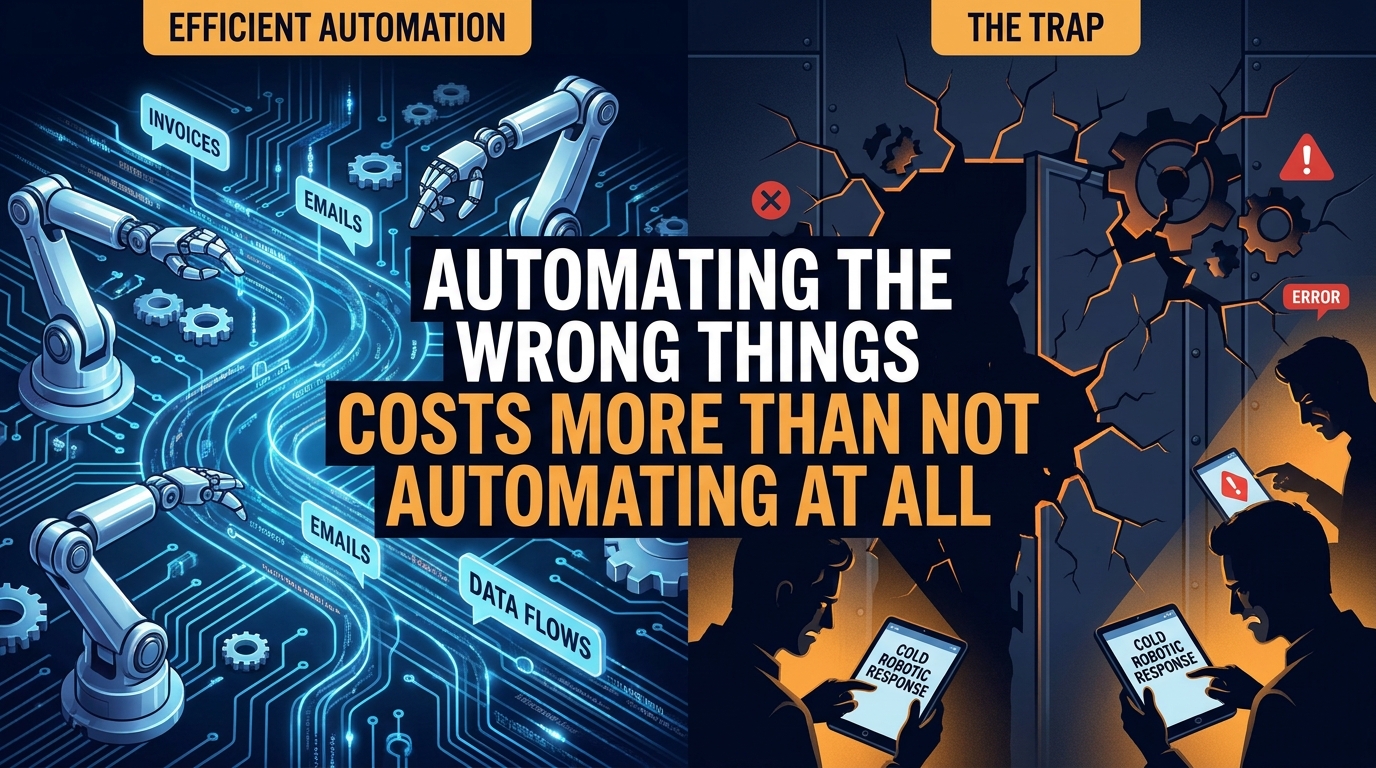
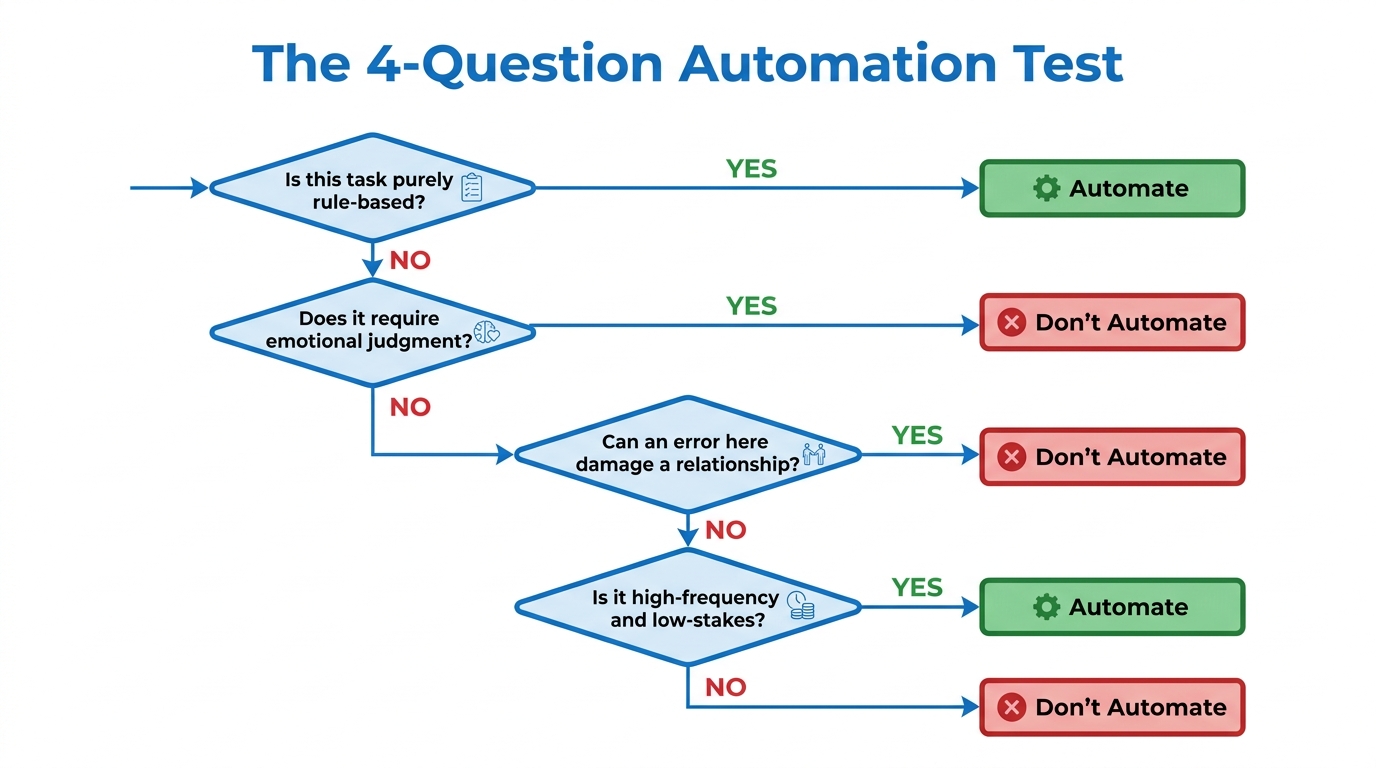
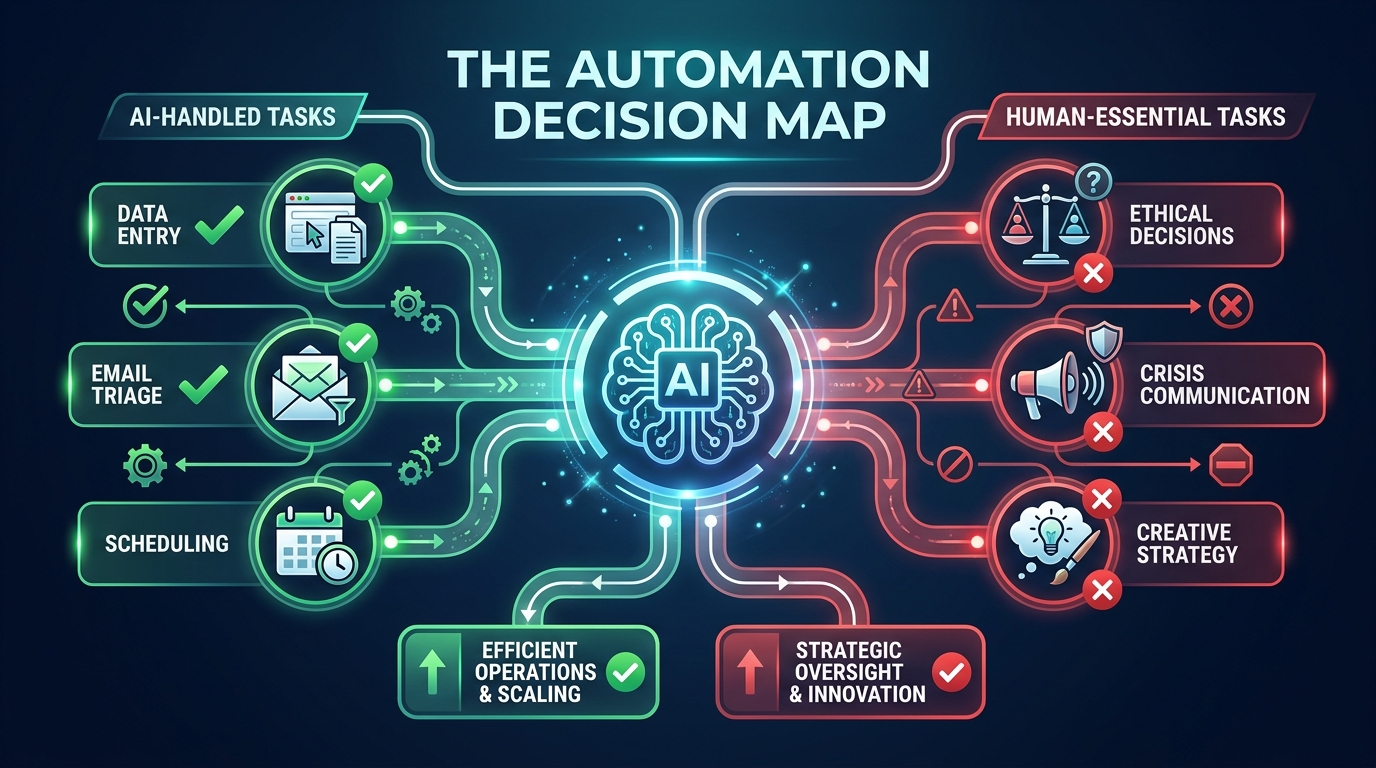
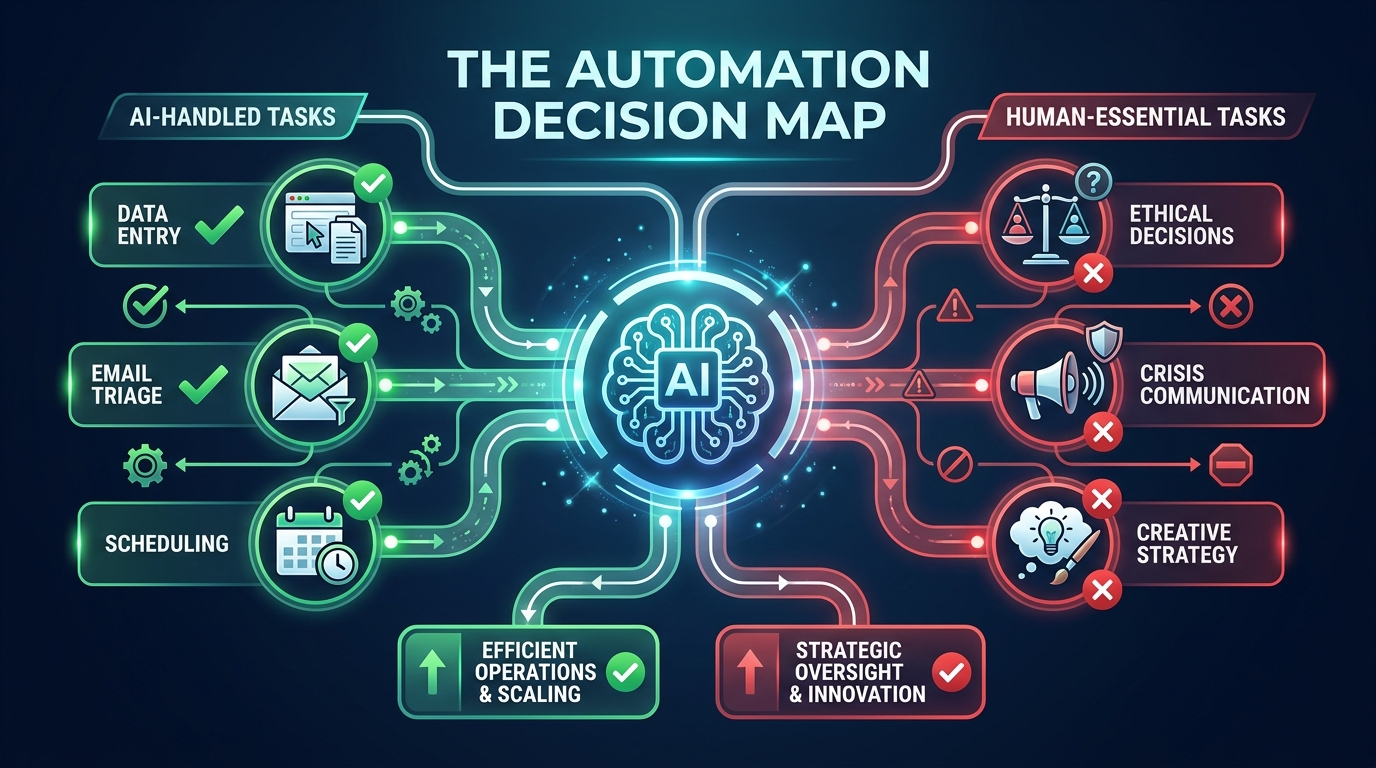
    The Automation Decision Map — AI decision tree showing what tasks AI handles well versus where human judgment is required

    Here’s a pattern that plays out in businesses everywhere right now: a team spots an AI automation tool, gets excited about the time savings, builds out a workflow over a few weeks — and then, three months later, quietly switches it off. Not because the technology failed. Because they automated the wrong thing.

    This is the real problem with how most businesses approach AI automation in 2026. The conversation almost always starts with the tools — Make, Zapier, n8n, custom GPT agents, Claude-powered pipelines — and almost never starts with the harder question: which tasks should be handed to AI in the first place?

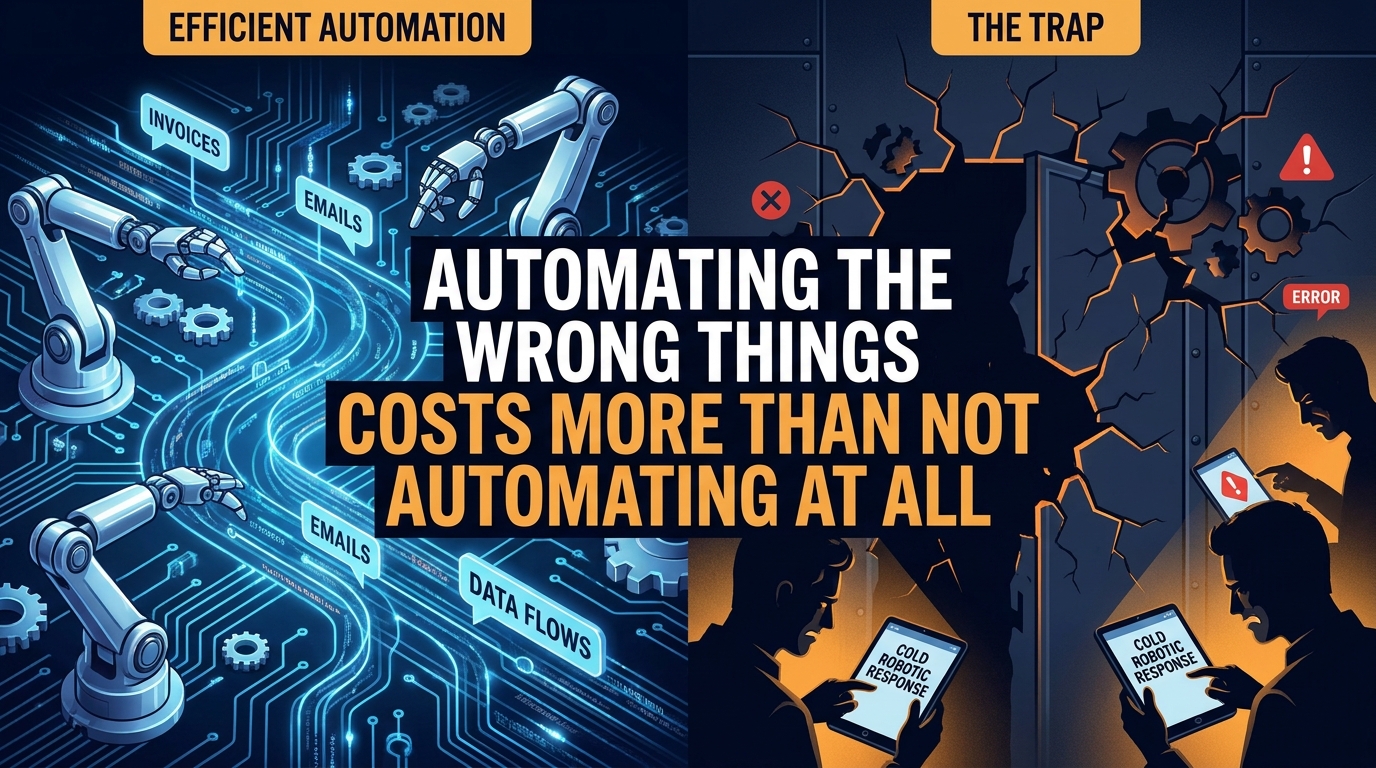
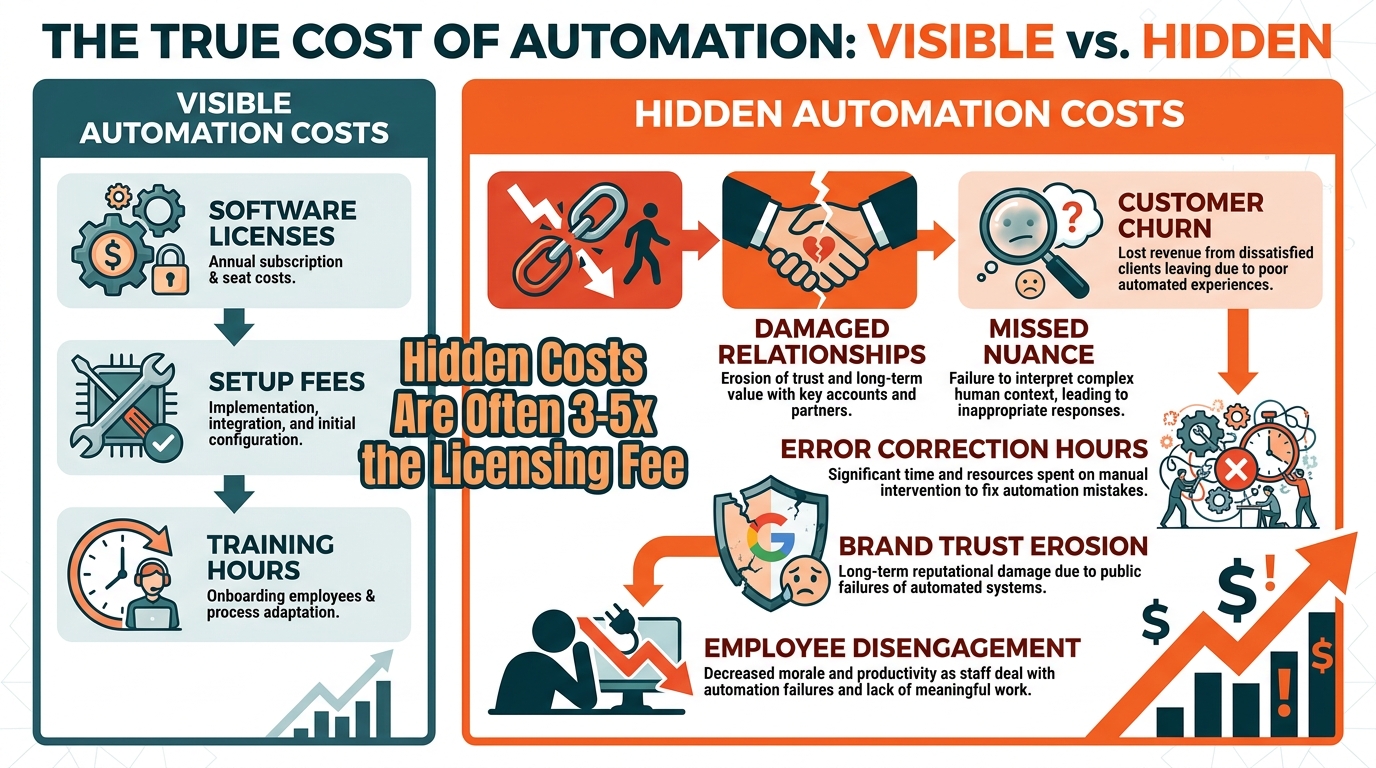
    The answer isn’t obvious. And getting it wrong doesn’t just waste money. It introduces errors into processes that used to work fine, erodes customer trust, and creates a quiet tax on your team who now spend time managing broken automations instead of doing the work those automations were supposed to replace.

    This guide isn’t about specific tools or platform comparisons. It’s a decision framework — the map you should draw before you touch a single workflow builder. We’ll walk through how to evaluate any business task for automation readiness, where AI genuinely performs well, where it consistently underdelivers, how to structure oversight so failures don’t compound silently, and what a sustainable automation practice actually looks like beyond the initial build.

    By the end, you’ll have a working methodology for evaluating every task in your business — not just the obvious ones — and a clear picture of what comes after the automation goes live.

    The Task Spectrum: Where AI Thrives vs. Where It Quietly Fails
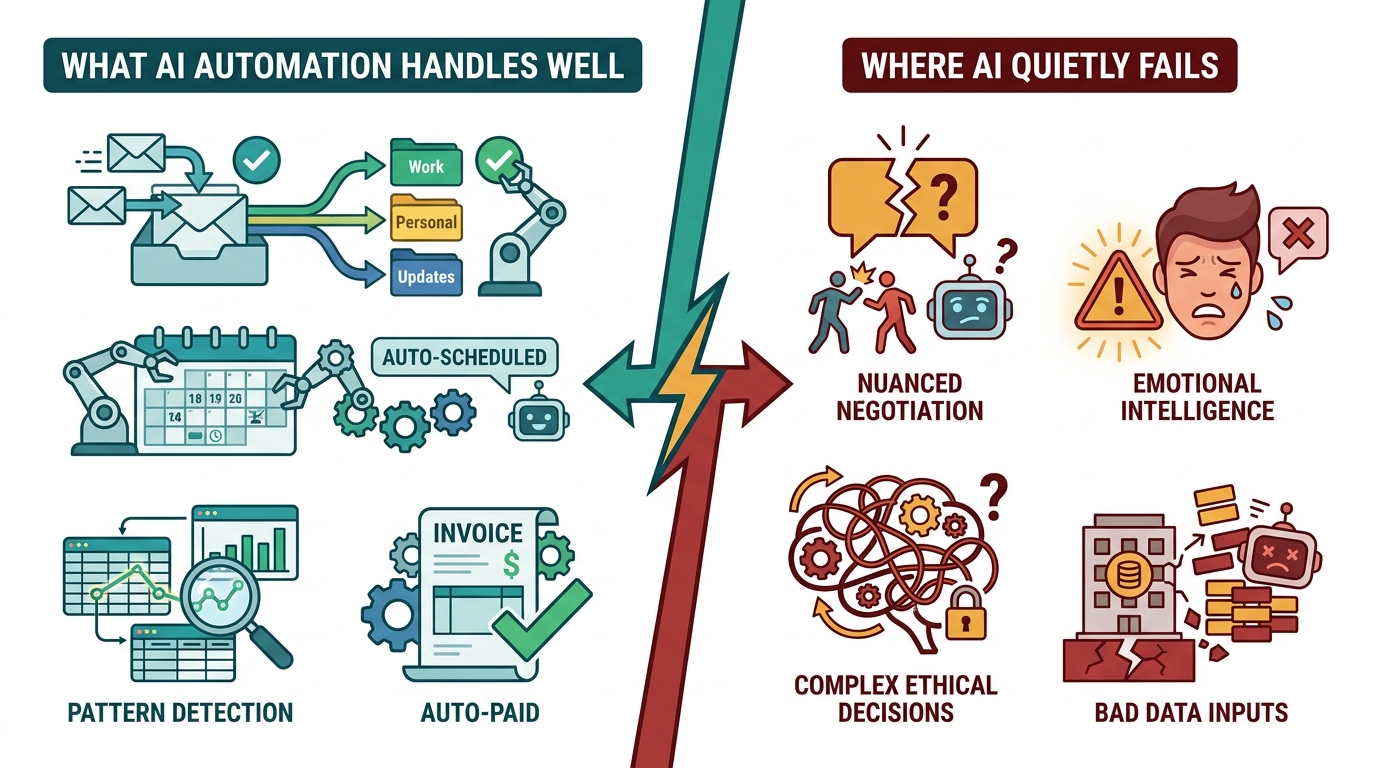
    Split-screen comparison showing what AI automation handles well versus where it quietly fails across business functions

    AI automation doesn’t fail randomly. It fails predictably, in specific types of tasks — and once you understand the pattern, you can avoid the most expensive mistakes before committing to a build.

    Tasks Where AI Consistently Delivers

    The sweet spot for AI automation sits at the intersection of three properties: high volume, structured inputs, and clear success criteria. When all three are present, AI can outperform humans significantly — not just in speed, but in consistency and error rate.

    Data extraction and transformation is the canonical example. Pulling invoice line items from PDFs, normalizing address formats across a customer database, converting currency in real-time across a spreadsheet — these tasks are tedious for humans and nearly effortless for AI. A process that takes a finance analyst four hours to run manually can be executed in minutes, with fewer transposition errors, every single day.

    Classification and routing is another high-performer. When a business receives hundreds of support tickets, emails, or form submissions daily, AI can read the content, identify the intent, and route each item to the right team or queue with accuracy that typically rivals a trained human reviewer — and does it 24 hours a day without fatigue. The same logic applies to lead scoring: an AI model trained on historical conversion data can rank inbound leads faster and more consistently than a human sales rep reviewing the same information cold.

    Scheduled, trigger-based communications also sit firmly in AI’s wheelhouse. Onboarding email sequences, appointment reminders, abandoned cart nudges, review request messages — these follow predictable logic trees that AI executes reliably. The content may be AI-generated or pre-written; either way, the orchestration layer (when to send, to whom, based on what behavior) is exactly the kind of rule-based-plus-adaptive task that automation handles well.

    Tasks Where AI Quietly Underdelivers

    The failures are just as predictable. Tasks with ambiguous success criteria, high contextual sensitivity, or significant consequences for errors tend to expose AI’s limitations quickly.

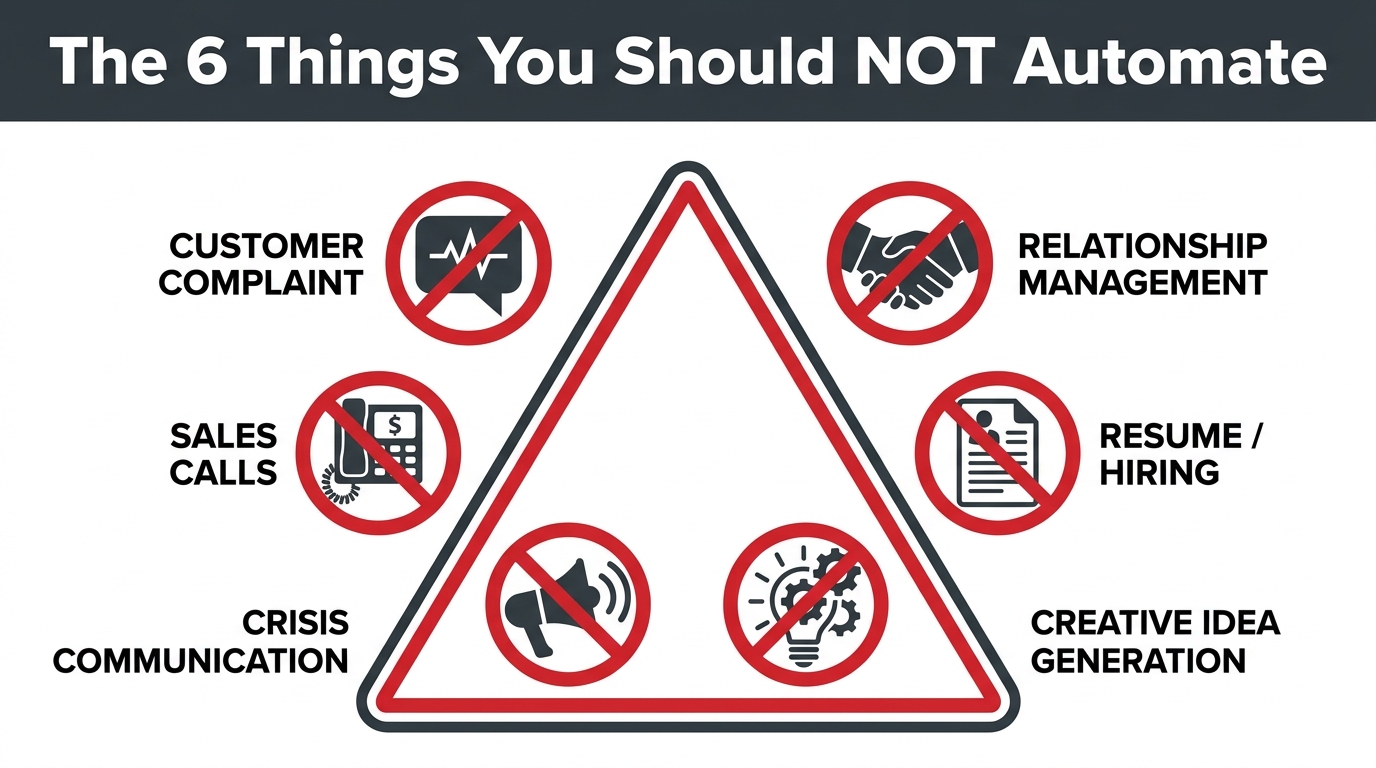
    Nuanced customer communication is a common casualty. When a long-term customer writes in with a complex complaint that involves frustration, history, and unstated expectations, an AI response that’s technically correct but tonally off can do more damage than no response at all. Humans read subtext; AI reads text. That gap matters enormously in relationship-critical interactions.

    Creative strategy and positioning is another area where automation underperforms. AI can generate content at scale, but generating content that genuinely reflects a brand’s personality, responds to shifting cultural context, and produces original angles — that’s still a human-first activity. AI can assist; it shouldn’t lead.

    Decisions with significant downstream consequences — hiring choices, contract terms, vendor selection, pricing strategy — involve variables that don’t always appear in structured data. Relevant context lives in relationships, institutional knowledge, and judgment that comes from experience. AI used as a decision-maker in these contexts often produces outputs that look confident but are missing crucial nuance.

    The pattern is consistent: AI excels when the rules are knowable, the data is clean, and mistakes are cheap. It struggles when the rules are implicit, the data is messy, and mistakes are expensive.

    The Four Quadrants of Automation Readiness
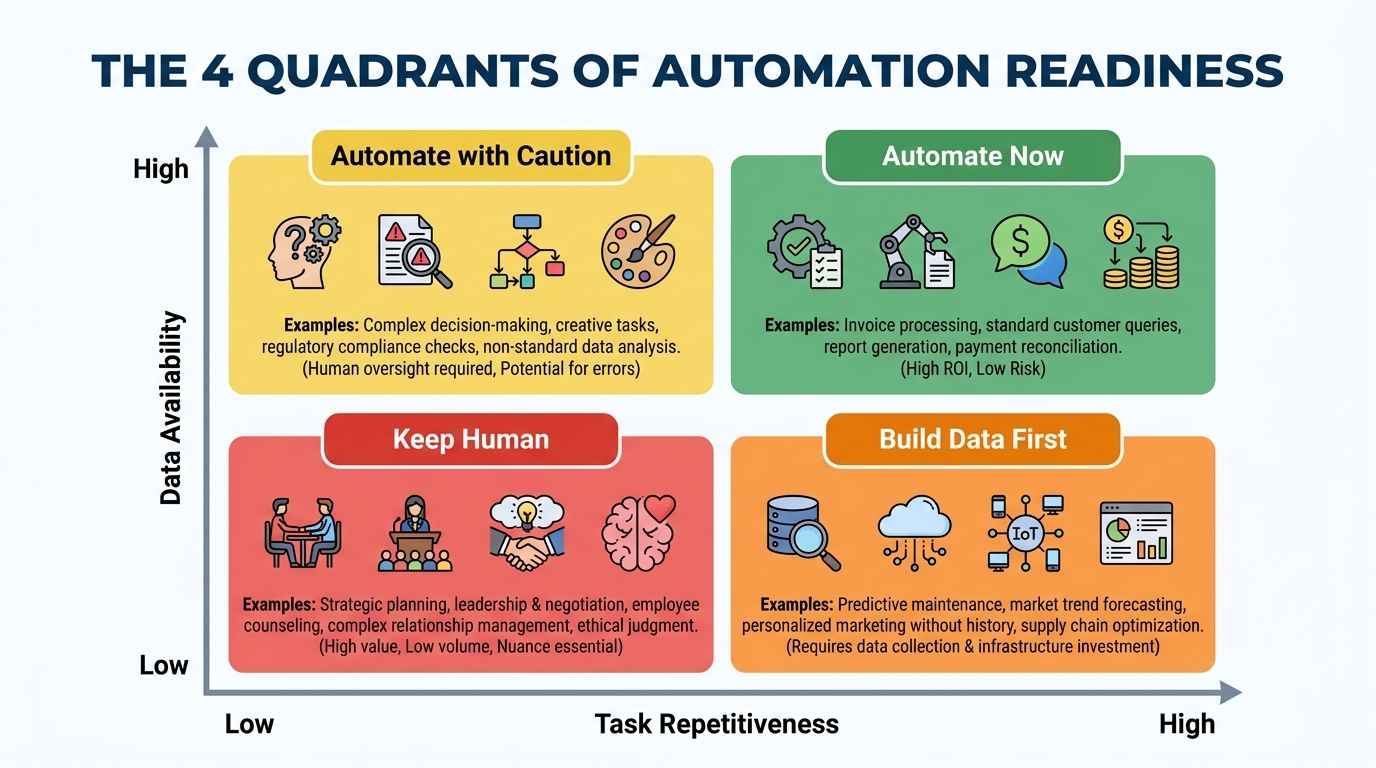
    The 4 Quadrants of Automation Readiness matrix — plotting task repetitiveness against data availability

    Before investing time and budget in building any automation, every candidate task should be evaluated against two dimensions: how repetitive it is (does it follow the same logic each time?) and how data-rich the environment is (do you have clean, structured, reliable inputs to feed the system?). Plotting these two variables creates a clear action framework.

    Quadrant 1: Automate Now (High Repetition, High Data Quality)

    This is where to start. Tasks in this quadrant follow predictable logic, have well-defined inputs, and produce outputs you can verify reliably. Invoice matching, data migration between systems, social media scheduling, CRM data enrichment from public sources — these are your quick wins. They tend to have fast payback periods and low failure rates when built thoughtfully.

    A professional services firm that processes 300 expense reports a month is a classic example. The inputs are structured (receipts, amounts, categories), the rules are clear (approval thresholds, policy limits), and the success criteria are objective (correct categorization, policy compliance). Automating this process typically cuts processing time by 70-80% within the first few weeks of deployment.

    Quadrant 2: Automate with Caution (High Repetition, Lower Data Quality)

    These tasks are tempting to automate because they feel mechanical — they happen frequently and follow similar patterns. But the underlying data is inconsistent, incomplete, or requires interpretation to use correctly. Customer support triage from mixed-channel inputs is a common example: tickets arrive via email, chat, social media, and phone transcripts, in varying formats and languages, with wildly different levels of clarity.

    Automation here is achievable, but it requires investing in data standardization first. Trying to build the automation before cleaning the data is one of the most common expensive mistakes teams make. You’re essentially teaching AI to learn from a messy room — it will replicate the mess at scale.

    Quadrant 3: Build Data Infrastructure First (Low Repetition, High Data Quality)

    These tasks don’t happen often enough to benefit from automation in their current state, but the data environment is solid. This is where you should focus on logging and instrumentation first — building the data density that will eventually enable automation. Quarterly competitive analysis, for example, might not be automatable today, but setting up systematic data collection creates the foundation for AI-assisted analysis later.

    Quadrant 4: Keep Human (Low Repetition, Low Data Quality)

    Don’t automate here. Not now. Tasks in this quadrant are unique enough that each instance requires contextual judgment, and the data environment doesn’t support reliable AI input. Complex contract negotiation, bespoke client strategy work, board-level communication — these stay with humans, and pushing AI into them prematurely creates liability without meaningful efficiency gains.

    The discipline this quadrant requires is resisting the pressure to automate just because automation is possible. Possible is not the same as profitable.

    Data Quality Is the Foundation Nobody Wants to Talk About

    Ask any team that has successfully run AI automations at scale what the hardest part was, and most will give the same answer: it wasn’t the AI, and it wasn’t the tooling. It was the data.

    This is the most under-discussed topic in AI automation — and it’s where the majority of mid-build failures trace back to. AI systems are trained on your data and make decisions using your data. When that data is inconsistent, incomplete, or riddled with legacy formatting quirks, the automation either produces unreliable outputs or requires so much exception-handling that the efficiency gains vanish.

    The Four Data Readiness Checks

    Completeness: What percentage of the records your automation will process actually have all the fields it needs? A lead-scoring model that’s missing job title or company size data for 40% of leads can’t produce reliable scores for those records. Before building, audit your data for completeness and set a threshold — typically 85% or higher — before proceeding.

    Consistency: Are the same concepts represented the same way across your data? Dates in three different formats, country names sometimes abbreviated and sometimes spelled out, product categories with overlapping names — these inconsistencies create decision forks that automation has to handle, and each one is a potential failure point. Data standardization is genuinely unglamorous work. It’s also genuinely necessary.

    Timeliness: How fresh does the data need to be for the automation to work correctly? Inventory automation that makes reorder decisions on 48-hour-old stock data may systematically over-order. Email personalization that uses a contact’s job title from two years ago will occasionally produce embarrassing outputs. Understanding your automation’s staleness tolerance is a data architecture question that needs an answer before you build.

    Accessibility: Can your automation actually reach the data when it needs it? This sounds obvious, but it’s a common blockage. The data might exist in a system that doesn’t have an API, in a format that requires manual export, or behind permission structures that make real-time access impossible. Data accessibility is an infrastructure constraint that needs to be solved before — not during — the automation build.

    Building a Pre-Automation Data Audit

    A practical approach is to run a 2-week data audit before committing to any significant automation build. Pull a sample of 200-500 records that your automation would process. Run them manually through the intended workflow logic. Count the exceptions, the missing fields, the formatting inconsistencies, the edge cases. That sample tells you more about your automation’s real-world viability than any tool demo ever will.

    If more than 20% of the records in your sample require human intervention to process correctly, you’re not ready to automate. Go fix the data first. This typically takes longer than teams expect — weeks, not days — but it’s time that pays for itself many times over in fewer failures, lower maintenance costs, and higher automation confidence.

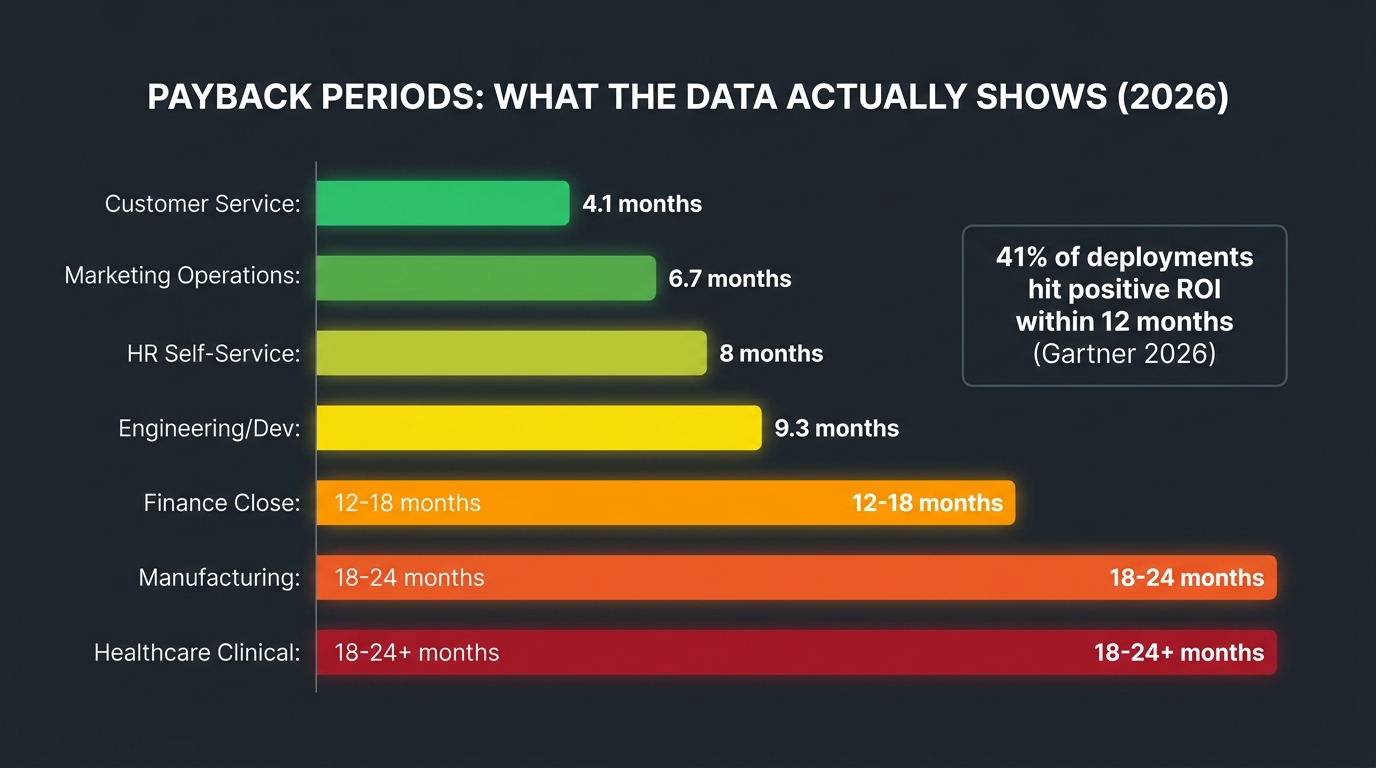
    The 7 Business Functions Where AI Automation Pays Off Fastest
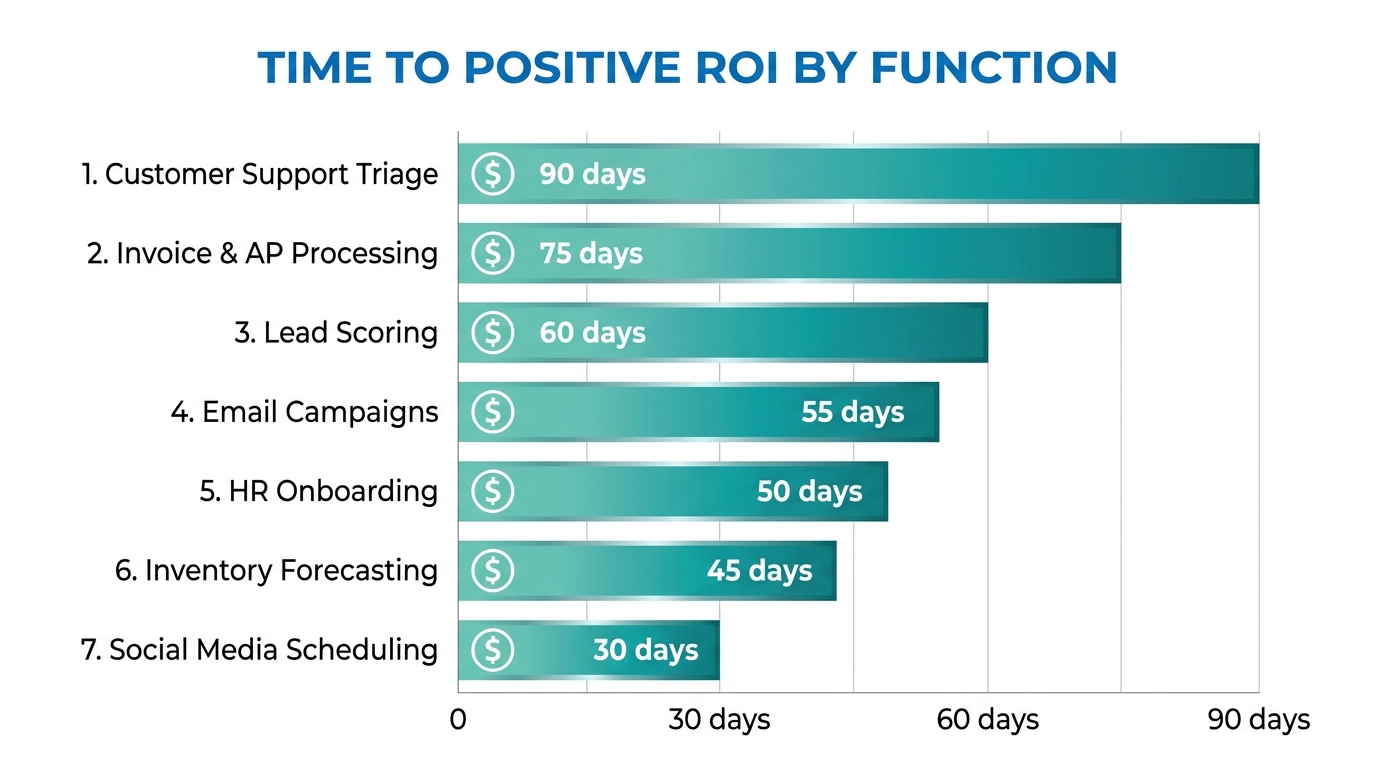
    Bar chart showing the top 7 business functions ranked by time-to-positive-ROI for AI automation

    Not all automation is equal in how quickly it returns value. Some functions have well-established automation patterns, clear inputs and outputs, and measurable impact. Others require more groundwork before they yield meaningful results. Based on adoption patterns across industries, these seven functions consistently reach positive ROI fastest.

    1. Customer Support Triage and First Response

    The economics here are straightforward. If your support team receives 500 tickets a day and 60% of them are answerable with information that already exists in your knowledge base, you’re paying human support agents to do work that a well-configured AI can handle in milliseconds. Not every ticket — the 40% that require judgment, empathy, or account-specific context absolutely still need humans. But the 60% that don’t? That’s where the math becomes compelling quickly.

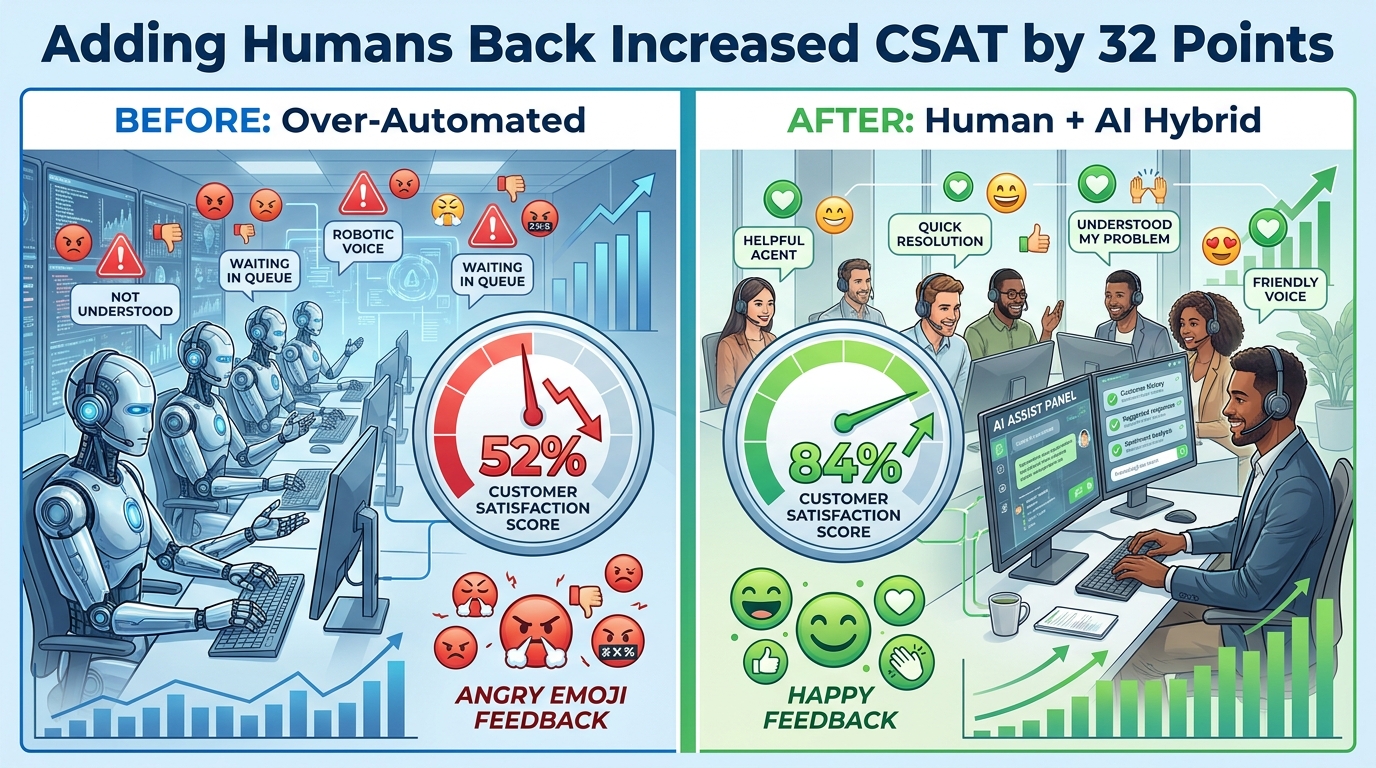
    The key metric to track isn’t cost reduction — it’s first response time and resolution rate for straightforward tickets. When both improve, customer satisfaction scores typically follow, creating a second-order benefit beyond the direct cost savings.

    2. Accounts Payable and Invoice Processing

    Invoice processing sits in the sweet spot: high volume, structured inputs (line items, amounts, vendor names), clear validation rules (three-way matching against purchase orders and delivery receipts), and expensive human error rates. Organizations that manually process invoices typically experience error rates between 1-3%; AI-assisted processing routinely reduces this to below 0.5%.

    The automation typically covers extraction (pulling data from PDFs, scans, or email attachments), validation (matching against PO and receiving records), exception flagging (items that don’t match or exceed thresholds), and routing (sending exceptions to the right approver). The human remains responsible for judgment on exceptions; the AI handles the high-volume matching work that consumes most of the time.

    3. Lead Scoring and Sales Queue Prioritization

    Sales teams are fundamentally overwhelmed by the prioritization problem. With hundreds of inbound leads and a limited number of selling hours, which ones do you call first? AI-driven lead scoring builds a model on your historical conversion data — what signals, behaviors, and firmographic characteristics predicted that a lead became a customer — and then ranks every new lead against that model in real time.

    The payoff isn’t just time savings; it’s revenue. When sales reps work the highest-quality leads first, conversion rates improve and deals close faster. A properly calibrated lead scoring model typically improves sales team productivity by 25-40% without adding headcount, because the same effort is being directed at better opportunities.

    4. Email Marketing Personalization and Sequencing

    Basic email automation has existed for years — the AI layer adds behavioral intelligence. Instead of sending everyone the same message at the same time, AI-powered email automation adapts: send time optimization based on individual recipient open history, content variant selection based on past engagement, sequence branching based on real-time behavior, and list hygiene automation that removes disengaged contacts before they damage deliverability.

    The aggregate impact of these optimizations is significant. Open rates typically improve 15-30% when send times are individually optimized, and unsubscribe rates drop when content relevance improves. Neither of these effects requires expensive custom models — they come from using behavioral data that most email platforms already collect but most teams never activate.

    5. HR and Employee Onboarding Workflows

    New employee onboarding involves an enormous amount of coordination: IT provisioning, benefits enrollment, document collection, training assignment, introductory meeting scheduling, compliance acknowledgments. Much of this is sequential and rules-based — exactly the profile that automation handles well.

    An automated onboarding workflow can trigger all of these steps based on a start date, track completion, send reminders for outstanding items, and escalate to managers when deadlines are missed. The human HR team focuses on the parts that actually benefit from human attention: culture integration, role clarity conversations, and the relationship-building that makes new employees feel genuinely welcomed — not the form-chasing that consumes disproportionate time today.

    6. Inventory Forecasting and Reorder Triggering

    Traditional inventory management relies on static reorder points set periodically and adjusted manually. AI-powered forecasting models incorporate seasonality, promotional calendars, supplier lead time variability, and real-time sales velocity to produce dynamic reorder recommendations that adapt continuously. The result is fewer stockouts and fewer overstock situations — both of which carry direct, measurable costs.

    For businesses with more than 500 SKUs, the manual monitoring burden alone is substantial. Automation here pays off both in reduced carrying costs and in the time operations teams get back from monitoring spreadsheets and reacting to stock alerts.

    7. Social Media Scheduling and Performance Reporting

    Content scheduling is low-stakes, high-frequency, and entirely rule-based — a natural automation candidate. But the real automation opportunity sits in reporting: pulling performance data from multiple platforms, normalizing it into a consistent format, flagging underperforming content, identifying top performers, and generating a readable summary for review. AI doesn’t decide the creative strategy, but it dramatically reduces the time spent assembling and interpreting the data that informs it.

    The 5 Tasks That Look Automatable But Will Burn You

    Every list of automation use cases glosses over these. These are the tasks that seem like obvious candidates — they’re frequent, they’re time-consuming, they involve data — but they have hidden complexity that makes them genuinely dangerous to automate without significant caution.

    1. Personalized Customer Outreach at Scale

    The logic seems sound: you have thousands of customers, you have data about them, you can generate personalized messages automatically. The problem is that “personalized” and “AI-generated-based-on-your-CRM-data” are not the same thing — and customers can tell the difference. A message that correctly uses someone’s first name and references their last purchase, but doesn’t acknowledge the complaint they filed two weeks ago, doesn’t feel personal. It feels like the worst kind of algorithmic parody of personalization.

    This is a failure of data completeness meeting a task with high relationship stakes. If your CRM has incomplete interaction history, or if your automation can’t access all relevant context before generating an outreach message, you’re better off sending a simpler, human-written message than a sophisticated-looking AI-generated one that misses crucial context.

    2. Content Moderation

    User-generated content platforms often try to automate moderation at scale, and the results are consistently messy. Satire, sarcasm, dialect, context-dependent appropriateness, and rapidly evolving slang all create edge cases that AI classifiers handle poorly. Over-moderation alienates users; under-moderation creates liability. Both are expensive. The lesson from platforms that have tried to fully automate moderation is that you can automate the obvious cases, but the edge cases — which constitute a meaningful percentage of real-world content — still require human judgment, and the volume of edge cases is often higher than expected.

    3. Pricing Optimization in Competitive Markets

    Dynamic pricing models that adjust based on competitor pricing data, demand signals, and margin targets can work well in controlled environments. They fail in volatile ones. When a competitor makes an unusual pricing move, when market conditions shift rapidly, or when the model’s training data doesn’t reflect current conditions, automated pricing systems can make decisions that look locally optimal but are globally damaging — racing competitors to the bottom, for example, or missing price elasticity signals that a human pricing analyst would immediately recognize as unusual.

    4. Candidate Screening for Roles Requiring Cultural Fit

    Resume screening automation is widespread and demonstrably useful for filtering unqualified candidates from high-volume applications. The danger zone is using AI to assess cultural fit, “soft skills,” or leadership potential — attributes that involve complex human judgment and where AI models frequently amplify historical biases present in the training data. Hiring decisions made by or heavily influenced by AI that was trained on biased historical hiring patterns can create both legal exposure and genuinely poor hiring outcomes. The screening layer can be automated; the fit assessment shouldn’t be.

    5. Customer Complaint Escalation and Resolution

    There’s a strong temptation to automate the full complaints process end-to-end. First response automation is well-suited for this. Resolution automation for complex complaints is not. When a customer is genuinely upset — especially when the underlying problem is systemic, involves a significant financial impact, or has an emotional dimension — an automated resolution attempt frequently makes the situation worse. The customer wanted to feel heard; instead they got a chatbot trying to close the ticket. The automation here needs to know when to stop and hand off, and that handoff logic needs to be thoughtful, well-tested, and erring heavily on the side of human involvement.

    Building Your Automation Stack: Tools, Triggers, and Logic Layers

    Once you know which tasks to automate, the next decision is how to build it. The tooling landscape in 2026 is broadly stratified into three tiers, and choosing the wrong tier for a given task is a common source of over-engineering (and overspending) on simple workflows and under-building on complex ones.

    Tier 1: Workflow Orchestration Platforms

    Tools like Make (formerly Integromat), Zapier, n8n, and Tray.io handle the connective tissue of automation — moving data between apps, triggering actions based on events, and building multi-step sequences without writing code. For most business automation use cases, this is the right starting point. They’re fast to build, easy to iterate on, and come with pre-built integrations for hundreds of common business tools.

    The limitation of pure orchestration tools is that they execute logic you define in advance. They don’t reason about ambiguous inputs. When you need AI judgment embedded in a workflow — reading an email and deciding whether it’s a complaint, a general inquiry, or a sales opportunity — you need to connect an AI model into the orchestration layer, typically via API.

    Tier 2: AI Model Integrations

    The middle layer of most sophisticated automation stacks today is an LLM API — OpenAI, Anthropic Claude, Google Gemini, or an open-source alternative run on your own infrastructure. This is where the “intelligent” part of intelligent automation lives. The orchestration tool triggers the AI model with a structured prompt, the model returns a decision or generated content, and the orchestration tool acts on that output.

    The key engineering discipline here is prompt engineering and output validation. AI model outputs are probabilistic — the same input won’t always produce the same output. For automation, you need deterministic enough behavior. That means investing in prompt design, testing outputs across a wide range of real inputs, and building validation logic that catches and routes unexpected responses before they propagate errors downstream.

    Tier 3: Custom-Built Automation Systems

    At the high end, organizations with complex, high-volume, or highly specialized automation needs build custom systems — proprietary ML models trained on their own data, custom data pipelines, dedicated APIs. This is expensive, requires engineering resources, and takes months to build and validate. It’s appropriate for processes where the volume is enormous, the business specificity is high enough that off-the-shelf tools can’t reach the required accuracy, or where data privacy constraints rule out third-party model APIs.

    Most businesses don’t start here — and most shouldn’t. The common mistake is starting at Tier 3 when a Tier 1 solution would deliver 80% of the value at 10% of the cost and time. Reserve custom builds for cases where you’ve already run a Tier 1 or 2 solution long enough to understand exactly where its limitations are and what the cost of those limitations is.

    Trigger Architecture: Getting the Inputs Right

    Every automation starts with a trigger — the event that sets the workflow in motion. Getting trigger architecture right matters more than most teams realize. There are three trigger types worth understanding clearly:

    Event-based triggers fire when something happens: a new form submission, a file arriving in a folder, a CRM record being updated, a payment being processed. These are the most reliable trigger type because they’re discrete and verifiable.

    Schedule-based triggers fire on a clock: every morning at 6 AM, every Monday at 9 AM, every hour. These work well for batch processing but require careful thought about what happens when the scheduled run encounters conditions it wasn’t designed for.

    Condition-based triggers fire when a threshold is crossed: inventory below a reorder point, response time exceeding a target, a score falling above or below a threshold. These are powerful but require well-calibrated thresholds — a threshold set wrong will either trigger too often (generating noise) or too rarely (missing the events you wanted to catch).

    Human-in-the-Loop: The Oversight Architecture That Prevents Disasters
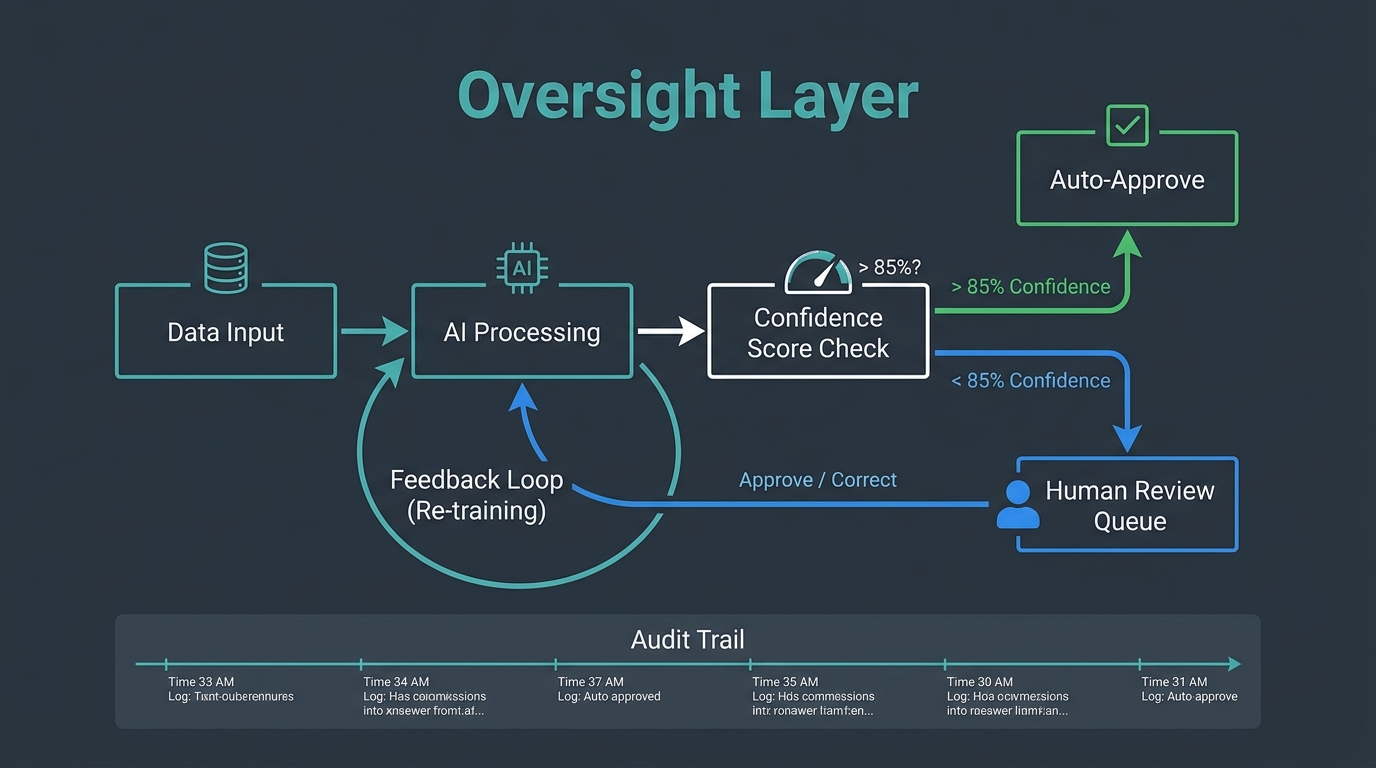
    Human-in-the-loop AI workflow architecture showing confidence scoring, auto-approval, and human review routing

    The phrase “human-in-the-loop” gets used loosely, but in the context of AI automation, it refers to a specific architectural decision: at what point, and under what conditions, does a human get involved in an automated process?

    Getting this architecture right is the difference between automation that builds trust over time and automation that periodically generates a crisis.

    The Confidence Threshold Model

    The most practical implementation of human oversight in AI automation uses confidence scoring. When an AI model makes a classification or generates an output, it also produces a confidence level — how certain the model is that its answer is correct. You set a threshold (commonly 85-90%) above which outputs are auto-approved, and below which they’re routed to a human review queue.

    This approach is elegant because it scales naturally. High-confidence outputs flow through automatically, maintaining efficiency. Low-confidence outputs get human attention, maintaining quality. Over time, you can analyze the low-confidence queue to understand where the model is systematically uncertain — and that analysis guides both model improvement and process redesign.

    The threshold you set matters significantly. Too high (95%+) and you’re routing so much to human review that the automation barely helps. Too low (70%) and you’re auto-approving outputs that have a meaningful failure rate. Calibrate based on the cost of an error in that specific workflow — higher stakes justify higher thresholds.

    Audit Trails and Explainability

    Every automated decision that has material consequences should generate an audit trail: what input did the system receive, what did it decide, at what confidence level, and what action did it take? This isn’t just a compliance requirement — it’s a diagnostic tool that tells you when automation behavior is drifting from what you designed it to do.

    For AI models specifically, explainability is increasingly important. “The AI decided” is not an acceptable answer when a customer asks why their account was flagged, their application was denied, or their price changed. Building lightweight explanation generation into automated decisions — “this lead was scored high because of seniority level, company size, and recency of engagement” — protects both the business and the people interacting with the automation.

    Failure Escalation Protocols

    Every automation needs a defined behavior for when it doesn’t know what to do. This sounds obvious; it’s consistently skipped in builds. What happens when the AI receives an input it has never seen before? What happens when an API call fails? What happens when the output validation check catches something unexpected?

    The answer should never be “nothing.” Failing silently — where the workflow simply stops and no one is notified — is how small automation errors compound into large operational problems. Failing loudly to the right person, with enough context for them to act, is the design target. Every workflow should have a defined escalation path: who gets notified, in what channel, with what information, when an exception occurs.

    Measuring What Actually Matters After You Deploy

    The metrics that get tracked most often after an automation goes live — tasks processed, time saved, cost per transaction — are useful but incomplete. They measure activity. They don’t always capture quality, and they rarely capture second-order effects. A more complete measurement framework covers four dimensions.

    Throughput and Efficiency

    Start here: how many tasks per hour, day, or month is the automation processing? Compare it to the manual baseline. This is your primary efficiency metric. Track it weekly for the first three months — automations often show initial throughput gains followed by a dip as edge cases accumulate and the workflow needs refinement. The dip is normal; the key is catching it early and diagnosing it quickly.

    Output Quality

    For every automation that produces a decision or a piece of content, you need a quality sampling process. Pull a random sample of outputs weekly — say 50-100 — and have a human evaluate them against your quality criteria. Track the error rate, the types of errors, and whether the error rate is trending up or down over time. Quality measurement is the most frequently skipped step in automation monitoring, and it’s where the most damaging problems go undetected longest.

    Exception Rate

    What percentage of tasks is the automation unable to complete and routing to human review? Track this separately from quality. A rising exception rate tells you either that your input data is changing in ways the automation wasn’t designed for, or that the model’s performance is degrading. Either way, it’s a signal worth investigating before it becomes a crisis.

    Downstream Business Impact

    The automation’s job isn’t to process tasks — it’s to produce a business outcome. Customer support triage automation isn’t measured by tickets processed; it’s measured by customer satisfaction scores and time-to-resolution. Lead scoring automation isn’t measured by scores generated; it’s measured by the conversion rate of leads the sales team actually works. Connecting the automation to its downstream business outcome is the measurement discipline that separates teams who know their automation is working from teams who assume it is.

    The Maintenance Reality: Why Automations Degrade Over Time
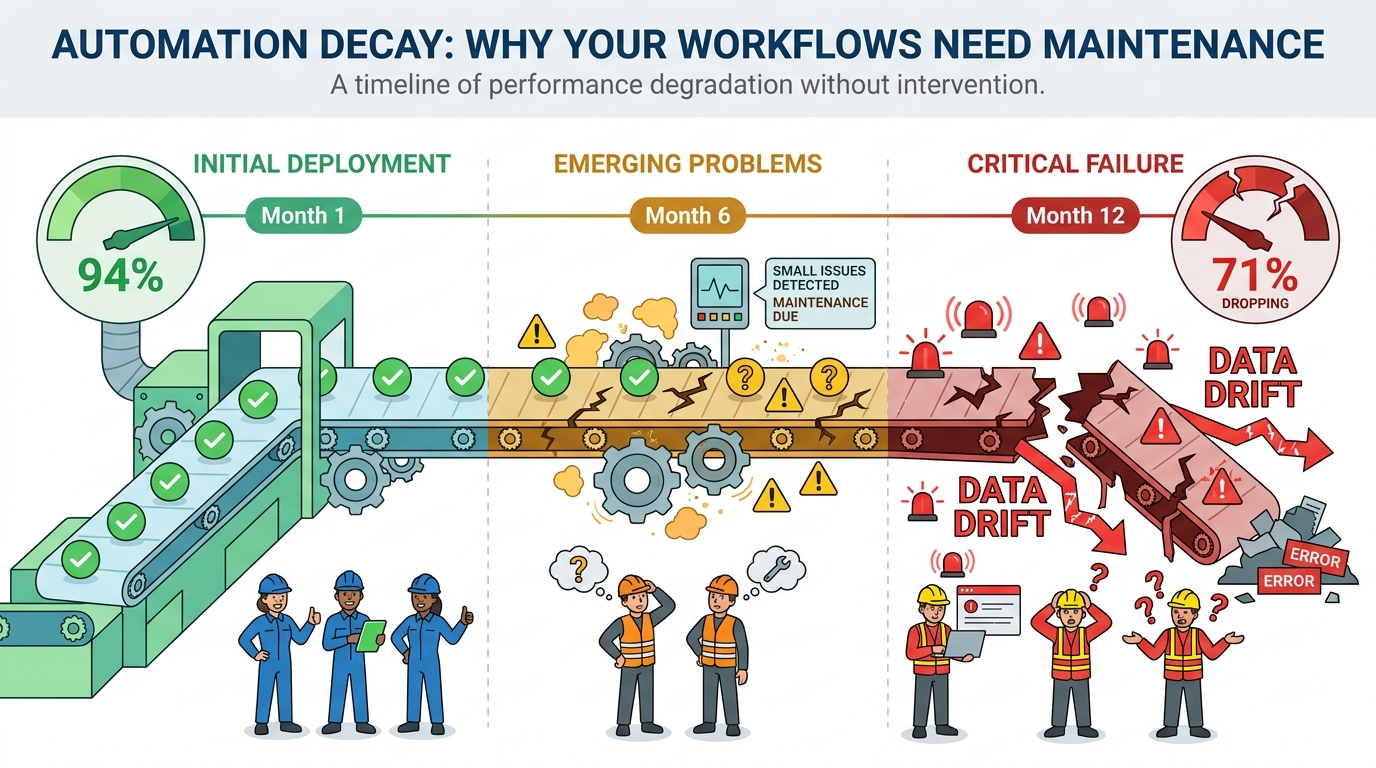
    Automation decay timeline illustration showing workflow degradation from Month 1 through Month 12 with data drift and model performance decline

    There’s a pervasive assumption that automation, once built, runs indefinitely. It doesn’t. Automations decay — not all at once, and not dramatically, but steadily, as the world changes around them.

    Understanding the mechanics of automation decay is essential for anyone building workflows they intend to rely on for more than a few months.

    Data Drift

    The most common cause of automation degradation is data drift — the gradual change in the statistical properties of the data the automation receives. An AI model trained on your customer data from twelve months ago may have learned patterns that no longer hold. Your customer base has shifted; your product catalog has changed; your marketing messaging has evolved and attracted a different audience. The model doesn’t know any of this. It keeps applying old patterns to new data, and its accuracy quietly erodes.

    Detecting data drift requires monitoring. Track the distribution of inputs your automation receives over time — the mix of customer segments, the range of values in key fields, the frequency of different input types. When the distribution shifts meaningfully from the training baseline, it’s time to retrain.

    Dependency Rot

    Automations depend on external systems: APIs, databases, third-party services, internal tools. Every external dependency is a potential point of failure over time. APIs add new required fields, change authentication methods, or version-change in ways that break existing integrations. The third-party service the automation relies on updates its data format. Your internal CRM gets migrated to a new platform. Each of these changes requires updating the automation — and if no one is responsible for tracking upstream dependency changes, the automation fails silently until something obvious breaks.

    The practical mitigation is dependency documentation and change notification. For every external dependency your automation relies on, document it, and set up monitoring (even simple uptime pings and format validation checks) that alerts your team when something changes.

    Process Evolution

    Your business processes change. New products launch, pricing models change, team structures reorganize, compliance requirements update. An automation built to reflect the business logic of twelve months ago may not reflect how the business actually works today. Process drift is harder to detect than technical failures because the automation keeps running — it’s just running the wrong process.

    The antidote is scheduled reviews. Every active automation should have a quarterly review on the calendar where someone with business context (not just the person who built it) evaluates whether the automation still reflects how the business intends to operate. This sounds bureaucratic. In practice, it takes 30 minutes per automation and catches problems early enough to fix them cheaply.

    Building a Maintenance Budget

    Automation maintenance is underbudgeted by default because it doesn’t feel like work — you’re not building anything new. But the evidence from teams that run automations at scale is consistent: expect to spend 20-30% of the initial build time on maintenance annually. An automation that took 40 hours to build should have 8-12 hours per year allocated for monitoring, updating, and retraining. Not every automation will need that much. Some will need more. Budget for it explicitly, or you’ll end up managing the cost reactively, when something breaks at the worst possible time.

    The Change Management Layer Most Teams Skip

    Here’s a truth that automation teams rarely confront directly: the technology is almost never the hardest part of deploying AI automation. The people are.

    This isn’t an indictment of employees. It’s a recognition that automation changes how work gets done, and people who’ve built expertise, workflow habits, and professional identity around doing tasks a specific way have legitimate reasons to be uncertain about what automation means for them. Skipping the change management layer doesn’t make the human dynamics disappear — it just makes them play out as passive resistance, low adoption rates, and quietly abandoned workflows.

    The Transparency Imperative

    The single most damaging thing a team can do when rolling out automation is obscure what it does and why. When people don’t understand what the automation is handling and what it’s not, they fill the gap with anxiety — usually catastrophizing in the direction of “it’s replacing my job.” Even when that fear isn’t warranted, it’s remarkably difficult to dislodge once it takes hold.

    Transparency doesn’t mean overwhelming people with technical detail. It means answering three questions clearly: What tasks is this automation handling? How does it make decisions? And what do I, as the person whose role is affected, do differently now? Teams that communicate these answers proactively and specifically see significantly higher adoption rates than those who send a brief announcement and assume the rest follows.

    Reframing the Role of the Human

    The most effective framing — and the one that’s most often true — is that automation takes over the parts of a job that are repetitive and mechanical, freeing up time for the parts that actually require the skills and judgment the person was hired for. A support agent who was spending 60% of their time on copy-paste ticket responses can now spend that 60% on complex customer issues where their empathy and knowledge actually make a difference. That’s not a job being replaced; it’s a job being made better.

    This framing only lands if it’s genuine. If the plan is to reduce headcount post-automation, say so honestly rather than using the “freeing up time” framing as a cover story. People see through it, and the trust damage from that kind of misdirection is expensive and slow to repair.

    Training for the New Role

    Automation changes what skills are needed, not whether skills are needed. Employees whose roles are affected by automation need training — not on how to use the automation (that should be self-evident) but on how their role has evolved. What judgment calls are now theirs to make that the automation can’t? What patterns should they be watching for in the automation’s outputs? How do they handle the exceptions that the automation routes to them?

    This training investment is typically modest in time but significant in adoption impact. Teams that receive it adapt faster, catch more problems early, and develop the kind of contextual relationship with the automation that allows them to improve it over time.

    Building an Automation Mindset, Not Just Automation Tools

    The businesses that get the most lasting value from AI automation share a characteristic that has nothing to do with the sophistication of their toolstack: they treat automation as a continuous practice, not a one-time project.

    A one-time project mindset builds an automation, declares victory when it goes live, and moves on. The automation runs until it fails badly enough to demand attention, gets fixed, and runs again. The efficiency gains are real but modest. The risk of silent failure is constant.

    A continuous practice mindset looks different. It maintains a backlog of automation candidates, ranked by quadrant analysis and data readiness. It runs regular reviews of active automations against quality and performance benchmarks. It uses exception data and error patterns as feedback loops to improve existing automations and inform the design of new ones. It treats automation maintenance as a first-class engineering and operations responsibility, not an afterthought.

    The Automation Backlog

    Every operations team should maintain a living list of tasks that are candidates for automation, with each task assessed against the quadrant framework: repetitiveness, data quality, estimated volume, estimated error cost, and estimated build effort. This backlog is reviewed monthly, reprioritized as data environments change and business priorities shift, and used to make deliberate decisions about where automation investment goes next.

    The backlog also prevents ad-hoc automation — the one-off builds that solve an immediate pain point but weren’t designed to fit into the broader automation architecture. Ad-hoc automations accumulate into technical debt fast. A maintained backlog creates the discipline to evaluate new automation candidates systematically before committing to building them.

    The Feedback Culture

    The people closest to automated processes are the employees whose roles interact with them — the support agents reviewing flagged tickets, the finance team handling invoice exceptions, the sales reps working scored leads. They notice things that monitoring dashboards don’t: the edge cases that generate wrong outputs but are below the statistical threshold for detection, the systematic bias in how the model handles a certain type of input, the exception that keeps appearing despite being flagged repeatedly.

    Building a feedback culture means creating a simple, low-friction channel for these observations to surface. A shared Slack channel, a quick-capture form, a standing 15-minute review in weekly team meetings — the format matters less than the habit. The teams that collect and act on front-line feedback improve their automations faster, and with fewer major failures, than teams that rely exclusively on system monitoring.

    Starting Small and Compounding

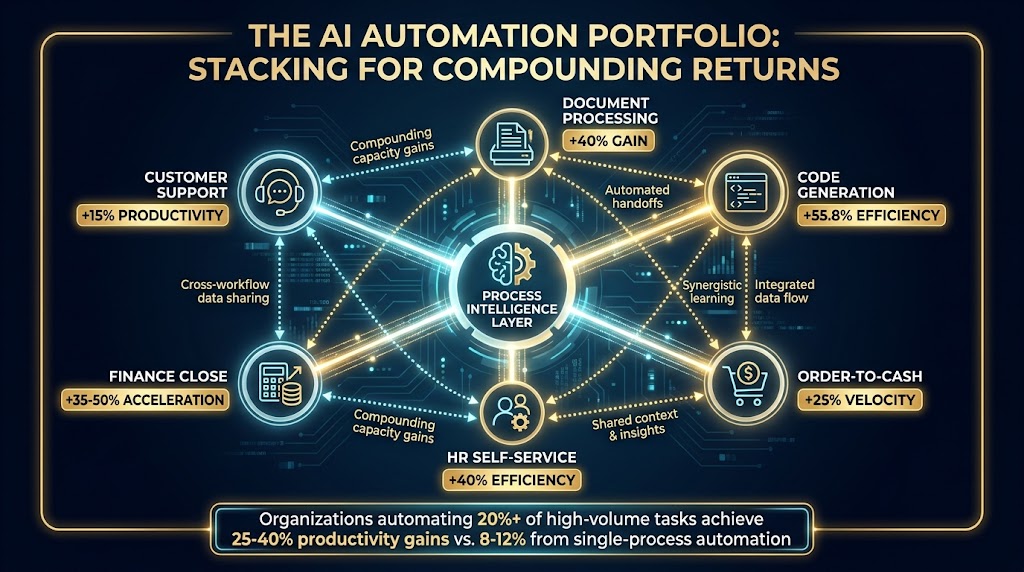
    The most durable approach to AI automation isn’t a sweeping transformation program. It’s a series of small, well-chosen, well-maintained wins that compound over time. A company that successfully automates six high-confidence processes in year one, maintains them diligently, and uses the data and trust those automations generate to tackle six more in year two is in a far stronger position than a company that attempted twenty automations simultaneously and is now managing the fallout of six that went wrong.

    Automation compounds because each successful build generates learnings — about your data quality, your exception patterns, your team’s adaptation speed — that make the next build better. The teams that are furthest ahead in AI automation in 2026 aren’t there because they moved fastest. They’re there because they moved most deliberately, fixed what broke, and built institutional knowledge that no tooling change could eliminate.

    The bottom line: AI automation is not a destination you arrive at. It’s a capability you build progressively, through a combination of careful task selection, honest data assessment, thoughtful oversight architecture, rigorous measurement, and genuine investment in the people whose work it changes. The map matters as much as the tools. Draw it carefully before you build anything.

    Key Takeaways

    • Use the quadrant framework — evaluate every automation candidate on repetitiveness AND data quality before committing to building it.
    • Fix data before building — a pre-automation data audit (200-500 record sample, manual walkthrough) will tell you more about viability than any tool demo.
    • Start in Quadrant 1 — high repetition, high data quality tasks return value fastest and build trust in your automation practice.
    • Build confidence thresholds into AI workflows — auto-approve high-confidence outputs, route low-confidence ones to human review, and track both rates over time.
    • Budget for maintenance explicitly — expect 20-30% of initial build time annually for monitoring, updating, and retraining.
    • Don’t skip change management — transparent communication about what the automation does, and genuine reframing of human roles, is what separates adopted automations from abandoned ones.
    • Maintain an automation backlog — deliberate prioritization prevents ad-hoc builds that become technical debt.
    • Measure downstream business impact — not just tasks processed, but the business outcome the automation was designed to improve.
  • What Nobody Tells You About Building AI Automations That Actually Stick

    What Nobody Tells You About Building AI Automations That Actually Stick

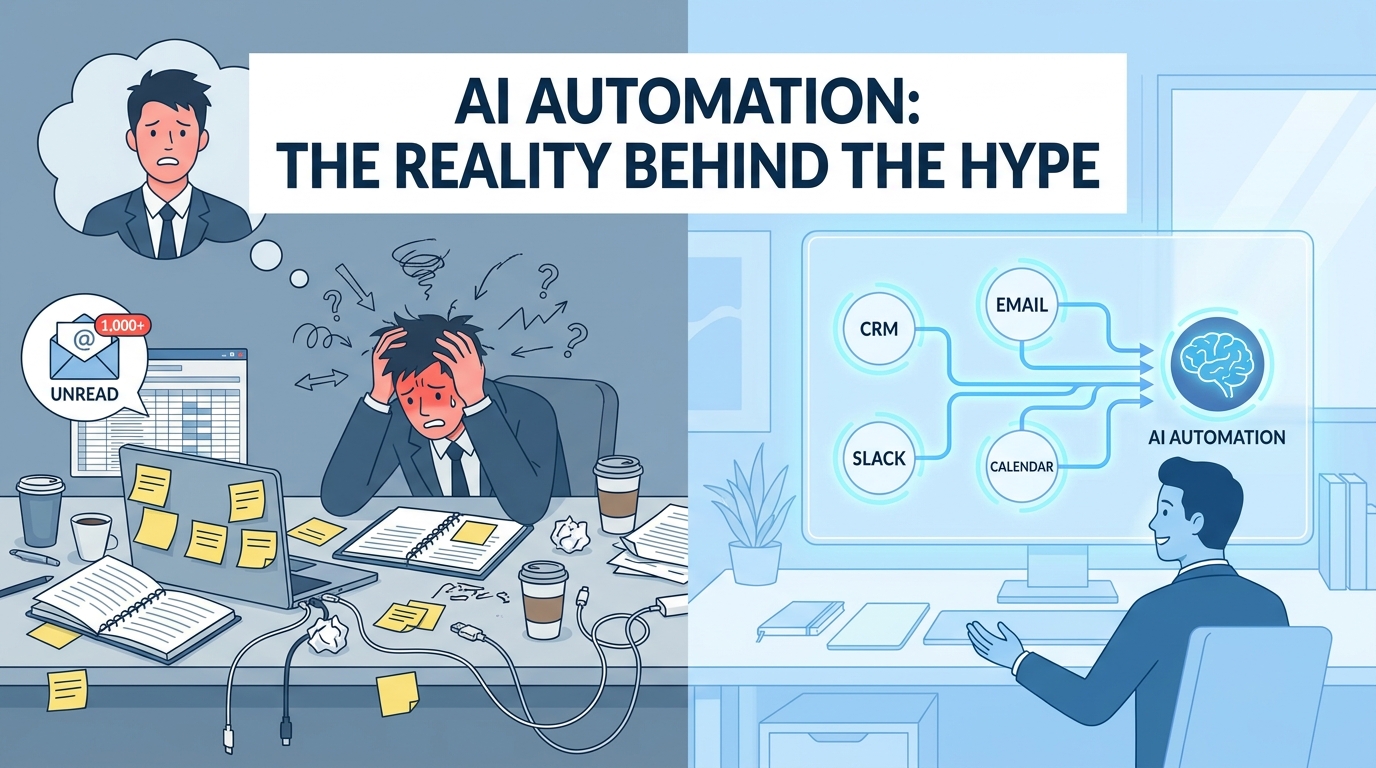
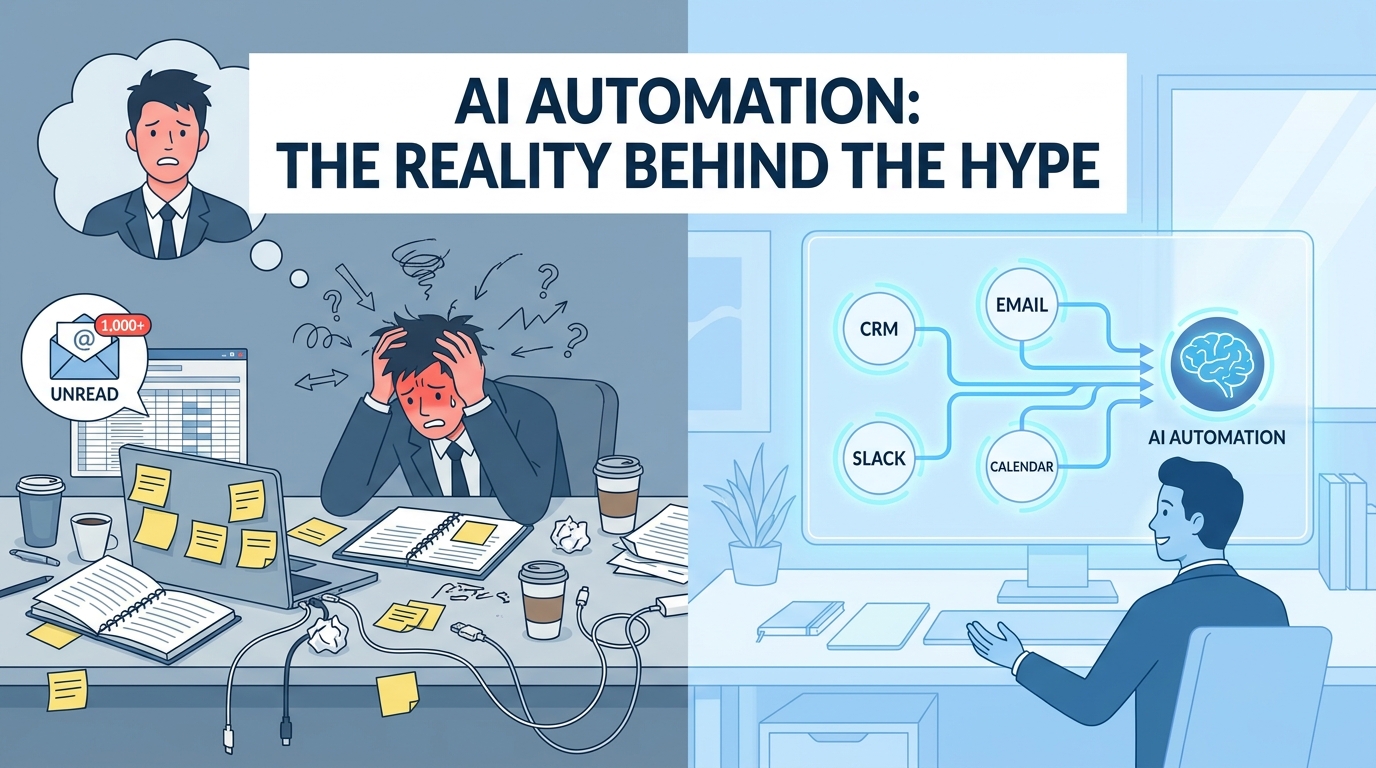
    Split-screen showing chaotic manual workflows on the left versus clean, connected AI automation on the right — AI Automation: The Reality Behind the Hype

    Every vendor selling AI automation tools will show you the same demo. A lead comes in. An AI reads it, scores it, routes it to the right rep, drafts the follow-up email, and logs everything to the CRM — all while the sales team is asleep. It looks effortless. It looks inevitable. And for some teams, it actually works exactly like that.

    For most teams, though, it doesn’t. Not because the technology is broken — it mostly isn’t — but because the distance between a compelling demo and a reliable, production-ready workflow is enormous, and almost nobody maps that territory honestly.

    The conversation around AI automations in 2026 has matured past the “what is it?” phase. Most business operators now understand, broadly, what AI automation means: using machine intelligence to handle tasks that used to require human judgment, embedded directly into the processes your team already runs. What hasn’t kept pace with that conceptual awareness is the operational knowledge — the specifics of how you actually build something that works, doesn’t break, scales beyond your first five workflows, and generates outcomes you can measure with confidence.

    This post covers that territory. It’s not a technology overview and it’s not a vendor comparison. It’s a practitioner’s map of the decisions, tradeoffs, and common failure modes that determine whether your AI automation program becomes a genuine operational advantage — or just an expensive collection of half-finished workflows and disappointed stakeholders.

    Whether you’re running your first automation or trying to scale a program that’s stalled out at ten workflows, there’s ground here worth covering.

    The Automation Readiness Problem Most Teams Skip Entirely

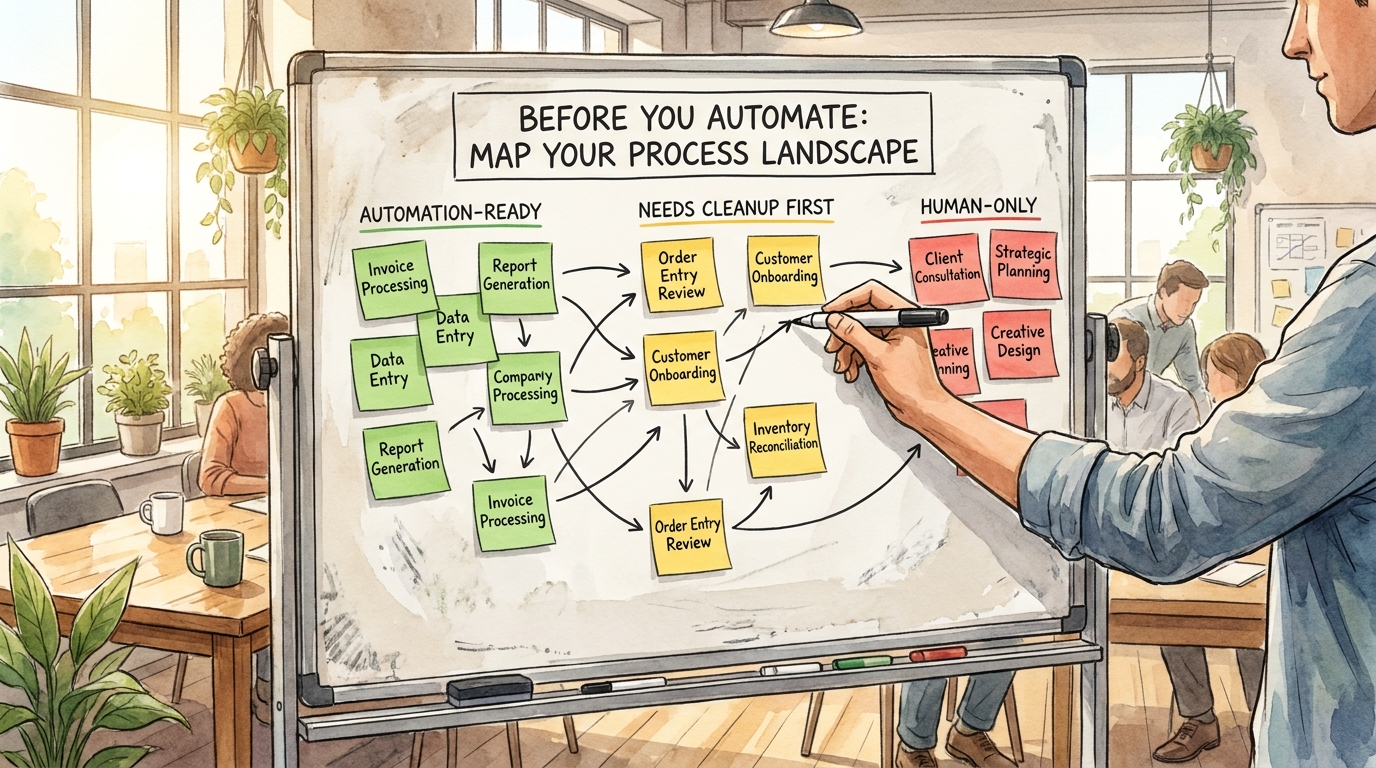
    Process audit map on a whiteboard showing Automation-Ready (green), Needs Cleanup First (yellow), and Human-Only (red) processes — Before You Automate: Map Your Process Landscape

    Before a single workflow gets built, there’s a diagnostic question that almost every team skips: Is this process actually ready to be automated?

    That question sounds obvious. It isn’t. Most organizations rush to automate processes that are fundamentally broken at the human level first. They’re inconsistent, poorly documented, dependent on tribal knowledge, or riddled with exceptions that nobody has ever written down. Automating a broken process doesn’t fix it — it just executes the broken version faster, at scale, with less visibility into what’s going wrong.

    The Three-Category Process Audit

    A useful first step before any automation build is sorting every candidate process into one of three categories:

    • Automation-Ready: The process is consistent, well-documented, has clear inputs and outputs, and exceptions are rare and predictable. These are your highest-confidence candidates.
    • Needs Cleanup First: The process works, but it relies on undocumented judgment calls, varies by team member, or has exception paths that haven’t been mapped. These processes need standardization before automation — otherwise you’ll be constantly firefighting edge cases your workflow can’t handle.
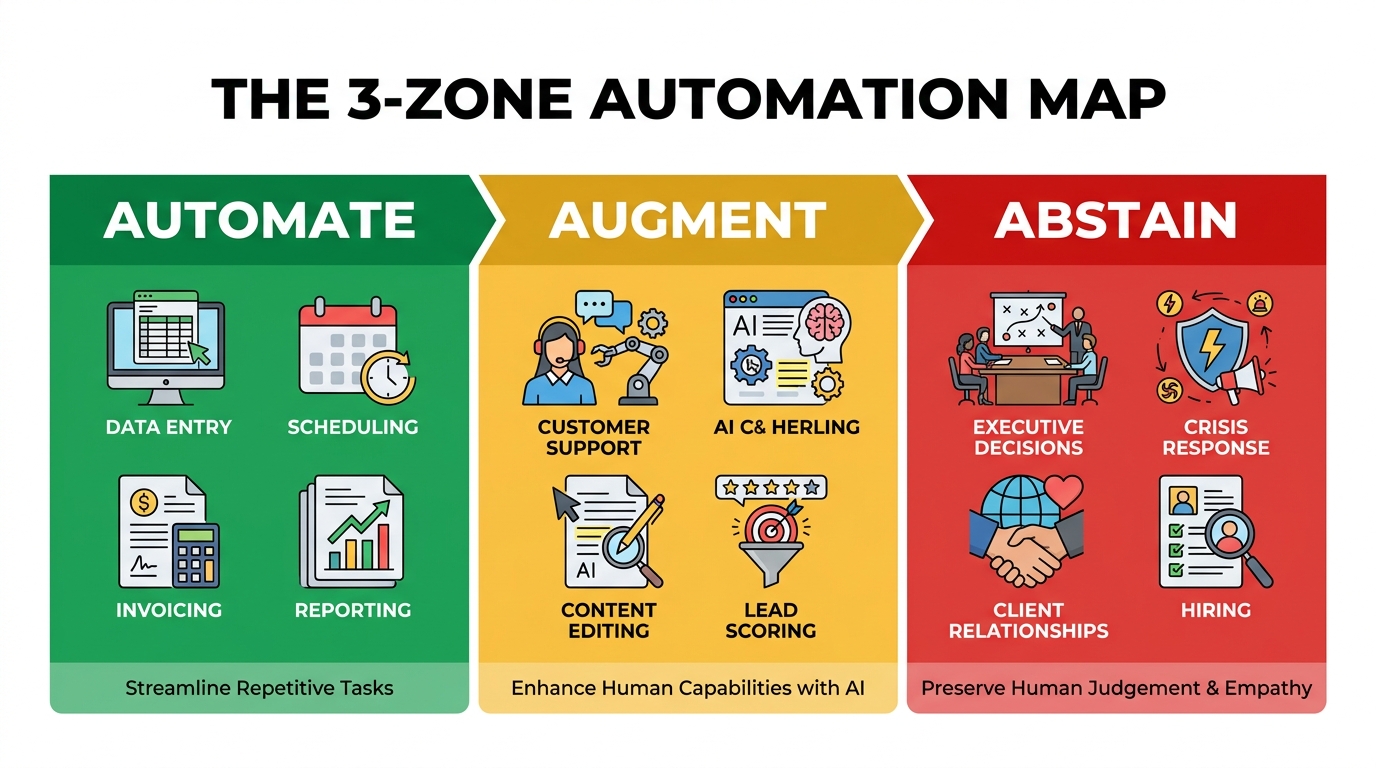
    • Human-Only (for now): The process is inherently relational, contextually complex, or ethically sensitive in ways that make full automation inappropriate or premature. This doesn’t mean it stays this way forever — it means automation should augment rather than replace the human in these workflows.

    The discipline here is being honest about which category a process actually belongs to, not which category you want it to belong to because you’re eager to ship something.

    Why Documentation Debt Kills Automation Programs

    The single biggest predictor of a failed automation build isn’t the technology — it’s documentation debt. When a process lives primarily in someone’s head, there’s no reliable way to translate it into a workflow that behaves consistently. Every edge case the human handles intuitively becomes a gap in the automation that surfaces as an error, an escalation, or worse, a mistake that nobody notices until it’s caused real damage.

    Teams that succeed at automation at scale treat process documentation as a pre-requisite, not an afterthought. Before they write a single workflow, they document the current state: who does what, when, in response to what inputs, and with what decision criteria. They map the exceptions. They identify the judgment calls. Only then do they design the automation — and that design process itself often reveals that the process needs redesign before it can be reliably automated.

    The Consistency Test

    A practical way to assess readiness: have three different people describe how they’d handle the same scenario in the process you’re considering automating. If you get three meaningfully different answers, the process isn’t ready to automate. The automation will simply encode one person’s version and break for everyone else’s edge cases. Standardize first, automate second.

    The Five Layers of a Real AI Automation Stack

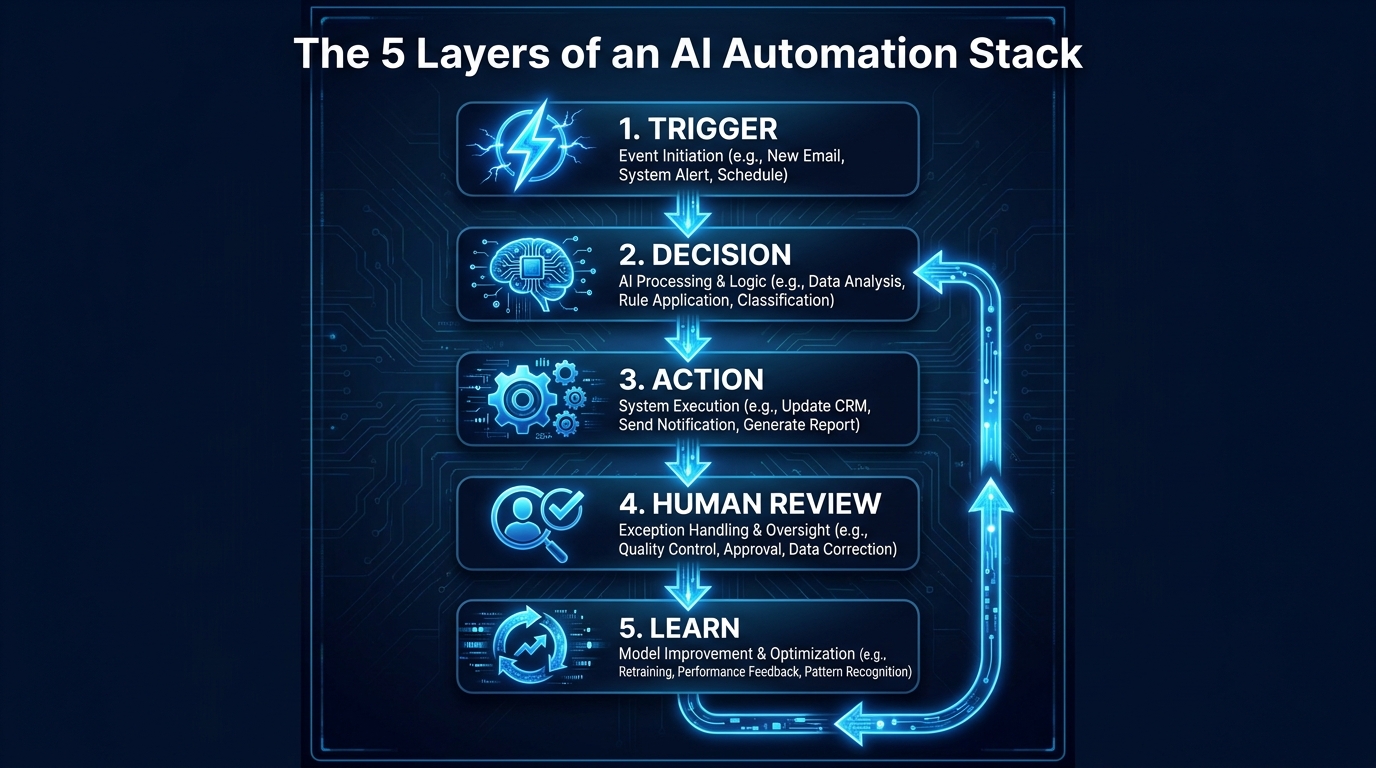
    The 5 Layers of an AI Automation Stack: Trigger, Decision, Action, Human Review, and Learn — a vertical pipeline diagram

    Most people think about AI automations as a single thing: a bot that does a task. In practice, every robust AI automation is a layered system, and understanding those layers is what separates workflows that last from workflows that collapse the first time something unexpected happens.

    Layer 1: The Trigger

    Every automation starts with a trigger — the event or condition that kicks the workflow into motion. Triggers can be time-based (run every Monday at 8am), event-based (a new lead submits a form), threshold-based (inventory drops below 50 units), or behavioral (a user hasn’t logged in for 14 days).

    The most common mistake at the trigger layer is being too broad or too narrow. A trigger that fires too broadly creates noise — your workflow runs constantly on inputs it wasn’t designed for, generating errors or junk outputs. A trigger that’s too narrow means you miss events you intended to capture. Defining your trigger conditions precisely, and testing them against realistic edge cases before launch, is foundational work that pays off in stability.

    Layer 2: The Decision

    This is the AI layer — where machine intelligence does the thing that rule-based automation couldn’t. It might be reading an email and determining whether it’s a support request, a sales inquiry, or a billing question. It might be scoring a lead based on behavioral signals. It might be extracting structured data from an unstructured document.

    The key design principle at this layer is knowing the confidence threshold at which you’ll trust the AI’s decision versus escalate to a human. Not every AI decision is created equal. A decision made with 95% confidence can usually be acted on automatically. A decision made at 60% confidence probably shouldn’t be. Building explicit confidence thresholds into your decision layer — and routing low-confidence outputs to a human review queue — is what separates a well-designed workflow from a liability.

    Layer 3: The Action

    Actions are the outputs the workflow produces: send an email, update a CRM record, create a task, move a file, post a Slack message, generate a report. The critical principle here is idempotency — designing your actions so that if they run twice (due to a system error or retry logic), they don’t cause double-sends or duplicate records. This sounds like an engineering concern, but it affects everyone who builds workflows. Nothing erodes trust in an automation faster than a customer receiving the same email five times.

    Layer 4: Human Review

    Almost every meaningful AI automation needs a human review checkpoint — either for high-stakes decisions, low-confidence outputs, or exception cases. The design of this checkpoint matters enormously. If the review interface is clunky, buried in an unfamiliar tool, or requires the reviewer to do significant context-gathering before they can make a decision, humans will stop reviewing. They’ll approve everything automatically to clear the queue, which defeats the purpose entirely.

    Good human review interfaces surface all the relevant context in a single view, make the approve/reject/modify action dead simple, and log the human’s decision so the system can learn from it over time.

    Layer 5: The Feedback Loop

    The feedback loop is what turns an automation into an asset that improves over time. Every human correction, every error, every escalation is a signal. Workflows that capture those signals and feed them back into the decision layer — either by fine-tuning the AI model or by updating the logic — get better. Workflows that don’t have a feedback loop degrade as the world changes around them and nobody updates the logic to match.

    This layer is the most commonly skipped. It requires intentional design, and it requires someone to own the workflow not just at launch but on an ongoing basis.

    Department by Department: Where AI Automation Is Generating Real Results

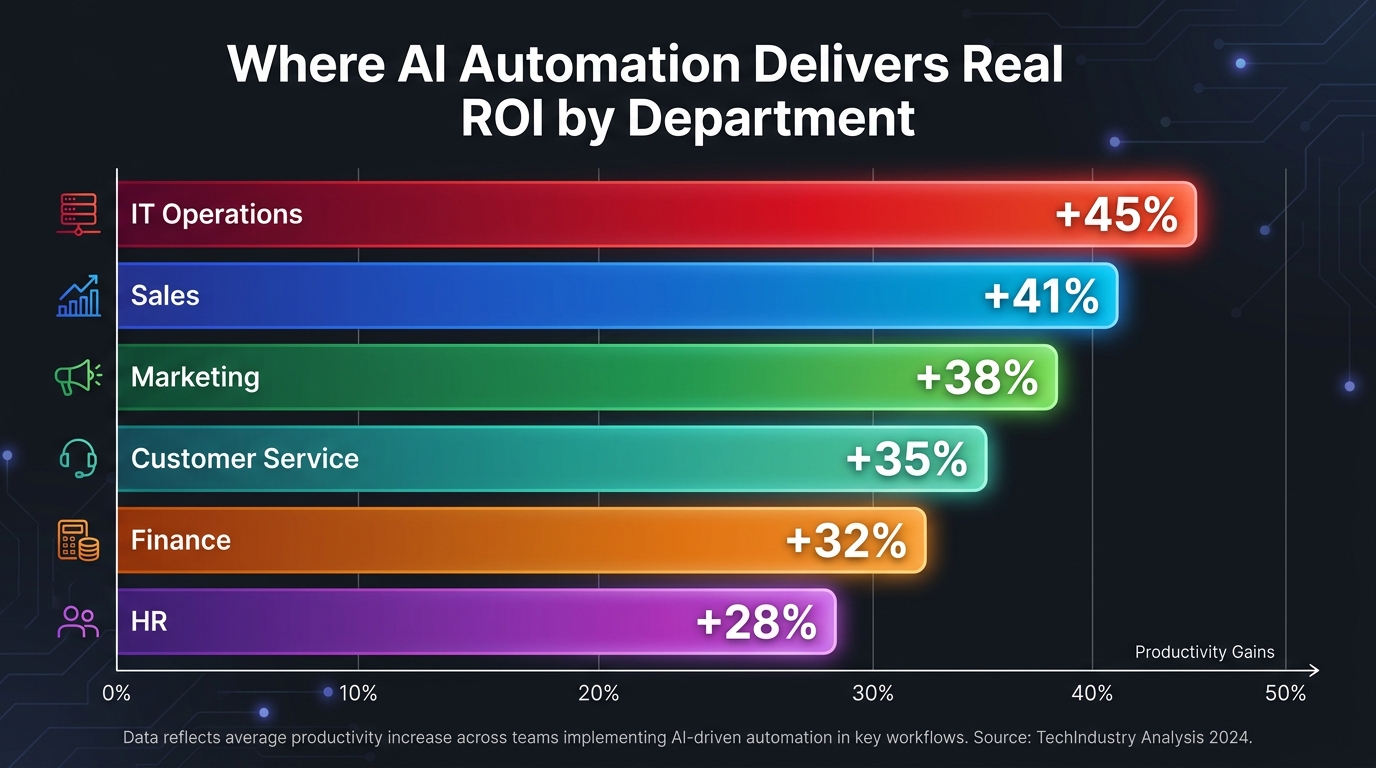
    Bar chart infographic showing AI automation productivity gains by department: IT Ops +45%, Sales +41%, Marketing +38%, Finance +32%, Customer Service +35%, HR +28%

    Rather than talking about AI automation in the abstract, it’s worth getting specific about where, functionally, the most reliable and measurable results are being generated. The landscape isn’t uniform — some departments have a longer track record, clearer use cases, and better tooling. Others are earlier on the curve.

    Sales: The Department That Moved First

    Sales was one of the first functions to adopt AI automation at scale, and for good reason: the processes are high-volume, the outcomes are measurable, and the pain points are acute. Admin work in sales — data entry, CRM updates, contact enrichment, follow-up scheduling — consumes enormous amounts of time that reps would rather spend in actual conversations.

    Real estate brokerage Rush Home, for example, built an AI agent that scores a database of more than 11,000 leads using Claude, then emails each agent a ranked morning brief with follow-up tactics drawn from CRM notes. The agent runs continuously, updating scores as leads interact with the team. This isn’t a one-time analysis — it’s a living system that prioritizes the right leads automatically, every day.

    The pattern that works in sales automation: eliminate the admin layer between conversations, not the conversations themselves. Enriching leads, routing them intelligently, logging call outcomes, drafting follow-up emails — these are the high-ROI targets. Attempting to automate the actual sales conversation is where things get complicated and results get inconsistent.

    Customer Service: Volume Plus Consistency

    Customer service automation has a longer history than most — chatbots and automated routing systems predate the current AI wave by years. What’s changed is the quality of the decision layer. Earlier generation systems routed by keyword matching. Current AI-powered systems can understand intent, context, sentiment, and prior history to route tickets with a level of accuracy that meaningfully reduces misrouting, repeat contacts, and escalations.

    PayPal, during a period of intense demand growth, used AI-powered customer service chatbots to handle 65% of message-based customer inquiries — freeing human agents to handle the genuinely complex cases that required judgment and relationship. The key insight here is that AI didn’t replace the service team; it filtered the volume so human agents could focus on work that actually required them.

    The most effective customer service automations share a common design: they handle the high-volume, low-complexity cases autonomously, and they recognize the limits of their own competence — routing to a human smoothly and with full context when a query exceeds those limits.

    Marketing: From Scheduling to Segmentation

    Marketing automation has a mature toolset — email scheduling, A/B testing, triggered campaigns — but AI layers are making it substantially more sophisticated. The current generation of marketing automations can segment audiences dynamically based on behavioral signals, personalize content at the individual level, identify which leads are approaching a buying decision based on engagement patterns, and flag underperforming assets before they drag down campaign metrics.

    ActiveCampaign’s internal team built a workflow that automatically enriches every inbound contact by pulling company and industry data from Apollo, Similarweb, and ChatGPT, attaching it to each lead before it enters the pipeline. The result: reps get leads with real context already attached, outreach is more relevant from the first touch, and routing accuracy improves because the data is there to route against.

    Finance and Operations: The Quiet Winners

    Finance and operations teams tend to operate with less fanfare than sales and marketing, but they’re often where the highest-confidence automation wins live. Invoice processing, expense categorization, vendor payment scheduling, inventory threshold alerts, and financial reconciliation are all processes with clear inputs, clear rules, and clear outputs — making them excellent automation candidates.

    The AI layer adds meaningful value in these contexts primarily in the document understanding and exception detection layers: reading an unstructured invoice and extracting the relevant data, or flagging a transaction that deviates from expected patterns. These are tasks that human finance teams do well but slowly — and that AI can do at high accuracy at scale.

    HR: The Most Sensitive Automation Territory

    HR automation requires the most careful approach of any department, because the decisions being made affect people’s livelihoods and experiences. Resume screening, interview scheduling, onboarding workflows, and benefit enrollment are all reasonable automation candidates. Performance evaluation, termination decisions, and compensation changes are not — at least not without very deliberate human oversight and ethical guardrails.

    The most effective HR automations handle the logistics: scheduling interviews, sending onboarding document packages, routing new hire paperwork, checking benefit enrollment deadlines. They free HR professionals to spend more time on the human work — coaching, culture-building, complex employee relations — rather than administrative task management.

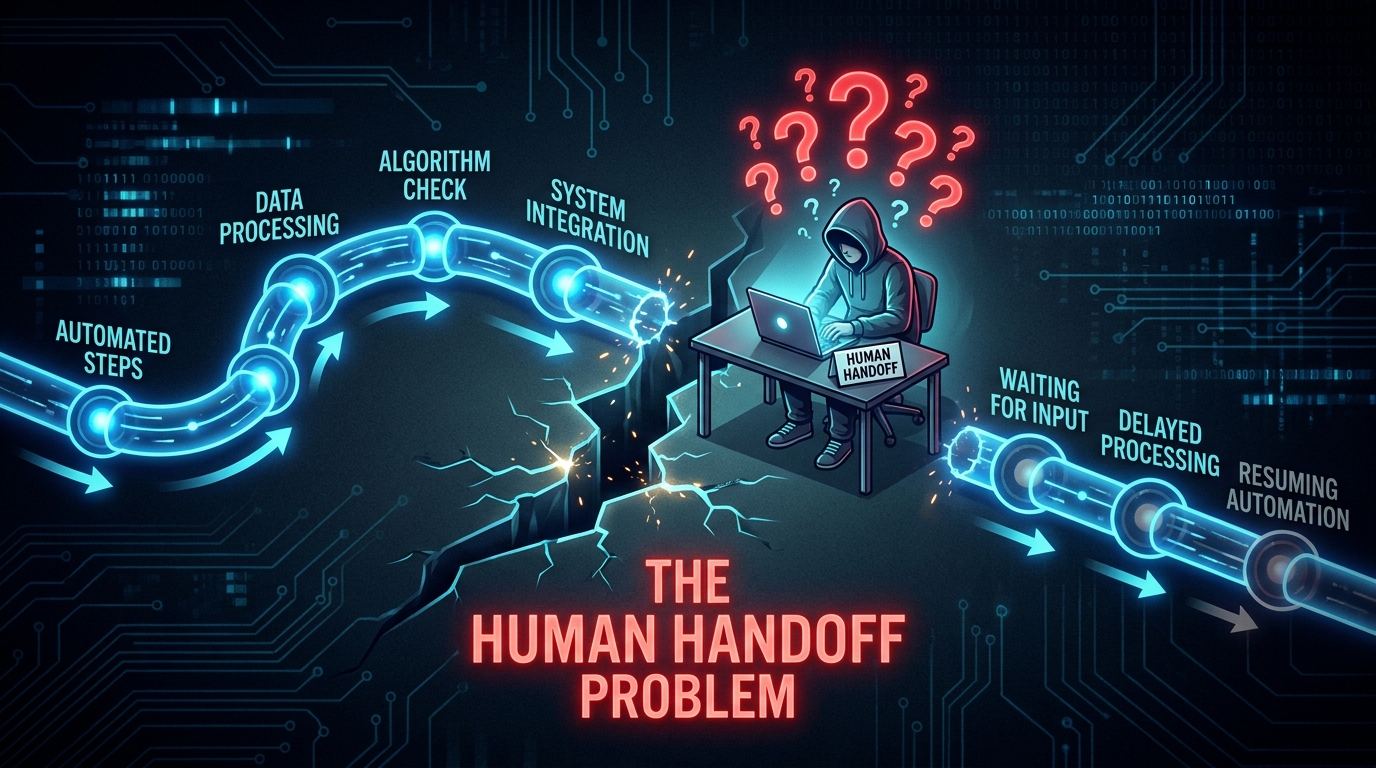
    The Human Handoff Problem — Why Most Automations Break Here

    Workflow diagram breaking at the human handoff point — a figure sits confused as the automated pipeline stalls at their step, labeled The Human Handoff Problem

    Ask any team that has built more than ten AI automations to name the point where things most reliably go wrong. The answer, almost universally, is the same: the moment the workflow hands off to a human.

    This is counterintuitive. You’d expect the AI decision layer to be the fragile point — and it can be. But in practice, the human handoff is where workflows stall, where context gets lost, where approvals take a week instead of an hour, and where the entire downstream automation sits idle waiting for an action that may or may not come.

    Why Handoffs Fail

    The human handoff fails for a consistent set of reasons. The notification goes somewhere the human doesn’t check. The task appears without enough context for the human to act on it confidently. The action required is buried in a tool or interface the human isn’t comfortable with. There’s no clear deadline, so it sits in the queue indefinitely. Or the human is simply overloaded, and the workflow item is indistinguishable from the other 40 things in their inbox.

    Each of these is a design failure, not a human failure. The automation was built assuming ideal conditions. In practice, humans are busy, distracted, working across multiple tools, and operating under cognitive load that wasn’t accounted for at design time.

    Designing Handoffs That Actually Work

    The design principles for human handoffs are different from the design principles for automated steps. Where automated steps need to be precise and fast, handoff steps need to be clear, contextual, and frictionless.

    Clear means the human understands exactly what they’re being asked to do and why. The notification or task description shouldn’t require them to go investigate. It should explain the situation, the relevant context, and the specific action required — in plain language, in one place.

    Contextual means all the information the human needs to make a confident decision is surfaced in the same view. Not spread across three tabs in two different tools. Not requiring a CRM lookup to understand the history. Right there, alongside the action button.

    Frictionless means the action the human needs to take is as simple as possible — ideally a single click or a very short form. Every additional step is an opportunity for the workflow to stall.

    Timeout Logic and Escalation Paths

    Every human handoff also needs a defined timeout. If the human hasn’t acted in X hours, what happens? The workflow should have an answer to that question built in. It might escalate to a backup reviewer. It might send a reminder. It might flag the item for a manager. What it should never do is just wait indefinitely, because that’s effectively the same as the automation failing silently.

    Building timeout logic into human handoff steps is unglamorous work. It’s rarely discussed in automation demos. But it is the difference between a workflow that’s genuinely reliable and one that seems to work great in testing and then mysteriously stalls in production.

    Building for Failure: Error Handling, Monitoring, and Recovery

    Most automation builders think about the happy path. A lead comes in, gets scored, gets routed, gets a follow-up email — smooth, clean, end-to-end. The happy path is what gets demoed. But what happens when the lead data is malformed? When the AI returns a confidence score below your threshold? When the CRM API times out? When the email service hits a rate limit?

    If you haven’t designed for those scenarios, the answer is usually: chaos. Data gets lost. Emails never send. Records get created in inconsistent states. And because the failure is silent — the workflow just stops — nobody notices until a customer complains or a rep realizes their pipeline has a hole in it.

    The Error Taxonomy You Need

    Before you can handle errors well, you need to categorize them. A useful taxonomy for automation errors:

    • Retriable errors: Temporary failures (API timeout, rate limit) that should be automatically retried after a delay. Most modern automation platforms handle this natively, but you need to configure the retry logic deliberately — how many retries, at what intervals, with what backoff behavior.
    • Recoverable errors: Failures that can’t be automatically retried but can be routed to a human who can resolve them — a malformed input, a missing required field, a record that can’t be found. These need a clear escalation path and an alert mechanism.
    • Fatal errors: Failures that represent a fundamental problem with the workflow design itself — unexpected input types, logic gaps, integration incompatibilities. These need to be logged and surfaced immediately to whoever owns the workflow.

    Monitoring That Actually Tells You Something

    Most teams initially monitor their automations by watching for obvious breakage — errors thrown, workflows failing to complete. That’s the floor, not the ceiling. The monitoring approach that gives you genuine operational confidence tracks a richer set of signals: completion rate by workflow step, time-in-queue at human handoff points, AI decision distribution (to catch model drift), and output quality sampling.

    Model drift is particularly worth calling out. An AI automation trained on data from six months ago may begin making systematically worse decisions as the world changes — without throwing any explicit errors. The workflow keeps running, keeps taking actions, but the quality of those actions quietly degrades. Catching this requires sampling outputs over time and checking them against ground truth, not just monitoring for technical failures.

    Graceful Degradation

    The best-designed automations degrade gracefully. If the AI decision layer is unavailable, the workflow doesn’t fail silently — it routes to a human and logs that the AI was bypassed. If an integration goes down, the data gets queued, not lost. If a rate limit is hit, the workflow pauses and resumes cleanly, not mid-execution.

    Graceful degradation isn’t exciting to design. It’s invisible when it works, and it only becomes visible when something goes wrong. But it is the operational maturity that separates automation programs that teams trust from ones they treat with constant suspicion.

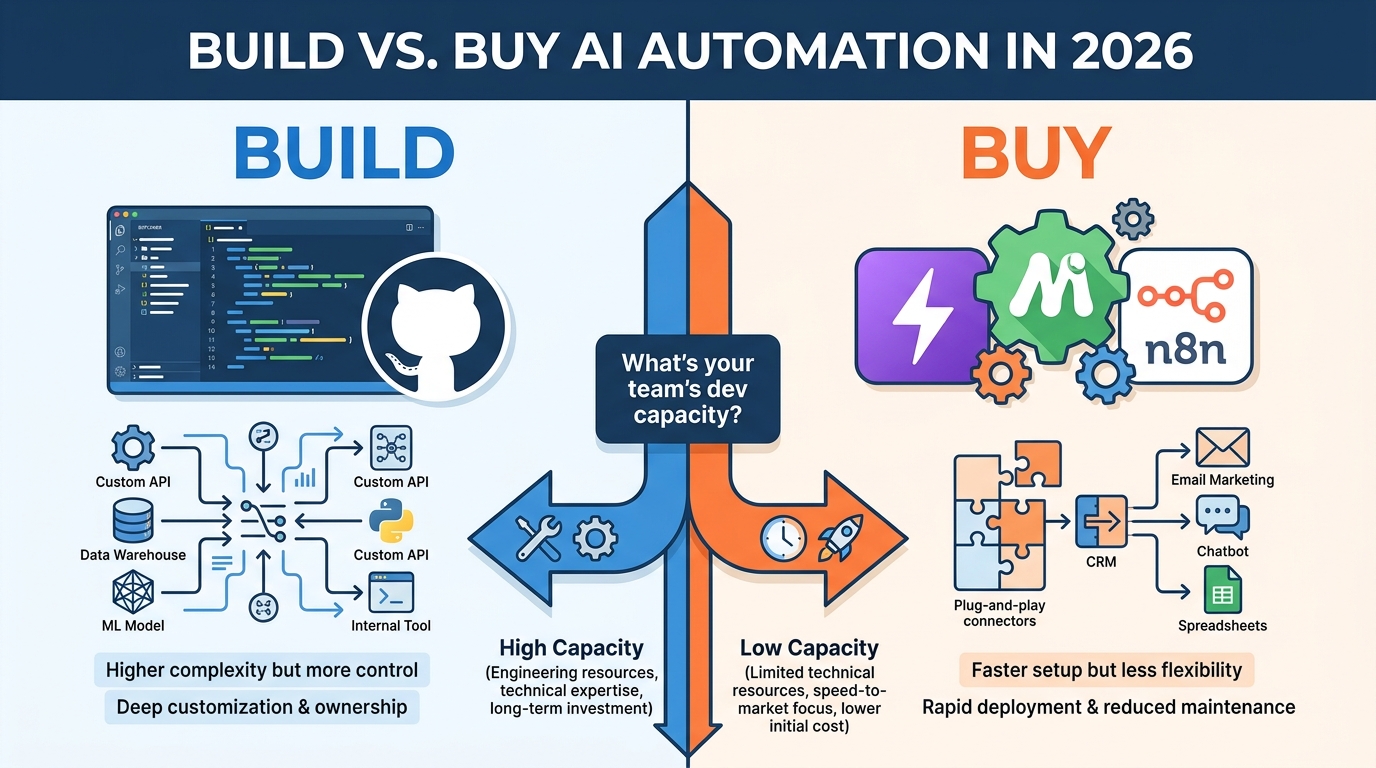
    Tools, Platforms, and the Build-vs-Buy Decision in 2026

    Build vs. Buy AI Automation in 2026 comparison infographic showing custom code development on the left versus no-code platforms on the right, with a decision tree in the center

    The tooling landscape for AI automation in 2026 is both richer and more confusing than it’s ever been. There are dozens of platforms, each with different strengths, pricing models, and capability ceilings. Understanding where the real decisions lie will save you significant time and money.

    The No-Code / Low-Code Tier

    Platforms like Zapier, Make (formerly Integromat), and n8n sit at the accessible end of the build spectrum. They offer visual workflow builders, pre-built connectors for hundreds of applications, and embedded AI capabilities — all without requiring engineering resources to implement basic to intermediate automations.

    These platforms have matured substantially. Zapier’s AI features now allow you to embed LLM decision steps directly into workflows without writing a line of code. Make offers complex branching logic and error handling that would have required custom development two years ago. n8n, as a self-hosted option, has gained traction among teams that want flexibility without vendor lock-in or per-task pricing that scales uncomfortably.

    The ceiling of these platforms is real, though. When your workflows need to handle large data volumes, complex state management, deeply custom AI models, or multi-step reasoning that requires context from many sources, you’ll run into limits that no-code can’t solve.

    The Mid-Tier: Code-Required Orchestration

    Platforms like LangChain, CrewAI, and Microsoft’s AutoGen sit in the middle ground — they give you programmatic control over AI orchestration without requiring you to build everything from scratch. These are typically the right tools for teams with some engineering capacity who need more than no-code can provide but don’t want to build a full custom stack.

    This tier is where most “agentic” automations live — workflows where an AI can decide what actions to take, execute them, observe the results, and decide on next steps dynamically. The tooling here is improving rapidly, but it still requires meaningful engineering investment to implement robustly.

    The Full Custom Stack

    Some organizations, typically those for whom a core automation is a genuine competitive differentiator or sits in a regulatory environment with specific requirements, build their automation infrastructure from scratch using cloud infrastructure, custom models, and proprietary orchestration logic. This is rarely the right choice for most teams — the cost and maintenance burden are high, and the no-code and mid-tier options cover the majority of use cases effectively.

    The Build vs. Buy Framework

    The decision between building and buying isn’t primarily a technology question — it’s an organizational one. Ask yourself:

    • Does this automation touch data that can’t leave your infrastructure? If yes, hosted platforms may be off the table for compliance reasons, and self-hosted or custom build becomes necessary.
    • Is this workflow a competitive differentiator or commodity? If it’s commodity work — lead routing, invoice processing, interview scheduling — there’s almost no reason to build from scratch. Buy. If the workflow itself represents IP or a unique capability, the build case gets stronger.
    • What’s your team’s ongoing maintenance capacity? Custom-built automations require ongoing maintenance that vendor platforms handle for you. Don’t underestimate the total cost of ownership for a custom build.
    • How fast do you need to be live? No-code platforms can have a functional workflow running in days. Custom builds take weeks to months. In most cases, shipping something that works quickly and iterating beats engineering perfection that ships late.

    How to Map, Prioritize, and Sequence Your First Ten Automations

    Most teams approach their automation roadmap by thinking about what’s technically possible. A more productive question is: what’s operationally valuable? The intersection of high-frequency processes, significant time cost, automation-readiness, and clear measurability is where your highest-ROI automations live.

    The Process Inventory

    Start with a process inventory. Have each team lead list the ten most time-consuming recurring tasks their team handles. You’re looking for processes that share these characteristics: they happen frequently (at least weekly, ideally daily), they follow a consistent pattern (even if that pattern is complex), they have clear inputs and outputs, and they’re currently consuming meaningful human time.

    Don’t limit this to “boring” processes. Some of the highest-ROI automations involve fairly sophisticated work — lead qualification, document extraction, customer churn prediction — that teams have been doing manually because nobody thought to question whether it had to be done that way.

    The Prioritization Matrix

    Score each candidate process across two dimensions: value impact (time saved, error reduction, revenue impact, customer experience improvement) and automation complexity (consistency of process, data quality, integration requirements, exception rate). The highest-priority automations sit in the high-value, low-complexity quadrant. These are your first five builds.

    The high-value, high-complexity processes are your medium-term roadmap — they’re worth the effort but require more preparation. Low-value processes, regardless of complexity, generally shouldn’t make the first ten cuts. Automation time is finite and should be allocated to where it moves the needle.

    Sequencing for Learning

    The order in which you build automations matters for reasons beyond priority. Early automations teach your team how to build, monitor, and own workflows. They surface the organizational issues — documentation gaps, tool integration challenges, review queue design problems — that will affect every subsequent workflow. Choosing early automations that are lower-stakes (failures are recoverable, edge cases aren’t catastrophic) gives your team a productive learning environment.

    By the time you’re building your eighth or tenth automation, you’ll have developed internal playbooks, established monitoring practices, and clarified who owns what. That institutional knowledge compounds — which is part of why organizations that have been building automations for eighteen months dramatically outperform those who are trying to stand up ten workflows simultaneously for the first time.

    The Governance Gap: Compliance, Data Privacy, and Ownership

    Here’s the conversation most automation programs skip until something forces it: who actually owns a workflow, and what are the rules around what it’s allowed to do?

    In many organizations, automation ownership is ambiguous by default. The person who built it has moved on. The business team that requested it doesn’t feel technical enough to own it. IT isn’t sure it’s in their purview since it was built by a business team on a no-code tool. Nobody is auditing it. Nobody is updating it when the underlying process changes. It just runs — until it doesn’t, or until it does something it shouldn’t.

    Assigning Workflow Ownership

    Every automation needs a designated owner. Not a team — a specific person. That person is responsible for the workflow’s output quality, its compliance with relevant policies, its adaptation when the process changes, and its retirement when it’s no longer needed. This sounds bureaucratic, but it’s the practical mechanism that keeps automation programs from accumulating technical debt invisibly.

    Ownership also implies authority. The workflow owner should have the ability to pause, modify, or retire the workflow without requiring a lengthy approval process. Fast iteration requires fast decision-making.

    Data Privacy and the Automation Boundary

    AI automations often handle sensitive data — customer PII, financial records, employee information, healthcare data. Understanding where that data goes, who can access it, and how long it’s retained is not optional.

    The no-code platform layer creates particular complexity here. When you build a workflow in Zapier or Make that passes customer data through an LLM for classification, you need to know: does that data get used for model training? Is it retained by the platform? What’s the data processing agreement with the vendor? These aren’t hypothetical questions — they’re compliance requirements in most jurisdictions operating under GDPR, CCPA, or industry-specific regulations.

    A practical first step: before deploying any automation that handles personal data, map the data flow — every system the data touches, every API call it passes through — and assess each hop against your organization’s data handling requirements. This is slower. It’s worth it.

    The Audit Trail Requirement

    In regulated industries and increasingly in general enterprise contexts, automated decisions need to be explainable and auditable. If an AI automation routes a customer’s credit application to a denial queue, there needs to be a log of why. If an automated system sends a contract amendment, there needs to be a record of what triggered it.

    Building audit trail logging into your automations from the start is far easier than retrofitting it later. Every significant decision or action the workflow takes should be logged with the relevant inputs, the decision made, and the output — in a system of record that’s durable and queryable.

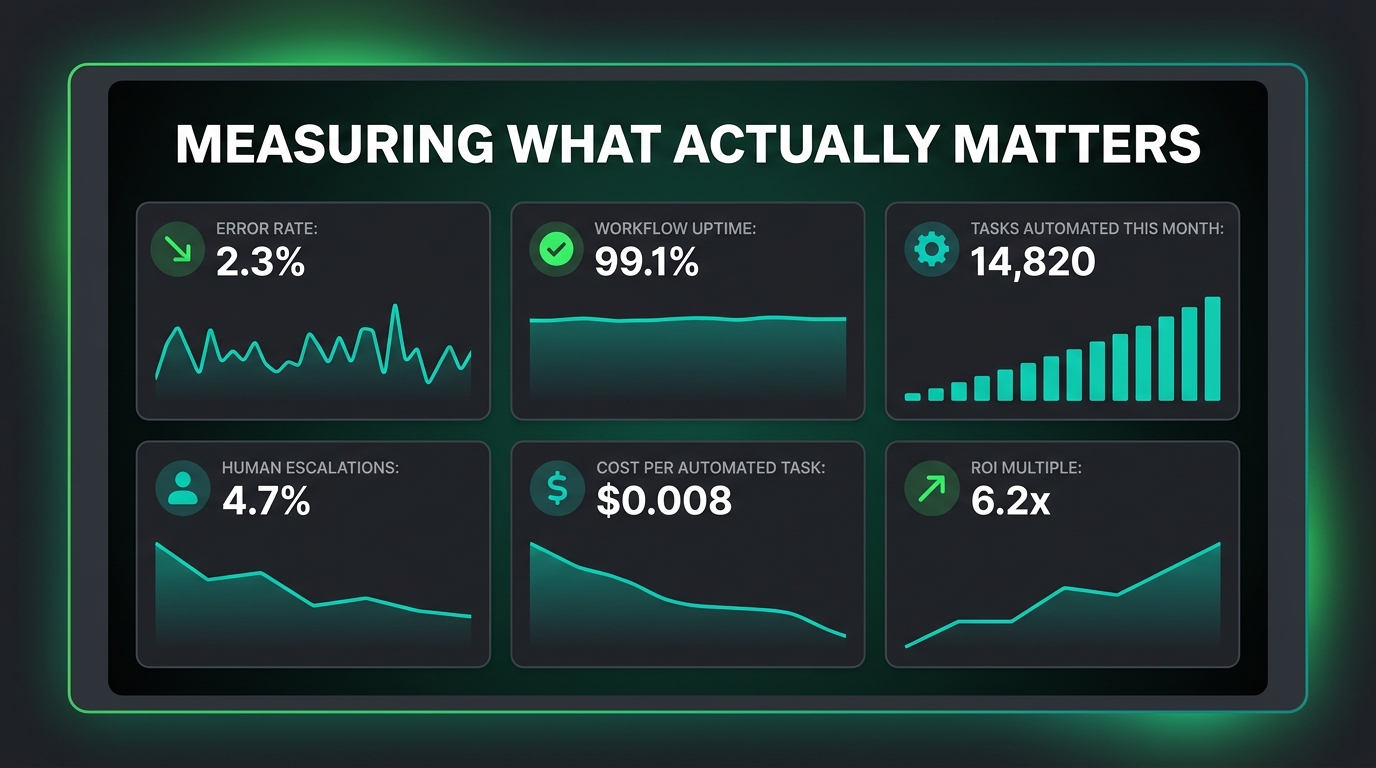
    Measuring What Actually Matters Beyond “Time Saved”

    AI automation monitoring dashboard showing Error Rate, Workflow Uptime, Tasks Automated, Human Escalations, Cost Per Task, and ROI Multiple — Measuring What Actually Matters

    “Time saved” is the metric almost every automation is justified with, and it’s almost always the wrong primary metric. Time saved is an input, not an outcome. What did that time get redirected to? What decisions got made faster? What errors were avoided? What customer experiences improved? Those are the outcomes worth measuring.

    A Better Measurement Framework

    A more complete framework for measuring AI automation performance operates at three levels:

    Workflow Health Metrics — These tell you whether the automation is running correctly. They include: completion rate (what percentage of triggered workflows complete successfully), error rate (what percentage fail at each step), time-in-queue at human handoffs (how long items wait before a human acts), and escalation rate (what percentage of items get routed to human review).

    Process Impact Metrics — These tell you whether the automation is actually changing the underlying process for the better. They include: processing time before vs. after automation, error rate in the process output (not just in the workflow itself), volume handled per team member, and consistency of outputs across different times, team members, and input sources.

    Business Outcome Metrics — These tell you whether the automation is moving the needle on what actually matters to the organization. For a sales lead automation: lead response time, conversion rate, pipeline velocity. For a customer service automation: customer satisfaction score, first contact resolution rate, ticket resolution time. For a finance automation: invoice processing time, payment error rate, month-end close cycle time.

    The Baseline Problem

    One of the most common measurement failures in automation programs is the absence of a pre-automation baseline. Teams launch a workflow and start measuring outcomes — but without a documented baseline of how the process performed before the automation, it’s impossible to attribute any improvement to the automation itself versus other changes happening in the business simultaneously.

    Before launching any automation, spend thirty days measuring the current-state process. Document how long it takes, how many errors occur, what the output quality looks like. That baseline is the control condition against which you’ll measure the automation’s impact. It seems obvious. It’s routinely skipped. Don’t skip it.

    The Quality Decay Signal

    Output quality from AI automations isn’t static. Models drift as the world changes. Triggers that were well-calibrated in January may be misfiring by July. A workflow that launched with a 3% error rate may have drifted to 15% by the time anyone notices — because nobody was regularly sampling outputs and comparing them to expected quality.

    Building regular output quality audits into your measurement practice — even as simple as manually reviewing a random sample of 50 workflow outputs each month — creates the feedback signal that catches quality decay before it becomes a customer-facing problem.

    The Skills Your Team Actually Needs (That Aren’t What You’d Expect)

    The conversation about AI automation skills tends to focus on technical capabilities: Python, API integrations, prompt engineering, workflow builder proficiency. Those skills matter. But they’re not the most important ones. The capabilities that most consistently separate teams that build effective automation programs from those that don’t are largely non-technical.

    Process Thinking

    The most valuable skill in an AI automation program is the ability to look at how work gets done and see it as a series of steps with explicit inputs, outputs, and decision points. This is process thinking — the discipline of getting below the surface description of a task (“we handle customer complaints”) to a precise map of what actually happens, step by step, in every scenario.

    People who are good at this — process designers, operations analysts, lean practitioners — are extraordinarily valuable in automation programs. They can translate the way work actually happens into the precise specifications that make a workflow reliable. They also tend to be the ones who identify, before building starts, the edge cases and exceptions that will cause problems later.

    Workflow Judgment

    Knowing when to automate and when not to is a judgment skill that develops with experience and can’t be fully taught from a framework. It’s the instinct that says “this process sounds simple but it’s actually full of relationship context that would be lost in automation” or “this looks complex but the logic is actually very consistent underneath the surface.” Developing this judgment is why starting with lower-stakes automations and building progressively is so important — you’re not just shipping workflows, you’re developing the organizational judgment about what to build.

    Stakeholder Translation

    Automation programs live or die by their relationship with the business teams whose processes they touch. The ability to translate between technical constraints and business requirements — to explain why a particular edge case matters in terms the business team cares about, or to understand what the business team actually needs when they describe a process in vague terms — is a critical capability that’s often underinvested in.

    Teams that treat automation as purely a technical exercise, built in isolation and handed off to users, reliably produce workflows that users resent or work around. Teams that treat automation as a collaborative design process, with business stakeholders genuinely involved from the start, build workflows that get used, extended, and trusted.

    What the Next Wave of AI Automation Actually Looks Like

    The honest picture of where AI automation is heading in the near term isn’t science fiction — it’s a set of incremental but meaningful shifts in what’s practically achievable without heroic engineering effort.

    Multi-Step Reasoning at the Decision Layer

    Early AI automation decision layers were essentially single-step: classify this input, score this record, extract this data. The current generation of models can perform genuinely multi-step reasoning — they can read a complex document, identify relevant clauses, compare them to a set of criteria, reason about what the relevant edge cases are, and produce a structured recommendation. This expands the category of processes that can be reliably automated from “classify and route” to genuinely complex knowledge work.

    Memory and Context Across Workflows

    One of the significant limitations of earlier AI automation was statelessness — each invocation of the AI happened without memory of what came before. Emerging capabilities in persistent memory and context allow AI agents to accumulate context over time: to know that this customer called three times last month, that this vendor has a pattern of late invoices, that this type of support ticket has a high escalation rate. That accumulated context makes decisions dramatically more relevant and accurate.

    Workflow Self-Repair

    The frontier that’s generating the most genuine excitement among automation practitioners is the idea of workflows that can diagnose and repair their own failures — where an error in one step triggers not just an alert but an AI-driven analysis of what went wrong and a proposed (or automatically implemented) fix. This isn’t broadly available in production-ready form yet, but the building blocks are in place, and the first serious implementations are emerging in 2026.

    Conclusion: The Discipline That Makes AI Automation Work

    The technology behind AI automation is, at this point, genuinely capable. The tools are accessible. The use cases are established. The limiting factor in 2026 isn’t whether AI automation can work — it demonstrably can, across a wide range of business processes, in organizations of every size and sophistication level.

    The limiting factor is discipline. The discipline to audit processes before automating them. To design for failure, not just for the happy path. To build human handoffs that humans will actually use. To monitor for quality decay, not just technical errors. To assign real ownership to every workflow. To measure outcomes, not just activity.

    None of those disciplines are technically complex. They don’t require advanced engineering skills or specialized AI expertise. They require the same operational rigor that makes any complex system reliable: clear thinking, honest assessment, and consistent follow-through.

    Teams that approach AI automation with that discipline build programs that compound over time — where each new workflow benefits from the organizational knowledge accumulated by everything that came before, and where the automations in production are genuinely trusted by the people they support.

    Teams that approach AI automation as a series of individual technical projects — build, ship, move on — accumulate a different kind of compound: technical debt, silent failures, and growing organizational skepticism toward a technology that could genuinely serve them better.

    The question isn’t whether AI automation is worth building. For most organizations, it clearly is. The question is whether you’re building it in a way that will still be serving you eighteen months from now — or whether you’re building it in a way that will be quietly causing problems you haven’t discovered yet.

    Actionable Takeaways

    1. Audit before you automate. Sort every candidate process into automation-ready, needs cleanup, or human-only before writing a single workflow.
    2. Design your human handoffs first. Don’t treat the automation as primary and the human as an edge case. The handoff is often where workflows live or die.
    3. Build a five-layer stack. Every workflow needs a trigger, a decision layer with explicit confidence thresholds, an action layer with idempotency, a human review checkpoint, and a feedback loop.
    4. Document a pre-automation baseline. Measure current-state performance for 30 days before launching any automation, so you can actually attribute improvements to the workflow.
    5. Assign a named owner to every workflow. Not a team — a person. They own quality, compliance, adaptation, and retirement.
    6. Monitor for quality decay, not just technical errors. Sample outputs regularly. Models drift. Triggers miscalibrate. Neither will throw an error to tell you.
    7. Start lower-stakes, sequence for learning. Your first five automations should be ones where failures are recoverable. You’re building workflows and organizational capability simultaneously.
  • The Automation Trap: Why Automating the Wrong Things Costs More Than Not Automating at All

    The Automation Trap: Why Automating the Wrong Things Costs More Than Not Automating at All

    The Automation Trap — split visual showing perfect AI workflow on one side and broken, cracked automation systems on the other

    There is a particular kind of confidence that comes with deploying a new AI automation. The dashboard lights up green. The workflow fires without human input. The time-saved metric ticks upward in the weekly report. Everything looks like progress.

    Until a customer sends an email saying they’re taking their business elsewhere. Until a sales prospect replies “this is clearly a bot, please don’t contact me again.” Until a candidate who would have been your next star hire gets auto-rejected because their resume contained a formatting edge case the system wasn’t trained for.

    The conversation about AI automations in 2026 has been almost entirely about speed — how fast to deploy, how many processes to cover, how to move a model from pilot to production. What that conversation has largely missed is the question sitting quietly underneath all of it: which processes should you actually be automating?

    This is not a post about whether AI automation works. It does, reliably and measurably, in the right contexts. This is a post about the contexts where it doesn’t — where automating a process actively makes outcomes worse, erodes trust, and costs more in downstream damage than any licensing fee you saved. And it’s a practical guide for building the decision intelligence to tell the difference before you build the workflow, not after.

    The companies winning with AI automation in 2026 are not the ones automating the most. They’re the ones automating with the most precision. There’s a meaningful difference, and it’s worth understanding in detail.

    What “Wrong-Fit” Automation Actually Means

    The term “wrong-fit automation” describes any process that has been automated where the characteristics of the task fundamentally conflict with what automation can reliably deliver. It’s not about technology limitations — modern AI systems are impressive. It’s about a category mismatch between what the task requires and what automation, by its nature, provides.

    Automation excels at tasks that are high-volume, rule-based, low-variance, and low-stakes when an individual instance goes wrong. It struggles — sometimes catastrophically — with tasks that require contextual judgment, emotional intelligence, relationship awareness, or where a single error has outsized consequences.

    The Three Core Mismatches

    Consistency vs. Adaptability. Automation is consistent by design. That’s usually a virtue. But some processes need to be inconsistent — they need to read the room, adjust tone, respond to an unstated subtext, or apply discretion based on signals that aren’t in the data fields. When you automate those processes, you get consistency where you needed adaptability. The result looks professional on the surface and feels wrong to the person on the receiving end.

    Speed vs. Care. One of automation’s great strengths is throughput — it processes at a speed no human can match. But speed is the enemy of care in certain contexts. A customer who has just experienced a billing error doesn’t need a fast response. They need a response that communicates genuine attention to their specific situation. Automated speed in that moment registers as indifference, because it is.

    Pattern recognition vs. Exception handling. AI systems trained on historical patterns perform well when new inputs resemble past inputs. The moment you’re outside the training distribution — an unusual client request, an edge case complaint, a candidate with a non-linear career path — pattern-recognition systems produce outputs that range from unhelpful to actively damaging. In high-volume, low-stakes work, these exceptions are tolerable. In high-stakes work, they’re not.

    Understanding these three mismatches gives you a conceptual tool that’s more valuable than any software checklist: when a process lives primarily in adaptability, care, or exception handling, automation should be approached with extreme caution — or avoided entirely.

    The Six Processes Most Companies Rush to Automate (That They Shouldn’t)

    The 6 Things You Should NOT Automate — infographic showing six business processes with warning overlays

    These six categories appear on almost every automation roadmap. They’re tempting targets — they’re time-consuming, repetitive-seeming, and clearly scalable. They’re also, in most organizations, exactly the wrong things to automate end-to-end.

    1. Customer Complaint Resolution

    Automating the intake and routing of complaints? Sensible. Automating the actual resolution of complaints — the communication of empathy, the crafting of a response to someone who is already frustrated — is a different matter entirely.

    A customer lodging a complaint is not primarily seeking information. They’re seeking acknowledgment. They want to know that a real person understands what happened to them and that their experience matters enough to warrant human attention. An AI-generated response, however well-crafted, communicates the opposite: that their complaint was triaged by an algorithm and returned an output. Even when the resolution is technically correct, the experience of receiving it through automated channels often compounds the original dissatisfaction.

    The data on this is consistent: customers consistently rate interactions higher when they believe they’ve spoken to a human, even when the quality of information provided is identical. Automation at the complaint resolution layer is a false economy — the cost savings on agent time are frequently offset by elevated churn and reduced lifetime value among the customers who experience it.

    2. Outbound Sales Personalization

    AI-generated personalization in sales outreach has become so ubiquitous that buyers have developed a finely tuned sensor for it. The opening line that references a prospect’s LinkedIn post. The closing line that mentions a shared connection. The “I noticed you recently expanded into [market]” opener. These patterns, once genuinely personal, have been commoditized to the point where they now signal automation rather than human attention.

    More damaging: when the AI gets the personalization wrong — references the wrong article, misidentifies the company’s market, or uses a detail that’s six months out of date — it doesn’t just fail to impress. It actively undermines credibility. The prospect now knows with certainty that they’re receiving automated outreach, and they’ve been given evidence that the sender didn’t bother to check basic facts. That’s worse than sending nothing.

    The automation that belongs in sales workflows is the backend work: CRM updates, follow-up scheduling, activity logging, lead scoring signal aggregation. The human-facing communication at the top of the funnel — where first impressions form — is worth protecting as genuinely human.

    3. Early-Stage Hiring and Resume Screening

    Automated resume screening tools have been in widespread use for years. The evidence on their outcomes is deeply mixed. Studies on hiring algorithm performance have repeatedly found systematic patterns of exclusion — against candidates from certain universities, certain geographic areas, certain career trajectories — that reflect historical biases baked into training data rather than actual predictors of performance.

    Beyond bias, there’s the simpler problem of dimension reduction: a resume contains signals that an algorithm can parse, but it cannot capture the things most strongly associated with long-term employee performance — adaptability, intellectual curiosity, communication quality, cultural contribution. Automating candidate filtering at the earliest stage of the funnel means the people who advance are the ones who optimized for the algorithm, not necessarily the ones who would be best at the job.

    This doesn’t mean automation has no place in hiring. Scheduling, reference check coordination, offer letter generation, onboarding workflows — all appropriate. The evaluation of human potential is not.

    4. Creative Strategy and Brand Direction

    AI has genuine utility in creative production — generating copy variants, producing visual concepts, A/B testing asset performance. Where it breaks down is in creative strategy: the decisions about what a brand stands for, what audiences to prioritize, what emotional territory to occupy, what cultural moments to lean into or stay away from.

    These decisions require a depth of cultural context and judgment about brand integrity that AI systems in 2026 do not reliably possess. When companies automate the strategy layer of their creative function — letting algorithms determine messaging direction based on performance data alone — they tend to optimize for what worked recently rather than what will work long-term. Short-term engagement metrics improve. Brand equity erodes slowly and invisibly until it becomes a problem that’s expensive to fix.

    5. Crisis Communication

    During a reputational crisis, every word a company puts into the world is scrutinized. Tone matters as much as content. The sequencing of an apology matters. Whether the CEO’s statement reads as genuine remorse or legal positioning matters enormously. These are not decisions that can be delegated to an AI system without substantial risk.

    Organizations that have pre-built automated crisis response workflows — templated statements triggered by certain keyword thresholds — have found that these systems fire at the wrong moments, produce responses that feel tonally inappropriate for the specific situation, or miss the nuance of what the crisis actually requires. A crisis response that is fast but wrong is categorically worse than one that is measured and right.

    6. High-Value Client Relationship Management

    For enterprise accounts and key partnerships, the relationship is the product. The trust and rapport built over years of human interaction is the primary retention mechanism. Automating touchpoints in those relationships — replacing personal check-in calls with triggered email sequences, substituting a quarterly business review with an AI-generated report — communicates to the client that they are being managed at scale rather than valued individually.

    The irony is that high-value client management is exactly the kind of work that looks automatable on a spreadsheet. It’s recurring, it has defined touchpoints, it involves sending information. But the purpose of those touchpoints is relational, not informational. Automation can deliver the information while completely destroying the purpose.

    How to Spot a Bad Automation Candidate: The 4-Question Test

    The 4-Question Automation Test — decision flowchart for evaluating AI automation candidates

    Rather than assessing automation candidates based on whether a tool exists for them (it almost certainly does), a more reliable filter is to run any candidate process through four sequential questions before building anything.

    Question 1: Is the task purely rule-based?

    A rule-based task is one where the correct output can be fully specified in advance. Given input A, produce output B. No judgment required. If you can write a complete decision tree — covering all meaningful variations — without reaching a branch that requires contextual discretion, the task is likely automatable.

    If the correct output depends on unstructured factors — emotional tone, relationship history, cultural context, unstated intent — the task is not purely rule-based. This doesn’t automatically rule out automation, but it signals that any automation will have meaningful failure modes that require mitigation.

    Question 2: Does it require emotional or relational judgment?

    Tasks requiring emotional or relational judgment include: evaluating whether a customer response requires escalation based on tone, deciding whether a sales conversation should advance or pause based on subtle hesitation signals, determining whether a piece of content is culturally appropriate for a specific audience, and assessing whether a client relationship is at risk.

    For any task where a human expert’s value lies primarily in their ability to read context and apply judgment — not just their knowledge of facts or rules — automated handling of that task will consistently produce outputs that are worse than a skilled human would produce. The math on this is clearer than it appears: even at high volumes, it’s worth preserving human judgment on the tasks where judgment is the product.

    Question 3: Can a single error in this task damage a relationship or reputation?

    Risk calibration is a dimension that most automation decision-making frameworks underweight. The question isn’t just “how likely is an error?” but “what happens when one occurs?”

    For data entry or report generation, an error might require correction and cost a few hours. For a customer-facing communication during a sensitive moment, for a hiring decision, or for a response to a high-value client query, an error can terminate a relationship, create legal exposure, or generate reputational damage that compounds over time. The acceptable error rate for a task is not fixed — it depends entirely on what an error costs.

    Question 4: Is it high-frequency and low-stakes when individual instances fail?

    This is the positive signal: automation is well-suited to tasks that occur at high volume where any individual instance failing doesn’t matter much. Invoice matching, appointment reminders, data normalization, report generation, status update emails — these are genuinely good automation candidates because the volume is the problem and the per-instance stakes are low.

    If a task is low-frequency and high-stakes per instance, the efficiency gains from automation are usually marginal while the risks are elevated. Protecting that task for human handling almost always makes more sense.

    The Real Cost Accounting of Automation Mistakes

    Hidden vs. Visible Automation Costs — infographic showing hidden costs dwarfing licensing fees

    The cost-benefit analysis that typically accompanies an automation proposal focuses on visible costs and visible savings. Tool licensing, implementation hours, training time — subtracted from projected time savings multiplied by headcount cost. The resulting number looks compelling in a slide deck.

    What that analysis almost never captures is the category of costs that appear downstream, often weeks or months after deployment, and that don’t show up in any automation dashboard.

    Customer Churn From Impersonal Experiences

    A customer who has a poor experience with an automated interaction rarely sends a complaint. They simply reduce their engagement and eventually stop buying. Customer churn attributable to service experience quality is notoriously difficult to isolate — the customer leaving in month four rarely tells you in exit data that it was the automated response to their billing query in month two that started the erosion. This makes wrong-fit automation appear free in most reporting systems, even as its cost accumulates.

    Calculating this cost requires multiplying the number of customers exposed to a given automated touchpoint by the estimated lift in churn probability from a poor interaction, then multiplying by average customer lifetime value. For most companies, even a 1% increase in churn rate across a customer base of meaningful size represents a cost that dwarfs annual software licensing.

    The Error Correction Multiplier

    When an automated process produces an error, the cost of fixing it is usually higher than the cost of doing it correctly in the first place would have been. The error surfaces. Someone identifies it. It gets routed. A human is pulled in to correct the specific instance. The root cause is investigated. If systemic, a fix is engineered and tested. The total labor cost of this cycle — multiplied by the error rate of the automated system — often exceeds the labor cost of the human process that was replaced.

    This is particularly true in customer-facing contexts, where the correction process itself becomes part of the customer experience.

    Trust Erosion With Employees

    Employees who witness automation deployed in contexts where they know it will perform poorly develop a specific kind of institutional cynicism about the organization’s judgment. They’ve seen the customer experience degraded. They’ve been asked to clean up the errors. They’ve watched the automation dashboard report success metrics while they handle the fallout. This erodes confidence in leadership and contributes to disengagement — a cost that appears in productivity data and eventually in attrition, neither of which will be attributed to automation decisions in any standard reporting.

    Opportunity Cost of Misdirected Investment

    Every dollar and hour spent building, maintaining, and managing a wrong-fit automation is a dollar and hour not spent on an automation that would have delivered genuine value. The companies that have gotten automation right in 2026 are not the ones who automated the most processes — they’re the ones who directed their investment toward the highest-yield, lowest-risk candidates and executed those exceptionally well.

    The Human-in-the-Loop Paradox: When Adding Humans Back Increases Quality

    Before vs. After: Adding Humans Back to Automation — CSAT score improvement infographic

    One of the counterintuitive findings from organizations that have honestly evaluated their automation performance is that selectively adding humans back into automated workflows frequently produces better outcomes — for customers, for accuracy, and sometimes even for overall throughput — than the fully automated version.

    This happens for several reasons that are worth understanding.

    Human Review as Quality Signal, Not Bottleneck

    In a well-designed human-in-the-loop workflow, the AI handles volume processing while a human reviews outputs that fall below a confidence threshold or match specific risk criteria. This isn’t a compromise — it’s a deliberate architecture that gets you the speed benefits of automation for the majority of cases while preserving quality for the cases where quality matters most.

    The key design insight is that humans in this model are not reviewing everything. They’re reviewing the right things: the outputs where the AI’s confidence is lowest, the cases that match risk flags, the edge conditions that fall outside the training distribution. A human reviewing 10% of outputs with intelligent triage performs far better than a human reviewing 100% of outputs randomly, and far better than an AI handling 100% of outputs without oversight.

    The Confidence Calibration Problem

    AI systems are not uniformly good at signaling their own uncertainty. A system that produces outputs confidently is not necessarily producing correct outputs confidently — it’s often producing wrong outputs confidently, which is worse than producing uncertain outputs. Human-in-the-loop architectures that use calibrated uncertainty thresholds rather than flat confidence scores tend to catch the highest-risk outputs more reliably.

    Organizations that have implemented this kind of tiered review architecture — particularly in customer communications and compliance-adjacent workflows — consistently report better accuracy metrics than equivalent fully automated systems, while maintaining the throughput improvements that automation was intended to deliver.

    What “Augmentation” Actually Means in Practice

    The word gets used loosely. In practice, effective augmentation means the AI is handling the repetitive cognitive load while the human is handling the judgment layer. A customer service agent with an AI assistant that drafts responses can review, edit, and send in 40% of the time it would take to draft from scratch — while the response that goes to the customer is genuinely human. That’s augmentation done well. It’s different from automation done badly, and the distinction is worth maintaining clearly.

    The Automation Audit: How to Review What You’ve Already Built

    If you’ve been deploying AI automations at pace — as most organizations have in 2026 — the more pressing practical challenge may not be deciding what to automate next, but assessing what you’ve already built and determining what’s actually working.

    An honest automation audit looks at four dimensions for each deployed workflow.

    Dimension 1: Output Quality vs. Human Benchmark

    For each automation, establish what the human-produced equivalent output looked like. Then pull a sample of actual automated outputs and evaluate them against the same quality criteria. Many organizations find that their automation benchmarks were set against theoretical human output rather than actual human output — and that the comparison is more flattering to automation than it should be.

    The comparison should be blind where possible: evaluators shouldn’t know whether they’re reviewing an automated or human output. Blind evaluation consistently reveals quality gaps that aware evaluation misses.

    Dimension 2: Error Rate and Error Cost

    Document how often the automation produces an incorrect, incomplete, or inappropriate output. Then estimate the cost of correcting each error type — in direct labor hours, in customer experience impact, and in downstream relationship effects. Many automations that report high accuracy rates on process metrics have much higher effective error costs when downstream impacts are included.

    Dimension 3: Customer and Stakeholder Experience

    Survey customers and internal stakeholders who interact with automated touchpoints. Specifically: do they know they’re interacting with automation? How does that knowledge affect their experience? What’s the satisfaction delta between automated and human interactions for comparable situations?

    This data is often revealing. Many organizations find that customers have a strong awareness of and negative reaction to automation in contexts where the organization assumed the automation was seamless.

    Dimension 4: Total Cost of Ownership vs. Projected Savings

    Revisit the original business case. Add all costs — including maintenance, error correction, oversight, compliance review, and downstream impacts — to the original implementation cost. Compare to actual savings realized. A significant portion of deployed automations, when honestly assessed this way, deliver far less than their original projections, and some deliver negative returns.

    Decision Framework: The 3-Zone Automation Map

    The 3-Zone Automation Map — green Automate, yellow Augment, red Abstain zones with process examples

    A practical alternative to case-by-case analysis is to map your organization’s processes across three zones. This gives teams a shared vocabulary and a repeatable framework that doesn’t require a full decision tree every time a new automation proposal arises.

    Zone 1: Automate (Green Zone)

    Processes that belong in the green zone share a set of common characteristics: they are high-volume, the correct output can be fully specified in advance, errors are low-cost and easily corrected, and the experience of the person on the receiving end is not meaningfully affected by whether a human or system produced the output.

    Examples that reliably belong here:

    • Invoice processing and matching
    • Appointment and meeting scheduling and reminders
    • Data normalization and migration between systems
    • Standard report generation and distribution
    • Password reset and account access workflows
    • Inventory threshold alerts and reorder triggers
    • Compliance document collection and routing
    • Status update notifications throughout defined processes

    These tasks share the characteristic that the human who was previously doing them was not providing unique value through judgment — they were performing mechanical operations that technology can perform more consistently and at lower cost. Automating these tasks genuinely frees human capacity for work where that capacity matters.

    Zone 2: Augment (Amber Zone)

    The amber zone is the most interesting and, when done well, the most valuable automation territory. These are processes where automation can dramatically improve throughput and consistency, but where human judgment at a key stage is what separates acceptable outputs from excellent ones.

    Examples that typically belong here:

    • Customer support for complex or sensitive issues (AI drafts, human reviews and sends)
    • Content production (AI generates, human edits and approves)
    • Lead scoring and qualification (AI signals, human decides)
    • Legal document drafting (AI produces first draft, attorney reviews)
    • Financial anomaly detection (AI flags, analyst investigates)
    • Performance review preparation (AI aggregates data, manager interprets and writes)

    The design principle in the amber zone is that AI handles the volume problem while humans handle the judgment problem. Neither component alone produces the best outcome. The design of the handoff point — when does AI work end and human work begin — is where most of the implementation complexity lives.

    Zone 3: Abstain (Red Zone)

    The red zone is not a permanent designation. It reflects the current state of AI capabilities relative to what specific tasks genuinely require. Some processes will move from red to amber as AI capabilities evolve. Many will not move for a long time, because what they require is not a technical capability but a human quality — genuine care, authentic judgment, embodied experience.

    Examples that currently belong here:

    • Executive and board-level decision-making
    • Crisis communication and reputational response
    • Final-stage hiring decisions, especially for leadership roles
    • Key account relationship management at the strategic level
    • Negotiation with major partners or clients
    • Mental health and wellness support for employees
    • Ethics and values-based decisions

    Placing a process in the red zone is not a failure of ambition. It’s an accurate assessment of where automation adds risk rather than value, and protecting those processes for human delivery is a strategic choice that good organizations make deliberately.

    What Healthy Automation Adoption Actually Looks Like in 2026

    The organizations that are getting measurable, sustained value from AI automation in 2026 share a set of practices that distinguish them from the organizations that are accumulating automation debt.

    They Start With Process Quality, Not Process Automation

    A broken process, when automated, becomes a fast broken process. Every organization has processes that persist for historical reasons — they were designed around constraints that no longer exist, or they were optimized for a tool that was replaced years ago. Automating these processes doesn’t fix them; it enshrines their dysfunction at scale.

    The organizations doing this well audit and redesign the process before building the automation. They ask: “If we were designing this from scratch today, what would it look like?” and then build automation around the answer to that question — not around the historical process that evolved organically.

    They Define Success Metrics Before Deployment

    It’s common for automation projects to have input metrics (time saved, headcount freed) but no output metrics (quality of outputs, customer satisfaction, error rates, downstream business impact). Without output metrics defined in advance, there’s no honest way to evaluate whether an automation is actually working.

    The discipline of defining both input and output success metrics before deployment — and committing to reviewing them at 30, 60, and 90 days — separates organizations that learn from their automation experience from those that simply accumulate more of it.

    They Treat Automation as a Continuous Practice, Not a Project

    The project model of automation — build it, deploy it, move on — produces automation portfolios that degrade over time. Business processes change. Regulatory requirements shift. Customer expectations evolve. The AI models underlying automation tools are updated, sometimes changing their outputs in ways that break workflows designed around earlier behavior.

    Healthy automation practices include ongoing monitoring, regular performance reviews, defined escalation paths when output quality drops, and a clear owner for each automation whose responsibility includes its continued performance — not just its initial deployment.

    They Maintain a “Human Override” Default

    Every automation they build includes a clear path for human intervention when the system detects uncertainty, when the output doesn’t meet quality thresholds, or when a human decides the situation requires it. This isn’t seen as a limitation — it’s a design principle. The best automated systems in production are the ones that know when to stop and ask.

    When Over-Automation Backfires: Patterns From Real Deployments

    While specific company names aren’t always attached to cautionary tales in the automation space, the patterns of failure are well-documented across the industry and provide clear guidance on where the risks concentrate.

    The Customer Service Full-Automation Experiment

    A recurring pattern across industries: a company deploys fully automated first-line customer support, driven by the genuine cost savings available from eliminating agent hours. Initial metrics — resolution rates, response times, cost per ticket — look strong. Six to twelve months later, customer satisfaction scores have declined, escalation rates have increased, and the customers most likely to have escalated are the highest-value segments: the ones who expect and deserve genuine attention and are most capable of taking their business elsewhere.

    The correction, in every version of this pattern, involves the same solution: reintroducing human agents for defined categories of interactions, typically those involving billing disputes, account cancellations, significant technical problems, or any customer who has flagged dissatisfaction. The automation remains for straightforward, transactional inquiries. The restoration of human presence for complex or emotional cases drives measurable improvement in customer retention that more than covers the cost of the additional headcount.

    The Sales Automation Overreach

    Organizations that have fully automated outbound sales prospecting — from initial contact to follow-up sequences — consistently report the same outcome: reply rates that are a fraction of human-written outreach, and a reputation in their target market for impersonal, low-quality communication. Some have found their domains placed on spam blocklists as a direct result. The short-term efficiency gain produces a long-term demand generation problem.

    The sustainable model that emerges from these experiences is a sharper division: automate everything behind the scenes (research, enrichment, CRM updates, scheduling, follow-up reminders), and preserve the actual communication for humans — with AI assistance available but not driving.

    The Hiring Algorithm Bias Discovery

    Multiple organizations across sectors have deployed AI resume screening tools and, following internal or external audits, discovered systematic patterns of exclusion that were not visible in aggregate performance metrics. Candidates from certain educational institutions were systematically underranked. Non-linear career paths were scored lower regardless of the actual quality of experience. Certain demographic indicators, when correlated with outcomes in training data, produced biased outputs that the organization had legal and reputational exposure around.

    The consistent response has been to retain automation for logistics (scheduling, communication, document collection) while returning the evaluation of candidate materials to human reviewers — often with structured assessment criteria that improve consistency without the bias vulnerabilities of pattern-matching algorithms.

    Building an Automation Governance Layer Without Slowing Down

    Automation Governance Layer diagram — five spokes including Ethics Review, Quality Monitoring, Human Override Controls, Bias Auditing, and Process Rollback Triggers

    The word “governance” tends to make automation teams nervous. It implies committees, approval processes, and delays that slow down the velocity that makes automation valuable in the first place. But governance doesn’t have to mean bureaucracy. In organizations that have implemented it well, it means the opposite: a clear, lightweight system that makes fast decision-making safer and more reliable.

    The Five Components of Lightweight Automation Governance

    1. A classification system. A shared and well-understood framework — like the three-zone map described earlier — that allows any team member to quickly categorize a new automation candidate without requiring a formal review for every case. Green-zone automations don’t need heavy oversight. Red-zone automations require explicit approval before proceeding. The classification system does the filtering.

    2. A quality monitoring requirement. Every automation in production has a defined set of output quality metrics and a defined review cadence. This can be as lightweight as a monthly 30-minute review for low-risk automations and as rigorous as weekly reviews with defined escalation triggers for high-stakes ones. The requirement exists for all automations, not just the ones that have already shown problems.

    3. A human override mechanism. Every automation that produces customer-facing or employee-affecting outputs has a documented and tested path for human intervention. This mechanism is accessible to the relevant staff and does not require a ticket or approval process to activate. When a human sees an automated output that they believe is wrong, they can stop it and replace it immediately.

    4. A bias and fairness review for people-adjacent processes. Any automation that affects hiring, promotion, access to services, or other decisions about individuals goes through a structured bias check before deployment and at defined intervals thereafter. This review doesn’t require external consultants — a structured internal assessment against documented criteria is sufficient for most organizations.

    5. A rollback playbook. Every automation has a documented rollback procedure that allows it to be turned off cleanly and replaced with the pre-automation process within a defined time window. Automation without a rollback path creates operational lock-in that makes it impossible to course-correct when problems emerge.

    Together, these five components create a governance layer that is meaningful without being slow. Automation teams that work within this structure report that it increases their confidence in what they’re deploying and reduces the time spent on incident response — which is ultimately what makes them faster, not slower.

    Automate Less, Better: What This Looks Like as a Strategy

    The argument being made here is not anti-automation. AI automations, in the right contexts, deliver genuine value that is hard to achieve any other way: consistency at scale, speed that humans cannot match, continuous operation without the energy cost of human attention, and the ability to process data volumes that no team could handle manually. That value is real and worth capturing.

    The argument is about precision. The organizations that are building sustainable competitive advantages through automation in 2026 are not the ones with the longest list of automated processes. They’re the ones whose automated processes reliably deliver quality outputs, whose human interactions remain genuinely human where it matters, and whose automation portfolios are maintained and monitored rather than built and forgotten.

    The Practical Starting Point

    If you’re evaluating your current automation posture — or planning new investments — these questions are worth sitting with:

    • For each automation you’ve deployed, can you show the output quality data? Not the process efficiency metrics, but actual output quality compared to what a human would produce?
    • Do your customers know when they’re interacting with an automated system? And if they do know, does that knowledge improve or harm their experience?
    • For your highest-value customer and partner relationships, how much of the interaction surface has been automated? And do you know whether the people on the other side of those relationships notice?
    • When your automated systems produce errors, how do you find out? How quickly? And what does the correction process cost in full, including the customer experience impact?
    • If you needed to turn off your three largest automations tomorrow, could you? Do you have the process knowledge and capacity to do so?

    Honest answers to these questions reveal more about an organization’s automation health than any dashboard metric. They’re also the starting point for making automation genuinely work — not just appear to work in reporting, but actually deliver the quality of outputs and the business outcomes that justified the investment.

    The Competitive Advantage in Being Selective

    There is a real competitive advantage available to organizations that resist the pressure to automate everything and instead automate thoughtfully. In a market where automation has been applied broadly and indiscriminately, genuine human attention — deployed strategically at the moments that matter — becomes a differentiator. Customers notice. Partners notice. Candidates notice.

    The organizations that will have the strongest positions in 2027 and beyond are not going to be the ones that automated the most processes. They’re going to be the ones that made their automated processes excellent and protected their human processes as a deliberate expression of what they value. That combination — precise automation plus preserved humanity — is what sustainable competitive advantage actually looks like in an AI-saturated environment.

    Automating less, but better, is not a conservative posture. It’s the most sophisticated AI strategy available right now.

  • The AI Automation ROI Reckoning: Why 79% of Enterprises See Zero EBIT Impact — and the Measurement Architecture That Changes the Math

    The AI Automation ROI Reckoning: Why 79% of Enterprises See Zero EBIT Impact — and the Measurement Architecture That Changes the Math

    The AI ROI Paradox 2026: 70% adoption vs 39% EBIT impact split-screen infographic

    Here is one of the more uncomfortable truths circulating in enterprise boardrooms in 2026: 70% of large organizations have adopted generative AI in some form, yet 79% report no measurable EBIT impact from it. That is not a typo. An AIMG Benchmark Study of 2,048 decision-makers found that after years of pilots, proofs of concept, vendor deployments, and internal builds, most companies cannot point to their bottom line and show AI changed it.

    The RAND Corporation analyzed over 2,400 AI initiatives and found that 80% of them fail to deliver intended business value — double the failure rate of conventional IT projects. MIT’s Project NANDA put an even sharper point on it: 95% of generative AI pilots produce zero measurable P&L impact. S&P Global found that 42% of companies abandoned at least one AI initiative in 2025, up from 17% the prior year.

    And yet budgets keep growing. Enthusiasm keeps building. Vendors keep promising.

    The problem is not the technology. The problem is how organizations define, measure, and sustain value from AI automation. Most businesses treat ROI as a destination — something you calculate once at go-live and file away. The organizations actually generating returns treat ROI as an architecture — a continuous system of measurement, governance, and process intelligence that runs in parallel with every automation they deploy.

    This article does not rehash the standard “how to calculate ROI” content that fills vendor white papers. Instead, it dissects the specific measurement failures, cost blindspots, and structural gaps that explain why the adoption-impact paradox exists — and what the companies generating real returns are doing differently.

    The Adoption-Impact Paradox: What the Numbers Are Actually Telling You

    When McKinsey asked enterprises about their AI deployments, 88% reported regular AI use. Only 39% reported measurable EBIT impact. IBM’s data is equally sobering: 25% of AI initiatives met their ROI targets, and only 16% scaled enterprise-wide. These figures do not come from AI-skeptic organizations — they come from companies that believed in the technology enough to invest substantially in it.

    Understanding this gap requires separating three different failure modes that companies routinely conflate:

    Failure Mode 1: The Measurement Vacuum

    Gartner research found that organizations with structured ROI tracking report 5.2 times higher confidence in their AI investments than those without. Yet fewer than 20% of companies properly track GenAI KPIs, according to McKinsey. Most measure adoption — login rates, feature utilization, user satisfaction scores — rather than business outcomes. These are activity metrics, not impact metrics. You can have 100% adoption of a tool that produces no financial benefit.

    The distinction matters enormously. When 81% of enterprises report that AI ROI is difficult to quantify (per Larridin’s research), the honest interpretation is not that ROI is inherently unmeasurable — it is that most companies never built the measurement infrastructure to capture it.

    Failure Mode 2: The Pilot-Production Chasm

    Across multiple studies, the data converges on a grim number: 88% of AI proofs of concept never make it to production. The average pilot takes 14 months to complete, and only 25% survive to deployment. The rest die somewhere between “this works in a controlled environment” and “this works at scale with real data, real edge cases, and real organizational friction.”

    The companies that close this gap do so by treating production readiness as a design criterion from day one — not an afterthought once the pilot succeeds.

    Failure Mode 3: The Value Evaporation Problem

    Even among the deployments that reach production, value erodes over time in ways most organizations do not track. Well-functioning Q1 deployments often show economically different profiles by Q4. Model drift, process drift, declining user adoption, shadow AI proliferation, and rising compute costs all chip away at initial gains — silently, without triggering any alerts, because nobody built systems to catch them.

    Why the Standard ROI Formula Is Structurally Broken

    The conventional ROI formula taught in every MBA program — (Gains − Costs) / Costs × 100 — is not wrong. It is incomplete. Applied to AI automation, it produces dangerously optimistic pre-deployment projections that collapse on contact with operational reality.

    The Input Problem

    Most ROI calculations use three inputs: licensing cost, implementation cost, and projected time savings. Each of these inputs is systematically underestimated before deployment.

    Licensing costs are straightforward on paper but grow with scale. A 50-person pilot becomes a 500-person rollout. Token-based pricing models mean costs scale with usage, not headcount. Hidden overage charges, API call costs, and model upgrade fees accumulate in ways that initial contracts do not surface.

    Implementation costs are where the real surprises live. Enterprise AI budget estimates are consistently undershot by 40-60%, according to Hypersense’s 2026 TCO analysis. A project scoped at €158,000 realistically costs €368,000 over three years once integration, data engineering, change management, and governance overhead are included. The 73% of enterprises that exceed their initial AI budgets do so by an average of 2.4x, generating an average $2.3 million in unplanned expenses per program.

    The Output Problem

    On the gains side, the formula typically captures only first-order time savings: hours saved × hourly cost. This misses quality improvements, error reduction (and the downstream cost of errors avoided), revenue acceleration effects, capacity reallocation benefits, and risk reduction value. It also overstates gains by assuming that time saved automatically converts to value — when in reality, reclaimed hours only become productive if they are redirected to higher-value work.

    A customer service agent who resolves tickets 15% faster is not automatically generating 15% more revenue. Unless management actively reallocates that capacity, the gain lives on paper but not on the income statement.

    The True Cost of AI Automation iceberg diagram showing hidden TCO costs below the waterline

    The True Cost Architecture: TCO vs. What You Budgeted

    Total Cost of Ownership for AI automation has a unique characteristic that separates it from conventional software: post-deployment costs dominate the lifecycle. While traditional enterprise software stabilizes after implementation, AI systems generate continuous cost obligations that grow with usage, data volume, and organizational complexity.

    The 65% Rule: What Happens After Go-Live

    Post-deployment maintenance represents approximately 65% of AI automation lifecycle costs, according to analysis from Keyhole Software and Hypersense. This includes model performance monitoring, retraining cycles, compliance updates, regression testing when upstream systems change, and the user support infrastructure required to maintain adoption. Most organizations budget for none of this explicitly — they assume that once the system is live, the only ongoing cost is the license fee.

    The reality is that a model trained on your Q1 data may behave significantly differently by Q3 as customer behavior patterns, product catalogs, regulatory requirements, and business processes shift. Each shift requires either retraining (15-25% additional compute overhead per cycle, per SoftwareSeni’s analysis) or manual intervention to catch the cases the model no longer handles correctly.

    Data Engineering: The Chronically Underestimated Cost

    Data preparation and engineering consume 25% to 80% of total project effort and spend, depending on the state of the organization’s data infrastructure. In enterprises with well-structured, accessible data pipelines, this figure lands in the lower range. In organizations with fragmented legacy systems, siloed databases, inconsistent data standards, and manual data entry dependencies — which describes the majority of mid-to-large enterprises — it skews toward the upper end.

    The consequence: organizations that budget $500,000 for an AI automation initiative and expect $200,000 of that to cover data work frequently find the data work consuming $350,000 before a single model goes live. This is not an edge case. Only 19% of enterprises report full data readiness for AI deployment, limiting 75% to deploying one to three AI use cases rather than the portfolio-level automation programs their ROI projections assume.

    Legacy Integration: The 2-3x Premium

    Connecting AI automation systems to legacy enterprise infrastructure — ERP systems, CRM platforms, proprietary databases, and decades-old transaction processing systems — commands a 2-3x cost premium over greenfield integration. This premium exists because legacy APIs were not designed for the volume, speed, or data format requirements of AI systems; because documentation is often incomplete or inaccurate; and because testing requirements expand dramatically when existing business-critical systems are touched.

    Organizations consistently underestimate this figure, in part because vendor demos invariably show clean integration with modern SaaS platforms rather than the 1990s-era systems that actually run enterprise operations.

    The Value Decay Problem: How Gains Erode After Go-Live

    One of the least-discussed dynamics in AI automation is what happens to gains over time when organizations do not actively manage them. The pattern is consistent enough across enough deployments that it deserves a name: value decay.

    AI Automation Value Decay Curve showing ROI erosion over 24 months post-deployment with managed vs unmanaged comparison

    The Novelty Effect

    Initial productivity gains from AI tools often include a novelty premium. Users invest extra attention in learning the system, exploring its capabilities, and finding ways to make it work for their specific tasks. This investment period generates above-baseline gains that are not sustainable once the novelty wears off. By month three to four post-deployment, usage patterns typically settle into a lower steady-state that reflects genuine workflow integration rather than enthusiastic exploration.

    Organizations that measure ROI at the 30-day mark and extrapolate annually are capturing novelty-inflated numbers, not sustainable operational value.

    Model Drift and Process Drift

    AI models degrade when the real-world data they process diverges from the training data they learned from. This is model drift — and it is inevitable. The question is how quickly it happens and how quickly organizations detect and correct it.

    Process drift is a parallel phenomenon on the human side: the business processes the AI was designed to support change over time, through product updates, policy changes, regulatory requirements, and organizational restructuring. An AI automation built around a specific workflow may find that workflow has been modified without any corresponding update to the automation — generating incorrect outputs, missed cases, or silent errors that accumulate undetected.

    McKinsey’s finding that 88% of organizations use AI but only 39% see EBIT impact is partly explained by these two forms of drift operating simultaneously on deployments that were never designed to be monitored for them.

    Adoption Decay and Shadow AI

    The Flexera 2026 AI Pulse Report documents a consistent pattern: initial adoption rates for AI automation tools decline 15-30% in the 6-12 months post-deployment unless actively supported. Users who struggled with the initial learning curve revert to manual workflows. Managers who saw the tool as a solution to a problem that has since evolved stop enforcing its use. New employees join who were never properly onboarded to the system.

    Simultaneously, shadow AI proliferates — employees who are not satisfied with the officially deployed tool adopt unofficial AI tools that solve their specific problem. This creates fragmented, ungoverned AI usage that generates no measured benefit for the organization while introducing security and compliance risks.

    Process Selection Science: Which Workflows Actually Pay Back

    Given how widely ROI varies across AI automation deployments, process selection is one of the highest-leverage decisions an organization makes before writing a single line of code or signing a single contract. The research identifies four filters that reliably separate high-return automation candidates from low-return ones.

    Filter 1: Volume × Cost per Error

    The most reliable predictor of strong AI automation ROI is the combination of high transaction volume and meaningful cost per error or per unit. Customer support ticket handling, invoice processing, and document classification score high on this filter — they happen thousands of times per day, and each instance of suboptimal handling has a quantifiable cost in labor time or downstream errors.

    Processes that happen infrequently, even if individually complex, rarely generate compelling ROI because the absolute value of improvement is limited regardless of the percentage gain.

    Filter 2: Process Boundary Clarity

    Automation succeeds where inputs and outputs are well-defined. Processes with clear triggers, structured data inputs, and verifiable outputs automate predictably. Processes that require judgment about ambiguous inputs, contextual reasoning, or stakeholder negotiation resist automation and generate unpredictable output quality.

    This is why coding assistance (55.8% faster task completion, per Alice Labs’ 2026 benchmark) and customer support routing (15% productivity gain) outperform more open-ended knowledge work automation in virtually every study. The task boundaries are clear enough to measure, monitor, and trust.

    Filter 3: Data Availability and Quality

    Only 19% of enterprises have the data infrastructure ready for AI deployment. Before selecting a process for automation, the honest question is: does training-quality data exist for this process, and can it be accessed, labeled, and maintained without heroic effort? Processes with rich historical data and structured records advance to production faster and generate ROI sooner. Processes that require extensive data collection, cleaning, or labeling consume budget before any automation benefit accumulates.

    Filter 4: Scalability Beyond the Pilot

    Harmony.ai’s 2026 decision framework adds a critical filter: is the process scalable beyond the pilot population? A workflow that only exists in one department, or that depends on the specific behavior of a small team, generates ROI only at the pilot scale. Prioritizing processes that run across multiple departments, business units, or customer segments multiplies the return on the implementation investment without proportionally multiplying the cost.

    High-confidence automation candidates identified across the evidence base include: customer support (15% productivity gain), professional document processing (40% faster throughput), software development assistance (55.8% faster coding, 26% more tasks completed), HR self-service (IBM achieved 40% HR cost reduction), and finance close operations (35-50% cycle time acceleration in finance-sector deployments).

    The Layered ROI Measurement Framework

    Four-layer AI ROI measurement pyramid from task level through enterprise level

    The organizations generating real, sustained returns from AI automation share a measurement architecture that operates at four distinct levels. Alice Labs’ 2026 benchmark report, which analyzed 47 public metrics from studies and surveys, articulates this structure more clearly than any vendor framework: ROI is not a single number — it is a layered stack of metrics that must be tracked simultaneously at different organizational levels.

    Layer 1: Task-Level Productivity

    This is the layer most organizations measure, and measuring it is genuinely important. Task-level metrics include: time per task completion (before and after automation), accuracy rates, throughput volume, and process completion rates. These are the 15-56% productivity gains that appear in headline benchmarks.

    The mistake is treating Layer 1 as sufficient. Task-level productivity gains do not automatically translate to worker-level, team-level, or enterprise-level value. They are a necessary precondition, not a proof of business impact.

    Baseline measurement is critical here. Organizations that deploy AI without establishing pre-deployment baselines cannot measure Layer 1 gains at all — they end up estimating, which CFOs correctly treat as guesswork.

    Layer 2: Worker-Level Capacity

    Layer 2 asks: what are workers doing with the time and cognitive capacity that automation returns to them? The answer to this question determines whether task-level gains generate real financial value or simply disappear.

    Research from Microsoft’s Copilot deployments and similar enterprise tools consistently shows 1.9 to 4.0 hours saved per worker per week. The organizations generating ROI from this figure are the ones that deliberately redirect that capacity — into higher-value customer interactions, complex problem-solving, creative work, or volume scaling that generates additional revenue.

    The organizations not generating ROI are the ones that reclaim the time without directing it anywhere, resulting in a slightly more relaxed workforce but no EBIT impact.

    Layer 3: Team and Workflow Economics

    Layer 3 measures the end-to-end workflow — not individual tasks or individual workers, but the complete process from trigger to output. This is where 20-90% process time reduction benchmarks live, where error rate reductions show up as downstream cost savings, and where SLA improvements translate to customer satisfaction and retention effects.

    Finance close operations that accelerate from 12 days to 7 days generate measurable effects on days-sales-outstanding, working capital, and auditor fees. Customer support workflows that resolve 84% of queries without human escalation generate measurable effects on support headcount requirements and customer churn. These are Layer 3 metrics, and they are the ones that start to get CFO attention.

    Layer 4: Enterprise-Level Financial Impact

    Layer 4 is where EBIT impact lives — AI revenue attribution (averaging 15-25% in high-performing deployments, per SecondTalent research), Return on AI Investment (ROAI, averaging 41% for the overall population and 171% for the highest performers), and total cost avoidance ratios (2.7:1 in well-managed programs).

    Reaching Layer 4 requires that Layers 1-3 are not just measured but actively managed. The 79% of enterprises reporting no EBIT impact are stalled somewhere between Layer 1 and Layer 3, measuring task productivity while the financial impact dissipates in the space between measurement points.

    Industry Payback Benchmarks: What the Data Actually Shows

    AI automation payback periods by industry and use case comparison chart 2026

    Bain’s 2026 Agentic AI Benchmark study (n=1,840) provides the clearest industry-level payback data available. Gartner independently confirms that 41% of AI deployments now hit positive ROI within 12 months — up from 23% in 2024 — suggesting the field is genuinely maturing in execution quality.

    Customer Service and Support

    Median payback period: 4.1 months. This is consistently the fastest-returning AI automation category across multiple studies. The reasons are structural: high transaction volume, clear task boundaries, measurable output quality, and direct linkage between automation quality and customer satisfaction scores that are already tracked.

    TELUS’s deployment serves as a representative case: over 500,000 hours saved and $90 million in documented benefits. ServiceNow’s internal deployment saved 410,000 hours and generated $17.7 million in cost avoidance. These are not projections — they are audited operational figures from companies that built the measurement infrastructure to capture them.

    Marketing Operations

    Median payback period: 6.7 months. Content generation, campaign optimization, personalization at scale, and research synthesis all represent processes with clear before-and-after comparisons and direct revenue linkage through campaign performance metrics. The caveat: output quality measurement requires human review infrastructure that most teams underinvest in.

    Engineering and Development

    Median payback period: 9.3 months. The 55.8% faster coding benchmark from Alice Labs is consistent across multiple independent studies, but the payback period is longer than customer service because implementation costs are higher, the scope of deployment is typically larger, and the value capture mechanism (faster product delivery, reduced defect rates, smaller team requirements) takes longer to manifest in financial statements.

    Finance Operations

    Payback period: 12-18 months. Finance-sector deployments show 35-50% process acceleration in accounts payable, invoice processing, financial close, and compliance reporting. IBM’s HR automation case achieved 40% HR cost reduction. The longer payback timeline reflects heavier compliance requirements, more complex integration with existing financial systems, and higher data quality standards that extend implementation timelines.

    Manufacturing

    Payback period: 18-24 months. Predictive maintenance, quality control automation, and supply chain optimization generate 30-40% cost reductions in successful deployments, but the capital requirements, integration complexity, and safety validation requirements extend the investment horizon substantially.

    Healthcare Clinical

    Payback period: 18-24+ months, with bottom-quartile deployments still pre-payback at month 24, according to Bain’s benchmark data. Clinical AI automation faces the highest regulatory burden, the most complex data standards (interoperability between EHR systems remains a persistent challenge), and the greatest institutional risk tolerance for automation — all of which extend the timeline to positive returns.

    The Portfolio Approach: Stacking AI Automations for Compounding Returns

    AI automation portfolio network diagram showing compounding returns from multi-process deployment

    Gartner’s research on simultaneous broad automation reveals a counterintuitive finding: organizations that deploy AI automation across many processes simultaneously without strategic prioritization achieve only 8-12% productivity gains — less than half the gains of organizations that automate 20% of their highest-volume tasks strategically. Deloitte’s figure is 25-40% for the strategic approach.

    The explanation is structural. Broad, simultaneous automation fragments attention, creates competing integration demands, strains change management capacity, and prevents the deep measurement infrastructure work required to capture value at each layer. Strategic portfolio construction is not about doing less — it is about sequencing and connecting automations so they build on each other.

    Why Sequencing Matters

    The compounding returns in AI automation portfolios come from three mechanisms that only operate when deployments are sequenced intelligently:

    Data network effects: Each automation deployment generates structured operational data. A customer support automation creates labeled interaction data. A document processing automation creates structured content data. Subsequent automations that can use this data as input are cheaper to build, faster to train, and more accurate from day one because the data infrastructure already exists.

    Integration reuse: The expensive work of connecting AI systems to legacy infrastructure, establishing data pipelines, and building monitoring frameworks can be amortized across multiple automations if they share architectural foundations. Organizations that build a reusable integration layer for their first automation spend 40-60% less on the second and third.

    Organizational capability accumulation: The humans managing AI automation — process owners, data engineers, model monitors, governance reviewers — develop skills with each deployment that accelerate subsequent deployments. The first automation program takes the longest. Each subsequent one benefits from institutional knowledge that does not appear in any ROI calculation but is real and valuable.

    Building the Automation Portfolio

    The research-backed approach is to begin with one high-volume, clearly bounded, data-rich process that generates quick payback (customer service, document processing, or HR self-service, depending on your industry). Use that deployment to build the measurement infrastructure, governance framework, and organizational capabilities that all subsequent deployments will use. Then expand to adjacent processes that share data inputs or integration architecture.

    This approach treats AI automation as a capability accumulation program, not a series of independent projects. The difference in long-term ROI is substantial.

    Building the Measurement Infrastructure Before You Deploy

    The single most impactful operational decision in AI automation ROI is establishing comprehensive baselines before any tool goes live. This is not glamorous work. It does not generate press releases or executive presentations. But the organizations that skip it are the ones filling the “79% with no measurable EBIT impact” statistic.

    What Baselines Must Cover

    For each process targeted for automation, pre-deployment measurement should capture: current cycle time (end-to-end, not just the specific task being automated), error rates and downstream cost of errors, labor cost per transaction, volume by time period, SLA performance rates, and downstream business outcomes (customer satisfaction, revenue per interaction, compliance incident rate — whatever the relevant outcome metric is for that process).

    This baseline data serves three functions. It makes ROI measurement possible. It identifies hidden bottlenecks that automation alone will not solve (and that will limit ROI if not addressed). And it gives process owners the ability to detect value decay early, before it has compounded across 12 months of unmonitored drift.

    Continuous Monitoring Architecture

    The Flexera 2026 AI Pulse Report identifies a consistent pattern in high-ROI AI programs: they treat continuous monitoring as a first-class operational requirement, not an optional add-on. This means model performance dashboards that alert on output quality degradation, usage analytics that flag declining adoption before it becomes adoption collapse, cost tracking that surfaces spending anomalies before they breach budgets, and quarterly structured reviews that compare current performance against baseline and original ROI projections.

    Organizations that build this monitoring architecture from deployment day one spend approximately 15-20% more on initial setup. They recoup that investment within the first year by catching and correcting performance degradation that would otherwise have gone undetected — and by having the evidence they need to secure continued investment from finance and leadership.

    From Pilot to Production: Closing the Value Realization Gap

    The 88% pilot-to-production failure rate is not primarily a technical failure — it is an organizational failure. The AIMG Benchmark Study’s analysis of 2,048 decision-makers found that the top three barriers to AI value realization were insufficient talent and skills (rated 4.65/5.0), model governance and transparency (4.55/5.0), and data quality and availability (4.45/5.0). Technology performance ranked lower than all three.

    The Skills Gap Is Real and Quantifiable

    Only 19% of enterprises have the technical talent to fully operationalize AI automation programs. The gap is not in AI research or model building — it is in the intersection of process knowledge and AI implementation capability. The people who understand business processes deeply enough to redesign them around AI capabilities are often not the same people who know how to build and manage AI systems. Organizations that bridge this gap — through targeted hiring, training programs, or external partnerships — progress from pilot to production at significantly higher rates.

    Governance as an Enabler, Not a Bottleneck

    The 42% of companies that abandoned AI initiatives did so in many cases because governance requirements emerged after deployment and were treated as roadblocks to an already-live system rather than as designed-in operational requirements. Retrofitting governance onto deployed AI systems is expensive and disruptive. Building governance frameworks into the deployment architecture from the start — clear ownership of model performance, defined escalation procedures for edge cases, audit trails that satisfy compliance requirements, and regular review cycles — generates better outcomes and lower total cost.

    Compliance requirements add approximately 20-30% to governance overhead in regulated industries. This is not avoidable. But it is plannable — and organizations that plan for it avoid the emergency remediation costs that compliance surprises generate.

    The Governance Layer Nobody Budgets For

    In the rush to show results quickly, governance consistently gets deprioritized. It rarely shows up as a line item in initial AI automation budgets. It rarely has a dedicated owner before deployment. And it almost never has performance metrics of its own that leadership tracks.

    This is financially significant. Beyond compliance costs, ungoverned AI automation generates several categories of quantifiable financial risk that organizations systematically fail to budget for:

    Model Quality Liability

    When AI automation produces incorrect outputs — wrong invoice amounts, misclassified customer inquiries, inaccurate document summaries — those errors have downstream costs. In customer-facing applications, they affect NPS scores and retention rates. In financial processes, they generate reconciliation work and compliance risk. In healthcare and legal applications, they can generate regulatory liability. A governance framework that detects output quality issues early contains these costs. Without it, errors accumulate and compound before anyone catches them.

    Data Governance and Privacy Risk

    AI automation systems are data-intensive by nature. They ingest, process, and in some cases store significant volumes of operational data. Without clear data governance policies — defining what data the AI system can access, how long it retains inputs, what logging occurs, and how personal data is handled — organizations create GDPR, CCPA, and sector-specific compliance exposure that can generate regulatory fines substantially larger than the ROI the automation was designed to generate.

    Vendor Lock-In and Portability Risk

    CXToday’s 2026 analysis identifies vendor lock-in as an underappreciated AI risk. Organizations that build critical workflows around proprietary AI platforms with no portability strategy face switching costs — in migration effort, data reformatting, retraining on new architectures, and business continuity during transitions — that can absorb years of accumulated ROI if a vendor relationship needs to change. A governance framework that includes an annual lock-in assessment and maintains data portability standards from deployment day one significantly reduces this long-term financial exposure.

    The ROI Reckoning: An Honest Measurement Checklist

    Based on the research and case evidence assembled here, the organizations generating real, sustained, defensible ROI from AI process automation share a common set of operational disciplines that distinguish them from the majority seeing minimal impact. The gap is not in the quality of AI they deploy — it is in the rigor with which they measure, manage, and sustain value from what they deploy.

    Before Deployment

    • Establish comprehensive process baselines covering cycle time, error rates, labor cost per transaction, volume, and downstream outcome metrics — before any AI tool is introduced.
    • Pressure-test the TCO estimate by adding 40-60% to the initial vendor quote to account for data engineering, legacy integration, governance, and post-deployment maintenance.
    • Validate process selection against the four filters: volume × error cost, process boundary clarity, data availability, and cross-functional scalability.
    • Design the monitoring architecture before writing deployment code — including model performance alerts, usage analytics, cost tracking, and quarterly review cadences.
    • Define capacity reallocation plans for the hours automation will return to workers, so that Layer 2 ROI is captured rather than evaporating into unfocused time.

    At and After Deployment

    • Measure ROI at all four layers from week one: task productivity, worker capacity, workflow economics, and enterprise financial impact.
    • Set 30/60/90-day ROI checkpoints with explicit triggers for intervention if performance diverges from baseline projections.
    • Track adoption rates as a leading indicator of value decay — declining adoption in months 3-6 is the earliest warning sign that gains are at risk.
    • Budget explicitly for post-deployment maintenance at 65% of lifecycle costs, not as an afterthought but as a first-class budget line.
    • Assess and manage vendor lock-in risk annually, maintaining data portability as a non-negotiable design requirement.

    For Portfolio Construction

    • Sequence automations to build shared infrastructure — data pipelines, integration layers, monitoring frameworks — that reduce per-deployment costs over time.
    • Target 20% of highest-volume processes for automation before expanding broadly, capturing the Deloitte-documented 25-40% productivity gain threshold that scattered deployment does not reach.
    • Treat governance as a portfolio-level function, not a per-project checkbox, so that standards compound across deployments rather than being recreated from scratch each time.

    Conclusion

    The AI adoption-impact paradox — 70% adoption, 39% EBIT impact — is not a technology problem. The technology works. The benchmarks prove it: 55.8% faster coding, 15% customer support productivity gains, $90 million in documented benefits at TELUS, 410,000 hours saved at ServiceNow. These are not marketing claims; they are audited outcomes from organizations that built the infrastructure to capture them.

    The problem is measurement architecture. Most organizations treat ROI as a calculation made once at the beginning of an AI project and filed in a business case document that nobody reviews after go-live. The organizations generating real returns treat ROI as an ongoing operational discipline — a continuous measurement system that operates at four layers simultaneously, tracks value decay and catches it early, applies honest TCO accounting that includes the 65% post-deployment costs that vendor quotes omit, and sequences automations to compound returns rather than fragment attention.

    The financial stakes are significant. Enterprise AI budgets that underestimate TCO by 40-60% and deploy without governance or measurement frameworks generate the statistics that fill industry reports: 95% of pilots with zero P&L impact, 80% of projects failing to deliver intended value, 42% of companies abandoning initiatives entirely. The average sunk cost from failed AI programs exceeds $150,000 per initiative before abandonment.

    The alternative is not a slower or more cautious approach to AI automation — it is a more rigorous one. Establish baselines. Build monitoring infrastructure. Apply honest TCO accounting. Select processes using evidence-based filters. Measure at all four layers. Manage value decay actively. Build portfolios with compounding architecture.

    The gap between the 79% and the 21% is not closed by deploying better AI. It is closed by deploying AI with better measurement.