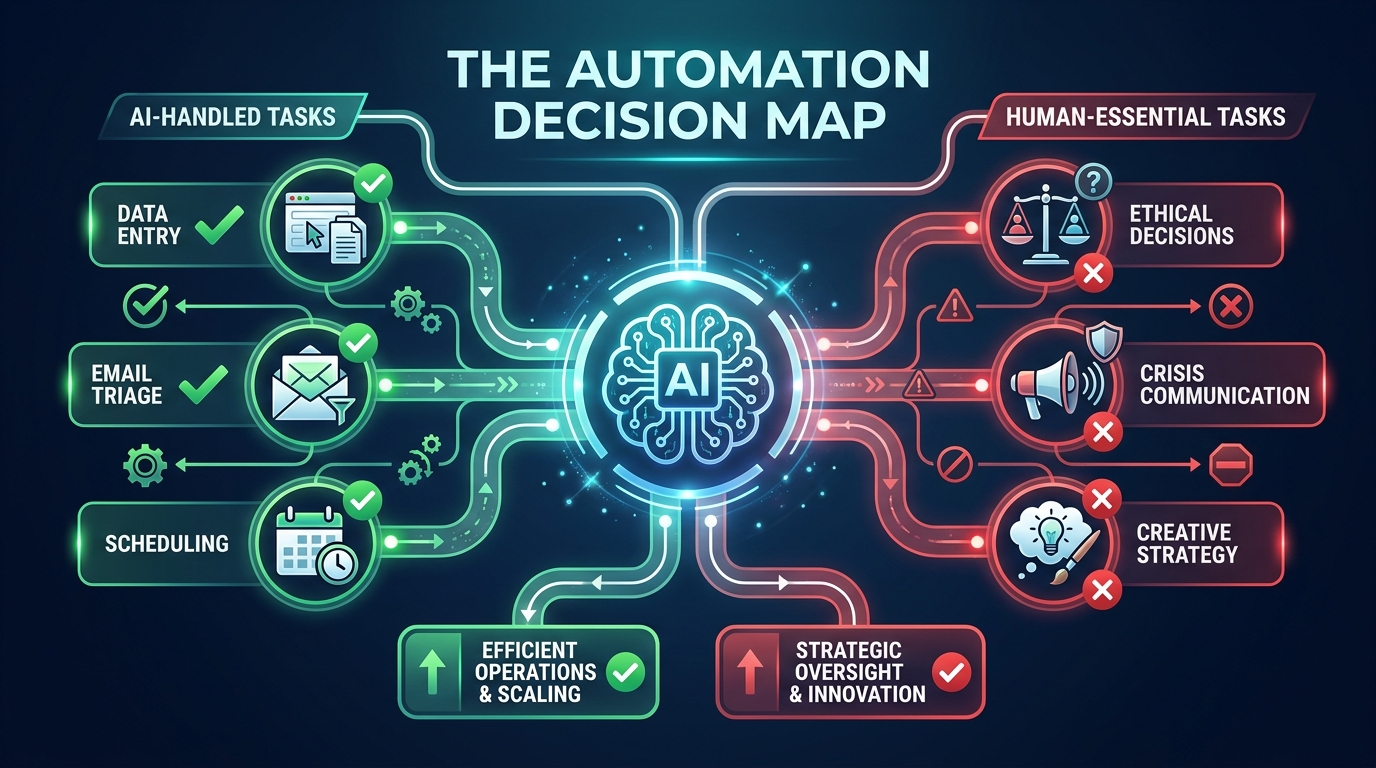
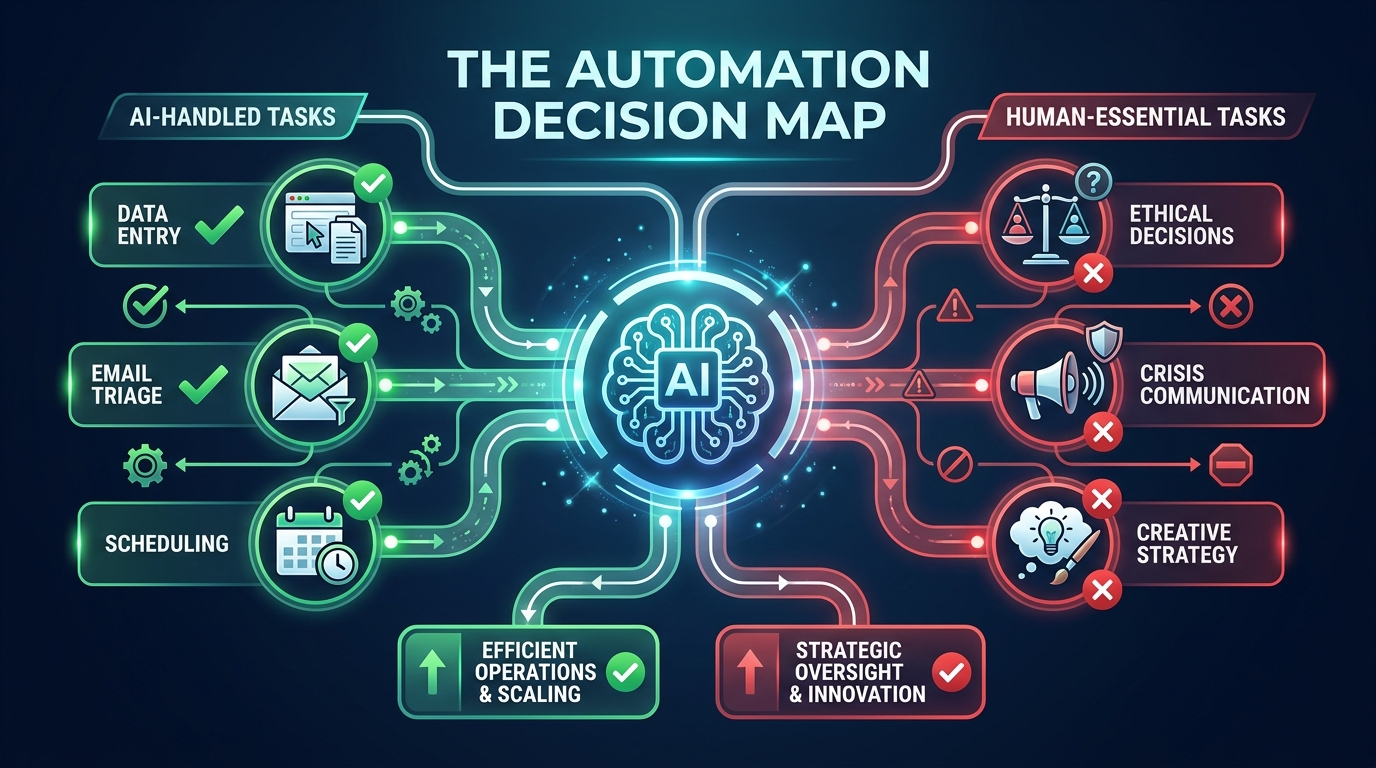
Here’s a pattern that plays out in businesses everywhere right now: a team spots an AI automation tool, gets excited about the time savings, builds out a workflow over a few weeks — and then, three months later, quietly switches it off. Not because the technology failed. Because they automated the wrong thing.
This is the real problem with how most businesses approach AI automation in 2026. The conversation almost always starts with the tools — Make, Zapier, n8n, custom GPT agents, Claude-powered pipelines — and almost never starts with the harder question: which tasks should be handed to AI in the first place?
The answer isn’t obvious. And getting it wrong doesn’t just waste money. It introduces errors into processes that used to work fine, erodes customer trust, and creates a quiet tax on your team who now spend time managing broken automations instead of doing the work those automations were supposed to replace.
This guide isn’t about specific tools or platform comparisons. It’s a decision framework — the map you should draw before you touch a single workflow builder. We’ll walk through how to evaluate any business task for automation readiness, where AI genuinely performs well, where it consistently underdelivers, how to structure oversight so failures don’t compound silently, and what a sustainable automation practice actually looks like beyond the initial build.
By the end, you’ll have a working methodology for evaluating every task in your business — not just the obvious ones — and a clear picture of what comes after the automation goes live.
The Task Spectrum: Where AI Thrives vs. Where It Quietly Fails
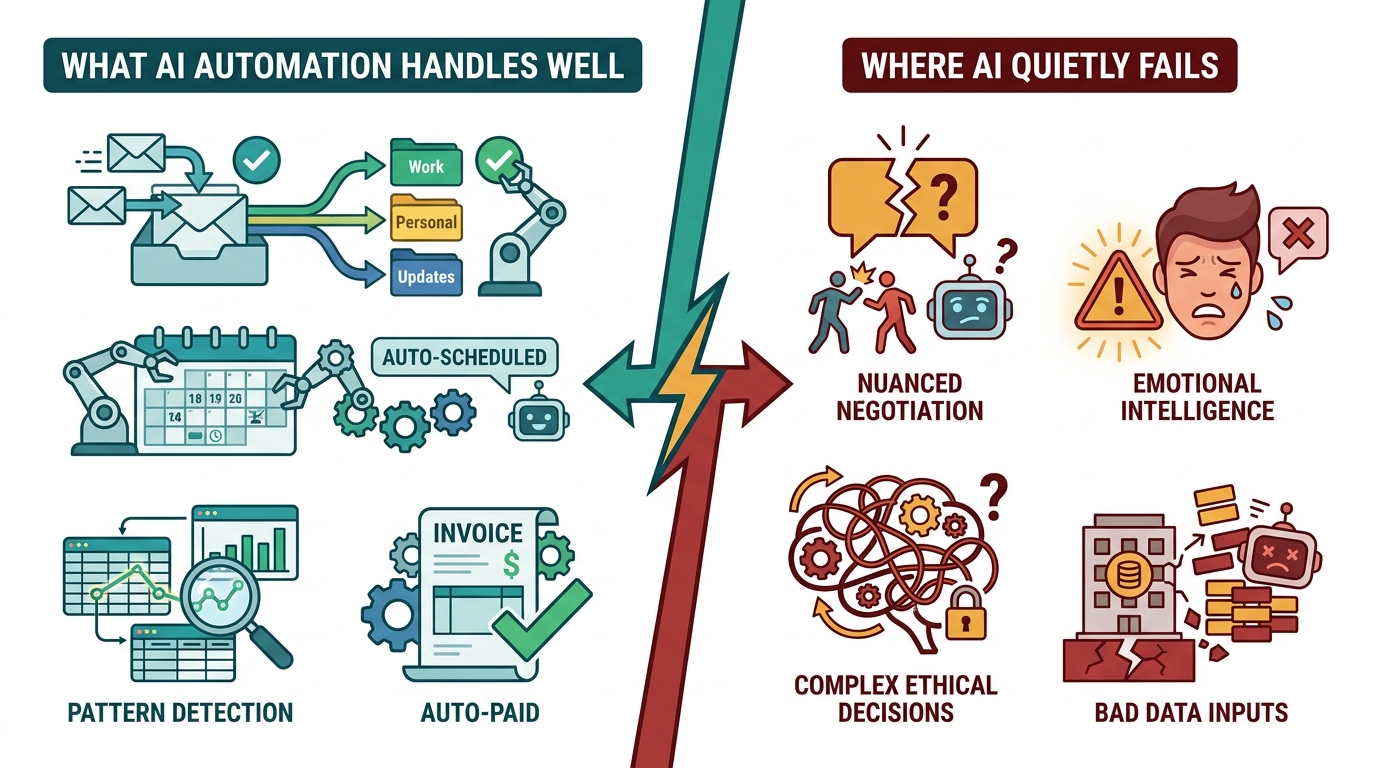
AI automation doesn’t fail randomly. It fails predictably, in specific types of tasks — and once you understand the pattern, you can avoid the most expensive mistakes before committing to a build.
Tasks Where AI Consistently Delivers
The sweet spot for AI automation sits at the intersection of three properties: high volume, structured inputs, and clear success criteria. When all three are present, AI can outperform humans significantly — not just in speed, but in consistency and error rate.
Data extraction and transformation is the canonical example. Pulling invoice line items from PDFs, normalizing address formats across a customer database, converting currency in real-time across a spreadsheet — these tasks are tedious for humans and nearly effortless for AI. A process that takes a finance analyst four hours to run manually can be executed in minutes, with fewer transposition errors, every single day.
Classification and routing is another high-performer. When a business receives hundreds of support tickets, emails, or form submissions daily, AI can read the content, identify the intent, and route each item to the right team or queue with accuracy that typically rivals a trained human reviewer — and does it 24 hours a day without fatigue. The same logic applies to lead scoring: an AI model trained on historical conversion data can rank inbound leads faster and more consistently than a human sales rep reviewing the same information cold.
Scheduled, trigger-based communications also sit firmly in AI’s wheelhouse. Onboarding email sequences, appointment reminders, abandoned cart nudges, review request messages — these follow predictable logic trees that AI executes reliably. The content may be AI-generated or pre-written; either way, the orchestration layer (when to send, to whom, based on what behavior) is exactly the kind of rule-based-plus-adaptive task that automation handles well.
Tasks Where AI Quietly Underdelivers
The failures are just as predictable. Tasks with ambiguous success criteria, high contextual sensitivity, or significant consequences for errors tend to expose AI’s limitations quickly.
Nuanced customer communication is a common casualty. When a long-term customer writes in with a complex complaint that involves frustration, history, and unstated expectations, an AI response that’s technically correct but tonally off can do more damage than no response at all. Humans read subtext; AI reads text. That gap matters enormously in relationship-critical interactions.
Creative strategy and positioning is another area where automation underperforms. AI can generate content at scale, but generating content that genuinely reflects a brand’s personality, responds to shifting cultural context, and produces original angles — that’s still a human-first activity. AI can assist; it shouldn’t lead.
Decisions with significant downstream consequences — hiring choices, contract terms, vendor selection, pricing strategy — involve variables that don’t always appear in structured data. Relevant context lives in relationships, institutional knowledge, and judgment that comes from experience. AI used as a decision-maker in these contexts often produces outputs that look confident but are missing crucial nuance.
The pattern is consistent: AI excels when the rules are knowable, the data is clean, and mistakes are cheap. It struggles when the rules are implicit, the data is messy, and mistakes are expensive.
The Four Quadrants of Automation Readiness
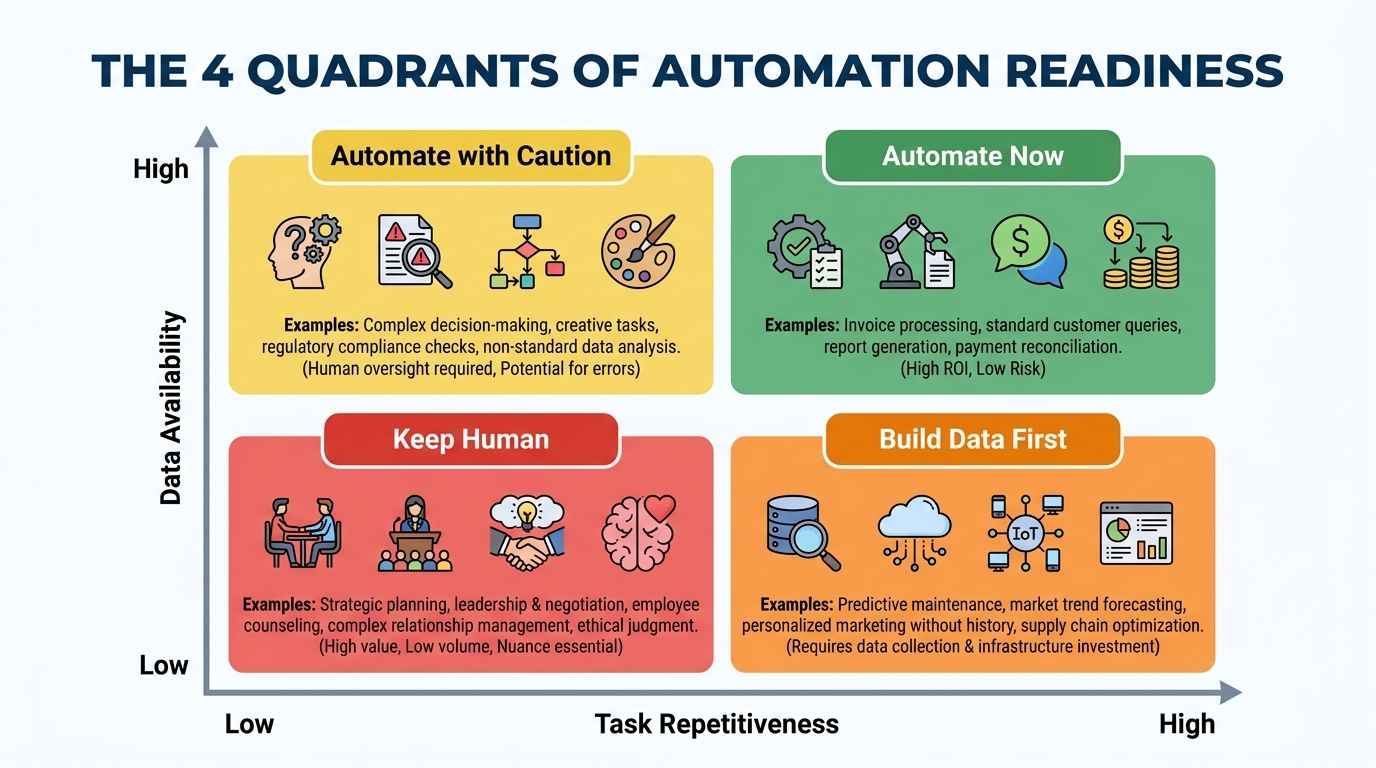
Before investing time and budget in building any automation, every candidate task should be evaluated against two dimensions: how repetitive it is (does it follow the same logic each time?) and how data-rich the environment is (do you have clean, structured, reliable inputs to feed the system?). Plotting these two variables creates a clear action framework.
Quadrant 1: Automate Now (High Repetition, High Data Quality)
This is where to start. Tasks in this quadrant follow predictable logic, have well-defined inputs, and produce outputs you can verify reliably. Invoice matching, data migration between systems, social media scheduling, CRM data enrichment from public sources — these are your quick wins. They tend to have fast payback periods and low failure rates when built thoughtfully.
A professional services firm that processes 300 expense reports a month is a classic example. The inputs are structured (receipts, amounts, categories), the rules are clear (approval thresholds, policy limits), and the success criteria are objective (correct categorization, policy compliance). Automating this process typically cuts processing time by 70-80% within the first few weeks of deployment.
Quadrant 2: Automate with Caution (High Repetition, Lower Data Quality)
These tasks are tempting to automate because they feel mechanical — they happen frequently and follow similar patterns. But the underlying data is inconsistent, incomplete, or requires interpretation to use correctly. Customer support triage from mixed-channel inputs is a common example: tickets arrive via email, chat, social media, and phone transcripts, in varying formats and languages, with wildly different levels of clarity.
Automation here is achievable, but it requires investing in data standardization first. Trying to build the automation before cleaning the data is one of the most common expensive mistakes teams make. You’re essentially teaching AI to learn from a messy room — it will replicate the mess at scale.
Quadrant 3: Build Data Infrastructure First (Low Repetition, High Data Quality)
These tasks don’t happen often enough to benefit from automation in their current state, but the data environment is solid. This is where you should focus on logging and instrumentation first — building the data density that will eventually enable automation. Quarterly competitive analysis, for example, might not be automatable today, but setting up systematic data collection creates the foundation for AI-assisted analysis later.
Quadrant 4: Keep Human (Low Repetition, Low Data Quality)
Don’t automate here. Not now. Tasks in this quadrant are unique enough that each instance requires contextual judgment, and the data environment doesn’t support reliable AI input. Complex contract negotiation, bespoke client strategy work, board-level communication — these stay with humans, and pushing AI into them prematurely creates liability without meaningful efficiency gains.
The discipline this quadrant requires is resisting the pressure to automate just because automation is possible. Possible is not the same as profitable.
Data Quality Is the Foundation Nobody Wants to Talk About
Ask any team that has successfully run AI automations at scale what the hardest part was, and most will give the same answer: it wasn’t the AI, and it wasn’t the tooling. It was the data.
This is the most under-discussed topic in AI automation — and it’s where the majority of mid-build failures trace back to. AI systems are trained on your data and make decisions using your data. When that data is inconsistent, incomplete, or riddled with legacy formatting quirks, the automation either produces unreliable outputs or requires so much exception-handling that the efficiency gains vanish.
The Four Data Readiness Checks
Completeness: What percentage of the records your automation will process actually have all the fields it needs? A lead-scoring model that’s missing job title or company size data for 40% of leads can’t produce reliable scores for those records. Before building, audit your data for completeness and set a threshold — typically 85% or higher — before proceeding.
Consistency: Are the same concepts represented the same way across your data? Dates in three different formats, country names sometimes abbreviated and sometimes spelled out, product categories with overlapping names — these inconsistencies create decision forks that automation has to handle, and each one is a potential failure point. Data standardization is genuinely unglamorous work. It’s also genuinely necessary.
Timeliness: How fresh does the data need to be for the automation to work correctly? Inventory automation that makes reorder decisions on 48-hour-old stock data may systematically over-order. Email personalization that uses a contact’s job title from two years ago will occasionally produce embarrassing outputs. Understanding your automation’s staleness tolerance is a data architecture question that needs an answer before you build.
Accessibility: Can your automation actually reach the data when it needs it? This sounds obvious, but it’s a common blockage. The data might exist in a system that doesn’t have an API, in a format that requires manual export, or behind permission structures that make real-time access impossible. Data accessibility is an infrastructure constraint that needs to be solved before — not during — the automation build.
Building a Pre-Automation Data Audit
A practical approach is to run a 2-week data audit before committing to any significant automation build. Pull a sample of 200-500 records that your automation would process. Run them manually through the intended workflow logic. Count the exceptions, the missing fields, the formatting inconsistencies, the edge cases. That sample tells you more about your automation’s real-world viability than any tool demo ever will.
If more than 20% of the records in your sample require human intervention to process correctly, you’re not ready to automate. Go fix the data first. This typically takes longer than teams expect — weeks, not days — but it’s time that pays for itself many times over in fewer failures, lower maintenance costs, and higher automation confidence.
The 7 Business Functions Where AI Automation Pays Off Fastest
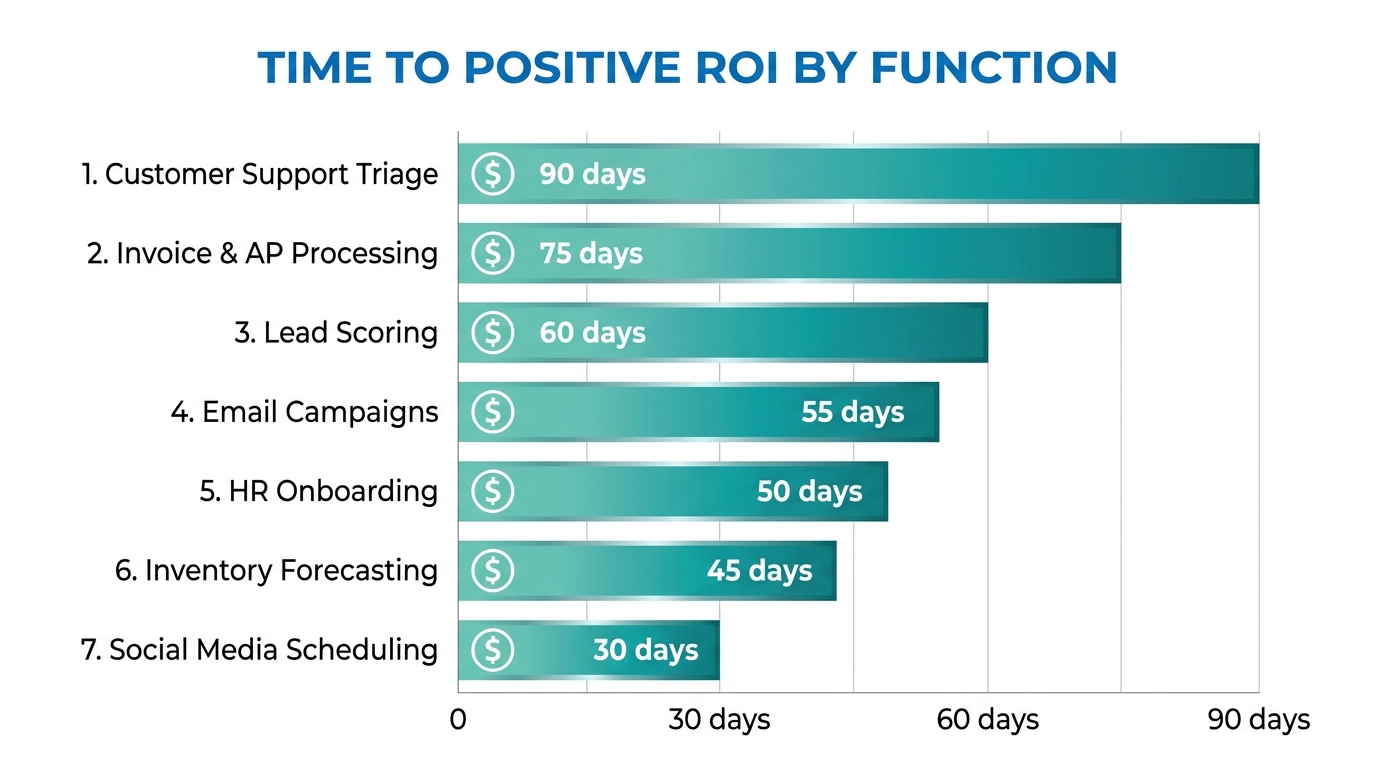
Not all automation is equal in how quickly it returns value. Some functions have well-established automation patterns, clear inputs and outputs, and measurable impact. Others require more groundwork before they yield meaningful results. Based on adoption patterns across industries, these seven functions consistently reach positive ROI fastest.
1. Customer Support Triage and First Response
The economics here are straightforward. If your support team receives 500 tickets a day and 60% of them are answerable with information that already exists in your knowledge base, you’re paying human support agents to do work that a well-configured AI can handle in milliseconds. Not every ticket — the 40% that require judgment, empathy, or account-specific context absolutely still need humans. But the 60% that don’t? That’s where the math becomes compelling quickly.
The key metric to track isn’t cost reduction — it’s first response time and resolution rate for straightforward tickets. When both improve, customer satisfaction scores typically follow, creating a second-order benefit beyond the direct cost savings.
2. Accounts Payable and Invoice Processing
Invoice processing sits in the sweet spot: high volume, structured inputs (line items, amounts, vendor names), clear validation rules (three-way matching against purchase orders and delivery receipts), and expensive human error rates. Organizations that manually process invoices typically experience error rates between 1-3%; AI-assisted processing routinely reduces this to below 0.5%.
The automation typically covers extraction (pulling data from PDFs, scans, or email attachments), validation (matching against PO and receiving records), exception flagging (items that don’t match or exceed thresholds), and routing (sending exceptions to the right approver). The human remains responsible for judgment on exceptions; the AI handles the high-volume matching work that consumes most of the time.
3. Lead Scoring and Sales Queue Prioritization
Sales teams are fundamentally overwhelmed by the prioritization problem. With hundreds of inbound leads and a limited number of selling hours, which ones do you call first? AI-driven lead scoring builds a model on your historical conversion data — what signals, behaviors, and firmographic characteristics predicted that a lead became a customer — and then ranks every new lead against that model in real time.
The payoff isn’t just time savings; it’s revenue. When sales reps work the highest-quality leads first, conversion rates improve and deals close faster. A properly calibrated lead scoring model typically improves sales team productivity by 25-40% without adding headcount, because the same effort is being directed at better opportunities.
4. Email Marketing Personalization and Sequencing
Basic email automation has existed for years — the AI layer adds behavioral intelligence. Instead of sending everyone the same message at the same time, AI-powered email automation adapts: send time optimization based on individual recipient open history, content variant selection based on past engagement, sequence branching based on real-time behavior, and list hygiene automation that removes disengaged contacts before they damage deliverability.
The aggregate impact of these optimizations is significant. Open rates typically improve 15-30% when send times are individually optimized, and unsubscribe rates drop when content relevance improves. Neither of these effects requires expensive custom models — they come from using behavioral data that most email platforms already collect but most teams never activate.
5. HR and Employee Onboarding Workflows
New employee onboarding involves an enormous amount of coordination: IT provisioning, benefits enrollment, document collection, training assignment, introductory meeting scheduling, compliance acknowledgments. Much of this is sequential and rules-based — exactly the profile that automation handles well.
An automated onboarding workflow can trigger all of these steps based on a start date, track completion, send reminders for outstanding items, and escalate to managers when deadlines are missed. The human HR team focuses on the parts that actually benefit from human attention: culture integration, role clarity conversations, and the relationship-building that makes new employees feel genuinely welcomed — not the form-chasing that consumes disproportionate time today.
6. Inventory Forecasting and Reorder Triggering
Traditional inventory management relies on static reorder points set periodically and adjusted manually. AI-powered forecasting models incorporate seasonality, promotional calendars, supplier lead time variability, and real-time sales velocity to produce dynamic reorder recommendations that adapt continuously. The result is fewer stockouts and fewer overstock situations — both of which carry direct, measurable costs.
For businesses with more than 500 SKUs, the manual monitoring burden alone is substantial. Automation here pays off both in reduced carrying costs and in the time operations teams get back from monitoring spreadsheets and reacting to stock alerts.
7. Social Media Scheduling and Performance Reporting
Content scheduling is low-stakes, high-frequency, and entirely rule-based — a natural automation candidate. But the real automation opportunity sits in reporting: pulling performance data from multiple platforms, normalizing it into a consistent format, flagging underperforming content, identifying top performers, and generating a readable summary for review. AI doesn’t decide the creative strategy, but it dramatically reduces the time spent assembling and interpreting the data that informs it.
The 5 Tasks That Look Automatable But Will Burn You
Every list of automation use cases glosses over these. These are the tasks that seem like obvious candidates — they’re frequent, they’re time-consuming, they involve data — but they have hidden complexity that makes them genuinely dangerous to automate without significant caution.
1. Personalized Customer Outreach at Scale
The logic seems sound: you have thousands of customers, you have data about them, you can generate personalized messages automatically. The problem is that “personalized” and “AI-generated-based-on-your-CRM-data” are not the same thing — and customers can tell the difference. A message that correctly uses someone’s first name and references their last purchase, but doesn’t acknowledge the complaint they filed two weeks ago, doesn’t feel personal. It feels like the worst kind of algorithmic parody of personalization.
This is a failure of data completeness meeting a task with high relationship stakes. If your CRM has incomplete interaction history, or if your automation can’t access all relevant context before generating an outreach message, you’re better off sending a simpler, human-written message than a sophisticated-looking AI-generated one that misses crucial context.
2. Content Moderation
User-generated content platforms often try to automate moderation at scale, and the results are consistently messy. Satire, sarcasm, dialect, context-dependent appropriateness, and rapidly evolving slang all create edge cases that AI classifiers handle poorly. Over-moderation alienates users; under-moderation creates liability. Both are expensive. The lesson from platforms that have tried to fully automate moderation is that you can automate the obvious cases, but the edge cases — which constitute a meaningful percentage of real-world content — still require human judgment, and the volume of edge cases is often higher than expected.
3. Pricing Optimization in Competitive Markets
Dynamic pricing models that adjust based on competitor pricing data, demand signals, and margin targets can work well in controlled environments. They fail in volatile ones. When a competitor makes an unusual pricing move, when market conditions shift rapidly, or when the model’s training data doesn’t reflect current conditions, automated pricing systems can make decisions that look locally optimal but are globally damaging — racing competitors to the bottom, for example, or missing price elasticity signals that a human pricing analyst would immediately recognize as unusual.
4. Candidate Screening for Roles Requiring Cultural Fit
Resume screening automation is widespread and demonstrably useful for filtering unqualified candidates from high-volume applications. The danger zone is using AI to assess cultural fit, “soft skills,” or leadership potential — attributes that involve complex human judgment and where AI models frequently amplify historical biases present in the training data. Hiring decisions made by or heavily influenced by AI that was trained on biased historical hiring patterns can create both legal exposure and genuinely poor hiring outcomes. The screening layer can be automated; the fit assessment shouldn’t be.
5. Customer Complaint Escalation and Resolution
There’s a strong temptation to automate the full complaints process end-to-end. First response automation is well-suited for this. Resolution automation for complex complaints is not. When a customer is genuinely upset — especially when the underlying problem is systemic, involves a significant financial impact, or has an emotional dimension — an automated resolution attempt frequently makes the situation worse. The customer wanted to feel heard; instead they got a chatbot trying to close the ticket. The automation here needs to know when to stop and hand off, and that handoff logic needs to be thoughtful, well-tested, and erring heavily on the side of human involvement.
Building Your Automation Stack: Tools, Triggers, and Logic Layers
Once you know which tasks to automate, the next decision is how to build it. The tooling landscape in 2026 is broadly stratified into three tiers, and choosing the wrong tier for a given task is a common source of over-engineering (and overspending) on simple workflows and under-building on complex ones.
Tier 1: Workflow Orchestration Platforms
Tools like Make (formerly Integromat), Zapier, n8n, and Tray.io handle the connective tissue of automation — moving data between apps, triggering actions based on events, and building multi-step sequences without writing code. For most business automation use cases, this is the right starting point. They’re fast to build, easy to iterate on, and come with pre-built integrations for hundreds of common business tools.
The limitation of pure orchestration tools is that they execute logic you define in advance. They don’t reason about ambiguous inputs. When you need AI judgment embedded in a workflow — reading an email and deciding whether it’s a complaint, a general inquiry, or a sales opportunity — you need to connect an AI model into the orchestration layer, typically via API.
Tier 2: AI Model Integrations
The middle layer of most sophisticated automation stacks today is an LLM API — OpenAI, Anthropic Claude, Google Gemini, or an open-source alternative run on your own infrastructure. This is where the “intelligent” part of intelligent automation lives. The orchestration tool triggers the AI model with a structured prompt, the model returns a decision or generated content, and the orchestration tool acts on that output.
The key engineering discipline here is prompt engineering and output validation. AI model outputs are probabilistic — the same input won’t always produce the same output. For automation, you need deterministic enough behavior. That means investing in prompt design, testing outputs across a wide range of real inputs, and building validation logic that catches and routes unexpected responses before they propagate errors downstream.
Tier 3: Custom-Built Automation Systems
At the high end, organizations with complex, high-volume, or highly specialized automation needs build custom systems — proprietary ML models trained on their own data, custom data pipelines, dedicated APIs. This is expensive, requires engineering resources, and takes months to build and validate. It’s appropriate for processes where the volume is enormous, the business specificity is high enough that off-the-shelf tools can’t reach the required accuracy, or where data privacy constraints rule out third-party model APIs.
Most businesses don’t start here — and most shouldn’t. The common mistake is starting at Tier 3 when a Tier 1 solution would deliver 80% of the value at 10% of the cost and time. Reserve custom builds for cases where you’ve already run a Tier 1 or 2 solution long enough to understand exactly where its limitations are and what the cost of those limitations is.
Trigger Architecture: Getting the Inputs Right
Every automation starts with a trigger — the event that sets the workflow in motion. Getting trigger architecture right matters more than most teams realize. There are three trigger types worth understanding clearly:
Event-based triggers fire when something happens: a new form submission, a file arriving in a folder, a CRM record being updated, a payment being processed. These are the most reliable trigger type because they’re discrete and verifiable.
Schedule-based triggers fire on a clock: every morning at 6 AM, every Monday at 9 AM, every hour. These work well for batch processing but require careful thought about what happens when the scheduled run encounters conditions it wasn’t designed for.
Condition-based triggers fire when a threshold is crossed: inventory below a reorder point, response time exceeding a target, a score falling above or below a threshold. These are powerful but require well-calibrated thresholds — a threshold set wrong will either trigger too often (generating noise) or too rarely (missing the events you wanted to catch).
Human-in-the-Loop: The Oversight Architecture That Prevents Disasters
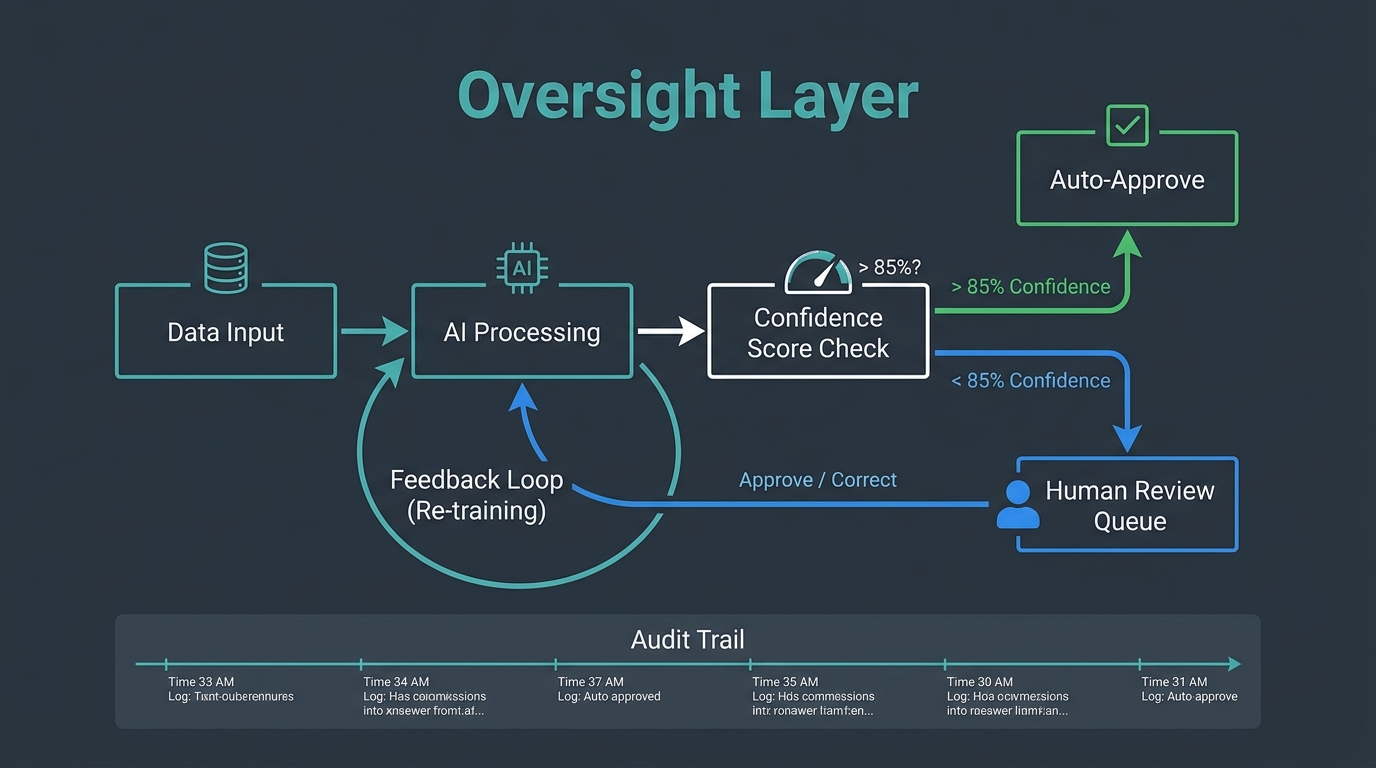
The phrase “human-in-the-loop” gets used loosely, but in the context of AI automation, it refers to a specific architectural decision: at what point, and under what conditions, does a human get involved in an automated process?
Getting this architecture right is the difference between automation that builds trust over time and automation that periodically generates a crisis.
The Confidence Threshold Model
The most practical implementation of human oversight in AI automation uses confidence scoring. When an AI model makes a classification or generates an output, it also produces a confidence level — how certain the model is that its answer is correct. You set a threshold (commonly 85-90%) above which outputs are auto-approved, and below which they’re routed to a human review queue.
This approach is elegant because it scales naturally. High-confidence outputs flow through automatically, maintaining efficiency. Low-confidence outputs get human attention, maintaining quality. Over time, you can analyze the low-confidence queue to understand where the model is systematically uncertain — and that analysis guides both model improvement and process redesign.
The threshold you set matters significantly. Too high (95%+) and you’re routing so much to human review that the automation barely helps. Too low (70%) and you’re auto-approving outputs that have a meaningful failure rate. Calibrate based on the cost of an error in that specific workflow — higher stakes justify higher thresholds.
Audit Trails and Explainability
Every automated decision that has material consequences should generate an audit trail: what input did the system receive, what did it decide, at what confidence level, and what action did it take? This isn’t just a compliance requirement — it’s a diagnostic tool that tells you when automation behavior is drifting from what you designed it to do.
For AI models specifically, explainability is increasingly important. “The AI decided” is not an acceptable answer when a customer asks why their account was flagged, their application was denied, or their price changed. Building lightweight explanation generation into automated decisions — “this lead was scored high because of seniority level, company size, and recency of engagement” — protects both the business and the people interacting with the automation.
Failure Escalation Protocols
Every automation needs a defined behavior for when it doesn’t know what to do. This sounds obvious; it’s consistently skipped in builds. What happens when the AI receives an input it has never seen before? What happens when an API call fails? What happens when the output validation check catches something unexpected?
The answer should never be “nothing.” Failing silently — where the workflow simply stops and no one is notified — is how small automation errors compound into large operational problems. Failing loudly to the right person, with enough context for them to act, is the design target. Every workflow should have a defined escalation path: who gets notified, in what channel, with what information, when an exception occurs.
Measuring What Actually Matters After You Deploy
The metrics that get tracked most often after an automation goes live — tasks processed, time saved, cost per transaction — are useful but incomplete. They measure activity. They don’t always capture quality, and they rarely capture second-order effects. A more complete measurement framework covers four dimensions.
Throughput and Efficiency
Start here: how many tasks per hour, day, or month is the automation processing? Compare it to the manual baseline. This is your primary efficiency metric. Track it weekly for the first three months — automations often show initial throughput gains followed by a dip as edge cases accumulate and the workflow needs refinement. The dip is normal; the key is catching it early and diagnosing it quickly.
Output Quality
For every automation that produces a decision or a piece of content, you need a quality sampling process. Pull a random sample of outputs weekly — say 50-100 — and have a human evaluate them against your quality criteria. Track the error rate, the types of errors, and whether the error rate is trending up or down over time. Quality measurement is the most frequently skipped step in automation monitoring, and it’s where the most damaging problems go undetected longest.
Exception Rate
What percentage of tasks is the automation unable to complete and routing to human review? Track this separately from quality. A rising exception rate tells you either that your input data is changing in ways the automation wasn’t designed for, or that the model’s performance is degrading. Either way, it’s a signal worth investigating before it becomes a crisis.
Downstream Business Impact
The automation’s job isn’t to process tasks — it’s to produce a business outcome. Customer support triage automation isn’t measured by tickets processed; it’s measured by customer satisfaction scores and time-to-resolution. Lead scoring automation isn’t measured by scores generated; it’s measured by the conversion rate of leads the sales team actually works. Connecting the automation to its downstream business outcome is the measurement discipline that separates teams who know their automation is working from teams who assume it is.
The Maintenance Reality: Why Automations Degrade Over Time
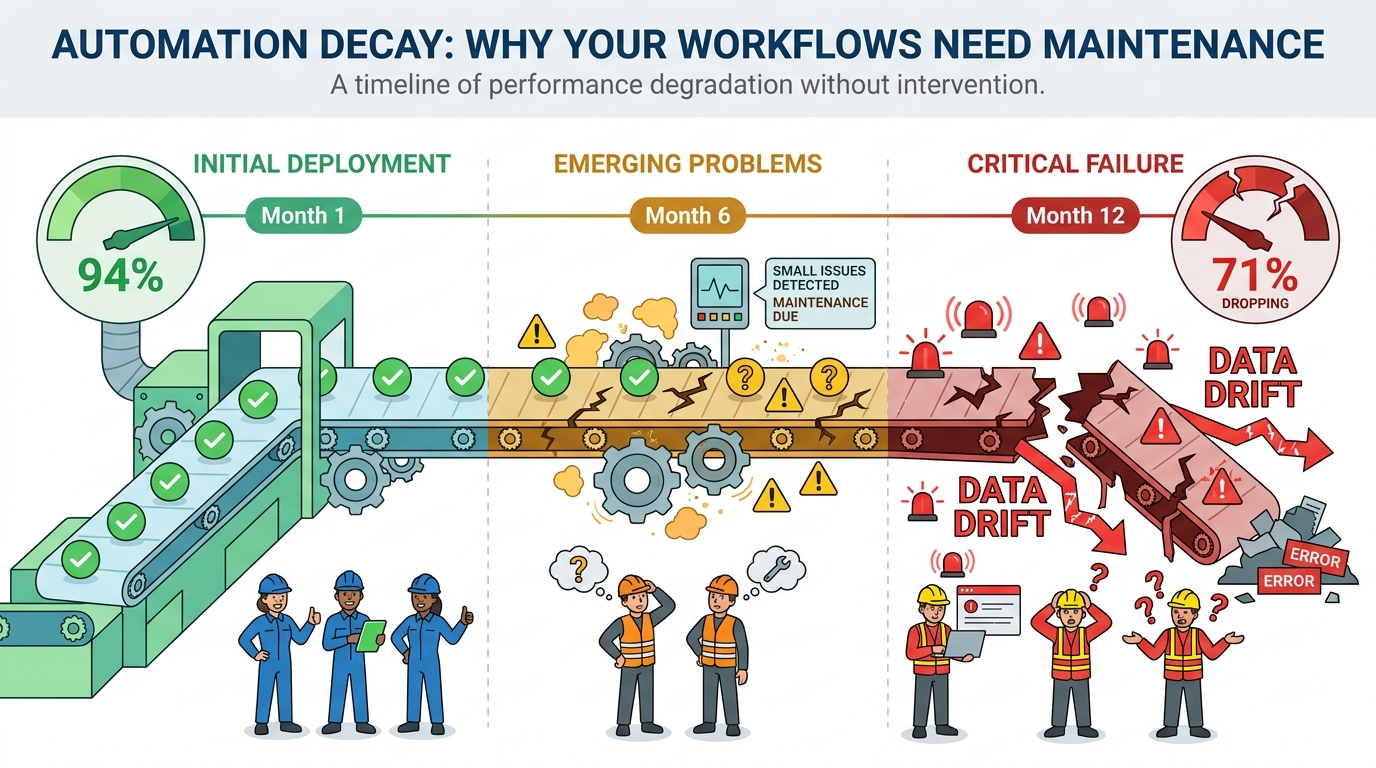
There’s a pervasive assumption that automation, once built, runs indefinitely. It doesn’t. Automations decay — not all at once, and not dramatically, but steadily, as the world changes around them.
Understanding the mechanics of automation decay is essential for anyone building workflows they intend to rely on for more than a few months.
Data Drift
The most common cause of automation degradation is data drift — the gradual change in the statistical properties of the data the automation receives. An AI model trained on your customer data from twelve months ago may have learned patterns that no longer hold. Your customer base has shifted; your product catalog has changed; your marketing messaging has evolved and attracted a different audience. The model doesn’t know any of this. It keeps applying old patterns to new data, and its accuracy quietly erodes.
Detecting data drift requires monitoring. Track the distribution of inputs your automation receives over time — the mix of customer segments, the range of values in key fields, the frequency of different input types. When the distribution shifts meaningfully from the training baseline, it’s time to retrain.
Dependency Rot
Automations depend on external systems: APIs, databases, third-party services, internal tools. Every external dependency is a potential point of failure over time. APIs add new required fields, change authentication methods, or version-change in ways that break existing integrations. The third-party service the automation relies on updates its data format. Your internal CRM gets migrated to a new platform. Each of these changes requires updating the automation — and if no one is responsible for tracking upstream dependency changes, the automation fails silently until something obvious breaks.
The practical mitigation is dependency documentation and change notification. For every external dependency your automation relies on, document it, and set up monitoring (even simple uptime pings and format validation checks) that alerts your team when something changes.
Process Evolution
Your business processes change. New products launch, pricing models change, team structures reorganize, compliance requirements update. An automation built to reflect the business logic of twelve months ago may not reflect how the business actually works today. Process drift is harder to detect than technical failures because the automation keeps running — it’s just running the wrong process.
The antidote is scheduled reviews. Every active automation should have a quarterly review on the calendar where someone with business context (not just the person who built it) evaluates whether the automation still reflects how the business intends to operate. This sounds bureaucratic. In practice, it takes 30 minutes per automation and catches problems early enough to fix them cheaply.
Building a Maintenance Budget
Automation maintenance is underbudgeted by default because it doesn’t feel like work — you’re not building anything new. But the evidence from teams that run automations at scale is consistent: expect to spend 20-30% of the initial build time on maintenance annually. An automation that took 40 hours to build should have 8-12 hours per year allocated for monitoring, updating, and retraining. Not every automation will need that much. Some will need more. Budget for it explicitly, or you’ll end up managing the cost reactively, when something breaks at the worst possible time.
The Change Management Layer Most Teams Skip
Here’s a truth that automation teams rarely confront directly: the technology is almost never the hardest part of deploying AI automation. The people are.
This isn’t an indictment of employees. It’s a recognition that automation changes how work gets done, and people who’ve built expertise, workflow habits, and professional identity around doing tasks a specific way have legitimate reasons to be uncertain about what automation means for them. Skipping the change management layer doesn’t make the human dynamics disappear — it just makes them play out as passive resistance, low adoption rates, and quietly abandoned workflows.
The Transparency Imperative
The single most damaging thing a team can do when rolling out automation is obscure what it does and why. When people don’t understand what the automation is handling and what it’s not, they fill the gap with anxiety — usually catastrophizing in the direction of “it’s replacing my job.” Even when that fear isn’t warranted, it’s remarkably difficult to dislodge once it takes hold.
Transparency doesn’t mean overwhelming people with technical detail. It means answering three questions clearly: What tasks is this automation handling? How does it make decisions? And what do I, as the person whose role is affected, do differently now? Teams that communicate these answers proactively and specifically see significantly higher adoption rates than those who send a brief announcement and assume the rest follows.
Reframing the Role of the Human
The most effective framing — and the one that’s most often true — is that automation takes over the parts of a job that are repetitive and mechanical, freeing up time for the parts that actually require the skills and judgment the person was hired for. A support agent who was spending 60% of their time on copy-paste ticket responses can now spend that 60% on complex customer issues where their empathy and knowledge actually make a difference. That’s not a job being replaced; it’s a job being made better.
This framing only lands if it’s genuine. If the plan is to reduce headcount post-automation, say so honestly rather than using the “freeing up time” framing as a cover story. People see through it, and the trust damage from that kind of misdirection is expensive and slow to repair.
Training for the New Role
Automation changes what skills are needed, not whether skills are needed. Employees whose roles are affected by automation need training — not on how to use the automation (that should be self-evident) but on how their role has evolved. What judgment calls are now theirs to make that the automation can’t? What patterns should they be watching for in the automation’s outputs? How do they handle the exceptions that the automation routes to them?
This training investment is typically modest in time but significant in adoption impact. Teams that receive it adapt faster, catch more problems early, and develop the kind of contextual relationship with the automation that allows them to improve it over time.
Building an Automation Mindset, Not Just Automation Tools
The businesses that get the most lasting value from AI automation share a characteristic that has nothing to do with the sophistication of their toolstack: they treat automation as a continuous practice, not a one-time project.
A one-time project mindset builds an automation, declares victory when it goes live, and moves on. The automation runs until it fails badly enough to demand attention, gets fixed, and runs again. The efficiency gains are real but modest. The risk of silent failure is constant.
A continuous practice mindset looks different. It maintains a backlog of automation candidates, ranked by quadrant analysis and data readiness. It runs regular reviews of active automations against quality and performance benchmarks. It uses exception data and error patterns as feedback loops to improve existing automations and inform the design of new ones. It treats automation maintenance as a first-class engineering and operations responsibility, not an afterthought.
The Automation Backlog
Every operations team should maintain a living list of tasks that are candidates for automation, with each task assessed against the quadrant framework: repetitiveness, data quality, estimated volume, estimated error cost, and estimated build effort. This backlog is reviewed monthly, reprioritized as data environments change and business priorities shift, and used to make deliberate decisions about where automation investment goes next.
The backlog also prevents ad-hoc automation — the one-off builds that solve an immediate pain point but weren’t designed to fit into the broader automation architecture. Ad-hoc automations accumulate into technical debt fast. A maintained backlog creates the discipline to evaluate new automation candidates systematically before committing to building them.
The Feedback Culture
The people closest to automated processes are the employees whose roles interact with them — the support agents reviewing flagged tickets, the finance team handling invoice exceptions, the sales reps working scored leads. They notice things that monitoring dashboards don’t: the edge cases that generate wrong outputs but are below the statistical threshold for detection, the systematic bias in how the model handles a certain type of input, the exception that keeps appearing despite being flagged repeatedly.
Building a feedback culture means creating a simple, low-friction channel for these observations to surface. A shared Slack channel, a quick-capture form, a standing 15-minute review in weekly team meetings — the format matters less than the habit. The teams that collect and act on front-line feedback improve their automations faster, and with fewer major failures, than teams that rely exclusively on system monitoring.
Starting Small and Compounding
The most durable approach to AI automation isn’t a sweeping transformation program. It’s a series of small, well-chosen, well-maintained wins that compound over time. A company that successfully automates six high-confidence processes in year one, maintains them diligently, and uses the data and trust those automations generate to tackle six more in year two is in a far stronger position than a company that attempted twenty automations simultaneously and is now managing the fallout of six that went wrong.
Automation compounds because each successful build generates learnings — about your data quality, your exception patterns, your team’s adaptation speed — that make the next build better. The teams that are furthest ahead in AI automation in 2026 aren’t there because they moved fastest. They’re there because they moved most deliberately, fixed what broke, and built institutional knowledge that no tooling change could eliminate.
The bottom line: AI automation is not a destination you arrive at. It’s a capability you build progressively, through a combination of careful task selection, honest data assessment, thoughtful oversight architecture, rigorous measurement, and genuine investment in the people whose work it changes. The map matters as much as the tools. Draw it carefully before you build anything.
Key Takeaways
- Use the quadrant framework — evaluate every automation candidate on repetitiveness AND data quality before committing to building it.
- Fix data before building — a pre-automation data audit (200-500 record sample, manual walkthrough) will tell you more about viability than any tool demo.
- Start in Quadrant 1 — high repetition, high data quality tasks return value fastest and build trust in your automation practice.
- Build confidence thresholds into AI workflows — auto-approve high-confidence outputs, route low-confidence ones to human review, and track both rates over time.
- Budget for maintenance explicitly — expect 20-30% of initial build time annually for monitoring, updating, and retraining.
- Don’t skip change management — transparent communication about what the automation does, and genuine reframing of human roles, is what separates adopted automations from abandoned ones.
- Maintain an automation backlog — deliberate prioritization prevents ad-hoc builds that become technical debt.
- Measure downstream business impact — not just tasks processed, but the business outcome the automation was designed to improve.
Leave a Reply