Tag: Amazon Image Compliance

  • Why Amazon’s Image Compliance System Flags Good Images — And the Framework to Build a Bulletproof Gallery in 2026

    Why Amazon’s Image Compliance System Flags Good Images — And the Framework to Build a Bulletproof Gallery in 2026

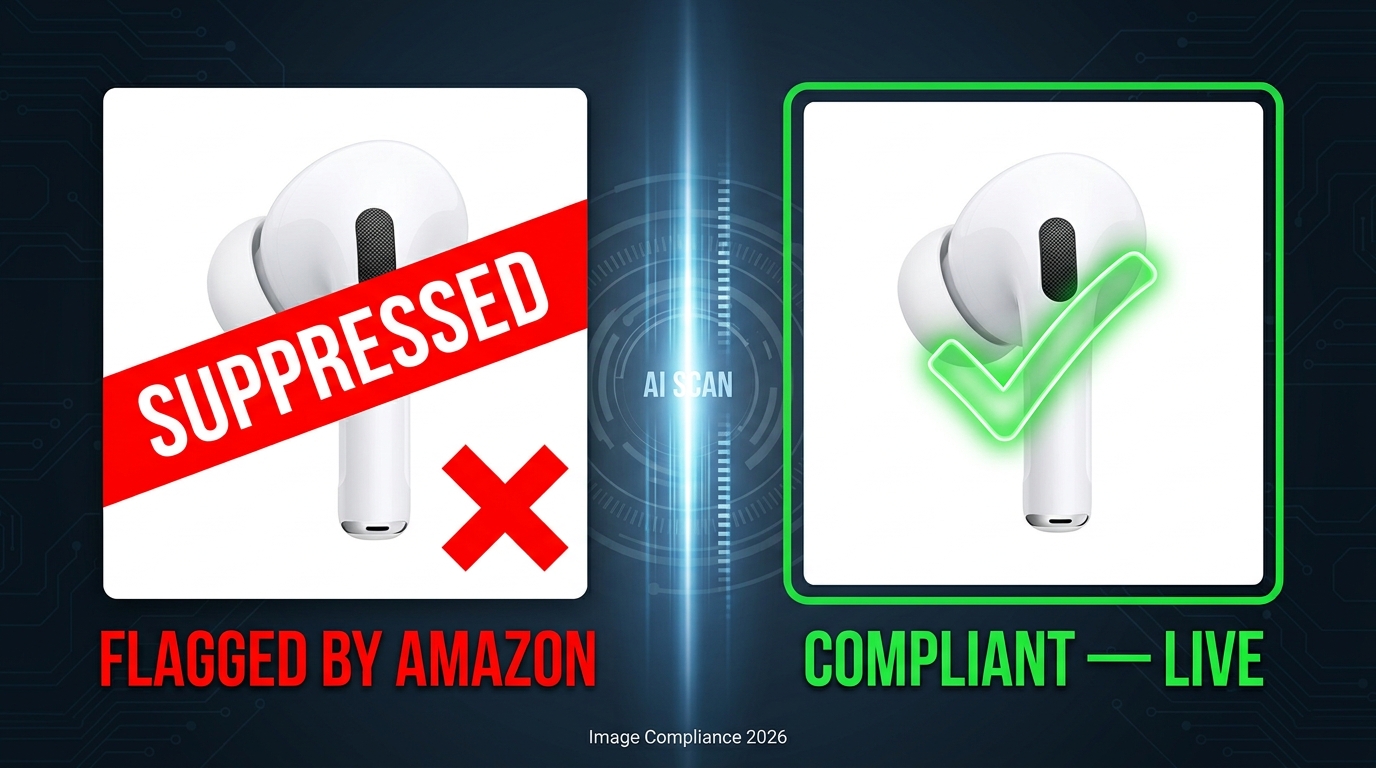
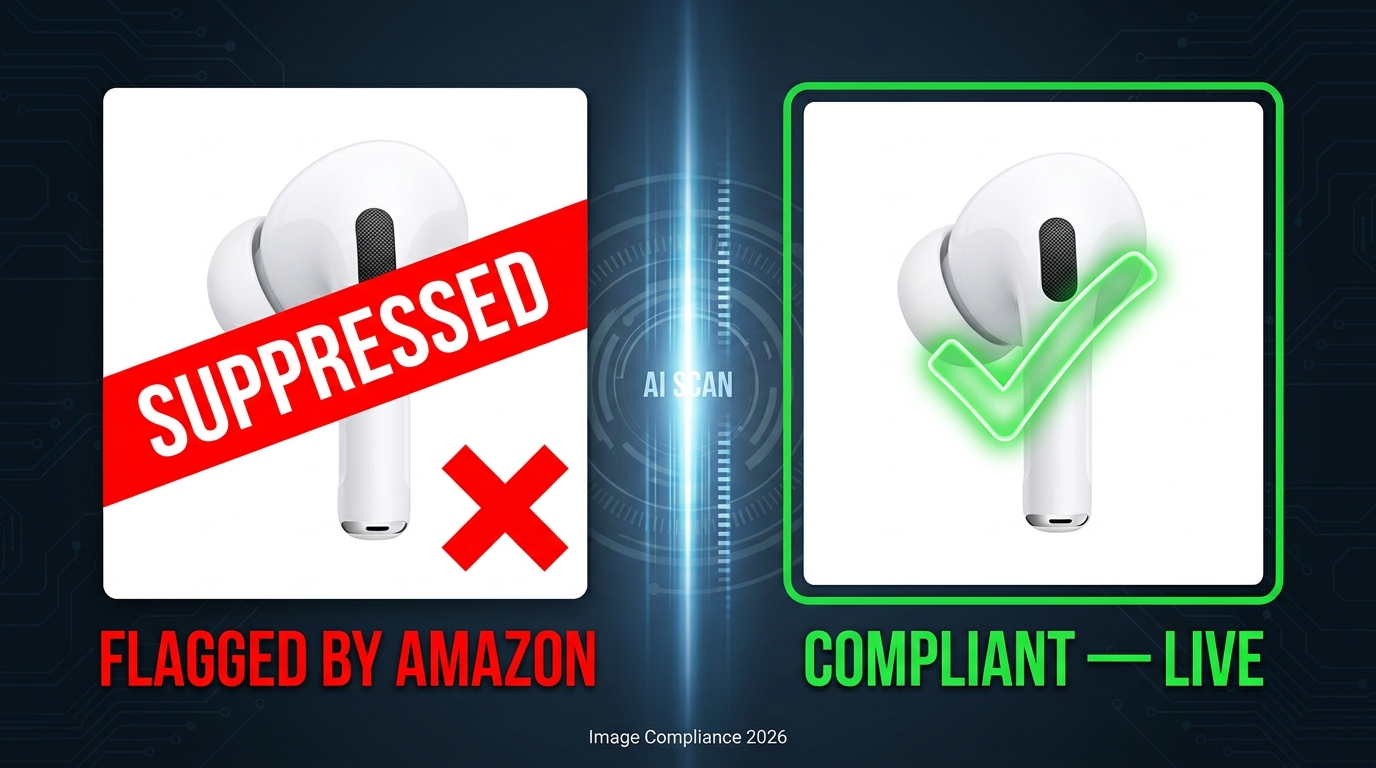
    Split-screen showing Amazon product image flagged as SUPPRESSED versus compliant and live in 2026

    You spent two days getting your product images right. A clean white background, sharp photography, correct resolution, no watermarks. You checked every box on Amazon’s help page. Then, forty-eight hours after upload, Seller Central shows a suppression notice — your listing is gone from search.

    This is not a hypothetical. Sellers across every category are running into exactly this scenario in 2026, and the frustrating part isn’t the occasional false positive. It’s that the system flagging images has become significantly faster, significantly less transparent, and significantly more consequential than it was two years ago. Amazon’s automated image compliance scanner now processes violations in minutes rather than days, suppression can happen before you even notice it, and for repeat offenses the escalation path leads directly to account health actions.

    What most coverage of this topic misses is the why. Not the rules — those are documented, if poorly communicated — but the system behavior underneath them. What exactly is the scanner checking, and in what order? Why do technically compliant images still get flagged? What does the July 2026 AI disclosure requirement actually change at the file level? And when a false positive hits, what does recovery actually look like?

    This post answers all of those questions with a practical framework for building image galleries that don’t just meet the rules as written — they pass the scanner as it actually operates. That distinction matters more than most sellers realize.

    How Amazon’s Automated Image Scanner Actually Decides What to Flag

    Technical infographic of Amazon's image compliance scanner showing all checks: background RGB, product fill, text detection, resolution, EXIF metadata, and prop detection

    Amazon’s image compliance system is not a single gate you pass through. It’s a layered series of automated checks that run in a defined sequence, each with its own detection method and failure mode. Understanding the sequence is the first step to understanding why images that look fine to a human reviewer still fail the system.

    The Automated Detection Layer

    When an image is uploaded to Amazon’s catalog, the first pass is automated — running background analysis, dimensional checks, and resolution verification before a human reviewer ever sees it. Third-party seller reporting from early 2026 suggests this automated layer now achieves approximately 94% accuracy, which sounds impressive until you consider what the 6% error rate means at Amazon’s catalog scale.

    The automated scanner evaluates images roughly in this order: background color purity, product fill percentage, resolution sufficiency, presence of text or watermarks, presence of prohibited props or borders, and — newly added this year — EXIF and XMP metadata flags for AI-generated content. Each of these checks uses a different detection mechanism.

    Background Detection vs. Text Detection: Why They Fail Differently

    Background color detection is pixel-based and relatively binary: the system samples background pixels and compares them against RGB target values. Text detection, by contrast, uses optical character recognition (OCR) to scan for character strings across the image. These two systems fail in different ways. Background checks produce false positives when natural shadows or product reflections push edge pixels off white. Text detection can misread graphical product elements — say, a logo printed on packaging — as a prohibited text overlay.

    Prop detection is perhaps the most error-prone of the automated checks. The system uses image recognition to identify non-product elements in the frame. This is where sellers with products that include accessories (consider a camera with a lens cap, or a power bank with its cable) most commonly hit false flags, because the scanner may classify included accessories as props.

    Human Review: When It Kicks In and When It Doesn’t

    Human review is reserved for edge cases — images that pass the automated scan but receive a complaint, or cases that are flagged at a borderline confidence threshold by the automated system. The practical implication is significant: if your image fails the automated check, it is highly unlikely to be caught before suppression by a human reviewer who might recognize the contextual nuance. The automation acts first. Appeals bring human review later.

    This is the enforcement architecture most sellers don’t account for. You’re not building images for Amazon’s reviewers. You’re building images for a detection system that has no tolerance for ambiguity.

    The “Pure White” Problem: Why RGB 255/255/255 Is Necessary but Not Sufficient
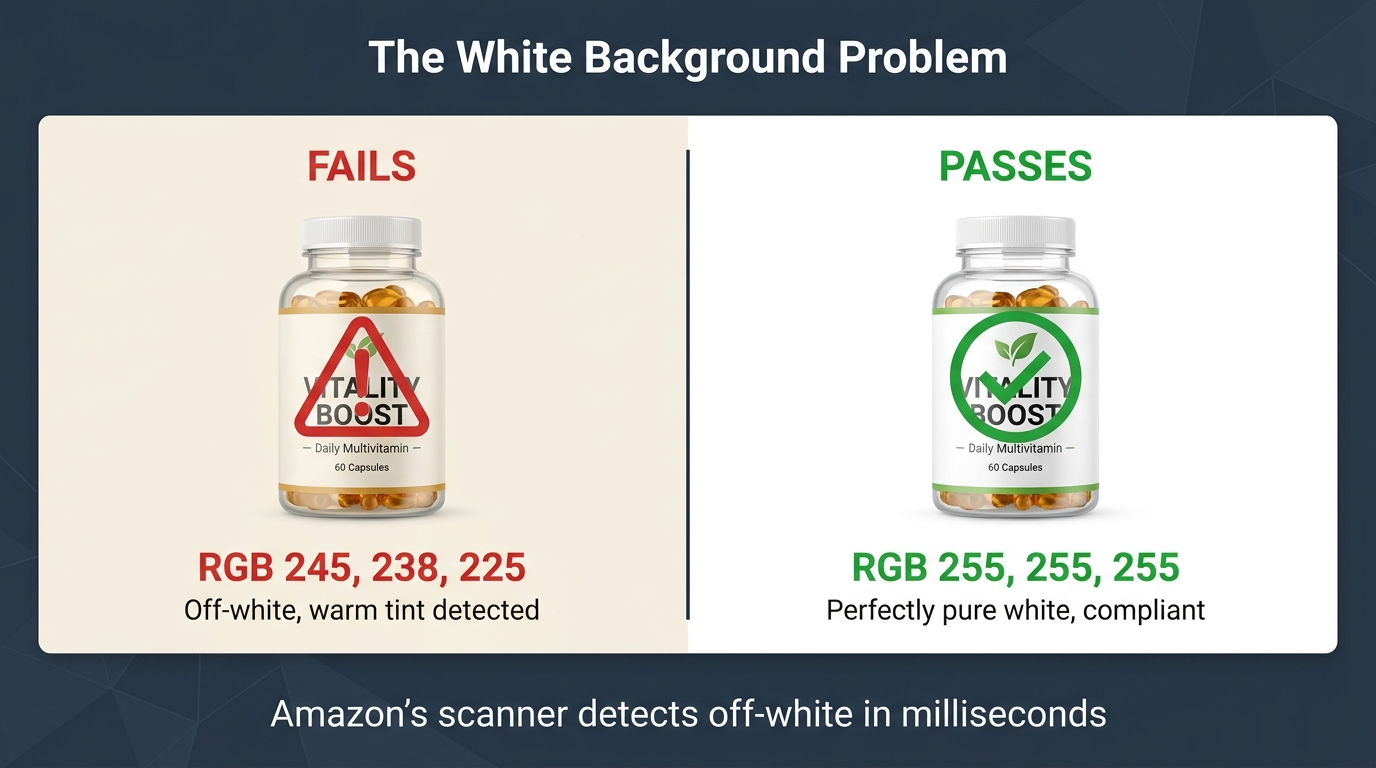
    Side-by-side comparison of off-white background (RGB 245/238/225) failing Amazon's scanner versus pure white (RGB 255/255/255) passing, with supplement bottle product

    Ask any seller what Amazon requires for main image backgrounds and they’ll say: “pure white.” That’s technically correct. But there’s a critical gap between knowing the rule and understanding how the scanner actually validates it — and that gap is where a huge proportion of suppression events originate.

    What “Pure White” Means to a Pixel-Based Scanner

    Amazon’s scanner samples background pixels and compares them to RGB values. Pure white in digital terms is RGB 255/255/255. The issue is that most photo editing workflows — including Lightroom, Photoshop, and virtually every AI background removal tool — don’t produce pixel-perfect white. They produce near-white. Even Photoshop’s “white” canvas can output values like RGB 253/253/253 or RGB 250/248/245 depending on color profile settings and export compression.

    An off-white background that looks identical to the human eye at a value of, say, RGB 240/238/235 can be enough to trigger the scanner’s background failure check. According to 2026 seller reports, approximately 72% of early-year image rejections were tied specifically to background color issues — making this the single most common compliance failure point by a significant margin.

    Three Background Problems Most Sellers Don’t Catch

    First: JPEG compression artifacts. When you export a white-background image as a JPEG, the compression algorithm introduces color variation in background pixels, particularly near product edges. The background that was 255/255/255 in your editing software may become slightly varied after export. PNG format preserves pixel values more reliably, which is why many compliance-focused sellers export secondary images as PNG even when JPEG is accepted.

    Second: Drop shadows. A realistic drop shadow beneath your product is a hallmark of professional-looking photography. It’s also a violation. The shadow pixels are not white, and the scanner flags them. This catches sellers whose images look beautiful and photorealistic but fail the technical check. Remove all shadows, or ensure any shadow is so faint that the pixel values remain at or near 255/255/255.

    Third: Color profile mismatch. Images shot in a color space other than sRGB (such as Adobe RGB or ProPhoto RGB) and not converted before upload can render background “white” in a way that translates to off-white pixel values in the sRGB color space Amazon’s system evaluates against. Always convert to sRGB before uploading.

    The Practical Fix

    After background replacement or editing, use your image editor’s color picker to sample at least five distinct points in the background area — especially near product edges, corners, and any area where lighting might create falloff. Every sampled point should read 255/255/255. If any point is off by even a few values, correct it before upload. This single habit eliminates the most common suppression trigger.

    Seven Triggers That Catch Even Technically Correct Images

    Beyond the white background, there’s a set of less obvious triggers that cause compliant-seeming images to fail. These are the violations that feel unfair — and that generate the most confusion in seller forums — because the images in question often do look correct to a human reviewer.

    1. The 85% Fill Threshold — And How It’s Measured

    Amazon requires the product to fill approximately 85% of the image frame. The issue is that “fill” is measured differently depending on product shape. A flat square item fills frame space easily. A long, narrow item — a yoga mat, a power strip, a fishing rod — fills frame space poorly in a standard 1:1 square crop, leaving dead space that the scanner reads as a fill deficiency. Sellers of elongated products need to either rotate the product diagonally, use a tighter crop, or shoot in a way that maximizes perceived fill without distorting the product’s actual dimensions.

    2. Product Packaging When the Product Itself Is the Listing

    If you’re selling the product unboxed, showing the product inside its packaging can trigger a suppression — because the scanner may interpret the packaging as a prop obscuring the main product. Conversely, if you’re selling a packaged item (like a gift set), the full package must be visible and must accurately represent what the buyer receives. The rule is: show exactly what arrives at the buyer’s door, nothing more.

    3. Printed Text on the Product Itself

    This is a surprisingly common false positive. A supplement bottle with a visible label, a branded t-shirt with text across the chest, a notebook with a printed cover — all of these can trigger OCR-based text detection, even though the text is part of the product, not an overlay. In most cases, Amazon’s system learns to distinguish product text from overlaid text, but newly listed ASINs are more vulnerable during the period before the system has established a baseline for that ASIN’s imagery.

    4. Inaccurate Variation Images

    If your listing has variations (colors, sizes, styles) and the images don’t match the specific variation selected, Amazon’s system can flag the mismatch. A red variation showing a blue product is a clear violation. But the more subtle issue is image stacks that show the full variation range in every image for every variation — shoppers see a product that doesn’t match what they’re purchasing, and the system catches it as inaccurate product representation.

    5. Insufficient Resolution for Zoom

    Amazon’s official minimum is 1,000 pixels on the longest side, but 2026 guidance consistently recommends 1,600 pixels minimum and ideally 2,000 pixels or more to activate zoom functionality. Images that meet the technical minimum but don’t support zoom are increasingly being flagged for quality issues — particularly in categories where detail matters (jewelry, electronics, textiles).

    6. Borders and Frames

    Any border around the main image — even a subtle 1-pixel border added during export, or a thin frame from a Canva template — is a violation. This sounds trivial but catches a meaningful number of images created using design tools that automatically add borders as part of their template formatting.

    7. Transparent Backgrounds Exported as White

    Some image editors and AI tools export transparent background images with the transparency layer rendered as a light gray or off-white rather than true white. This is especially common when the output format is JPEG rather than PNG, since JPEG doesn’t support transparency and the editor must choose a background color to render. Always explicitly set the background fill to RGB 255/255/255 before exporting as JPEG.

    AI-Generated Images: The New Metadata Rules That Determine Pass or Fail
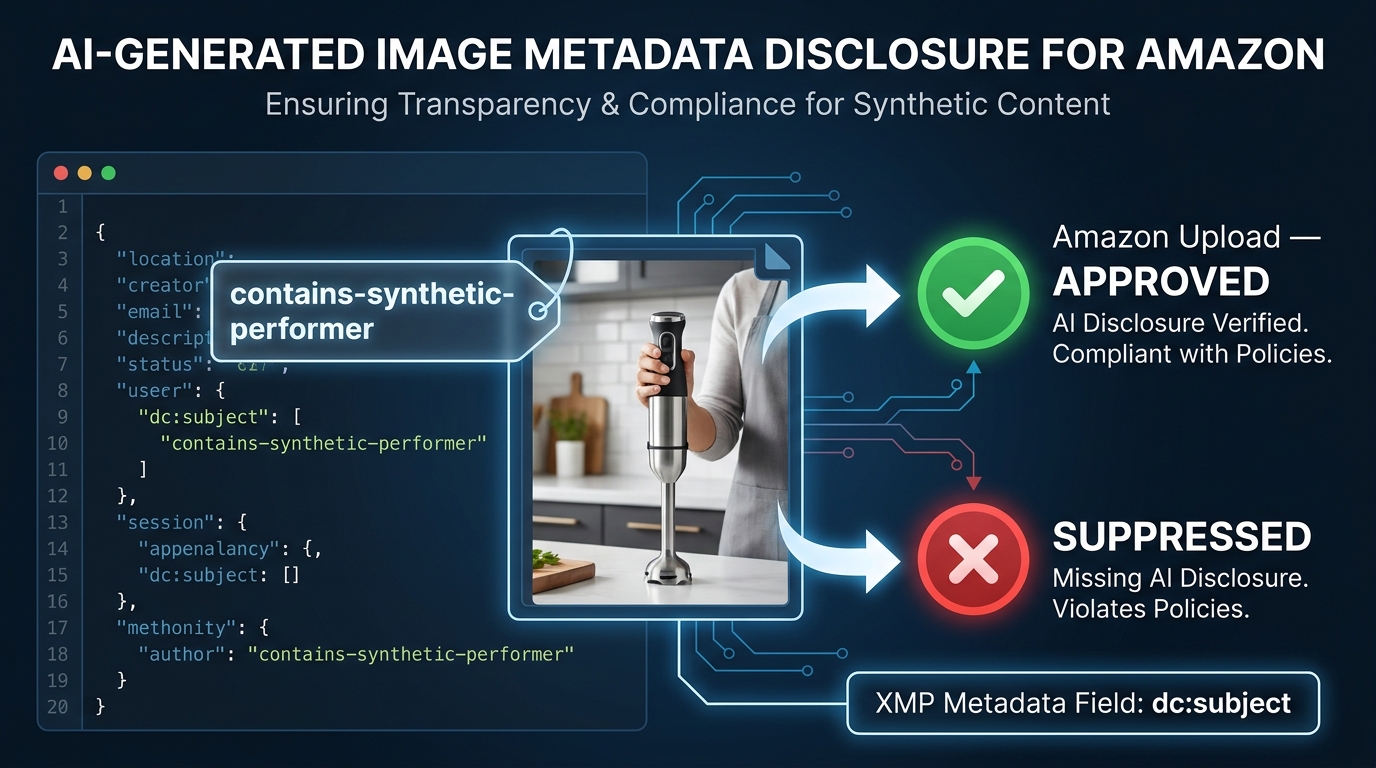
    Infographic showing the Amazon AI image metadata disclosure requirement: contains-synthetic-performer XMP tag in dc:subject field, with approved and suppressed outcome paths

    The single largest policy change affecting AI-generated Amazon images in 2026 has nothing to do with image quality, background color, or text overlays. It’s a metadata requirement — and most sellers have never heard of it.

    What Changed in July 2026

    In late July 2026, Amazon rolled out a new requirement tied to New York state’s synthetic performer disclosure law, which took effect in June 2026. The rule: any buyer-facing image or video that contains a photorealistic AI-generated person — not an edited real person, but a person entirely created by AI — must be tagged with specific metadata before upload. The required tag is the keyword contains-synthetic-performer added to the file’s XMP dc:subject metadata field.

    When this tag is present, Amazon reads it on upload and adds a shopper-facing disclosure indicator where applicable. When the tag is absent from an image that contains AI-generated people, the image is at risk of suppression once Amazon’s system or a reviewer detects synthetic content — which is becoming increasingly likely as Amazon builds out its AI content detection capabilities.

    What Images Are Affected

    The requirement applies to images where a person is entirely generated by AI. This covers lifestyle imagery where a model is AI-generated rather than a real person. It covers A+ content featuring AI-generated people. It covers product-in-use shots where the hands or body visible in the frame are AI-rendered. It does not apply to images that simply use AI for background removal, color correction, or editing of real photography — the person must be wholly synthetic.

    Importantly, this does not constitute a ban on AI-generated people in listings. Amazon is not prohibiting this content. It is requiring disclosure. Sellers who tag correctly can continue using AI-generated lifestyle imagery; those who don’t are taking on suppression risk as enforcement scales.

    How to Add the Metadata Tag

    The tag must be embedded in the image file’s XMP metadata before upload. This cannot be done by entering information into Seller Central — it’s a file-level requirement. The process:

    1. Use an IPTC-compatible metadata editor such as Adobe Bridge, ExifTool (free, command-line), or Photo Mechanic.
    2. Open the image file in the editor.
    3. Navigate to the XMP metadata panel and find the dc:subject field (sometimes labeled “Keywords” or “Subject” depending on the editor).
    4. Add the exact text: contains-synthetic-performer as a keyword entry.
    5. Save the file and verify the metadata was written correctly before uploading to Amazon.

    For A+ content specifically, Amazon has reportedly added a checkbox within the A+ Content Manager that automatically applies this disclosure without requiring manual metadata editing. But for standard listing images, the file-level tag is the required path.

    The Broader Implication for AI Image Workflows

    This requirement signals a direction, not just a rule. Amazon is building the infrastructure to detect, disclose, and eventually audit AI-generated content in listings. Sellers who build their image production workflows with metadata compliance from the start — embedding the correct tags before assets go anywhere near Seller Central — are positioned significantly better than those who treat this as an afterthought.

    The practical approach is to add metadata tagging as a mandatory step in your image handoff process. Every AI-generated lifestyle image goes through a metadata audit before it’s uploaded anywhere. This adds minimal time and eliminates a risk category that will only grow as Amazon’s detection capabilities improve.

    Secondary Images: Where the Rules Get Complicated

    Secondary images (images 2 through 7 in your gallery) operate under a materially different rule set than the main image — and the gap between what’s allowed in secondary positions versus the main image is where most of the conversion-driving creativity lives. Understanding this distinction clearly is essential for building galleries that are both compliant and high-performing.

    What Secondary Images Can Include That Main Images Cannot

    The main image must be product-only, pure white background, no text, no props. Secondary images allow considerably more latitude. Text overlays describing features, dimensions, or ingredients are generally permissible. Lifestyle scenes — the product in use in a realistic environment — are not only allowed but consistently cited as the highest-converting secondary image type in 2026 guidance. Comparison charts, infographics, size guides, and bundle representations are all acceptable in secondary positions provided they accurately represent what the buyer receives.

    The Key Compliance Rules That Still Apply to Secondary Images

    Flexibility in secondary images does not mean anything goes. Several rules apply across the entire gallery, not just the main image:

    • Accuracy. Every image must accurately represent the product being sold. Lifestyle imagery that shows a product in a context or configuration that doesn’t reflect reality is a policy violation, even in a secondary position.
    • No Amazon branding or badges. Third-party seller images cannot include Amazon’s logos, “Best Seller” badges, “Amazon’s Choice” labels, or any other Amazon-owned visual marks. This is a categorical prohibition.
    • No contact information. Website URLs, email addresses, phone numbers, and QR codes that lead shoppers off Amazon are prohibited.
    • No misleading claims. Infographics are allowed. Infographics that make unsubstantiated health claims, performance claims, or comparative claims without evidence are violations and can trigger suppression or, more seriously, category-level compliance reviews.
    • No AI-generated people without disclosure. The contains-synthetic-performer metadata rule applies to secondary images as much as main images.

    The Gray Area: Bundles and Multi-Product Images

    One of the trickier compliance questions in secondary image positions is how to represent bundles and included accessories. The rule is that what you show must be what the buyer receives. If your product includes an accessory, showing it is not only allowed but appropriate. If your secondary image shows a product lifestyle scene that includes items not included in the purchase, the scene must be clearly contextualized in a way that doesn’t imply the other items are included.

    The safest approach for lifestyle images that include environmental props (a coffee mug next to your supplement, a cutting board near your kitchen gadget): show the product prominently, make the environmental elements clearly secondary in size and focus, and never imply that environmental elements are part of the purchase. Ambiguity in this area is what generates compliance flags.

    The Image Stack Architecture That Passes Every Check
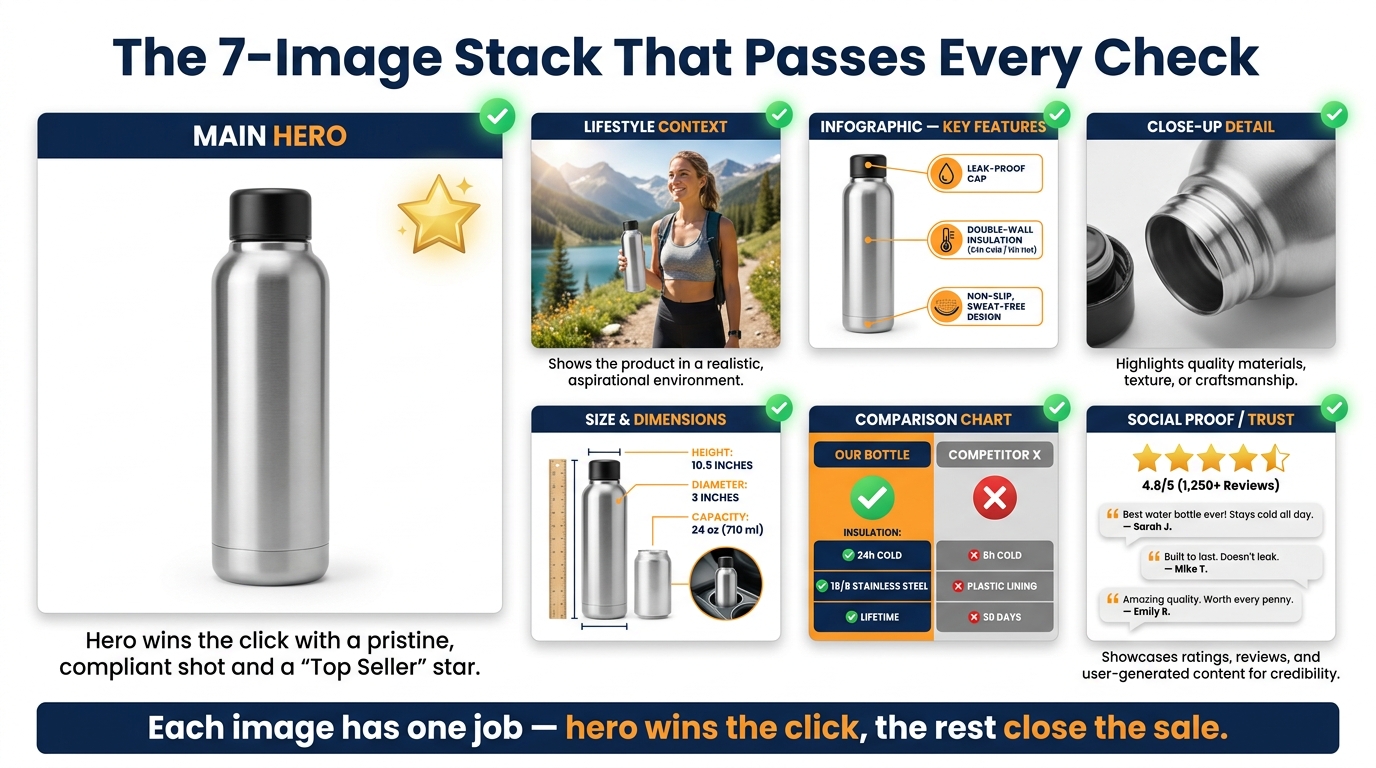
    Ideal Amazon 7-image stack layout showing main hero, lifestyle context, infographic features, close-up detail, size guide, comparison chart, and social proof images all with green compliance checkmarks

    A compliant Amazon image gallery is not just a collection of images that each individually pass the rules. It’s an intentionally structured sequence in which every image has a defined role — both from a conversion perspective and a compliance perspective. The architecture matters because Amazon’s scanner evaluates the gallery as a set, and inconsistencies between images can trigger flags even when individual images look clean.

    Image 1: The Compliant Hero

    Position one must be the most rigorously compliant image in your gallery. It is the primary driver of click-through rate from search results, which means it must work at thumbnail size on mobile — typically displayed at around 100–150px — while also passing every automated compliance check. The hero image should feature the exact product sold, on a pure white background, filling at least 85% of the frame, in the highest resolution you can produce.

    For products with multiple components included (a skincare set, a tool kit, a cooking bundle), show all included components arranged together on the white background. This satisfies both the “what the buyer receives” accuracy requirement and gives you maximum product fill without violating any single-product rules.

    Image 2: Lifestyle Context — High Priority, High Compliance Risk

    The lifestyle image is consistently cited as the highest-converting secondary image type. It’s also where compliance risk is highest, for the reasons described in the previous section. The lifestyle image should show the product in a realistic use context — the actual product, used by an actual person (or an AI-generated person with the correct metadata tag), in an environment that reflects the product’s intended use case.

    Keep the product as the clear visual focal point. Use a professional photography or AI generation approach that produces photorealistic results. If using AI-generated models, apply the contains-synthetic-performer metadata tag before upload, every time, without exception.

    Images 3–4: Feature Infographic and Close-Up Detail

    The feature infographic is the workhorse of the gallery — it’s where you communicate specifications, key benefits, and differentiators using text overlays on a product image. This is fully permissible in secondary positions. Design clean, legible infographics with text large enough to read on mobile screens without pinching to zoom. Avoid making unsubstantiated performance claims in your callouts — every claim should be factually accurate and defensible if reviewed.

    The close-up detail image serves a different function: reducing purchase uncertainty by showing texture, material quality, finish, connector types, thread count — whatever detail matters most for your product’s category. This image typically has the lowest compliance risk because it’s simply a tighter crop of the actual product.

    Images 5–6: Size Guide and Comparison Chart

    Size guides showing dimensions with overlaid measurements are permissible and highly effective for products where sizing uncertainty drives return rates. Comparison charts that contrast your product against alternative offerings (or against cheaper alternatives in your own lineup) are allowed, with the caveat that you must not misrepresent competitors or make claims that could be characterized as false advertising.

    Image 7: Trust and Social Proof Signals

    The final image slot is often used for trust signals: certifications, awards, guarantee messaging, or media mentions. These are permissible with important restrictions. Third-party certifications must be ones you genuinely hold. You cannot display Amazon “Best Seller” badges or Amazon’s own rating graphics. Awards or media mentions should reflect actual recognition rather than manufactured social proof. If you display a money-back guarantee in an image, that guarantee must be honored — it becomes part of your product claim set.

    Before You Upload: A Pre-Flight Compliance Checklist

    The most effective way to prevent suppression is to catch violations before upload rather than appeal them after the fact. The following pre-flight process is designed to catch every common compliance failure point at the image production stage, not the crisis management stage.

    Main Image Pre-Flight

    • Background pixel check: Sample at least 5 background pixels including corners and areas near the product edge. Confirm all read RGB 255/255/255.
    • Product fill estimate: Visually estimate product fill — the product should occupy at least 85% of the canvas area. For elongated products, consider diagonal orientation if needed.
    • Resolution check: Confirm the image is at least 1,600 pixels on the longest side (2,000+ preferred). Verify the file was not upscaled from a lower resolution source.
    • Color profile: Confirm the image is in the sRGB color space before export.
    • Text/watermark scan: Open the image full-screen and visually inspect for any text, watermark, or border. Check corners and edges carefully — borders can be easy to miss at reduced preview sizes.
    • Shadow and reflection check: Confirm no visible shadow extends beyond the product area in a way that produces non-white pixels.
    • Format check: Confirm the image is exported as JPEG or PNG with no transparency layer artifacts.

    Secondary Image Pre-Flight

    • Accuracy audit: Does every element shown in the image reflect what the buyer actually receives? Is the product configuration shown accurate?
    • Claim review: Do any text callouts make claims (health, performance, comparative) that could be challenged? Remove or qualify any claims that lack clear evidence.
    • Amazon marks check: Confirm no Amazon logos, star rating graphics, “Best Seller” text, or “Amazon’s Choice” language appears anywhere in the image.
    • Contact info check: Confirm no URLs, QR codes, email addresses, or phone numbers are visible in the image.
    • AI disclosure check: If any person visible in the image is entirely AI-generated (not a real photographed person), confirm the contains-synthetic-performer XMP metadata tag has been applied to the file.
    • Mobile legibility: Reduce the image to 200px width and confirm all critical text is still legible. If it’s not, increase font size in the infographic design.

    Catalog-Level Pre-Flight for Variation Listings

    • Confirm that each variation’s image set shows the correct variation — color, size, style — in the hero image position.
    • Confirm that the listed image set for each variation doesn’t show images from sibling variations as if they were the selected variation.
    • Verify that bundle images show exactly the items included in each specific bundle variation, not the full range across all variations.

    When Good Images Get Flagged: The False Positive Recovery Protocol
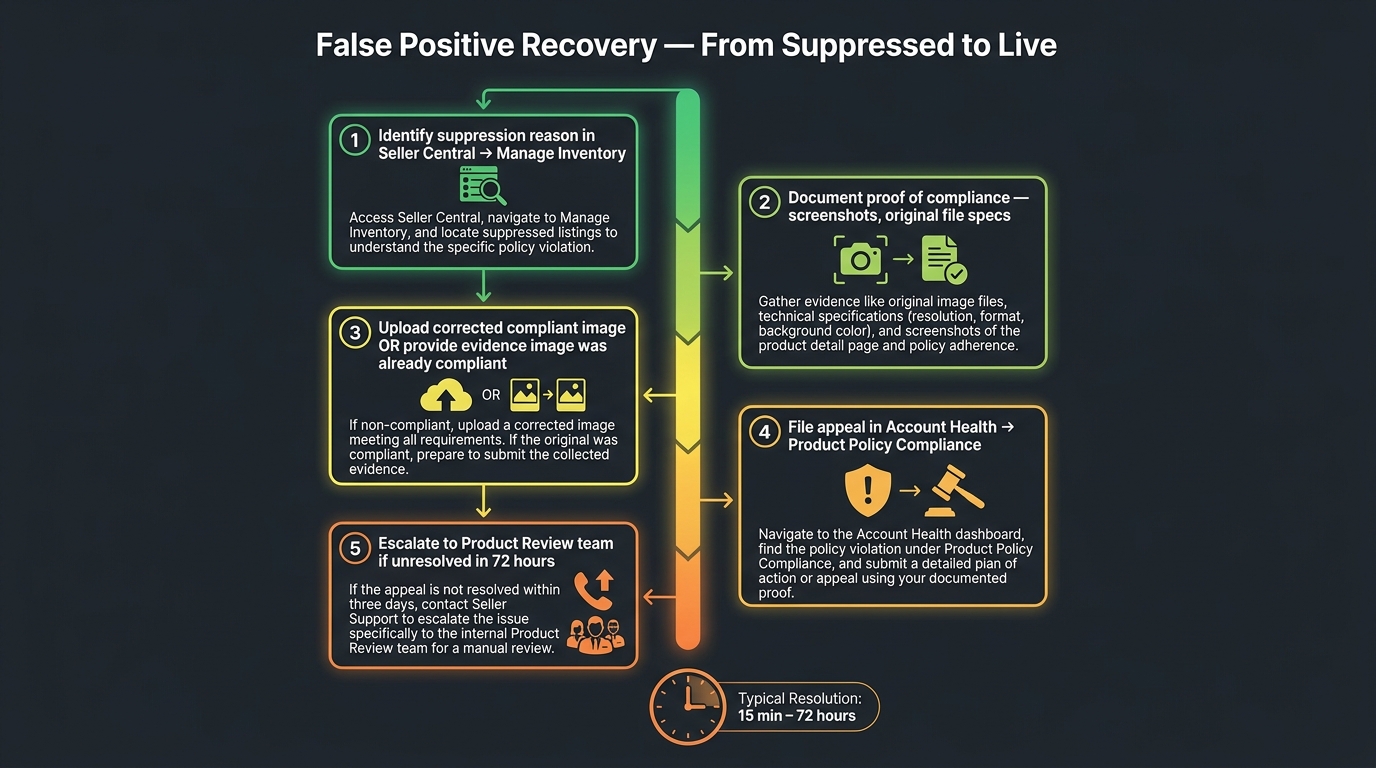
    5-step false positive recovery protocol timeline from suppression to live listing, showing Seller Central path, documentation, appeal, and escalation steps, with resolution time of 15 minutes to 72 hours

    Even after executing a rigorous pre-flight checklist, image suppression false positives happen. When they do, the speed and structure of your response determines how much revenue you lose during the suppression window. Here is the exact protocol — based on how Amazon’s appeal and review systems actually function in 2026.

    Step 1: Identify the Exact Suppression Reason (Don’t Skip This)

    In Seller Central, navigate to Inventory → Manage All Inventory and filter for suppressed listings. Alternatively, go to Inventory → Fix Blocked Listings or check the Listing Quality Dashboard. Click into the affected ASIN and read the specific suppression reason — not the category, but the exact stated violation. This information is critical because the appeal path varies depending on whether the issue is classified as a technical image violation, an accuracy violation, an IP complaint, or a policy compliance matter.

    Step 2: Document Before You Change Anything

    Before you replace or modify the flagged image, take screenshots of: the suppression notice with its stated reason, the current image in the listing as it appears in Seller Central, and the original image file’s technical specifications (resolution, color profile, file size, pixel values). This documentation is your evidence in the appeal if you believe the suppression is a false positive.

    Step 3: Decide — Fix and Resubmit, or Appeal Without Changing

    If you believe the image is genuinely compliant and the suppression is a false positive, you can appeal without replacing the image — but this is slower. If you can quickly produce a clearly compliant replacement (which you should, if you’ve been building backup images as part of your compliance workflow), upload it immediately to restore the listing, then appeal the original suppression as a false positive. The priority is getting the listing live again; the appeal is a secondary concern.

    Typical reinstatement timeline after uploading a compliant replacement: 15 minutes to 24 hours for straightforward cases. Complex cases or those requiring internal review can take 24 to 72 hours. Cases that require category-level or brand-level review may take up to 7 days.

    Step 4: File the Appeal Through the Correct Path

    Navigate to Account Health → Product Policy Compliance and find the specific violation record. Use the Appeal or Submit Additional Information option attached to that specific record — not a generic support ticket. In your appeal submission:

    • State clearly that you believe the suppression is a false positive.
    • Provide your documentation: pixel value screenshots, resolution data, comparison between your image and the stated violation reason.
    • Be specific and factual. Appeals that say “my image is fine” without evidence are rejected at a much higher rate than appeals that provide concrete technical data showing compliance.

    Step 5: Escalate If Not Resolved Within 72 Hours

    If your appeal has not been resolved in 72 hours, open a new Seller Support case specifically referencing the ASIN, the suppression date, the appeal case number, and requesting transfer to the Product Review team. Generic case routing in Seller Support often cycles you back to the same automated responses. Explicitly requesting the Product Review team increases the likelihood of a human with appropriate authority reviewing your case. Do not accept a generic “your appeal has been received” response as a resolution — follow up until you have a written confirmation that the suppression has been cleared or a specific reason for rejection.

    The Amazon Image Replacement Risk — And How to Protect Your Listings

    Dramatic infographic showing Amazon's automated image replacement process replacing a brand's carefully crafted listing image with an alternate image without notice

    Beyond the risk of suppression, 2026 has introduced a more insidious risk that many sellers don’t discover until after it’s already affected their listings: Amazon’s ability — and increasing willingness — to replace seller images on non-compliant or weak listings.

    What Amazon’s Image Replacement Mechanism Actually Does

    Amazon’s policies give it the latitude to modify or replace listing images when the current main image doesn’t meet standards. In practice, this means Amazon can pull in an alternate image from the catalog — sometimes from another seller on the same ASIN, sometimes from Amazon’s own vendor catalog, sometimes from indexed product images it has sourced independently — and promote that image as the main image for the listing.

    This has been reported on brand-registered listings as well as non-brand-registered ASINs. Brand Registry provides stronger protection but does not provide absolute immunity, particularly if your own images have compliance weaknesses that give Amazon’s system a justification to intervene.

    Why This Is a Conversion Threat, Not Just a Compliance Threat

    The images Amazon selects as replacements are not optimized for conversion. They may be technically compliant but contextually wrong for your product positioning. They may show a different variation. They may show the product from an angle that emphasizes a feature that isn’t your primary selling point. They may simply be lower quality than your carefully produced imagery.

    The conversion impact of a misaligned main image is significant. The main image is the primary driver of click-through rate from search results. An image that passes Amazon’s compliance check but doesn’t communicate your product’s key value proposition clearly is costing you clicks that should be yours.

    Protection Strategy

    The most effective defense against image replacement is ensuring your own images give Amazon’s system no reason to intervene. This means: every image in your gallery must be technically compliant before any automated check would flag it. Beyond compliance, this means maintaining a full image gallery — all 7 positions filled with compliant, high-quality images. Listings with sparse or incomplete galleries are at higher replacement risk than listings with complete, compliant galleries.

    If you’re on Brand Registry, use the Brand Registry portal to monitor and manage your listing images actively rather than treating image uploads as a one-time task. Audit your gallery on a quarterly schedule — not just when a suppression notice appears.

    Bulk Catalog Auditing: Finding and Fixing at Scale

    For sellers managing catalogs of hundreds or thousands of ASINs, the image compliance challenge isn’t conceptual — it’s operational. A single pre-flight checklist applied image by image doesn’t scale. The question becomes: how do you systematically find and fix compliance risks across a large catalog before they turn into suppression events?

    Start With Seller Central’s Built-In Suppression Reports

    Seller Central’s suppression reports under the Listing Quality Dashboard and Fix Blocked Listings view provide the most direct signal of current compliance issues. Export these reports regularly — weekly for active catalogs — and build a tracking system that records suppression type, ASIN, date of suppression, date of fix, and outcome. Pattern recognition across this data will show you which image types, which product categories, or which production vendors are generating the most compliance risk.

    Use Third-Party Auditing Tools Selectively

    Several third-party listing audit tools — including those from Helium 10, DataDive, and listing quality SaaS platforms — offer background detection, resolution checks, and compliance scoring. These tools vary significantly in how current their rule databases are and how accurately they replicate Amazon’s actual detection logic. They are useful for initial bulk scans that surface obvious issues (off-white backgrounds, low resolution, text in main images) but should not be treated as a substitute for manual review of images flagged by Amazon’s own system.

    Prioritize by Revenue Impact

    When auditing a large catalog, not all ASINs carry equal weight. Prioritize compliance auditing in this order:

    1. High-revenue, high-traffic ASINs — the listings where a suppression event has maximum revenue impact.
    2. Recently launched ASINs — new listings are particularly vulnerable during the initial indexing period before the system establishes a compliance baseline for the ASIN.
    3. Variation parents with multiple child ASINs — a compliance issue on a parent-level image can cascade across all child variations.
    4. ASINs with AI-generated lifestyle imagery — these need an immediate metadata audit to verify contains-synthetic-performer tags are correctly applied.
    5. Long-tail catalog depth — older, lower-traffic ASINs that haven’t been image-audited recently.

    Build a Compliance Buffer: Backup Images

    One practice that significantly reduces suppression recovery time for large catalogs is maintaining a library of pre-approved backup images for top-priority ASINs. These are fully compliant main image alternatives — different angles, different fills, same white background and technical specs — that can be uploaded immediately if the current main image is suppressed. The goal is to shrink recovery time from “time to produce a new compliant image” to “time to click upload.” For ASINs that generate significant daily revenue, that difference in recovery speed is directly measurable in dollars.

    Building Compliance Into Your Creative Process — Not Onto It

    The sellers who spend the least time managing image compliance crises are not the ones who have memorized every rule. They’re the ones who have embedded compliance checks into their creative workflow at the point of production — before any image reaches Seller Central.

    The Handoff Protocol That Prevents Most Violations

    If you work with photographers, designers, or AI image production vendors, the compliance burden needs to be defined in the brief, not discovered in the review. Every creative brief for Amazon imagery should include explicit requirements for: background color specifications (RGB 255/255/255, verified), minimum resolution, export format and color profile, prohibited elements checklist, and — for any content featuring AI-generated people — metadata tagging instructions.

    Requiring vendors to deliver images with a technical spec sheet showing their compliance checks, rather than just the final image file, shifts accountability to the point of production. It’s far more efficient than discovering a background issue after 50 images have been shot in the same setup.

    Use Staged Review Before Live Upload

    Before uploading images to production listings, maintain a staging workflow: upload new images to a draft ASIN or use Amazon’s image preview tools to verify that images render correctly within the Seller Central environment before going live. This adds a day to the image deployment timeline but surfaces rendering issues — color profile mismatches, resolution problems, format artifacts — before they affect live listings.

    Schedule Quarterly Gallery Audits

    Amazon’s image rules evolve. What was compliant eighteen months ago may not meet current standards. A quarterly review of your full image gallery — not just checking for suppression flags but proactively comparing your images against the current published guidelines — catches drift before it becomes a problem. This is particularly important for sellers who produce images infrequently and whose galleries may be built on older production standards.

    Track the Rules That Are Changing, Not Just the Rules That Are

    The AI disclosure requirement that emerged in July 2026 is a clear signal that Amazon’s compliance framework is actively evolving in response to external legal and regulatory changes. Sellers who only pay attention to compliance rules when they get flagged will always be reactive. Building a practice of monitoring Amazon’s policy update announcements and, when relevant, the legal landscape that drives them — as the New York synthetic performer law did — positions your operation to adapt before enforcement arrives.

    What All of This Actually Means for Your Image Strategy in 2026

    The core insight across everything covered in this post is one that most sellers — even experienced ones — underestimate: Amazon’s image compliance system is not designed to be fair. It’s designed to be consistent. Automated scanning at the scale of hundreds of millions of ASINs cannot afford nuance. It catches the things it was trained to catch, in the order it was trained to check them, with the tolerance thresholds it was calibrated to enforce.

    Working within that reality means building images that don’t require nuance to pass. Not images that are technically on the right side of a borderline — images that are unambiguously, verifiably compliant by every measurable parameter. And it means understanding that compliance and conversion are not in opposition. The sellers generating the strongest image performance in 2026 are those who have mastered the constraint: a bulletproof main image that Amazon’s scanner never has cause to touch, paired with a well-structured secondary gallery that does all the persuasion work within the rules that govern it.

    Build to pass the scanner first. Then build to convert the human. In that order, every time.

    Actionable Takeaways

    • Run a pixel-level background check on every main image before upload — sample at least 5 background points and verify RGB 255/255/255 at each.
    • Apply the contains-synthetic-performer metadata tag to every image or video containing an entirely AI-generated person, before upload, every time.
    • Maintain a backup image library for top-revenue ASINs — pre-compliant alternatives that can be uploaded immediately if the current main image is suppressed.
    • Embed compliance requirements in your creative brief — don’t review for compliance after production. Specify it before production begins.
    • If you’re suppressed, document before you change anything — your original image evidence is the foundation of a successful false positive appeal.
    • Audit your AI-generated lifestyle images immediately if you haven’t already checked for the metadata disclosure requirement — this is the most under-addressed compliance risk in catalogs right now.
    • Schedule a quarterly gallery review across your full catalog. Image rules change. Your galleries shouldn’t be set-and-forgotten assets.
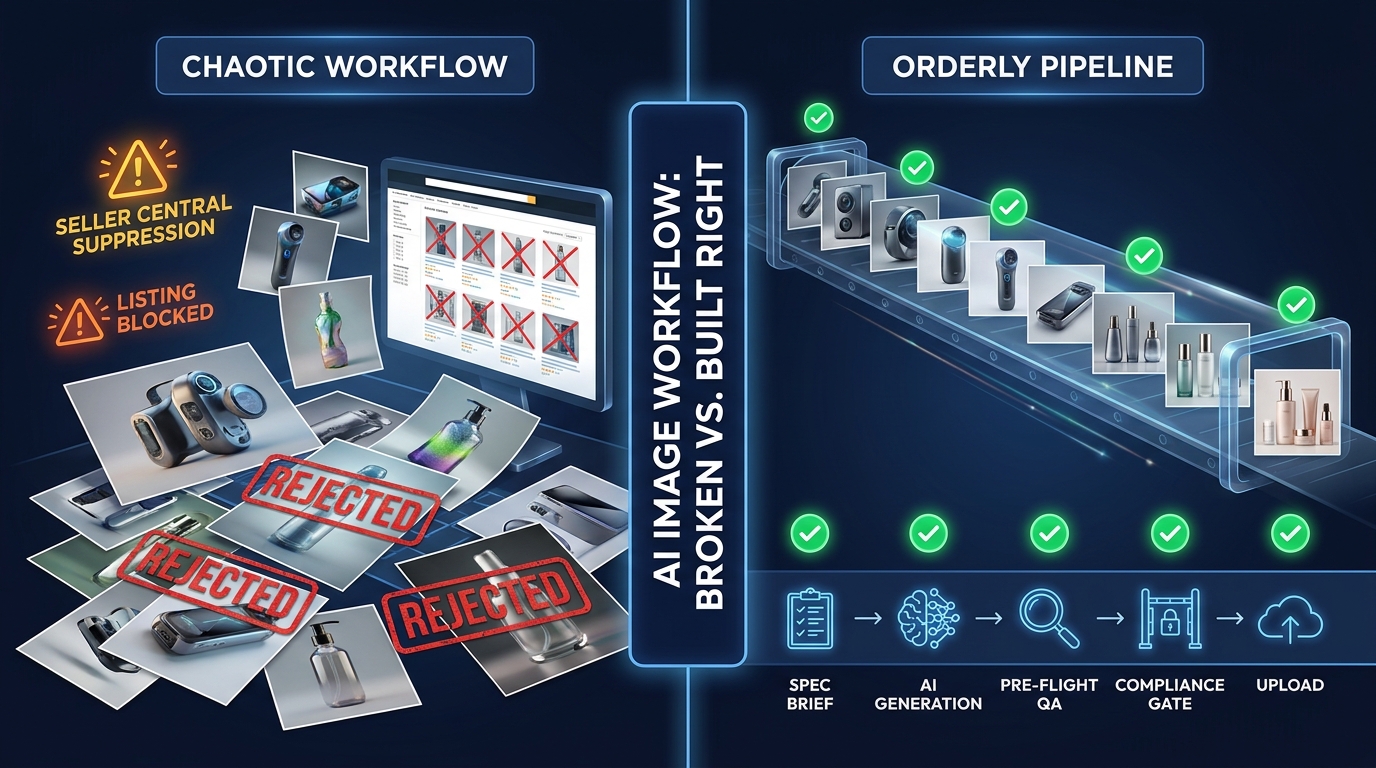
  • The Operator’s Blueprint for AI Image Workflows That Pass Amazon’s Compliance Gate Every Time

    The Operator’s Blueprint for AI Image Workflows That Pass Amazon’s Compliance Gate Every Time

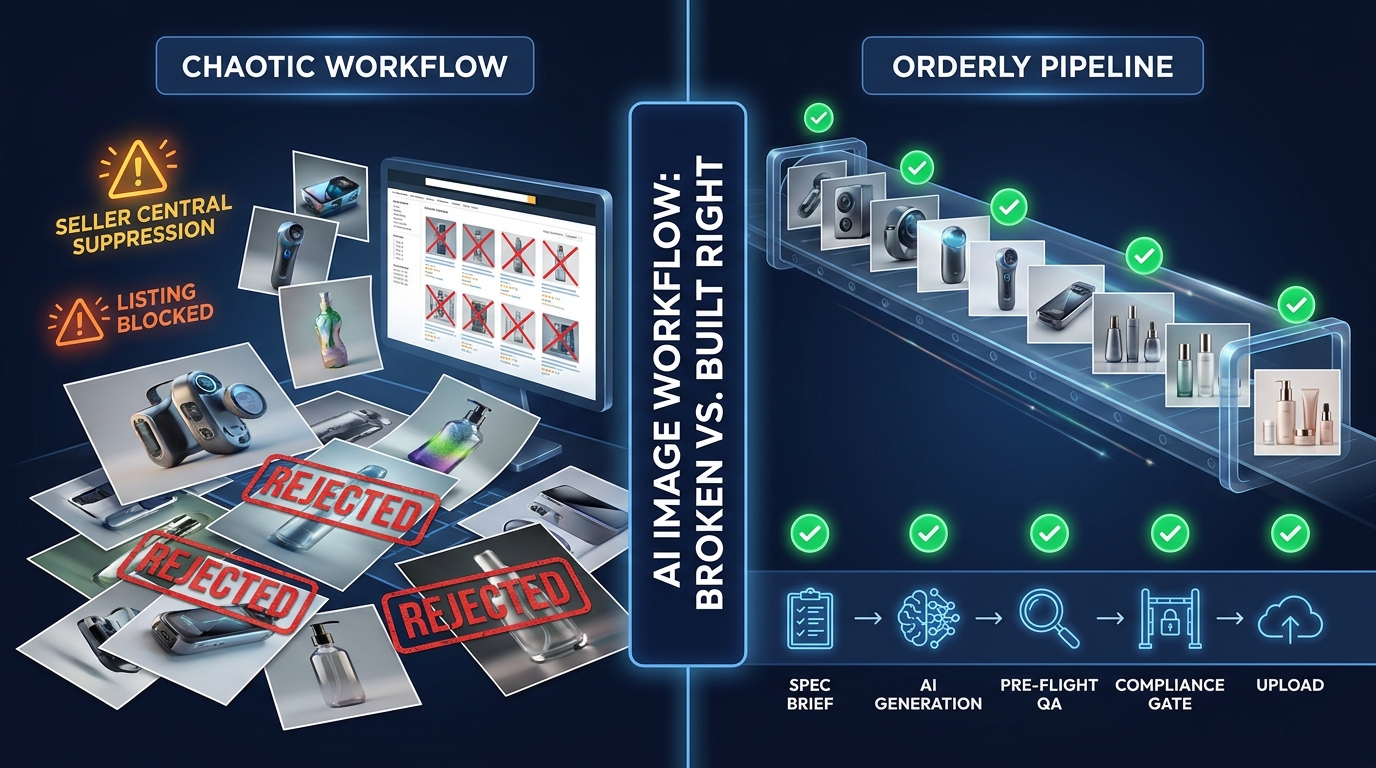
    Split-screen showing chaotic rejected AI image workflow versus clean compliant pipeline with green checkmarks at every stage

    Here is where most AI image workflows for Amazon break down: not at the generation step, but at the gate. Sellers pour time and budget into AI tooling, craft elaborate prompts, generate hundreds of product images, and then watch those assets get flagged, suppressed, or silently penalized the moment they hit Seller Central’s automated review system.

    The failure is rarely about image quality in any aesthetic sense. The images often look great. The problem is structural — there was no compliance architecture built into the workflow before the first image was ever generated.

    Amazon’s Spring 2026 Visual ID Standard 3.0 update, which took full enforcement effect on April 15, 2026, turned what used to be a relatively forgiving manual-review environment into a machine-scored gauntlet. Amazon’s automated image validation system now evaluates assets across more than 127 distinct quality and policy parameters before a listing goes live. Non-compliance doesn’t just mean a flagged image anymore — it means search suppression, which means sales drop to near zero until the problem is fixed and reinstated.

    This post is not about what Amazon’s image rules say. It’s about how to engineer an AI image workflow so that compliance is baked in at every stage — not checked at the end. There’s a meaningful difference between a workflow that produces compliant images most of the time and one that cannot produce non-compliant images because the guardrails are structural, not aspirational.

    The operators who get this right are protecting catalog revenue, scaling image production without proportional headcount increases, and running far fewer emergency reinstatement appeals. Here’s how they do it.

    Why Image Compliance Is Now an Ops Problem, Not a Creative Problem

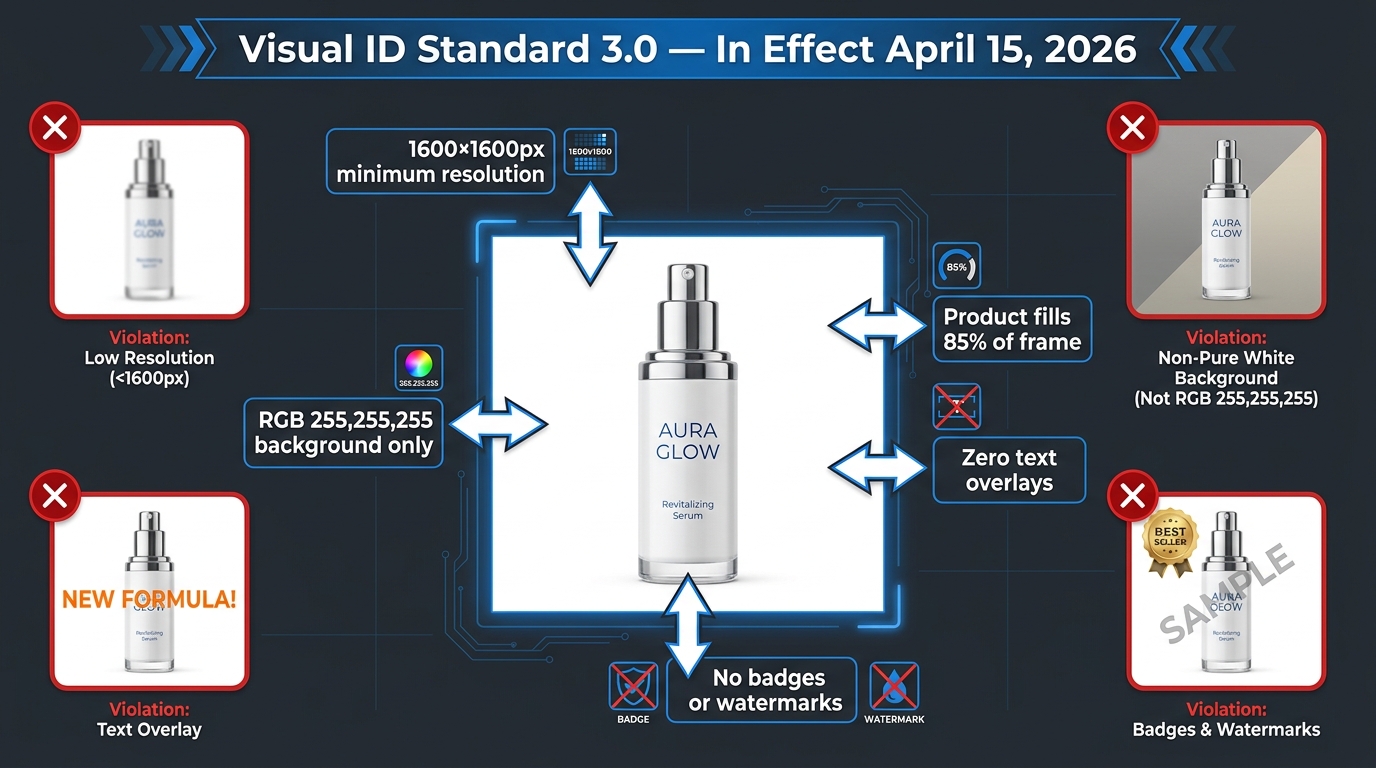
    Amazon Visual ID Standard 3.0 technical requirements diagram showing 1600px resolution, RGB 255,255,255 background, and 85% product fill rules

    For years, Amazon image compliance was treated as a creative brief problem. Give the designer the rules, tell them to follow the white-background requirements, and trust the upload to go through. When rejections happened, they were handled as one-off tickets — fix this image, re-upload, move on.

    That model does not survive contact with the 2026 enforcement environment. Amazon’s Visual ID Standard 3.0, published on March 3, 2026, and enforced from April 15, represents a qualitative shift in how the platform evaluates listing images. It’s no longer primarily a human moderation workflow. It is a machine-scored system, running automated checks that flag violations faster than any manual review queue could and triggering search suppression — not just image rejection — as the penalty for non-compliance.

    What Changed With Visual ID Standard 3.0

    The most immediate technical change is the resolution floor. Minimum primary image resolution moved from 1,000 × 1,000 pixels to 1,600 × 1,600 pixels for all primary images across all categories. The practical implication: any AI generation workflow outputting at lower resolution, or any legacy image in a catalog that hasn’t been refreshed, is now automatically out of compliance.

    Beyond resolution, the update codified stricter enforcement of background purity standards. The primary image must have a background of exactly RGB 255,255,255 — pure white with no gradient, shadow bleed, or off-white variation. Amazon’s automated system evaluates this at the pixel level, not by eyeball. An image that looks white to a human reviewer may fail the automated check if even a small portion of the background registers outside that exact RGB value.

    The update also introduced explicit requirements around AI-generated image disclosure and provenance metadata, aligning with Amazon’s broader 2026 push toward transparency in AI-generated content. Sellers using AI to produce or substantially alter product images are now required to flag that in metadata, and Amazon’s systems cross-reference whether submitted images match the physical product as represented on the detail page.

    Why This Becomes an Ops Problem

    When compliance enforcement was manual and sporadic, creative teams could manage it ad hoc. When it’s automated, continuous, and directly tied to search visibility, it becomes an operations problem. Every image in a catalog is now on a recurring evaluation cycle. A listing that passed review six months ago may be flagged under the new standards today, with no proactive notification to the seller — just a suppressed listing discovered when someone notices a traffic drop.

    Sellers with large catalogs — hundreds or thousands of ASINs — cannot manage this reactively. The operational risk is too high. A single batch upload that pushes non-compliant images across fifty ASINs can suppress an entire product line in hours. That’s not a creative mistake. That’s an operations failure.

    The answer is to stop treating image compliance as a downstream quality check and start treating it as an upstream workflow requirement — the same way engineering teams treat code quality: built-in checks, gates that block bad output before it ships, and documented standards that the whole team operates within.

    The Six Root Causes Behind AI Image Failures on Amazon

    Six root causes of AI image failures on Amazon shown as labeled workflow failure nodes — background purity, resolution gaps, overlays, provenance, misrepresentation, and batch cascade

    Before you can build a workflow that prevents failures, you need to understand exactly where failures happen. Most sellers conflate “image compliance problems” into a single bucket, but there are six distinct root causes, each requiring a different fix.

    1. Background Purity Failures

    This is the most common single cause of primary image rejection. AI image generators — even the best current models — do not reliably produce perfect RGB 255,255,255 backgrounds without explicit constraints. Stable Diffusion and Midjourney, in particular, frequently generate near-white backgrounds that read as cream, light gray, or warm white to the automated checker. The visual difference is imperceptible to the human eye. The automated rejection is immediate.

    The root cause here is usually a missing post-processing step, not a bad prompt. Even a well-prompted AI image should go through a background replacement step using a dedicated tool (Adobe Firefly’s background removal, Remove.bg, or a custom masking script) to guarantee the exact RGB value before the image enters the compliance gate.

    2. Resolution and Aspect-Ratio Gaps

    Many AI image generation tools default to output resolutions that do not meet the 1,600 × 1,600 pixel minimum. DALL-E 3, for example, outputs at 1,024 × 1,024 by default. Upscaling after generation introduces compression artifacts that can themselves trigger quality score penalties. The fix is to either use models that natively output at the required resolution or build upscaling — using tools like Topaz Gigapixel AI or Magnific — into the pipeline before the QA step, not as an afterthought.

    Aspect ratio is a related but separate issue. Amazon requires a 1:1 square format for primary images. Some AI tools default to 16:9 or portrait ratios. A cropping step needs to be automated into the workflow, not left to individual operators to remember on each run.

    3. Prohibited Overlays and Metadata Artifacts

    Text, watermarks, logos, price callouts, badges (“Best Seller,” “New,” “Sale”), and marketing copy of any kind are prohibited on primary images. This seems obvious, but AI tools — especially those trained on e-commerce imagery — will sometimes hallucinate promotional text or overlay patterns because that’s what product images in their training data contain. A prompt that doesn’t explicitly exclude these elements will occasionally produce them.

    Secondary images have more flexibility, but even there, certain overlay types trigger automated flags. Any image that emerged from a generative AI model should go through an explicit overlay-detection check as part of QA — either human review or an automated text-detection pass using tools like Google Vision API or AWS Rekognition.

    4. AI Provenance Disclosure Failures

    This is the newest and most misunderstood failure mode. Amazon’s 2026 guidelines require that images substantially generated or modified by AI be identified as such in the listing metadata. Many sellers either don’t know this requirement exists or don’t have a workflow step that captures and attaches the required disclosure flag. The image might look perfectly compliant by every other standard, but the missing provenance metadata alone can cause the listing to be flagged during audit cycles.

    5. Product Misrepresentation

    AI image generation introduces a misrepresentation risk that traditional photography does not: the generated image may not accurately reflect the physical product that arrives in the customer’s hands. Color variants, dimensions, packaging details, and material textures can all drift during generation. Amazon’s systems cross-reference detail page claims against image content, and customer return data can trigger reviews of listings where the product doesn’t match its images. This is both a compliance risk and a brand risk.

    6. Batch Upload Cascade Failures

    This is the failure mode that causes the most acute revenue damage. A seller with a catalog of 200+ ASINs runs a batch upload of freshly generated images. One overlooked parameter — background purity, for example — is wrong across the entire batch. Within hours, dozens of listings are suppressed simultaneously. There was no single point of failure; the failure was structural, built into the batch before it shipped.

    Cascade failures happen when there is no per-image compliance gate before batch upload. Fixing them requires both the immediate work of reinstating suppressed listings and the systemic work of identifying why the pre-upload check didn’t catch the issue.

    Building the Compliance Gate Before the Generation Step

    The most effective AI image workflows build compliance architecture upstream — before a single image is generated. This sounds counterintuitive. Most teams think of compliance as something you check after production. The highest-performing catalog operations invert this: if the brief is right, the image is mostly right before the prompt is written.

    The Requirement Brief: Your Compliance Contract

    Every image production run — regardless of whether it’s AI-generated or photography-based — should begin with a written Requirement Brief. This is not a creative brief. It is a compliance contract that translates Amazon’s policy requirements into specific, measurable parameters that both the human operator and the AI generation system must meet.

    A minimum Requirement Brief for Amazon main images in 2026 includes:

    • Output resolution: 1,600 × 1,600 pixels minimum, 2,000 × 2,000 pixels recommended
    • Background specification: RGB 255,255,255 — to be verified post-generation, not assumed
    • Aspect ratio: 1:1 square, no exceptions for primary images
    • Product fill requirement: Product must occupy approximately 85% of the image frame
    • Prohibited elements: No text, no watermarks, no props that aren’t part of the product, no hands, no human models (category-dependent)
    • AI provenance flag: Required for all AI-generated or AI-substantially-edited images
    • File format: JPEG, TIFF, PNG, or GIF — JPEG preferred for primary images
    • Accuracy standard: Image must represent the specific ASIN, including correct color variant, packaging, and visible features

    Category-Specific Rules Matrix

    Amazon’s image requirements are not uniform across all categories. Apparel, jewelry, grocery, electronics, and hazardous materials each have category-specific requirements that overlay the standard rules. Before any production run begins, the category-specific rules for every ASIN in scope should be documented in a rules matrix — a simple table that maps each ASIN or category to its specific restrictions. This matrix becomes the reference document for anyone working in the pipeline, including AI operators writing prompts.

    Secondary Image Mapping

    Secondary images (images 2–9) operate under different rules than the primary image. Text overlays, lifestyle context, infographic callouts, and dimensional diagrams are permitted. But many sellers fail to map out what secondary image types are both permitted and strategically valuable for each ASIN category before production begins. Building a secondary image brief alongside the primary image brief ensures the full image set is planned, compliant, and purposeful before a single generation run starts.

    Prompt Engineering for Compliance — What Most Operators Get Wrong

    Prompt engineering for Amazon compliance is a distinct skill from prompt engineering for general image quality. Most operators learn quickly how to get a model to produce a visually appealing product image. Fewer know how to structure prompts so that compliance-critical attributes are reliably preserved across a large batch run.

    Negative Prompting for Background Purity

    If you’re using a model that supports negative prompts (Stable Diffusion, many fine-tuned commercial models), your compliance negative prompt should be explicit and detailed. A baseline negative prompt for Amazon primary image compliance includes:

    off-white background, cream background, gray background, textured background, gradient background, patterned background, shadows on background, text overlays, watermarks, price tags, promotional badges, props, lifestyle context, hands, reflections extending to background, vignette edges

    Running without a structured negative prompt and relying on post-processing alone is a higher-risk approach because it produces more output that needs to be fixed, increasing processing time and human review load.

    Resolution Anchoring

    Specify the target resolution explicitly in your prompt system settings, not just in the export step. Many operators generate at a model’s default resolution and upscale at the end. A better approach is to force the generation target to match your compliance requirement. When using API-based generation (Replicate, AWS Bedrock, StabilityAI API), set width and height parameters explicitly at 1,600 × 1,600 or higher. The upscaling step then becomes a quality enhancement, not a compliance lifeline.

    Controlling Shadow and Reflection Artifacts

    A particularly common failure mode with AI-generated product images is shadow or reflection bleed — the product casts a realistic shadow onto the background, or its reflective surface creates a gradient that disrupts background purity. Prompts should explicitly call for product on pure white background, no drop shadow, no surface reflection, no cast shadow, clean white floor. Even with these controls, a post-generation shadow-detection step is advisable for reflective products (cosmetics, electronics, kitchenware).

    Model-Specific Behaviors You Need to Know

    Different AI image models have different compliance risk profiles for Amazon specifically. Understanding these differences helps you choose the right tool for your production context:

    • DALL-E 3 (via OpenAI/ChatGPT): Strong prompt adherence and clean outputs, but default resolution (1,024px) requires mandatory upscaling. Tends to add subtle environmental lighting that can affect background purity.
    • Midjourney (v6/v7): Excellent aesthetic quality, but backgrounds frequently include ambient gradients. Nearly always requires a dedicated background replacement step. Not ideal for primary image production without robust post-processing.
    • Adobe Firefly (Commerce Edition): Purpose-built for e-commerce with explicit white-background modes and brand kit integration. Highest native compliance rate for primary images among commercially available tools in 2026, though prompt flexibility is more constrained.
    • Stable Diffusion (fine-tuned product models): Highest control ceiling when properly fine-tuned, but requires the most operator expertise. Best compliance results come from models specifically fine-tuned on product photography datasets with clean backgrounds.
    • Amazon Bedrock (Titan Image Generator, Stability AI via Bedrock): Increasingly the enterprise choice for brands building AWS-native pipelines. Supports metadata logging and audit trails natively, which is valuable for AI provenance compliance.

    The Pre-Flight QA Layer — Your Last Line of Defense

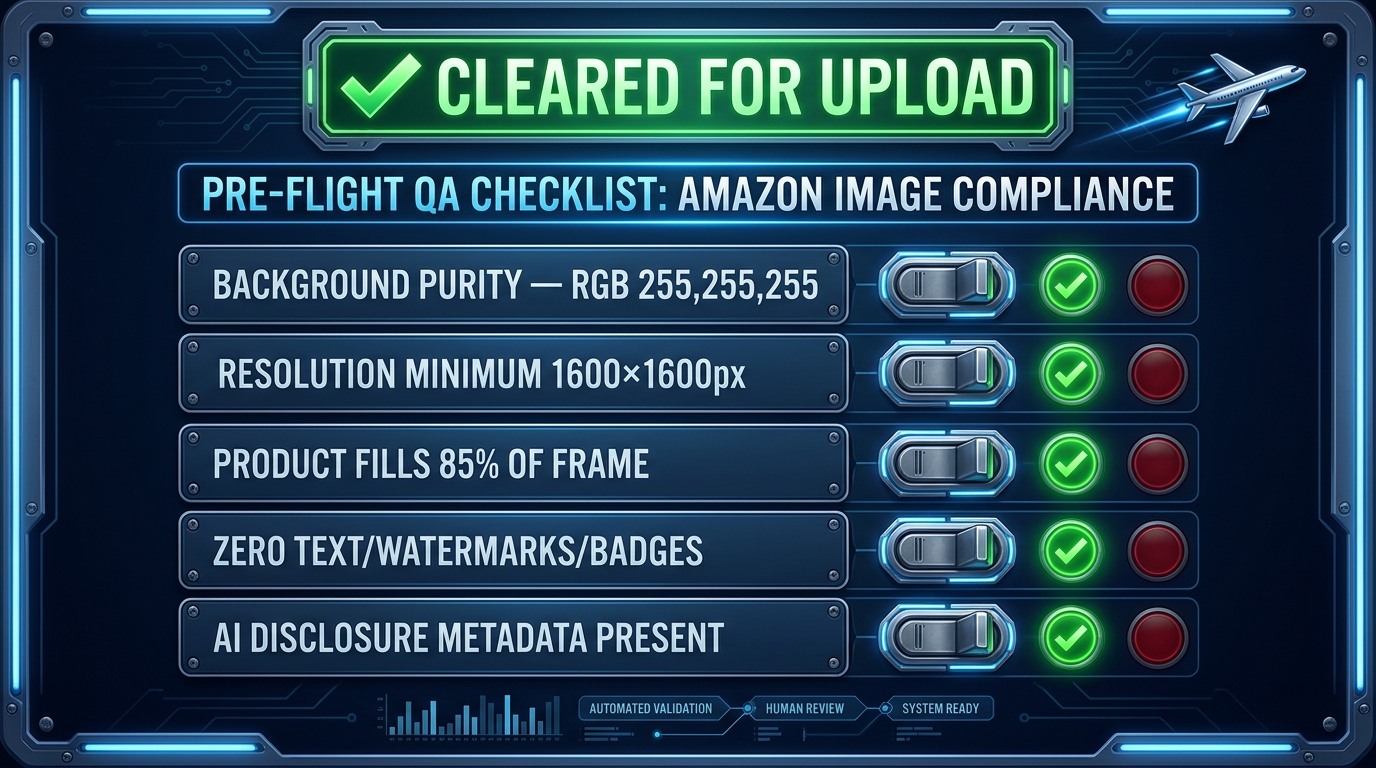
    Pre-flight compliance checklist board with five green indicator lights showing background purity, resolution, product fill, no overlays, and AI disclosure all cleared for upload

    Even the best upstream compliance architecture will occasionally produce an image that fails a specific check. The pre-flight QA layer is the structured set of checks that every image must pass before it enters any upload queue — batch or individual. Think of it as the gate that separates production from publication.

    Layer 1: Automated Pixel-Level Checks

    The first tier of the pre-flight layer should be fully automated — no human involvement, no exceptions. Automated checks at this stage include:

    • Background purity verification: Sample pixels at defined coordinates across the background region. Any pixel outside the acceptable range (RGB 255,255,255 ± a small tolerance, typically ± 3 values per channel) fails automatically. Tools like IMG101’s browser-based compliance checker or custom Python scripts using Pillow can execute this check in seconds per image.
    • Dimension and aspect-ratio check: Verify that the image is exactly 1:1 and meets the minimum resolution threshold. This is a trivial automated check that costs nothing to run but catches a surprisingly common error.
    • File size and format validation: Amazon has maximum file size limits (10MB for most image types) and accepts specific formats. Automated format validation prevents submission errors before they happen.
    • Metadata completeness check: Verify that required metadata fields — including AI provenance flags where applicable — are populated. An image that passes every visual check but is missing required metadata is still a compliance failure.

    Layer 2: AI-Assisted Content Checks

    The second tier uses AI detection tools to surface content-level compliance issues that pixel-level checks cannot catch:

    • Text and overlay detection: Run images through a text detection model (Google Vision API, AWS Rekognition, or Tesseract for on-premise workflows) to identify any visible text, watermarks, or promotional overlays. Flag and route for human review if text is detected.
    • Product fill estimation: Use object segmentation to estimate what percentage of the frame the primary product occupies. Anything significantly below 85% should be flagged for crop adjustment.
    • Prohibited element detection: Check for hands, props, lifestyle backgrounds, or other prohibited elements for the specific product category. This check should be parameterized by category, not run with a single universal ruleset.

    Layer 3: Human Spot-Check

    Even with robust automated checks in Layers 1 and 2, a human spot-check layer is essential — particularly for new product categories, new AI models introduced to the workflow, or any run where the batch size exceeds a threshold your team has defined. Human reviewers at this stage are not looking at every image; they’re sampling a percentage of the batch (typically 10–20%) and reviewing any images that generated a “soft flag” (borderline pass) from the automated layers.

    The key operational discipline here is that the human spot-check layer reviews and approves to send to upload — it does not directly upload. Separating the review step from the upload action prevents the all-too-common situation where a reviewer looks at an image, approves it mentally, and then accidentally uploads the wrong file.

    Tools Worth Knowing in 2026

    Several tools have emerged as useful components of the pre-flight QA layer for Amazon sellers:

    • IMG101 Amazon Image Compliance Checker: Browser-based, pixel-level background analysis with no image upload required (images are analyzed locally). Useful for individual spot-checks and small batch validation.
    • Listing Eagle / SellerApp Catalog Health: Catalog-level monitoring tools that flag compliance issues across a full ASIN catalog, including image-related suppression alerts.
    • AWS Rekognition: Enterprise-grade image analysis for text detection, object identification, and content moderation. Can be integrated directly into a generation pipeline via Lambda functions for automated per-image checking.
    • Custom Python pipeline (Pillow + OpenCV): For teams with technical resources, a custom pipeline combining Pillow for pixel-level checks and OpenCV for object detection gives the most control and the lowest per-image cost at scale.

    Version Control and Asset Governance for Catalog Scale

    One of the most underappreciated challenges in AI image workflows for large Amazon catalogs is not generation or compliance — it’s governance. Which version of this image is live on Amazon right now? Who approved the change? What was the previous version, and can we roll it back? When every image is AI-generated and iterated rapidly, these questions become genuinely difficult to answer without a structured asset governance system.

    ASIN-Linked Asset Repositories

    Every image in your catalog should be stored in a repository that is keyed to its ASIN. This sounds obvious but is frequently ignored by teams that organize images by creative campaign, shoot date, or product category. The ASIN is the canonical identifier on Amazon’s side; it should be the canonical identifier in your asset management system too.

    A practical minimum structure for ASIN-linked asset management:

    • One folder (or equivalent storage structure) per ASIN
    • Sub-folders for primary image, secondary images 2–9, A+ content images, and archived/retired versions
    • File naming convention that includes ASIN, image slot number, version number, and date: e.g., B09XYZABC1_main_v3_20260412.jpg
    • A companion metadata file per ASIN that records: current live version, approval status, compliance check date, AI provenance flag, and the operator who approved the upload

    Change Logging and Rollback Capability

    AI image workflows move fast. When a new lifestyle image variant is tested, when a resolution refresh is run across a hundred ASINs, or when a prompt change produces a subtly different look — all of those changes need to be logged with enough detail to understand what changed, when, who authorized it, and what the previous state was.

    The rollback capability is particularly important after a suppression event. If a batch image update coincides with a suppression spike, you need to be able to immediately restore the previous compliant image for affected ASINs while the investigation into the new batch happens in parallel. Without version history, you’re stuck either waiting for the new images to be cleared or re-creating the old images from scratch under time pressure — neither of which is a good operational position.

    Approval Routing Before Upload

    No image should enter the upload queue without a documented approval step. This doesn’t need to be a lengthy review process. For teams using project management tools, a simple task state transition — from “QA Complete” to “Approved for Upload” — with the approver’s name attached is sufficient. For larger operations, tools like Monday.com, Asana, or dedicated DAM (Digital Asset Management) systems like Bynder or Brandfolder can formalize this routing.

    The key governance principle is that the approval step and the upload step are separate actions, performed with a deliberate handoff. The person who approves an image should not be the same person who performs the batch upload, wherever this separation is operationally feasible.

    When Things Go Wrong — The Suppression Recovery Workflow

    Even well-designed workflows will occasionally produce a suppression event. The suppression recovery workflow is not a failure of the compliance system — it’s the evidence that the compliance system caught something, even if too late. The measure of a mature ops team is not that suppressions never happen; it’s how fast and methodically they’re resolved when they do.

    Suppression vs. Rejection — The Distinction That Changes Your Response

    Amazon distinguishes between two different types of image-related compliance action, and the response workflow differs significantly between them:

    Image Rejection occurs during the upload validation step. The image doesn’t meet a technical specification, and Amazon returns an error. The listing may still be live with its previous image, or it may go live without any image in that slot. Image rejections are typically lower urgency because the listing hasn’t lost visibility — yet.

    Listing Suppression is when Amazon removes a listing from search results due to a compliance issue — which may include image violations. This is a higher urgency event because the listing is invisible to search traffic while suppressed. Sales effectively stop for that ASIN until the suppression is lifted.

    In 2026, Amazon’s system increasingly moves directly to suppression for image violations caught during automated audit cycles, bypassing the rejection warning phase. This is part of why the pre-flight QA layer is so critical — the penalty for getting past it with a non-compliant image has increased.

    The 72-Hour Correction Window

    Industry guidance consistently points to a recovery timeline of minutes to 72 hours after uploading a technically correct replacement image for a suppression caused by image-only issues. The fastest recoveries happen when the replacement image is clean on the first submission — no borderline pixels, no ambiguous elements, full compliance with the pre-flight checklist. Repeated resubmissions of images that continue to fail extend the recovery window and can trigger additional manual review.

    The operational implication is that when a suppression occurs, the first resubmission must be the correct one. Don’t rush a replacement image through without running it through the full pre-flight QA layer. One clean image submitted once recovers a suppressed listing faster than three imperfect attempts.

    POA Structure for Image-Related Appeals

    For suppressions that don’t resolve automatically after a corrected image upload — particularly those involving suspected misrepresentation or policy violations beyond technical specs — you may need to submit a formal Plan of Action (POA). An effective POA for an image-related appeal has a three-part structure:

    1. Root Cause Statement: What specifically caused the violation? Be precise. “Our AI-generated images contained subtle off-white background values that failed the automated background purity check” is a better root cause statement than “our images were non-compliant.”
    2. Corrective Actions Taken: What have you already done to fix this? Describe the specific changes made to the offending images and confirm that compliant replacements have been submitted. Include the ASIN list and upload timestamps if available.
    3. Preventive Controls Added: What changes have you made to your workflow to prevent this from recurring? Describe the specific QA step added, the tool or check implemented, or the standard updated. Amazon’s review team responds better to concrete process changes than to assurances that it won’t happen again.

    Preventing Cascade Failures in Large Catalogs

    For sellers with catalogs above 100 ASINs, the primary suppression risk is cascade — one workflow error affecting many listings simultaneously. Two operational practices significantly reduce cascade risk:

    Staged batch uploads: Rather than uploading an entire image batch at once, upload a representative sample (5–10 ASINs) first and verify that all images are live and in the expected state in Seller Central before uploading the remainder. This catches batch-level errors before they scale.

    Post-upload monitoring: Set up Seller Central Health report monitoring (or use a third-party catalog monitoring tool) to alert your team within hours of any new suppression events. The faster you detect a suppression, the faster you can halt the remainder of a problematic batch upload before it affects more listings.

    Building Feedback Loops That Prevent Repeat Failures

    A compliance workflow without a feedback mechanism is a static defense in a changing environment. Amazon’s rules evolve — and its enforcement behavior evolves independently of its published rules. The teams that maintain near-zero suppression rates over time aren’t doing so because their initial workflow was perfect. They’re doing so because they built mechanisms to learn from every compliance event and update their processes accordingly.

    Suppression Root-Cause Tagging

    Every suppression event should be tagged with its root cause before the recovery ticket is closed. This doesn’t need to be elaborate — a simple tagging system works: Background Purity, Resolution, Overlay, Provenance, Misrepresentation, Category Rule, Other. Over time, the distribution of root cause tags will tell you where your workflow has persistent weak points.

    A catalog team that sees 60% of its suppression events tagged as “Background Purity” needs to investigate its post-generation processing step, not its prompt engineering. A team where 40% of events are tagged “Category Rule” likely has a gap in its category-specific rules matrix. The data drives the fix.

    Monthly Image Audit Cadence

    Beyond reactive monitoring after uploads, a proactive monthly audit of a random sample of live listings is an important feedback mechanism. Amazon’s automated audit cycles mean that images that are compliant today may be flagged under updated enforcement parameters next month. A monthly human review of 5–10% of your live catalog, cross-checked against current compliance specs, catches drift before it becomes suppression.

    The monthly audit also serves as a catalog hygiene mechanism. Legacy images from before the Visual ID Standard 3.0 update — images that may have passed review under the old 1,000px minimum but now sit below the 1,600px threshold — should be identified and queued for refresh. Amazon’s automated systems may not flag these immediately, but they create ongoing compliance vulnerability that a proactive audit removes.

    Using Seller Central Health Reports

    Seller Central’s Catalog Health and Listing Quality tools provide image-related compliance signals that many sellers underuse. The “Fix Your Products” report, the “Listing Quality Dashboard,” and the “Search Suppressed” report under Inventory are all sources of structured feedback about image compliance issues across your catalog. These reports should be reviewed on a weekly cadence by whoever owns catalog ops — not just when something has already gone wrong.

    The Compliance-First Team Structure That Scales

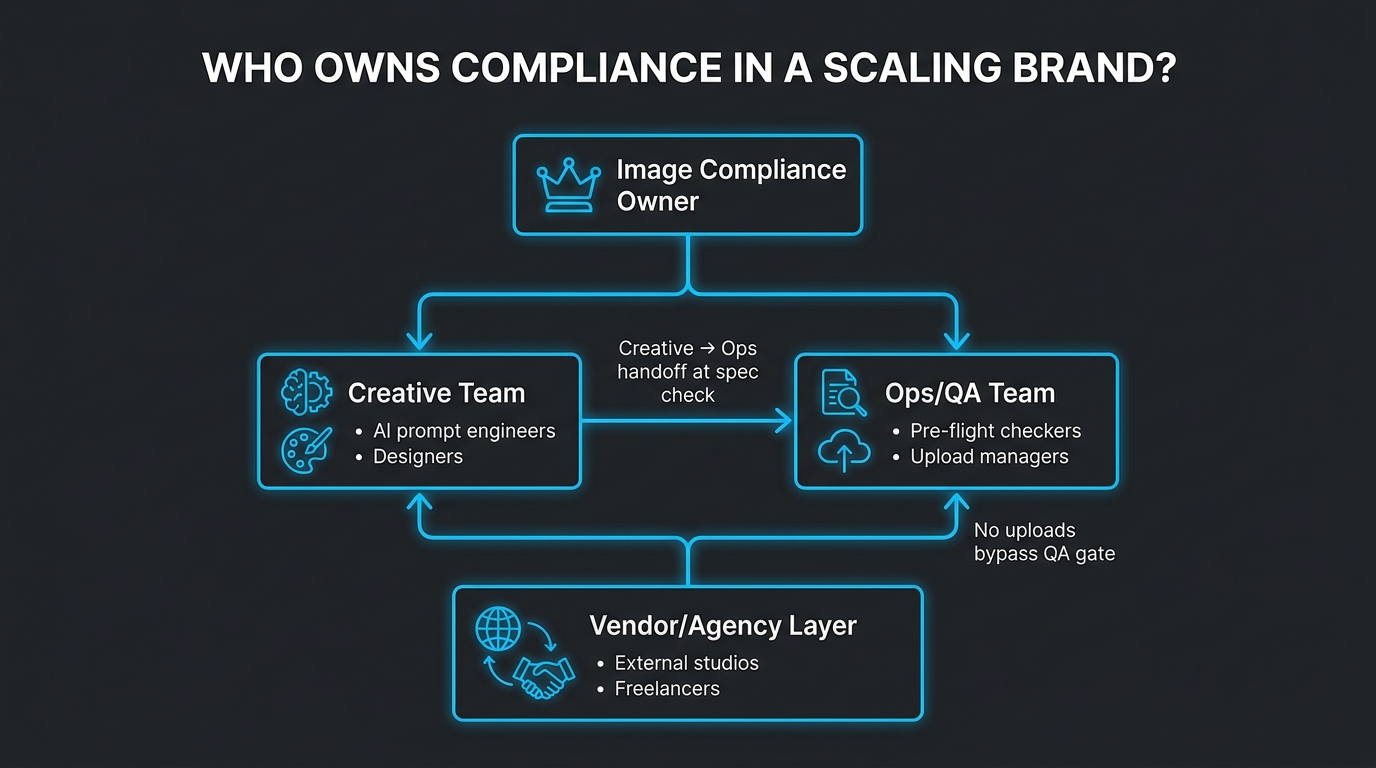
    Organizational chart showing compliance-first image team structure with Image Compliance Owner at top, Creative and Ops teams in middle, and Vendor Layer at bottom

    The structural question most growing Amazon brands get wrong is: who owns image compliance? In most organizations, the answer is “nobody in particular” — which functionally means it’s split between a creative team that’s focused on producing good-looking assets and an ops team that’s focused on not breaking the catalog. Neither group has a clear mandate to own the full compliance lifecycle, and issues fall through the gap between them.

    The Image Compliance Owner Role

    In any catalog operation managing more than 50 ASINs with active AI image production, there should be a designated Image Compliance Owner. This is not necessarily a full-time dedicated role at the outset — for smaller teams, it can be a defined responsibility within an existing role. But it must be explicitly assigned, not assumed to be covered by general ownership of the creative or ops function.

    The Image Compliance Owner’s responsibilities include: maintaining the requirement briefs and category rules matrix, owning the pre-flight QA checklist and ensuring it reflects current policy, reviewing suppression root-cause tags and driving workflow updates based on patterns, running the monthly audit cadence, and serving as the point of contact for any suppression-related POA submissions.

    The Creative-to-Ops Handoff

    One of the highest-risk points in any AI image workflow is the handoff from the creative team (who generates and selects images) to the ops team (who runs the pre-flight checks and manages the upload). Without a defined handoff protocol, images can get uploaded directly from the creative stage without ever entering the QA layer — either because of time pressure or because team members don’t realize the handoff is required.

    The handoff should be formalized: images enter a designated “Ready for QA” state or folder, and only the ops/QA function pulls from that queue to begin pre-flight checks. No creative team member should have direct catalog upload permissions in a mature operation. This sounds like bureaucracy; in practice, it’s the single change that most consistently eliminates cascade failures in growing Amazon businesses.

    Vendor and Agency Oversight

    Many brands outsource image production to agencies or freelancers who may be using their own AI tools and workflows. This creates a compliance risk that sits outside your direct operational control. Vendor contracts and briefs should explicitly include:

    • The Amazon requirement specifications as a non-negotiable deliverable standard
    • The requirement that all AI-generated images be flagged as such in metadata
    • An acceptance criteria checklist that deliverables must pass before payment is triggered
    • A re-work clause that specifies the vendor’s responsibility to fix compliance failures identified in pre-flight QA at no additional cost

    If a vendor or agency cannot demonstrate familiarity with Amazon’s 2026 image compliance standards, treat that as a qualification gap that affects your vendor selection decision.

    The Cost Math — What Proper Workflow Investment Actually Returns

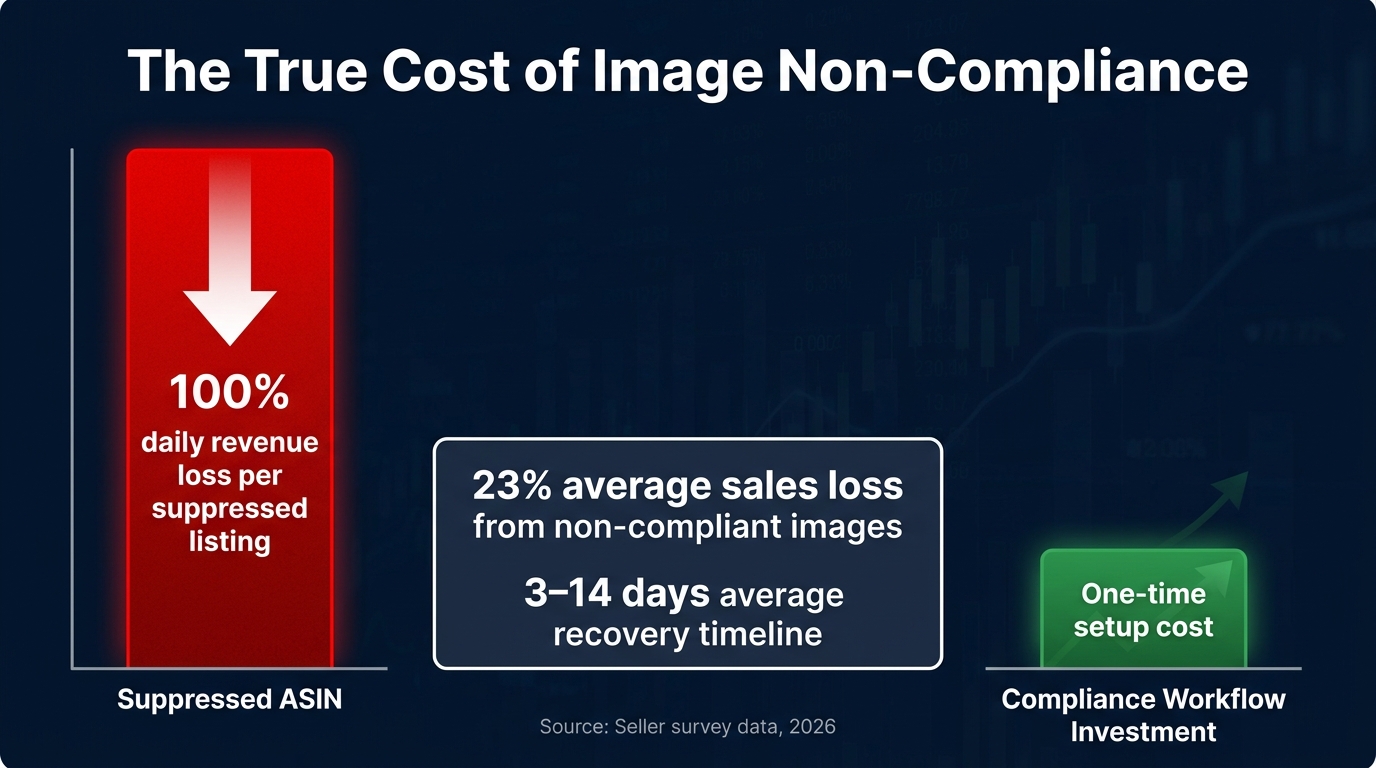
    Cost vs risk bar chart showing suppressed ASIN revenue loss versus compliance workflow investment with 23% average sales loss statistic highlighted

    The business case for investing in a structured AI image compliance workflow is not difficult to make once the numbers are on the table. The challenge is that most brands are not tracking the cost of image compliance failures explicitly, so the investment in prevention looks like overhead rather than risk management.

    The Revenue Impact of Non-Compliance

    Seller survey data cited in 2026 compliance guidance estimates that sellers lose an average of approximately 23% of potential sales when images fail Amazon’s requirements. This is not a suppression-specific number — it includes the broader impact of lower conversion rates, reduced click-through from search, and the visibility penalty that Amazon’s algorithm applies to listings with image quality issues below the scoring threshold, even when the listing is not fully suppressed.

    For a suppressed listing specifically, the revenue impact is more severe: the formula is straightforward — average daily revenue from that ASIN multiplied by the number of days suppressed. For a product generating $300/day in revenue, a 5-day suppression event represents $1,500 in lost gross revenue. A cascade failure affecting 20 ASINs averaging $150/day each for an average of 4 days represents $12,000 in lost gross revenue from a single workflow error.

    The Cost of the Recovery Cycle

    Beyond the direct revenue loss, suppression events carry operational costs that are harder to quantify but real:

    • Team time: Diagnosing, correcting, and resubmitting suppressed images typically requires 30 minutes to several hours per ASIN, depending on the complexity of the violation. A 20-ASIN cascade failure can consume 2–3 days of catalog ops capacity.
    • BSR recovery lag: Even after a listing is reinstated, its Best Seller Rank will have decayed during the suppression period. Recovering rank typically requires several days to weeks of restored sales velocity — a secondary revenue impact beyond the direct suppression period.
    • Amazon algorithm signal: Frequent suppression events may accumulate negative signals in Amazon’s catalog quality scoring, creating compounding compliance risk over time.

    What the Workflow Investment Actually Costs

    By contrast, the investment in a structured pre-flight QA workflow is modest. For a mid-sized operation managing 100–500 ASINs:

    • Tools: A combination of browser-based compliance checkers (free to low-cost), AWS Rekognition or Google Vision API for text detection ($1–3 per 1,000 images), and catalog monitoring tools ($50–200/month) represents a total tooling cost well under $500/month.
    • Time: A well-designed automated pre-flight check runs in seconds per image. The human spot-check layer adds 15–30 minutes per batch of 50 images. For most operations, this is a contained, schedulable time cost — not open-ended firefighting.
    • Training: The initial investment in documenting the requirement brief, building the QA checklist, and training the team on the workflow is a one-time fixed cost, not a recurring one.

    The ROI case is not close. A single prevented cascade failure pays for months of workflow investment. The teams that treat compliance workflow as overhead are, in effect, choosing to absorb random, large, unscheduled revenue events rather than investing in small, predictable, bounded operational costs.

    The Continuous Improvement Cycle — How the Best Operations Stay Ahead

    Amazon’s compliance environment will continue to evolve. The Visual ID Standard 3.0 will not be the last major policy update. AI detection capabilities on Amazon’s side will continue to improve. Category-specific rules will shift. New disclosure requirements for AI-generated content may expand. A workflow that is correctly calibrated for April 2026 will need to be updated for the next change cycle.

    Quarterly Policy Reviews

    Assign the Image Compliance Owner to conduct a formal quarterly review of Amazon’s current Product Image Requirements documentation in Seller Central, cross-referenced against the existing requirement briefs and QA checklists. Any delta between current policy and documented internal standards triggers a workflow update cycle, not just a mental note.

    The quarterly review should also include a review of Seller Central News and Policy Updates, Amazon Seller forums (particularly the Fulfilled by Amazon and Account Health sub-forums), and third-party seller intelligence sources for any enforcement pattern changes that may not yet be reflected in published policy.

    A/B Testing Compliant Variants

    Compliance is the floor, not the ceiling. Once a workflow reliably produces compliant images, the next layer of value is using that workflow to systematically test which compliant variants produce better conversion and click-through rates. Amazon’s Manage Your Experiments tool allows A/B testing of primary images between compliant variants, providing direct data on which visual approach performs better for a given ASIN.

    Teams that have invested in a structured compliance workflow are in a much better position to run these experiments — because they’re not burning ops capacity on suppression recovery, they can allocate attention to continuous performance optimization instead.

    Scaling the Feedback Loop

    As catalog size grows, the feedback loop infrastructure needs to scale with it. A 50-ASIN operation can manage compliance feedback through a shared spreadsheet and weekly team check-ins. A 500-ASIN operation needs structured tooling — catalog health dashboards, automated suppression alerts, and a ticketing system for tracking compliance events from detection through resolution. The investment in this infrastructure should track the growth of the catalog, not lag it.

    Conclusion: Compliance Is Infrastructure, Not a Checklist

    The framing that causes the most expensive problems in AI image workflows for Amazon is treating compliance as a checklist item — something you reference once, apply at the end, and mark done. In the 2026 enforcement environment, with automated visual scoring across 127 parameters, machine-triggered search suppression, and Visual ID Standard 3.0 as the new baseline, that framing is not just inadequate — it’s actively dangerous for catalog health.

    The operators running large catalogs with consistently low suppression rates are not doing so because they have better AI tools than everyone else. They are doing so because compliance is structural in their workflows. The requirement brief is the starting document. The category rules matrix is the standing reference. The pre-flight QA layer is a gate that cannot be bypassed. Version control makes rollback possible. The feedback loop makes improvement continuous.

    This is infrastructure thinking applied to a creative production problem. And it is the only approach that scales without accumulating compounding compliance risk as the catalog grows.

    Actionable Takeaways for Building Your Compliance Workflow

    • Start with the brief, not the prompt. No image production run should begin without a documented requirement brief that translates Amazon’s current policy into specific, measurable parameters.
    • Build the pre-flight QA layer as a gate, not a suggestion. Automated pixel-level checks, AI-assisted content detection, and human spot-check review should all be required before any image enters an upload queue.
    • Assign a named Image Compliance Owner. Distributed ownership of compliance is functionally the same as no ownership.
    • Separate the approval step from the upload action. This single change eliminates a significant class of cascade failure.
    • Tag and analyze every suppression event. The distribution of root causes across time tells you exactly where your workflow needs strengthening.
    • Review policy quarterly and update your internal standards accordingly. A compliance workflow calibrated for today needs to be recalibrated for the next enforcement update.
    • Treat compliance investment as risk management, not overhead. The math is straightforward: one prevented cascade failure covers months of workflow tooling and process investment.

    The catalog that stays visible, stays sellable. Building the workflow that guarantees that is not glamorous work — but it is the foundational work that everything else depends on.