Tag: Business Operations

  • The Automation Audit: How to Identify, Prioritize, and Build AI Workflows That Actually Hold Up

    The Automation Audit: How to Identify, Prioritize, and Build AI Workflows That Actually Hold Up

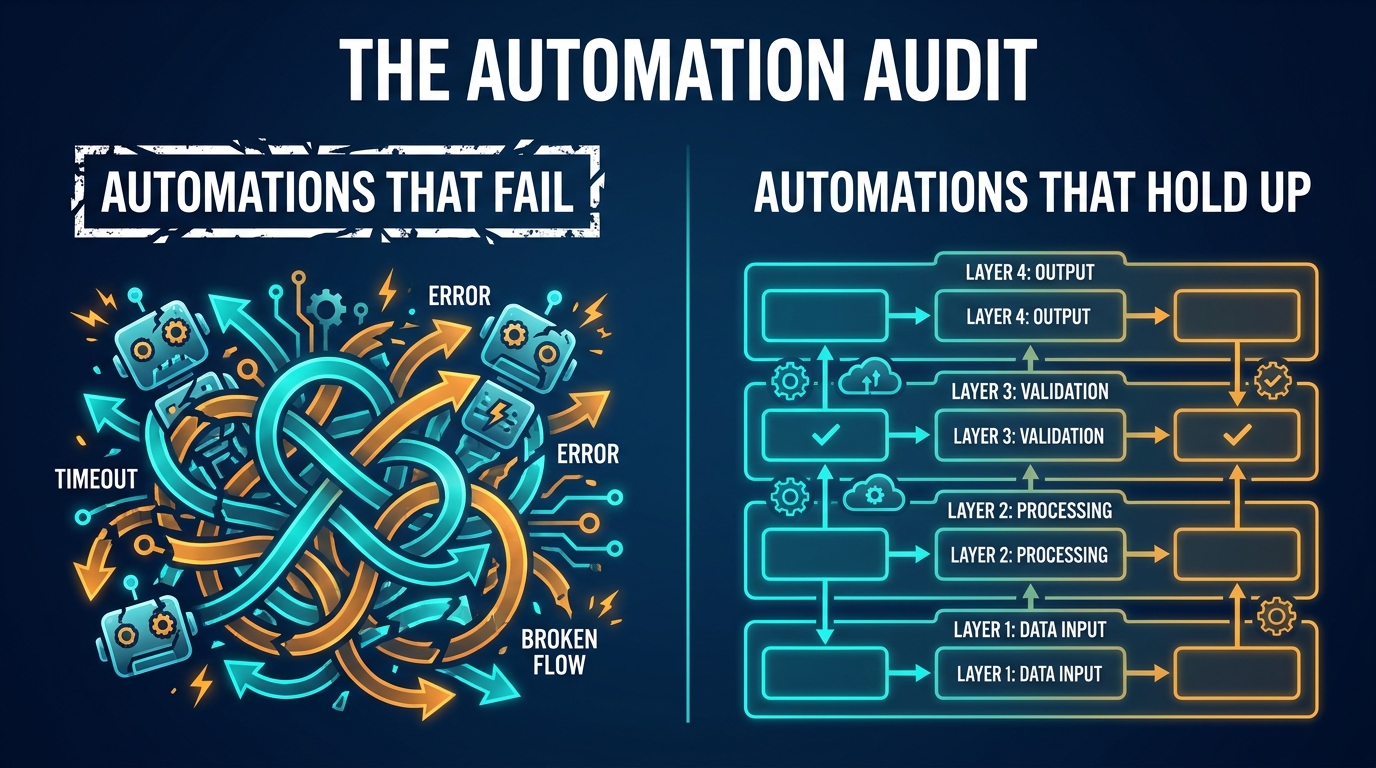
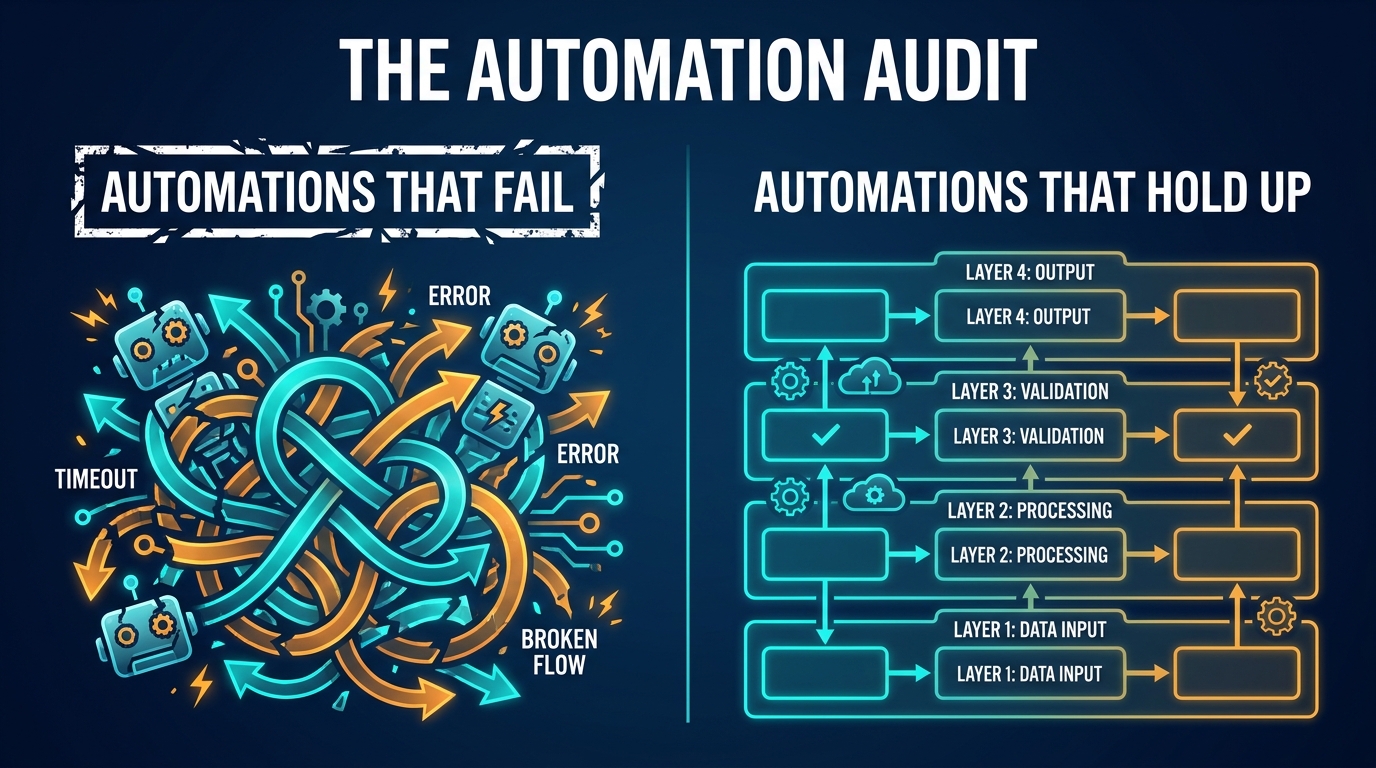
    Split-screen comparison: chaotic failed automations on the left vs. a clean, structured AI automation architecture on the right — The Automation Audit

    Ask most operations leaders what their AI automation strategy looks like, and you’ll get one of two answers. Either they’ll describe a sprawling, somewhat chaotic collection of bots and workflows that “sort of works,” held together by a few spreadsheets and a lot of tribal knowledge. Or they’ll admit, quietly, that they haven’t really started yet — because every time they try to figure out where to begin, the whole thing feels overwhelming.

    Both are symptoms of the same root problem: most teams approach AI automation as a technology decision when it’s actually a process decision. They ask “which AI tool should we buy?” before they’ve answered “which processes are actually worth automating, in which order, and with what guardrails?”

    That sequencing mistake is expensive. Gartner research has consistently found that the majority of early automation deployments underdeliver — not because the technology failed, but because the wrong processes were automated, in the wrong order, without the data quality or human oversight structures needed to sustain them.

    This guide takes a different approach. Instead of cataloguing what AI can automate (the internet has no shortage of those lists), it walks through the decision science behind choosing what to automate first, why, and how to build it so it doesn’t quietly break six months later. Think of it as the engineering mindset applied to automation strategy — rigorous, methodical, and honest about what the technology can and cannot do reliably.

    Whether you’re mapping your first five automations or auditing a portfolio of 50, what follows is a structured framework for building AI workflows that hold up under real operating conditions.

    Why Most AI Automations Are Solving the Wrong Problem

    The first and most common mistake in AI automation is picking the wrong target. This happens in a predictable pattern: a team sees a task that feels manual and annoying, decides AI should handle it, and builds a workflow around it — without ever checking whether that task is actually the right lever to pull.

    The Visibility Trap

    Tasks that look repetitive from the outside aren’t always good automation candidates. A customer service rep triaging emails looks repetitive — same inbox, same categories, day after day. But the actual decision-making involved might be highly contextual: flagging an email as urgent based on account value, relationship history, tone, contract status, and unspoken implication. That’s not a rules-based task. That’s nuanced judgment wrapped in a repetitive interface.

    When companies automate this without accounting for that complexity, they end up with bots that mis-categorize high-value accounts, frustrate long-tenured clients, and create more cleanup work than the original manual process. The automation looks like it’s working — tickets are moving — but the quality outcomes are worse than before.

    The “Pain Point” Fallacy

    Another common trap: automating what hurts most rather than what will yield the most. Operations teams naturally gravitate toward their biggest pain points. But high pain doesn’t always correlate with high automation potential. A slow, frustrating process might be slow and frustrating precisely because it requires constant human judgment, exception handling, or regulatory oversight — all of which make it a poor candidate for autonomous AI execution.

    The processes that should be automated first are often the unglamorous, low-visibility ones: invoice matching, data enrichment, report generation, meeting note distribution, CRM field updates. Nobody complains about these loudly. Nobody gets a promotion for fixing them. But they consume significant human time across every department, and they’re structurally well-suited for AI — high volume, consistent structure, clear success criteria, low cost of error.

    The Measurement Gap

    Perhaps most critically: most automation decisions are made without any baseline measurement of the current process. Teams don’t know how long the manual task actually takes, what the error rate is, or how much rework happens downstream because of those errors. Without that baseline, you can’t calculate ROI, you can’t prove the automation is working, and you can’t justify the next investment in the program.

    Before you automate anything, you need to measure it. That means timing the manual process, counting errors, mapping the exceptions, and understanding what “good” looks like. That measurement step is what separates automation programs that get bigger over time from ones that stall after the first deployment.

    The Four Dimensions of an Automatable Task
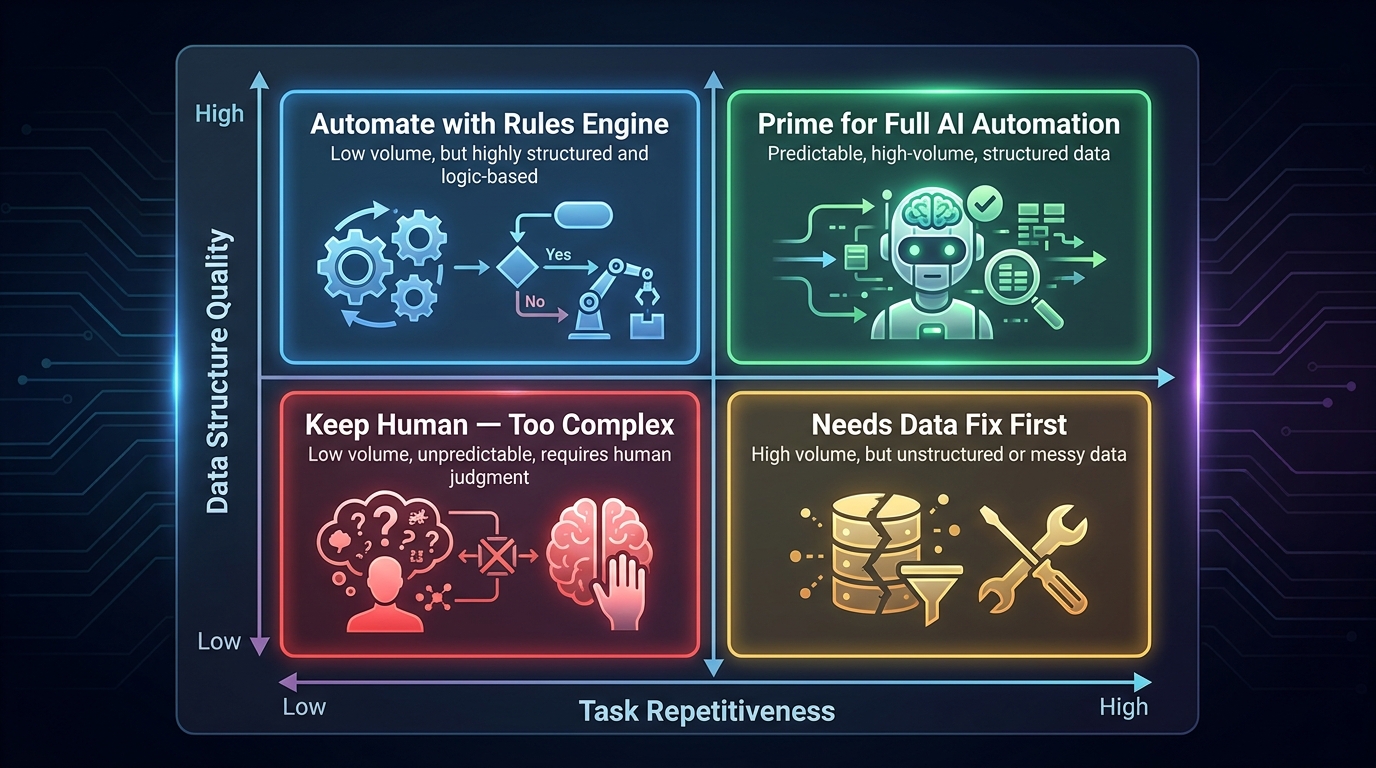
    2x2 decision matrix for AI automation readiness — mapping task repetitiveness against data structure quality to determine automation candidacy

    Rather than gut-checking whether something “feels” automatable, experienced automation architects evaluate tasks against a consistent set of dimensions. Four of these dimensions — taken together — give you a reliable read on whether a process is ready for AI, needs preparation work first, or should stay human for now.

    Dimension 1: Structural Consistency

    How consistent is the input the process receives? Does it always arrive in the same format, from the same source, with the same fields populated? Invoice processing from a set of known vendors is highly structurally consistent. Customer emails are not. The more variable the input structure, the more AI capability (specifically NLP or multimodal models) you need to handle it reliably — and the more edge cases you need to account for in your design.

    Score this dimension 1–5. A process scoring below 3 either needs a pre-processing layer to normalize inputs, or it needs a more sophisticated AI model than a simple rules engine can provide.

    Dimension 2: Decision Complexity

    How many variables influence the outcome, and how context-dependent are they? Approving a standard purchase order under a set dollar threshold has low decision complexity — it’s essentially a yes/no based on a few checkable conditions. Deciding how to respond to a client escalation requires judgment about relationship history, strategic account value, internal capacity, precedent, and tone. That’s high decision complexity.

    Low complexity tasks are safe for full automation. Medium complexity tasks are candidates for AI-assisted decisions where a human reviews and approves AI recommendations. High complexity tasks should stay largely human-driven, with AI handling data gathering and preparation rather than the decision itself.

    Dimension 3: Volume and Frequency

    Even a perfectly automatable task may not be worth automating if it only happens twice a month. The ROI math only works when the time savings across the year justify the build cost and ongoing maintenance overhead. A useful benchmark: if a task takes more than 2 hours per week per person performing it, or happens more than 50 times per week at the team level, it’s worth putting on the automation roadmap. Below that, the time invested in building and maintaining the automation may exceed the time saved.

    Dimension 4: Cost of Error

    What happens when the automation gets it wrong? This is the most underweighted dimension in most automation evaluations. A mis-labeled internal file is low cost of error. A mis-routed regulatory compliance document, an incorrect patient record update, or an automated pricing decision that undersells a high-margin product by 40% — these are high cost of error situations. The higher the error cost, the more human oversight you need to build into the design, and the longer you should run parallel manual processes before fully handing off to the machine.

    Mapping every candidate process against these four dimensions gives you a defensible, data-driven prioritization that’s hard to argue with — and that will save you from expensive mistakes.

    Building the Automation Audit: A Room-by-Room Walkthrough
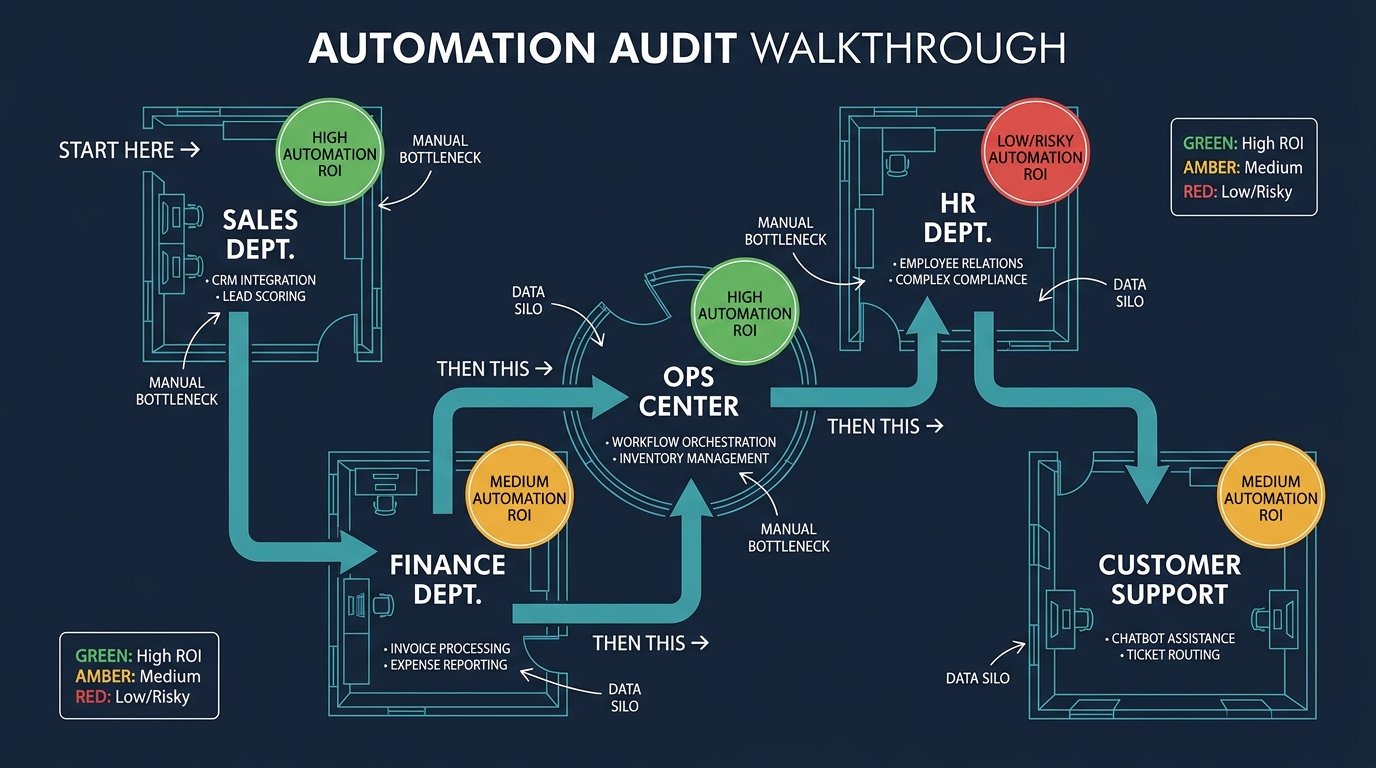
    Blueprint-style floor plan of a business showing different departments color-coded by automation ROI potential, with arrows indicating recommended automation sequencing

    An automation audit is a systematic walkthrough of every process across your operation, evaluated against the four dimensions above. Done properly, it produces two outputs: a prioritized list of automation candidates, and a clear-eyed picture of what’s not ready (and why).

    Step 1: Process Inventory

    Start by listing every recurring process in each department. Don’t filter yet — just list. Include the obvious (monthly financial close, weekly sales reports) and the obscure (the spreadsheet someone manually updates every Friday morning to consolidate data from three systems that don’t talk to each other). Those obscure manual bridges between systems are often the highest-value automation targets because they’re invisible, they’re error-prone, and no one has ever thought to question why they still exist.

    The inventory exercise alone is valuable. Most operations leaders are surprised by how many unofficial manual processes exist across their teams — especially in companies that have grown quickly and patched process gaps with people rather than systems.

    Step 2: Score Each Process

    For each item in the inventory, score it on the four dimensions: structural consistency (1–5), decision complexity (1–5 inverse — higher complexity means lower score for automation readiness), volume/frequency (1–5), and cost of error (1–5 inverse — higher error cost means more caution needed). Add the scores for a composite automation readiness number.

    Processes scoring 15–20 are your immediate automation candidates. Processes scoring 10–14 need some preparation work — usually data quality improvement or process standardization — before they’re ready. Processes scoring below 10 should either remain human-driven for now or be placed in a longer-term roadmap once foundational work is complete.

    Step 3: Map the Dependencies

    Processes don’t exist in isolation. Before finalizing your sequence, map which processes feed into which others. If Process A outputs data that Process B consumes, automating B without automating A means your AI workflow will only be as reliable as the manual upstream process. In practice, this means you should often automate upstream data-generating processes before downstream decision-making ones — even if the downstream process has a higher composite score.

    Step 4: Size the Opportunity

    For each high-priority candidate, calculate a rough opportunity size: (average time per instance) × (monthly volume) × (fully-loaded hourly cost of the person doing it). This gives you an annualized labor cost that the automation will partially or fully replace. Add a quality-improvement multiplier if the process has a meaningful error rate that creates downstream rework. This number becomes your investment ceiling for that specific automation — it’s the maximum you should spend to build and maintain it before the ROI case breaks down.

    The Sequencing Trap: Why Order Matters More Than Speed
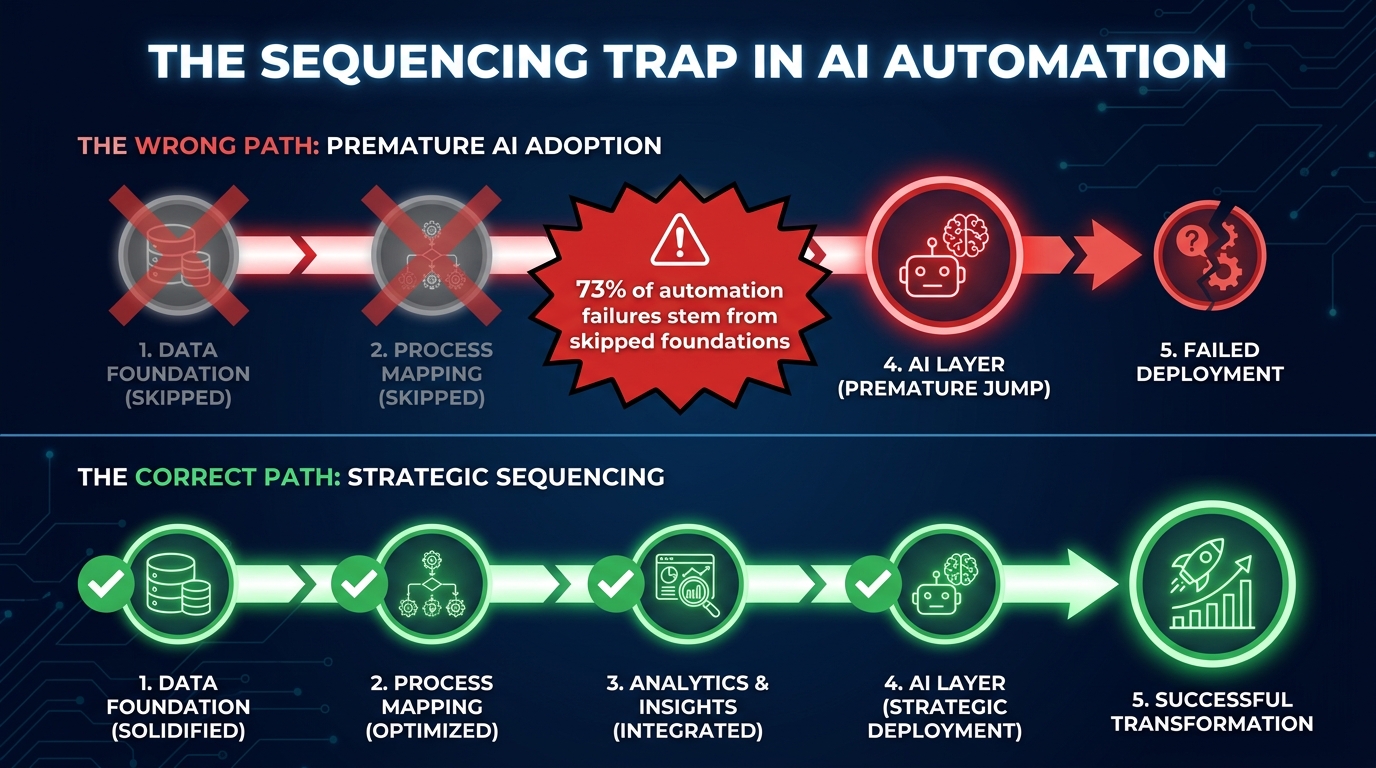
    Timeline diagram showing the sequencing trap — companies skipping foundational steps to jump to AI automation, with corrected sequencing shown below

    Speed is the enemy of durable automation. The pressure to show AI results fast — from boards, investors, and internal stakeholders who’ve been reading about AI for three years and want to see something — pushes teams into skipping foundational steps that matter enormously for long-term stability.

    The Correct Sequence

    Effective automation programs follow a consistent layered sequence. The first layer is always process standardization. Before any AI touches a workflow, the workflow itself needs to be documented, understood, and — ideally — simplified. Automating a messy process doesn’t clean it up; it makes the mess run faster and at greater scale. Any exception handling that currently happens informally in someone’s head needs to be made explicit and decision-tree-able.

    The second layer is data readiness. The automation’s inputs need to be reliable, complete, and consistently formatted. This often requires cleaning up source systems, fixing integration gaps, or building normalization steps into the data pipeline. Skipping this layer and trusting the AI to handle noisy, inconsistent inputs is one of the most expensive mistakes a team can make — it’s a root cause of automations that “work in staging but break in production.”

    Only once these two layers are stable should you add the third layer: the AI execution layer. This is where the actual model, bot, or intelligent workflow lives. By this point, it’s operating on clean data and a well-understood process — which dramatically increases the chance it will behave predictably.

    The fourth layer is monitoring and feedback. Every automation needs a health dashboard, an alerting mechanism for when outputs fall outside expected parameters, and a feedback loop that surfaces errors back to the humans responsible for the workflow.

    What Skipping Layers Looks Like in Practice

    The typical failure story goes like this: a team is under pressure to show AI results by Q2. They pick a high-visibility process, skip the standardization and data readiness steps (“we’ll fix that in post”), and deploy an AI layer directly on top of a fragile manual process. The demo looks great. Two months later, the automation is producing subtle errors that nobody catches for weeks because no monitoring was set up. By the time the damage is found, there’s a mountain of cleanup work, some damaged customer relationships, and a skeptical CFO asking why the AI budget should be renewed.

    The irony is that proper sequencing — which feels slower at the start — almost always produces working automation faster than rushing the build on a shaky foundation.

    Choosing the Right AI Layer for Each Workflow Type

    Not all AI automation is the same. Applying the wrong type of AI to a workflow — using a sophisticated large language model where a simple rules engine would do, or using a rigid rules engine where you need probabilistic judgment — is a waste of money and a source of reliability problems. Understanding the distinct layers of AI capability helps you match the right tool to each task.

    Rules Engines and Conditional Logic

    The most basic layer of “AI automation” is actually not AI at all — it’s deterministic conditional logic. If X, then Y. This is appropriate for processes with very clear, consistent rules and no ambiguity: route all invoices under $500 to auto-approval; flag any support ticket that contains the phrase “cancel my subscription” for priority handling; send a follow-up email if a meeting invitation hasn’t been accepted within 48 hours.

    Rules engines are fast, cheap, completely predictable, and easy to audit. They should be the first tool you reach for — not the last resort after AI has failed. Many processes that teams assume need AI actually work perfectly well with well-designed conditional logic. Reserve AI for the cases where rules genuinely can’t cover the variation.

    Machine Learning Models

    ML models are appropriate when the decision pattern is learnable from historical data but too complex to express as explicit rules. Predicting customer churn risk, classifying support tickets by root cause from free-text descriptions, scoring leads by conversion likelihood — these are machine learning problems. The model learns the pattern from labeled historical examples and generalizes it to new inputs.

    The critical prerequisite: you need enough quality labeled historical data for the model to learn from. As a rough benchmark, fewer than 1,000 labeled examples in a balanced dataset is likely to produce an unreliable model for most classification tasks. If your data volume doesn’t meet that threshold, consider a rules engine or an LLM with few-shot prompting instead.

    Large Language Models (LLMs)

    LLMs are appropriate for tasks involving the interpretation or generation of natural language — summarizing documents, drafting responses, extracting structured information from unstructured text, translating between formats, or answering questions from a knowledge base. Their power is genuine and significant. So are their failure modes: hallucination (confidently wrong output), inconsistency across similar inputs, and sensitivity to prompt phrasing.

    LLMs should almost always have a human review layer when used in customer-facing or compliance-sensitive workflows. They work best as productivity multipliers for human workers — drafting a first version that a human refines — rather than as fully autonomous decision-makers in high-stakes contexts.

    Robotic Process Automation (RPA)

    RPA bots interact with software interfaces the way a human would — clicking, typing, extracting data from screens. They’re powerful for automating processes that span legacy systems with no APIs, or for moving data between tools that aren’t natively integrated. Combined with AI for input interpretation, RPA plus LLM combinations are increasingly common for automating end-to-end document processing workflows. The key caveat: RPA bots are brittle when UI layouts change. Any application update can break a bot, which makes UI change management an operational consideration alongside the technical build.

    How to Stress-Test an Automation Before It Goes Live

    The gap between “works in testing” and “works in production” is where automation programs most often stumble. Stress-testing is the discipline of deliberately trying to break your automation before it goes live — under realistic conditions, with realistic edge cases.

    Edge Case Mapping

    Before going live, spend structured time identifying every way the automation’s inputs could deviate from the happy path. What happens if the invoice arrives as a scanned image instead of a digital PDF? What if a customer email is in a language you didn’t train for? What if the CRM field that triggers a workflow is empty because a sales rep forgot to fill it in? What if the API the automation depends on goes down for 20 minutes?

    For each edge case, define the desired behavior explicitly: fail gracefully and alert a human, retry once and then escalate, skip and log for review. “The automation will handle it” is not an acceptable answer for an edge case you haven’t tested. “The automation will detect this condition, flag the record for manual review, and send an alert to the workflow owner” is.

    Shadow Mode Deployment

    Shadow mode (also called parallel running) means running the automation alongside the existing manual process for a defined period — typically two to four weeks — without replacing the manual process. Both the automation and the human process the same inputs, and outputs are compared. Any divergence is investigated. This is the most reliable way to validate automation performance under real conditions before removing the human safety net.

    The instinct to skip shadow mode because “it doubles the work for a month” is exactly backwards. Shadow mode is an insurance policy. The cost of a month of parallel running is almost always less than the cost of discovering a systematic error in a fully live automation two months after launch.

    Failure Mode and Effect Analysis (FMEA)

    Borrowed from engineering disciplines, FMEA asks: what are all the ways this automation could fail, how likely is each failure, and how severe would the consequences be? For each failure mode, you design a mitigation. High likelihood + high severity failures get active prevention mechanisms. Low likelihood + low severity failures get logging and periodic review. The output is a risk register for the automation — a living document that gets updated as the automation runs and new failure patterns emerge.

    The Human-in-the-Loop Calculus — Where to Keep Humans and Why
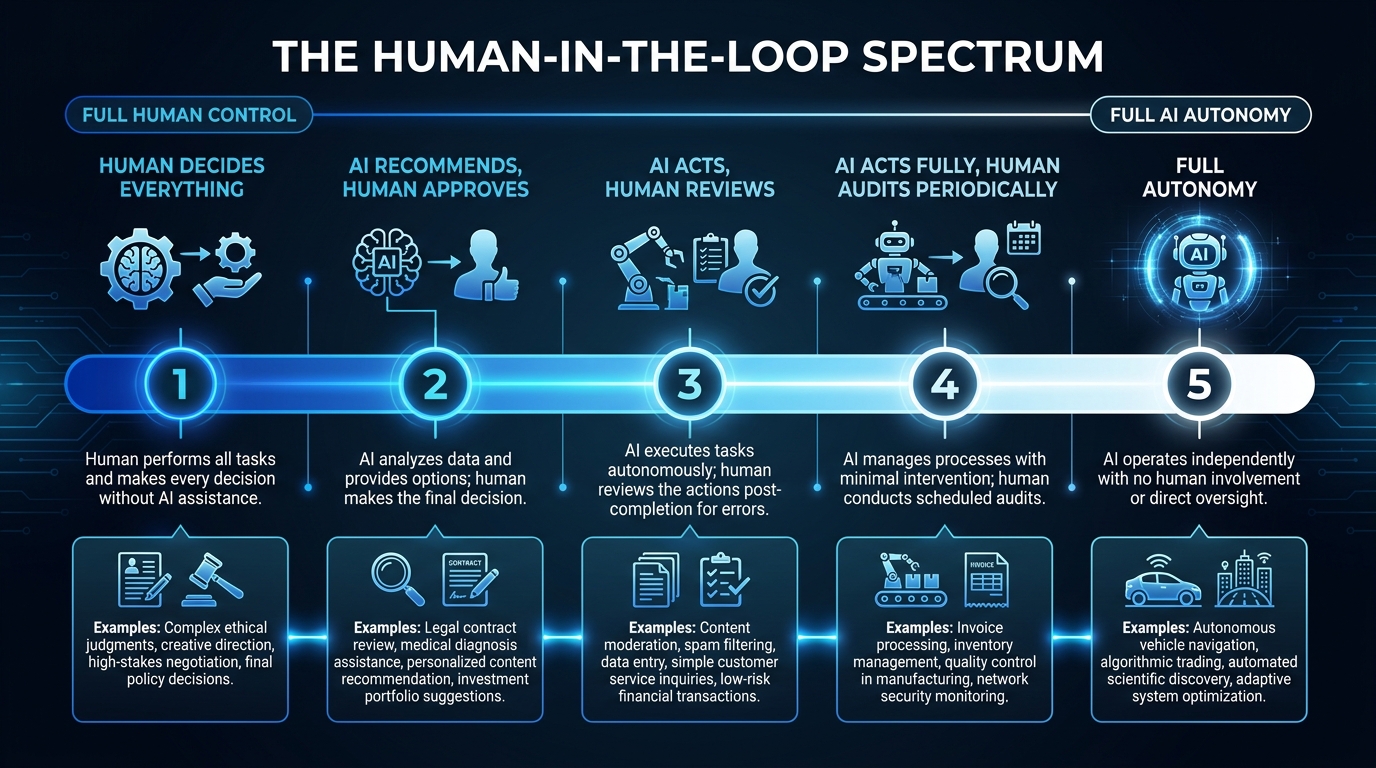
    The Human-in-the-Loop Spectrum showing five levels from full human control to full AI autonomy, with example tasks placed at each level

    The goal of AI automation is not to remove humans from every process. In many workflows, the most effective design keeps humans meaningfully involved — not because the AI can’t perform the task, but because human involvement adds value the AI genuinely cannot replicate, or because the risk of autonomous AI action is too high to accept.

    The Five Levels of Human Involvement

    Level 1 — Human decides, AI informs: The human makes every decision, but AI surfaces relevant data, summarizes context, or flags anomalies to inform that decision. Best for high-stakes, low-volume decisions like strategic pricing, contract negotiation, or key account strategy.

    Level 2 — AI recommends, human approves: The AI generates a recommendation with a confidence score and supporting rationale. A human reviews and approves (or overrides) before any action is taken. Best for medium-stakes decisions at moderate volume: content publishing, mid-size purchase approvals, candidate shortlisting.

    Level 3 — AI acts, human reviews after: The AI takes action autonomously, but all actions are logged and a human reviews the batch at a defined interval (daily, weekly). Exceptions are escalated immediately; routine actions are retrospectively reviewed. Best for high-volume, low-stakes actions: data enrichment, routine email responses, internal ticket routing.

    Level 4 — AI acts, human audits periodically: The AI operates fully autonomously in routine conditions. Human review happens on a sampling basis (10% of outputs, quarterly full audits) rather than per-transaction. Best for well-understood, stable workflows: invoice processing under known vendor/amount thresholds, scheduled report generation, routine data sync operations.

    Level 5 — Full autonomy: Reserved for the smallest set of genuinely low-risk, fully deterministic processes where the failure cost is negligible and the pattern is completely stable. Even here, ongoing monitoring for drift is essential.

    The Oversight Drift Problem

    One of the subtler risks in mature automation programs is oversight drift — the gradual erosion of human review as team members get busy and start treating the automation as infallible. An automation that launches at Level 3 (AI acts, human reviews after) can quietly drift to Level 5 (full autonomy) simply because nobody has time to do the reviews anymore. By the time a systematic error is discovered, thousands of records may have been incorrectly processed.

    Prevent oversight drift by building human review into the workflow formally — not as an optional extra, but as a step that produces a required output. A sign-off log, a review metric tracked on a dashboard, a weekly review meeting with a standing agenda item. The formalization is what keeps the review actually happening.

    Data Quality: The Silent Killer of AI Automations

    Every AI automation is only as good as the data it runs on. This is perhaps the most frequently stated principle in enterprise AI — and the most frequently ignored. Teams acknowledge data quality as important in the abstract, then skip the data readiness work when timelines get tight, then wonder why the automation misbehaves.

    The Four Data Quality Dimensions

    Data quality for automation purposes comes down to four properties. Completeness: are all required fields populated? An automation that depends on a CRM field that sales reps fill in inconsistently will produce inconsistent outputs. Accuracy: does the data reflect reality? Stale contact information, outdated product pricing, incorrect inventory counts — all will propagate errors through automated workflows at speed. Consistency: is the same concept represented the same way across systems? “United States,” “US,” “USA,” and “U.S.A.” are the same thing to a human and four different values to a data system. Timeliness: is the data fresh enough for the automation’s decision logic? A stock level from six hours ago may be fine for a weekly inventory report and catastrophically wrong for an automated purchase order trigger.

    Data Quality Remediation Strategies

    Depending on your data quality gaps, remediation might involve cleaning historical records in source systems, adding validation rules at data entry points, building normalization layers in the automation pipeline itself, or enriching data from external sources. The right approach depends on whether the quality problem is a historical artifact or an ongoing process issue.

    Historical artifacts can sometimes be cleaned once and maintained. Ongoing process issues — like sales reps not filling in required CRM fields — require process and behavior change, not just technical fixes. If the humans feeding the system aren’t incentivized to input quality data, the automation will suffer for as long as that incentive gap exists. Fixing this is a management problem, not a technical one.

    Build Data Health Monitoring In

    Data quality degrades over time. Products change, vendors change, organizational structures change, and the data in your systems slowly falls out of step with reality. Every automation should have a data health check as part of its monitoring infrastructure: a regular automated assessment of input data completeness, accuracy, and freshness, with alerts when thresholds are breached. Catching data degradation early prevents the downstream automation errors that are expensive to diagnose and clean up.

    Measuring Automation Health Over Time — Not Just at Launch

    Launch day metrics are vanity metrics. The numbers that matter are the ones you’re looking at six months and eighteen months after deployment, when the novelty has worn off and the automation is running in genuinely uncontrolled conditions.

    The Metrics That Actually Matter

    Straight-through processing rate (STP rate): What percentage of inputs does the automation handle end-to-end without any human intervention or exception handling? A declining STP rate is an early warning sign that input conditions are drifting outside the parameters the automation was designed for. A well-designed automation should have an STP rate target set at design time, and monitored against it continuously.

    Exception rate by category: When the automation can’t handle an input, why? Track exception reasons in structured categories. If one exception reason suddenly spikes, it tells you something has changed upstream — a new input format, a process change in an adjacent system, a new product type the automation wasn’t trained to handle. Categorized exceptions are your diagnostic signal.

    Error cost: How much did automation errors cost this period — in direct correction time, in downstream rework, in customer impact? This number should be tracked alongside time-savings metrics. An automation that saves 20 hours per week but creates 8 hours of error-correction work has a true net value of 12 hours, not 20.

    Model drift indicators (for ML automations): Machine learning models degrade as the world changes and the data distribution shifts away from the training data. Track model accuracy metrics on an ongoing basis and establish retraining schedules before drift becomes a performance problem. A standard practice is to set accuracy thresholds — if the model’s precision or recall on a validation set drops below a defined floor, an automatic retraining job is triggered.

    Automation Review Cadences

    Healthy automation programs run structured reviews at three cadences. Weekly: quick check of exception rates and alerts — is anything unusual happening? Monthly: deeper performance review against STP rate targets, error costs, and any changes to upstream processes. Quarterly: strategic review of whether the automation is still solving the right problem, whether the process it’s automating has changed significantly, and whether any redesign or expansion is warranted.

    Department-by-Department: Real Automation Stacks That Work in 2026
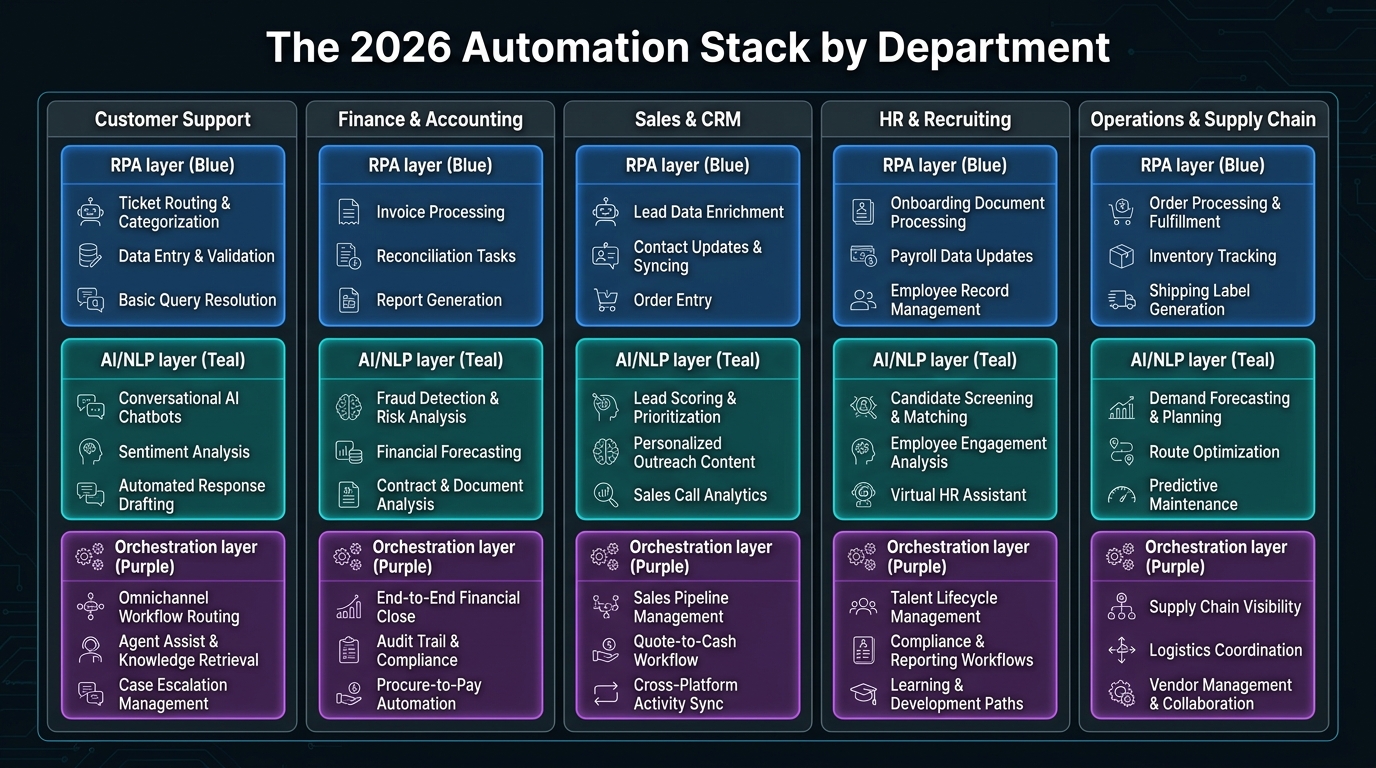
    The 2026 Automation Stack by Department — grid showing RPA, AI/NLP, and orchestration layers for Customer Support, Finance, Sales, HR, and Operations

    Theory is useful. Concrete examples are more useful. Here’s what effective AI automation actually looks like across five key departments in 2026 — not what vendors claim is possible, but what’s demonstrably working in practice.

    Customer Support

    The most mature automation use case in customer support is intelligent ticket triage: an LLM reads incoming support tickets, classifies them by issue type and urgency, extracts relevant customer account data from the CRM, and routes to the appropriate agent queue — with a summary attached so the agent doesn’t start from zero. This saves an average of 3–5 minutes per ticket in triage time, which adds up dramatically at scale.

    Beyond triage, AI draft responses have become standard for tier-1 queries (password resets, order status, basic troubleshooting). An LLM generates a personalized response draft; the agent reviews, adjusts tone if needed, and sends. The key design choice: the agent always sends, not the bot. This keeps quality high and customer relationships intact.

    Avoid automating: complex complaints involving emotional distress, refund negotiations above a threshold, or any interaction where the customer has explicitly requested human contact.

    Finance and Accounting

    Finance has some of the highest-quality automation candidates in any organization: high volume, structured inputs, clear rules, measurable accuracy. Invoice processing (capture, validate against PO, route for approval, update GL) is the flagship use case — mature, well-tooled, and delivering documented ROI across industries.

    Beyond invoices: automated account reconciliation, expense report review and flagging, financial close checklists, cash flow forecasting updates, and vendor statement matching. These are all high-volume, rules-adjacent tasks with structured data sources that lend themselves to reliable AI execution.

    Avoid automating: tax strategy decisions, audit response drafting, any financial statement that requires professional judgment or will be reviewed by external auditors.

    Sales and CRM

    Sales automation’s highest-value use cases are around data hygiene and preparation — not around replacing sales conversations. AI that automatically enriches lead records with company size, technographics, and news triggers saves SDRs significant research time. Automated meeting prep briefs (pulling CRM history, recent interactions, and relevant company news into a one-page summary before each call) are consistently rated as one of the highest-value automation wins by sales teams that use them.

    CRM hygiene automation — detecting and merging duplicate records, flagging contacts with stale information, auto-populating fields from email and calendar data — addresses one of the most chronic frustrations in sales operations without requiring sales reps to change any behavior.

    Avoid automating: actual sales conversations (the relationship damage from unwanted AI interactions is significant), final negotiation stages, and renewal conversations with at-risk accounts.

    HR and Recruiting

    Recruiting automation is effective at the front of the funnel: job posting distribution, application tracking, initial screening questionnaire administration, and interview scheduling. AI resume screening has gained traction, with appropriate caveats — it must be audited regularly for bias, and its decision criteria must be explainable and legally defensible in the jurisdictions where you operate.

    Onboarding automation has strong ROI: automated provisioning checklists, day-one IT setup workflows, 30/60/90-day check-in scheduling, and benefits enrollment reminders. These are high-volume, structured processes that new hires benefit from significantly when they run reliably and on time.

    Avoid automating: offer negotiation, performance improvement conversations, termination processes, or any interaction that involves significant emotional weight or legal sensitivity.

    Operations and Supply Chain

    Operations automation at its most effective looks like predictive rather than reactive processes. Reorder triggers based on inventory velocity rather than static thresholds, automated supplier communication for routine POs, shipment exception alerting, and quality inspection report generation from structured sensor data.

    The distinctive challenge in operations automation is integration breadth: automations often need to span ERP systems, logistics platforms, supplier portals, and warehouse management systems. API availability and data model compatibility between these systems is frequently the limiting factor — which makes data layer investment especially high-value in operations contexts.

    The Automation Debt Problem Nobody Talks About
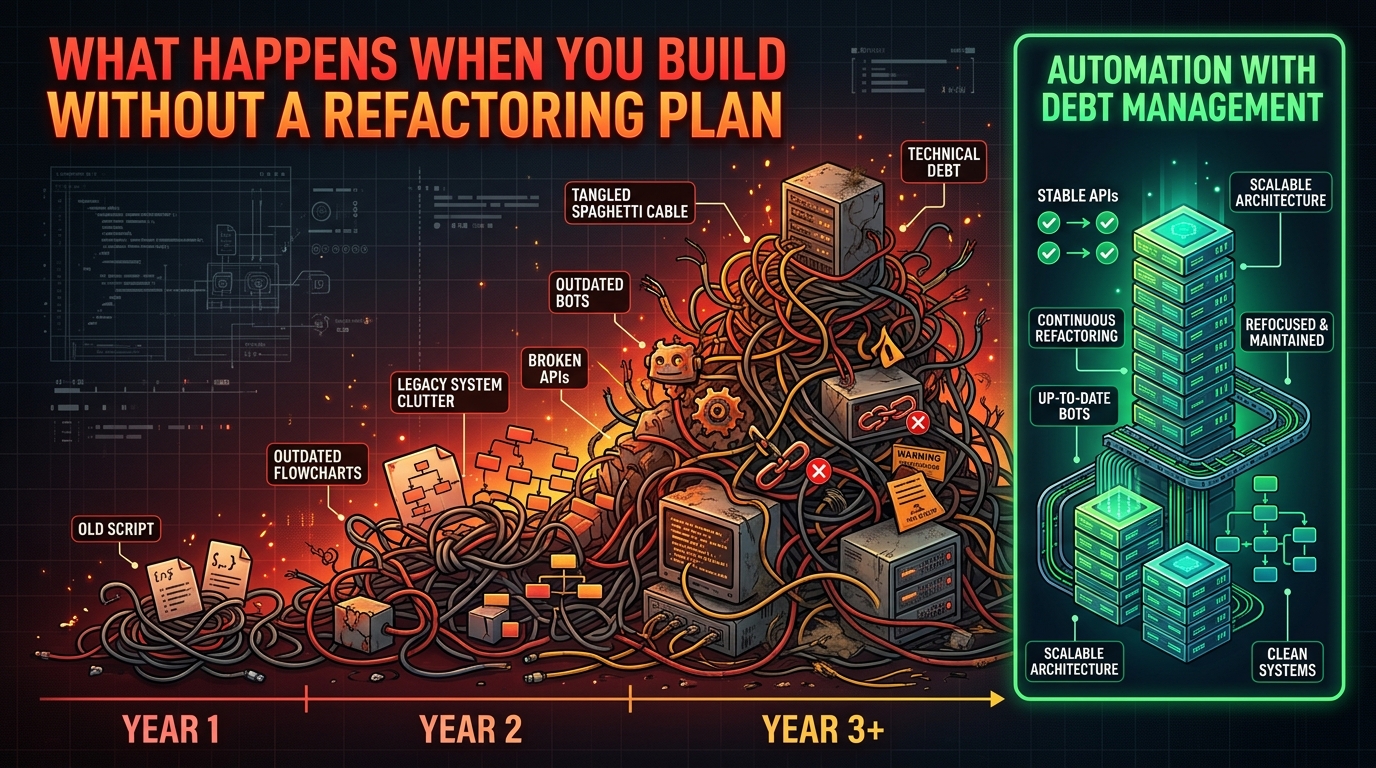
    Visualization of automation debt accumulating over time as tangled legacy automations and broken connections, contrasted with a clean maintained automation stack

    Technical debt is a familiar concept in software engineering. Automation debt is its less-discussed cousin — and it’s accumulating quietly in organizations that have been running automation programs for three or more years without a corresponding investment in maintenance and governance.

    How Automation Debt Accumulates

    Automation debt builds in several predictable ways. Automations that were built for a process that has since changed — but the automation hasn’t been updated to match. Workflows that depend on an API that was deprecated, now jury-rigged with a brittle workaround. Bots built by a contractor who is no longer available, with no documentation, running processes nobody fully understands anymore. Models trained on 2023 data, still making decisions in 2026 without retraining, on a distribution that has shifted significantly.

    Each of these represents debt. And like financial debt, automation debt compounds. A fragile automation that’s patched rather than rebuilt becomes more fragile with each patch. A model that drifts without retraining becomes increasingly inaccurate. At some point, the cost of maintaining the debt exceeds the cost of the original investment — and the automation becomes a liability rather than an asset.

    The Governance Structures That Prevent It

    Debt prevention requires governance from the start. Every automation in production should have a designated owner — a person (not just a team) accountable for its performance and maintenance. It should have documented architecture, including all dependencies, data sources, and integration points. It should have a defined review schedule. And it should have a sunset policy: a pre-agreed set of conditions under which the automation will be decommissioned and rebuilt rather than patched further.

    Automation catalogs — maintained registers of all automations in production, their owners, their performance metrics, and their last review date — are a simple governance tool that dramatically reduces debt accumulation. If you can’t answer “how many automations are currently running in our organization, who owns each one, and when was each one last reviewed,” you have an automation debt problem in progress.

    Building an Automation Roadmap That Survives Budget Cycles

    The final challenge isn’t technical — it’s organizational. Automation programs that survive and grow do so because they’ve built the internal credibility and infrastructure to justify continued investment. Programs that stall do so because they failed to demonstrate value clearly, or because key champions left the organization, or because a failed deployment spooked leadership into pulling back.

    The Credibility Architecture

    Build credibility through documented wins at every stage. The first automation deployed should be one you’re highly confident will succeed — moderate complexity, well-understood process, clear metrics — not the most ambitious thing on the list. A solid, measurable first win creates the internal political capital to tackle harder problems in subsequent phases.

    Document ROI at the automation level, not just the program level. “Our automation program saved $2.3M last year” is less persuasive to a CFO evaluating budget than “the invoice processing automation saved 1,840 hours of AP team time at an average fully-loaded cost of $45/hour, delivering $82,800 in direct labor savings against a build cost of $34,000 — a 143% ROI in year one.” That specificity is what sustains investment through budget cycles and leadership transitions.

    The Portfolio Approach

    Mature automation programs manage their builds as a portfolio: some low-risk, quick-win automations to maintain momentum and credibility; some medium-complexity automations that deliver significant ROI; and a smaller number of ambitious, higher-risk builds that could deliver transformational value if successful.

    This balance prevents two failure modes: the program that only ever pursues safe wins and never delivers step-change impact, and the program that swings for the fences on every build, accumulates failures, and loses executive support. The portfolio approach keeps both the wins coming and the ambitions alive — and it gives leadership a clear narrative about where the program is headed.

    Making the Case to Keep Going

    Automation roadmaps that survive budget cycles share one characteristic: they make the cost of not continuing visible. Quantify the processes that are still manual, the time still being spent, the errors still occurring. The question shouldn’t be “can we afford to invest in automation?” but “can we afford to keep doing this manually?” Framing the decision that way, with real numbers tied to real processes, is what moves automation from a discretionary technology budget line to an operational necessity that no one wants to defund.

    Conclusion: The Discipline That Makes Automation Actually Work

    The gap between organizations where AI automation consistently delivers and those where it consistently disappoints isn’t a gap in ambition, budget, or technology access. It’s a gap in discipline — the methodical, sometimes unglamorous work of auditing before building, sequencing correctly, testing rigorously, designing appropriate human oversight, and maintaining what you’ve built over time.

    The frameworks in this guide don’t make automation easy. They make it reliable. And reliability, not sophistication, is what separates the automation programs that compound in value year over year from the ones that become cautionary tales.

    Key Takeaways

    • Audit before you automate. Score every candidate process on structural consistency, decision complexity, volume, and error cost before deciding what to build first.
    • Sequence correctly. Process standardization and data readiness must precede the AI execution layer. Skipping foundational steps doesn’t save time — it creates rework.
    • Match the AI type to the task. Rules engines for deterministic logic. ML models for learnable patterns with historical data. LLMs for language tasks. RPA for legacy system integration. Don’t use a sledgehammer where a scalpel will do.
    • Stress-test before launch. Map edge cases, run in shadow mode, document failure modes and their mitigations. A month of parallel running is worth more than six months of post-launch firefighting.
    • Design human oversight deliberately. Decide in advance which level of human involvement is appropriate for each automation, and build that oversight into the workflow formally — not as an optional extra.
    • Monitor continuously, not just at launch. Track STP rate, exception categories, error cost, and model drift on defined cadences. The automations that keep working are the ones that keep getting reviewed.
    • Manage automation debt. Every automation in production needs an owner, documentation, a review schedule, and a sunset policy. Ungoverned automations become liabilities.
    • Build the credibility architecture. Start with wins you’re confident in, document ROI at the automation level, and manage your portfolio across risk tiers. That’s how you sustain investment — and how automation programs survive long enough to actually matter.
  • The Organizational Rewiring: How AI Agents Are Redrawing Who Owns What Inside Your Business

    The Organizational Rewiring: How AI Agents Are Redrawing Who Owns What Inside Your Business

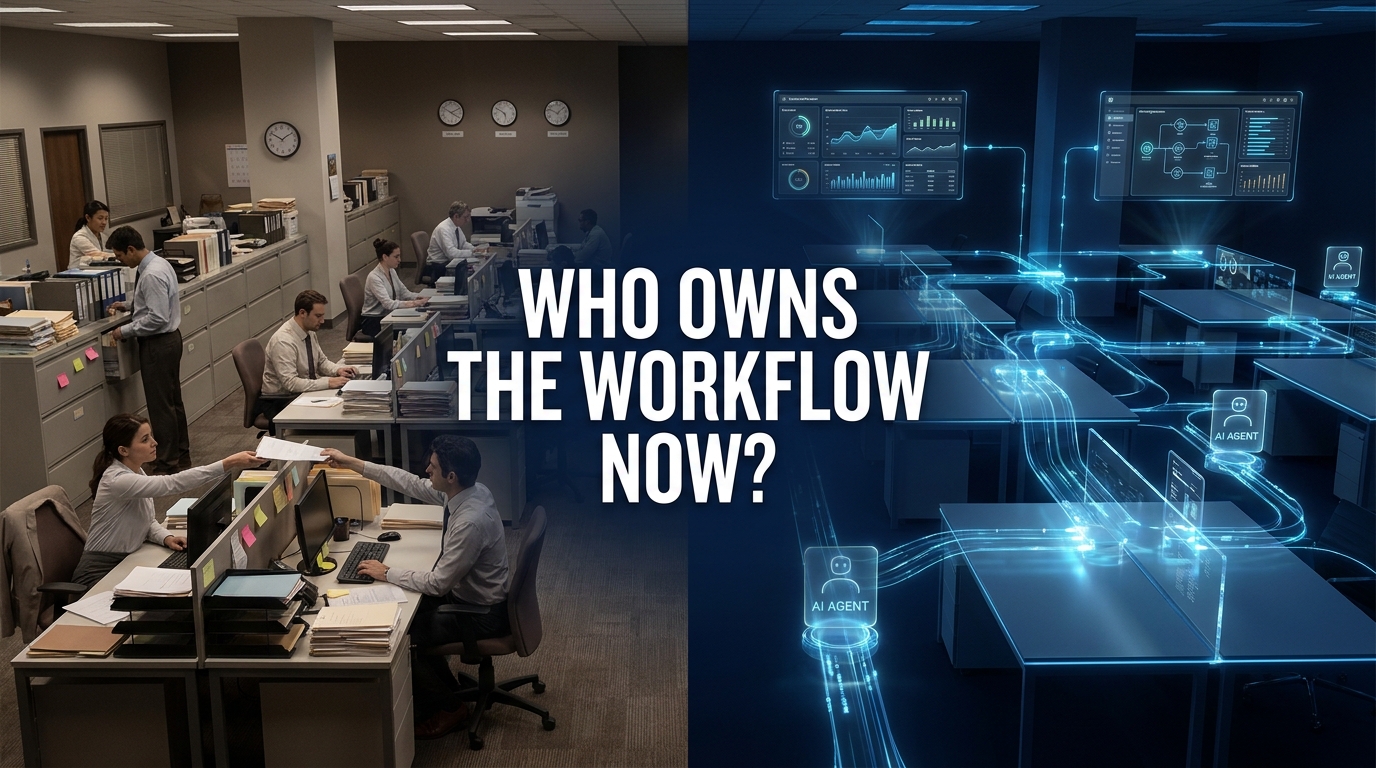
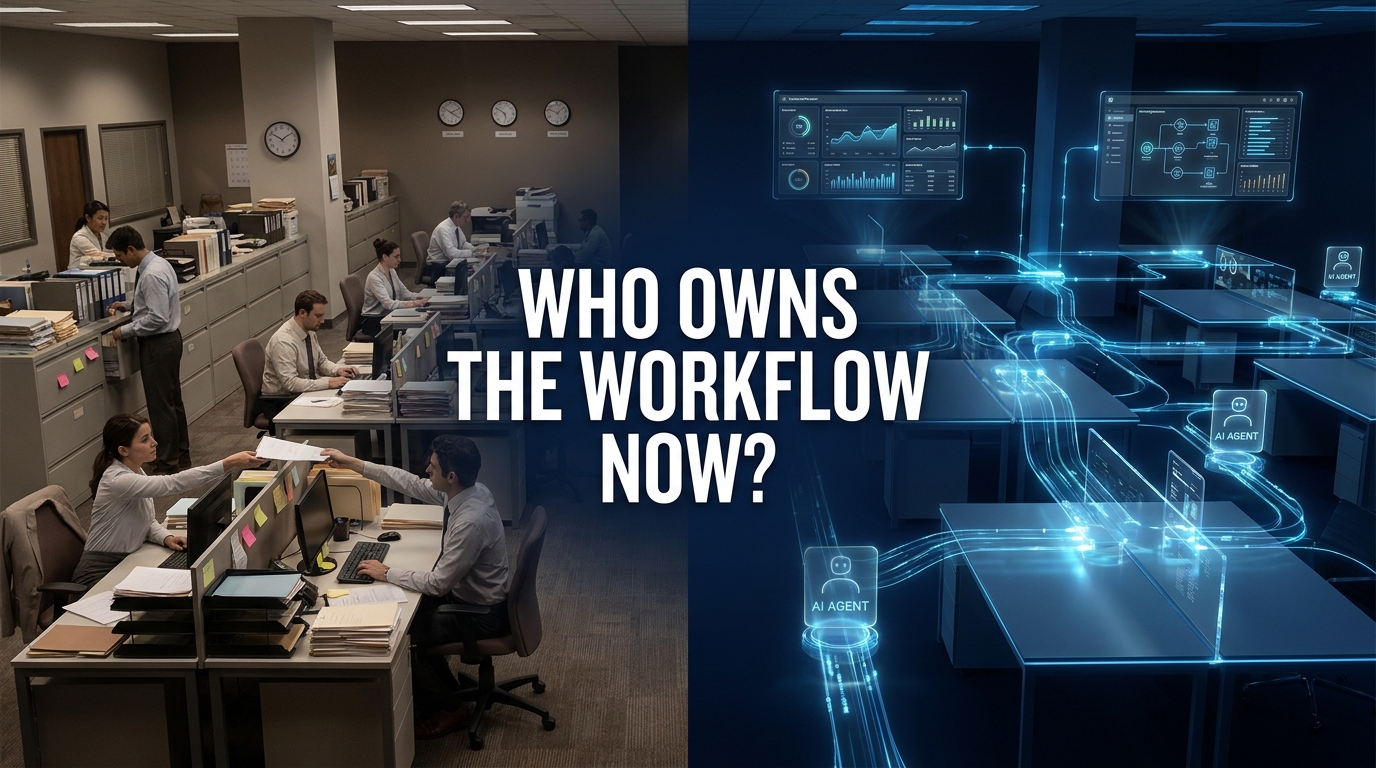
    Split view showing traditional human-run office workflows on the left versus AI agent-powered automated workflows on the right, with the question 'Who Owns the Workflow Now?'

    The conversation about AI agents in the enterprise has been dominated by two narratives. The first: agents are automating tasks, saving hours, cutting costs. The second: agents are dangerous, unreliable, and not ready for prime time. Both miss the more fundamental shift happening right now inside thousands of organizations.

    AI agents are not just doing work faster. They are taking ownership of entire workflows — the multi-step, cross-system, decision-laden processes that used to be orchestrated entirely by humans. That is a different kind of change. It is not about efficiency. It is about who, or what, is responsible for getting something done from start to finish.

    By mid-2026, roughly 40% of enterprise applications are expected to embed task-specific AI agents according to Gartner projections. Around 79% of enterprises report adopting AI agents in some form. Yet only 11–15% of those pilots have actually reached production at scale. The gap between experimentation and real operational ownership is wide — and the organizations closing that gap are not doing it through better models or faster hardware. They are doing it by redesigning who owns what inside their organizational structure.

    This post is about that redesign. Not the tools, not the models, not the vendor landscape — but the organizational logic of how work ownership is shifting, where the fault lines are forming, and what enterprises that are succeeding in this transition are actually doing differently.

    From Task Execution to Workflow Ownership: What Actually Changed

    The distinction between task execution and workflow ownership is not semantic. It is the difference between a copilot that helps a human write an email and an agent that receives an inbound customer complaint, queries the order management system, determines eligibility for a refund based on policy rules, initiates the refund, sends a confirmation, updates the CRM, and flags the case for quality review — all without a human touching it.

    That second scenario is what “workflow ownership” looks like. The agent does not assist. It runs the process. It coordinates systems. It makes decisions within defined boundaries. And it hands off to a human only when a genuine exception or high-stakes judgment call requires it.

    The Shift From Prompt-and-Response to Goal-Directed Execution

    Early enterprise AI deployments were predominantly prompt-based. A user asks a question, the system returns an answer. Useful, but still human-directed at every step. The user still owned the workflow — the AI just helped with individual moments inside it.

    Agentic AI changes the architecture. Instead of responding to prompts, agents receive goals. “Process all incoming invoices received before 5pm.” “Monitor this customer segment for churn signals and trigger outreach when threshold is met.” “Review all open support tickets older than 48 hours and escalate those that match these criteria.” The agent interprets the goal, breaks it into steps, calls the tools it needs, handles intermediate decisions, and reports back on outcomes.

    This is a fundamental transfer of workflow orchestration authority. Organizations accustomed to having a human responsible for every handoff between systems and steps are now asking whether that responsibility can be transferred — and under what conditions.

    Why This Shift Is Happening Now

    Three converging factors explain the timing. First, large language models have become capable enough to reason about multi-step tasks with sufficient reliability for structured business processes. Second, the tooling layer — API integrations, function calling, memory systems, orchestration frameworks — has matured to the point where connecting agents to real enterprise systems is achievable without rebuilding everything from scratch. Third, and perhaps most importantly, competitive pressure is forcing organizations to act. When a competitor’s AI agent processes 10,000 invoices overnight while yours requires a team of eight people doing the same work over two weeks, the business case is no longer a spreadsheet exercise.

    The result is a market-wide shift from “AI as assistant” to “AI as workflow owner” — and it is happening faster in some functions than others.

    Where Agents Have Actually Taken Root: A Department-by-Department Reality Check

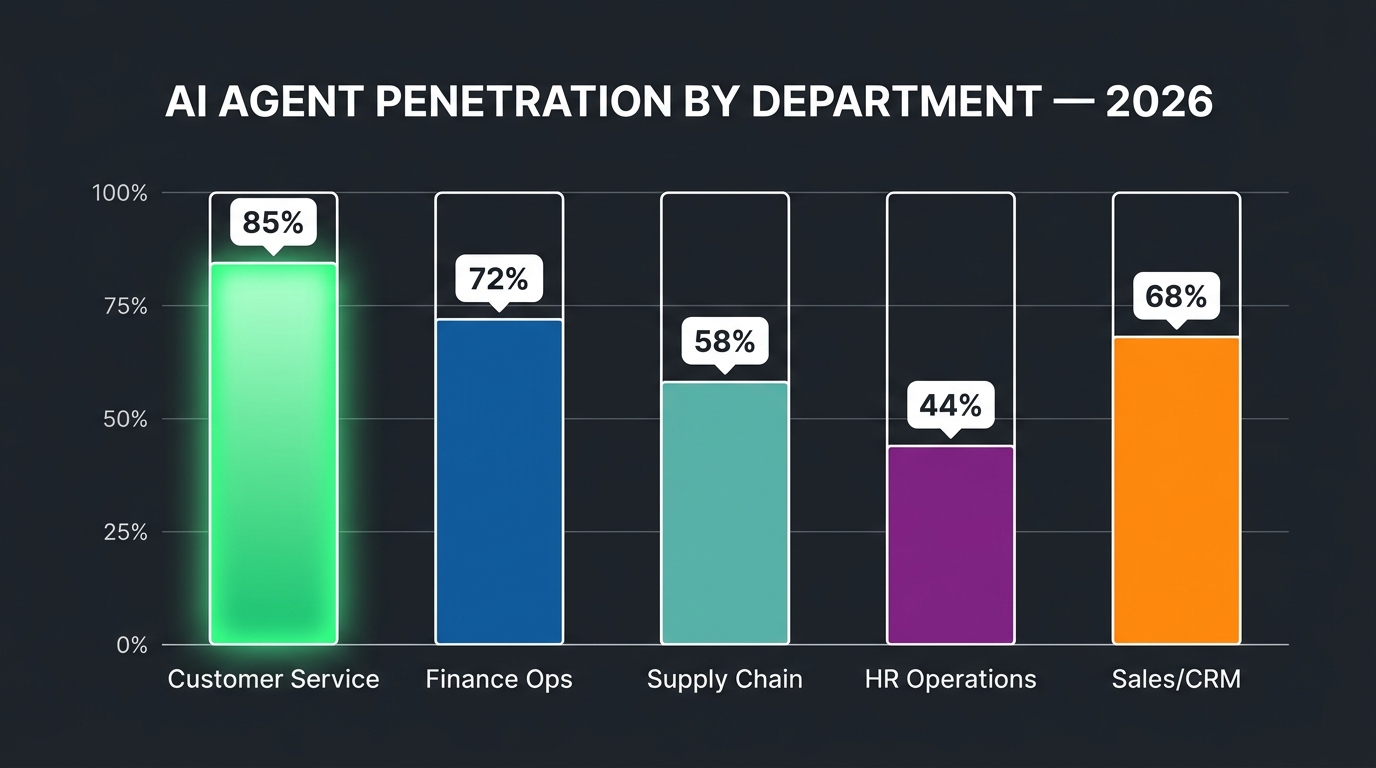
    Bar chart showing AI agent penetration by business department in 2026: Customer Service leads at 85%, followed by Finance Ops, Sales/CRM, Supply Chain, and HR Operations

    Not all departments are equal in this transition. The depth of AI agent penetration varies significantly based on how well-structured the underlying workflows are, how available and clean the relevant data is, and how much organizational tolerance exists for autonomous action in that function.

    Customer Service: The Deepest Penetration

    Customer service has the most mature, broadest AI agent deployment of any enterprise function. Platforms like Salesforce Agentforce, Zendesk AI, Intercom Fin, and others have moved well past chatbot functionality into agents that handle end-to-end ticket resolution. In practice, this means an agent that can receive a customer query, access account history, determine what action is warranted, take that action, communicate the outcome to the customer, and close the ticket — without human intervention for the majority of cases.

    The economics are compelling. Contact centers typically see agents resolve 60–80% of inbound cases autonomously, reserving human agents for escalations that require genuine empathy, complex judgment, or regulatory sensitivity. The productivity gain is not incremental. For high-volume operations, it represents a structural cost reduction that changes the entire unit economics of the support function.

    Critically, the success in customer service was built on a specific advantage: the workflows were already heavily documented, the decision rules were largely explicit (refund policies, SLA tiers, escalation criteria), and the data systems (CRM, order management, ticketing) were already integrated. Agents did not have to improvise — they had the scaffolding to execute against.

    Finance Operations: The Fastest-Moving Back-Office Function

    Finance is experiencing the most rapid shift toward agent ownership of any back-office function. Invoice processing, accounts payable, reconciliation, expense management, and financial reporting are all seeing significant automation through AI agents — not just rule-based RPA, but agents capable of handling the unstructured exceptions that traditional automation always choked on.

    The benchmark data is striking. Enterprises using AI agents for invoice processing report 70–90% reductions in processing time per invoice. Organizations running agents on accounts reconciliation workflows report reducing cycle times from multiple days to under four hours. The core breakthrough is that modern AI agents can handle the messy middle of financial workflows: the vendor invoice that does not match the purchase order exactly, the expense report that requires checking multiple policy criteria, the reconciliation item that needs a human-readable explanation before it can be escalated.

    Finance agents are also moving into financial forecasting support — not replacing the CFO’s judgment, but aggregating data across systems, running preliminary analyses, and presenting structured options with supporting data that used to require significant analyst time to prepare.

    Supply Chain and Procurement: Rapidly Catching Up

    Supply chain workflows are structurally well-suited for AI agents — high volume, rule-heavy, multi-system, with clear optimization objectives and measurable outcomes. Agents are being deployed across demand forecasting, purchase order processing, supplier communication, logistics coordination, and inventory management.

    What makes supply chain interesting from an ownership perspective is the increasing deployment of agents that span organizational boundaries. An agent managing procurement does not just operate inside one company’s systems — it communicates with supplier APIs, monitors external signals like lead time data or commodity prices, and adjusts internal plans accordingly. This inter-organizational workflow ownership is a frontier that is just beginning to be explored at scale.

    Sales and CRM: Agent-Augmented, Not Agent-Owned

    Sales workflows have significant AI agent activity, but the ownership pattern is different. In high-touch B2B sales, agents augment rather than replace the human. They qualify leads, enrich prospect data, draft outreach sequences, schedule meetings, update CRM records, and surface buying signals — but the relationship and the close remain human-led. The exception is high-volume transactional sales, where end-to-end agent handling of the full cycle is increasingly viable.

    HR: The Cautious Adopter

    HR functions are adopting AI agents more slowly, primarily due to sensitivity around employment decisions and the regulatory complexity of labor law in different jurisdictions. Where agents have taken root is in clearly process-bound HR workflows: benefits enrollment administration, onboarding document processing, leave request handling, and first-level employee query resolution. Anything touching hiring decisions, performance assessment, or compensation is subject to much stricter human oversight requirements — and appropriately so.

    The Decision Rights Problem Nobody Is Talking About

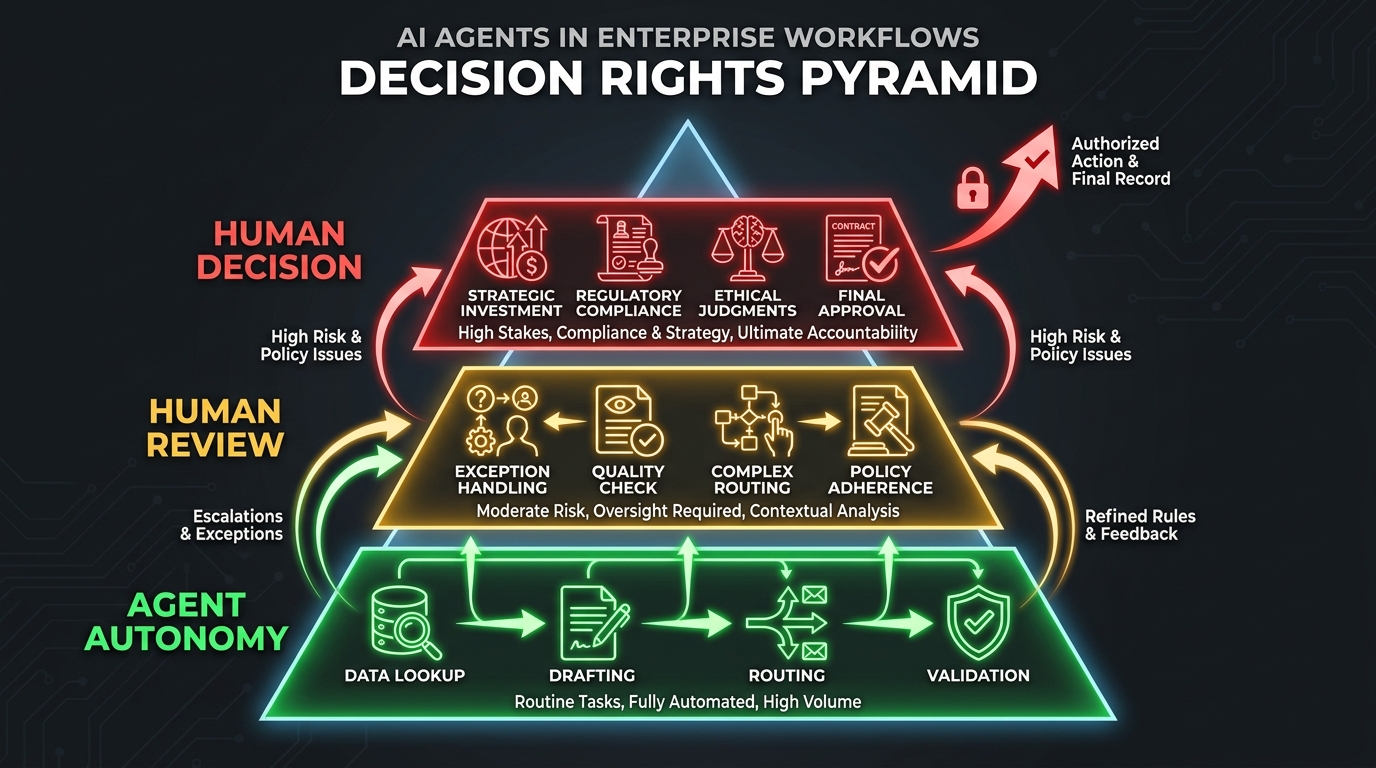
    Decision Rights Pyramid for AI agents: bottom tier shows Agent Autonomy for routine tasks, middle tier shows Human Review for moderate-risk actions, top tier shows Human Decision for high-stakes choices

    Here is the problem that most organizations deploying AI agents are not solving cleanly, and it is responsible for more project failures than poor model selection, bad data pipelines, or inadequate tooling combined.

    When an AI agent owns a workflow, who is responsible for the decisions that workflow produces?

    This is not a philosophical question. It is an operational one. If an AI agent processes a refund incorrectly, who is accountable? If an agent makes a procurement commitment on behalf of the company, who authorized it? If an agent sends a customer communication that misrepresents the company’s position, who is responsible for the compliance violation?

    Traditional organizations have clear, if imperfect, answers to these questions because humans own every material decision. A procurement manager approves a purchase order. A finance director signs off on a refund above a threshold. A legal reviewer checks a customer communication before it goes out. When agents enter the picture, these ownership chains break down — and most organizations have not rebuilt them deliberately.

    The Three Decision Rights Failures

    Across the pattern of enterprise AI agent deployments, three decision rights failures recur consistently.

    The assumption of equivalence. Organizations assume that an agent making a “routine” decision is the same as no decision being made — that automating a low-stakes action removes it from the governance framework. It does not. Even routine decisions, when executed at scale by an agent, can produce significant aggregate consequences. An agent that slightly misapplies a discount policy 10,000 times a day creates a very different problem than a human applying it incorrectly once.

    The accountability vacuum. When something goes wrong with an agent-run workflow, organizations discover that no human was formally assigned responsibility for that process outcome. The agent does not have accountability. The engineer who built it does not typically own business outcomes. The process owner who used to run the workflow manually was “freed up” when the agent took over. Nobody owns the failure. This is not a hypothetical scenario — it has played out repeatedly in early production deployments.

    The escalation design gap. Agents are commonly deployed with escalation paths that are either too narrow (the agent escalates almost nothing, creating unchecked autonomy) or too broad (the agent escalates so frequently that the human oversight is swamped and becomes rubber-stamping). Effective decision rights design requires precision: specific triggers, specific escalation channels, specific response time expectations, and specific consequences for when escalations are not resolved.

    What Deliberate Decision Rights Design Looks Like

    The organizations getting this right are building explicit decision rights frameworks before deploying agents, not after. They define three categories for every agent workflow: decisions the agent can make autonomously, decisions the agent can propose but a human must confirm, and decisions the agent cannot make at all and must route immediately. These are not default settings in any platform — they are deliberate design choices that require deep understanding of the workflow, the risk profile of each decision type, and the regulatory context.

    Deloitte’s 2026 Global Human Capital Trends research specifically calls out “decision rights modernization for AI” as a core organizational design discipline — defining override privileges, escalation paths, and consensus rules so that humans and agents coordinate who decides, when, and on what basis. Organizations treating this as a technology configuration problem rather than an organizational design problem are consistently underperforming those who treat it as a governance priority.

    Why Legacy Process Design Is an Agent Killer

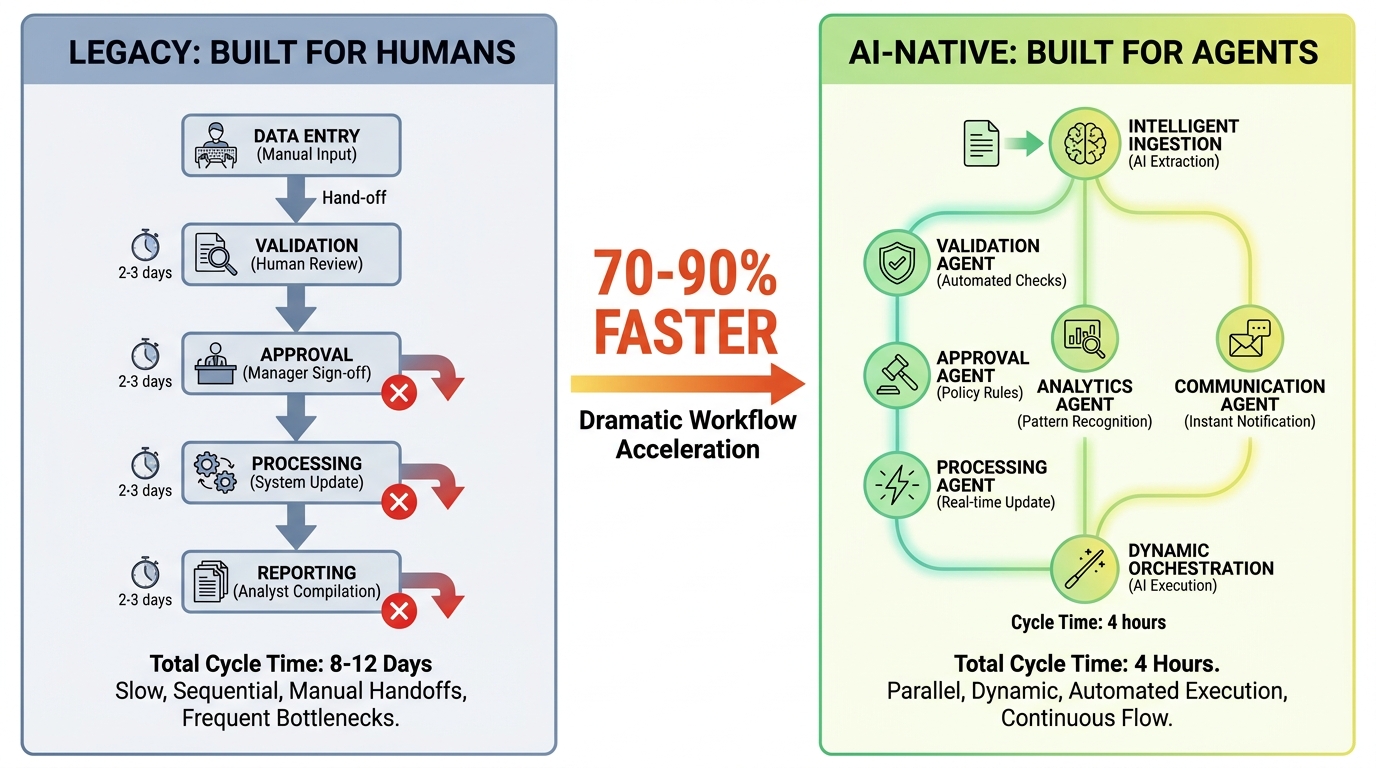
    Comparison of Legacy process design with many manual bottlenecks versus AI-native workflow design showing parallel agent tasks running 70-90% faster

    The single most predictable cause of enterprise AI agent project failure is not model quality, data availability, or technology integration. It is deploying an AI agent into a process that was designed to be run by humans.

    This sounds obvious in retrospect but is routinely ignored in practice. An organization identifies a workflow they want to automate. They document the existing process. They configure an agent to follow those steps. And then they wonder why the agent produces worse outcomes than the human team it replaced.

    The issue is that human-designed processes are full of implicit knowledge, informal coordination, and compensating behaviors that never appear in the process documentation. When a human accounts payable clerk sees an invoice that does not match a purchase order, they do not follow a rigid decision tree — they draw on institutional knowledge, pick up the phone, look at the vendor’s history, make a judgment call. The process documentation says “escalate exceptions.” The reality is that humans resolve most of those exceptions through informal channels that the documentation does not capture.

    The “Automated Failure” Trap

    When an AI agent executes a poorly designed process faster, it does not improve the process — it amplifies its failures. A workflow that produces exceptions because human compensating behaviors are masking structural flaws will produce more exceptions when an agent runs it, not fewer. The agent executes the documented process with fidelity. The undocumented human patches disappear. The result is what practitioners increasingly call “automated failure” — the same broken process, running at machine speed.

    The research data confirms this pattern starkly. The most commonly cited failure points in enterprise agentic AI projects are not model quality or integration complexity — they are upstream data readiness, legacy workflow design, and governance sequencing gaps. These are organizational and process problems, not technology problems.

    What AI-Native Process Design Requires

    AI-native process design starts from a different premise: not “how do we automate this process?” but “if we were designing this process for an agent to own, what would it look like?”

    That reframe has practical implications. AI-native workflows make all decision rules explicit — the informal patches become documented policies. They restructure data flows so agents receive structured inputs, not the ambiguous text-heavy handoffs that humans navigate intuitively. They redesign the exception taxonomy so that genuine exceptions that require human judgment are clearly distinguishable from routine complexity that an agent can handle with the right information.

    Perhaps most importantly, AI-native process design separates the sequential, gate-based structure of human workflows — where one step cannot begin until a human completes the previous one — from parallel, concurrent architectures where multiple agent actions can proceed simultaneously. A process that took three days with humans not because the work was slow, but because humans had to pass approvals sequentially and wait for each other, can run in four hours when those sequencing constraints are removed.

    Organizations that are seeing 70–90% cycle time reductions from AI agents are almost always doing this redesign work first. Those seeing marginal improvements are almost always skipping it.

    Tiered Autonomy: The Governance Architecture That Actually Works

    The governance question for AI agents is not binary. It is not “fully autonomous” versus “human-in-the-loop for everything.” Organizations that try to implement either extreme consistently fail — the fully autonomous deployment creates unchecked risk, and the “human approves everything” approach negates most of the efficiency gain and drowns human reviewers in a volume they cannot meaningfully process.

    The governance model that is working in practice is tiered autonomy: a structured framework that assigns different levels of human involvement based on the risk profile of each decision type within a workflow.

    The Three Tiers in Practice

    Tier 1 — Full Agent Autonomy. Low-risk, high-volume, fully reversible actions that the agent executes without human review. Examples: querying data systems, generating internal drafts, routing tickets to queues, logging records, sending standard notifications based on confirmed triggers. The key criteria for Tier 1 are reversibility and materiality — actions that can be undone if wrong and that carry limited individual impact even at scale.

    Tier 2 — Asynchronous Human Review. Moderate-risk actions where the agent proposes a course of action and a human confirms within a defined time window before execution. Examples: customer refunds above a threshold, vendor payments outside normal parameters, outbound customer communications with legal implications, configuration changes in production systems. The agent prepares everything — the rationale, the supporting data, the recommended action — and the human’s job is to confirm or redirect, not to re-do the analysis. This design keeps humans meaningfully in the loop without requiring them to be involved in real-time execution.

    Tier 3 — Mandatory Human Decision. High-risk actions that the agent cannot execute and cannot propose without a full human review and explicit authorization. Examples: employment decisions, legal commitments above defined value thresholds, regulatory filings, public communications on sensitive topics, security-classified system changes. The agent’s role here is to prepare and organize the information that supports the human decision, not to make the decision or influence the outcome through its framing.

    Risk Tiering Is a Living Document, Not a Static Configuration

    One of the most important operational insights from organizations running mature AI agent governance programs is that risk tiers need to be revisited regularly. As agents demonstrate track records in production — as their error rates become quantifiable, their failure modes become understood, and their behaviors in edge cases become documented — the appropriate tier for specific decision types may shift. A decision type that required Tier 2 review for the first three months may earn Tier 1 status after accumulating a statistically significant track record with minimal errors. Conversely, a Tier 1 decision that produces an unexpected failure pattern may be temporarily elevated to Tier 2 pending investigation.

    This dynamic recalibration is how organizations build justified confidence in their agents over time, rather than treating trust as an all-or-nothing proposition.

    Multi-Agent Orchestration: The New Infrastructure Bottleneck

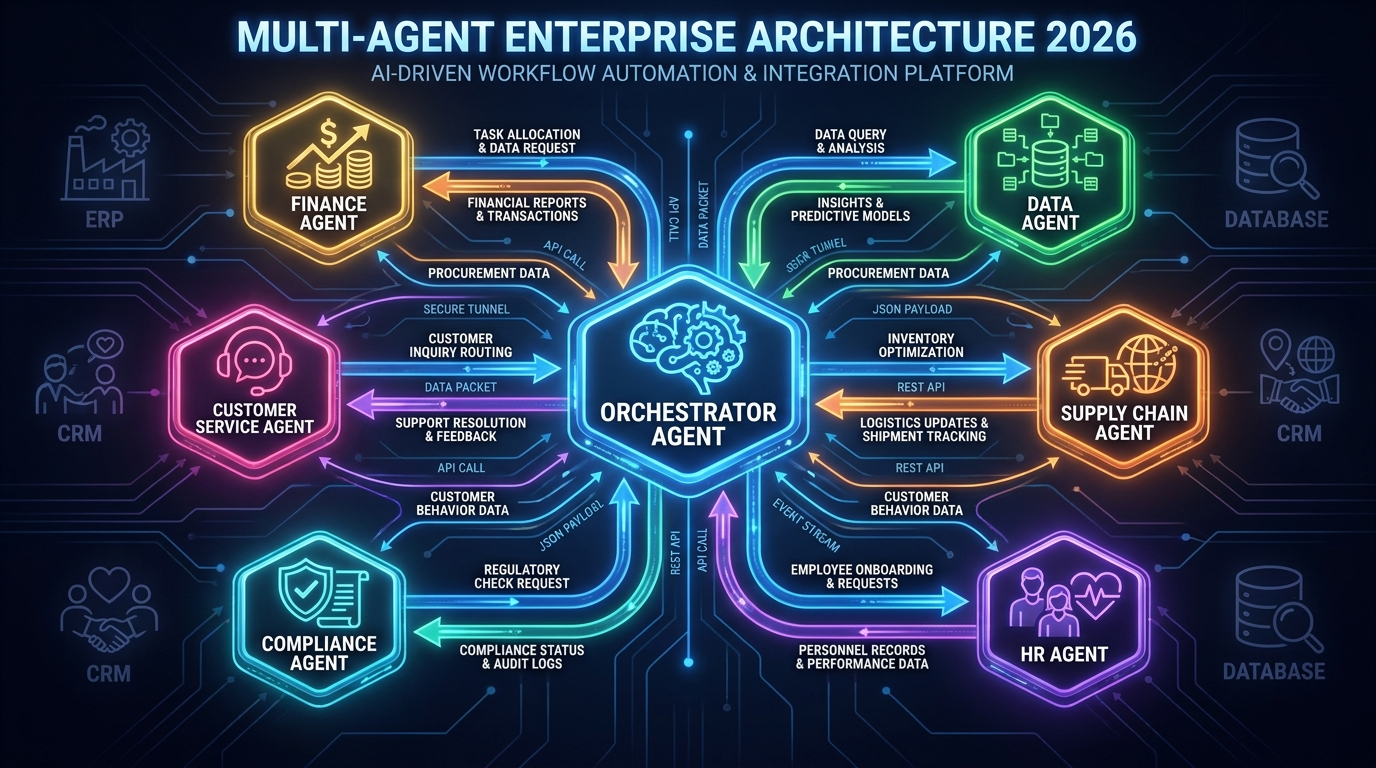
    Multi-agent enterprise architecture showing a central orchestrator agent connected to six specialized agents including Finance, Customer Service, Compliance, Data, Supply Chain, and HR agents

    Single-agent deployments solve isolated workflow problems. The genuinely transformative deployments — the ones that are beginning to reshape how businesses operate at a structural level — involve multiple agents coordinating across different systems, functions, and data domains. And that coordination layer is where most of the hard problems live in 2026.

    Databricks research published in 2026 reported over 300% growth in multi-agent workflow deployments as enterprises moved from pilots into production. Yet the same research showed that the primary barriers to scaling those deployments were not model performance issues — they were orchestration, observability, and cross-agent governance challenges.

    What Multi-Agent Orchestration Actually Involves

    In a multi-agent architecture, a primary orchestrating agent receives a high-level goal and decomposes it into sub-tasks that are assigned to specialized sub-agents. The customer service agent handles the interaction. The data agent queries the relevant systems. The compliance agent checks the proposed action against policy. The finance agent processes the transaction. The orchestrator integrates their outputs and determines what happens next.

    The technical challenges of this architecture are significant. Agents need to communicate state reliably — if one agent’s action changes the state of a system, every agent working in that context needs to know about it. Failures need to be handled gracefully — if one sub-agent fails or returns an uncertain result, the orchestrator needs to handle that uncertainty appropriately rather than proceeding on flawed assumptions. Costs need to be tracked — multi-agent systems can consume significant compute resources, and runaway agent loops (where agents call each other in cycles that never resolve) are a real production risk.

    The Observability Gap

    One of the most practically significant challenges in multi-agent production deployments is observability — the ability to understand what an agent system actually did, why it made each decision, and where failures originated when something goes wrong.

    In a single-agent deployment, tracing failures is relatively manageable. In a five-agent system where each agent is calling multiple tools, accessing multiple data sources, and making multiple intermediate decisions, the trace of a single workflow execution can involve hundreds of individual steps. When that workflow produces a wrong outcome, identifying which agent made which incorrect decision, based on what information, is not trivial. It requires purpose-built observability tooling — agent-specific logging and tracing systems that capture not just what happened but the intermediate reasoning that led to each action.

    Organizations that are succeeding in multi-agent production deployments are investing in this observability infrastructure before scaling. Those that skip it find themselves unable to diagnose failures reliably, which means they cannot improve agent behavior systematically or satisfy audit requirements when issues occur.

    Vendor Lock-In as a Strategic Risk

    The orchestration layer has also become a significant vendor lock-in risk. Most enterprise AI agent platforms — Salesforce Agentforce, ServiceNow AI Agents, Microsoft Copilot Studio, and others — provide proprietary orchestration mechanisms that are not interoperable. An enterprise that builds a multi-agent workflow on one platform’s orchestration layer faces significant migration costs if it needs to change vendors or integrate agents built on different platforms.

    Forward-looking architecture decisions in 2026 are therefore prioritizing standards-based integration patterns, abstraction layers between agents and their orchestration infrastructure, and modular agent designs that can be rehosted if the underlying platform changes. This is a more complex initial build, but it preserves strategic flexibility as the vendor landscape continues to consolidate and shift.

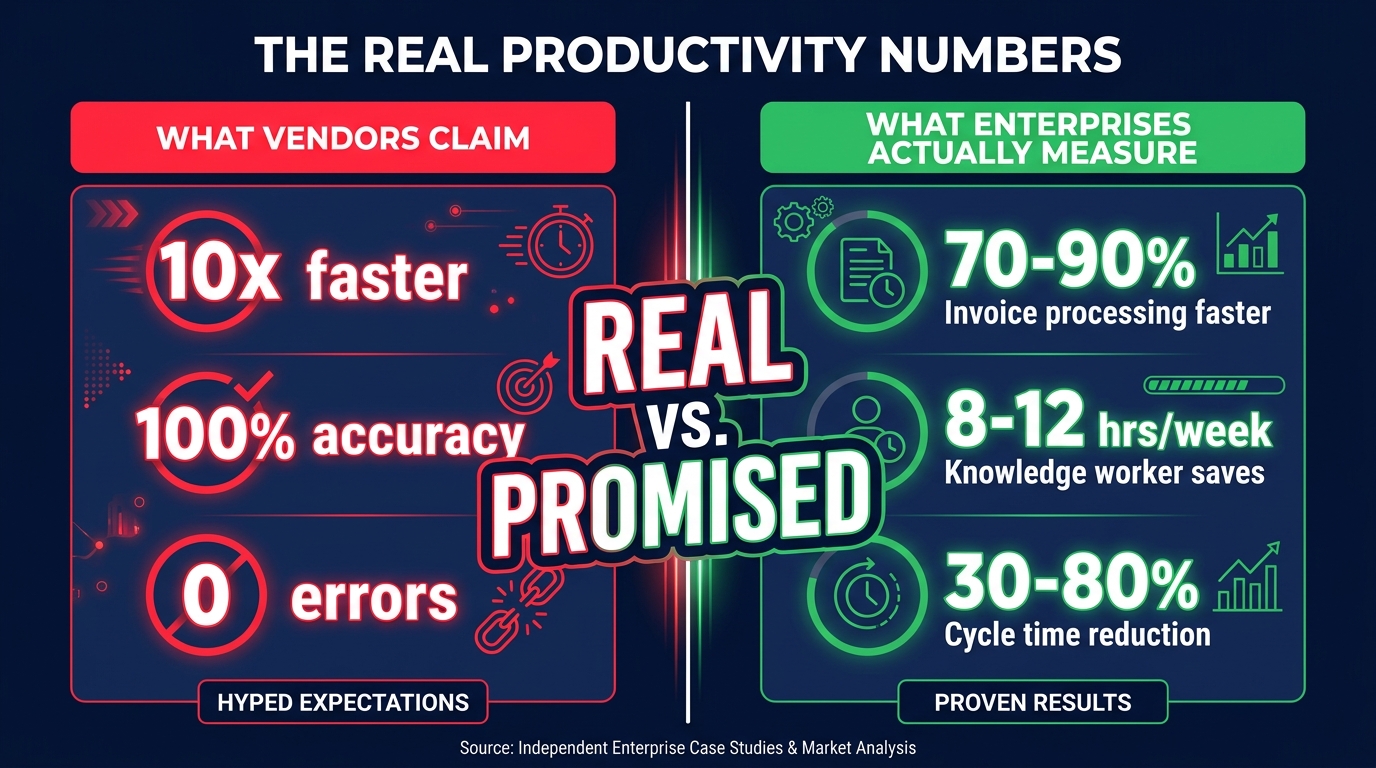
    The Real Productivity Numbers vs. the Marketing Claims

    Comparison chart showing vendor productivity claims versus what enterprises actually measure with AI agents in 2026, highlighting the gap between promised and real results

    Enterprise technology has a long history of productivity claims that look spectacular in case studies and disappoint in production. AI agents are no exception, but the picture is more nuanced than either the enthusiast or the skeptic position suggests. There are real, significant productivity gains in specific contexts — and there is genuine exaggeration in others.

    Where the Numbers Are Real

    The most credible, consistently replicated productivity gains from AI agents in enterprise workflows cluster in specific types of tasks:

    High-volume, rule-structured document processing. Invoice processing, contract review, onboarding document verification, expense report processing. Documented cycle time reductions of 70–90% are consistent and credible in this category because the baseline process is slow, the work is repetitive, and errors are measurable. An organization processing 50,000 invoices a month is not reporting a 70% cycle time reduction based on a 20-invoice pilot — they have statistically meaningful data.

    Multi-channel customer query resolution. Organizations running AI agents on first-line customer support reliably report 60–80% autonomous resolution rates for structured query types. The productivity math is straightforward: if an agent handles 70% of the volume that previously required a human agent, and the agent’s accuracy rate on that 70% is 95%+, the economics are clearly positive even accounting for the cost of managing the remaining 30% with greater human attention.

    Knowledge worker research and synthesis tasks. Research consistently shows that knowledge workers using AI agents for information gathering, synthesis, and structured output generation save 8–12 hours per week. This finding is robust across multiple independent studies and appears not to be heavily dependent on the specific domain or industry.

    Where the Numbers Are Inflated

    The productivity claims that are most frequently overstated fall into a different pattern:

    End-to-end process ownership claims that omit the human work still required. An agent “owning” an end-to-end workflow often means the agent handles 70–80% of the steps, with humans still engaged in a meaningful portion of the exceptions, edge cases, and quality reviews. The marketing claim presents this as full automation. The operational reality includes a restructured human role that is less immediately visible but still resource-intensive.

    Pilot-to-production extrapolations. A common pattern is a controlled pilot that operates on clean, pre-screened data and straightforward cases — which produces impressive metrics — followed by a production deployment that encounters the full messiness of real data and real edge cases, which produces markedly inferior performance. The cited figures are often from the pilot phase.

    ROI calculations that exclude implementation and maintenance costs. Agent deployments require ongoing tuning, data pipeline maintenance, monitoring, and governance activities. These are real costs that are frequently excluded from the headline ROI figures in vendor case studies. A workflow that saves $500,000 annually in direct labor may require $200,000 in ongoing maintenance and oversight — still a positive ROI, but not the 5× figure the initial headline suggests.

    The Role Redesign Imperative: What Humans Do in an Agent-Run Workflow

    A human professional reviewing strategic dashboards and exception alerts on holographic screens while AI agents run automated workflows, showing the new human role as judgment-focused rather than execution-focused

    When an AI agent takes ownership of a workflow that a human previously owned, what does the human do? This question is being answered badly in most enterprises right now — either by not asking it at all (the human’s role evaporates and they are simply redeployed elsewhere with no structured transition) or by defining the human role reactively as “fix what the agent breaks.”

    Neither answer produces a sustainable operating model. The organizations building durable agent-integrated operations are defining the post-agent human role deliberately, along three distinct dimensions.

    Exception Judgment: The Cases Agents Cannot Handle

    When agents own workflows, human work concentrates in the genuinely hard cases — situations that fall outside the decision rules, involve unusual context, require empathy or relationship knowledge, or carry regulatory implications that require accountable human sign-off. These are not the mundane exceptions that human workers spent most of their time on previously. They are the genuinely complex situations that require experience, judgment, and professional accountability.

    This means that human roles in agent-integrated workflows tend to require higher competency, not lower. The routine work disappears. What remains demands more. Organizations that staff the “exception handler” role with their least experienced people, because it seems like a residual role, consistently find their exception queues degrading in quality and their agents failing to improve because the feedback loop that depends on good human judgments on exceptions is broken.

    Intent Setting: Defining What Agents Are Trying to Achieve

    AI agents execute toward goals. Someone has to define those goals — and more importantly, update them as business conditions change. The human role of “intent setter” — determining what outcomes the agent is optimizing for, what constraints apply, and when the objectives need to change — is one of the most valuable and least well-understood roles in agent-integrated operations.

    This is not a technical role. It requires deep business knowledge, strategic clarity, and an understanding of how the agent’s behavior connects to business outcomes. When a customer service agent is optimized for resolution speed and begins making customers feel rushed, someone needs to recognize that the objective needs adjustment — and have the authority to make that adjustment. That is an intent-setting function, and it needs to be explicitly assigned to a person with both the knowledge and the authority to exercise it.

    Governance and Accountability: Owning the Outcomes

    As discussed in the decision rights section, agent workflows need human accountability for their outcomes — not for every individual action, but for the aggregate performance and compliance of the workflow over time. This “workflow steward” role monitors key performance indicators, investigates anomalies, ensures the agent’s behavior remains compliant with evolving policies and regulations, and owns the escalation when something materially goes wrong.

    The workflow steward is not the engineer who built the agent and is not the operations manager who ran the process before. It is a new role that combines operational knowledge with enough technical literacy to interpret agent performance data and sufficient organizational authority to make consequential decisions about agent behavior.

    Building the Human-AI Handoff Architecture

    The mechanics of how work transitions between agents and humans — and back again — is where good governance theory meets operational reality. Poor handoff design is one of the most common sources of value destruction in otherwise well-conceived AI agent deployments.

    Designing for Asymmetric Context

    When an agent escalates to a human, the human typically does not have the context the agent has been accumulating throughout the workflow. The agent has queried multiple systems, considered multiple conditions, run multiple evaluations. The human sees the escalation notification. This asymmetry creates an information gap that, if not designed against, produces poor human decisions on escalated cases.

    High-performing handoff architectures solve this by packaging the escalation. When an agent escalates to a human, it delivers not just the item requiring a decision, but a structured summary of the relevant context: what triggered the escalation, what the agent’s recommended action is, what information the agent considered, what options are available and their likely consequences, and what the agent will do next based on each decision path. The human’s cognitive load is minimized. The decision they are asked to make is scoped clearly. The time required is reduced.

    This design principle — “never make the human reconstruct what the agent already knows” — dramatically improves both the quality of human decisions on escalated cases and the human’s experience of working alongside an agent. The resistance to agent-integrated workflows that comes from human team members is frequently not about the agent doing their job — it is about being given inadequate context to do the residual parts of the job effectively.

    Handoff Latency and SLA Design

    Agent workflows move at machine speed. When an agent escalates to a human, the workflow pauses — and the duration of that pause depends on how quickly the human responds. In customer-facing workflows, this pause is directly visible to the customer. In financial workflows, it may affect settlement timing or compliance deadlines. In supply chain workflows, it may impact procurement cycles.

    Effective handoff architecture requires explicit SLA design for human response to escalations. When an agent escalates, what is the expected response time? What happens if that time is exceeded — does the agent take a default action, does the case get rerouted to a different human reviewer, does the customer receive an interim communication? These are not edge cases. They are routine operational scenarios that need to be designed for explicitly, with clear consequences specified in advance.

    The Feedback Loop: How Humans Improve Agent Behavior

    Human decisions on escalated cases represent the most valuable training signal available for improving agent performance. When a human overrides an agent’s recommended action, that is a data point. When the human resolution of an escalated case produces a better outcome than the agent’s proposed action would have, that difference is information. Capturing that information systematically and feeding it back into agent evaluation and tuning is how organizations build agents that improve over time rather than stagnating at their initial performance level.

    Most enterprise agent deployments do not have this feedback loop built in. Human decisions are made, cases are closed, and the information disappears. The agent continues making the same pattern of mistakes on similar cases because nobody connected the dots between human override decisions and agent behavior patterns. This is a significant, correctable source of underperformance in deployed agent systems.

    The Accountability Gap: The Risk Enterprises Are Not Pricing In

    Enterprise AI agent deployments in 2026 are operating in a regulatory environment that has not fully caught up with the pace of deployment. The EU AI Act provides the most developed regulatory framework, but its agent-specific provisions are still being interpreted and enforced. In other jurisdictions, the regulatory picture is even less defined. Organizations are making significant operational commitments to agent-owned workflows in a governance landscape that will look meaningfully different in 12–24 months.

    The Liability Assignment Problem

    When an AI agent makes a decision that produces a harmful outcome — a discriminatory credit decision, a regulatory violation in a financial transaction, a safety-relevant error in a supply chain — who is liable? The current legal frameworks do not give a clean answer. The agent vendor may bear some responsibility for the model’s behavior. The enterprise deploying the agent bears responsibility for the deployment decisions and governance. The specific human who was supposed to oversee the relevant decision may bear individual professional liability.

    These are not theoretical scenarios for 2030. They are happening in 2026, in early form, and the organizations that are exposed are those that deployed agents into consequential workflows without explicitly assigning human accountability for those workflows’ outcomes. The accountability vacuum described in the decision rights section is not just an operational problem. In the emerging regulatory environment, it is a legal exposure.

    Audit Trail Design as a Non-Negotiable

    Regardless of the specific regulatory framework an organization operates under, one requirement is consistent across all of them: the ability to explain, after the fact, what decisions were made, why, and by whom or what. This is the audit trail requirement, and it is one that AI agent deployments frequently underinvest in.

    Agent actions need to be logged at a level of granularity that supports post-hoc explanation. Not just “the agent processed this invoice” but “the agent queried these three data sources, evaluated these four conditions, applied this policy rule, and took this action, at this time, with these inputs.” Building this level of logging into agent systems from the start is significantly less costly than retrofitting it after deployment — and the retrofit is painful, as several large enterprises discovered in early 2026 when audit requests arrived for agent-processed transactions that had inadequate logging.

    Governance as Competitive Advantage, Not Compliance Overhead

    The organizations framing agent governance as purely a compliance burden are systematically underinvesting in it. The organizations framing it as a source of competitive advantage are taking a different view: robust governance — clear accountability, documented decision logic, reliable audit trails, systematic feedback loops — is what allows agents to be trusted with progressively more consequential workflows over time. It is the organizational infrastructure that determines how quickly the trust in an agent system can be justified and extended.

    An agent system that runs in a governance vacuum may produce impressive short-term results. But it cannot be verified, cannot be audited, cannot be defended in a regulatory examination, and cannot be trusted with higher-stakes decisions until the governance infrastructure is built. The investment in governance is not separate from the investment in agent capability — it is a multiplier on it.

    What Separates Organizations That Are Getting This Right

    Across the pattern of enterprise AI agent deployments in 2026, the organizations reaching sustainable production at scale share a set of characteristics that are distinguishable from those still cycling through failed pilots.

    They treat workflow redesign as a prerequisite, not a parallel track. They do not deploy agents onto existing processes. They redesign the process for agent ownership first — making decision rules explicit, restructuring data flows for machine readability, eliminating informal human patches that agents cannot replicate, and designing the exception taxonomy that determines what goes to agents and what goes to humans.

    They define decision rights before deployment, not in response to failures. Who is accountable for the outcomes of every agent-owned workflow is specified before the agent goes live. Override authorities, escalation paths, and response time requirements are documented and enforced. The accountability vacuum does not exist because they closed it deliberately.

    They invest in observability infrastructure proportional to the stakes of the workflow. Agents running high-volume, lower-stakes workflows have standard logging. Agents making consequential decisions have comprehensive audit trails, performance monitoring, and anomaly detection. The observability investment is not uniform — it is risk-calibrated.

    They build feedback loops that connect human override decisions back to agent improvement. Human judgments on escalated cases are captured systematically. Patterns in human overrides are analyzed. Agent behavior is updated based on what humans consistently decide differently. The agent gets better over time in production, not just in controlled test environments.

    They staff the human residual roles deliberately. Exception handlers, intent setters, and workflow stewards are not afterthoughts — they are explicitly designed roles with clear responsibilities, appropriate seniority, and the organizational authority to act on what they see. The human roles that remain when agents take over workflow execution are treated as consequential, not residual.

    The Organizational Rewiring Is Not Optional

    The framing of AI agent adoption as a technology deployment decision misses the organizational reality. Deploying an AI agent that owns a core business workflow is an organizational redesign decision. It changes accountability structures, decision rights, human roles, and the operating model of the affected function. Organizations that approach it as a technology decision consistently underperform those that approach it as an organizational one.

    The good news is that the organizational redesign work is achievable, and the enterprises that have done it are producing real, durable results — not pilot-phase metrics that evaporate in production, but sustained performance improvements that compound over time as agents improve and human roles evolve around them.

    The question for every leadership team looking at AI agents in 2026 is not “do these tools work?” At this point, in the right context, with the right organizational infrastructure, they demonstrably do. The question is whether the organization is willing to do the harder work that makes the tools perform: redesigning the process, defining the decision rights, building the governance infrastructure, and deliberately shaping the human roles that remain.

    The organizations that answer yes to that question are not just deploying better technology. They are building a fundamentally different operating model — one in which the boundaries between human work and machine work are explicit, governed, and deliberately designed to deliver outcomes that neither can produce alone.

    Actionable Takeaways for Leadership Teams

    • Audit your highest-volume workflows for AI agent candidacy — prioritize those where decision rules are explicit, data is structured, and cycle times are slow relative to theoretical minimums.
    • Before deploying any agent into a core workflow, document who is accountable for that workflow’s outcomes post-deployment. Close the accountability vacuum before it becomes a liability.
    • Build a decision rights framework for every agent deployment: Tier 1 (agent acts autonomously), Tier 2 (agent proposes, human confirms), Tier 3 (agent cannot act). Review and recalibrate this framework quarterly based on performance data.
    • Do not treat workflow redesign as optional. Deploy agents into processes designed for agents, not processes designed for humans.
    • Define the post-agent human roles explicitly. Exception judgment, intent setting, and workflow stewardship are real functions that require skilled people — not afterthoughts.
    • Build feedback loops that connect human escalation decisions back to agent performance improvement. This is the fastest path to agents that get meaningfully better in production.
    • Invest in observability and audit trail infrastructure proportional to the stakes of each agent workflow. This is both a governance requirement and the foundation of justified trust expansion over time.