Tag: RPA

  • Agentic Stack Wars: Who Actually Controls Your Automation Future — LLMs, RPA, or APIs?

    Agentic Stack Wars: Who Actually Controls Your Automation Future — LLMs, RPA, or APIs?

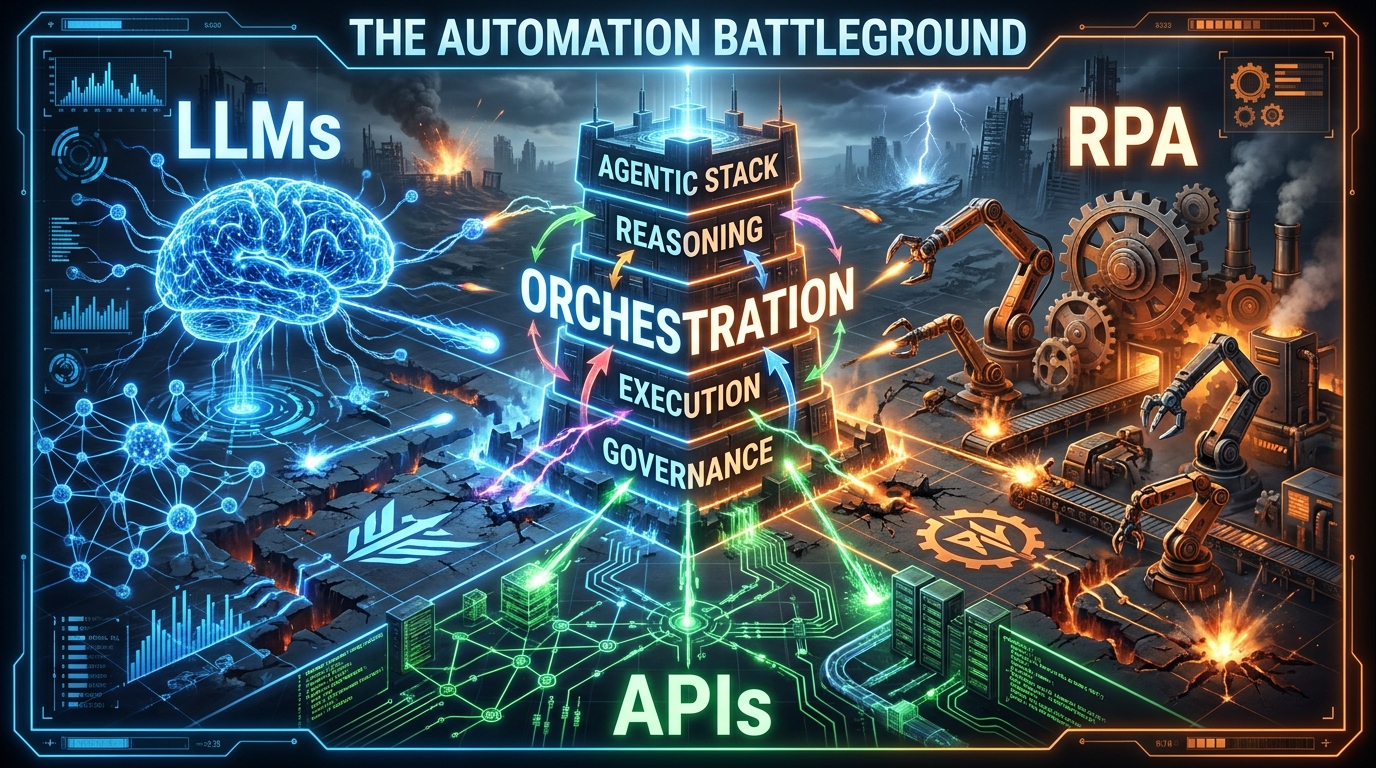
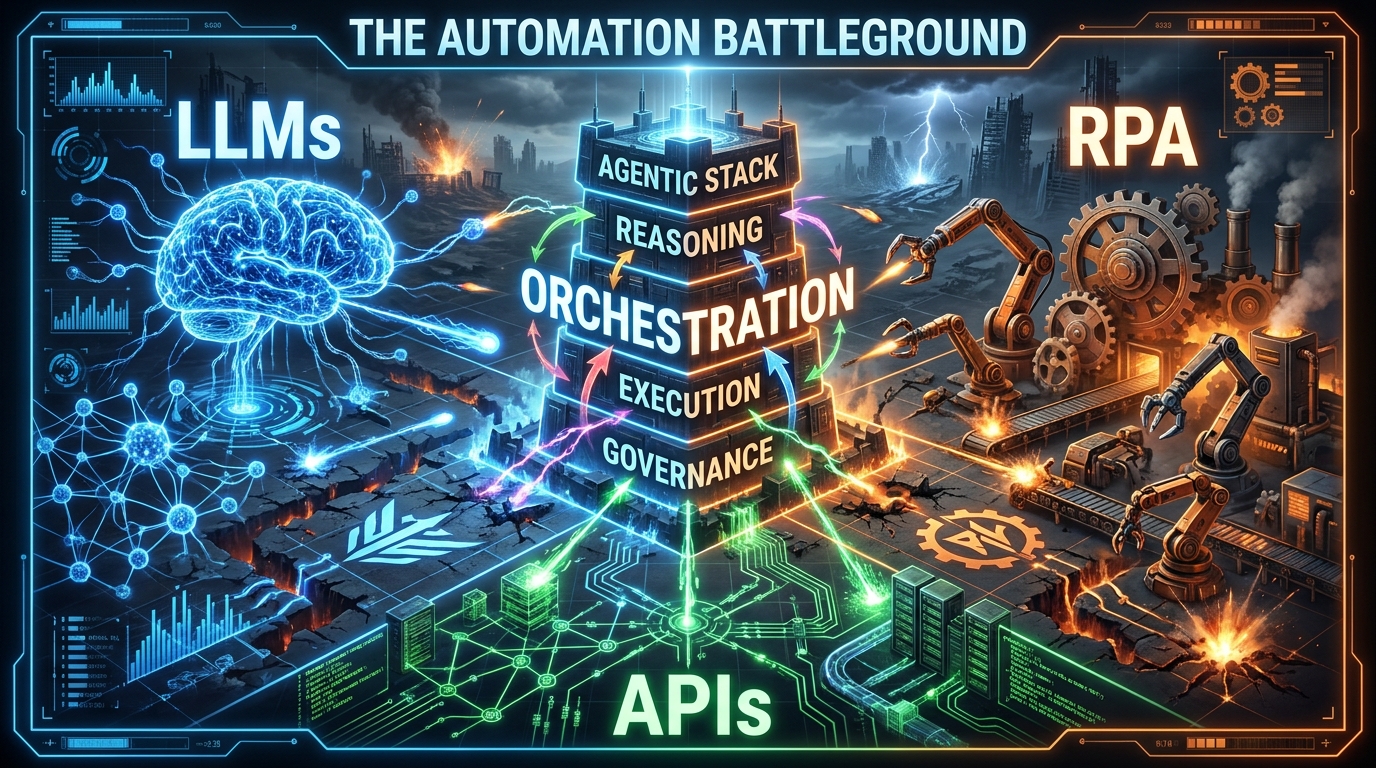
    Three competing factions — LLMs, RPA, and APIs — battle for control of the enterprise agentic automation stack

    Every enterprise automation conversation in 2026 eventually arrives at the same three-way standoff. LLM vendors promise that language models can now reason through any workflow. RPA incumbents argue their bots aren’t going anywhere — they’re just getting smarter. And API platform teams quietly remind everyone that none of it moves without them.

    All three are right. And all three are wrong about who’s in charge.

    The real battle isn’t between tools — it’s between layers. Whichever vendor or framework controls the orchestration layer, owns your stack. Whoever owns your stack, owns your automation roadmap for the next five to eight years. That’s not a technology question. That’s a strategic one.

    This post maps the fight layer by layer. Not from the perspective of “which tool should I pick” — that framing is already obsolete. Instead, it examines what each layer actually does, where the genuine architectural leverage sits, which vendors are quietly cementing control, and what the compounding costs of bad layer decisions look like in production. By the end, you’ll have a clearer picture of the battlefield than most of the vendors currently trying to sell you a seat at the table.

    One critical framing note before we begin: this is not about which AI model wins. Model wars are largely over as a decision-making variable. GPT-4o, Claude 3.5, Gemini 1.5 Pro — they’re all capable enough for most enterprise workflows. The models are commoditising. The stack around the models is not.

    The Stack Is Not a Tool — It’s a Power Structure

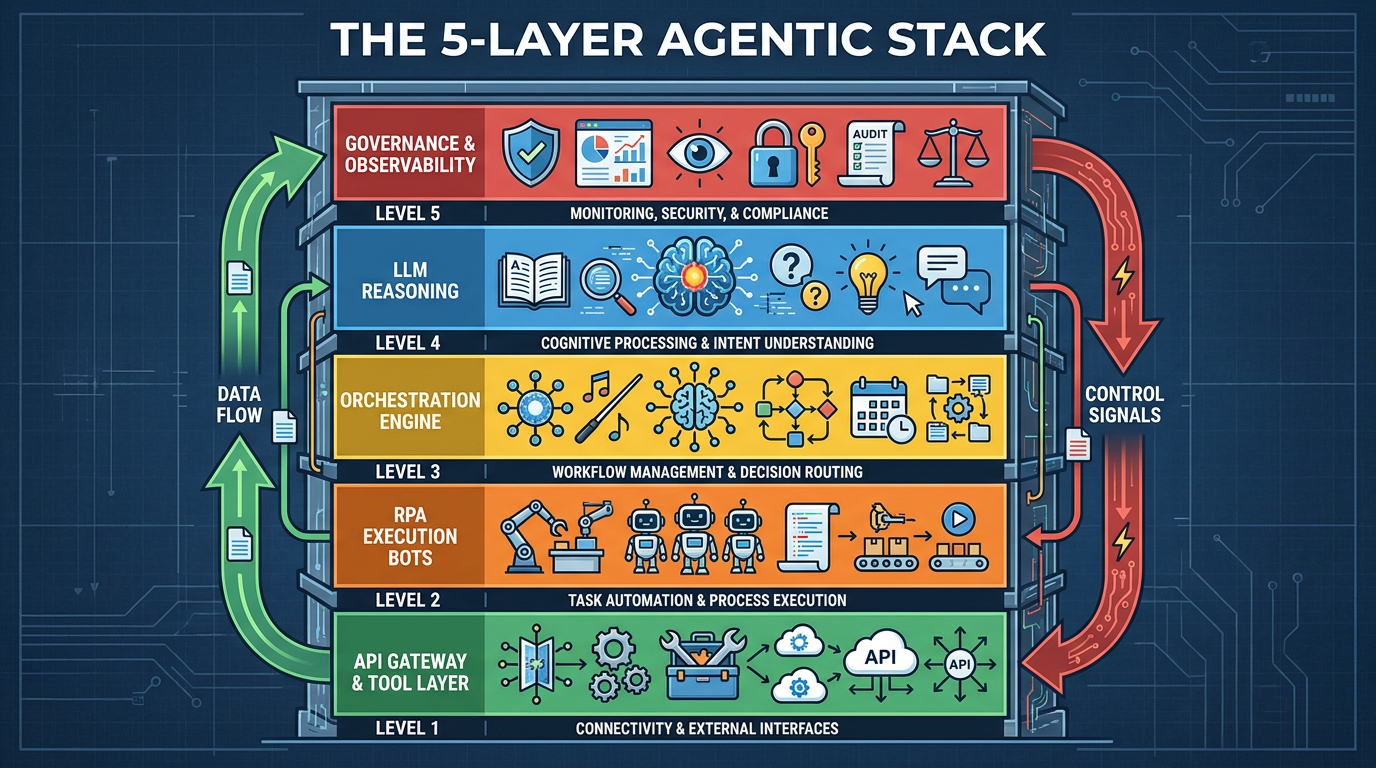
    The five layers of a modern agentic AI stack — from API gateway to governance — stacked as floors of a building

    Most teams approach the agentic stack as a shopping list. Pick an LLM. Choose an orchestration framework. Bolt on some RPA bots for legacy system access. Wrap it in an API gateway. Ship it. This approach produces demos that look impressive and production systems that break in ways nobody anticipated.

    The reason is that an agentic stack isn’t a collection of tools — it’s a layered power structure, where each layer makes decisions that constrain the layers below and depend on the layers above. If you pick those layers without understanding who controls them, who can change them, and what it costs to replace them, you’re not building automation infrastructure. You’re accumulating technical debt with a very impressive-looking interface.

    The five load-bearing layers

    A mature enterprise agentic stack in 2026 has five distinct layers, each with its own failure modes, vendor dynamics, and lock-in profile:

    • Layer 1 — Reasoning: The LLM or model ensemble responsible for planning, decision-making, and natural language understanding. This is the layer most people obsess over — and the layer that matters least for long-term architecture decisions.
    • Layer 2 — Orchestration: The runtime that coordinates agent tasks, manages state, handles retries, and routes decisions between agents and tools. This is the highest-stakes architectural decision in any agentic stack.
    • Layer 3 — Execution: Where actual work happens — API calls, RPA bot triggers, database writes, file operations, browser automation. The execution layer is often inherited from existing infrastructure, which creates the RPA integration problem explored below.
    • Layer 4 — Tool & API Access: The standardised interface through which agents discover, call, and authenticate against external systems. This layer has been fundamentally reshaped by the Model Context Protocol (MCP).
    • Layer 5 — Governance & Observability: Audit logs, access controls, human-in-the-loop gates, cost monitoring, and behavioural evaluation. In 2026, this layer is frequently the difference between an agent that scales and one that gets shut down after its first major error.

    Gartner projects that roughly 40% of enterprise applications will embed task-specific AI agents by the end of 2026 — up from under 5% in 2025. Most of those deployments will be decided by layer 2 choices made in the next 12 months. That’s the battlefield.

    Why “which LLM” is the wrong first question

    It’s tempting to anchor your stack decision to a model choice. In practice, well-architected stacks are model-agnostic at the reasoning layer — routing between GPT-4o, Claude, Gemini, and smaller fine-tuned models depending on task type, latency requirements, and cost targets. If your stack is deeply coupled to a single model provider at the reasoning layer, that’s not a feature — it’s a fragility.

    The decision that locks you in isn’t which model you use. It’s which orchestration runtime you build your workflow logic inside. Everything downstream inherits that choice.

    Layer 1: The Reasoning Brain — Model Routing Over Model Loyalty

    The first question most teams ask when building an agentic stack is: “Which LLM do we use?” It’s a reasonable starting point — but in 2026, treating it as a binary decision is a sign of architectural immaturity.

    Multi-model routing is now the baseline

    Enterprise teams that have moved from pilot to production consistently describe the same progression. They start with a single model (usually OpenAI or Anthropic), get good demo results, move to production, then realise they need different models for different task types. A large context window model for document analysis. A smaller, faster model for real-time classification. A fine-tuned domain-specific model for compliance checks. A cheap open-source model for high-volume preprocessing.

    Multi-model routing — dynamically selecting which model handles which task within a single workflow — has become a standard pattern. The orchestration layer handles this routing, which means your model provider diversification strategy is actually an orchestration layer design decision.

    What the reasoning layer is actually responsible for

    Within an agentic stack, the LLM reasoning layer performs four distinct functions that are worth separating in your architecture:

    1. Planning: Breaking a high-level goal into a sequence of sub-tasks. This is where LLM quality most directly impacts workflow success rates.
    2. Tool selection: Choosing which tool or API to call for each sub-task. Tool-calling reliability varies significantly across models and is often the most common source of workflow failures.
    3. Context management: Maintaining relevant context across multiple steps without hallucinating or losing track of prior state. This is a context engineering problem as much as a model quality problem.
    4. Exception handling: Recognising when a step has failed and deciding whether to retry, escalate, or reroute. Weaker models tend to loop silently; stronger models tend to escalate appropriately.

    The practical implication: you don’t need your most expensive model doing all four. Planning and exception handling benefit from the strongest available model. Tool selection and preprocessing can often use smaller, cheaper alternatives — cutting per-workflow costs by 40–60% without meaningful quality loss.

    Context engineering: the silent performance variable

    One of the most underappreciated variables in reasoning layer performance is context design — what information the agent receives, in what order, and how it’s structured. A well-orchestrated context pipeline can make a mid-tier model outperform an expensive one on a specific task. This is why “context engineering” is increasingly discussed as a first-class skill alongside prompt engineering — and why it sits at the intersection of the reasoning layer and the orchestration layer.

    Layer 2: The Orchestration Battlefield

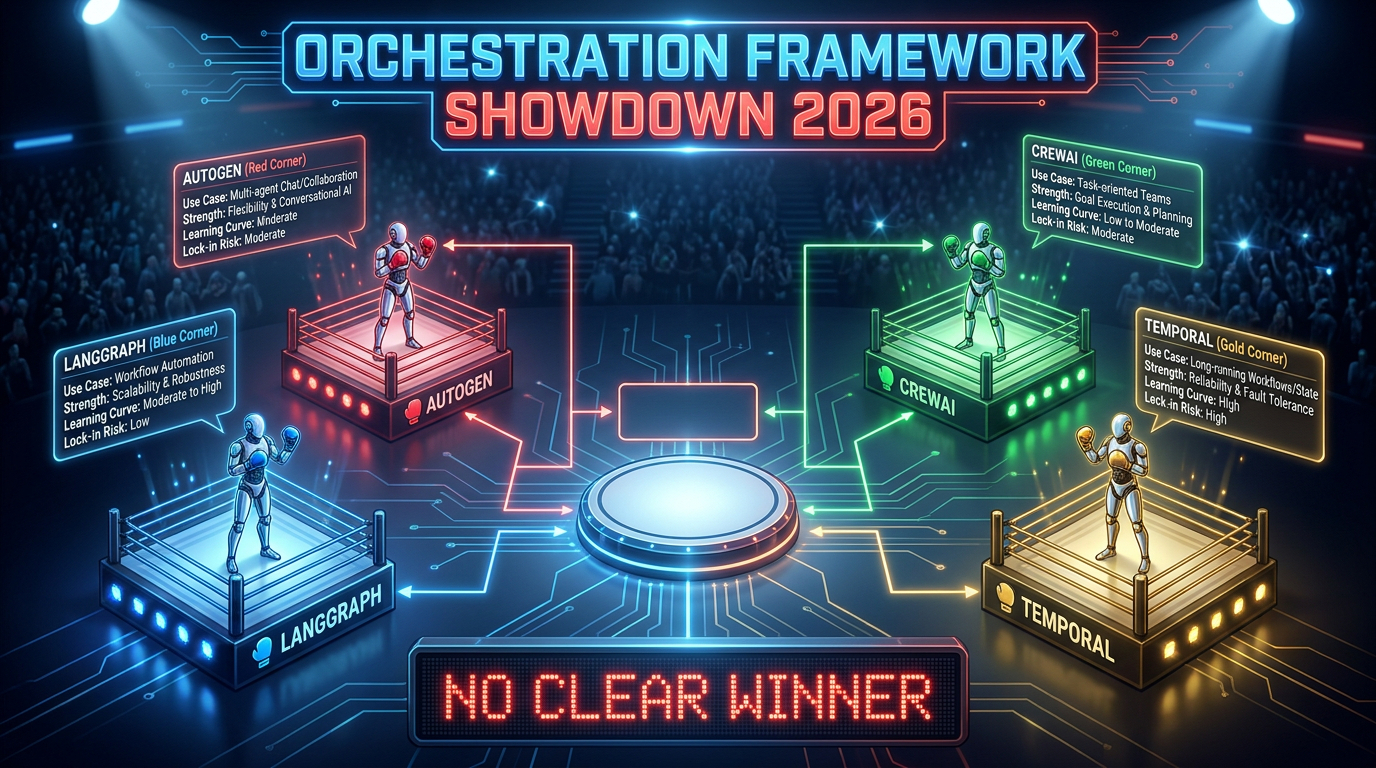
    Orchestration framework showdown 2026 — LangGraph vs AutoGen vs CrewAI vs Temporal: No clear winner

    If you want to understand where the real architectural power in an agentic stack is concentrated, watch which layer is generating the most VC investment, the most open-source activity, and the most enterprise vendor anxiety. That’s the orchestration layer. And in 2026, it’s genuinely contested terrain.

    What orchestration actually does

    Orchestration is the control plane of the agentic stack. It decides:

    • Which agent runs next
    • What state gets passed between agents
    • When to call a tool vs. when to ask a human
    • How to handle failures, timeouts, and retries
    • How to route tasks across a multi-agent network
    • How to enforce cost limits and governance policies

    Get the orchestration layer wrong and no amount of model quality or RPA investment can save you. Get it right and you have a system that can absorb changes in models, tools, and business logic without requiring a full rebuild.

    The main frameworks — and what they’re actually for

    The four frameworks that dominate enterprise conversations in 2026 are LangGraph, AutoGen, CrewAI, and Temporal. They are not direct competitors in the way vendors sometimes present them. They solve different orchestration problems.

    LangGraph (LangChain) is the closest thing to a general-purpose production orchestration runtime. Its graph-based state machine model gives teams precise control over workflow branching, cycle detection, and state persistence. LangSmith provides integrated observability. The trade-off is a steeper learning curve and strong coupling to the LangChain ecosystem — a lock-in risk that deserves deliberate consideration.

    AutoGen (Microsoft) is optimised for conversational multi-agent systems and code-executing agents. It excels in research environments and developer tool workflows where agent-to-agent dialogue drives decision-making. The Microsoft backing means tight integration with Azure AI services — convenient if you’re already Azure-native, a significant constraint if you’re not.

    CrewAI offers the fastest time-to-prototype for role-based multi-agent teams. Its abstraction model — where agents are assigned roles, goals, and backstories like members of a team — makes it accessible to developers who aren’t deep experts in graph theory or distributed systems. The downside is that this simplicity creates ceilings. Complex, stateful enterprise workflows tend to outgrow CrewAI’s abstractions.

    Temporal is not strictly an AI orchestration framework — it’s a durable execution engine that has been widely adopted for agentic workflows requiring long-running, fault-tolerant processes. Where LangGraph manages agent reasoning graphs, Temporal manages the reliability of the execution itself: ensuring that a workflow that runs for hours or days doesn’t lose state when a server fails. Many mature production stacks use both — LangGraph for agent logic, Temporal for durability.

    The convergence trap

    In early 2026, the frameworks have been converging on similar abstractions: stateful graphs, tool registries, memory management, human-in-the-loop gates. This convergence makes it tempting to treat them as interchangeable. They are not. The differences that matter aren’t feature lists — they’re operational maturity, ecosystem depth, observability support, and most importantly, which cloud vendor controls the runtime’s long-term direction. Choosing AutoGen is, in practice, a partial bet on Microsoft’s AI roadmap. That may be exactly the right bet for your organisation. But it should be made explicitly, not by accident.

    Layer 3: Where RPA Actually Belongs in a Cognitive Stack

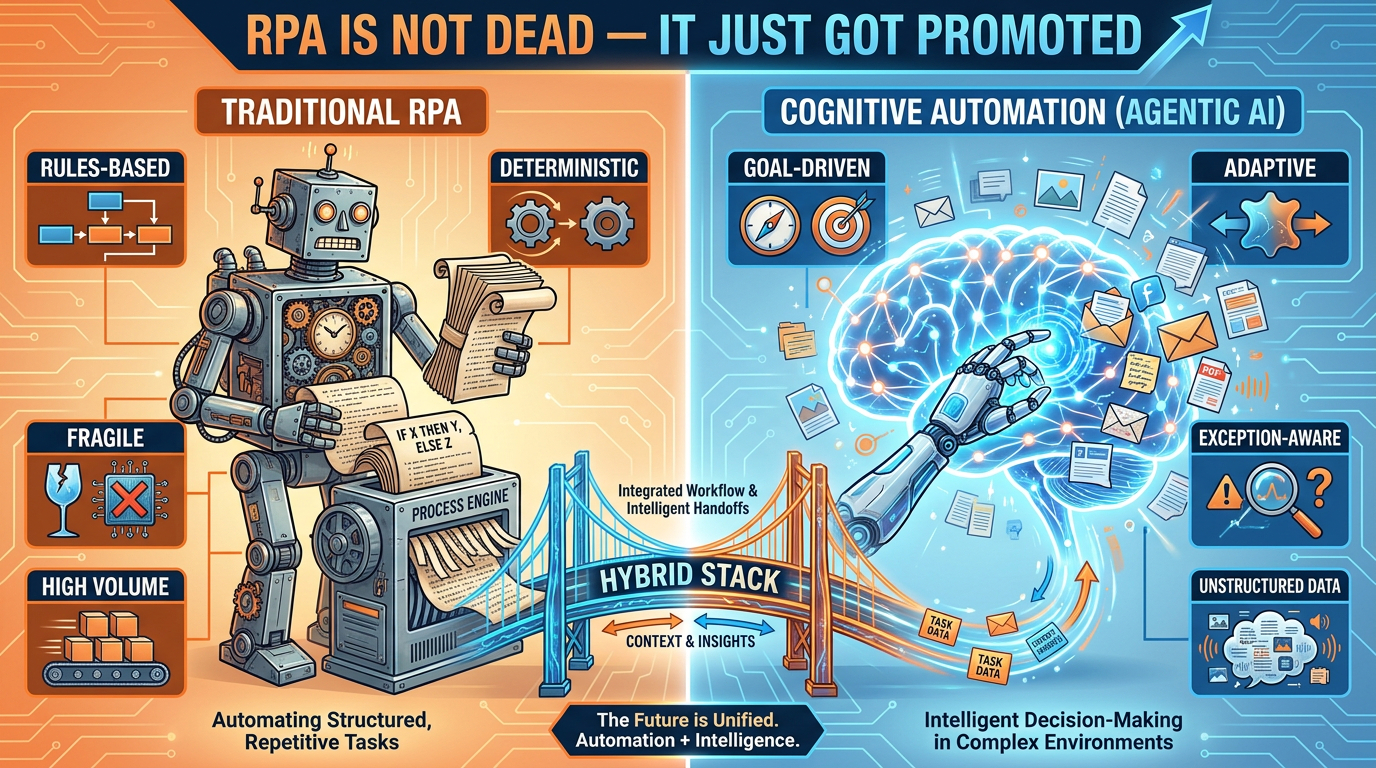
    Traditional RPA versus cognitive agentic automation — a hybrid stack bridges both sides

    The hottest take in enterprise automation circles in 2026 is “RPA is dead.” It makes for a compelling vendor narrative — particularly from LLM-native automation startups pitching against UiPath and Automation Anywhere. The reality is substantially more complicated, and the organisations that act on the “RPA is dead” thesis without nuance are discovering it through expensive production failures.

    Why traditional RPA isn’t going anywhere — yet

    Traditional RPA bots have a specific set of properties that make them genuinely irreplaceable for a class of enterprise workflows:

    • Deterministic execution: A well-built RPA bot does exactly what it’s scripted to do, every time. In compliance-sensitive workflows — payroll, regulatory filings, audit trails — this predictability isn’t a limitation. It’s a requirement.
    • Structured system integration: Many enterprise systems — particularly legacy ERP platforms, mainframes, and COBOL-era applications — don’t expose APIs. RPA bots interact with their UIs directly. Until those systems are modernised (a multi-year effort in most large organisations), RPA is the only practical access mechanism.
    • Existing investment: The average large enterprise has hundreds to thousands of deployed RPA bots. Replacing them wholesale isn’t a technology decision — it’s a budget, risk, and operational continuity decision. The deprecation curve for mature RPA infrastructure is measured in years, not quarters.

    The cognitive promotion: what agentic AI actually adds to RPA

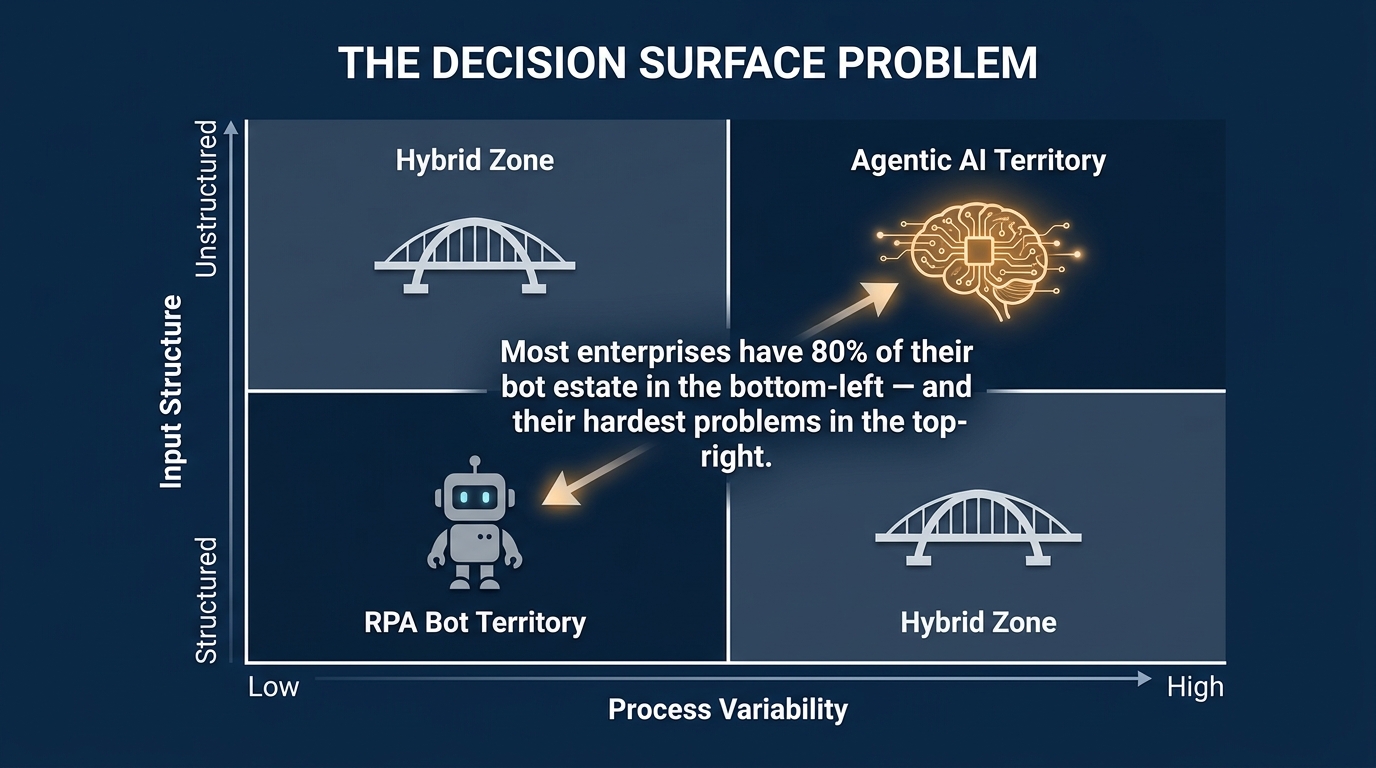
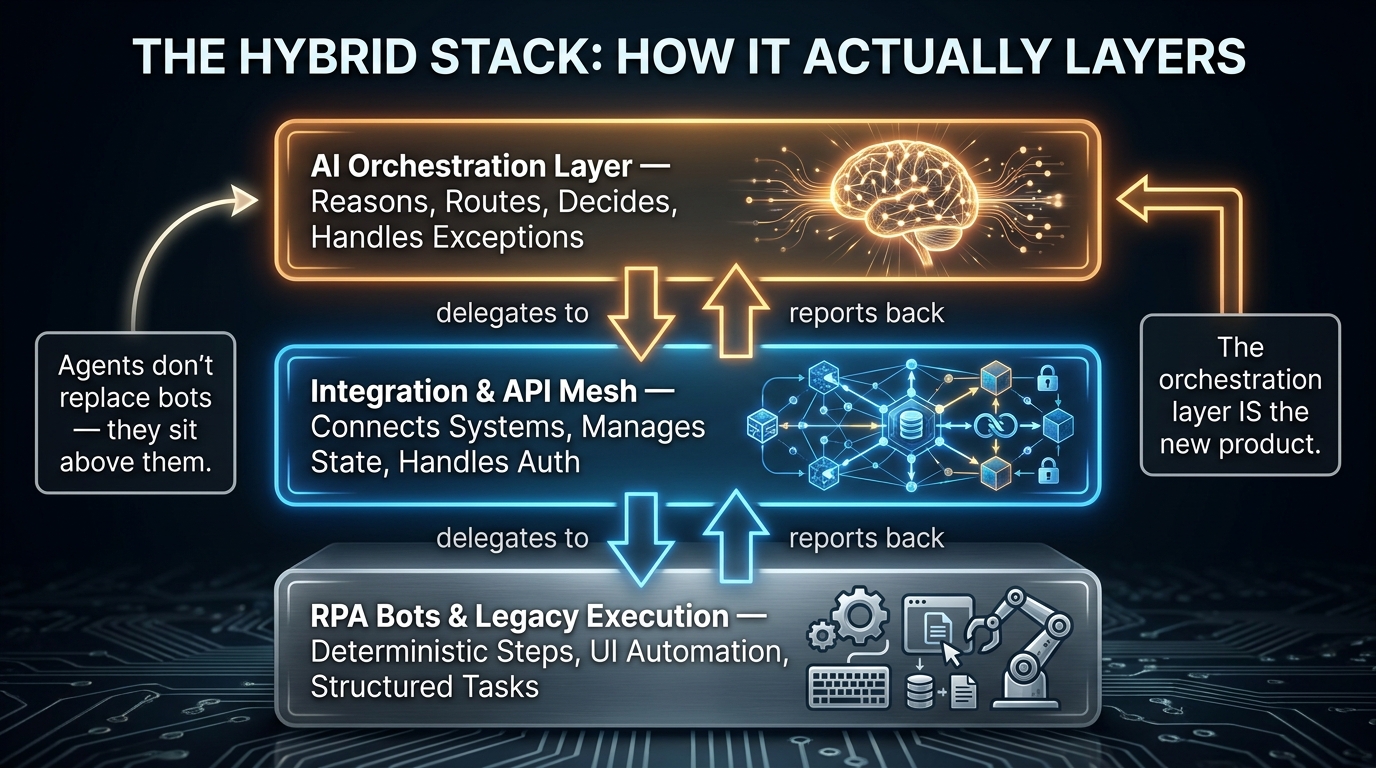
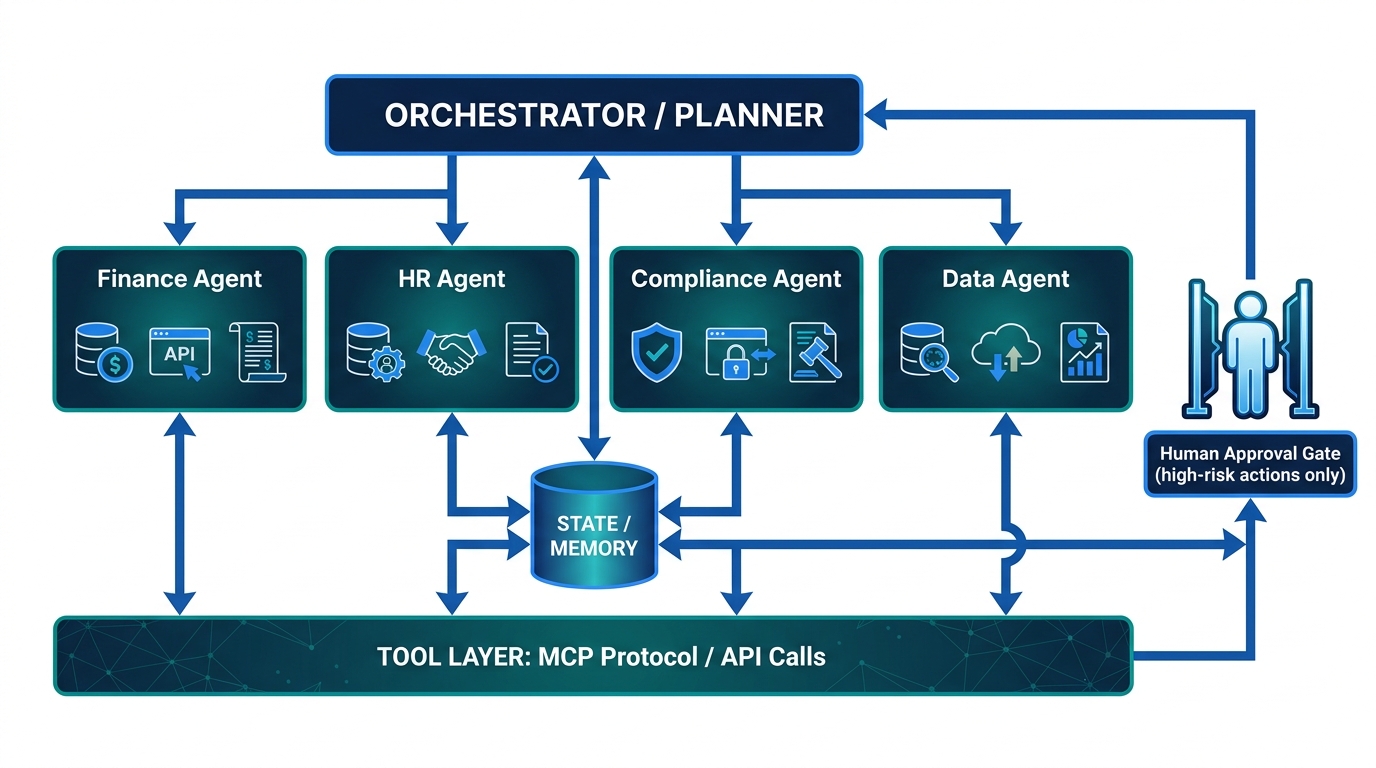
    The most accurate framing isn’t “agents replace RPA” — it’s “agents give RPA a manager.” In a well-architected hybrid stack, RPA bots remain the execution workers for deterministic, high-volume, rules-based tasks. Agentic AI handles the higher-level work that RPA can’t: interpreting unstructured inputs, handling exceptions, making contextual decisions, and coordinating across multiple systems.

    Consider a practical example: invoice processing in accounts payable. A traditional RPA bot can extract structured data from a standard PDF invoice and enter it into an ERP system with high speed and reliability. But it fails immediately when the invoice is a scanned image with unusual formatting, or when it requires a decision about whether a line item qualifies for a specific cost centre, or when there’s a discrepancy that needs negotiation with the vendor. These exceptions previously required human intervention.

    In a hybrid agentic stack, the LLM-powered agent handles the exception — reading the unstructured input, querying relevant policy documents via RAG, making a contextual decision, and then handing a structured instruction back to the RPA bot for execution. The bot does what it’s good at. The agent does what the bot can’t.

    The three-tier execution model

    The most effective enterprise automation architectures in 2026 use a three-tier execution model:

    1. Deterministic tier (RPA bots): High-volume, rules-based, stable-format tasks. Zero tolerance for variability. Compliance-critical paths.
    2. Adaptive tier (LLM agents): Exception handling, unstructured data interpretation, multi-step decisions, cross-system coordination.
    3. Human-in-the-loop tier: Decisions above a defined confidence threshold, novel situations outside training data, high-stakes irreversible actions.

    The RPA vendor ecosystem has responded to this reality. UiPath, Automation Anywhere, and Blue Prism are all shipping agentic AI integrations — positioning their bot infrastructure as the execution layer of agentic stacks rather than a competing paradigm. This is the correct architectural framing. It’s also a smart commercial survival strategy.

    Layer 4: APIs as the Action Layer — Why Gateways Now Run the Show

    The least glamorous layer of the agentic stack is the one that increasingly runs it. API gateways — long understood as security and traffic management tools — have become the functional nervous system of any enterprise agent deployment. In 2026, this shift has become too significant to treat as an infrastructure detail.

    The action layer problem

    An agentic system’s value is entirely determined by what it can do. Reading data is useful. Writing to a database, triggering a workflow, sending a notification, updating a CRM record, initiating a payment — that’s where automation value is actually realised. All of that happens through APIs. Which means every action an agent takes is an API call. And every API call is a governance event.

    In a traditional application, API traffic is relatively predictable. A human user triggers an action; the application makes a call. Volume is bounded by human interaction speed. In an agentic stack, agents can make hundreds or thousands of API calls per minute, across dozens of endpoints, with tool selection driven by probabilistic LLM inference rather than deterministic code paths. The governance requirements are fundamentally different.

    What the modern AI gateway does

    The AI gateway — distinct from a traditional API gateway in its awareness of LLM-specific traffic patterns — now handles five distinct functions in the agentic stack:

    • Tool discovery: Exposing a catalogue of available APIs to agents in a structured format they can reason about. Rather than agents being hardcoded with specific endpoints, they query the gateway for what’s available.
    • Identity and access control: Enforcing which agents can call which APIs, under what conditions, and with what rate limits. This is especially critical in multi-agent systems where one agent might spawn sub-agents that inherit (or shouldn’t inherit) its permissions.
    • Semantic routing: In advanced deployments, the gateway routes tool calls to the most appropriate backend based on the call’s intent — not just its endpoint. This enables fallback logic, load balancing across equivalent services, and graceful degradation.
    • Cost and latency tracking: Logging the token cost, latency, and error rate of every tool call. Without this, there is no reliable way to track the true cost of an agent workflow or identify which tool calls are responsible for performance problems.
    • Audit trail generation: Creating an immutable record of every action an agent took. In regulated industries, this audit trail isn’t optional — it’s a compliance requirement.

    The gateway as the choke point of agent governance

    Here’s the uncomfortable strategic reality: in an agentic stack without a well-configured AI gateway, there is no reliable way to control what your agents do. You can write governance policies at the orchestration layer, but if an agent can make direct API calls that bypass the gateway, those policies are advisory, not enforced. The gateway is the enforcement point. Building governance into the prompt is theatre. Building governance into the gateway is architecture.

    The MCP + A2A Protocol Shift That Changes Everything

    If there’s a single technical development in 2026 that most practitioners are underweighting, it’s the rapid standardisation of the Model Context Protocol (MCP) and the Agent-to-Agent (A2A) coordination protocol as the foundational communication standards of the agentic stack.

    What MCP actually is — and why it matters beyond the hype

    MCP, originally developed by Anthropic and now adopted broadly across the ecosystem, solves a specific and genuinely painful problem: how does an agent discover, authenticate against, and call external tools in a standardised way? Before MCP, every agent-to-tool integration was bespoke. Building an agent that could use Salesforce, Jira, a custom database, and a payment processor required four separate integration implementations, each with its own authentication handling, error management, and data serialisation logic.

    MCP defines a standard protocol for this. An MCP server wraps an external tool or data source, exposes a standardised interface, and handles the translation between the agent’s requests and the tool’s native API. The agent doesn’t need to know whether it’s talking to Salesforce or a legacy internal database — it makes the same type of MCP call either way.

    The practical impact: teams that have migrated their tool integrations to MCP report dramatically reduced integration maintenance overhead and the ability to swap underlying tools without rewriting agent logic. This is the portability benefit that matters most for long-term stack governance.

    A2A: the agent-to-agent coordination layer

    While MCP handles agent-to-tool communication, A2A (Agent-to-Agent protocol, championed by Google) handles a different problem: how do agents from different systems, built by different teams or vendors, coordinate with each other?

    In a multi-agent enterprise workflow, you might have a procurement agent built on one framework, a compliance checking agent built by a vendor, and a financial approval agent built on a different platform entirely. A2A provides a standard protocol for these agents to discover each other, delegate tasks, and return results — without requiring a shared underlying runtime.

    The emerging consensus is that MCP and A2A are complementary rather than competing standards. MCP is the agent’s interface to the tool layer. A2A is the agent’s interface to other agents. Together, they form what is beginning to look like a genuine interoperability standard for the agentic ecosystem — which would be significant if adoption continues at its current pace.

    The gateway-as-MCP-broker pattern

    The most architecturally elegant deployment pattern emerging in 2026 is the AI gateway functioning as an MCP broker — sitting between agents and MCP servers, adding governance, security, and observability to every tool call without requiring agents to handle those concerns themselves. This pattern cleanly separates the agent’s reasoning responsibility from the platform’s governance responsibility, which is exactly the separation you want for maintainability and compliance.

    The Hidden Cost Stack Nobody Shows You at Demo Day

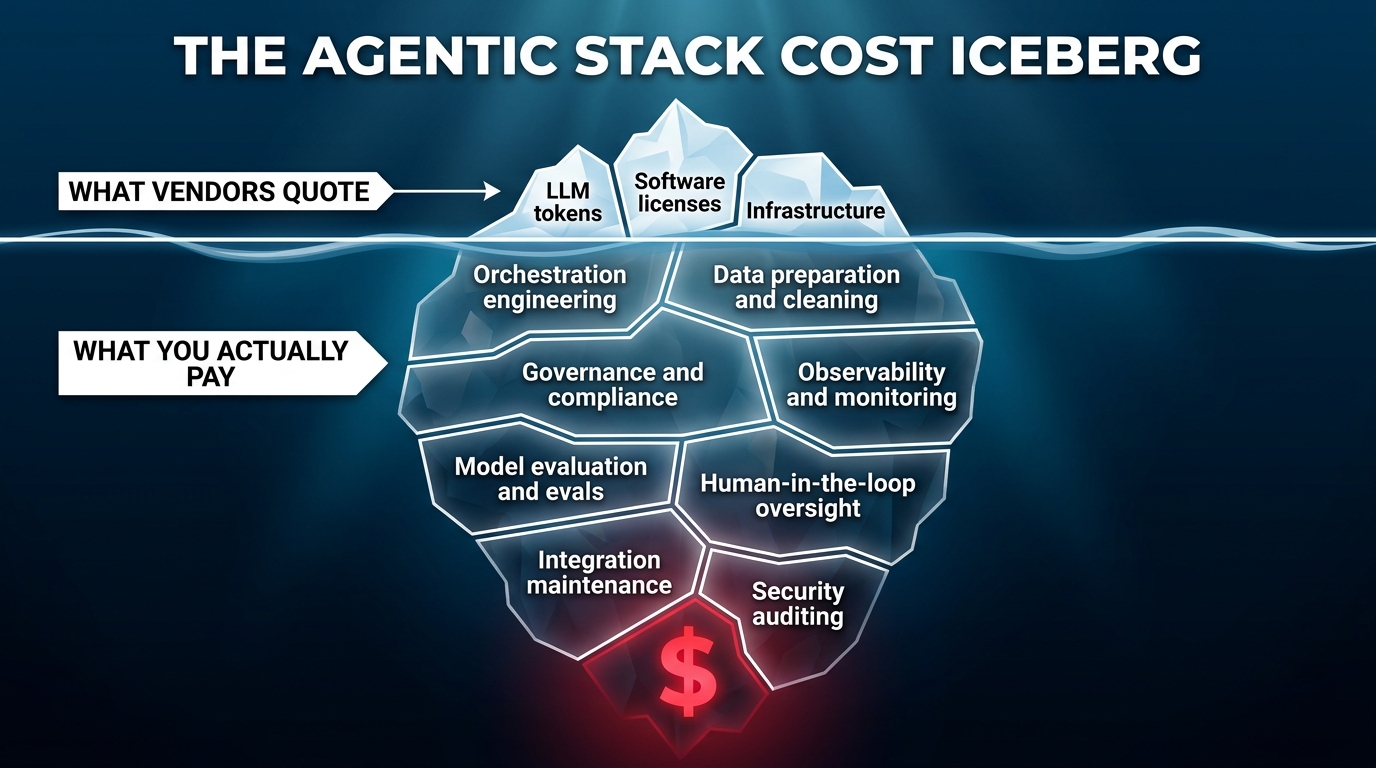
    The agentic AI stack cost iceberg — hidden costs of orchestration, governance, and observability dwarf the quoted LLM token price

    Vendor demos of agentic AI are, almost universally, cost-optimistic. This isn’t dishonesty — it’s the natural consequence of showing a system at demo scale rather than production scale, in a controlled environment rather than an enterprise one, with happy-path scenarios rather than exception-heavy real workloads. The TCO gap between a compelling demo and a sustainable production deployment is one of the most consistent sources of agentic AI project failure in 2026.

    What vendors quote vs. what you actually pay

    The visible costs in any agentic AI proposal are LLM token costs, software licensing, and cloud infrastructure. These are real costs — but in a mature enterprise deployment, they typically represent 20–30% of total spend. The 70–80% sits below the waterline:

    • Orchestration engineering: Building, testing, and maintaining the workflow logic that coordinates agents is a significant engineering investment. Every edge case in a business process becomes an orchestration decision. Typical enterprise deployments require 2–4 senior engineers working on orchestration full-time for the first 6 months.
    • Data preparation: Agents require clean, well-structured, contextually appropriate data. In most enterprises, data is messy, inconsistent, and scattered across siloed systems. Getting data to a state where agents can reliably use it is often the longest phase of any deployment — and it’s rarely in the vendor quote.
    • Governance and compliance engineering: Building the audit trails, access controls, human-in-the-loop workflows, and policy enforcement mechanisms required for regulated industries is a separate engineering project running parallel to the agent development itself.
    • Evaluation and quality assurance: Unlike traditional software, agentic systems require continuous behavioural evaluation — not just unit tests. Building evaluation frameworks, defining success metrics for agent behaviour, and running regular evals against those metrics is an ongoing operational cost.
    • Human oversight infrastructure: Even well-performing agents need human review mechanisms for edge cases. Designing, building, and staffing those review workflows — the “human in the loop” — is a cost that’s often underestimated until the first major production incident.

    The TCO multiplier in practice

    Research across enterprise deployments in 2026 suggests that total cost of ownership for agentic AI stacks runs 2–3× naive initial estimates. For a mid-sized deployment initially quoted at $200,000 for the first year, realistic TCO including all the above layers is typically $400,000–$600,000. Upfront implementation costs for enterprise-grade stacks typically range from $40,000 to $200,000+, with ongoing operational costs of $5,000–$25,000 per month depending on scale and complexity.

    This doesn’t mean agentic AI is a bad investment — the ROI data is compelling for well-scoped deployments. But it does mean that organisations evaluating proposals on quoted cost rather than realistic TCO are systematically underestimating the commitment they’re making.

    The FinOps discipline for agentic stacks

    The operational response from mature teams is treating agentic AI costs with the same rigour as cloud infrastructure costs — a FinOps discipline applied to the agent layer. This means per-workflow cost attribution, token budget controls enforced at the gateway layer, regular cost-per-outcome tracking, and explicit ROI review cycles tied to specific workflow automations rather than the program as a whole.

    Teams that implement this discipline early consistently report better cost control and higher stakeholder confidence in continued investment. Those that don’t tend to experience the classic pattern: exciting early results, cost shock at the first renewal conversation, difficult internal justification battles.

    Failure Modes That Don’t Show Up Until Production

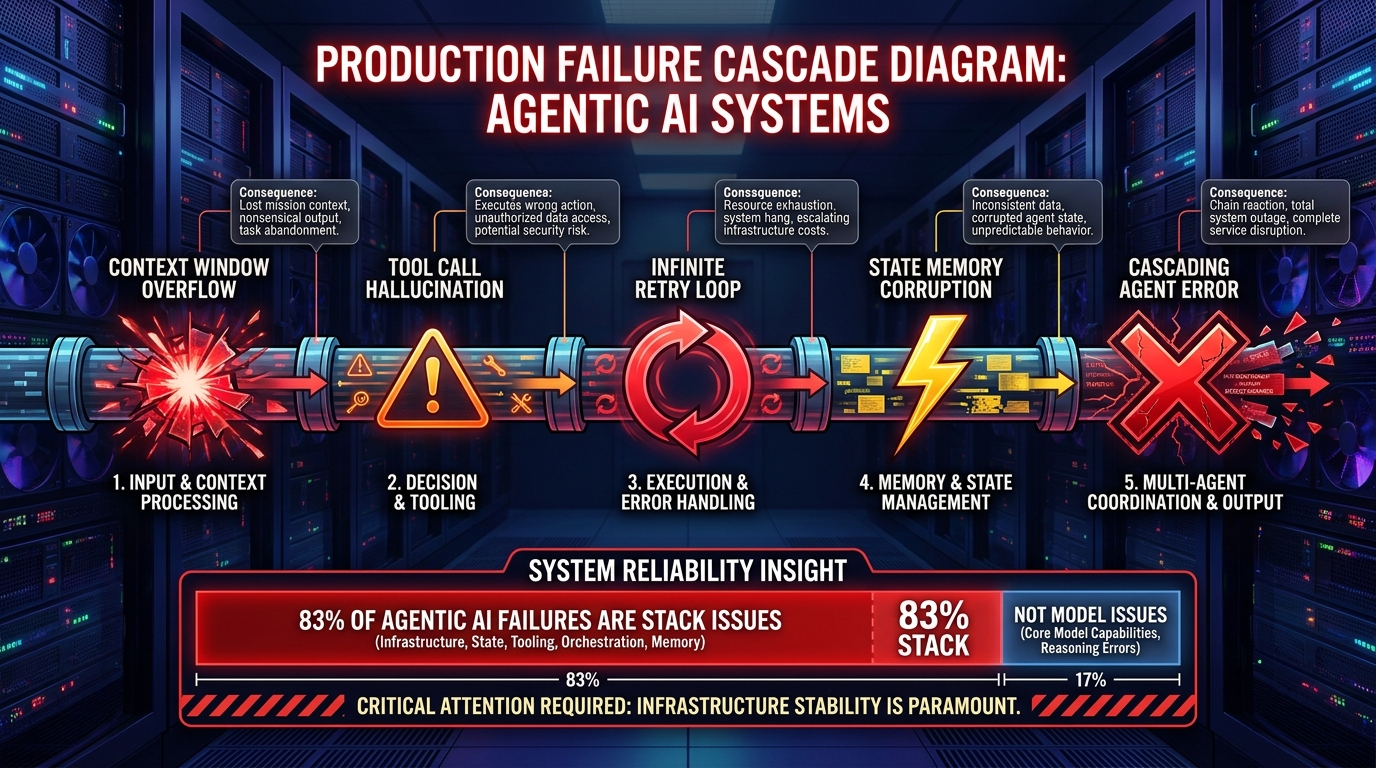
    Agentic AI production failure cascade — context overflow, tool hallucination, infinite loops, and state corruption hit in sequence

    The failure modes of agentic AI stacks are categorically different from those of traditional software. Traditional software fails in predictable, reproducible ways: a specific input triggers a specific error. Agentic systems fail in probabilistic, context-sensitive, sometimes-undetectable ways. Understanding this failure profile is essential for building production systems that survive first contact with real workloads.

    The six failure categories that actually kill production deployments

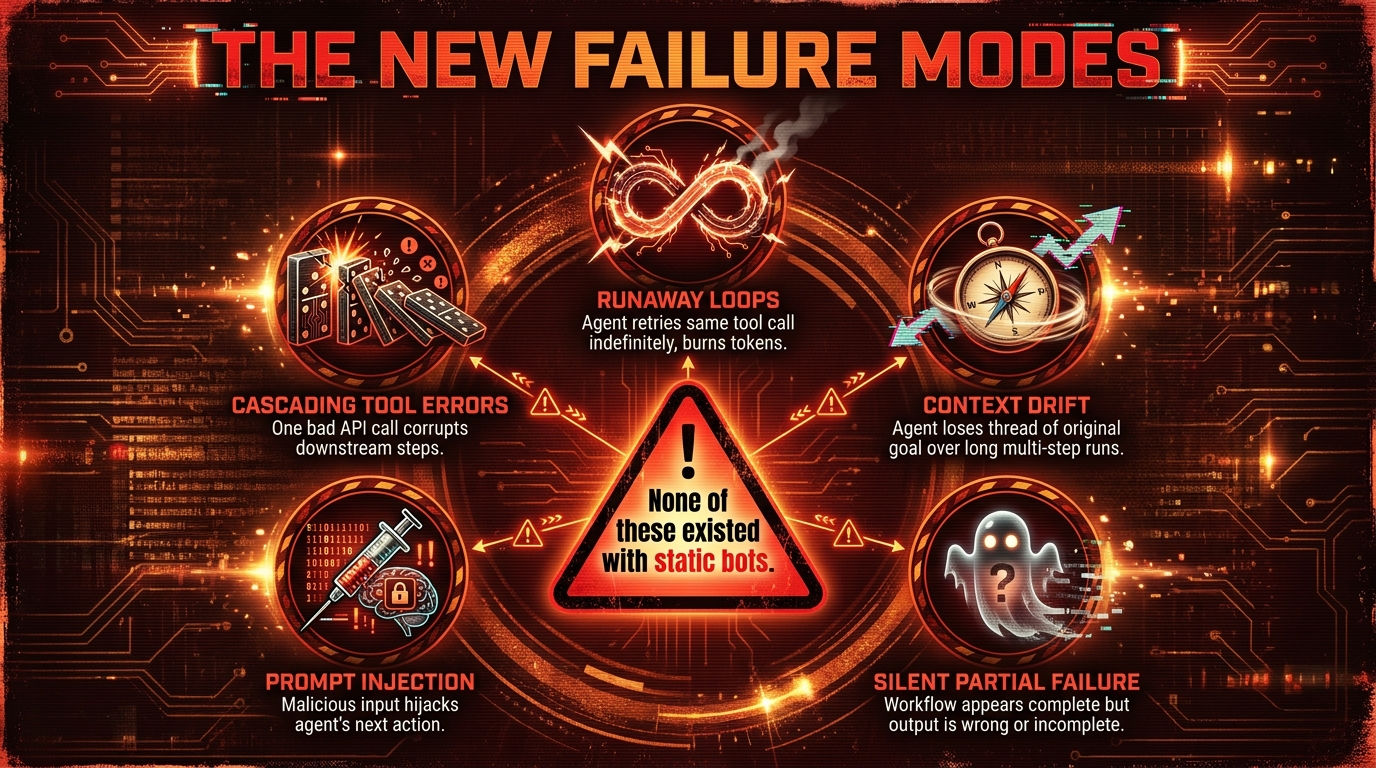
    1. Context overflow and information loss. As a workflow lengthens, the agent’s context window fills with accumulated task history, tool outputs, and intermediate results. When that window is exceeded — or when the agent is poorly designed and loses track of earlier context — it begins making decisions based on incomplete information. This produces outputs that are locally coherent but globally wrong, and they’re often extremely hard to detect without workflow-level tracing.

    2. Tool call hallucination. Agents occasionally invoke tools with incorrect parameters, against endpoints that don’t exist, or with fabricated authentication credentials. Unlike a traditional software bug, this failure mode doesn’t throw an obvious error — it generates a plausible-looking API call that simply fails. Without comprehensive tool-call logging at the gateway layer, these failures are nearly invisible.

    3. Infinite retry loops. When a tool call fails, a well-designed agent should either try an alternative approach or escalate to a human. A poorly designed one retries the same call indefinitely, or cycles between two failed approaches. Without hard timeout limits and loop-detection logic at the orchestration layer, this can exhaust both token budgets and downstream API rate limits before anyone notices.

    4. State memory corruption in multi-agent systems. When multiple agents share access to a state store and one agent writes incorrect or malformed state data, every downstream agent that reads that state inherits the corruption. In a five-agent pipeline, a state corruption in agent two can silently invalidate the outputs of agents three, four, and five. This is the multi-agent equivalent of a database transaction failure — and it requires explicit state validation logic to catch.

    5. Goal drift in long-running workflows. In workflows that run over hours or days, agent behaviour can drift from the original objective as accumulated context shifts the model’s interpretation of the task. This is especially pronounced in workflows where agents interact with external systems that return evolving data. The goal the agent is optimising for at step 50 may not be the same goal it was given at step 1.

    6. Inter-agent trust escalation. In multi-agent systems, agents often delegate tasks to sub-agents. If permissions aren’t explicitly scoped at each delegation level, a sub-agent may inherit (or claim) permissions beyond what its principal intended. This is the agentic equivalent of a privilege escalation attack — and it’s a genuine security risk in any system where agents can create other agents.

    Observability as a first-class design requirement

    The common thread across all these failure modes is that they are invisible without purpose-built observability. Standard application monitoring — uptime checks, error rate dashboards, response time percentiles — does not capture the failure signatures of agentic systems. You need session-level tracing that records every agent decision, every tool call, every state transition, and every model inference, along with the ability to replay and inspect any workflow after the fact.

    Teams that treat observability as a nice-to-have tend to discover these failure modes from user complaints or system incidents. Teams that build observability as a first-class infrastructure component discover them from their monitoring dashboards — a distinction that is the difference between proactive and reactive operations.

    The Lock-In Map: Where You’re Already Trapped

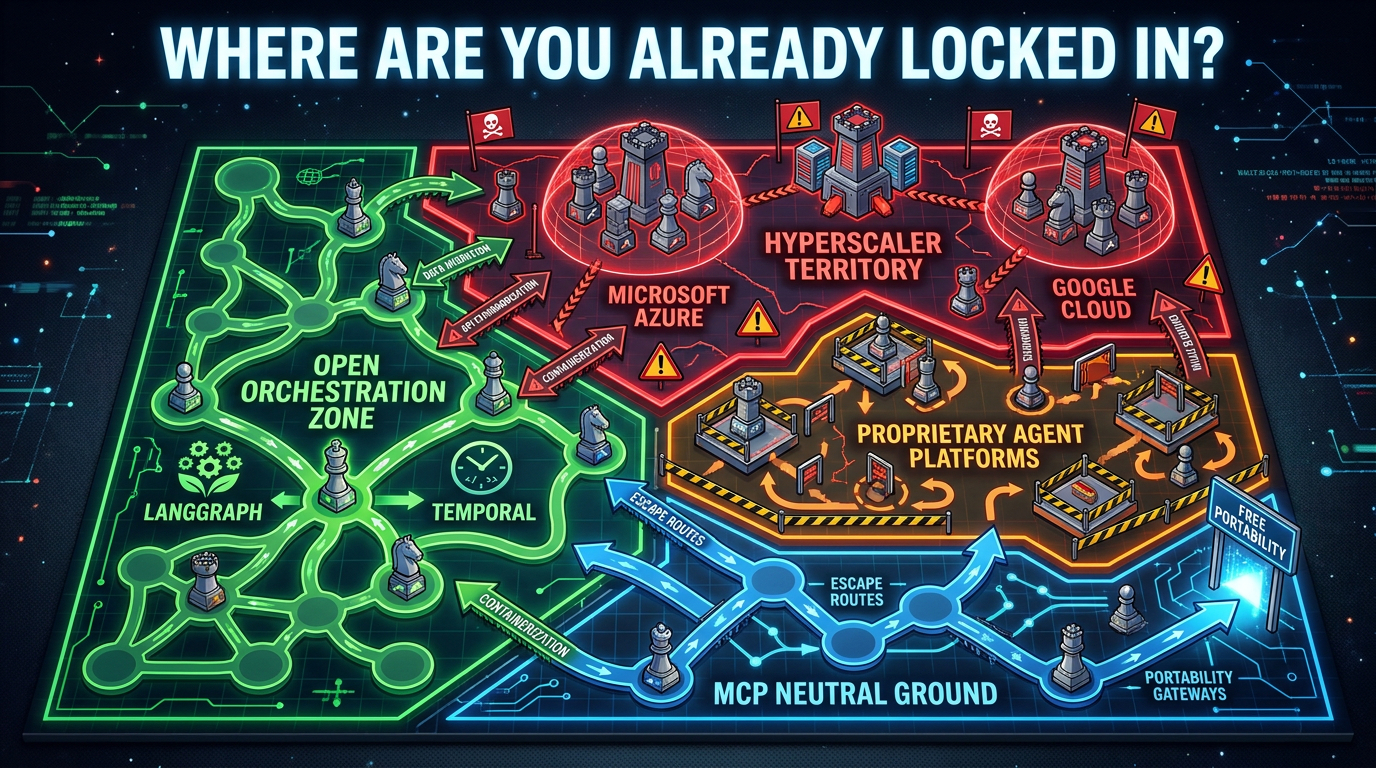
    Lock-in risk map for agentic stacks — hyperscaler territory, open orchestration zones, and MCP neutral ground

    One of the most consistent findings from enterprise architecture reviews in 2026 is that teams dramatically underestimate lock-in risk in their agentic stack decisions. This isn’t because they’re naive — it’s because the lock-in in these systems is structural and often invisible until you try to change something.

    Where the real lock-in lives

    Contrary to popular assumption, model-level lock-in is now the easiest to escape. Switching from GPT-4o to Claude or Gemini is largely an API and prompt engineering exercise — meaningful work, but achievable in weeks. The lock-in that actually constrains organisations for years is concentrated in different places.

    Orchestration runtime lock-in is the most significant. Once you’ve built complex multi-agent workflows inside LangGraph’s state machine model, migrating that logic to a different orchestration framework is effectively a rewrite. Your workflow definitions, state schemas, memory patterns, and tool integrations are all expressed in the framework’s abstractions. That’s not porting — it’s rebuilding.

    Memory and state layer lock-in is emerging as a critical new category. Agents that maintain long-term memory about users, processes, and organisational context accumulate that memory in specific formats tied to specific databases and retrieval systems. As these memory stores grow, they become increasingly difficult to migrate without data loss or quality degradation.

    Hyperscaler platform lock-in is the most familiar pattern, and arguably the most dangerous. Microsoft’s Azure AI Foundry and Google’s Vertex AI are both building comprehensive agentic platforms that bundle orchestration, model access, storage, and governance into a single offering. The convenience is real. So is the eventual pricing power once switching costs are high enough to deter exit.

    Proprietary agent platform lock-in from newer startups selling “complete agentic platforms” presents a different risk profile: these companies are early-stage, potentially less stable, and their platforms are less battle-tested in enterprise environments. The appeal is a faster time-to-value. The risk is platform instability, acquisition, or pivot.

    The open vs. closed architecture decision

    The strategic question isn’t whether to accept any lock-in — some is inevitable in any technology stack. The question is which lock-in you can afford and which you can’t. Teams that have navigated this most successfully in 2026 use the following framework:

    • Keep the reasoning layer model-agnostic by design. Use routing abstractions that allow model swapping without workflow changes.
    • Prefer open orchestration frameworks (LangGraph, Temporal) over proprietary platforms for complex workflows. Accept proprietary platforms only for well-scoped, contained use cases.
    • Insist on MCP-compliant tool integrations as a procurement requirement. Non-MCP tool integrations create integration debt that compounds as the stack grows.
    • Design the governance and observability layer to be cloud-agnostic. Audit logs, policy definitions, and evaluation frameworks should be portable — not stored in a hyperscaler’s proprietary format.

    How to Architect for Composability, Not Just Speed

    The instinct in any competitive technology adoption cycle is to move fast and standardise later. In enterprise agentic AI, this instinct is actively dangerous. The architectural decisions made in the first 6–12 months of a deployment define the composability ceiling for everything built on top of them.

    The composability principle in agentic stacks

    A composable agentic stack is one where new capabilities — new agents, new tools, new models, new workflow patterns — can be added without requiring changes to existing components. This sounds obvious. It’s surprisingly rare in practice, because the shortcuts taken during fast-moving initial development tend to produce coupling between layers that should be independent.

    The most common composability failure: agents that are tightly coupled to specific tool implementations rather than to standardised tool interfaces. When the tool changes — the underlying API is updated, the vendor is replaced, the integration is refactored — agents that hold references to specific implementation details break. Agents that call through an MCP-standardised interface are insulated from those changes.

    Design patterns for composable agentic architecture

    The specialist-coordinator pattern: Design agents as specialists — narrow, deep, highly capable within a specific domain. Then build coordinator agents whose sole function is to route tasks to the appropriate specialist and aggregate results. This pattern mirrors how effective human organisations work, and it produces systems that are easier to extend (add a new specialist) without modifying existing components.

    Explicit state contracts: Define the shape of the data that flows between agents as explicit schema contracts — not implicit conventions. Every agent publishes what state it expects to receive and what state it will produce. This contract becomes the interface that allows agents to be replaced or upgraded without breaking downstream consumers.

    Graceful degradation by design: Every agent should have a fallback behaviour when its primary approach fails: retry with a different model, route to a simpler rule-based fallback, or escalate to human review. Systems designed with graceful degradation produce much more predictable failure modes and are dramatically easier to operate under adversarial real-world conditions.

    Evals as the acceptance test: Before any agent component is promoted to production, it should pass a defined evaluation suite that tests its behaviour across representative edge cases. This is not optional quality assurance — it’s the mechanism that ensures the composable stack remains composable as it grows. Components without evals are components whose behaviour is undefined, and undefined components poison composability.

    The governance-by-design imperative

    One of the most consistent findings from organisations that have successfully scaled agentic stacks is that governance built into the architecture from the start is dramatically cheaper than governance retrofitted after deployment. Audit trails designed as a core feature cost a fraction of audit trails bolted on after the system is in production. Access controls defined at the orchestration level require a tenth of the engineering effort of access controls that have to intercept existing tool calls retroactively.

    This isn’t just a technical observation — it’s a strategic one. Organisations that architect for governance from day one are consistently better positioned for the regulatory scrutiny that enterprise AI is beginning to face in 2026. Those that treat governance as a deployment-phase concern tend to face painful retrospective engineering when the audit or the regulator arrives.

    Stop Choosing Tools — Start Owning Layers

    The agentic stack wars are not going to be resolved by a single winning framework, a single winning model, or a single winning vendor. The enterprise automation landscape in 2026 is genuinely pluralistic — and that’s not a temporary state of market immaturity. It’s the permanent condition of an infrastructure layer that runs across too many different industries, regulatory environments, and legacy system profiles to be served by any monoculture.

    What will be resolved, one enterprise at a time, is the question of which organisations have made deliberate, strategic choices about their stack architecture — and which have accumulated a collection of well-intentioned point solutions that don’t compose, don’t scale, and don’t survive the next vendor pivot.

    The strategic reframe: layer ownership over tool selection

    The most useful mental shift for engineering leaders, architects, and technology executives working through agentic stack decisions in 2026 is this: stop asking “which tool should I choose?” and start asking “which layers do I want to own?”

    Owning a layer means having the architectural control to swap the underlying implementation without breaking dependent systems. It means your governance policies are expressed in your infrastructure, not in a vendor’s SaaS platform. It means your evaluation frameworks, observability systems, and state contracts are yours — not licensed from a third party who can change the terms.

    You may choose to outsource some layers entirely — and that can be the right call for specific components at specific stages of maturity. But it should be a deliberate choice made with eyes open to the lock-in implications, not a default outcome of defaulting to whatever the most convenient vendor includes in the package.

    Five actionable decisions to make before your next build sprint

    1. Declare your model-agnosticism policy. Before writing a line of orchestration code, decide which models you’ll route between and design the routing abstraction. This is a 2-day architectural decision that saves months of rework later.
    2. Choose your orchestration runtime deliberately, not by default. Evaluate LangGraph, Temporal, and your hyperscaler’s native offering against a specific rubric: lock-in profile, observability depth, stateful workflow support, and ecosystem stability. Make the decision in writing and document the trade-offs you accepted.
    3. Set an MCP compliance requirement. New tool integrations go through MCP-compliant interfaces. No exceptions. This creates the portability infrastructure you’ll thank yourself for in two years.
    4. Build your governance layer before you need it. Design the audit trail, access control, and human-in-the-loop mechanisms before the first production workflow goes live. The cost of doing this as a first-class design activity is a fraction of the cost of retrofitting it.
    5. Deploy eval-first. Every agent component gets an evaluation suite before it touches production data. Define what “good behaviour” means in measurable terms, test against it, and gate promotion on it. This is the discipline that keeps a composable stack composable as it scales.

    The longer view

    The organisations that emerge from the agentic stack wars with durable competitive advantage won’t be the ones that moved fastest. They’ll be the ones that moved deliberately — building composable, governed, observable infrastructure that can absorb the inevitable model upgrades, framework evolutions, and vendor pivots that characterise any technology layer in early maturity.

    The stack wars are real. The battleground is your orchestration layer, your API governance, your memory architecture, and your lock-in decisions. The outcome — whether you own your automation future or rent it from vendors who do — depends entirely on the architectural choices you make in the next 12 months.

    The good news: those choices are still mostly in your hands. That window won’t stay open indefinitely.

  • From Workflows to Agents: How to Actually Upgrade Your Automation Stack (Without Breaking What Works)

    From Workflows to Agents: How to Actually Upgrade Your Automation Stack (Without Breaking What Works)

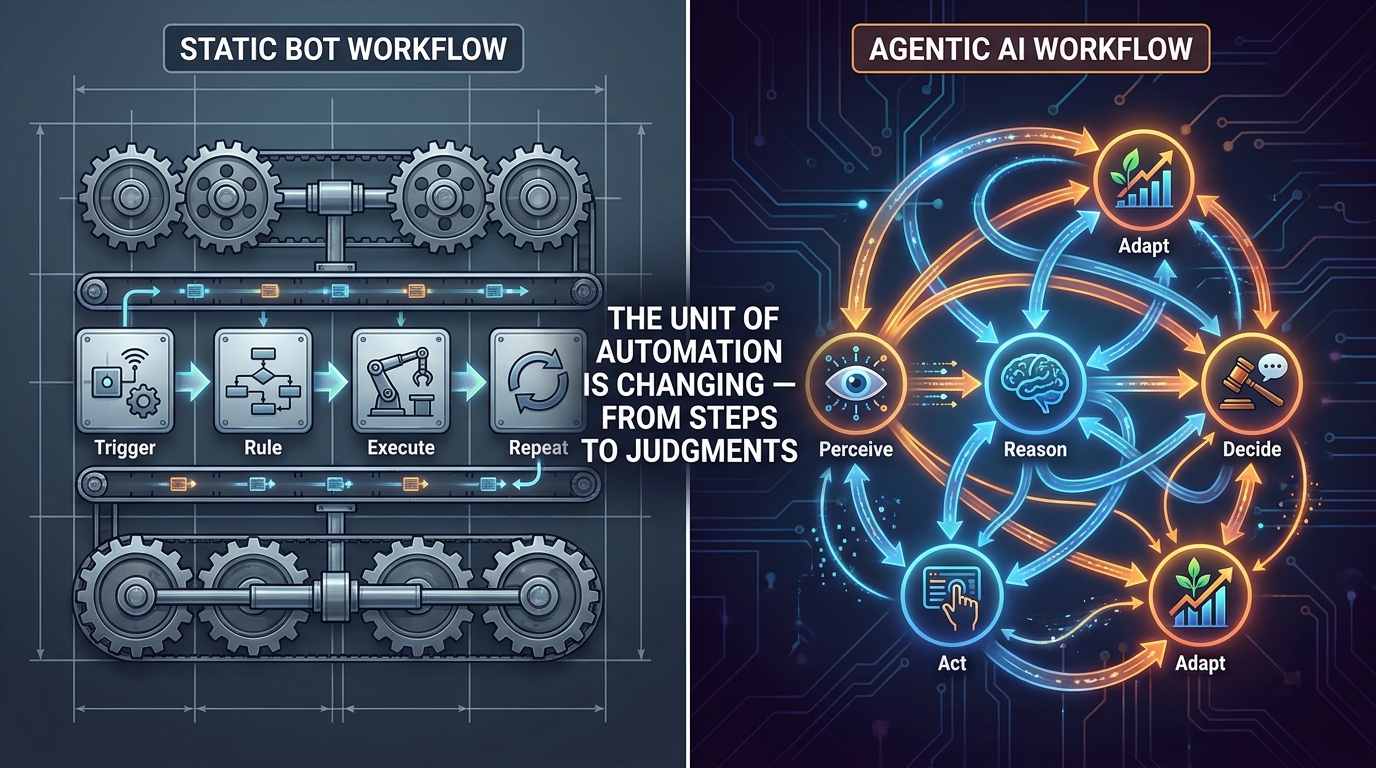
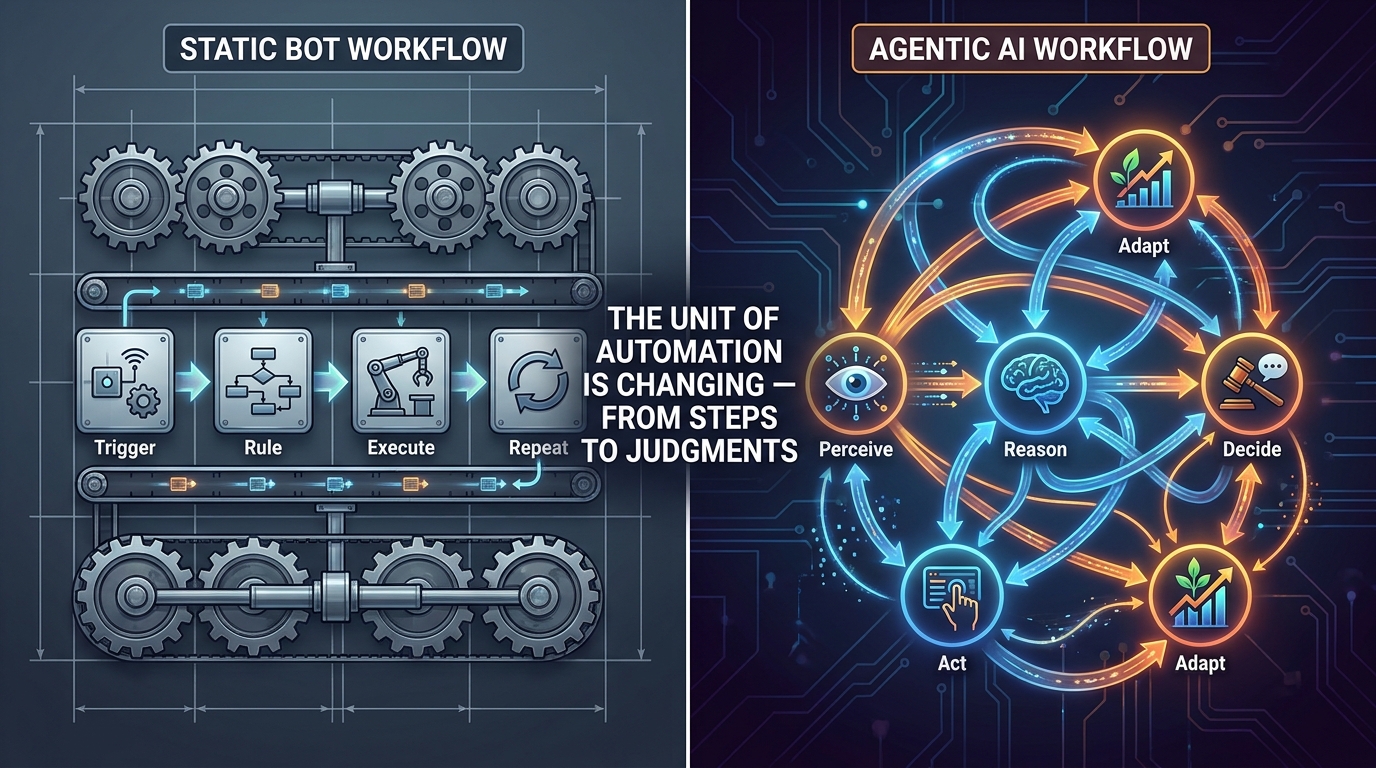
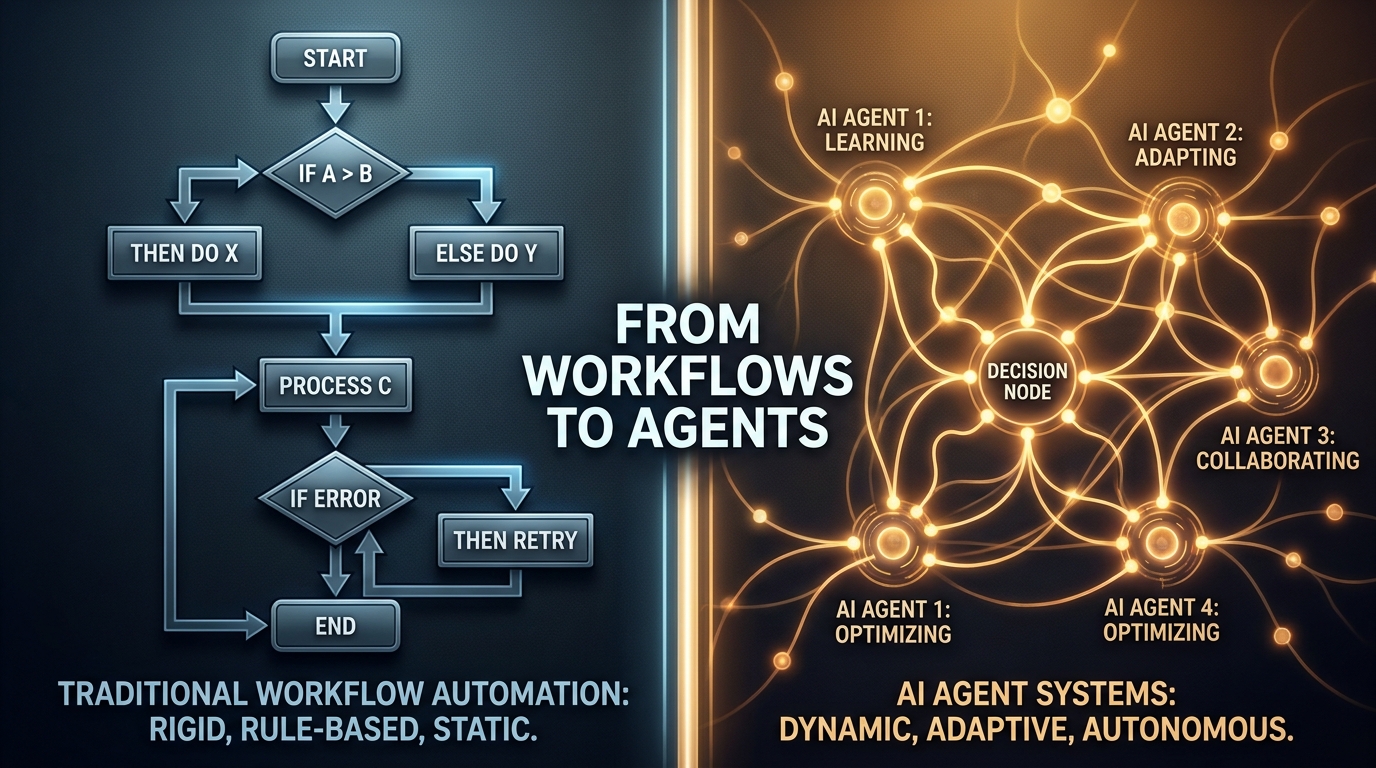
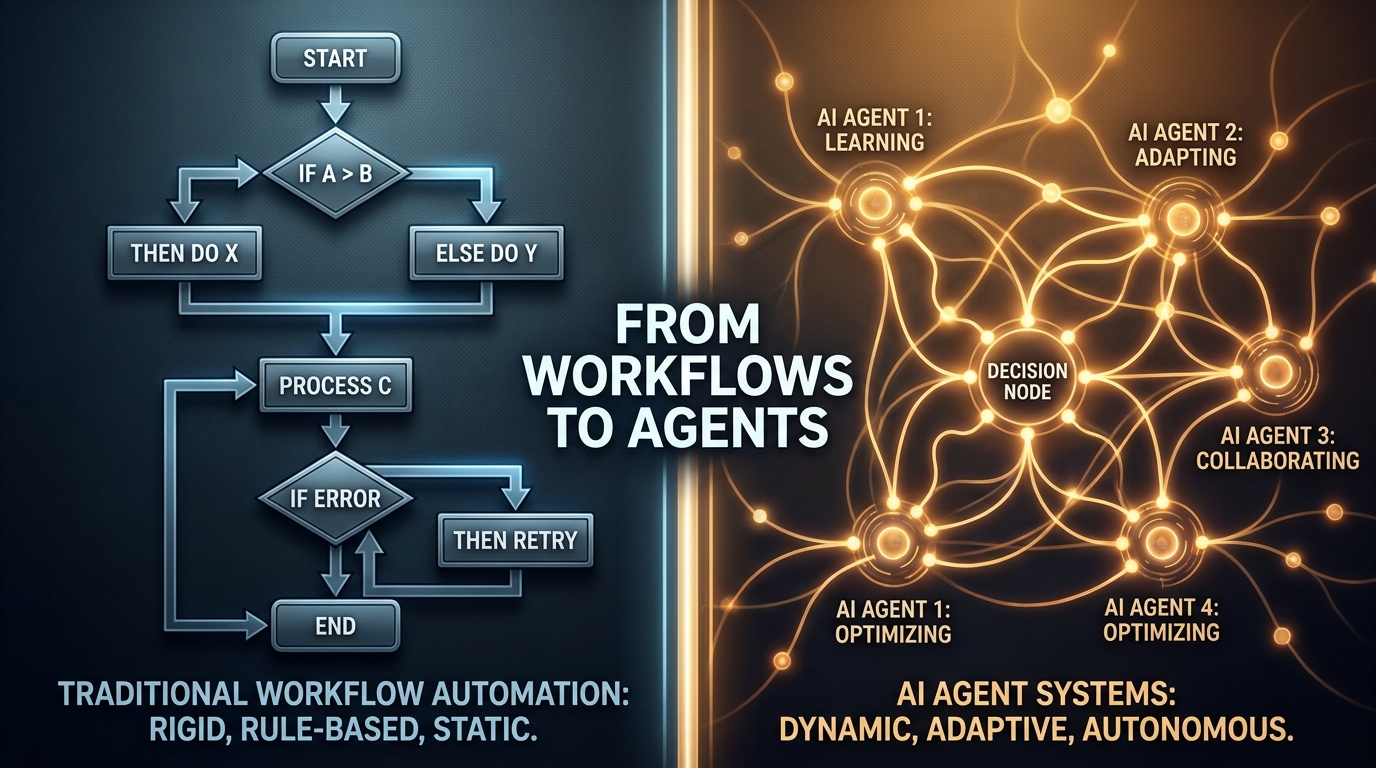
    Split-screen visualization comparing rigid IF/THEN workflow automation on the left with adaptive AI agent networks on the right, representing the shift from workflows to agents

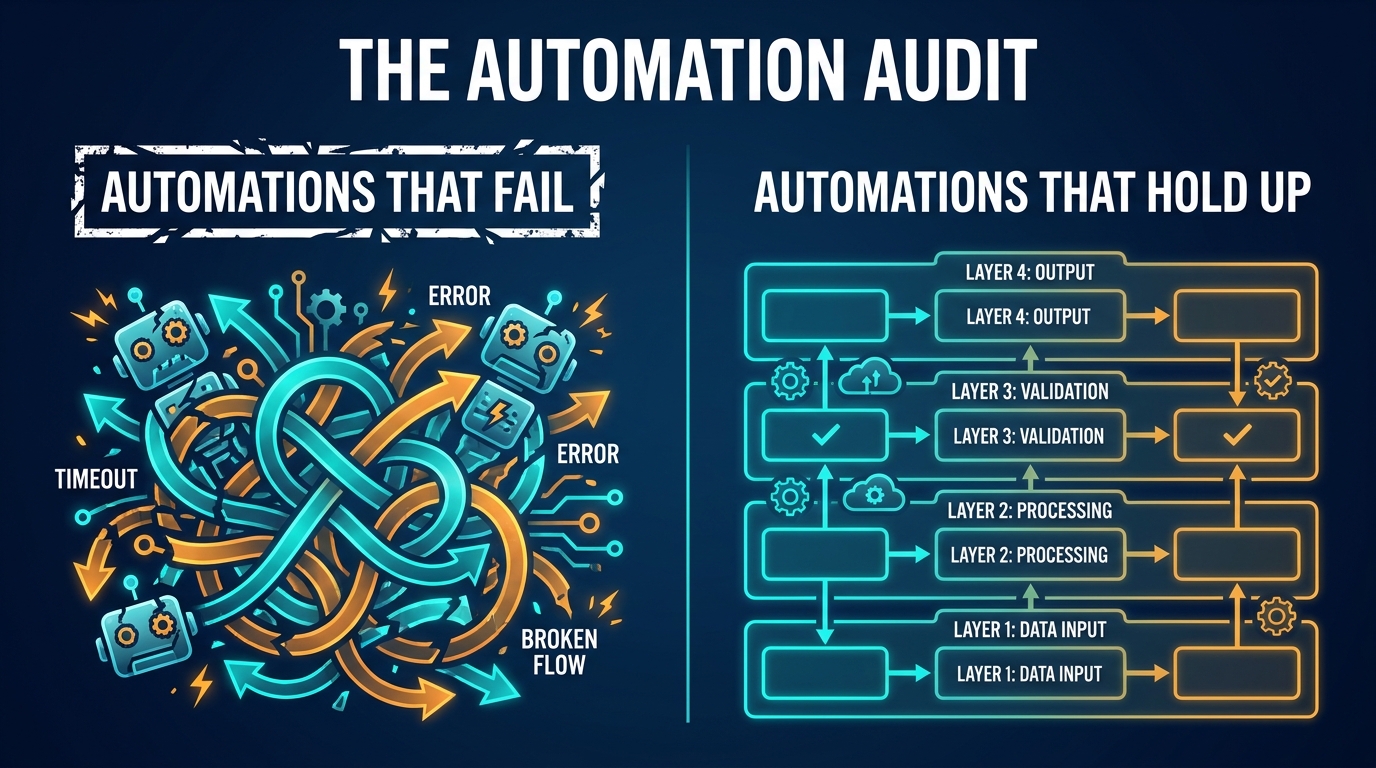
    Most automation stacks weren’t designed — they accumulated. A Zapier flow here. A ServiceNow workflow there. An RPA bot someone built three years ago that no one fully understands but everyone’s afraid to touch. A Python script in a cron job that technically runs but fails silently once a week.

    This is the real shape of enterprise automation in 2026: a patchwork of tools, each doing a narrow job well enough that replacing it never becomes urgent — until suddenly, it does.

    Now the market is pushing hard toward something different: AI agents. Systems that don’t just follow rules but set goals, call tools, reason over context, and decide their own next step. The pitch is compelling. The vendor noise is deafening. And the pressure to “go agentic” is real, even if half the organizations feeling that pressure haven’t finished documenting what their existing automations actually do.

    This post isn’t a vendor comparison or a whitepaper-style definition of what agents are. It’s a practitioner’s guide to the actual upgrade problem — how to look at your existing automation stack honestly, identify where it’s quietly costing you more than it delivers, and make deliberate choices about what to keep, what to extend, and where agents genuinely change the math.

    The answer is almost never “tear everything out and go agent-first.” But it’s also no longer “stay the course.” The window for making these decisions thoughtfully — rather than reactively — is narrowing. Here’s how to use it.

    What Your Current Stack Is Actually Doing (and Where It’s Quietly Failing)

    Before any upgrade decision can be made intelligently, you need an honest accounting of what you’ve built. Most teams skip this step because it’s uncomfortable. Legacy automation tends to reveal itself as a collection of tribal knowledge, undocumented dependencies, and business logic that lives nowhere except inside a bot that runs on a server someone set up in 2021.

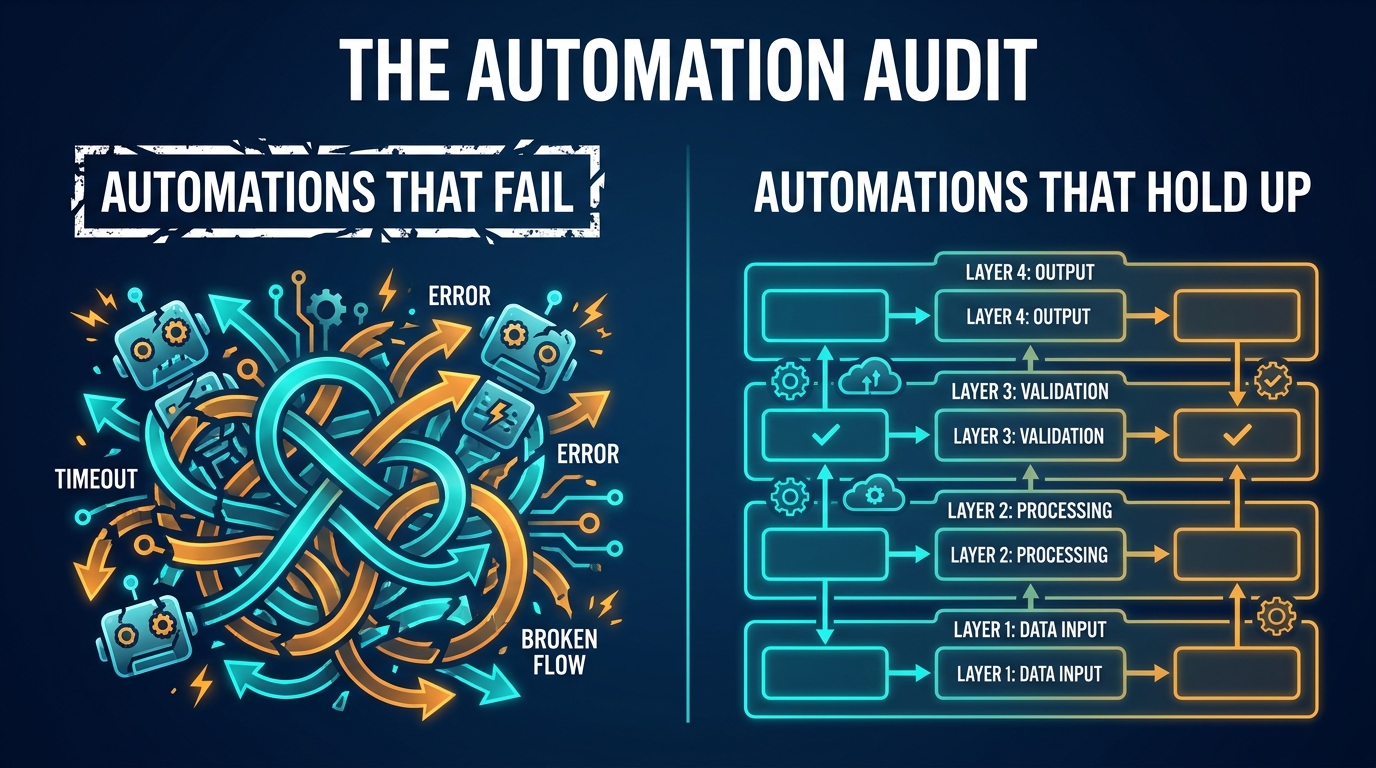
    The Three Failure Patterns That Signal a Stack in Distress

    Across enterprise automation programs, three failure patterns show up repeatedly — and they’re worth diagnosing explicitly, because each one points to a different kind of upgrade need.

    Pattern 1: Exception Rate Creep. A workflow was designed to handle a clean, well-defined process. Over time, edge cases accumulate. The business adds product lines, changes pricing structures, onboards new systems. The workflow starts routing more and more items to a “manual review” queue that’s now handling 20% of volume. The bot runs, technically, but it’s farming out the hard cases to humans at a rate that defeats its original purpose.

    When exception rates on a workflow exceed roughly 15–20% of volume, the economics of the automation start to invert. You’re maintaining a complex system to automate the easy 80% while the hard 20% still requires human intervention — and the hard 20% is often where the highest-value decisions live.

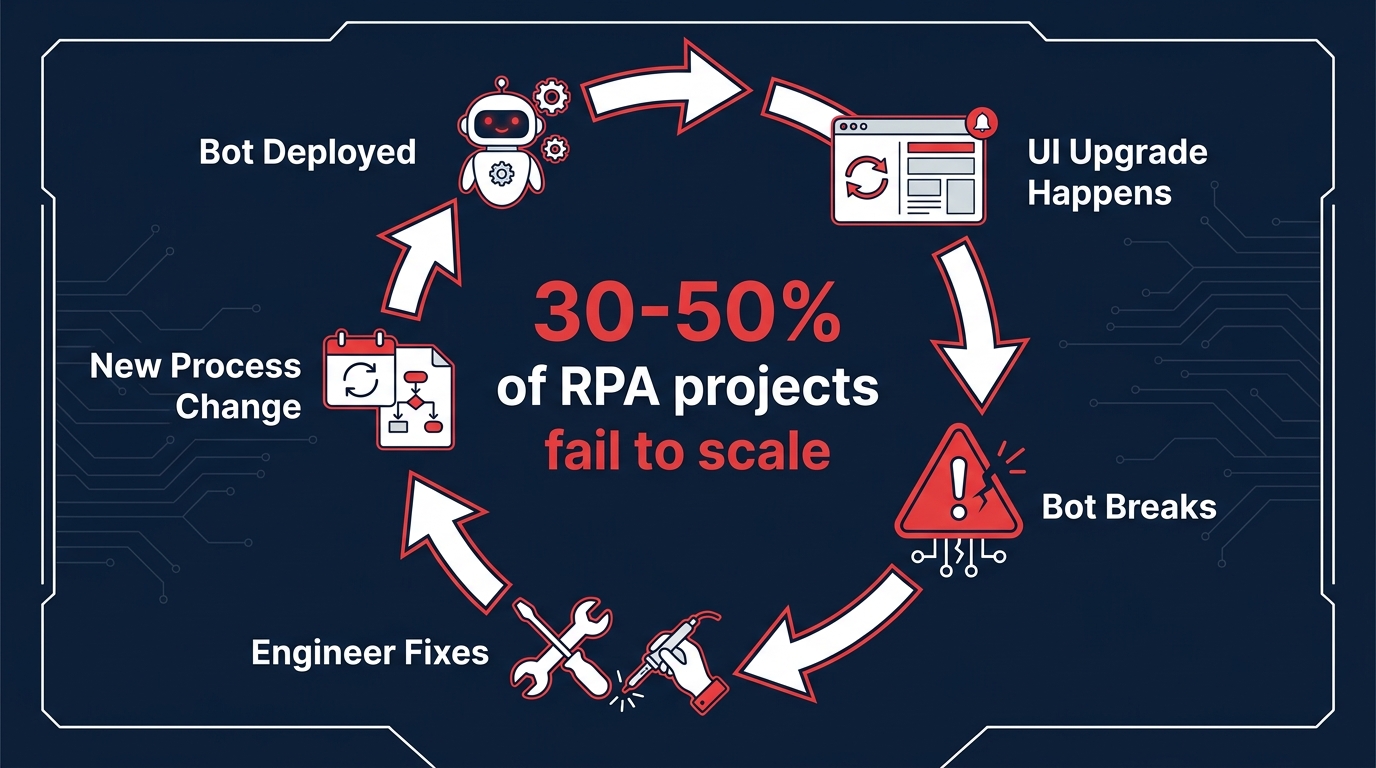
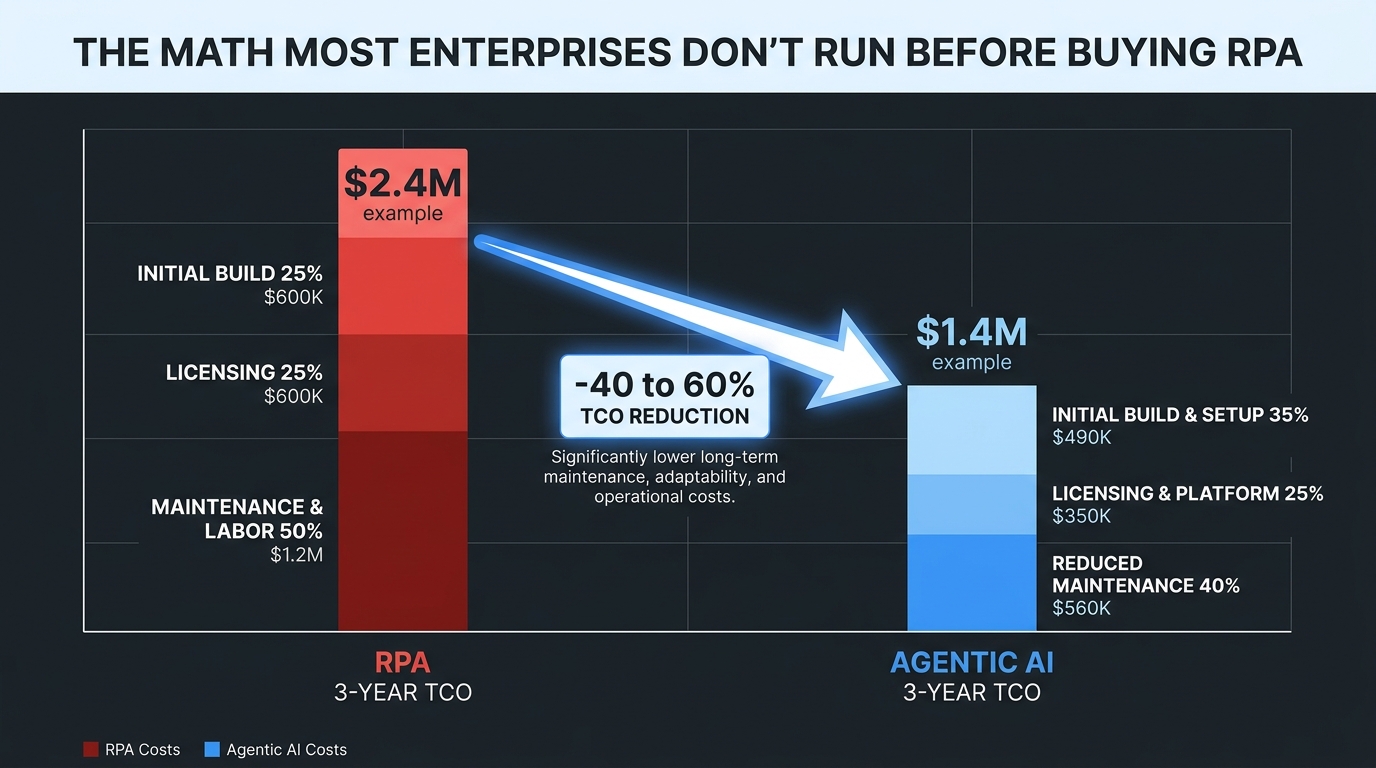
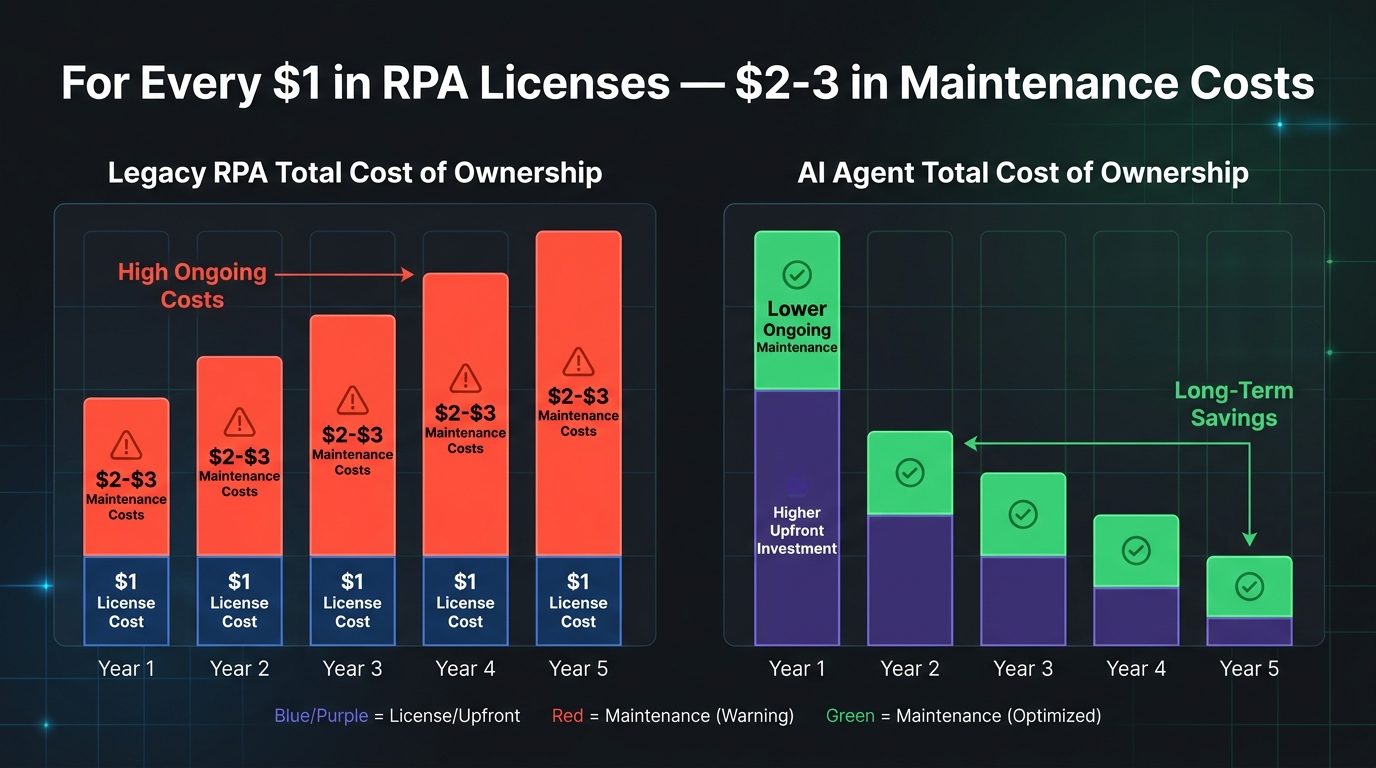
    Pattern 2: Brittleness Tax. Any automation that depends on UI scraping, fixed data schemas, or hardcoded field positions is paying a brittleness tax. Every time a vendor updates their interface, every time an API adds a required field, every time a business process changes — someone has to go in and fix the bot. The maintenance burden is non-trivial: industry data suggests enterprises spend $2–3 in maintenance over five years for every $1 they spend on RPA licensing. That’s a ratio that compounds quietly until it breaks a budget.

    Pattern 3: The Integration Ceiling. Workflow tools are typically designed around linear, point-to-point integrations. Process A triggers Process B, which outputs to System C. This works until the business needs Process A to consider context from five different systems, weigh competing priorities, and make a judgment call. At that point, the workflow isn’t just limited — it’s architecturally incapable of doing what’s needed. You can add more branches, but you’re essentially trying to encode decision intelligence into a flowchart, which is both fragile and expensive to maintain.

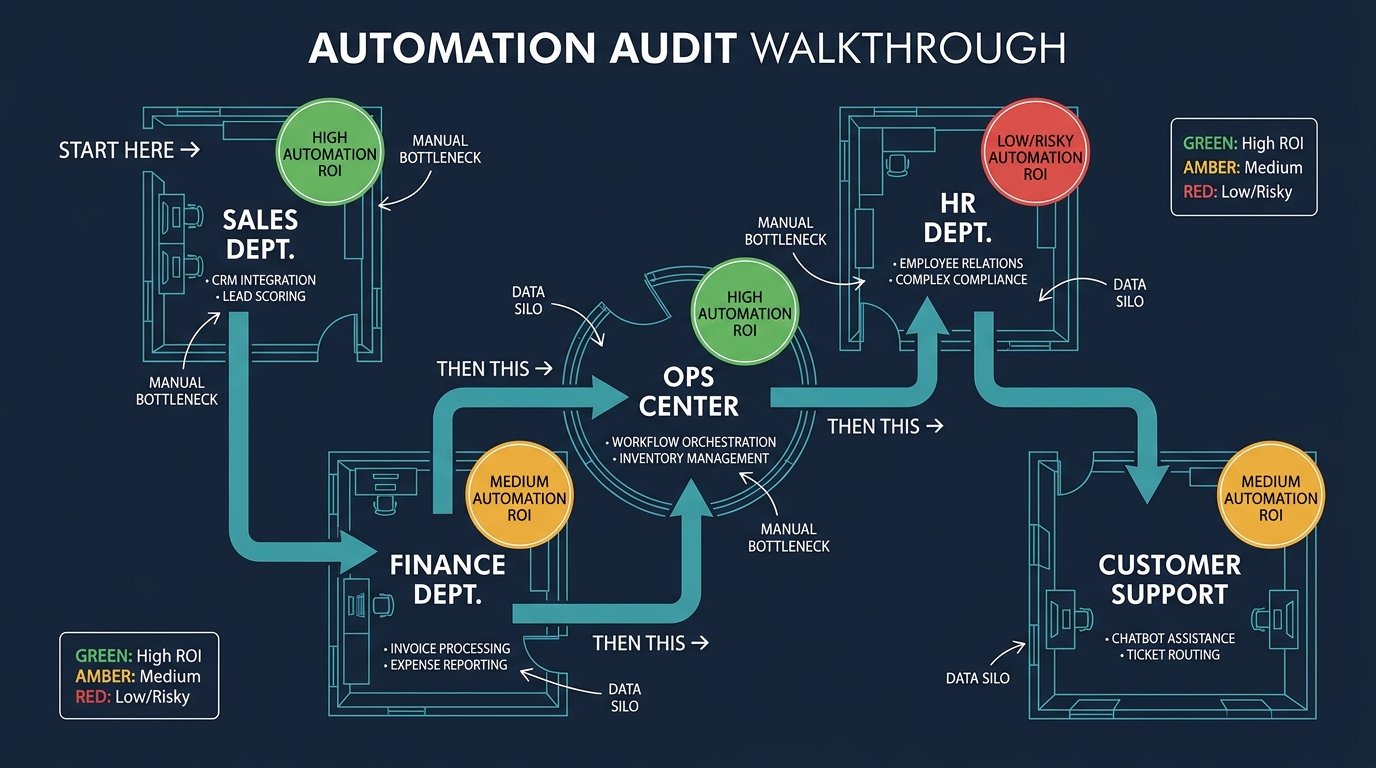
    Running Your Own Stack Audit

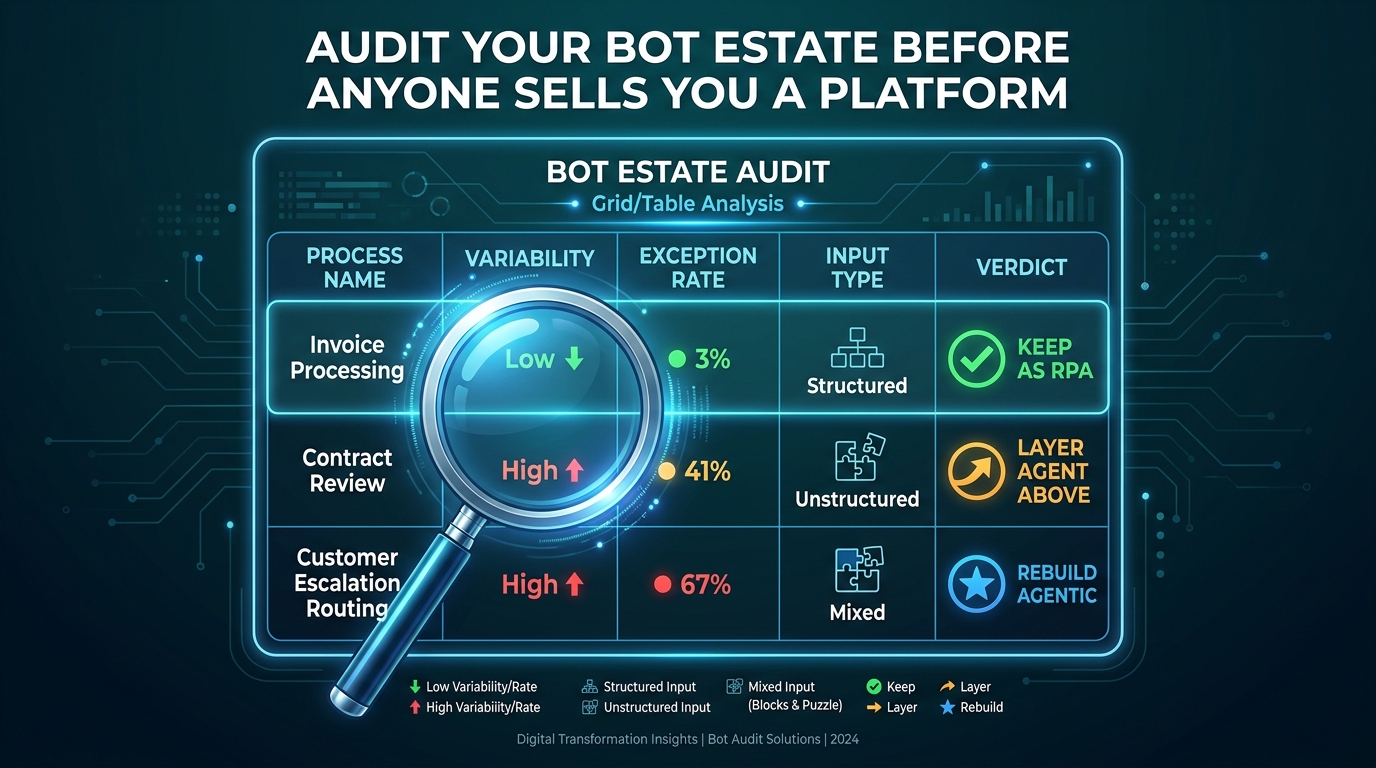
    A practical audit starts with three inventory questions for every automation currently running in your organization:

    1. What is the exception rate? How many items processed per month require human intervention or manual override? Track this number. If you don’t have it, instrument your flows to capture it before making any upgrade decisions.
    2. What is the maintenance frequency? How many times in the past 12 months did someone have to modify this automation because of an external change — a system update, a policy change, a data format shift? High maintenance frequency is the clearest signal of brittleness.
    3. What decisions does it make? Is it executing pre-defined logic (if X then Y), or is it approximating a judgment call that a human would make differently depending on context? The more judgment-like the decision, the more a workflow is hiding complexity rather than eliminating it.

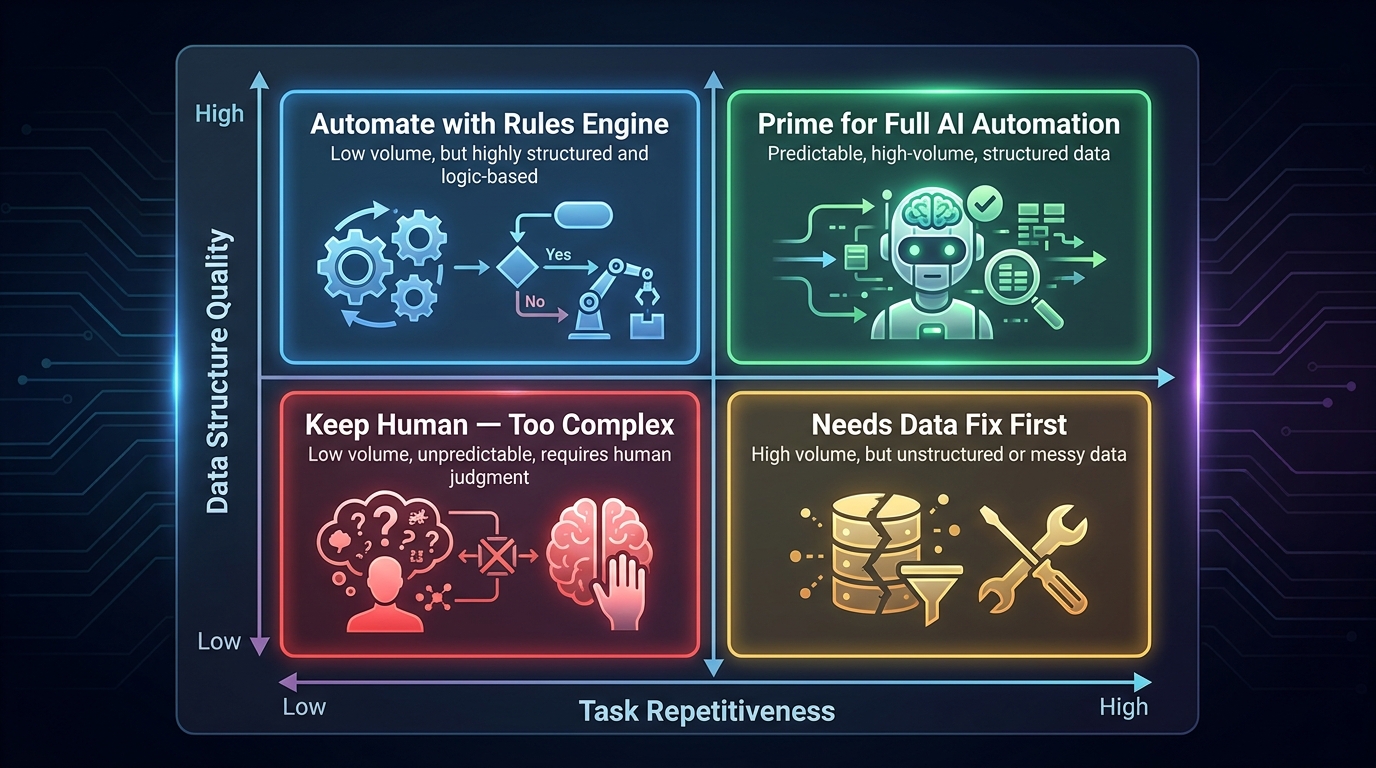
    This audit won’t take long if you approach it as a quick triage rather than a full documentation project. The goal is to categorize your existing automations into: (1) healthy and stable, (2) maintained but aging, and (3) actively costing more than they save. That classification drives every subsequent upgrade decision.

    The Four-Layer Automation Stack Model for 2026

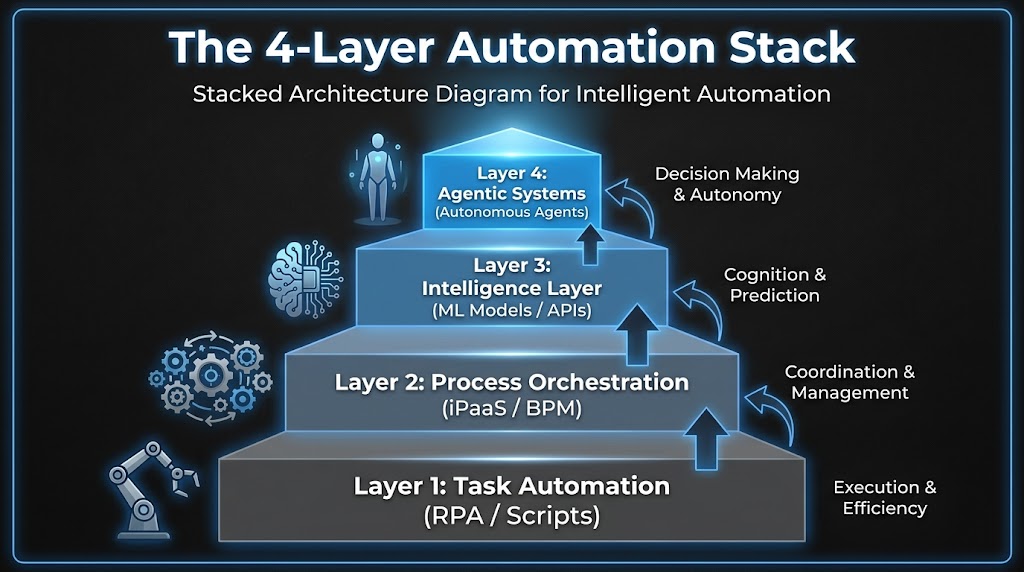
    Four-layer automation stack architecture diagram showing Task Automation, Process Orchestration, Intelligence Layer, and Agentic Systems from bottom to top

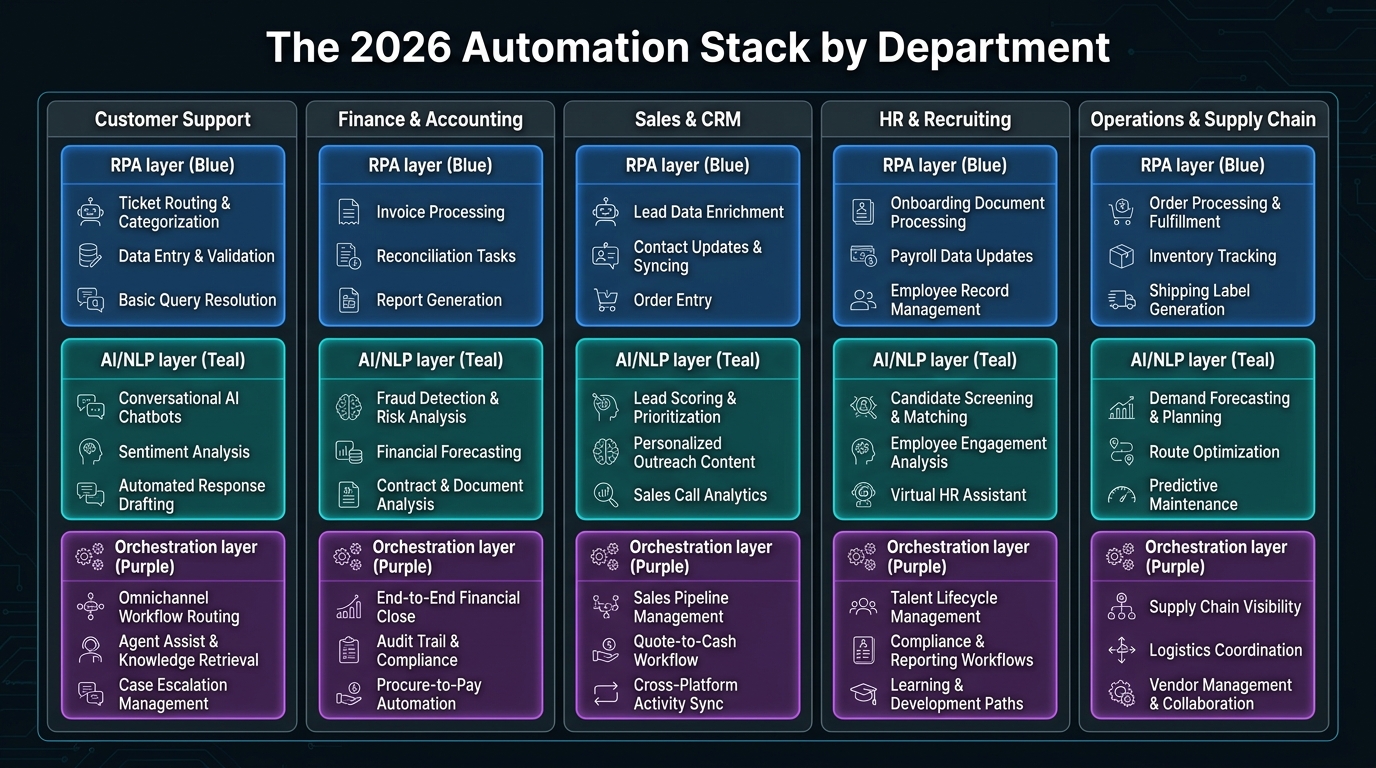
    One of the most useful reframes for thinking about automation upgrades is to stop thinking about individual tools and start thinking in layers. Your stack isn’t a collection of point solutions — it’s (or should be) a layered architecture where each tier has a different job, a different change cadence, and a different cost profile.

    Layer 1: Task Automation

    This is the foundation — RPA bots, shell scripts, macros, scheduled jobs. These tools exist to handle high-volume, repetitive, structurally stable tasks at low marginal cost. UI-based data entry. File format conversions. Automated report distribution. When a process is genuinely stable and deterministic, this layer is still the right tool. The mistake most organizations make isn’t using RPA — it’s using RPA for processes that aren’t genuinely stable or deterministic.

    The health metric for this layer is simple: maintenance cost per automation per year. If you’re spending more maintaining a bot than you’d spend having a human do the task periodically, the bot has become a liability.

    Layer 2: Process Orchestration

    This layer coordinates multi-step processes across systems and teams — iPaaS platforms like MuleSoft, Boomi, or Workato; BPM tools like Camunda or Appian; workflow platforms like Microsoft Power Automate. The job here is sequencing, routing, and state management across processes that involve multiple participants or systems.

    Where Layer 1 automates a task, Layer 2 automates the handoffs between tasks. It’s inherently about coordination — and that’s where it often breaks down, because coordination logic is where business rules accumulate fastest. Approval workflows that grow twenty exception branches over three years. Routing logic that was simple in year one and is now a maintenance nightmare.

    Layer 3: Intelligence Layer

    This is where ML models, classification engines, document understanding tools, and decision APIs sit. In 2026, this layer is being populated rapidly — document processing that uses vision models to extract data from non-standard formats, NLP classifiers that route support tickets, recommendation engines that inform next-best-action suggestions. These tools don’t orchestrate processes, but they inject judgment into them.

    The key distinction: Layer 3 tools are still called by workflows. They respond to requests from the layers below. They don’t initiate actions or pursue goals.

    Layer 4: Agentic Systems

    This is the layer that changes the model. Agents don’t wait to be called — they pursue a goal, using tools from the layers below to take actions, observe results, and adapt. An agent in this layer might be tasked with resolving a customer complaint end-to-end: it reads the case context, checks inventory systems, looks up account history, drafts a response, waits for approval, and closes the ticket — without a human defining each step in advance.

    The critical point is that Layer 4 doesn’t replace layers 1–3. It coordinates them. Your RPA bots become tools that agents can call. Your orchestration workflows become sub-processes that agents can trigger. Your intelligence models become capabilities that agents can invoke as needed. The architecture doesn’t collapse — it gains a new top layer that changes what’s possible.

    The Real Difference Between a Workflow and an Agent (It’s Not What Vendors Say)

    The vendor explanation of agents vs. workflows usually goes something like this: workflows are rule-based and deterministic; agents are AI-powered and flexible. That’s technically accurate but practically useless, because it doesn’t tell you when to use which, or what actually changes at the system design level.

    The Control Flow Inversion

    The more precise distinction is about who controls the flow. In a workflow, the process designer controls the flow. They define every step, every branch, every error condition in advance. The workflow executes exactly what was designed — nothing more.

    In an agent, the model controls the flow. The designer specifies a goal and makes tools available. The agent decides which tools to use, in what order, and when to stop. This is called the ReAct loop — Reason, Act, Observe, Repeat — and it fundamentally changes both what’s possible and what can go wrong.

    A workflow will never do something you didn’t design it to do. An agent might. That’s its power and its risk in the same sentence.

    State and Memory

    Workflows are typically stateless between steps or manage state through explicit handoffs — a variable passed from one node to the next, a record updated in a database. Agents maintain context across a multi-step process, using a combination of working memory (what’s happened so far in this session), external memory (a vector database or document store), and tool call results. This allows agents to handle processes where the right action at step 7 depends on subtle context from steps 1–6 — something workflow engines fundamentally can’t do without explicit state management that rapidly becomes complex.

    Error Handling and Exception Management

    This is where the practical gap is largest. A workflow’s error handling is defined by the designer: catch this exception, route to this fallback, alert this person. An agent can reason about errors. If a tool call fails, the agent can try a different approach, gather more information, or escalate with a detailed explanation of what it tried and why it failed. For processes with high exception rates, this difference alone can justify the migration cost.

    What Agents Can’t Do (Yet)

    It’s equally important to be clear about agent limitations. Agents are non-deterministic — the same input won’t always produce the same output, which makes them unsuitable for processes requiring strict auditability or regulatory compliance without careful instrumentation. They’re also computationally more expensive than running a workflow: every agent step involves an LLM inference call, which adds latency and cost. And they require careful prompt engineering and tool design to behave reliably at scale. The 40% of multi-agent pilots that fail within six months of production deployment almost always fail because of underestimating these operational requirements, not because the underlying technology doesn’t work.

    The Break-Even Diagnosis: When Legacy Automation Costs More Than It Saves

    Financial comparison chart showing RPA total cost of ownership with $2-3 in maintenance costs for every $1 in license costs versus AI agent TCO over 5 years

    The decision to upgrade any piece of your automation stack shouldn’t be driven by vendor roadmaps or industry trend reports. It should be driven by a break-even analysis that’s specific to your context. Here’s how to structure it.

    The True Cost of Your Current Automation

    Most organizations dramatically undercount the cost of running legacy automation because they only account for licensing fees. The real cost includes:

    • Maintenance engineering time: How many hours per month do developers spend fixing, adjusting, or debugging existing workflows and bots? At typical fully-loaded developer rates, this number is often surprisingly large.
    • Exception handling labor: Every item that falls out of an automated process and lands in a manual review queue has a cost. If your exception rate is 20% on a process handling 10,000 items per month, you’re paying for 2,000 manual reviews. Track this number explicitly.
    • Opportunity cost of brittleness: When a bot breaks, how long does it take to restore the process? What’s the cost of that downtime — in delayed outputs, frustrated users, or escalation to leadership? Brittle automations have a hidden downtime cost that rarely shows up in TCO calculations.
    • Upgrade overhead: As underlying systems change (new ERP release, API version change, UI redesign), how much does it cost to update the automations that depend on them? For organizations running large RPA estates, this is often a significant annual budget item.

    The Inflection Point

    The break-even inflection point typically arrives when the annual cost of maintaining an existing automation — including all the above — exceeds the estimated annual cost of replacing it with a more capable system, amortized over a reasonable lifespan. For many RPA deployments that have been running for 3+ years, the inflection point has already passed or is approaching rapidly.

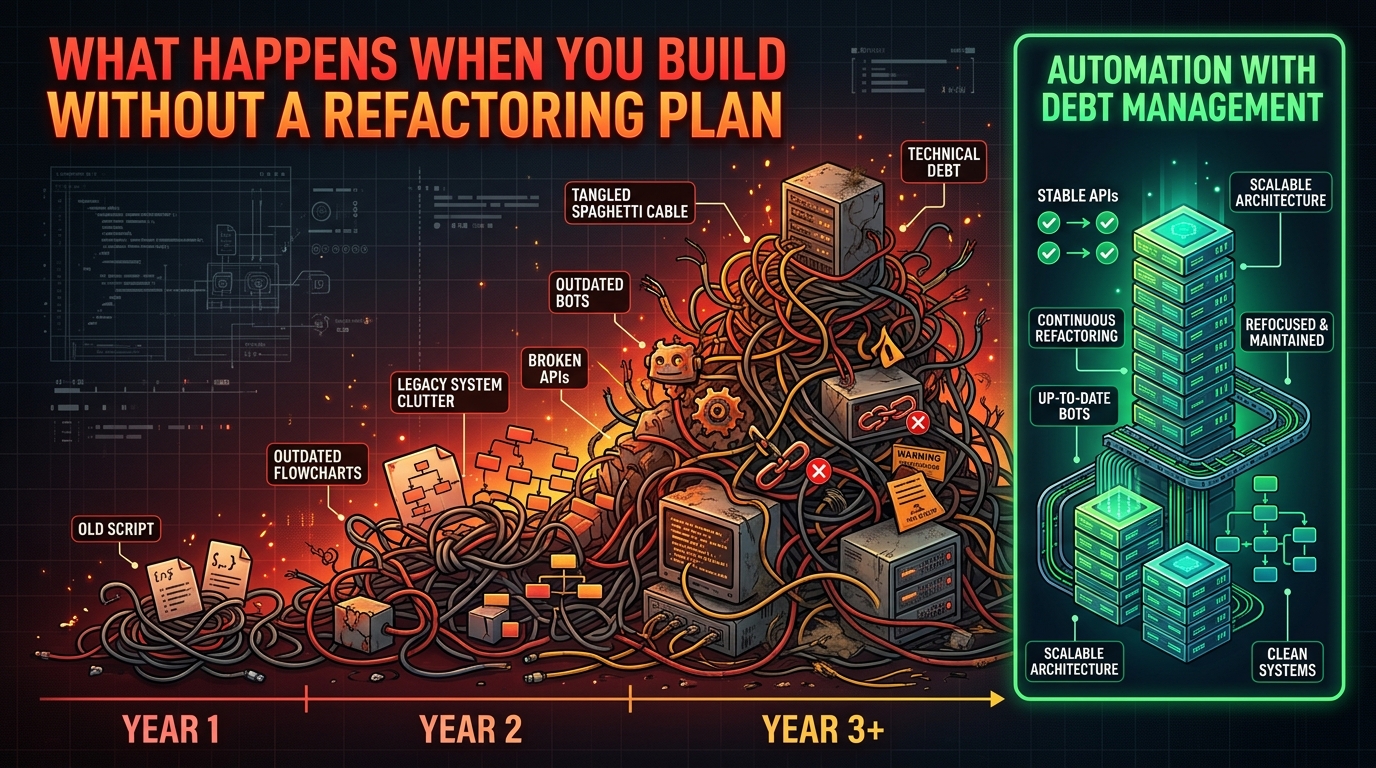
    The $2–3 maintenance multiplier cited by industry analysts isn’t just a vendor talking point — it reflects the compounding nature of technical debt in brittle automation. The longer a workflow runs without architectural modernization, the more business logic gets encoded into it in ad hoc ways, and the harder it becomes to change, audit, or replace.

    A Practical Scoring Method

    For each automation in your stack, score it on three dimensions from 1–5:

    1. Maintenance burden (1 = minimal, 5 = constant firefighting)
    2. Exception rate (1 = <5% manual intervention, 5 = >25% manual intervention)
    3. Strategic value (1 = low-volume administrative task, 5 = customer-facing or revenue-impacting process)

    Any automation scoring 7 or above across these dimensions — especially with a high strategic value score — is a candidate for upgrade evaluation. Any automation scoring 9 or above is actively worth accelerating. This isn’t a perfect formula, but it turns an abstract “should we upgrade?” question into a ranked priority list you can act on.

    The Upgrade Decision Matrix: What to Keep, Extend, and Replace

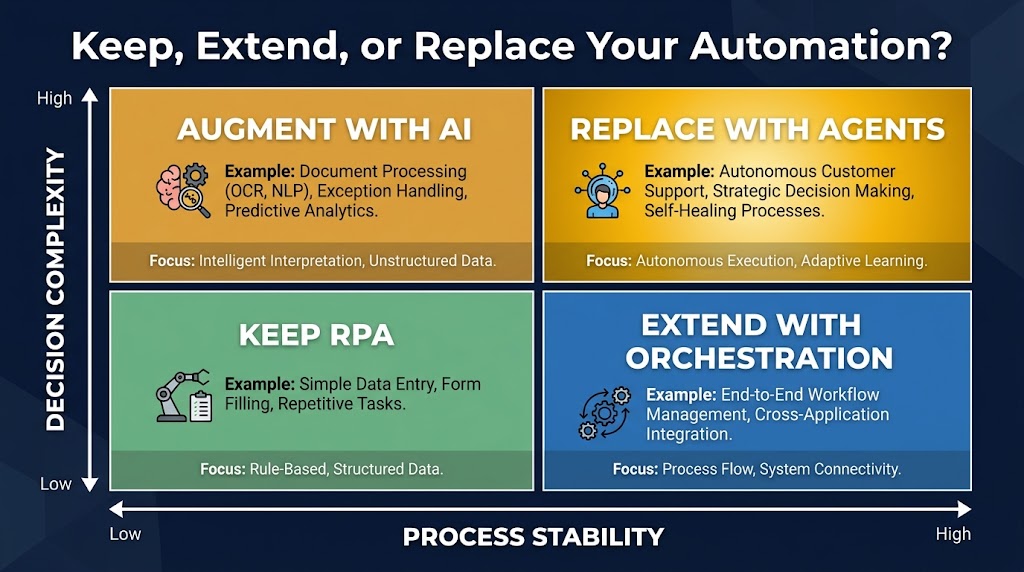
    Decision matrix showing Keep vs Extend vs Replace automation decisions based on process stability and decision complexity axes

    Once you’ve diagnosed the health of your existing stack, the decision about what to do with each component comes down to four factors: process stability, decision complexity, exception tolerance, and volume. Let’s map those to concrete upgrade paths.

    Keep: High Stability, Low Complexity

    If a process is structurally stable — meaning the inputs, logic, and outputs rarely change — and the decisions it makes are fully deterministic, RPA or rule-based workflow automation is still the right tool. High-volume, low-variation processes like payroll calculations, scheduled report generation, or data format conversions between systems with stable APIs fall into this category.

    The key question isn’t “could an agent do this?” — it’s “is there a compelling reason to change?” For genuinely stable, high-volume processes, adding agent overhead adds cost and non-determinism without adding value. Keep them as-is and put your upgrade budget elsewhere.

    Extend: Moderate Complexity, Stable Structure

    Many workflows don’t need to be replaced — they need to be extended with intelligence. This is where Layer 3 tools (document understanding models, classification APIs, anomaly detection) can be added to an existing workflow to reduce exception rates without a full architectural replacement.

    A practical example: an invoice processing workflow that’s routing 20% of invoices to manual review because they don’t match standard templates. Rather than replacing the workflow with an agent, add a document intelligence model at the intake step that extracts fields from non-standard invoices and normalizes them before the existing workflow processes them. The workflow’s exception rate drops dramatically, the cost of the upgrade is modest, and you’ve extended the life of a working process without a full rebuild.

    Augment: High Complexity, High Exception Rate

    When a process has both high decision complexity and a significant exception rate, the architecture needs to change — but not necessarily with a full agent replacement. This is often the right place for a hybrid pattern: a workflow handles the well-defined happy path, and an agent handles exception routing and resolution.

    This “agent as exception handler” pattern is one of the most practical entry points for agentic AI. It keeps the deterministic core of the existing workflow intact while delegating the hard cases — the ones currently going to humans — to an agent that can reason about context, gather additional information, and either resolve the exception or escalate with a clear explanation. The result is a process that handles 95%+ of volume automatically instead of 80%, without the risk of replacing a working system wholesale.

    Replace: Low Stability, High Decision Complexity

    Full agent replacement makes the most sense for processes where the structure itself changes frequently, the decisions required are genuinely judgment-like, and the cost of maintaining the existing automation is high. Customer-facing support processes, complex procurement workflows, research and analysis tasks, and multi-system coordination tasks that currently require human judgment at multiple points — these are the candidates for full agent replacement.

    The signal that a process belongs in this category isn’t just high exception rate or high maintenance cost — it’s the combination of both with a strategic importance that makes the investment worthwhile. Replacing a low-volume administrative workflow with an agent to save two hours of manual work per week is rarely the right priority. Replacing a customer escalation process that handles high-value accounts and requires contextual judgment is a different calculation entirely.

    Agent Design Patterns That Actually Hold Up in Production

    When organizations deploy AI agents for the first time, they tend to underestimate the design work required and overestimate how much the LLM will figure out on its own. The result is agents that work in demo environments and break in production. Here are the design patterns that separate stable production agents from fragile demos.

    Pattern 1: Small Tool Sets, Sharp Scopes

    The single most common design mistake is giving an agent too many tools. When an agent has access to 30 different tools, the LLM’s routing accuracy drops significantly — it selects the wrong tool, chains calls unnecessarily, or gets confused by overlapping functionality. Production-grade agents consistently perform better with five to ten tightly scoped tools that do one thing well than with broad tool suites that cover every conceivable action.

    Design principle: each tool should be named and described with the precision you’d use for a well-written function docstring. The description tells the agent not just what the tool does, but when to use it and what its limitations are. “Retrieve customer order history” is a better tool description than “Get data.” The more precisely the agent understands what each tool is for, the more reliably it will use them correctly.

    Pattern 2: Explicit State Management

    Don’t rely on the agent’s context window to maintain state across a long-running process. Context windows are expensive, and for processes that span hours or involve branching paths, context-based state management is both unreliable and costly. Instead, implement explicit state objects — structured records that capture what the agent has done, what it knows, and what decision it’s currently working on — stored externally and passed to the agent at each step.

    This also makes your agent debuggable. When an agent makes an unexpected decision, you can inspect the state object at the point of failure and understand exactly what information it was working with. Without explicit state, debugging becomes a prompt archaeology exercise that few engineers have patience for.

    Pattern 3: Structured Output Contracts

    Agents should produce structured outputs — not free-form text — whenever their output feeds into another system. This means defining output schemas before building the agent, and using the LLM’s function-calling or structured output capabilities to enforce them. An agent that writes its decision as a JSON object with defined fields is far easier to integrate with downstream systems than one that writes a paragraph of explanation you then have to parse.

    This is particularly important for the “agent as exception handler” pattern. The agent needs to communicate its decision (resolved, escalated, needs more information) along with the reasoning, the actions taken, and any artifacts created — all in a format that the downstream workflow can process without human interpretation.

    Pattern 4: Graceful Degradation

    Every production agent needs a graceful degradation path: a defined behavior for when it can’t complete a task. This should not be “the agent keeps trying until it times out.” It should be: after N retries or M minutes, the agent produces a structured handoff document describing what it knows, what it tried, and why it stopped — and routes that to a human queue. The human gets context-rich information rather than a raw failure, and the process doesn’t stall.

    Building this escalation behavior explicitly into the agent’s system prompt and tool set — not leaving it to emergent LLM behavior — is the difference between a production-grade agent and a demo-grade one.

    Pattern 5: Tool-Level Observability

    Log every tool call, with inputs and outputs, at the infrastructure level — not just what the agent decided to do, but what each tool returned. This creates an audit trail that’s invaluable for debugging, compliance, and ongoing improvement. Gartner has noted that organizations prioritizing audit trails and policy enforcement in their agent deployments are the ones moving from pilots to production successfully. The observability infrastructure isn’t optional — it’s what makes enterprise-grade agentic systems governable.

    The Trust Architecture: Human-in-the-Loop vs Autonomous Execution

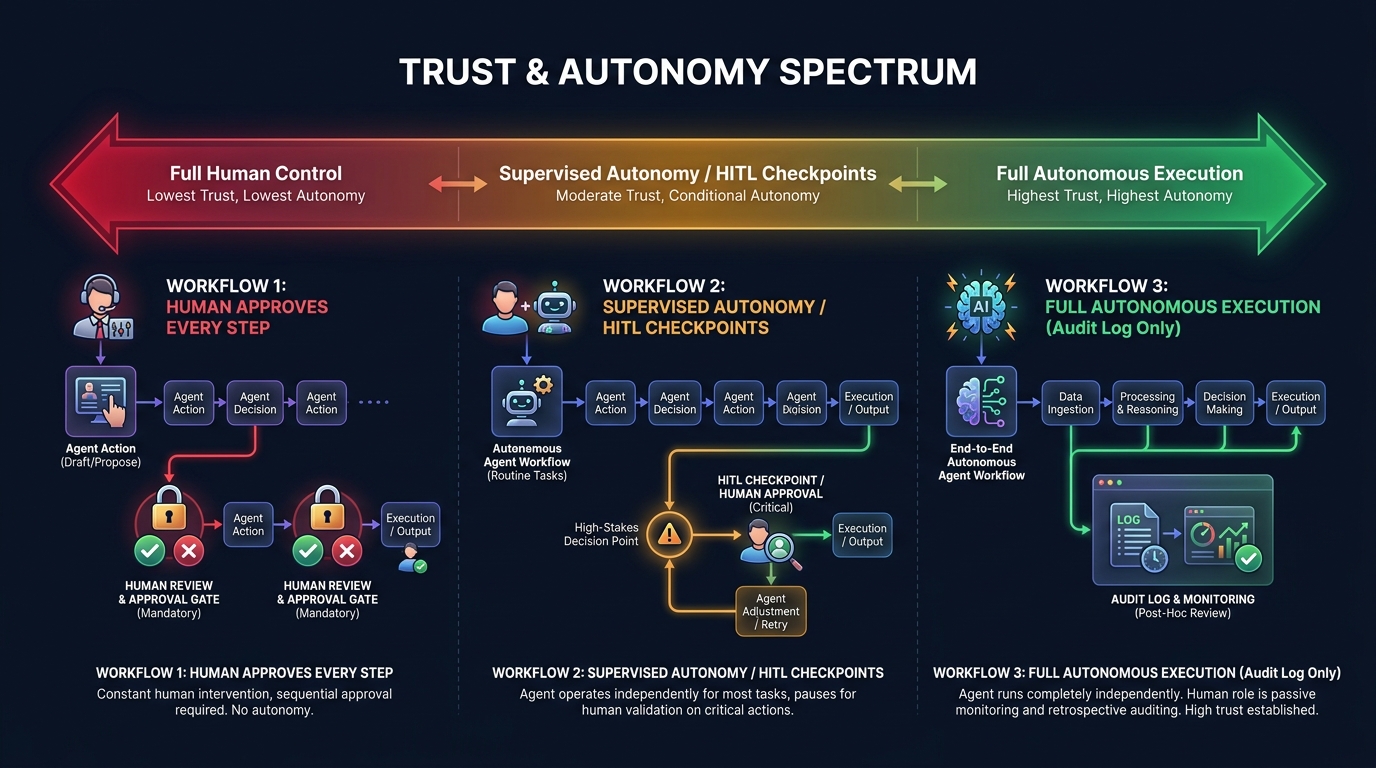
    Trust and autonomy spectrum diagram showing human-in-the-loop versus supervised autonomy versus fully autonomous agent execution patterns

    One of the most consequential architectural decisions in any agent deployment is where on the autonomy spectrum the agent should sit. This isn’t a question of technical capability — modern agents can operate fully autonomously on many tasks. It’s a question of risk, reversibility, and trust calibration.

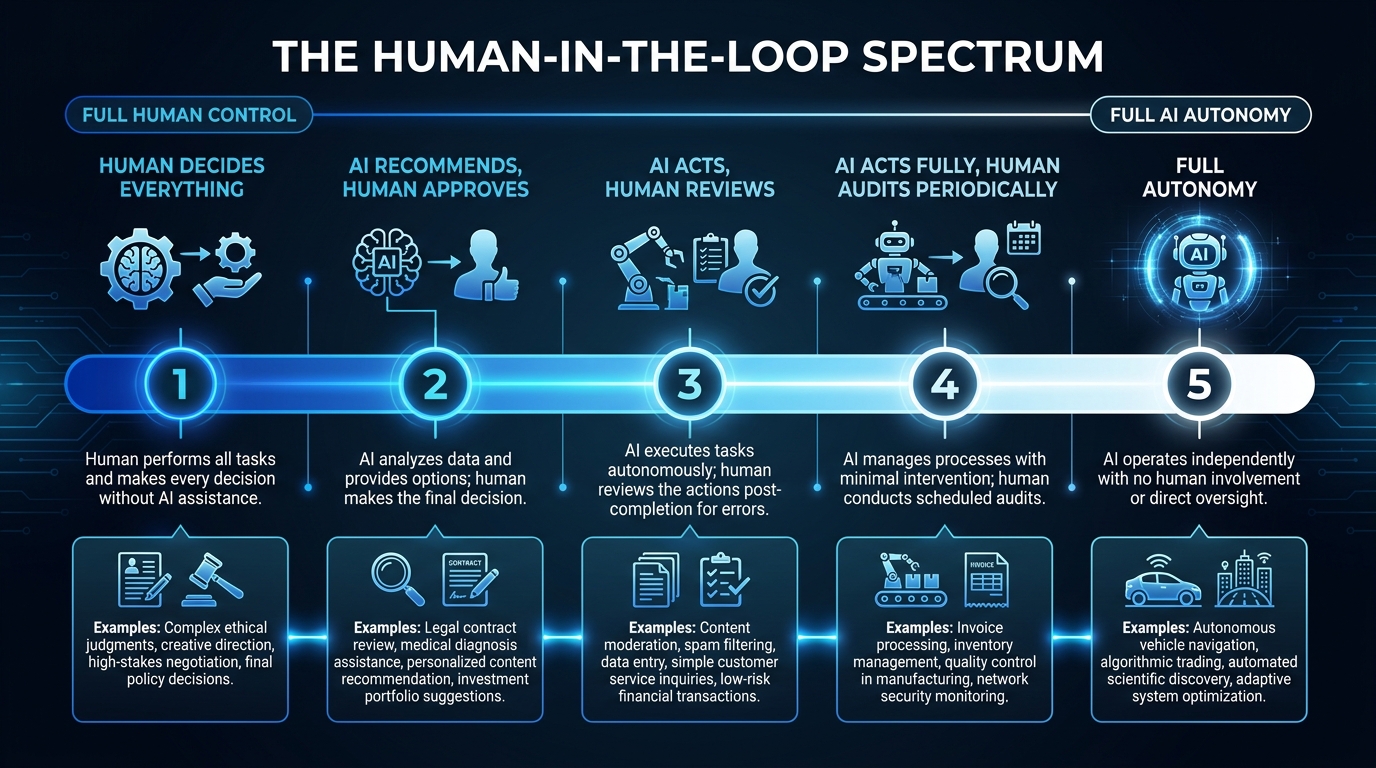
    The Autonomy Spectrum

    Think of autonomy as a dial with five settings, not a binary switch:

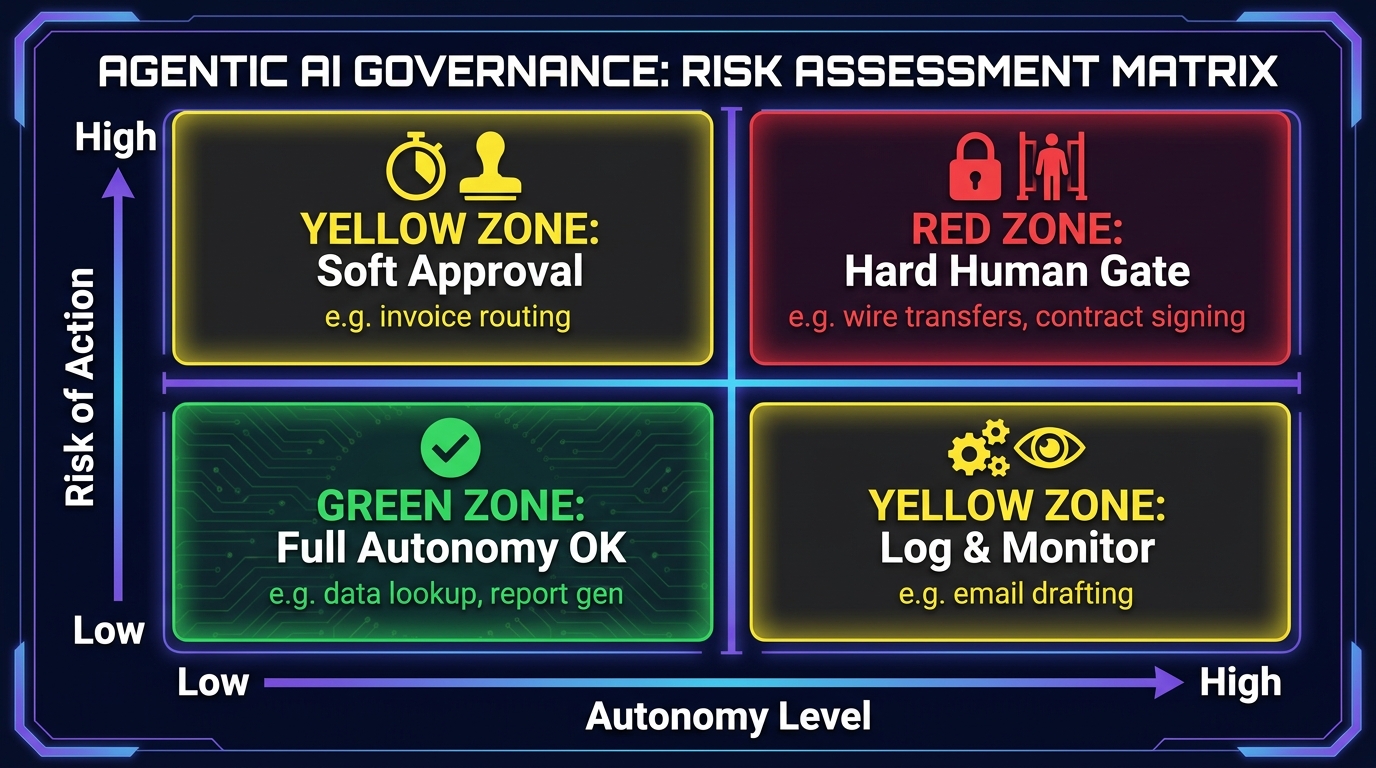
    1. Step-by-step approval: Every action the agent proposes is reviewed and approved before execution. Maximum control, minimal efficiency gain. Appropriate for novel processes where trust has not yet been established.
    2. Category-level approval: Certain categories of action (e.g., read operations, low-value writes) are executed automatically; others (e.g., external communications, financial transactions above a threshold) require approval. Most common pattern for production deployments.
    3. Exception-only escalation: The agent runs autonomously but must escalate defined categories of decision — high-value transactions, PII handling, legally sensitive actions. This is appropriate once the agent has demonstrated reliable behavior over a meaningful production period.
    4. Autonomous with audit: The agent runs fully autonomously, but all actions are logged in real time and reviewable. Appropriate for well-understood, low-risk processes with clear rollback capabilities.
    5. Fully autonomous: No human in the loop. Extremely limited appropriate use cases — typically low-stakes, well-constrained, easily reversible tasks with extensive instrumentation.

    Setting the Right Level for Your Context

    The right autonomy level isn’t determined by how confident you are in the LLM — it’s determined by the reversibility and blast radius of the actions the agent can take. An agent that reads data and generates a draft document can sit at level 4 or 5 comfortably. An agent that sends external emails, initiates financial transactions, or modifies production databases should stay at level 2 or 3 until a significant track record of reliable behavior is established.

    Recent industry guidance makes the point sharply: naming a human reviewer is not governance. If approval workflows don’t have defined decision rights, clear escalation criteria, and trained reviewers who actually engage with the agent’s reasoning rather than rubber-stamping it, human-in-the-loop is theater, not control. The organizational design of the review process matters as much as the technical implementation.

    Building Toward Higher Autonomy Over Time

    The practical approach is to start at a more controlled level than you think you need and increase autonomy as the agent demonstrates reliability on specific action categories. Track false positive rates (agent takes an action it shouldn’t have) and false negative rates (agent escalates something it should have handled) over time. When both rates are consistently low for a defined category of action, consider expanding autonomy for that category specifically — not for the entire agent at once.

    This graduated trust model is more work upfront but dramatically more robust than deploying a fully autonomous agent on day one and discovering its failure modes in production.

    The Migration Path: Moving from Workflows to Agents Without Breaking the Stack

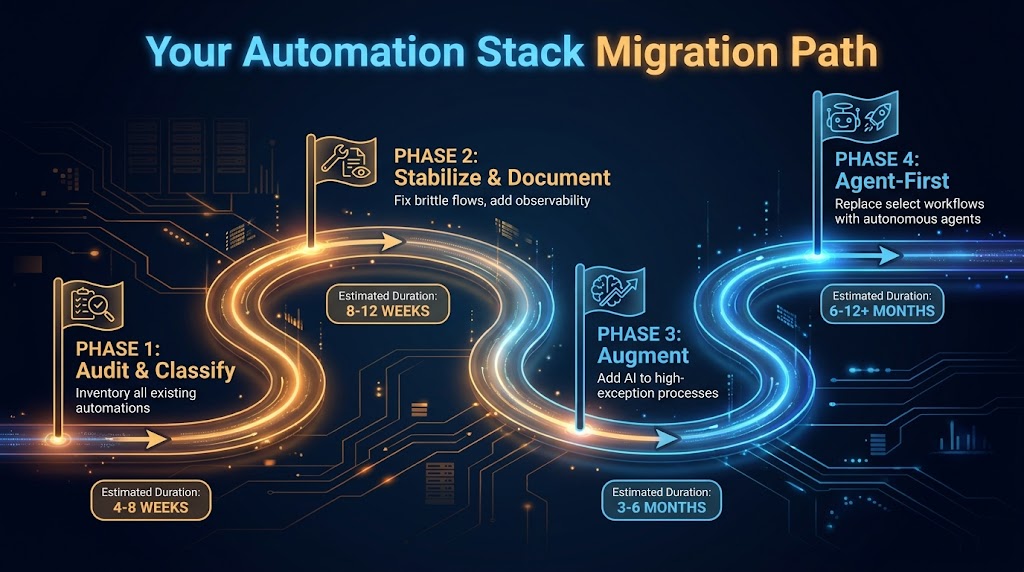
    Four-phase automation stack migration roadmap from Audit and Classify through Stabilize, Augment, and Agent-First phases with timeline milestones

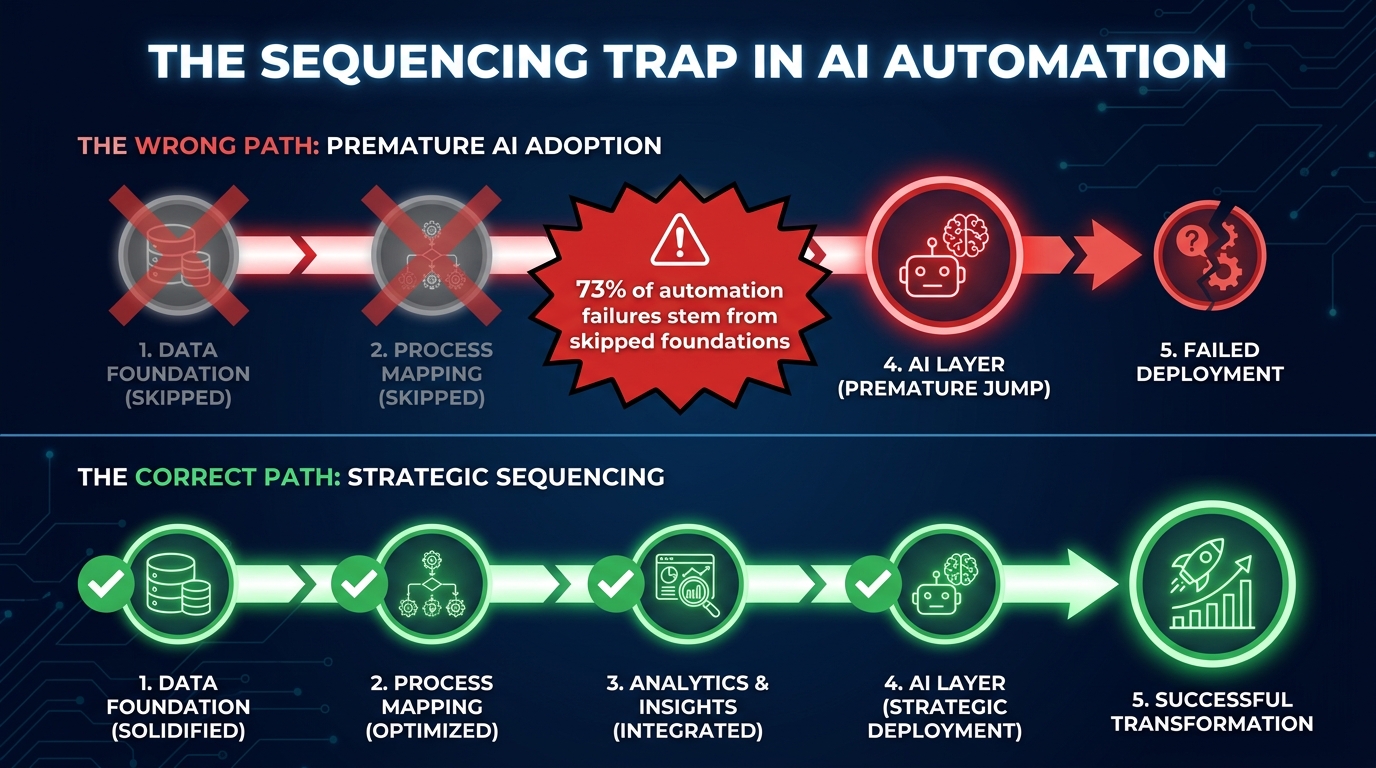
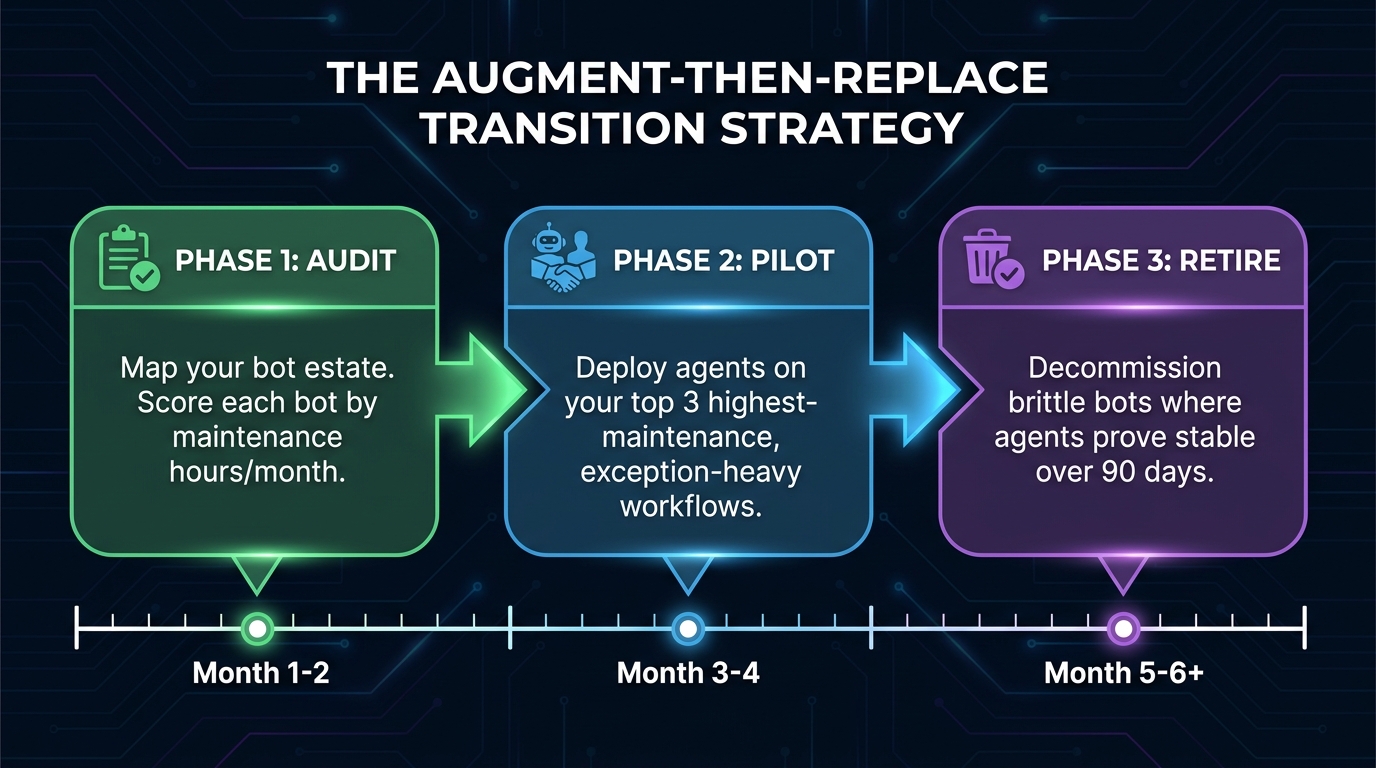
    The biggest migration mistake organizations make is treating the shift to agents as a replacement project rather than an evolution project. The goal isn’t to rip out your existing automation stack — it’s to build a capable agent layer on top of an automation stack that’s been deliberately prepared to support it.

    Phase 1: Audit and Classify (Weeks 1–6)

    This is the inventory work described earlier — scoring every existing automation on maintenance burden, exception rate, and strategic value. The output of this phase is a tiered list of automations in three categories: healthy (leave alone), aging (extend), and broken (fix or replace).

    The non-obvious work in this phase is documenting the business logic embedded in existing automations. When you eventually migrate a process to an agent, the agent needs to understand the business rules it’s enforcing. If those rules live only inside a workflow tool’s conditional logic and no one has written them down in plain language, you’ll spend significant time reverse-engineering them. Capturing that logic during the audit phase is valuable even if you end up keeping the workflow.

    Phase 2: Stabilize and Instrument (Weeks 4–12)

    Before adding agents to your stack, make your existing automation foundations more solid. This means two things: stabilizing brittle automations that agents will depend on (because an agent that calls a flaky RPA bot will itself behave flakily), and adding observability to your existing flows so you have baseline metrics to compare against.

    Instrumentation is particularly important here. If you don’t know your current exception rate, throughput, and error rate, you can’t evaluate whether an agent upgrade is actually an improvement. Set up logging and monitoring on your existing automations during this phase — not just because it’s good practice, but because it gives you the data you’ll need to make the upgrade case and measure results afterward.

    Phase 3: Augment with AI (Months 2–6)

    Start adding intelligence to your highest-exception workflows before deploying full agents. This is the “extend” strategy from the upgrade matrix — adding document intelligence, classification models, or decision APIs to reduce exception rates on existing processes.

    The wins from this phase are typically fast and measurable, which is valuable for building internal confidence. An invoice processing workflow that goes from 22% exception rate to 8% exception rate after adding a document intelligence model is a clear, quantifiable result — exactly the kind of evidence that builds organizational appetite for the more ambitious agent work in Phase 4.

    Phase 4: Agent-First on Select Processes (Months 4–12)

    Choose two or three processes from your “replace” tier — high strategic value, high exception rate, high maintenance burden — and design full agent replacements for them. Start with the exception handling pattern: keep the existing workflow’s happy path, replace the exception queue with an agent. This limits blast radius while demonstrating agent capability on a real production process.

    Once the exception-handling agents are stable and trusted, extend scope incrementally. The goal by the end of month 12 isn’t to have migrated your entire stack to agents — it’s to have two or three production agents running reliably, with the team’s capability and confidence to expand from there. Organizations that try to go all-in on agents in a single migration effort almost always have a harder time than those that build agent competency gradually.

    What “Agent-First” Design Actually Means for Your Team

    There’s a lot of loose language about “agent-first” design in 2026, most of it meaning “use agents for things.” That’s not design — it’s a preference. Agent-first design is a specific set of architectural and organizational practices that make agent deployments more likely to succeed at scale.

    Design for Goals, Not Steps

    Traditional automation design starts with a process map: step 1, step 2, branch condition, step 3. Agent-first design starts with a goal definition: what outcome should the agent produce, and how will we know if it’s been achieved? The goal definition drives everything else — which tools the agent needs, what data sources it needs access to, what decision criteria it’s working with, and what success looks like.

    This sounds like a subtle shift, but it changes the entire design conversation. Teams that have spent years mapping processes struggle with goal-oriented design because they’re used to specifying behavior rather than specifying outcomes. The transition requires a different mental model — closer to how you’d brief a human analyst than how you’d spec out a workflow.

    Tools as First-Class Interfaces

    In agent-first design, every system capability that an agent might need is exposed as a well-defined tool. This isn’t just an API catalog — it’s a deliberate interface design exercise. Each tool needs a clear purpose, well-defined inputs and outputs, error states that the agent can reason about, and a description accurate enough that the LLM routes to it correctly.

    Organizations that do this well essentially build an agent API layer over their existing system landscape. This has a valuable side effect: it forces the kind of system documentation that’s often missing from legacy environments. The work of defining tools for agents is also the work of understanding what your systems actually do.

    Team Structure and Skill Sets

    Agent-first design requires a different team composition than traditional workflow automation. You still need process analysts who understand the business logic. But you also need engineers who understand LLM behavior, context window management, and prompt engineering — skills that are distinct from both traditional software development and data science. And you need operations staff who can monitor agent behavior in production, evaluate edge cases, and decide when to adjust autonomy levels.

    The 73% of Fortune 500 companies reportedly deploying multi-agent workflows in 2026 are doing so with teams that have a mix of these skills, typically assembled through a combination of reskilling existing staff and targeted hiring. Organizations that try to run agent programs with only workflow automation engineers or only data scientists tend to hit capability ceilings quickly.

    Metrics That Matter: Tracking Your New Automation Stack’s Performance

    As your stack evolves, the metrics you use to track it need to evolve too. Traditional automation metrics — bot uptime, process cycle time, cost per transaction — don’t capture the performance characteristics that matter most in an agent-augmented stack.

    Task Completion Rate (End-to-End)

    For agent-handled processes, the most important metric isn’t whether the agent ran without errors — it’s whether the process completed without human intervention. This is the full end-to-end completion rate, including exception cases that the agent handled autonomously. If your exception-handling agent is resolving 85% of escalated cases without passing to a human, that’s the number that shows value.

    Escalation Quality

    When an agent does escalate, measure the quality of the escalation — specifically, whether the human reviewing it has everything they need to make a decision without going back to source systems. An agent that escalates with a clear summary of what it knows, what it tried, and why it’s stuck is delivering value even in the escalation. An agent that escalates with no context is just moving the problem upstream.

    Exception Rate Trajectory

    Track the exception rate across your full automation stack over time, segmented by process. A healthy stack should show a declining exception rate as agents and AI augmentation are added. If exception rates are stable or rising despite agent additions, that’s a signal of either poor agent design or misaligned expectations about what the agent should be handling.

    Maintenance Cost per Automation (Annualized)

    As you migrate from legacy workflows to agent-handled processes, track the annualized engineering cost of maintaining each automation. The expected direction is that agent-handled processes should have lower maintenance costs over time — not because agents don’t need tuning, but because they’re more adaptable to change than brittle rule-based systems. If your agent maintenance costs are running higher than the workflows they replaced, that’s a design problem worth diagnosing before expanding scope.

    Autonomy Level Trend

    For each production agent, track the autonomy level over time. Are agents earning more autonomy as they demonstrate reliability, or are they staying at high supervision levels indefinitely? Agents that never graduate to higher autonomy levels either aren’t performing reliably enough to justify it or are operating in an organizational context where the trust-building process hasn’t been formalized. Either way, the metric surfaces the issue.

    The Stack Shift Is Already Happening — Whether You Direct It or Not

    The adoption statistics for agentic AI in 2026 are striking not because of their size, but because of their trajectory. Gartner tracked a 1,445% surge in multi-agent system inquiries between Q1 2024 and Q2 2025. Organizations already running agent programs average 12 agents in deployment, with projections for 67% growth in that number over the next two years. McKinsey’s surveys consistently show automation and decision-making as the two leading AI use cases across enterprise functions, with 72% of companies having adopted AI in at least one business function.

    This isn’t a technology story that’s still playing out in research labs. It’s a production story playing out in operations centers, finance teams, support organizations, and engineering departments at scale. The organizations deciding not to act aren’t choosing to wait — they’re ceding the decision to their vendors, their competitors, and their own teams’ workarounds.

    The Real Risk Isn’t Moving Too Fast

    Most enterprise teams think of agent adoption as a risk of moving too quickly: deploying agents that aren’t ready, breaking processes, losing control. That risk is real and worth managing carefully, which is why the phased migration and trust architecture frameworks above exist.

    But the risk of moving too slowly is just as real and less often articulated. Legacy automation stacks compound their own technical debt. Every year spent maintaining brittle workflows instead of building more capable systems is a year of compounding maintenance cost, declining competitive capability, and organizational inertia that makes the eventual migration harder. The organizations with the most successful agent programs in 2026 didn’t start with agents — they started with disciplined automation foundations several years earlier and had the stack prepared when agents became viable.

    Three Decisions You Can Make This Quarter

    You don’t need a multi-year transformation program to start this work. Three decisions are actionable in the next 90 days:

    1. Run the audit. Score your existing automations using the maintenance burden, exception rate, and strategic value framework. Identify your top three candidates for upgrade evaluation. This work takes days, not weeks, and it anchors all subsequent decisions in data rather than vendor conversations.
    2. Pick one augmentation target. Choose one high-exception workflow and identify one AI component — document intelligence, a classification API, a decision model — that could meaningfully reduce its exception rate. Implement it as a standalone layer addition, without rebuilding the workflow. This gives your team hands-on experience with AI-augmented automation at low risk and high learning value.
    3. Draft your agent design principles. Before building any agents, document the principles your team will follow: tool scope limits, state management approach, escalation requirements, autonomy level framework, and success metrics. These principles don’t need to be perfect — they need to exist, so you’re designing agents rather than just deploying them.

    The shift from workflows to agents isn’t a single migration event. It’s an ongoing evolution of how your organization uses automation — one that benefits enormously from being directed deliberately rather than allowed to drift. The organizations that build this competency now, with discipline and clarity about what they’re building and why, will have a structural advantage that’s hard to close once it’s established.

    The stack doesn’t upgrade itself. But it doesn’t have to be rebuilt from scratch either. The path forward is incremental, evidence-driven, and already being walked by the organizations that understand what they’re actually trying to accomplish.