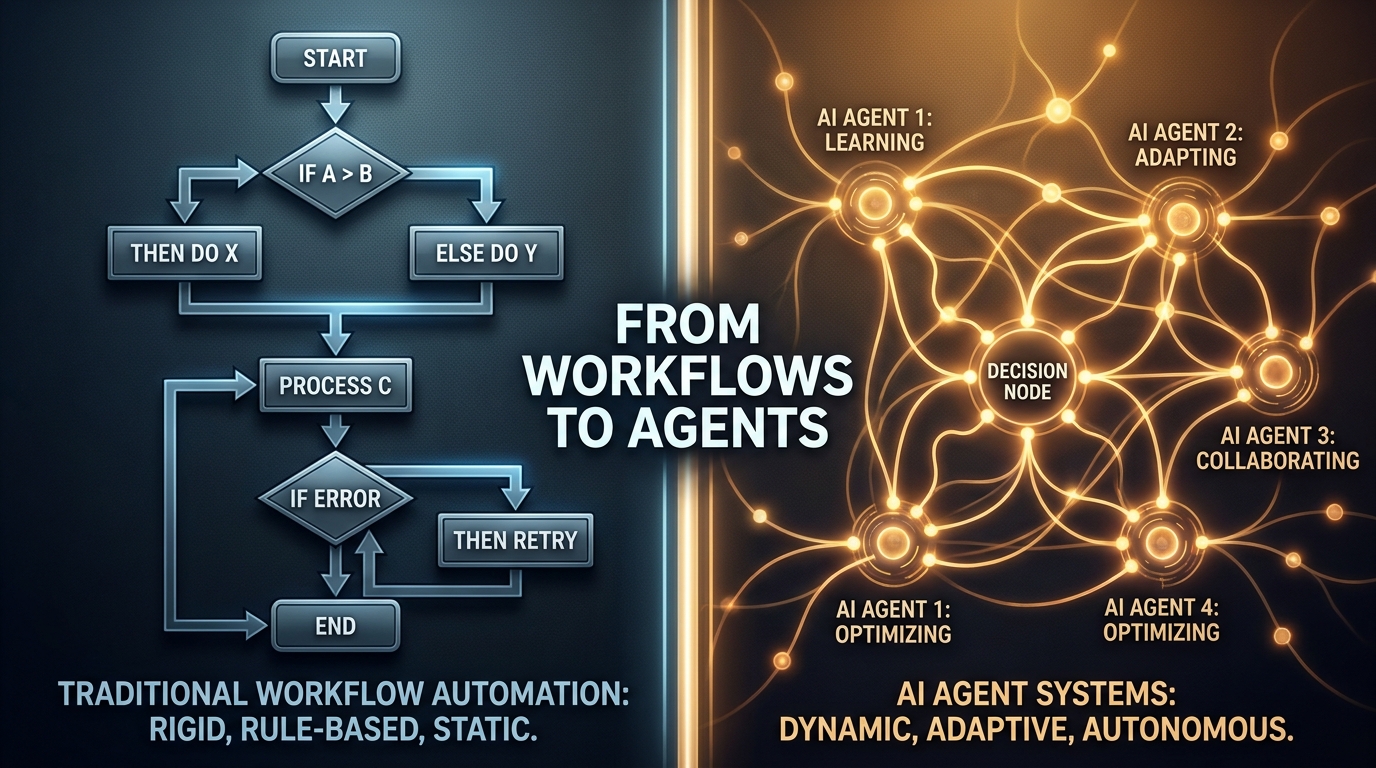
Most automation stacks weren’t designed — they accumulated. A Zapier flow here. A ServiceNow workflow there. An RPA bot someone built three years ago that no one fully understands but everyone’s afraid to touch. A Python script in a cron job that technically runs but fails silently once a week.
This is the real shape of enterprise automation in 2026: a patchwork of tools, each doing a narrow job well enough that replacing it never becomes urgent — until suddenly, it does.
Now the market is pushing hard toward something different: AI agents. Systems that don’t just follow rules but set goals, call tools, reason over context, and decide their own next step. The pitch is compelling. The vendor noise is deafening. And the pressure to “go agentic” is real, even if half the organizations feeling that pressure haven’t finished documenting what their existing automations actually do.
This post isn’t a vendor comparison or a whitepaper-style definition of what agents are. It’s a practitioner’s guide to the actual upgrade problem — how to look at your existing automation stack honestly, identify where it’s quietly costing you more than it delivers, and make deliberate choices about what to keep, what to extend, and where agents genuinely change the math.
The answer is almost never “tear everything out and go agent-first.” But it’s also no longer “stay the course.” The window for making these decisions thoughtfully — rather than reactively — is narrowing. Here’s how to use it.
What Your Current Stack Is Actually Doing (and Where It’s Quietly Failing)
Before any upgrade decision can be made intelligently, you need an honest accounting of what you’ve built. Most teams skip this step because it’s uncomfortable. Legacy automation tends to reveal itself as a collection of tribal knowledge, undocumented dependencies, and business logic that lives nowhere except inside a bot that runs on a server someone set up in 2021.
The Three Failure Patterns That Signal a Stack in Distress
Across enterprise automation programs, three failure patterns show up repeatedly — and they’re worth diagnosing explicitly, because each one points to a different kind of upgrade need.
Pattern 1: Exception Rate Creep. A workflow was designed to handle a clean, well-defined process. Over time, edge cases accumulate. The business adds product lines, changes pricing structures, onboards new systems. The workflow starts routing more and more items to a “manual review” queue that’s now handling 20% of volume. The bot runs, technically, but it’s farming out the hard cases to humans at a rate that defeats its original purpose.
When exception rates on a workflow exceed roughly 15–20% of volume, the economics of the automation start to invert. You’re maintaining a complex system to automate the easy 80% while the hard 20% still requires human intervention — and the hard 20% is often where the highest-value decisions live.
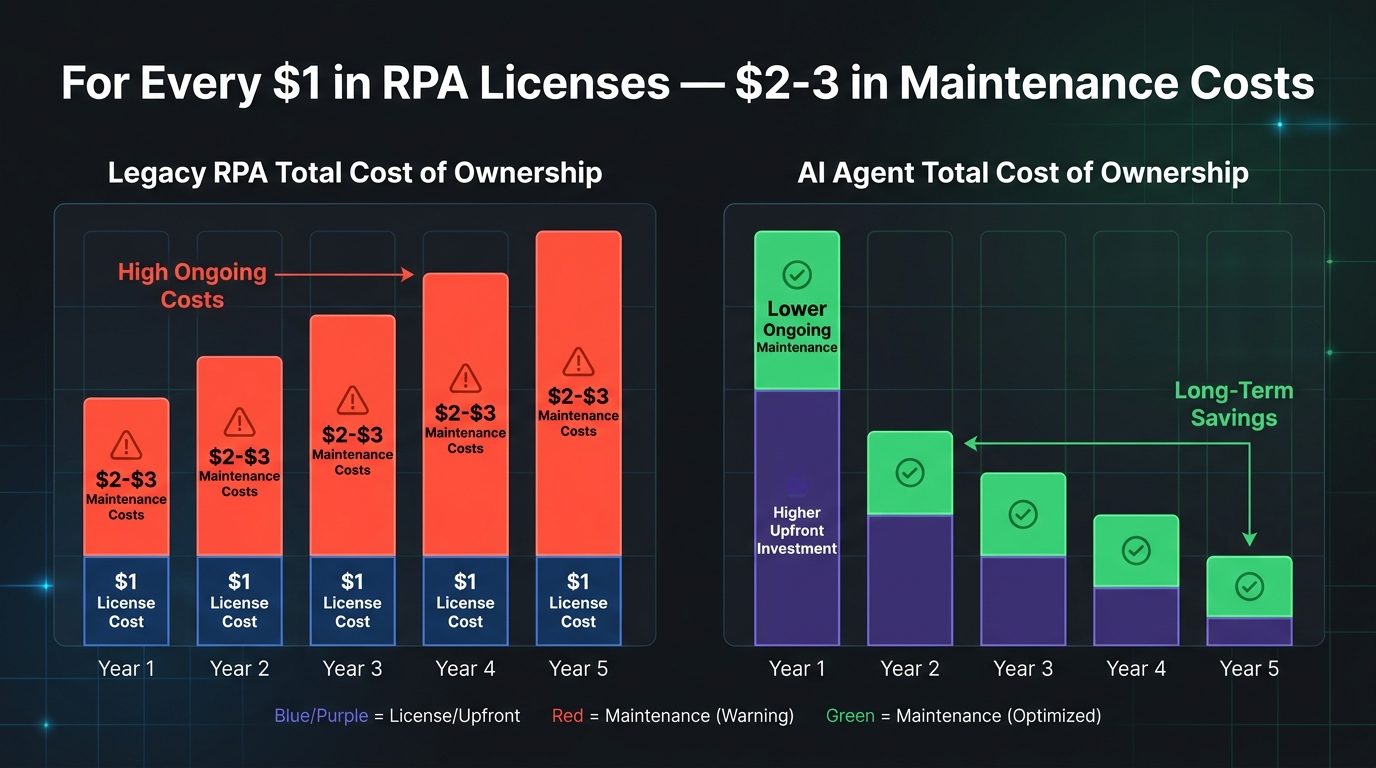
Pattern 2: Brittleness Tax. Any automation that depends on UI scraping, fixed data schemas, or hardcoded field positions is paying a brittleness tax. Every time a vendor updates their interface, every time an API adds a required field, every time a business process changes — someone has to go in and fix the bot. The maintenance burden is non-trivial: industry data suggests enterprises spend $2–3 in maintenance over five years for every $1 they spend on RPA licensing. That’s a ratio that compounds quietly until it breaks a budget.
Pattern 3: The Integration Ceiling. Workflow tools are typically designed around linear, point-to-point integrations. Process A triggers Process B, which outputs to System C. This works until the business needs Process A to consider context from five different systems, weigh competing priorities, and make a judgment call. At that point, the workflow isn’t just limited — it’s architecturally incapable of doing what’s needed. You can add more branches, but you’re essentially trying to encode decision intelligence into a flowchart, which is both fragile and expensive to maintain.
Running Your Own Stack Audit
A practical audit starts with three inventory questions for every automation currently running in your organization:
- What is the exception rate? How many items processed per month require human intervention or manual override? Track this number. If you don’t have it, instrument your flows to capture it before making any upgrade decisions.
- What is the maintenance frequency? How many times in the past 12 months did someone have to modify this automation because of an external change — a system update, a policy change, a data format shift? High maintenance frequency is the clearest signal of brittleness.
- What decisions does it make? Is it executing pre-defined logic (if X then Y), or is it approximating a judgment call that a human would make differently depending on context? The more judgment-like the decision, the more a workflow is hiding complexity rather than eliminating it.
This audit won’t take long if you approach it as a quick triage rather than a full documentation project. The goal is to categorize your existing automations into: (1) healthy and stable, (2) maintained but aging, and (3) actively costing more than they save. That classification drives every subsequent upgrade decision.
The Four-Layer Automation Stack Model for 2026
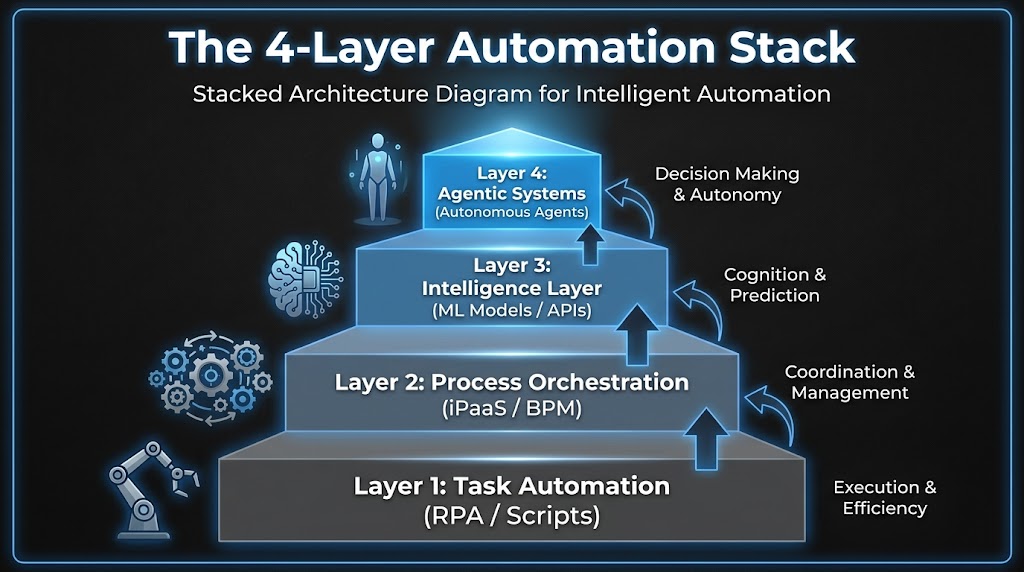
One of the most useful reframes for thinking about automation upgrades is to stop thinking about individual tools and start thinking in layers. Your stack isn’t a collection of point solutions — it’s (or should be) a layered architecture where each tier has a different job, a different change cadence, and a different cost profile.
Layer 1: Task Automation
This is the foundation — RPA bots, shell scripts, macros, scheduled jobs. These tools exist to handle high-volume, repetitive, structurally stable tasks at low marginal cost. UI-based data entry. File format conversions. Automated report distribution. When a process is genuinely stable and deterministic, this layer is still the right tool. The mistake most organizations make isn’t using RPA — it’s using RPA for processes that aren’t genuinely stable or deterministic.
The health metric for this layer is simple: maintenance cost per automation per year. If you’re spending more maintaining a bot than you’d spend having a human do the task periodically, the bot has become a liability.
Layer 2: Process Orchestration
This layer coordinates multi-step processes across systems and teams — iPaaS platforms like MuleSoft, Boomi, or Workato; BPM tools like Camunda or Appian; workflow platforms like Microsoft Power Automate. The job here is sequencing, routing, and state management across processes that involve multiple participants or systems.
Where Layer 1 automates a task, Layer 2 automates the handoffs between tasks. It’s inherently about coordination — and that’s where it often breaks down, because coordination logic is where business rules accumulate fastest. Approval workflows that grow twenty exception branches over three years. Routing logic that was simple in year one and is now a maintenance nightmare.
Layer 3: Intelligence Layer
This is where ML models, classification engines, document understanding tools, and decision APIs sit. In 2026, this layer is being populated rapidly — document processing that uses vision models to extract data from non-standard formats, NLP classifiers that route support tickets, recommendation engines that inform next-best-action suggestions. These tools don’t orchestrate processes, but they inject judgment into them.
The key distinction: Layer 3 tools are still called by workflows. They respond to requests from the layers below. They don’t initiate actions or pursue goals.
Layer 4: Agentic Systems
This is the layer that changes the model. Agents don’t wait to be called — they pursue a goal, using tools from the layers below to take actions, observe results, and adapt. An agent in this layer might be tasked with resolving a customer complaint end-to-end: it reads the case context, checks inventory systems, looks up account history, drafts a response, waits for approval, and closes the ticket — without a human defining each step in advance.
The critical point is that Layer 4 doesn’t replace layers 1–3. It coordinates them. Your RPA bots become tools that agents can call. Your orchestration workflows become sub-processes that agents can trigger. Your intelligence models become capabilities that agents can invoke as needed. The architecture doesn’t collapse — it gains a new top layer that changes what’s possible.
The Real Difference Between a Workflow and an Agent (It’s Not What Vendors Say)
The vendor explanation of agents vs. workflows usually goes something like this: workflows are rule-based and deterministic; agents are AI-powered and flexible. That’s technically accurate but practically useless, because it doesn’t tell you when to use which, or what actually changes at the system design level.
The Control Flow Inversion
The more precise distinction is about who controls the flow. In a workflow, the process designer controls the flow. They define every step, every branch, every error condition in advance. The workflow executes exactly what was designed — nothing more.
In an agent, the model controls the flow. The designer specifies a goal and makes tools available. The agent decides which tools to use, in what order, and when to stop. This is called the ReAct loop — Reason, Act, Observe, Repeat — and it fundamentally changes both what’s possible and what can go wrong.
A workflow will never do something you didn’t design it to do. An agent might. That’s its power and its risk in the same sentence.
State and Memory
Workflows are typically stateless between steps or manage state through explicit handoffs — a variable passed from one node to the next, a record updated in a database. Agents maintain context across a multi-step process, using a combination of working memory (what’s happened so far in this session), external memory (a vector database or document store), and tool call results. This allows agents to handle processes where the right action at step 7 depends on subtle context from steps 1–6 — something workflow engines fundamentally can’t do without explicit state management that rapidly becomes complex.
Error Handling and Exception Management
This is where the practical gap is largest. A workflow’s error handling is defined by the designer: catch this exception, route to this fallback, alert this person. An agent can reason about errors. If a tool call fails, the agent can try a different approach, gather more information, or escalate with a detailed explanation of what it tried and why it failed. For processes with high exception rates, this difference alone can justify the migration cost.
What Agents Can’t Do (Yet)
It’s equally important to be clear about agent limitations. Agents are non-deterministic — the same input won’t always produce the same output, which makes them unsuitable for processes requiring strict auditability or regulatory compliance without careful instrumentation. They’re also computationally more expensive than running a workflow: every agent step involves an LLM inference call, which adds latency and cost. And they require careful prompt engineering and tool design to behave reliably at scale. The 40% of multi-agent pilots that fail within six months of production deployment almost always fail because of underestimating these operational requirements, not because the underlying technology doesn’t work.
The Break-Even Diagnosis: When Legacy Automation Costs More Than It Saves
The decision to upgrade any piece of your automation stack shouldn’t be driven by vendor roadmaps or industry trend reports. It should be driven by a break-even analysis that’s specific to your context. Here’s how to structure it.
The True Cost of Your Current Automation
Most organizations dramatically undercount the cost of running legacy automation because they only account for licensing fees. The real cost includes:
- Maintenance engineering time: How many hours per month do developers spend fixing, adjusting, or debugging existing workflows and bots? At typical fully-loaded developer rates, this number is often surprisingly large.
- Exception handling labor: Every item that falls out of an automated process and lands in a manual review queue has a cost. If your exception rate is 20% on a process handling 10,000 items per month, you’re paying for 2,000 manual reviews. Track this number explicitly.
- Opportunity cost of brittleness: When a bot breaks, how long does it take to restore the process? What’s the cost of that downtime — in delayed outputs, frustrated users, or escalation to leadership? Brittle automations have a hidden downtime cost that rarely shows up in TCO calculations.
- Upgrade overhead: As underlying systems change (new ERP release, API version change, UI redesign), how much does it cost to update the automations that depend on them? For organizations running large RPA estates, this is often a significant annual budget item.
The Inflection Point
The break-even inflection point typically arrives when the annual cost of maintaining an existing automation — including all the above — exceeds the estimated annual cost of replacing it with a more capable system, amortized over a reasonable lifespan. For many RPA deployments that have been running for 3+ years, the inflection point has already passed or is approaching rapidly.
The $2–3 maintenance multiplier cited by industry analysts isn’t just a vendor talking point — it reflects the compounding nature of technical debt in brittle automation. The longer a workflow runs without architectural modernization, the more business logic gets encoded into it in ad hoc ways, and the harder it becomes to change, audit, or replace.
A Practical Scoring Method
For each automation in your stack, score it on three dimensions from 1–5:
- Maintenance burden (1 = minimal, 5 = constant firefighting)
- Exception rate (1 = <5% manual intervention, 5 = >25% manual intervention)
- Strategic value (1 = low-volume administrative task, 5 = customer-facing or revenue-impacting process)
Any automation scoring 7 or above across these dimensions — especially with a high strategic value score — is a candidate for upgrade evaluation. Any automation scoring 9 or above is actively worth accelerating. This isn’t a perfect formula, but it turns an abstract “should we upgrade?” question into a ranked priority list you can act on.
The Upgrade Decision Matrix: What to Keep, Extend, and Replace
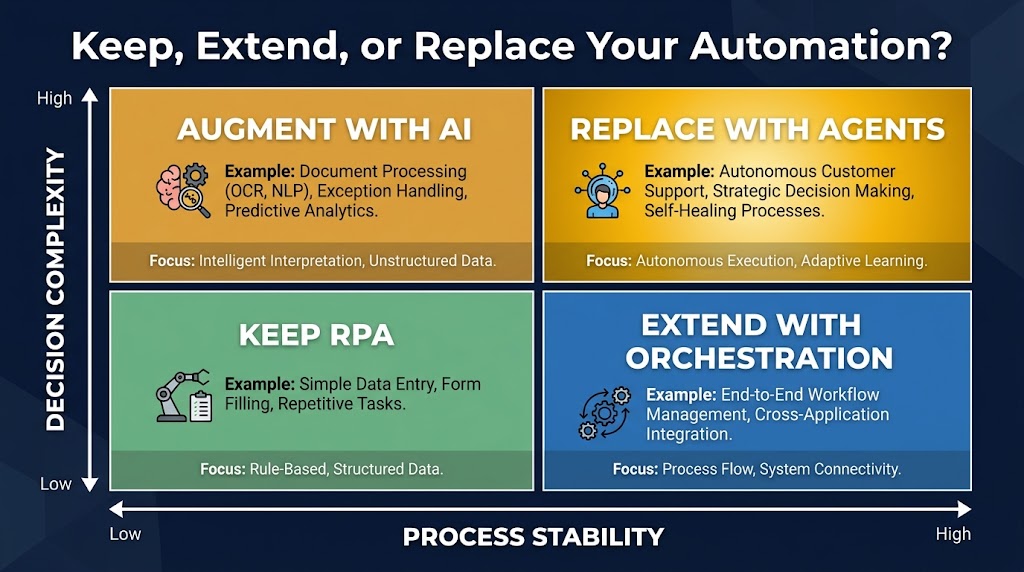
Once you’ve diagnosed the health of your existing stack, the decision about what to do with each component comes down to four factors: process stability, decision complexity, exception tolerance, and volume. Let’s map those to concrete upgrade paths.
Keep: High Stability, Low Complexity
If a process is structurally stable — meaning the inputs, logic, and outputs rarely change — and the decisions it makes are fully deterministic, RPA or rule-based workflow automation is still the right tool. High-volume, low-variation processes like payroll calculations, scheduled report generation, or data format conversions between systems with stable APIs fall into this category.
The key question isn’t “could an agent do this?” — it’s “is there a compelling reason to change?” For genuinely stable, high-volume processes, adding agent overhead adds cost and non-determinism without adding value. Keep them as-is and put your upgrade budget elsewhere.
Extend: Moderate Complexity, Stable Structure
Many workflows don’t need to be replaced — they need to be extended with intelligence. This is where Layer 3 tools (document understanding models, classification APIs, anomaly detection) can be added to an existing workflow to reduce exception rates without a full architectural replacement.
A practical example: an invoice processing workflow that’s routing 20% of invoices to manual review because they don’t match standard templates. Rather than replacing the workflow with an agent, add a document intelligence model at the intake step that extracts fields from non-standard invoices and normalizes them before the existing workflow processes them. The workflow’s exception rate drops dramatically, the cost of the upgrade is modest, and you’ve extended the life of a working process without a full rebuild.
Augment: High Complexity, High Exception Rate
When a process has both high decision complexity and a significant exception rate, the architecture needs to change — but not necessarily with a full agent replacement. This is often the right place for a hybrid pattern: a workflow handles the well-defined happy path, and an agent handles exception routing and resolution.
This “agent as exception handler” pattern is one of the most practical entry points for agentic AI. It keeps the deterministic core of the existing workflow intact while delegating the hard cases — the ones currently going to humans — to an agent that can reason about context, gather additional information, and either resolve the exception or escalate with a clear explanation. The result is a process that handles 95%+ of volume automatically instead of 80%, without the risk of replacing a working system wholesale.
Replace: Low Stability, High Decision Complexity
Full agent replacement makes the most sense for processes where the structure itself changes frequently, the decisions required are genuinely judgment-like, and the cost of maintaining the existing automation is high. Customer-facing support processes, complex procurement workflows, research and analysis tasks, and multi-system coordination tasks that currently require human judgment at multiple points — these are the candidates for full agent replacement.
The signal that a process belongs in this category isn’t just high exception rate or high maintenance cost — it’s the combination of both with a strategic importance that makes the investment worthwhile. Replacing a low-volume administrative workflow with an agent to save two hours of manual work per week is rarely the right priority. Replacing a customer escalation process that handles high-value accounts and requires contextual judgment is a different calculation entirely.
Agent Design Patterns That Actually Hold Up in Production
When organizations deploy AI agents for the first time, they tend to underestimate the design work required and overestimate how much the LLM will figure out on its own. The result is agents that work in demo environments and break in production. Here are the design patterns that separate stable production agents from fragile demos.
Pattern 1: Small Tool Sets, Sharp Scopes
The single most common design mistake is giving an agent too many tools. When an agent has access to 30 different tools, the LLM’s routing accuracy drops significantly — it selects the wrong tool, chains calls unnecessarily, or gets confused by overlapping functionality. Production-grade agents consistently perform better with five to ten tightly scoped tools that do one thing well than with broad tool suites that cover every conceivable action.
Design principle: each tool should be named and described with the precision you’d use for a well-written function docstring. The description tells the agent not just what the tool does, but when to use it and what its limitations are. “Retrieve customer order history” is a better tool description than “Get data.” The more precisely the agent understands what each tool is for, the more reliably it will use them correctly.
Pattern 2: Explicit State Management
Don’t rely on the agent’s context window to maintain state across a long-running process. Context windows are expensive, and for processes that span hours or involve branching paths, context-based state management is both unreliable and costly. Instead, implement explicit state objects — structured records that capture what the agent has done, what it knows, and what decision it’s currently working on — stored externally and passed to the agent at each step.
This also makes your agent debuggable. When an agent makes an unexpected decision, you can inspect the state object at the point of failure and understand exactly what information it was working with. Without explicit state, debugging becomes a prompt archaeology exercise that few engineers have patience for.
Pattern 3: Structured Output Contracts
Agents should produce structured outputs — not free-form text — whenever their output feeds into another system. This means defining output schemas before building the agent, and using the LLM’s function-calling or structured output capabilities to enforce them. An agent that writes its decision as a JSON object with defined fields is far easier to integrate with downstream systems than one that writes a paragraph of explanation you then have to parse.
This is particularly important for the “agent as exception handler” pattern. The agent needs to communicate its decision (resolved, escalated, needs more information) along with the reasoning, the actions taken, and any artifacts created — all in a format that the downstream workflow can process without human interpretation.
Pattern 4: Graceful Degradation
Every production agent needs a graceful degradation path: a defined behavior for when it can’t complete a task. This should not be “the agent keeps trying until it times out.” It should be: after N retries or M minutes, the agent produces a structured handoff document describing what it knows, what it tried, and why it stopped — and routes that to a human queue. The human gets context-rich information rather than a raw failure, and the process doesn’t stall.
Building this escalation behavior explicitly into the agent’s system prompt and tool set — not leaving it to emergent LLM behavior — is the difference between a production-grade agent and a demo-grade one.
Pattern 5: Tool-Level Observability
Log every tool call, with inputs and outputs, at the infrastructure level — not just what the agent decided to do, but what each tool returned. This creates an audit trail that’s invaluable for debugging, compliance, and ongoing improvement. Gartner has noted that organizations prioritizing audit trails and policy enforcement in their agent deployments are the ones moving from pilots to production successfully. The observability infrastructure isn’t optional — it’s what makes enterprise-grade agentic systems governable.
The Trust Architecture: Human-in-the-Loop vs Autonomous Execution
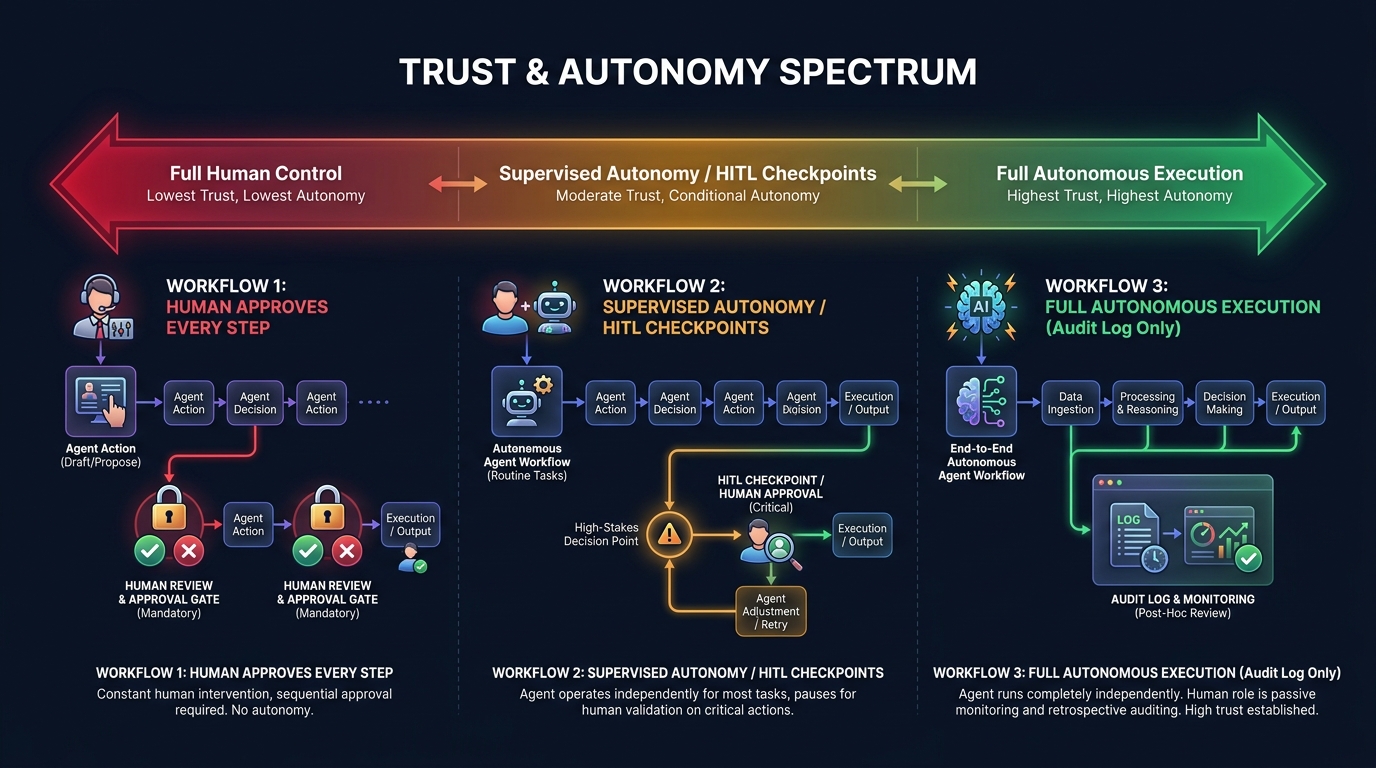
One of the most consequential architectural decisions in any agent deployment is where on the autonomy spectrum the agent should sit. This isn’t a question of technical capability — modern agents can operate fully autonomously on many tasks. It’s a question of risk, reversibility, and trust calibration.
The Autonomy Spectrum
Think of autonomy as a dial with five settings, not a binary switch:
- Step-by-step approval: Every action the agent proposes is reviewed and approved before execution. Maximum control, minimal efficiency gain. Appropriate for novel processes where trust has not yet been established.
- Category-level approval: Certain categories of action (e.g., read operations, low-value writes) are executed automatically; others (e.g., external communications, financial transactions above a threshold) require approval. Most common pattern for production deployments.
- Exception-only escalation: The agent runs autonomously but must escalate defined categories of decision — high-value transactions, PII handling, legally sensitive actions. This is appropriate once the agent has demonstrated reliable behavior over a meaningful production period.
- Autonomous with audit: The agent runs fully autonomously, but all actions are logged in real time and reviewable. Appropriate for well-understood, low-risk processes with clear rollback capabilities.
- Fully autonomous: No human in the loop. Extremely limited appropriate use cases — typically low-stakes, well-constrained, easily reversible tasks with extensive instrumentation.
Setting the Right Level for Your Context
The right autonomy level isn’t determined by how confident you are in the LLM — it’s determined by the reversibility and blast radius of the actions the agent can take. An agent that reads data and generates a draft document can sit at level 4 or 5 comfortably. An agent that sends external emails, initiates financial transactions, or modifies production databases should stay at level 2 or 3 until a significant track record of reliable behavior is established.
Recent industry guidance makes the point sharply: naming a human reviewer is not governance. If approval workflows don’t have defined decision rights, clear escalation criteria, and trained reviewers who actually engage with the agent’s reasoning rather than rubber-stamping it, human-in-the-loop is theater, not control. The organizational design of the review process matters as much as the technical implementation.
Building Toward Higher Autonomy Over Time
The practical approach is to start at a more controlled level than you think you need and increase autonomy as the agent demonstrates reliability on specific action categories. Track false positive rates (agent takes an action it shouldn’t have) and false negative rates (agent escalates something it should have handled) over time. When both rates are consistently low for a defined category of action, consider expanding autonomy for that category specifically — not for the entire agent at once.
This graduated trust model is more work upfront but dramatically more robust than deploying a fully autonomous agent on day one and discovering its failure modes in production.
The Migration Path: Moving from Workflows to Agents Without Breaking the Stack
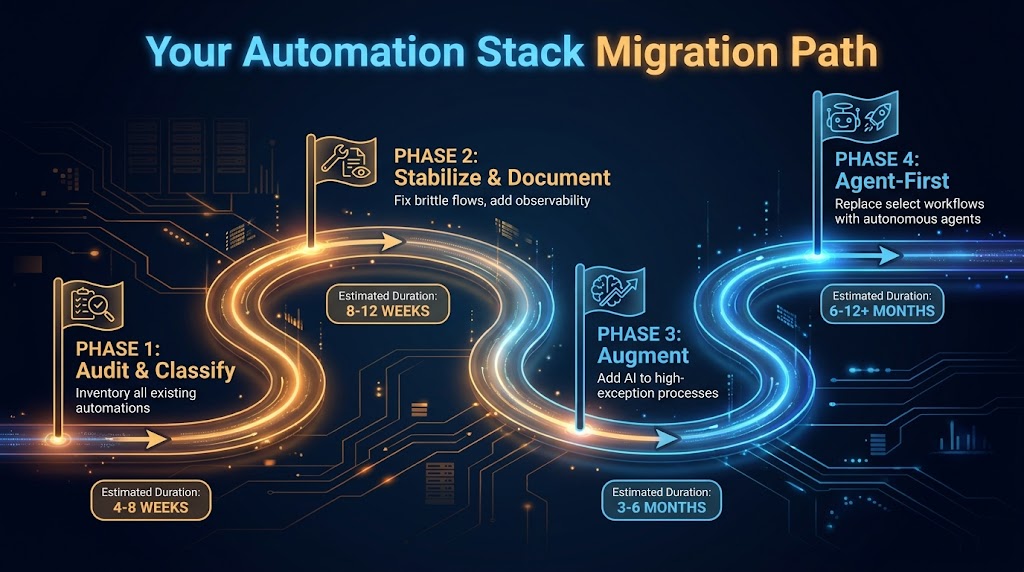
The biggest migration mistake organizations make is treating the shift to agents as a replacement project rather than an evolution project. The goal isn’t to rip out your existing automation stack — it’s to build a capable agent layer on top of an automation stack that’s been deliberately prepared to support it.
Phase 1: Audit and Classify (Weeks 1–6)
This is the inventory work described earlier — scoring every existing automation on maintenance burden, exception rate, and strategic value. The output of this phase is a tiered list of automations in three categories: healthy (leave alone), aging (extend), and broken (fix or replace).
The non-obvious work in this phase is documenting the business logic embedded in existing automations. When you eventually migrate a process to an agent, the agent needs to understand the business rules it’s enforcing. If those rules live only inside a workflow tool’s conditional logic and no one has written them down in plain language, you’ll spend significant time reverse-engineering them. Capturing that logic during the audit phase is valuable even if you end up keeping the workflow.
Phase 2: Stabilize and Instrument (Weeks 4–12)
Before adding agents to your stack, make your existing automation foundations more solid. This means two things: stabilizing brittle automations that agents will depend on (because an agent that calls a flaky RPA bot will itself behave flakily), and adding observability to your existing flows so you have baseline metrics to compare against.
Instrumentation is particularly important here. If you don’t know your current exception rate, throughput, and error rate, you can’t evaluate whether an agent upgrade is actually an improvement. Set up logging and monitoring on your existing automations during this phase — not just because it’s good practice, but because it gives you the data you’ll need to make the upgrade case and measure results afterward.
Phase 3: Augment with AI (Months 2–6)
Start adding intelligence to your highest-exception workflows before deploying full agents. This is the “extend” strategy from the upgrade matrix — adding document intelligence, classification models, or decision APIs to reduce exception rates on existing processes.
The wins from this phase are typically fast and measurable, which is valuable for building internal confidence. An invoice processing workflow that goes from 22% exception rate to 8% exception rate after adding a document intelligence model is a clear, quantifiable result — exactly the kind of evidence that builds organizational appetite for the more ambitious agent work in Phase 4.
Phase 4: Agent-First on Select Processes (Months 4–12)
Choose two or three processes from your “replace” tier — high strategic value, high exception rate, high maintenance burden — and design full agent replacements for them. Start with the exception handling pattern: keep the existing workflow’s happy path, replace the exception queue with an agent. This limits blast radius while demonstrating agent capability on a real production process.
Once the exception-handling agents are stable and trusted, extend scope incrementally. The goal by the end of month 12 isn’t to have migrated your entire stack to agents — it’s to have two or three production agents running reliably, with the team’s capability and confidence to expand from there. Organizations that try to go all-in on agents in a single migration effort almost always have a harder time than those that build agent competency gradually.
What “Agent-First” Design Actually Means for Your Team
There’s a lot of loose language about “agent-first” design in 2026, most of it meaning “use agents for things.” That’s not design — it’s a preference. Agent-first design is a specific set of architectural and organizational practices that make agent deployments more likely to succeed at scale.
Design for Goals, Not Steps
Traditional automation design starts with a process map: step 1, step 2, branch condition, step 3. Agent-first design starts with a goal definition: what outcome should the agent produce, and how will we know if it’s been achieved? The goal definition drives everything else — which tools the agent needs, what data sources it needs access to, what decision criteria it’s working with, and what success looks like.
This sounds like a subtle shift, but it changes the entire design conversation. Teams that have spent years mapping processes struggle with goal-oriented design because they’re used to specifying behavior rather than specifying outcomes. The transition requires a different mental model — closer to how you’d brief a human analyst than how you’d spec out a workflow.
Tools as First-Class Interfaces
In agent-first design, every system capability that an agent might need is exposed as a well-defined tool. This isn’t just an API catalog — it’s a deliberate interface design exercise. Each tool needs a clear purpose, well-defined inputs and outputs, error states that the agent can reason about, and a description accurate enough that the LLM routes to it correctly.
Organizations that do this well essentially build an agent API layer over their existing system landscape. This has a valuable side effect: it forces the kind of system documentation that’s often missing from legacy environments. The work of defining tools for agents is also the work of understanding what your systems actually do.
Team Structure and Skill Sets
Agent-first design requires a different team composition than traditional workflow automation. You still need process analysts who understand the business logic. But you also need engineers who understand LLM behavior, context window management, and prompt engineering — skills that are distinct from both traditional software development and data science. And you need operations staff who can monitor agent behavior in production, evaluate edge cases, and decide when to adjust autonomy levels.
The 73% of Fortune 500 companies reportedly deploying multi-agent workflows in 2026 are doing so with teams that have a mix of these skills, typically assembled through a combination of reskilling existing staff and targeted hiring. Organizations that try to run agent programs with only workflow automation engineers or only data scientists tend to hit capability ceilings quickly.
Metrics That Matter: Tracking Your New Automation Stack’s Performance
As your stack evolves, the metrics you use to track it need to evolve too. Traditional automation metrics — bot uptime, process cycle time, cost per transaction — don’t capture the performance characteristics that matter most in an agent-augmented stack.
Task Completion Rate (End-to-End)
For agent-handled processes, the most important metric isn’t whether the agent ran without errors — it’s whether the process completed without human intervention. This is the full end-to-end completion rate, including exception cases that the agent handled autonomously. If your exception-handling agent is resolving 85% of escalated cases without passing to a human, that’s the number that shows value.
Escalation Quality
When an agent does escalate, measure the quality of the escalation — specifically, whether the human reviewing it has everything they need to make a decision without going back to source systems. An agent that escalates with a clear summary of what it knows, what it tried, and why it’s stuck is delivering value even in the escalation. An agent that escalates with no context is just moving the problem upstream.
Exception Rate Trajectory
Track the exception rate across your full automation stack over time, segmented by process. A healthy stack should show a declining exception rate as agents and AI augmentation are added. If exception rates are stable or rising despite agent additions, that’s a signal of either poor agent design or misaligned expectations about what the agent should be handling.
Maintenance Cost per Automation (Annualized)
As you migrate from legacy workflows to agent-handled processes, track the annualized engineering cost of maintaining each automation. The expected direction is that agent-handled processes should have lower maintenance costs over time — not because agents don’t need tuning, but because they’re more adaptable to change than brittle rule-based systems. If your agent maintenance costs are running higher than the workflows they replaced, that’s a design problem worth diagnosing before expanding scope.
Autonomy Level Trend
For each production agent, track the autonomy level over time. Are agents earning more autonomy as they demonstrate reliability, or are they staying at high supervision levels indefinitely? Agents that never graduate to higher autonomy levels either aren’t performing reliably enough to justify it or are operating in an organizational context where the trust-building process hasn’t been formalized. Either way, the metric surfaces the issue.
The Stack Shift Is Already Happening — Whether You Direct It or Not
The adoption statistics for agentic AI in 2026 are striking not because of their size, but because of their trajectory. Gartner tracked a 1,445% surge in multi-agent system inquiries between Q1 2024 and Q2 2025. Organizations already running agent programs average 12 agents in deployment, with projections for 67% growth in that number over the next two years. McKinsey’s surveys consistently show automation and decision-making as the two leading AI use cases across enterprise functions, with 72% of companies having adopted AI in at least one business function.
This isn’t a technology story that’s still playing out in research labs. It’s a production story playing out in operations centers, finance teams, support organizations, and engineering departments at scale. The organizations deciding not to act aren’t choosing to wait — they’re ceding the decision to their vendors, their competitors, and their own teams’ workarounds.
The Real Risk Isn’t Moving Too Fast
Most enterprise teams think of agent adoption as a risk of moving too quickly: deploying agents that aren’t ready, breaking processes, losing control. That risk is real and worth managing carefully, which is why the phased migration and trust architecture frameworks above exist.
But the risk of moving too slowly is just as real and less often articulated. Legacy automation stacks compound their own technical debt. Every year spent maintaining brittle workflows instead of building more capable systems is a year of compounding maintenance cost, declining competitive capability, and organizational inertia that makes the eventual migration harder. The organizations with the most successful agent programs in 2026 didn’t start with agents — they started with disciplined automation foundations several years earlier and had the stack prepared when agents became viable.
Three Decisions You Can Make This Quarter
You don’t need a multi-year transformation program to start this work. Three decisions are actionable in the next 90 days:
- Run the audit. Score your existing automations using the maintenance burden, exception rate, and strategic value framework. Identify your top three candidates for upgrade evaluation. This work takes days, not weeks, and it anchors all subsequent decisions in data rather than vendor conversations.
- Pick one augmentation target. Choose one high-exception workflow and identify one AI component — document intelligence, a classification API, a decision model — that could meaningfully reduce its exception rate. Implement it as a standalone layer addition, without rebuilding the workflow. This gives your team hands-on experience with AI-augmented automation at low risk and high learning value.
- Draft your agent design principles. Before building any agents, document the principles your team will follow: tool scope limits, state management approach, escalation requirements, autonomy level framework, and success metrics. These principles don’t need to be perfect — they need to exist, so you’re designing agents rather than just deploying them.
The shift from workflows to agents isn’t a single migration event. It’s an ongoing evolution of how your organization uses automation — one that benefits enormously from being directed deliberately rather than allowed to drift. The organizations that build this competency now, with discipline and clarity about what they’re building and why, will have a structural advantage that’s hard to close once it’s established.
The stack doesn’t upgrade itself. But it doesn’t have to be rebuilt from scratch either. The path forward is incremental, evidence-driven, and already being walked by the organizations that understand what they’re actually trying to accomplish.
Leave a Reply