Tag: Sponsored Products

  • Amazon Ads AI Bidding: The Test-First Framework That Actually Sequences Your Experiments

    Amazon Ads AI Bidding: The Test-First Framework That Actually Sequences Your Experiments

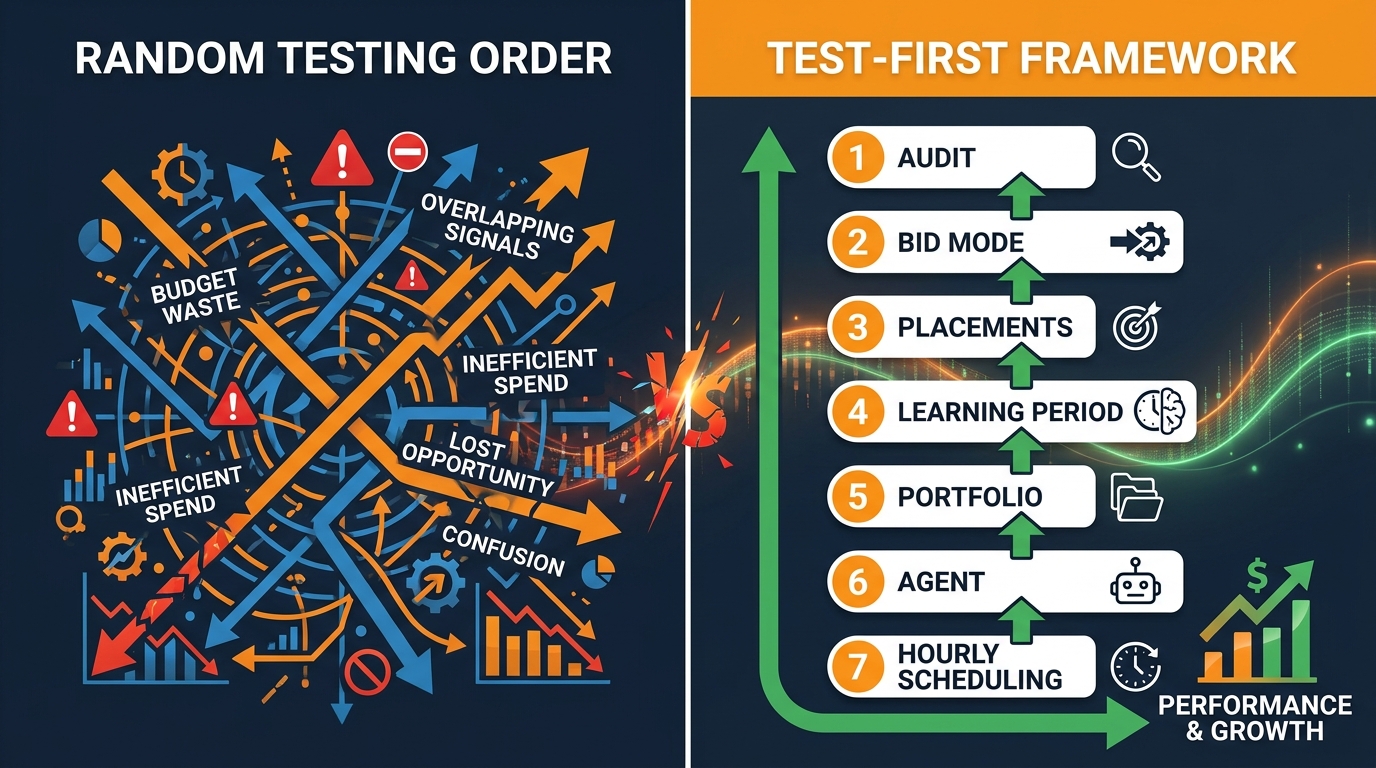
    Amazon Ads AI bidding test-first framework: chaotic random testing vs structured sequenced flowchart

    Here is the mistake most Amazon advertisers are making with AI bidding in 2026: they treat it as a feature to activate, not a system to build. They flip on dynamic bidding, wait a week, see mixed results, then chase the next lever — placement multipliers, a third-party tool, maybe the new Ads Agent — without ever knowing whether the first test actually worked.

    The result is a campaign account that looks increasingly automated but performs no better than it did six months ago. Sometimes worse.

    The core problem is not the tools. Amazon’s native AI bidding infrastructure has matured considerably. The problem is test sequencing. Each bidding layer you add to a campaign interacts with the ones already in place. If you run placement multipliers before you’ve established a stable bid mode, you cannot attribute the outcome to either variable. If you hand off to Ads Agent before you’ve established clean conversion signals, the agent learns from noise. The tests compound — but so do the errors.

    This article lays out a specific test order: what to run first, what each test actually measures, how long to wait before drawing conclusions, and what failure looks like at each stage. It draws on real campaign data, Amazon’s own documentation, and practitioner analysis from accounts managing thousands of Sponsored Products campaigns in 2026.

    This is not a beginner’s overview of dynamic bidding. It is a sequenced testing framework for advertisers who already understand the basics and want to know how to build on top of them systematically — without breaking what is already working.

    Why Test Order Matters More Than the Test Itself

    Most Amazon PPC education treats each bidding feature as an independent dial. Turn this one up for volume, turn that one down for efficiency. In practice, these features are interdependent layers in a single auction system, and the order in which you activate them determines what signals each layer receives.

    Consider a simple example. You run a Sponsored Products campaign on dynamic bidding — up and down. Amazon’s algorithm is now adjusting your bids in real time based on its estimate of the probability that any given impression will convert. You then add a 100% Top of Search placement multiplier. The result: on a high-intent search with strong conversion probability, Amazon bids up (say, 30% above your base), and then your multiplier pushes another 100% on top of that. Your effective CPC on top-of-search placements is now 2.6x your stated base bid — a number no efficiency model anticipated.

    You now have two variables interacting in a way you cannot disentangle from a single report. If ACoS spikes, was it the bidding mode or the multiplier? You do not know, and you cannot know, unless you tested them separately in sequence.

    The Compounding Signal Problem

    This sequencing challenge becomes even more critical when AI is involved. Amazon’s bidding algorithms — whether native dynamic bidding or the newer Ads Agent — learn from the conversion data your campaigns generate. That learning is path-dependent: the AI builds a model based on the historical pattern of impressions, clicks, and conversions your campaign has produced. If that history contains periods where two variables changed simultaneously, the model’s understanding of cause and effect is degraded.

    Introduce a third-party AI tool on top of an already-noisy foundation and the problem multiplies. The external tool is now learning from data that Amazon’s system already partially shaped — and both systems may be making competing bid adjustments on the same auction. Practitioner analysis from 2026 accounts consistently flags this as a primary cause of “AI drift,” where automated systems stabilize at a local optimum significantly below what disciplined manual management would have achieved.

    The Right Mental Model: Layers, Not Levers

    Think of Amazon Ads AI bidding as a layer cake. The base layer is your campaign structure and keyword match types. The second layer is your bid mode. The third is your placement modifiers. The fourth is your portfolio or budget controls. The fifth is any AI agent or third-party automation layer on top.

    Each layer should be stable and understood before you add the next one. Stability does not mean perfect — it means you have enough data to have a directional read on performance. This is the foundation of the framework that follows.

    Step One: The Pre-Test Audit — Diagnose Before You Automate

    Before changing any bidding setting, there is a diagnostic step that most advertisers skip entirely. It takes roughly 30 minutes per campaign, but it determines whether AI bidding has any chance of working in the first place.

    AI bidding systems learn from conversion signals. If those signals are weak, infrequent, or contaminated, the algorithm learns the wrong patterns and confidently executes on them. The diagnostic checks four things:

    1. Conversion Volume Sufficiency

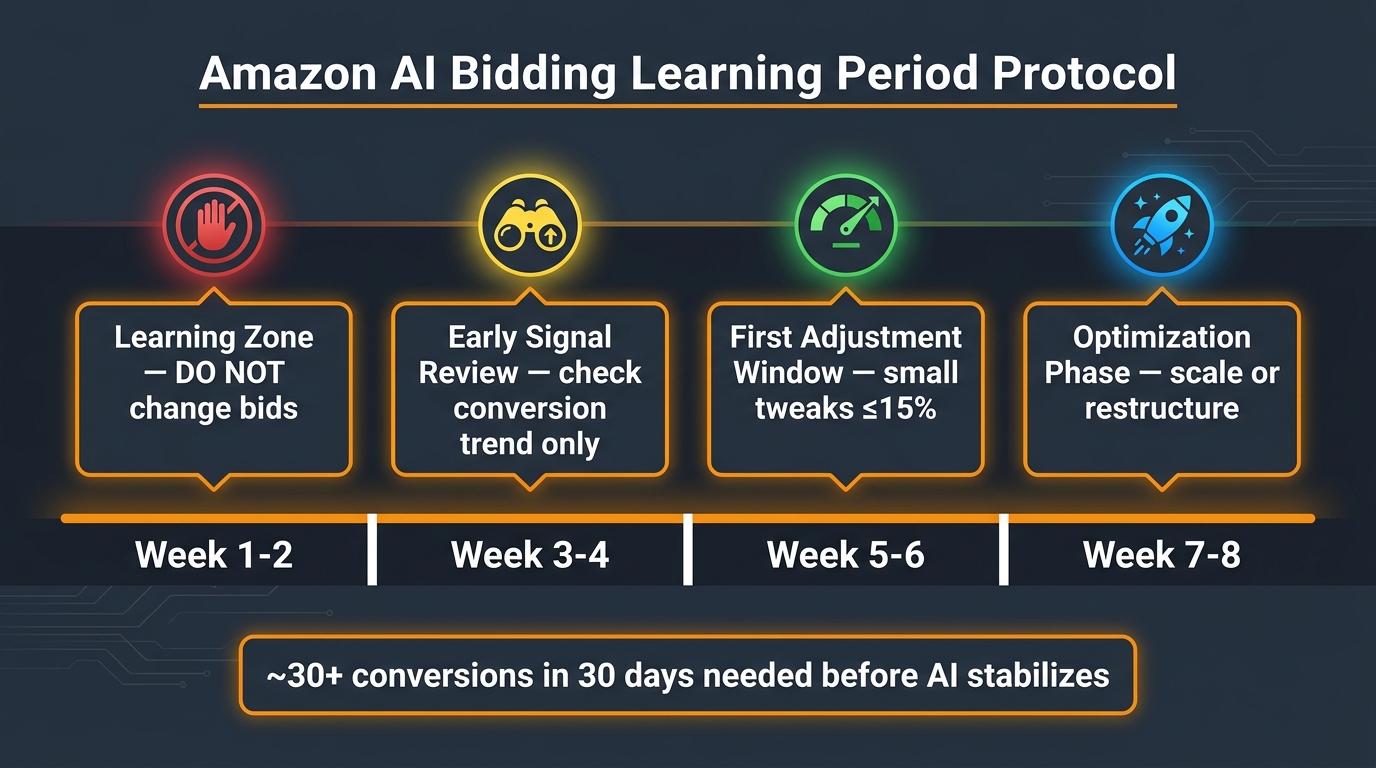
    Amazon’s native AI bidding stabilizes with approximately 30 or more conversions over any 30-day window per campaign. Below that threshold, the algorithm does not have enough data to model conversion probability with any reliability. This is not a formal Amazon policy number — the company does not publish a universal minimum — but it reflects consistent practitioner experience and parallels the documented behavior of Amazon DSP Performance+, which officially requires a minimum conversion volume before the learning phase can conclude.

    Check your last 30 days of conversion data at the campaign level. If you are running below 30 orders, AI bidding will not reliably outperform a well-structured manual bid. Fix conversion volume first: tighten match types, eliminate non-converting keywords, and improve listing conversion rate before touching bidding mode.

    2. Attribution Cleanliness

    Amazon’s 14-day attribution window means conversions show up in reports days after the click. If you have recently changed prices, run a coupon, or had a Buy Box loss, the conversion data in your current window is contaminated — it reflects a product state that no longer exists. AI bidding trained on that data will optimize for a context that has passed. Always audit your last 30 days for any external changes before running a bidding test.

    3. Campaign Isolation

    Each campaign you test should contain products with similar economics and conversion rates. Mixing high-margin, fast-selling ASINs with slow-moving commodity SKUs in a single campaign forces the AI to average across wildly different conversion patterns. The result is an algorithm that is perpetually confused and perpetually underperforming. Segment before you test.

    4. Listing Quality Baseline

    Bidding AI cannot fix a listing that does not convert. If your main image, title, price, or review count is meaningfully below category benchmarks, raising bids — automatically or otherwise — generates expensive impressions that do not convert. Document your listing conversion rate (orders divided by sessions from the Brand Analytics or Business Reports page) before starting any bidding test. If it is below 10% in a category where competitors average 15–20%, the problem is the listing, not the bids.

    Step Two: Bidding Mode — Down Only vs Up and Down (The Data You Actually Need)
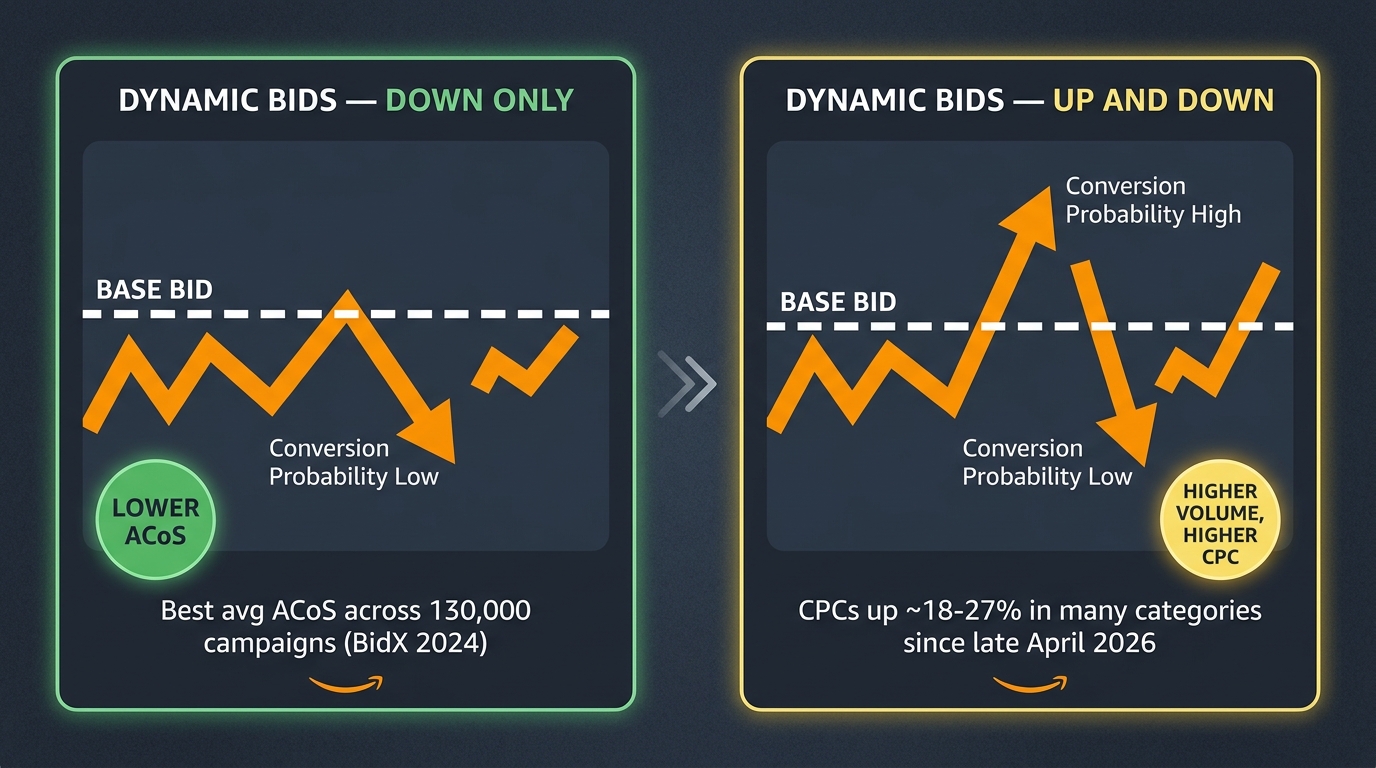
    Amazon dynamic bidding comparison: Down Only vs Up and Down — ACoS, CPC, and volume trade-offs with 2026 data

    Bid mode is the first real test in the sequence, and the data on it is clearer than most advertisers realize. A BidX analysis of approximately 130,000 campaigns in 2024 found that dynamic bidding — down only produced the lowest average ACoS across the study group, with a click-through rate only 0.02% lower than up and down campaigns. The CTR difference was negligible; the ACoS difference was not.

    In 2026, this picture has sharpened further. Multiple advertisers and agency reports have documented that the up-and-down engine has been retuned by Amazon, with CPCs running approximately 18–27% higher in many categories since late April 2026 compared to historical averages — while conversion rates remained largely flat. That combination is a direct efficiency hit to any campaign using up and down without a deliberate rationale for accepting higher costs.

    When Down Only Is the Right Default

    Down only should be your starting bid mode for the majority of Sponsored Products campaigns. It functions as a cost floor — Amazon can reduce your bid when conversion probability is low, but it cannot inflate your bid above your stated maximum. This gives the AI a real optimization lever (downward adjustment) while preventing the uncapped spend that damages ACoS in high-competition auctions.

    This mode is particularly effective for mature campaigns with established conversion history, campaigns with tight margin constraints, and any ASIN in a category where CPCs have risen significantly in 2026. The algorithm’s downward adjustments can reduce wasted spend on low-intent impressions without requiring you to manually review every keyword bid daily.

    When Up and Down Has a Specific Role

    Up and down is not a universally bad choice — it has a specific, narrow use case: product launches and aggressive share-capture scenarios where you have pre-committed to higher short-term CPC in exchange for velocity and ranking signal. If you are launching a new ASIN and need to build conversion history quickly, or if you are running a time-limited conquest campaign against a key competitor, giving Amazon the ability to bid above your base to win high-intent auctions can be worth the cost.

    The critical discipline is defining an exit condition before you start. Decide: after how many days, or at what ACoS threshold, does this campaign revert to down only? Without a predefined exit, up and down campaigns tend to accumulate cost and never get rationalized.

    How to Run This Test Cleanly

    To test bid mode in isolation, use Amazon’s Campaign Experiments tool (available within the Ads console under “Experiments”). This feature splits your campaign traffic between two configurations — a control and a treatment — and attributes outcomes to each. Run the experiment for a minimum of 28 days to capture enough conversion events for statistical reliability. The single variable to change is bid mode. Keep base bids, keyword lists, match types, and placement modifiers identical across both arms of the experiment.

    Step Three: Placement Multipliers — The Lever Nobody Tests Correctly
    Amazon Top of Search placement multiplier testing diagram showing adjustment ranges and ACoS decision logic

    Placement multipliers are tested in Step Three because they operate on top of your bid mode. If your bid mode is not yet stable and understood, adding placement modifiers creates compounding uncertainty that you cannot resolve. Once you have established a stable bid mode — ideally down only — and have at least 28 days of clean data from that mode, placement multipliers become the next variable to isolate.

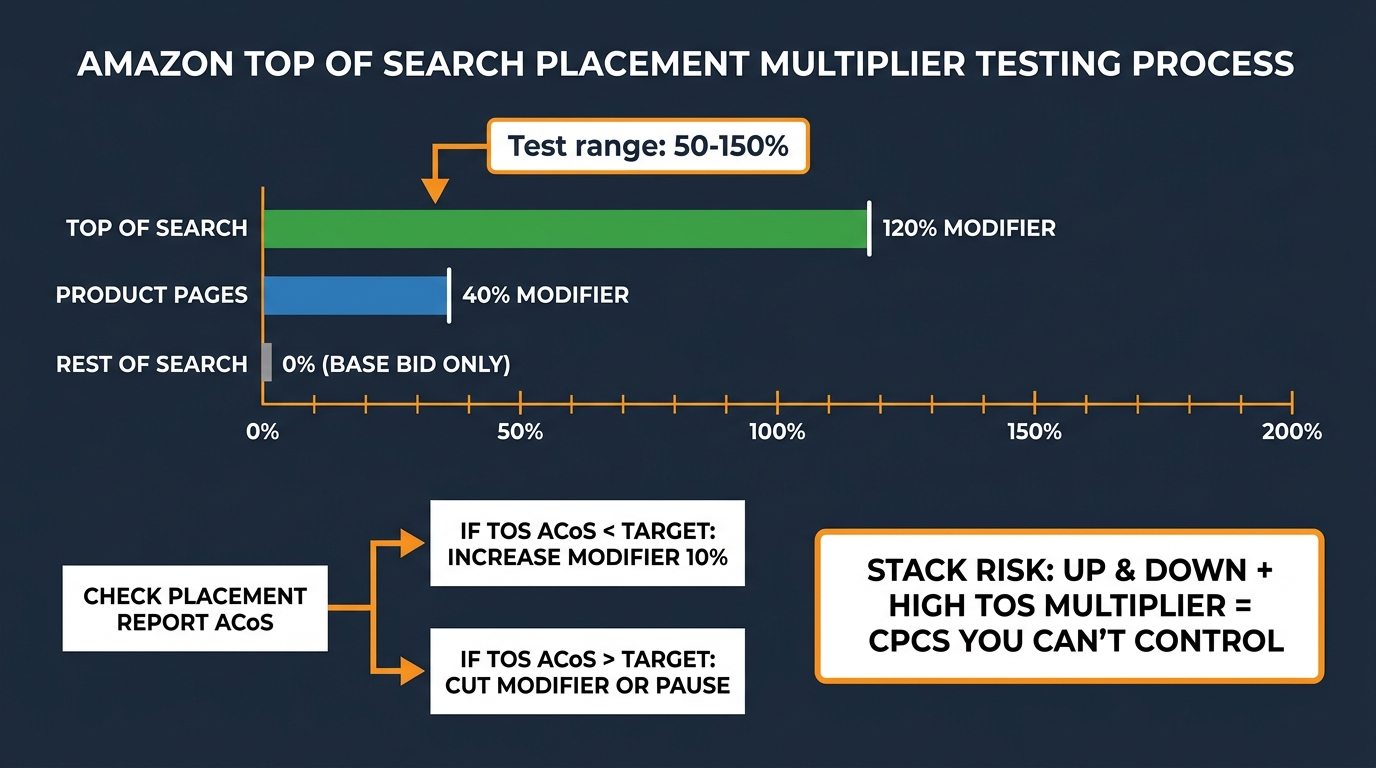
    Amazon Sponsored Products allows you to set percentage bid modifiers for two placements: Top of Search (first page) and Product Pages. Rest of Search always uses your base bid with no modifier. Modifiers can go up to +900%, though anything above 150% is almost never justified outside extreme brand-defense scenarios.

    The Stacking Problem

    The most important thing to understand about placement multipliers is how they interact with dynamic bidding. If you are on dynamic bidding — up and down — and you add a 100% Top of Search multiplier, Amazon’s algorithm can bid above your base on a high-intent impression, and then your multiplier adds another 100% on top of that adjusted bid. The CPC you actually pay can reach multiples of your stated base bid, with zero notification from Amazon. This is the stacking risk that inflates spend silently.

    On dynamic bidding — down only, stacking is less dangerous: the multiplier can push above your base for top-of-search placements, but Amazon cannot inflate the base beyond your stated maximum before the multiplier applies. The effective exposure is more predictable. This is one more reason to resolve your bid mode first.

    How to Test Placement Multipliers Correctly

    Start with your placement report, not with a multiplier adjustment. Pull the Placement Report from your campaign’s reports tab, filtered to the last 30 days. This report breaks out ACoS, CPC, conversions, and spend by placement type: Top of Search, Product Pages, and Rest of Search. This data tells you whether Top of Search is currently profitable for your campaigns — before you spend a dollar more amplifying it.

    If your Top of Search ACoS is already below your target, a moderate multiplier (try 25–50% to start) will send more budget to your most profitable placement. Increase in 10-percentage-point increments every 10–14 days, checking placement-level ACoS after each adjustment. Expert consensus in 2026 puts the productive range for most accounts at 50–150% for Top of Search. Above 150%, CPC exposure typically erodes the efficiency gains from better placement.

    If your Top of Search ACoS in the placement report is already above target, a multiplier will not fix that — it will amplify the problem. The issue is either keyword relevance, listing conversion, or a CPC floor set too high for your margin. Fix the underlying conversion issue before applying any positive multiplier.

    Product Pages: The Underused Placement

    Product page placements (your ads appearing on competitor or complementary product detail pages) often convert at lower rates than Top of Search but can deliver profitable scale at lower CPCs. Test product page multipliers separately from Top of Search multipliers using the same placement-report-first process. Many accounts find a moderate product page multiplier (20–40%) expands volume cost-effectively when top-of-search is expensive and competitive.

    Step Four: The Learning Period Protocol — How to Protect the Algorithm’s Work
    Amazon AI bidding learning period 8-week timeline showing optimal intervention points and what not to do in weeks 1 and 2

    Every time you make a meaningful change to a campaign running AI-assisted bidding — bid mode, placement modifier, keyword addition, budget change — the learning period effectively resets. Amazon’s algorithm needs time to rebuild its conversion probability model under the new conditions. This is not unique to Amazon; it mirrors the documented behavior of Google’s Smart Bidding, which carries a formal 2-week learning period designation.

    On Amazon, the learning period is not formally labeled as such in most campaign types (though Amazon DSP Performance+ explicitly documents up to four weeks), but practitioner data consistently shows performance instability in the first two to three weeks after a structural campaign change. The accounts that most commonly report “AI bidding doesn’t work” are the ones making changes every few days.

    The Eight-Week Protocol

    When you activate a new bidding configuration, commit to the following timeline:

    Weeks 1–2 (Learning Zone): Do not change bids, match types, budgets, or placement modifiers. Monitor impressions and spend to confirm the campaign is active and within expected ranges, but resist any optimization impulse. The algorithm is building its baseline model. Any intervention at this stage teaches the system that its early signals were wrong — even if they weren’t.

    Weeks 3–4 (Early Signal Review): Begin reviewing conversion trend data only. You are not yet optimizing — you are assessing whether the trajectory is directionally correct. Is ACoS trending downward compared to the pre-change baseline? Is conversion rate stable or improving? These are the questions to answer. Still no bid or structure changes.

    Weeks 5–6 (First Adjustment Window): If the trajectory is positive, make incremental adjustments — small changes of 10–15% to base bids or placement modifiers, never multiple changes simultaneously. If performance has deteriorated materially from your pre-test baseline, evaluate whether the issue is the bidding configuration or an external factor (seasonality, listing change, inventory constraint).

    Weeks 7–8 (Optimization Phase): You now have approximately 60 days of data under the new configuration. At this point you can make more confident decisions about scaling, restructuring, or moving to the next layer in the framework.

    What Counts as a “Reset” Trigger

    Not every campaign change resets the learning period equally. Minor changes — adding a single negative keyword, adjusting budget by less than 20% — typically do not cause significant disruption. Major changes — switching bid mode, adding or removing large keyword groups, changing campaign structure, enabling or disabling a third-party bidding tool — will reset the model’s confidence in its conversion estimates. Apply the full eight-week protocol after any major change.

    Step Five: Portfolio Bidding and Budget Signals — Teaching the Algorithm What Matters

    Once individual campaigns are stable under a tested bid mode with understood placement behavior, the next layer is portfolio-level optimization. Portfolio bidding on Amazon allows you to set shared budget caps and, for some ad types, target ACoS or ROAS goals at the portfolio level rather than managing each campaign individually.

    This matters in 2026 because Amazon’s bidding engine increasingly looks at portfolio-level signals — not just individual campaign data — when modeling conversion probability. A campaign within a well-structured portfolio with a clear, consistent budget signal performs differently than the same campaign running in isolation. The algorithm uses budget pacing behavior, cross-campaign conversion patterns, and aggregate spend data as inputs alongside the keyword-level signals it has always processed.

    Budget Signals the Algorithm Reads

    Amazon’s AI bidding reads your budget behavior as a quality signal. Campaigns that run out of budget early in the day and go dark for hours create a fragmented performance history — the algorithm sees active-then-inactive patterns and struggles to model consistent conversion probability. Budget depletion events also suppress impression share during high-converting hours (typically mid-morning and early evening), replacing your AI-optimized bids with absence.

    Before adding portfolio-level controls, audit your daily budget utilization. If any campaign is consistently hitting its daily cap before 3 PM, the budget constraint is limiting what the AI can learn. Either raise the budget or reduce it deliberately to a level where the campaign can run all day on its existing allocation. Partial days create partial data.

    Portfolio ACoS Targets vs Campaign-Level ACoS Targets

    A common mistake in 2026 is setting a portfolio-level ACoS target that averages out fundamentally different product economics. A $15 accessory with a 60% margin should not share an ACoS target with a $150 appliance running at 25% margin. The algorithm receives a blended efficiency goal that is wrong for both products.

    Structure portfolios around products with similar margin profiles and similar business goals. Keep launch campaigns — where you deliberately accept higher ACoS to build conversion history — in separate portfolios from mature, efficiency-optimized campaigns. The portfolio’s ACoS target is a signal the AI uses to calibrate bid aggressiveness. A mixed signal produces mixed results.

    The Budget Increase Protocol

    When increasing campaign or portfolio budgets, Amazon’s guidance and practitioner consensus both suggest limiting single-step increases to approximately 20–30% of the current budget. Larger budget jumps can cause the AI to recalibrate its pacing model, temporarily overserving impressions in early-day hours and underserving in peak-conversion windows. Gradual increases preserve the pacing behavior the algorithm has learned and produce more stable performance through growth phases.

    Step Six: Amazon Ads Agent — Where It Actually Helps and Where It Doesn’t

    Amazon Ads Agent launched in early 2026 as an agentic AI campaign management layer built on Amazon’s Bedrock infrastructure. It allows advertisers to describe goals in plain English, receive proposed campaign setups, bid adjustments, keyword suggestions, and budget changes — then approve or reject those proposals before they go live. It is the closest thing Amazon has offered to a fully AI-managed campaign workflow within its native console.

    The key word is “proposed.” Amazon Ads Agent does not make changes autonomously by default — it surfaces recommendations for human review and approval. This is meaningful: it means the agent operates as an informed advisor rather than an autonomous bidder, and it means its effectiveness depends entirely on the quality of the input signals it receives.

    What Ads Agent Does Well

    Ads Agent is genuinely useful for three specific tasks. First, search term harvesting: the agent can identify converting search terms from auto-targeting campaigns and recommend promotion into exact-match manual campaigns, a task that is time-consuming and easy to deprioritize manually. Second, bulk bid adjustments: for accounts with dozens or hundreds of campaigns, reviewing and proposing bid changes at scale is where the agent saves the most time, surfacing the same adjustments that a skilled human manager would make but across a larger surface area faster. Third, campaign creation from briefs: describing a new product launch goal in natural language and receiving a structured campaign draft (with suggested keyword groups, match types, and initial bids) materially reduces the time from product launch to active advertising.

    Where Ads Agent Falls Short

    Ads Agent does not currently understand your product economics, inventory position, or margin structure. It optimizes for the performance metrics it can see inside Amazon Ads — clicks, conversions, ACoS — without any awareness that your ASIN is low on stock, that your margin on this product is 12% rather than 35%, or that this campaign’s goal is new-to-brand acquisition rather than immediate profitability. These strategic inputs still require human specification.

    The agent also performs significantly better when it is working with stable, clean campaign data. This brings us back to sequencing: Ads Agent should be introduced after you have established stable bid modes (Step Two), tested and calibrated placement multipliers (Step Three), and completed at least one full learning period (Step Four) on your primary campaigns. Activating the agent on a campaign that is still in its first 30 days of a new bidding configuration means the agent learns from noise and projects that noise forward into its recommendations.

    A Practical Activation Checklist for Ads Agent

    Before activating Ads Agent on any campaign, confirm: the campaign has at least 60 days of stable performance data; your ACoS target is explicitly documented and can be entered as a goal parameter; you have a human review cadence (minimum weekly) to evaluate proposed changes before approving them; and you have excluded any campaigns in active launch or experimental phases from the agent’s scope. Ads Agent is a force multiplier for stable, mature campaigns — not a replacement for the foundational work that makes those campaigns stable.

    Step Seven: Hourly Bid Scheduling via Amazon Marketing Stream
    Amazon Marketing Stream hourly bid scheduling heatmap showing peak and off-peak conversion windows with Tinuiti case study results

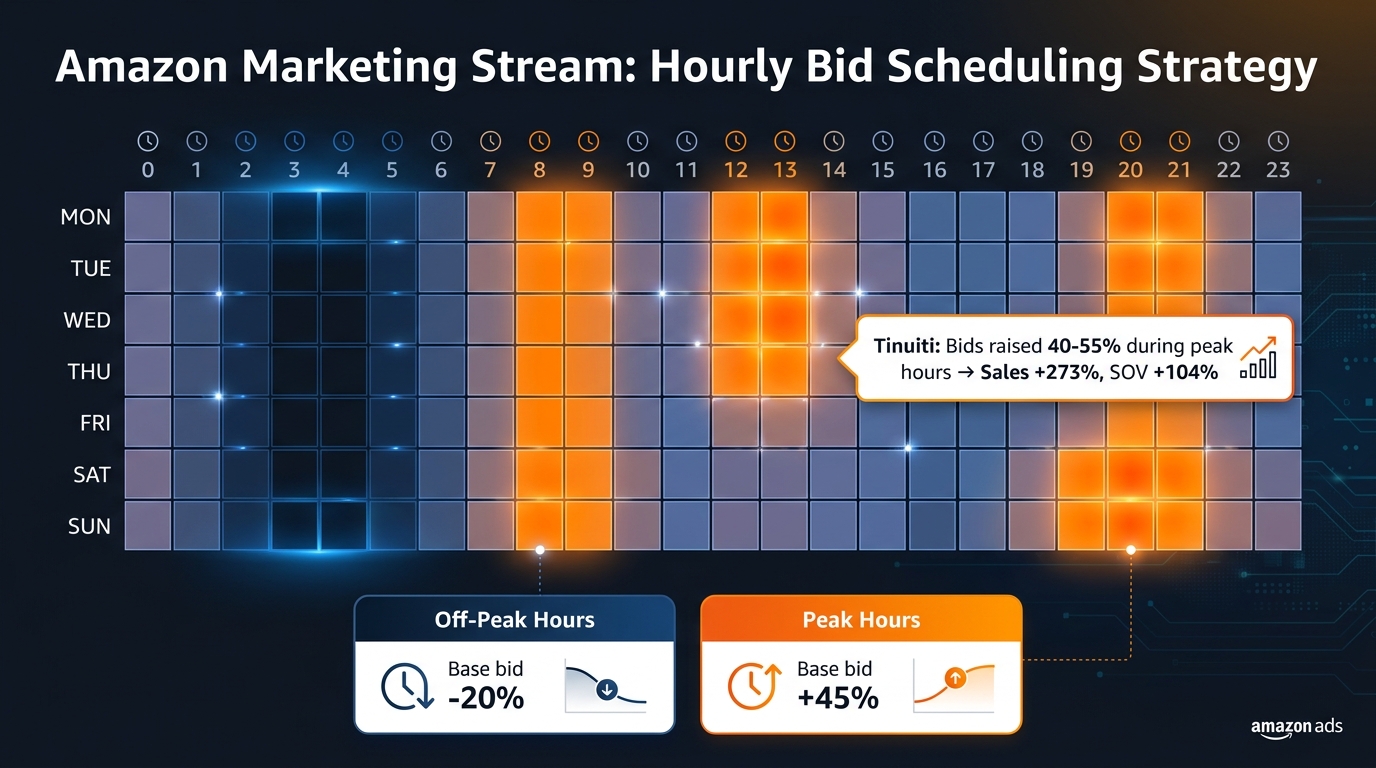
    Hourly bid scheduling is the most operationally advanced layer in the framework — and the one with some of the most dramatic published results. Amazon Marketing Stream provides near-real-time hourly performance data (traffic, conversions, CPC, ACoS, budget consumption) via the Amazon Ads API, updated hourly across Sponsored Products, Sponsored Brands, Sponsored Display, and DSP. Accessing this data requires API integration — either via a third-party tool that has built Marketing Stream integration or via a custom technical build.

    When Tinuiti applied historical hourly Marketing Stream data to identify peak conversion windows for a soda-category campaign and raised bids 40–55% during those windows, the results were notable: share of voice increased 104%, sales increased 273%, and new-to-brand units increased 570% at the account level. The test campaigns directly attributed 120% sales growth to the hourly optimization. These are extreme results in a particular category context, not a universal guarantee — but they illustrate the magnitude of value available when intraday conversion patterns are significant.

    How to Build an Hourly Bid Schedule

    The starting point is data collection, not adjustment. Before modifying any bids, you need at least four to six weeks of hourly Marketing Stream data to establish reliable conversion patterns. Most categories show identifiable peaks — commonly mid-morning (7–9 AM), lunch hours (12–2 PM), and evening windows (7–10 PM) — but these patterns vary significantly by product type, audience demographics, and category. Consumer electronics may peak differently from grocery; home goods may peak differently from automotive.

    Once your hourly conversion data reveals clear high-converting and low-converting windows, structure bid adjustments through a third-party tool (most major Amazon PPC platforms including Perpetua, Intentwise, and Quartile offer Marketing Stream-based dayparting), or via API rules if you have technical resources in-house. A reasonable starting range: reduce bids 15–25% during consistently low-converting hours and increase bids 20–40% during consistently high-converting hours. Adjust in increments, not all at once, and re-evaluate after four weeks as the bid changes may themselves shift which hours generate the most volume.

    When Hourly Scheduling Is Not Worth the Complexity

    Hourly bid scheduling adds meaningful operational complexity. It requires Marketing Stream API access, a technical integration layer, and ongoing monitoring to ensure that bid schedules remain aligned with actual conversion patterns as they evolve. For accounts spending under approximately $500 per day, this complexity is unlikely to generate returns that justify the investment — the conversion volume at that spend level may not be large enough to make hourly patterns statistically significant. At higher spend levels, particularly $1,000 per day and above, the efficiency gains from routing budget away from low-converting hours and toward peak windows can deliver meaningful annual savings.

    The Guardrail Stack: Bid Floors, Ceilings, and Exit Conditions

    No AI bidding system — native or third-party — should operate without a defined guardrail stack. Guardrails are the human-set constraints that prevent automation from optimizing toward local maxima that destroy account health: bids that run to zero and kill impression share, or bids that spike unconstrained during competitive auctions and blow through margin.

    Bid Floor: Your Non-Negotiable Minimum

    A bid floor prevents your AI from bidding so low that you lose impression share entirely. Calculate your floor based on the minimum CPC needed to remain competitive for your top-priority keywords in your category. This is not a fixed number — it varies by category and changes as competitor behavior evolves — but as a starting rule, your bid floor should sit at approximately 70–80% of your current average CPC for high-priority keywords. Below that level, you become invisible in the auction; above it, the AI has meaningful room to optimize downward without eliminating your presence.

    Bid Ceiling: The Protection Against Runaway Spend

    A bid ceiling caps the maximum your AI can bid on any individual keyword or placement. This is most critical when using dynamic bidding — up and down combined with placement multipliers, where effective CPCs can reach multiples of your base bid. Set your ceiling at the maximum CPC that still delivers a profitable conversion given your margin and target ACoS. The formula: bid ceiling = (product price × target ACoS × conversion rate). Any bid above this ceiling cannot, on average, produce a profitable result. Feed this number explicitly into your bidding tool’s cap settings.

    Exit Conditions: Knowing When to Turn It Off

    Every AI bidding experiment needs a predefined exit condition — a specific, quantified threshold at which you stop the test and revert to your control configuration. Without this, poor performers accumulate spend indefinitely while you wait for the algorithm to “figure it out.”

    Define exit conditions before each test, typically: if ACoS exceeds 150% of your target for more than 14 consecutive days after the initial learning period, revert to control; if conversion rate drops more than 30% relative to pre-test baseline and stays there for 7 days, revert; if campaign budget depletes before noon on more than 5 consecutive days, adjust budget before proceeding. These thresholds should be written down and checked systematically, not evaluated subjectively when you feel uncomfortable with the numbers.

    When to Escalate to Third-Party AI Bidding Tools
    Decision tree for choosing native Amazon AI bidding vs third-party tools based on spend level, catalog complexity, and portfolio needs

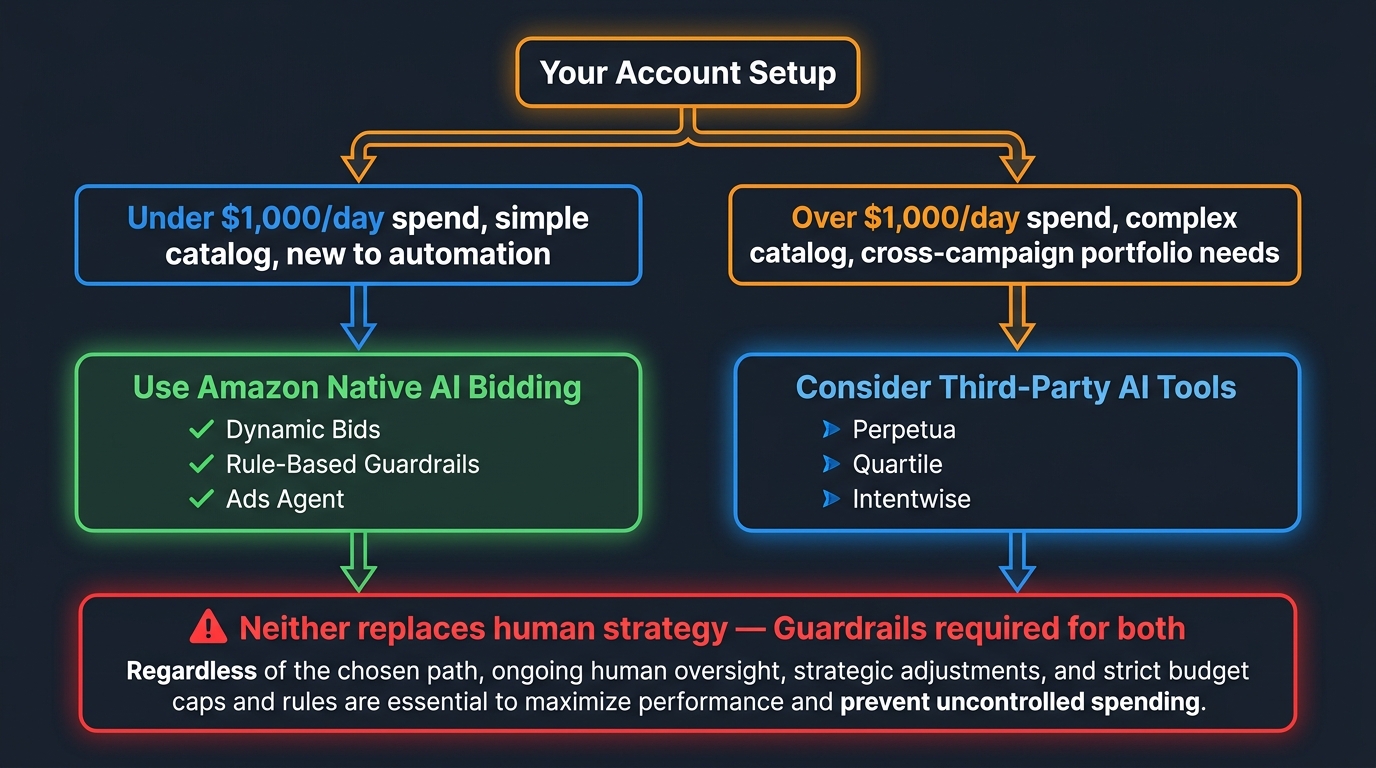
    Amazon’s native AI bidding infrastructure — dynamic bidding modes, portfolio controls, Ads Agent, and Marketing Stream — covers the majority of optimization needs for most accounts. Third-party AI bidding tools offer incremental capabilities in specific situations, but they are not universally superior to the native stack, and they introduce operational complexity that should be justified by expected returns before adding.

    In 2026, the gap between native Amazon AI and third-party AI tools has narrowed significantly. Amazon’s own algorithms have improved, Ads Agent has added meaningful automation, and Marketing Stream has brought intraday granularity that was previously only available via external integrations. For accounts under approximately $1,000 per day in spend with a catalog of fewer than 50 ASINs, the native stack is the rational starting point.

    Cases Where Third-Party Tools Add Genuine Value

    Third-party tools — platforms like Perpetua, Quartile, Intentwise, and several others — earn their place in three specific scenarios.

    First, cross-campaign portfolio optimization at scale. For accounts managing hundreds of campaigns across dozens of ASINs, native tools require significant manual effort to coordinate budget reallocation across campaigns. Third-party platforms can rebalance spend across the entire portfolio in response to real-time performance signals — moving budget from underperforming campaigns to overperforming ones intraday. Amazon’s native portfolio tools offer some of this, but the external platforms generally operate with more sophistication at high campaign counts.

    Second, margin-aware bidding. Native Amazon bidding optimizes to ACoS, ROAS, or click volume — it does not know your cost of goods, fulfillment fees, or net margin. Third-party tools that integrate product economics data can bid to true profitability rather than proxy metrics. For catalogs with highly variable margins, this distinction matters significantly.

    Third, cross-marketplace coordination. Sellers active across multiple Amazon marketplaces (US, EU, UK, Japan) managing coordinated campaigns benefit from third-party platforms that can apply shared learning and budget coordination across geographies — something native Amazon tools cannot currently do.

    The Overlay Risk

    The most important caution with third-party tools is what happens when their bid adjustments conflict with or layer on top of Amazon’s native AI adjustments. If Amazon’s dynamic bidding algorithm is adjusting bids in real time and your third-party tool is also adjusting bids on a 15-minute cycle, both systems are operating on delayed information about what the other has just done. The result can be erratic effective CPCs and unstable learning data for both systems.

    Best practice in 2026: when using a third-party bidding tool, set Amazon’s native bid mode to “fixed bids” for those campaigns, giving the external tool full control rather than running two competing AI systems simultaneously. Establish which layer has authority, and stick to it.

    What Good Testing Infrastructure Looks Like in Practice

    The framework above is a sequence of decisions. Making those decisions well requires a consistent measurement infrastructure that most Amazon advertisers do not have in place. Here is what that infrastructure needs to include.

    A Documented Pre-Test Baseline

    Before each test in the sequence, document your current performance metrics: average daily spend, ACoS, conversion rate, CPC, and impression share over the prior 30 days at the campaign level. Without this baseline, you cannot assess whether the test delivered an improvement, a degradation, or no measurable change. This sounds obvious, but a significant number of advertisers run tests without recording the starting state and then evaluate outcomes by feel rather than by comparison.

    Consistent Reporting Cadence

    During any active test, pull placement reports, search term reports, and campaign performance reports weekly — not daily. Daily data on Amazon is highly volatile due to attribution delays and normal auction variance. Weekly data provides a smoother, more reliable signal. Monthly data is too infrequent to catch issues before they compound. Weekly is the right cadence during active experiments.

    One Variable at a Time — Enforced as a Rule

    This principle appears in every PPC testing framework ever written, and it is violated in every account examined by every agency that has ever conducted an audit. The pressure to make multiple improvements at once is real — you have a list of things you want to fix, and changing one at a time feels slow. The cost is that you never know what worked, which means you cannot scale what works or avoid what doesn’t.

    In AI bidding specifically, the cost of violating this principle is higher than in manual bidding, because each change resets the algorithm’s learning state. Multiple simultaneous changes do not reset the learning period once — they reset it into a configuration where the algorithm is building a model for a state that may change again before the model has stabilized. The compounding confusion can set performance back months.

    An ACoS Waterfall by Product Lifecycle Stage

    Document your ACoS targets explicitly by product lifecycle stage. Launch-phase ASINs should have a deliberately higher ACoS target (you are paying to build conversion history). Growth-phase ASINs should have a moderate target. Mature, high-volume ASINs should have a tight efficiency target. Each stage implies a different bidding mode, different exit conditions, and different intervention thresholds. Without this documentation, you will inevitably apply efficiency-phase thinking to launch campaigns and kill their velocity, or apply launch-phase thinking to mature campaigns and erode their margin.

    The Sequence Is the Strategy

    Amazon Ads AI bidding in 2026 is genuinely powerful. The algorithms have improved, the data infrastructure has deepened, and the tools — from Ads Agent to Marketing Stream hourly data — provide capabilities that required expensive third-party solutions or custom engineering just two years ago. The frustrating reality, however, is that power does not equal performance. The accounts that are extracting the most from these systems are not the ones with the most advanced tools. They are the ones that built the right foundation in the right order.

    The sequence matters because each layer feeds the next. Clean conversion data makes AI bidding stable. A stable bid mode makes placement testing interpretable. Understood placement behavior makes portfolio ACoS targets accurate. Accurate targets make Ads Agent recommendations trustworthy. Trustworthy recommendations, combined with hourly Marketing Stream data, make intraday bid scheduling genuinely useful rather than just technically possible.

    Running these steps out of order — or running them all at once — collapses the clarity that makes each step work. The accounts that report AI bidding “doesn’t deliver results” have almost universally skipped the audit, changed too many things at once, evaluated outcomes before learning periods completed, or added AI on top of a structurally broken campaign foundation.

    The Practical Starting Point for This Week

    If you are reading this with an active Amazon Ads account and want to know where to start, the answer is the pre-test audit in Step One. Pull your last 30 days of conversion data by campaign, check each campaign for the four diagnostic criteria, and identify which campaigns have the data quality to support AI bidding and which ones need foundational work first. That audit, completed honestly, will tell you more about your account’s current situation than any bidding tool or algorithm setting can.

    From there, the framework gives you a sequence. Follow the sequence. Let each step complete before starting the next. Document your baseline before each change. Set exit conditions before you begin. And resist the pressure to accelerate — in AI bidding, patience at each step is not passivity. It is the mechanism by which the algorithm learns to deliver the results you are trying to measure.

    Key takeaways: Complete your four-point pre-test audit before changing any bid setting. Start with dynamic bidding — down only as your default mode. Test placement multipliers only after bid mode is stable. Protect the learning period from interference for at least 4 weeks after any major change. Build portfolio structures around products with similar margins. Introduce Ads Agent only on mature, stable campaigns. Explore hourly scheduling at scale only after the preceding layers are working. Always define guardrails and exit conditions before starting any test.
  • Sponsored Products Video Ads in 2026: The Seller’s Creative & Campaign Execution Guide

    Sponsored Products Video Ads in 2026: The Seller’s Creative & Campaign Execution Guide

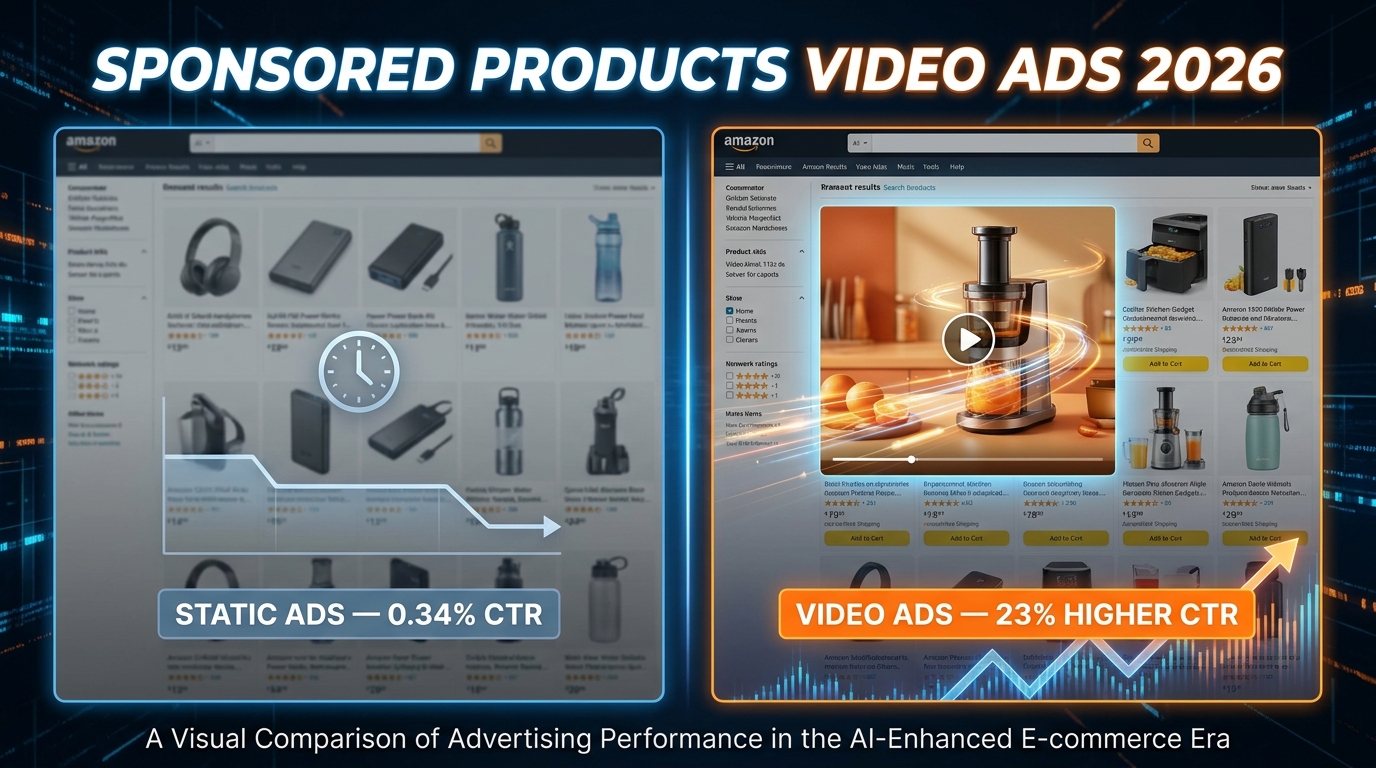
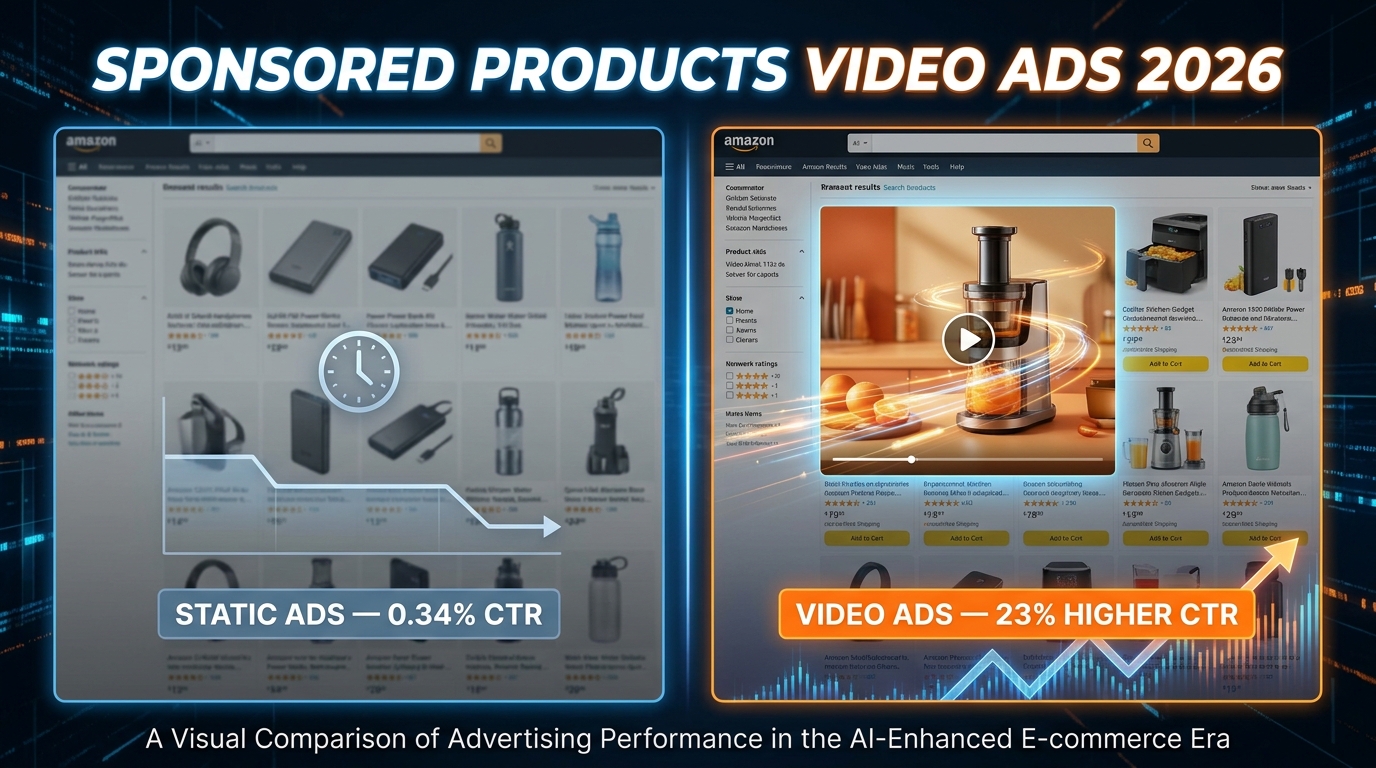
    Sponsored Products Video Ads 2026 — static ads vs video ads CTR comparison

    For most of Amazon’s advertising history, the word “video” and the words “Sponsored Products” lived in completely different conversations. Video was for brand storytelling — the eye-catching banner at the top of the search results page that brand-registered sellers used for awareness campaigns. Sponsored Products were the workhorse: static, efficient, and responsible for the majority of ad revenue across the platform. The two formats coexisted but never truly merged.

    That changed in 2026. Amazon officially rolled out Sponsored Products Video Ads (SPV) in Q1 of this year, inserting autoplay video directly into the search results grid — the very same placement where static product images have always competed for attention. This isn’t a cosmetic update. It’s a structural change to how Amazon’s search engine results page (SERP) works, and it has significant implications for every seller who runs PPC campaigns.

    The timing is not accidental. Amazon is responding to a documented shift in shopper behavior. TikTok Shop, YouTube Shopping, and Instagram’s shoppable video features have conditioned a generation of buyers to expect motion when they browse. Static images are increasingly invisible to a scroll-trained eye. Amazon’s answer is to bring the feed-like discovery experience into its own search grid — and it’s doing it through the most conversion-focused ad type it has ever offered.

    This guide is built specifically for sellers who are past the “what is it?” stage and want to know how to actually execute. We’ll cover the technical specs, the creative psychology, the campaign architecture, the bid mechanics, and the specific pitfalls that will bleed your budget if you’re not paying attention.

    What Sponsored Products Video Ads Actually Are (And What They’re Not)

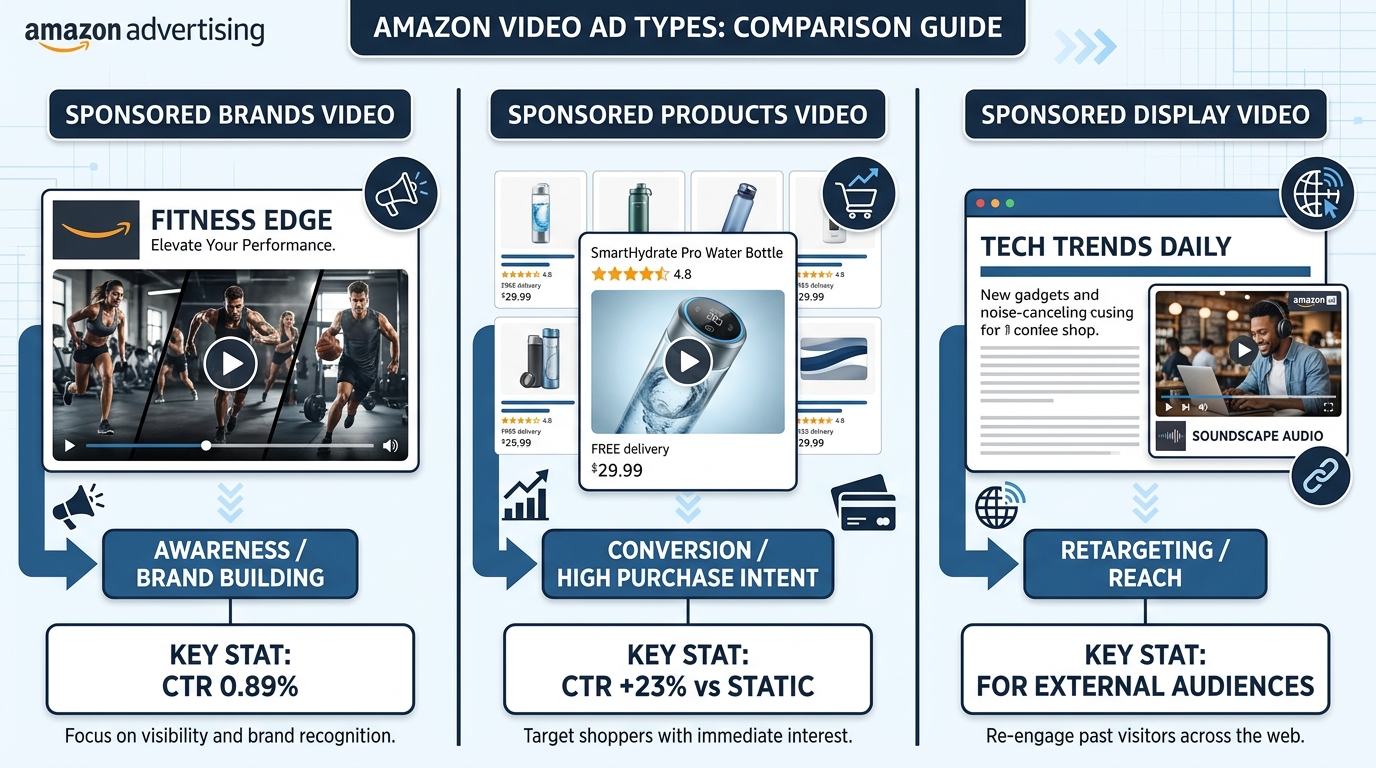
    Three Amazon video ad types compared — Sponsored Brands Video, Sponsored Products Video, Sponsored Display Video

    Confusion about Amazon’s video ad ecosystem is widespread, and it matters because getting the terminology wrong leads to choosing the wrong format for the wrong goal. Let’s clarify exactly what Sponsored Products Video Ads are and how they fit alongside Amazon’s other video placements.

    Sponsored Products Video (SPV): The Conversion Engine

    Sponsored Products Video Ads are video assets attached directly to individual ASIN campaigns inside the standard Sponsored Products framework. They appear inside the search results grid — not in a banner above it, not in a sidebar — in the same placement where static product images have always competed. When a shopper scrolls through Amazon search results, the video autoplays silently, displaying your product in motion.

    Key characteristics of SPV:

    • Placement: Within the organic-looking search grid (mid-page and in-feed), mobile and desktop search results, enhanced mobile app surfaces
    • Autoplay behavior: Muted, silent autoplay — your video must work without sound
    • Targeting: All standard Sponsored Products targeting options apply — auto campaigns, manual keyword targeting (broad/phrase/exact), and ASIN product targeting
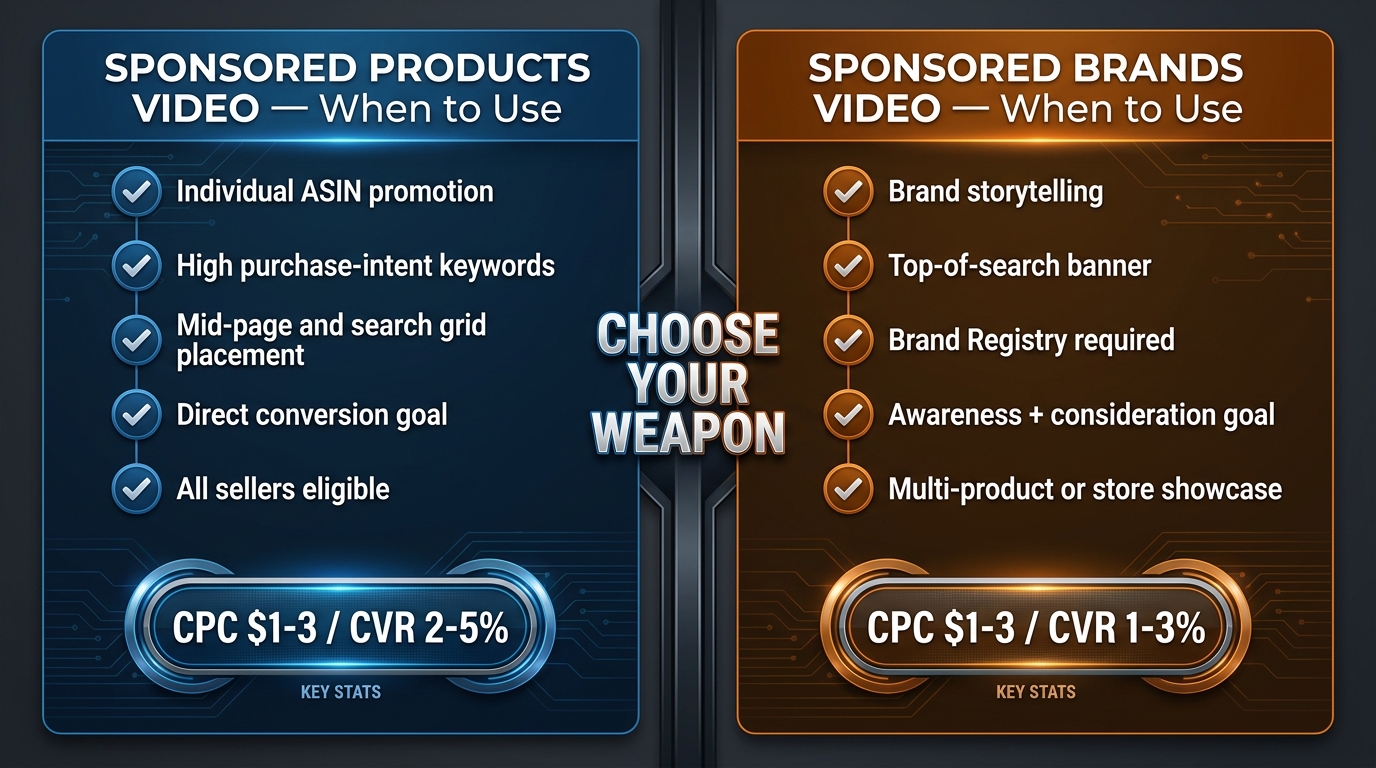
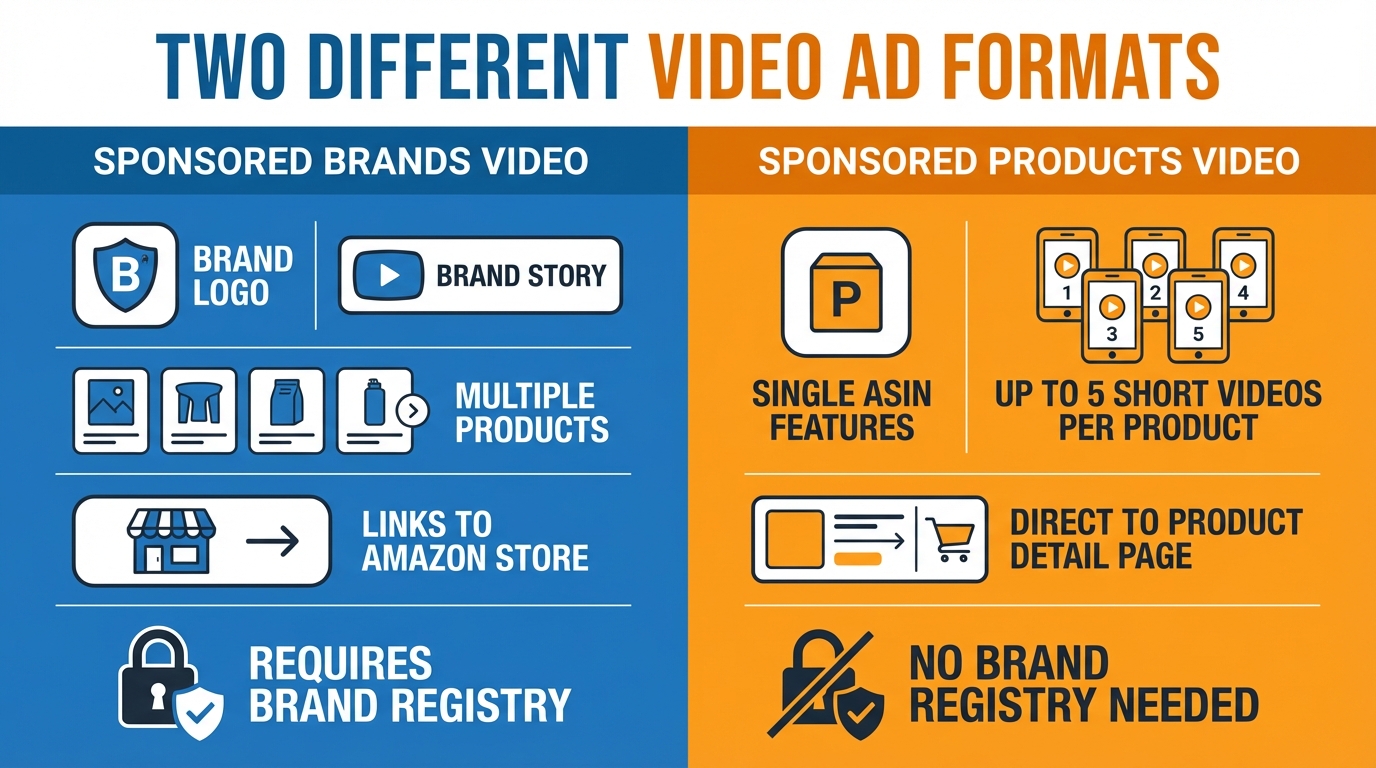
    • Eligibility: Available to all sellers, including those without Brand Registry — this is a major differentiator
    • Billing: Standard CPC model, same auction mechanics as static Sponsored Products
    • Videos per ASIN: Up to 5 short feature videos per ASIN, with shoppers able to tap between clips using clickable thumbnails

    How It Differs From Sponsored Brands Video (SBV)

    Sponsored Brands Video is a fundamentally different product. SBV ads sit at the top of search — above all organic listings — and require Brand Registry enrollment. They’re designed to tell a brand story with headline text, a logo, and a product card below the video. SBV is a brand-building and awareness tool that happens to convert reasonably well. Its average CTR is 0.89%, which is strong, but its conversion rate (1–3%) trails SPV’s conversion-focused placement.

    SPV, by contrast, lands a shopper directly on the product detail page when clicked. There’s no brand story interlude. The click intent is almost always purchase-ready, which is why conversion rates for SPV trend toward the 2–5% range (with top performers significantly higher). SPV also isn’t limited to brand-registered sellers, meaning even newer accounts can use it immediately.

    Sponsored Display Video: The Retargeting Layer

    Sponsored Display Video is Amazon’s off-Amazon retargeting product. It serves video to shoppers who have previously viewed your product page, browsed similar categories, or visited your Amazon Storefront — both on Amazon and across external websites and apps. If SPV is about winning the moment of search, Sponsored Display Video is about re-engaging shoppers who were almost buyers but didn’t convert. Think of them as operating at different stages of the purchase funnel, not competing with each other.

    The strategic takeaway: SPV wins at point-of-purchase; SBV builds brand equity; Sponsored Display Video handles retargeting. All three can work simultaneously in a sophisticated account, but they solve different problems.

    The 2026 Performance Benchmarks: What the Data Actually Says

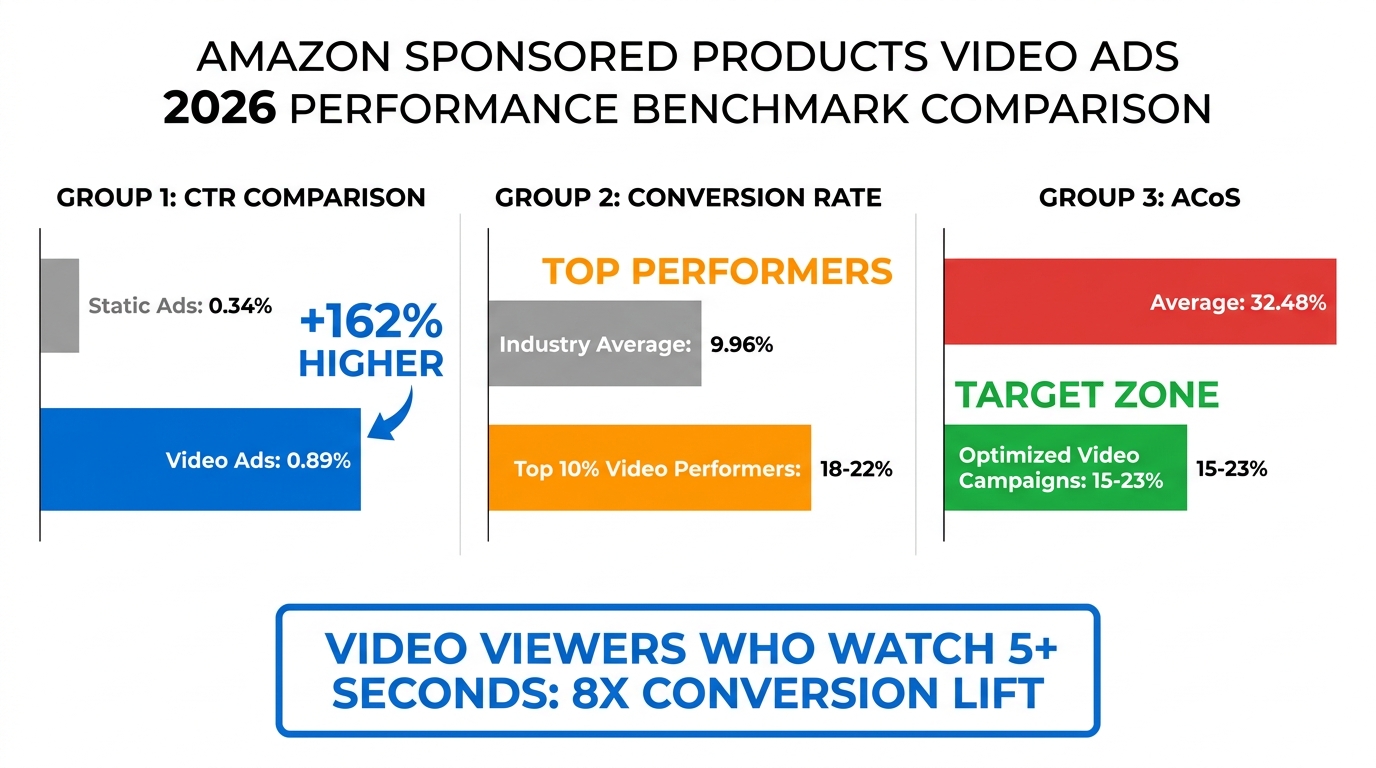
    Amazon Sponsored Products Video Ads 2026 performance benchmarks — CTR, CVR, and ACoS comparison chart

    Before you can set meaningful targets for an SPV campaign, you need an accurate read on what the format is actually delivering in 2026. The numbers here are real, but they come with important context that most summaries gloss over.

    Click-Through Rate (CTR)

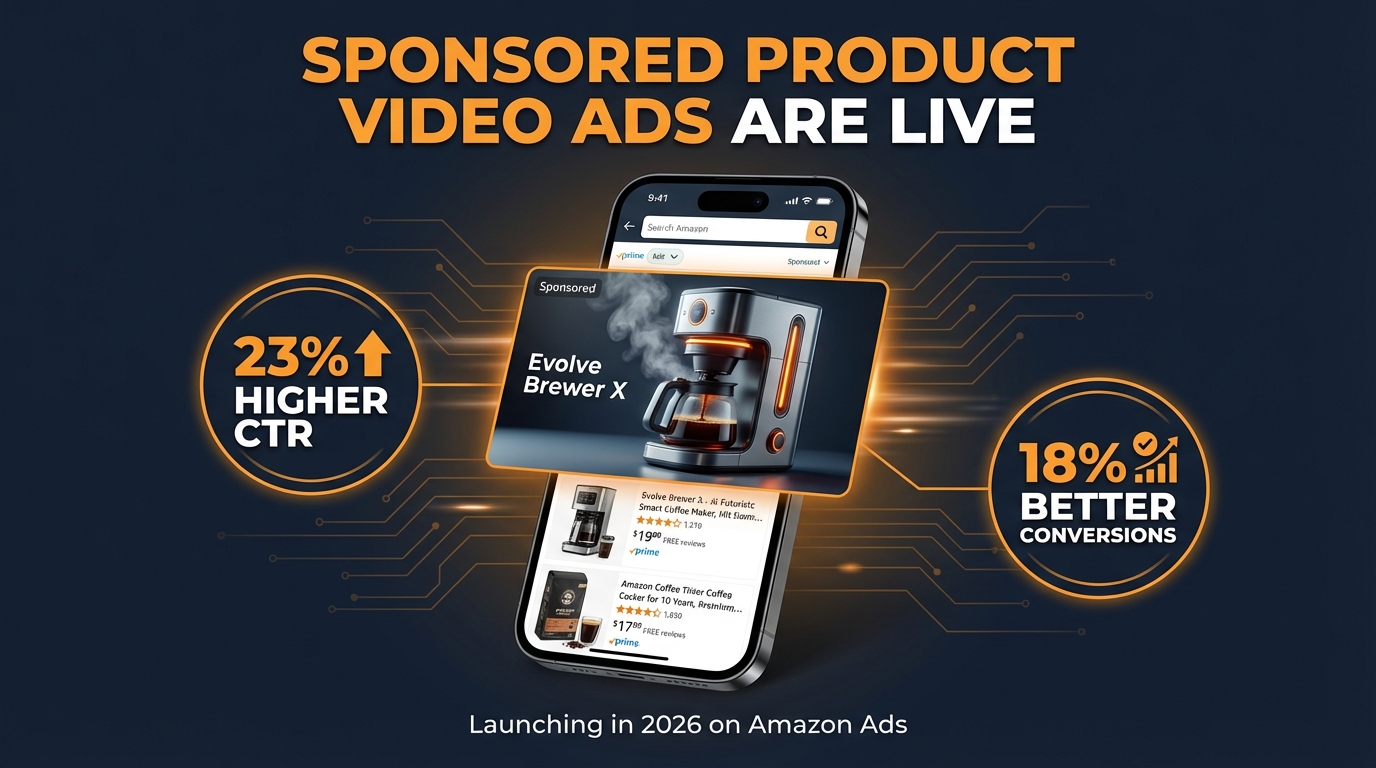
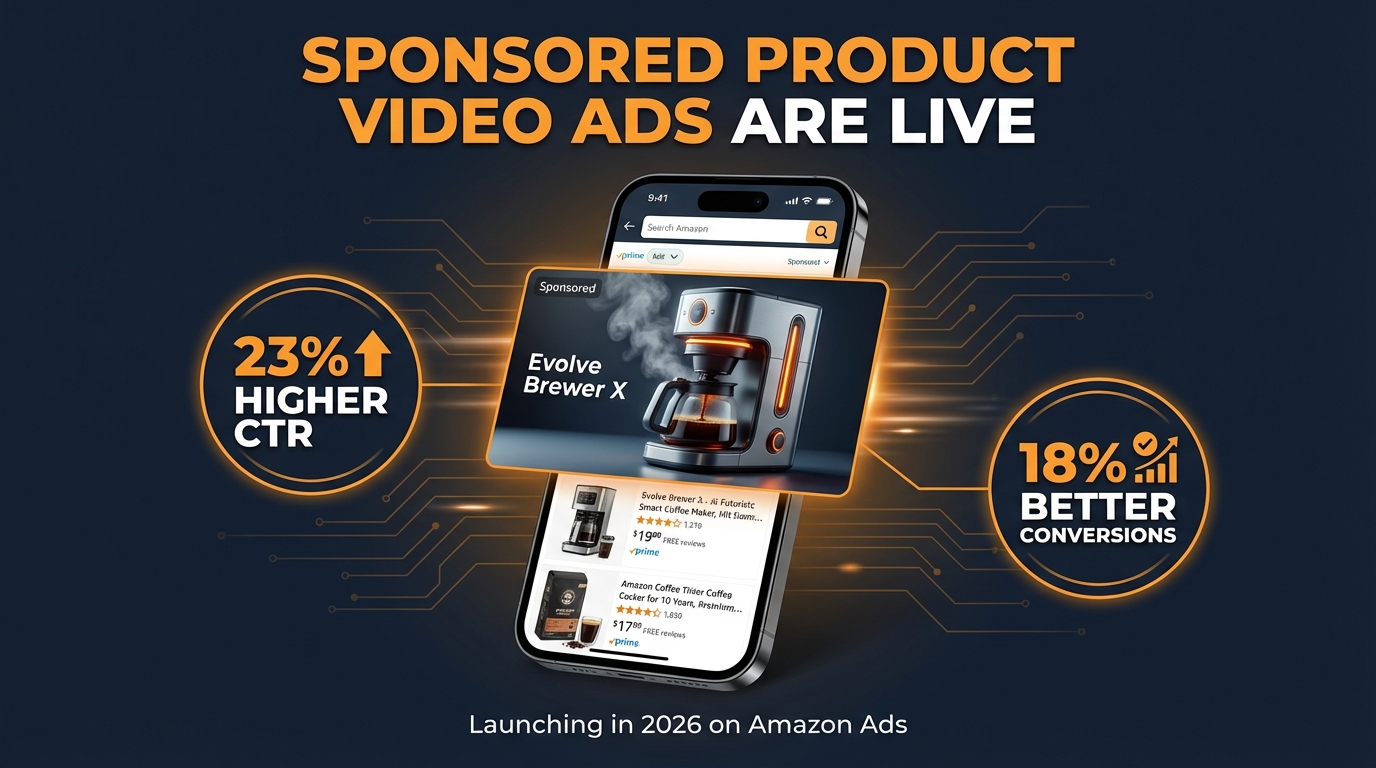
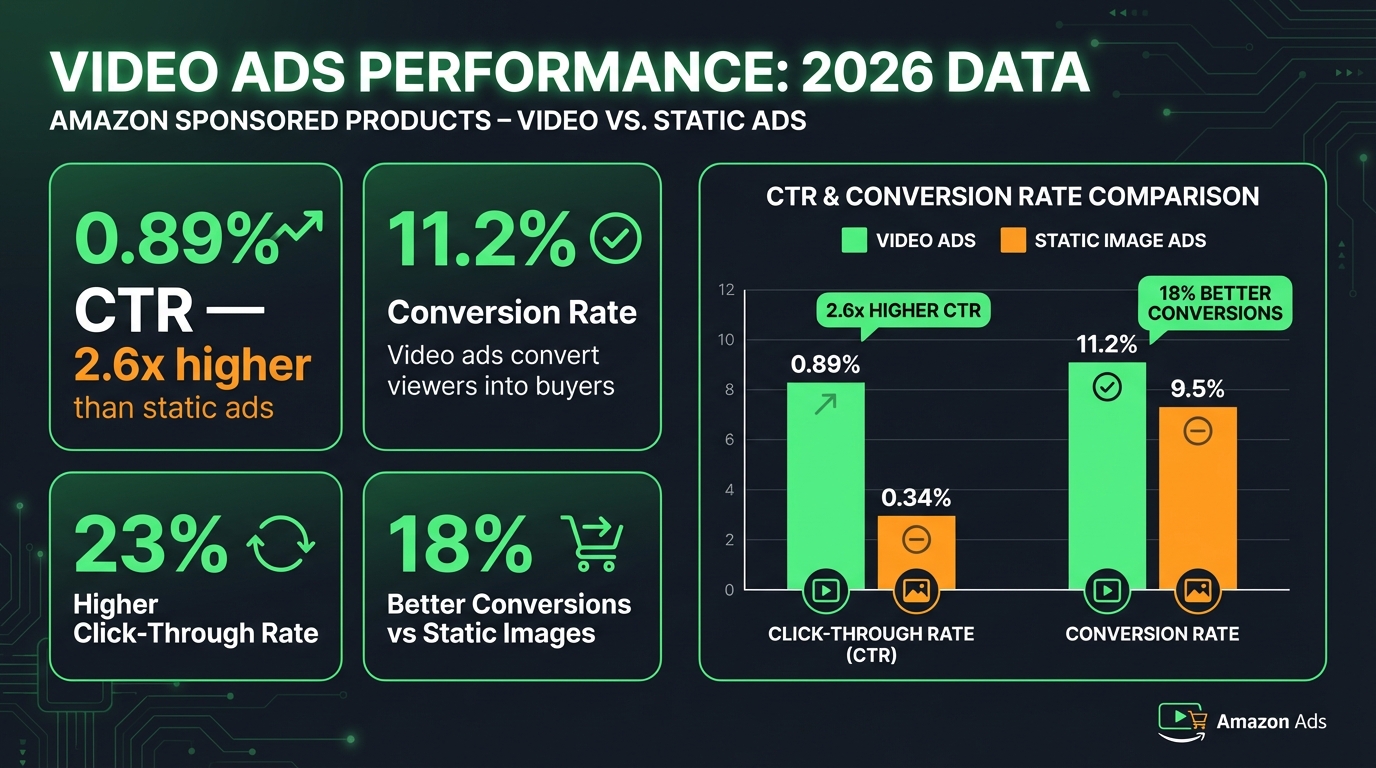
    Static Sponsored Products ads average a CTR of 0.34% across the platform (Stormy.ai, 2026). Sponsored Products Video Ads, in Q1 2026 beta tests, posted 23% higher CTR than static image equivalents — putting average SPV CTR in the range of 0.42–0.60% when controlling for category and price point. Sponsored Brands Video, for comparison, averages 0.89% CTR, but it occupies the premium top-of-search placement rather than the mid-grid position where SPV competes.

    The 23% lift is meaningful, but it’s an average across all SPV campaigns. The actual variance is enormous. Product categories where motion naturally demonstrates value — kitchen appliances, fitness equipment, personal care devices, cleaning tools, anything with a before/after story — see dramatically higher CTR lifts. Categories with low differentiation or commodity products (bulk paper, plain phone cables) see smaller gains.

    Conversion Rate (CVR)

    The more interesting number is CVR. The overall Amazon platform conversion rate averages around 9.96% (SequenceCommerce, 2026), which is already 7–8x higher than typical e-commerce. SPV campaigns average 10.2–11.5% CVR across all categories. Top-performing campaigns — typically in consumables, home goods, and personal care — achieve 18–22% CVR.

    The critical variable is engagement depth. Shoppers who watch a Sponsored Products Video for more than 5 seconds convert at roughly 8x the rate of those who don’t engage with the video at all. This is the number that should drive your entire creative strategy: your goal isn’t just to stop the scroll. It’s to hold attention past the 5-second mark.

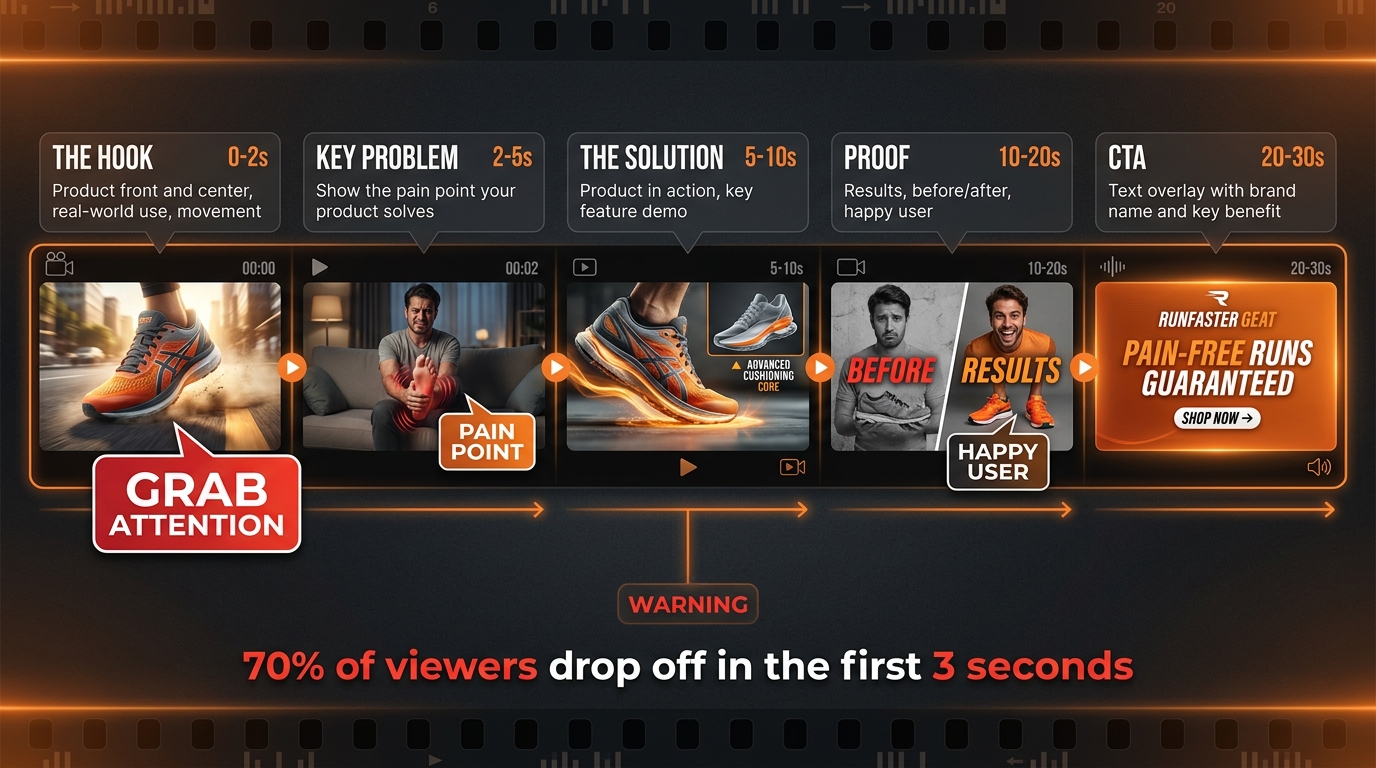
    There’s a counterweight here: 70% of viewers drop off within the first 3 seconds (SellerMetrics, 2026). The gap between “scroll past” and “5-second viewer” is the creative problem that separates winning SPV campaigns from wasted spend.

    ACoS Benchmarks

    Average ACoS for Sponsored Products campaigns sits at approximately 32.48%. Well-optimized SPV campaigns target 15–23% ACoS, which requires both strong creative (high CTR) and targeted keyword selection (high CVR). Sellers who launch SPV without adjusting their keyword targeting or creative strategy often see ACoS spike initially — especially in the first 2–4 weeks while the algorithm gathers engagement signal data.

    Category-Level Variance

    Performance varies significantly by category. Consumables and repeat-purchase categories average CVR above 15%. Electronics hover around 5% due to longer consideration cycles. Health and personal care, kitchen and dining, and pet supplies all trend above the platform average. If you’re in a low-CVR category, SPV can still be worthwhile, but your creative needs to work harder on trust-building rather than impulse response.

    Price Point Effect

    Amazon’s 2026 data shows a clear inverse relationship between price and conversion rate across all ad types: products priced below $25 convert at 12.5%, $25–$50 at 10.2%, $50–$100 at 8.7%, and above $100 at 6.4%. SPV doesn’t eliminate this dynamic — it compresses the gap by using video to handle objections before the click — but it doesn’t reverse it. Higher-priced products benefit from SPV’s storytelling capacity but need longer, more detailed videos to move the needle.

    Technical Specs and Creative Requirements for SPV in 2026

    Getting rejected during the ad review process is an expensive delay. Amazon’s moderation team applies strict standards to video assets, and understanding the technical requirements before production begins saves time and budget. Here’s exactly what you need to know.

    Video Specifications

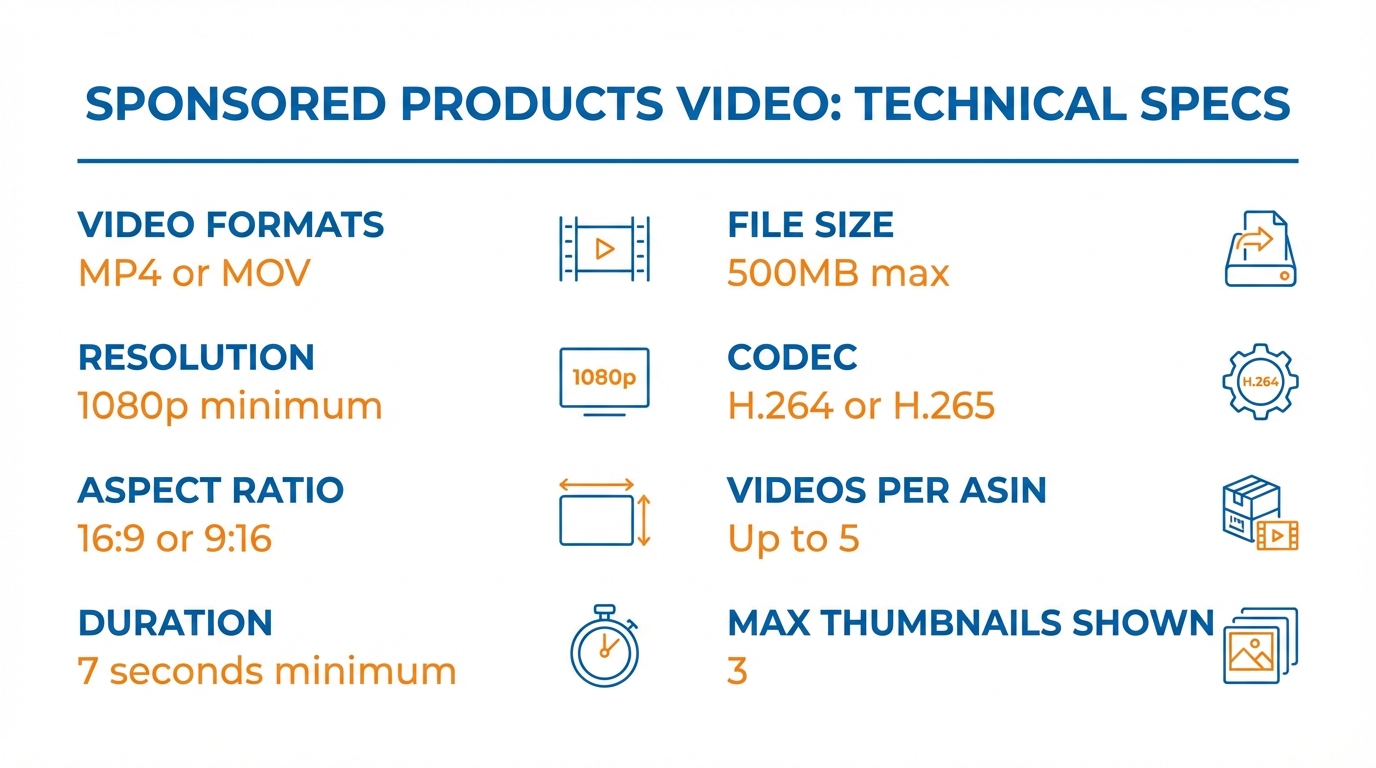
    • File format: MP4 or MOV
    • Codec: H.264 (primary recommendation); H.265 also accepted
    • Resolution: Minimum 1280×720px; recommended 1920×1080px; 4K (3840×2160px) accepted
    • Aspect ratio: 16:9 horizontal (standard); 9:16 vertical now available in 2026 for mobile-first placements
    • Frame rate: Minimum 15 fps; recommended 23–30 fps
    • File size: Maximum 500MB
    • Duration: Minimum 7 seconds; no hard maximum — recommended sweet spot is 15–30 seconds
    • Audio: Not required; videos autoplay muted — your creative must work in silent mode
    • Bitrate: Approximately 2 Mbps recommended

    Creative Policy Requirements

    Amazon’s content guidelines for SPV are more exacting than for static images. Common rejection reasons include:

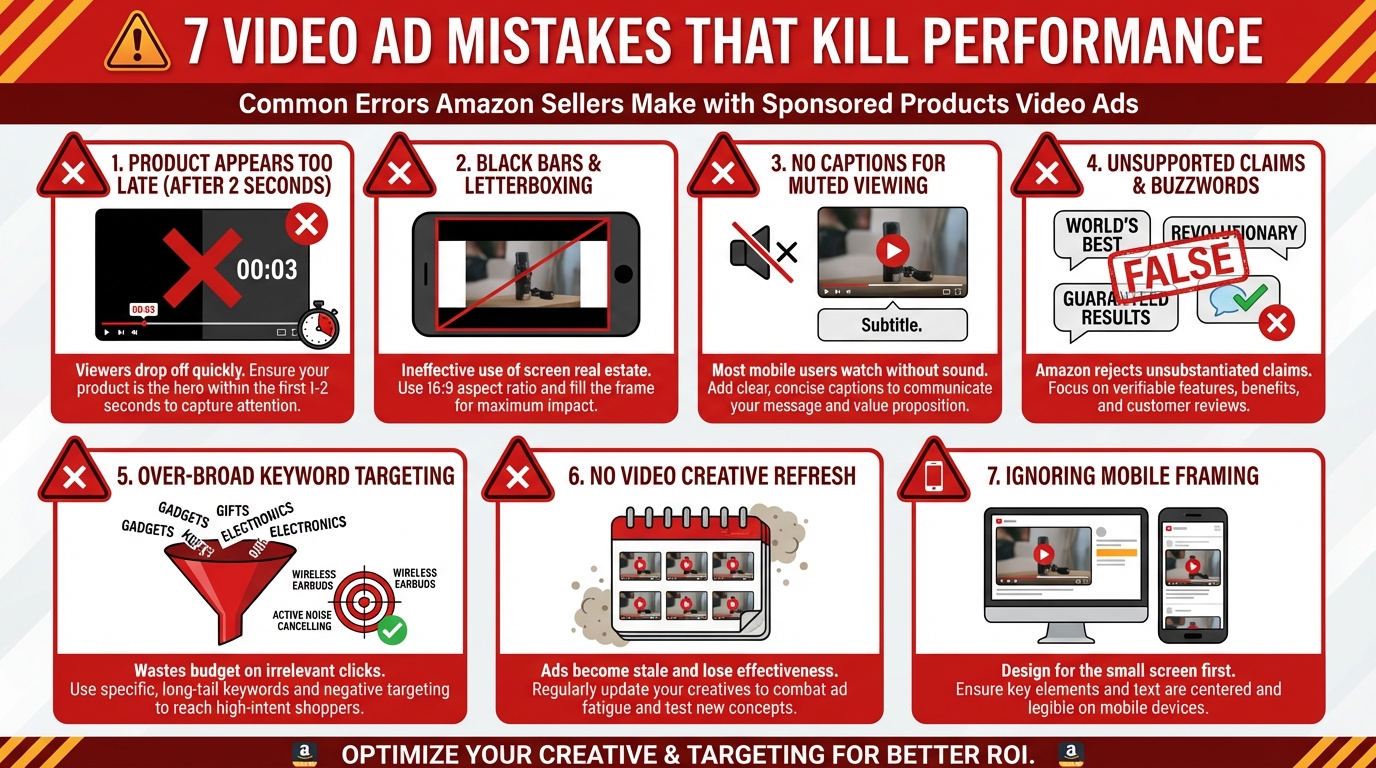
    • Black bars (letterboxing/pillarboxing): Videos must fill the frame completely. Any black bars are an automatic rejection.
    • Unsubstantiated claims: Health claims (“cures,” “proven to”), performance superlatives (“best,” “#1”), or comparative claims without clear evidence will be flagged.
    • External logos or competitor branding: Any identifiable competitor branding in frame violates policy.
    • Low production quality: Excessively shaky footage, poor lighting, or obviously degraded resolution can result in rejection even if specs are met.
    • Ending on a static frame: Videos that freeze on a still image at the end are typically rejected — your final frame should still be in motion or loop back to the beginning.

    The Multi-Video Feature: 5 Assets Per ASIN

    The most significant technical addition in 2026 is the ability to upload up to 5 short feature videos per ASIN. Amazon displays up to 3 thumbnail previews beneath the main video slot, allowing shoppers to tap between clips without leaving the search results page. Each video can focus on a different product feature, use case, or customer segment.

    This changes the creative strategy substantially. Rather than trying to cram every product benefit into a single 30-second video, you can build a library of targeted short clips — one addressing portability, one demonstrating durability, one showing the setup process, one featuring real-world use. Amazon’s algorithm selects which thumbnail appears based on relevance signals tied to the search query. A search for “waterproof” might surface your durability clip; “easy assembly” might surface your setup video.

    Vertical Video for Mobile (9:16)

    Amazon’s 2026 rollout of 9:16 vertical format for SPV deserves attention from any seller whose analytics show high mobile traffic (which is most sellers — mobile accounts for over 60% of Amazon browse traffic). Vertical video fills the phone screen natively, eliminating the visual “shrink” effect of horizontal video on a mobile display. Early data suggests 2–3x higher CTR for vertical format vs. horizontal on mobile placements. If your production workflow can accommodate it, shoot vertical-first and crop for 16:9 as a secondary deliverable.

    Creative Psychology: Building a Video That Earns the 5-Second Watch

    Anatomy of a perfect Amazon Sponsored Products video ad — 5-frame storyboard from hook to CTA

    The 70% drop-off rate in the first 3 seconds is the single most important data point in this entire guide. It means most of the people who see your video ad don’t watch it long enough to receive the message. And the 8x conversion lift for viewers who reach 5 seconds tells you exactly what’s at stake in those first few seconds. This is a creative execution problem disguised as a data problem.

    Frame One: Product Must Be Visible Immediately

    Amazon’s own guidelines specify that the product should appear within the first 1–2 seconds. This isn’t a suggestion — it’s a direct performance driver. Videos that open with a branded intro card, a scenic establishing shot, or an abstract visual teaser perform measurably worse than videos that lead with the product itself. Remember: the shopper is already on Amazon with purchase intent. They don’t need brand awareness; they need product confidence. Give them the product immediately.

    The best-performing first frames show the product in motion — being held, being used, being operated — not just sitting on a table. Motion is what makes the viewer stop scrolling in the first place.

    The Hook Mechanics: Four Approaches That Work

    Beyond leading with the product, your first 3 seconds need an additional “hook” layer that creates a reason to keep watching. Four hook types have demonstrated consistent performance:

    1. The Problem Statement: Show the problem your product solves visually, before you show the solution. A foot pain product that opens with someone wincing while walking is more arresting than a product sitting in a box. The viewer thinks, “I know that feeling.” That emotional match earns the continued watch.
    2. The Transformation Hook: A rapid before/after visual cut (dirty sink → spotless sink; tangled cord → organized desk) creates curiosity about the mechanism. The viewer watches to understand how the transformation happens.
    3. The “How Does That Work?” Hook: Show the mechanism of your product operating in a way that’s slightly surprising or satisfying. Satisfying mechanical motions, precise fits, or unexpected product behaviors exploit the brain’s natural attention to novelty.
    4. The Question Overlay: A text overlay posing a direct question (“Tired of your blender leaking?”) combined with matching visuals creates cognitive engagement — the viewer’s brain automatically seeks the answer by continuing to watch.

    The Silent Video Rule

    Because SPV autoplays muted, sound is effectively optional. Text overlays are not optional. Every key message in your video — the problem, the benefit, the product name, the primary feature — should be communicated through text on screen, not through narration or product voiceover. Assume every viewer is watching in a quiet library or on a bus with no earphones. If your video requires audio to make sense, you’ve lost the sale before the 5-second mark.

    Text overlays should be brief (3–5 words maximum per frame), high-contrast against the background, and timed to appear as the relevant visual element enters frame. Don’t front-load all your text in the first 2 seconds — distribute it across the video timeline to give viewers a reason to keep watching.

    Creative Frameworks That Consistently Underperform

    The data also tells us what doesn’t work. Several creative approaches that perform well on YouTube or social media translate poorly to SPV’s context:

    • Talking-head testimonials as the lead: A person speaking to camera (even without audio) reads as a social ad, not a product search result. Shoppers are in “product evaluation” mode, not “content consumption” mode. Open with product, transition to testimonial if needed later.
    • Brand story openers: Your brand’s founding story is interesting to existing customers. To a first-time searcher on Amazon, it’s dead time in a format where dead time costs conversions.
    • Lifestyle-first content: Beautiful cinematography of people in aspirational settings, with the product appearing at the 8-second mark, loses most viewers before they ever see the product. Amazon’s internal data shows product demos outperform lifestyle content 3-to-1 on SPV placements.
    • Long list videos: Videos that cycle through 10+ product features without narrative structure result in viewers absorbing none of them. Focus each video on one or two features maximum.

    Leveraging the 5-Video System Strategically

    The multi-video asset capability isn’t just a technical convenience — it’s a segmentation tool. Different shoppers search with different intents, and your 5 videos can each speak to a distinct buying motivation:

    • Video 1 (Primary): The “conversion” video — product in action, primary benefit, direct and fast
    • Video 2: Feature deep-dive — demonstrates the most asked-about feature in detail
    • Video 3: Use-case scenario — shows the product in the specific context your best customers use it
    • Video 4: Social proof / review highlight — real customer moments, unboxing, or before/after results
    • Video 5: Differentiation — a direct, factual comparison showing what makes your product different from alternatives (without naming competitors)

    Amazon’s algorithm will surface the most relevant thumbnail based on search query signals. A shopper searching a more specific long-tail phrase is more likely to see a feature-specific video than a shopper doing a broad category search.

    Campaign Architecture: Where Video Fits in Your Targeting Framework

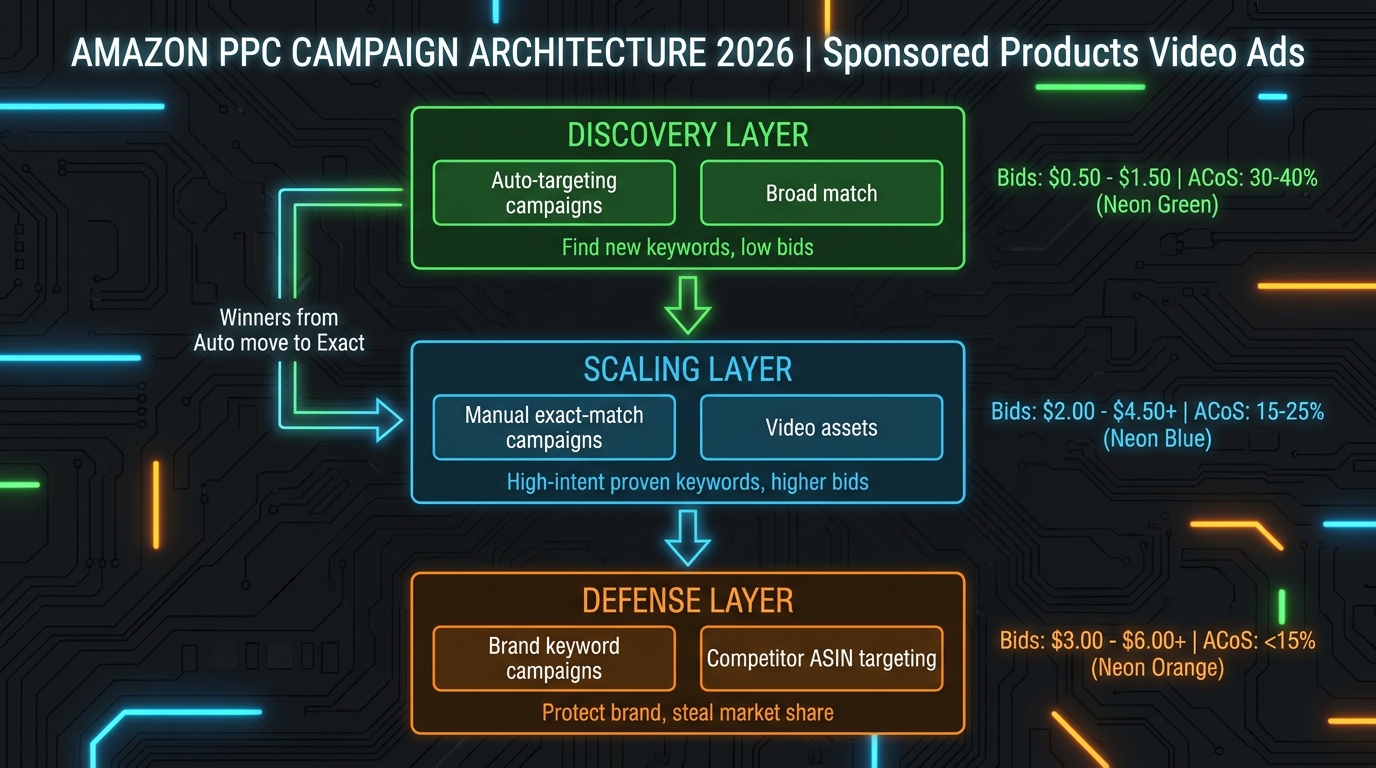
    Amazon Sponsored Products Video Ads 2026 campaign architecture — discovery, scaling, and defense layers

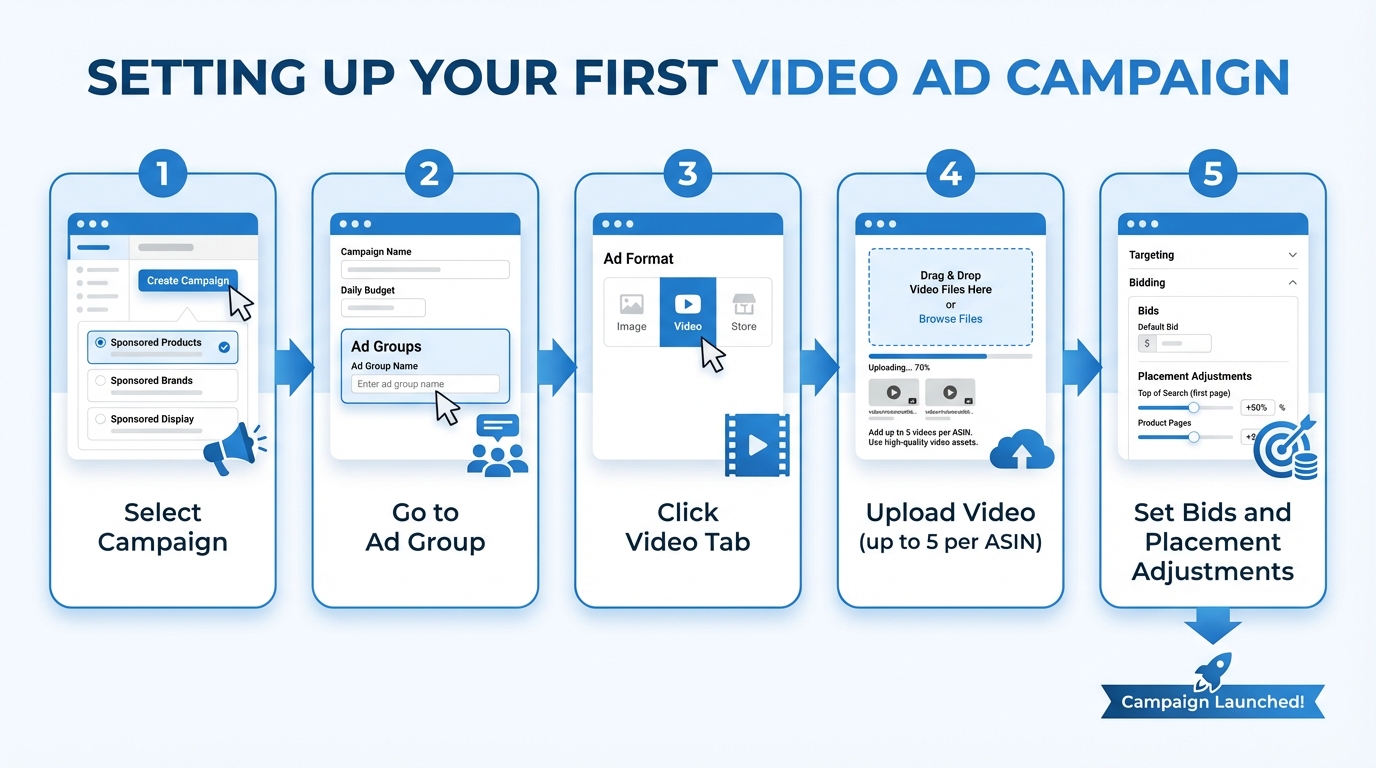
    One of the most practical advantages of SPV is that you don’t need to create a separate campaign type. Video assets are added directly to existing Sponsored Products campaigns within Amazon Ads console. This means your existing campaign structure, keyword lists, and bid logic can stay intact — SPV is an enhancement layer, not a parallel system. That said, the way you deploy video across your campaign tiers matters significantly.

    The Three-Layer Campaign Architecture

    A well-structured Sponsored Products account in 2026 typically operates across three functional tiers, and video should be deployed differently in each:

    Layer 1 — Discovery (Auto Campaigns): Automatic targeting campaigns are your keyword mining tool. Amazon’s algorithm matches your product against relevant searches, and you harvest converting search terms to promote to manual campaigns. SPV should be active here, but your video brief for discovery campaigns should be your most “universal” asset — the primary conversion video that appeals to the broadest interpretation of your product. Don’t over-invest video production effort on discovery campaigns; save the feature-specific videos for where you have keyword control.

    Layer 2 — Scaling (Manual Exact Match): Your proven high-intent keywords live here. These are terms you know convert, you’ve confirmed they match buyer intent, and you’re willing to bid aggressively to win them. This is where SPV earns its keep. Allocate your best-performing video here — the one with the highest 5-second engagement rate from your discovery data. Apply video-specific placement adjustments to prioritize video delivery over static ads for these keywords.

    Layer 3 — Defense (Brand + Competitor ASIN Targeting): Branded keyword campaigns protect your existing customer base; competitor ASIN targeting lets you appear on rival product detail pages. For brand defense, your video doesn’t need to sell hard — it needs to reinforce recognition and quality for shoppers who already know you. For competitor ASIN targeting, a differentiation-focused video (Video 5 in the 5-video system above) is highly effective here.

    Keyword Strategy for SPV Campaigns

    Video doesn’t change the fundamental logic of keyword selection, but it does change the ROI calculus for certain keyword types:

    • Informational long-tail keywords (“how to store food without plastic,” “best insulated water bottle for hiking”) benefit disproportionately from video because the query implies a shopper early in the consideration phase. A video that directly addresses the query’s implicit question converts better than a static image that doesn’t “answer” anything.
    • Category head terms (“water bottle,” “kitchen knife”) are extremely competitive. Adding video to your bids on these terms increases your effective quality score and may improve placement without requiring a proportional bid increase.
    • Branded competitor terms require a different video — one that leads with your product’s clear differentiator from the competition without violating Amazon’s comparative advertising policy.

    One important structural note: negative keyword hygiene becomes more critical with SPV. Because video serves as a quality signal to the algorithm, impressions on irrelevant searches can dilute your engagement rate data. A shopper who searches an irrelevant term and scrolls past your video without engaging is a data point that tells Amazon your video doesn’t resonate — even if the mismatch is purely about keyword relevance, not creative quality. Add aggressive negatives early.

    Bid Strategy and Placement Modifiers: Getting Video in Front of the Right Shoppers

    Amazon’s bidding system for Sponsored Products gives you three core strategies: dynamic bids (up and down), dynamic bids (down only), and fixed bids. With SPV, the choice of bid strategy interacts with placement modifiers in important ways.

    Dynamic vs. Fixed Bids for Video Campaigns

    Dynamic bids (up and down) allow Amazon to raise your bid by up to 100% when it predicts a high conversion probability, and lower it when probability is low. For SPV campaigns, this is generally the recommended starting point for new campaigns, because the video engagement signal is new data that Amazon is still learning. Letting the algorithm adjust gives it room to find the conversion patterns unique to your video creative.

    Dynamic bids (down only) are useful once a campaign has 30+ days of video engagement data and you’ve identified the specific keywords and placements that convert. This protects your ACoS ceiling while still allowing Amazon to reduce spend when intent signals are weak.

    Fixed bids give maximum control for exact-match campaigns on proven keywords. They’re most appropriate in Layer 2 campaigns where you have specific ranking goals and don’t want Amazon adjusting bids based on conversion probability scores that may not fully account for your video’s engagement contribution.

    Video Placement Bid Adjustments

    Amazon introduced video-specific bid adjustments for Sponsored Products in 2026, allowing sellers to apply a percentage increase specifically when video is eligible to serve (versus the fallback static image). This is a critical lever most sellers haven’t yet discovered. If you upload a video and your campaign has a +0% video placement modifier, Amazon will serve the video or the static image based purely on which it predicts will perform better. By increasing the video bid modifier to +20–40%, you tell the system to prioritize video delivery — meaning you’re paying slightly more per click, but you’re getting the higher-engagement format consistently.

    Set the video placement modifier aggressively (40–60%) during the first 30 days to accelerate data collection. Once you have enough video engagement data to see clear performance patterns, reduce the modifier to a level that maintains video priority without over-bidding relative to your ACoS targets.

    Top-of-Search vs. Rest-of-Search Placement

    Sponsored Products can appear at the top of search results or within the mid-page grid. The conventional wisdom is that top-of-search placement costs more but converts better. With SPV, this dynamic shifts slightly: mid-page video placement captures shoppers who are still scrolling and comparing — a more consideration-phase moment — while top-of-search video captures early-session intent. Test both with separate placement modifier settings and evaluate ACoS independently. Don’t assume the performance hierarchy of static ads applies equally to video.

    ACoS Control: Where Sellers Bleed Budget on SPV Campaigns

    The most common failure mode for newly launched SPV campaigns isn’t creative quality — it’s budget management during the data collection phase. Video campaigns have a higher implicit cost structure than static campaigns, because the algorithm is learning new signals (video engagement metrics) that don’t exist for static ads. Here’s where the money leaks.

    The First-30-Days Tax

    In the initial month of a SPV campaign, expect ACoS to run 10–15 percentage points higher than your static campaign benchmarks for the same keywords. This is not evidence that video isn’t working — it’s the cost of signal acquisition. The algorithm is learning which queries, placements, and audience behaviors correlate with video engagement that converts. Cutting spend or pausing campaigns in the first 30 days destroys the data-gathering process and resets the learning curve.

    Set a conservative weekly budget cap for the first month (roughly 20–30% higher than your equivalent static campaign spend) and commit to not adjusting bids downward for at least 3 weeks. Track video engagement rate in your campaign reports alongside the standard CTR and CVR metrics.

    Keyword Concentration Risk

    A common mistake is launching SPV campaigns with the same broad keyword list you use for static campaigns. Video has higher CPCs in competitive categories because you’re competing against other sellers who are also now bidding with video-quality multipliers. Running 200 keywords in a single SPV campaign dilutes your budget across too many low-volume terms and prevents any single keyword from accumulating enough data to optimize.

    Start SPV with a focused list of 20–40 high-intent, proven-converting keywords. Once you’ve established performance baselines, expand. This is the opposite of the “spray and pray” approach that works well for static campaigns but burns video budgets.

    The Engagement Rate Metric You Need to Track

    Standard Amazon campaign reports don’t show video engagement metrics (watch time, 5-second rate) by default. You need to access these through the Amazon Ads console’s video-specific report section. Pull these reports weekly during the campaign’s first 90 days. The engagement rate at the 3-second and 5-second marks tells you whether your creative is working. If you have strong CTR but low 5-second engagement, your hook is getting the click but the video isn’t building purchase intent — meaning you’re paying for low-quality traffic. Fix the creative before scaling spend.

    Negative ASIN Targeting for Video Campaigns

    When running SPV with ASIN product targeting (appearing on competitor product pages), you’re visible to shoppers who are explicitly considering an alternative. The conversion intent is real, but the ACoS can be punishing if you’re targeting hundreds of competitor ASINs blindly. Prioritize competitor ASINs with similar price points (within 20% of yours) and similar review counts. Products significantly cheaper or more established than yours will drain spend with low conversion rates regardless of how good your video is.

    Sponsored Products Video vs. Sponsored Brands Video: A Strategic Comparison

    Sponsored Products Video vs Sponsored Brands Video — strategic comparison and when to use each format

    If you’re brand-registered and running both SPV and Sponsored Brands Video (SBV), the question of how to allocate creative effort and budget between them is real and consequential. They’re not interchangeable — they’re genuinely different tools for different jobs.

    Where They Compete for Budget

    Both SPV and SBV serve video in search results. For brand-registered sellers with limited production budgets, the temptation is to use the same video asset for both. Resist this. The creative requirements for each placement are meaningfully different, and a video optimized for one will underperform in the other.

    SBV sits at the top of search, where shoppers see it before any products. The shopping mindset at that moment is “I’m about to start evaluating options.” The appropriate video for this moment has more time to set context, introduce the brand, and show the product range. SBV can be 30–45 seconds and use a slightly more cinematic opening.

    SPV appears in the mid-grid, where shoppers are already in evaluation mode — they’ve been scanning products and comparing. The appropriate video here is faster, more direct, and more focused on differentiating your specific ASIN from the others in view. SPV should rarely exceed 20–25 seconds and needs to lead with the product benefit, not brand story.

    Budget Allocation Between SPV and SBV

    A practical starting framework for brand-registered sellers running both:

    • Allocate 60–70% of video ad budget to SPV for established products with strong organic rankings and proven keyword sets. SPV operates at lower-funnel, higher-intent moments and generally delivers better direct ROAS on mature products.
    • Allocate 30–40% to SBV for new product launches, seasonal campaigns, or brand-building around category keywords where you want top-of-search presence before shoppers form strong alternatives preferences.

    This ratio flips for newer brands entering competitive categories: more SBV early to establish category awareness, transitioning to SPV-heavy allocation as the brand builds organic presence.

    Creative Repurposing: What Works and What Doesn’t

    If you must use one video for both formats, SPV requirements should drive the creative brief. A well-crafted SPV video (product-forward, fast hook, text overlays for silent viewing) will adapt to SBV with minor edits. The reverse is less true — an SBV video built around brand storytelling will lose viewers in SPV’s context before delivering its payload.

    Measuring What Actually Matters: The Right Metrics for SPV

    Amazon gives you a lot of data. Not all of it is equally useful for evaluating SPV performance. Here’s a disciplined approach to measurement that focuses on actionable signals rather than vanity numbers.

    The Metrics That Drive Creative Decisions

    5-Second Engagement Rate: The percentage of shoppers who watch at least 5 seconds of your video. This is the single most predictive metric for downstream purchase intent. Below 30% engagement rate: your hook is failing. Above 50%: your hook is strong, focus on the post-hook content. Pull this from the video campaign report section of Amazon Ads.

    Video Completion Rate (VCR): For 15–30 second videos, a completion rate above 25% indicates strong creative resonance. Below 15% suggests pacing problems in the video’s middle section. Map your pacing edits to the drop-off timeline data that Amazon provides in video reports.

    CTR relative to static baseline: Don’t evaluate your SPV CTR in isolation — compare it to your static campaign CTR for the same keywords. If SPV CTR is not at least 15% higher than static for the same keywords, either the creative needs work or the keywords are a poor match for the video’s messaging.

    The Metrics That Drive Campaign Decisions

    ACoS by keyword with video data overlay: Keywords where video engagement is high but ACoS is still elevated often indicate a listing problem — shoppers are engaging with the ad but finding something on the product detail page that kills the purchase. This diagnosis is impossible without looking at the keyword-level engagement data alongside CVR. It’s one of SPV’s most valuable hidden benefits: it forces you to see exactly where in the funnel the purchase breaks down.

    New-to-Brand rate: Amazon Ads provides New-to-Brand (NTB) data for Sponsored Products campaigns. SPV’s search-grid placement makes it more effective at reaching net-new customers than repeat-purchase retargeting. Track your NTB rate for SPV campaigns separately — a high NTB rate at acceptable ACoS means SPV is genuinely expanding your customer base, not just recycling existing demand.

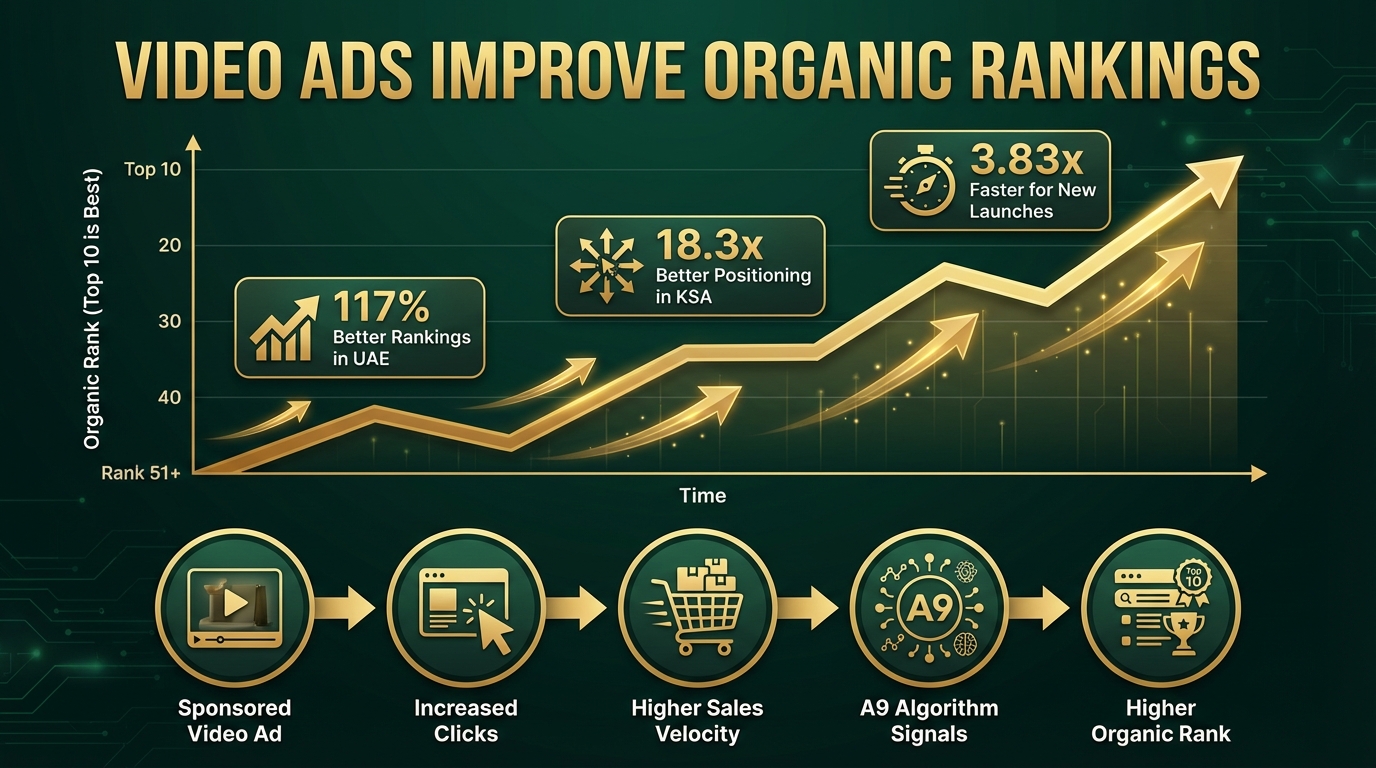
    Organic rank correlation: Sales velocity generated by SPV contributes to organic ranking signals. After 60 days of running SPV on specific keywords, pull your organic rank position for those keywords and compare to a pre-campaign baseline. This is the “bonus ROI” of video campaigns — the paid ad is building the organic equity that eventually reduces your need for paid spend on that keyword.

    Weekly Review Cadence

    SPV campaigns require a weekly review structure during the first 90 days. The standard bi-weekly or monthly review cadence used for mature static campaigns is too slow for a format where creative performance is the primary variable. Structure your weekly review around three questions:

    1. Is the 5-second engagement rate above 30%? If not, what’s the hypothesis for why it’s failing?
    2. Are any keywords generating clicks with zero or near-zero engagement on the video? (This suggests a keyword-creative mismatch and is a candidate for negative listing.)
    3. Is ACoS trending down from the baseline established in week 1? If not, where in the funnel is the leak?

    Who Should Launch SPV Now — and Who Should Wait

    Not every seller is equally positioned to benefit from SPV at launch. There’s a meaningful difference between sellers for whom SPV is an immediate priority and sellers who need prerequisites in place first.

    Launch Now If:

    • You already have video assets created for other platforms (YouTube ads, social media) that can be adapted to SPV specs
    • Your product has a clear visual benefit story — it does something that’s more compelling when shown than described
    • You’re in a category with high scroll-and-compare behavior (kitchen, fitness, beauty, outdoor, pet)
    • Your main static image is strong and your listings are already optimized — SPV amplifies a good listing; it can’t rescue a weak one
    • You have budget tolerance for a 30–60 day learning period before expecting optimized ACoS

    Build Prerequisites First If:

    • You have no video production capability and no budget for even basic smartphone-quality content
    • Your product detail page has under 4.0 stars or fewer than 25 reviews — video will drive traffic to a page that doesn’t convert
    • Your static Sponsored Products campaigns have never achieved ACoS below 40% — the fundamental conversion problem is in the listing or pricing, not the ad format
    • You’re in a category where purchase decisions are almost entirely price-driven (commodity goods) — video adds cost without a clear differentiation benefit

    The Production Minimum Viable Bar

    A question sellers frequently ask: does SPV require professional videography? The honest answer is that it requires intentional videography, which is different from expensive videography. A 20-second video shot on a modern smartphone in good lighting, with proper stabilization (a tripod costs under $30), a clean background, and well-designed text overlays will outperform a professionally shot video that doesn’t follow the hook-product-benefit-proof structure. The creative strategy matters more than the production budget at most price points. Categories above $150 may benefit from elevated production quality, but for the majority of Amazon product categories, execution of the creative brief is the differentiator.

    What Comes Next: The SPV Feature Roadmap

    Amazon rarely announces its ad product roadmap publicly, but based on current beta testing signals and the trajectory of the feature rollout, several developments are likely to arrive or fully roll out before the end of 2026:

    Interactive Video Elements

    Amazon has been testing “pause ads” on Prime Video — non-intrusive overlay ads that appear when a viewer pauses content, with a direct “Add to Cart” button. Similar interactive elements are being piloted for SPV, including in-video cart add overlays that allow shoppers to add a product to cart without clicking through to the product detail page. Early internal data suggests a 3.5x brand favorability lift for these formats. When this feature reaches general availability, it fundamentally changes SPV’s purchase funnel by eliminating the click barrier entirely.

    AI-Assisted Video Creation

    Amazon’s AI creative tools, already deployed for image optimization, are being extended to video. Within the Amazon Ads console, sellers will reportedly be able to generate short video clips from existing product images and A+ content — effectively creating an SPV-ready video without a production budget. This is already in limited beta and is expected to reach broader availability by late 2026. For sellers with no current video assets, this will reduce the barrier to entry significantly.

    Vertical Video Full Rollout

    The 9:16 vertical format for SPV is currently available in select placements. By Q4 2026, Amazon is expected to complete its rollout across all mobile SPV placements. Sellers who prepare vertical video assets now — even simple ones — will have a meaningful advantage as vertical becomes the dominant mobile format.

    SPV Integration with Amazon DSP

    Amazon is also reportedly testing cross-channel continuity between SPV and its Demand-Side Platform (DSP). This would allow a shopper who engaged with a SPV ad (but didn’t convert) to be retargeted with related video content through DSP placements off Amazon. This kind of cross-channel video attribution would make SPV’s upper-funnel contribution measurable in ways that current reporting doesn’t support.

    Your 60-Day Launch Checklist for Sponsored Products Video Ads

    Translating research into action requires a concrete sequence. Here’s a practical 60-day roadmap for launching your first SPV campaign with the highest probability of a positive ROI outcome:

    Days 1–7: Production and Asset Preparation

    • Identify your top 3–5 ASINs by organic conversion rate — launch SPV on proven products first
    • Map the creative brief for Video 1 (primary conversion video) — define the hook type, key benefit to demonstrate, and text overlay copy
    • Shoot and edit Video 1 to spec: 1920×1080px, 16:9, 15–25 seconds, silent-mode functional, product visible by second 1
    • If mobile traffic is above 60%, also produce a 9:16 vertical version
    • Submit for Amazon review (allow 3–5 business days for approval)

    Days 8–14: Campaign Setup

    • Add the approved video to your top-performing existing Sponsored Products campaigns (Layer 2: proven exact-match keywords)
    • Set video placement bid modifier to +40% for the first 30 days
    • Choose “dynamic bids up and down” for new SPV campaigns
    • Pull your static campaign’s 90-day search term report and pre-populate 150+ negative keywords before launch
    • Set weekly budget cap at 125% of your equivalent static campaign spend

    Days 15–30: Data Collection (Do Not Optimize Yet)

    • Check video engagement reports weekly but resist making bid changes for the first 21 days
    • Note search terms generating clicks but zero video engagement — add these to a negative review list
    • Track ACoS baseline — expect it to be elevated; document rather than react

    Days 31–45: First Optimization Pass

    • Pull the full 30-day video engagement report. Identify keywords where 5-second engagement rate is below 20% — pause or negate these terms
    • Reduce video placement modifier to +20% for campaigns showing ACoS above target
    • Begin production of Video 2 (feature deep-dive) based on which product features have the highest search query volume in your term report
    • For auto campaigns, promote 3–5 converting search terms to a new exact-match campaign with SPV active

    Days 46–60: Scale and Diversify

    • Upload Video 2 and activate in the same campaigns as Video 1
    • Enable competitor ASIN targeting with a focused list of 10–20 directly competitive products
    • Set ACoS targets for 90 days: aim for within 5 percentage points of your static campaign benchmark
    • Begin planning Video 3 (use-case scenario) based on 60 days of search query data showing customer intent patterns

    The Bigger Picture: SPV as a Competitive Moat

    Step back from the tactical detail and consider the structural dynamic at play. Amazon’s search results page is undergoing a format shift — from a static grid to a hybrid feed with motion content. This shift is happening now, while the majority of sellers are still operating with all-static creative strategies. The adoption gap is real, and it’s temporary.

    In 12–18 months, Sponsored Products Video will be table stakes — something every category leader uses, and something that no longer confers first-mover advantage. The window where video gives you a measurable edge over non-video competitors (the 23% CTR lift, the lower effective CPC from quality score improvement, the 8x conversion lift for engaged viewers) is widest right now, while adoption is still below majority.

    This isn’t about chasing a shiny new feature. It’s about recognizing that the format of Amazon advertising is changing at the structural level, and aligning your creative and campaign strategy with where the platform is actually going — before your competitors do.

    The sellers who build a library of well-structured SPV assets now, who learn the creative frameworks that earn the 5-second watch, and who wire their campaign architecture to extract the maximum signal from video engagement data, will have a compounding advantage. The data they collect today will inform better creative tomorrow. The organic rank gains from video-driven sales velocity will reduce their paid spend requirements over time. And the creative production muscle they build now will be immediately applicable to every new video format Amazon introduces afterward.

    The Amazon SERP is becoming a feed. Every seller who treats it like a catalog is slowly disappearing. The question isn’t whether to use Sponsored Products Video Ads — it’s whether you move now or wait until the advantage is gone.

    Start with one product. Build one video. Launch one campaign. Collect 30 days of data. Then decide how aggressively to scale. The first video you produce will not be your best video — but it will generate data that makes every subsequent video better. That’s the compound return that early movers in this format are already building, and late movers will eventually have to catch up to.

  • Amazon Sponsored Product Video Ads: The Seller’s Complete Playbook for 2026

    Amazon Sponsored Product Video Ads: The Seller’s Complete Playbook for 2026

    Amazon Sponsored Products Video Ads live in 2026 with 23% higher CTR and 18% better conversions shown on smartphone screen

    Something shifted quietly in Q1 2026, and most sellers are still catching up. Amazon rolled out Sponsored Products Video Ads — a feature that lets any seller with an active Professional account embed short feature videos directly inside their existing Sponsored Products campaigns. Not Sponsored Brands. Not Streaming TV. Sponsored Products — the ad type that lives at the very top of search results and drives the majority of Amazon ad revenue for most sellers.

    For context: Sponsored Brands Video has existed for years, but it requires Brand Registry enrollment and carries a different cost structure. The new Sponsored Products Video format is open to virtually everyone and sits inside campaigns sellers are already running. That changes the calculation considerably.

    Early performance data from Amazon’s own internal testing shows a 23% increase in click-through rates and an 18% improvement in conversion rates compared to static image ads running in the same placements. The average CTR for video ads clocks in at 0.89% — roughly 2.6 times higher than static alternatives. Those numbers alone would justify paying attention. But the real story is more nuanced than a headline stat.

    This guide breaks down everything you need: what the format actually is (and how it’s different from every other Amazon video ad), who can use it, what the technical requirements look like, how to build a creative strategy that earns those conversion lifts, how to set up campaigns and bids correctly, and what the data says about long-term organic ranking effects. Whether you’re launching a new product or pushing an established ASIN harder, this is the playbook.

    What Sponsored Products Video Ads Actually Are

    Side-by-side comparison: Sponsored Brands Video vs Sponsored Products Video on Amazon — format differences, eligibility, and targeting

    Before going deep on strategy, it’s worth being precise about what this format is — because “Amazon video ads” is a phrase that covers several very different products, and conflating them leads to bad decisions.

    The Core Format Explained

    Sponsored Products Video Ads allow sellers to attach up to five short feature videos directly to a product ASIN within an existing Sponsored Products campaign. When a shopper encounters the ad in search results, they see clickable video thumbnails alongside — or in place of — the standard static product image. Shoppers can tap between up to three displayed thumbnails to browse different product angles or features before clicking through to the detail page. Amazon’s algorithm selects which thumbnails to display based on the shopper’s browsing history and the relevance of each video to their query.

    The placement appears in search results the same way a standard Sponsored Products ad does: at the top of the page, alongside results, or within results depending on bid and quality score. The video doesn’t autoplay at full volume — the experience is deliberately low-friction, with muted autoplay (where applicable) and tap-to-explore navigation. The goal is to let the product demonstrate itself without forcing an interruption.

    How It’s Different from Sponsored Brands Video

    Sellers who already use Sponsored Brands Video may wonder whether this is just a repackaged version of what they already run. It isn’t — the two formats serve different objectives and operate very differently.

    Sponsored Brands Video (SBV) is designed for brand-level storytelling. It appears in a dedicated banner placement at the top of search results, features a brand logo, links out to an Amazon Store or custom landing page, and is built for awareness across multiple products or a product line. Critically, it requires Brand Registry enrollment — meaning you need an active registered trademark through an Amazon-approved IP office. SBV is a mid-to-upper funnel tool, and it excels at introducing shoppers to a brand they haven’t considered yet.

    Sponsored Products Video, by contrast, is a single-ASIN format. It lives inside a product-level campaign and links directly to that product’s detail page. It’s a lower-funnel tool — it targets shoppers who are already searching for something specific, and its job is to push them from search result to purchase faster than a static image would. The two formats are complementary, not competitive.

    Where Ads Actually Appear

    Sponsored Products Video Ads appear across Amazon’s primary surfaces: desktop browser, mobile browser, and the Amazon mobile app. They serve in the same search result placements as standard Sponsored Products — top-of-search, mid-page, and product detail page placements depending on bid and placement multipliers. They also extend to third-party destinations where Amazon serves ads beyond its own properties, though search placement is where the majority of meaningful traffic originates.

    One nuance worth tracking: Amazon’s algorithm doesn’t simply swap out the static image for a video. The system evaluates both formats and selects which creative to serve based on predicted engagement. Sellers can influence this via placement bid adjustments, but Amazon ultimately controls the final presentation. Understanding this matters when you’re analyzing performance data — if you see mixed results early on, it may be that your video is losing the format selection contest to your static image, not that the video itself is underperforming.

    Who Can Use Sponsored Products Video Ads: Eligibility and Access

    One of the most important things to understand about this format is its accessibility. Unlike Sponsored Brands — which gates video advertising behind Brand Registry enrollment and trademark requirements — Sponsored Products Video is open to any seller with an active Professional Seller account in good standing.

    Basic Requirements

    To access the feature, you need three things: an active Professional Selling account (not Individual), the ability to ship products to your target marketplace, and a valid payment method on file. That’s it. No registered trademark. No Brand Registry enrollment. No minimum ad spend history or minimum sales threshold. If you’re running Sponsored Products campaigns today — even as a relatively new seller — you can start adding videos to those campaigns now.

    This is a significant departure from Amazon’s historical approach to premium ad formats. Sponsored Brands, Sponsored Display, and Streaming TV all carry additional eligibility requirements. The decision to open Sponsored Products Video broadly appears deliberate — Amazon benefits from higher overall engagement in search results, and the wider the adoption, the faster that engagement metric improves across the platform.

    Brand Registry vs. No Brand Registry: What Changes

    While Brand Registry isn’t required to use the format, being enrolled does unlock some additional capabilities. Brand Registry sellers can access Amazon’s full suite of creative tools, including A+ Content and Brand Story features that can reinforce the messaging from video ads once shoppers land on the detail page. The cohesion between a video ad that demonstrates a product feature and an A+ Content module that explains the same feature in depth can meaningfully improve post-click conversion.

    Sellers without Brand Registry can still run the format effectively — the key limitation is on the destination, not the ad itself. If your detail page is thin on content, the video ad will drive shoppers to a page that doesn’t close the sale. Getting Brand Registry eventually matters for holistic listing quality, but it’s not a prerequisite for starting with video ads.

    ASIN Eligibility and Availability

    Not every ASIN is automatically video-eligible. Products must be in stock, buybox-eligible, and not in a restricted category. Amazon’s content moderation policies apply to video ads just as they do to listing images and A+ Content — any video that includes customer reviews, star ratings, competitor references, pricing claims, or unsubstantiated superlatives will be rejected during the review process. Products in sensitive categories (health claims, certain supplements, adult products) may face additional scrutiny during video review.

    Rollout has been phased, so if you’re not seeing the video upload option in your Ads Console today, check back — access has been expanding across seller tiers and categories throughout 2026.

    The Performance Data: Numbers Every Seller Should Understand

    Amazon Sponsored Products Video Ads 2026 performance data: 0.89% CTR 2.6x higher than static, 11.2% conversion rate, 23% higher CTR, 18% better conversions infographic

    Numbers from beta testing and early rollout data are genuinely compelling — but they require careful interpretation. Understanding what these stats mean (and what they don’t mean) helps you set realistic expectations and avoid the common trap of treating platform-reported averages as guaranteed outcomes for your specific products.

    The Headline Numbers

    Amazon’s internal data from Q1 2026 rollout testing shows Sponsored Products Video Ads achieving a 23% higher click-through rate and 18% better conversion rate compared to static image ads in equivalent placements. The average CTR for video-format ads sits at 0.89%, against a static ad benchmark of roughly 0.34% — that’s the source of the 2.6x CTR figure that’s been widely cited. Conversion rates for video-enabled campaigns are averaging 11.2%, compared to approximately 9.9% for image-only campaigns — a 13% relative improvement.

    An additional data point: for shoppers who watch five or more seconds of a video, CTR jumps to roughly 8 times the non-video baseline. This matters because it suggests the performance lift isn’t evenly distributed — it’s heavily concentrated among shoppers who are genuinely engaging with the video content, not just glimpsing it as they scroll. Getting those first five seconds right is therefore disproportionately important.

    Context and Caveats

    These numbers come from Amazon’s own reporting, which always deserves some scrutiny. Beta test populations tend to skew toward more engaged shoppers, early-adopter sellers running well-optimized campaigns, and categories where video naturally performs (electronics, fitness equipment, kitchen appliances, beauty). If your product is a commodity item with minimal differentiation — say, a basic phone case or plain tote bag — don’t expect the same lift as a multi-functional kitchen gadget that genuinely benefits from a demonstration.

    Category matters enormously. Amazon’s overall Sponsored Products conversion rate benchmarks for 2026 sit between 9.5% and 10% on average, with strong performers in the 13–15% range and seasonal categories like grocery hitting 30–50% during peak periods. Video ads layer on top of this baseline — they don’t override category-level fundamentals. A low-intent browse category will still underperform a high-intent, problem-solution category regardless of format.

    What the Data Says About Purchase Intent Signals

    One of the more interesting behavioral signals in the data is what happens after a shopper engages with a video thumbnail. Shoppers who interact with multiple thumbnails (i.e., tap through more than one video before clicking to the detail page) show meaningfully higher add-to-cart rates than shoppers who click through after just one thumbnail. This suggests that the interactive multi-video format isn’t just a novelty — it’s actually functioning as a pre-qualifier, helping shoppers self-select into higher-intent visits to the product page.

    For sellers thinking about what videos to create, this behavioral pattern has direct implications. Your video set should cover different aspects of the purchase decision — not the same message repeated five times. One video for out-of-box experience, one for key features in use, one for size/scale context, one for a specific use case — that kind of variety drives the multi-thumbnail engagement that correlates with stronger purchase intent downstream.

    Technical Specifications: What Your Videos Must Look Like

    Amazon Sponsored Products Video Ads technical specifications: MP4 or MOV, 1080p minimum, 16:9 or 9:16 aspect ratio, 7 seconds minimum, 500MB max file size, H.264 codec

    Getting rejected during the video review process wastes time and delays campaigns. Amazon’s content and format requirements are specific — not difficult, but non-negotiable. Understanding the full spec list before you shoot or commission video saves a lot of frustration.

    Format and File Requirements

    Amazon accepts MP4 and MOV file formats only. Videos must be encoded with H.264 or H.265 codec and use progressive scan (not interlaced). Minimum resolution is 1920×1080 pixels — 1080p. File size is capped at 500MB. Frame rates accepted include 23.976, 23.98, 24, 25, 29.97, and 29.98 fps. Bit rate should be consistent — variable bit rate is acceptable as long as the video doesn’t drop below quality thresholds that would cause compression artifacts in the ad display.

    Aspect ratios accepted are 16:9 (horizontal, the traditional format) and 9:16 (vertical, formally added in 2026 to support mobile-first placements). Given that a majority of Amazon searches now happen on mobile devices, the 9:16 vertical option is worth taking seriously — a video shot in landscape doesn’t fill a mobile screen the same way a vertical-optimized clip does, and the difference in perceived quality is noticeable when side by side.

    Duration and Count

    Minimum video duration is 7 seconds. There is no stated maximum, but Amazon’s guidance and seller testing data both point to 15–30 seconds as the sweet spot for engagement. Videos much shorter than 15 seconds can struggle to communicate a meaningful product benefit. Videos longer than 30 seconds see drop-off in engagement and, crucially, risk losing the viewer before the thumbnail interaction window closes.

    You can upload up to five videos per ASIN. Amazon will display a maximum of three thumbnail options at once in search results — which three it shows is determined algorithmically based on shopper behavior history and query relevance. Sellers don’t control thumbnail selection directly, which is another reason to make all five videos distinctly useful rather than padding the count with slight variations of the same clip.

    Content Restrictions (What Gets Your Video Rejected)

    Amazon’s content moderation for Sponsored Products Video is stricter than many sellers expect. Videos are reviewed before they go live, and rejections are common for sellers unfamiliar with the policies. The following will get a video rejected outright:

    • Black, blank, or static frames at the beginning or end of the video. The product must be visible in the first one to two seconds.
    • Letterboxing or black bars on any edge — use the full frame.
    • Customer reviews, star ratings, or any testimonial language, whether shown on screen or spoken in narration.
    • Pricing claims, promotional language, or urgency copy (“limited time,” “best deal,” “huge savings” are all prohibited).
    • Competitor brand names or comparison claims that reference specific other brands.
    • Unsubstantiated superlatives — “#1 bestseller,” “world’s best,” and similar claims require verified data to appear anywhere in the ad.
    • External URLs, QR codes, or off-Amazon destinations.
    • Logos at the very start of the video — an exception exists for globally recognized brands, but for most sellers, leading with a logo rather than the product is a rejection trigger.

    On the audio side: Amazon automatically removes audio from Sponsored Products Video Ads. Videos play silently in the search results context. This is not a bug — it’s the designed behavior. Any strategy that depends on spoken narration or sound design to communicate key information is fundamentally flawed for this format. All messaging must work visually, with on-screen text overlay as your primary copy vehicle.

    Creative Strategy: What Actually Drives Conversions

    The technical specs tell you what Amazon will accept. Creative strategy is about what will actually make shoppers stop, engage, and click. These are different problems, and solving only the technical one gets you a compliant video that doesn’t perform. Here’s how to think about the creative side of this format.

    The First Two Seconds Are the Only Seconds That Matter (Initially)

    The performance data is unambiguous: shopper engagement with video ads spikes dramatically for viewers who make it past five seconds, but the decision to keep watching happens in the first two. This means your opening frame has one job — showing the product clearly and in a context that creates immediate recognition of relevance.

    Abstract intros, logo cards, color fades, and atmospheric B-roll are creative instincts borrowed from traditional TV advertising. They don’t work here. A shopper scanning Amazon search results has a specific intent in mind. The video that earns their five-second threshold is the one that immediately signals “this is the product you’re looking for, and here’s why.” A blender should be blending in frame one. A phone case should be on a phone in frame one. A kitchen scale should be showing a measurement in frame one.

    Text Overlays Are Your Copy Layer

    Since audio is stripped, on-screen text does the heavy lifting that voiceover or sound design would do in other video contexts. Every video should include brief, readable text overlays that name key features as they’re being demonstrated visually. The combination of seeing and reading reinforces the message significantly more than either channel alone.

    Keep text minimal and legible at small sizes — remember that three thumbnail-sized videos may appear side-by-side on mobile. A two-word label (“500W Motor,” “Waterproof,” “Dishwasher Safe”) reads at any size. A full sentence doesn’t. Use contrasting colors against your background, and avoid placing text near the edges of the frame where it may be clipped in certain display contexts.

    Build Each Video Around One Specific Decision Driver

    The multi-video format’s power comes from addressability — the ability to speak to different purchase concerns with different clips. The mistake sellers make is treating all five video slots as a chance to repeat their top benefit five times. That’s not how shoppers use the thumbnails.

    A more effective approach maps your five videos to the five most common reasons shoppers either buy or don’t buy your product. If you have access to your listing’s Q&A, customer reviews, and competitor reviews, you can extract these directly from what shoppers write. Common frameworks include: an in-use demonstration video, a size/scale reference video, a durability or material quality video, a setup or assembly video (for products with that concern), and a comparison-to-alternatives video that focuses on your differentiator without naming competitors.

    Lighting, Background, and Production Quality

    Amazon’s own guidelines call for clean visuals and neutral backgrounds — and the rationale is practical, not aesthetic. Cluttered backgrounds compete with the product for visual attention. Inconsistent lighting makes it hard to read product details accurately. A video that looks homemade doesn’t inspire purchase confidence, especially for categories where appearance and quality are part of the product promise.

    Professional production doesn’t require a studio. A clean background (white, light grey, or a contextually appropriate setting), good natural or softbox lighting, and a steady shot are the baseline requirements. For products in the $20–$50 range, smartphone footage shot carefully and edited cleanly is entirely adequate. For products over $100, investing $500–$1,500 in professional product videography typically pays back quickly given the conversion lift data.

    Campaign Setup: Inside the Amazon Ads Console

    Step-by-step guide to setting up Amazon Sponsored Products Video Ad campaign in Ads Console: select campaign, ad group, video tab, upload videos, set bids

    One of the deliberately seller-friendly aspects of the format is that it doesn’t require building a new campaign from scratch. Video content is added to existing Sponsored Products campaigns at the ad group level — the campaign structure, keyword targeting, and budget you’ve already established remain intact. Here’s exactly how the setup works.

    Step 1: Access Your Existing Campaign

    Log into Seller Central and navigate to Campaign Manager. Open the Sponsored Products campaign where the ASIN you want to promote is running. Inside that campaign, select the specific ad group for that product. You’ll see a new “Video” tab alongside the standard creative and targeting options — this is where video content is managed.

    If you don’t see the Video tab, one of a few things may be happening: your account hasn’t yet been rolled into the full access tier, your ASIN is in a restricted category, or the product isn’t currently buybox-eligible. Check each of these before assuming there’s a technical issue.

    Step 2: Upload Your Videos

    Inside the Video tab, click “Add video” and upload your prepared files. Each video goes through an asynchronous review process — Amazon will notify you when videos are approved or rejected. Review typically takes 24–72 hours during normal periods, though backlogs can extend this during peak seasons (Prime Day, Q4). Upload all videos you intend to run before your launch date to account for review time.

    For each video, you’ll be prompted to add a title (internal-use only, not shown to shoppers) and to designate which product feature it highlights. This metadata helps Amazon’s relevance algorithm match the right video to the right search queries. Be specific and accurate here — don’t assign a “durability” video to the “features” category just to fill a slot. The algorithm uses this to make serving decisions.

    Step 3: Configure Placement Bid Adjustments

    Once videos are live, you have access to a video-specific placement bid adjustment that’s separate from the standard top-of-search and product page adjustments. This adjustment can go from 0% to 900% — it tells Amazon’s system how aggressively to favor serving the video format over the static image when the campaign is eligible for both.

    Starting at a moderate adjustment (50–100%) and monitoring how the video format performs versus static in your campaign reports is the prudent approach. Don’t immediately crank this to maximum unless you have strong evidence that video will outperform static for your specific product and category. The 900% cap exists for sellers who have confirmed that video dramatically outperforms static and want to ensure the video wins format selection as often as possible.

    Step 4: Keyword Strategy for Video Campaigns

    Your existing keyword targeting carries over — but it’s worth reviewing whether your keyword mix is appropriate for a video-forward campaign. Demonstration-friendly keywords (queries that suggest a shopper is evaluating options based on features, use cases, or comparisons) benefit most from video. Transactional keywords where the shopper has already decided what they want and is just confirming availability may show less differentiation between video and static performance.

    Consider creating a video-specific ad group or campaign with a tighter keyword set focused on consideration-stage queries. This lets you isolate video performance data from your broader keyword traffic, making it easier to optimize both independently. Over time, you’ll identify which keyword categories respond most strongly to video creative — and that learning has value beyond the campaign itself.

    Bidding and Budget: Setting CPC Without Burning Your Margin

    Video ads don’t inherently cost more per click than static ads — you’re still bidding on the same keywords in a CPC auction. But there are dynamics specific to video placement that affect how bids should be set, and mistakes here can burn budget quickly.

    The CPC Landscape in 2026

    The overall average Amazon CPC in 2026 sits at approximately $1.18, with February 2026 recording the peak at $1.21. This varies significantly by category: Sponsored Products CPCs range from $0.50 in low-competition categories to $8.00+ in ultra-competitive niches like supplements or electronics. The key thing to understand about video ads is that they can actually lower effective CPC over time through higher CTR — a video ad with a 0.89% CTR is more efficient per dollar of ad spend than a static ad with a 0.34% CTR targeting the same keywords, even at the same nominal bid, because Amazon’s auction rewards relevance and predicted CTR.

    Sponsored Brands Video has historically achieved CPCs 15–30% lower than standard Sponsored Brands for this exact reason. The same dynamic is beginning to emerge in Sponsored Products Video data, though it will take several months of broader rollout before stable category-level benchmarks emerge.

    Starting Bid Strategy

    For sellers adding video to existing campaigns, the cleanest approach is to start with bids that mirror your current static campaign and let the performance data drive adjustments. The formula for an initial bid is straightforward: Initial Bid = (Average Order Value × Estimated Conversion Rate) × Target ACoS. If your product sells for $45, your estimated conversion rate is 10%, and your target ACoS is 25%, your initial bid is $1.13.

    Where video changes this equation is in the conversion rate assumption. If early video performance shows a 15–18% lift in conversion, adjust the formula accordingly and you can afford to bid more aggressively for the same target ACoS. Conversely, if video is driving higher CTR but not proportionally higher conversions for your specific product, adjust down.

    Dynamic Bidding Settings

    Amazon offers three bidding options: Dynamic Bids (Down Only), Dynamic Bids (Up and Down), and Fixed Bids. For video campaigns in the testing phase, “Down Only” provides the most control — Amazon will lower your bid when it predicts a lower conversion probability, but won’t raise it above your set amount. This is the conservative, lower-risk approach for campaigns where you’re still establishing video performance baselines.

    Once you have two to four weeks of video-specific performance data and can see that video placements are converting at or above your target, switch to “Up and Down” dynamic bidding to let Amazon capture high-intent opportunities you might be missing with a fixed ceiling. The bid cap for “Up and Down” is 100% above your set bid for top-of-search placements — factor this into your budget planning so you’re not surprised by spend spikes.

    Budget Allocation When Running Both Formats

    If you’re running both video and static creative within the same ad group, your budget is shared across both. This can create an attribution complexity — you won’t immediately know how much of your spend is going to video versus static impressions unless you segment carefully. The cleanest testing setup is to duplicate an existing ad group, add video to one version only, and run both with identical keywords and bids. After 14–21 days (enough to clear statistical noise), compare performance. This A/B-style approach gives you clean data for budget allocation decisions.

    The Organic Ranking Effect: Why Video Ads Do More Than Drive Clicks

    Amazon Sponsored Products Video Ads organic ranking improvement data: 117% better rankings UAE, 18.3x better positioning KSA, 3.83x faster for new launches

    Most sellers evaluate PPC purely on ACoS and return on ad spend. That framing misses something significant about how video ads interact with Amazon’s A9 ranking algorithm — and it’s one of the stronger arguments for investing in this format beyond the direct click-through numbers.

    How Engagement Signals Feed the Algorithm

    Amazon’s A9 algorithm uses sales velocity, conversion rate, and click-through rate as core signals for organic ranking. When a video ad drives higher CTR than a static equivalent on the same keyword, that signal registers with the algorithm — more shoppers clicked on this product when searching for this query. When those clicks convert at a higher rate, that’s an additional positive signal. Both effects compound over time to push organic rankings upward, meaning the paid ad is doing double duty: generating direct sales and building organic visibility that reduces future dependence on paid spend.

    This is not a new dynamic — Sponsored Brands Video has demonstrated the same effect for years. But it’s now available to sellers who don’t have Brand Registry, and it’s now attached to the highest-traffic ad placement on the platform: Sponsored Products in search results.

    What the Data Shows for New Launches

    The most striking research on this topic comes from an analysis of over 10,000 products across Amazon’s UAE and Saudi Arabia marketplaces. Products using video ads achieved 117% better ranking performance in the UAE compared to non-video products. In Saudi Arabia, the improvement was 18.3x — a dramatic number that reflects both the effectiveness of video and the relatively lower baseline competition in that market.

    For new product launches specifically — products starting from page 5 or below (position 51+) — the data shows video ads produce 3.83x faster ranking acceleration than launches without video. For hardline products (non-consumable physical goods) in Saudi Arabia, the improvement was an extraordinary 11x. These aren’t marginal improvements. They suggest that for new ASINs without established ranking history, the decision to run video ads from day one rather than adding them later could meaningfully shorten the time to organic page-one visibility.

    Building a Launch Strategy Around Video Ads

    The practical implication for sellers with new product launches: treat Sponsored Products Video as a launch acceleration tool, not just an optimization layer for established products. The algorithm is most receptive to engagement signals early in a product’s life cycle, when it has the least organic ranking data to work with. A video ad that drives strong CTR and conversion in the first 30–60 days after launch sends exactly the kind of signals that establish ranking history quickly.

    Pair video ads with a keyword-specific launch strategy: identify the 10–20 highest-priority keywords for your product, ensure your video creative directly addresses the purchase concerns behind those queries, and run video-forward campaigns on those keywords from the very first week of availability. Supplement with backend search term optimization and A+ Content (if Brand Registry is available) to reinforce the same messaging on the detail page.

    Long-Term Organic Impact vs. Short-Term Paid Efficiency

    One legitimate concern about attributing organic ranking gains to video ads is the difficulty of isolating the video variable from other factors — a new launch with better creative might also have better pricing, better reviews, or a more optimized listing. The causal mechanism is clear in theory (higher engagement → stronger algorithm signals → better rankings), but clean attribution is difficult in practice.

    The most credible approach for individual sellers is to track organic ranking for your target keywords alongside your video ad campaign performance over a 90-day window. If you see consistent ranking improvement during active video campaigns and stagnation during periods of paused video spend, the correlation is meaningful even if controlled causation is hard to establish perfectly. Most sellers who run this analysis report exactly that pattern.

    Common Mistakes Sellers Are Already Making

    7 video ad mistakes that kill Amazon Sponsored Products Video Ad performance: product appears late, black bars, no captions, unsupported claims, broad keywords, no creative refresh, ignoring mobile

    New ad formats have a honeymoon period where early adopters capture disproportionate returns before the market catches up. The sellers who extract the most value from that window are the ones who avoid the predictable errors that everyone else is making. Here are the seven most common mistakes appearing in early Sponsored Products Video campaign data.

    Mistake 1: Showing the Product Too Late

    This is the most common rejection trigger and the most common performance killer. Videos that open with branding, color fades, scenic b-roll, or text-only screens before showing the product are violating Amazon’s guidelines and losing the shopper in the first two seconds. Amazon’s review process will often approve videos where the product appears by second three or four, but those videos consistently underperform videos where the product is front-and-center in frame one. Test both and let the data confirm it.

    Mistake 2: Relying on Audio to Communicate Key Information

    Audio is stripped from Sponsored Products Video Ads. Any seller who commissions a video with a narrator explaining features, background music creating emotional resonance, or any sound design will find that the stripped version communicates almost nothing. Every important message must be encoded in the visual content and on-screen text. This should inform how you brief video producers — they need to understand the format’s audio constraint before they start shooting, not after.

    Mistake 3: Using All Five Video Slots for the Same Angle

    The multi-video format was designed to give shoppers a richer product understanding before clicking. Sellers who upload five minor variations of the same product close-up are wasting the format’s structural advantage. Amazon’s algorithm will distribute thumbnail impressions across your five videos — if they’re all showing the same thing, you’re getting diminishing returns on shots four and five instead of addressing different shopper questions.

    Mistake 4: Targeting Too Broadly

    Video ads perform best against keywords with purchase intent behind them — queries where a shopper is actively evaluating a category and a good demonstration will tip the decision. Running video against ultra-broad match keywords that capture early-stage browsing, off-topic queries, or competitor brand names that won’t convert regardless of creative is a budget efficiency problem. Build your video-forward campaigns around a tighter, higher-intent keyword set.

    Mistake 5: Never Refreshing Creative

    Static images in Amazon ads can run indefinitely without major performance degradation — shoppers barely notice the same image after repeated exposure. Video is different. Engagement data shows that video ads see fatigue more quickly, particularly for shoppers who encounter the same product repeatedly in their shopping journey. Setting a creative review cycle — evaluating video performance every 60–90 days and refreshing at least one or two slots per cycle — keeps engagement rates from drifting downward.

    Mistake 6: Ignoring Mobile Framing

    A majority of Amazon searches happen on mobile. Videos shot in landscape (16:9) and then served on mobile screens have significant dead space when not optimized for vertical playback. The new 9:16 vertical format support in 2026 is a direct response to this — take advantage of it. If you can only produce one video format, shoot vertical and crop to horizontal, not the other way around. The reverse crop loses key visual information.

    Mistake 7: Setting and Forgetting

    Campaign setup is the beginning of optimization, not the end. Video placement bid adjustments, keyword performance by format, conversion rate by video (when separable), and organic ranking progression all need regular review. Sellers who upload videos, set bids, and don’t revisit for months are leaving significant optimization value untouched. Build a monthly review habit specifically for your video campaign metrics — it takes 20 minutes and the incremental gains compound quickly.

    Measuring Success: The Metrics That Actually Matter

    Campaign Manager provides a range of metrics, but not all of them are equally useful for evaluating video ad performance. Here’s a framework for what to track and how to interpret it.

    Click-Through Rate by Creative Format

    The most direct comparison point is CTR for video impressions versus static impressions within the same campaign and keyword set. Amazon’s reporting can segment by ad format when you’ve set up campaigns to allow this separation. If your video CTR isn’t meaningfully higher than your static CTR after the first two weeks (past the novelty effect), investigate whether your video is actually being served in meaningful volume or whether the algorithm is defaulting to static due to predicted performance.

    Conversion Rate and ACoS

    Higher CTR doesn’t automatically mean better efficiency — if video drives more clicks but those clicks convert at a lower rate, your ACoS may actually worsen. Track both conversion rate and ACoS for video-enriched campaigns separately from pure-static campaigns. The expected outcome is higher CTR, similar or better conversion rate, and improved ACoS over time as quality scores improve. If you’re seeing high CTR but lower conversion, the disconnect is usually between what the video promises and what the detail page delivers — fix the landing page first.

    Video Engagement Metrics

    Amazon provides some video-specific engagement data including view counts and completion rates. The 5-second engagement threshold is particularly important — campaigns where a significant percentage of video viewers make it past five seconds are demonstrating that the creative is earning attention, not just collecting impressions. Use this metric to compare video creative performance across your ASIN set and prioritize budget toward products where engagement depth is strongest.

    Organic Ranking Tracking

    Use a third-party rank tracker (Helium 10, DataDive, Jungle Scout, or similar) to monitor your organic ranking for your top 10–20 target keywords before, during, and after your video campaign periods. This is the long-view metric — it won’t show dramatic movement in week one, but 60–90 day trends will reveal whether the paid engagement signals are translating into organic ranking gains. For products you’ve identified as long-term core ASINs, this metric may be more valuable than short-term ACoS.

    New-to-Brand Attribution

    For Brand Registry sellers, Amazon Ads reporting includes new-to-brand (NTB) metrics — the percentage of orders coming from shoppers who haven’t purchased from your brand in the past 12 months. Video ads, especially for new product launches, often show higher NTB rates than static ads because the demonstration format is more effective at convincing unconvinced shoppers. Tracking NTB alongside total orders gives you a fuller picture of whether video ads are expanding your customer base or primarily recapturing existing buyers.

    What Comes Next: The Trajectory of This Format

    Sponsored Products Video Ads are a Q1 2026 launch — which means the competitive landscape around this format is still early. Most sellers haven’t added videos to their campaigns yet. Most of those who have uploaded one or two videos without a systematic creative strategy. The window where early adopters get disproportionate benefit is open, but it won’t stay open indefinitely.

    Competitive Pressure Will Build

    The same dynamics that made top-of-search Sponsored Products placement more expensive over the past five years will play out with video ad placements. As more sellers adopt the format, the competition for video-format impressions increases, CPCs rise, and the easy wins disappear. The sellers who build strong video creative operations now — clear production workflows, effective creative testing processes, regular refresh cycles — will be better positioned to compete when the playing field is more level.

    Format Expansion Is Likely

    Amazon’s roadmap has historically added capabilities to successful formats rather than replacing them. Sponsored Products Video in 2026 supports 16:9 and 9:16 aspect ratios, up to five videos per ASIN, and interactive thumbnail navigation. Features that have been discussed in industry circles for future updates include longer video support, audio-on variants for certain placements, enhanced analytics with heatmap-style thumbnail engagement data, and expanded off-Amazon placement opportunities. None of these are confirmed, but preparing a video creative library now positions you to take advantage of format expansions quickly when they arrive.

    The AI-Assisted Creative Pipeline

    Amazon has been quietly expanding its AI creative tools in 2026 — the same infrastructure that powers AI-generated listing images is being extended toward video creative assistance, including auto-generated video templates populated with listing images, basic animation, and on-screen text based on listing content. For sellers who don’t have video production resources, these tools will lower the barrier to entry significantly. The quality will be baseline, not differentiated — but baseline video will still outperform static images in CTR terms, which matters for early adoption periods when almost any video beats no video.

    Conclusion: A Practical Action Plan for the Next 30 Days

    Sponsored Products Video Ads represent the most significant change to the Sponsored Products format since its launch. The performance data is real, the accessibility is unusually broad, and the adoption curve is still early enough that moving quickly creates a genuine advantage. Here’s how to turn everything in this guide into action over the next 30 days.

    Week 1: Audit and Plan

    Identify your top five to ten ASINs by revenue and margin contribution. For each one, determine whether they’re video-eligible in Campaign Manager. Pull your existing campaign data to establish baseline CTR and conversion rate benchmarks — you need these to measure improvement. Review your customer reviews and Q&A for each ASIN to identify the top three to five purchase decision drivers. These become your video brief for each product.

    Week 2: Produce or Commission Video Content

    For ASINs where you have video production capability in-house, shoot your first two to three videos per product following the creative guidelines in this article: product visible in frame one, text overlays for key features, 15–30 seconds, clean background, 1080p minimum, no audio dependence. For ASINs where you’ll need external production, brief a product videographer with the format specs and the Amazon-specific constraints (no audio, no testimonials, no promotional language). Budget $500–$1,500 per ASIN for professional production if margins support it.

    Week 3: Upload, Set Up, and Launch

    Upload videos to Campaign Manager, set your video titles and feature assignments, configure placement bid adjustments starting at 50–100%, and allow the review process to complete. Launch video-enabled ad groups on your priority keyword sets. Set up organic rank tracking for your top 10 keywords per ASIN before launch — you’ll want that baseline for the 60-day comparison.

    Week 4: First Review and Iteration

    After 14–21 days of live data, review CTR by format, conversion rate, ACoS, and any available video engagement metrics. Compare against your pre-video baselines. If video CTR is strong but conversion is lagging, look at your detail page — the video is doing its job but the page isn’t closing. If CTR isn’t improving, review whether your video is actually winning format selection or being outbid by static. Adjust bid multipliers and keyword targeting accordingly.

    The sellers who build repeatable video ad workflows in the first half of 2026 will have a structural advantage in the second half — not because video ads are a silver bullet, but because the compounding effects of stronger engagement signals, better organic rankings, and refined creative iteration accumulate over time in ways that late adopters will find difficult to close.

    The format is new. The data is strong. The barrier to entry is low. The right time to start is now — not after your competitors have already built a six-month head start.