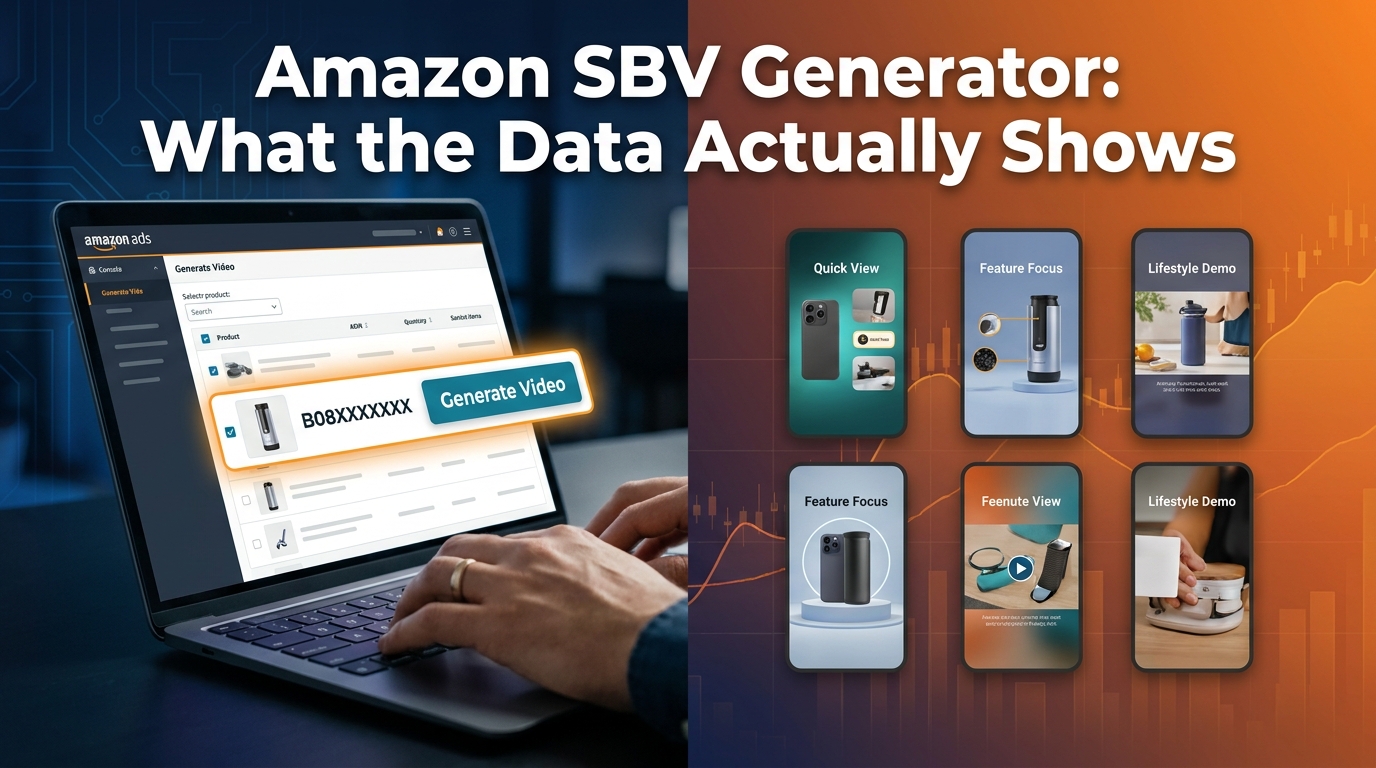
There is a moment, deep inside an Amazon search results page, where everything changes for a shopper. They’re scrolling past the usual grid of product images — white backgrounds, identical angles, the same price-point signaling — and then something moves. A video starts playing on its own. No tap required. No opt-in. It’s just there, filling the middle of the page, showing a product in actual use.
That moment is the entire premise of Amazon Sponsored Brand Video (SBV). It is, on paper, the most attention-commanding ad format Amazon offers to sellers and vendors. In a feed built entirely out of static images, motion is a superpower. And yet, the overwhelming majority of Sponsored Brand Video campaigns either underperform their potential or actively waste budget — not because sellers chose the wrong format, but because they misunderstood what the format is actually doing.
SBV isn’t a commercial. It isn’t a brand film. It isn’t a product demo in the traditional sense. It’s an interruption that happens to a shopper who is already in buying mode — someone who typed a keyword, hit search, and started evaluating options. Your video has roughly one second to justify its existence before that shopper keeps scrolling. One second. That’s not a creative challenge. That’s an engineering problem.
This piece isn’t about why you should run Sponsored Brand Videos. By 2026, that conversation is largely settled. The question worth examining is why so many SBV campaigns fail creatively, technically, and strategically — and what the sellers who actually make the format work are doing differently. We’ll cover the mechanics of how the ad unit works, the science of attention at scroll speed, the targeting architecture that separates SBV from Sponsored Products, the measurement framework most sellers ignore, and a production approach that doesn’t require a film crew.
What Sponsored Brand Video Actually Is — and What It Isn’t
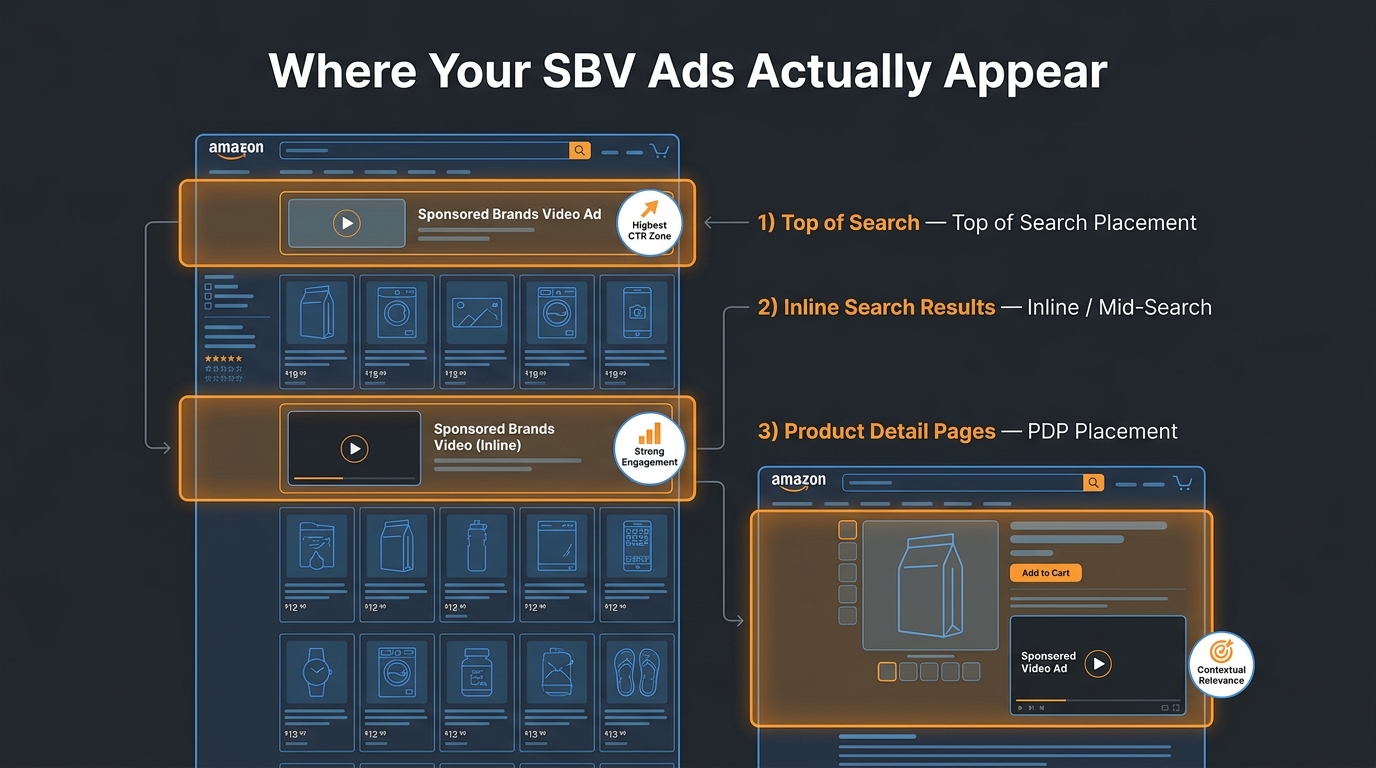
Before diagnosing what goes wrong, it helps to understand the format precisely. Sponsored Brand Video is a sub-type of Amazon’s Sponsored Brands ad product, which historically ran as a banner-style unit across the top of search results. When Amazon introduced the video variant, it added something categorically different: a full-width, auto-playing video unit that appears within search results, typically in the middle of the results page rather than anchored to the top.
The Technical Mechanics
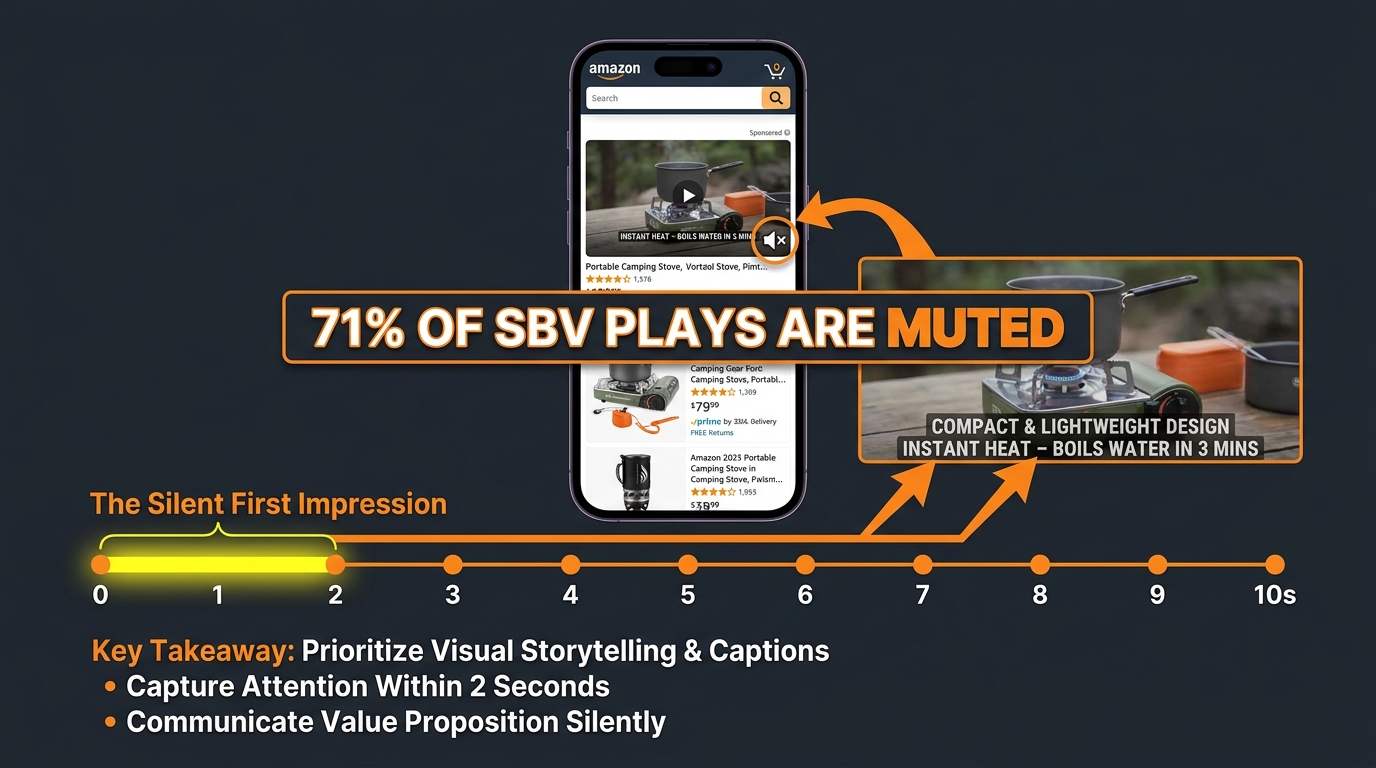
SBV ads autoplay without sound by default on both desktop and mobile. This is not an accident or a limitation — it’s a deliberate design decision that mirrors how video content works across social platforms. Shoppers have learned, through years of scrolling Facebook, Instagram, and TikTok, that video plays silently and they can tap to unmute if interested. Amazon is working within that behavior pattern, not against it.
The video specs Amazon enforces are worth understanding in detail because they shape creative strategy:
- Duration: Minimum 6 seconds, maximum 45 seconds. The effective sweet spot based on engagement patterns is 15 to 30 seconds.
- File format: MP4 or MOV
- Resolution: Minimum 1920 x 1080 pixels (1080p). Amazon recommends 16:9 aspect ratio for desktop; vertical formats are increasingly supported for mobile placements.
- File size: Maximum 500MB
- Frame rate: 23.976, 24, 25, 29.97, or 30 fps
- Audio: While the video autoplays muted, audio must still be present in the file — and must be clear, because shoppers can and do unmute. Voiceover narration that clearly reinforces the visuals is considered best practice.
Where SBV Ads Actually Appear
The placement behavior of SBV is one of the most misunderstood aspects of the format. Unlike top-of-search banner ads, SBV units appear in the middle of keyword search results pages — specifically in the area below the first row of organic results, mixed in with the product grid. On mobile, this placement dominates screen real estate. The ad expands to fill the full width of the search page, making it impossible to scroll past without registering visually.
SBV is keyword-targeted, not product-targeted by default (though product targeting is an option). This means you’re reaching shoppers at the exact moment of active category search — not passively browsing a detail page. That intent signal is what makes the format fundamentally different from display advertising.
Who Can Run SBV
Access to Sponsored Brand Video requires enrollment in Amazon Brand Registry. This applies to both sellers (third-party) and vendors (first-party). Brand Registry requires a registered trademark in the relevant marketplace country. For most legitimate brands, this is a standard compliance step — but it does mean SBV is not available to unregistered resellers or arbitrage accounts. This effectively makes SBV a brand-building tool in both form and access structure.
SBV vs. Sponsored Products vs. Standard Sponsored Brands: When to Use Each
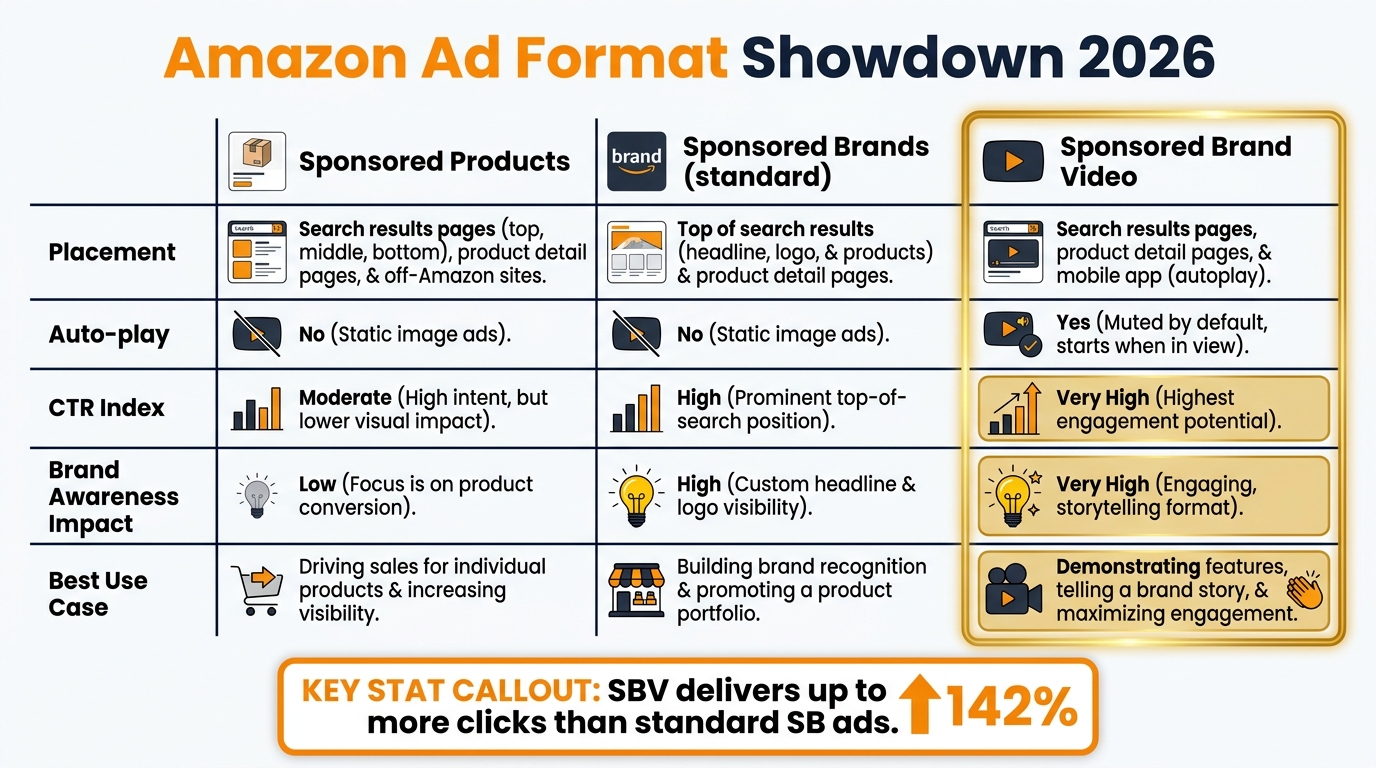
One of the most persistent mistakes in Amazon advertising is treating all three ad types as interchangeable tools that just happen to look different. They’re not. Each format operates at a different stage of the shopper’s decision process, and allocating budget without understanding that distinction leads to consistently misread performance data.
Sponsored Products: The Closer
Sponsored Products (SP) is Amazon’s highest-volume, lowest-funnel ad unit. It looks like an organic listing. It appears in organic results. Shoppers frequently can’t distinguish it from non-paid results, which is exactly what makes it effective for capturing demand that already exists. If someone types “stainless steel water bottle 32oz” and your SP ad appears at position 2, you’re fishing where the fish are already hungry.
SP campaigns are generally the first thing any brand should optimize because they directly impact organic ranking velocity. Every SP sale contributes to sales history, conversion rate data, and keyword relevance signals that Amazon’s algorithm reads when deciding organic placement. They should anchor any brand’s baseline advertising — but they are not a brand-building tool. A shopper who clicks a Sponsored Products ad and buys your product may not remember your brand name three days later.
Standard Sponsored Brands: The Billboard
Standard SB ads — the banner units with brand logo, custom headline, and up to three product images — function more like traditional awareness advertising. They run primarily at the top of search results and on product detail pages. Their strength is visibility at the category level: a shopper who searches “protein powder” sees your brand name before they see any specific product.
Standard SB is useful for brand recall, especially in categories where trust and familiarity drive the final click. But static banner ads on a shopping platform have a significant limitation: they’re fighting the natural scanning behavior of a shopper whose eyes are trained to jump straight to product images and prices. A banner that doesn’t immediately answer “why should I care about this brand?” gets mentally filtered out in milliseconds.
Sponsored Brand Video: The Conversation Starter
SBV sits between the two. It has the keyword targeting precision of Sponsored Products but the brand-presence impact of Sponsored Brands. More importantly, it creates something neither of the other formats can: a moment of genuine product understanding. Shoppers who watch a well-made SBV ad come away knowing not just what the product is, but how it works, what problem it solves, and what kind of person it’s for. That understanding drives higher-quality clicks — people who land on your detail page already convinced, not just curious.
The practical implication for budget allocation: SBV rarely replaces SP campaigns. It supplements them. A shopper might see your SBV ad, not click, then encounter your Sponsored Product in a subsequent search and convert. The awareness moment matters even when it doesn’t directly produce a same-session click.
The Real Reason SBVs Fail: The First Three Seconds Problem
Ask a typical brand team what their SBV creative looks like and you’ll hear some version of this: a two-second logo reveal, then a lifestyle shot, then a product hero moment, then a voiceover explaining the brand story. The video is well-produced. It’s on-brand. It probably cost a few thousand dollars to make.
And it fails. Not because it’s bad creative in the abstract, but because it’s built for a different context — one where the viewer has already opted in to watching. An SBV ad earns zero opt-in. It starts playing in the middle of a page where the shopper’s goal is to evaluate and buy products, not watch brand content. That context changes everything about how the creative needs to be structured.
The Scroll Speed Reality
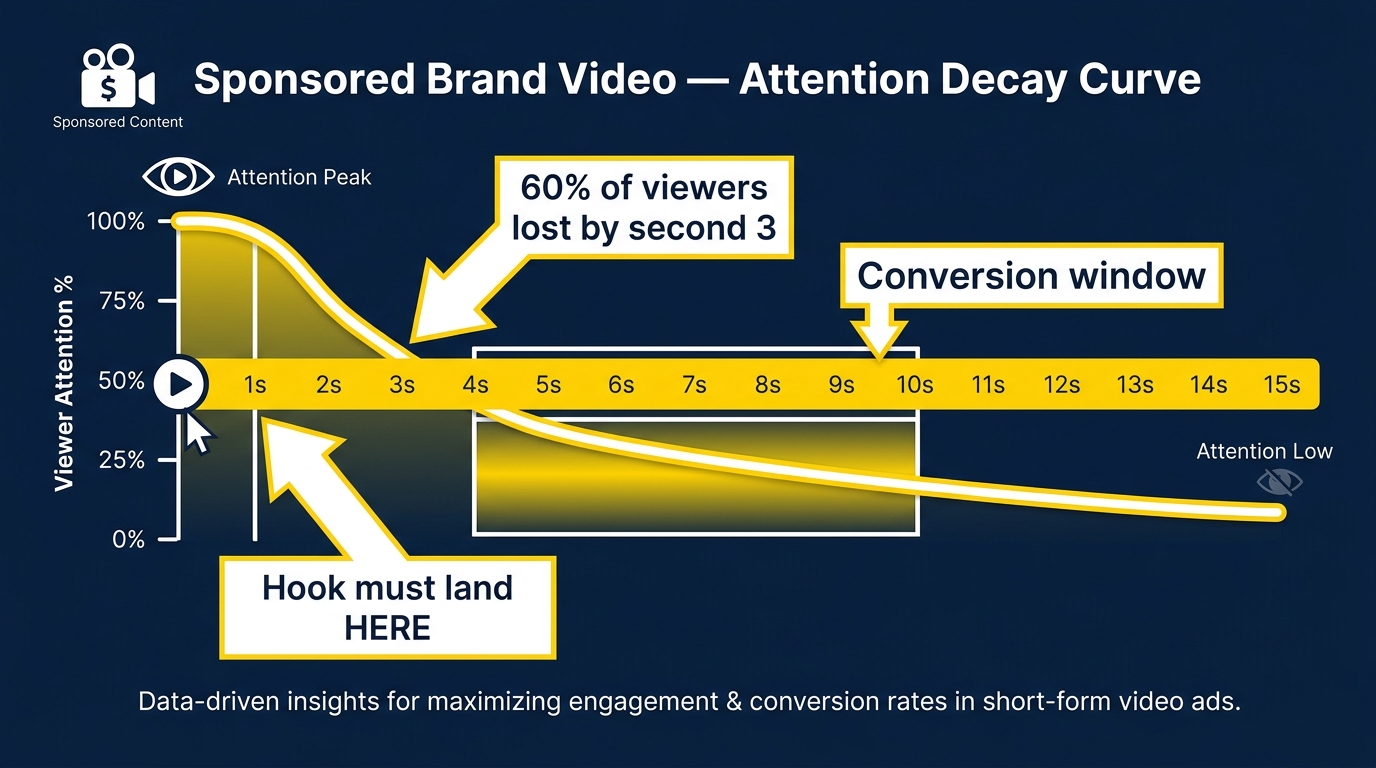
On mobile — which accounts for the majority of Amazon shopping traffic — a page scroll takes roughly 300 to 500 milliseconds. In that time, the human visual system is making low-effort assessments: Is this relevant? Should I stop? Does this deserve my attention? Those assessments happen before conscious evaluation kicks in. By the time a shopper’s prefrontal cortex is deciding whether to engage with your video, the video has already been playing for 1 to 2 seconds. The subconscious decision has already been made.
This is why the first second isn’t just important — it’s the entire ballgame for a large percentage of your audience. Research into video ad attention across digital platforms consistently shows that viewership drops sharply within the first three seconds. The exact numbers vary by category and platform, but the shape of the curve is universal: steep initial drop, then a gentler decline among those who stayed past the hook.
What Amazon’s Own Data Suggests
Amazon doesn’t publish granular view-through data broken down by second, but the Video Completion Rate (VCR) metric available in the advertising console reveals the pattern. Brands running SBV campaigns regularly report a significant gap between video impression volume and completion volume — meaning a large proportion of shoppers scroll past before the video hits the midpoint. The brands that see stronger VCR numbers share a common creative trait: they put the product in motion immediately, before any branding, title card, or music fade-in.
The Logo-First Trap
The instinct to lead with a brand logo makes sense from a traditional advertising standpoint. Brand recognition requires repeated exposure to brand identifiers, and the logo is the primary identifier. But on Amazon, the logo-first approach has a specific problem: it signals to the shopper that they’re watching an ad rather than getting information. That signal triggers scrolling behavior rather than stopping behavior.
The counterintuitive fix: lead with the product doing something interesting, then reveal your brand. Shoppers who stay to watch a compelling product moment are more receptive to brand information that comes after. The sequence matters more than the content.
The Creative Framework That Actually Converts
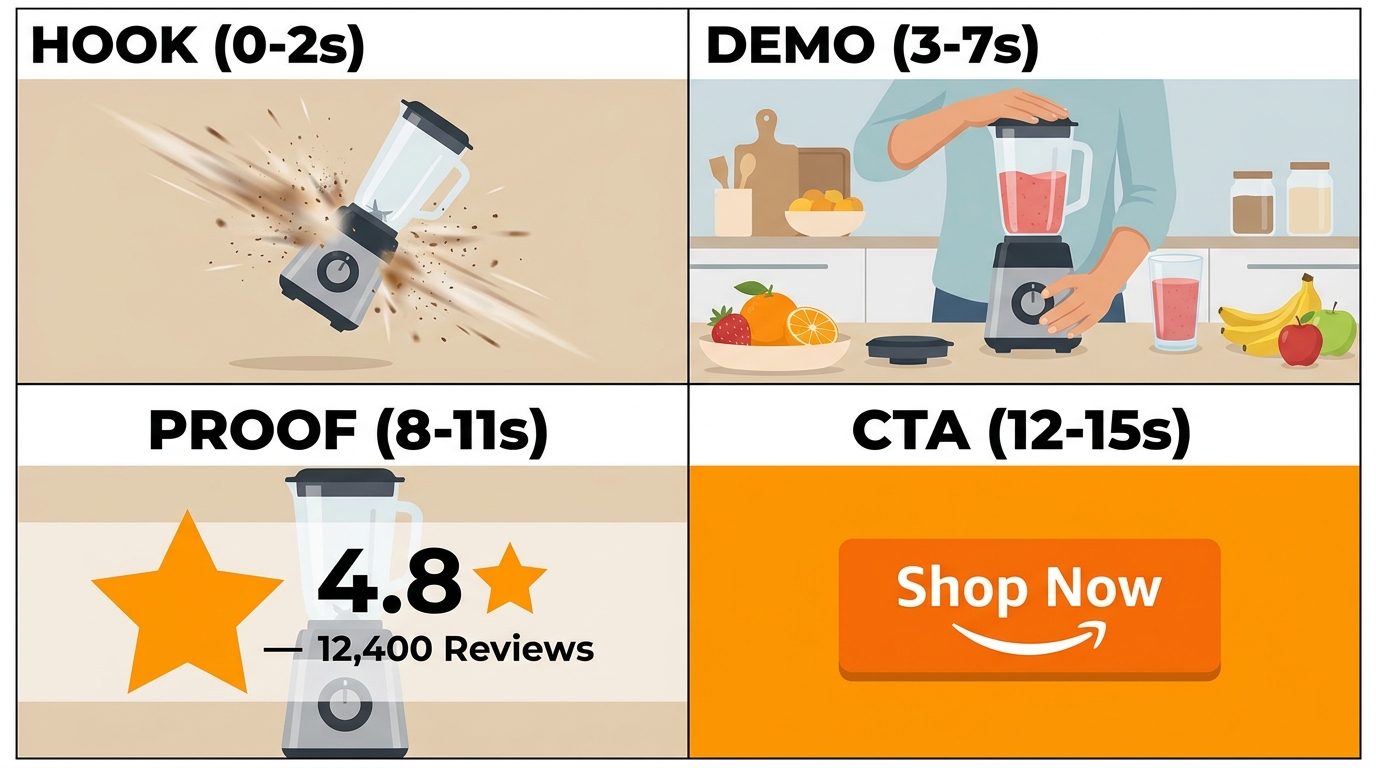
After working through the attention dynamics, the creative structure that consistently outperforms becomes fairly logical. It’s not a formula in the rigid sense — execution still matters enormously — but the underlying sequence holds across categories.
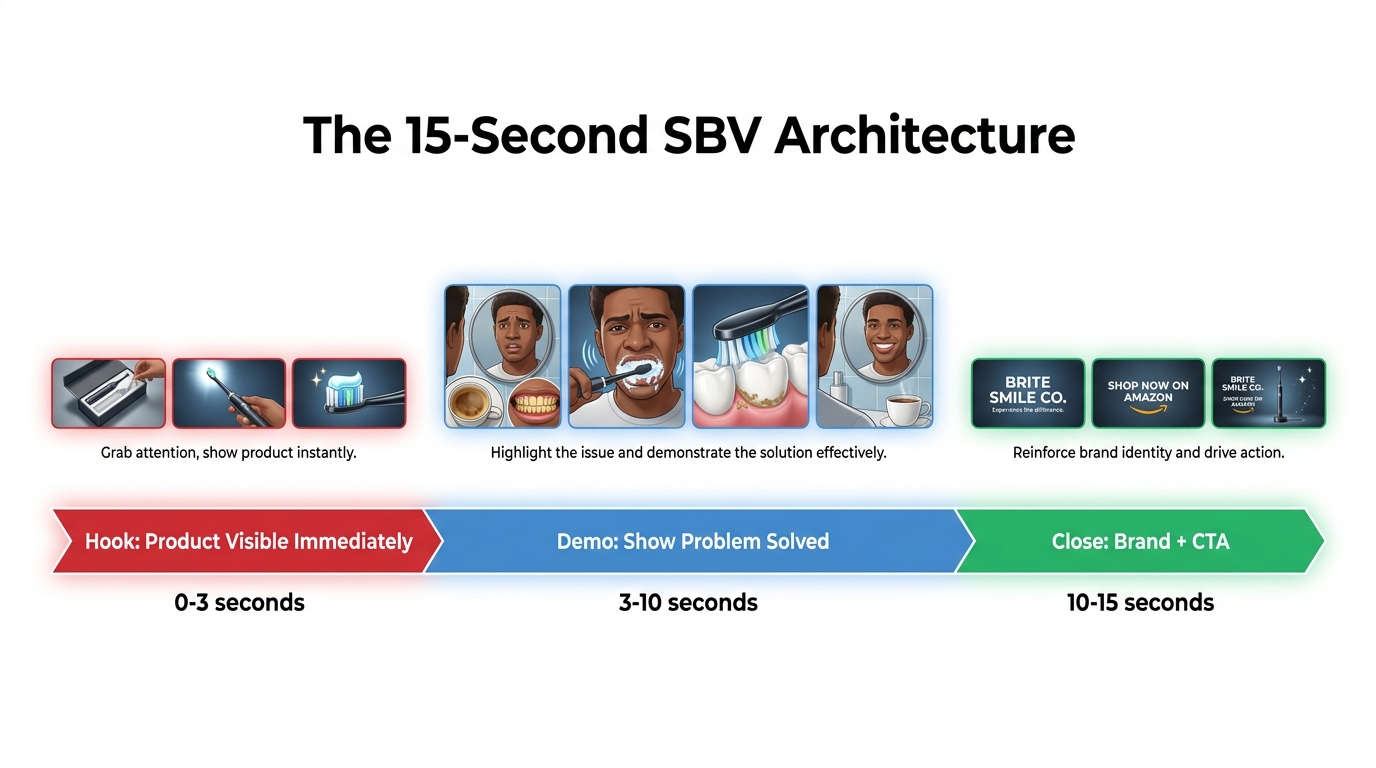
Phase 1: The Hook (Seconds 0–2)
The hook’s job is to stop the scroll. That’s it. Not to explain the product, not to establish brand identity, not to set a mood. To stop the scroll.
What stops scrolls? Motion that creates a question in the viewer’s mind. A product being used in an unexpected way. A problem being demonstrated so clearly that the viewer recognizes it as their own. A visual contrast — the “before” state that makes you wince, immediately followed by a transition.
Effective hooks tend to share a few characteristics:
- They show the product immediately. Not in packaging. Not being unboxed. In use. The viewer should be able to identify what they’re looking at within the first half-second.
- They imply a payoff. The opening visual should create a sense of “I need to see where this goes.” This can be as simple as a blender in motion, a cleaning product attacking a visible mess, or a garment being worn in an aspirational setting.
- They work muted. Because most viewers won’t unmute in the first second, the hook must land visually, without relying on audio or voiceover. On-screen text can reinforce the hook if it’s large enough to read at scroll speed.
Phase 2: The Demonstration (Seconds 3–8)
With the viewer’s attention secured, the demonstration phase earns its real estate. This is where you show the product solving the problem or delivering the experience it promises. The key principle here is specificity over generality.
A common mistake: showing the product in a beautiful lifestyle context without actually demonstrating how it works. Soft-focus shots of people smiling while holding your product tell shoppers very little. Close-up shots of the product mechanism, the material quality, the ease of use, the measurable result — those tell shoppers everything they need to decide.
On-screen text should accompany the demonstration, not as subtitles of an audio track, but as functional callouts. Labels like “leakproof seal,” “BPA-free stainless steel,” or “fits standard car cupholders” do more in three words than five seconds of voiceover can. Think of this section like an annotated product demo — you’re both showing and explaining simultaneously.
Phase 3: Social Proof (Seconds 9–12)
For most categories, trust signals close the gap between interest and click. The proof phase should be brief and concrete. Star ratings with review counts, third-party certifications, notable claims (“Amazon’s Choice,” “#1 Best Seller in [category]”), or specific performance stats relevant to the product.
Avoid vague superlatives. “The best water bottle you’ll ever own” is ignored. “4.8 stars across 14,000 reviews” is processed and retained. The specificity of the number signals authenticity in a way that adjectives cannot.
Phase 4: The Call to Action (Seconds 13–15)
SBV ads link to a product detail page or Amazon Brand Store when clicked. The CTA should reflect that destination. “Shop now,” “See all sizes,” or “Explore the collection” are appropriate. Avoid off-Amazon language like “Visit our website” — it creates cognitive friction because the shopper knows they’re on Amazon.
The product should be visible during the CTA phase, ideally paired with pricing information if the price is competitive. Many shoppers make their final click decision based on price, and showing it in the video can eliminate a step between the ad and the purchase decision.
Targeting Architecture: Why Keyword Strategy for SBV Is Different
One of the most common SBV mistakes is importing the same keyword lists from Sponsored Products campaigns and running them in SBV without modification. This approach works — in the same way that a hammer technically works as a screwdriver. You’ll get some results, but you’re leaving the format’s unique strengths almost entirely unused.
Understanding the Intent Mismatch
Sponsored Products keyword targeting works because the format looks organic. When a shopper searches “best air fryer” and clicks on what appears to be a regular product listing, the transition feels natural. With SBV, the shopper is aware they’re watching an advertisement. That awareness changes the intent dynamic. High-transactional keywords — terms used by shoppers who are ready to buy right now — may actually underperform in SBV relative to SP because those shoppers are in “decide and buy” mode, not “learn about options” mode. Watching a 15-second video feels like a detour to a purchase-ready shopper.
This doesn’t mean transactional keywords don’t belong in SBV campaigns. It means the video creative needs to be structured differently depending on the keyword type. A viewer who searched a highly specific product term (“32oz insulated water bottle black with straw lid”) doesn’t need to be convinced the category is worth considering — they need to be convinced your specific version is the right one. The demonstration phase of the video becomes critical for those keywords.
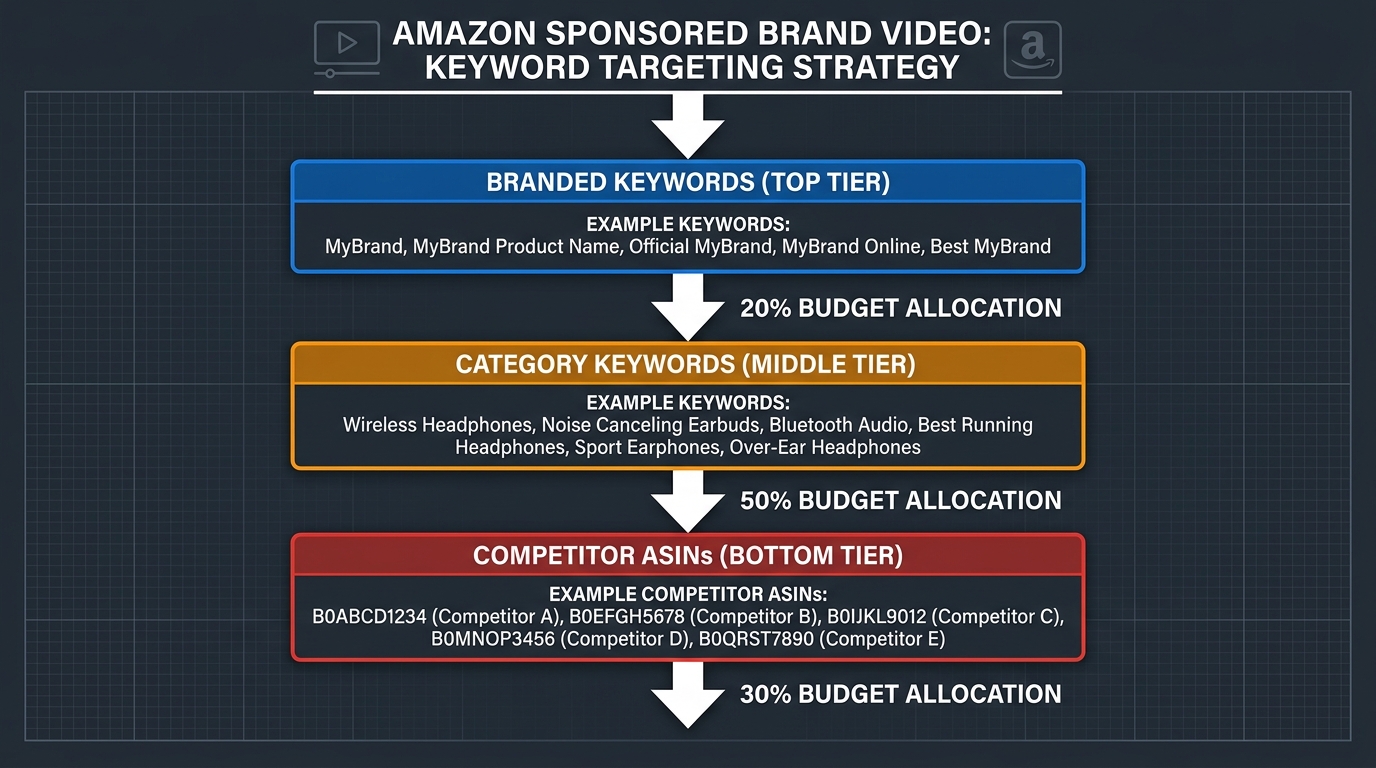
A Three-Tier Keyword Architecture
A structurally sound SBV targeting approach typically involves three distinct campaign types running in parallel:
Tier 1 — Branded keyword defense: Your brand name and product line names. Budget allocation here is primarily defensive — you’re ensuring that shoppers who search specifically for your brand see your own content rather than a competitor’s. Bidding on your own brand terms in SBV is particularly important if competitors are running SBV ads targeting your branded keywords (which is allowed and common).
Tier 2 — Category and problem-based keywords: These are the broad-to-phrase match keywords that describe what your product does or the problem it solves. “Insulated water bottle,” “leakproof bottle for gym,” “stainless steel tumbler.” These keywords reach shoppers at the consideration stage — they know what category they want but haven’t committed to a specific product or brand. SBV performs exceptionally well at this tier because the video format can shape early-stage decision-making in ways that a static image cannot. Budget allocation here should typically be the heaviest, because this is where new-to-brand customer acquisition happens.
Tier 3 — Competitor ASIN and brand targeting: SBV allows product targeting, which lets you serve your video ad to shoppers browsing a competitor’s product detail page. This is a more aggressive tactic and requires careful creative consideration — your video needs to make a clear comparative case for why your product is worth a second look. The click-through rate on competitor targeting is typically lower, but the conversion intent of shoppers who do click is high.
Match Type and Negative Keyword Management
For SBV, phrase and exact match types generally outperform broad match because the format’s effectiveness depends on relevance. A broadly targeted SBV campaign that serves video ads for loosely related searches wastes both budget and impressions. The cost per view (CPV) model means you’re paying even for quick scroll-pasts, so relevance discipline matters more than in cost-per-click models.
Negative keyword management for SBV should be run as a separate exercise from SP campaigns. The search terms that convert well in SP may be irrelevant or low-performing in SBV, and vice versa. Run search term reports for SBV campaigns independently and prune aggressively in the first 30 to 60 days.
Budget, Bidding, and ACoS Benchmarks for SBV in 2026
Setting realistic budget and performance expectations for SBV is harder than for Sponsored Products because the format operates across multiple funnel stages simultaneously. A single SBV campaign can generate both direct conversions (click → purchase within the same session) and assisted conversions (view → return visit → purchase) — and Amazon’s standard ACoS metric only captures the former.
Starting Bid Strategy
SBV uses a cost-per-click (CPC) model, not cost-per-view. This means you only pay when a shopper clicks your ad, not when they watch it. That makes the economics more straightforward than they might appear: even if 95% of shoppers who see your video don’t click, they’ve received an impression of your product in motion. You paid for that impression at zero cost.
This also means that aggressive bidding in SBV is generally justified in a way it might not be in display formats. Because you’re only charged for clicks, high bids primarily drive your auction competitiveness and placement quality — they don’t inflate costs from view-heavy but click-light impressions.
For category keyword targeting, starting bids should typically run 10 to 20% higher than your comparable Sponsored Products bids for the same keywords. The rationale: SBV placements are less numerous than SP placements, so competition for premium positions is intense. Underbidding in SBV doesn’t just lower placement — it can result in your ads not serving at all during peak traffic windows.
What to Expect for ACoS
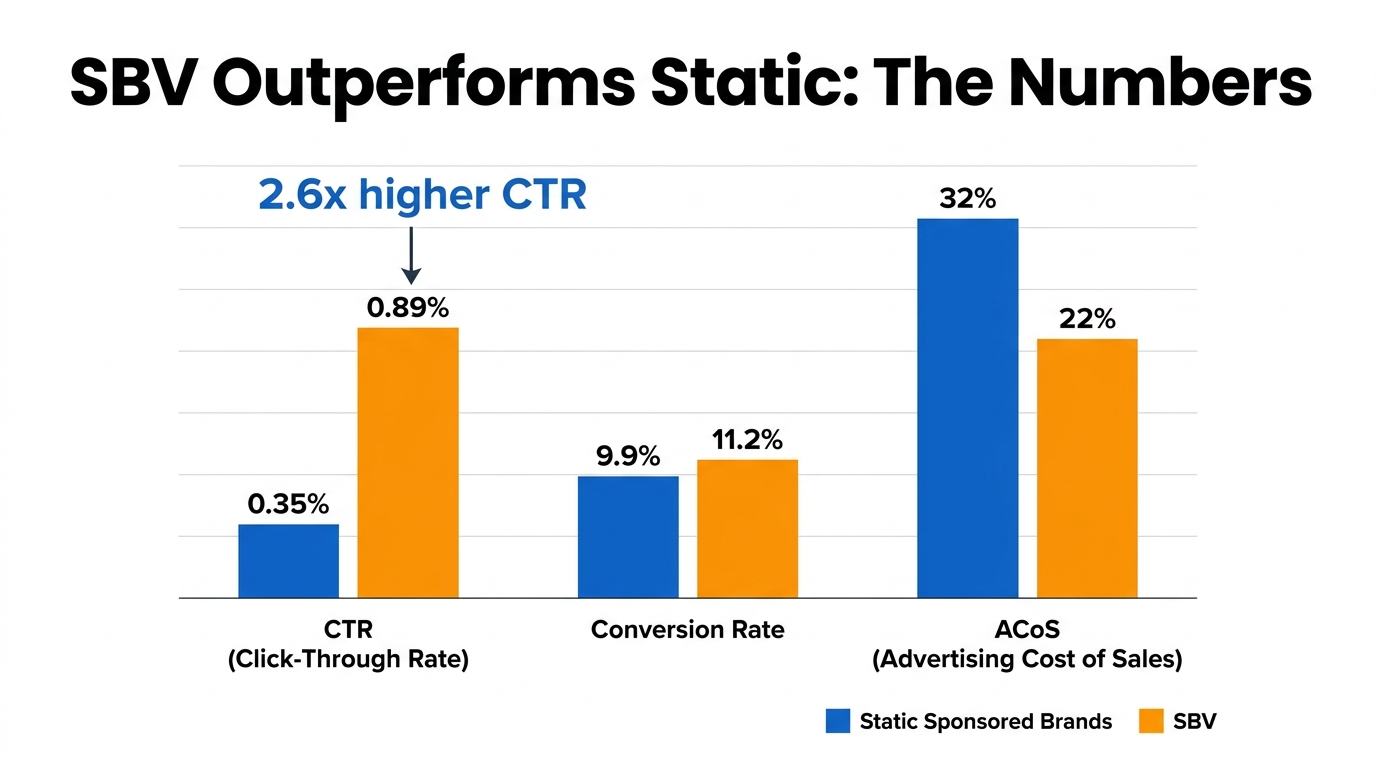
SBV campaigns typically run at higher ACoS than Sponsored Products campaigns in the same category, particularly during the first 60 to 90 days. This is a structural reality, not a sign of failure. SP campaigns benefit from direct-response targeting in an established context; SBV is partially doing awareness work, and that work doesn’t always convert within the attribution window.
Amazon’s standard attribution window for sponsored ads is 7 days for keyword-targeted campaigns (a shopper who clicks your ad and purchases within 7 days is credited as an ad-attributed sale). In practice, SBV’s influence on purchase behavior often extends beyond that window, particularly for higher-consideration products. A shopper who watches your video ad, doesn’t click, searches again three days later, and converts through an organic listing or SP ad — that sale doesn’t appear in your SBV ACoS, but SBV contributed to it.
For most categories in 2026, SBV ACoS in the 20 to 35% range during the first 60 days is not alarming if new-to-brand customer acquisition rates are strong. SBV campaigns that show 60 to 70%+ new-to-brand order rates are performing their intended function — growing the customer base rather than retargeting existing buyers.
Daily Budget Floors
SBV campaigns require sufficient daily budget to generate statistically meaningful data quickly. Amazon’s algorithm needs volume to optimize delivery, and SBV’s higher CPC relative to SP means thin budgets produce thin data. For most sellers, a minimum daily budget of $30 to $50 per SBV campaign is needed to generate enough impressions for meaningful week-over-week analysis. Campaigns running on $5 to $10 daily budgets may generate useful brand impressions but won’t produce the click and conversion volume needed to optimize targeting or creative performance.
The Amazon Creative Approval Gauntlet
Amazon’s video creative review process has become significantly more stringent since SBV launched, and rejections are common enough that they deserve a dedicated section. Knowing what gets flagged before you shoot and edit is far cheaper than learning it after video production is complete.
Common Rejection Reasons
Amazon’s content review team rejects SBV creatives for both technical and content-related reasons. The technical failures are usually straightforward to fix: incorrect resolution, audio levels that are too low, frame rate mismatches, or letterboxing that leaves black bars on the frame. These are pre-submission checklist items.
The content-related rejections are more nuanced and more frustrating:
- Claims that require substantiation: Any health, safety, or performance claim that isn’t substantiated on the product detail page or through recognized certification can trigger rejection. “Clinically proven to reduce inflammation” requires FDA or equivalent documentation. “Helps you stay hydrated” does not. The line between acceptable and rejected claims often feels arbitrary, but the underlying principle is that the video cannot make claims the product page doesn’t back up.
- Competitor references: Direct naming or showing of competitor products in a comparative context is prohibited. You can show your product is better than “the competition” in an implied way, but explicit side-by-side with a named competitor brand is not allowed.
- Price or promotional claims: Time-sensitive price claims (“only $19.99 this week!”) are rejected because video creatives aren’t updated in real-time and a stale price claim would mislead shoppers. Evergreen value claims (“under $25”) are generally acceptable if accurate.
- Lifestyle depictions: Videos depicting activities that could be considered dangerous, or showing product use in contexts that imply claims (like showing a skincare product used by a person with dramatically clearer skin before/after) can be flagged depending on the category.
- Text density: Videos that are primarily text overlays with minimal visual content — essentially animated infographics — may be rejected as insufficiently “video” in nature. The format requires genuine motion content.
The Resubmission Process
Amazon typically provides a rejection reason when a video fails creative review, though the specificity varies. In some cases the feedback is precise (“claim on screen at 0:08 requires substantiation”); in others it’s broad (“content does not meet our guidelines”). When rejection feedback is vague, the fastest path to resubmission is removing any claim that could even loosely be considered a performance statement and resubmitting.
Review timelines average 1 to 3 business days for initial submissions. Resubmissions typically process within 24 to 48 hours. Budget 5 to 7 business days from final creative delivery to campaign launch to account for review cycles, particularly if the video includes any health, safety, or performance claims.
Measuring SBV Performance: The Metrics That Actually Matter
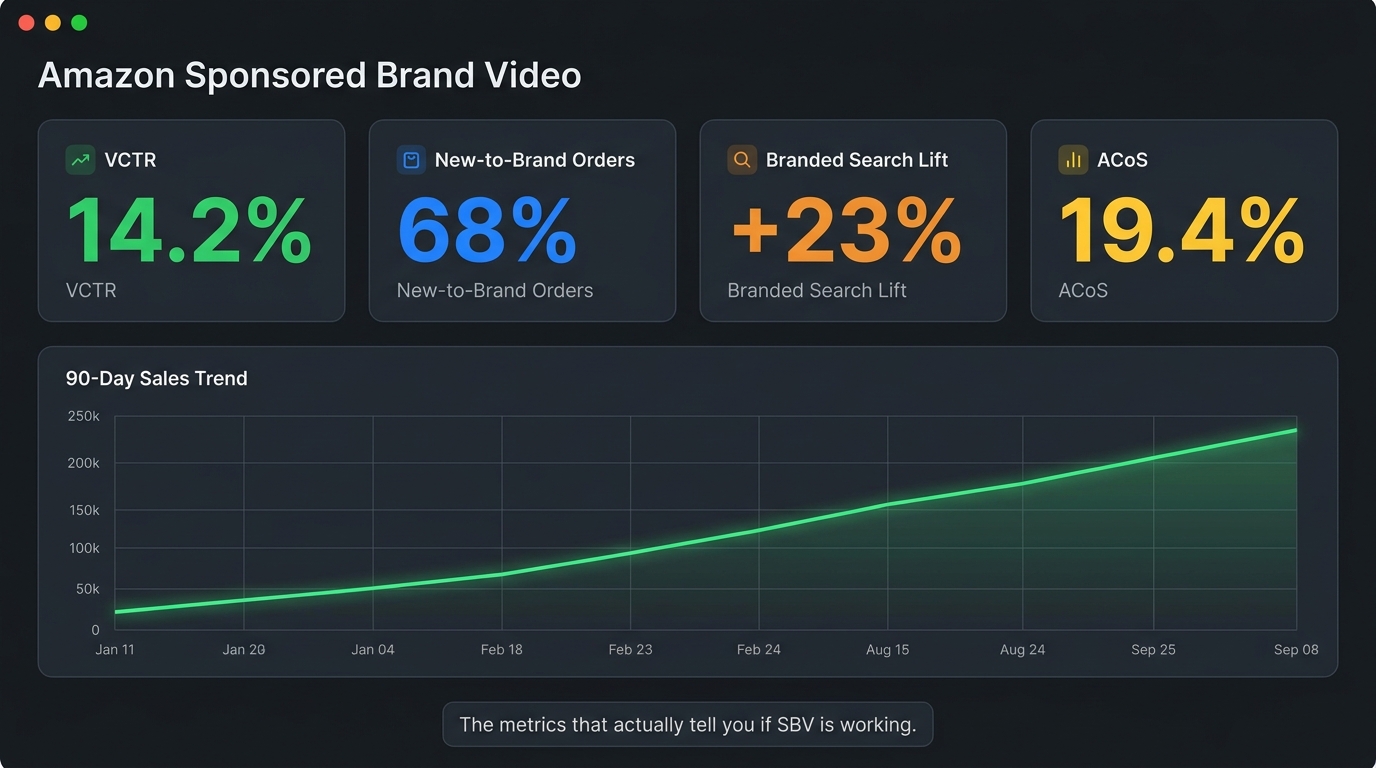
The default metrics in Amazon’s advertising console — impressions, clicks, spend, sales, ACoS — are necessary but insufficient for evaluating SBV performance. Treating SBV like a Sponsored Products campaign and optimizing purely on ACoS will consistently lead to premature campaign shutdowns for formats that are actually working.
The Metrics That Tell the Real Story
Video Completion Rate (VCR): The percentage of video impressions where the full video was watched. Available in Amazon’s campaign reporting for video ad types. VCR is the clearest signal of creative quality — a video that loses people in the first three seconds will have poor VCR, and no amount of bidding adjustment will fix that. The remedy is creative, not campaign structural. Industry benchmarks for SBV VCR vary widely by category, but a healthy creative generally targets 15% to 30% VCR.
Video Click-Through Rate (VCTR): The ratio of clicks to video impressions (not standard CTR, which would be clicks to ad impressions). VCTR isolates the conversion effectiveness of the video itself. A high VCTR with a low VCR suggests your hook is working but your demonstration is weak — people are clicking early without finishing the video. A high VCR with a low VCTR suggests people are watching but not being prompted to act — the CTA needs work.
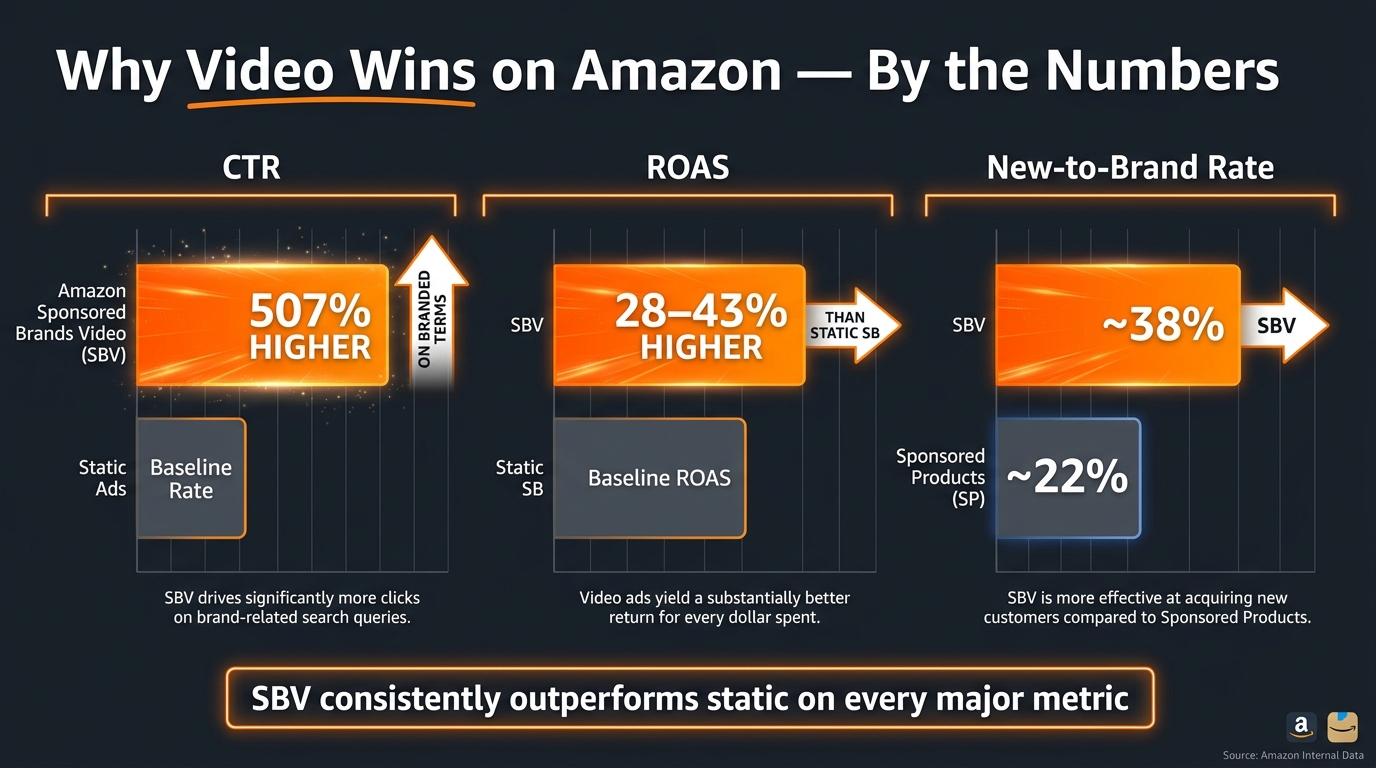
New-to-Brand (NTB) Order Rate: The percentage of sales attributed to SBV that came from customers who hadn’t purchased from your brand on Amazon in the prior 12 months. This is arguably the most strategically important metric for SBV campaigns. If NTB rates are high (60%+), SBV is doing its job of expanding your customer base. If NTB rates are low, you’re likely running SBV against branded keywords and retargeting existing customers — which is less efficient than using Sponsored Products for that purpose.
Branded Search Lift: Not directly available in the advertising console, but measurable through Amazon Brand Analytics (available to Brand Registry enrollees). Look for increases in branded search volume during and after SBV campaign periods. SBV’s awareness function should, over time, produce measurable increases in the number of shoppers searching your brand name directly — a signal that the video content is driving brand recall.
Detail Page View Rate from Video: Available in some reporting configurations, this shows how many shoppers who viewed the SBV ad then visited the product detail page — including those who didn’t click the ad directly but searched and found the product organically. This metric captures some of the awareness-to-consideration conversion that standard click attribution misses.
The Optimization Timeline
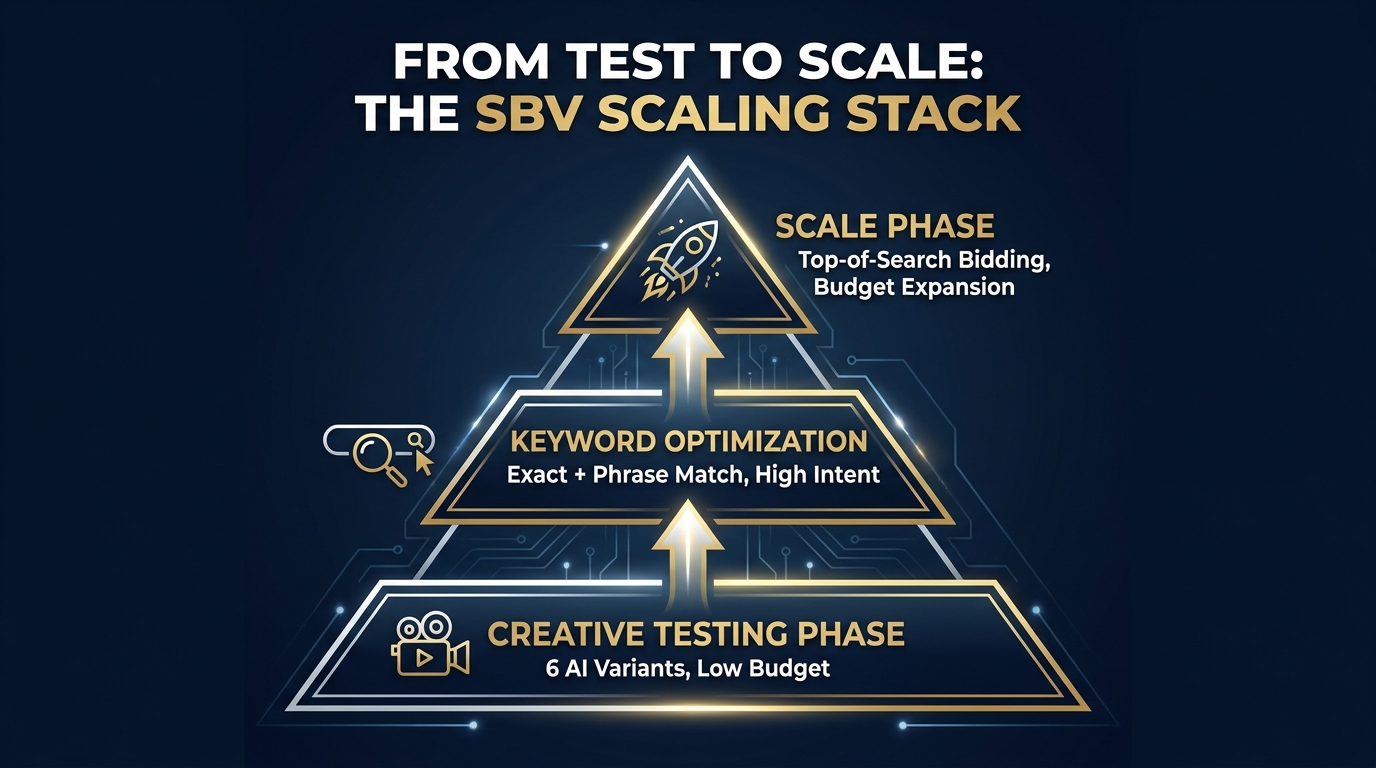
SBV campaigns require a different optimization cadence than SP campaigns. For SP, weekly bid adjustments based on keyword performance are standard practice. For SBV, the first three weeks should be largely observational — you need sufficient impression and click volume to draw conclusions, and premature optimization creates unstable data sets.
By week four, the following decisions should be data-supported: Which keyword tiers are driving the highest NTB rates? Which keyword groups show strong VCR but weak VCTR (suggesting a creative-to-keyword mismatch)? What is the average cost per new-to-brand customer acquisition, and how does it compare to other channels?
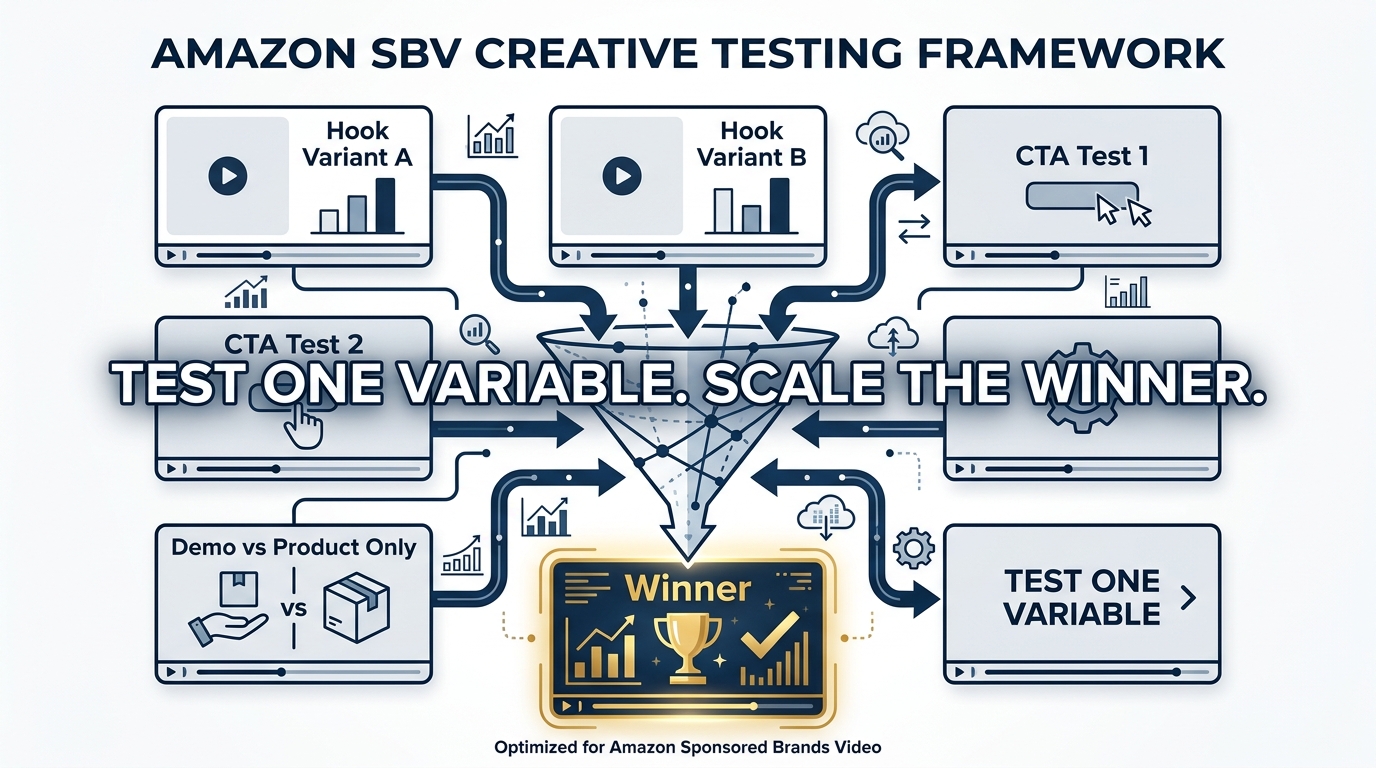
Creative testing should be structured carefully. Amazon allows multiple video creatives within a campaign, but running too many variables simultaneously makes it impossible to isolate what’s driving performance differences. Test one creative variable at a time: different hooks, different CTA copy, different voiceover approaches. Treat creative testing with the same discipline you’d apply to listing A/B testing.
Real-World Results: What the Data From HP, Loftie, and Others Shows
Amazon’s publicly available case studies provide useful benchmarks for what strong SBV performance looks like at scale and at the small brand level.
HP’s Global SBV Expansion
HP Electronics deployed Sponsored Brand Video as part of a broader multi-format Amazon advertising strategy, combining SBV with standard Sponsored Brands, Sponsored Products, and Display ads across multiple global markets. The results for SBV specifically are notable: impressions grew 224% year-over-year, and total clicks increased 142% year-over-year, with the SBV placement specifically contributing a 42% increase in clicks for the Sponsored Brands video category.
The HP case illustrates a point worth emphasizing: SBV works best as part of a coordinated format strategy, not as a standalone campaign type. The 224% impression growth didn’t come from SBV alone — it came from SBV being the top-of-funnel awareness driver that made the SP and display touchpoints more effective. Shoppers who had already seen an HP video were more likely to click an HP SP ad further down the funnel.
Loftie’s Efficiency Case Study
Loftie, a small-business brand selling a smart alarm clock designed to improve sleep habits, ran an Amazon advertising campaign that included Sponsored Brand Video as a primary format for awareness and consideration. The results: a return on ad spend of $5.66 and an advertising cost of sale of 17.68%.
For a brand selling a premium, higher-consideration product in a category (sleep tech) where shoppers need to understand the product’s features to justify the price point, SBV was a natural fit. A 17.68% ACoS for a product that requires education before purchase is genuinely strong performance — it suggests the video creative was doing effective pre-qualification, meaning shoppers who clicked were already largely convinced.
NF Imports: Long-Term Brand Building
NF Imports, a Japan-based brand that began advertising on Amazon in 2015, incorporated Sponsored Brands (including SBV) into a long-running advertising strategy. Their data shows 80% of sales coming from new customers between 2018 and 2022, and steady 30% annual sales growth over the same period. While not exclusively attributable to SBV, the new-to-brand rate is the key indicator: a format strategy centered on awareness advertising consistently produces customer bases weighted toward new buyers rather than repeat purchasers.
Production Without a Big Budget
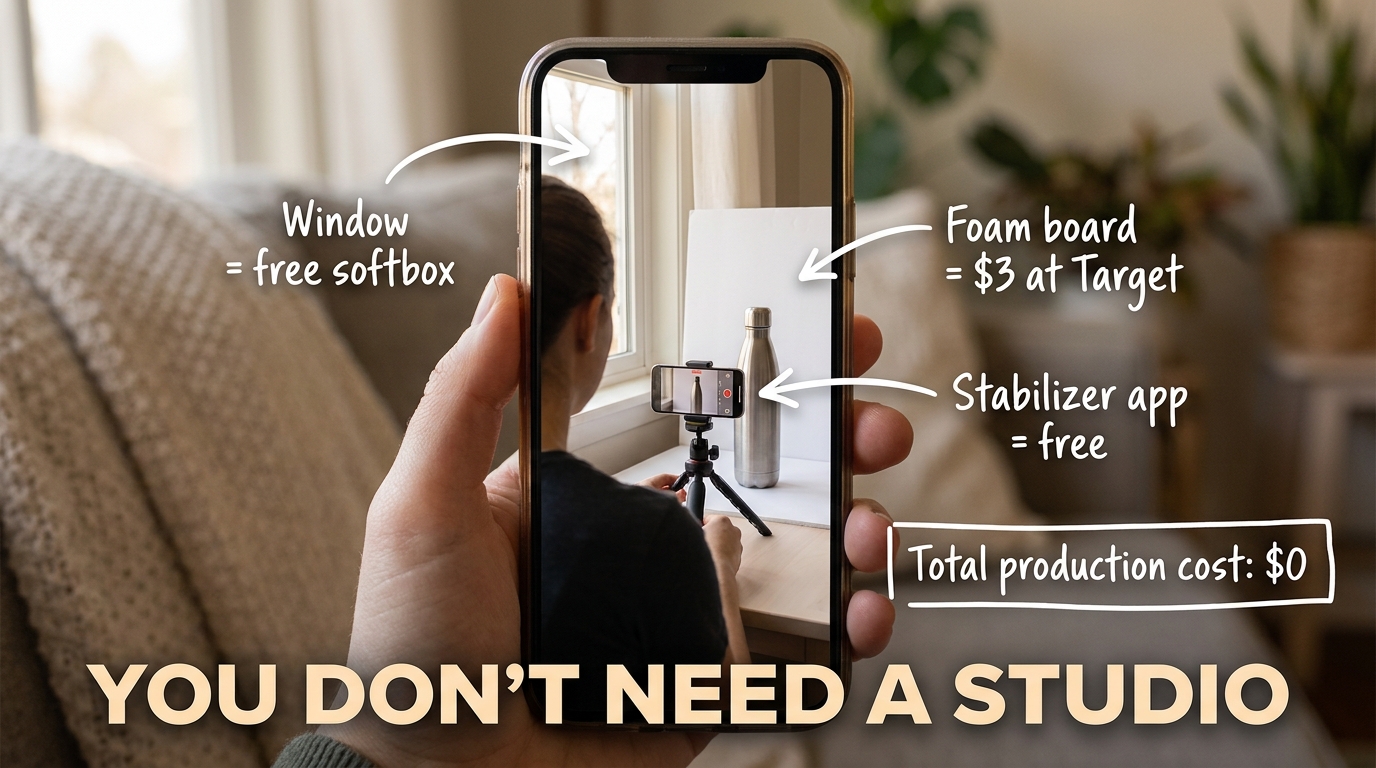
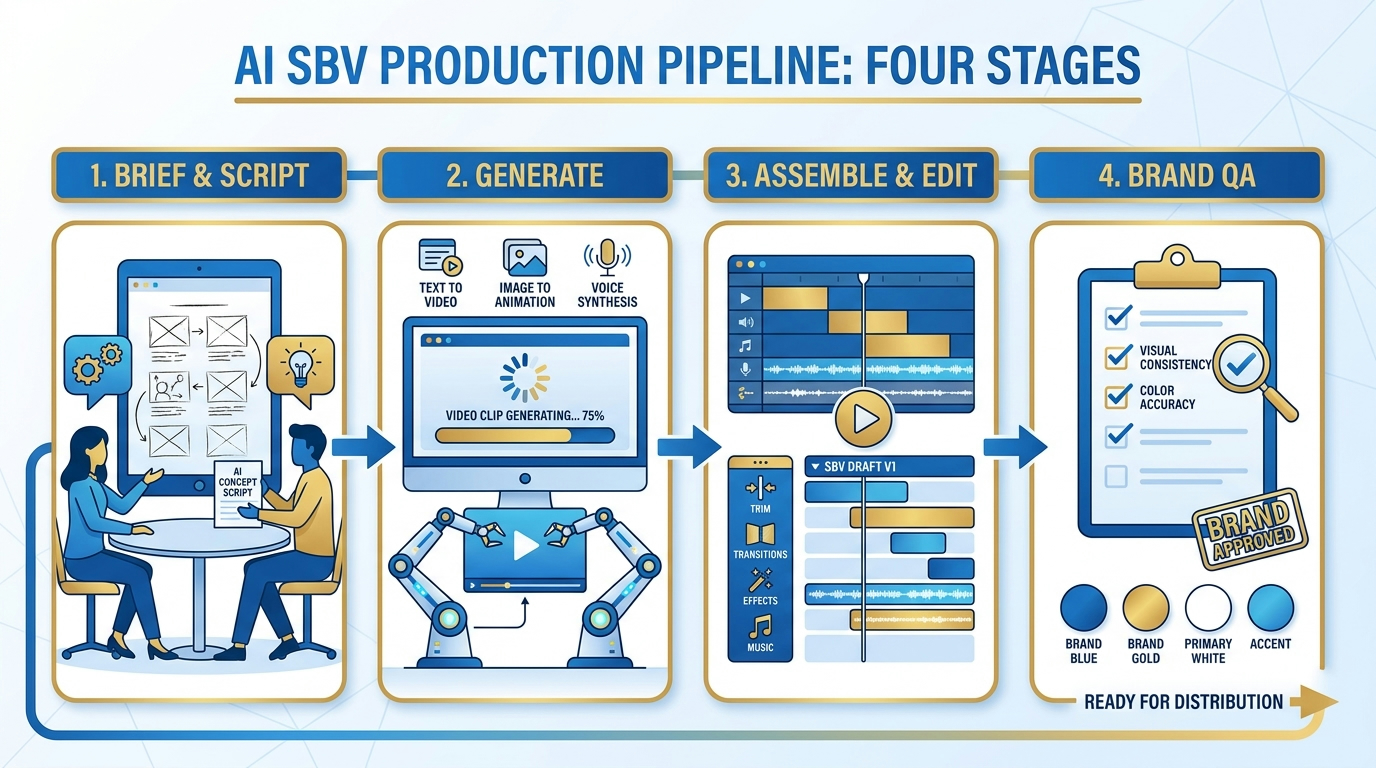
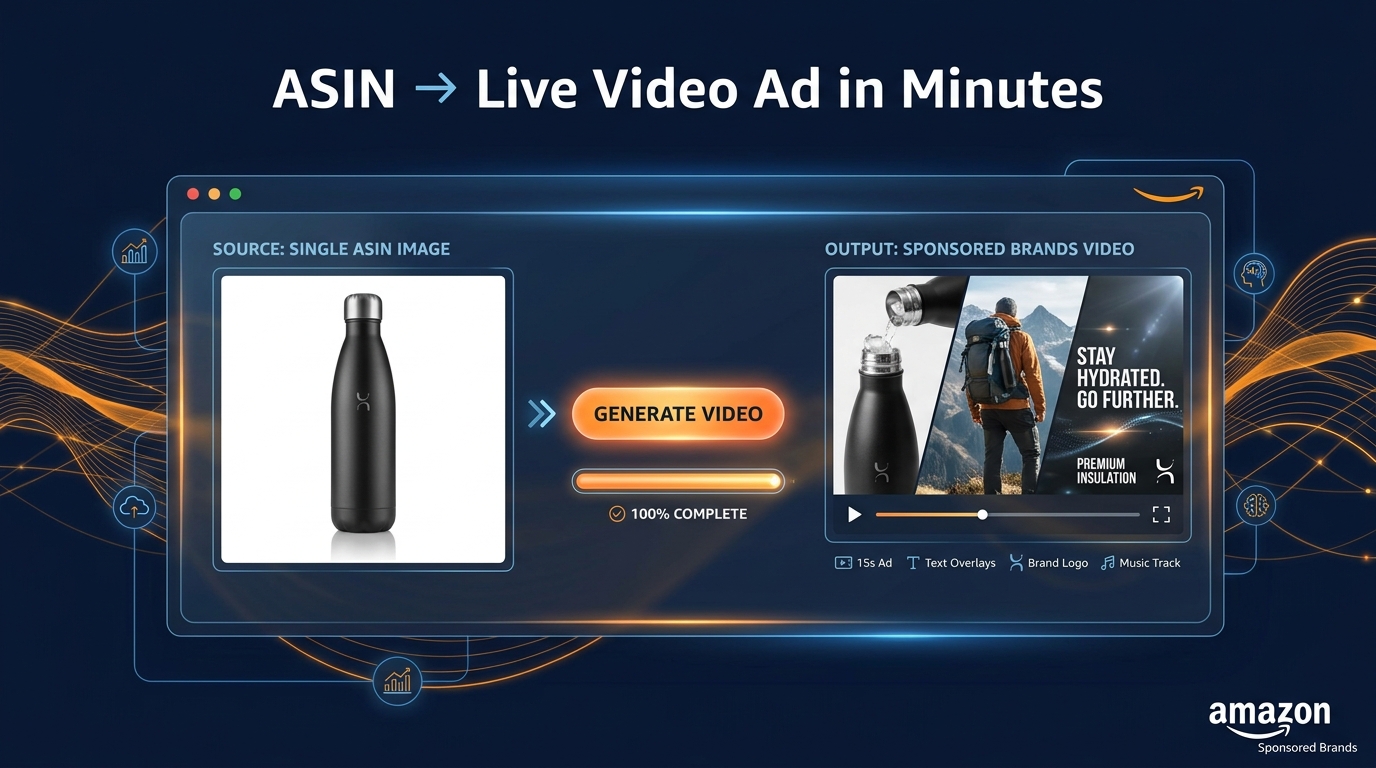
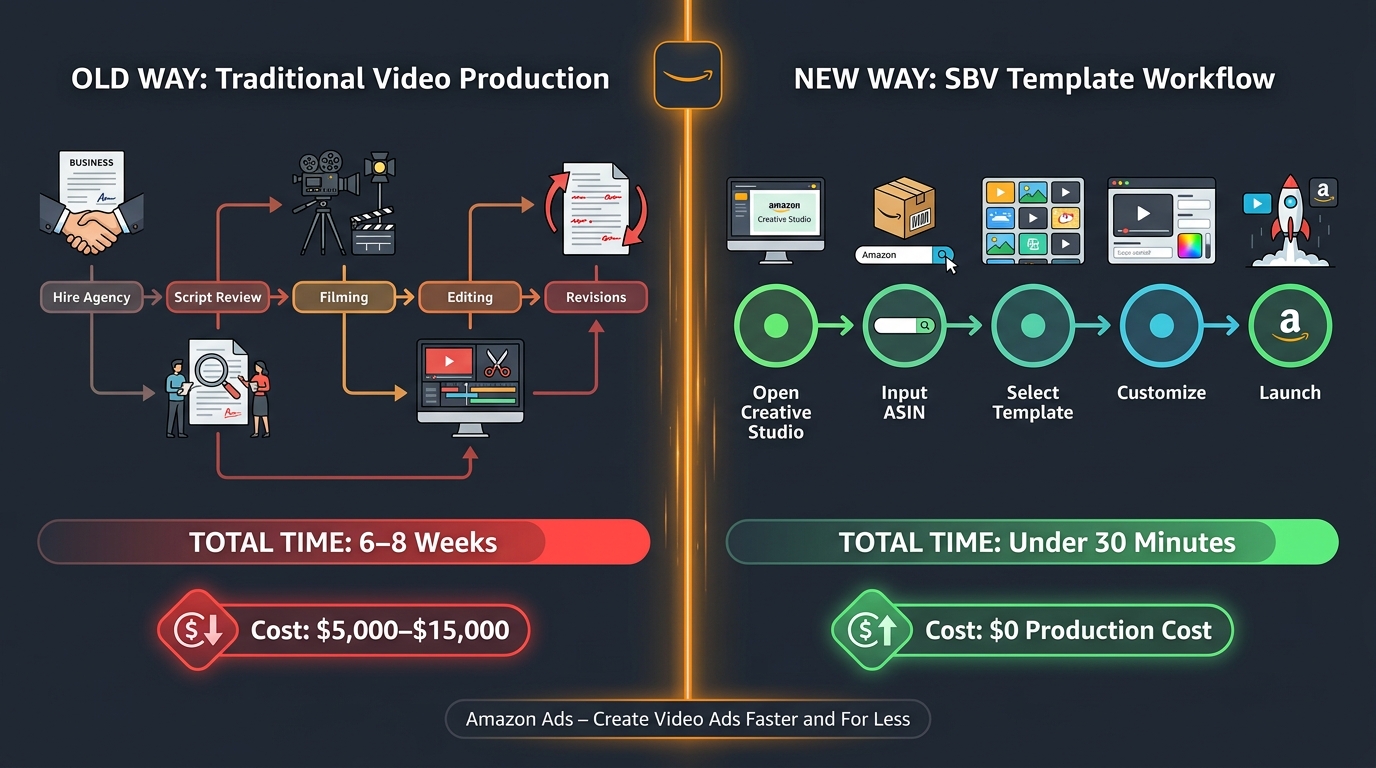
The most common objection to SBV from small and mid-size sellers is production cost. The assumption is that running video advertising requires either an expensive agency engagement or a professional production crew — neither of which fits a $500-per-month advertising budget. This assumption is increasingly untrue, and it’s costing sellers who hold it a meaningful competitive disadvantage.
What Actually Makes a Good SBV Creative
The creative quality that matters for SBV is not production polish. It’s clarity and motion. A video shot on a modern smartphone (iPhone 14 or later, any current Samsung flagship, or equivalent) at 1080p 30fps meets Amazon’s technical requirements. The variables that determine performance — hook strength, demonstration clarity, proof presentation, CTA legibility — are scripting and editing decisions, not equipment decisions.
What genuinely requires investment:
- Lighting: Flat, even lighting that shows the product clearly. This can be achieved with a north-facing window on a cloudy day (diffuse, even light source), a single LED ring light ($30 to $60), or a foam core reflector board ($3 to $5). A $3,000 studio lighting kit produces the same functional result for a 15-second product video.
- Stabilization: Handheld shakiness is the fastest way to make a video look unprofessional. A basic phone tripod ($15 to $25) eliminates this entirely. For moving shots, a simple gimbal stabilizer costs $80 to $150.
- Editing: Text overlays, transitions, music, and color grading all matter. Free options (CapCut, DaVinci Resolve) handle all of these. Paid options (Adobe Premiere, Final Cut) add efficiency for sellers who plan to produce regularly. Either way, the cost of editing software is not a barrier.
The UGC Approach
User-generated content style videos — shot to look like an authentic individual review or demonstration rather than a polished brand advertisement — have shown strong performance in SBV placements for certain categories. The authenticity signal of a UGC-style video can be effective in categories where shoppers are skeptical of brand claims (supplements, skincare, pet products, food). Platforms like Billo, Fiverr, and various UGC creator marketplaces can connect brands with content creators who produce short product videos for $50 to $200 per asset. For brands that haven’t yet built internal video capability, this is a low-risk entry point.
Script-First, Shoot-Second
The single most valuable investment in SBV production is scripting time. Before any camera is picked up, the video should be mapped second-by-second: what is on screen at 0 seconds, at 2 seconds, at 5 seconds, at 10 seconds, at 14 seconds. What text overlays appear and when. What the voiceover says and what visual it’s paired with.
This level of pre-production planning sounds excessive for a 15-second video. It isn’t. A 15-second video that hasn’t been scripted at the second level is a 15-second collection of hopefully related shots, and that’s exactly what most failing SBV creatives look like. A scripted video has intentionality at every moment, and intentionality is the single biggest driver of SBV performance that doesn’t show up in production budgets.
The Competitive Defense Dimension: Why SBV Is Also a Moat
Most of the conversation around SBV centers on customer acquisition — using video to introduce your product to shoppers who don’t yet know it exists. That’s valid and important. But there’s a second function of SBV that receives far less attention: brand defense.
Competitors Are Already Targeting Your Customers
Amazon’s advertising system allows any brand to target competitor keywords and ASINs. This means that when a shopper searches your brand name — someone who already knows you, possibly a loyal customer — your competitors can serve SBV ads to that shopper. Without your own branded keyword SBV campaigns running, you are leaving your most valuable search real estate undefended.
The math here is stark. If a competitor is running SBV ads on your branded keywords, shoppers searching specifically for your brand see a competing product in motion before they find you. Some percentage of those shoppers — particularly those who were considering repurchasing but hadn’t fully committed — will be diverted. The cost of losing an existing customer to a competitor who outbid you on your own brand name is almost always higher than the cost of the defensive SBV campaign bid.
Category Presence as Barrier to Entry
For established brands in competitive categories, maintaining SBV presence across top-volume category keywords creates a form of brand recall that accumulates over time. Shoppers who see your product in motion — even without clicking — register your brand in the context of that category search. Repeated exposure across multiple shopping sessions builds the kind of familiarity that affects organic purchase decisions. This is awareness advertising’s long game, and SBV on Amazon is one of the few places it can be played against in-market shoppers with documented purchase intent.
New entrants to a category can use SBV aggressively to establish presence in the same way that traditional advertising spend built brand recognition — but compressed into a channel where every impression is attached to a specific category search. A brand that runs consistent SBV campaigns against its core category keywords for 12 to 18 months is building something that a competitor who enters later will need significant spend to overcome.
Conclusion: The Seconds That Compound
Amazon Sponsored Brand Video is, in aggregate, a deceptively simple ad format. You create a short video. You target keywords. You pay when shoppers click. The mechanics fit in a paragraph. But the gap between understanding the mechanics and running campaigns that actually perform is wide, and it’s filled with creative missteps, targeting mismatches, measurement blind spots, and production assumptions that don’t hold up in practice.
The brands that make SBV work are thinking about it differently. They’re not asking “how do we make a great video?” They’re asking “what does a shopper who searched this keyword need to see in the first second to stay and watch?” They’re treating each second of video as a deliberate piece of decision architecture rather than a creative canvas. They’re measuring NTB rates and VCR alongside ACoS. They’re running branded keyword defense alongside category acquisition. They’re testing hooks on smartphones before commissioning polished productions.
The format rewards that kind of thinking disproportionately. A brand with a $2,000 SBV production budget and a well-scripted, intentionally structured video will consistently outperform a brand with a $20,000 production budget and a logo-first brand film. The shopper in the search results doesn’t know what the video cost. They know if it answered their question in the first two seconds.
For sellers who haven’t yet committed to SBV, the competitive argument is strengthening. Video content in search results is becoming an expectation rather than a novelty. The categories where SBV hasn’t yet been widely adopted are narrowing. The cost of entry — in both production and advertising spend — is lower than it has ever been. The window for building SBV brand presence before your category becomes saturated with video ads is real, and it won’t stay open indefinitely.
Run one campaign. Script it carefully. Measure the right metrics. Let it run long enough to generate data. Then iterate from what you learn. The seconds add up.