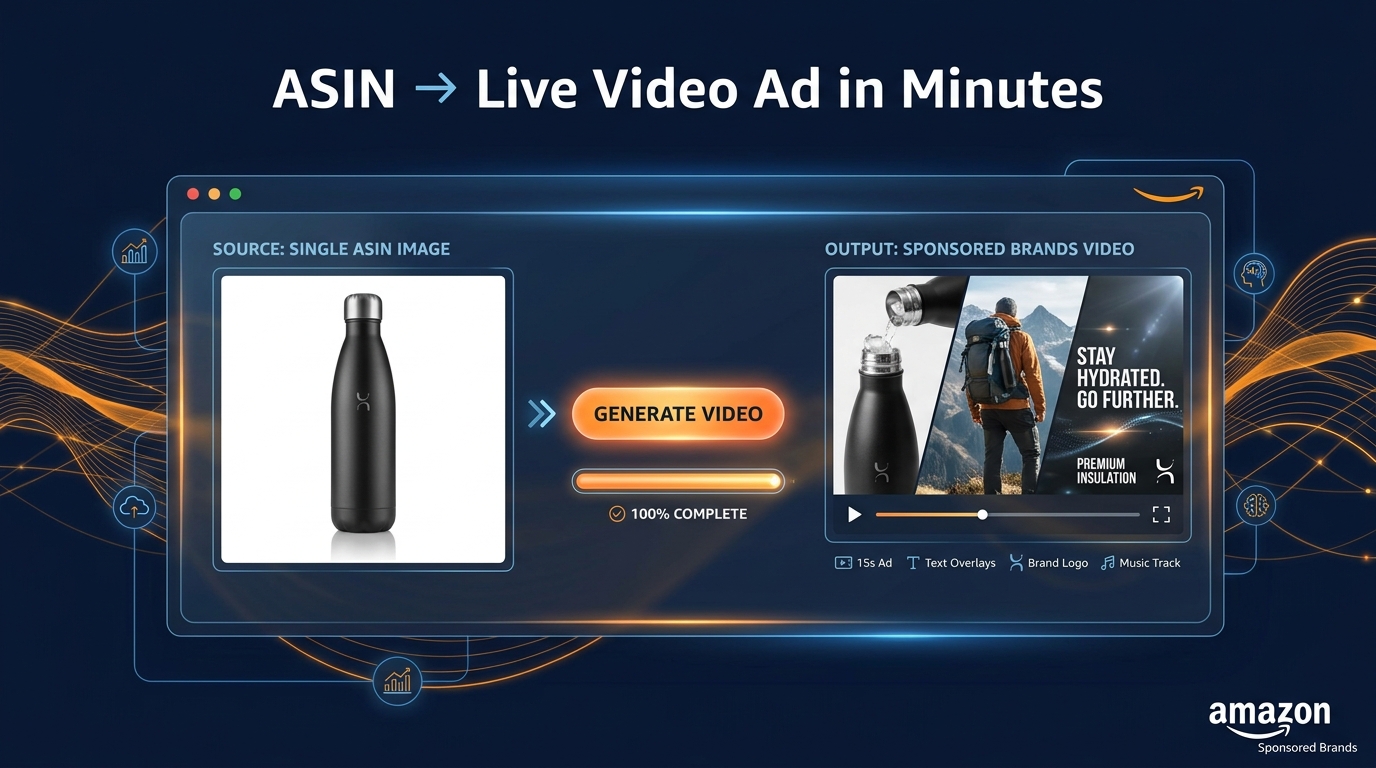
There is a moment every Amazon advertiser hits eventually. You have a great product, a healthy ad budget, and a campaigns manager who keeps saying the same thing: “We should really be running Sponsored Brands Video.” And you agree. Every benchmark you read says SBV outperforms static. The data is unambiguous. But video production is expensive, time-consuming, and your creative agency has a four-week lead time and a five-figure quote for something that might live on Amazon for 15 seconds.
That’s the wall. And for most brands, it has kept Sponsored Brands Video as a theoretical priority rather than an active strategy. You plan to do it next quarter. Then the next quarter after that.
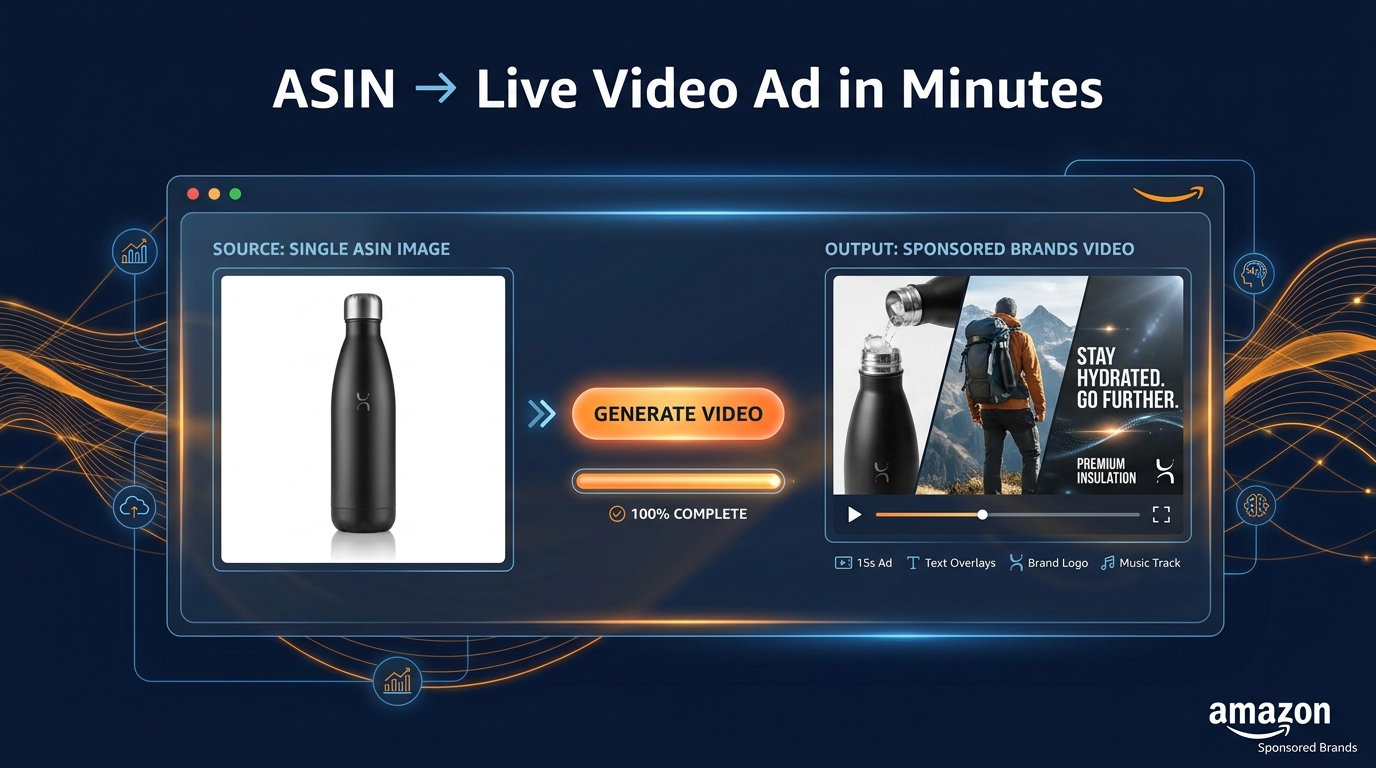
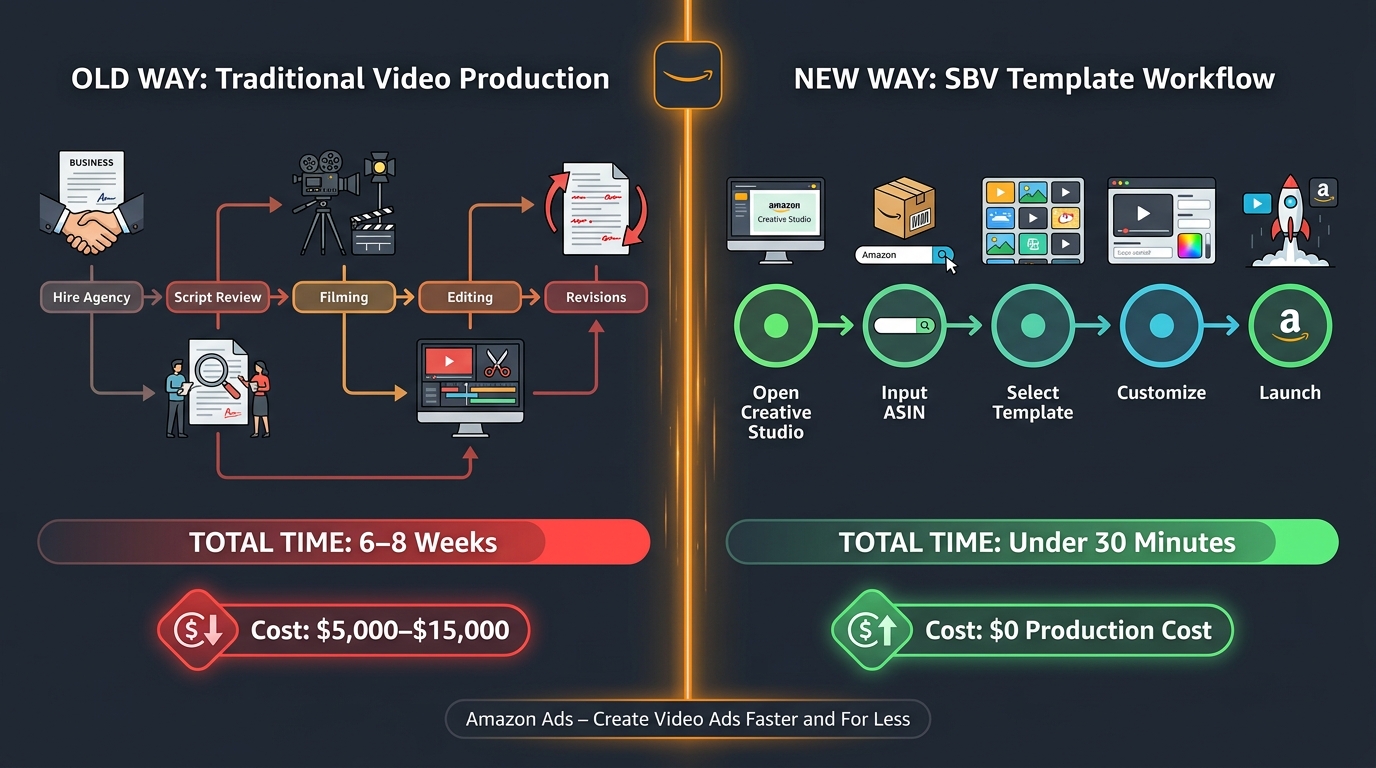
Amazon’s new SBV creative tools — most notably the Video Generator inside Creative Studio and the newer Creative Agent workflow — are designed to demolish that wall entirely. In theory, you can now go from a product ASIN to a polished, live Sponsored Brands Video ad in under 30 minutes, at zero production cost, without a camera, an editor, or an agency on the phone.
But how does it actually work? What does the template system let you control, and what does it decide for you? When should you use the Quick Video path versus the Creative Agent chat workflow? And critically — what are the performance and measurement pitfalls that brands keep tripping over after launch?
This post answers all of it, from the mechanics of the tool to the testing system you need to build around it, and the new-to-brand metrics that tell you whether any of it is actually working.
The Creative Toolkit Amazon Has Actually Built
Before getting into workflow specifics, it helps to understand what Amazon has actually shipped versus what it announced. The distinction matters because there’s been a lot of noise around AI creative tools, and not all of it maps cleanly to what’s available inside your Amazon Ads console today.
Creative Studio: The Central Hub
Creative Studio is the unified creative environment within the Amazon Ads console. Think of it as the workspace that houses all of Amazon’s ad production tools under one roof. You access it directly from the Ads console — it does not live in Seller Central. This is a deliberate design choice. Creative Studio is an advertiser tool, not a seller tool, and the distinction affects who in your organization should be managing it.
Within Creative Studio, you can produce image ads, video ads, audio ads (for streaming), and eventually Streaming TV creatives. For Sponsored Brands Video specifically, you’ll primarily be working with two sub-tools: the Video Generator and the Creative Agent.
The Video Generator: The Fast Path
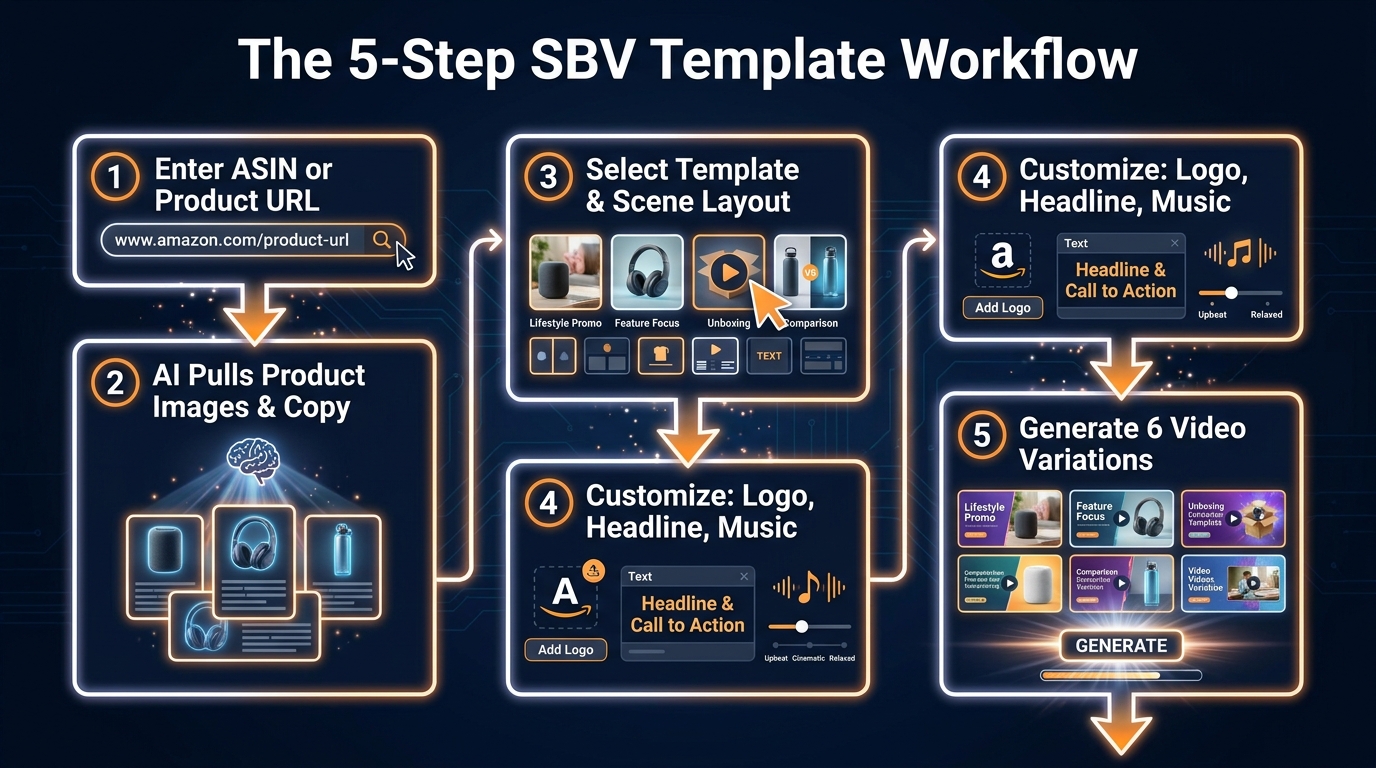
The Video Generator is the quick-production tool. It’s designed for advertisers who want to create SBV-ready assets fast, with minimal decision-making required. You input a product ASIN or product detail page URL, the system pulls your existing product images and copy, applies them to pre-built templates, and outputs six video variations in minutes. These are short — typically 6 to 15 seconds, which aligns with Amazon’s SBV spec requirements.
The Video Generator was the flagship announcement at Amazon’s unBoxed 2025 event and has been rolling out broadly since. As of 2026, it’s available to most Amazon advertisers in the US and is expanding internationally. It’s free — there’s no production charge. Amazon absorbs the generation cost as part of its advertising ecosystem.
Creative Agent: The Strategic Path
The Creative Agent is Amazon’s agentic AI creative workflow. It went into open beta on February 12, 2026, and it works differently from the Video Generator. Instead of a button-click template system, Creative Agent is a conversational interface — you open a chat window inside Creative Studio and brief the tool in natural language.
You might say something like: “I want to create a Sponsored Brands Video for my collagen supplement. The audience is women 35–55 who are new to supplements. The key message is that this is tasteless and mixes easily into any drink. The tone should be warm and approachable, not clinical.”
From that brief, Creative Agent generates a concept, a script, a storyboard, and then a finished multi-scene video. It handles voiceover scripting, music selection, text animation, and scene sequencing. The result is significantly more customized than what the Quick Video template path delivers — but it takes longer, and it requires you to engage with the creative process rather than offload it entirely to a template.
The two tools serve different use cases, and the smartest advertisers are using both in tandem rather than choosing one.
The Quick Video Template Path: A Practical Walkthrough
The fastest way to understand the Video Generator template workflow is to walk through it step by step. Here is how it actually functions in practice, not as a marketing description but as a realistic account of what you click, what you input, and what gets produced on the other side.
Step 1: Access the Video Generator from Within a Campaign
You start a new Sponsored Brands campaign in the Amazon Ads console. When you reach the creative setup stage — where you’d normally upload your video — you’ll see an option to generate a video instead of uploading one. Clicking this takes you into the Video Generator interface. This entry point is important: unlike Creative Studio, which is accessed independently, the Video Generator is embedded directly in the campaign setup flow. You don’t have to leave your campaign, produce something in a separate tool, and come back. It’s a single continuous workflow.
Step 2: Input Your ASIN
You enter the product ASIN you’re advertising. The system then reaches into the product detail page and pulls your existing assets: product images, title, bullet points, and any A+ content images that are available. This is one of the more underrated aspects of the tool. You’re not uploading anything — Amazon already has your assets from the listing. The quality of what gets generated is therefore directly tied to the quality of what’s already on your PDP. Poor main images, dark photographs, inconsistent backgrounds — all of these feed directly into the video output and show up as production problems.
This is not a bug; it’s the system behaving exactly as intended. But it catches a lot of brands off guard, especially those who haven’t invested heavily in their product photography.
Step 3: Select a Template and Scene Layout
The Video Generator offers a selection of template styles. These templates vary in scene sequencing (how many scenes, in what order), text animation style (the way headlines appear, fade, or move), background treatment, and pacing. Some templates are product-forward — the product dominates almost every scene. Others are more narrative, with more text and minimal product visibility in certain frames. The right choice depends heavily on your product category and where the viewer is in their purchase journey.
For high-consideration products where “what is this?” is still the operative question, product-forward templates perform better. For commoditized categories where the product is familiar but differentiation is the challenge, the more narrative templates give you room to make a case.
Step 4: Customize Headline, Logo, and Music
This is where advertisers have more control than many expect. The Video Generator allows you to edit the primary headline text, add your brand logo, and select background music from a licensed library. You can adjust the call to action and make basic edits to the text that appears on-screen in each scene.
What you cannot do is reorder scenes arbitrarily, add custom footage, change the animation style of a specific template element, or adjust individual scene duration. The templates are structured. You’re customizing within lanes, not redesigning the road. That’s the trade-off: speed and zero technical skill required in exchange for constrained creative control.
Step 5: Generate Six Variations and Choose
After inputting your customizations, the system generates six video variations simultaneously. These variations apply your inputs across slightly different executions — different scene emphasis, different text pacing, different background music choices within your selected style. You preview all six, choose the one that best represents the product, and proceed to attach it to your campaign.
The total elapsed time from starting the campaign to having a video attached is typically 15 to 30 minutes for a first-time user. For advertisers who’ve done it before and know the tool’s interface, it can be under 10 minutes.
Creative Agent: When the Template Path Isn’t Enough
The Quick Video template path solves the access problem for SBV. It gets brands into the format who otherwise wouldn’t be running it at all. But there’s a ceiling on what templates can do creatively, and for brands competing in crowded categories — or launching products where storytelling is genuinely part of the conversion argument — the Creative Agent workflow offers meaningfully more.
The Brief-to-Video Conversation
Creative Agent operates through a conversational interface. You open chat in Creative Studio and begin with a brief. The more specific that brief, the better the output. Vague prompts like “make me a video for my supplements” produce generic results. Detailed briefs that include audience specifics, the one or two product benefits to emphasize, the tone and register you want, and any messaging to avoid produce output that’s significantly more targeted.
A well-constructed brief for Creative Agent might include: the target customer (not just a demographic but a behavioral description — “someone who has tried other collagen supplements and been turned off by the taste”), the primary claim to lead with, the emotional register (confident, warm, clinical, playful), the call to action, and any brand voice notes. Amazon has published guidance suggesting that Creative Agent performs best when the brief treats it as you would brief a human creative director — giving it enough context to make good editorial decisions rather than trying to specify every element upfront.
Storyboard Review and Scene Editing
After processing the brief, Creative Agent doesn’t immediately produce a finished video. It first presents a storyboard — a scene-by-scene outline of what it intends to produce. This is a deliberate checkpoint. You can review the storyboard, request changes to specific scenes, adjust the script for individual frames, and redirect the concept before any rendering happens. This saves significant iteration time compared to reviewing a fully-rendered video that needs structural changes.
Once you approve the storyboard, Creative Agent renders the video. Voiceover, if included, is generated by AI voice models. Music is selected from Amazon’s licensed library based on the brief’s tonal guidance. Text animations are applied consistent with the creative direction established in the storyboard review.
Where Creative Agent Adds Real Value
The clearest use case for Creative Agent over the Quick Video template is any situation where the product is unfamiliar to the target audience, or where the differentiation story is complex enough that it needs to be told rather than implied. New-category products, products solving non-obvious problems, or brands launching into a category where they’re competing against established names with strong brand recognition — these are the contexts where a structured creative narrative matters more than fast template execution.
Creative Agent also produces assets that are inherently more differentiated from each other across an ad portfolio, which matters for testing. Template-generated videos, even across variations, share a structural sameness that can limit your ability to learn what messaging element is driving performance differences. Creative Agent output is diverse enough to test genuinely different creative approaches rather than different executions of the same approach.
What You Can and Cannot Control: The Creative Constraints Map
One of the most practical things to understand before running SBV through either of these tools is the exact boundary between what you control and what the system controls. Misunderstanding this is the source of most early frustration with the workflow.
What Advertisers Control
- Headline text: The primary claim or product descriptor that appears on-screen. This is the single highest-leverage creative element you control, and it deserves significant attention. The headline in the first two seconds of an auto-playing, muted video is effectively your entire message to anyone who doesn’t watch past the opening frame.
- Brand logo placement: You can upload and position your logo. Getting this right matters for brand recall, particularly for new-to-brand audiences encountering the brand for the first time.
- Music selection: You choose from a library of licensed tracks within a stylistic category. You cannot upload custom music. For brands with strong sonic identity this is a limitation; for most brands it’s a reasonable constraint.
- Call to action text: The CTA button or text that appears at the end of the video. The options are templates-bound (e.g., “Shop Now,” “Learn More,” “See Details”) rather than fully custom.
- ASIN selection: Which product drives the creative. For multi-product brands, this is a meaningful choice — different product images produce materially different video quality depending on photography quality.
What the System Controls
- Scene duration and pacing: Each template has fixed scene lengths. You can’t extend a scene to give a particular product feature more screen time.
- Image selection from your listing: The Video Generator picks which product images to use from your ASIN. It generally selects the main image and the first few secondary images. If your image order on the listing isn’t optimized, the video may pull images that don’t represent the product’s best angles.
- Animation style: The way text appears, transitions happen, and scenes cut is determined by the template. You’re selecting a template style, not configuring individual animation parameters.
- Video resolution and format: Amazon generates to its own SBV spec (16:9 aspect ratio, minimum 1080p, typically 1280×720 or 1920×1080). You can’t adjust aspect ratio for a different placement type within the same generation flow.
The key practical takeaway here: treat the headline as your primary creative lever. It’s what you have the most control over, it has the most direct impact on performance, and it’s the one element where small changes produce measurable differences across test variants.
The Performance Case for Video: What the Data Actually Says
The argument for Sponsored Brands Video over static Sponsored Brands has been made many times, but it’s worth grounding it in the specific numbers that are actually available — rather than the vague “video performs better” claims that appear in most generic coverage of the topic.
Click-Through Rate Differentials
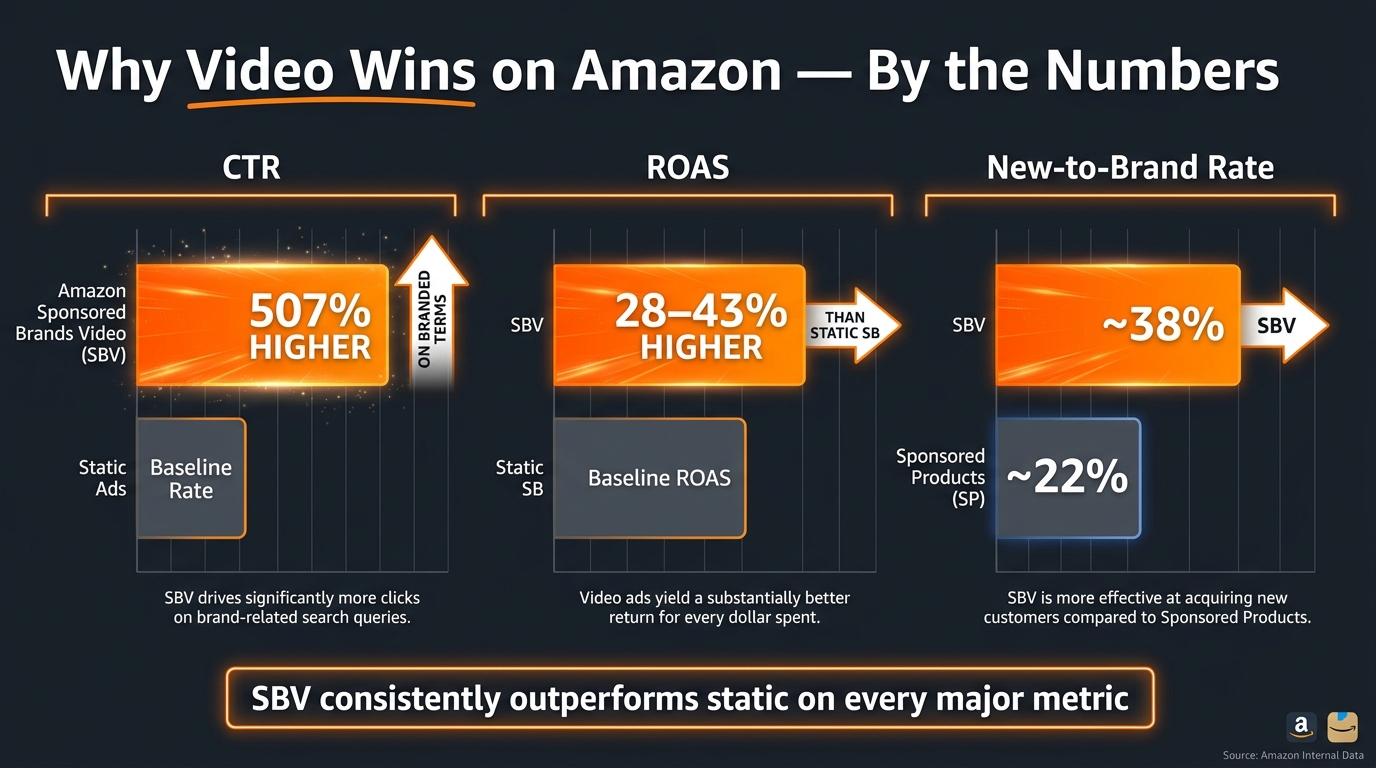
Sponsored Brands Video consistently delivers higher CTR than static Sponsored Brands across both branded and non-branded search. On branded keyword searches, SBV has been cited at approximately 507% higher CTR than other Sponsored Brands ad types — a number that, while striking, makes intuitive sense. A searcher looking for your brand by name, encountering a video auto-playing your product, is in an extremely receptive moment. The video reinforces the brand recognition that already drove the search.
On non-branded keyword searches, the CTR advantage is cited at approximately 703% higher — even more significant, because these are discovery-mode shoppers who had no prior intent to find you specifically. Stopping their scroll with a video format rather than a static image is a meaningful edge in a genuinely competitive context.
ROAS and Conversion Rate
SBV’s ROAS advantage over static Sponsored Brands is documented at approximately 28–43% higher, depending on category and campaign structure, based on Amazon’s own published benchmark data cited by third-party research firms including Perpetua. The average ROAS for a Sponsored Brands campaign across all formats sits around $5.66 with an ACOS of roughly 17.68% per Amazon’s own benchmark materials — but SBV-specifically tends to land at the higher end of that range when campaigns are properly structured.
It’s worth noting what drives this ROAS premium. SBV doesn’t inherently produce better conversions on the click — the conversion rate difference comes in part from the quality of the audience clicking. A shopper who watches 10+ seconds of an auto-playing video and then clicks has demonstrated significantly higher intent than one who clicks a static image. The self-selection of engaged viewers is built into the format.
New-to-Brand Acquisition
The most compelling data point for brands investing in SBV is the new-to-brand customer rate. Sponsored Brands Video campaigns have shown a new-to-brand purchase rate of approximately 38%, compared to roughly 22% for Sponsored Products. This gap — nearly 16 percentage points — is not incidental. It reflects that SBV does actual brand awareness work in a way that Sponsored Products fundamentally cannot. SP ads appear to people already searching; SBV stops people who weren’t necessarily looking and makes them look. That’s a different customer acquisition mechanic entirely, and it justifies running SBV as part of a customer acquisition strategy rather than purely as a bottom-funnel conversion tool.
Where SBV Ads Actually Appear — And Why Placement Matters
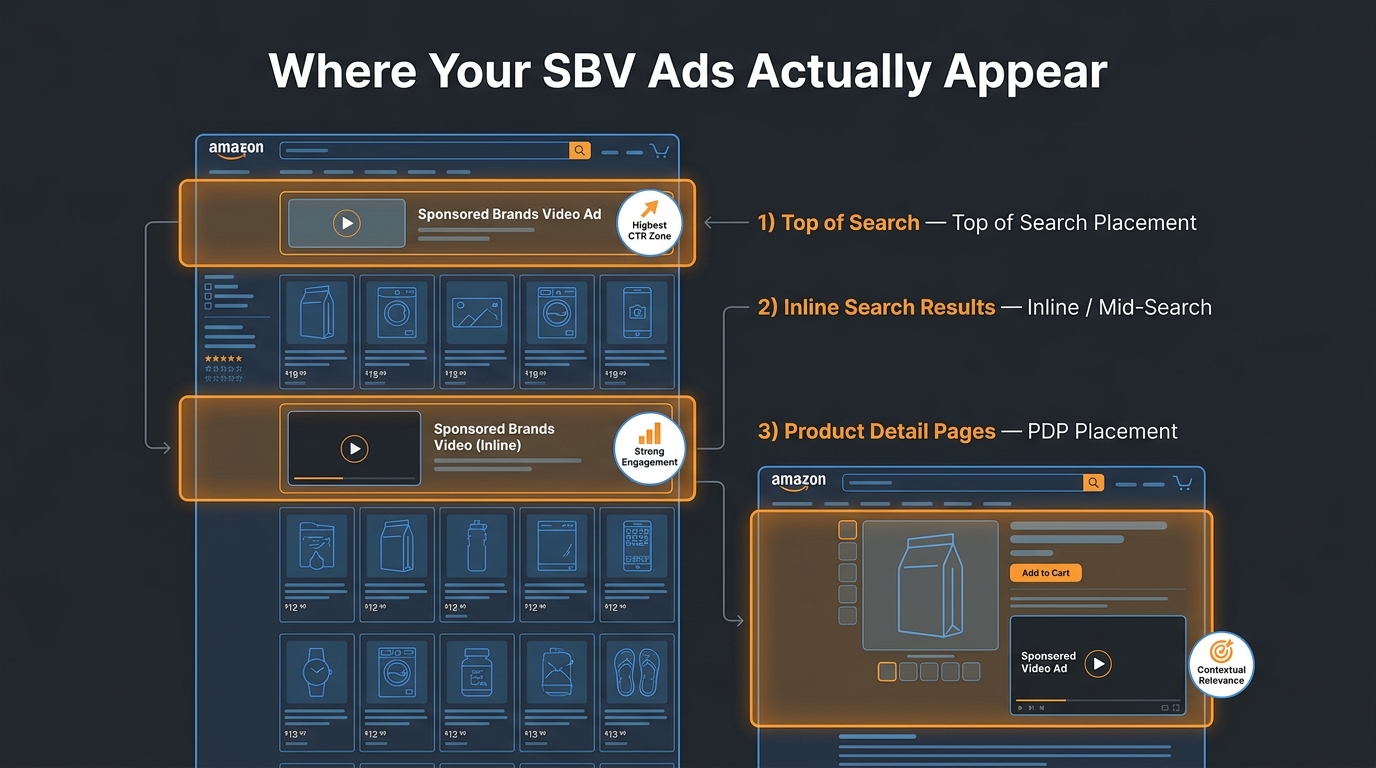
Amazon has been actively expanding the placement inventory for Sponsored Brands Video, and understanding the placement landscape affects how you structure your creative. The video that works at the top of search results does not necessarily work the same way on a product detail page.
Top of Search: The Premium Placement
The top of search placement — the very first position on a search results page, above any organic listings — is the highest-visibility placement in the SBV inventory. It auto-plays as soon as it’s 50% visible on screen, and because it’s the first thing the searcher sees, the first 2–3 seconds of your video are doing an enormous amount of work. This placement rewards videos that lead with the product identity immediately. The viewer has no context about your brand; they just entered a search query and the first thing they see is your video. The creative has to orient them instantly.
Videos that open with brand-forward content (a logo, a tagline, a lifestyle scene that doesn’t show the product quickly) tend to underperform at this placement compared to videos that start with the product itself in the first frame. The Top of Search viewer is in discovery mode and impatient.
Inline Search Results: The Volume Placement
Inline search placements appear between rows of organic product listings as the shopper scrolls. This placement captures a viewer who has already begun their search journey — they’ve seen multiple products and are evaluating. Creative that works here tends to be more differentiating: leading with a specific product advantage, addressing a concern (“mixes clear — no clumping”), or calling out a comparison point. The viewer is already in comparison mode; meet them there.
Product Detail Pages: The Consideration Placement
PDP placement is the most recently expanded placement type for SBV, and it operates differently from search placements. The viewer is already on a competitor’s product page. They’ve shown purchase intent for the category; they just haven’t committed to a specific product. SBV appearing here is competing for a high-intent shopper in the middle of a consideration phase. Creative for PDP placement benefits from being benefit-dense — making a specific, credible product claim that gives the viewer a reason to click away from the page they’re already on.
Amazon lets you apply placement bid adjustments — modifiers that increase or decrease how much you bid on each placement type. Use placement reporting to understand which placement is delivering your strongest ROAS and adjust bids accordingly rather than leaving them flat across placements.
Building a Creative Testing System Around SBV Templates
The biggest operational advantage of the new SBV template workflow isn’t the zero cost or the speed — it’s the volume. When producing a single SBV used to cost $5,000–$15,000 and take six weeks, most brands ran one video per campaign and hoped it worked. When producing six variations takes 15 minutes and costs nothing, you can test aggressively. But testing aggressively without a system produces noise, not signal.

The One-Variable Rule
The core discipline of SBV creative testing is changing one variable at a time. If you generate four video variations with different headlines, different template styles, different music, and different CTAs simultaneously, you cannot determine what drove any performance difference between them. You’ll know which video won; you won’t know why. And why is what lets you compound learnings across future creative cycles.
For your first testing sprint, choose the variable you’re least certain about and hold everything else constant. For most brands new to SBV, that variable is the headline. Generate six videos with the same template and music, varying only the headline text across them. After sufficient data has accumulated — typically at least 500 impressions per variant, though more is better — pause the underperformers and move the winning headline into the next round of testing where you vary the template style or CTA.
Campaign Structure for Testing
The cleanest testing structure is to run each video variation as a separate ad within the same campaign. This keeps targeting, bidding, and placement identical across all variants, ensuring that performance differences are attributable to the creative rather than any campaign-level variable. Amazon’s campaign manager allows multiple ad creatives within a single Sponsored Brands campaign; use this feature deliberately rather than running separate campaigns per variant, which introduces budget allocation and bid competitiveness variables that contaminate the creative signal.
Setting a Decision Timeline
Many brands make the mistake of pausing underperforming ads too early — pulling a video after 200 impressions when the data is still statistically noisy. The right decision timeline depends on your daily ad spend and how quickly you accumulate impressions. A campaign spending $100/day will reach meaningful sample sizes faster than one spending $20/day. As a general operating rule: don’t make pause decisions in the first 7 days of a new creative test regardless of what the numbers appear to be saying. Amazon’s ad delivery system needs time to calibrate placement and bidding for new creative; early results often don’t reflect steady-state performance.
What to Learn, Not Just What to Test
Each testing round should be generating a transferable insight. “Test C won” is not an insight. “Test C won, and its headline led with a specific product claim (‘melts in 45 seconds’) rather than a brand benefit (‘premium quality’), which suggests our audience at this placement responds to functional specificity over aspiration” — that’s an insight. Document every round at this level and you’ll accumulate a creative intelligence asset that pays dividends well beyond any individual campaign.
The Common Template Mistakes That Kill Performance Before a Click
The availability of fast, low-cost SBV production creates a new failure mode: brands are now making creative errors at scale, quickly, where before those errors were rare because production was prohibitively expensive. Understanding the most common template mistakes helps you avoid distributing bad creative efficiently.
Relying on Product Images That Weren’t Built for Video
The Video Generator pulls from your existing product images. These images were almost certainly photographed for a static context — designed to look good as a thumbnail in a listing grid, on a white background, isolated and clear. When those images are animated and sequenced in a 15-second video, the result often looks like a slideshow rather than a video. It’s technically compliant, but it lacks the visual momentum that makes video effective.
The solution is to ensure your product image library includes at least a few lifestyle images — products in use, in context, against non-white backgrounds — before generating template videos. These images translate into far more compelling video frames than isolated white-background hero shots. This is a listing preparation task, not a video production task, and many brands overlook it entirely when they think about SBV readiness.
Writing Headlines That Are Too Long
The headline in an SBV plays over a moving image, often against a background that isn’t perfectly controlled for legibility. Long headlines — anything over 7–8 words — become difficult to read in the screen time available and compete with the visual for attention. The best-performing SBV headlines are short, specific, and instantly comprehensible. “Zero Sugar. Full Flavor.” beats “Our award-winning sports drink now comes in sugar-free formulations.” The former lands in one second. The latter requires three seconds of reading that most viewers won’t give you.
Using the Same Video Everywhere
Because production is now cheap, there’s no reason to run a single SBV across all placements, all keyword groups, and all stages of your funnel. A brand-awareness-mode video (looser, lifestyle-forward, emotional) is not the right creative for a shopping-mode placement against high-intent keywords. A direct-response video with a tight product claim and a “Shop Now” CTA is not the right creative for a PDP placement where the shopper needs more convincing. The template workflow makes it cheap to produce placement-specific and intent-specific creative; use that capability.
Not Accounting for the Muted Autoplay Context
SBV ads autoplay muted. The viewer has not chosen to engage with your ad; it simply started playing in their field of view. Every creative element that assumes audio — voiceover, sound effects, music that creates emotional context — is invisible to the majority of initial viewers. Your video must communicate its primary message through visuals and text alone. If the headline disappears and only the product remains on screen, can the viewer still understand what this product does and why they might want it? If the answer is no, the creative needs revision.
Measuring SBV Template ROI: The Metrics That Actually Matter
The new SBV creative tools solve a production problem, but they create a measurement responsibility. When creative was expensive, brands were careful about what they produced and watched performance obsessively. When creative is free and fast, it’s easy to keep generating videos without establishing a clear success definition. Don’t fall into this trap.
New-to-Brand Metrics Are Non-Negotiable
Amazon now exposes new-to-brand (NTB) metrics directly in Sponsored Brands reporting. These include: new-to-brand orders, new-to-brand order rate, new-to-brand sales, and new-to-brand orders as a percentage of total orders. These metrics use a 12-month lookback window — a customer counts as new-to-brand if they haven’t purchased from your brand in the prior 12 months.
For any SBV campaign, NTB rate should be a primary KPI alongside ROAS. A campaign delivering strong ROAS but 100% to existing customers is doing remarketing work, not customer acquisition. That’s still valuable — but if your goal is growth, it’s a different strategic contribution than you think you’re making. SBV running a 38% NTB rate is growing your customer base; a campaign running 12% NTB is largely selling to people who would have bought from you anyway.
Branded Search Lift as a Halo Signal
One of the most underutilized measurements for SBV is tracking branded search volume before and after campaign launch. When SBV campaigns generate genuine brand awareness among new audiences, branded search volume typically rises — people who encountered the brand through video then search directly for it. This is a real signal that’s systematically excluded from ROAS calculations, because the branded SP campaign that captures that search gets credit rather than the SBV that created the intent.
Monitor your branded search impression share and branded keyword conversion rates in parallel with SBV campaign performance. If both rise in the weeks after an SBV scale-up, you’re capturing brand equity that ROAS doesn’t show you. This matters enormously for justifying SBV budget at the senior level, where ROAS-only storytelling undervalues the format’s contribution.
Video Engagement Metrics Inside Creative Studio
Amazon provides video-specific performance metrics within Creative Studio, including video completion rate (what percentage of viewers watched to the end), average watch time, and impression-to-click ratios. These are leading indicators of creative quality. A video with a 12% completion rate is losing most viewers before they’ve received your message. A video with a 55% completion rate is generating extended brand exposure across every impression.
Benchmarks vary by category and placement, but as a general orientation: below 20% completion rate suggests a first-scene problem (the opening frame isn’t holding attention); between 20–40% suggests a mid-video pacing or relevance problem; above 40% is solid and suggests the creative is genuinely engaging the audience it reaches.
What’s Coming: The SBV Creative Roadmap
Amazon’s investment in AI-assisted creative tools is accelerating, and the current Video Generator and Creative Agent workflows are early iterations rather than finished products. Understanding the direction of travel helps you build a creative infrastructure now that will adapt well to capabilities arriving in the next 6–18 months.
Vertical Video for Mobile-First Placements
The current SBV spec is 16:9 horizontal, which aligns with desktop viewing and traditional video production. But Amazon’s mobile traffic has been growing consistently, and social-platform mobile behavior — where vertical video is the default — is reshaping viewer expectations. Amazon has been signaling a move toward supporting vertical (9:16) video formats for mobile placements, similar to how Meta and TikTok have built mobile-native ad environments. Brands that begin thinking about their SBV creative in a mobile-first vertical format now will have an advantage when Amazon officially opens those placements.
ASIN-to-Video Personalization at Scale
The next maturity stage for the Video Generator is likely dynamic creative optimization at the ASIN level — where large catalog brands can generate video assets for dozens or hundreds of products simultaneously, with product-specific assets auto-generated from each ASIN’s unique images and copy. For brands with broad catalogs, this would represent a step-change in SBV coverage that currently requires significant manual work. Early agentic features in Creative Agent already hint at this direction.
Streaming TV and the Full-Funnel Creative Stack
Amazon’s broader creative strategy, as outlined at unBoxed 2025, is a full-funnel video stack that runs from Streaming TV and Prime Video ads (upper funnel, large-format) down through SBV (mid-funnel, search intent) to Sponsored Products Video (lower funnel, conversion intent). Creative Studio is being built to serve all of these formats from a single creative workspace. Brands that get efficient with SBV template production now are building institutional knowledge that will transfer directly to the broader video formats as Amazon’s programmatic video inventory expands.
From Tool to Strategy: Putting the Workflow to Work
The most important reframe for brands approaching the new SBV creative tools is this: the bottleneck has moved. It used to be production — getting video made was the hard part. That bottleneck is now effectively gone. The new bottleneck is strategy: knowing which products to prioritize, which creative angles to test, which placements to target, and how to read the measurement data to make better decisions in the next cycle.
Brands that treat the Video Generator as a “set it and generate” solution will produce video ads they’re mildly satisfied with and wonder why performance doesn’t match the benchmarks. Brands that use the speed of the template workflow to run structured, systematic creative tests will accumulate learnings that compound over time — getting better at SBV with every iteration in a way that was simply not possible when each video cost $10,000 to produce.
The tools are genuinely useful. But they’re the beginning of the work, not the end of it.
Conclusion: 5 Actionable Takeaways
Amazon’s new SBV creative tools represent a real shift in who can run Sponsored Brands Video effectively. The production barrier — the one that kept most small and mid-size brands from competing in the format — is functionally gone. But removing a barrier doesn’t guarantee results. Here is what to actually do with this new capability:
- Audit your product images before touching Creative Studio. The Video Generator is only as good as the assets on your listing. Lifestyle images, in-use photography, and diverse angles produce far better video output than white-background hero shots. Fix the inputs before generating the output.
- Use the Quick Video template path for testing volume and Creative Agent for narrative-driven launch creative. They’re complementary tools, not competing ones. Let the template path generate your testing variants cheaply; use Creative Agent when you need a truly differentiated hero creative for a major campaign.
- Make the headline your primary creative variable. It’s what you control most, it’s what viewers read first, and it’s where small changes produce measurable performance differences. Test it systematically and document what you learn.
- Add new-to-brand metrics to every SBV campaign report. ROAS alone misrepresents SBV’s contribution. NTB rate tells you whether the campaign is growing your customer base or recycling it. Both matter; neither tells the whole story without the other.
- Start building the habit now. The brands that will have durable advantage in SBV over the next 12–24 months are the ones building creative testing data, NTB benchmarks, and placement performance intelligence today. The tools are early. The learning curve is real. Get on it ahead of your competitors rather than after them.
The template workflow makes SBV accessible. What you do with that access is still a strategic choice. Make it deliberately.
Leave a Reply