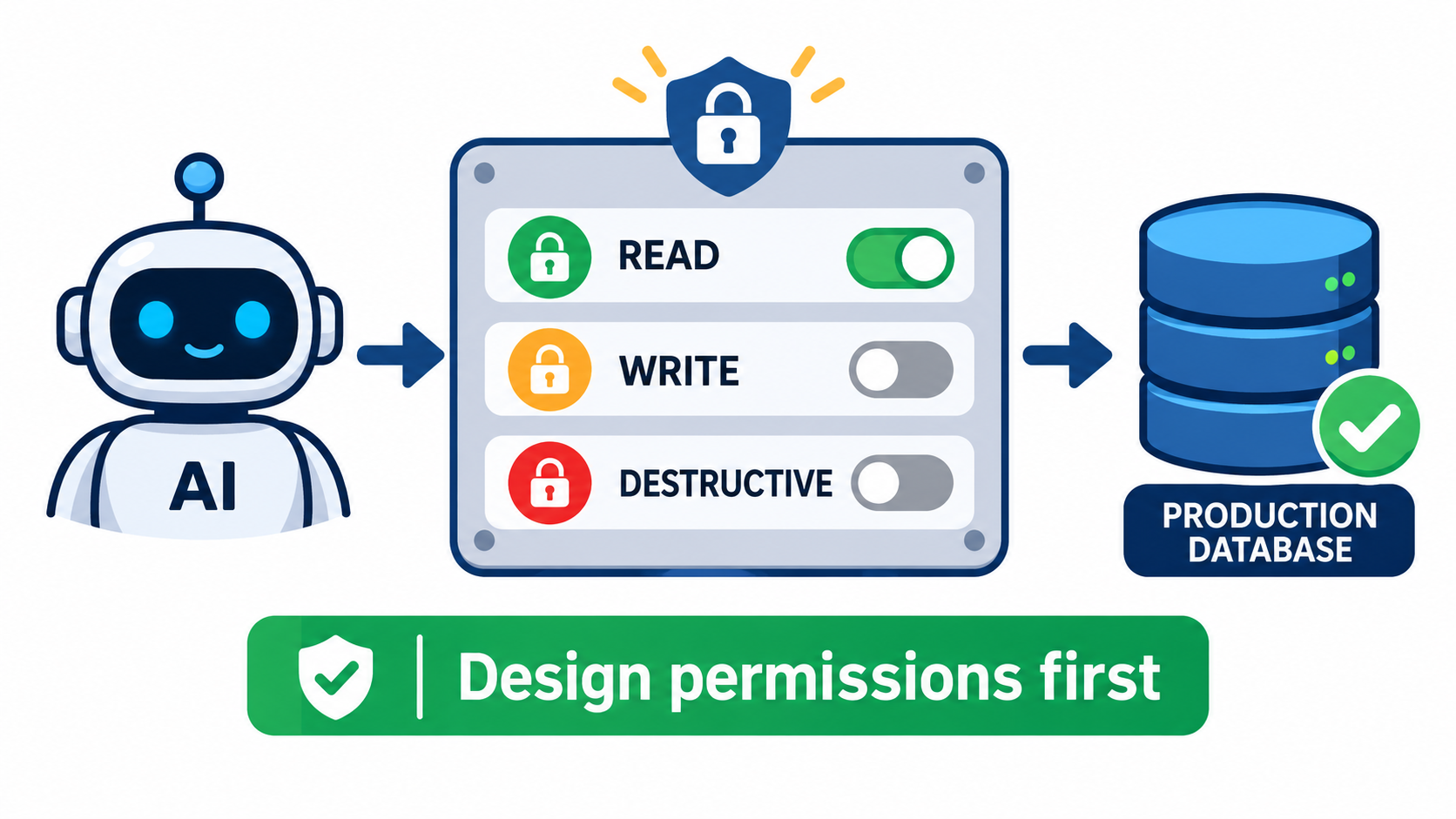
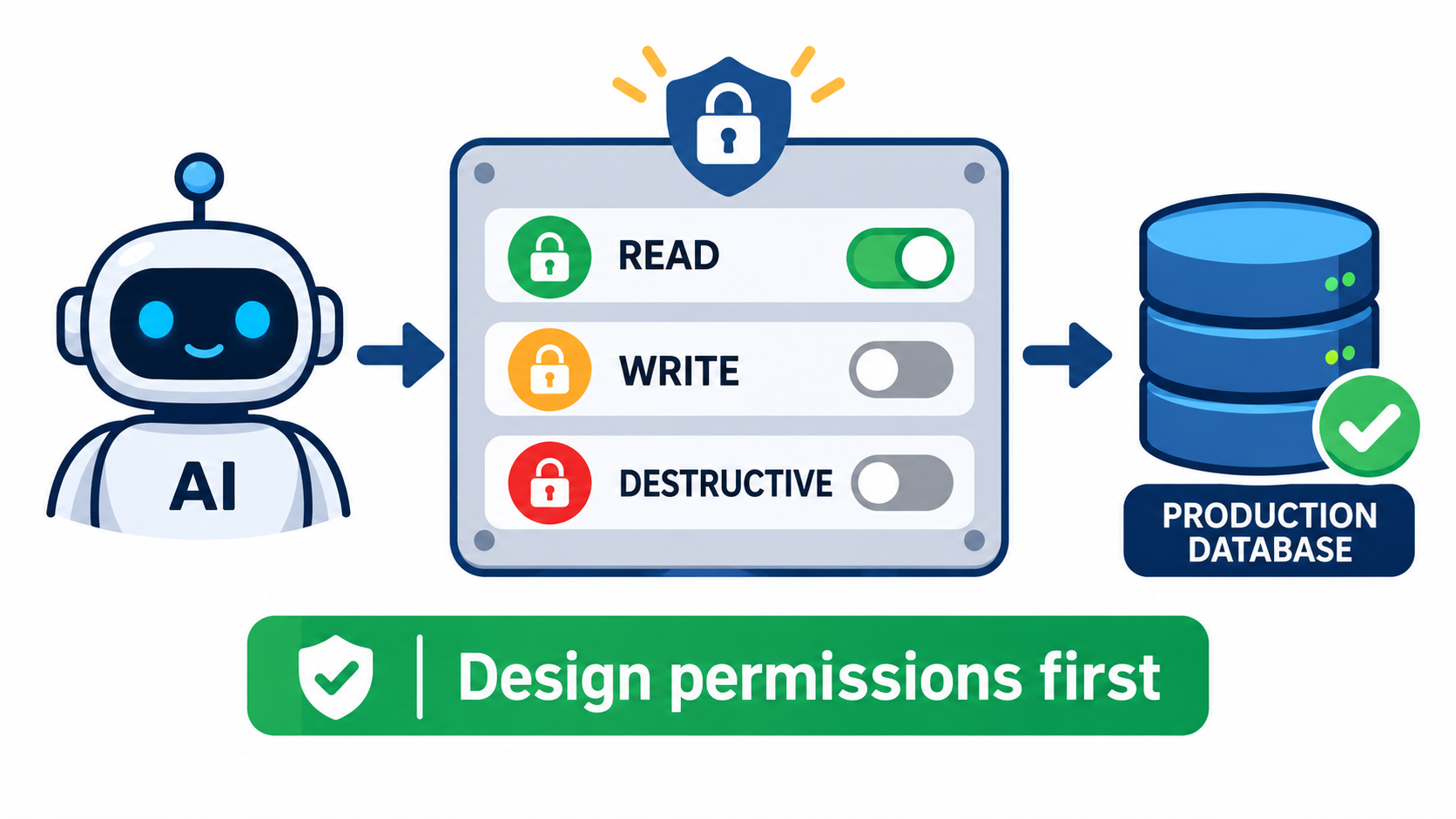
The usual MCP rollout goes like this. A developer connects an agent to a database, a ticketing system or a code repository. It works in a demo, so someone says “let’s point it at production.” Nobody has decided what the agent is allowed to do. The permission model is whatever the first server author happened to ship.
That order is backwards. The Model Context Protocol standardizes how agents discover and call tools. It does not decide which tools an agent should have, on which resources, under whose identity, or with what approval. Those decisions belong to you, and they are much cheaper to make before launch than after an incident.
This article treats permission design as an architecture task. It covers what the protocol does and does not enforce, why “least capability” should come before “least privilege,” how to split authorization into two gates, and how to roll out access in stages. It ends with a checklist you can run before any agent gets near production data.
What MCP Actually Enforces (and What It Leaves to You)
MCP is a connection standard. Recent security analyses describe the same pattern: authentication, approvals and guardrails are largely left to the people deploying it. One government-linked assessment noted that authorization is optional in the protocol, role-based access exchange isn’t supported, and many implementations lack authentication or granular create/read/update/delete permissions.
The authorization spec is real, but narrow
The current MCP authorization model is built on OAuth 2.1. It centers on PKCE with S256, protected-resource metadata, RFC 8707 resource indicators, issuer validation and audience-bound tokens. Token passthrough, where a server forwards a client’s token to an upstream API, is prohibited. Where a proxy uses a static client ID, the spec requires fresh consent for each dynamically registered client.
These controls answer specific questions. Was this token issued for this server? Was it intercepted? Is the client talking to the authorization server it thinks it is? They reduce token replay, mix-up attacks and confused-deputy problems.
What it does not answer
OAuth scopes mostly authorize access to a server. They do not describe individual tools, arguments or side effects. The protocol does not standardize per-tool authorization, so gateways and server authors commonly build it themselves. Expert commentary converges on the same point: OAuth 2.1 is necessary but not sufficient. It does not stop a malicious tool description, a poisoned server or an agent that is talked into misusing a legitimate permission.
In short, the spec secures the pipe. You still have to design what flows through it.
The Adoption Gap: Why This Is Urgent
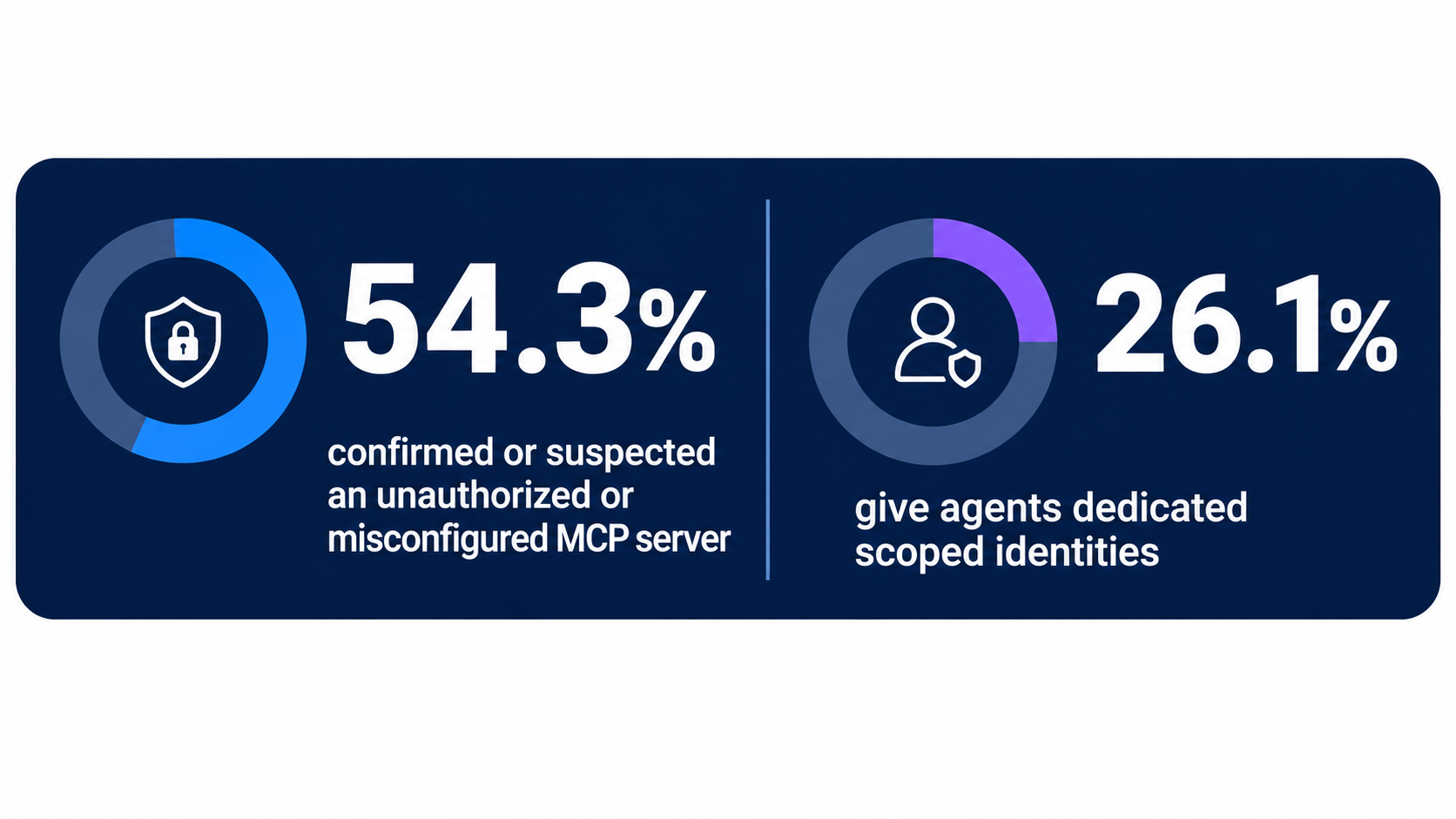
A 2026 survey cited in recent research found that only 26.1% of organizations give AI agents dedicated identities with scoped permissions. Another 24.3% use dedicated identities but with broad permissions. And 54.3% confirmed or suspected an unauthorized, shadow or misconfigured MCP server in their environment.
Treat those figures as one survey’s snapshot, not a universal constant. The direction is still clear. Agents are being connected faster than identity and permission practices are being built around them. The same research reports MCP-related infrastructure appearing in a growing share of customer environments over a matter of months.
Why agents change the risk profile
A human with broad database access is constrained by habit, attention and job role. An agent is constrained only by what its tools allow and what its prompt says. Prompts are not a security boundary. Text from a web page, an email or a ticket can steer an agent, which is why prompt injection and tool poisoning matter when tools are powerful.
The result is a connected risk chain: injected instructions, a tool with excess reach, a credential with excess scope, and no log that tells you what happened. Break any link and the chain gets much weaker. Permission design breaks several at once.
Least Capability Before Least Privilege
Cloud Security Alliance commentary frames exposing an MCP tool as a privilege change. Its recommendation is “least capability” before least privilege: shrink what the agent can even attempt, then constrain what each attempt can touch.
Remove capabilities instead of forbidding them
The cheapest guardrail is a tool that does not exist. If an agent never needs to delete records, do not expose a delete tool and tell the model not to use it. Prompt-level restrictions fail under pressure. A removed capability cannot be argued with.
Prefer narrow, purpose-built tools
Compare two designs for a support agent:
- Broad:
run_sql(query)against the customer database. - Narrow:
get_order_status(order_id)andissue_refund(order_id, amount)with a refund cap.
The broad tool makes every table, column and statement part of the attack surface. The narrow tools make the agent’s job legible, testable and loggable. Narrow tools also make authorization simple because each one maps to a clear action.
Reduce discovery
Agents see the tools you advertise. Large tool lists increase both confusion and exposure. Give each agent only the tools for its job, and scope discovery per role, not per server. An agent that cannot list a tool is far less likely to be tricked into calling it.
Two Gates: Capability Access and Action Authorization
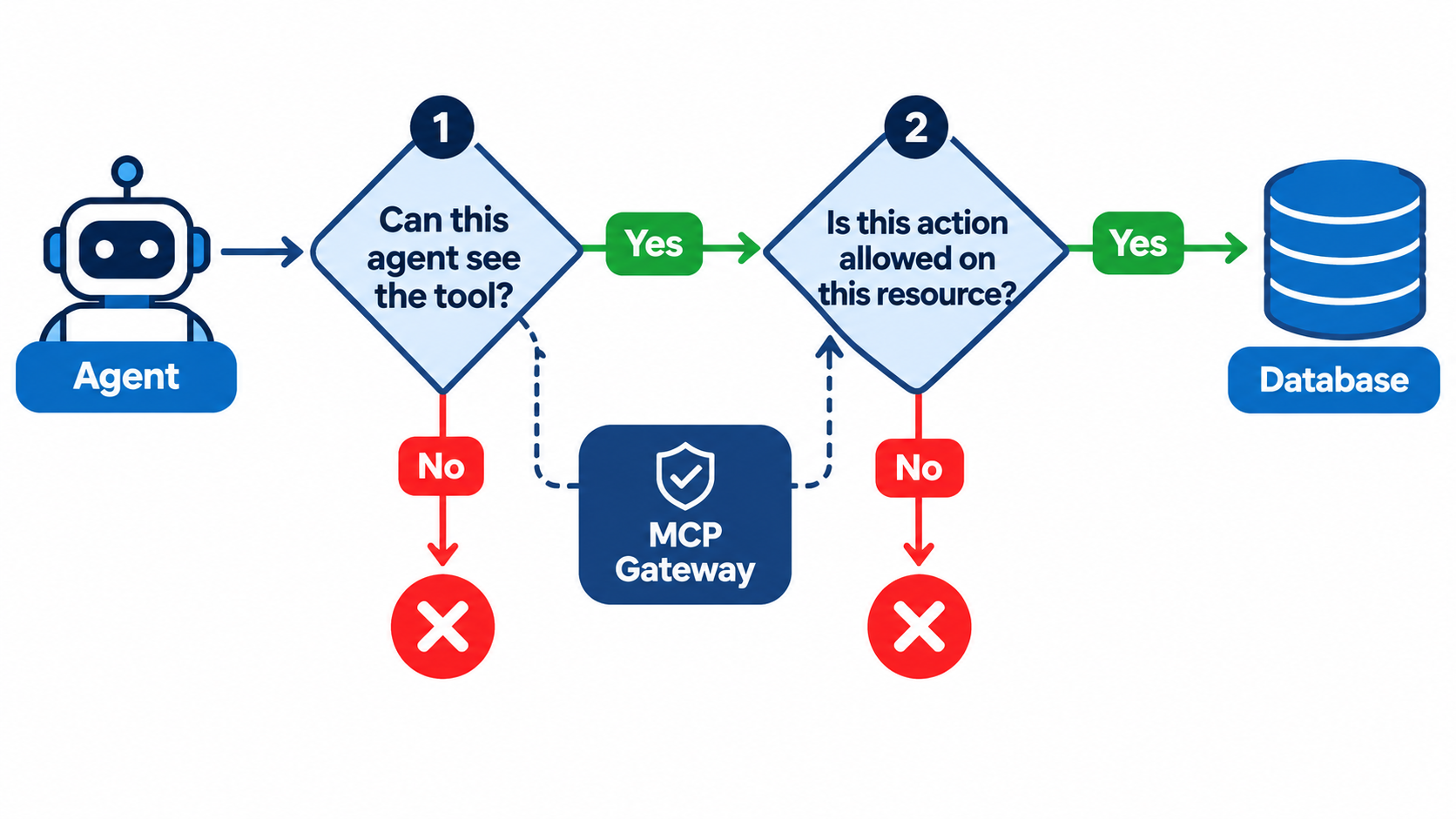
An emerging pattern separates two questions that teams often blur together.
- Gate one: may this agent use this capability at all? This is coarse. It is about the agent’s role, environment and the tool catalog it can see.
- Gate two: is this specific action allowed on this specific resource, for this identity, in this context? This is fine-grained. It checks arguments, targets, amounts and conditions.
“The agent can use the file tool” is not an authorization decision. “The agent can read files under /reports/q3/ on behalf of this user” is.
Where to enforce gate two
Because the protocol doesn’t standardize per-tool authorization, enforcement usually lands in one of three places: inside the MCP server, in a gateway in front of servers, or in the downstream system’s own policy engine. The last is the strongest when available. AWS guidance, for example, suggests read-only access wherever possible and restricting writes to specific resources, using IAM conditions to limit buckets, paths and tables. The database or cloud service enforces the limit even if the MCP server has a bug.
Defense in depth
Use more than one layer. A gateway allow-list stops an unapproved tool. Downstream IAM stops an approved tool from touching the wrong table. An approval rule stops a valid but high-impact action from running unattended. Each layer is imperfect, and together they cover each other’s gaps.
Identity: Give Every Agent Its Own
The survey numbers above point to the most common failure: agents running under a shared service account or a developer’s personal token. Then every log line says the same name, and every agent has the union of everyone’s access.
Dedicated agent identities
Create a distinct identity per agent or per agent role. Attach scoped permissions to that identity, and make it revocable on its own. When something goes wrong, you can disable one agent without taking down your whole automation estate.
Acting on behalf of a user
Many agents act for a person. Then there are two identities in play: the agent and the user. The safe default is that the agent can never exceed the user’s own rights, and may be allowed less. Audience-bound tokens and the ban on token passthrough exist partly for this reason. A token minted for the MCP server should not be replayed against the upstream API. The server should obtain its own downstream credential with appropriate limits.
Short-lived credentials
Prefer short-lived, rotating credentials and brokered secrets over long-lived keys stored in agent config. Keeping secrets out of the model’s context also means a prompt injection cannot read them.
Scopes in Practice: Start Low, Elevate on Demand
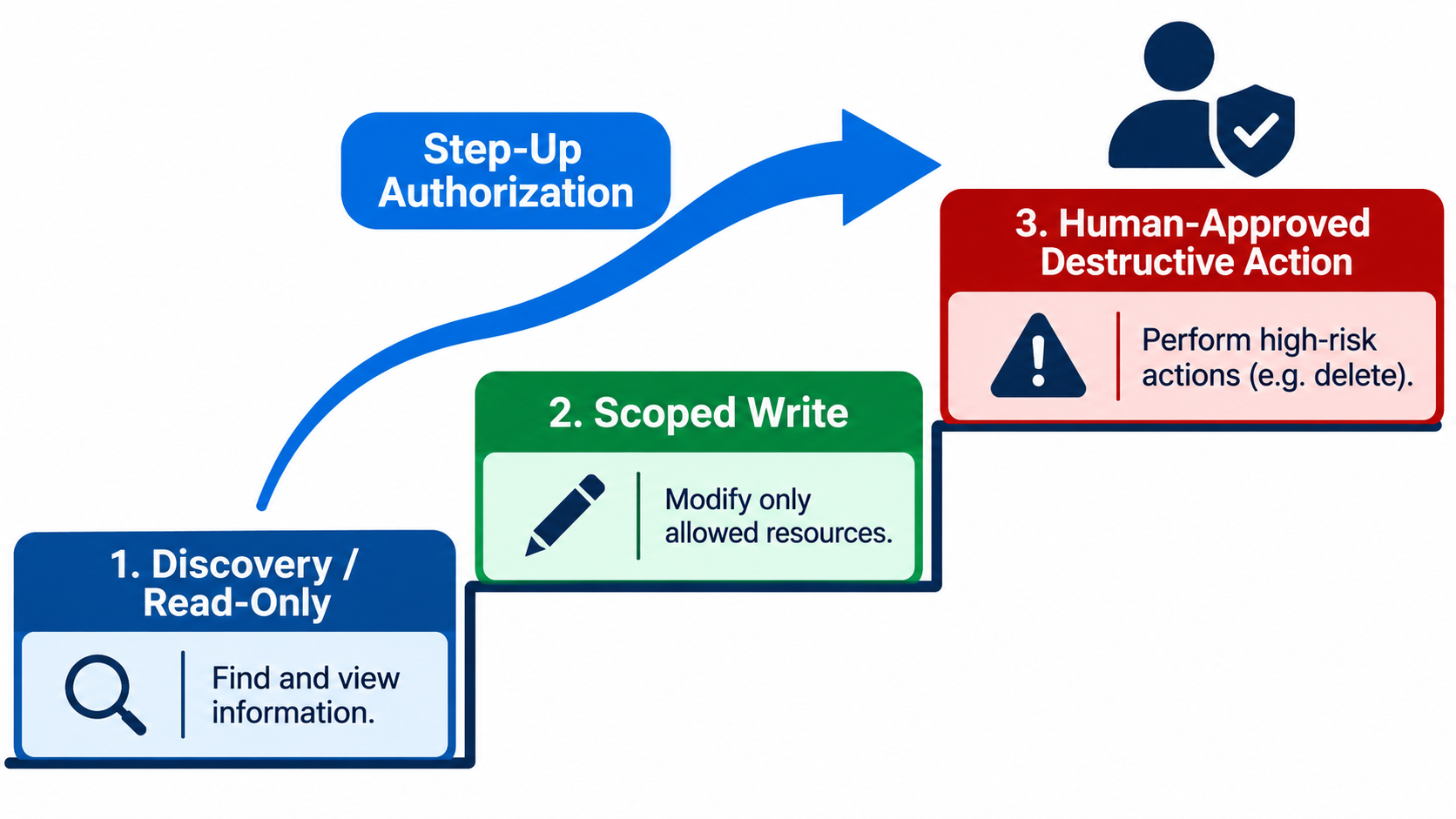
Current MCP guidance says clients should request only the scopes needed for the operation in front of them. Servers should advertise required scopes through the WWW-Authenticate challenge. The recommended shape is to begin with low-risk discovery and read access, then add permissions progressively through step-up authorization when a privileged tool is invoked.
A three-step ladder
- Tier 1, discovery and read: granted by default. Low blast radius, high usefulness.
- Tier 2, scoped write: granted for named resources, with limits such as amount caps or allowed paths.
- Tier 3, destructive or irreversible: requires explicit approval, from a human or a policy engine, each time.
Watch scope creep
Under the spec, clients must union previously requested scopes with scopes from new challenges, and servers must handle scope hierarchies. That makes it easy for an agent’s effective access to grow quietly over a long session. Guidance also stresses rejecting silent scope expansion at token refresh. Review how your clients and servers behave here, and test it.
Validate the server too
Confused-deputy risk can run the other way. A typosquatted or malicious MCP server can publish altered authorization metadata so a client requests legitimate scopes for the wrong resource. Pin the servers your agents may connect to, verify exact redirect URIs, and check token audiences.
Designing Tools as Permission Boundaries
Because scopes are coarse, your tool design carries much of the authorization load. Use these principles when you write or review a tool.
One tool, one verb, one resource type
A tool called manage_customer that can read, update and delete is three tools in a trench coat. Split it. Each can then get its own approval rule and its own log entry.
Constrain arguments in the schema
Use enums, maximums and patterns in the input schema, and validate server-side as well. A refund tool should reject amounts above its cap no matter what the model asks for. Treat every argument as untrusted input, since it came from a model that may have read hostile text.
Make side effects explicit
Mark tools as read-only, write or destructive in your own metadata, and route on that. Offer dry-run modes for risky actions so an agent, or a reviewer, can see the effect before committing.
Treat tool descriptions as code
Tool poisoning works by hiding instructions in descriptions or metadata. Version tool definitions, review changes, and alert if a description changes after approval.
Runtime Isolation and Egress Controls
Production guidance from several vendors, including DigitalOcean, combines scoped credentials with approval rules, brokered secrets, isolated runtimes and egress allow-lists. The reasoning is simple: assume some tool will misbehave and limit what it can reach.
Sandbox the servers
Run MCP servers in isolated containers or sandboxes with minimal filesystem and network access. A local server running with a developer’s full shell permissions is a different risk from one in a locked container.
Allow-list outbound destinations
Data exfiltration usually needs an outbound path. A domain allow-list on the runtime means that even an injected agent cannot send data to an arbitrary host. Pair it with input validation and secret rotation.
Separate environments
Use different servers and credentials for development, staging and production. An agent that is allowed to experiment should never share a credential with the one that touches live data.
Approvals That People Will Not Rubber-Stamp
Human approval is a useful gate until it becomes noise. If every call asks for confirmation, people click through without reading.
Approve by risk, not by volume
Auto-allow Tier 1 reads. Require approval for Tier 3 actions only, and make the prompt concrete: which resource, what change, what amount, and which agent asked. Where possible show a diff or a dry-run result.
Policy approvals for the routine
Some approvals can be automated by policy: refunds under a threshold, writes to a staging path, changes to tickets the agent opened. Reserve humans for the cases a policy can’t judge.
Bind approvals to the action
An approval should cover exactly one action with exactly those parameters. A blanket “yes” for the session turns into silent scope expansion.
Find the Shadow Servers
Given the survey’s finding that more than half of organizations confirmed or suspected an unauthorized or misconfigured MCP server, inventory is a permission control in its own right.
Build a registry
Keep a list of approved MCP servers, owners, versions, tool catalogs and the scopes each requires. Have clients connect only to registry entries, enforced at the gateway or through managed client configuration.
Scan for the rest
Look for MCP endpoints and local server configs across developer machines, CI and cloud accounts. Unknown servers are rarely malicious, but they are usually unauthenticated and over-permissioned, since someone wired them up for a quick test.
Audit Logs and a Kill Switch
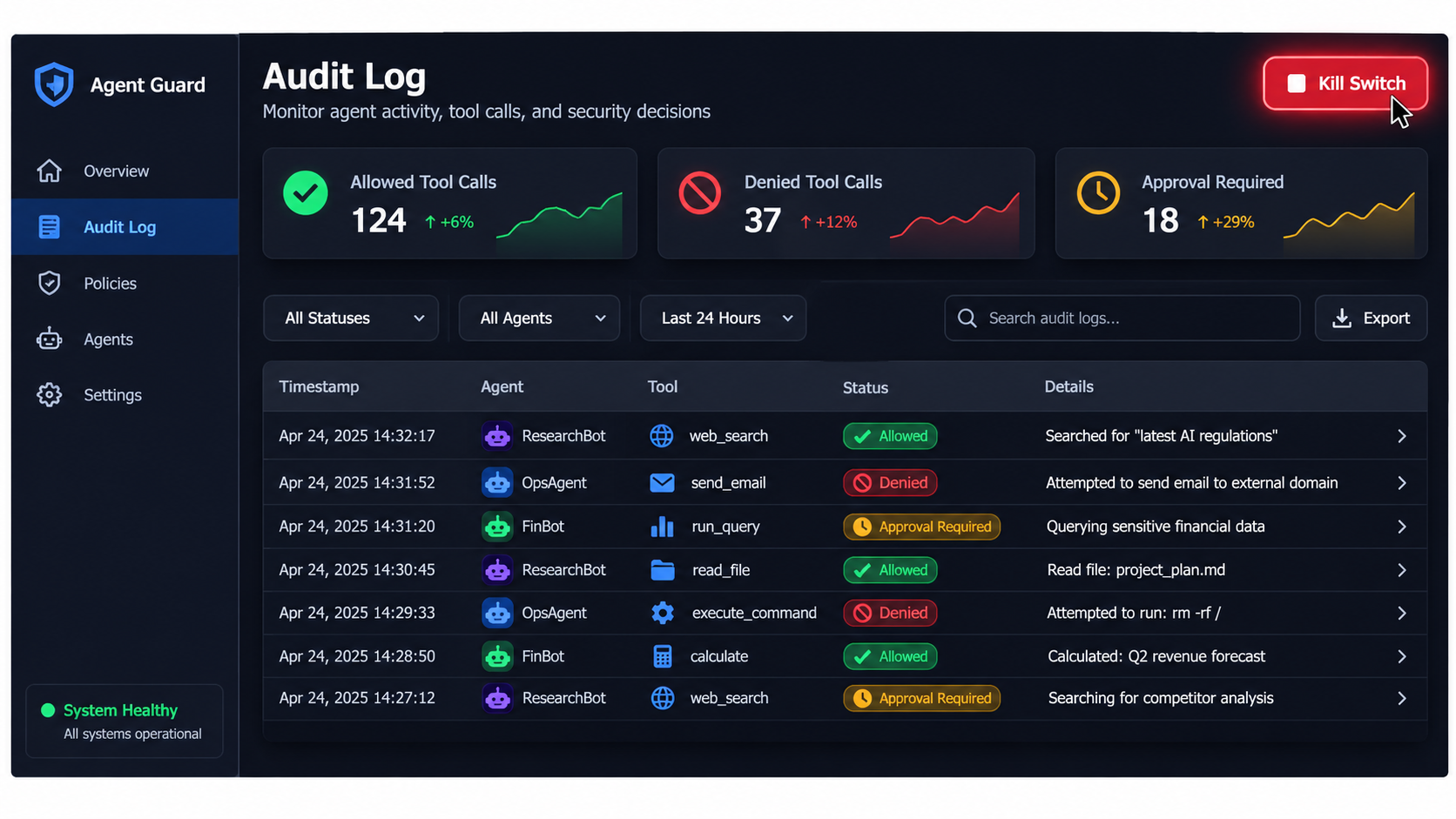
Permissions you can’t observe are permissions you can’t tune. Log every tool call with the agent identity, the on-behalf-of user, tool name, arguments, the authorization decision and the result.
Log denials as signal
Denied calls tell you where the agent’s behavior and your policy disagree. A spike in denials may mean a poor policy, a confused agent or an injection attempt. Each is worth knowing about.
Alert on shape changes
Watch for new tools appearing, tool descriptions changing, unusual call volume, access to new resources and sudden scope elevation. Continuous monitoring is a recurring recommendation in 2026 guidance for good reason.
Have a kill switch
You should be able to revoke one agent’s identity, disable one tool, or cut one server in minutes, without a deploy. Test it before you need it.
A Staged Rollout Plan
Stage 1: read-only in a sandbox
Connect the agent to a copy of the data with read-only tools. Observe the calls it makes and compare them with the tool list you thought it needed.
Stage 2: read-only in production
Same tools, real data, a dedicated identity, full logging. Prune anything unused.
Stage 3: narrow writes
Add purpose-built write tools with argument limits, resource-level conditions and policy approvals. Keep a human in the loop for anything irreversible.
Stage 4: widen with evidence
Expand scope only when logs show the agent behaves within bounds, and write down who approved each expansion.
Pre-Production Checklist
- Each agent has its own identity with scoped, short-lived credentials.
- The tool catalog is the minimum the job needs; destructive tools are absent unless required.
- Tools are narrow, with schema limits and server-side validation.
- Gate one (capability) and gate two (resource-level action) are both enforced, ideally with downstream IAM as the final check.
- Tokens are audience-bound, passthrough is off, and scope expansion at refresh is rejected.
- Servers run in isolation with egress allow-lists and brokered secrets.
- High-impact actions need specific, action-bound approval.
- A registry lists approved servers, and scans look for unapproved ones.
- Every call is logged, alerts exist, and a kill switch has been tested.
Conclusion: Decide Before You Connect
MCP makes it easy to connect agents to real systems. It does not make it safe. The protocol’s authorization work is useful, with OAuth 2.1, audience-bound tokens and step-up challenges, but scopes stay coarse and per-tool authorization is yours to build.
The practical order of operations is clear. Remove capabilities first. Give each agent its own identity. Enforce two gates, with the downstream system as the last word. Start with read access and elevate on demand. Log everything and keep a way to stop it.
Teams that do this work before launch spend a few days on design. Teams that skip it tend to spend weeks on forensics. Pick which one you want to be before the agent touches production.
Leave a Reply