Most Shopify stores run on a quiet layer of automation. Inventory syncs, order routing, review requests, ERP connectors, reporting pipelines and AI agents all call the Shopify Admin API many times a day. Nobody thinks about them until they stop.
Shopify is now requiring IP allowlisting for apps that use the Admin API. Most coverage is written for app developers. This post is written for the other side: the merchant or operations lead who has to find out which of their tools are ready, which are not, and what to do about it.
The dates below come from Shopify’s published guidance as summarized in recent reporting. Confirm them against Shopify’s developer documentation before you plan around them, because Shopify has already expanded the scope once.
What Shopify Is Actually Requiring
An IP allowlist restricts Admin API requests made with an app’s tokens to a list of approved network locations. A request from anywhere else is rejected with an HTTP 403. The goal is to limit the damage if an access token leaks, since a stolen token is useless from an unapproved network.
What the allowlist can contain
- Public IP addresses and CIDR ranges, up to 250 entries.
- Up to 10 ASNs (autonomous system numbers), which identify a hosting provider’s network.
- Optional country restrictions that apply to ASN traffic.
The ASN option matters because serverless and dynamic hosting platforms do not give a fixed outbound IP. Developers on those platforms can allow the provider’s network instead.
Which requests are covered
The rule applies to GraphQL and REST Admin API requests made with app tokens. It does not change how your customers browse your storefront. It affects the server-to-server traffic that your apps generate.
The Dates That Matter
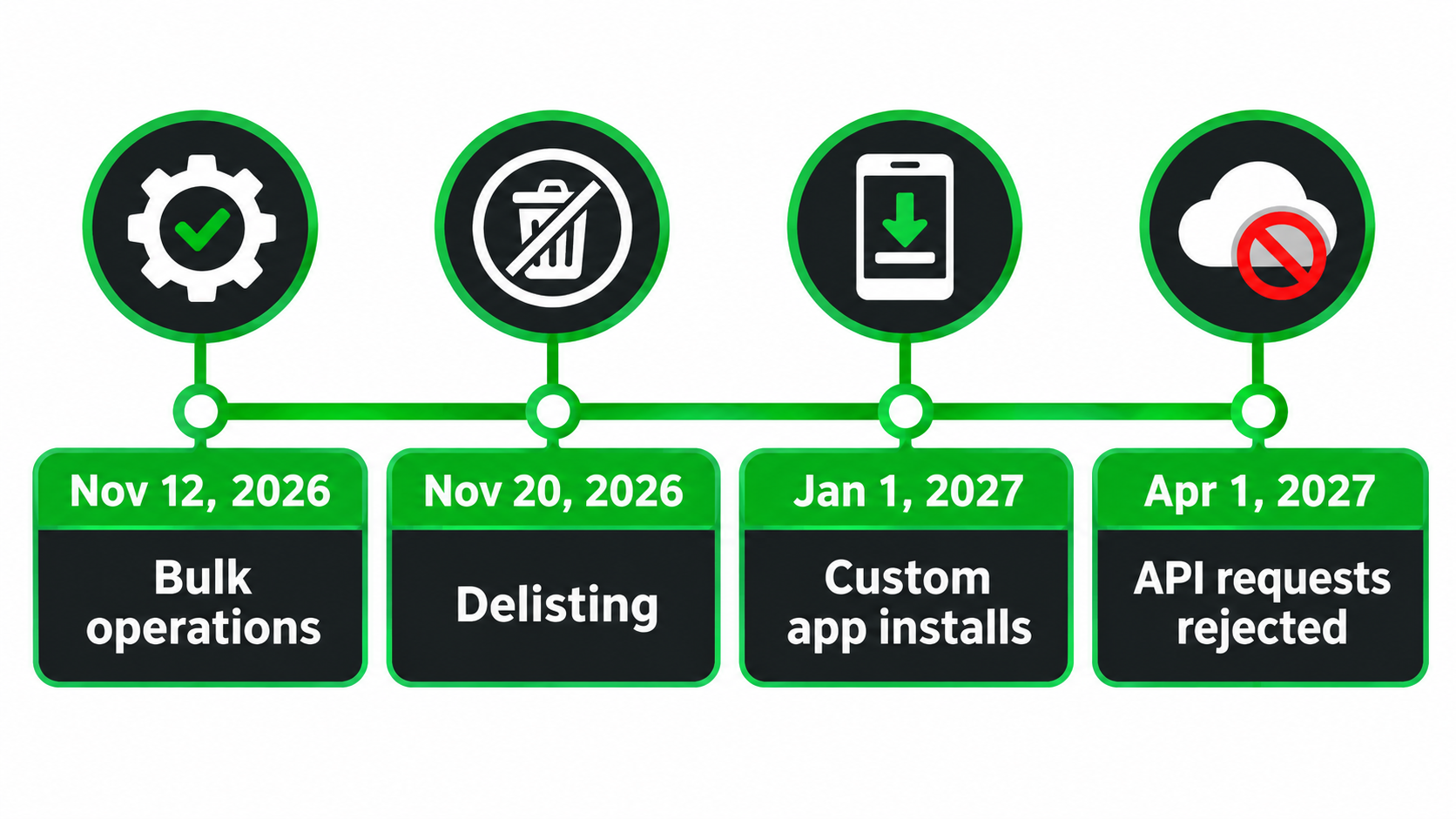
- November 12, 2026: public apps that use bulk queries or bulk mutations need an allowlist. Bulk operations from apps without one are blocked.
- November 20, 2026 (11:59 p.m. ET): all other public apps using the Admin API need an allowlist. Noncompliant apps are delisted and blocked from new installs.
- November 20, 2026: custom apps installed outside their owning organization need an allowlist for new installs.
- January 1, 2027: the same custom apps need one for existing installs.
- April 1, 2027: Shopify plans to begin rejecting Admin API requests from noncompliant public apps, including on existing installs.
Internal-only apps and apps a merchant created for their own store are reported as excluded. Check that exemption against your own setup rather than assuming it.
Why Merchants Should Care, Not Just Developers
If you installed a public app from the App Store, compliance is mostly the vendor’s job. But the consequences land on you. Existing installs keep working for a while, which creates a false sense of safety. The failure arrives later, and it may arrive in the form of silent 403 errors inside a workflow nobody watches.
The bulk-operation date deserves special attention. Bulk calls are what heavy catalog syncs, large exports and reporting tools tend to use. These are the jobs that run at night and fail without anyone noticing until a report is empty or stock counts drift.
There is also a vendor-risk angle. An app that cannot meet the deadline will be delisted. That tells you something about how actively it is maintained.
Step 1: Build an Inventory of Everything That Touches the API
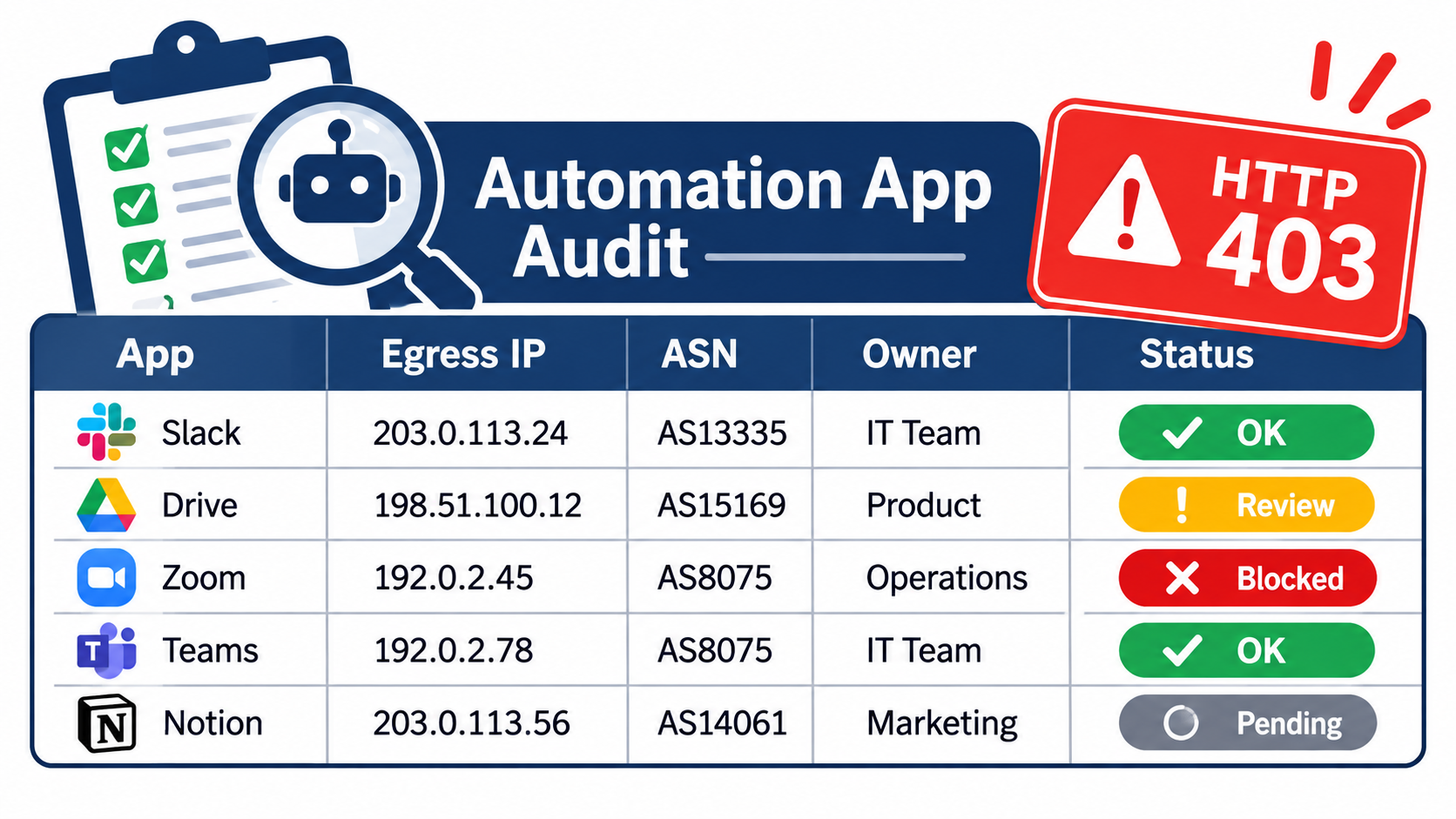
Start with the admin’s installed apps list, then go beyond it. Several kinds of integration do not look like apps at first glance.
Places to look
- The installed apps page and any apps under development or custom apps in the store settings.
- No-code platforms such as workflow tools, where a connector holds an API token on your behalf.
- Scripts run by a freelancer or agency, often on a personal server or a scheduled cloud job.
- ERP, warehouse, accounting and helpdesk integrations.
- AI agents or assistants that were given store access.
Fields to record
For each item note the owner, the business process it supports, the vendor contact, whether it is public, custom or internal, and whether it uses bulk operations. Add a column for criticality. A review-request app and an inventory sync are not the same level of risk.
Step 2: Classify Each App by Type
The rules differ by app type, so classification drives the whole audit.
- Public App Store apps: the vendor must configure the allowlist. You ask for confirmation.
- Custom apps built by an agency for several clients or installed across organizations: subject to the November 20 and January 1 dates reported above.
- Apps you created for your own store: reported as exempt, but still worth securing on your own terms.
- Third-party automation platforms: the platform may be the public app, so its egress network is what gets allowed.
When unsure, ask the vendor in writing which category applies and what they plan to do.
Step 3: Ask Vendors the Right Questions
A short, specific email gets better answers than a general query about security. Send the same questions to every vendor.
- Have you configured an IP allowlist for your Shopify app, and on what date?
- Do you use bulk queries or bulk mutations? If so, are you ready for November 12, 2026?
- Does your infrastructure use fixed outbound IPs, or do you rely on ASNs and country restrictions?
- What happens to my store’s sync jobs if a request is rejected, and how will I be alerted?
- Will anything change on my side, such as a reinstall or a permission re-approval?
Treat vague replies as a finding. A vendor that cannot answer these by late summer is a vendor worth watching.
Step 4: Handle the Apps You Own or Your Agency Built
This is where the real work sits. If you run scripts or custom integrations, you need to know where their requests originate.
Fixed infrastructure
If your server has a stable public IP, list it, or the CIDR range from your hosting provider. Remember the 250-entry limit, and keep a record of who owns each address.
Serverless and dynamic infrastructure
Function platforms and autoscaling clusters rotate outbound addresses. This is the case Shopify’s ASN support addresses. You can allow your provider’s ASN, and add a country restriction to narrow it. Be aware that an ASN is broader than a single IP, so it permits more than a fixed address would. The trade-off is weaker restriction in exchange for reliability.
Consider a static egress
If tighter control matters, route outbound Shopify calls through a NAT gateway or proxy with a fixed address. That gives you a single IP to allow and a clear place to log traffic.
Watch for hidden origins
Staging environments, a developer’s laptop and a backup job on another cloud all produce requests from different places. List them or consciously decide they should fail.
Step 5: Test Before the Enforcement Dates
Do not discover the problem in production. Test in a development store where possible and check what a rejected request looks like in your logs.
- Confirm your integration surfaces 403 errors rather than swallowing them.
- Run a bulk operation from the approved network and from an unapproved one to confirm both behave as expected.
- Check retry logic. A job that retries forever against a 403 will waste time and hide the cause.
Also check that your workflow tools alert a person when a run fails. Many default to quiet failure.
Step 6: Add Monitoring That Catches the Silent Failures
The worst outcome is not an outage you notice. It is an automation that stopped three weeks ago. Add simple checks that test business outcomes rather than technical states.
- A daily comparison of inventory counts between Shopify and your warehouse system.
- An alert if order export files are empty or missing.
- A weekly check that scheduled reports contain data from the previous day.
- Error-rate alerts on 403 responses from the API.
Step 7: Decide What to Do With Laggards
For each app that cannot confirm readiness, choose a path early.
- Wait with a deadline: acceptable for low-criticality tools. Set a date and a replacement shortlist.
- Replace: for critical processes, begin evaluating alternatives now. Migrations take longer than expected.
- Retire: an audit often reveals apps nobody uses. Removing them also reduces your security exposure.
The delisting rule means new installs of a noncompliant public app will be blocked, so a fallback tool in the App Store may disappear before you need it.
A Realistic Timeline for Your Team
- This month: complete the inventory and classification.
- Next 30 days: send vendor questions and gather written responses.
- Before November 12: verify bulk-operation tools, since these face the earliest block.
- Before November 20: finalize allowlists on anything you own, and confirm custom app status.
- Before January 1, 2027: cover existing installs of custom apps.
- Before April 1, 2027: confirm all remaining public apps are compliant, and remove those that are not.
Common Mistakes to Avoid
- Assuming that because existing installs keep working, nothing needs doing.
- Forgetting no-code connectors that hold tokens.
- Allowing an overly broad range just to make errors go away.
- Leaving staging and developer machines off the list, then wondering why tests fail.
- Keeping the allowlist in one person’s head instead of a shared document.
Key Takeaways
- Shopify’s allowlist rule limits where Admin API requests with app tokens can come from; other origins get a 403.
- Reported dates: November 12, 2026 for bulk operations, November 20 for other public apps, January 1, 2027 for existing custom app installs, April 1, 2027 for rejecting noncompliant requests.
- Merchants should inventory every integration, classify it, and get written vendor confirmation.
- Own your scripts: list fixed IPs, or use ASNs for dynamic hosting with the trade-offs in mind.
- Monitor business outcomes so a silent failure does not sit unnoticed.
The deadline is a security measure, but it doubles as a free audit prompt. Stores that use it to clean up their app stack will end up with fewer tools, clearer ownership and better visibility. Verify the final details in Shopify’s developer documentation, since the requirements have already been adjusted once.
Leave a Reply