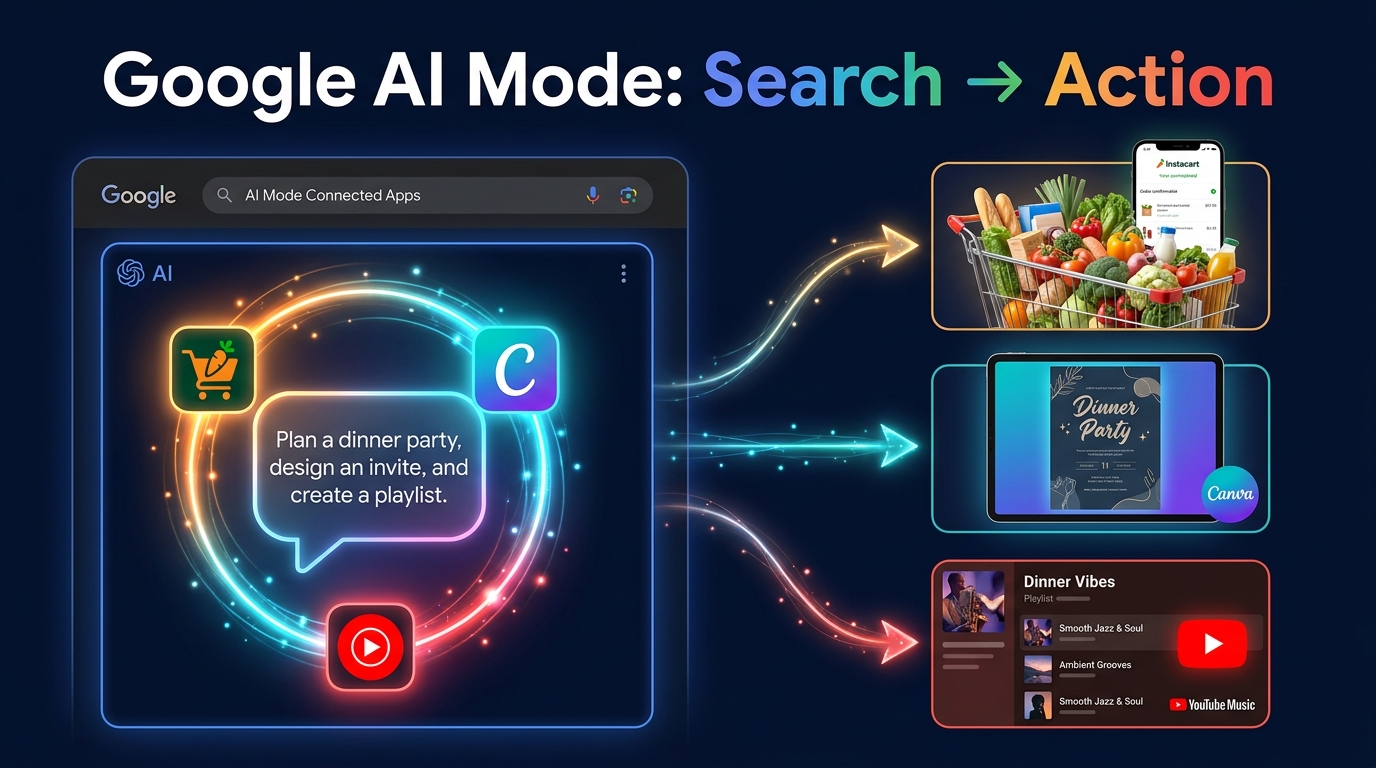
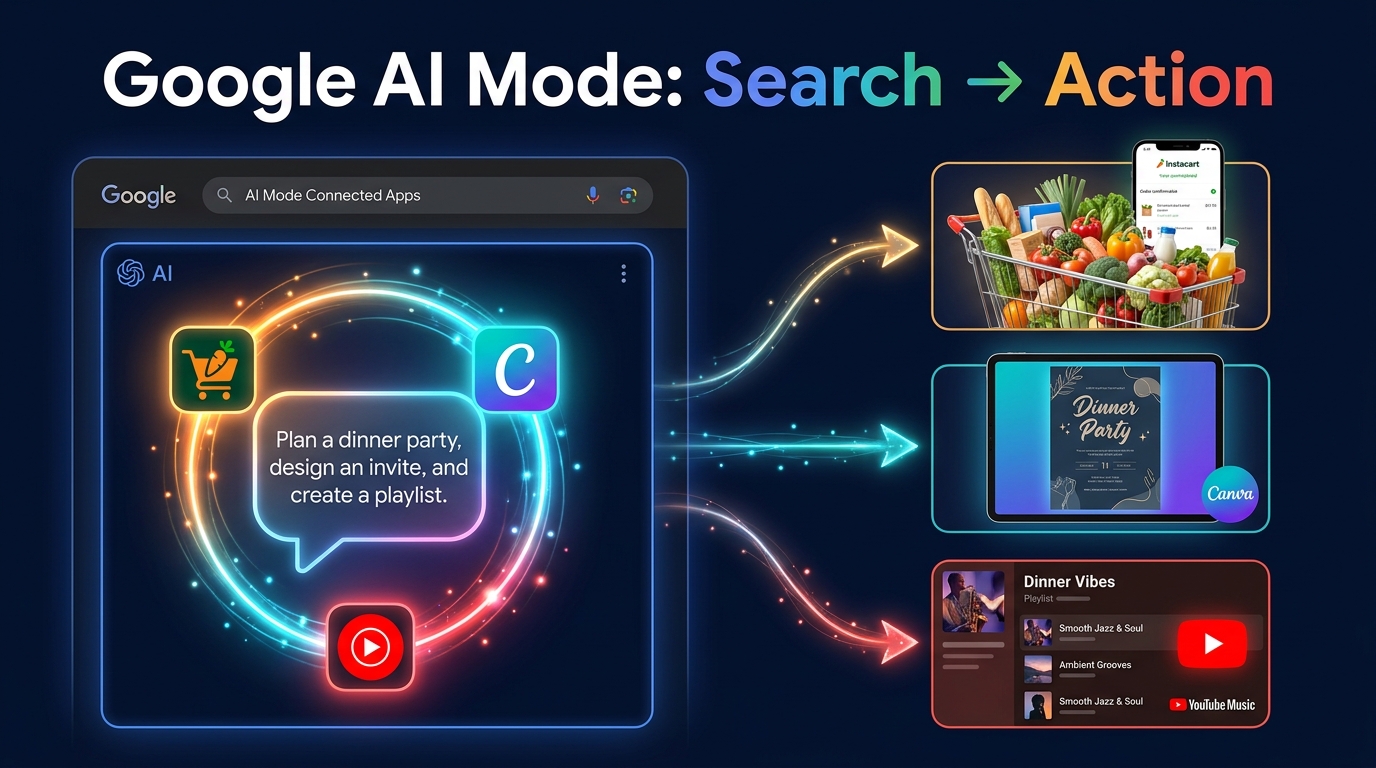
Google Search has answered questions for over two decades. On July 16, 2026, it started completing tasks.
That is the practical meaning of Connected Apps in AI Mode — a feature that sounds modest in the announcement but represents a fundamental shift in what Search is for. For the first time, a query issued inside Google can ripple outward and do something tangible in a third-party application: fill a grocery cart in Instacart, spin up a design template in Canva, or build a curated playlist in YouTube Music. The user never has to leave the conversation to make it happen.
This is not Google adding a few shortcut buttons. The architecture underneath Connected Apps — the permission model, the personal context layer, the agent-style task routing — is the foundation for a much broader shift in how Google wants to sit between users and the rest of the internet. The three launch partners are the visible tip; the structural change happening underneath them is what will matter for years.
This guide covers how each integration actually works from the keyboard forward, where the real friction lives, what the permission architecture allows and explicitly does not allow, and what the agentic expansion means for businesses, developers, and anyone who currently relies on Google Search as a traffic channel. Skip the press release framing. Here is the operator-level picture.
What “Connected Apps” Actually Means — and Why the Framing Matters
Before getting into the step-by-step mechanics, it is worth being precise about what this feature is — because the official descriptions can obscure how significant the underlying architecture change actually is.
From Answer Engine to Task Layer
Google AI Mode has, since its wider rollout in 2026, operated as a conversational interface layered on top of traditional search. You ask a question in natural language; AI Mode synthesizes an answer drawing on Google’s index and, optionally, your connected personal data. That is the answer-engine model.
Connected Apps shifts the paradigm. Instead of answering “what ingredients do I need for a BBQ dinner for eight people,” AI Mode now takes the follow-through action: it generates the ingredient list and pushes those items into your Instacart cart. Instead of describing what a good birthday flyer might look like, it opens a Canva template with your brief already baked in. The distinction between generating information and executing an instruction is the dividing line between a search engine and an agent. Google just crossed it.
Why Three Partners at Launch
The choice of Instacart, Canva, and YouTube Music as launch partners is not arbitrary. Each one represents a different high-frequency task category: shopping and commerce, content creation, and entertainment curation. Together they let Google demonstrate that the connected-apps architecture works across meaningfully different types of actions — transactional (cart building), creative (design generation), and editorial (playlist curation). They also happen to be partners with whom Google has existing commercial relationships or API infrastructure, making them practical as a first cohort rather than a comprehensive rollout.
Google has confirmed that more partners are coming. The three at launch should be read as proof-of-concept choices, not the final scope of this capability.
The Language That Gets Used — and the Language That Gets Avoided
Google describes Connected Apps as helping users “complete tasks.” What the company does not use prominently in official communications is the word “agentic” — though that is precisely the technical category this feature falls into. An agentic system perceives a goal, breaks it into sub-steps, accesses external tools, and executes actions on behalf of a user. That is exactly what AI Mode does when it takes a meal-planning prompt, consults your Google Calendar for the event date, generates a recipe, and populates an Instacart cart. The careful language choice is almost certainly deliberate: the word “agent” carries connotations of autonomous behavior that Google likely does not want consumers scrutinizing too closely at this stage.
For operators building workflows around this, understanding what it actually is — an agent acting with delegated permissions in external systems — is essential for both using it effectively and evaluating the trust implications correctly.
The Permission Architecture: What Google Actually Touches and What It Doesn’t
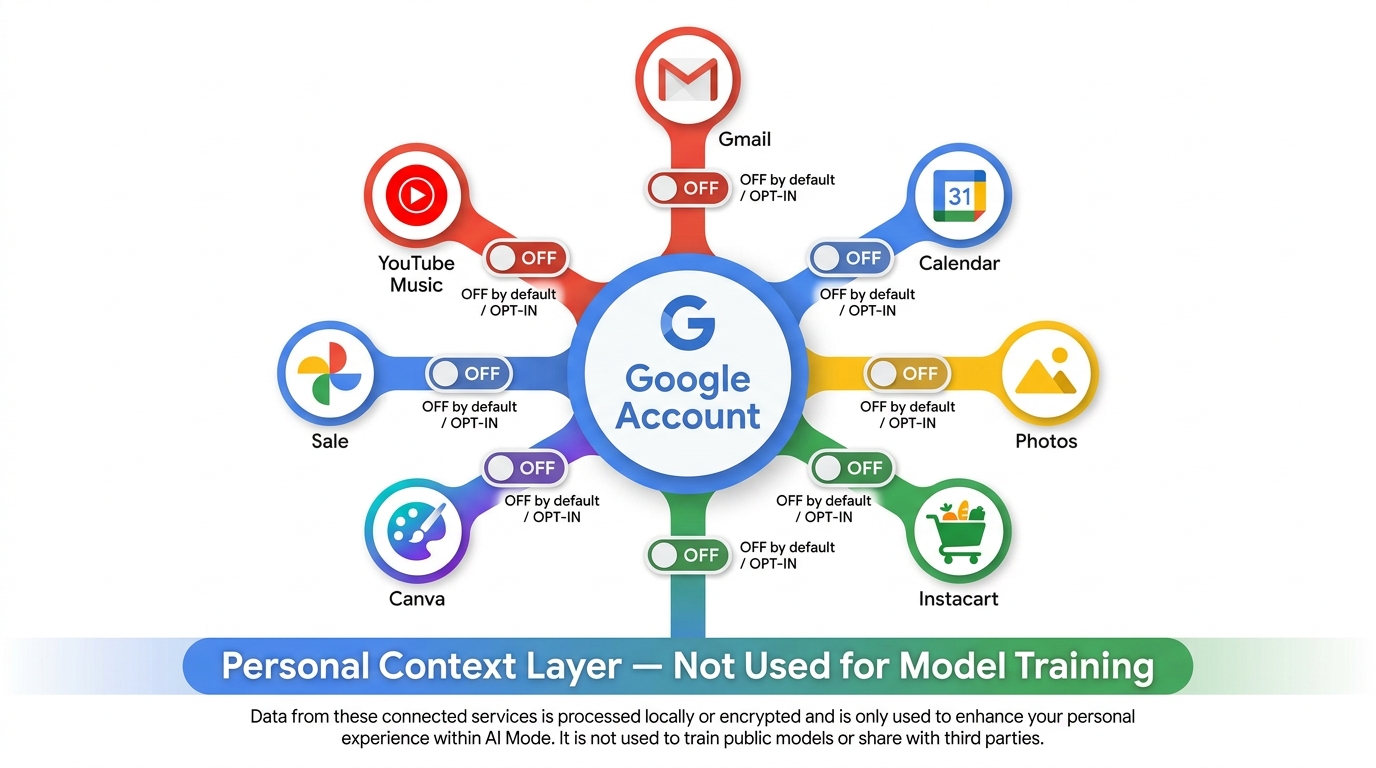
Before you wire anything, you need to understand what you are actually authorizing. The permission model for Connected Apps is layered, and conflating the layers creates either unnecessary anxiety or, more dangerously, misplaced trust.
Two Separate Permission Systems
Google AI Mode operates with two distinct categories of data access, and it is critical not to confuse them.
The first is Personal Intelligence — the opt-in system that allows AI Mode to draw on your Gmail, Google Calendar, Google Photos, and other first-party Google services as context for its answers. This is what lets AI Mode know you have a dinner party next Saturday (because it is in your Calendar) or that you recently ordered a specific ingredient (because it showed up in a Gmail receipt). Personal Intelligence is off by default. You must explicitly turn it on in your Google Account settings, and you can toggle individual services independently.
The second is Connected Apps — the OAuth-style links to third-party services like Instacart, Canva, and YouTube Music. These are also off by default and require a separate authorization step per app. When you connect Instacart, you are granting AI Mode specific delegated permissions to act inside Instacart on your behalf: in the current implementation, that means the ability to add items to a cart. It does not mean read access to your order history or payment information.
What Google Says About Training Data
Google has explicitly stated that data accessed through Personal Intelligence — including Gmail and Photos content — is not used to train AI models. This is a meaningful commitment, and one that mirrors similar assurances made when Workspace AI features were introduced. That said, it is worth noting that these commitments are made in terms of service documents that can be updated, and independent verification of model-training exclusions is not currently feasible for end users.
For enterprise or professional use cases, particularly those involving sensitive calendar data or business email, this distinction between “context used for task execution” and “data used for training” warrants scrutiny of the specific terms in effect at the time of use.
Granular Controls and Revocation
Both Personal Intelligence settings and Connected App authorizations are manageable from a single location in Google Account settings, under the AI Mode or Search personalization section. Each connected app can be revoked independently. When you revoke access, AI Mode loses the ability to act in that app immediately — unlike some OAuth implementations where tokens persist until expiry.
The practical implication for users who want to experiment without full commitment: you can connect an app, try a workflow, review what was created, and revoke the connection before leaving the session. The task outputs (the Instacart cart, the Canva template, the playlist) persist in the partner app after revocation, but Google’s ongoing access to act in those apps stops.
The Minimum Viable Permission Approach
For most personal use cases, the recommended setup is: connect only the apps you are actively using in a session, enable only the Personal Intelligence sources that are actually additive to the task (Calendar for event planning; not necessarily Photos for grocery shopping), and periodically audit your Connected Apps list in settings. This reduces your exposure while preserving the full functionality of the workflows described in the sections below.
Wiring Instacart: From Meal Intent to a Pre-Filled Cart
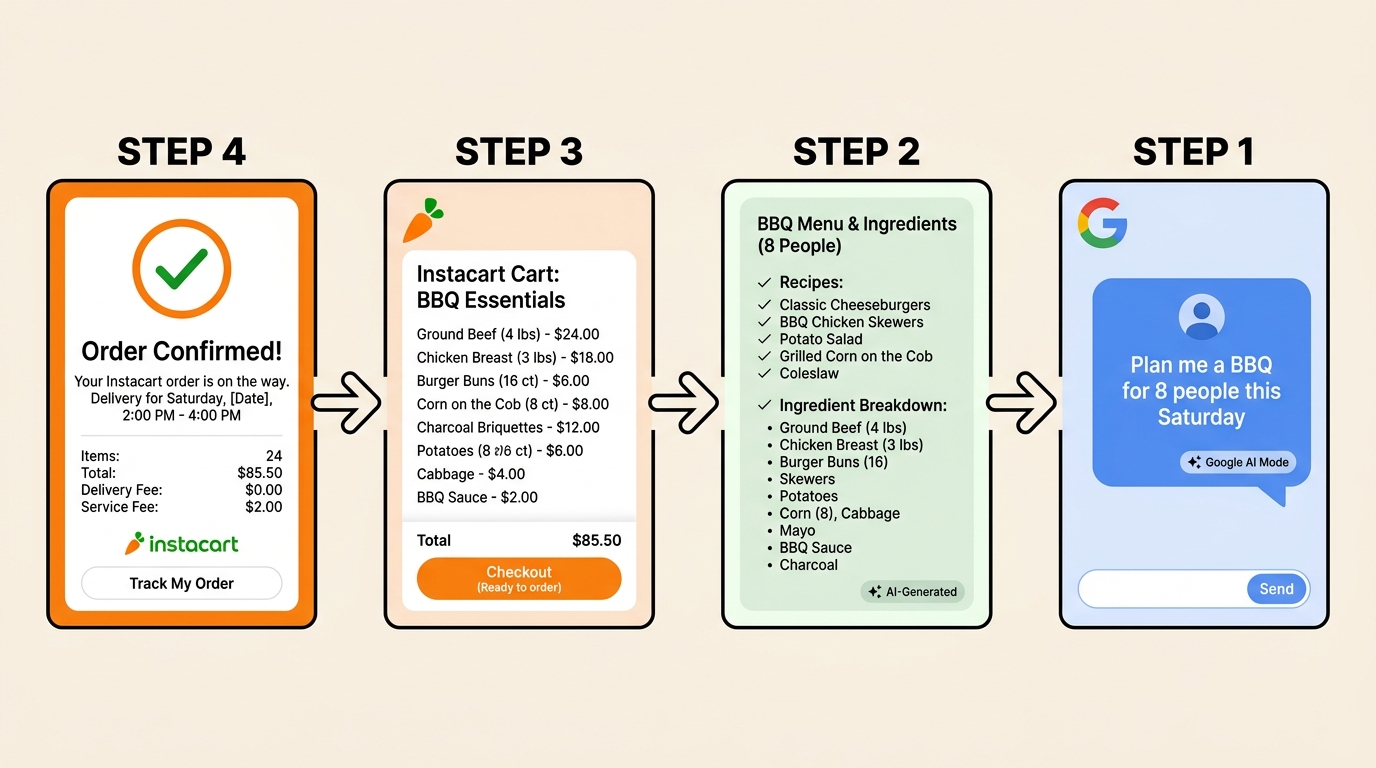
The Instacart integration is the most commercially tangible of the three launch workflows, and it is also the one where Google’s personal context layer adds the most visible value. Here is how to set it up and how to prompt effectively.
Setup: Connecting Instacart to AI Mode
Navigate to Google Search and switch to AI Mode (accessible via the AI Mode tab or google.com/ai if it is available in your account). Inside the AI Mode interface, look for the settings or apps management panel — typically accessible via a grid icon or “Manage apps” link within the conversation interface. Select Instacart from the available integrations and authorize the connection via Instacart’s OAuth flow. You will need an active Instacart account; the connection works with both free and Instacart+ accounts.
Once connected, AI Mode will show Instacart as an active integration in your session. You do not need to re-authorize in subsequent sessions as long as you remain logged into the same Google Account and have not revoked the token.
The Basic Workflow: Prompt → List → Cart
The workflow Google demonstrated at launch — and the one that works most reliably — follows this sequence:
- State a meal or event goal, not just an ingredient request. “Plan a barbecue dinner for eight people this Saturday” produces a significantly better result than “what do I need for a BBQ.” The goal-framing gives AI Mode enough context to generate a complete, proportionally scaled ingredient list.
- Review the generated plan. AI Mode will produce a recipe or menu breakdown, often broken into categories (proteins, produce, pantry staples, condiments). This is the point to edit before committing to the cart — you can remove items, add substitutions, or adjust quantities in the AI Mode conversation.
- Confirm the cart action. AI Mode will present a summary of items it intends to add to your Instacart cart and ask for confirmation. This is a deliberate friction point — Google built a confirmation step into the flow rather than auto-populating the cart, which is the right call for a commerce-adjacent action.
- Finish in Instacart. After confirmation, AI Mode passes the item list to Instacart. You will be directed to your Instacart cart — in the app or on the website — where the items appear pre-populated. Store selection, substitution preferences, delivery scheduling, and checkout all happen within Instacart.
Where Personal Context Changes the Output
If you have Google Calendar connected via Personal Intelligence, the Instacart workflow becomes noticeably more useful. When AI Mode can see an upcoming calendar event — say, “Dinner with the Rodriguezes – 7 attendees” on Saturday evening — it can use that event as the guest count for scaling recipes, without you having to specify it. It can also cross-reference the event title or notes for dietary clues if any are present.
Similarly, if AI Mode has access to Gmail and a previous Instacart order confirmation exists in your inbox, it may reference past purchases to flag items you regularly stock. This behavior is inconsistent in early testing — it works better when the relevant emails are recent and clearly formatted — but when it works, it meaningfully reduces the editing burden on the generated list.
Prompt Patterns That Work Well
Specificity on the occasion and constraints produces better outputs than vague food requests. Prompts that perform well include: “Plan a weeknight dinner for four people that takes under 30 minutes to cook, focusing on Mediterranean flavors, and add everything to my Instacart cart.” The combination of guest count, time constraint, and cuisine direction gives AI Mode enough parameters to generate a list that needs minimal editing.
Dietary constraints work reliably: “gluten-free,” “vegetarian,” “nut-free” all modify outputs correctly in testing. Budget constraints (“under $80”) are supported but less precise — treat them as directional guidance rather than enforced limits at this stage of the product.
The Handoff Gap: What Instacart Still Controls
AI Mode hands off a list of items, not a complete order. Instacart’s own systems then match those items to available products from the selected store. This means you may see substitutions, out-of-stock warnings, or slightly different product matches than you intended. The quality of the handoff depends significantly on how specific AI Mode’s item descriptions are — “chicken thighs” will map more cleanly than “protein,” for example. Reviewing the cart in Instacart before checkout is still necessary, particularly for produce and specialty items.
Wiring Canva: From a One-Line Brief to an Editable Template
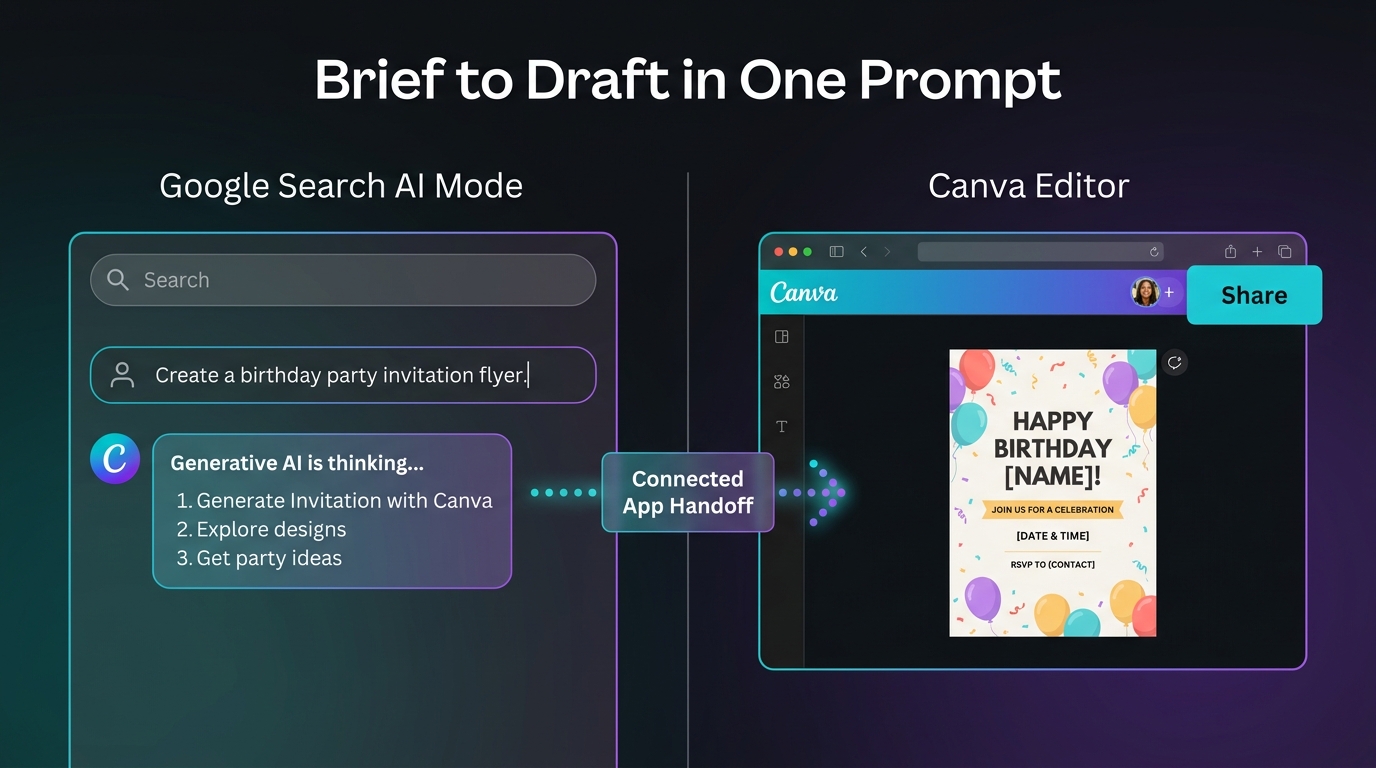
The Canva integration takes a different shape than Instacart’s. Where the grocery workflow is fundamentally about data transfer (a list of items moving from one system to another), the Canva workflow is about intent translation — taking a natural language design brief and converting it into a starting point inside a fully-featured design environment.
Two Distinct Entry Points
The Canva connection in AI Mode supports two different workflows, and they serve different purposes.
The first is template discovery and launch: you describe a design need — a birthday invitation, a social media graphic, an event flyer — and AI Mode surfaces Canva templates that match the brief, then opens your chosen template directly inside Canva. This is essentially a turbocharged version of Canva’s own internal search, with the advantage that you can describe your need conversationally rather than navigating Canva’s template library manually.
The second is AI image export: if AI Mode generates an image in response to a visual prompt (which it can do natively using Google’s image generation models), you can export that generated image directly into a Canva project as a design asset. This is useful for content creators who want to use AI-generated imagery as a foundation for further design work without a separate download-and-upload cycle.
Connecting Canva to AI Mode
The setup mirrors the Instacart flow. In AI Mode, open the apps management panel and authorize Canva via OAuth. You will need an active Canva account — the integration works with both free and Canva Pro accounts, though Pro users have access to the full template library and Brand Kit integration. Once connected, AI Mode recognizes Canva-specific requests and routes them appropriately.
Prompt Patterns for Design Workflows
Canva prompts work best when they include three elements: the format, the occasion or purpose, and at least one style or aesthetic signal. “Create a birthday party invitation flyer in a modern minimalist style” will produce more useful template matches than “make me an invite.” The format specification (flyer, Instagram post, presentation slide, LinkedIn banner) maps directly to Canva’s template categories, which influences what gets surfaced.
For professional or brand-consistent work, including color palette or brand name in the prompt can help — particularly if you have a Canva Pro account with a Brand Kit configured, as the handoff can sometimes route into brand-consistent templates. This behavior is not yet fully reliable but appears to be improving.
Some examples of prompts that perform well in testing:
- “Design a promotional banner for a weekend sale, Instagram square format, bright colors, playful font — open in Canva.”
- “Create a pitch deck title slide for a fintech startup, clean corporate look, blue and white palette.”
- “Generate an image of a cozy coffee shop in autumn and export it to Canva so I can add text.”
The Editing Handoff: What Canva Receives
When AI Mode routes a design request to Canva, what lands in Canva is a template in the editing state — meaning it is fully editable, with placeholder text and image areas available for customization. AI Mode does not currently write copy into the Canva template (that is, it will not pre-fill your event date, location, or personalized text into the design). That editing still happens inside Canva. The value of the integration is primarily in collapsing the discovery and setup steps: instead of opening Canva, searching templates, and browsing results, you arrive at the right starting point from a single conversational prompt.
For teams or frequent Canva users, this is a meaningful time saving, particularly for repetitive design tasks like weekly social graphics, recurring event announcements, or newsletter headers. The use case shines most for people who know roughly what they want but find template browsing friction-heavy.
What Canva Pro Adds to the Workflow
Canva Pro’s Brand Kit — which stores brand colors, fonts, and logos centrally — works within the connected-app workflow in a limited but useful way. When a Pro account is connected and a brand-relevant request is made, there is early evidence that AI Mode attempts to route to templates compatible with the Brand Kit configuration. This is not consistent enough to rely on for high-stakes brand work without human review, but for rapid first-draft generation, it reduces the “brand alignment” editing step.
Wiring YouTube Music: Prompt-Driven Playlists and the Listening History Advantage
The YouTube Music integration is structurally simpler than Instacart or Canva but arguably showcases the personal context layer most vividly. The core function is playlist creation from a natural language description, but the sophistication of the output scales sharply with how much listening context AI Mode has access to.
Two Paths to AI Playlist Creation
It is worth distinguishing between two related but separate AI playlist systems, because they are easy to conflate.
The first is AI Playlist inside YouTube Music directly: within the YouTube Music app (or website), there is a native AI playlist feature available to YouTube Music Premium subscribers. You access it via Library → New → AI Playlist, describe the mood or occasion, and the app generates a playlist without leaving YouTube Music. This uses Gemini models under the hood but operates entirely within YouTube Music’s own interface.
The second is AI Mode Connected App workflow: from within Google Search’s AI Mode, you can describe a playlist and have it created and saved to your YouTube Music library via the connected-app link. This second path is what falls under the Connected Apps feature announced in July 2026, and it adds the possibility of using cross-app context (Calendar events, activity in other connected apps) to inform the playlist creation.
Setup and Connection
Connect YouTube Music in AI Mode via the same apps management panel. Note that full AI playlist functionality requires a YouTube Music Premium subscription; basic users can create playlists but may find that some features — particularly those leveraging listening history for personalization — are limited or unavailable.
Once connected, ensure that YouTube Music listening history is enabled in your Google Account (this is the data that powers the personalization layer). If listening history is paused, AI Mode can still create playlists, but they will be based on the described criteria alone rather than your personal listening patterns.
Prompt Strategies: Genre, Mood, Occasion, and Energy Level
YouTube Music AI playlist prompts work along four primary axes, and using multiple axes together substantially improves the output quality:
- Mood: energetic, mellow, contemplative, celebratory, melancholic
- Occasion: workout, dinner party, study session, road trip, morning commute
- Genre or era: 90s R&B, indie folk, classical piano, late-night jazz, 2020s pop
- Energy curve: “starts slow and builds,” “consistent high energy,” “winds down toward the end”
A prompt like “a playlist for a long drive through desert landscapes, mostly instrumental, a mix of ambient electronica and post-rock, that gradually builds energy over two hours” will produce a substantially more coherent result than “road trip music.” The additional parameters are not just style preferences — they map to Gemini’s understanding of both musical structure and your listening history to weight the selections.
Where Listening History Changes Everything
The most significant differentiator for the YouTube Music integration versus any generic AI playlist tool is the listening history access. When AI Mode can see your actual listening patterns — what you return to, what you skip, how your tastes vary by time of day or day of week — the playlist output shifts from a generically competent selection to something that feels tailored. Heavy users of YouTube Music who have a rich listening history available will notice this most acutely; casual listeners may find the base quality of the output without personalization entirely adequate.
The privacy note here: listening history data used for playlist personalization falls under the Personal Intelligence opt-in framework. If you have not explicitly connected YouTube activity as a personal context source, AI Mode will generate playlists based on prompt criteria only, without the listening history layer. Both modes are useful; which you choose depends on your comfort level with that data being accessed.
Saving, Sharing, and Iterating
Generated playlists land in your YouTube Music library and are immediately playable. From there, you can edit the tracklist directly in YouTube Music, add or remove songs, change the playlist name, and share via standard YouTube Music sharing links. The AI-generated playlist is not locked or read-only — it behaves identically to any manually created playlist once it is in your library.
Iterative refinement also works. If the initial playlist misses the mark, you can follow up in the AI Mode conversation: “Remove anything with vocals” or “Add more tracks from the early 2000s” will trigger a revision. This conversational refinement loop is one of the cleaner UX experiences in the current implementation.
Cross-App Workflows: When All Three Work Together
Most early coverage of Connected Apps treats each integration in isolation. The more interesting — and currently underexplored — territory is what happens when all three are active simultaneously, combined with Google Calendar’s personal context. Here are three practical cross-app scenarios that illustrate the actual potential.
Scenario 1: The Event Planning Stack
You have a dinner party in Google Calendar next Saturday evening, eight guests, tagged “Italian theme.” With Calendar connected via Personal Intelligence, Instacart connected, Canva connected, and YouTube Music connected:
- A single prompt — “Help me plan Saturday’s dinner party” — can kick off a multi-branch workflow: AI Mode generates an Italian menu scaled for eight, adds ingredients to Instacart, suggests a mood-appropriate playlist for a dinner party atmosphere in YouTube Music, and offers to create a “Welcome” table card design in Canva.
- Each branch is confirmed separately before action is taken. You are not handed a completed plan with no review; you are offered a structured set of actions that you approve or modify at each step.
This is a genuine demonstration of agentic behavior across multiple systems, and it works today — not as a future roadmap item.
Scenario 2: The Content Creator’s Rapid Production Loop
A social media manager needs to produce assets for a product launch campaign. With Canva connected and AI Mode’s image generation active:
- They describe the campaign in AI Mode: “Product launch for a new espresso machine, modern brand aesthetic, earthy tones, Instagram-first.”
- AI Mode generates a hero image and exports it to Canva as a base asset.
- They request a set of matching social graphics in different formats (story, square post, banner) and AI Mode routes template discovery for each format into Canva with the same brief applied.
- A background playlist for the creative session — “focus music for a design sprint, lo-fi and instrumental” — gets created in YouTube Music simultaneously.
The time saving here is not dramatic in per-task seconds but in context-switching cost. Keeping a complex creative brief alive across three production tools without re-entering it multiple times has measurable productivity value for creative teams running multiple campaigns in parallel.
Scenario 3: Weekly Meal Planning at Scale
For households that run structured weekly meal plans, the Instacart integration combined with Calendar has a recurring-use case that compounds in value. Set up a repeating pattern: each Sunday, ask AI Mode to “plan five weeknight dinners for the week, incorporating any dinner events on the calendar, and add the full ingredient list to Instacart.” The Calendar context prevents double-ordering for nights already covered by restaurant plans or social events. The grocery list generated covers only the cooking nights that actually need provisioning.
This workflow benefits most from the memory-adjacent behavior that emerges when AI Mode can reference recent Gmail order confirmations — it can, in some cases, identify items already in your typical shopping rotation and focus the generated list on the incremental items you actually need.
Where the Friction Actually Lives
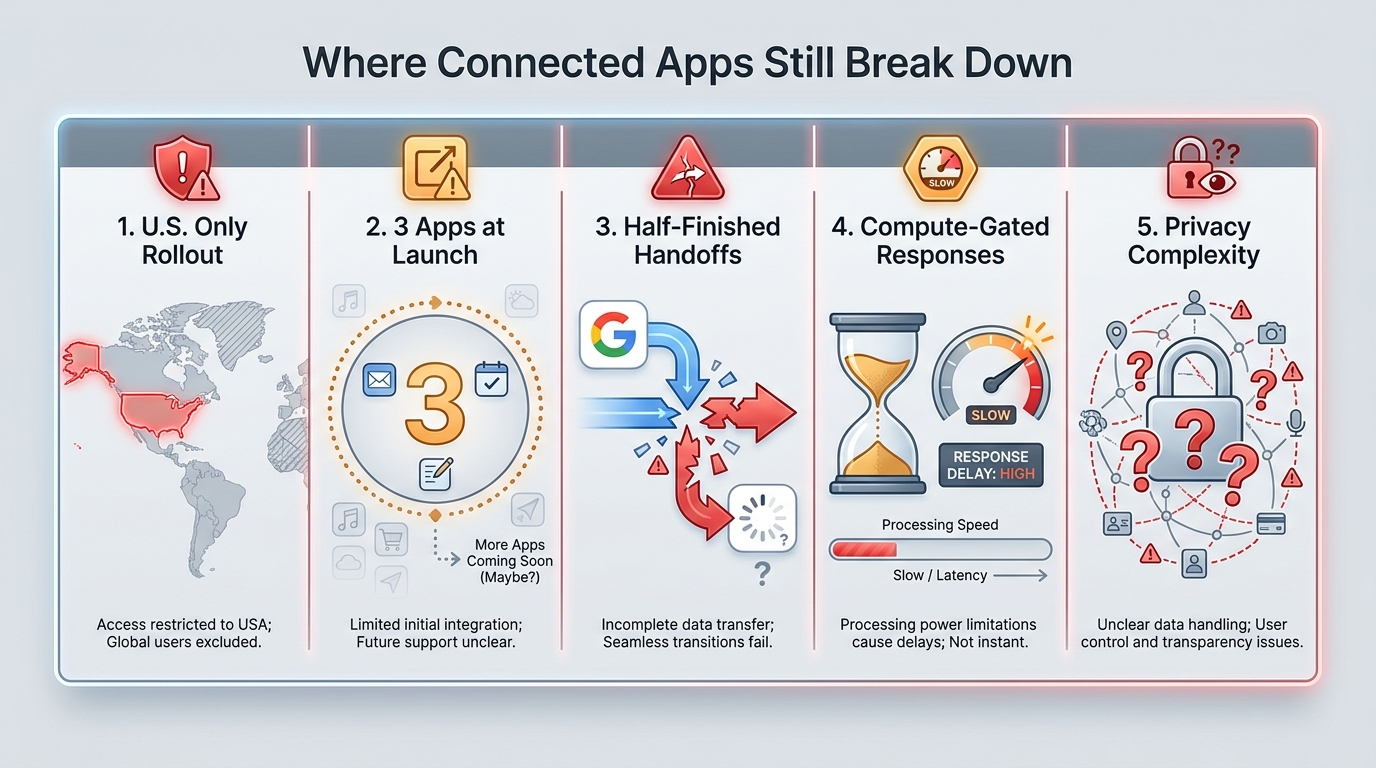
No honest evaluation of a feature this new avoids the limitations. Here is where Connected Apps actually breaks down, frustrates users, or underdelivers relative to the promise.
Geographic Gating
As of July 2026, Connected Apps in AI Mode is available only in the United States, in English. Users outside the U.S. — including regions where AI Mode itself is available — do not yet have access to the third-party app connections. This is a significant constraint for a global platform, and while Google has not given a specific timeline for international expansion, the pattern from AI Mode’s own rollout suggests a phased geographic expansion is likely but will take quarters, not weeks.
The Half-Finished Handoff Problem
Across all three integrations, the flow ends inside the partner app rather than completing inside Google. This is partly by design — checkout, brand editing, and music listening all happen in the apps that built them — but it creates a user experience that feels fragmented at the last step. You build a cart in AI Mode and then transfer to Instacart for checkout; you get a template opened in Canva but still do all the text editing there; you get a playlist but manage it in YouTube Music. The value is in the setup and discovery stages; the execution still requires leaving the AI Mode context.
For users who expected a fully contained “I asked for it in Google, it’s done in Google” experience, this limitation is disappointing. For users who understand that partner apps exist for good reasons (their specialized UI, their checkout infrastructure, their full feature sets), it is a reasonable tradeoff. Setting expectations correctly when describing the feature to new users matters.
Compute-Gated Response Times and Usage Limits
AI Mode queries involving personal context and multi-app actions are significantly more computationally intensive than standard AI Mode answers. In practice, this means response times for complex connected-app prompts can be 5–15 seconds, which is noticeably slower than the snappy answers users are accustomed to from Google Search. During peak usage periods, this can extend further.
Additionally, AI Mode operates under compute quotas — heavy users may encounter limits on how many complex multi-app queries they can run in a given session or day. These limits are not publicly documented in precise terms, which creates an inconsistent experience when they appear.
Personalization Errors from Personal Context
The personal context layer adds value in the best cases, but it introduces a new failure mode: when AI Mode incorrectly interprets a Gmail message, Calendar entry, or Photos content, the downstream task action can be based on faulty premises. A calendar event titled ambiguously, or a receipt email that doesn’t parse cleanly, can cause AI Mode to generate a plan that misses the actual intent.
The practical mitigation is to review AI Mode’s stated reasoning before approving any cart action or design routing. When AI Mode explains what context it used (“Based on your Saturday calendar event for 7 guests…”), verify that interpretation before confirming. The confirmation step exists precisely for this reason.
Limited App Coverage at Launch
Three apps is a narrow integration surface. Many of the most obvious candidates — grocery alternatives to Instacart, design tools beyond Canva, streaming services beyond YouTube Music, booking platforms, productivity apps — are not yet connected. The more you look at the potential scope of what Connected Apps could eventually do, the more the current three-app implementation feels like a minimal viable launch rather than a mature platform.
This is not a criticism of the feature as shipped; it is an accurate characterization of where it stands. Businesses and developers who want to understand the trajectory should watch the partner announcement cadence over the next two quarters carefully.
What Connected Apps Does to Search Traffic, SEO, and the Publisher Equation
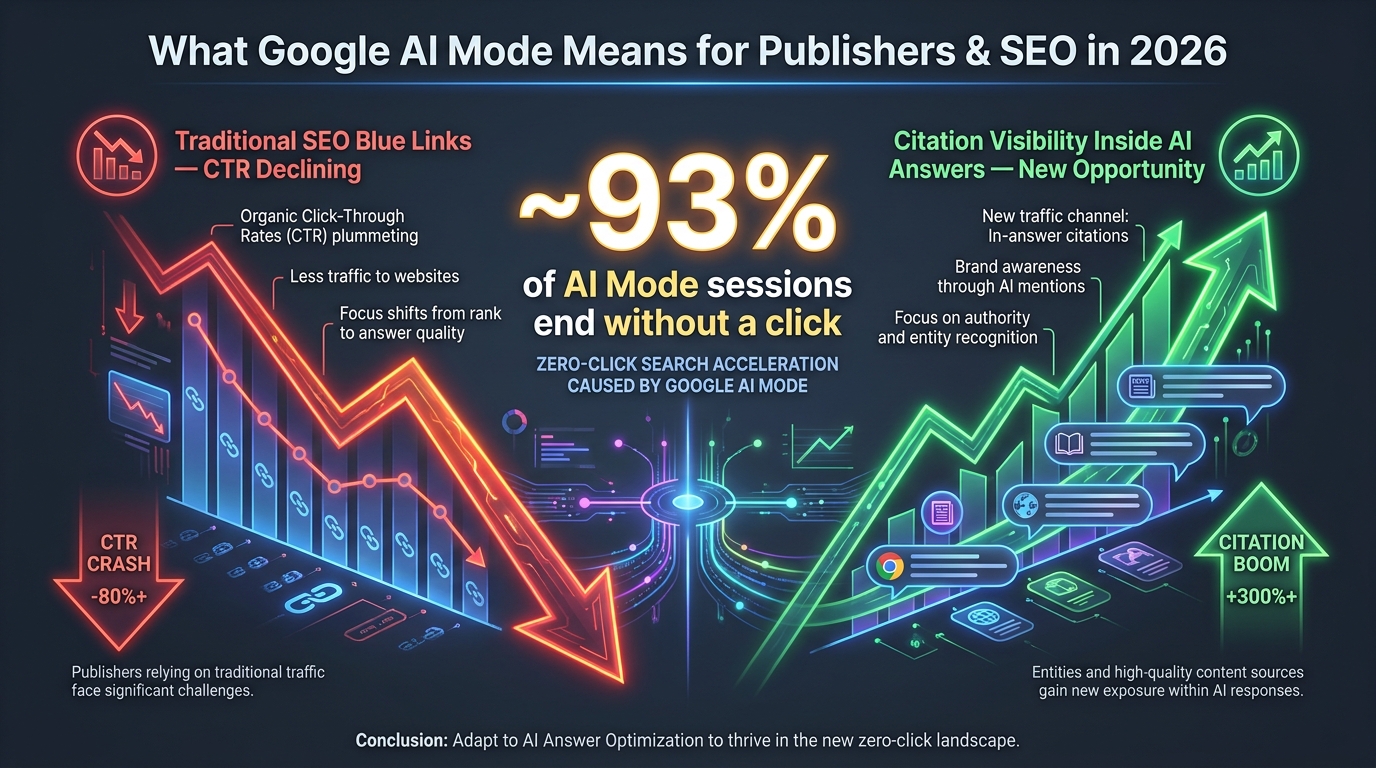
Connected Apps does not exist in isolation. It is one component of a broader AI Mode architecture that is materially changing where users go — and crucially, whether they go anywhere at all — when they issue a query to Google.
The Zero-Click Acceleration
Research tracking AI Mode behavior in 2026 suggests approximately 93% of AI Mode sessions end without a click to an external website. That figure represents a qualitatively different challenge than the zero-click problem that AI Overviews introduced for informational queries. AI Overviews answer questions and the user stops there. Connected Apps answers questions and takes action — the entire user journey from intent to task completion occurs within Google’s interface and partner apps, bypassing the open web entirely.
For publishers whose traffic depends on Google Search referrals for transactional or task-oriented content — recipe sites, product comparison pages, how-to guides that feed affiliate commerce — this is the more serious structural threat. The queries that previously drove high-intent clicks to external properties (“best recipe for a BBQ chicken dinner for 8”) are precisely the query types that Connected Apps is designed to absorb and complete.
What Changes for Brands That Are Partner Apps
For Instacart, Canva, and YouTube Music, being a Connected App is a distribution advantage that is hard to overstate. Each has essentially bought a placement at the most valuable moment in the consumer journey — the moment of intent formation inside Google Search. Users who would previously have moved from Google to Instacart via a click now arrive inside Instacart with a pre-built cart, a significantly higher-conversion starting point than an organic search click. The economics of being inside the agentic flow are structurally superior to any paid search or organic traffic strategy.
For businesses in categories not yet covered — other grocery services, other design tools, other music platforms — the question is not whether to become a Connected App partner but how urgently to pursue it. Google has not published an open API or partner program application; the initial cohort appears to be by direct partnership arrangement. Monitoring official developer channels and Google partner announcements is the practical path for businesses that want to position for the next cohort.
The Citation Visibility Counter-Strategy
For publishers who are not positioned to become Connected App partners, the emerging counter-strategy is to optimize for citation inside AI Mode answers rather than clicks from AI Mode answers. When AI Mode generates a recipe plan before handing off to Instacart, it may cite sources for the recipes it uses. When it explains a design principle before opening Canva, it may reference relevant educational content. These citation appearances drive lower traffic volume than traditional search clicks, but qualitatively different behavior — users who follow a citation from an AI Mode answer tend to be higher intent and better informed than average organic visitors.
The practical moves for publishers: structure content explicitly for AI citation (clear, factual, well-attributed, semantically organized); build brand recognition that makes citations more likely; and shift success metrics away from session volume toward lead quality, citation frequency, and brand search volume as proxy measures.
The Developer API Question
The most significant open question for the broader business ecosystem around Connected Apps is whether Google will publish a developer API that allows any app to integrate into the Connected Apps framework, or whether the system will remain a curated set of partnerships. A closed-partnership model concentrates the agentic distribution advantage with a small number of large platforms. An open API model creates a new category of competitive surface for app developers — and a new form of Google platform dependency risk.
Google has not made a public commitment either way as of the July 2026 launch. The language in Google’s developer communications suggests openness to a broader ecosystem over time, but nothing has been confirmed. This is the most consequential strategic unknown in the Connected Apps story, and it deserves close attention from anyone building products that depend on Search-originating traffic.
What’s Coming Next: Reading the Roadmap Signals
Google rarely launches a product feature with a single cohort and no expansion plan. Several signals from the July 2026 launch and the surrounding announcements point clearly toward where Connected Apps is heading.
More App Categories, Likely This Year
The three launch categories — commerce, creative, entertainment — are deliberately varied. The next wave of expansions most likely targets: restaurant reservations (OpenTable and competitors have been mentioned in Google’s broader AI commerce initiatives), travel and booking (Hotels, flights, and Airbnb-style properties are natural fits for the task-completion model), and productivity tools (where Google’s own Workspace apps are the obvious first expansion, potentially followed by external productivity platforms). Home automation and smart device control have also been referenced as a category Google is exploring for AI Mode integrations.
The Universal Cart Ambition
Separate from Connected Apps but architecturally adjacent, Google has been developing what internal teams have described as a “Universal Cart” concept — a persistent, AI-managed shopping aggregator that can hold items from multiple retailers simultaneously and optimize for price, availability, or delivery speed before routing to checkout. If that architecture matures, the Instacart integration would become one input into a multi-retailer layer rather than a single-partner integration. This would substantially change the commerce dynamics for every retail partner involved.
Gemini as the Cross-Surface Agent
The underlying model powering all of these integrations is Gemini, and the trajectory of Gemini’s deployment across Google surfaces — Search, Gmail, Workspace, Android, Chrome, the Gemini standalone app — points toward a future where the same agentic capabilities available in AI Mode are available everywhere in Google’s ecosystem simultaneously. A Canva task started in Gmail, continued in AI Mode, and finalized on an Android device is a near-term possibility given the infrastructure already in place. The Connected Apps framework, in this light, is the beginning of a cross-surface agent system rather than a Search-specific feature.
Competitive Pressure From Elsewhere
Google is not building this in a vacuum. OpenAI’s ChatGPT Connectors, Microsoft Copilot’s plugin ecosystem, and Anthropic’s tool-use capabilities in Claude all represent parallel attempts to become the agentic layer between users and their most-used applications. The race to occupy the “front door to apps” position in the AI era is multi-competitor, and the trajectory of each platform’s partner ecosystem will influence which users develop workflow habits around which agent interface. Google has an advantage in starting from inside Search — the highest-traffic user intent surface in existence — but that advantage is not permanent if competitors build more functional or broader integration ecosystems faster.
How to Position Yourself for This Shift — Practical Next Steps
Across the different audiences reading this — regular users, content creators, business operators, developers, and publishers — the practical implications differ substantially. Here is a structured way to think about positioning.
For Individual Users: Get Connected, Then Get Selective
The lowest-risk way to engage with Connected Apps is to connect one integration at a time, try it on a real task, and evaluate whether it genuinely saves time versus using the app directly. For meal planning around events, the Instacart integration has a strong enough use case to test immediately. For design-heavy workflows, the Canva integration adds value primarily if template discovery is your bottleneck. For music curation, YouTube Music’s own native AI playlist features may be sufficient without the AI Mode layer, particularly if you are not a heavy Google Calendar user.
Start with the minimum permissions needed for each workflow and expand if you find the personal context layer genuinely additive rather than just theoretically useful.
For Content Creators and Marketers: Rethink the Creative Brief Process
The Canva integration specifically has implications for how creative briefs are developed and executed. If a single natural-language prompt in Google AI Mode can produce a functional starting template in Canva within seconds, the cost-per-first-draft for social and marketing content drops materially. The practical opportunity is to build prompt templates — structured, reusable descriptions of your typical content formats — and run them through AI Mode as a systematic first-draft production step, reserving designer time for refinement and brand-critical work rather than blank-canvas starts.
For Business Operators: Watch the Partner Expansion
If your business is in a category adjacent to the launch partners — food and beverage, retail, design services, media — the question of whether and how to pursue a Connected Apps partnership deserves strategic consideration now, not after a broader rollout makes the competitive environment more crowded. Google’s developer relations and partner program teams are the right contact points. Even if you cannot become a Connected App immediately, understanding what the partner criteria and integration architecture requirements are will let you build toward it.
For SEO and Digital Marketing Professionals: Expand the Success Metric Stack
The 93% no-click rate in AI Mode is not something that can be optimized around with traditional SEO tactics. Chasing blue-link rankings for the query types AI Mode is absorbing is increasingly a diminishing-return investment. The expansion of the success metric stack — adding brand mention tracking, AI citation monitoring, branded search volume, and direct traffic as leading indicators alongside organic session counts — is not optional for professionals advising clients in categories affected by AI Mode’s task-completion sweep.
For Developers: Start Building for Agent Compatibility
Regardless of whether a public Connected Apps API materializes, building products that are agent-compatible is table stakes for anything launching in 2026 and beyond. That means: structured data that AI systems can read cleanly, clear action semantics (what your app can do, not just what it contains), OAuth flows that support granular permission scoping, and event-level data models that let agents understand task completion states. These are the architectural characteristics of apps that will integrate cleanly into agentic frameworks — Google’s or anyone else’s — when the API surfaces become available.
Conclusion
Google’s Connected Apps in AI Mode is a genuinely significant change in what Search does — not in what it answers. The shift from a query-response architecture to a query-action architecture has been discussed in theory for years; it is now a product that real users in the United States can enable today for grocery shopping, design creation, and music curation.
The three launch partners are a proof of concept, not a ceiling. The permission model is more carefully designed than initial press coverage suggested — opt-in, revocable, with explicit commitments about training data exclusions. The friction is real and documented: geographic limitations, half-finished handoffs, compute-gated response times, and a three-app integration surface that is narrow for the scale of the ambition.
But the trajectory is clear. Search is becoming a task layer. The apps that end up inside that layer will have a distribution advantage that compounds over time as users build habits around it. The publishers and businesses that treat this as a traffic metric problem will misread what is actually at stake. What is actually at stake is where the front door of the internet sits — and Google just made a significant move to ensure it sits inside AI Mode, with a connected app on the other side of every intent.
The operators who understand that distinction early — and who build their content, products, and partnerships accordingly — will be better positioned than those who wait for the full scale of the shift to become impossible to ignore.
Leave a Reply