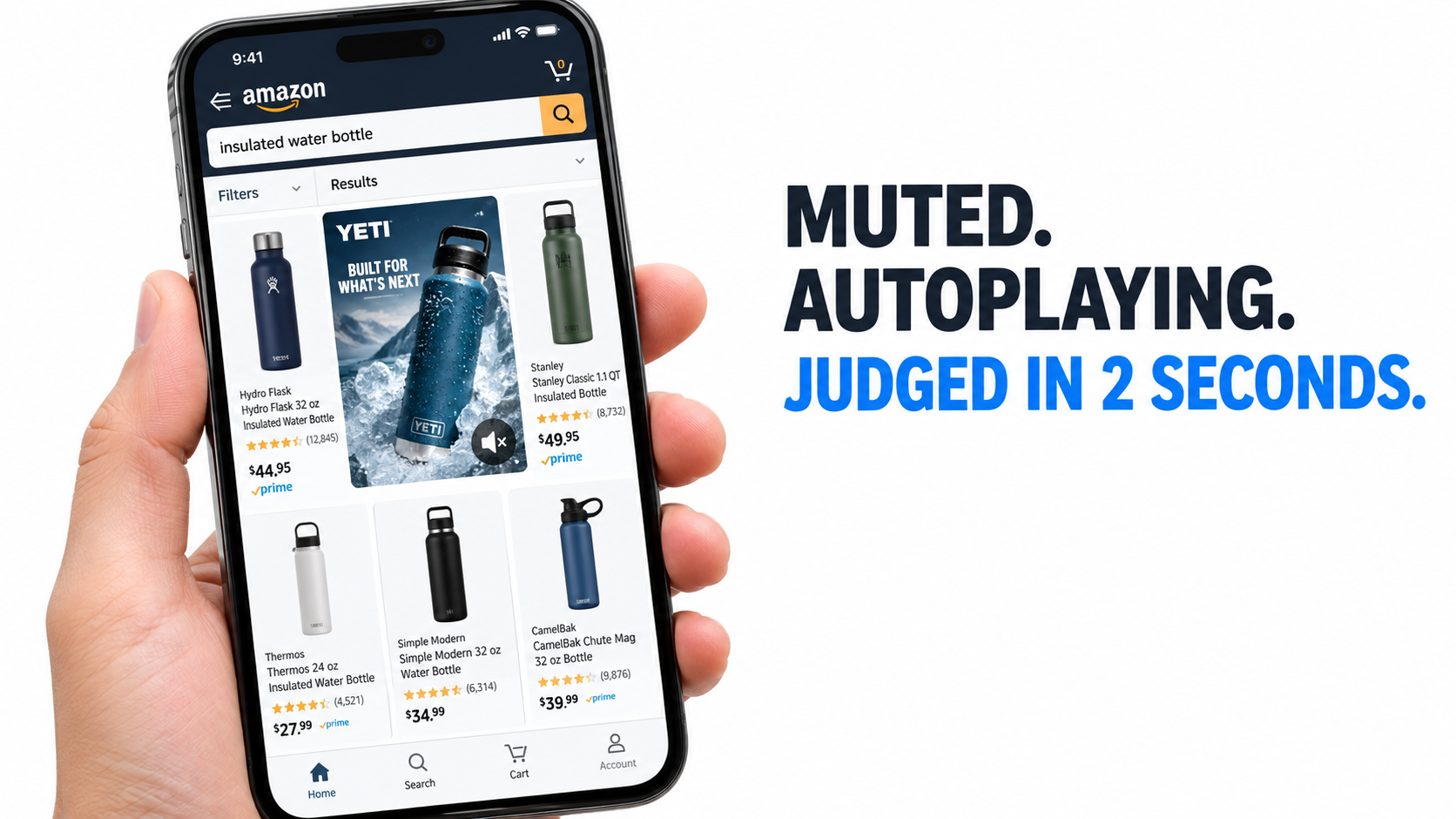
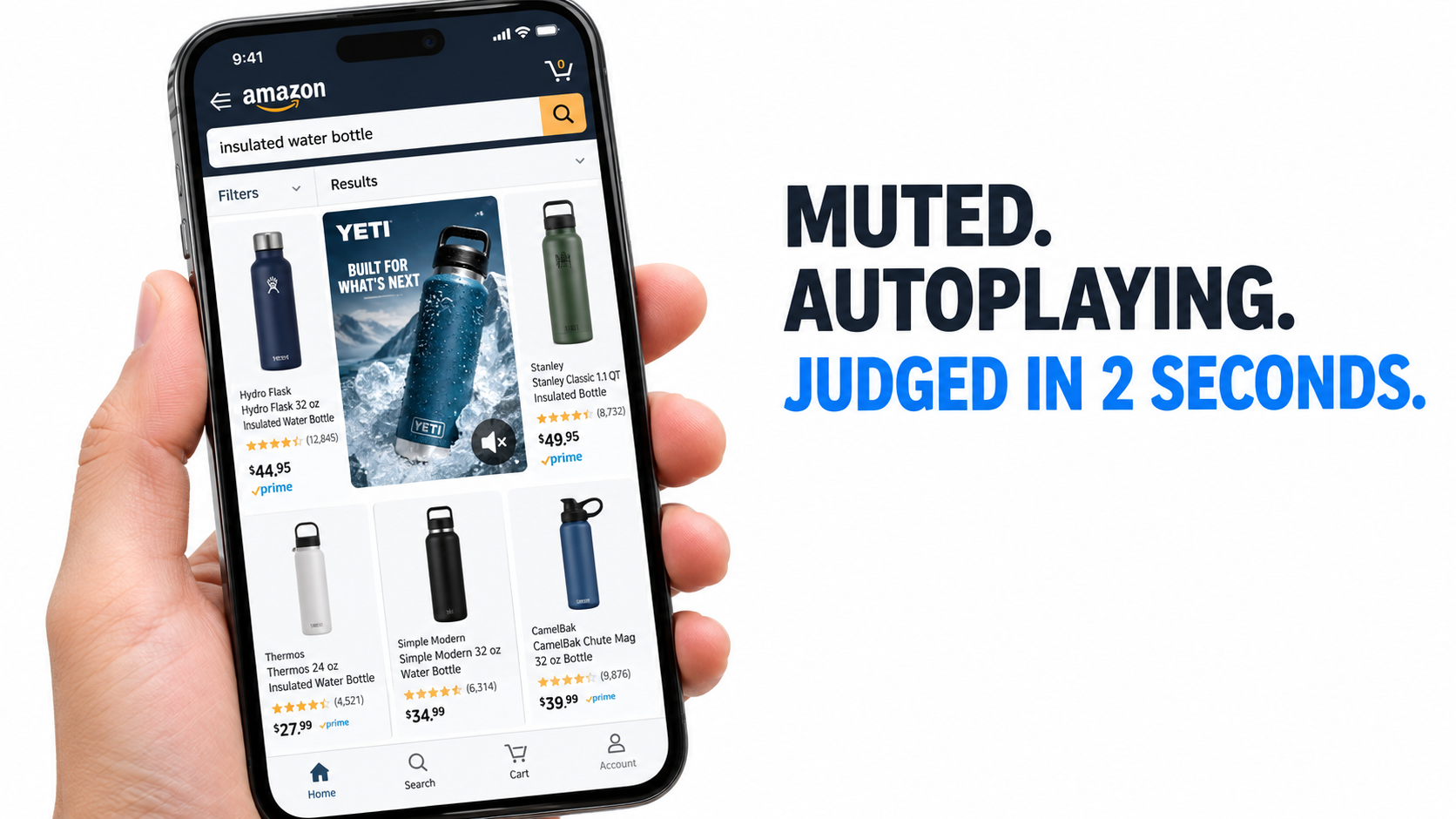
Most advertisers approach Amazon Sponsored Brands video the way they approach a YouTube pre-roll or a TikTok spot. They brief a “brand video,” cut it to length, upload it, and hope the click-through rate follows. Then they look at the numbers a month later and wonder why a beautifully shot asset is underperforming a static image ad.
The problem is rarely the production budget. It is that Sponsored Brands video (often shortened to SBV) lives under a very specific set of conditions that almost no other video format shares. It plays inside a shopping results page. It starts without sound. It begins playing only once half of it is on screen. And it competes, pixel for pixel, with organic listings and other ads that shoppers are actively scanning for price, ratings, and Prime badges.
Those conditions are not hidden. Amazon publishes them in its own ad specifications. But very few brands treat the spec sheet as what it really is: a description of the viewing environment that should shape every creative and campaign decision.
This article takes that approach. Rather than repeating generic “use video to tell your story” advice, it works through the mechanics of the ad unit itself, from the six components Amazon assembles around your footage, to the choice between a Product Detail Page campaign and a Brand Store campaign, to how silent autoplay should change the way you script the first two seconds. It also covers how to measure what the video actually did, how to test without wasting budget, and how to avoid the moderation rejections that quietly delay launches.
Whether you are launching your first SBV campaign or trying to figure out why your existing ones have plateaued, the goal here is simple: understand the environment, then build for it.
Why Sponsored Brands Video Is a Different Animal From Every Other Video Ad You Run
Amazon describes Sponsored Brands as an advertising solution “built to help customers discover your brand within the Amazon store,” using display and video creatives in “prominent placements like top of search and product pages.” That framing matters. Sponsored Brands video is a search ad first and a video ad second.
It is bought like search, not like media
According to Amazon’s specifications, Sponsored Brands video lets you target shoppers “through keywords, categories, and products” on a cost-per-click basis. You are not paying for impressions or views. You pay when a shopper clicks. That single fact changes the economics compared to most video channels, where you pay for reach and hope it converts later.
Because you pay per click, a video that earns lots of attention but few clicks is cheap to run but does little for sales. A video that earns clicks from the wrong shoppers is expensive and unprofitable. The creative job is narrower than “build awareness”: it is to earn the right click from someone who already typed a query or is already looking at a related product.
It lives in a page full of competing signals
On a social feed, your video is the only thing on screen for a moment. On Amazon, your video sits next to star ratings, review counts, price points, delivery promises, and “Best Seller” badges. Shoppers are in evaluation mode. They are comparing, not lounging.
This means your video is fighting a different kind of distraction. It does not need to stop a passive scroll so much as it needs to answer an active question faster than the listing next to it. A shopper searching “insulated water bottle” wants to know whether yours keeps ice frozen, fits a cup holder, and does not leak. A video that spends five seconds on a lifestyle montage before showing the product is losing that comparison.
It appears in more than one spot
Amazon lists Sponsored Brands placements as including the top of search results on desktop and mobile, the top of the mobile home page, and positions “above, alongside, or within shopping results.” The video spec page adds that Sponsored Brands video ads “can also be displayed within detail pages.” Each of those contexts implies a slightly different viewer mindset, which we will return to when we discuss matching creative to targeting.
Takeaway: Before you brief any creative, write down the sentence “A shopper who searched for ___ sees this muted, in-grid, and decides in seconds whether to click.” If your concept does not survive that sentence, it is not an SBV concept yet.
Anatomy of the Unit: Six Components, Only One of Which You Fully Control
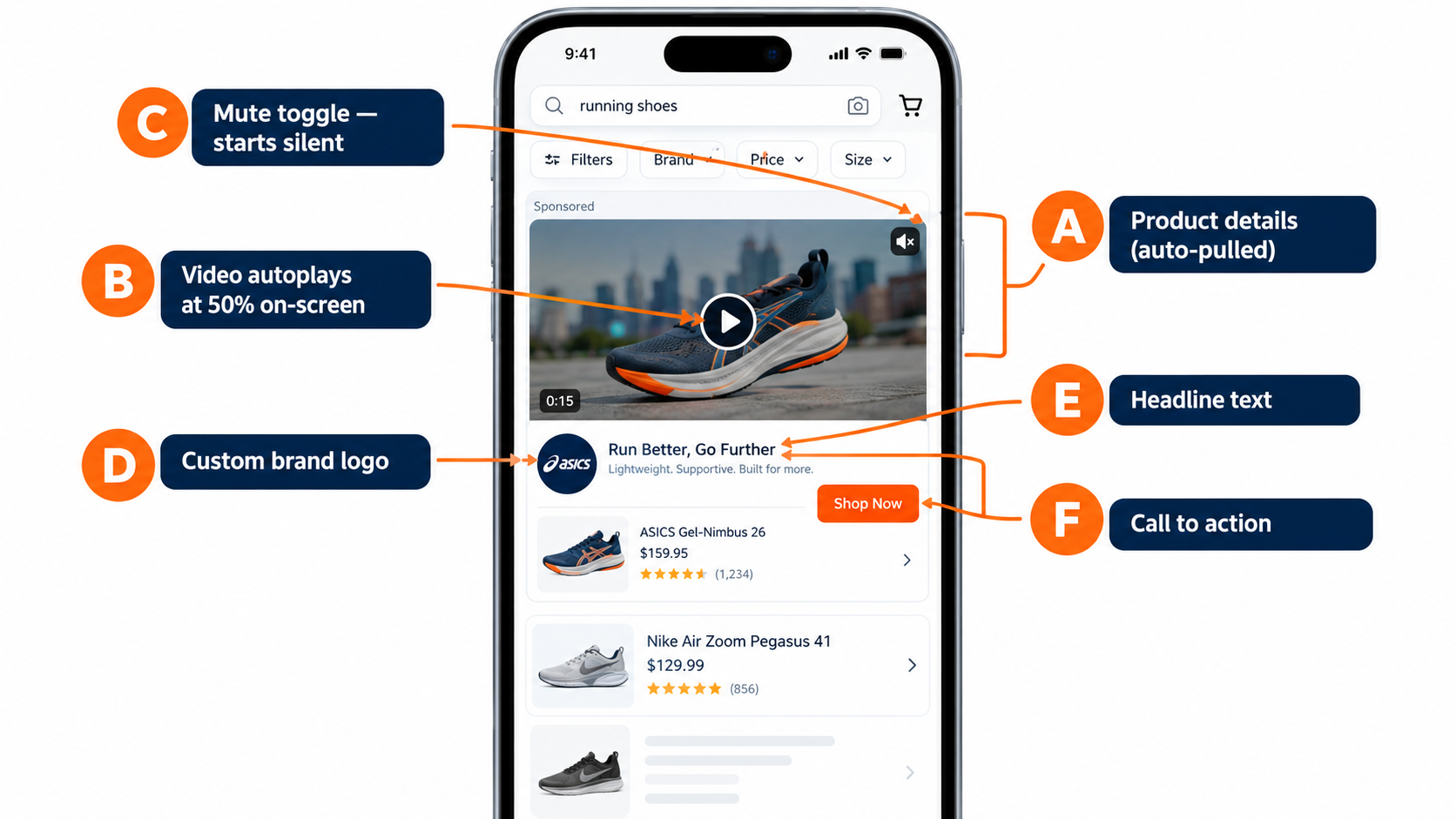
Amazon’s own specification breaks the Sponsored Brands video ad unit into six labeled parts. Understanding which parts you control, and which Amazon fills in automatically, is the foundation of good creative planning.
A. Product details (pulled automatically)
Amazon states that “the primary product image and associated product information from the detail page are automatically displayed.” In other words, your listing’s main image, title, rating, and price travel with your ad. You do not write them in the campaign builder; they come from the detail page.
The practical implication is that your listing quality is part of your video ad. A weak main image or a low star rating will sit right next to your footage. Fix the listing before you scale spend on the video.
B. The video (plays at 50% visibility)
Per Amazon, “the video will play automatically when 50% of pixels are on-screen.” Playback is triggered by visibility, not by a tap. That means the first frames a shopper sees are often seen while they are still scrolling. A slow fade-in from black wastes the exact moment the video becomes visible.
C. Mute toggle (starts silent)
This is the single most important line in the specification: “By default, videos always start without audio.” Shoppers can tap a toggle in the lower right corner to enable sound, and if a video has no audio the toggle is not shown at all. Every SBV should be designed on the assumption that most viewers will never hear it.
D. Custom brand logo
Amazon notes that “a clear easy to read custom brand logo makes a lasting impression.” This sits outside the video frame, which matters: your brand is already identified by the unit, so you do not need to open the video with a logo animation to establish who you are.
E. Headline text
You can “add custom text to communicate your brand’s value.” The headline is the only written copy you control outside the video itself. Treat it as a partner to the video, not a duplicate. If the video shows a leak-proof lid test, the headline can carry a different benefit, such as temperature retention or capacity.
F. Call to action
Amazon describes the CTA as letting “shoppers know an action is required to see your brand store on Amazon.” Its exact behavior depends on the campaign’s landing destination, which leads directly to the next big decision.
The one component you fully control
Of the six, only the video file itself is fully yours to shape from scratch. The product details are inherited, the logo and headline are constrained fields, and the CTA is determined by campaign type. That is why the remaining sections focus so heavily on what happens inside the frame, while also treating the listing and headline as supporting cast that must not contradict the video.
Product Detail Page vs. Brand Store: The Destination Decision Most Advertisers Make by Default
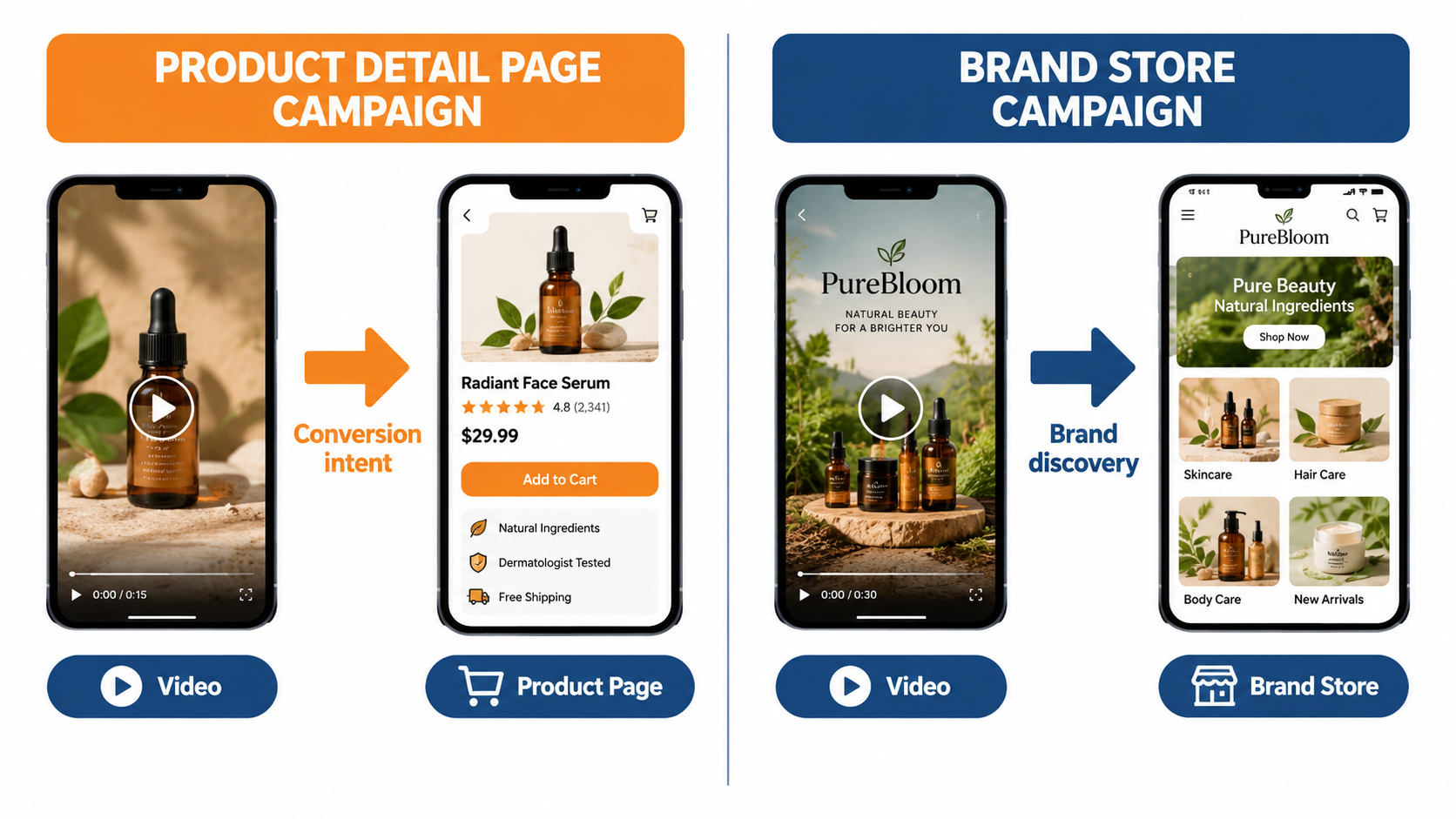
Amazon’s specification describes “two ways to connect with shoppers” through Sponsored Brands video. Many advertisers pick one without much thought, usually whichever the campaign builder suggests first. The choice deserves more deliberation because it changes what the video should do.
Product Detail Page campaigns
Amazon says this campaign type “is best for connecting shoppers with your product” and that it “will be shown in shopping results and on detail pages.” The click takes a shopper straight to a single product listing. The path from interest to purchase is short.
Because the destination is one product, the video should be about that one product. Show it, demonstrate the key benefit, and make it obvious that clicking leads to a page where the shopper can buy exactly what they just watched. Mismatch between the video and the landing listing (for example, showing three color variants when only one is linked) introduces friction.
Brand Store campaigns
Amazon positions this type as “an effective way to increase brand equity and build lasting value by directly connecting shoppers to your Brand Store through shopping results.” It notes these campaigns “can be featured both above and below the fold of search results.”
The click takes the shopper to a curated, multi-product environment. That makes the video’s job broader. It can introduce a product line, a design philosophy, or a problem your range solves, then let the Store do the work of helping the shopper find their specific item.
How to decide
A useful rule of thumb is to match the destination to the shopper’s specificity:
- Narrow, high-intent queries (for example, a specific product type plus a key attribute) tend to suit Product Detail Page campaigns. The shopper knows what they want; send them to it.
- Broad or exploratory queries (category terms, gift-oriented searches, problem-based searches) can suit Brand Store campaigns, where a shopper may benefit from seeing a range.
- Brand-name searches are often a good fit for Store destinations, since the shopper already knows the brand and may want to browse.
- Single-hero-product brands usually gain little from a Store destination if the Store is thin. A Store with one or two products adds a click without adding value.
Do not let the Store be the weak link
If you choose a Brand Store destination, the Store itself becomes part of your conversion funnel. Amazon pairs Sponsored Brands and Brand Stores explicitly, saying that together they drive “discovery, consideration, and long-term engagement.” A Store with outdated images, broken navigation, or no clear path to best-sellers will drag down a strong video. Audit the Store before sending paid traffic to it.
Takeaway: Decide the destination first, then brief the video. A single-product demo and a range-introduction video are different scripts, and trying to make one asset serve both usually weakens it for each.
Reading the Spec Sheet as a Strategy Document
Amazon’s technical specifications for Sponsored Brands video look like a checklist for your editor. They are that. But each requirement also says something about how the ad is experienced, and reading them that way leads to better creative.
Duration: 6 to 45 seconds, with 20 or less “highly recommended”
Amazon allows videos between 6 and 45 seconds but specifically states “20 secs or less highly recommended.” The longer ceiling exists, but Amazon is signaling that shorter videos fit the environment better. That aligns with its creative guidance: “Keep your video brief, easy to understand, and straight to the point.”
Amazon also states plainly that “the goal of the video is not to provide all the details about the product, but rather to create a sense of excitement and curiosity that will drive viewers to your product or Stores page for more information.” The detail page and Store exist to carry detail. The video exists to earn the click.
Aspect ratio: 16:9 only
Despite appearing heavily on mobile, Sponsored Brands video accepts only 16:9 (square pixel) aspect ratio. That is a meaningful constraint for brands that produce most of their content vertically for TikTok, Reels, or Shorts. A 9:16 asset cannot simply be uploaded.
It also means your subject must read clearly in a horizontal frame that may be displayed relatively small on a phone screen. Tight framing, large product presence, and minimal background clutter help.
Resolution, codec, and bit rate
The accepted dimensions are 1280×720, 1920×1080, or 3840×2160 pixels. Files must be .MP4 or .MOV, 500MB or less, using H.264 or H.265 codecs in Main or Baseline profile. Frame rates from 23.976 to 30 fps are accepted, with progressive scan. The minimum video bit rate is 1 Mbps, with 4 Mbps or higher recommended.
For audio, Amazon requires PCM, AAC, or MP3, stereo or mono, with a minimum bit rate of 96 kbps and a minimum sample rate of 44.1 kHz.
The strategic reading here is that Amazon wants clean, crisp footage. Its creative guidance says “a polished, high-quality, professionally-produced video is an effective way to convey the quality of your product and instill trust in your brand.” Shipping at the minimum bit rate is technically allowed but works against that goal, especially for products where texture, finish, or detail is a selling point.
No letterboxing or pillarboxing
Amazon instructs advertisers to “avoid using videos with horizontal or vertical black, color, or blurred bars.” This most often catches brands that try to adapt vertical or square footage by placing it in the center of a 16:9 canvas with blurred edges. It is a common shortcut on social platforms, but it is explicitly discouraged here.
The lower-right safe area
Amazon advises: “avoid placing text and other important information in the lower right corner of the video.” That is where the mute toggle sits. Any price callout, claim, or key visual placed there risks being covered. Amazon provides a safe area template; use it during editing, not after.
Designing for Mute: The Silent-First Creative Rulebook
If you take one idea from this article, take this one: the default viewing state of a Sponsored Brands video is silent. Amazon says so directly. Videos “always start without audio,” and sound plays only if the shopper taps the toggle.
That means voiceover-driven scripts, which are common in brand videos, are carrying their message through a channel most viewers will not open. Here is how to build creative that works without sound and gets better with it.
Rule 1: The product should explain itself visually
Ask what the product does that can be seen. A blender crushes ice. A water bottle holds ice for hours. A pet hair remover lifts fur off a couch in one pass. A phone stand holds a device at an angle while someone cooks. These are visual demonstrations that need no narration.
If your product’s main benefit is invisible (for example, a supplement or a software-enabled device), you will need to work harder with on-screen text, visual metaphors, or demonstrations of the outcome rather than the mechanism.
Rule 2: On-screen text carries the claims
Short text overlays do the job a voiceover would. Keep them to a few words, keep them on screen long enough to read, and size them for a phone. Avoid the lower-right corner. Keep each overlay to a single idea: “Ice for 24 hours” rather than a sentence about vacuum insulation technology.
Any claim you put in text should be one you can substantiate. Amazon’s ad policies require content that complies “with all relevant laws and regulations,” and unverifiable superlatives are a common source of friction.
Rule 3: Motion should start immediately
Because playback starts at 50% visibility, often mid-scroll, the very first frame must already contain something worth looking at. Amazon’s guidance is to “showcase your product or something interesting within the first few seconds to catch the shopper’s attention.” A static product shot, a fade from black, or a slow pan across a kitchen counter all waste that moment.
Rule 4: Hold the logo for later
This one surprises many brand teams. Amazon recommends that you “wait until later in the video to include your brand name and logo.” The ad unit already displays your custom logo alongside the video. Opening with a logo sting spends your most valuable seconds on information the shopper can already see. Amazon does recommend an “end card” with your brand name and logo, so the brand still gets its moment, just at the end.
Rule 5: Audio as a bonus layer
None of this means you should ship silent videos. For the shoppers who do tap for sound, audio can add credibility and texture. The test is simple: watch your final cut with sound off. If it still makes complete sense and the key benefit is clear, audio becomes an enhancement rather than a dependency.
A quick mute audit
- Play the video muted on a phone, at the size it will appear in search results.
- Stop at two seconds. Can you tell what the product is?
- Stop at eight seconds. Can you name the main benefit?
- Watch to the end. Would you know where clicking takes you?
If any answer is “no,” revise before uploading.
The 20-Second Architecture: Structuring a Video That Earns the Click
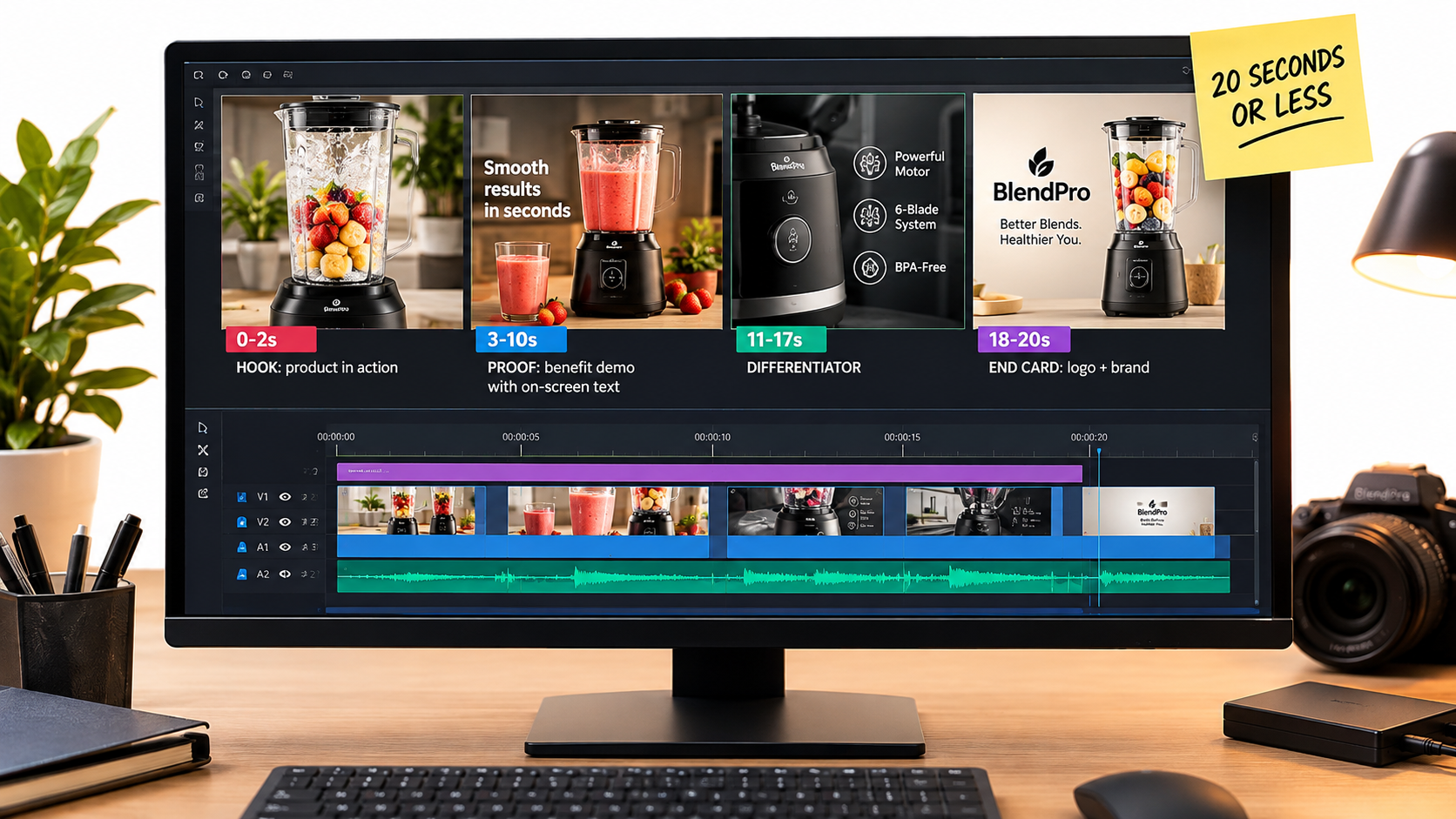
Amazon highly recommends staying at or under 20 seconds. Within that window, a predictable structure makes production faster and testing cleaner. The framework below is not an Amazon rule; it is a practical way to apply Amazon’s published guidance about first impressions, brevity, and end cards.
0–2 seconds: The hook
Open on the product doing its job. No intro, no logo, no establishing shot. If the product is a vacuum, the first frame shows debris disappearing. If it is a cooler, the first frame shows ice. This is where Amazon’s “showcase your product or something interesting within the first few seconds” guidance applies most directly.
Pattern interrupts also work here: an unexpected angle, a fast before-and-after, a close-up macro shot of texture. The aim is to give a scrolling shopper a reason to pause.
3–10 seconds: The proof
Now show the primary benefit with a supporting text overlay. This is the section that answers the shopper’s evaluation question. Think in terms of the search query you are targeting. If shoppers search for “leak proof,” prove leak-proofness. If they search for “quiet,” show something that visually conveys low noise, such as a sleeping baby or a person on a call nearby.
11–17 seconds: The differentiator
Use this window for the second reason to choose your product over the alternatives sitting beside it in search results. That might be a secondary feature, a usage scenario, an included accessory, or a size comparison. Keep it to one idea. Amazon’s guidance is to create “excitement and curiosity,” not to list every feature.
18–20 seconds: The end card
Close with your brand name and logo, as Amazon recommends, and a clean final product shot. Keep it on screen long enough to register. Because video ads in a results grid may loop or be seen partially, the end card should also work as a standalone frame.
Variations on the structure
- Six-to-ten second cuts: Collapse into hook plus proof plus a brief end card. Useful for testing whether a shorter cut performs differently.
- Brand Store versions: Replace the differentiator section with a quick range showcase (for example, three products in quick succession) to set up the multi-product landing.
- Problem-solution: Open on the problem (a spill, a tangle, a mess) for one second, then cut immediately to the product solving it. This can work well for problem-based search terms.
Production does not have to be expensive
Amazon’s guidance does encourage investing in “stunning, clear, and easy to understand visuals.” But clarity matters more than cinematic polish. A well-lit tabletop demonstration shot on a modern camera, edited tightly with clear text, can satisfy the spec and the guidance. Amazon also highlights free AI-powered image generation tools for Sponsored Brands creatives, and its console includes creative tools that can help smaller brands build assets. The point is to get the structure right; production value is a multiplier on structure, not a substitute for it.
Matching Creative to Targeting Intent
Sponsored Brands video can be targeted by keywords, products, and categories. Most advertisers build one video and run it against every target. That is efficient to set up but leaves performance on the table, because the shopper’s mindset differs depending on how they arrived.
Keyword targeting: answer the query
When a shopper searches, they have told you what they care about. The video’s proof section should speak to that. Consider grouping keywords by theme and pairing each theme with a video that leads with the relevant benefit:
- Feature-led queries (“stainless steel,” “BPA free,” “cordless”): show that feature clearly within the first few seconds.
- Use-case queries (“for camping,” “for travel,” “for kids”): show the product in that context.
- Problem queries (“for pet hair,” “for back pain”): use the problem-solution structure.
- Generic category queries: lead with your strongest overall differentiator, since intent is less specific.
Product targeting: win the comparison
Amazon notes that Sponsored Brands video can appear within detail pages. When you target competitor or complementary product pages, the shopper is already looking at a specific item. The video’s job is comparative: show why yours deserves a look in addition to, or instead of, what they are viewing.
For competitor targeting, lead with the attribute where you most clearly differ, without making unsubstantiated comparative claims. For complementary product targeting (for example, targeting a coffee maker page with a coffee grinder video), show the products working together.
Category targeting: introduce, don’t assume
Category targeting tends to reach shoppers earlier or more broadly. They may not know your brand. A clear product demonstration and a strong end card matter more here, and a Brand Store destination can make sense if you have a range worth browsing.
Brand-term defense
When shoppers search your brand name, a video is a strong way to occupy prominent space with your own content. These shoppers already know you, so the video can focus on new products, bundles, or range breadth rather than basic introduction.
Keep the headline aligned
Remember that the headline text sits next to the video. When you split videos by intent, split headlines too. A video about leak-proof performance paired with a headline about colors creates a mixed message.
Takeaway: Even two or three intent-specific video variants, each paired with a matching keyword group and headline, can make your campaigns easier to read and improve relevance compared to one video running everywhere.
Passing Moderation the First Time
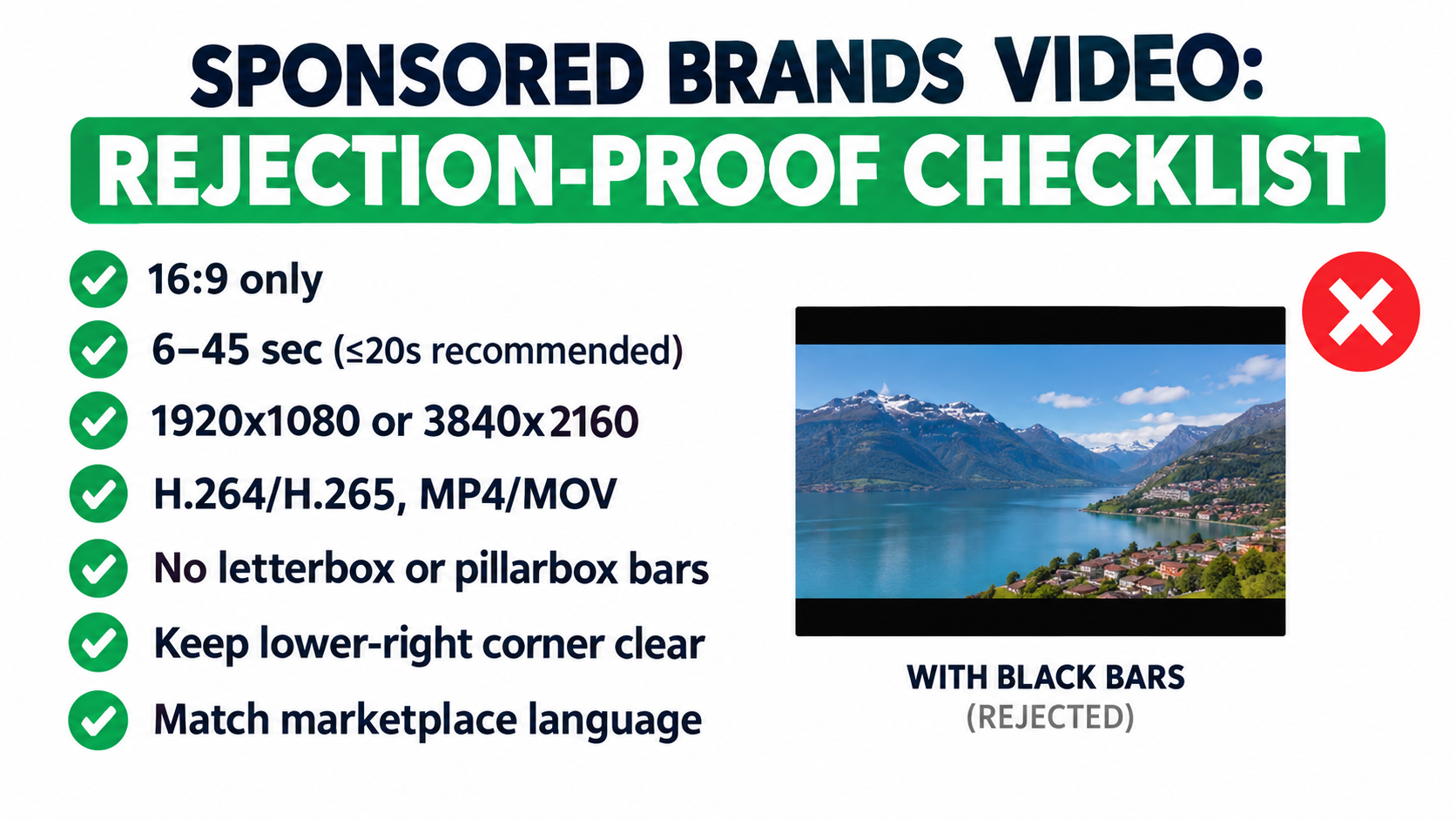
Every Sponsored Brands video goes through Amazon’s review before it can serve. Amazon states that videos must meet its “creative acceptance policies for sponsored ads,” that “all content must be suitable for a general audience,” and that ads not meeting these policies “will not be accepted.” Rejections cost time, especially around launches and seasonal events. Most are preventable.
Language must match the marketplace
Amazon is explicit: “Make sure your videos match the language of the marketplace they are being shown in.” Its example is that English-language locales should have English on-screen text or voiceover, and the Italian marketplace should have Italian text or voiceover.
For sellers expanding internationally, Amazon recommends “adding subtitles or creating different versions of the video tailored to each marketplace.” Because SBV starts muted, translating on-screen text is often more important than re-recording voiceover. Build your video with text layers that can be swapped easily, and you can localize without a reshoot.
No bars, no blurred edges
As covered earlier, letterboxing and pillarboxing (black, colored, or blurred bars) should be avoided. If your source footage is vertical, reframe or reshoot for 16:9 instead of padding.
Respect the safe area
Placing text in the lower-right corner, where the mute toggle sits, is discouraged. Use Amazon’s safe area template during editing.
Technical compliance
Uploads that fall outside the accepted specs (wrong aspect ratio, unsupported codec, interlaced scan, under-spec audio sample rate) can be blocked or rejected. Export presets that match Amazon’s requirements save repeated trips back to the editor:
- 16:9, 1920×1080 (or 3840×2160)
- H.264, Main profile, progressive scan
- Constant frame rate at 23.976, 24, 25, 29.97, or 30 fps
- Video bit rate of 4 Mbps or higher
- AAC audio, 44.1 kHz or higher, 96 kbps or higher
- Duration between 6 and 45 seconds, ideally 20 or under
- File under 500MB, .MP4 or .MOV
Claims and content
Content must suit a general audience and comply with applicable laws. In practice, that means being careful with health claims, comparative claims about competitors, and superlatives you cannot support. Amazon recommends reviewing its Amazon Ads Policies page before launching; doing so before production, not just before upload, avoids having to re-edit a finished asset.
Build a pre-upload review step
A simple internal checklist, reviewed by someone who did not edit the video, catches most issues. Include technical specs, safe area, language, claim substantiation, and a muted playback check. Ten minutes of review beats days of resubmission cycles.
Measuring What the Video Actually Did
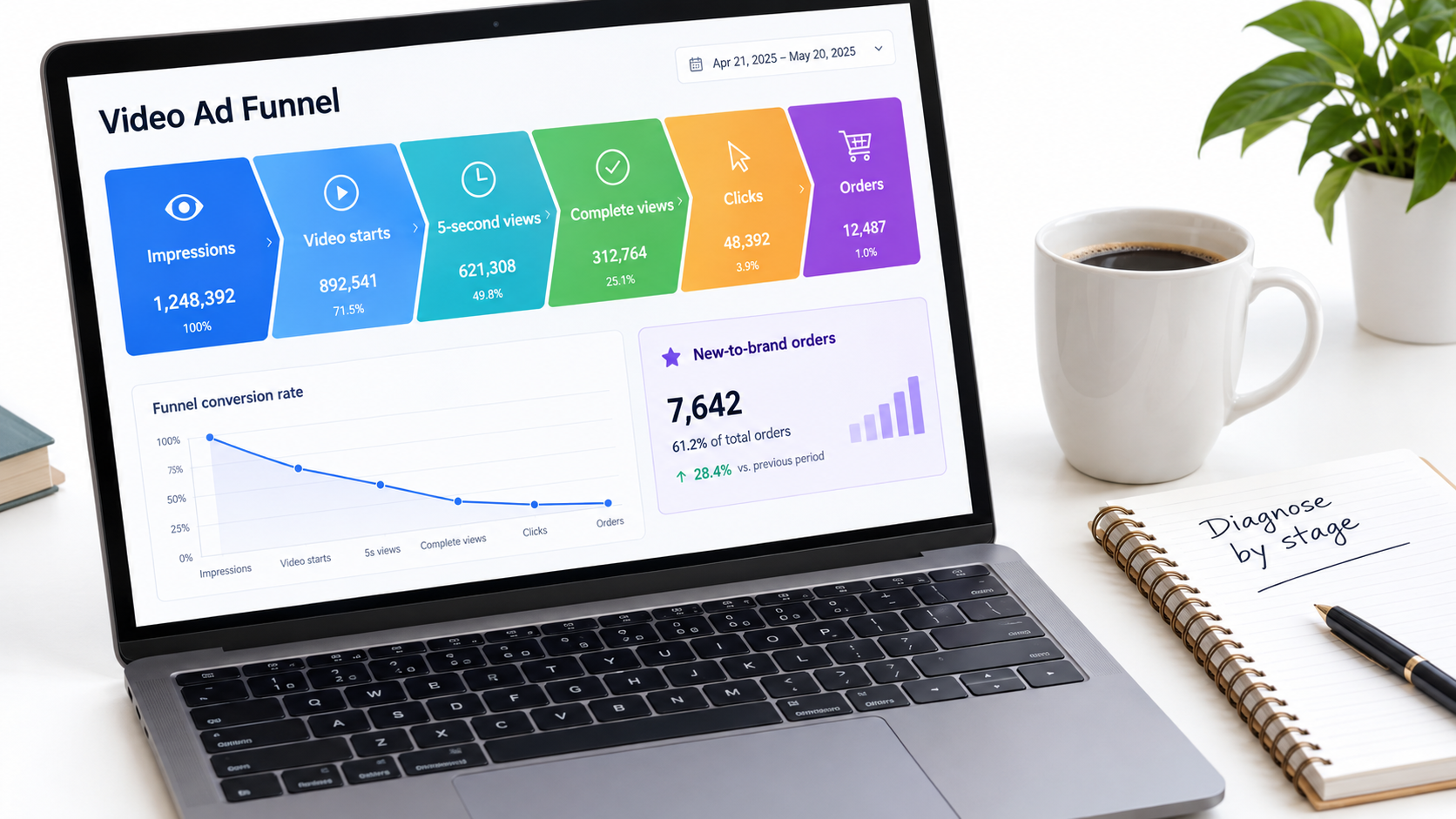
Amazon says Sponsored Brands lets you “get insights into how and which shoppers engage with your ads to understand your brand’s impact,” and it offers dedicated courses on analyzing Sponsored Brands reporting. The mistake most advertisers make is judging SBV on a single number, usually ACOS or ROAS, without diagnosing where in the funnel performance breaks down.
Think of performance as a sequence
A video ad moves a shopper through stages: it gets shown, it starts playing, it holds attention, it earns a click, and the click converts. Amazon’s console reports video engagement metrics alongside standard click and sales metrics for video campaigns. Use them to locate the weak stage rather than guessing.
Diagnosing common patterns
- Low impressions: This is usually a targeting or bidding issue, not a creative one. Your bids may not be competitive for the placements you want, or your targets may be too narrow.
- Healthy impressions, weak early viewing: The hook is not working. Revisit the first two seconds. Is the product visible immediately? Is there motion?
- Good early viewing, low completion: The middle of the video is losing people. It may be too long, too slow, or repetitive. Test a shorter cut.
- Strong viewing, low click-through: The video is entertaining but not prompting action, or the headline and product details (price, rating) are discouraging clicks. Check the listing data shown in the unit.
- Good click-through, low conversion: The problem is likely downstream: the detail page or Store, price, reviews, or a mismatch between what the video promised and what the landing page shows.
New-to-brand metrics
Amazon reports new-to-brand metrics for Sponsored Brands, which indicate purchases from customers who have not bought from your brand within a lookback period. This matters for SBV because one of its stated purposes is brand discovery. Amazon’s own NF Imports case study, for instance, highlights that the brand observed 80% of sales coming from new customers between March 2018 and December 2022.
When evaluating SBV against Sponsored Products, consider whether it is reaching different customers. A video campaign with slightly higher ACOS but a much larger share of new-to-brand orders may be doing a different, and potentially more valuable, job.
Compare like with like
Video campaigns targeting broad category terms will not perform like Sponsored Products campaigns targeting your own brand name. Compare SBV performance by target type and intent group, not as one blended number against your whole account.
Give it enough data
Judging a video on a handful of clicks leads to false conclusions. Set a minimum threshold of spend or clicks before making creative calls, and keep it consistent across tests so comparisons are fair.
A Testing Framework That Does Not Burn Budget
Video production costs more than a headline change, so testing needs more discipline. The goal is to learn something specific from each test rather than throwing several different videos into the market and hoping one wins.
Test one variable at a time
If you change the hook, the length, and the headline all at once, you will not know which change mattered. Prioritize tests in roughly this order, since earlier elements affect everything after them:
- The hook (first two seconds): Same video, different opening shot.
- The lead benefit: Same structure, different primary claim in the proof section.
- Length: A full 15–20 second version against a 6–10 second version.
- Headline: Same video, different headline text.
- Destination: Product Detail Page versus Brand Store, where both are viable.
Shoot for modularity
The cheapest way to test video is to plan for it during the shoot. Capture several hook options, multiple angles of each demonstration, and clean product plates for end cards. Then you can assemble variants in editing without returning to set.
Keep text overlays as separate editable layers. That makes headline-style tests inside the video, and marketplace localization, much faster.
Control the targeting
To compare two videos fairly, run them against the same targets with similar bids and budgets, over the same period. Running variant A against brand terms and variant B against category terms tells you about targeting, not creative.
Document everything
Keep a simple log: variant name, what changed, targets, dates, spend, and results at each funnel stage. Over time, this becomes a playbook specific to your category. You will learn, for example, whether your shoppers respond better to demonstrations or outcomes, or whether shorter cuts consistently hold attention better in your niche.
Refresh before fatigue sets in
Shoppers who search frequently in a category may see the same video repeatedly. Watch for declining engagement on a video whose targeting and bids have not changed. A planned refresh cadence, using modular footage from your original shoot, keeps the creative from going stale without a full new production.
Seasonal adaptation
Key retail moments often bring different search behavior. A gift-focused cut for holiday periods, or a “back to school” context for relevant products, can be assembled from existing footage with new overlays and end cards. Prepare these early to allow time for moderation review.
What the Published Case Studies Do (and Do Not) Tell You
Amazon publishes case studies on its Sponsored Brands page. They are useful, but they should be read carefully: they are selected success stories, they often combine several ad types, and they cover different time periods and categories.
HP: video as part of a mix
Amazon reports that HP, using Sponsored Brands video alongside Sponsored Brands, Sponsored Products, and display ads, saw impressions grow 224% year over year, “extending HP’s reach across all product categories.” It also reports a 142% year-over-year increase in clicks, “yielding a 42% increase in clicks for Sponsored Brands video placements.”
The lesson is not that SBV alone tripled impressions. It is that a large brand used video as one part of a coordinated sponsored ads approach, and video placements contributed measurably to click growth. For most advertisers, that supports treating SBV as a complement to Sponsored Products rather than a replacement.
Loftie: small business efficiency
Amazon highlights Loftie, described as “a thriving small business,” which worked with Amazon Ads on a sponsored ads campaign in 2022 and reported a return on ad spend of $5.66 and an ACOS of 17.68%. This is a useful reminder that efficient sponsored ads results are not limited to enterprise budgets. It is not specific to SBV, so treat it as evidence about sponsored ads broadly.
NF Imports: the long game
Amazon notes that NF Imports, which launched sponsored ads in 2015, has “amplified their brand using Sponsored Brands,” observing that 80% of sales came from new customers between March 2018 and December 2022, alongside 30% sales growth between December 2019 and November 2022. The story here is consistency over years, not a quick spike.
How to use case studies responsibly
- Use them to understand how brands combine ad types, not to set your own targets.
- Note whether results are attributed to SBV specifically or to a broader mix.
- Build your own benchmarks from your account data, by category and intent group.
- Remember that published case studies are, by nature, positive outcomes.
Your own testing log, built using the framework in the previous section, will ultimately be more useful than any external benchmark.
Conclusion: A 30-Day Plan for Better Sponsored Brands Video
Sponsored Brands video rewards advertisers who respect its environment. It is a cost-per-click search ad that happens to use video. It autoplays when half visible, starts muted, sits beside your listing data, and competes with every other result on the page. Amazon’s own specifications and guidance say all of this plainly. The advantage goes to brands that actually build for it.
Here is a practical way to put this article into action over the next month.
Week 1: Audit and decide
- Review the detail pages and Brand Store that will receive SBV traffic. Fix weak main images, thin Stores, and outdated content first.
- Choose your destination for each campaign: Product Detail Page for focused, high-intent targets; Brand Store for broader discovery where you have a range worth browsing.
- Group your targets by intent: feature, use case, problem, category, competitor, and brand.
Week 2: Brief and produce
- Script to the 20-second architecture: hook, proof, differentiator, end card.
- Design silent-first, with on-screen text carrying the claims and the logo saved for the end.
- Shoot modular footage: multiple hooks and angles for future testing.
- Export to Amazon’s specs: 16:9, no bars, safe area respected, language matched to marketplace.
Week 3: Launch with structure
- Run a pre-upload review covering specs, policy, claims, and a muted playback test.
- Pair each video with a matching headline and keyword group.
- Set a consistent data threshold before judging results.
Week 4: Diagnose and iterate
- Read performance as a funnel: impressions, early views, completion, clicks, and conversions.
- Locate the weak stage and test one variable to address it, starting with the hook.
- Check new-to-brand metrics to understand whether video is reaching customers your other campaigns miss.
- Start a testing log you will keep adding to.
None of this requires a large production budget. It requires treating a few lines in Amazon’s spec sheet, “videos always start without audio,” “plays automatically when 50% of pixels are on-screen,” “20 secs or less highly recommended,” as the creative brief they really are. Brands that do that consistently will find their videos doing what they were bought to do: earning the right click from the right shopper, in the moment it matters.
Leave a Reply