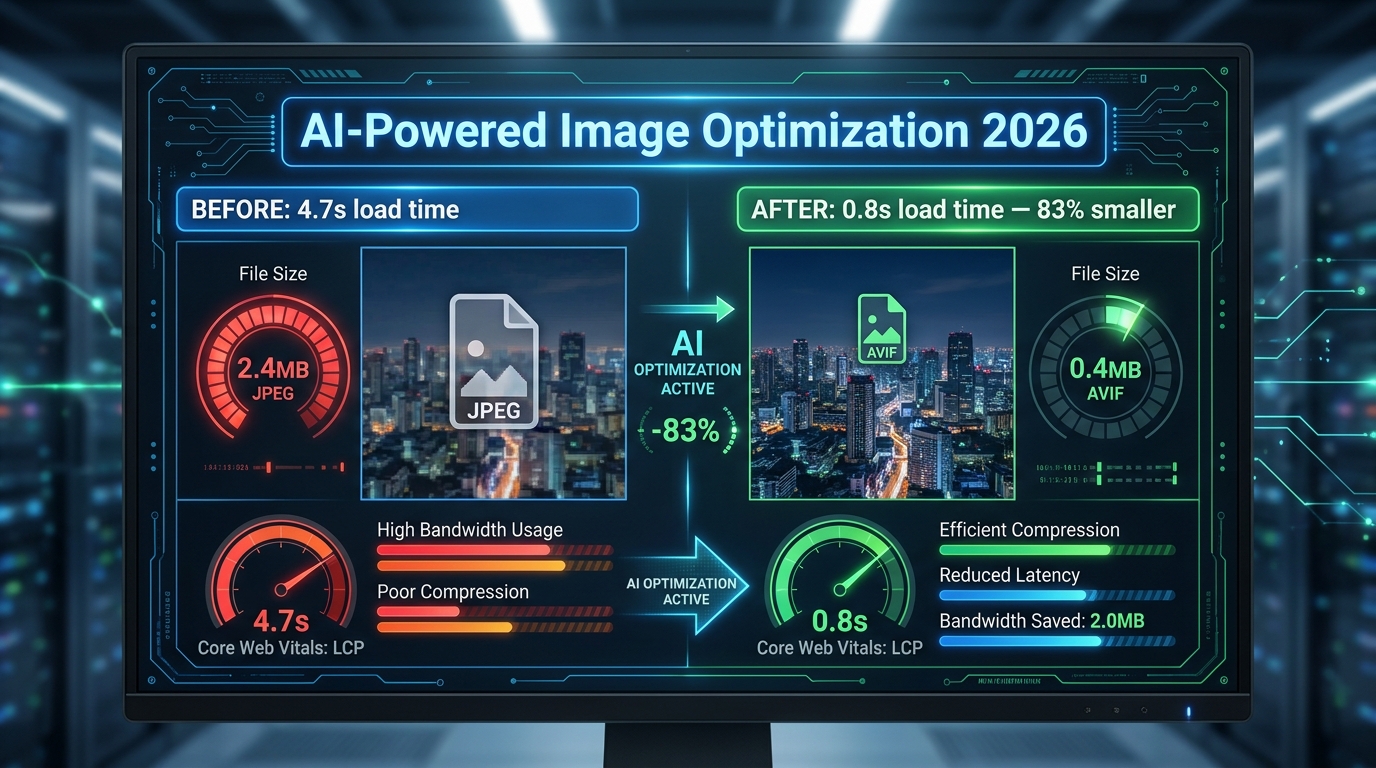
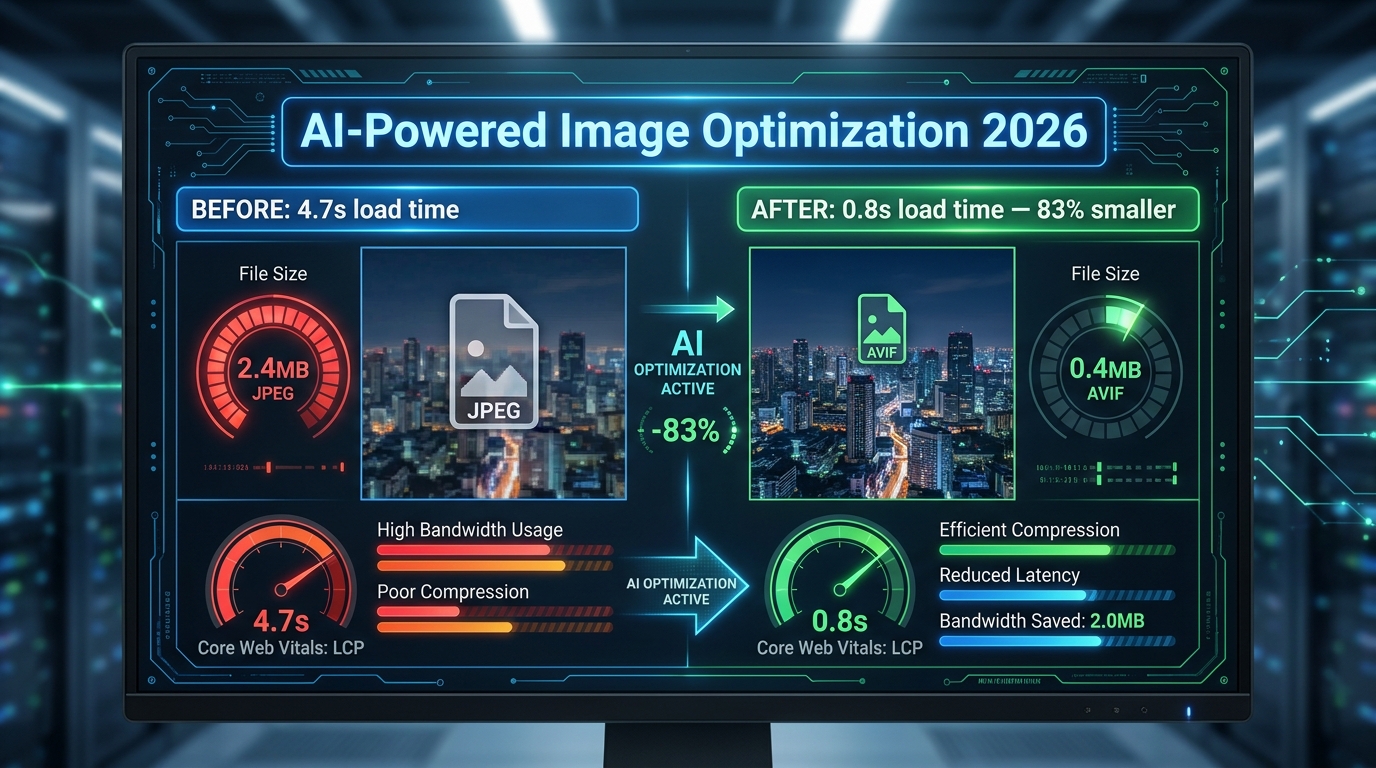
Most image optimization advice is stuck in 2021. Compress your JPEGs, use lazy loading, add an alt tag — done. But the tools, formats, and techniques available in 2026 have completely changed what “good” looks like. And the gap between sites doing this right versus sites doing it the old way is no longer a minor performance difference. It’s the difference between ranking and not ranking. Between converting and bouncing. Between visible in Google Lens and invisible.
This guide is not about basics. It’s not going to tell you to “resize your images” or “use a CDN.” It’s written for developers, technical marketers, and digital operators who already know the fundamentals and want a precise, up-to-date picture of what actually moves the needle in 2026 — with specific tools, specific tactics, and the data to back them up.
We’ll cover the definitive format landscape (AVIF has won, and you need a strategy), AI-driven compression pipelines, edge delivery with intelligent routing, machine learning–based predictive loading, visual search optimization for Google Lens, AI-generated alt text at scale, generative AI for product imagery (and the compliance layer you can’t ignore), Core Web Vitals LCP mechanics, and a prioritized implementation stack you can act on today.
Every section is grounded in 2026 data. Let’s get into it.
The Format War Is Over — And AVIF Won
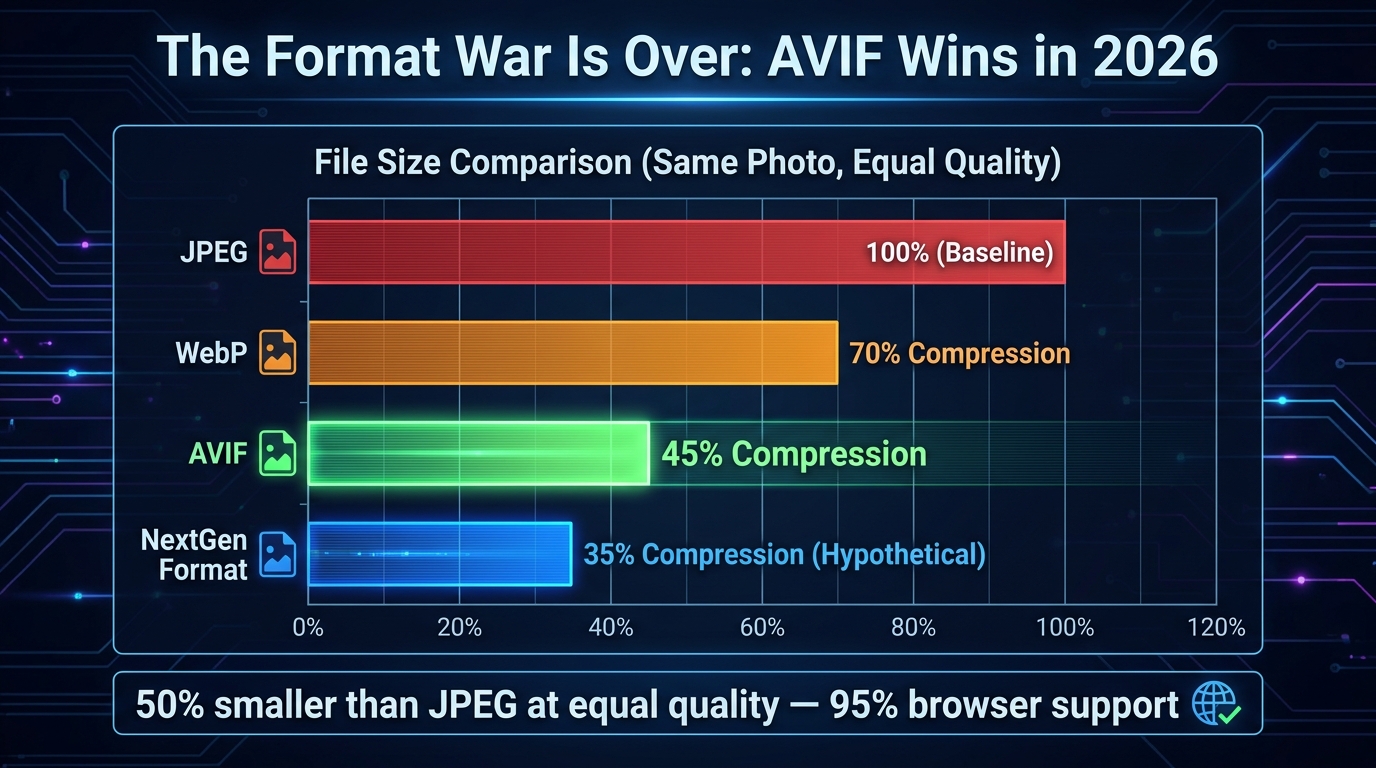
For the better part of five years, the image format landscape was unsettled. WebP was supposed to replace JPEG but had stubborn Safari holdouts. AVIF had better compression but inconsistent browser support. In 2026, that debate is settled. AVIF crossed the 95% browser support threshold in early 2026, making it the clear primary delivery format for the modern web.
The Numbers in Plain Terms
Let’s be direct about what the compression gains actually look like in practice. AVIF delivers files that are 50% smaller than JPEG at equivalent visual quality. Compared to WebP, it’s 20–30% smaller. These aren’t marginal improvements — they represent a fundamental shift in page weight. A 1.2MB JPEG routinely compresses to a 0.2MB AVIF using tools like Imagify, an 83% size reduction with imperceptible quality loss.
WebP itself compresses 25–35% smaller than JPEG and still carries ~97% browser support, making it the correct fallback format. The modern delivery strategy in 2026 is: AVIF primary, WebP fallback, JPEG last resort — and this should be implemented using the HTML <picture> element with srcset for responsive delivery. No exceptions, no excuses.
What AVIF Does Technically That JPEG Cannot
AVIF’s advantages aren’t just about compression ratios. It eliminates the blocking artifacts that JPEG produces at high compression settings — those blocky, pixelated degradation patterns that appear around edges and text. AVIF also supports HDR (High Dynamic Range) and wide color gamut natively, which matters increasingly as more displays ship with P3 or Rec. 2020 color profiles.
For e-commerce especially, this means product images can carry richer, more accurate color representation without a file size penalty. A red sneaker photographed in HDR can render with the actual vibrancy of the original shot, not the muted, slightly off tones that JPEG compression typically introduces.
Serving AVIF Correctly: The <picture> Pattern
Correct implementation matters. The <picture> element enables browser-native format negotiation, meaning each visitor gets the best format their browser supports without any JavaScript overhead:
<picture>
  <source srcset="hero.avif" type="image/avif">
  <source srcset="hero.webp" type="image/webp">
  <img src="hero.jpg" alt="[descriptive alt text]" width="1200" height="628">
</picture>
Always include explicit width and height attributes on the <img> element. This reserves layout space before the image loads, eliminating Cumulative Layout Shift (CLS) — a separate Core Web Vitals metric that penalizes pages where content jumps around as resources load.
SVG for Non-Photographic Elements
One commonly overlooked optimization: logos, icons, and UI elements should never be rasterized in the first place. SVG files are resolution-independent, meaning they render crisp at any screen size without any data overhead from serving multiple resolution variants. A complex PNG logo at 200KB can frequently be replaced by an SVG at 8KB that looks sharper on a 4K display than the PNG ever did. Audit your non-photographic image inventory and convert aggressively.
AI Compression Tools That Actually Deliver in 2026
AI-driven compression goes beyond applying a quality slider to a JPEG. Modern tools analyze image content at the pixel and region level, applying heavier compression to visually less-important areas (backgrounds, uniform textures, empty space) while preserving detail where the human eye will focus — faces, product edges, text overlays, fine textures.
Content-Aware Compression: How It Works
Tools like Photo AI Studio apply what’s called region-specific compression: the algorithm identifies high-salience areas (faces, product foregrounds, labels) and applies lighter compression there, while applying heavier compression to the sky behind a product, a blurred bokeh background, or a clean studio wall. The result is a file that’s 30–50% smaller than a uniformly compressed equivalent but appears visually indistinguishable — because the human visual system doesn’t notice compression artifacts where it isn’t looking closely.
This is a fundamentally different approach from traditional compression, which applies the same quality setting uniformly. The practical result: a 500KB product image that would compress to 250KB with standard WebP compression can hit 150KB or less with content-aware AI compression at identical perceived quality.
The Leading Tools and Their Actual Differentiators
Imagify has become the benchmark for WordPress environments. Its Smart Compression mode automatically balances quality and performance targets on a per-image basis, processing at under 200ms per image and supporting batch conversion to WebP or AVIF. 93% of users rate its setup as straightforward. For volume operations, the results are consistent: a 1.2MB JPG becomes a 0.2MB AVIF through Imagify’s pipeline.
Cloudinary is the enterprise standard. Beyond compression, it offers 50+ URL-based transformations, a built-in DAM (Digital Asset Management) layer, AI smart cropping with face and subject detection, and video optimization in the same pipeline. Its CDN runs on over 700 edge nodes (CloudFront-powered), enabling transformations at the edge rather than at origin. Case studies include Neiman Marcus reducing photoshoot volume by 50% and Stylight attributing a 2.2% conversion lift directly to Cloudinary-driven image optimization.
ImageKit has emerged as the value-disruptive option. At $9/month on its Lite plan, it bundles a full AI feature set — background removal, auto-tagging, 50+ URL transformations, AVIF/WebP auto-delivery, and face detection-based smart cropping. It runs on 700+ edge nodes and has become the go-to for growing businesses that need enterprise-grade image infrastructure without enterprise pricing.
ShortPixel and Kraken.io remain strong options for batch-processing existing image libraries, particularly where the primary goal is bulk compression of legacy JPEG/PNG catalogs to WebP or AVIF without a full CDN layer.
The On-Device AI Compression Shift
A noteworthy 2026 development: tools like TinyImage.Online are processing AVIF encoding natively in the browser using Canvas and File APIs — meaning images never leave the user’s device for compression. For privacy-sensitive workflows or scenarios where uploading proprietary product imagery to third-party servers is a concern, this represents a genuinely useful alternative to cloud-based pipelines.
Smart CDN and Edge Delivery: Why Where You Process Matters
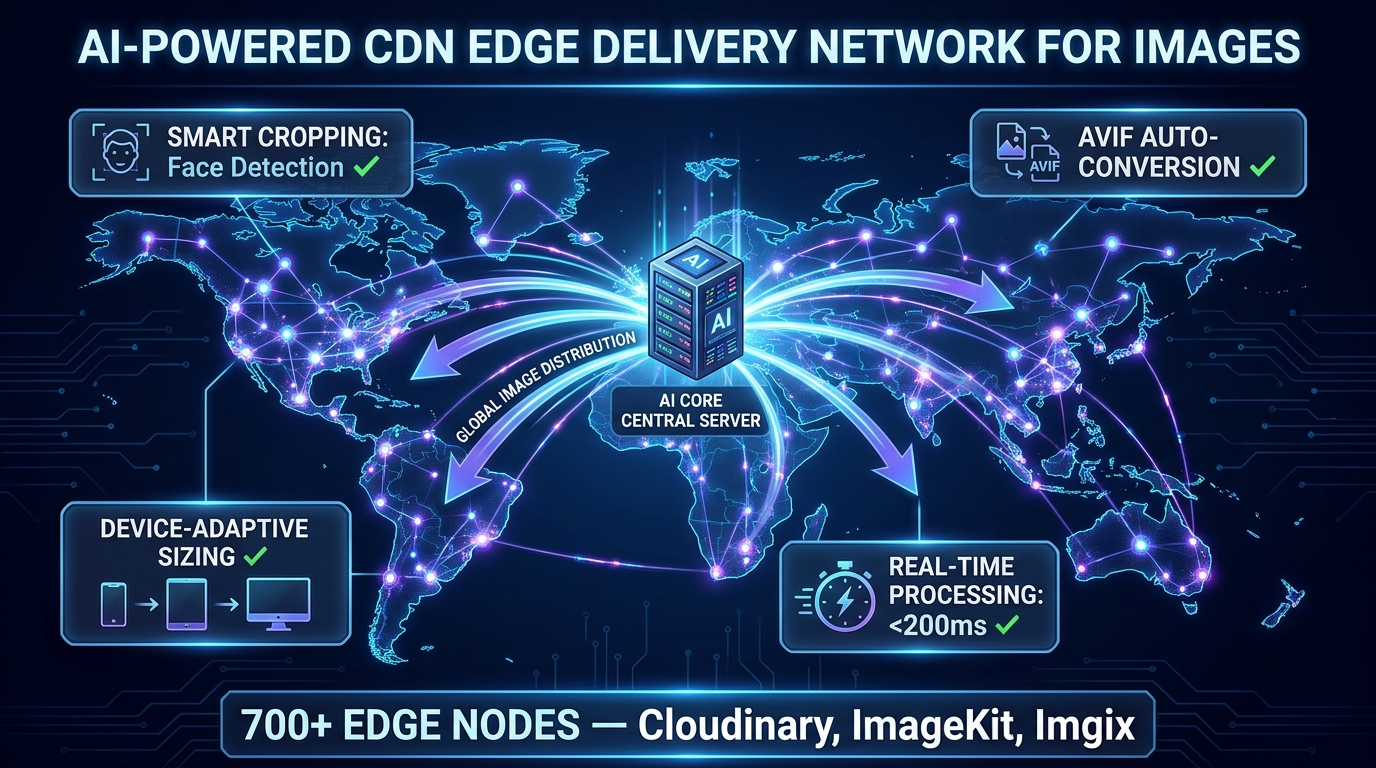
Even a perfectly compressed AVIF image delivers a poor experience if it’s served from a single origin server on the other side of the world from the user. CDN edge delivery is not new advice — but the intelligence layer that’s been added to modern image CDNs in 2026 fundamentally changes what edge delivery means for images.
Edge Processing vs. Edge Caching: The Distinction That Matters
Traditional CDNs cache pre-generated image variants. You upload a product image in 5 different sizes, cache all 5 at the edge, and serve the right one based on a URL parameter. This works but has a major drawback: you’re pre-generating and storing every variant you might ever need, which is storage-intensive and requires anticipating every device/size combination.
Modern AI image CDNs like Cloudinary, ImageKit, and Imgix take a different approach: on-the-fly edge processing. When a device requests an image, the edge node generates the optimal variant in real time — the right dimensions for the requesting device’s screen, the right format for its browser, the right compression quality for its network conditions — in under 200ms. Subsequent identical requests are cached. The first request triggers transformation; all subsequent requests serve from cache. This means you maintain a single source image and the CDN’s AI layer handles every output variant dynamically.
AI Smart Cropping: The Feature Most Teams Underuse
Smart cropping is now table-stakes on every major image CDN — but most teams either haven’t enabled it or don’t understand its scope. AI smart cropping uses computer vision to identify the visual subject of an image — a face, a product, a focal point — and ensures that element remains centered and fully visible when the image is cropped to different aspect ratios.
Without smart cropping, a landscape product photo cropped to a square mobile thumbnail might cut off half the product. With AI subject detection enabled, the CDN identifies the product as the focal subject and crops to keep it centered regardless of the target aspect ratio. For teams managing thousands of SKUs across multiple surface areas (PDPs, category pages, thumbnails, social), this eliminates hours of manual art direction per image.
Network-Adaptive Quality: Serving the Right Image for the Right Connection
The most forward-looking edge delivery feature in 2026 is network-adaptive image quality. CDNs can read the requesting device’s connection type (via the Save-Data header or the Network Information API) and serve a lighter image variant automatically to users on congested or slow connections. A user on 5G in a major city gets a full-quality AVIF. A user on a 3G mobile connection in a rural area gets a lighter WebP at 75% quality — still looking good on their screen, but loading in a fraction of the time.
This is not something most teams configure explicitly. It’s a CDN-level setting, and enabling it is often a single checkbox. The impact on mobile conversion rates — where 62% of web traffic now originates — is measurable and immediate.
Beyond Lazy Loading: AI Predictive Image Loading
Lazy loading — deferring below-the-fold images until they approach the viewport — has been standard practice since 2019. In 2026, it’s the floor, not the ceiling. AI-driven predictive loading represents the next layer, and early adopters are reporting 35–50% performance gains over traditional lazy loading alone.
How Predictive Preloading Works
Traditional lazy loading is reactive: an image loads when it enters (or approaches) the viewport. AI predictive loading is proactive: it analyzes a user’s scroll velocity, historical navigation patterns, cursor position, and device capabilities to anticipate which images they’re likely to see next — and begins loading them before they reach the viewport.
The technical implementation typically combines the Intersection Observer API with a lightweight ML model trained on user behavior data. The model assigns “interest scores” to off-screen images based on behavioral signals, then prioritizes preloading the highest-scoring candidates. Think of it as the image equivalent of DNS prefetching: by the time the user’s scroll reaches a product image, the download may already be complete.
Low-Quality Image Placeholders (LQIP): The Perceived Performance Trick
While AI predictive loading handles the actual resource timing, LQIP handles perceived performance — and the two techniques are complementary. A Low-Quality Image Placeholder is a heavily compressed, 1–2KB version of the image that loads immediately and occupies the space while the full-resolution version loads.
In 2026, LQIP has evolved. Rather than the blurry JPEG thumbnails of earlier implementations, modern LQIPs use AI-generated dominant color blocks or gradient approximations that match the actual image’s color palette without any layout shift. The user sees a coherent, contextually appropriate placeholder rather than blank space or a spinning loader — and the transition to the full image is seamless.
Critical Path Exception: Never Lazy-Load Your Hero Image
This is where many implementations go wrong. Lazy loading is appropriate for below-the-fold content. The hero image — the first, largest above-the-fold image — must load as a priority resource. Lazy-loading a hero image actively harms LCP scores because it delays the browser’s early discovery and fetching of the most important visual element on the page.
The correct approach for hero images is the opposite of lazy loading:
<link rel="preload" as="image" href="hero.avif" type="image/avif" fetchpriority="high">The fetchpriority="high" attribute signals to the browser that this resource should be fetched immediately, ahead of other queued requests. Combined with a preload hint in the document <head>, this can reduce hero image load times by 0.5–1.5 seconds on typical connections — which translates directly to LCP improvements.
Google Lens and Visual Search: The Optimization Layer Most Sites Miss
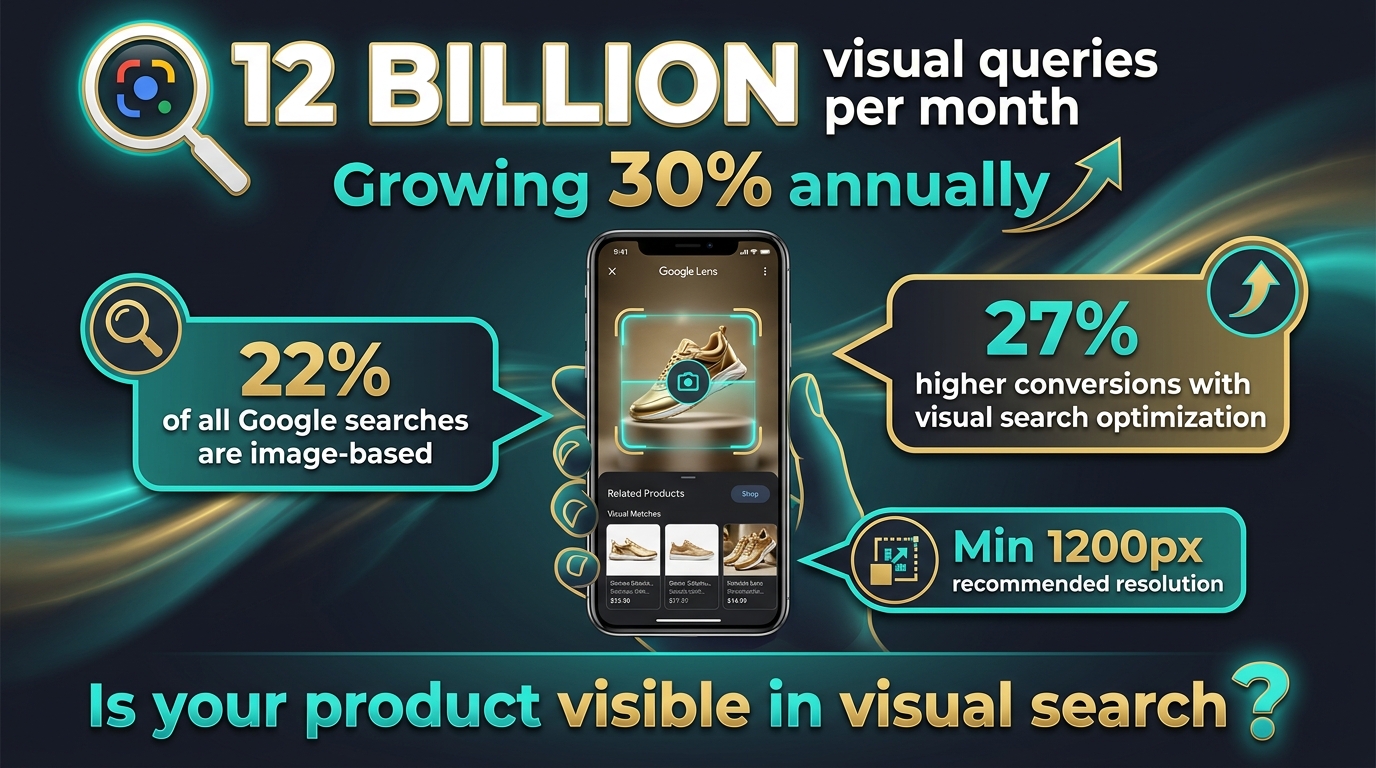
Text search optimization has been the dominant SEO paradigm for two decades. Visual search is disrupting that paradigm faster than most teams have noticed. Google Lens now processes over 12 billion visual queries per month, growing at 30% annually. Google Images independently drives 22% of all web searches. Sites that have implemented comprehensive visual search optimization report 27% higher conversion rates compared to text-only optimization strategies.
These are not marginal numbers. They represent a major commercial channel that most competitors have not optimized for.
How Google Lens Actually Processes Your Images
Understanding what Google Lens does technically helps clarify what you need to optimize for. Lens uses multimodal AI to analyze images without requiring any text input. It performs object detection (identifying specific products, brands, colors), scene understanding (context and setting), and commercial intent prediction (inferring whether the user wants to buy, research, or navigate based on what they’re photographing).
When someone photographs a product with Google Lens, the system matches the visual against Google’s product feed index, structured product data, and web imagery. The images that surface in results are those that provide strong visual signals (high resolution, clean subject, consistent lighting), strong structured data signals (Product schema, ImageObject markup), and fast-loading pages (the technical quality of the serving infrastructure matters for crawlability).
Resolution Requirements for Visual Search Visibility
Google’s recommendations for visual search are clear: minimum 1,200px on the longest side, ideally 2,400px+. This is higher than most teams default to for web delivery, because web performance optimization typically pushes toward smaller images. The resolution requirement for visual search is driven by the pixel-level matching algorithms Lens uses — low-resolution images don’t provide enough visual detail for accurate object detection and matching.
The practical solution is responsive serving with high-resolution sources. Maintain source images at 2,400px+ and use your image CDN to serve device-appropriate sizes for actual page rendering. The high-resolution version stays indexed and available for Google’s crawler, while users receive right-sized images for their displays.
Photography Practices That Drive Visual Search Rankings
Technical optimization only works if the underlying photography provides clean visual signals. For product images specifically: shoot on consistent, neutral backgrounds (white or light grey); ensure the product fills at least 60–70% of the frame; capture multiple angles (front, side, back, detail); use consistent, studio-quality lighting that eliminates harsh shadows; and maintain consistent cropping and framing across a catalog. These practices enable Lens’s object detection models to accurately identify your product and match it against queries.
Descriptive File Names and Stable URLs
File naming is an underrated visual search signal. product-img-047.jpg tells Google nothing. blue-mens-running-shoes-size-10-side-view.webp provides explicit product context before any other signal is processed. Rename files descriptively before upload, and use hyphens (not underscores) as word separators per Google’s preference. Equally important: use stable, canonical URLs for images. If your CMS regenerates URLs on product updates, Google’s visual index loses continuity and your image authority resets.
AI-Generated Alt Text and Metadata at Scale
Over 2.2 billion people worldwide have some form of visual impairment that causes them to rely on alt text when consuming web content. Beyond accessibility — which is reason enough to get this right — Google explicitly states that it prioritizes explicit alt text over its own computer vision inference for image understanding. Writing descriptive alt text is not optional for image SEO; it’s the most direct signal you can provide.
The problem is scale. An e-commerce catalog with 10,000 SKUs and multiple images per product can’t be manually alt-tagged at high quality. AI has solved this problem.
How Modern AI Alt Text Generation Works
Modern AI alt text tools use vision-language models (VLMs) like GPT-4o and Gemini to analyze image content and generate contextually appropriate descriptions. Unlike early computer vision-based tagging that produced generic labels (“product, item, image”), current VLMs understand context, composition, and commercial intent.
For a product photo, a VLM-generated alt text might produce: “Nike Air Max 270 in midnight navy blue, side view showing full-length Air unit midsole, white outsole, and mesh upper with synthetic overlays.” That’s SEO-relevant, accessibility-compliant, and accurate — generated automatically, at scale, in under a second per image.
Best Practices for AI-Generated Alt Text
Even with AI generation, review the output against a few quality standards. The optimal length for alt text is 80–140 characters — enough for detail, not so long it becomes noise for screen readers. Prioritize contextual purpose over literal description: describe what the image communicates in its page context, not just its visual contents. For images that are purely decorative (dividers, background patterns), use an empty alt attribute (alt="") to signal to screen readers that the image can be skipped.
Tools like AltText.ai support 130+ languages and integrate directly with major CMS platforms and e-commerce plugins, enabling automated alt text generation that fires on upload without manual intervention. The EU Accessibility Act, which mandated alt text compliance across digital properties, has made automated alt text generation a legal compliance concern in European markets — not just an SEO optimization.
Beyond Alt Text: AI-Powered Image Metadata Enrichment
AI can enrich image metadata beyond alt text. Auto-tagging — automatically assigning descriptive keyword tags to images based on their visual content — enables faster internal image search, better DAM organization, and additional structured data signals for search indexing. Platforms like Contentful’s AI layer and Cloudinary’s auto-tagging feature generate comprehensive tag sets on upload. For large teams managing thousands of images, this removes a significant manual bottleneck from the publishing workflow.
Generative AI for Product Images: The Opportunity and the Compliance Layer You Can’t Ignore
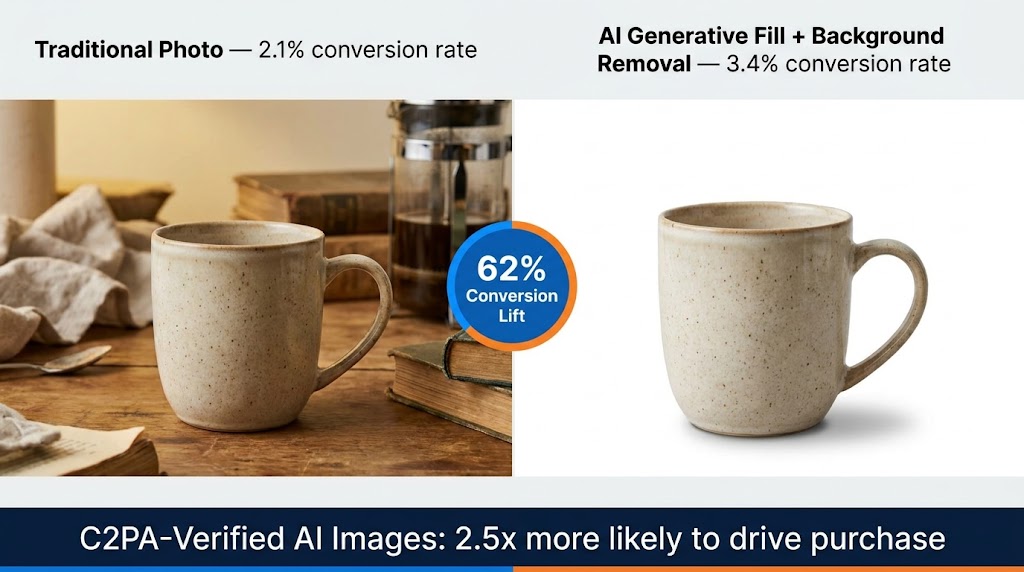
AI-generated and AI-enhanced product imagery is now producing measurably better commercial outcomes than traditional photography in controlled tests — but with a critical compliance caveat that determines whether those results are positive or catastrophically negative.
The Conversion Data on AI Product Images
Shopify Q4 2025 data reveals a clear hierarchy: traditional photography converts at a 2.1% baseline rate. Unlabeled AI-generated images drop to 1.8% — a negative outcome driven by consumer mistrust when artificial origin is suspected but unconfirmed. C2PA-verified AI images convert at 3.4%, outperforming traditional photography by a significant margin.
BCG’s late 2025 study adds important context: consumers are 2.5x more likely to purchase when AI imagery carries C2PA (Coalition for Content Provenance and Authenticity) verification badges. Non-compliant AI images, meanwhile, cut customer lifetime value by 15%. The compliance layer isn’t just ethical best practice — it’s a direct revenue variable.
Background Removal and Generative Fill in Practice
The most widely applicable AI image tools for e-commerce fall into two categories: background removal and generative fill. Remove.bg processes backgrounds in approximately 5 seconds per image via API, with 99.8% accurate removal on standard product shapes. It scales efficiently for high-volume catalogs where consistent white-background imagery is required for marketplace compliance.
Photoroom (150M+ downloads) goes further, combining background removal with AI background generation — placing products in contextually relevant scenes (a coffee mug on a café table, a sneaker on an urban street, a skincare product in a bathroom setting) without a photoshoot. This is the AI-driven production studio model: generate dozens of lifestyle context variants from a single hero shot, A/B test them, and serve the highest-converting variant per customer segment.
Claid specializes in bulk enhancement — upscaling, sharpening, color correction, and background replacement at catalog scale, with API integration that slots into existing DAM workflows without requiring image-by-image manual processing.
C2PA Compliance: Not Optional in 2026
C2PA (Coalition for Content Provenance and Authenticity) metadata embeds a cryptographically verifiable origin record into AI-generated or AI-modified images. This metadata travels with the image and can be read by compliant platforms (Adobe products, Google, most major social platforms as of early 2026) to display provenance information to end users.
The practical implication: if you’re using AI to generate or significantly modify product imagery and you’re not embedding C2PA metadata, you’re in the quadrant that produces 1.8% conversion rates and eroding LTV. Enable C2PA output in your generative AI tools (Adobe Firefly, Photoroom Pro, and Midjourney Enterprise all support it), and display the provenance badge where your platform surfaces it. Transparency drives trust; trust drives conversion.
Core Web Vitals and LCP: The Revenue Connection Most Teams Underestimate
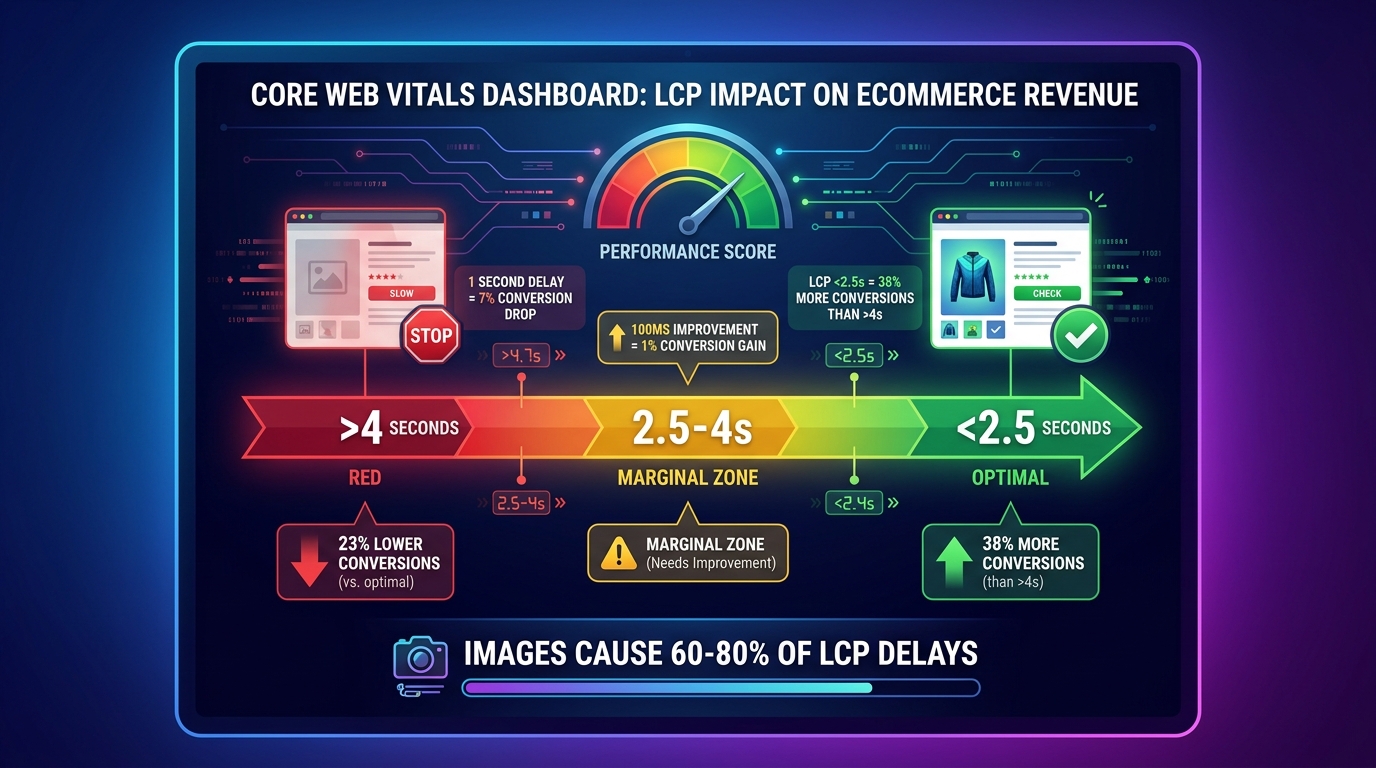
Largest Contentful Paint (LCP) measures how long it takes for the largest visible element on the page to fully load. In the vast majority of page layouts — especially product pages, landing pages, and home pages — that largest element is an image. Understanding LCP isn’t just a technical exercise; it’s a direct proxy for the commercial health of your pages.
The LCP Thresholds and What They Cost You
Google’s thresholds are: under 2.5 seconds = good, 2.5–4.0 seconds = needs improvement, over 4.0 seconds = poor. The conversion implications across these zones are well-documented in 2026 research:
- A 1-second delay in page load time reduces conversions by 7%.
- Every 100ms improvement corresponds to approximately a 1% conversion gain.
- Sites with LCP under 2.5 seconds see 23% higher conversions than sites with LCP over 4 seconds.
- One documented case study showed a 38% conversion lift from reducing LCP from 4.2 seconds to 1.8 seconds via AVIF/WebP implementation and hero image preloading.
- Mobile users — 62% of total web traffic — experience LCP degradation more severely, amplifying the revenue impact on any site that hasn’t explicitly optimized for mobile image delivery.
These aren’t theoretical numbers. They’re operational costs that compound daily on any site running above-threshold LCP scores.
Images Are the Primary LCP Culprit
Unoptimized images cause 60–80% of poor LCP scores. The common failure modes are:
- Oversized source images: Serving a 3MB JPEG where a 150KB AVIF would render identically
- Lazy-loaded hero images: The hero image is the LCP element — lazy loading it defeats the entire purpose of LCP optimization
- No preload hint: The browser discovers the hero image late in the load cycle, after parsing HTML and CSS, rather than at parse time
- Missing
width/heightattributes: Causes layout shifts (affecting CLS) and delays rendering pipeline - Origin-served images: No CDN, no edge delivery — every user hits the origin server regardless of geographic distance
Diagnosing Your LCP Image Issues
Google PageSpeed Insights (powered by Lighthouse) identifies your LCP element and its load time on mobile and desktop. Chrome DevTools Performance tab shows a waterfall view of exactly when each image starts and finishes downloading. The combination of these two tools gives you everything you need to identify which specific images are causing LCP failures — and in what order to fix them.
Prioritize pages by commercial importance: checkout flow, product detail pages, and category pages first. Fix the LCP element on each (almost always the hero or first product image), then work outward to secondary images. For most e-commerce sites, fixing the top five template types (PDP, category page, homepage, cart, landing page) captures 80%+ of the total LCP opportunity.
Schema Markup and Structured Data: Making Images Legible to AI Systems
Structured data has evolved from a nice-to-have SEO enhancement to a requirement for visibility in AI-powered search surfaces. Google’s March 2026 core update tightened rich result eligibility, requiring schema to match primary page content precisely. Sites with correct schema markup occupy 72% of first-page results, and pages with rich results experience 20–40% CTR increases compared to standard listings.
ImageObject Schema: The Specific Markup for Images
The ImageObject schema type in JSON-LD provides Google with explicit metadata about your images — including license, copyright, caption, creator, and URL — that goes beyond what it can infer from visual analysis alone. For product images, ImageObject is typically nested within Product schema:
<script type="application/ld+json">
{
  "@context": "https://schema.org",
  "@type": "Product",
  "name": "Blue Running Shoes",
  "image": [
    {
      "@type": "ImageObject",
      "url": "https://example.com/shoes-front.avif",
      "description": "Blue running shoes, front view, white sole",
      "width": 1200,
      "height": 1200
    }
  ],
  "offers": {
    "@type": "Offer",
    "price": "89.99",
    "priceCurrency": "USD",
    "availability": "https://schema.org/InStock"
  }
}
</script>
Products with complete schema markup are 4.2x more likely to appear in Google Shopping results. Pages with structured data earn 35% higher click-through rates from rich results. And image schema that includes license information unlocks Google Images’ licensable content filter — a growing traffic source for media and photography sites.
Open Graph and Social Sharing Performance
Open Graph meta tags control how your images appear when pages are shared on social platforms. Getting this wrong means your product pages share as blank or with incorrect images, losing the visual engagement that drives click-through from social contexts.
The critical tags for image performance on social sharing:
og:image— the primary image URL (should be absolute, not relative)og:image:widthandog:image:height— allows platforms to render without downloading to determine dimensionsog:image:type— specifyimage/webpfor platforms that support it (improves load speed in social feeds)og:image:alt— the alt text for the shared image (accessibility on social platforms)
The recommended minimum dimensions for Open Graph images are 1200×630px. Below this, most platforms scale up the image and display it in a reduced card format rather than the large preview card that drives significantly higher click-through rates.
Visual Search Rich Results: The Emerging Frontier
Google’s AI Overviews (the AI-generated summary blocks at the top of search results) increasingly surface images as evidence. Pages whose images are correctly tagged with ImageObject schema, serve at appropriate resolution, and load fast enough for Googlebot to fetch on its crawl budget are the ones appearing in these visual AI Overview citations. This is a new traffic vector — one that schema-poor sites are systematically excluded from.
Building Your 2026 Image Optimization Implementation Stack
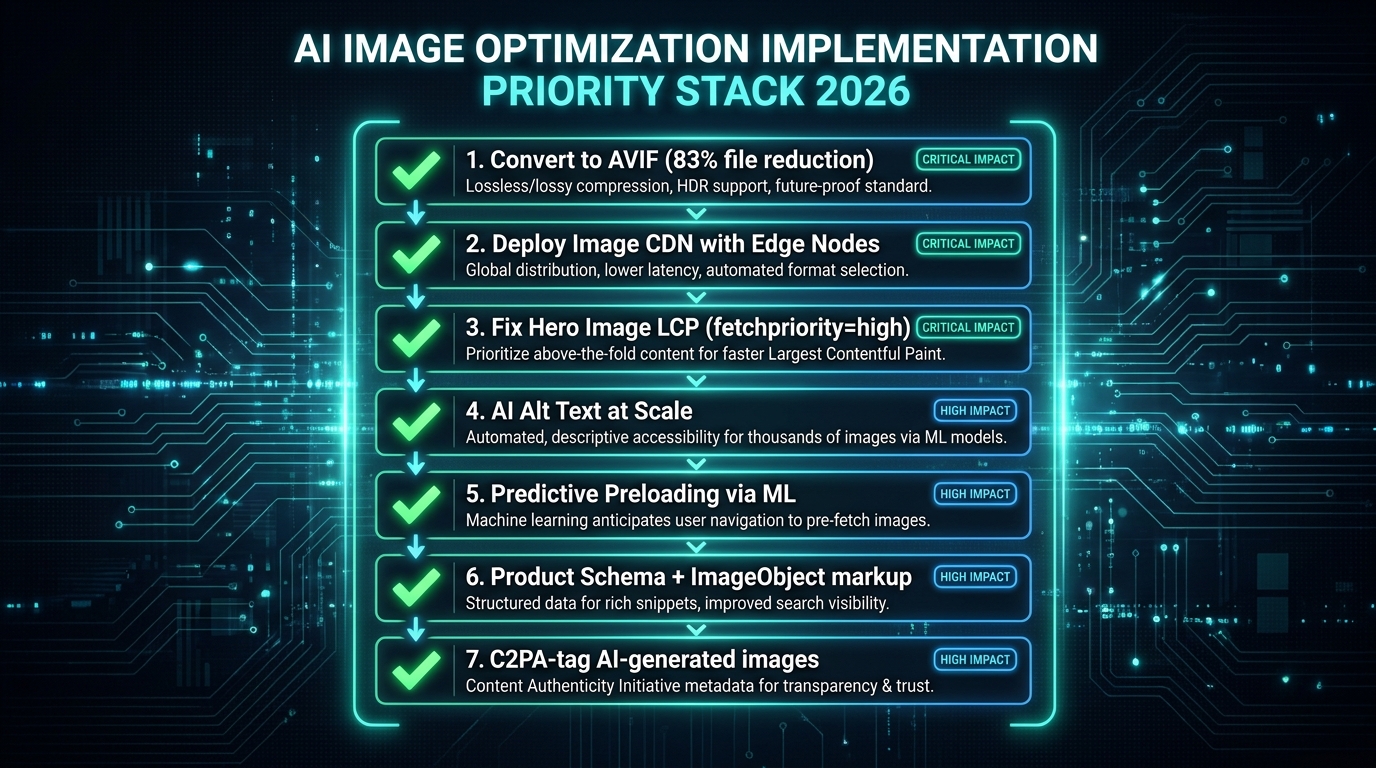
With all the techniques and tools covered, the question becomes prioritization. Not everything has equal leverage, and implementation resources are finite. Here’s a sequenced approach based on impact-to-effort ratio.
Tier 1: Maximum Impact, Achievable Immediately
1. Convert your image library to AVIF (with WebP fallback). This single change — implementable via Imagify, ShortPixel, or your image CDN’s auto-conversion — can reduce total image payload by 50–83%. It directly improves LCP, reduces bandwidth costs, and improves perceived performance across every page on your site. Do this first.
2. Fix your hero image LCP. Add fetchpriority="high" and a <link rel="preload"> for every hero image. Remove any lazy-loading attributes from above-the-fold images. Add explicit width and height attributes to eliminate CLS. This is typically 15 minutes of implementation for a 0.5–1.5 second LCP improvement.
3. Deploy an image CDN if you aren’t using one. ImageKit at $9/month serves more edge-delivery functionality than most teams have from their current stack. The combination of edge delivery plus AVIF auto-conversion plus smart responsive sizing covers the majority of the performance gap for most sites.
Tier 2: High Impact, Requires More Setup
4. Implement AI-generated alt text at scale. Integrate AltText.ai or your image CDN’s auto-tagging into your upload pipeline. Set up a rule that fires on every new image upload. Run a batch job on existing images with missing or generic alt text. This improves accessibility compliance, image SEO, and visual search indexing simultaneously.
5. Add Product schema and ImageObject markup to all product pages. For WordPress/WooCommerce sites, plugins like Yoast SEO Premium or RankMath handle much of this automatically with minimal configuration. For custom platforms, the JSON-LD block is templatable and can be generated programmatically from product data.
6. Implement lazy loading correctly across below-the-fold images. Use the native HTML loading="lazy" attribute — it’s supported by all modern browsers and requires no JavaScript. Reserve Intersection Observer-based implementations for scenarios where you need more granular control over loading thresholds or are implementing LQIP transitions.
Tier 3: Advanced, Compounding Returns
7. Implement LQIP for progressive image loading. Generate dominant-color or low-quality progressive placeholders for all above-the-fold product images. This improves perceived performance significantly, particularly on mobile connections, even when actual load times remain constant.
8. Explore AI generative backgrounds for product imagery. Test Photoroom or Claid for a single high-traffic product category. Run an A/B test against your current photography baseline. Measure conversion, time-on-page, and bounce rate. If you generate AI images, enable C2PA metadata output from day one.
9. Enable network-adaptive quality on your image CDN. Most CDNs offer this as a configuration flag. Enable it and monitor its effect on mobile conversion rates over 30 days. On high-mobile-traffic sites, this can produce conversion improvements of 3–8% with zero additional development work.
10. Optimize for visual search (Google Lens) systematically. Audit your product image library against the resolution (1200px+ minimum), photography quality, and file naming standards outlined in this guide. Prioritize your highest-commercial-value SKUs first. Cross-reference with your Google Search Console image performance data to identify which product categories are already generating image search traffic — and which ones should be but aren’t.
Tracking Progress: The Metrics That Matter
Set up a measurement baseline before beginning any implementation so you can attribute improvements accurately. The metrics to track:
- LCP score (mobile and desktop) via Google PageSpeed Insights or Search Console Core Web Vitals report
- Total image payload per page type (via Chrome DevTools Network tab, filtered to images)
- Google Images impressions and clicks via Search Console’s Search Type filter set to “Image”
- Conversion rate by page type — segment by device type to isolate mobile image performance impact
- CLS score — tracks layout stability improvements from adding width/height attributes
Review these weekly for the first month after major changes, then monthly once baselines stabilize. The impact of AVIF conversion and LCP fixes typically surfaces in Google’s field data within 28–45 days of implementation, which is the time it takes for real user measurements to refresh in the Chrome UX Report.
Conclusion: The Technical Operators Who Win on Images in 2026
The pattern across every section of this guide is consistent: image optimization in 2026 has two distinct populations of practitioners. Those who are still operating on 2021-era mental models — compress the JPEG, add an alt tag, done — and those who understand that images are now a multi-dimensional technical performance layer intersecting with SEO, visual search, accessibility, AI transparency, and conversion rate.
The operators in the second group are compounding advantages that compound further over time. AVIF adoption means lower bandwidth costs and better LCP today, which means better rankings tomorrow, which means more organic traffic that lands on pages already optimized to convert. AI alt text means better accessibility compliance, better image SEO, and better AI Overview citations simultaneously. C2PA compliance means higher trust, higher conversion rates, and lower risk of platform penalties as AI content regulations tighten.
None of this requires building something from scratch. The tools exist, the pricing is accessible, and the implementation complexity is lower than it appears when you tackle the steps in the right order. Tier 1 changes — AVIF conversion, hero image LCP fix, and image CDN deployment — can realistically be completed in a single sprint by a team of two. The compounding returns start from day one.
The sites that will dominate image performance metrics in 2026 and 2027 are the ones starting these implementations today, not waiting until the next algorithm update forces the issue. The margin between optimized and unoptimized is already large enough to be commercially significant. It will only widen from here.
Key Takeaways: Switch to AVIF primary delivery with WebP fallback. Fix your hero image’s LCP with
fetchpriority="high". Deploy an AI image CDN with edge processing. Implement AI-generated alt text on upload. Add ImageObject and Product schema markup. C2PA-tag any AI-generated images. Audit for Google Lens visual search requirements. Measure LCP weekly. The order matters — start with the highest-leverage items and work down the stack.
Leave a Reply