There’s a reliable pattern in how most teams discover browser automation. Someone watches a demo, gets excited about the possibility of computers doing the repetitive web work for them, tries to set something up — and then quietly abandons it three weeks later when the script breaks every time the website updates a button label. The tool was real. The promise was real. The workflow just never became self-sustaining.
DeepAgent, built by Abacus AI, is one of the most substantive attempts to close that gap. It doesn’t ask you to write Selenium scripts or wire together a maze of API connectors. You describe what you want in plain English — “check our competitor’s pricing page every morning and email me a CSV with any changes” — and it handles the planning, the browser execution, and the delivery. Scheduled. Recurring. Running in a background tab while you do other things.
But “running without you” is a much higher bar than most tools admit. Getting there requires understanding how DeepAgent’s engine actually works, which workflow types it handles well versus where it quietly fails, how to write prompts that produce durable results, and what the pricing model actually allows at each tier. This article covers all of it — without glossing over the rough edges that most overviews skip entirely.
Whether you’re evaluating DeepAgent for the first time or you’ve already run a few tasks and want to push it further, the goal here is to give you an honest, detailed picture of what’s possible and what takes real work to get right.
What DeepAgent Actually Is (And Why It’s Different from Other Automation Tools)
Most people who encounter DeepAgent have a frame of reference — Zapier, Make, UiPath, or even the basic macro recorders built into enterprise software. It helps to be clear upfront: DeepAgent is something structurally different from all of them, even though the output can look similar from the outside.
The Core Distinction: Goal-Oriented vs. Step-Oriented
Traditional automation tools are fundamentally step-oriented. You define every action in sequence — click this element, wait 2 seconds, paste this value into that field, submit the form. The tool faithfully executes those steps every time. That works perfectly until one of those steps changes: the button moves, the page reloads differently, a login flow adds a new prompt. The automation breaks, and someone has to go fix it.
DeepAgent is goal-oriented. You describe an outcome — “scrape these 50 LinkedIn profiles, extract names and emails, and push them into this Google Sheet” — and an LLM (currently powered by Gemini under the hood) generates a plan to achieve that outcome on the fly. It reads the page, understands the DOM contextually, and decides what to click or fill based on its interpretation of the current state of the browser. When the page changes slightly, it adapts rather than breaking.
This isn’t magic — and it introduces its own failure modes, which we’ll cover later. But the architectural difference is significant. You’re not maintaining a fragile script. You’re guiding an agent toward a goal.
Where DeepAgent Sits in the Abacus AI Ecosystem
Abacus AI built DeepAgent as part of a broader platform that also includes ChatLLM (a conversational interface across models), Abacus Studio (for building and deploying AI-powered apps), and a suite of enterprise AI tooling. DeepAgent sits at the intersection of all of these — it can use browser automation, call APIs, write and execute code, interact with databases, generate documents, and deploy lightweight apps.
In practice, this means a single DeepAgent workflow can do things that would require multiple separate tools in other setups: browse a competitor’s site, pull pricing data, run it through an analysis model, populate a Google Sheet, generate a formatted report, and email it to stakeholders — all triggered by a single scheduled task.
How It Runs: The Browser Extension and Background Execution
DeepAgent operates through a browser extension that creates a controlled execution environment inside your browser. There’s no separate desktop app you need to manage. The agent’s actions run in background tabs — it logs into sites using your authenticated sessions, navigates pages, reads DOM elements, fills forms, and extracts data without requiring a visible active browser window on your end.
For security-conscious users, this is worth flagging: because DeepAgent operates within your authenticated browser sessions, it has access to anything you’re logged into. Abacus AI uses an Execution Controller specifically designed to prevent cross-origin session issues and unauthorized data access. But this is a meaningful operational consideration when evaluating whether to use it for workflows involving sensitive accounts.
How the Browser Automation Engine Works Under the Hood
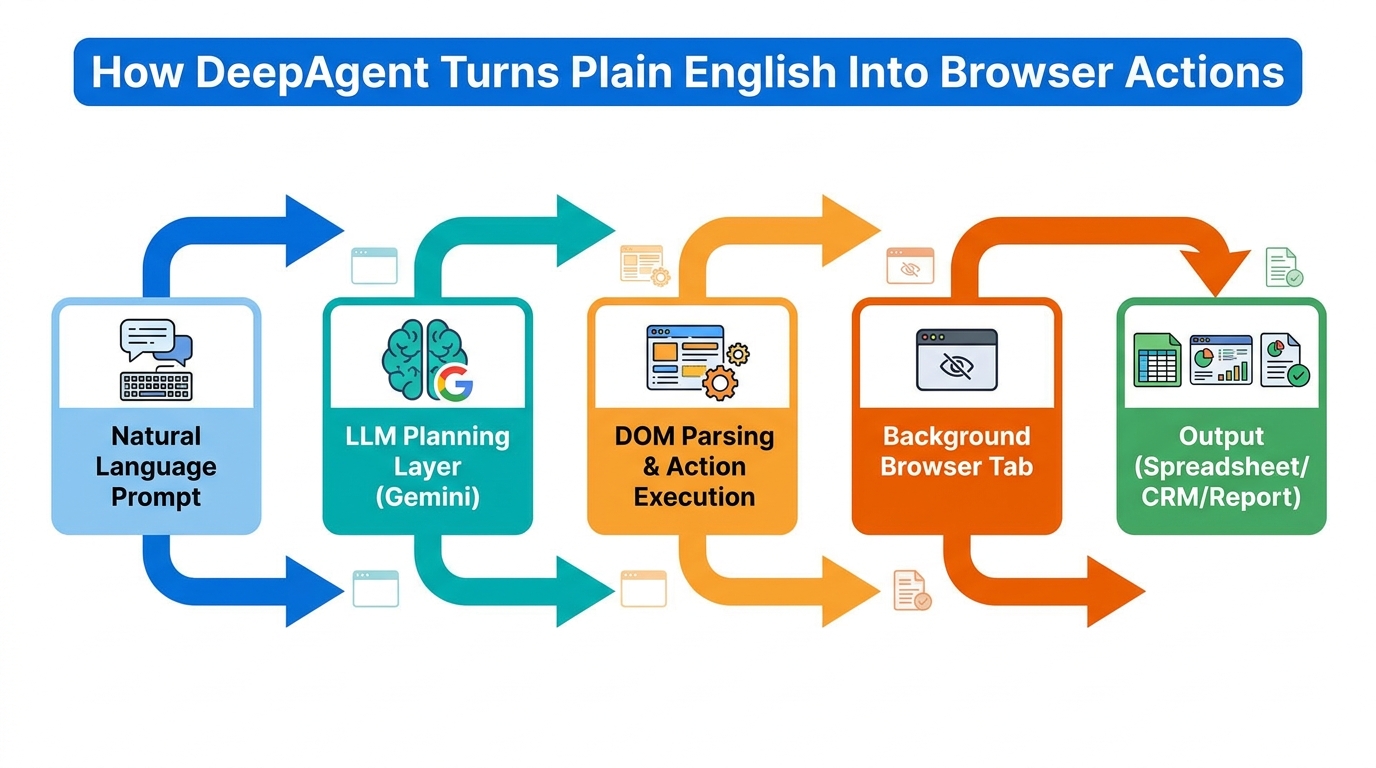
Understanding how DeepAgent’s engine processes and executes workflows isn’t just academic knowledge — it directly affects how you write prompts, how you structure complex workflows, and why certain tasks succeed where others fail. Here’s what’s actually happening between the moment you submit a task and the moment it completes.
Step 1: Natural Language to Execution Plan
When you describe a task — say, “Monitor this SaaS competitor’s pricing page daily and send me an email with a table of any price changes since yesterday” — DeepAgent’s LLM layer doesn’t immediately start clicking things. It first constructs a structured execution plan: a sequence of subtasks, each with a defined objective and expected output. This plan is the backbone of the entire workflow.
The quality of that plan depends heavily on the clarity of your prompt. Vague goals produce vague plans. Specific goals with explicit output formats, data sources, and conditional logic produce plans that execute reliably. We’ll come back to prompting strategy in detail later.
Step 2: DOM Parsing and Action Execution
Once the plan exists, the agent begins executing it browser-side. This is where the architecture diverges most sharply from traditional scripts. Rather than looking for a fixed CSS selector or element ID, DeepAgent reads the page semantically — understanding structure, labels, button text, and contextual relationships between elements.
When it needs to click a button, it identifies it by understanding what that button does in context, not by memorizing its exact position. When it needs to extract data from a table, it reads the table’s content as structured information rather than scraping raw HTML. This is what gives it resilience to minor UI changes that would break a brittle selector-based script.
Step 3: Multi-Step Chaining and Sub-Agent Spawning
For complex workflows, DeepAgent chains subtasks together, passing the output of one step as the input to the next. A lead generation workflow might chain: (1) search LinkedIn for target profiles, (2) extract contact info from each profile, (3) score each lead against defined criteria, (4) push qualified leads to a Google Sheet, (5) trigger an email summary. Each step is handled sequentially, with the agent adapting its next action based on what it received from the previous one.
In some advanced scenarios, DeepAgent can spawn sub-agents — specialized instances focused on a narrower task. This is powerful for parallelizing work, but it also introduces coordination complexity. Poorly scoped sub-agents are one of the more common failure modes in complex multi-step workflows, which is why explicit task boundaries in your prompt matter enormously.
The Role of JavaScript Execution
For tasks that require interacting with dynamically rendered content — forms built in React, data tables loaded via JavaScript, SPAs where content changes without a full page reload — DeepAgent executes JavaScript directly within browser tabs. This is meaningfully different from screenshot-based agents or tools that rely purely on visual understanding. It gives DeepAgent direct access to page structure even when that structure isn’t visible in a static HTML snapshot.
The Five Workflow Categories Where DeepAgent Delivers the Most Value
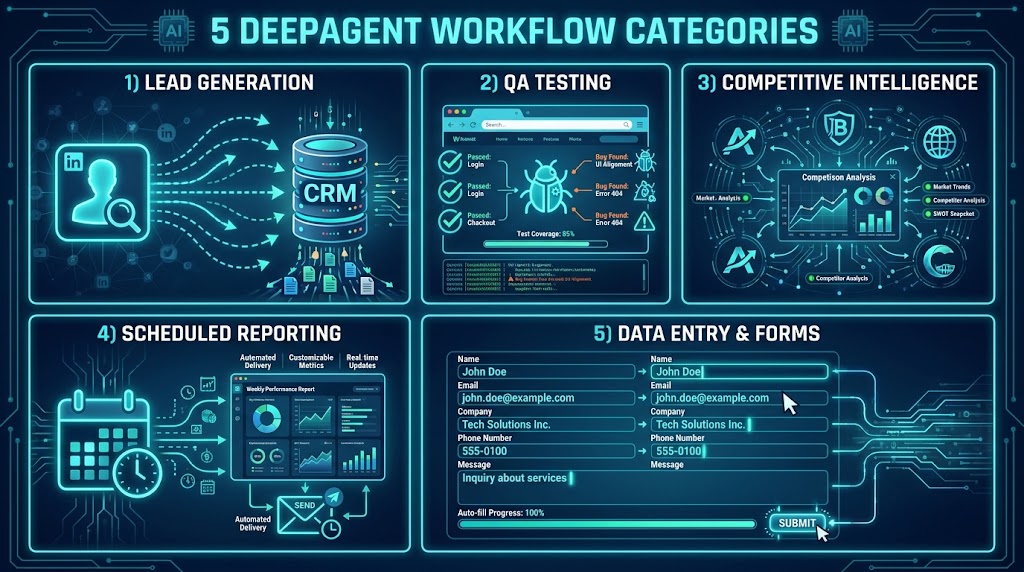
Not every automation is created equal. DeepAgent works across a broad range of browser-based tasks, but there are five specific workflow categories where the combination of goal-oriented reasoning, browser access, and scheduling creates disproportionate value. These are the areas where teams should look first when assessing what to automate.
1. Lead Generation and Outreach Workflows
This is arguably the use case that resonates most immediately with sales and marketing teams. A well-built DeepAgent lead gen workflow can crawl target websites, search LinkedIn for profiles matching defined criteria, extract contact information (names, titles, company data, public emails), score each lead against a qualification rubric, and push the results to a CRM or Google Sheet — all before the team’s morning standup.
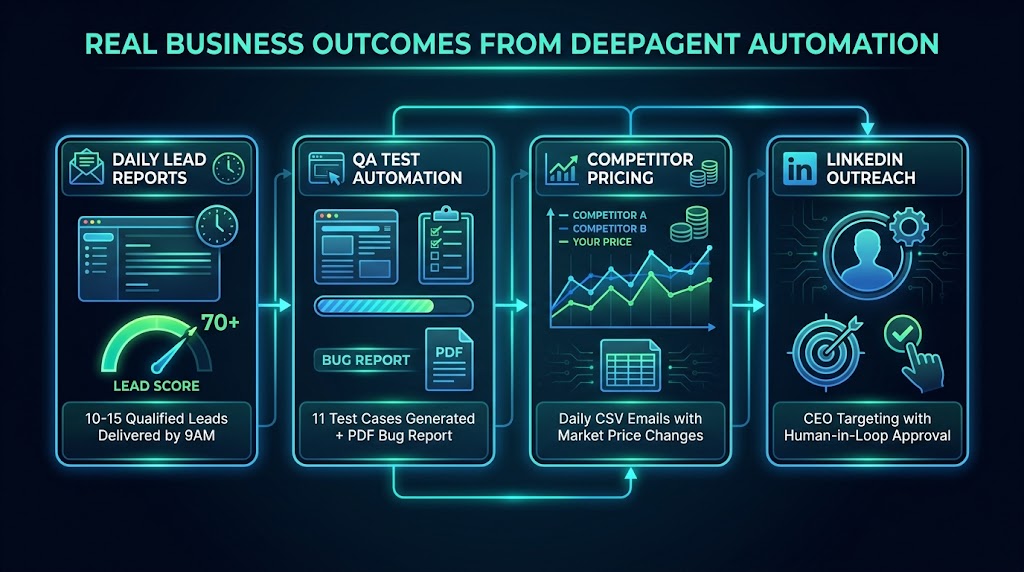
One documented workflow pattern delivers 10–15 qualified leads with a score of 70 or higher by 9AM daily, emailed directly to the sales team. The human involvement is essentially zero once the workflow is configured. The LinkedIn CEO outreach demo is another strong example: the agent builds a targeted list, drafts personalized connection messages, and queues them for sending — but routes each message through a human approval step before delivery. This “human-in-the-loop” pattern is particularly smart for outreach, where tone and judgment matter but the research and drafting work is purely mechanical.
2. Competitive Intelligence and Market Monitoring
Keeping tabs on competitors manually is one of those tasks that always gets deprioritized in favor of more urgent work. DeepAgent turns it into a scheduled background process. Teams have used it to monitor competitor pricing pages daily (with CSV email reports), track when competitor websites update their feature pages, analyze new entrants in a product category, and generate structured action plans when significant changes are detected.
The mirrorless camera brand competitive intelligence workflow — where DeepAgent detects a new competitor website, ingests and analyzes its positioning, evaluates competitive dimensions, and generates a multi-section action plan with executive summary, leverage points, and tactical recommendations — shows the ceiling of what’s possible when you give the agent a rich analytical framework to work with, not just a scraping target.
3. QA Testing and Website Monitoring
For teams maintaining web applications, manual QA is a constant tax on engineering and product time. DeepAgent can simulate end-to-end user flows, generate structured test case libraries (demos have produced 11 organized test cases from a single workflow prompt), execute those tests on schedule, and deliver PDF or HTML reports with screenshots, identified errors, severity ratings, and impact assessments. Broken links, failed form submissions, authentication errors, and navigation dead-ends get flagged without anyone having to click through them manually.
The scheduling capability makes this particularly powerful. A QA workflow configured to run every morning means your team starts each day knowing the current state of the application’s critical paths, rather than discovering production issues from user complaints.
4. Scheduled Reporting and Data Aggregation
Many business reporting workflows involve the same boring sequence every week: log into three different platforms, pull numbers from each, paste them into a spreadsheet, write a summary, send it to the team. DeepAgent handles this entire chain. It logs into authenticated sessions, navigates dashboards, extracts the relevant metrics, formats them into a Google Sheet or structured document, and delivers the output via email — on whatever schedule you define.
The NVDA market monitoring workflow is a clean example: the agent browses financial data sources, takes screenshots of relevant charts, aggregates news summaries, and assembles a daily trading report. Teams using Jira can get weekly Plotly-powered dashboards deployed to a URL automatically. Content teams can get automated competitive content summaries every Monday morning without anyone spending time on research compilation.
5. Invoice and Back-Office Browser Tasks
Back-office browser work — logging into vendor portals, downloading invoices, uploading data to supplier systems, filling in forms that don’t have APIs — is a surprisingly large time sink for operations teams. These tasks are exactly what DeepAgent’s scheduled browser automation was built for. The agent logs in, navigates to the right section, downloads or uploads the relevant files, updates a tracking spreadsheet, and logs the completed action. What took 20 minutes of careful navigation now runs overnight.
Building Your First Custom Workflow: A Step-by-Step Walkthrough
The fastest way to understand what DeepAgent can do — and more importantly, how to make it do it reliably — is to walk through a real workflow build from first prompt to running task. Let’s use a lead generation workflow as the example, since it combines several of the core capabilities: browser navigation, data extraction, scoring logic, and output delivery.
Step 1: Define the Outcome, Not the Steps
The single most important mindset shift when working with DeepAgent is to describe what you want, not how to get there. Resist the temptation to specify every click. Instead, start with a clear, outcome-focused prompt:
“Every morning at 8:30AM, search LinkedIn for founders and CEOs at B2B SaaS companies with 10–50 employees based in the US. Extract names, titles, company names, and any publicly available email addresses or LinkedIn URLs. Score each lead from 0–100 based on relevance to [ICP description]. Push the top 10 leads scoring 70+ into this Google Sheet [URL] and send a summary email to [address].”
This gives the agent a clear goal, explicit criteria, a defined output format, and a delivery mechanism. It leaves the path-finding to the LLM while constraining the outcome precisely.
Step 2: Add Conditional Logic and Guardrails
Once the basic prompt works, the next step is adding conditional logic to handle edge cases. What should happen if LinkedIn returns fewer than 10 qualifying results? What if a page fails to load? Explicit instructions for edge cases prevent the agent from improvising in ways you don’t want.
Add language like: “If fewer than 10 leads meet the 70+ score threshold, include the top 5 results regardless of score and flag them with ‘LOW CONFIDENCE’ in the Notes column.” Simple conditional instructions dramatically improve the reliability of recurring workflows.
Step 3: Test Before Scheduling
Run the workflow manually two or three times before setting it on a schedule. Watch the execution, review the output, and check whether the agent made any unexpected interpretations or navigation choices. DeepAgent provides execution logs you can review — use them. Catching a misinterpreted prompt in testing is a five-minute fix. Catching it after a week of silent bad data is a much bigger problem.
Step 4: Configure the Task Schedule
Once you’re satisfied the workflow runs correctly, navigate to the Tasks section and configure the schedule — hourly, daily, weekly, monthly, or a custom cron-style timing. Give the task a descriptive name that will make sense in six months when you’ve forgotten what you set up. Document the prompt in a separate note or the task description field.
Step 5: Set Up Monitoring
Don’t configure a scheduled task and forget about it completely. Workflows can drift over time — websites change, authentication sessions expire, Google Sheets permissions lapse. Set a reminder to review task output weekly for the first month, then monthly once you’ve confirmed stability. DeepAgent’s Slack integrations can be used to push completion confirmations or flag failures, giving you passive visibility without active monitoring.
Where DeepAgent Workflows Break (And How to Fix Them Before They Do)
Any honest assessment of an AI browser automation tool has to spend real time on failure modes. DeepAgent is genuinely impressive in what it can handle — but it fails in specific, predictable ways. Knowing those patterns in advance is the difference between a workflow that runs reliably for months and one that quietly produces garbage for two weeks before anyone notices.
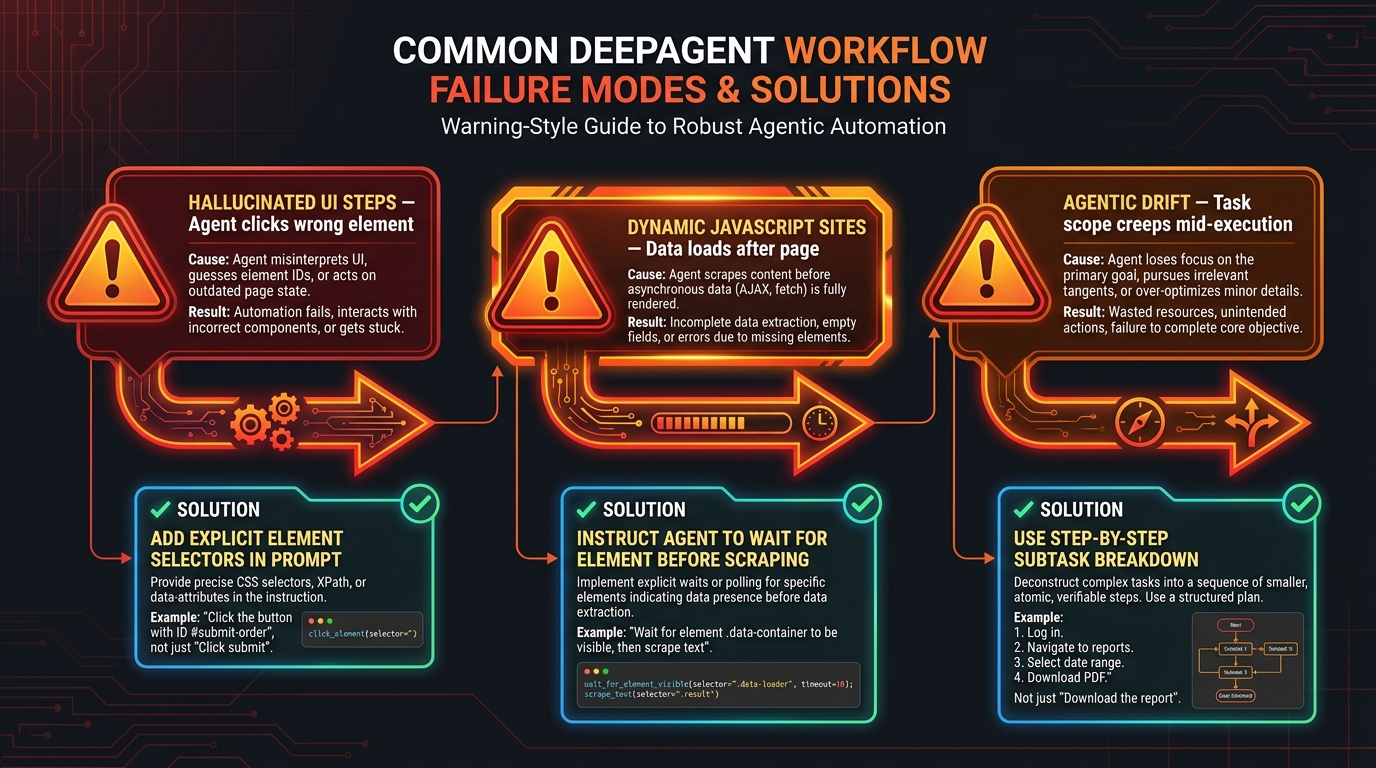
Failure Mode 1: Hallucinated UI Steps
LLMs are confident. Sometimes more confident than they should be. When DeepAgent encounters a UI element it doesn’t immediately understand, it may infer what the element does based on surrounding context — and that inference can be wrong. It might click the wrong button because the label resembles something it expected, or fill a field in the wrong format because it assumed a standard input type.
The fix: Be specific about the UI elements you expect the agent to interact with. Instead of “click the export button,” write “click the button labeled ‘Export to CSV’ in the top right corner of the data table.” If you know the target site well, include the exact text labels, section names, or navigation paths. The more specificity you give, the less the agent has to infer — and inferences are where errors enter.
Failure Mode 2: JavaScript-Heavy Dynamic Sites
Pages that load content asynchronously — where the data appears several seconds after the page technically finishes loading — are a significant challenge. An agent that tries to read a table before JavaScript has finished populating it will either scrape empty content or generate an error. This is especially common on analytics dashboards, financial data platforms, and any SaaS product built on React or Vue.
The fix: Explicitly instruct the agent to wait for content before reading it. Prompt language like “wait until the data table is fully loaded before extracting rows” or “pause 5 seconds after navigating to the dashboard before reading any values” gives the execution layer the instruction it needs. For highly dynamic sites, specifying a particular element to wait for (“wait until the element containing ‘Total Revenue’ is visible”) is even more reliable.
Failure Mode 3: Agentic Drift and Scope Creep
In multi-step workflows, there’s a failure mode researchers sometimes call “agentic drift” — where the agent gradually expands what it’s doing to serve the goal it’s been given, but in ways you didn’t intend. It might start clicking through related pages to find more data, follow links it wasn’t supposed to follow, or try to “enrich” a dataset beyond the scope of the original task. Each step is locally reasonable, but the cumulative result is a workflow that’s doing something different from what you asked.
The fix: Use explicit scope boundaries in your prompts. “Only extract data from this specific URL” is stronger than “research this topic.” Break complex tasks into numbered subtasks with clear handoff points. Phrases like “stop after completing step 4 and deliver output even if additional data might be available” help constrain scope creep.
Failure Mode 4: Session Expiry and Authentication Failures
Because DeepAgent relies on your authenticated browser sessions, any workflow that touches a logged-in platform is vulnerable to session expiry. If your LinkedIn session expires overnight and the lead gen workflow runs at 8AM, it will either fail silently or, in some cases, attempt to log in with behavior that looks like automated login to the platform’s security systems.
The fix: Review your session longevity settings for any platform your workflows touch. For critical recurring workflows, build in a login step at the start of the workflow rather than assuming an existing session is valid. “Log into [platform] using my credentials before proceeding” adds minimal execution time but dramatically improves reliability.
Failure Mode 5: Tool-Calling Format Errors
When DeepAgent passes data between steps — from a browser scrape to a Google Sheets update, for instance — the format of that data has to match what the receiving step expects. Mismatches (a Unix timestamp where a date string is expected, a JSON array where a comma-separated value is expected) can produce outputs that look syntactically valid but are semantically wrong. The workflow technically “succeeded” while producing unusable data.
The fix: Specify output formats explicitly in your prompts. “Format the date as MM/DD/YYYY,” “output the list as a comma-separated string,” “ensure the score is a single integer between 0 and 100” — these constraints prevent format drift between steps. When in doubt, add a validation step that checks the format of the data before passing it downstream.
DeepAgent vs. Traditional Automation Tools: An Honest Comparison
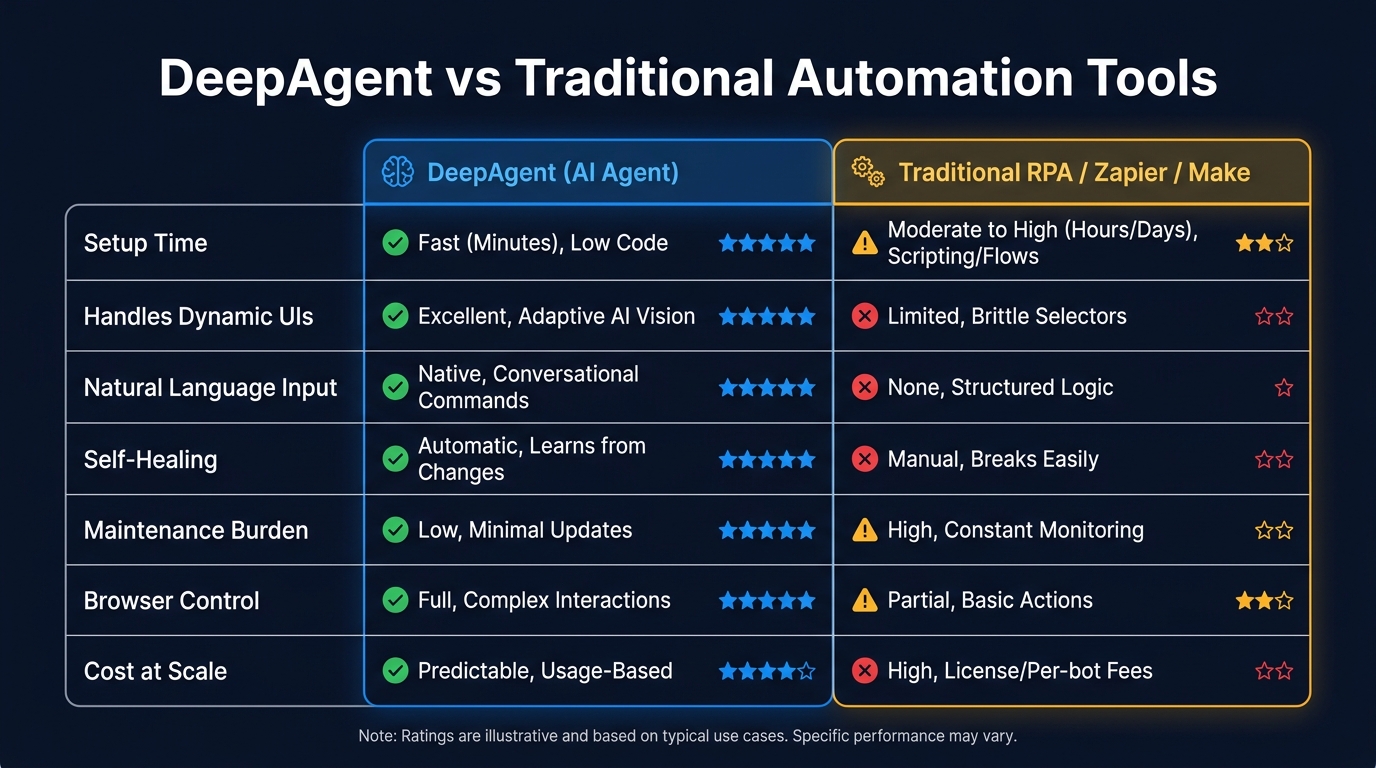
The automation tool landscape in 2026 is legitimately crowded. Zapier dominates in sheer integration breadth. Make offers a visual workflow canvas at lower per-operation cost. n8n provides open-source flexibility with native LLM support. UiPath and other enterprise RPA platforms have been in the market for over a decade. Where does DeepAgent fit, and when should you choose it over these alternatives?
DeepAgent vs. Zapier and Make
Zapier and Make excel at connecting APIs. When both the source and destination of your data have documented APIs and standard authentication, they’re extremely efficient — well-understood, widely supported, and easy to maintain. Their weakness is anything that doesn’t have an API: web pages with no public endpoint, platforms with login walls, dynamic content that requires real browser interaction.
DeepAgent’s strength is exactly where Zapier and Make struggle: the open web, login-required platforms, and workflows that require actual browser navigation rather than API calls. If you’re trying to pull data from a platform that has no API, automate tasks in a web interface, or interact with a site as a human user would, DeepAgent is doing something neither Zapier nor Make can meaningfully replicate. For pure API-to-API workflows, Zapier and Make remain simpler and more reliable choices.
DeepAgent vs. Traditional RPA (UiPath, Automation Anywhere)
Enterprise RPA platforms are powerful, but they carry significant overhead: longer deployment timelines, complex scripting requirements, dedicated maintenance cycles, and substantial licensing costs. They’re optimized for high-volume, highly stable, rule-based processes — the same form filled out 10,000 times in the same way. They break when UIs change and require developer time to repair.
DeepAgent offers faster deployment (hours or days rather than weeks), natural language configuration rather than scripting, and meaningful resilience to UI changes. The trade-off is that enterprise RPA platforms are more auditable, more enterprise-hardened, and more appropriate for regulated industries with compliance requirements around automation. For SMBs and smaller teams, DeepAgent’s accessibility advantage is decisive. For large enterprise deployment with strict compliance requirements, the calculus is more nuanced.
DeepAgent vs. n8n (for AI-Savvy Teams)
n8n is worth noting for technically sophisticated teams. It’s open-source, self-hostable, has robust LangChain integration, and allows deep customization. For teams with engineering resources who want fine-grained control over every aspect of an AI-powered workflow, n8n provides capabilities that DeepAgent doesn’t — particularly around custom code injection, self-hosted privacy, and integration with specialized vector databases.
The practical difference is the audience. DeepAgent is designed for users who want to describe what they want in plain English and have a capable agent handle the execution. n8n is designed for builders who want to construct the execution logic themselves. Both approaches have genuine value; they serve different skill levels and different degrees of customization need.
Where the Hybrid Approach Wins
The most sophisticated automation stacks in 2026 aren’t choosing one tool exclusively. They use API-based platforms (Zapier/Make/n8n) for the structured, API-friendly parts of workflows, and browser-based AI agents like DeepAgent for the parts that require real web interaction. This hybrid architecture extracts the reliability strengths of each approach without forcing either into use cases they weren’t built for.
Pricing, Limits, and What You Actually Get at Each Tier
DeepAgent’s pricing is worth examining carefully, because the gap between what each tier allows isn’t always obvious from the headline numbers. Understanding the credit model — and how it interacts with the task limits — will save you from discovering constraints at the worst possible moment.
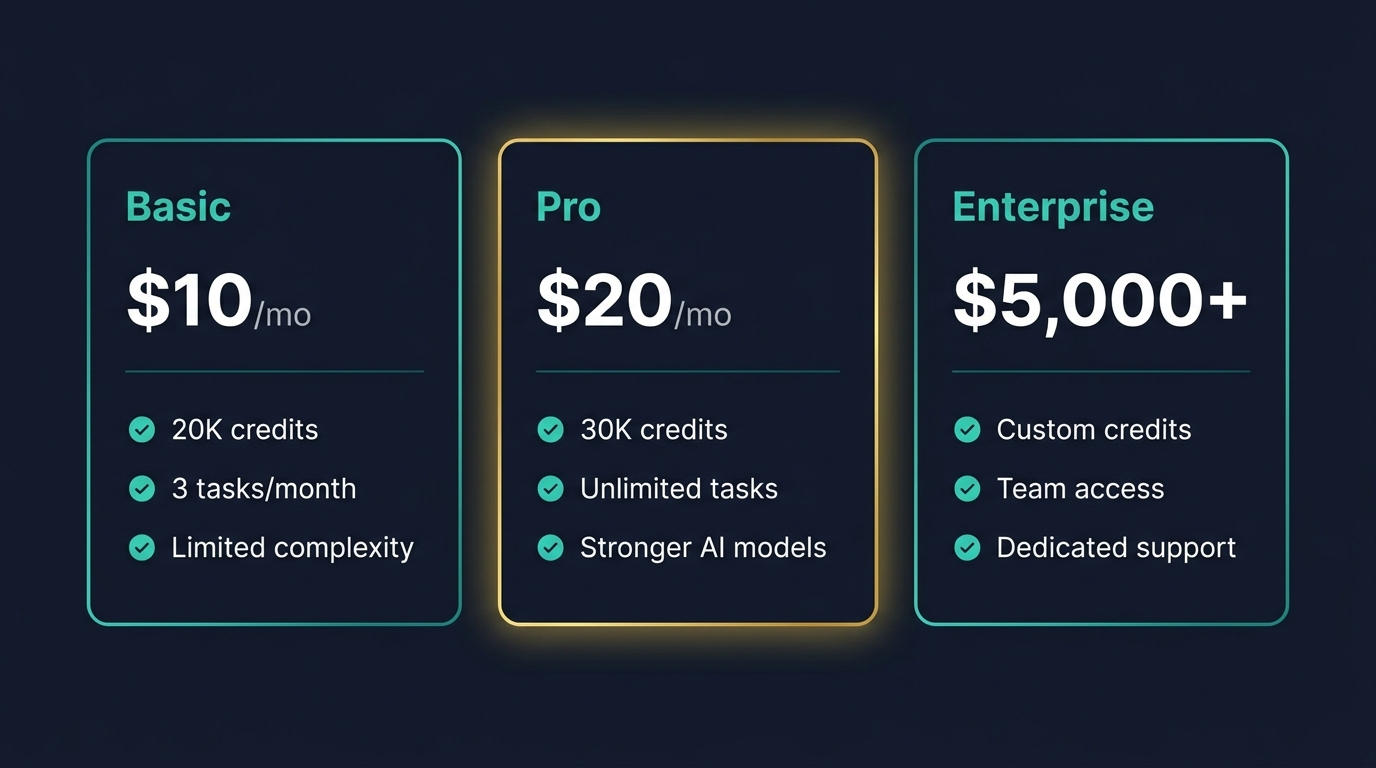
Basic Tier: $10/Month
The Basic plan provides 20,000 monthly credits and includes access to DeepAgent alongside ChatLLM and the Abacus AI Agent desktop. The key limitation is the hard cap on DeepAgent tasks: three tasks of limited complexity per month. With each DeepAgent task consuming approximately 500–1,000 credits, you’re looking at a maximum of three to six task executions per month — even if your credit balance would theoretically support more.
That cap has significant practical implications. If you’re testing DeepAgent’s capabilities or running a small number of high-value monthly automation tasks, the Basic tier is a perfectly functional entry point. If you’re planning recurring daily or weekly workflows that need to run consistently throughout the month, you’ll hit the wall fast. The Basic tier is best understood as a serious trial environment, not a production automation tier.
Pro Tier: $20/Month
The Pro tier adds $10 to the Basic subscription for a total of $20/month, bumps the credit allowance to 30,000 per month, and — critically — removes the task count restriction. Unrestricted task execution with available credits, access to stronger AI models that produce better reasoning and more reliable execution, and full Abacus Studio access for building and deploying lightweight applications.
For any team running recurring automation workflows — daily lead gen, weekly reporting, ongoing competitor monitoring — the Pro tier is the practical minimum. The $10 additional cost compared to Basic is negligible against the value of uncapped scheduled task execution. The stronger models also matter: more capable reasoning produces more reliable multi-step workflows and fewer edge-case failures.
Enterprise Tier: $5,000+
Enterprise pricing is custom and contact-based, starting from approximately $5,000 per month. This tier is designed for larger teams needing volume execution, dedicated infrastructure, SLA commitments, and enterprise security and compliance features. For organizations running dozens of concurrent workflows with business-critical data, enterprise is the appropriate track. For everyone else, the Pro tier handles the vast majority of use cases.
Credit Consumption: What Eats Your Budget
It’s worth being explicit about what drives credit consumption, because it affects how you design workflows. Simple browser tasks (navigating a page, reading a table, filling a form) consume relatively few credits. Multi-step workflows with LLM reasoning between each step consume significantly more — the model has to think at each stage, and thinking has a credit cost. Media-heavy tasks (generating images, building video outputs, creating complex dashboards) are the highest credit consumers.
This means designing DeepAgent workflows with economy in mind isn’t just a nice-to-have — it directly extends how much automation you can run within a given credit budget. Breaking a workflow into unnecessarily granular sub-steps costs more. Combining logically related steps into clear compound instructions costs less. Prompt efficiency and credit efficiency are the same thing.
Advanced Prompting Strategies That Separate Working Workflows from Broken Ones
The gap between a DeepAgent workflow that runs reliably for months and one that fails on the third execution usually comes down to prompting quality. This isn’t about elaborate prompt engineering jargon — it’s about a handful of concrete practices that consistently produce better results.
Use Numbered Steps for Complex Tasks
When a workflow has more than two or three distinct stages, structure your prompt as numbered steps rather than a flowing paragraph. The LLM processes numbered steps as discrete subtasks with clear boundaries, which produces more reliable execution than parsing a continuous description and inferring the stage transitions itself. Compare:
Vague: “Research our top five competitors, gather their pricing, and put it in a spreadsheet with our prices for comparison and email me.”
Structured: “1. Navigate to [competitor 1 URL] and extract current pricing for all plans. 2. Repeat for [competitor 2–5 URLs]. 3. Create a comparison table in Google Sheet [URL] with columns: Competitor Name, Plan Name, Monthly Price, Annual Price. 4. Add our pricing in a final row labeled ‘Our Product.’ 5. Email the sheet link to [address] with subject line ‘Weekly Pricing Update.’”
The second prompt will execute more reliably across repeated runs because every decision point is explicit.
Specify the Failure Behavior
Telling the agent what to do when something goes wrong is as important as telling it what to do when everything works. “If a competitor’s pricing page is unavailable or returns an error, note ‘Data unavailable — check manually’ in that row and continue with the next competitor” prevents the workflow from stalling or returning incomplete data silently.
Anchor Outputs in Concrete Formats
Every workflow that produces a structured output — a table, a report, an email — should have the output format specified explicitly in the prompt. “Format as a markdown table with headers Name | Company | Score | Notes” is not over-specifying. It’s preventing the agent from inventing a format that works fine today and changes next time.
Use Positive Constraints, Not Just Negative Ones
Most users think about constraints in terms of what they don’t want (“don’t include duplicate entries,” “don’t modify the existing rows”). Positive constraints — explicitly stating what should be included — are equally important and often more effective. “Include only the first 15 results, sorted by score descending” is clearer than “don’t include too many results or sort them incorrectly.”
Test Edge Cases Manually First
Before scheduling a workflow to run autonomously, manually test the edge cases you can anticipate: what happens if the page returns zero results? What if the target website is down? What if the Google Sheet you’re writing to has been renamed? Building answers to these questions into your prompt — rather than discovering them through failed autonomous runs — is the most efficient path to a stable workflow.
The Human-in-the-Loop Pattern
For workflows involving outbound actions — sending emails, posting content, making changes to live systems — the smartest architecture keeps a human approval step at the gate. DeepAgent handles research, drafting, targeting, and preparation. A human reviews and approves before anything goes out. This isn’t a sign the automation failed — it’s a deliberate design choice that combines agent efficiency with human judgment at the moments that matter most.
Real Business Outcomes: What Teams Are Actually Automating
It’s easy for automation tools to show impressive demos built specifically to make the tool look good. What’s more useful — and more honest — is looking at the patterns across actual documented workflows to understand what business functions DeepAgent is genuinely delivering value in, and what that value looks like concretely.
Sales Teams: Pipeline Research Without Analyst Headcount
The most consistent business case is in sales development. Building and qualifying a prospect list manually — identifying targets, researching each company, finding the right contact, scoring fit against an ICP — can consume several hours per week of an SDR’s time. With a well-configured DeepAgent workflow, that research runs overnight. The SDR arrives in the morning to a pre-populated spreadsheet of qualified prospects, complete with fit scoring and any available contact data.
The key outcome isn’t just time savings — it’s the consistency of the process. A human researcher might look at 20 prospects on a slow day and 50 on a productive day. A scheduled DeepAgent task delivers the same volume and quality of research every single day, regardless of workload pressures. That predictability has downstream effects on pipeline planning and forecast reliability.
Content and Marketing Teams: Competitive Monitoring at Zero Ongoing Cost
Marketing teams with competitive intelligence responsibilities spend real time tracking competitor content, pricing changes, product updates, and positioning shifts. Most of that work involves logging into tools, checking pages, and synthesizing what you found. DeepAgent handles the monitoring and synthesis automatically.
Teams are using it for: weekly competitor blog roundups (extracting titles, publication dates, and topic summaries), pricing change monitoring with email alerts, new product announcement detection, and social listening summaries. The value isn’t just the saved time — it’s that things that previously got monitored “when there’s a chance” now happen on a reliable schedule with documented outputs.
Engineering and Product Teams: QA That Actually Runs Regularly
Automated QA testing is one of those things every engineering team knows they should do more consistently. The reality is that setting up and maintaining test suites takes time, and that time competes with feature development. DeepAgent provides a lower-effort path to regular end-to-end testing: describe the user flows you want tested, and the agent generates and executes test cases, flagging failures with screenshots and severity ratings.
The primary benefit teams report is catching regression issues between releases — small breakages in authentication flows, form validations, or navigation paths that would otherwise surface only when a user reports them. Daily or pre-release QA runs catch these before they reach production.
Operations Teams: Back-Office Browser Work That Finally Gets Done on Time
Operations teams carry a significant burden of repetitive browser-based administrative work: downloading invoices from vendor portals, uploading reports to supplier systems, populating project management tools with recurring weekly updates, pulling data from systems that predate API availability. This work is important but mind-numbing — and it’s exactly what DeepAgent’s scheduling system was built to absorb.
Invoice download workflows that previously required 20–30 minutes of careful navigation now run on a schedule with the output delivered to the appropriate Google Drive folder automatically. Weekly report population tasks that happened inconsistently because they were easy to deprioritize now run every Sunday evening before the Monday morning review. The category of “necessary work we keep putting off” shrinks.
Freelancers and Solopreneurs: Punching Above Their Operational Weight
Perhaps the most underrated use case is for individual operators — freelancers, consultants, and solopreneurs — who need to maintain the operational cadence of a much larger organization without headcount. DeepAgent’s $20/month Pro tier gives a single person the automation infrastructure to run daily lead generation, competitive monitoring, client reporting, and content research simultaneously — work that would otherwise require hours of daily manual effort or the delegation cost of a part-time assistant.
When DeepAgent Isn’t the Right Tool: Being Honest About the Limits
A complete assessment requires being direct about the situations where DeepAgent isn’t the optimal choice — and there are several worth naming explicitly.
High-Volume, High-Frequency Enterprise Processes
If you need to process thousands of records per day through a complex workflow with strict audit trails, compliance documentation, and enterprise SLA guarantees, DeepAgent’s current architecture isn’t the right fit. Enterprise RPA platforms with dedicated infrastructure and formal compliance tooling are better suited to these high-stakes, high-volume scenarios. DeepAgent’s strengths are in flexibility, accessibility, and intelligent adaptation — not in raw throughput at enterprise scale.
Tasks Requiring Precise, Immutable Logic
There are workflows where the logic needs to be exact, documented, and verifiable every time it runs — financial reconciliations, regulatory reporting, healthcare data processing. The inherent variability of LLM-driven execution (even well-constrained LLM execution) is a risk factor in these contexts. Rule-based automation, where every action is scripted and deterministic, is more appropriate for workflows where the consequences of an edge-case mistake are serious.
Platforms with Aggressive Bot Detection
Some platforms — particularly large social networks and marketplaces — actively detect and block automated browser behavior. LinkedIn is a prime example: while DeepAgent LinkedIn outreach workflows are documented and demonstrated, heavy automation use on LinkedIn runs real risks of account restrictions. Any workflow involving platforms with explicit anti-automation terms of service should be treated with caution, and volume should be kept well below anything that would trigger anti-bot systems.
The Bigger Picture: Where Browser Automation Is Heading in 2026
DeepAgent doesn’t exist in isolation. It’s one node in a much larger shift happening in how software interfaces with the web. Understanding that shift helps contextualize what DeepAgent is, where it’s likely to go, and what it means for teams building automation infrastructure today.
The Browser as the Universal Control Layer
The web browser is becoming the operating layer for AI agents in the same way the command line was the operating layer for early software automation. Nearly every business tool of consequence has a web interface. Agents that can operate those interfaces — navigate, read, interact, extract — have access to essentially the entire surface area of business software, regardless of whether that software has a developer API.
This is a fundamentally different capability from what automation has historically offered. It’s not dependent on vendors building integrations. It’s not constrained by what’s on an app marketplace. Any tool with a browser interface is, in principle, automatable by a capable AI browser agent. The implication for teams is significant: the bottleneck on automation is no longer “does this tool have an API?” It’s “can we describe what we want clearly enough for an agent to execute it?”
Self-Healing Workflows Will Become the Standard
The most significant near-term advancement in tools like DeepAgent is more robust self-healing — agents that detect when a UI has changed, adapt their navigation approach, and continue executing without human intervention. Current implementations adapt within a workflow run; the next generation will adapt across runs, updating their approach based on what succeeded and failed in previous executions. This moves the reliability curve meaningfully closer to the “set it and forget it” ideal that most teams are actually targeting.
The Governance Gap Is Real
Broader adoption of AI browser agents creates genuine governance questions that many organizations haven’t fully addressed yet. Which workflows are approved for autonomous operation? Who reviews the outputs? How are errors caught before they cause downstream damage? What happens when an agent takes an action it wasn’t supposed to in an authenticated session? These aren’t hypothetical concerns — they’re operational realities for teams deploying automation at scale. Building governance frameworks alongside the workflows themselves, from the start, is the approach that scales safely.
Conclusion: The Real Work Starts After the First Workflow
DeepAgent makes it genuinely easy to automate a browser-based task. The first workflow — whatever it is — will probably take less than an hour to configure and run. That’s a real achievement for a category of tooling that used to require developer involvement for even basic automation.
But the teams and individuals who extract the most value from DeepAgent aren’t the ones who ran one workflow and called it automation. They’re the ones who systematically identified the browser-based manual work consuming their team’s time, built well-structured prompts for each workflow category, invested the time to test and refine before scheduling, and established monitoring habits that catch drift before it creates problems.
The difference between a novelty and infrastructure is maintenance and intention. DeepAgent is capable of being infrastructure — running mission-critical daily workflows for sales, marketing, operations, and engineering with minimal ongoing involvement. Getting there requires treating it like infrastructure: with planning, documentation, regular review, and honest assessment of where AI-driven execution needs a human check before acting.
Key Takeaways
- DeepAgent is goal-oriented, not step-oriented. Describe outcomes, not sequences of clicks. The LLM figures out the path.
- The five highest-value workflow categories are lead generation, competitive intelligence, QA testing, scheduled reporting, and back-office browser tasks.
- Most workflow failures trace back to vague prompts, JavaScript timing issues, or unhandled edge cases — all fixable before scheduling.
- The Pro tier ($20/month) is the practical minimum for recurring automation. The Basic tier’s three-task hard cap limits real-world utility.
- Test edge cases manually before scheduling. What happens when the source page is down? When the output destination isn’t available? Build the answers into the prompt.
- Keep humans in the loop for outbound actions. Research and preparation can be fully automated. Actions that affect external parties benefit from a human approval gate.
- Audit workflows monthly. Sessions expire, sites change, and Google Sheets permissions lapse. Scheduled audits catch drift before it damages downstream data.
- DeepAgent complements, not replaces, API-based tools. Use it specifically for workflows that require real browser interaction with login-required or non-API surfaces.
Browser automation has been promised for years. DeepAgent is one of the first implementations where the promise and the reality are close enough to each other that building real operational infrastructure on top of it makes sense. The gap hasn’t closed entirely — but for the first time, it’s small enough to work with.
Leave a Reply