Most advice on AI automations starts with tools. Which platform, which model, which template. That is the wrong starting point, and it is why so many automations get built, demoed, and quietly switched off a month later.
The better starting question is smaller and less exciting: what kind of work is this? Some work is fully predictable and needs no AI at all. Some work is messy and benefits enormously from a language model. Some work should never be fully handed off. Mixing these up is the root of most disappointment.
This article offers a framework, which I call the automation ladder, for sorting work into the right rung. It covers how to score candidates, how to design checkpoints, what breaks in practice, and how to monitor what you launch.
A note on sources: this piece is built on process-design reasoning and common implementation patterns, not on survey statistics. I have deliberately avoided quoting numbers I could not verify. Treat the examples as illustrations and test them against your own data.
1. What “AI automation” Actually Means
The phrase covers two different things that are often blended together. The first is classic automation: when X happens, do Y. The second is AI-assisted judgment: read this, interpret it, and produce something.
A useful automation usually contains both. A trigger fires, a model interprets unstructured input, and deterministic steps carry out the result. The model is one component, not the whole system.
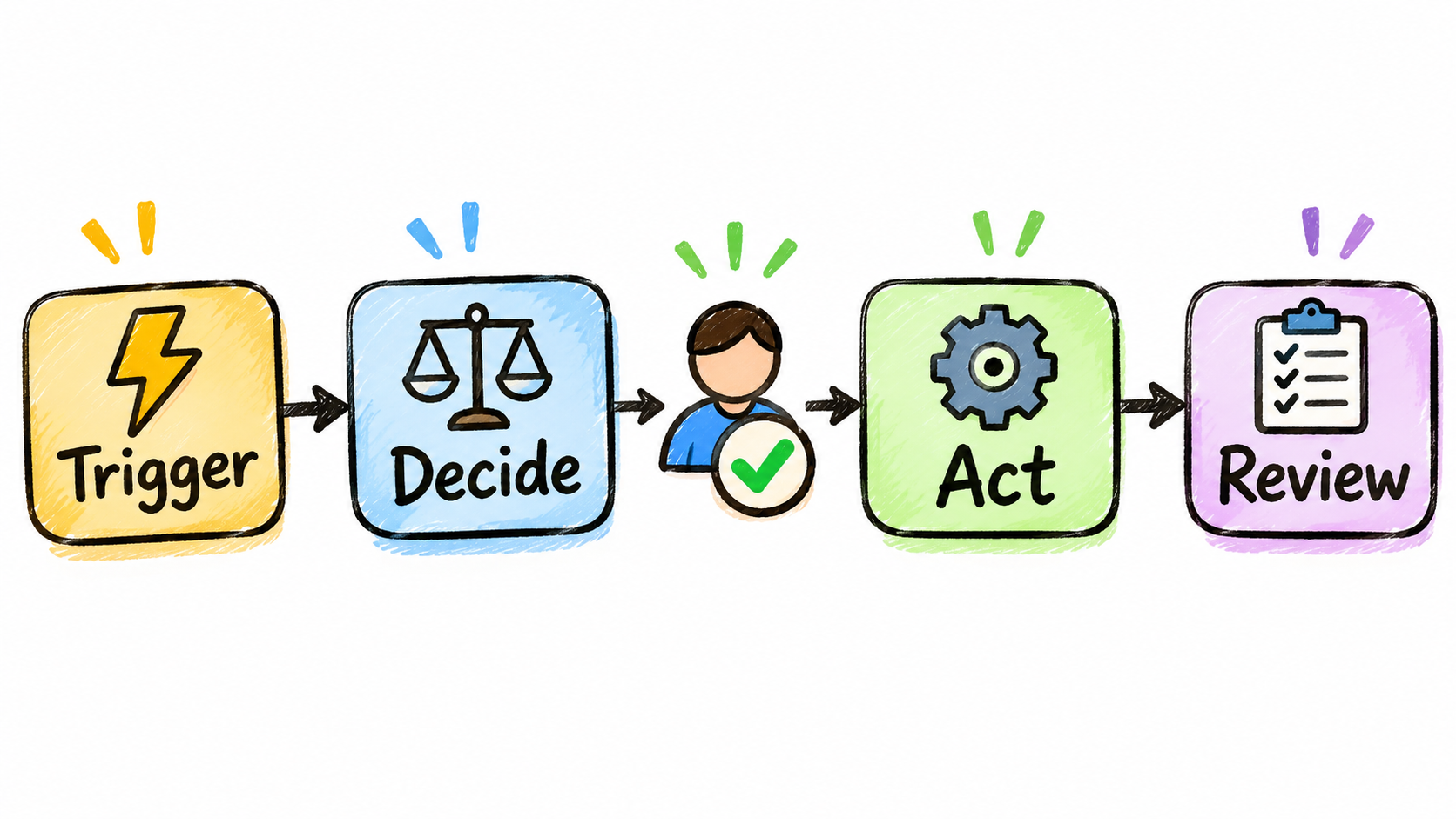
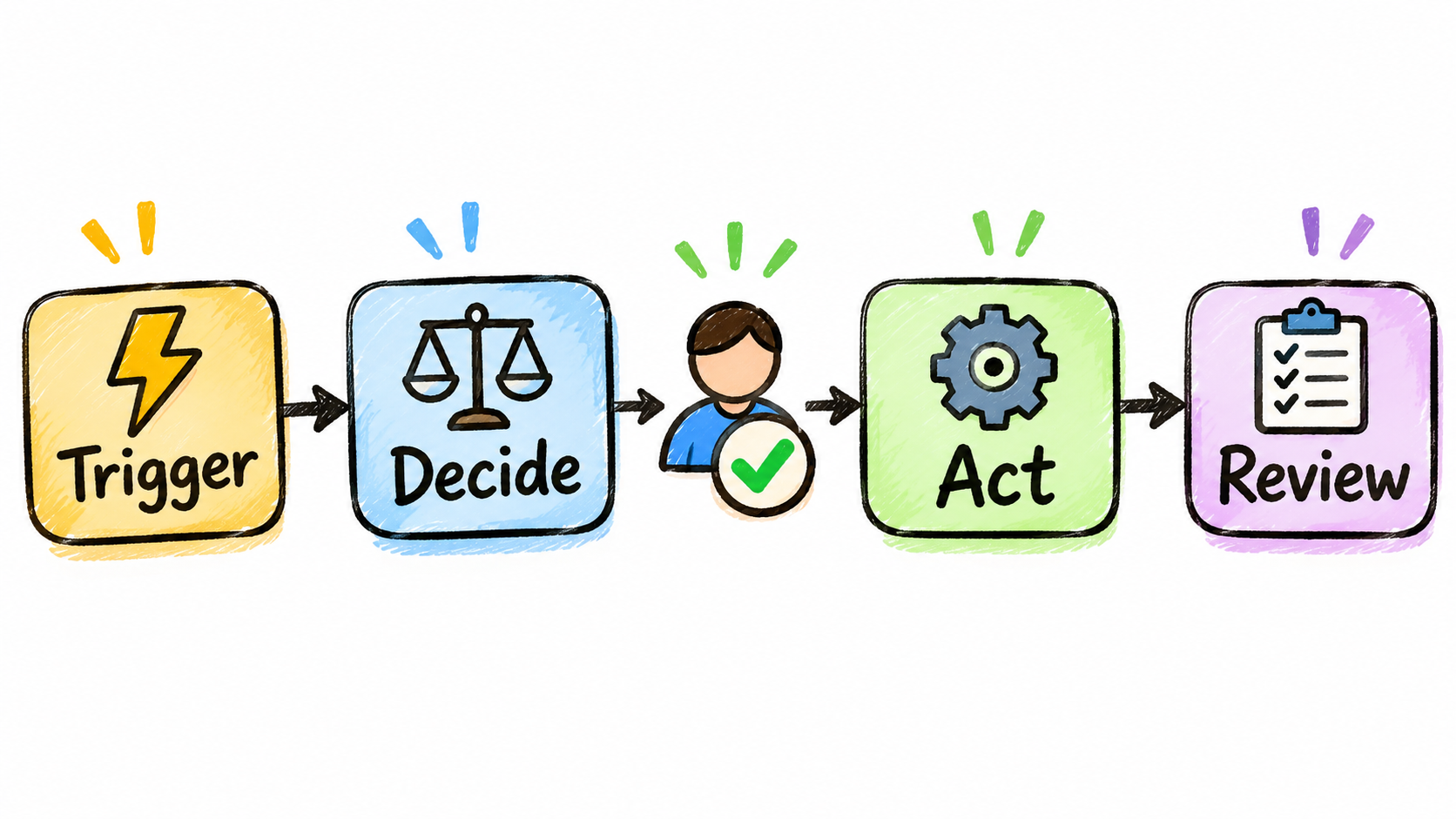
The four moving parts
- Trigger: an email arrives, a form is submitted, a row changes, a schedule hits.
- Interpretation: a model classifies, extracts, summarizes, or drafts.
- Action: a system is updated, a message is sent, a record is created.
- Review: a person or a rule checks the result when stakes or uncertainty are high.
Thinking in these four parts makes it easier to see where AI is genuinely needed. Often it is needed in exactly one step.
2. Rules vs. AI: The Decision Most Teams Skip
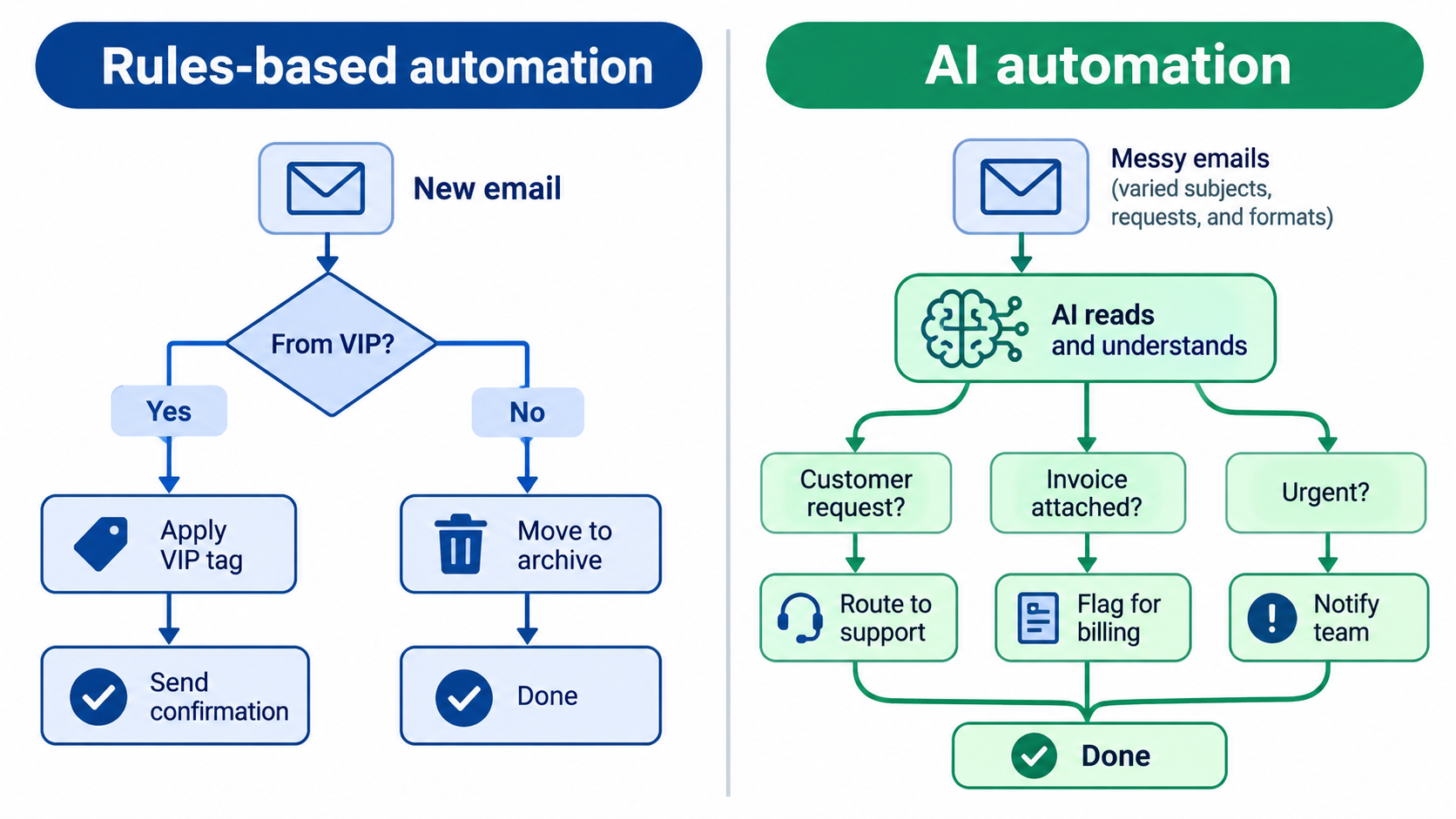
If a task can be described completely as a set of if-then rules, use rules. They are cheaper, faster, repeatable, and easy to debug. A model adds cost and variance, and you should only accept both when you get something in return.
When rules win
Routing an invoice over a certain amount to a manager. Copying a new customer from a form into a CRM. Sending a reminder three days before a deadline. None of these need interpretation.
When AI earns its place
Input is unstructured and varied: customer emails, call transcripts, PDFs with inconsistent layouts, free-text survey answers. A rule can’t anticipate every phrasing. A model can read the text and return a category, a field, or a draft.
The hybrid pattern
The most reliable setup uses the model to convert messy input into structured output, such as a category from a fixed list or a set of named fields. Rules then take over. This limits how much freedom the model has downstream, which limits how badly it can go wrong.
Ask of each step: would a clear checklist handle this? If yes, no model. If no, constrain the model’s output as tightly as you can.
3. The Automation Ladder
Not every task should jump straight to full autonomy. The ladder describes five rungs, and the right move is usually to climb one rung at a time.
- Rung 1 – Assist: AI produces a suggestion; a person does the work. Example: a drafted reply the agent can edit.
- Rung 2 – Prepare: AI completes the groundwork, such as pulling context or filling a form, and a person approves every item.
- Rung 3 – Act with sampling: the system acts on its own, and a person reviews a sample after the fact.
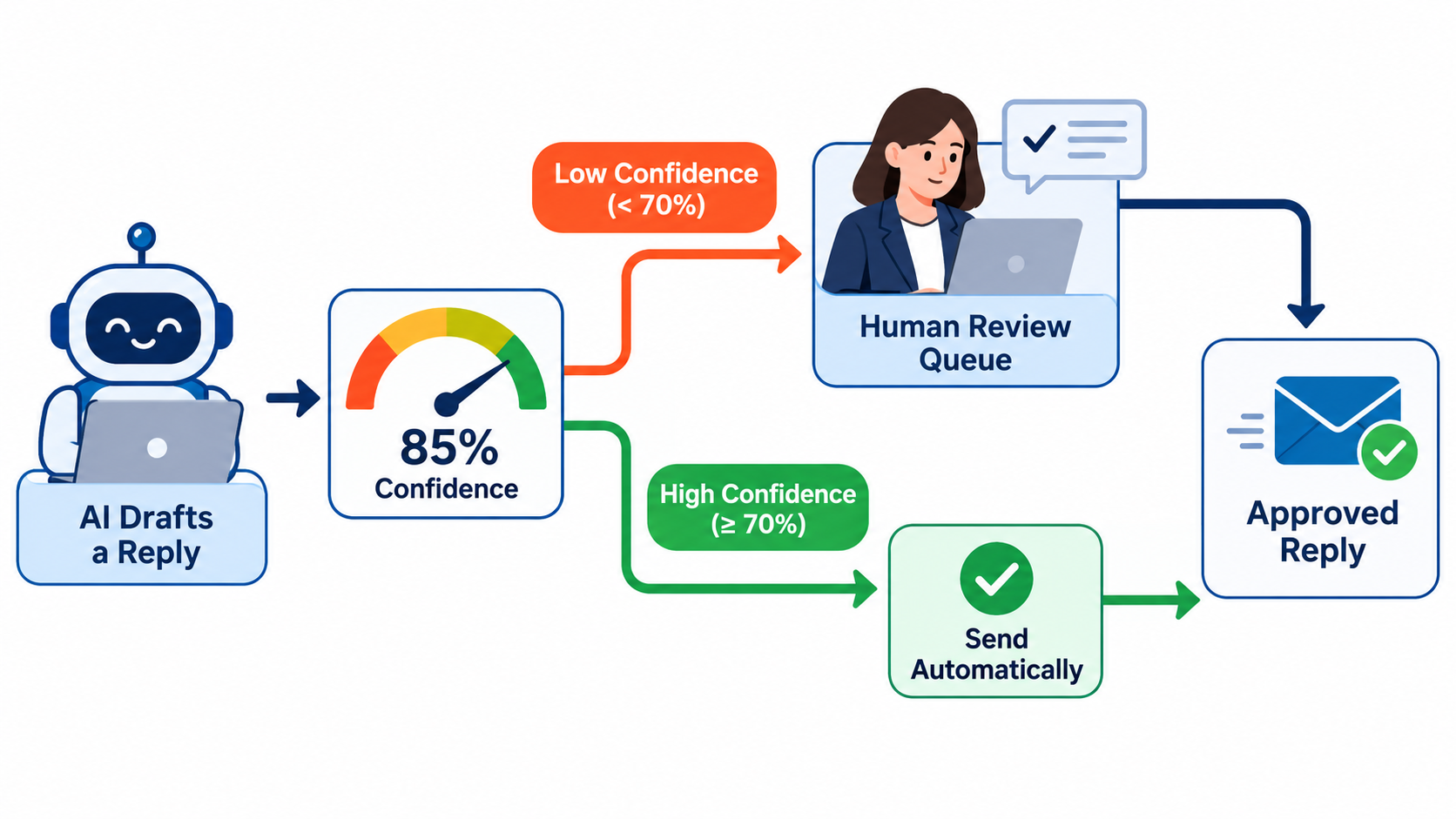
- Rung 4 – Act with exceptions: the system acts, and anything low-confidence or unusual is routed to a person.
- Rung 5 – Autonomous: the system acts and is monitored only through aggregate metrics.
Most workflows should live at rung 2 to 4. Rung 5 is appropriate only for low-cost, reversible actions. Starting at rung 1 also generates something valuable: a record of what people change, which tells you where the model is weak.
Earning promotion
Move a workflow up a rung only when you have evidence, for example that reviewers accept the output unchanged in nearly all cases over a meaningful period. Define that threshold before launch, not after you are tired of reviewing.
4. Scoring Candidates Before You Build
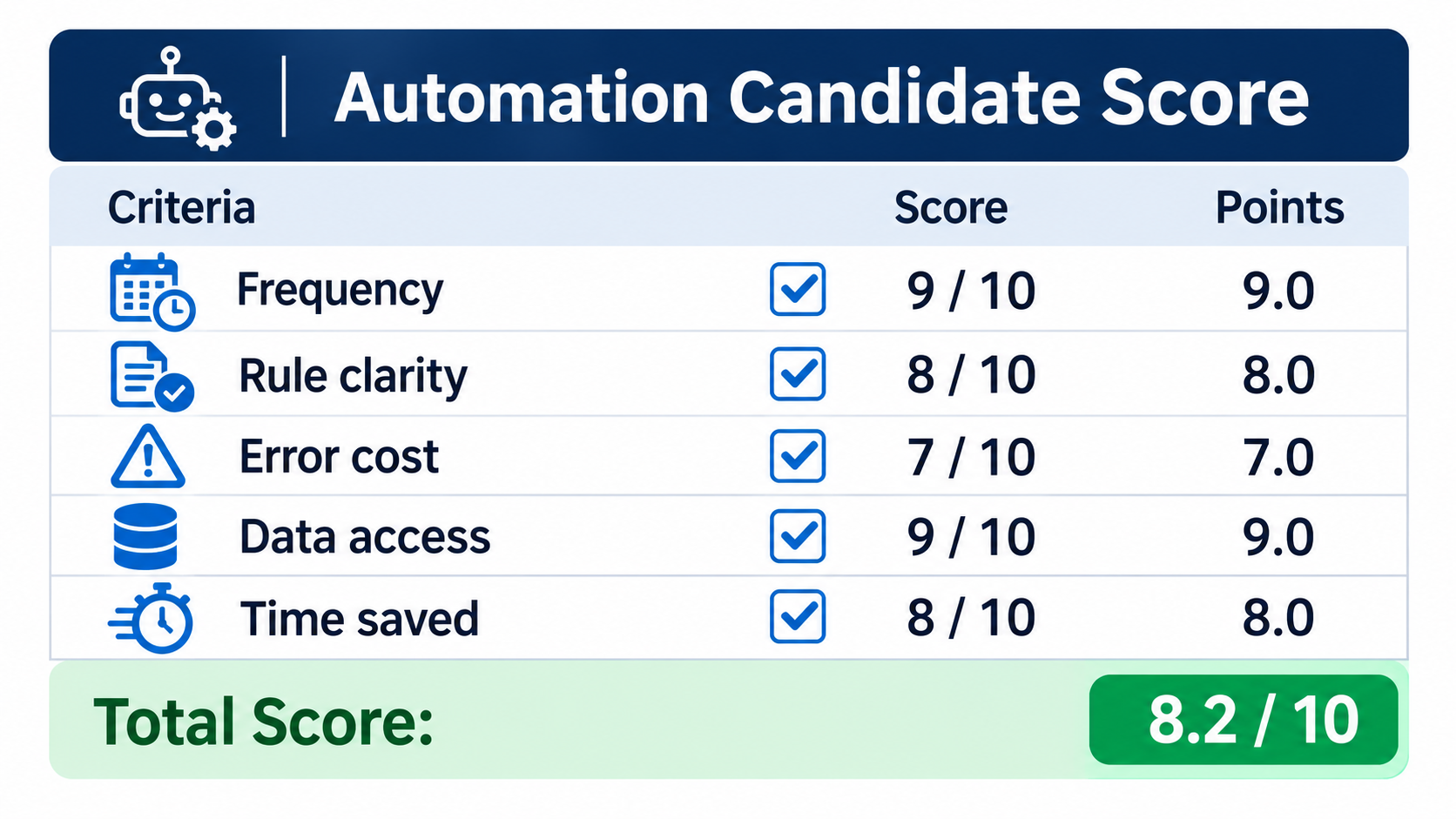
Enthusiasm is a poor filter. A simple score keeps you honest about which processes deserve effort.
Five criteria
- Frequency: how often does the task occur? Rare tasks rarely repay the build time.
- Rule clarity: can a new hire follow written instructions and get it right?
- Cost of an error: a misfiled note and a wrong refund are very different problems.
- Data access: can the system actually reach the information it needs?
- Time per instance: small savings multiplied by high volume still count.
Score each from 1 to 5, inverting the error-cost score so that low-risk work scores high. Start with the highest totals. Tasks that are frequent, clear, low-risk, and data-accessible are your first builds.
The hidden eighth hour
Beware tasks that look small but depend on tacit knowledge. If the person doing it says “it depends” more than twice while explaining it, document the dependencies first. Automating an undocumented process only makes its inconsistencies faster.
5. Anatomy of a Reliable Workflow
Reliable automations share a few design habits, regardless of platform.
Constrain the output
Ask the model for a fixed format, such as one of six categories or a set of named fields, and validate it. If the response doesn’t match, retry or route to a person rather than passing it on.
Give it the context it needs, and no more
Provide the relevant policy text, the customer’s record, and a few examples of good output. Dumping an entire knowledge base into every call raises cost and can distract the model.
Make steps idempotent
If a run fails halfway and restarts, it should not send the email twice or create a duplicate record. Check whether the action already happened before doing it.
Keep a log of every decision
Store the input, the model’s output, and the action taken. When something goes wrong, and it will, this log is the difference between a ten-minute fix and a week of guessing.
6. Where Humans Belong in the Loop
Human review is often framed as a failure of automation. It is better seen as a design choice, placed where it is most valuable.
Route by risk, not by habit
Some items should always go to a person: anything involving money above a threshold, legal language, a complaint from a major account, or a request that mentions harm. Write these as explicit rules that sit outside the model.
Route by uncertainty
Models can be asked to flag when the input is ambiguous or when they lack information. This signal is imperfect, so combine it with checks such as missing fields or mismatched data. Low-confidence items go to the review queue.
Make review fast
A reviewer who has to reconstruct the context will start approving without reading. Show the original input, the proposed action, and the reason side by side, with one-click approve or edit. Capture the edits; they are your best training signal for improving prompts.
7. The Failure Modes That Show Up in Practice
Most failures are unglamorous. Knowing them in advance lets you design around them.
- Silent drift: input changes, such as a new product line or form field, and output quality quietly degrades.
- Confident errors: the model produces a plausible but wrong answer, particularly for facts it was never given.
- Integration breakage: an API changes or a credential expires, and the workflow stops without anyone noticing.
- Loops and duplicates: an automation triggers itself or repeats an action after a retry.
- Scope creep: a workflow built for one case is stretched to others without retesting.
Defenses
Ground the model in supplied source material instead of asking it to recall facts. Add alerts for failed runs and for zero runs, since silence can be a failure. Cap the number of actions per hour so a runaway loop causes limited damage. Retest whenever the inputs change.
8. Understanding the Real Cost
Costs come in more forms than a subscription fee. Count all of them, or the business case will be flattering and wrong.
Cost components
- Platform or runtime fees and per-run charges.
- Model usage, which grows with the length of the inputs and outputs and with how often you call it.
- Build time, including testing against real, messy examples.
- Review time, which does not disappear at rungs 2 to 4.
- Maintenance, since workflows need updates as systems change.
A simple payback calculation
Estimate the minutes saved per instance, multiply by monthly volume, and price it at the loaded hourly cost of the person doing the work. Subtract running costs and review time. Divide the build effort by the monthly net benefit to get a payback period. If the answer depends on optimistic assumptions, run it again with pessimistic ones. If it still works, build it.
Also consider benefits that aren’t hours: faster response times, fewer dropped follow-ups, more consistent quality. These are real but harder to measure, so decide in advance how you will check them.
9. Monitoring After Launch
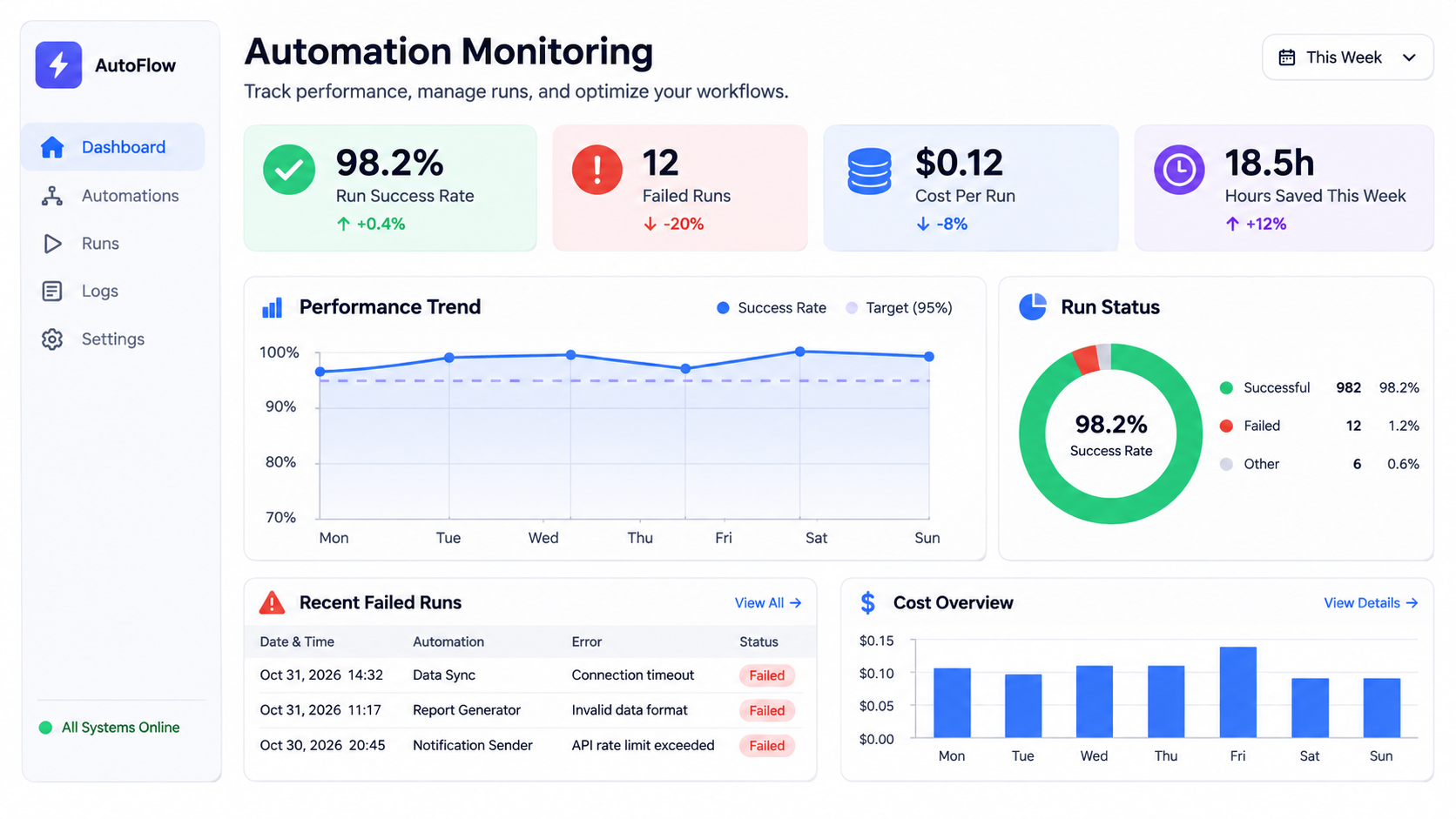
An automation is a small piece of operations, not a one-time project. It needs an owner and a dashboard.
Metrics worth tracking
- Run success and failure counts.
- Share of items routed to human review.
- Edit rate: how often reviewers change the output.
- Cost per run.
- Estimated time saved, checked occasionally against reality.
Sampling and audits
Even at higher rungs, pull a small random sample regularly and check it by hand. Sampling catches problems that aggregate metrics smooth over. Put the audit on a calendar, or it will not happen.
Name an owner
Every workflow needs one named person who is notified of failures and who decides on changes. Workflows owned by “the team” are owned by nobody.
10. A Rollout Plan That Builds Trust
People trust automation when it has proven itself in front of them. A staged rollout helps.
- Document the manual process. Write down the steps, exceptions, and what a good result looks like.
- Collect real examples. Gather a set of past cases, including the awkward ones, as a test set.
- Build at rung 1 or 2. Let the system suggest while people act.
- Measure agreement. Track how often people accept suggestions unchanged, and study the misses.
- Promote deliberately. Move up a rung when your pre-set threshold is met.
- Review quarterly. Check that the process, tools, and volume still match the design.
Bring the people doing the work into the design
The person who handles the task daily knows the exceptions. Involve them early, and make clear that the aim is to remove the dull parts of their work. Resistance usually falls when people see the tool handling the tasks they like least.
Conclusion: Climb One Rung at a Time
AI automations pay off when they are matched to the right kind of work and introduced gradually. The tools matter less than the thinking behind them.
Actionable takeaways
- Use rules wherever a clear checklist works; use AI for messy, unstructured input.
- Constrain model output into fixed categories or fields, and validate it.
- Score candidates on frequency, clarity, error cost, data access, and time saved.
- Start at the assist or prepare rung and promote on evidence.
- Route to humans by risk and by uncertainty, and make review fast.
- Log every decision, alert on failures and silence, and name an owner.
- Count review and maintenance in the cost, not just the subscription.
Pick one process this week, score it, and build the smallest version at rung 1. What you learn from the reviewers’ edits will be worth more than any template.
Leave a Reply