

On April 17, 2026, GitHub quietly dropped a billing announcement that didn’t get nearly enough attention outside of engineering finance teams. Starting June 1, 2026, GitHub Copilot’s entire pricing infrastructure moves from a flat-rate premium request model to usage-based billing driven by token consumption. The change is called GitHub AI Credits, and it touches every plan from individual Pro accounts to large Enterprise deployments.
If you read the headline — “subscription prices unchanged” — and moved on, you missed the part that matters. The monthly fee staying the same is almost irrelevant. What’s changed is the unit of measurement for everything beyond basic code completions. The new system doesn’t charge you per request. It charges you per token — every input character, every output character, every cached piece of context that flows through the model. And depending on how your team actually uses Copilot, that distinction could mean paying the same, paying less, or seeing your AI tooling budget spike in ways nobody budgeted for.
This post breaks down exactly how the new model works, why GitHub made the switch when it did, which usage patterns are genuinely fine under token pricing, which ones are quietly expensive, and what enterprise admins need to configure before June 1 to avoid billing surprises. There’s also a practical cost-modeling section so you can run real numbers against your team’s actual workflow before the meter starts running.
The Old Model: Premium Request Units and How They Actually Worked
To understand why the switch matters, you first need to understand what it’s replacing. GitHub Copilot’s previous billing model used a unit called Premium Request Units, or PRUs. The concept was simple on the surface: when you used certain AI-powered features — chat, code review, model-powered suggestions beyond basic inline completions — the system deducted a fixed number of PRUs from your monthly allotment.
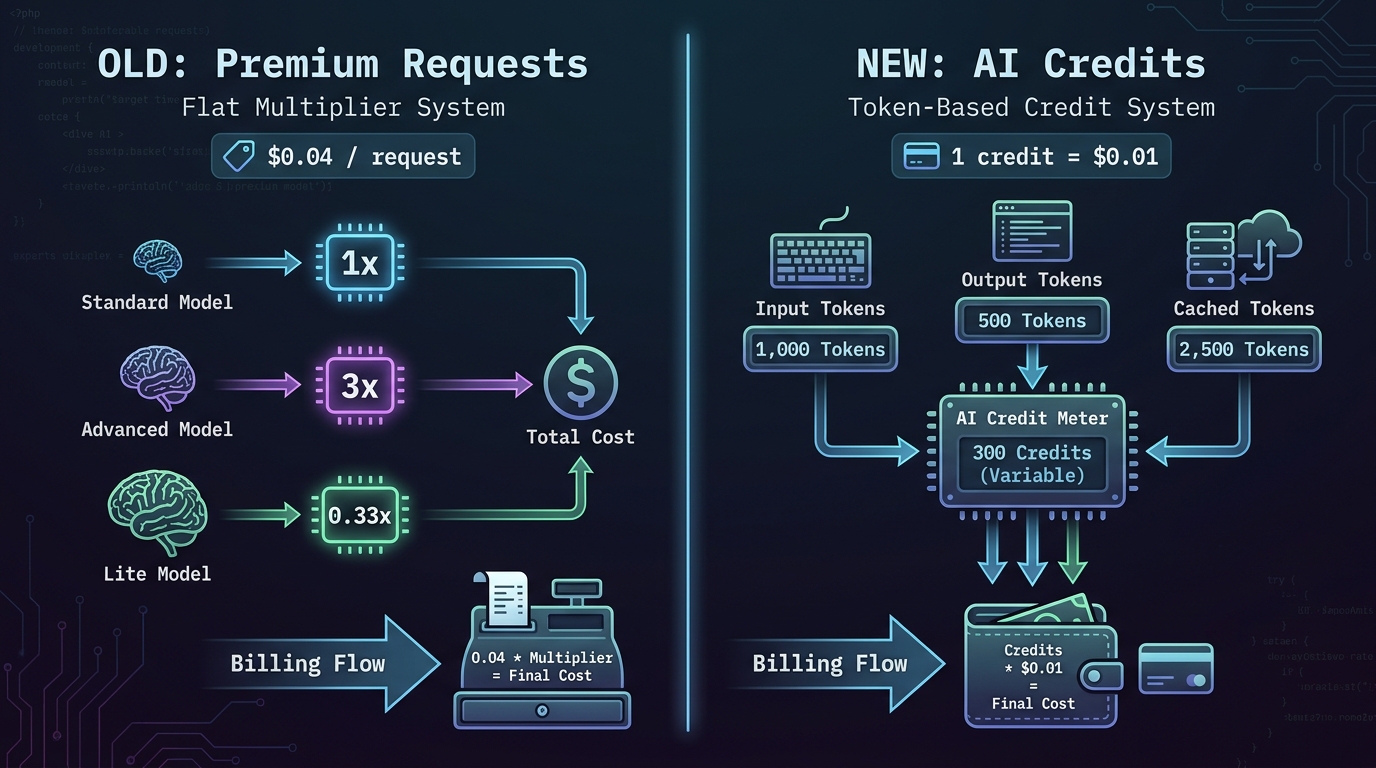
Each plan came with a set number of PRUs per month. Copilot Business users got 300 per month. Pro+ users received 1,500. Enterprise users had 1,000 per user per month. When you ran out, you could buy extras at $0.04 per request. It felt straightforward because it appeared to be.
The Multiplier System That Complicated Everything
The reality was more complicated than it appeared. Not all PRU requests were equal. Different models had different multipliers that changed how many PRUs a single request actually consumed. Claude Opus 4.5 and 4.6 carried a 3x multiplier, meaning one session with Claude Opus cost three PRUs instead of one. GPT-5.4 mini, the lightweight model, had a 0.33x multiplier — three requests for the price of one. Entry-level models like GPT-4o were free entirely, with a 0x multiplier that didn’t touch your balance at all.
In theory, this was GitHub’s attempt to abstract the real cost of running different models behind a simpler number. In practice, it created a confusing middle layer where users had to remember both how many PRUs they had left and which multiplier applied to whichever model they were currently using. A 300-request Business plan budget wasn’t 300 Claude Opus sessions — it was 100. For a team that had shifted toward running Claude for its stronger reasoning on complex refactoring tasks, the 300-request number was essentially fiction.
The Fundamental Problem GitHub Couldn’t Ignore
There was a deeper structural problem, too. A simple three-line code explanation in chat might generate 200 tokens total. An agent session analyzing a legacy codebase, iterating over 12 files, running tool calls, and producing a refactoring plan might generate 180,000 tokens. Under the PRU model, both consumed one request from the user’s perspective — only the multiplier adjusted for model choice, not for the scale of computation involved.
GitHub was absorbing the difference. As more users adopted agent mode, multi-file editing, and longer context interactions, GitHub’s actual inference costs per “request” rose dramatically while its per-seat revenue stayed fixed. The switch to token-based billing isn’t primarily a revenue story — it’s an infrastructure economics story that GitHub couldn’t defer any longer.
The New Model: GitHub AI Credits and Token-Based Billing Explained
The replacement system is built around a currency called GitHub AI Credits. The unit is straightforward: one credit equals $0.01 USD. Credits are consumed based on actual token usage — not request counts, not multipliers, not estimated usage. When you ask Copilot Chat a question, the system counts the input tokens sent to the model and the output tokens returned. Both consume credits at rates specific to whichever model processed the request.
Each Copilot plan now includes a monthly credit allotment equal in dollar value to the plan’s subscription price. Copilot Pro at $10/month includes 1,000 credits. Pro+ at $39/month includes 3,900. Business at $19/user/month includes 1,900 credits per user. Enterprise at $39/user/month includes 3,900 credits per user.
The Three Types of Tokens You’re Paying For
The system measures three distinct token categories, each billed slightly differently:
- Input tokens: Everything sent to the model — your prompt, file context, conversation history, system instructions, and tool outputs fed back into the next prompt. These are the most plentiful and often the most expensive in aggregate because context accumulates fast in long sessions.
- Output tokens: The model’s generated response. This includes the actual text, code, analysis, or intermediate reasoning steps (if using a “thinking” model). Output tokens are typically priced higher per unit than input tokens, sometimes 5x higher for premium models.
- Cached tokens: Context that was used in a previous interaction and can be reused without re-processing the full input. Cached tokens are priced lower than fresh input tokens and represent GitHub’s mechanism for passing some efficiency savings back to users who work in long, consistent sessions.
Model-Specific Rates: What You Actually Pay Per Model
The credit consumption rate depends entirely on which model handles your request. The specific published rates differ by model tier. As a rough frame of reference based on the underlying API pricing GitHub aligns to: GPT-4o-class models run in the range of $2–$8 per million tokens. Claude Opus 4.7, the most capable (and expensive) model available in Pro+, runs approximately $5 per million input tokens and $25 per million output tokens. Claude Sonnet class models sit in the middle. Lighter models like GPT-4o mini sit toward the lower end.
Translated to credits: a one-million-token Claude Opus interaction would consume roughly 500–2,500 credits depending on the input/output split. A one-million-token interaction with a mid-tier model might consume 200–800 credits. For most individual interactions — a chat query, a single-file suggestion review — you’re consuming tens to a few hundred credits at most. The numbers only get dramatic in agent mode, which we’ll address in detail shortly.
Why GitHub Made the Switch — And Why It Happened in 2026
GitHub hasn’t published a loss breakdown, but the timing and the mechanics of the change tell a clear story. The adoption of agent-mode features accelerated sharply in early 2026. Developers who had previously used Copilot primarily for inline completions started running multi-turn agentic workflows: sessions where Copilot autonomously reads files, writes code, runs tests, reads the test output, adjusts the code, and repeats the loop — sometimes over a dozen iterations before the user sees a result.
Each of those iterations sends a full context window to the model. Files read early in the session remain in context for subsequent steps. Tool call outputs feed back into later prompts. A session that looks like “one request” from the user’s perspective might involve 10–15 actual model calls, each consuming tens of thousands of tokens. Under the PRU model, that entire session cost one request (or three, with a Claude Opus multiplier). The actual compute cost to GitHub was orders of magnitude higher.
The Sustainability Calculation
When GitHub absorbed those costs under a flat PRU model, it was effectively cross-subsidizing heavy agent users with revenue from the majority of users who stick to completions and light chat. That cross-subsidy eroded as the proportion of agent-mode users grew. By early 2026, GitHub’s internal inference costs for Copilot were reportedly running at unsustainable levels relative to subscription revenue — the operational model had become misaligned with actual usage patterns.
The token model solves this structurally. Heavy users who generate more compute cost now pay proportionally to their usage. Light users who mostly rely on free-tier features — completions and Next Edit Suggestions, which remain unlimited and uncharged — barely touch their credit balance. The economics become self-correcting: GitHub’s cost per user scales with each user’s actual consumption, not an abstract PRU figure.
Why the Timing Matters for Teams
GitHub’s decision to move fast — announcing April 17, implementing June 1, offering only a six-week window — also reflects urgency. The company paused new registrations for Pro, Pro+, and Student accounts on April 20, three days after the announcement. It simultaneously tightened usage limits and removed Claude Opus from certain Pro-tier features. These were defensive moves to limit exposure under the old pricing model while the transition infrastructure was prepared. For teams, six weeks is not much lead time to audit usage, model costs, and set budget controls.
What’s Free, What Costs Credits, and What Nobody’s Talking About
The most important practical question for most developers isn’t “how does token billing work in theory?” It’s “will my day-to-day workflow actually cost more?” The answer depends almost entirely on which features you use — because the free tier of the new model is surprisingly generous for a specific type of usage.
What Remains Unlimited and Free
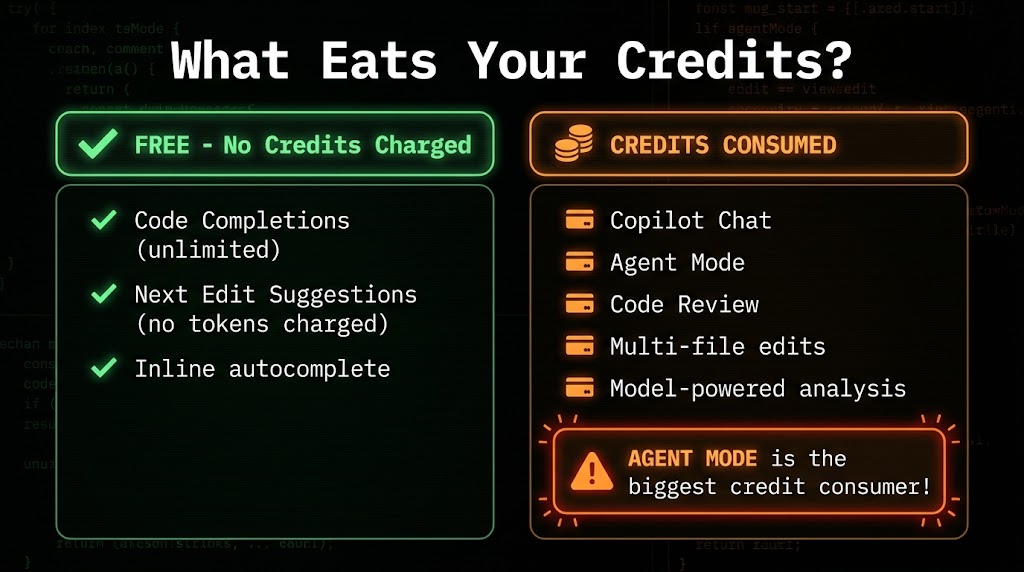
Two core features remain completely unrestricted and consume zero credits regardless of how frequently you use them:
- Code completions: The inline autocomplete suggestions that appear as you type. This is Copilot’s original feature — single-line and multi-line completions generated in real-time as you code. Under the new model, these remain unlimited and do not draw from your credit balance at all.
- Next Edit Suggestions: Copilot’s feature that anticipates your next intended change based on what you just edited. Also unlimited, also uncharged.
This is a critical point that gets lost in the anxiety about token billing. For developers whose primary Copilot usage is the core tab-completion workflow — which still describes a large share of Copilot users — the new billing model changes nothing about their day-to-day experience or cost. Their credit balance could sit at zero and they’d still get completions.
What Consumes Credits
Everything beyond those two features draws from your credit balance. The key credit-consuming features are:
- Copilot Chat: Any interactive Q&A session, whether in the IDE sidebar, on GitHub.com, or through the mobile app. The longer your conversation thread and the larger the context you attach, the more credits a single chat session consumes.
- Agent Mode: Multi-step agentic workflows where Copilot autonomously iterates across files, runs tool calls, and performs iterative reasoning. This is by far the most credit-intensive feature (see the next section).
- Code Review: Copilot’s AI-powered pull request review feature, which analyzes diffs and suggests improvements. The review depth and file count directly affect token consumption.
- Multi-file editing and refactoring: Any prompt that involves reading or modifying multiple files in a session. Each file read adds input tokens; each modification generates output tokens.
- Model-powered analysis: Custom instructions, workspace context, and codebase analysis features that load broad context into the model.
The Part Nobody Talks About: Context Window Costs
There’s a subtlety in how context accumulates that most billing announcements understate. When you have a multi-turn chat conversation and you’ve attached three files to your workspace context, those files don’t just exist “in the background.” They’re re-sent to the model with every turn of the conversation. If you have a 10,000-token context (which is genuinely small — a few medium-sized files) and you exchange 15 messages in a session, you’ve sent 150,000 input tokens just in context re-transmission, before a single word of your messages or responses is counted.
This means a focused, long conversation with large file context can be surprisingly expensive — not because any single message was complex, but because the context window multiplies across every turn. Teams that use Copilot Chat with large attached codebases in persistent sessions need to account for this accumulation when modeling costs.
Agent Mode: The Hidden Cost Multiplier That Will Define Your Budget
If there’s one feature that changes the billing math more than any other, it’s agent mode. And given that agent mode is precisely the feature GitHub has been aggressively marketing as the future of AI-assisted development, the cost implications deserve serious attention before June 1.
What Actually Happens Inside an Agent Session
Agent mode is GitHub Copilot’s agentic workflow capability — the ability to give Copilot a high-level task and have it autonomously figure out what files to read, what changes to make, what tools to call, and how to iterate until the task is complete. From the user’s perspective, it looks like magic. From a token billing perspective, it looks like a very long context loop running repeatedly.
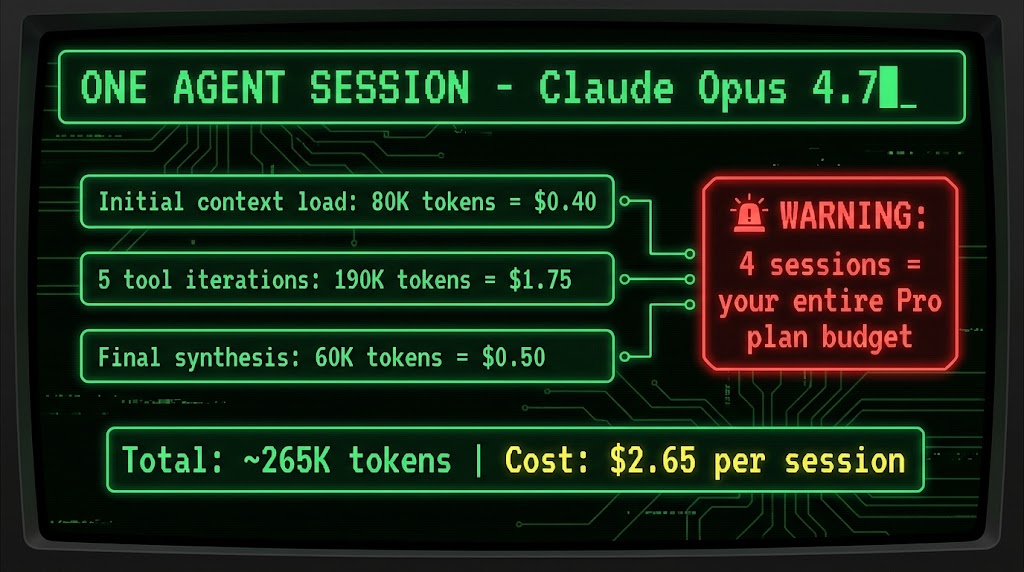
Here’s a representative breakdown of a conservative agent session using Claude Opus 4.7:
- Initial context load: Copilot reads the relevant files for the task — say 5–8 source files and a few configuration files. This alone can generate 80,000 input tokens (~$0.40 at Opus rates).
- Tool iteration loop: The agent runs five iterations, each sending the full accumulated context plus tool outputs from previous steps. At roughly 150,000 input tokens and 40,000 output tokens across the five iterations, this costs approximately $1.75.
- Final synthesis: A concluding pass to consolidate the changes and generate output — roughly 50,000 input tokens and 10,000 output tokens at another ~$0.50.
Total for one conservatively scoped agent session: approximately 265,000 tokens, costing around $2.65 or 265 credits. Under the Pro plan’s 1,000-credit monthly allotment, that’s roughly four agent sessions before you’re in overage territory. Under the Business plan’s 1,900 credits, seven sessions. Under Enterprise’s 3,900 credits, about fifteen sessions per user per month.
Model Choice Dramatically Changes the Math
The scenario above uses Claude Opus 4.7, the most powerful model available and the most expensive. The same task run through a mid-tier model like Claude Sonnet would consume roughly the same number of tokens but at a much lower per-token rate — potentially cutting the cost by 60–70%. The same task on GPT-4o-mini class models could cost even less.
This creates a genuine optimization opportunity that didn’t exist under the PRU model. Under PRUs, you could switch to a cheaper model and save nothing if the multiplier was still 1x. Under token pricing, every step down in model tier translates directly into credit savings. Teams that have defaulted to running Opus for everything because it “felt the same price” now have a concrete financial incentive to use lighter models for lighter tasks and reserve Opus for complex reasoning work that genuinely benefits from it.
Longer Agent Tasks Scale Exponentially, Not Linearly
It’s worth understanding that agent mode costs don’t scale linearly with task complexity. A task that’s twice as complex doesn’t necessarily cost twice as much — it can cost significantly more because longer agent sessions accumulate more context, which gets re-sent with each subsequent iteration. A session that runs 15 iterations instead of 5 doesn’t just cost 3x more. The context window grows with each iteration, so later iterations are more expensive than early ones in absolute token terms. For genuinely large refactoring tasks across 20+ files, real-world costs per session can reach $10–$20 under Opus pricing.
Winners and Losers: Which Developers and Teams Come Out Ahead
Token-based billing doesn’t affect all developers equally. The impact varies significantly by usage pattern, and understanding where your team falls helps predict whether June 1 will feel like a non-event or a budget shock.
Who Comes Out Ahead (or Unaffected)
Developers who primarily use inline completions and Next Edit Suggestions are the clearest winners. Their entire core workflow is free under the new model. They can use Copilot as aggressively as they want for autocomplete without touching their credit balance at all. The shift to token billing is irrelevant to their daily experience.
Teams with widely varying engagement levels benefit from the credit pooling mechanism. In a 20-person Business plan team, some developers might use Copilot Chat heavily while others barely open it. Under PRUs, each user’s allotment was separate — unused requests by one person couldn’t offset excess usage by another. Under the new model, Business and Enterprise credits are pooled organization-wide. Heavy users draw from a shared pool that light users contribute to. For teams with uneven usage patterns, this pooling alone can reduce effective costs compared to the old per-seat PRU allotment.
Organizations with disciplined model selection that use lighter models for everyday tasks and reserve premium models for high-value complex work will find token pricing cheaper than the old Opus-at-everything approach that PRU billing accidentally encouraged.
Who Faces Higher Costs
Developers who rely heavily on agent mode for complex, multi-file workflows are the group most at risk. If agent mode is a central part of your daily workflow — running multiple sessions per day to handle refactoring, debugging large systems, or exploring unfamiliar codebases — the 1,900–3,900 monthly credits in standard plans deplete fast. Four to fifteen Opus-based agent sessions per month is not a high bar for developers who’ve built their workflow around agentic capabilities.
Teams using persistent long-context chat sessions — particularly those that attach large files and maintain long conversation threads — will find their credit consumption higher than expected due to the context re-transmission cost described earlier.
Individual Pro plan users face the tightest budget. At 1,000 credits ($10 equivalent) per month, a Pro user running regular agent mode sessions with Claude Opus could exhaust their balance in three to four intensive sessions. The Pro plan was always positioned as a personal-use tier, but developers accustomed to running serious agentic workflows may need to upgrade to Pro+ (3,900 credits) or accept overage charges.
Enterprise Budget Controls: What Admins Need to Configure Before June 1
For organizations on Copilot Business or Enterprise, the billing shift introduces a new layer of administrative responsibility that didn’t exist under the PRU model. The good news is that GitHub has built a reasonably complete set of budget controls. The bad news is that they’re opt-in — and if you don’t configure them before June 1, your organization is operating without guardrails.
The Three Levels of Budget Control
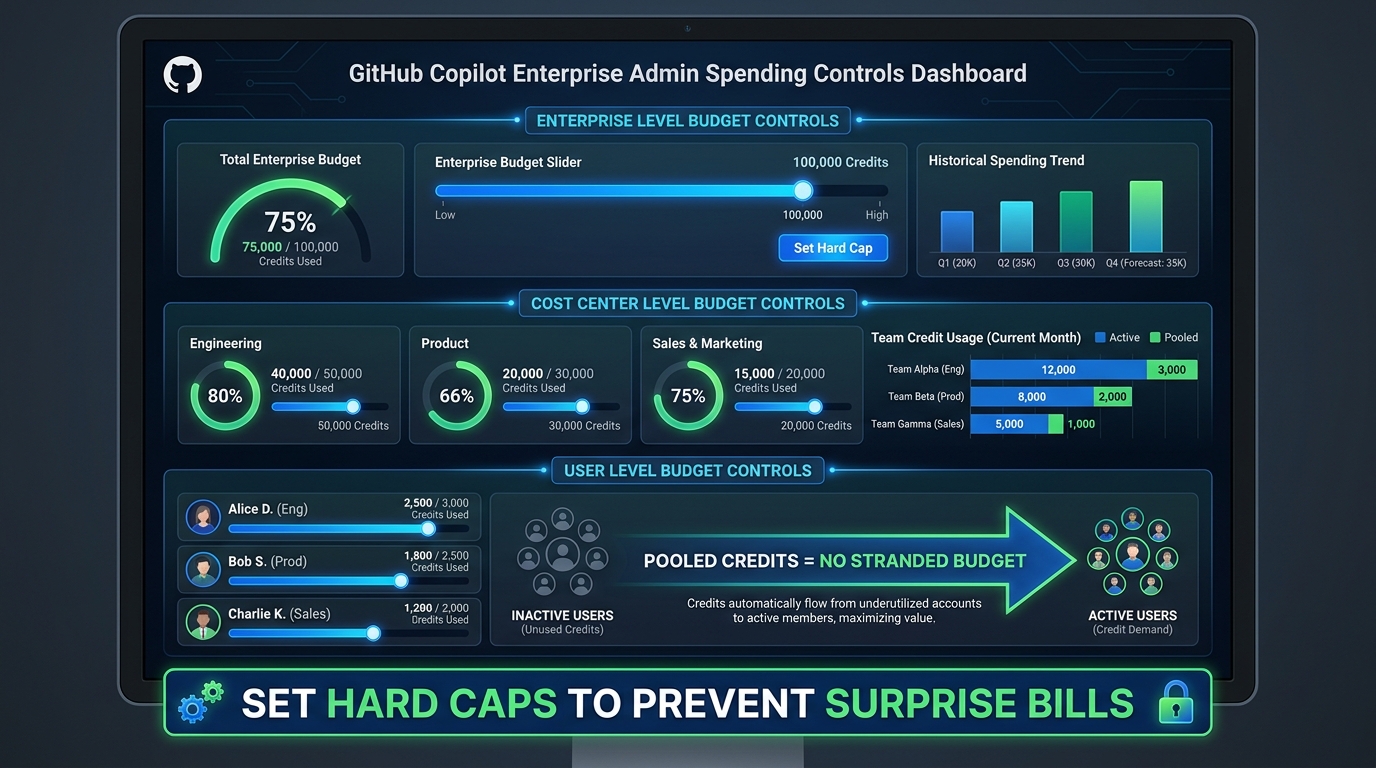
GitHub has implemented a hierarchical budget control system that lets administrators manage credit spending at three distinct levels:
Enterprise level: The broadest control. Administrators can set an overall spending cap for the entire enterprise account. When the monthly credit pool is exhausted, admins choose whether to enable overage spending (at $0.01 per credit) or enforce a hard stop that blocks further AI-powered feature usage until the next billing cycle.
Cost center level: For enterprises with multiple teams or departments, credits can be allocated to specific cost centers with independent budgets. An engineering team can have its own credit pool separate from, say, a DevOps team or a data science group. This enables per-team accountability and prevents one high-volume team from draining the entire enterprise pool.
User level: The most granular control. Admins can set per-user spending limits within the pooled budget. This is particularly useful for managing access to expensive premium models — an admin can allow unlimited use of lightweight models while capping per-user Opus-class spending at a defined monthly ceiling.
What Happens When Credits Run Out
This is where the PRU model and the new model diverge in a critical operational way. Under the PRU model, when a user exhausted their monthly premium requests, Copilot would fall back to a free base model — the experience degraded gracefully, but users kept working. Under the new token model, there is no fallback. If you exhaust your credit pool and the admin has set a hard cap, credit-consuming features stop working entirely. Copilot Chat goes dark. Agent mode is unavailable. Only the free unlimited features — completions and Next Edit Suggestions — continue to function.
For teams that use Copilot Chat as an active part of their development workflow (not just an occasional tool), this is a meaningful operational risk. An admin who hasn’t configured overage budgets and hasn’t communicated credit expectations to the team could create a mid-month productivity disruption that’s entirely preventable.
Converting Existing PRU Budgets
If your organization had set custom PRU budgets under the old system, those don’t automatically carry forward in a way you can ignore. GitHub is converting existing premium request budgets to equivalent AI Credits values, but the conversion should be manually reviewed by billing admins. The conversion formula maps PRU counts to credit equivalents, but given that a PRU was never a fixed dollar amount (its cost varied by model multiplier), the mapping involves estimation. Admins should log into the billing settings in May, review the converted credit allocations, and adjust them based on your actual expected usage patterns rather than assuming the converted values are correct.
The Promotional Credit Boost: Why June Through September Is the Best Time to Experiment
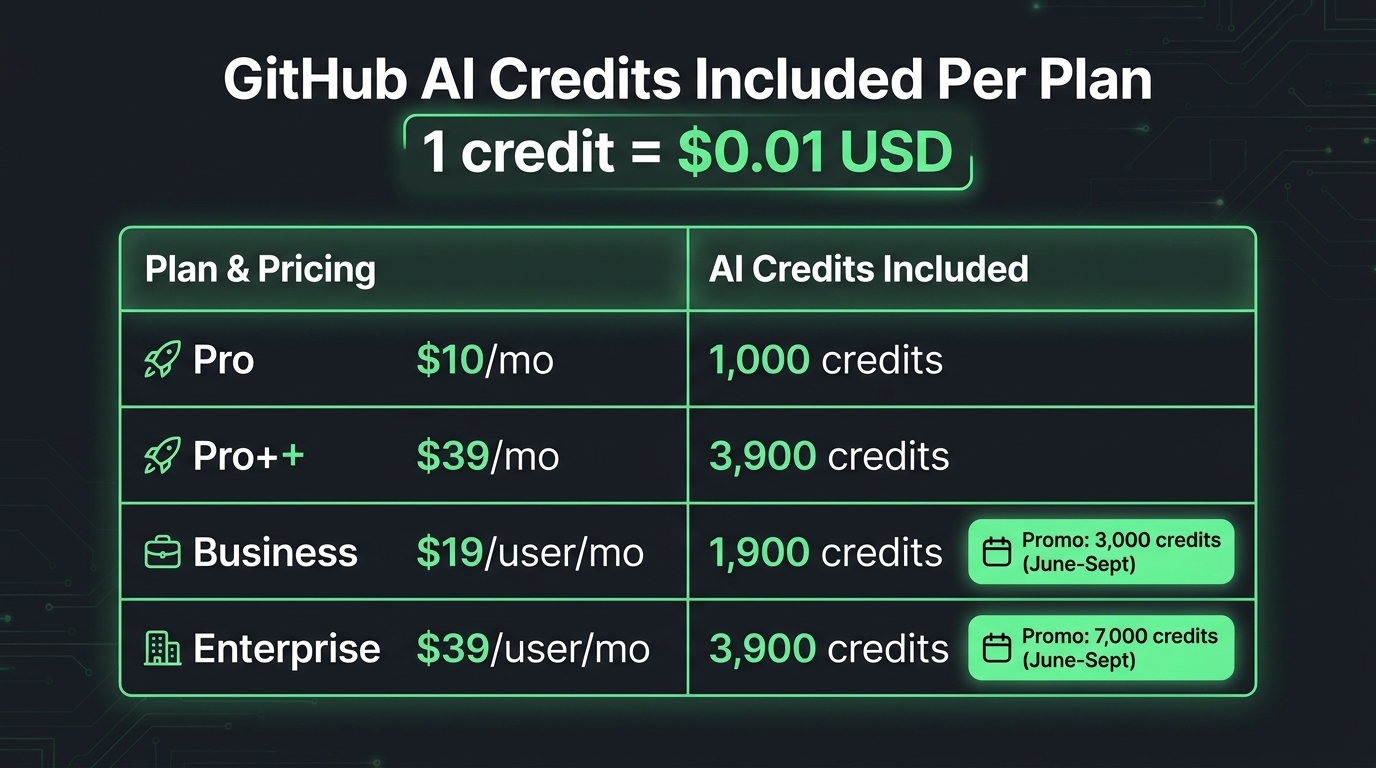
GitHub is doing something notable to smooth the transition: both Business and Enterprise plans receive a promotional credit boost during the June–September 2026 window that’s significantly higher than the standard long-term allotment. Understanding this window matters for how you plan your team’s experimentation and workflow development.
The Numbers During the Promotional Period
During June through September 2026, the credit allotments are:
- Copilot Business: 3,000 credits per user per month (compared to the standard 1,900 credits after September). That’s a 58% boost over the steady-state amount.
- Copilot Enterprise: 7,000 credits per user per month (compared to the standard 3,900 credits). That’s nearly an 80% boost during the promotional period.
GitHub’s stated rationale is to give existing customers time to understand their actual usage patterns under the new billing model before settling into the permanent credit allotment. It’s a reasonable customer-experience decision — and it creates an opportunity for organizations to run genuine usage audits during those four months.
Using the Promo Window Strategically
The promotional period should be treated as a diagnostic window, not just a billing cushion. With substantially more credits per user, teams can safely experiment with agent mode, extended chat sessions, and premium models without fear of running out mid-month. That usage data is genuinely valuable: it tells you, in real credit consumption terms, exactly how much your team’s actual workflows cost.
The smart move is to track credit consumption per user during June and July, segment it by feature type if possible (agent mode vs. chat vs. review), and use that data to assess whether the standard allotment starting in October will be sufficient — or whether overage budgets need to be pre-set. The promotional period gives you four months of real billing data before the numbers get tighter.
For Enterprise teams, the 7,000 monthly credits during the promotional period also offer a meaningful window to develop internal guidelines about model selection, context management, and agent mode governance before those guidelines have real financial stakes attached to them.
How to Model Your Team’s Costs Before the Switch
The most practical thing any team lead, engineering manager, or CTO can do right now is build a basic cost model before June 1. The math isn’t complicated, and having a rough projection is vastly better than discovering your billing situation after the first month on the new system.
Step 1: Categorize Your Team’s Copilot Usage
Start by getting honest about how your team actually uses Copilot. Segment developers into rough categories:
- Completions-only users: Developers who use Copilot primarily for inline autocomplete and Next Edit Suggestions. These users will consume near-zero credits. No cost modeling needed.
- Light chat users: Developers who use Copilot Chat a few times per day for targeted questions — explaining a function, checking a syntax pattern, asking about an API. Typical daily sessions might consume 2,000–5,000 tokens each. At mid-tier model rates, monthly usage for a light chat user might run 200–600 credits — well within all standard plan allotments.
- Heavy chat users: Developers who use Copilot Chat extensively, with large file contexts attached and long conversation threads. These users can consume 5,000–20,000 tokens per session and may run 5–10 sessions daily. Monthly credit consumption for this profile could range from 2,000–10,000 credits depending on session length, model choice, and context size.
- Agent mode users: Developers running multi-file, multi-iteration agentic workflows. As detailed above, each session with a premium model can consume 200–1,000+ credits. Monthly consumption can range from 3,000 to 30,000+ credits for developers who run several agent sessions per day.
Step 2: Apply Model-Specific Rates
Once you have your usage categories, apply model rates. The key variables are:
- What model does each usage category typically use? (Opus, Sonnet, GPT-4o, mini?)
- What’s the typical input/output token ratio? (Agent mode is input-heavy; generation tasks are output-heavy)
- How large is the typical context window in each session?
A rough rule of thumb for budgeting: plan for 500–1,000 credits per power user per day if they’re running regular agent mode with premium models. Plan for 50–200 credits per day for heavy chat users. Plan for near-zero for completions-focused users.
Step 3: Compare Against Your Plan Allotments
With your usage model built, compare it against what your plan provides. If your 10-person Enterprise team has 3 agent-mode-heavy developers, 4 heavy chat users, and 3 completions-focused developers, your pooled usage might look like:
- Agent mode users (3): ~15,000 credits/month each = 45,000 credits
- Heavy chat users (4): ~3,000 credits/month each = 12,000 credits
- Completions users (3): ~200 credits/month each = 600 credits
- Total estimated: ~57,600 credits/month
- Plan provides (Enterprise, 10 users): 39,000 credits/month standard
In this scenario, you’d likely need overage budget configured. That’s not necessarily a problem — roughly $186/month in overage for a 10-person engineering team is a small number relative to productivity value. But you need to know it’s coming and have the overage budget enabled, or you’ll hit a hard wall mid-month.
Step 4: Set Up Billing Controls Before June 1
Whatever your model shows, configure the billing controls before the switch date:
- Log into GitHub enterprise billing settings
- Review the auto-converted PRU-to-credit budget (don’t just accept it)
- Set an overage budget at the enterprise level — even a modest one prevents a complete blackout
- If teams have very different usage patterns, set cost center allocations
- Consider per-user caps for any team members you expect to be extremely high consumers
- Enable preview billing if GitHub offers it in May — get a look at what the meter shows before real money is on the line
What This Shift Signals About Where AI Developer Tooling Is Heading
GitHub’s move isn’t happening in isolation. It’s part of a broader industry shift in how AI-powered software tools are priced and managed. Understanding the direction helps teams make smarter long-term decisions about tooling investment.
Usage-Based Billing Is Becoming the Standard
Across AI developer tools, the flat-rate subscription model is giving way to consumption-based pricing. The pattern is consistent: tools launch with simple flat rates to minimize friction during adoption, then transition to usage-based billing once AI infrastructure costs become the dominant variable in the economics. GitHub’s move is the most prominent example in 2026, but it’s happening across coding assistants, AI testing platforms, code review tools, and documentation generators simultaneously.
For engineering leaders, this means budgeting for AI tooling is becoming more like budgeting for cloud compute — it requires monitoring, forecasting, and governance rather than a simple line item for seat licenses. Teams that develop that operational muscle now, during the GitHub transition, will be better positioned when every AI tool in their stack eventually makes the same shift.
Model Selection Becomes a Real Engineering Decision
Under flat PRU pricing, model selection was mostly a quality question: which model gives the best results? Under token-based pricing, it becomes a cost-quality tradeoff: which model gives sufficient results for this task at the lowest cost? For an agentic workflow iterating over hundreds of turns, the difference between Opus and a mid-tier model is a significant budget consideration, not just a preference.
This pushes teams toward developing model selection guidelines — rough heuristics for which models to use for which task types. Complex architectural analysis and nuanced refactoring: Opus. Explaining a function, writing a test, autocompleting a loop: GPT-4o mini or equivalent. Code review of a small PR: Sonnet. These kinds of tiered guidelines don’t just reduce costs — they also encourage more intentional use of AI assistance, which tends to produce better outcomes than defaulting to the most powerful model for everything.
Transparency as a Double-Edged Sword
Token-based billing creates something that didn’t exist in the PRU era: actual visibility into what AI assistance costs at a granular level. Organizations can now see exactly how many credits each feature, each team, and potentially each developer consumes. That transparency can drive better governance, more intentional tool usage, and clearer ROI conversations. It can also create friction — individual developers may feel surveillance pressure around their AI usage patterns, or teams may over-restrict access to avoid overruns rather than investing in appropriate budgets.
The framing that leadership establishes around credit visibility matters. Is the credit data a monitoring mechanism, or is it a planning and optimization tool? Organizations that treat it as the latter will get the most value from the new billing structure.
The Actionable Checklist: What to Do Before June 1, 2026
With all of the above context in hand, here’s a practical checklist for teams and individuals ahead of the billing switch:
For Individual Developers
- Audit your actual Copilot usage: Are you primarily using completions (unaffected) or chat and agent mode (credit-consuming)? Know which category describes you.
- Check your plan: Pro users on $10/month have 1,000 credits. If you run agent mode sessions with premium models, that runs out fast. Pro+ at $39/month gives significantly more runway.
- Identify your “default” model in agent mode: If you’ve been defaulting to Claude Opus for everything, experiment with Sonnet or GPT-4o for tasks that don’t require Opus-level reasoning. The quality difference for simple tasks is often negligible; the cost difference is substantial.
- Shorten context when possible: In Copilot Chat, avoid attaching files you don’t need for the specific question. Each attached file adds input tokens to every subsequent message in the session.
- Watch preview billing in May: If GitHub releases preview billing dashboards before June 1, check them. Seeing your projected credit consumption under the new model before real charges begin is valuable calibration.
For Engineering Managers and Team Leads
- Identify your agent mode heavy users: Talk to developers who use agent mode regularly and understand the scale of their sessions. These are your highest-risk profiles for credit overruns.
- Communicate the free tier explicitly: Many developers will hear “token billing” and assume all of Copilot is now metered. Clarifying that completions and Next Edit Suggestions remain unlimited prevents unnecessary anxiety and workflow disruption.
- Build a usage model before June 1: Use the framework from the previous section. Even a rough estimate is better than none.
- Set up cost center allocations if relevant: If you have multiple teams with very different usage intensities, separate credit pools prevent one team’s heavy usage from stranding another team.
For Engineering Leaders and Admins
- Access billing settings before June 1 and review the PRU conversion: Do not assume the auto-converted budget is correctly calibrated for your team’s actual usage patterns.
- Enable overage budget at the enterprise level: Even a conservative overage budget is better than a hard stop. The cost of a mid-month Copilot Chat blackout — in lost productivity and developer frustration — vastly outweighs a few hundred dollars in credit overages.
- Use the June–September promotional window as a diagnostic: Treat the elevated credit allotments as an opportunity to gather real usage data, not just a billing grace period.
- Develop model selection guidelines: Work with senior developers to create lightweight guidance on which models to use for which task types. This reduces costs and creates more intentional AI usage patterns.
- Establish a review cadence for billing data: Plan to review credit consumption data monthly during Q3 and use it to calibrate overage budgets and per-user limits for Q4 and beyond.
Conclusion: Token Billing Is Fairer — If You’re Prepared for It
GitHub Copilot’s shift to per-token billing is, in many ways, more rational than the system it replaces. Charging based on actual compute consumption rather than abstract request counts removes the cross-subsidies and multiplier confusions that made PRU billing difficult to reason about. Light users get a genuinely fair deal: completions remain unlimited, and light chat sessions consume a fraction of the included monthly credits. The system also makes GitHub’s economics sustainable in a way that flat PRU pricing wasn’t — a prerequisite for GitHub continuing to invest in the infrastructure behind Copilot.
But rationality doesn’t mean simplicity, and fairness doesn’t eliminate risk. For teams that have built serious workflows around agent mode, the token model introduces cost dynamics that the PRU model never exposed. The developers most likely to be impacted — the ones running complex, multi-file, multi-iteration agentic sessions — are often the ones getting the most value from Copilot. Constraining them through insufficient credit budgets or hard caps set without context would be counterproductive.
The key is preparation. The six-week window between announcement and go-live is tight, but it’s enough time to audit usage, configure billing controls, and build a cost model that turns June 1 from a billing surprise into a billing non-event. The teams that do that work will find the new model manageable. The teams that don’t will find out what they should have done on their July invoice.
The promotional credit window running through September 2026 is a genuine gift for organizations willing to use it strategically. Four months of elevated allotments, real usage data, and zero consequences for burning credits while you figure out your team’s patterns — that’s a solid foundation for transitioning to sustainable token-based AI tooling management. Use it.
Leave a Reply