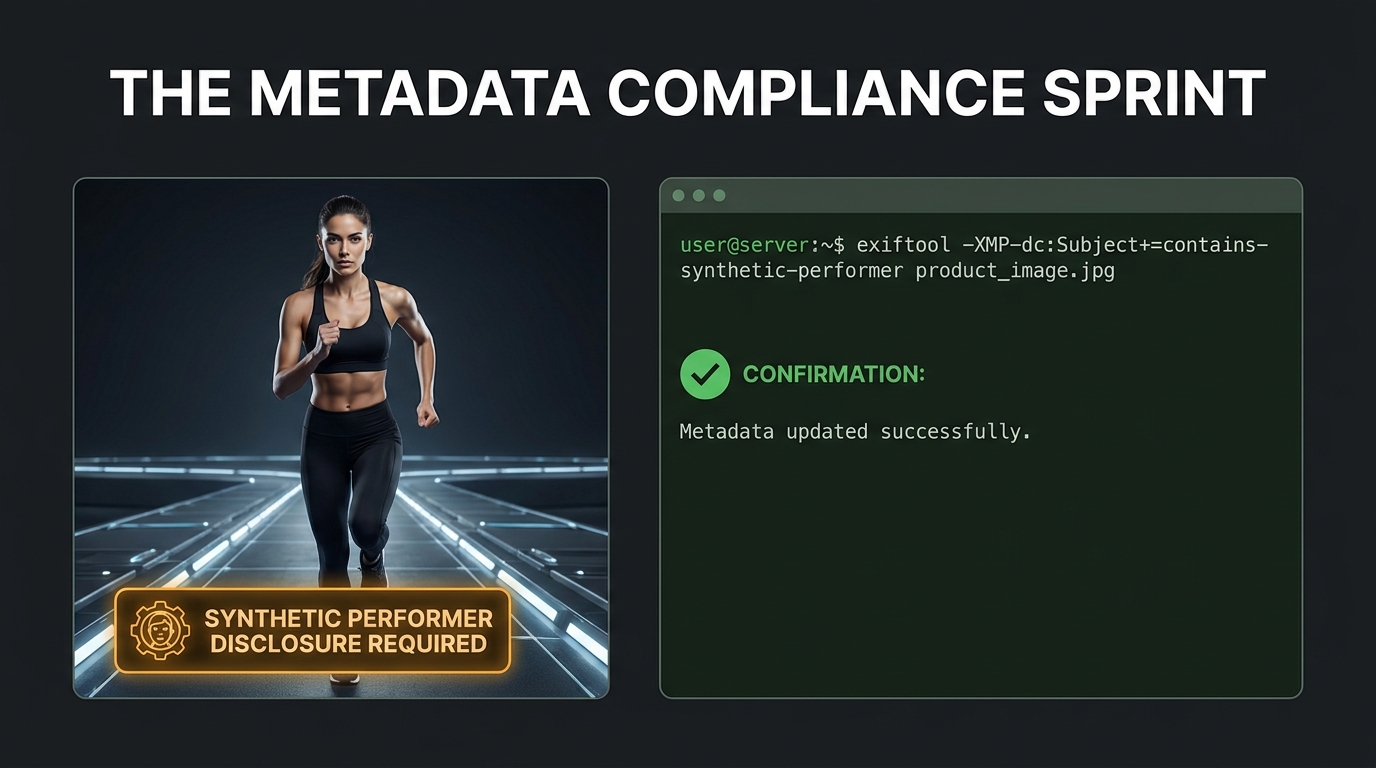
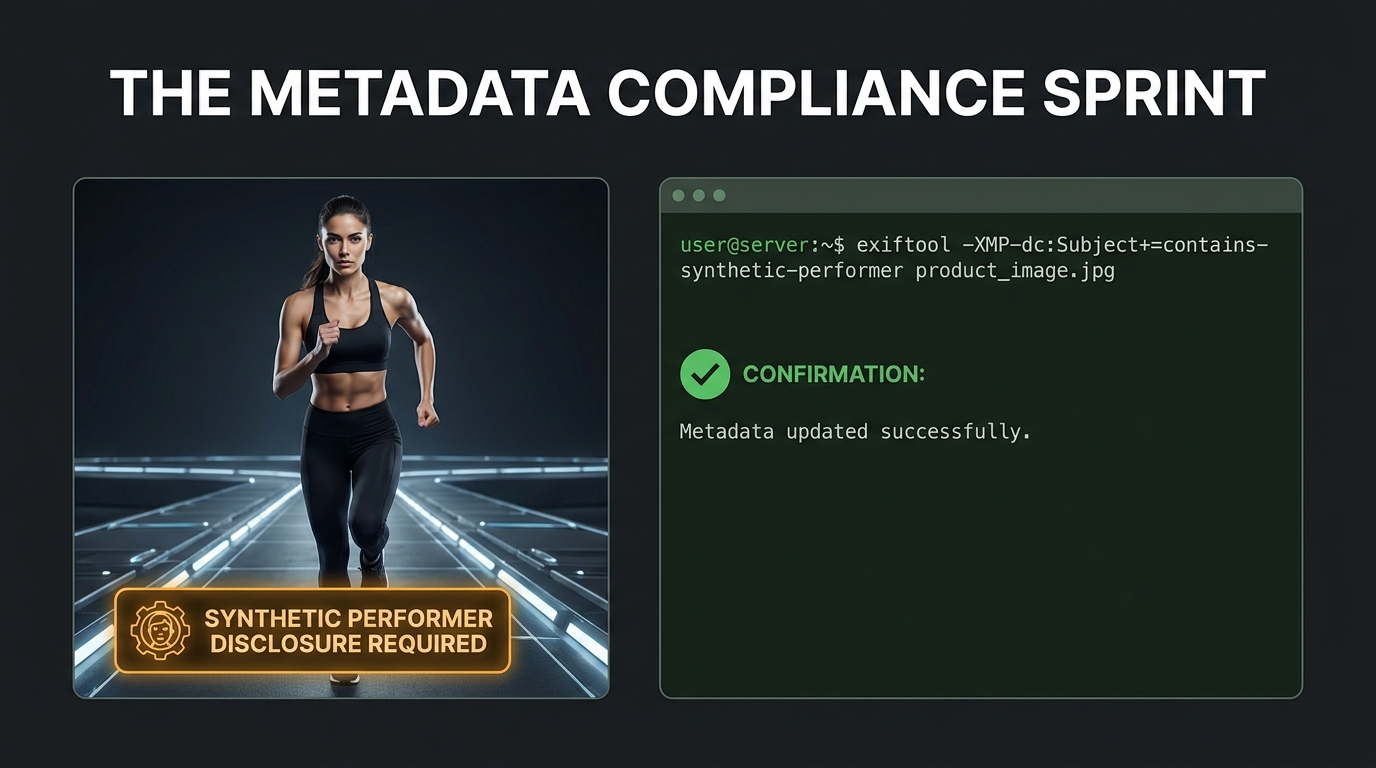
At some point in 2026, a significant number of Amazon sellers woke up to a policy that had been sitting quietly in Seller Central help documentation for months, waiting to become an enforcement problem. The rule isn’t complicated in concept — if your listing images contain photorealistic AI-generated people, you need to embed a specific metadata tag in those files before you upload them. But the operational reality of that requirement across a catalog of hundreds or thousands of ASINs, spanning product images, A+ Content, Brand Story modules, Storefront assets, and video — is considerably more complex than the policy language suggests.
This isn’t an article about what the rule says at a surface level. That ground has already been covered. This is an operations guide for sellers who are looking at their existing catalog and asking the harder question: how do we actually do this, at scale, across everything we’ve already published? And more importantly: how do we build the workflow so we never have to run this kind of remediation sprint again?
The answers require getting into the technical details of XMP metadata, ExifTool batch processing, A+ Content Manager’s built-in compliance shortcuts, and the strategic triage logic for deciding which ASINs to fix first. But they also require understanding why this rule exists in the first place — because understanding the intent shapes how you prioritize the work and how you think about the trust implications of the disclosure badge that Amazon surfaces to shoppers once the tag is present.
Let’s start from the ground up.
What the Rule Actually Requires — and What It Doesn’t
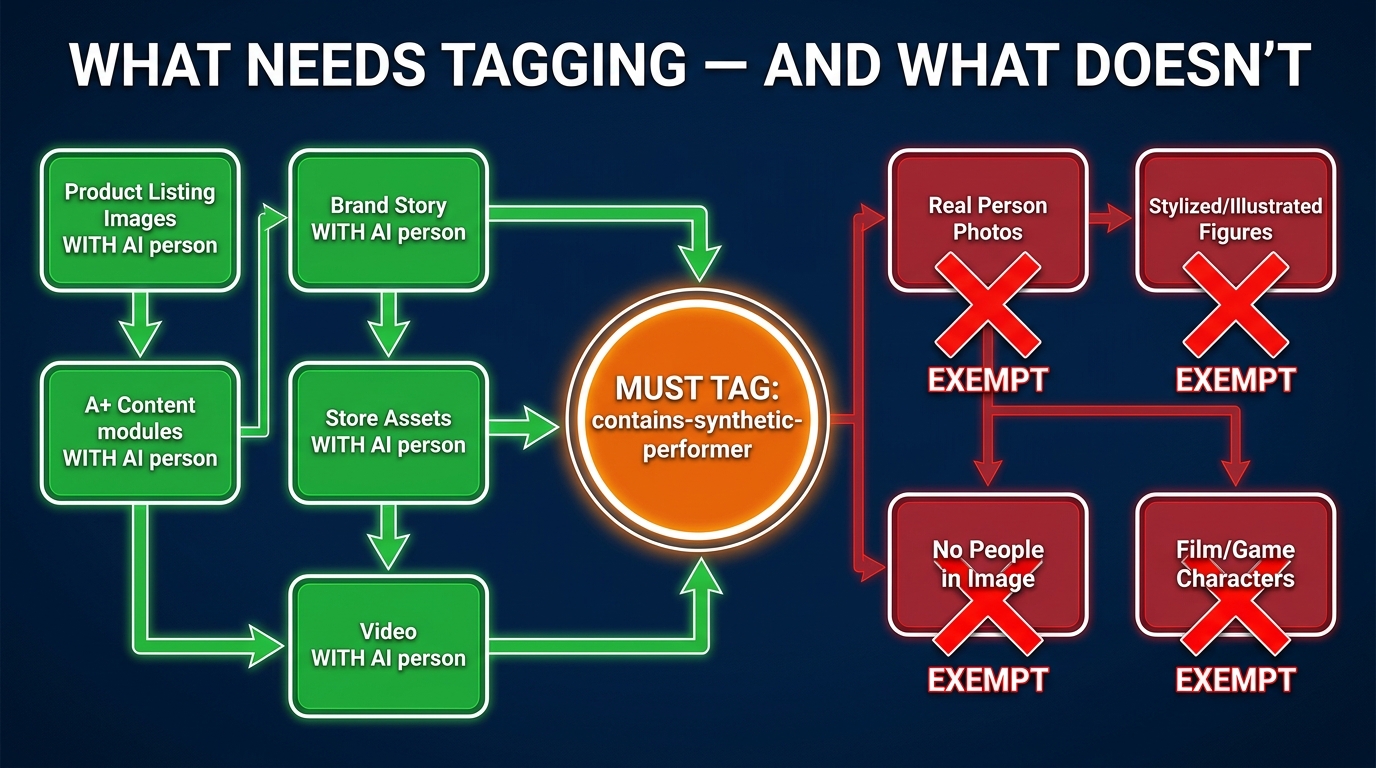
Amazon’s requirement is narrower than most sellers initially assume. The policy does not mandate metadata disclosure for every AI-generated image in your catalog. It does not apply to product-only photos, background replacements, lighting corrections, or AI-enhanced images where no human figure is present. The scope is specifically and deliberately limited to one category: photorealistic AI-generated people appearing in buyer-facing media.
The Exact Technical Requirement
When an image or video contains a person who was entirely generated by artificial intelligence — not a real human photographed and then edited, but a synthetic human figure created by a generative AI model — that file must carry the keyword contains-synthetic-performer in the XMP dc:subject metadata field before it is uploaded to Amazon. Amazon’s help documentation specifies that the metadata must be in the rdf:li list structure within the XMP dc:subject field, and it must contain this exact string.
Once the tag is present and the asset is uploaded, Amazon reads that metadata during ingestion and applies a shopper-facing disclosure label where applicable — typically a badge visible on the product detail page or within A+ Content that informs shoppers the imagery contains AI-generated performers.
Who Triggers the Requirement
The rule applies across a broad set of buyer-facing media placements:
- Product listing images (main image and secondary image slots)
- A+ Content modules that contain AI-generated human figures
- Brand Story creative assets
- Amazon Storefront images and banners
- Video assets attached to product listings
- Ad creative served through Amazon’s Ads Console
The exemptions are equally important to understand. Real people whose photos have been edited or retouched with AI tools are not within scope — the rule targets fully synthetic human figures, not AI-assisted photography. Non-photorealistic figures such as stylized illustrations, cartoon characters, or clearly fantastical beings are also exempt. Characters from expressive works — film, television, games — fall outside the requirement as well.
The Critical Word: “Photorealistic”
This is where judgment calls enter the picture. Amazon’s guidance uses the word “photorealistic” to define what’s in scope, but it doesn’t publish a pixel-level definition of where the photorealism threshold sits. In practice, this means sellers using midrange generative AI models that produce stylized-but-humanlike figures are operating in a gray area. The safest interpretive stance — and the one most compliance-oriented sellers are adopting — is to tag any image where a reasonable shopper would believe the human figure depicted is a real person. If there’s ambiguity, the tag costs you nothing to add, while omitting it creates legal exposure.
The Legal Layer Driving All of This: New York’s Synthetic Performer Law
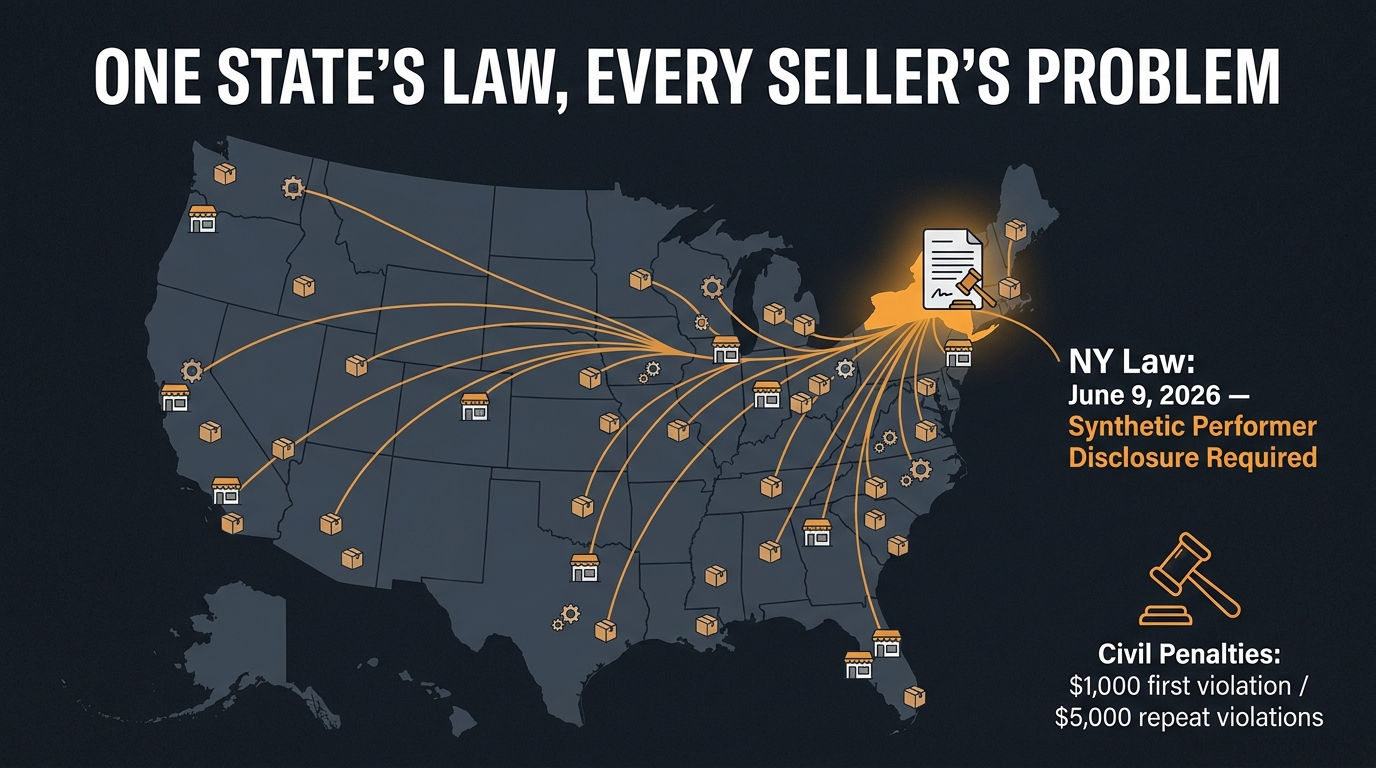
Amazon didn’t invent this requirement from scratch. The metadata tagging rule exists because of an external legal obligation that Amazon is pushing downstream to sellers — specifically, New York State’s synthetic performer disclosure law, which took effect on June 9, 2026.
What New York’s Law Actually Mandates
The New York legislation requires that any advertisement shown to New York consumers that contains a synthetic performer — broadly defined as a photorealistic human figure generated by artificial intelligence — must carry a conspicuous disclosure. The law doesn’t care where the advertiser or seller is based. If your ad reaches a New York consumer and contains an AI-generated person, the disclosure obligation applies to you.
The civil penalty structure is meaningful. A first violation carries a penalty of $1,000. Subsequent violations escalate to $5,000 per instance. Critically, each non-compliant image in a campaign or listing can potentially be counted as a separate violation — which transforms what looks like a manageable single fine into compounding exposure for sellers with large catalogs of AI model imagery.
Why This Is Every Seller’s Problem, Not Just New York Sellers
The geographic reach of Amazon’s marketplace makes this a universal compliance issue, not a regional one. Amazon operates a national (and global) platform. Unless you are specifically geo-restricting your listings to exclude New York — which is not a practical or financially rational option for most sellers — your listings are reaching New York consumers. That means the New York disclosure requirement applies to your catalog.
Amazon’s response to this legal reality was to operationalize the disclosure through metadata: rather than requiring sellers to attach visible watermarks or on-image text to every AI model photo, Amazon created the contains-synthetic-performer XMP field system. Sellers embed the tag; Amazon reads it and handles the disclosure rendering on the detail page. It’s a technically elegant solution that shifts the tagging burden to sellers while keeping the disclosure format consistent for shoppers.
The Ad Console Layer
For sellers running Sponsored Products, Sponsored Brands, or other Amazon ad products, there’s an additional workflow consideration. Amazon’s Ads Console has its own disclosure mechanism: when uploading ad creative that was built outside Amazon’s native AI tools, sellers must select the “Contains synthetic performers” designation during creative upload. Assets built natively within Amazon’s Creative Studio or generative AI tools may be auto-identified by Amazon’s system. But third-party-created AI model images served through Amazon’s ad infrastructure require manual seller-side disclosure at the time of upload.
The Audit Framework: Mapping Your AI Image Exposure Before You Touch a Single File
The single biggest mistake sellers make when responding to compliance requirements like this is jumping straight to remediation without completing a thorough audit first. Tagging files is the easy part. Knowing which files need tagging — and in which placements — is the work that determines whether your compliance sprint is complete or whether you’ve left exposure behind.
Building Your Asset Inventory
Start by pulling a complete inventory of your catalog, organized by ASIN. For each ASIN, you need to capture every buyer-facing image placement:
- Main image (the one that appears in search results)
- Secondary images (slots 2–8 in the image carousel)
- A+ Content module images (each module separately)
- Brand Story images
- Storefront banner and tile images
- Video thumbnails and video content
- Ad creative linked to those ASINs
This inventory doesn’t need to be sophisticated. A spreadsheet with ASIN, placement type, image filename or URL, image creation method (photography, AI-generated, edited photo), and human figure presence is sufficient. The goal is a single source of truth that tells you exactly what you have and where the compliance risk lives.
Triage by Revenue, Risk, and Traffic
Not every ASIN in your catalog carries equal compliance urgency. A reasonable triage framework prioritizes assets in this order:
- High-revenue ASINs with AI model images in the main image slot — highest priority. A suppressed main image means a suppressed listing, which means zero traffic from that ASIN immediately.
- High-traffic ASINs with AI model images in A+ Content or Brand Story — medium-high priority. These placements drive conversion on listings that already have qualified traffic; a suppression or compliance flag here damages conversion rate on your best performers.
- Long-tail ASINs with AI model images in any placement — lower urgency but still within scope. These can follow the high-priority work.
- Ad creative containing AI model imagery — handle in parallel with ASIN-level remediation. Ads can carry the $5,000 per-instance civil penalty risk, making them higher legal priority than their revenue contribution might suggest.
Classifying What You Actually Have
Once you’ve built the inventory, the classification step is straightforward but time-consuming: go through each image and answer the binary question — does this image contain a photorealistic person who was entirely AI-generated? If yes, it goes into the tagging queue. If no, it’s documented as compliant and set aside.
Keep records of this classification. Document who made the classification decision, on what date, and what evidence or logic supported the determination. If Amazon or a state regulator ever asks, your documented audit trail is your defense against claims of willful non-compliance.
The Technical Tagging Workflow: ExifTool, Adobe Bridge, and Windows/Mac Native Tools
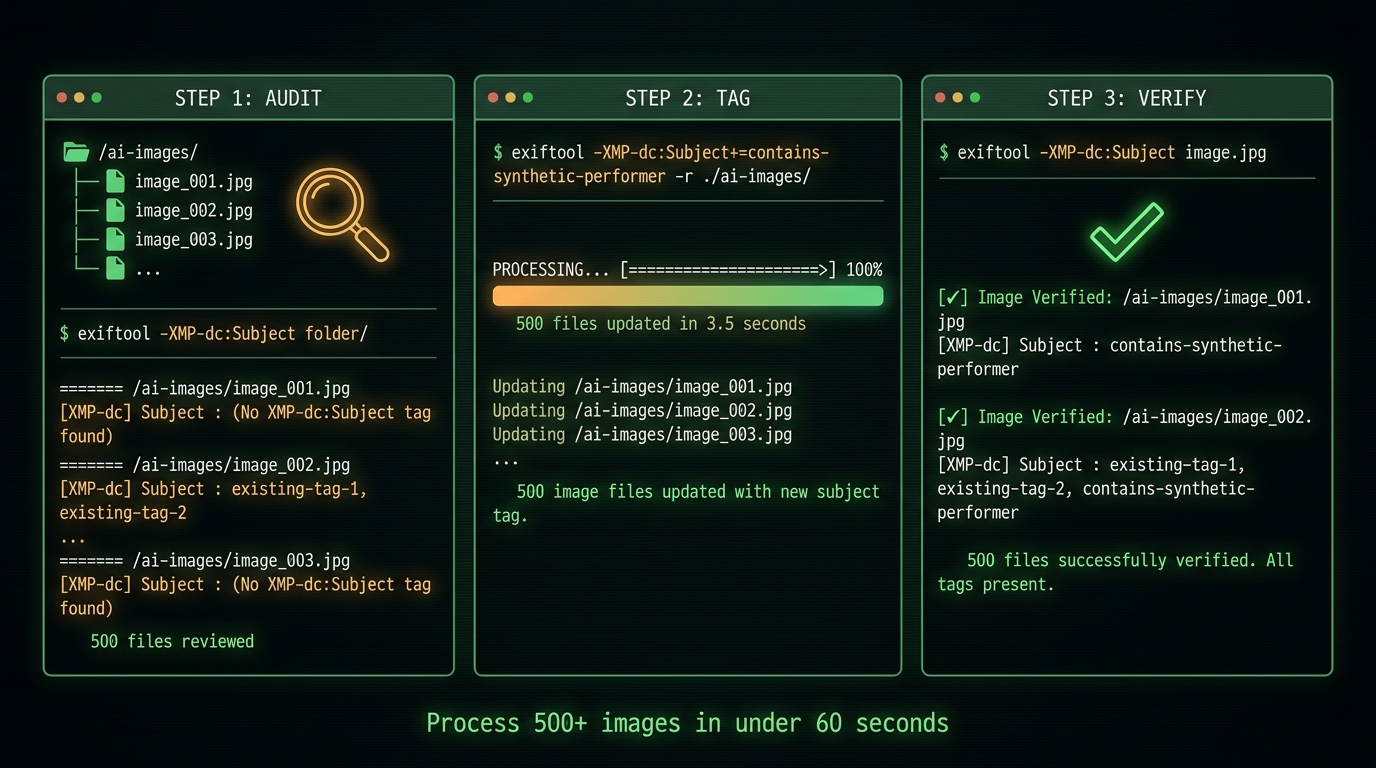
Amazon’s help documentation acknowledges three tagging approaches: Preview on macOS, File Explorer on Windows, and ExifTool for command-line workflows. For sellers with small catalogs or occasional AI model images, the native OS tools are workable. For anyone running a compliance sprint across dozens or hundreds of files, ExifTool is the only practical answer.
Understanding What You’re Writing
Before executing any commands, it’s worth understanding the metadata structure you’re working with. XMP (Extensible Metadata Platform) is an Adobe-developed standard for embedding metadata within image files. The dc:subject field within XMP is a multi-value list field — it can contain multiple keywords stored as an RDF Bag structure. Amazon requires that contains-synthetic-performer appear as one of the values in this list.
The critical operational risk here is overwriting. If your files already have other subject keywords — such as product category tags, brand identifiers, or SEO keywords — a naive metadata write operation could erase them. ExifTool handles this correctly with the append operator (+=), which adds the new value without disturbing existing values in the field.
The ExifTool Command for a Single File
For a single image, the correct ExifTool command is:
exiftool -XMP-dc:Subject+=contains-synthetic-performer path/to/image.jpgThe += operator appends the value to the existing list rather than replacing the entire field. After running the command, always verify the write was successful:
exiftool -XMP-dc:Subject path/to/image.jpgThe output should include contains-synthetic-performer in the listed values. If it doesn’t appear, the write failed and you should not upload that file.
Batch Processing a Folder
For a folder of AI model images, ExifTool’s recursive batch processing is the right tool:
exiftool -XMP-dc:Subject+=contains-synthetic-performer -r /path/to/ai-images/The -r flag enables recursive processing through subdirectories. For very large batches — hundreds or thousands of files — ExifTool’s -stay_open mode reduces the per-file startup overhead by keeping the process running between file operations, dramatically cutting total processing time.
ExifTool also supports argument files for large jobs, allowing you to specify a list of target files in a text document and pass it as input. This is particularly useful when your AI model images are distributed across multiple folder structures rather than consolidated in a single directory.
Verification at Scale
After a batch run, you need a scalable way to confirm the tag was written correctly across all files. ExifTool can output a CSV report of the XMP-dc:Subject field for every file in a directory:
exiftool -csv -XMP-dc:Subject /path/to/ai-images/ > subject_audit.csvOpen the resulting CSV and filter for rows where the Subject field either doesn’t contain contains-synthetic-performer or is empty. Any such rows represent files that need re-processing before upload. Run this verification step before uploading anything — catching a failed write before upload is far cheaper than discovering a non-compliant file after it’s live on a listing.
macOS and Windows Native Tagging
For sellers without command-line comfort, both operating systems offer basic XMP metadata editing capabilities. On macOS, Preview can display and edit some metadata fields through the Tools menu, though the interface is not optimized for batch operations. On Windows, File Explorer’s Properties panel (Details tab) allows editing of some image metadata, but its XMP handling is inconsistent depending on file type and may not write to the correct dc:subject field structure Amazon requires.
Adobe Bridge offers a more reliable IPTC/XMP editing interface through its File Info dialog and Metadata panel, with the ability to apply keyword templates across batches of selected files. For sellers already in the Adobe ecosystem, Bridge is a reasonable middle ground between the native OS tools and the command-line power of ExifTool.
Regardless of the tool, the same verification step applies: after writing metadata with any application, open the file in ExifTool and confirm the XMP-dc:Subject field contains the correct value before uploading.
The Easy Path Everyone Misses: A+ Content Manager and the Built-In Checkbox
For all the technical detail in the section above, there’s a significant portion of your compliance workload that can be addressed without touching a metadata editor at all. Amazon’s A+ Content Manager includes a native disclosure mechanism that sellers consistently overlook: an “AI-generated people” checkbox during the upload workflow.
How the Checkbox Works
When you upload images through A+ Content Manager or Creative Assets, Amazon presents an option to designate that the image contains AI-generated people. Selecting this checkbox instructs Amazon to apply the required metadata and disclosure treatment automatically, without requiring you to pre-embed the contains-synthetic-performer tag in the file itself before upload.
This is a substantial workflow simplification for A+ Content, Brand Story, and other content managed through the A+ interface. Instead of a separate metadata-writing step for every file, the disclosure is handled at upload time through Amazon’s own tooling.
What the Checkbox Doesn’t Cover
The A+ Content checkbox handles disclosure for content created and managed within A+ Content Manager. It does not apply to:
- Main image and secondary image slots on product listings (which are uploaded through a different path)
- Storefront assets managed through Amazon Stores
- Video content
- Ad creative uploaded through the Ads Console
For those placements, the pre-upload file-level metadata tagging workflow remains necessary. The practical implication is that most sellers will need both approaches running in parallel: the ExifTool or Bridge workflow for listing images, video, and ad creative, and the A+ checkbox for enhanced content placements.
Assets Built with Amazon’s Own AI Tools
There’s one additional category that warrants a note: images created natively within Amazon’s own generative AI tools — such as features available in Creative Studio or AI-powered background generation within Seller Central. Amazon’s guidance indicates that assets produced within its own generative AI tooling may be auto-identified by Amazon’s system during upload, potentially bypassing the need for manual tagging.
However, “may be auto-identified” is not the same as “will always be correctly identified.” The safest operating posture is to verify disclosures on AI-native Amazon content the same way you’d verify any other asset — by checking whether the disclosure badge appears on the live listing after upload.
The Conversion Tradeoff: What Happens When the Disclosure Badge Goes Live
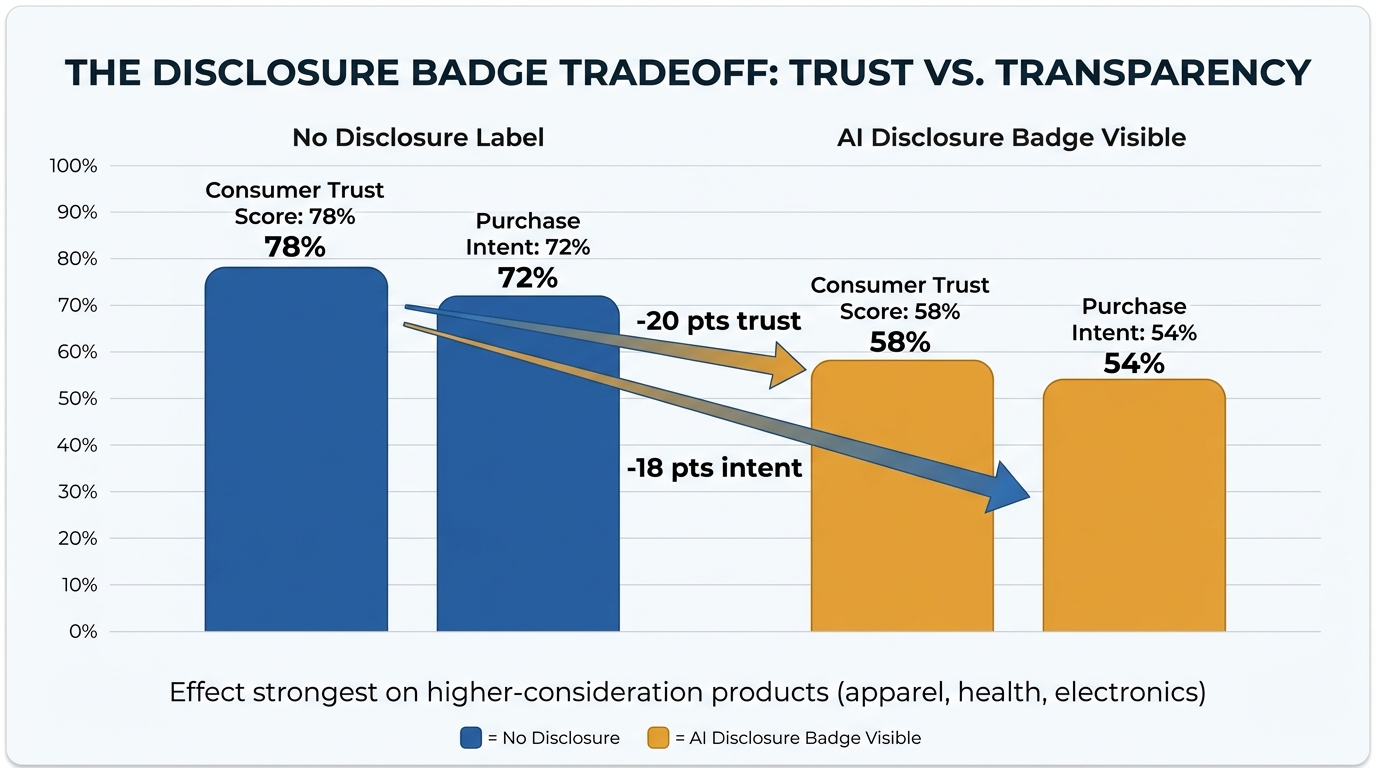
Metadata compliance is not just an operational task — it has measurable downstream effects on how shoppers interact with your listings. Understanding the conversion implications of the disclosure badge helps you make informed creative decisions, not just tick a compliance box.
What the Research Says About AI Disclosure and Trust
A December 2025 experiment examining consumer responses to AI-labeled advertising content found that ads explicitly labeled as AI-generated received meaningfully lower trust scores and purchase intent ratings compared to identical ads without that label. The trust gap was not uniform — it was significantly more pronounced for higher-consideration product categories such as apparel, health products, and consumer electronics, where the visual authenticity of the product image carries substantial weight in the purchase decision.
For lower-consideration or commodity-type products, the disclosure effect was less dramatic, but still measurable in a negative direction. The research broadly aligns with the intuition that shoppers who notice an AI disclosure badge are likely to apply additional skepticism to the image — questioning whether the product will look the same in real life as it does on screen.
Practical Implications for Sellers
This creates a meaningful strategic consideration that goes beyond compliance: which categories of AI model imagery are worth maintaining post-disclosure? For some product types, a well-executed AI model image that carries a disclosure badge may still outperform a lower-quality real photography alternative. For others — particularly in fashion, athletic apparel, and beauty where “real person” authenticity is a core trust signal — the disclosure badge may create enough friction to justify investing in human photography instead.
The compliance requirement doesn’t make the decision for you. It does, however, force the question. Sellers who approach this sprint purely as an IT exercise — tag the files, re-upload, done — are leaving a strategic conversation on the table. The smarter play is to use the compliance audit as a forcing function for a broader creative review: which AI model images are we keeping, which are we replacing with photography, and what does that decision mean for our unit economics?
Testing the Disclosure Impact on Your Specific Catalog
The aggregate research findings are directional, not prescriptive. Your specific category, price point, customer demographics, and image quality will all influence how much the disclosure badge affects conversion on your listings. The right approach is to treat the post-compliance period as a testing window: monitor conversion rate on listings with disclosure badges versus comparable listings with photography, and use that data to inform your forward-looking creative strategy.
Amazon’s analytics infrastructure gives you what you need for this analysis. Post-compliance, set a 30-day monitoring window on your highest-traffic AI model image listings and pull before/after conversion rate data through Brand Analytics or Seller Central reporting. The numbers will tell you where the disclosure badge is creating drag and where it isn’t.
Building a Prospective Compliance Pipeline: Never Run a Retroactive Sprint Again
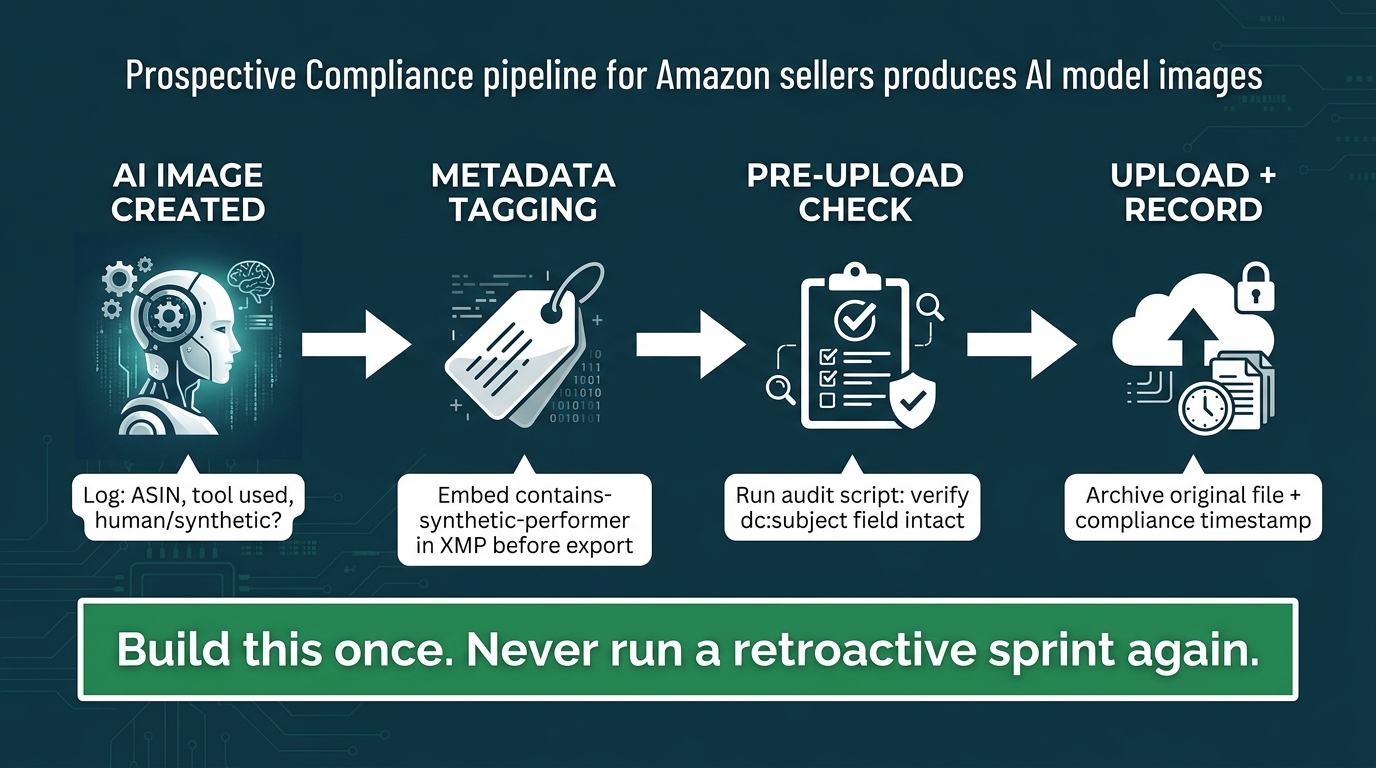
The highest-leverage outcome of running a compliance sprint is not the sprint itself — it’s the process you put in place afterward so that every AI model image entering your catalog from this point forward is already compliant before it goes anywhere near a listing. Retroactive remediation is expensive, stressful, and creates legal exposure during the gap between production and tagging. A prospective pipeline eliminates that gap.
Stage 1: Logging at Creation
The process starts at image creation. Every image produced using generative AI that includes a human figure needs to be logged at the point of creation with three data points: the ASIN it’s intended for, the AI tool used to create it, and a binary classification of whether it contains a synthetic person. This log can live in a shared spreadsheet, a project management tool, or a dedicated asset management system — the medium matters less than the discipline of capturing it consistently.
Many creative teams use a simple naming convention to handle the first two pieces: a prefix in the filename (e.g., AI_MODEL_) that signals to the metadata tagging step that this file requires processing. Combined with a log entry, this creates two independent tracking signals for the same compliance requirement.
Stage 2: Metadata Tagging at Export
The tagging step should happen at the time of export from the AI tool or creative workflow, not as a separate pre-upload step performed by a different person days later. When the creative team exports the final version of an AI model image, the ExifTool command (or the Adobe Bridge keyword template) should be part of the standard export checklist — not an optional afterthought.
For teams using creative automation pipelines, this can be built into the export script itself: any image file matching the AI model naming convention gets the metadata tag applied as part of the automated export process. The tag is embedded before the file reaches the asset library, making non-compliant uploads structurally impossible within the pipeline.
Stage 3: Pre-Upload Verification Gate
Even with an upstream tagging step, a verification gate before upload adds a meaningful layer of protection. A simple shell script that reads the XMP-dc:Subject field on every file in the upload queue and flags any file that contains “MODEL” or “AI” in its filename but doesn’t contain contains-synthetic-performer in its metadata can catch the edge cases: the file that got renamed after tagging, the image that came from an external agency without the tag applied, or the AI model image that slipped through because someone forgot the naming convention.
This gate doesn’t need to be complex. It can be as simple as a pre-upload checklist item that an operations team member runs manually using an ExifTool CSV export, or as automated as a CI/CD-style check built into an image management system. The goal is to ensure that no AI model image reaches Amazon without the tag confirmed present.
Stage 4: Upload and Archival
After upload, archive the original tagged file alongside a timestamp and the ASIN it was applied to. This creates a permanent compliance record: proof that at the time of upload, the file contained the required metadata. If Amazon or a regulator ever questions compliance for a specific asset, you can produce the original file with embedded metadata and the upload timestamp without having to reconstruct anything from memory.
Governance: Who Owns This Process?
Prospective compliance pipelines fail when nobody owns them. The process described above requires a designated owner — typically someone in operations, creative operations, or brand compliance — who is responsible for maintaining the checklist, running the verification gate, and updating the process if Amazon’s requirements change. In a small brand, this might be a single person wearing many hats. In a larger operation, it warrants a dedicated SOP with named owners for each stage.
Enforcement Reality: What Actually Happens to Non-Compliant Sellers

Understanding what enforcement actually looks like helps you calibrate how urgently to run the compliance sprint and which risks to prioritize. The enforcement picture in 2026 has two distinct layers: Amazon’s own marketplace enforcement and the legal enforcement exposure created by New York’s synthetic performer law.
Amazon’s Enforcement Approach: Suppression First
Amazon’s primary enforcement mechanism for non-compliant AI model images is listing suppression — removing the image or the listing from search results and the detail page until the non-compliance is corrected. This is the immediate, most operationally damaging consequence: a suppressed main image means your listing effectively disappears from search. A suppressed listing means zero organic traffic, zero conversions, and zero sales velocity on that ASIN for as long as the suppression remains active.
Seller forum reports in 2026 indicate that Amazon’s enforcement is moving toward more automated detection rather than purely complaint-driven enforcement. The implication is that the window between non-compliant upload and detection may be narrowing. Sellers who historically relied on enforcement being slow or inconsistent should not assume that calculation still holds.
The Account Health Escalation Path
Individual listing suppressions that go unresolved, or patterns of non-compliance across multiple ASINs, can escalate to account-level consequences. Amazon’s Account Health dashboard is the leading indicator of this escalation: a rising policy violation count is the signal that individual ASIN issues are accumulating into a broader account risk.
Repeated or severe violations can trigger manual review, account suspension warnings, or in the most serious cases, account termination. Given that most Amazon sellers’ entire revenue runs through a single account, the account-level risk is categorically more serious than any individual listing suppression. It’s the scenario that transforms a compliance sprint from an operational annoyance into an existential threat.
The Civil Penalty Layer: New York Law Enforcement
Amazon’s marketplace penalties and New York’s civil penalties operate independently. Being compliant with Amazon’s metadata tagging requirement is not a complete substitute for legal compliance with New York’s synthetic performer law — though in practice, proper metadata tagging triggers Amazon’s disclosure mechanism, which is designed to satisfy the law’s conspicuous disclosure requirement for Amazon-served media.
The civil penalty exposure — $1,000 for a first violation and $5,000 for subsequent violations — is most acute for sellers running advertising campaigns with AI model creative. An ad campaign reaching New York consumers with non-disclosed synthetic performers is the clearest enforcement exposure. The per-image or per-creative unit nature of potential violations means that a catalog-wide non-compliance situation could theoretically produce penalty exposure far exceeding the operational cost of running the compliance sprint in the first place.
What “Retroactive” Compliance Looks Like in Practice
For already-published assets, retroactive compliance means downloading the image files from their current placements (or retrieving them from your original source files), embedding the metadata tag, and re-uploading them to replace the non-compliant versions. Amazon’s systems accept re-uploaded versions of existing listing images, and forum guidance suggests that retroactive tagging of already-published content is an accepted remediation path.
The key operational risk in retroactive remediation is continuity: there is a window between removing the non-compliant image and the compliant replacement going live. For main images, this window means potential listing suppression. Minimize this window by having the tagged replacement ready before initiating the removal, and by uploading the replacement immediately after. For A+ Content, the in-tool editing workflow allows you to replace images within a module without taking the entire A+ Content offline, which significantly reduces the continuity risk.
The Strategic Questions Your Sprint Should Force You to Answer
A compliance sprint done well is more than a metadata exercise — it’s an audit that surfaces creative strategy questions that your team may not have formally addressed when AI model images started entering the catalog.
Do We Actually Know Which Images Are AI-Generated?
For brands that outsourced image creation to agencies or freelancers, the answer to this question is often uncomfortably uncertain. If you don’t have a documented record of how each image in your catalog was created — photography versus AI generation, and with which tool — you cannot run a reliable compliance audit. The sprint forces this documentation gap into the open.
Going forward, any brief or contract with external creative partners should explicitly require disclosure of whether delivered assets contain AI-generated human figures, and should make the required metadata tagging a deliverable condition. The responsibility for the tag shouldn’t fall entirely on your in-house team if an external agency is producing the content.
What’s Our Actual Policy on AI Model Images?
Many brands adopted AI model images opportunistically — a creative team found a cheaper, faster way to produce lifestyle shots and started using it without any formal policy decision being made at the brand level. The compliance requirement creates a forcing function for that policy conversation: do we want to continue using AI-generated human figures in our imagery? In which product categories? Under what creative standards? With what archival and documentation requirements?
Answering these questions explicitly produces a written creative policy that governs future AI model image usage — which is both a compliance asset and a brand management asset. It sets standards for what “photorealistic enough to require disclosure” means for your specific catalog, establishes who approves AI model image usage, and creates the governance structure that makes your prospective compliance pipeline operational rather than aspirational.
Are There Categories Where We Should Replace AI Models with Real Photography?
The disclosure badge conversion research points toward a clear strategic implication: in categories where shopper trust in image authenticity is a primary purchase driver, the medium-term cost of the disclosure badge may exceed the cost savings of AI model photography. Apparel is the clearest example. Shoppers buying clothing from an unfamiliar brand are already asking whether the item will look the same in person as it does in the listing image. A disclosure badge that signals AI-generated imagery compounds that uncertainty.
The compliance sprint is the right moment to run the math on category-level creative ROI. What does professional human model photography actually cost for your product categories? How does that compare to the margin impact of a conversion rate decline driven by the disclosure badge? The answer may surprise some teams that assumed AI model imagery was a clear cost win.
Conclusion: The Sprint Is the Easy Part
Running the technical compliance sprint — auditing your catalog, tagging the files, re-uploading the assets — is achievable in days for most brand sizes. The ExifTool commands are not complicated. The A+ Content checkbox makes enhanced content compliance almost trivial. The triage logic is straightforward once your asset inventory is complete.
What’s harder, and more valuable, is what comes after the sprint: the prospective pipeline that makes retroactive remediation unnecessary going forward, the creative policy that governs AI model image usage with documented standards, and the conversion monitoring that tells you whether the disclosure badge is affecting your key listings.
New York’s synthetic performer law took effect on June 9, 2026. Amazon’s enforcement of the metadata requirement is tightening. The $5,000-per-instance civil penalty exposure is real for sellers with AI model creative in their ad campaigns. None of these pressures are going to ease — they are more likely to intensify as other states consider similar legislation and as Amazon continues automating its compliance detection.
The sellers who will handle this environment best are not the ones who ran the fastest retroactive sprint. They’re the ones who converted the sprint into a durable operational capability.
Immediate Action Checklist
- ✅ Pull your ASIN catalog and map every buyer-facing image placement by ASIN
- ✅ Classify images as photorealistic AI-generated people (requires tagging), real photography (exempt), or no people (exempt)
- ✅ Triage by priority: high-revenue main images first, then A+ and Brand Story, then long-tail ASINs
- ✅ Install ExifTool and run the batch append command on your AI model image folder
- ✅ Verify tags with the ExifTool CSV export before uploading anything
- ✅ Use the A+ Content Manager checkbox for enhanced content placements instead of pre-tagging files
- ✅ Update your Ads Console creative to select “Contains synthetic performers” on qualifying ad assets
- ✅ Archive original tagged files with ASIN and upload timestamp for compliance records
- ✅ Build the prospective pipeline: log at creation, tag at export, verify before upload
- ✅ Brief external creative partners on the metadata tagging requirement for any AI model imagery they deliver
- ✅ Monitor conversion rates on disclosure-badged listings for 30 days post-compliance
- ✅ Document your creative policy for AI-generated human figures in listing imagery
Leave a Reply