Most Amazon sellers treat Sponsored Brands video as a production problem. They hire a videographer, film a polished 30-second clip, upload it, and wait. When results stall, they blame the bid, the keyword list, or the algorithm.
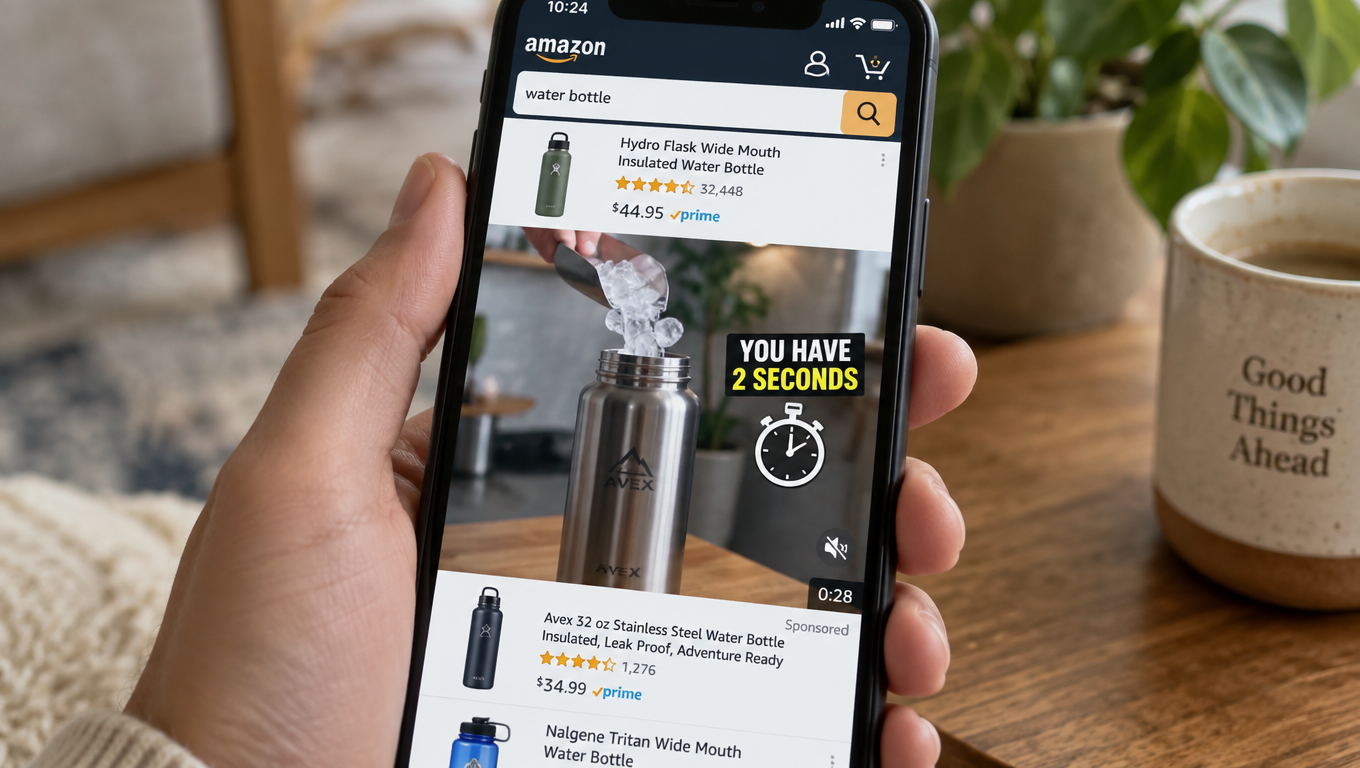
The real problem usually shows up much earlier. It sits in the first two seconds of the video, while a shopper is scrolling a search results page on their phone with the sound off. That’s where Sponsored Brands video (SBV) campaigns are won or lost. Everything after that moment only matters if the opening frames did their job.
This article approaches Sponsored Brands video from a different angle than most guides. It isn’t a campaign setup walkthrough or a list of general tips. It’s a frame-by-frame look at how SBV creative actually gets consumed on Amazon. It covers how placement shapes what your video needs to say, how to storyboard for muted autoplay, which metrics tell you where viewers drop off, and how to run a testing cycle that keeps creative fresh without burning budget.
The stakes are real. Amazon’s own case studies show what well-executed video can do. HP, running Sponsored Brands video alongside Sponsored Brands, Sponsored Products, and display ads, reported a 224% year-over-year increase in impressions and a 142% increase in clicks, including a 42% increase in clicks specifically on Sponsored Brands video placements, according to Amazon Ads. Smaller brands have seen results too. Sleep-tech company Loftie reported a ROAS of $5.66 and an ACOS of 17.68% on a sponsored ads program with Amazon Ads.
Those results didn’t come from uploading any video and hoping for the best. They came from creative that fits the way shoppers actually see it. Let’s break down what that means in practice.
Why Sponsored Brands Video Is a Different Animal from Other Amazon Ads
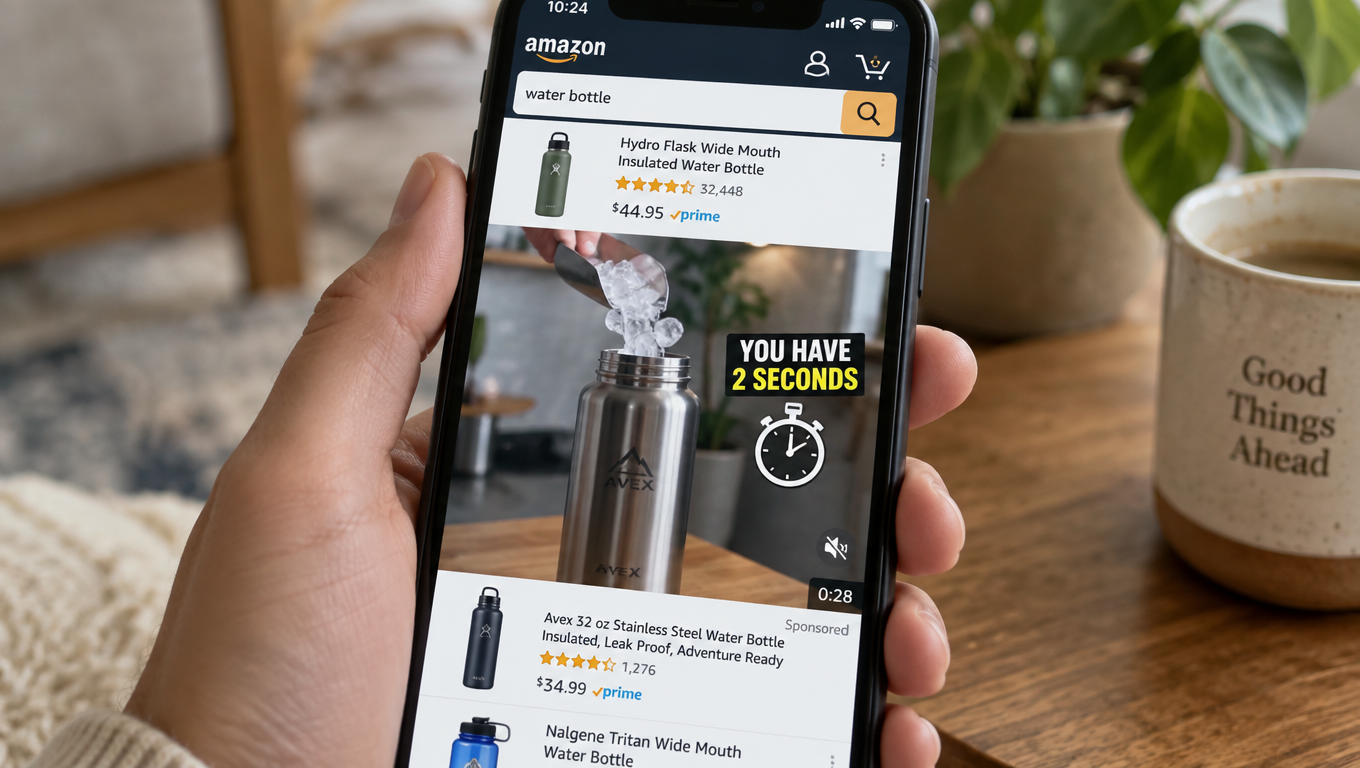
Sponsored Products ads borrow the look of an organic listing. A shopper sees a main image, a title, a price, star ratings, and a small “Sponsored” label. The ad works because it blends in.
Sponsored Brands video works for the opposite reason. It stands out. It’s the only moving element on a page full of static thumbnails, and it autoplays as soon as it scrolls into view. That’s a big advantage for grabbing attention. It’s also a liability if the motion doesn’t communicate anything useful.
What Amazon says the format is for
Amazon Ads describes Sponsored Brands as a solution “built to help customers discover your brand within the Amazon store,” with “rich display and video creatives that put your brand front and center.” It calls Sponsored Brands video “a powerful storytelling tool for brands to initiate, cultivate, and maintain relationships with shoppers.”
That framing matters. Amazon positions SBV as a discovery and consideration format first and a conversion format second. In practice, it does both. But if you judge it only on the same ACOS target you use for exact-match Sponsored Products campaigns, you’ll likely underfund it or shut it off too soon.
The eligibility gate
Sponsored Brands, including video, is available to sellers enrolled in Amazon Brand Registry, as well as vendors and agencies that work with them. If you’re not brand-registered, this format isn’t available to you. That’s one reason SBV placements tend to be less crowded than Sponsored Products in many categories: fewer advertisers are eligible to compete for them.
Three structural differences that change your approach
- Motion creates attention, not persuasion. Autoplay gets eyes on the ad. The content still has to earn the click.
- Video is usually watched muted. Amazon autoplays SBV without sound in search results. Unless a shopper actively taps to unmute, your audio track does nothing.
- The ad sits beside competitors’ static listings. Shoppers compare your video against the products around it in real time. Your first frames are competing with price tags and star ratings a few pixels away.
Each of these differences leads to a specific creative decision, which the rest of this article covers.
Placement Dictates Creative: Where SBV Actually Appears
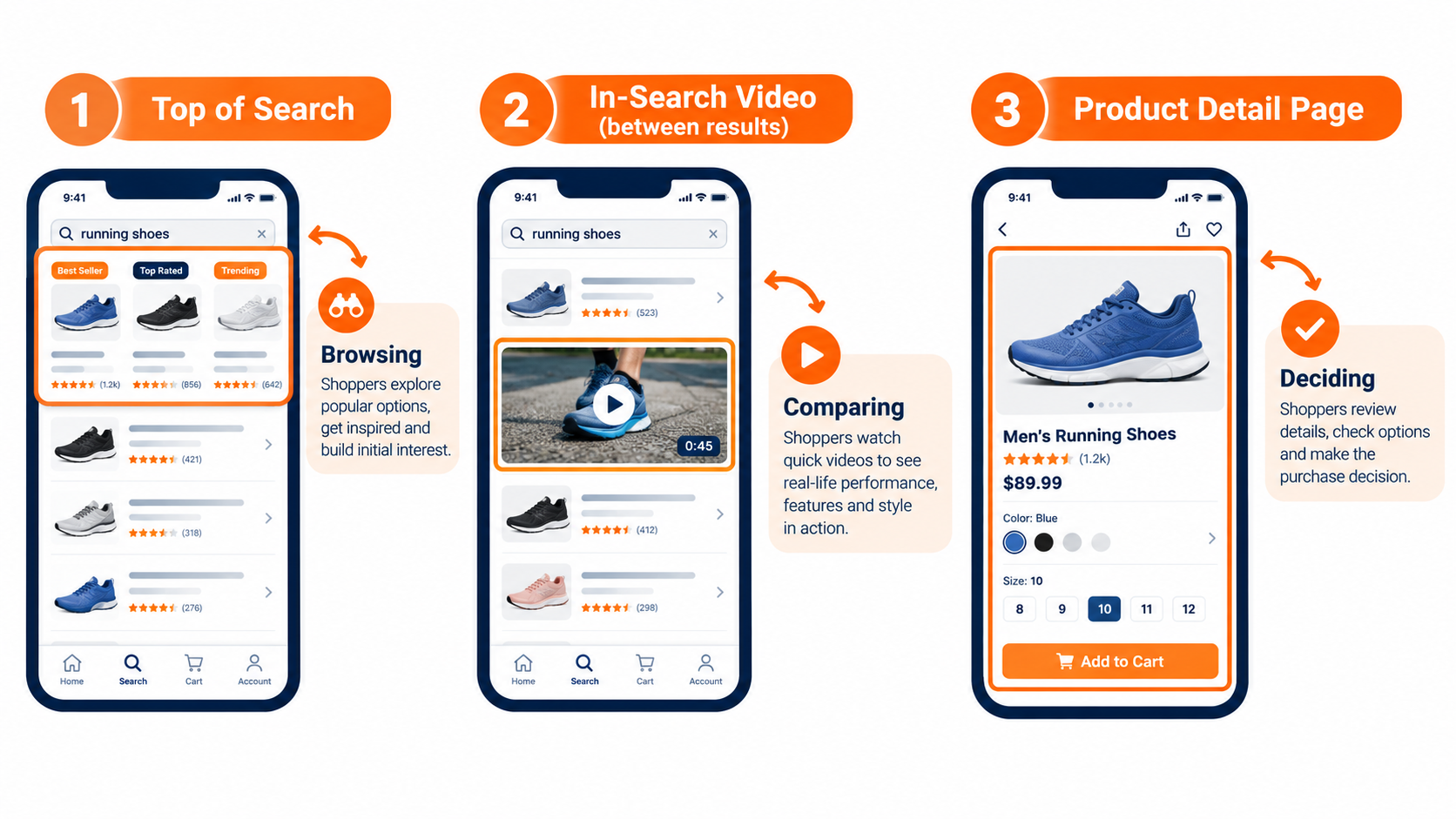
According to Amazon Ads, Sponsored Brands creatives “appear in prominent placements like top of search and product pages,” and may be shown “above, alongside, or within shopping results” on desktop and mobile. For video specifically, that usually means three types of environments. Each puts the shopper in a different frame of mind.
In-search placements: the browsing mindset
The most familiar SBV placement is the video unit that appears between rows of search results. The shopper has typed a query, such as “insulated water bottle,” and is scanning options. They haven’t decided anything yet.
Here, your video’s job is to answer one question quickly: why should I stop scrolling for this one? A clear visual of the product in use, paired with one distinguishing claim, usually beats a brand story. The shopper isn’t interested in your founding story at this stage. They want to know whether this product is different from the eight others on the screen.
Top-of-search placements: the first impression
When video appears at or near the top of results, it’s often the first thing a shopper sees after searching. That position carries weight because it frames how the shopper reads everything below it. If your video sets the standard, such as “this is what a leak-proof lid should look like,” competing listings get judged against it.
Top-of-search visibility is valuable enough that Amazon offers a reserve share of voice option for Sponsored Brands. Brands can use it to secure top-of-search visibility for chosen keywords. For launches or seasonal peaks, that can be worth exploring. It’s a premium tactic, though, and should come after you’ve proven your creative works.
Product detail page placements: the comparison mindset
On product pages, the shopper is already looking at a specific item, often a competitor’s. Your video is interrupting a decision that’s already underway. That calls for a different message.
Comparison-oriented creative tends to fit here: a feature the competitor lacks, a size or capacity advantage, or a demonstration of durability. You can’t name competitors in Amazon ads, and moderation will reject disparaging claims. But you can show what your product does well in a way that invites the comparison.
The practical takeaway
One video rarely fits all three contexts equally well. You don’t need three fully separate productions, though. You need one set of footage cut into versions with different opening frames and on-screen text. The in-search version leads with the product in action. The detail-page version leads with the standout feature. Same shoot, different edits.
The Muted Autoplay Constraint (and Why It’s Actually Useful)
Because SBV autoplays silently in search, sound is optional for the viewer. That one fact rules out a large share of conventional video advertising techniques. Voiceover-driven explainers, spokesperson monologues, and music-dependent emotional builds all lose most of their meaning without audio.
Many brands still make the mistake of repurposing a video made for YouTube, a website hero banner, or a TV spot. Those videos were designed for audio. On Amazon, they become a person silently moving their mouth next to a product.
Design for silence first
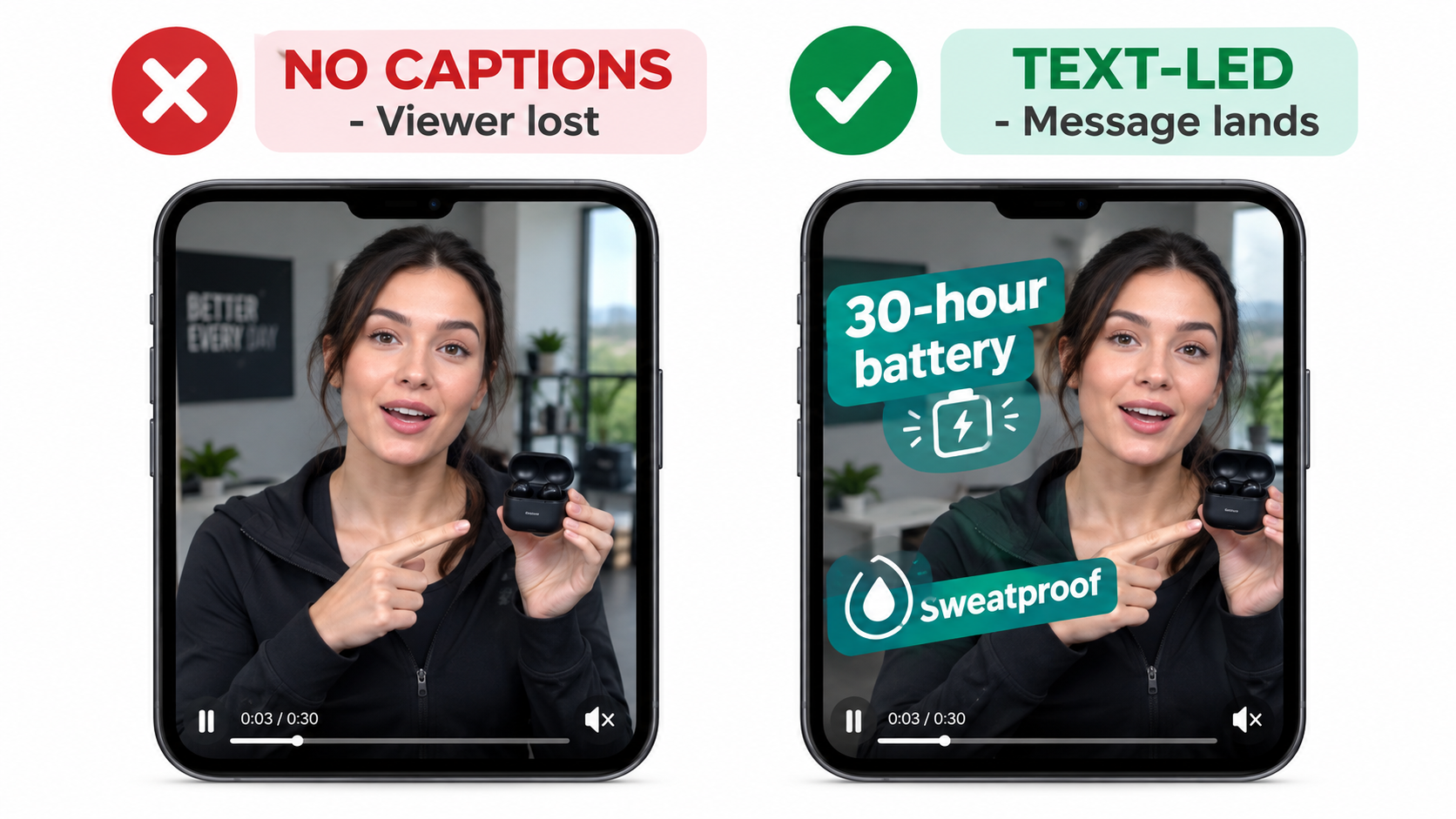
The fix is simple to state and harder to execute: build the video so it makes complete sense with the sound off. Then add audio as a bonus layer for the small share of viewers who unmute.
In practice, that means:
- On-screen text carries the message. Short phrases of three to six words, large enough to read on a phone screen, held on screen long enough to be read twice.
- Visual demonstration replaces narration. Instead of saying “our blender crushes ice in seconds,” show ice going in and smooth liquid coming out.
- Captions for any spoken content. If you do include a speaker, burn in captions. Don’t rely on the platform to add them.
- Motion that tells a story. Before-and-after sequences, pouring, folding, assembling, and stress tests communicate without words.
Why this constraint helps you
Muted-first design forces clarity. When you can’t lean on a voiceover, you have to identify the single visual that proves your product’s value. That discipline often produces better creative than a sound-dependent script would.
It also makes your video more reusable. A silent-first SBV cut works well in Sponsored Display video, on your Brand Store, in your listing’s video slot, and on social platforms where muted autoplay is also common. You’re producing one asset with several uses.
A quick muted test
Before uploading any SBV creative, watch it on your phone with the sound off at arm’s length. Then ask someone unfamiliar with the product to do the same and tell you, in one sentence, what the product is and why it’s better. If they can’t, the video isn’t ready.
A Frame-by-Frame Storyboard for Sponsored Brands Video
Amazon’s published guidance has generally recommended shorter videos for Sponsored Brands, with many advertisers working in the 15-to-30-second range. Whatever length you choose, the structure matters more than the runtime. Below is a four-part storyboard built around how attention actually decays in a scrolling feed.
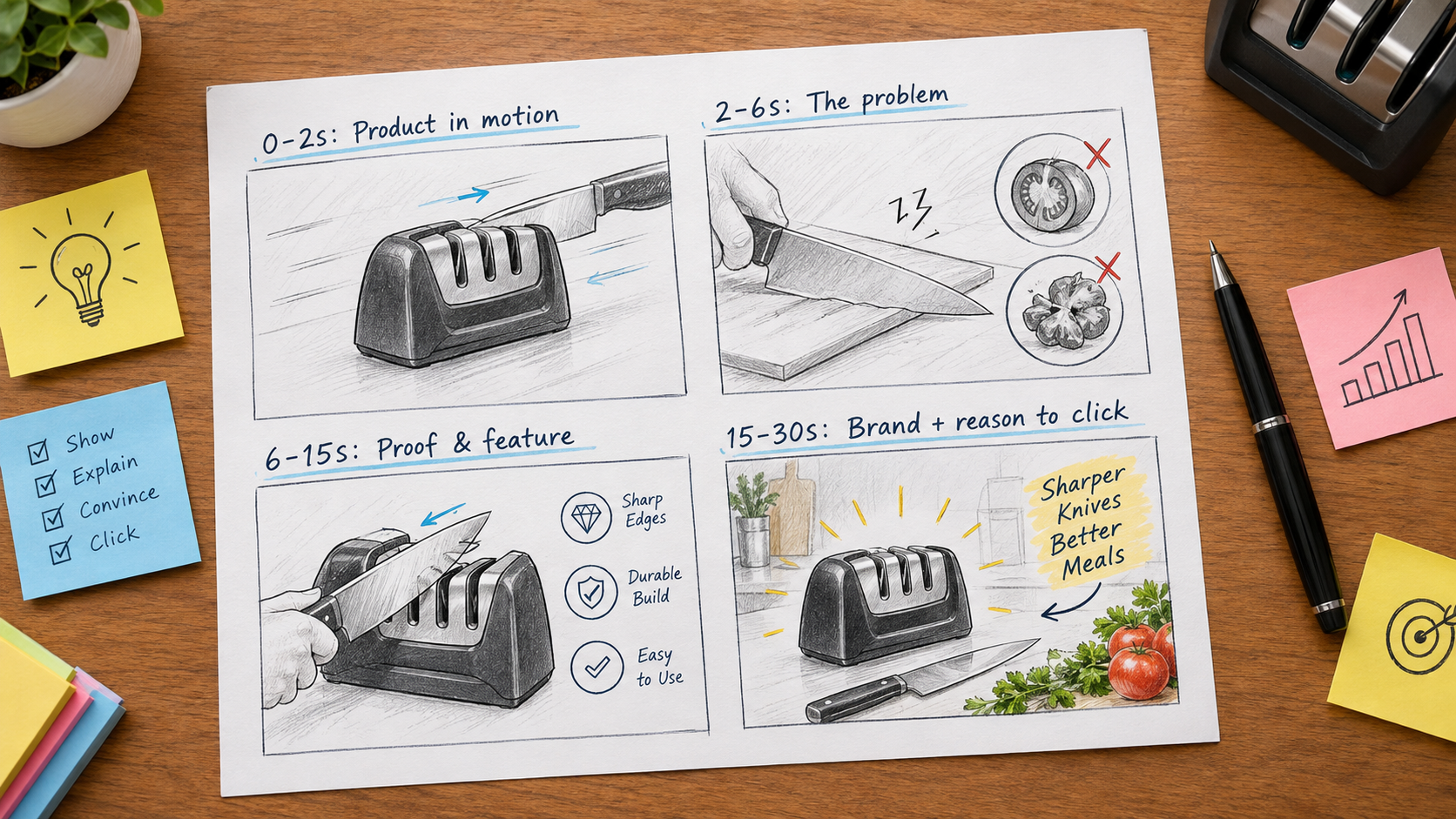
Frames 0–2 seconds: the product in motion
The opening must show the product, and it should already be moving. No logo animation, no lifestyle establishing shot, no slow fade-in from black. Those openings waste the only moment you’re guaranteed to have.
Strong openings include the product being used mid-action, a close-up of the key feature working, or a dramatic visual contrast. Think coffee pouring into a mug that stays hot, a knife slicing a tomato cleanly, or a backpack being overstuffed and zipped shut. The shopper should recognize the product category in the first second.
Frames 2–6 seconds: the problem or the promise
Once you have attention, establish why it matters. This is where a short on-screen text line appears: a problem the shopper recognizes (“Tired of lukewarm coffee by 10 a.m.?”) or a clear promise (“Hot for 12 hours”).
Keep it to one idea. Many videos try to list four features here. The viewer retains none of them. One problem, one promise, clearly shown.
Frames 6–15 seconds: proof and differentiation
Viewers who make it this far are interested. Now show proof. This section can hold two or three supporting features, each paired with a visual demonstration. It’s also where social proof can appear, such as a mention of awards or certifications, as long as the claims are accurate and can be substantiated for moderation.
Avoid star ratings or review quotes unless you’ve confirmed they meet current Amazon advertising policies. Claims about reviews, pricing, and “best seller” status are common reasons for rejection.
Frames 15–30 seconds: brand and reason to click
The final stretch reinforces your brand and gives a reason to take action. Show the logo clearly, restate the core benefit, and if relevant, show the product range. That’s especially useful if the ad links to your Brand Store.
Note that Amazon restricts certain call-to-action language and urgency claims in ads, so skip “Buy now, limited time!” style overlays. A simple closing frame showing the product, logo, and core benefit works well.
Loop awareness
SBV may loop in some placements. Design your last frame so it transitions reasonably into your first. An abrupt jump from logo card to action shot can look glitchy. A clean end frame that cuts naturally back to the product in motion keeps the loop watchable.
Technical Specs and Moderation: Where Good Videos Get Rejected
A strong creative concept is worthless if it doesn’t clear moderation. Amazon reviews every Sponsored Brands video before it goes live, and rejections can add days to a launch.
Technical specifications to confirm before export
Amazon updates its ad specs periodically, so always check the current Sponsored Brands video specification page before final export. Historically, the requirements have followed this general pattern:
- Aspect ratio: 16:9 landscape has been the standard for SBV.
- Resolution: HD minimum, with 1920×1080 widely used as the working standard.
- File format: MP4 or MOV.
- File size: A maximum limit applies (historically up to 500 MB).
- Length: A minimum and maximum duration apply. Check the current limits, as they’ve changed over time.
- No letterboxing or black bars, and no blank frames at the start or end.
The common rejection triggers
Beyond technical specs, most rejections come from content issues. Watch out for these in particular:
- Blurry or low-quality footage. Upscaled phone clips often get flagged.
- Unsubstantiated claims. “#1 rated,” “best on Amazon,” and “clinically proven” all require support.
- Pricing and promotions in the video. Prices change; baked-in prices quickly become inaccurate.
- Text that’s too small or on screen too briefly. Amazon expects on-screen text to be legible.
- Content that doesn’t match the landing page. The product in the video should be the product shoppers land on.
- Restricted categories and claims. Health, supplements, and personal care products face stricter review.
Build a pre-moderation checklist
Brands that launch video often save time with an internal checklist that mirrors Amazon’s policies. Before any upload, someone other than the editor reviews every claim, every text overlay, and the final frames. It’s a small step that prevents the most frustrating kind of delay: a rejection you could have caught yourself.
Choosing the Destination: Product Page, Brand Store, or Multi-Product
Where your SBV sends shoppers affects what the video should say and how you should judge its performance. Amazon notes that Sponsored Brands can drive “traffic to your Brand Store or detail pages,” supporting both product evaluation and catalog discovery.
Single product detail page
This is the most direct path. The video features one product, and a click takes the shopper straight to that listing. It’s the easiest setup to measure and usually the best fit for hero products with strong conversion rates.
The creative should focus narrowly on that single product. Your listing then has to finish the job: strong main image, clear bullets, competitive price, and solid reviews. If the detail page is weak, a great video just sends shoppers to a disappointing destination.
Brand Store destination
Sending traffic to your Brand Store makes sense when the goal is discovery across a catalog. Think a cookware brand with pans, lids, utensils, and storage, or an apparel brand with multiple styles. Amazon explicitly pairs Sponsored Brands with Brand Stores to drive “discovery, consideration, and long-term engagement.”
Expect lower immediate conversion rates from Store traffic compared to detail page traffic. Shoppers browse before buying. Judge Store-destination SBV with metrics like new-to-brand orders and total brand sales over a longer window, not just same-session ACOS.
Multi-product video formats
Amazon has expanded Sponsored Brands video to support formats where a video appears alongside several products from your catalog. This lets a brand show its range while still giving shoppers direct paths to individual listings.
This approach works well for brands with product families, such as variants in different sizes, or bundles of complementary items. The video can tell a broader brand story while the product tiles handle the specifics.
Match the message to the destination
A simple rule helps here: the narrower the destination, the narrower the message. Single-product destinations need single-product videos. Store destinations can afford broader brand storytelling. Mismatches, like a brand-story video linked to one product page, confuse shoppers and waste clicks.
Targeting Architecture Built for Video
Sponsored Brands video supports keyword targeting and product targeting, which Amazon describes as ways to “reach shoppers who matter most to your business.” How you structure that targeting should reflect what video does well.
Separate campaigns by intent
Combining branded, category, and competitor keywords in a single SBV campaign makes it very hard to read performance. Each intent type behaves differently:
- Branded keywords (your brand name plus product terms) usually convert well and cost less. Video here defends your territory against competitors bidding on your name.
- Category keywords (“stainless steel water bottle,” “ergonomic office chair”) are where video’s attention advantage matters most. Shoppers are open to options, and a strong video can win them.
- Competitor keywords and product targets are the hardest to convert but offer the best chance to win new customers. Comparison-style creative works best here.
Running each in its own campaign lets you set different budgets, bids, and success criteria. It also lets you pair each intent with the creative version built for it.
Start with mid-funnel category terms
For most brands launching SBV, the most informative starting point is a focused set of mid-funnel category keywords. These are specific enough to signal buying intent but broad enough to reach new shoppers. Examples include “32 oz insulated water bottle with straw” instead of “water bottle” or your brand name.
These terms give you clean data on whether your creative can win attention against unfamiliar competitors. That’s the core question you need answered before scaling budget.
Product targeting for detail pages
Product targeting lets your SBV appear on specific competitor or complementary listings. Choose targets carefully. The best candidates are products with higher prices, lower ratings, or weaker feature sets than yours, where a side-by-side comparison favors you.
Complementary product targeting also works. A phone case brand might target specific phone models. A coffee grinder brand might target popular espresso machines. The shopper is already buying into a category where your product fits naturally.
Use search term reports to refine
Review the search term report regularly. Add converting search terms as new targets, and add irrelevant or consistently wasteful terms as negatives. Video budgets can drain quickly on broad terms that generate views without purchase intent.
Reading the Video Metrics: Where Viewers Drop Off
Sponsored Brands video reporting includes metrics beyond clicks and sales. Amazon says advertisers can “get insights into how and which shoppers engage with your ads to understand your brand’s impact.” These video-specific metrics are where you learn what’s actually going on inside your creative.
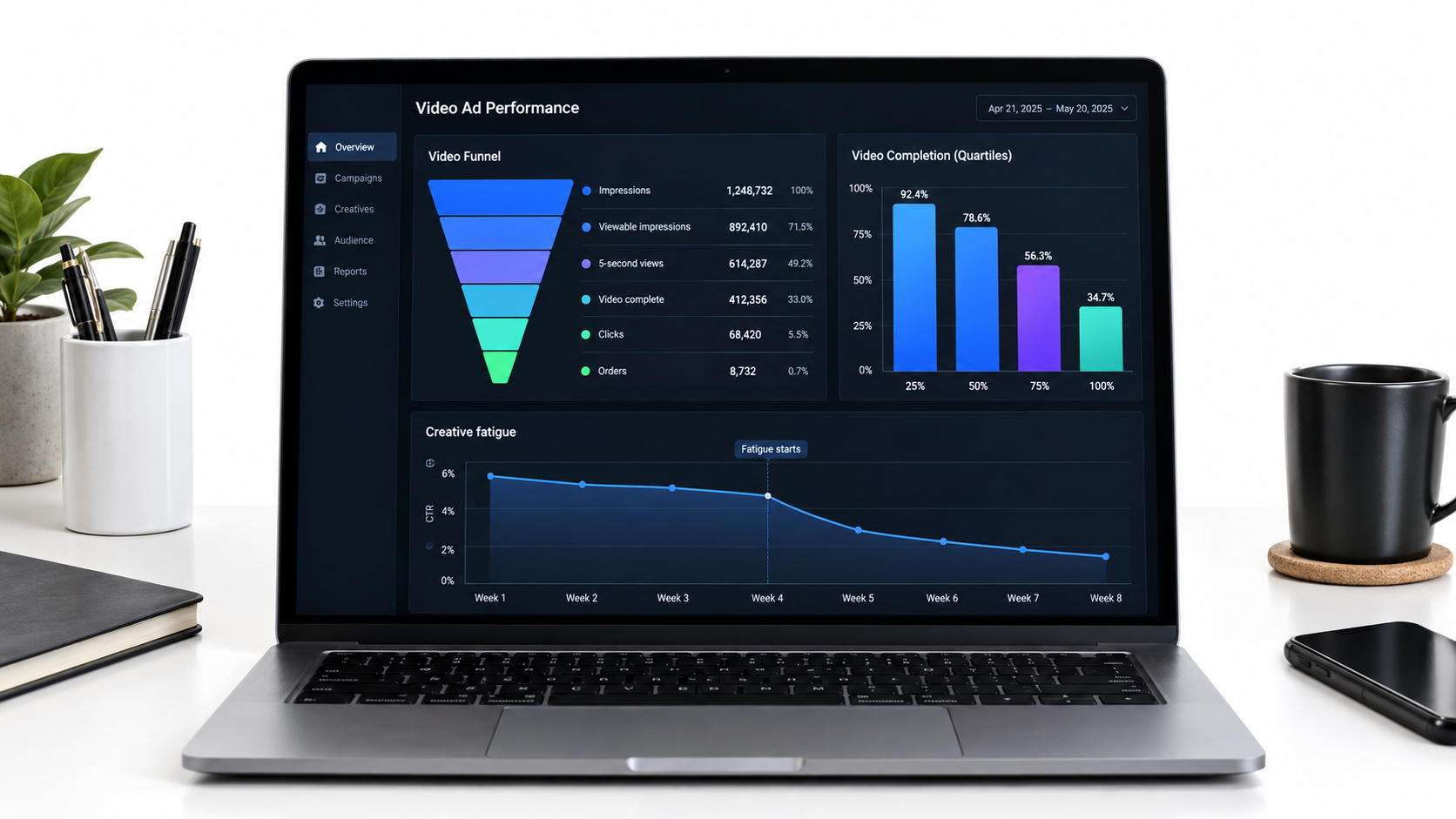
The key video metrics
- Viewable impressions: Impressions where the video was actually visible on screen according to viewability standards. This is a more honest denominator than raw impressions.
- 5-second views and 5-second view rate: How many viewers watched at least five seconds. This is your clearest read on whether your opening frames work.
- Quartile completions: The share of viewers reaching 25%, 50%, 75%, and 100% of the video. These show where attention drops.
- Viewable click-through rate (vCTR): Clicks divided by viewable impressions. A cleaner measure of creative appeal than standard CTR.
- Unmutes: How many viewers tapped to turn on sound. Useful as an interest signal, and a reminder of how few viewers hear your audio.
- New-to-brand metrics: Orders and sales from customers who haven’t bought from your brand in the lookback period.
Diagnosing problems by where the drop happens
Each metric points to a specific part of the storyboard:
- Low 5-second view rate: The opening isn’t working. Your first two seconds aren’t stopping the scroll. Recut the opening with a stronger product-in-motion shot.
- Good 5-second rate, sharp drop before 50%: The hook works, but the middle loses people. Your problem or promise section is probably too slow or too cluttered.
- Strong completion rate, low vCTR: People watch but don’t click. The ending lacks a clear reason to act, or the product doesn’t match what the video promised.
- Strong vCTR, weak conversion rate: The video works; the landing page doesn’t. Fix the detail page or Store before spending more on video.
Don’t benchmark blindly
Published benchmarks for video metrics vary widely by category, price point, and season. A 5-second view rate that’s strong for replacement vacuum filters may be weak for fashion accessories. The most reliable benchmark is your own history. Compare creative versions against each other within the same campaign, targeting, and time window.
Attribution windows and new-to-brand
Video often influences purchases that happen later. Sponsored Brands uses a 14-day attribution window for sales. New-to-brand metrics help show whether SBV is reaching fresh customers or just recapturing existing buyers. For brand-building campaigns, a rising new-to-brand share can justify a higher ACOS than you’d accept on a pure conversion campaign.
Creative Testing and Fatigue: Keeping Video Fresh
No video performs well forever. Shoppers in your category see the same ad repeatedly, and response declines over time. This creative fatigue is predictable, and a good testing process plans for it instead of reacting to it.
Test one variable at a time
When comparing video versions, change only one major element per test. If version A and version B have different openings, different text, and different music, you won’t know which change made the difference.
The most useful variables to test, roughly in order of impact:
- Opening shot (first two seconds)
- Primary on-screen claim
- Video length (a shorter cut against a longer cut)
- Featured benefit order
- Closing frame and brand treatment
Start at the top. Opening shots usually have the biggest influence on 5-second view rate, which affects everything downstream.
Structure tests fairly
Run competing creative versions in parallel campaigns or ad groups with identical targeting, bids, and budgets. Let each accumulate enough viewable impressions and clicks before drawing conclusions. Ending a test after two days on a handful of clicks usually leads to wrong conclusions.
Amazon has also rolled out creative experimentation tools for some ad types, which let you split traffic between versions within the console. Check whether these are available for your account and campaign type. They make fair comparisons much easier.
Spotting fatigue early
Fatigue shows up as a gradual decline in 5-second view rate and vCTR while targeting and bids stay constant. When you see that trend over several weeks, it’s time to rotate in fresh creative.
A practical approach is to keep a pipeline of two or three alternative cuts ready at all times. Because they come from the same footage, they’re cheap to produce. When the current winner starts to fade, swap in the next version and keep testing.
Seasonal creative
Seasonal refreshes also help. A water bottle video can feature hiking in summer and office use in the fall. A blanket brand can shift from gifting in December to cozy-home themes in January. The product stays the same; the context changes to match what shoppers are searching for.
Budgeting and Bidding for Video Campaigns
Sponsored Brands video is typically sold on a cost-per-click basis, with Amazon also offering impression-based options for certain campaign goals, such as growing brand impression share. The right approach depends on your objective.
Match the bid strategy to the goal
If your goal is sales efficiency, use CPC bidding and judge the campaign on ACOS and ROAS, accounting for a 14-day attribution window. If your goal is visibility and brand awareness, impression-based bidding and reserve share of voice options can make sense. Judge those on reach, viewable impressions, and new-to-brand metrics.
Don’t mix goals within the same campaign. A campaign judged on both awareness and ACOS will disappoint on at least one.
Set a learning budget
New SBV creative needs enough traffic to generate meaningful data. Set aside a defined learning budget for the first few weeks and treat it as research spend. Its purpose is to answer questions: does this opening stop the scroll? Does this claim drive clicks? Does this targeting convert?
Once you know which creative and targeting combinations work, move budget toward them and hold them to efficiency targets.
Placement bid adjustments
Sponsored Brands campaigns offer placement-level controls, including bid adjustments for top-of-search in many setups. If your data shows video performs much better in one placement, adjust bids accordingly. Review placement reports regularly, because placement mix can shift as competitors change strategy.
Think in portfolio terms
SBV rarely works best alone. HP’s reported results came from combining Sponsored Brands video with Sponsored Brands, Sponsored Products, and display ads. Video creates awareness and interest. Sponsored Products captures shoppers who come back to search more specifically. Display retargets those who viewed but didn’t buy.
When evaluating SBV, look at its effect on your total brand performance, including branded search volume and overall new-to-brand orders, not just its own attributed sales.
A 30-Day Rollout Plan for Your Next Sponsored Brands Video
Here’s a practical sequence for launching or relaunching Sponsored Brands video, built on everything above.
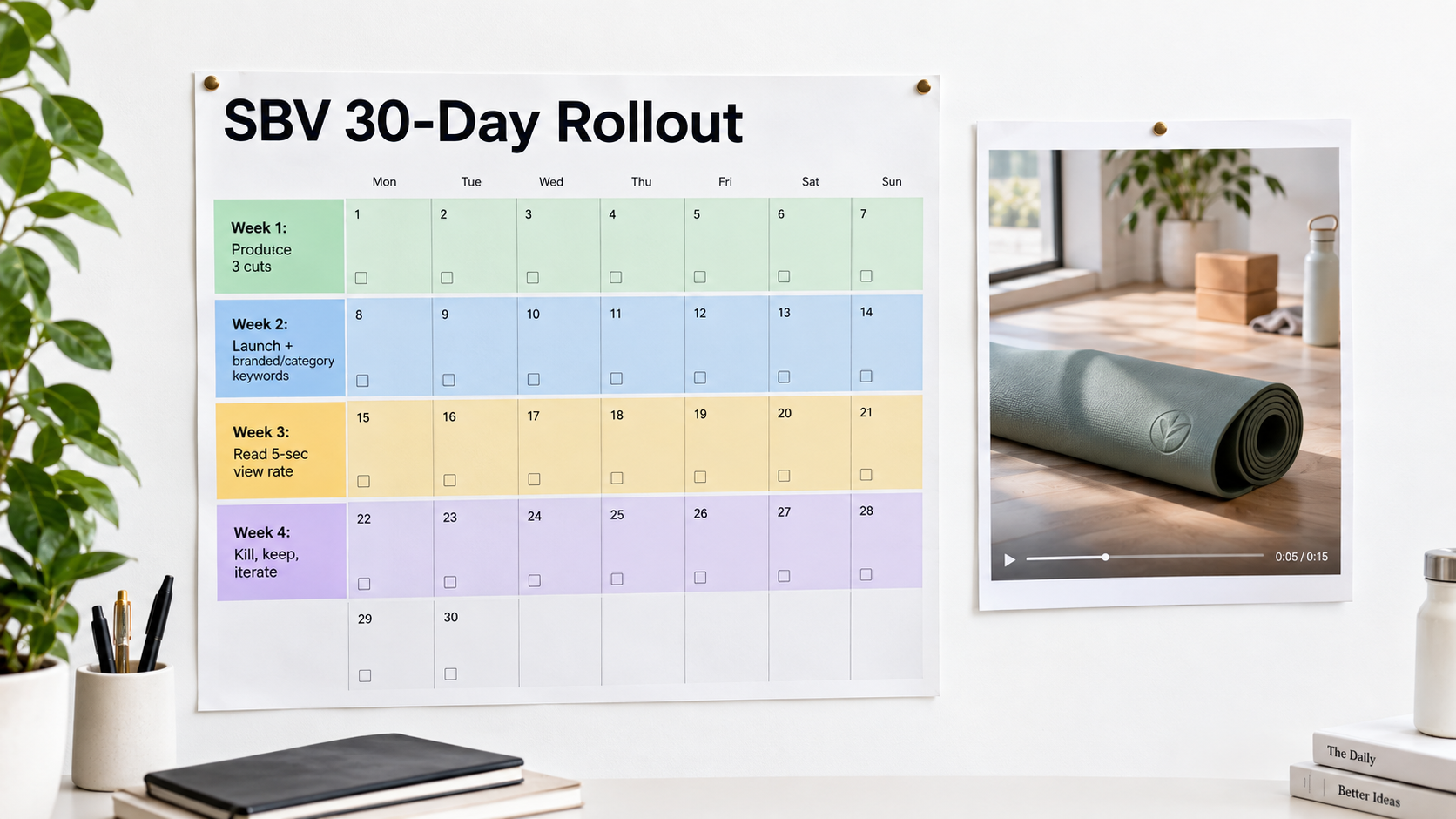
Week 1: Plan and produce
- Pick one hero product with a strong detail page, good reviews, and healthy inventory.
- Identify the single visual that best proves its value.
- Shoot enough footage for at least three different openings.
- Edit three cuts: a product-in-motion opening, a problem-led opening, and a feature-led opening.
- Run the muted phone test on each cut with someone outside your team.
- Check every claim and text overlay against Amazon’s current ad policies and specs.
Week 2: Launch with clean structure
- Submit all three cuts for moderation early to leave room for revisions.
- Create separate campaigns for branded keywords and a focused set of mid-funnel category keywords.
- Run the three creative versions with identical targeting and budgets.
- Set a defined learning budget for the test period.
Week 3: Read the early signals
- Compare 5-second view rates across the three openings.
- Check quartile completion to spot where viewers leave.
- Review vCTR and conversion rate to identify whether the problem is the creative or the landing page.
- Pull the search term report and add negatives for irrelevant terms.
Week 4: Decide and iterate
- Pause the weakest version.
- Move budget toward the winning cut.
- Build a new challenger that changes one variable from the winner.
- Add product targeting campaigns using comparison-style creative.
- Set a recurring review to watch for fatigue signals going forward.
At the end of 30 days, you won’t have a perfect video. You’ll have something more valuable: a clear read on what your shoppers respond to and a repeatable process for improving on it.
Conclusion: Treat the First Two Seconds as the Whole Ad
Sponsored Brands video is one of the few Amazon ad formats that can actually stop a shopper mid-scroll. It moves in a feed of static images, it holds prominent placements, and it’s only available to brand-registered sellers. The competition is thinner and the attention potential is higher than in most of the ad console.
That potential is wasted when brands treat SBV as a place to recycle TV spots or website videos. The format has its own rules: muted autoplay, placement-specific shopper mindsets, strict moderation, and metrics that show exactly where attention breaks down.
Key takeaways
- Win the first two seconds. Open with the product already in motion. No logo intros, no slow fades.
- Design for silence. Make on-screen text and visual demonstrations carry the entire message. Treat audio as optional.
- Cut for placement. Use the same footage to create different openings for in-search, top-of-search, and detail-page contexts.
- Match message to destination. Single-product videos go to product pages. Brand stories go to Stores or multi-product formats.
- Separate targeting by intent. Branded, category, and competitor campaigns each need their own budgets, creative, and success metrics.
- Diagnose with video metrics. 5-second view rate tells you about the hook. Quartiles show the middle. vCTR and conversion rate show the ending and the landing page.
- Plan for fatigue. Keep two or three alternative cuts ready and test one variable at a time.
- Judge SBV as part of a portfolio. Measure its effect on new-to-brand orders and total brand sales, not just its own ACOS.
The brands getting results from Sponsored Brands video in 2026 aren’t necessarily the ones with the biggest production budgets. They’re the ones who’ve worked out what a shopper sees in a muted, two-second glance and built everything else around that moment.
Leave a Reply