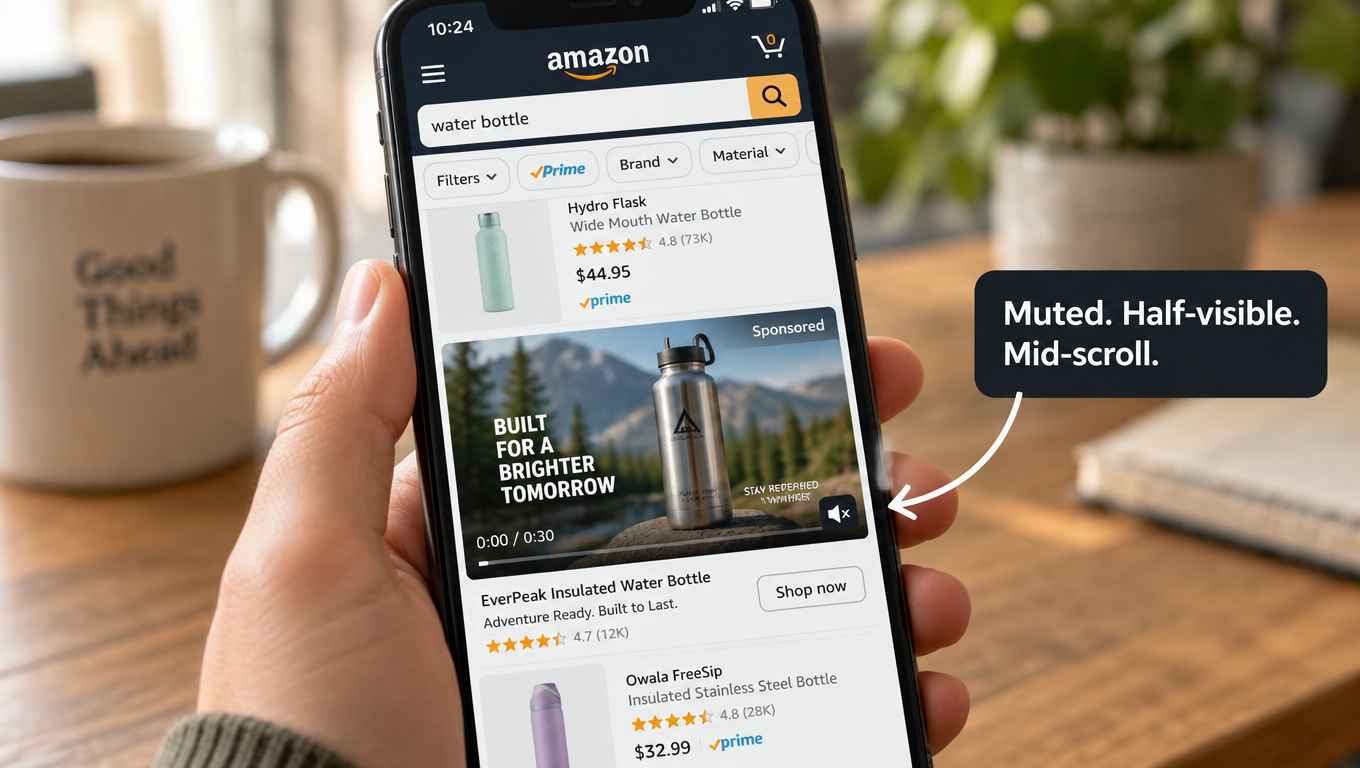
Most Amazon Sponsored Brands video ads are made for a viewer who doesn’t exist.
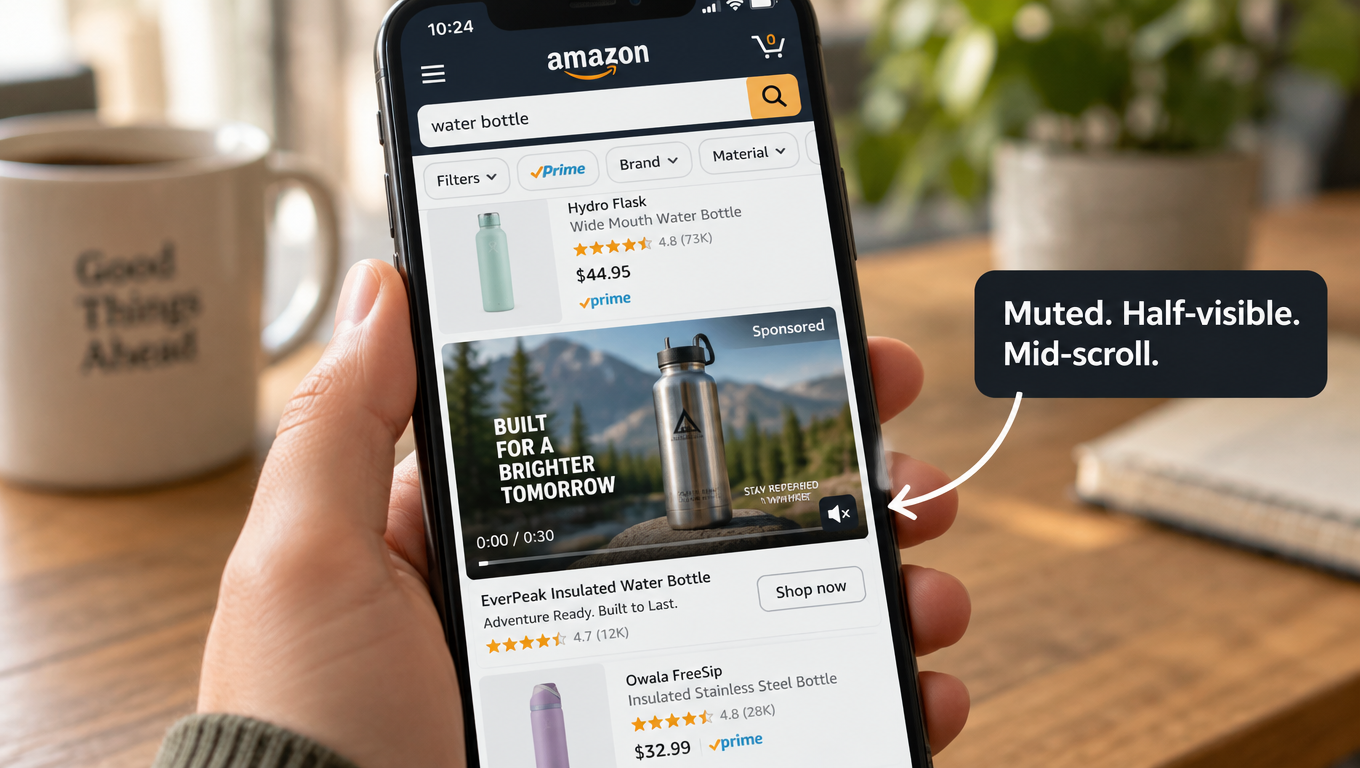
That imagined viewer sits through the whole clip with the sound on, sees the brand intro, follows the story, and clicks at the end. The person actually in front of your ad is scrolling a search results page on a phone. They’re looking for something specific. Your video starts playing only once half of it is on screen, and it plays without sound unless they tap a small button in the corner.
That gap explains a lot of Sponsored Brands video (SBV) campaigns that look fine in the editing suite and do poorly in the account. The creative is good, but it was built for a TV-style viewer. Amazon’s own ad specs describe a very different setting: autoplay that kicks in at 50% pixel visibility, audio off by default, a mute toggle sitting on the lower-right corner, and a strict 16:9 frame with no letterboxing allowed.
This article doesn’t go over the usual “why video matters” points. It starts from the ad unit itself, using Amazon’s published specs, and works backward to creative, landing page choice, targeting, measurement, and testing. The idea is simple. If you understand exactly what the shopper sees, in what order, and under what conditions, most creative decisions stop being matters of taste and become engineering problems.
Each section covers one constraint of the ad unit and what it means for the decisions you make. There’s a checklist at the end you can use before your next upload.
1. The Viewer You’re Really Editing For
Before talking about specs, it helps to describe the viewing situation honestly. Sponsored Brands video ads show up in shopping results on desktop and mobile. Amazon’s ad specs say they can also appear inside product detail pages. In both places the shopper came to buy something, not to watch something.
The shopper is task-focused
Someone who searches “insulated water bottle 32 oz” has already decided on a category and is narrowing down options. Your video is competing with product titles, star ratings, prices, Prime badges, and the organic results under it. It isn’t competing with other entertainment.
That’s a different mindset from social video. On a social feed, people are open to being distracted. On Amazon search, a distraction only works if it answers the shopper’s question faster than the listings around it.
The shopper is moving
Search results are scrolled. Your video may get a second or two of partial visibility before the thumb moves on. Each frame in those first seconds has to make sense when viewed alone.
The shopper is probably silent
Amazon’s specs say plainly that “by default, videos always start without audio.” The shopper has to tap the mute toggle to hear anything. Some will, most likely after something on screen has already caught their attention. So sound can add to a video that already works, but it can’t carry the message.
What this means in practice
Put together, these three conditions describe the real viewer: task-focused, moving, and silent. Each creative choice later in this article can be checked against that description. A slow brand intro fails for the task-focused shopper. A detail that only shows up in the last frame fails for the moving one. A voiceover that carries the main benefit fails for the silent one.
Amazon’s guidance points the same way. Its creative best practices tell advertisers to “showcase your product or something interesting within the first few seconds” and to “wait until later in the video to include your brand name and logo.” Brand-first is the habit from TV advertising, and Amazon is explicitly recommending the reverse.
2. Anatomy of the Ad Unit: The Video Is Only One of Six Parts
A common mistake is to treat SBV as “a video.” Amazon’s spec sheet breaks the ad unit into six components, and the video is just one of them. Knowing what the other five do shows you what the video doesn’t need to do.
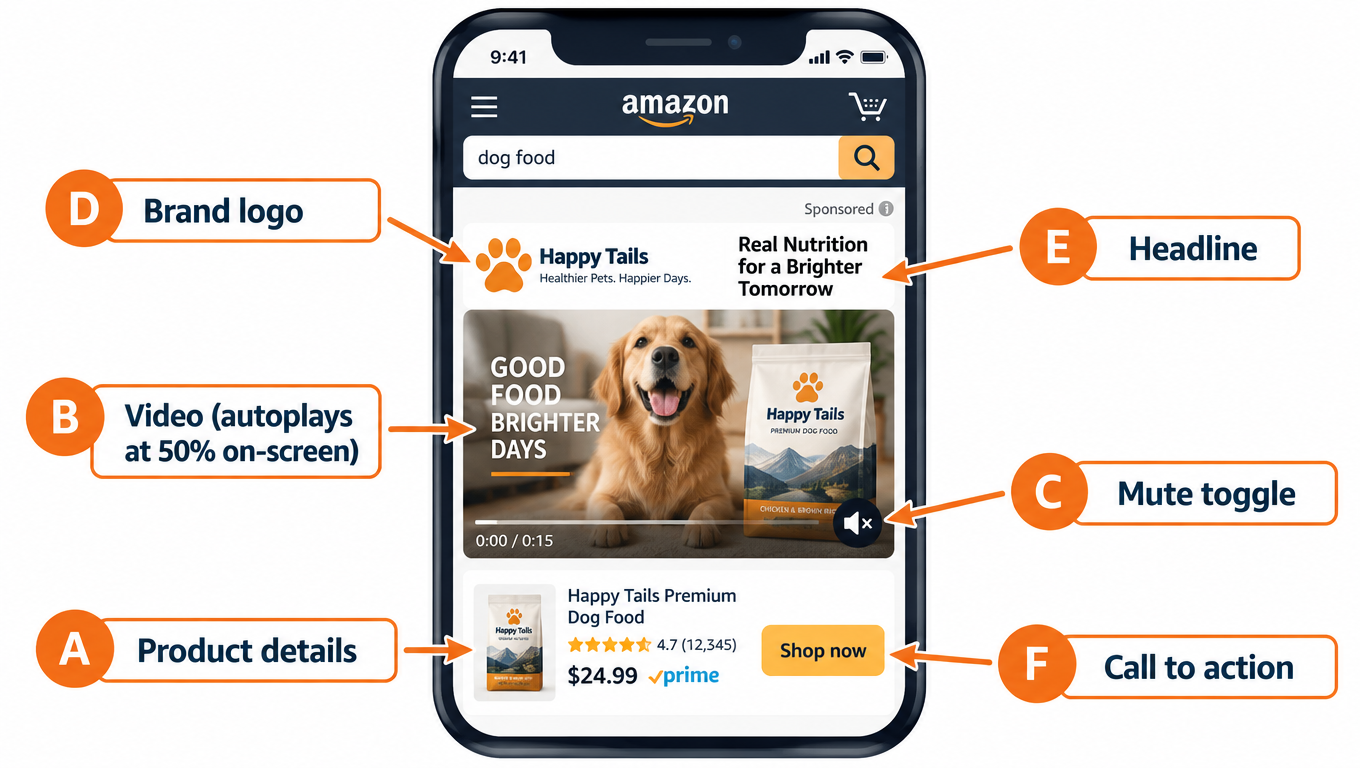
The six components
- Product details. The main product image and related information from the detail page are pulled in automatically.
- Video. It plays automatically once 50% of its pixels are on screen.
- Mute toggle. It sits over the lower-right corner of the video. It isn’t shown if the video has no audio.
- Custom brand logo. Amazon describes it as something that “makes a lasting impression.”
- Headline text. Custom copy that states your brand’s value.
- Call to action. It tells shoppers that an action is needed to reach the destination, such as your Brand Store.
Stop making the video repeat the rest of the unit
Product details like the image, price context, and rating signals come from the listing automatically. That means your video doesn’t have to show the price or list specs the shopper can already see beside it. The logo and headline are separate elements too, so the video doesn’t need a long branded opening to establish who you are.
This changes how you allocate the video’s time. If the surrounding unit already handles identity and the basic facts, the video’s job gets narrower: show the one thing still images and text can’t show. That’s usually motion, scale, texture, a before-and-after change, or the product working in a real setting.
Write the headline and video together
Because the headline and video appear side by side, they should work as a pair. If the headline says “Keeps drinks cold for 24 hours,” the video’s opening frames shouldn’t make a different claim. They should show evidence for that one: ice still in the bottle, condensation-free steel, a time-lapse overlay. When they match, the shopper reads and watches one argument, not two competing ones.
One practical habit is to write the headline first and then storyboard the video as visual proof of it. This also makes testing cleaner, which comes up again in Section 9.
The CTA depends on the destination
The call to action leads somewhere, and Amazon offers two kinds of destination for SBV: a Product Detail Page or a Brand Store. That choice matters enough that Section 6 covers it on its own. For now, the point is that the ad unit is a small system, and the video is the part that moves inside it.
3. The 50% Rule: How Autoplay Turns Your First Seconds Into the Whole Ad
Amazon’s specs state that the video “will play automatically when 50% of pixels are on-screen.” That one sentence has more effect on creative strategy than anything else on the spec sheet.
What the trigger means
Playback doesn’t start when the page loads. It starts when the ad scrolls far enough into view. On mobile, the shopper’s thumb is usually still moving at that point. The first frames play while the ad is sliding into place and often while it’s only partly visible.
In practice, your first second plays to someone who isn’t fully looking yet. Your next second or two decides whether they stop scrolling. If the opening is a fade-in from black, a logo animation, or a slow establishing shot, it’s spent on a viewer who isn’t paying attention yet.
Open on the product doing something
The opening that holds up best under these conditions is the product, already in motion, already doing its job. A few examples:
- A vacuum already picking up a visible line of debris, not a vacuum sitting in a hallway.
- A skincare serum already being dropped onto skin, not a bottle on a marble counter.
- A phone mount already holding a phone steady over a bumpy road, not a mount in its packaging.
- A storage bin already being stacked into a tidy closet, not an empty bin turning on a white background.
In each case, a viewer who only catches a fraction of a second still learns what the product does. That’s the test to use: pause the video at any point in the first two seconds and ask whether a stranger could tell what’s being sold and why.
Front-load visual contrast
Search results are visually busy, with white backgrounds, product cutouts, and rows of text. Opening frames that differ from that environment, through color, real-world settings, close-up texture, or people, have a better chance of being noticed than frames that look like another product image.
Don’t swing too far and make the opening so abstract or stylized that the product disappears. Contrast is there to get attention for the product, not to replace it.
Use loops carefully
Some advertisers design SBV to loop cleanly so the last frame flows back into the first. That can work for short, product-focused clips. The more important question is whether the video still works when someone joins it partway through. Viewers who scroll past and come back may catch it mid-play. Clips where every segment shows the product clearly hold up better than clips that rely on narrative order.
The brand reveal goes last, not first
Amazon’s guidance to put the brand name and logo later in the video fits this. The logo is already in the ad unit. A branded end card, which Amazon also recommends (“include an ‘end card’ prominently displaying your brand name and logo”), is for viewers who stayed through the clip, and those viewers are the most likely to click. The first seconds belong to the product.
4. Silent by Default: Building a Video That Sells With No Sound
If the video starts muted and the shopper has to tap a toggle to hear it, the visual track has to carry the full message. Audio is extra.
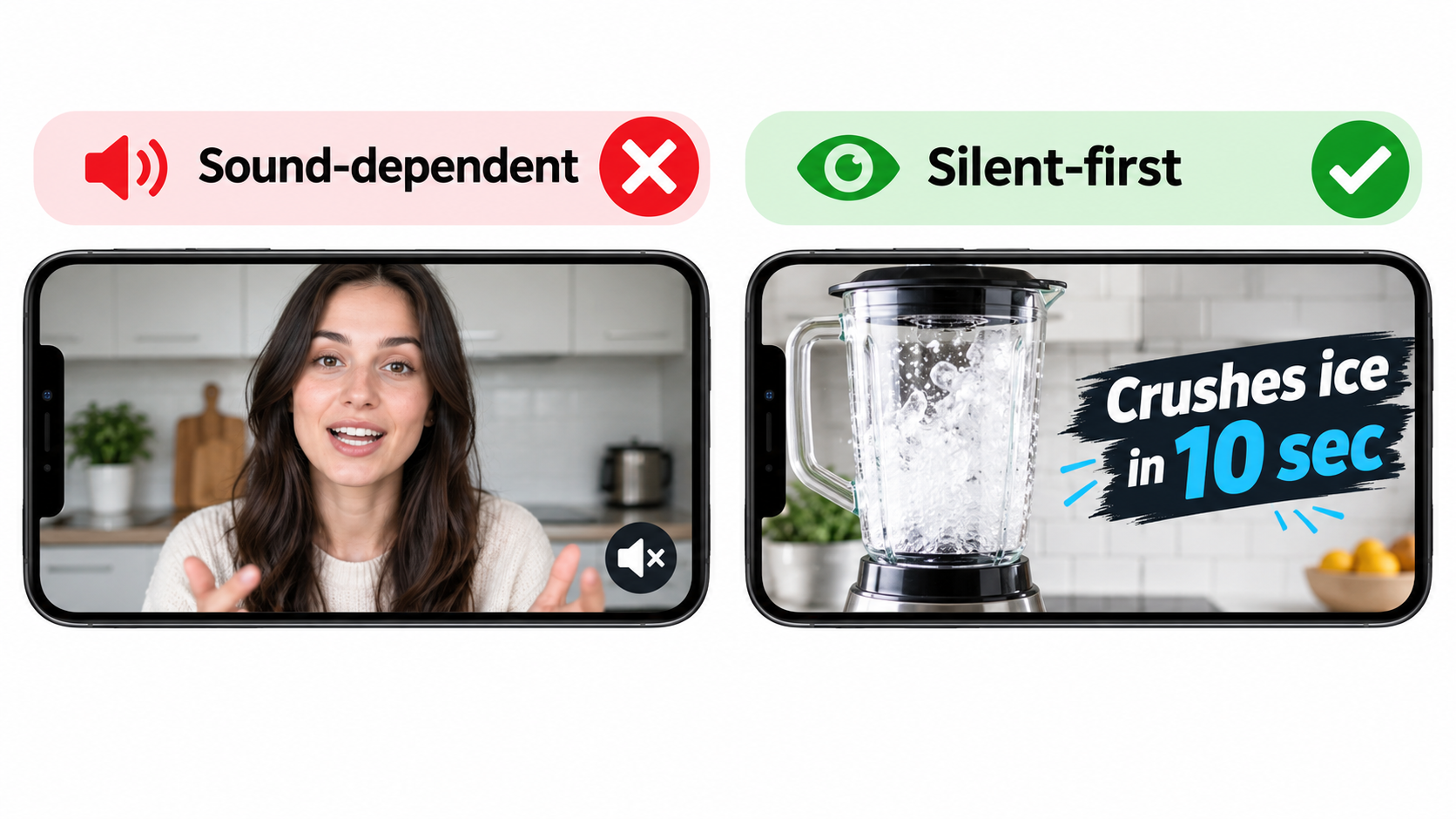
The silent-viewing audit
Before you upload, watch the final cut with sound off from start to finish. Then ask:
- Is the main benefit clear without audio?
- Is any important claim spoken but not shown or written on screen?
- Does any scene only make sense with the voiceover, such as a talking head or an explanation over generic footage?
- Is there a moment where the viewer has to read a lot of text very quickly?
If the answer to 2 or 3 is yes, the video depends on sound, and most viewers will get only part of it.
On-screen text: short, large, and well placed
On-screen text is the main tool for silent viewing, but it’s easy to overdo. A few principles help:
- One idea per text card. “Cold for 24 hrs” works. “Double-wall vacuum insulation keeps beverages cold for up to 24 hours and hot for 12” is too much at scroll speed.
- Size for mobile. The ad unit is small on a phone. Text that reads well on a desktop monitor can be illegible at thumbnail size.
- Keep it on screen long enough. A text card that disappears before it can be read hasn’t done its job.
- Stay out of the lower-right corner. That’s where the mute toggle sits, and Amazon specifically warns against putting text or other key information there (more in Section 5).
Captions versus designed text
If your video has a voiceover, you might just burn in captions. That’s better than nothing, but captions written for speech are often too long for the format. Text written specifically for the screen usually works better: shorter, punchier, and timed to the visuals, not to the narrator.
When audio is worth including
Audio still matters. A shopper who taps unmute is showing interest, and the soundtrack should reward that. Product sounds can carry real information: the click of a well-built latch, the hum of a quiet motor, the crunch of a blender crushing ice. A voiceover that adds detail beyond the on-screen text gives engaged viewers more.
Amazon’s specs set minimum audio standards: PCM, AAC, or MP3 codec; stereo or mono; at least 96 kbps bit rate; and a sample rate of at least 44.1 kHz. A fully silent video is also allowed. In that case Amazon notes the mute toggle won’t appear, which clears that corner of the frame.
Does a fully silent video make sense?
For some products it does. If audio wouldn’t add any information, as with many apparel, home décor, or accessory products, a silent video avoids a toggle that implies there’s something to hear. For products where sound shows quality or function, like audio equipment, kitchen appliances, or tools, a well-mixed soundtrack is a real advantage for viewers who unmute. Choose based on what the product needs, not on habit.
5. Treat the Spec Sheet as a Creative Brief
Most teams treat Amazon’s video specs as a technical checklist to clear right before upload. It works better to read them at the start of production, because several specs constrain the creative itself, not just the file.
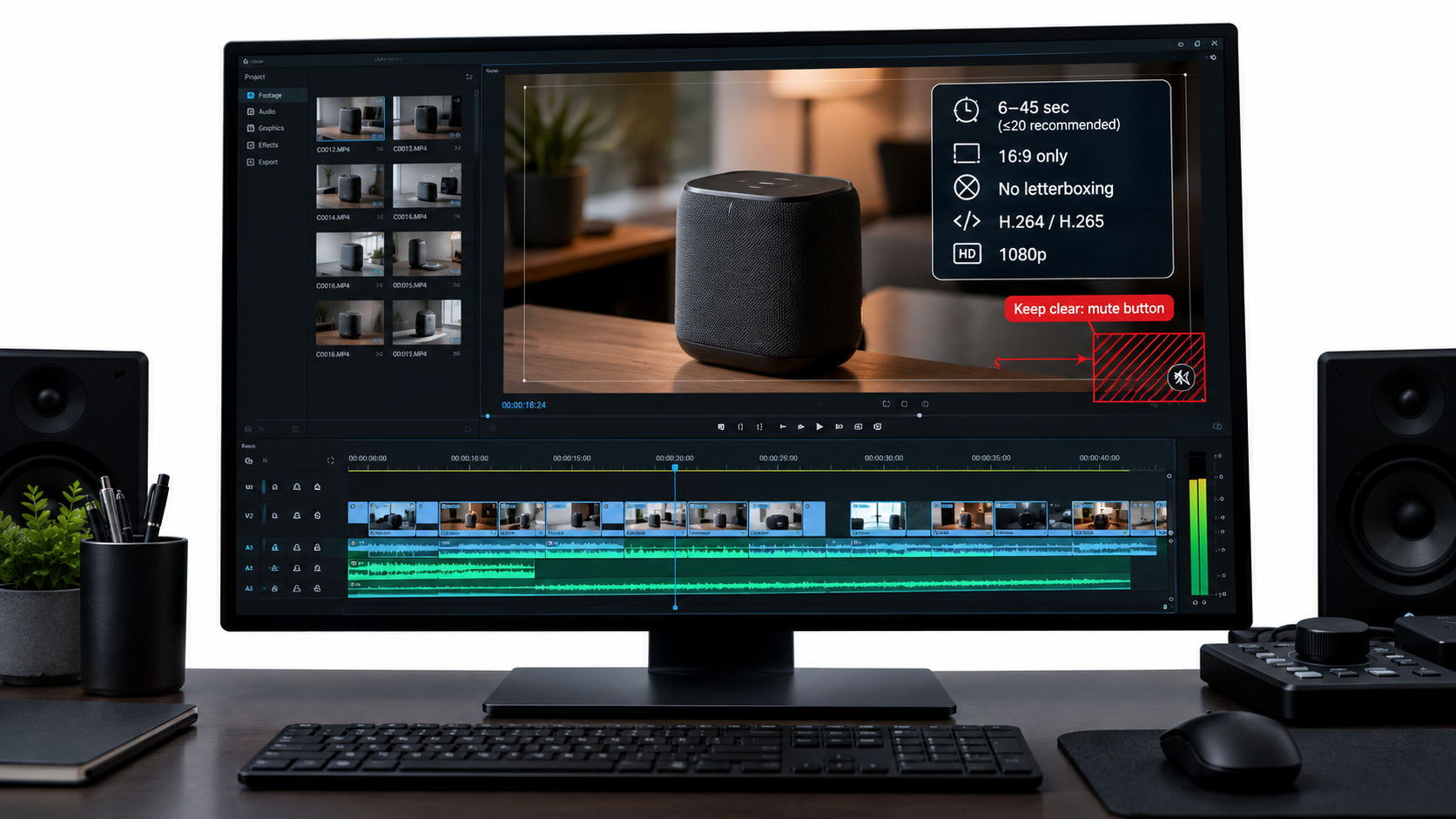
The full spec list
According to Amazon Ads’ published Sponsored Brands video specs:
- Duration: 6 to 45 seconds, with 20 seconds or less “highly recommended”
- Dimensions: 1280×720, 1920×1080, or 3840×2160 px
- Aspect ratio: 16:9 (square pixel) only
- File size: 500 MB or less
- Format: .MP4 or .MOV
- Codec: H.264 or H.265, Main or Baseline profile
- Frame rate: 23.976, 23.98, 24, 25, 29.97, 29.98, or 30 fps
- Video bit rate: minimum 1 Mbps, with 4 Mbps or higher recommended
- Scan type: progressive
Constraint 1: 16:9 only, and no bars
This one has the biggest effect on production. Many brands now shoot mainly vertical (9:16) for social platforms. Amazon’s SBV spec allows only 16:9 and specifically says to avoid “horizontal or vertical black, color, or blurred bars.” You can’t drop a vertical TikTok clip into a blurred 16:9 frame and upload it.
If you plan to use footage across channels, shoot wide enough to crop both ways. Frame the product with plenty of space around it so you can export a 16:9 version and a 9:16 version from the same footage. Doing this at the shoot is much cheaper than reshooting later.
Constraint 2: the lower-right safe area
Amazon tells advertisers to “avoid placing text and other important information in the lower right corner of the video” and provides a safe-area template. That’s where the mute toggle appears. Text, product details, or a key demonstration in that corner can be partly hidden.
Add this to your edit templates. Many teams set up a guide overlay in their editing software marking the restricted zone so nobody has to remember it on every project.
Constraint 3: the 20-second recommendation
The allowed range runs to 45 seconds, but Amazon “highly recommends” 20 seconds or less. That matches the scrolling-viewer reality from Section 1. Amazon’s guidance also says the video’s purpose “is not to provide all the details about the product, but rather to create a sense of excitement and curiosity that will drive viewers to your product or Stores page for more information.”
So the video isn’t a mini detail page. The detail page is one tap away. A good working structure for a 15–20 second SBV:
- 0–2s: product in action, visual hook
- 2–10s: one or two benefits shown visually, each with a short text card
- 10–15s: a use case or result, ideally with a person or a real setting
- Final seconds: branded end card with logo
Constraint 4: bit rate and resolution
The minimum is 1 Mbps, but Amazon recommends 4 Mbps or more. Fine product detail like textures, small text, and stitching breaks down quickly when heavily compressed. Exporting at 1080p with a healthy bit rate is a simple way to protect visual quality, which Amazon connects directly to trust: “A polished, high-quality, professionally-produced video is an effective way to convey the quality of your product and instill trust in your brand.”
A pre-production checklist built from the specs
- Is the shot list framed for 16:9 with crop room for other formats?
- Do the text card positions avoid the lower-right corner?
- Is the script timed to 20 seconds or less?
- Is any on-screen text in the marketplace’s language?
- Is the export preset set to H.264/H.265, progressive, an approved frame rate, and 4 Mbps or more?
6. Product Detail Page vs. Brand Store: Two Destinations, Two Different Videos
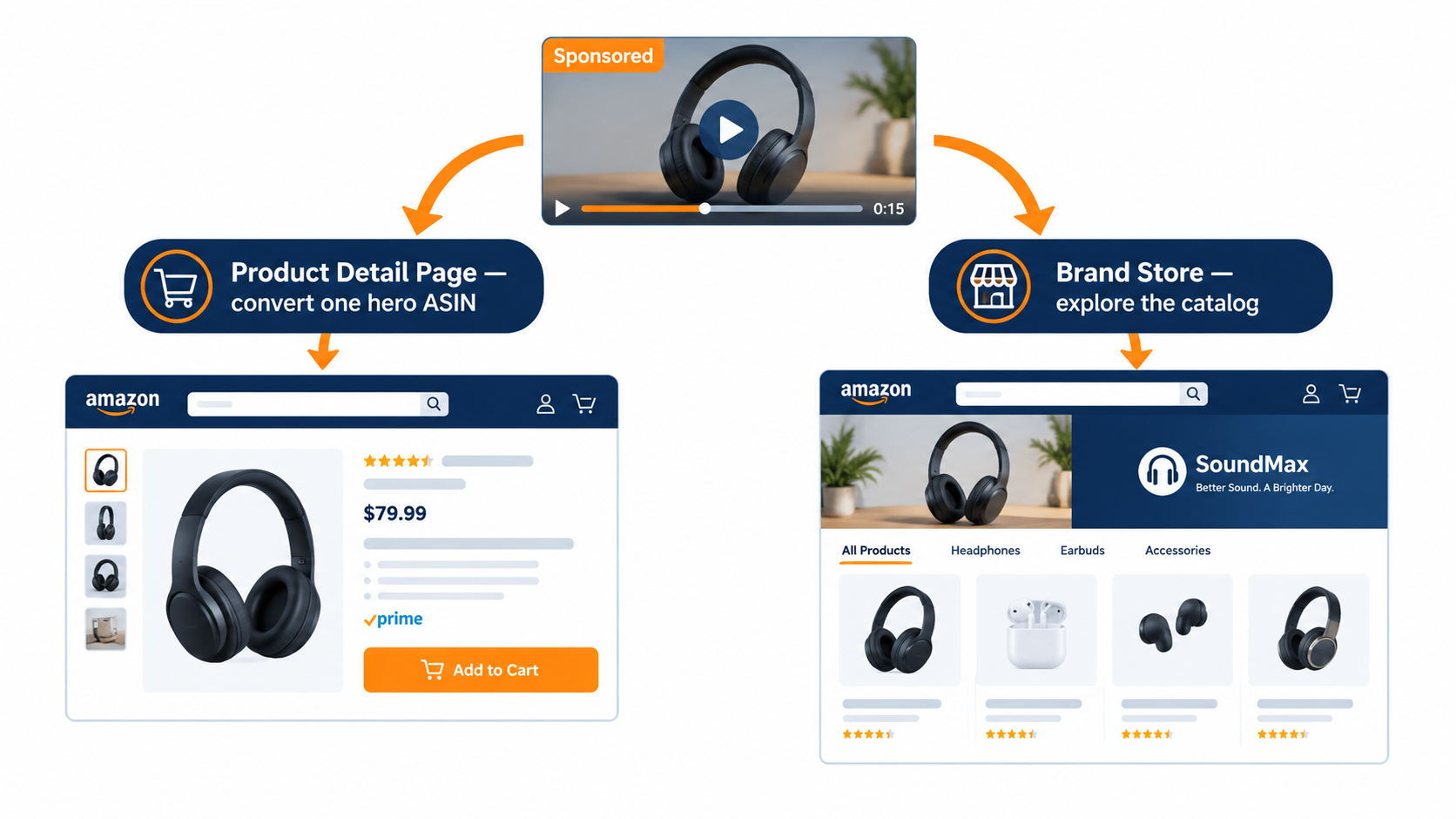
Amazon describes two ways to connect SBV with shoppers, and they aren’t interchangeable. Choosing the destination should come before you write the script, because each one calls for a different video.
Product Detail Page campaigns
Amazon describes this type as “best for connecting shoppers with your product,” with ads appearing in shopping results and on detail pages. The click goes straight to one product listing.
Here the video should be a single-product argument. Every second should support buying this specific ASIN. Showing other products from your catalog only distracts, because the shopper can’t reach them from the click.
This campaign type suits:
- Hero products with strong reviews and conversion history
- Products whose main benefit is visual and easy to show in a short clip
- Defending branded search terms or competing on high-intent category keywords
Brand Store campaigns
Amazon positions this type as “an effective way to increase brand equity and build lasting value by directly connecting shoppers to your Brand Store.” Amazon also says these campaigns “can be featured both above and below the fold of search results.”
The video’s job changes here. It’s selling the brand and the range, not one item. Effective Brand Store videos tend to:
- Set up a clear brand idea, such as a material, a design approach, or a problem you solve across products
- Show variety, like colorways, sizes, or related items, so the click into a store makes sense
- Promise something the store delivers, so the landing experience matches the ad
The mismatch problem
One common failure is a single-product demo sending traffic to a Brand Store homepage. The shopper clicks expecting the product they saw and lands on a page where they have to find it. Each extra step adds friction.
The reverse is also a problem: a broad brand-story video that sends shoppers to one product page. Someone drawn in by the range finds a single option and may leave.
A simple rule: the last thing the video promises should be the first thing the landing page shows.
Building the store to receive video traffic
If you use Brand Store destinations, make sure the store can handle the traffic. Amazon presents Sponsored Brands and Brand Stores as working together. Its product page says that “paired with Brand Stores, it drives discovery, consideration, and long-term engagement with your brand.” A store with a vague homepage, missing categories, or out-of-stock products will waste paid clicks regardless of how good the video is.
A practical step: if a campaign’s video features one product line, consider sending traffic to a store subpage dedicated to that line, if your store structure and the campaign settings allow it, instead of the generic homepage.
7. How Targeting Should Shape the Script
Amazon’s spec page notes that SBV lets you “target shoppers through keywords, categories, and products.” Most advertisers treat targeting and creative as separate jobs. Usually the media buyer handles targeting and the creative team handles video. That split leaves performance on the table, because the right video depends on what the shopper was doing just before they saw it.
Keyword targeting: answer the query
With keyword targeting, you know what the shopper typed. That’s useful creative information. A shopper searching “quiet blender for smoothies” and one searching “high-power blender for nut butter” want different proof, even if your blender fits both.
If budget allows, group keywords by shopper intent and give each group a video variant that opens on the matching benefit. The quiet-blender group sees a low-noise demonstration first. The power group sees thick nut butter blended smooth first. The footage can come from the same shoot, and only the order and text cards change.
Branded keywords: reassure, don’t introduce
Shoppers searching your brand name already know you. A brand-introduction video wastes their time. For branded terms, think about creative that shows the range, a new release, or a reason to buy from your official listing. For these shoppers the task is to confirm a decision they’re already leaning toward.
Product targeting: the comparison context
Amazon notes that SBV can appear inside detail pages. When you target specific products, including competitors’, the shopper is already looking at an alternative. The video becomes a comparison, whether or not you call it that.
The best creative for this context shows a clear point of difference that matters to someone considering the targeted product. Stay within Amazon’s ad policies on comparative claims, and review the Amazon Ads Policies page before making any claim that references another brand, but focus the video on what makes your product the better choice for the shopper’s situation.
Category targeting: broad audience, broad benefit
Category targeting reaches a wider, less specific audience. Here the strongest benefit for the whole category usually works better than a niche one. Save niche angles for keyword groups where you know the shopper cares about them.
A simple targeting-to-creative map
- Generic category keywords → Video leads with the product’s main differentiator
- Feature-specific keywords → Video leads with that exact feature in action
- Branded keywords → Video shows range, newness, or the official-listing reason to buy
- Competitor product targets → Video shows a clear, policy-compliant point of difference
- Category targets → Video leads with the broadest, most universal benefit
Not every brand can produce five variants right away. Even two, one for high-intent generic and one for competitor targets, is a clear improvement over sending one video to every audience.
8. Reading the Numbers: What Video Metrics Actually Tell You
Sponsored Brands video reporting adds video-specific engagement metrics on top of the usual impressions, clicks, spend, and sales. Exact column names can differ by report type and interface version, but they typically include things like 5-second views, quartile completion (25%, 50%, 75%), complete views, view-through rate, and video unmutes. Together these give you a diagnostic funnel that standard PPC metrics can’t.
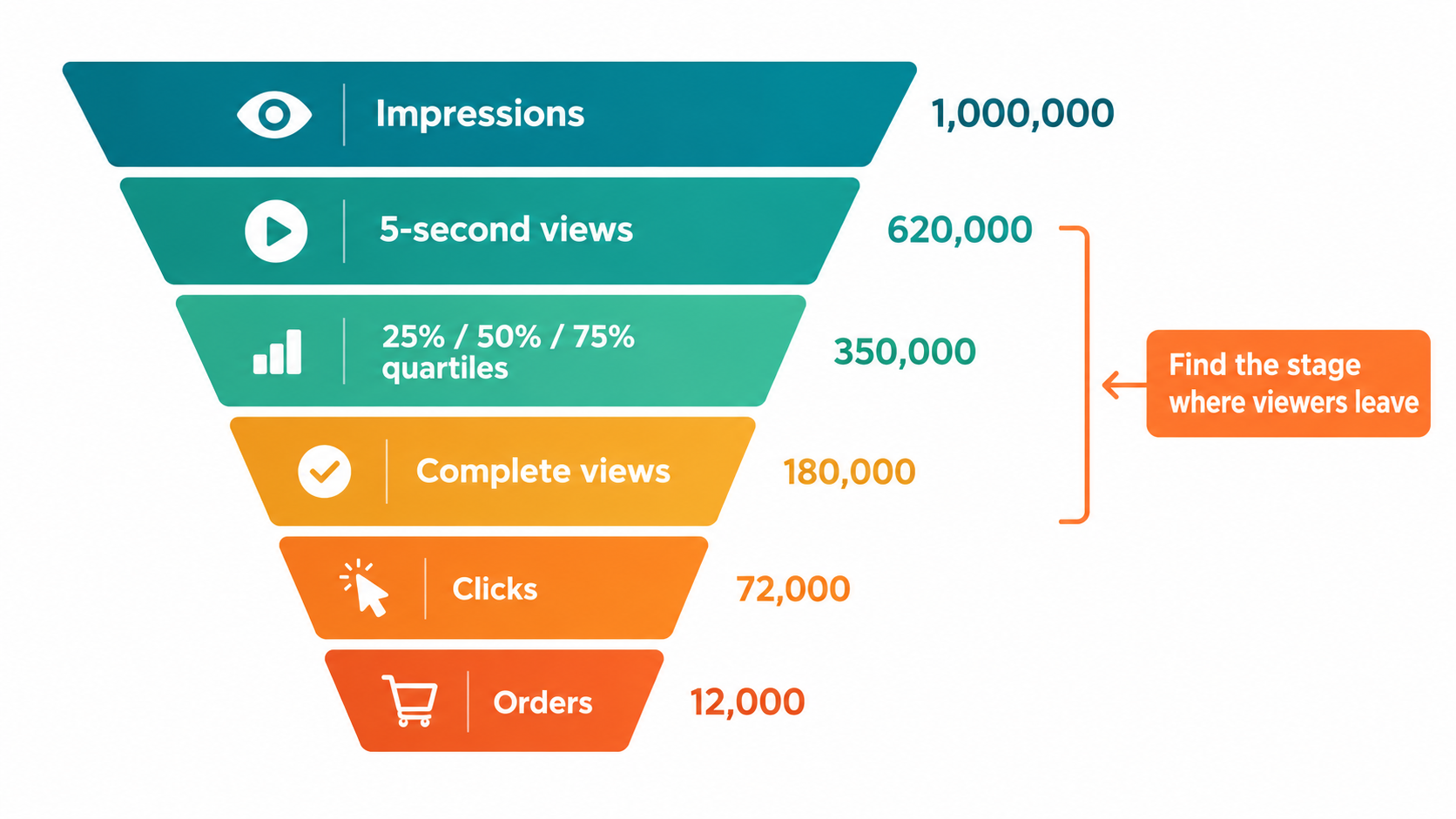
Read the funnel from top to bottom
Each step points to a different part of the creative:
- Impressions → early views: Did the opening stop the scroll? A weak ratio here suggests a problem with the first one or two seconds, as covered in Section 3.
- Early views → quartile completion: Did the middle hold attention? A sharp drop between quartiles shows where the story loses people. Often it’s a slow scene, a confusing transition, or a long text card.
- Complete views: Did people reach the end card? If few do, your branding may never be seen, so consider moving key brand cues earlier or shortening the video.
- Unmutes: A signal of curiosity. If unmutes are high relative to views, the visuals are creating interest. Make sure the audio rewards it.
- Clicks and orders: Did attention turn into action, and did the destination convert?
Separate creative problems from targeting problems
The funnel lets you tell apart problems that look the same from the outside. Low sales might come from:
- Weak hook: few early views relative to impressions. Fix the opening.
- Weak story: good early views, steep quartile drop-off. Fix the middle or shorten it.
- Weak click motivation: good completion, low click-through. The video entertains but doesn’t make the next step feel needed. Tighten the benefit and the headline pairing.
- Weak landing: good clicks, poor conversion. The problem is likely the destination (listing, price, reviews, store layout), or a mismatch between the ad’s promise and the landing page.
- Weak targeting: healthy video engagement but spend going to irrelevant queries. Check search term reports.
Without video metrics, all five look like “ACOS is too high.” With them, you can identify which fix to make.
Context from Amazon’s case studies
Amazon’s published case studies give a sense of what’s possible when SBV is part of a wider program. Amazon reports that HP, using Sponsored Brands video together with Sponsored Brands, Sponsored Products, and display ads, saw impressions grow 224% year over year and clicks increase 142%, including a 42% increase in clicks for Sponsored Brands video placements. Separately, Amazon reports that small business Loftie achieved a ROAS of $5.66 and an ACOS of 17.68% from its sponsored ads campaign.
Read these carefully. They’re vendor-published success stories, and the results come from multi-format programs, not SBV alone. They’re useful as examples, not as benchmarks you should expect. Your own funnel data is a much more reliable guide.
Watch the time frame
Sponsored Brands is positioned as a brand-building format. Amazon’s product page highlights measuring “your brand-building efforts” and getting “insights into how and which shoppers engage with your ads.” Some of SBV’s value, including new-to-brand customers, later branded searches, and store visits, may not show up in the same session’s attributed sales. Look at last-click ROAS alongside those longer-term signals before deciding a video “doesn’t work.”
9. A Testing System That Actually Teaches You Something
Many brands “test” SBV by uploading a new video every few weeks and comparing the results to the last one. That approach rarely teaches anything, because too many things change at once: creative, season, bids, competition, and inventory.
Change one variable at a time
Good creative testing isolates one change. For SBV, the useful variables, roughly in order of likely impact, are:
- The opening two seconds, with different hook scenes and the rest identical
- The main benefit shown, for example durability versus convenience
- Length, such as a 15-second cut against a 30-second cut of the same footage
- On-screen text approach, such as minimal text against benefit-heavy text
- Human presence, product-only against product-in-hand or lifestyle
- Headline pairing, same video with a different headline
Because the hook gets the most exposure and fails most often, start there. One shoot can supply several opening variants with the rest of the video unchanged.
Keep the comparison fair
Run variants at the same time, not one after another, so seasonality and competition affect both equally. Keep targeting, bids, and budgets matched. Give each variant enough impressions to see a real difference before you decide. Early results based on a small sample are mostly noise.
Decide what “winning” means beforehand
Choose your success metric before the test starts. If you’re testing hooks, early view rate is the most direct measure. If you’re testing benefits, click-through rate and conversion matter more. Deciding the winner after looking at the data invites cherry-picking.
Build a creative library, not a pile of one-off ads
The real value of disciplined testing builds up over time. After a few rounds you’ll know which kinds of openings work in your category, which benefits make shoppers click, and what length your audience tolerates. Record each finding in a shared document so the next shoot starts from evidence, not guesswork.
Where AI creative tools fit
Amazon’s Sponsored Brands page mentions AI-powered image generation “at no cost to produce branded creatives.” Tools like this, and similar ones across the industry, can make it cheaper to produce variants of supporting assets. They don’t replace the discipline described here. Making more variants only helps if each one tests a clear hypothesis and you measure it properly. Also check that any AI-generated or AI-edited material shows your actual product accurately, because misleading product depictions create policy and customer-trust risks.
10. Selling Across Marketplaces: Localization Is a Policy Issue, Not a Nice-to-Have
Brands selling in more than one Amazon marketplace often want to reuse one SBV everywhere. Amazon’s specs make clear that this is a compliance problem, not just a creative preference.
What the language rule says
Amazon’s guidance: “Make sure your videos match the language of the marketplace they are being shown in.” Its example is that English-speaking locales need English on-screen text or voiceover, and the Italian marketplace needs Italian on-screen text or voiceover. Amazon suggests that sellers in multiple marketplaces “consider adding subtitles or creating different versions of the video tailored to each marketplace.”
Design for localization from the start
The silent-first approach from Section 4 helps a lot here. If the video carries its message through visuals and a few short text cards, localizing means swapping text layers, not re-recording a voiceover or reshooting.
Practical steps:
- Keep text on separate editable layers in the project file, never baked into footage.
- Leave room for longer translations. Some languages need considerably more characters than English for the same idea. A text card that just fits in English may overflow in German or French.
- Avoid text inside the footage (signs, packaging close-ups in one language) where it’s central to the message, unless you have localized packaging to film.
- Check units and conventions. Ounces versus milliliters and Fahrenheit versus Celsius are easy to overlook in a quick translation.
Local relevance beyond language
Translation is the minimum. Use cases, settings, and benefits that matter may differ between marketplaces. A cooling product shown in summer heat makes sense in one region and season and less in another. Where budget allows, consider whether the lead benefit itself should change by market, not just the words on screen.
11. Avoiding Moderation Problems Before They Cost You a Launch Window
Every SBV campaign goes through moderation against Amazon’s creative acceptance policies for sponsored ads. Amazon states that “all content must be suitable for a general audience and must comply with all relevant laws and regulations,” and that ads not meeting these policies “will not be accepted.” A rejection right before a seasonal push can cost far more than the time it takes to fix.
Problems that are easy to prevent
Several issues come straight from the published specs and are simple to catch internally:
- Letterboxing or pillarboxing: any black, colored, or blurred bars. A common cause is reformatted vertical footage.
- Wrong aspect ratio: anything other than 16:9.
- Language mismatch: on-screen text or voiceover that doesn’t match the marketplace.
- Out-of-range duration: under 6 seconds or over 45 seconds.
- Technical spec failures: unsupported frame rates, interlaced scan, codecs outside H.264/H.265, or files over 500 MB.
Problems that need judgment
Other issues depend on policy interpretation. Claims about performance, health, or comparisons with other products should be supportable and should follow Amazon’s policies. Amazon recommends reviewing the Amazon Ads Policies page before launch, saying it “can help you ensure that your ad is ready for Sponsored Brands video.” Doing that review before production, not after, means problematic claims never make it into the edit.
Build moderation time into your calendar
Moderation isn’t instant, and a rejection means revising and resubmitting. For important dates like product launches, Prime events, and seasonal peaks, plan to submit creative well ahead and keep a backup version on hand. One simple safeguard is a “conservative cut”: a version of the video with fewer claims and plain on-screen text that you can submit quickly if the main version runs into trouble.
Use an internal QA checklist
Before any upload, one person who didn’t edit the video should go through a fixed checklist: specs, safe area, language, claims, duration, and a full sound-off viewing. A second reviewer with fresh eyes catches problems the editor has stopped noticing after many passes through the timeline.
12. Putting It Together: The Pre-Upload Checklist
Sponsored Brands video gives brands one of the most noticeable placements in the Amazon shopping experience: moving, branded creative at the top of search and inside detail pages. That visibility doesn’t guarantee results on its own. It pays off when the creative fits how the ad unit actually works: autoplay at 50% visibility, muted by default, a toggle in the corner, a strict 16:9 frame, and a shopper who’s looking for something to buy.
The main point of this article is that Amazon’s spec sheet works as a creative brief. Read that way, most of the decisions follow from it. Open on the product in action. Make the visuals carry the message without sound. Keep it to around 20 seconds. Save the logo for the end card. Match the video to the destination and the targeting. Read the funnel, not just ACOS. Test one variable at a time.
Your pre-upload checklist
Creative fundamentals
- Does the first two seconds show the product in use, clearly enough to understand from one frame?
- Does the video make sense with sound off from start to finish?
- Is each on-screen text card a single idea, readable at mobile size, and on screen long enough?
- Is the lower-right corner free of text and key visuals?
- Do the brand name and logo appear mainly in the end card, not the opening?
- Is the runtime 20 seconds or less, unless you have tested evidence for longer?
Strategy alignment
- Does the video match the destination: single product for a PDP, range and brand for a Brand Store?
- Does the headline make the same claim the video shows?
- Is the opening benefit matched to the targeting group (keyword intent, branded, competitor, or category)?
- If it’s a Brand Store campaign, does the landing page show first what the video promised last?
Technical and compliance
- Is it 16:9 with no letterboxing, pillarboxing, or blurred bars?
- Is it 1080p or higher, H.264/H.265, progressive scan, an approved frame rate, and 4 Mbps or more?
- Is it 6 to 45 seconds and under 500 MB?
- Do the on-screen text and voiceover match the target marketplace’s language?
- Have the claims been checked against Amazon Ads policies?
- Is a backup “conservative cut” ready for time-sensitive launches?
Measurement and testing
- Is the success metric defined before launch?
- Are variants running at the same time with matched targeting and budget?
- Are you tracking the full funnel (early views, quartiles, completes, unmutes, clicks, orders), not just ACOS?
- Is each test result recorded in a shared creative-learning document?
Final thought
Brands that consistently do well with Sponsored Brands video aren’t necessarily the ones with the biggest production budgets. They’ve accepted what the format is: a silent, short, scroll-interrupted demonstration placed next to a headline, a logo, and a buy button. Build for that viewer and you’ll stop paying for impressions that were never going to turn into a click.
Leave a Reply