Most conversations about AI automations happen before launch. Which use case should we pick first? Which model? Which platform? How fast will it pay for itself? Those are reasonable questions. They also skip over the part where most of the real cost and risk sits.
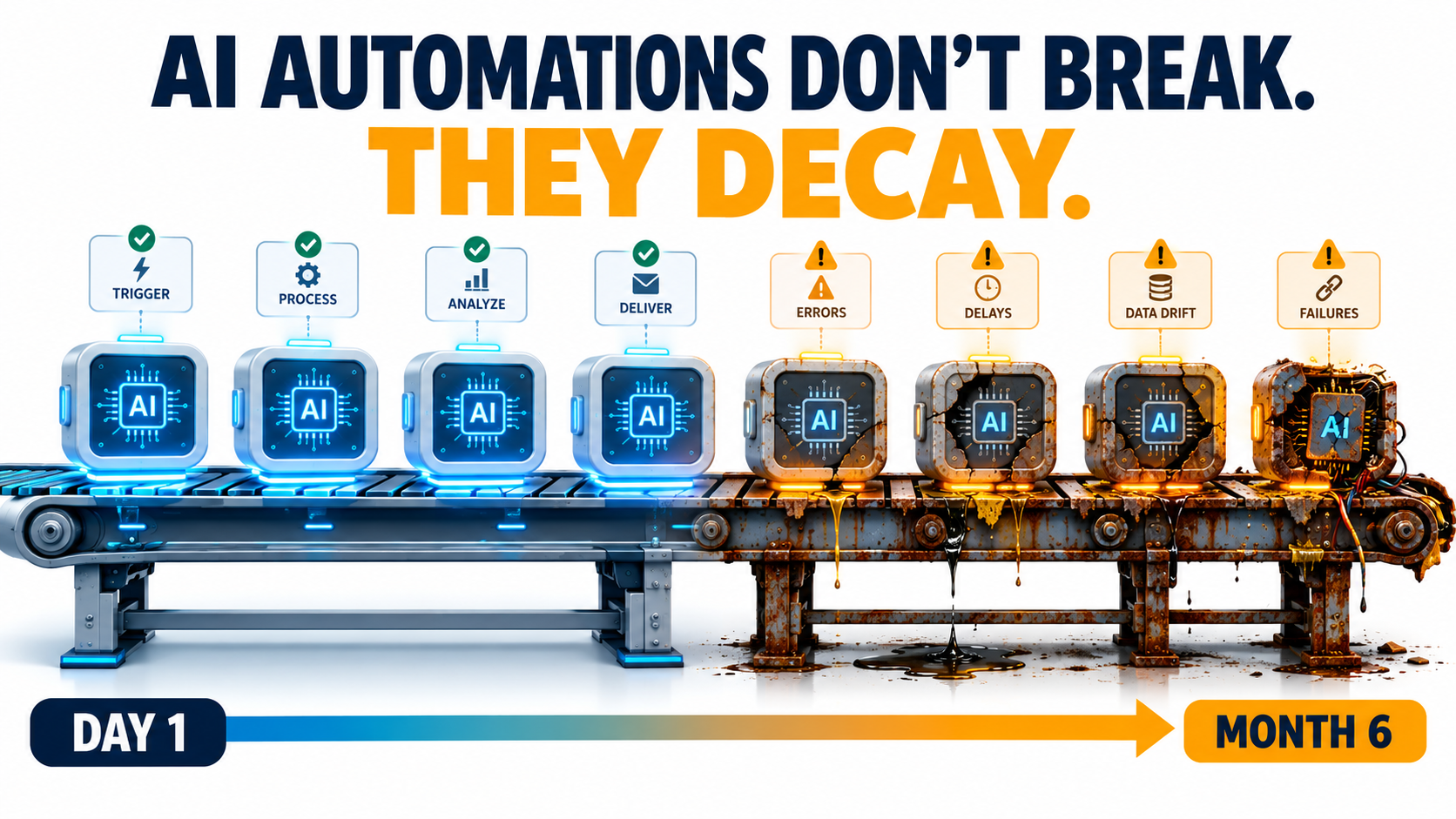
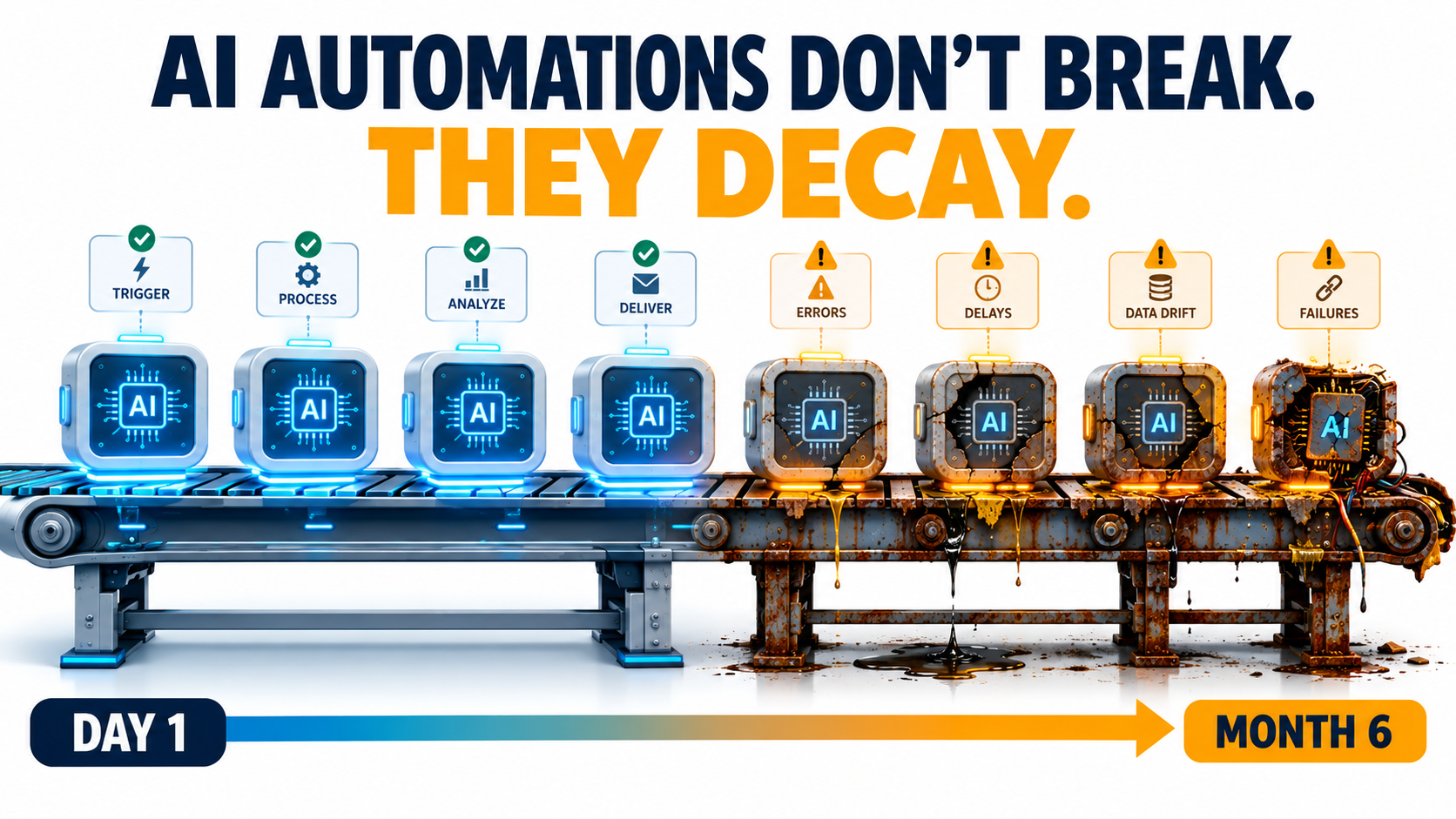
An AI automation that works on launch day is not finished. It’s simply new. Over the following weeks and months, the model underneath it may change behavior. The vendor may retire the model completely. The CRM field it reads from gets renamed. The refund policy it quotes gets updated by a team that has no idea the bot exists. None of this sets off an alarm. The workflow keeps running, the dashboard stays green, and the outputs slowly get worse.
This isn’t a new idea in machine learning. Back in 2015, Google engineers published a paper titled Hidden Technical Debt in Machine Learning Systems. It argued that it is “dangerous to think of these quick wins as coming for free” and that “it is common to incur massive ongoing maintenance costs in real-world ML systems.” What has changed is who is building these systems. Today, AI automations get built by operations managers, marketers, and solo founders using no-code tools and hosted LLM APIs. Most of these people have never heard of that paper, and they’re running into its warnings directly.
This article is about the period after launch: how AI automations decay, why that decay is so hard to see, and what a practical maintenance layer looks like for a team that doesn’t have an MLOps department. It’s written for people who already have automations running, or will soon, and want them to still be trustworthy a year from now.
The Launch-Day Illusion: Why “It Works” Is the Most Dangerous Status
Traditional software automation is deterministic. If a Zapier zap moves a row from a form into a spreadsheet, it does exactly the same thing on day 300 as on day one, unless something upstream breaks. And when something upstream does break, you usually get an error message.
AI automations don’t work that way. They are probabilistic systems built on components you don’t control. Even with identical inputs, the output depends on a model whose weights, serving infrastructure, and safety tuning belong to someone else. “It works” describes one moment in time. It doesn’t describe how the system will behave from here on.
Testing Happens Under Ideal Conditions
When a team builds an automation, they usually test it against a few dozen examples they picked themselves. Those examples tend to be clean, typical, and recent. Real-world traffic is messier. There are edge cases nobody thought of, customers who write in three languages in one message, and invoices scanned upside down.
So launch-day accuracy is often the best accuracy the system will ever have. Results tend to slide from there, not because anything “broke” but because the world the automation operates in keeps moving away from the snapshot it was tested on.
Success Removes the Humans Who Would Have Noticed
There’s an awkward irony here. The point of an automation is to take people out of a repetitive loop. But the people who used to do that work were also, without anyone calling it that, the quality control. A support agent who handled refund questions would have noticed right away if the policy changed. The bot that replaced them won’t.
A successful automation removes the very observers who would have caught it degrading. Unless you deliberately rebuild that observation layer, decay can go on for months before anyone sees it.
The Scale of the Problem
Analysts are starting to put numbers on what this costs. In June 2025, Gartner predicted that more than 40% of agentic AI projects will be canceled by the end of 2027, citing escalating costs, unclear business value, and inadequate risk controls. Two of those three reasons, cost and risk control, are mostly about what happens after launch, not before. Projects rarely die because the demo failed. They die because keeping them reliable turned out to be more expensive and more nerve-wracking than anyone had budgeted for.
The Five Ways AI Automations Decay
“Decay” is too vague to manage, so it helps to break it into specific mechanisms. In practice, nearly every degraded AI automation traces back to one or more of these five causes.
1. Model Behavior Drift
The model behind a named API endpoint can change. Providers update models, adjust safety tuning, and change serving infrastructure. Even when the model name stays the same, the behavior you tested against may not. This is the most widely discussed form of decay, and it has been measured, as the next section shows.
2. Vendor Deprecation
Models have lifespans. Every major provider retires older models on a published schedule. When your model reaches its shutdown date, the automation doesn’t get worse. It stops working. Migrating to the replacement model creates its own drift risk, because the new model will interpret your prompts differently.
3. Upstream Data and Schema Changes
AI automations read from other systems: CRMs, help desks, spreadsheets, product catalogs, email inboxes. When someone renames a field, adds a new product category, changes a date format, or moves a document, the automation may keep running on incomplete or misread inputs. The Google paper calls this “data dependencies” and “undeclared consumers”: systems that quietly depend on data whose owners don’t know they exist.
4. Business-Rule Drift
The facts baked into prompts and knowledge bases age. Pricing changes. Return windows change. Shipping carriers change. Compliance language changes. If your automation’s knowledge was copied into a system prompt eight months ago, it describes the business as it was eight months ago. The paper’s phrase for this is “changes in the external world,” and for customer-facing automations it is often the most expensive kind of decay.
5. Prompt and Workflow Sprawl
Automations pick up patches over time. Someone adds a line to the prompt to handle an edge case. Someone else adds a filter step. A third person copies the workflow to make a variant for another region. After a year, nobody can say exactly what the automation does or why. That is “entanglement” in the Google paper’s terms: change anything and everything changes. Small fixes start causing regressions in unexpected places.
The useful thing about this taxonomy is that each cause has a different detection method and a different fix. Treating “the AI got worse” as one problem is why many teams end up endlessly rewording prompts instead of finding the real cause.
Model Drift Is Documented, Not Hypothetical
For a long time, complaints that a model “got dumber” were dismissed as anecdotes or confirmation bias. Then researchers measured it.
The Stanford and Berkeley Study
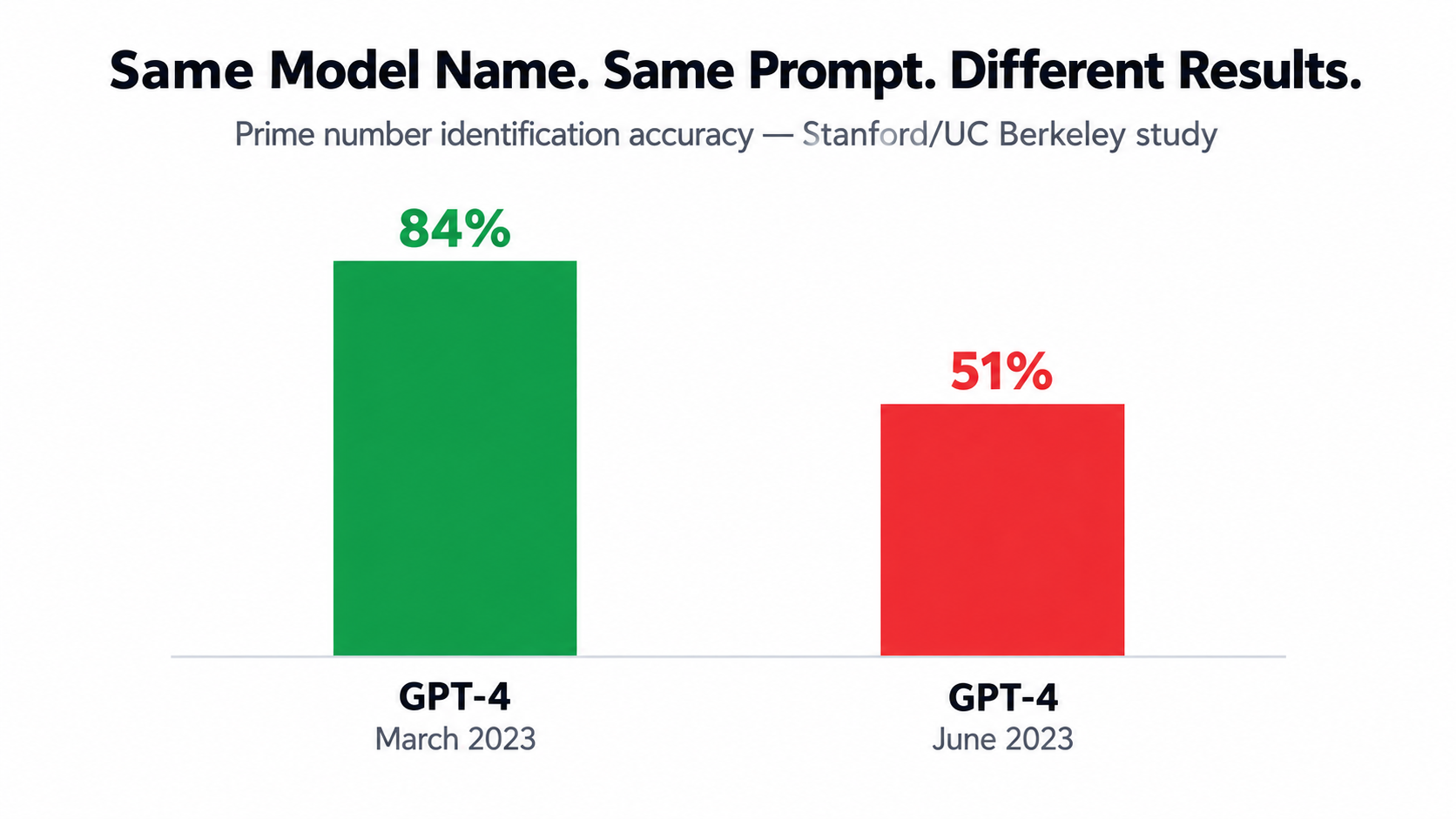
In 2023, Lingjiao Chen, Matei Zaharia, and James Zou published How is ChatGPT’s Behavior Changing Over Time? They compared the March 2023 and June 2023 versions of GPT-3.5 and GPT-4 on a range of tasks: math problems, sensitive questions, opinion surveys, multi-hop knowledge questions, code generation, medical licensing exam questions, and visual reasoning.
The headline result: GPT-4 identified prime versus composite numbers with 84% accuracy in March and 51% in June. The authors attributed this partly to a drop in the model’s willingness to follow chain-of-thought prompting. Meanwhile, GPT-3.5 actually got better at the same task over the same period.
The Details Matter More Than the Headline
For anyone running automations, the less dramatic findings are more relevant than the prime-number result:
- Formatting regressions: Both GPT-4 and GPT-3.5 made more formatting mistakes in code generation in June than in March. If your automation parses model output, such as JSON for a downstream step, formatting drift is exactly what breaks it.
- Changed refusal behavior: GPT-4 became less willing to answer sensitive questions and opinion surveys. An automation that worked fine on borderline content could start returning refusals with no change on your side.
- Mixed direction: GPT-4 got better at multi-hop questions while GPT-3.5 got worse. Drift isn’t uniformly bad. It’s unpredictable, which is arguably harder to plan around.
- Instruction following: The authors found evidence that GPT-4’s ability to follow user instructions had declined, and identified this as “one common factor behind the many behavior drifts.”
Their conclusion is worth quoting directly: “the behavior of the ‘same’ LLM service can change substantially in a relatively short amount of time, highlighting the need for continuous monitoring of LLMs.”
What This Means in Practice
The study looked at models from 2023, and providers have since become more disciplined about versioning. Most now offer dated snapshots you can pin to. But the core lesson still applies in 2026: if you call a model alias that points to “the latest version,” you’ve agreed to have its behavior changed underneath you. And even with pinned snapshots, you’ll eventually have to move, which brings us to the next two forms of decay.
When the Provider Breaks It: Infrastructure Incidents You Can’t See
Drift isn’t always the result of a deliberate model update. Sometimes the model is unchanged but the infrastructure serving it has a bug. From your side, the effect looks exactly the same.
A Detailed Public Example
Anthropic published an unusually candid postmortem describing three infrastructure bugs that intermittently degraded Claude’s response quality between August and early September 2025. The details show how hard this kind of decay is to detect, even for the provider.
- A routing error: Starting August 5, some Sonnet 4 requests were misrouted to servers configured for an upcoming 1M-token context window. It initially affected 0.8% of requests. After a routine load-balancing change on August 29, it peaked at 16% of Sonnet 4 requests in the worst hour on August 31. Anthropic estimated that roughly 30% of Claude Code users who made requests during the period had at least one message routed to the wrong server type.
- Output corruption: A misconfiguration deployed on August 25 sometimes caused the model to produce tokens that should rarely appear. One example was Thai or Chinese characters showing up in the middle of English responses. Another was obvious syntax errors in code.
- Sticky routing: Because routing was “sticky,” a user whose request hit a bad server was likely to keep hitting it on follow-up requests. Some users had a much worse experience than the averages suggest.
Why Detection Took Weeks
The postmortem says initial user reports “were difficult to distinguish from normal variation in user feedback.” Only as reports grew more frequent and persistent in late August did the company open an investigation. Fixes rolled out across platforms between early and mid-September.
That’s a company with deep model expertise and full visibility into its own infrastructure, and it still took weeks to separate signal from noise. A small business running a lead-qualification automation on the same API had no visibility at all. If that business wasn’t measuring output quality, it would never have known anything happened.
The Takeaway for Automation Owners
You can’t prevent provider-side incidents, but you can detect them on your side. The postmortem notes that Anthropic added detection tests for unexpected character output. Your automations need something similar: cheap, automatic checks that flag outputs which are malformed, in the wrong language, off-format, or statistically unusual. If your only quality signal is “customers complained,” you’ll always be the last to know.
The Deprecation Calendar Nobody Tracks
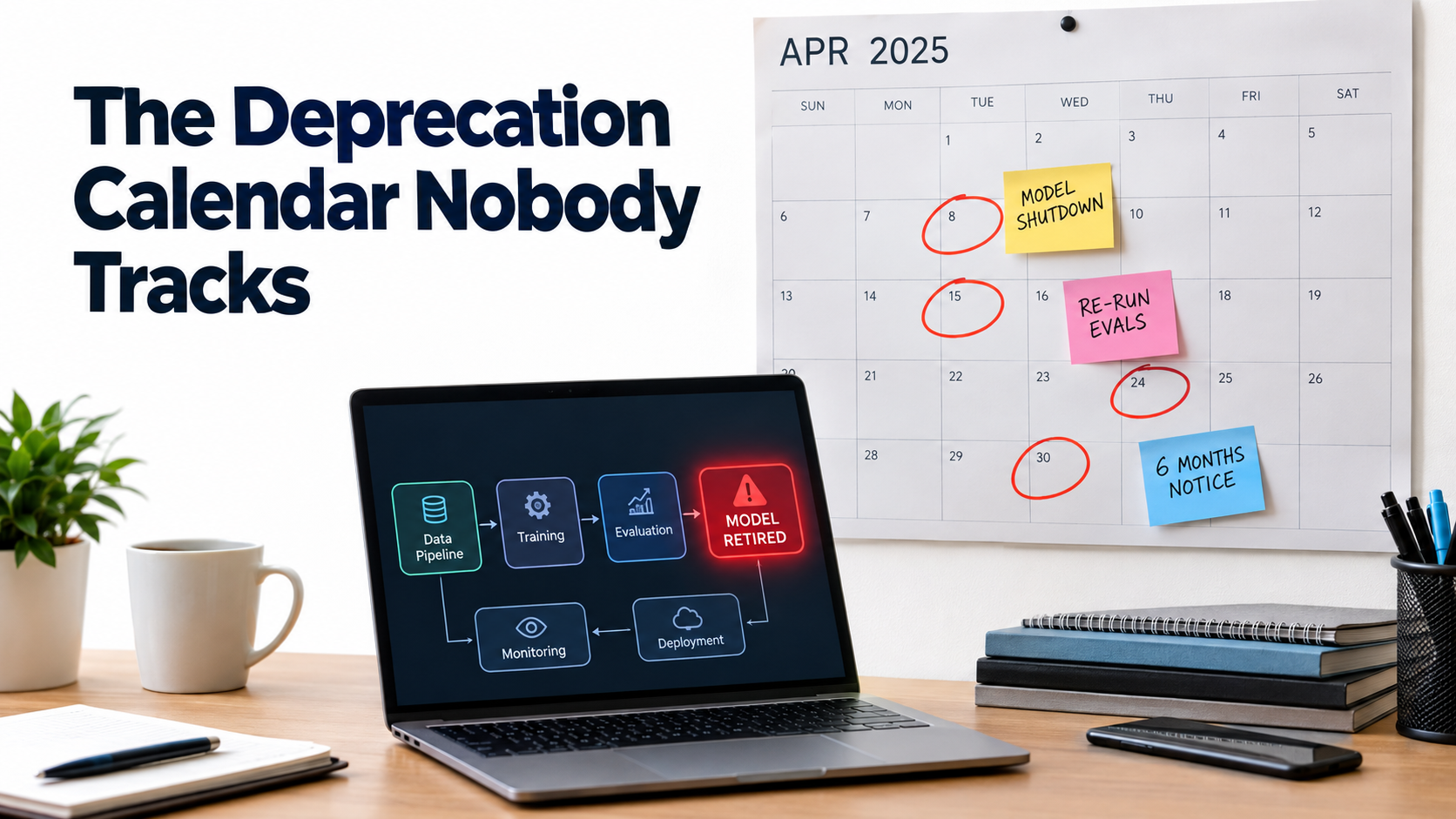
Drift is gradual. Deprecation is a hard deadline. Yet in many organizations, nobody is responsible for knowing when the models behind their automations will be switched off.
How Notice Periods Actually Work
OpenAI’s deprecations page spells out the policy clearly. Barring safety or compliance issues, the minimum notice before retirement is:
- Generally available models: at least 6 months.
- Specialized variants (chat, Codex, and deep research variants): at least 3 months.
- Preview models: possibly much shorter notice, “such as 2 weeks.” The company says directly that it doesn’t recommend preview models “for business-critical production workloads unless you can migrate on short notice.”
The page also separates “deprecated” (being retired, with a shutdown date) from “legacy” (no longer receiving updates and likely to be deprecated later). Both labels are early warnings that you should start planning a migration.
The Pace Is Relentless
Look at the current deprecation page and you’ll see a steady stream of retirements: text-to-speech models, transcription models including whisper-1, legacy realtime and audio snapshots, and general models such as GPT-5.1, each with a shutdown date and a recommended replacement. Notifications go out by email to customers who are actively using the affected model.
That email detail matters more than it seems. If the automation was built by a contractor, a former employee, or someone using a personal API key, the deprecation notice may go to an inbox nobody reads. Six months of notice is plenty, but only if someone actually receives it.
Migration Is Not a Find-and-Replace
The tempting response to a deprecation notice is to change the model name in your config and move on. That’s how a hard deadline turns into a quality problem. A replacement model is a different model. It may be more verbose, follow formatting instructions differently, handle edge cases differently, or refuse different things.
A responsible migration looks more like a small re-launch:
- Run your test set against both the old and new models.
- Compare outputs side by side, especially on edge cases and formatting.
- Adjust prompts where the new model behaves differently.
- Route a small share of live traffic to the new model before cutting over fully.
- Keep the old configuration documented so you can roll back while it’s still available.
Teams that already have a test set find this a few days of work. Teams that don’t end up rebuilding their understanding of the automation from scratch, usually under deadline pressure.
Silent Failure: Why AI Breaks Differently From Classic Automation
All of these decay modes share one trait, and it’s the core problem: AI automations usually fail quietly.
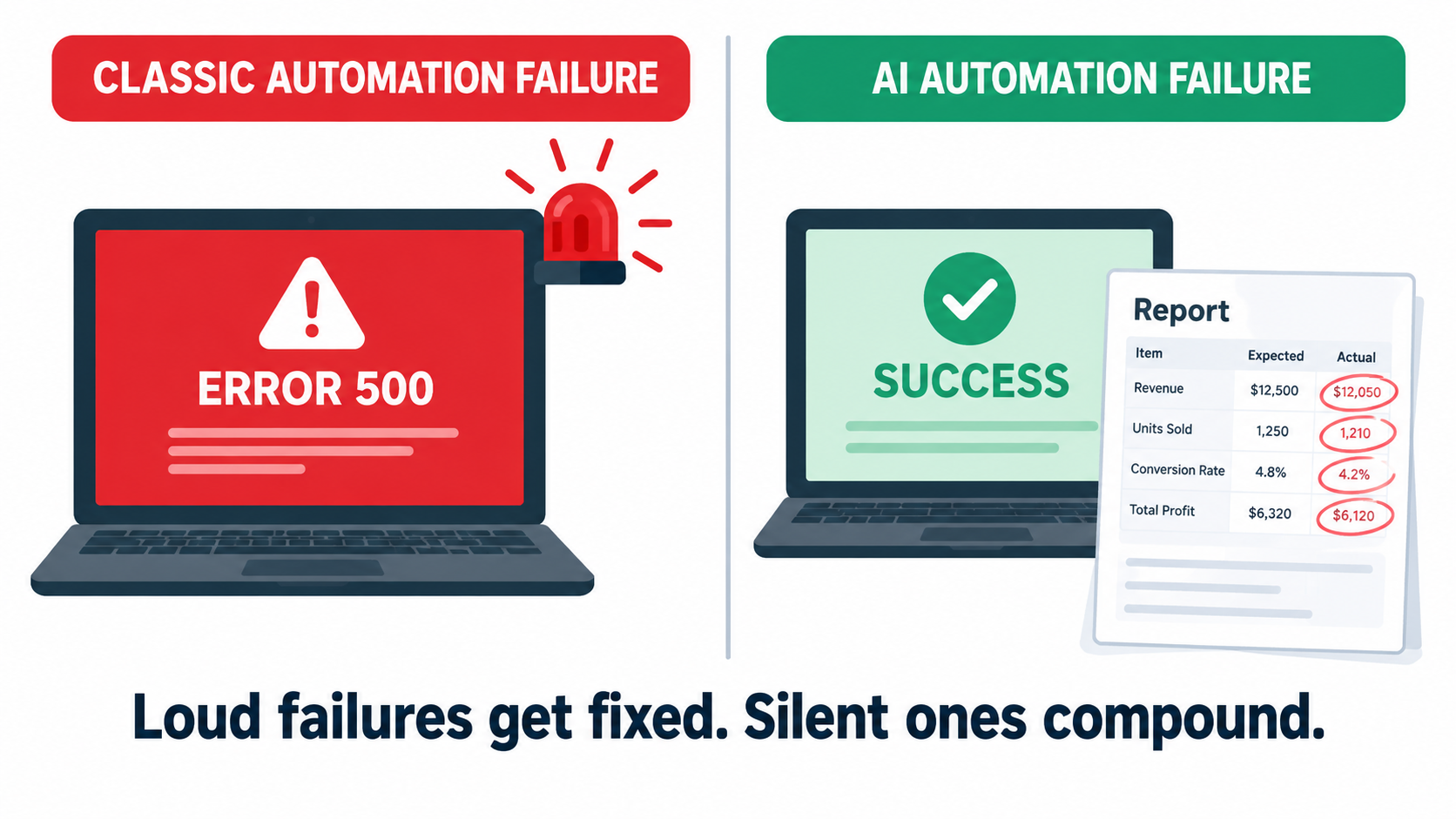
Loud Failures vs. Silent Failures
When a traditional integration breaks, it breaks loudly. An API returns an error, a step fails, the platform sends a failure email, and someone fixes it. The failure is binary and visible.
When an AI step degrades, the workflow usually still “succeeds.” The model returns text. The text is well-formed. The next step accepts it. Every status indicator stays green. The only problem is that the content is wrong: a misclassified ticket, an invented policy detail, a summary that leaves out the one important clause, an extracted invoice total off by a decimal place.
Why Monitoring Uptime Isn’t Enough
Most automation platforms monitor whether things ran, not whether they ran correctly. Execution logs show success rates, run counts, and latency. Those metrics matter, but they say almost nothing about output quality. An automation can show 100% successful runs while producing a steadily growing share of bad results.
This is why the Anthropic incident is such a useful example. The API kept responding. Requests didn’t fail. The degradation lived entirely in the content of the responses, which is exactly what standard monitoring ignores.
Compounding Through Multi-Step Workflows
Silent failures get worse when AI steps are chained. If one step classifies an email, the next drafts a reply based on that classification, and a third updates the CRM, one subtle error at the start spreads through everything after it. Agentic workflows, where a model decides what to do next, make this worse because a wrong decision early on changes the whole path.
The Google paper names a related risk: “hidden feedback loops.” If an automation’s outputs end up shaping its own future inputs, for example AI-written knowledge base articles that later feed the retrieval system, errors can reinforce themselves over time.
Designing for Detectability
The practical response is to design automations so failures become visible. That means:
- Structured outputs with validation: Require JSON or fixed formats, and reject anything that doesn’t parse or contains values outside expected ranges.
- Confidence and abstention paths: Let the model say “I’m not sure” and send those cases to a human instead of forcing an answer.
- Distribution monitoring: Track the share of outputs in each category over time. If “urgent” tickets jump from 8% to 30% overnight, something changed, whether in your inputs or in the model.
- Sampling for human review: Have a person check a small random sample of outputs every week. It’s cheap, and it catches what automated checks miss.
Liability Doesn’t Drift: Who Pays When an Automation Is Wrong
The cost of a decayed automation isn’t only operational. When AI automations talk to customers, wrong outputs become legal and reputational exposure, and courts have been clear about who owns that exposure.
Moffatt v. Air Canada
In February 2024, British Columbia’s Civil Resolution Tribunal ruled on Moffatt v. Air Canada. After his grandmother died, Jake Moffatt asked Air Canada’s website chatbot about bereavement fares. The chatbot told him he could buy a full-price ticket and claim a refund of the difference within 90 days. He bought tickets costing CA$1,630. When he applied for the refund, Air Canada refused, pointing to another page on its website that said bereavement fares could not be applied retroactively.
Air Canada argued that the chatbot was “a separate legal entity that is responsible for its own actions.” Tribunal member Christopher Rivers called this submission “remarkable” and rejected it. Because the chatbot was part of Air Canada’s website, the airline was responsible for what it said. Air Canada was found liable for negligent misrepresentation and ordered to pay CA$812 plus interest and costs.
Why a Small Claim Got Global Attention
The amount was small. The principle was not. The American Bar Association described the ruling as “a helpful reminder that companies remain liable for the actions of their AI tools.” For anyone running customer-facing automations, the lesson is simple: whatever your automation says, your company said.
Look at the case through the decay taxonomy. The chatbot gave an answer that contradicted the company’s own published policy. Whether the cause was a hallucination, stale knowledge, or a policy page the bot never saw, the failure fits the “business-rule drift” pattern. The policy and the automation’s version of it had separated, and nobody was checking.
Practical Implications
- Single source of truth: Customer-facing automations should pull policy information from the same source your website and staff use, not from a copy pasted into a prompt.
- Change notifications: When legal, finance, or operations update a policy, there should be a defined step to update or re-test any automation that references it.
- Scope limits: Decide explicitly which topics an automation may answer and which it must hand off. Refunds, pricing exceptions, legal terms, and medical or financial advice are common hand-off categories.
- Logs you can produce: If a customer disputes what your bot told them, you need the transcript. Keep conversation logs for a defined retention period.
Building the Maintenance Layer: Tests, Evals, Canaries, and Pinning
Knowing how automations decay is only useful if it changes how you run them. Here’s a maintenance layer sized for teams without dedicated ML engineers. You don’t need all of it on day one. Even the first two pieces will catch most problems.
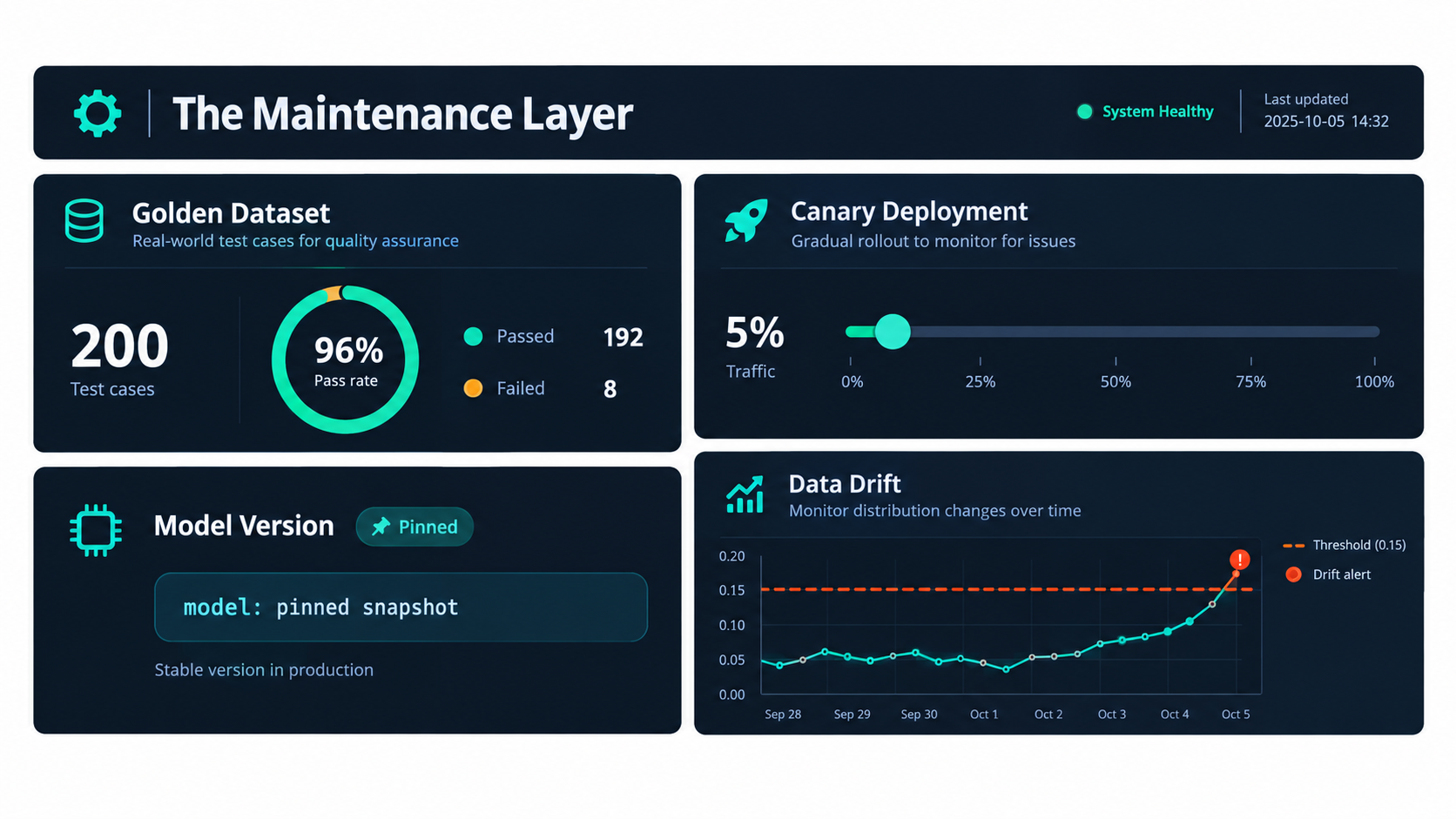
Piece 1: A Golden Dataset
A golden dataset is a fixed set of real inputs paired with the outputs you expect. For a ticket classifier, that might be 100 to 200 past tickets with their correct labels. For a document extractor, it might be 50 invoices with verified field values.
Build it from real traffic, not invented examples. Deliberately include edge cases: the strange ones, the ambiguous ones, and the ones that caused problems before. Every time the automation gets something wrong in production, add that case to the set. Over time, the golden dataset becomes the institutional memory of everything that has ever gone wrong.
Piece 2: Scheduled Evaluation Runs
Run the golden dataset through the live automation on a schedule, weekly for most workflows and daily for high-stakes ones. Track the pass rate over time. A sudden drop points to a provider-side change or incident. A slow decline points to drift. Either way, you find out from your own test instead of from a customer.
For outputs with one right answer (classifications, extracted fields, yes/no decisions), scoring is simple. For open-ended outputs such as drafted emails or summaries, teams often use a rubric scored by a person, or a second model acting as a grader, checked periodically against human judgment.
Piece 3: Version Pinning
Wherever your provider offers dated model snapshots, pin to one rather than calling a floating “latest” alias. That turns silent drift into a planned migration. You choose when the model changes, and you test before it does.
The trade-off is that pinned versions eventually reach end of life, so pinning only works alongside the deprecation tracking covered earlier. Pinning without tracking just delays the surprise.
Piece 4: Canary Releases for Changes
Any change counts here: a new model, a prompt edit, a new workflow step. Before it handles all your traffic, run it on a small share, perhaps 5% to 10%, and compare its outputs and error rates against the existing version. Only expand once it holds up.
Many no-code platforms can do a basic version of this with a random split step that sends a fraction of runs down a test branch. It’s not elaborate, but it turns “we changed the prompt and hoped” into an actual experiment.
Piece 5: Output Guards and Kill Switches
Add automated checks to every AI step’s output: schema validation, length limits, language detection, banned-phrase lists, and range checks on numbers. Route anything that fails to a human queue. Build a kill switch too, a single toggle that pauses the automation or sends everything to manual handling. When something goes wrong, the ability to stop the bleeding in thirty seconds is worth more than any root-cause analysis.
Ownership and the Automation Registry
Tools catch problems. People fix them. The most common organizational failure with AI automations isn’t technical. It’s that nobody clearly owns the automation after the person who built it moves on.
The Shadow Automation Problem
Because AI automations are now easy to build, they multiply. A sales rep connects an LLM to their inbox. A marketer sets up an AI content pipeline. A finance analyst automates invoice coding with a spreadsheet add-on. Each is useful. Collectively, they form a layer of operational infrastructure that nobody has mapped.
The Google paper’s term “undeclared consumers” applies here in a broader sense. These automations depend on data, APIs, and policies whose owners don’t know they’re being depended on. When those owners make a perfectly reasonable change, things break without anyone noticing.
What an Automation Registry Contains
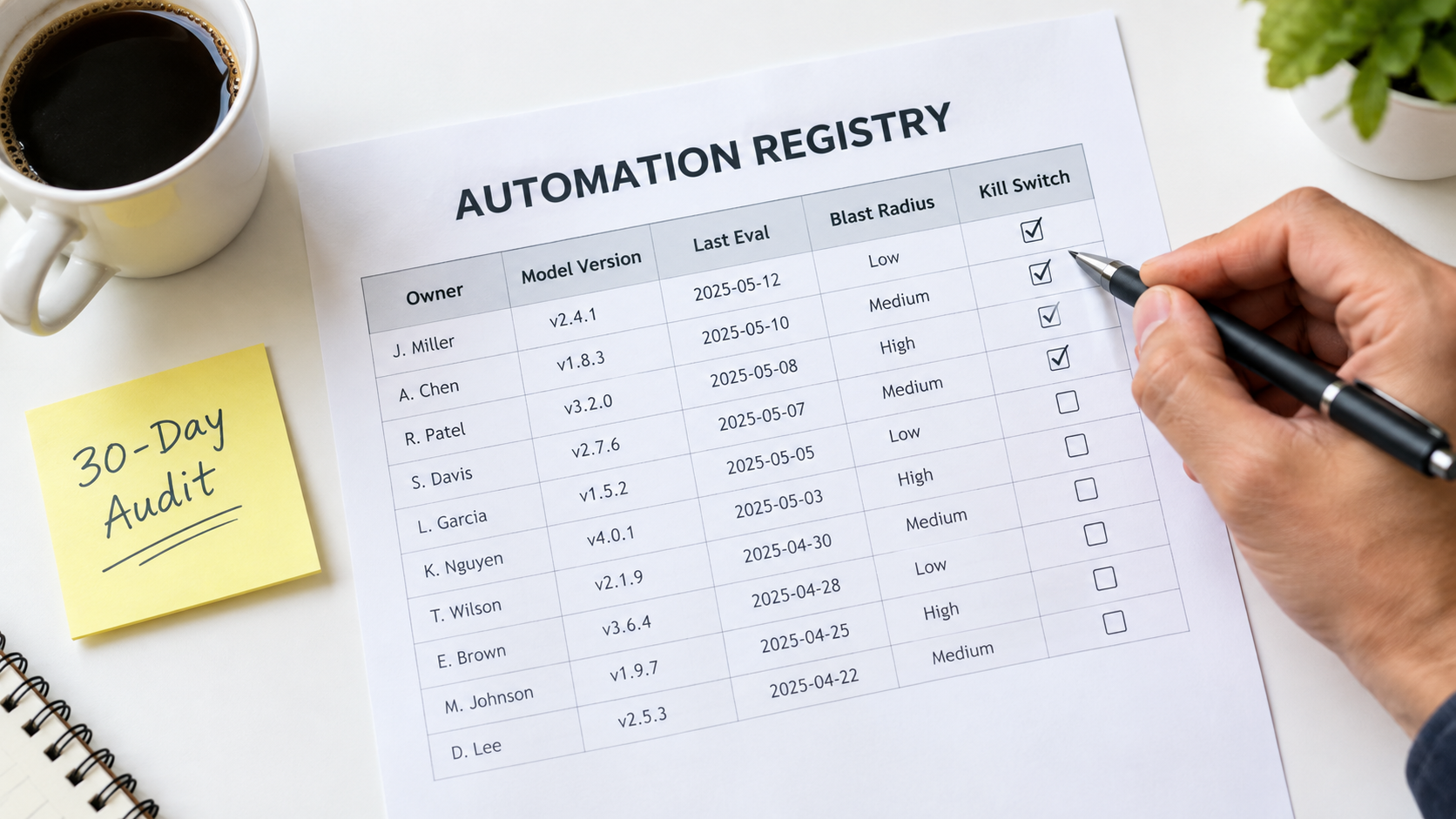
The fix is unglamorous: a registry. It can be a spreadsheet. For every AI automation in production, record:
- Name and purpose: What it does, in one sentence.
- Owner: A named person, not a team, who is accountable for its behavior.
- Backup owner: Who takes over when the owner is unavailable or leaves.
- Model and version: The exact model and snapshot it calls, plus whose API key or account it runs under.
- Data dependencies: Which systems and fields it reads from and writes to.
- Policy dependencies: Which business rules or documents its behavior relies on.
- Blast radius: What happens if it’s wrong. Internal inconvenience? Customer-facing error? Financial or legal exposure?
- Last evaluation date and pass rate: When it was last tested, and how it did.
- Kill switch location: How to turn it off, documented clearly enough that someone other than the owner can do it.
Matching Oversight to Blast Radius
Not every automation needs the same rigor. An internal tool that drafts meeting notes can get by with a monthly spot check. An automation that quotes prices to customers or approves refunds needs scheduled evals, output guards, and policy-change notifications. The blast radius column lets you spend maintenance effort where it matters instead of spreading it evenly or, more commonly, not spending it at all.
Connecting the Registry to Change Management
The registry only pays off if other teams consult it. When IT plans a CRM migration, when legal updates the terms of service, when operations changes the returns process, someone should check the registry for affected automations. Building that step into existing change processes is the cheapest way to prevent the business-rule drift behind cases like Air Canada’s.
Budgeting for Decay: The Real Cost of Ownership
Most AI automation business cases count build cost and API cost, then compare them to labor saved. That leaves out the category the Google paper warned about: ongoing maintenance. Leaving it out doesn’t make it go away. It just means the cost turns up later as unplanned work and, in Gartner’s framing, as one reason projects get canceled.
The Maintenance Line Items
A realistic total cost of ownership for an AI automation includes:
- Evaluation upkeep: Time to maintain the golden dataset, run evals, and review results.
- Human review: Time spent on sampled outputs and handling flagged or abstained cases.
- Migrations: At least one model migration per automation per year is a reasonable planning assumption, given how often providers ship and retire models. Each one needs testing and prompt adjustment.
- Upstream change response: Fixing breakages caused by changes in connected systems.
- Policy synchronization: Keeping knowledge and rules current with the business.
- Incident handling: Investigating and fixing quality degradations, including provider-side ones.
A Practical Planning Heuristic
There’s no universal figure for maintenance as a percentage of build cost. It varies a lot with complexity and blast radius. But it should never be zero. A useful exercise is to estimate maintenance hours per month for each automation in the registry, multiply by a loaded hourly rate, and subtract that from the labor savings in the original business case.
Some automations will still look excellent. Others will turn out to be marginal once maintenance is counted, and those are the ones to simplify, merge, or retire. Retiring an automation that isn’t earning its upkeep is a perfectly good outcome, not a failure.
Complexity Is a Cost Multiplier
Every extra AI step, branch, and integration adds failure points and makes diagnosis harder. A three-step chain with a single model call is far easier to maintain than a ten-step agent with tool use and memory. When choosing between a simpler design that handles 85% of cases (with humans handling the rest) and a complex one that handles 95%, include the maintenance cost of that extra 10%. Very often the simpler design wins once you look at the full lifecycle.
The 30-Day Automation Health Audit
If you already have AI automations running and recognized some of the problems above, here’s a practical four-week plan to bring them under control. It assumes no special tooling, just a spreadsheet, access to your automation platforms, and a few hours a week.
Week 1: Inventory
- List every AI automation in production, including ones built by individuals outside IT. Ask around, since shadow automations rarely announce themselves.
- For each one, record the owner, model, version, account or API key, and data sources in your new registry.
- Find any automation with no clear owner, running on a former employee’s credentials, or calling a preview model. These are your highest-risk items.
Week 2: Risk and Deprecation Check
- Assign a blast radius rating to each automation: low (internal and easily corrected), medium (affects internal decisions or data quality), or high (customer-facing, financial, or legal).
- Check every model against its provider’s deprecation page. Note shutdown dates and add calendar reminders at least 60 days before each one.
- Make sure deprecation emails reach a monitored, shared inbox rather than an individual’s.
- Confirm that every high-blast-radius automation has a working kill switch, and test it.
Week 3: Baseline Evaluation
- For each high and medium automation, assemble a starter golden dataset of 30 to 50 real past inputs with verified correct outputs.
- Run the dataset through the current automation and record the pass rate. That’s your baseline.
- For customer-facing automations, compare every policy statement the automation might make against your current published policies. Fix any mismatches immediately.
Week 4: Ongoing Cadence
- Schedule recurring eval runs: weekly for high-risk automations, monthly for medium.
- Add basic output guards (format validation, length limits, language checks) to every AI step that feeds another system.
- Set up a weekly sample review: 10 to 20 random outputs per high-risk automation, checked by a person.
- Add a “check the automation registry” step to your change management process for CRM updates, policy changes, and system migrations.
At the end of 30 days, you won’t have a perfect system. You will know what’s running, who owns it, when it will break, and how it’s performing, which most organizations running AI automations in 2026 cannot say.
What Good Looks Like a Year From Now
It helps to picture where all this leads. A team that has absorbed these lessons runs its AI automations differently from one that hasn’t, and the difference shows up in a few concrete ways.
Migrations Are Routine
When a deprecation notice arrives, it goes to a shared inbox, gets logged in the registry, and triggers a planned migration weeks before the deadline. The golden dataset runs against the replacement model, prompts get adjusted, a canary release confirms the results, and the cutover happens without drama. What used to be a scramble becomes a calendar item.
Incidents Are Caught Internally
When a provider has a quality incident, or an upstream system changes a field, the scheduled eval or the distribution monitor flags it before customers notice. The owner gets an alert, flips the automation to manual handling if needed, and investigates. The timeline that took weeks in the Anthropic example shrinks to hours for your own workflows, because you’re measuring the thing that matters.
Policies and Automations Stay in Sync
When the business changes a rule, the change process includes checking the registry. Customer-facing automations pull from the same policy source as the website. The gap between what the company says and what the bot says, the gap that cost Air Canada, stays closed.
The Portfolio Gets Pruned
Because maintenance costs are visible, automations that don’t earn their upkeep get retired or simplified. The total number of automations may even go down while the value they deliver goes up. That’s what an operational discipline looks like, as opposed to a pile of experiments.
Conclusion: Treat AI Automations Like Living Systems
The industry spends a lot of energy on getting AI automations into production and much less on what happens once they’re there. That imbalance explains a lot of quiet disappointment. Teams launch automations that work, watch them slowly degrade, lose confidence, and eventually shut them down or route everything back to people.
The evidence for decay is well documented. Researchers measured large behavior shifts in the “same” model over three months. A major provider published a detailed account of infrastructure bugs that degraded output quality for weeks before they were fully diagnosed. Providers retire models on published schedules, sometimes with only weeks of notice for preview releases. A tribunal has ruled that a company is fully liable for what its chatbot says. And a decade-old paper from Google engineers predicted all of it: ML systems carry hidden, ongoing maintenance costs that quick wins tend to hide.
None of this is a reason to avoid AI automations. It’s a reason to run them properly.
Key Takeaways
- Launch is the start, not the finish. Plan for maintenance from day one and include it in your business case.
- Know the five decay modes: model drift, vendor deprecation, upstream data changes, business-rule drift, and prompt sprawl. Each needs a different fix.
- Measure output quality, not just uptime. A golden dataset and scheduled eval runs are the most valuable maintenance investment you can make.
- Pin model versions and track deprecations. Turn surprise changes into planned migrations, and make sure deprecation notices reach a monitored inbox.
- Design for detectable failure. Structured outputs, validation, abstention paths, and distribution monitoring make silent failures loud.
- Assign a named owner to every automation. Keep a registry with model versions, dependencies, blast radius, and kill switches.
- Remember that your automation speaks for you. Customer-facing outputs carry your company’s liability, so keep them in sync with your real policies.
- Start with a 30-day audit. Inventory, risk-rate, baseline, and set a cadence. It’s a few hours a week and puts you ahead of most organizations.
The teams that get lasting value from AI automations in 2026 won’t necessarily be the ones that build the most. They’ll be the ones whose automations are still accurate, owned, and trusted twelve months after launch.
Leave a Reply