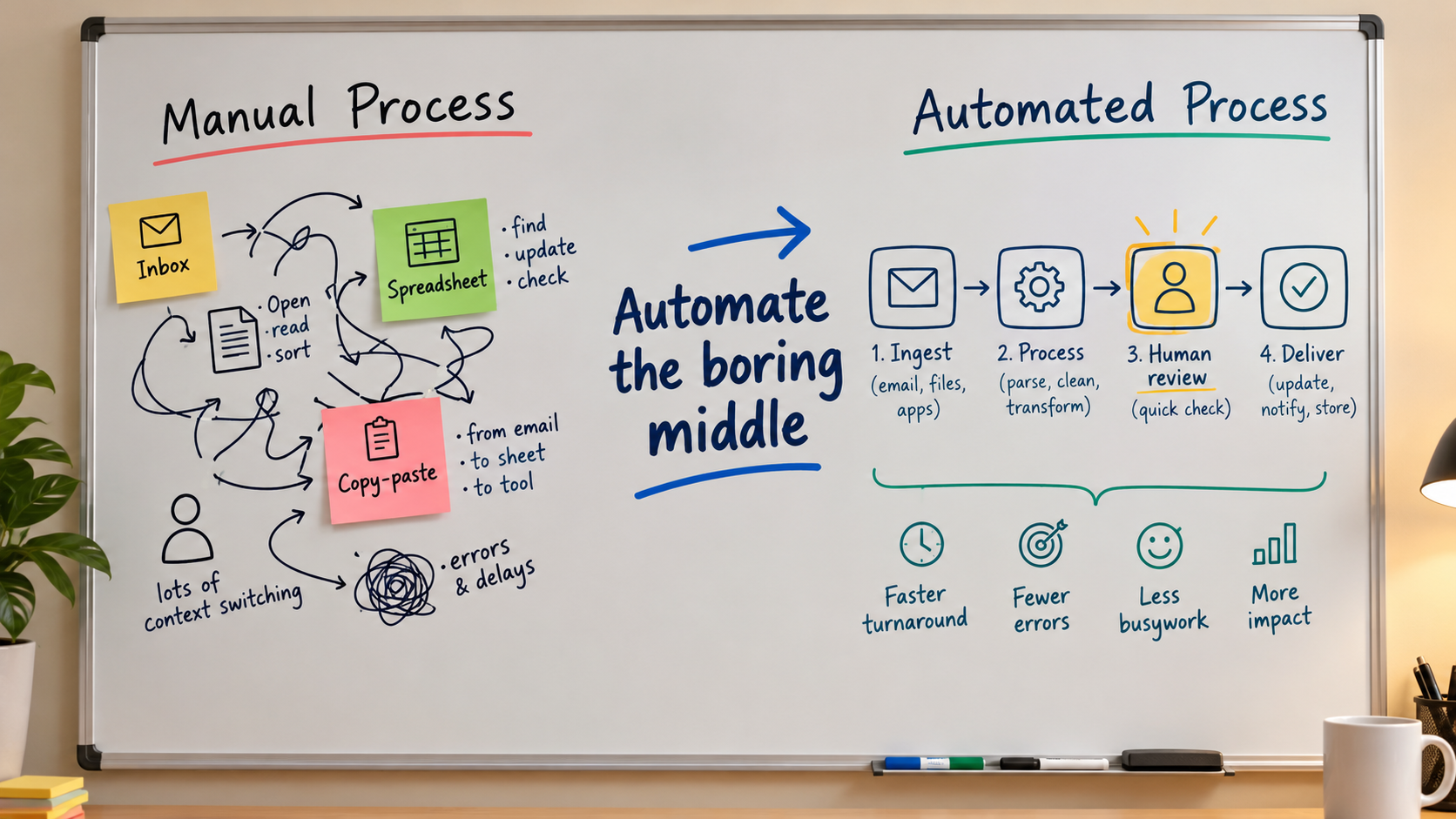
Most advice on AI automation starts with tools. Which platform, which model, which agent framework. That is the wrong starting point. The automations that last tend to share one trait: they sit in the boring middle of a process, where work is repetitive and rule-shaped, and they leave the messy edges to people.
This article takes that idea and turns it into a working method. It covers how to find the middle, score candidates, pick the right level of AI, build in checkpoints, and watch for failures. It does not rely on headline statistics. Where I give guidance, it is a framework drawn from how automation projects generally behave, not a quoted study.
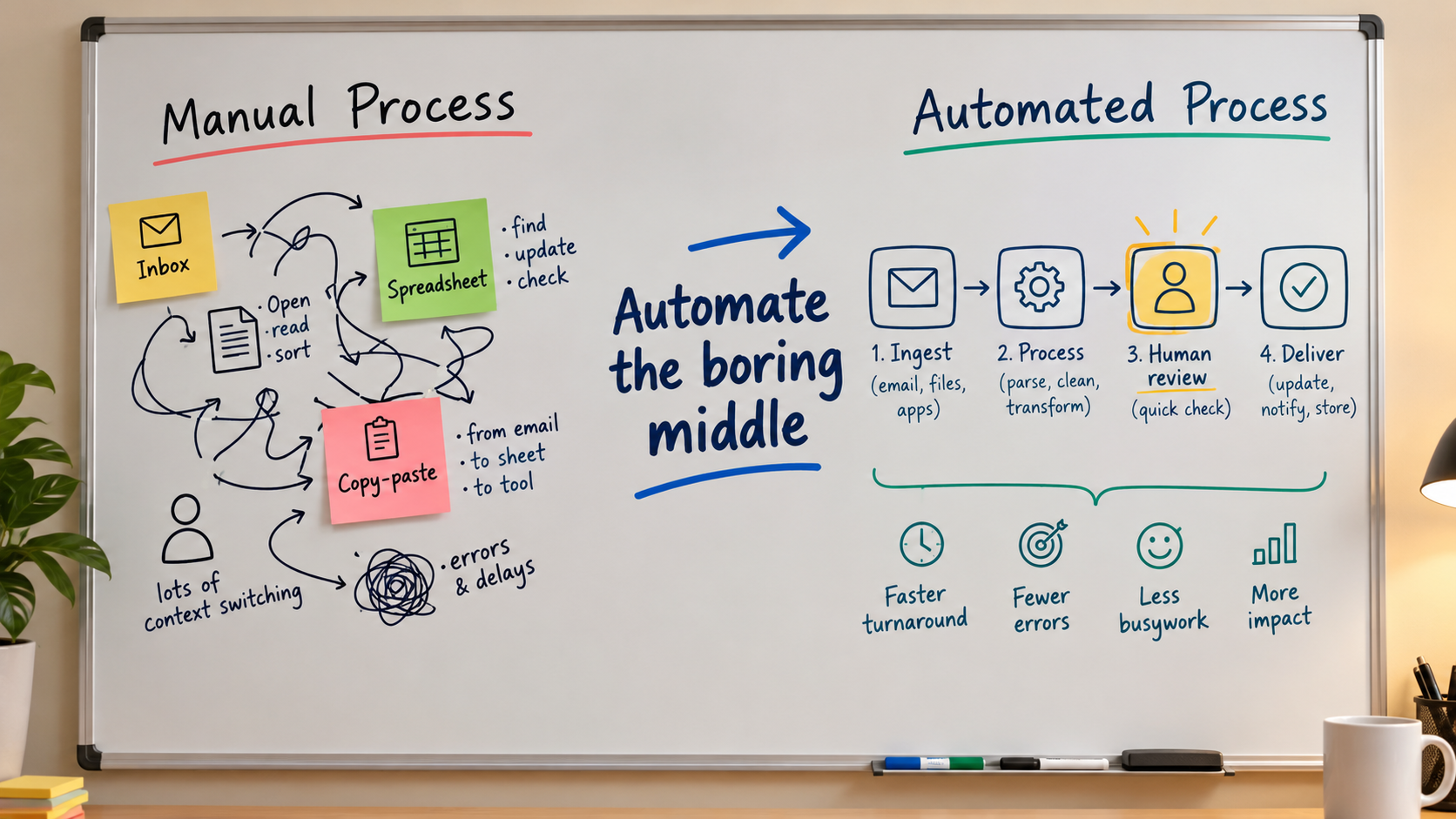
What “the Boring Middle” Means
Every business process has three zones. The intake is where unstructured input arrives: an email, a call, a form, a photo of an invoice. The decision edge is where judgment, exceptions and relationships matter. The middle is everything in between: classifying, extracting, routing, formatting, updating records, drafting a first version, sending a notification.
The middle is where people lose hours and where errors from fatigue creep in. It is also where AI is now strong. Language models read messy intake and turn it into structured data. Classic automation then moves that data between systems.
Why the edges stay human
Edges carry risk. A refund exception, a sensitive complaint or a contract change involves context a workflow does not hold. You can automate the preparation for those decisions (summaries, history, a suggested reply) without automating the decision itself.
Automation vs. AI Automation: Know Which You Need
Not every task needs a model. If the input is structured and the rules are fixed, plain automation is cheaper, faster and more predictable. Use AI only where the input is unstructured or the output needs language.
A quick split
- Rules only: moving a form submission into a CRM, sending a receipt, syncing inventory counts.
- Rules plus a model step: reading an emailed invoice and extracting fields, tagging support tickets by topic, summarising call notes.
- Agentic: a model chooses among tools and steps on its own, for example researching a lead and deciding what to do next.
Climb this ladder only as far as the task demands. Each rung adds capability and adds unpredictability. Many successful setups are mostly rules with one or two model calls inside.
A Four-Question Score for Picking What to Automate
Teams often pick whatever is most annoying or most exciting. A short scoring pass works better. Rate each candidate from 1 to 5 on four factors.
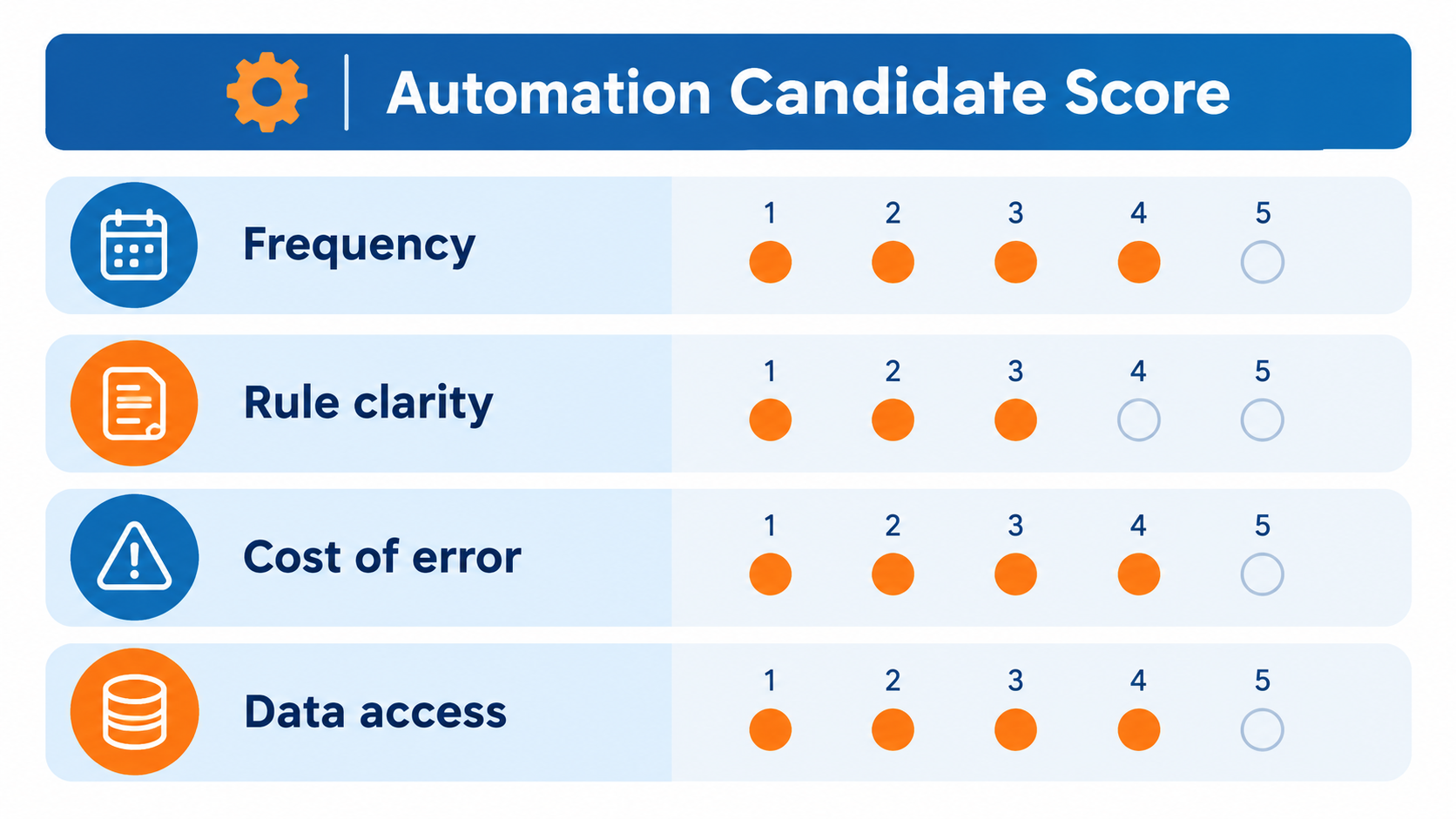
1. Frequency
How often does the task run? A weekly five-minute chore rarely repays the build and upkeep. A task done dozens of times a day usually does.
2. Rule clarity
Could you explain to a new hire, in one page, how to do it correctly? If experts disagree on the right answer, a model will not settle it for you.
3. Cost of error
Score this inversely: a high score means mistakes are cheap and easy to reverse. Tagging internal tickets is low risk. Sending pricing to customers is not.
4. Data access
Can the workflow actually reach the data it needs through an API, export or connector? Many projects stall here, not on the AI. If a human has to log in and click through a legacy screen, budget for that.
Start with candidates that score high across all four. Anything scoring 1 on cost of error or data access should wait.
Examples of Good Middle Candidates
These patterns recur across teams of every size. They are illustrations, not benchmarks.
- Inbound triage: classify emails or tickets, extract key details, route to the right queue, draft a suggested reply for a human to approve.
- Document intake: pull fields from invoices, receipts, applications or contracts into a spreadsheet or system of record.
- Meeting and call follow-up: summarise, extract action items, create tasks, draft the follow-up email.
- Lead enrichment: gather public company details, score fit against written criteria, hand a short brief to sales.
- Content operations: repurpose a long piece into drafts for other formats, with a person editing before anything is published.
- Reporting: assemble recurring figures and write a plain-language commentary for review.
Notice the pattern: in nearly all of them, the output is either data going into a system or a draft going to a person.
Design Principle: Put a Checkpoint Where Errors Get Expensive
A human-in-the-loop step is not a failure of automation. It is a design choice about where to spend attention. Place review before actions that are hard to undo: sending external messages, moving money, deleting records, changing prices.
Three checkpoint styles
- Approve before send: the workflow drafts, a person clicks approve. Best for customer-facing text.
- Sample review: a person checks a random slice of outputs. Best for high-volume, low-risk work.
- Confidence routing: the workflow sends uncertain cases to a person and processes clear ones itself. Best once you have enough history to trust the thresholds.
Begin with approve-before-send. Loosen it only when review logs show people almost never change the output.
Prompts Are Part of the Workflow, So Treat Them Like Code
A model step is a function with a fuzzy interface. To make it dependable, constrain it.
- Ask for structured output (a fixed set of fields or labels) rather than free text when the result feeds another system.
- Give the model a closed list of allowed categories and an explicit “unsure” option.
- Include two or three real examples of correct output, including an awkward one.
- Keep the prompt in version control or at least a dated document, so you know what changed when behaviour shifts.
- Keep a small test set of real past cases and rerun it whenever you edit the prompt or switch models.
The test set matters most. It turns “it seems fine” into something you can check.
The Real Risk Is Silent Failure
Automations rarely fail loudly. An API token expires, a form field gets renamed, a model starts labelling things slightly differently, and the workflow keeps running while producing worse results. Nobody notices for weeks.
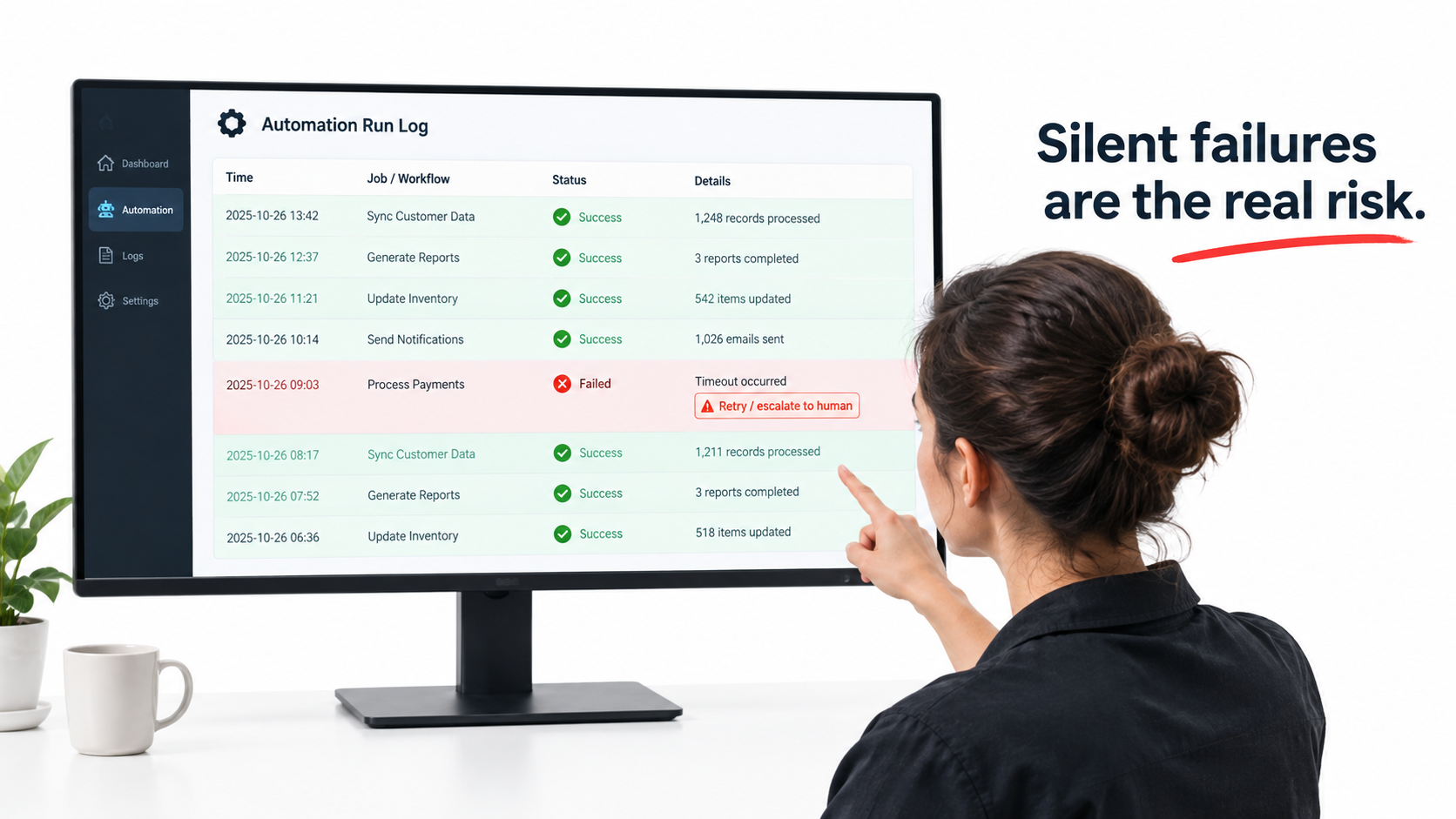
A minimum monitoring kit
- Error alerts: every failed run notifies a named person, not a shared inbox no one reads.
- Volume checks: alert when a workflow that normally runs fifty times a day runs zero times, or five hundred.
- Output sampling: a recurring, scheduled look at a handful of real outputs.
- Retries with limits: retry transient errors a few times, then escalate rather than loop forever.
- Idempotency: design steps so a rerun does not send a duplicate email or create a duplicate record.
- Owner and documentation: every automation has one named owner and a short note on what it does and what it touches.
Counting the Real Cost
The build is the visible cost. The hidden costs are upkeep, review time and usage fees. When estimating payback, include each of these.
- Time saved: measure the current time per task by timing a few real runs, not by guessing.
- Review time: subtract the minutes people still spend checking and fixing outputs.
- Usage cost: model calls and platform fees, which scale with volume.
- Maintenance: assume something will need attention regularly as tools and APIs change.
- Error cost: estimate what a typical mistake costs, and how often review catches it.
If the saving is thin after all five, pick a different candidate. Thin wins also tend to disappear the first time something breaks.
Data, Privacy and Access
Automations touch real customer and company data, so set boundaries before building. Decide what data may be sent to an external model provider, and check the provider’s data-retention terms and your own contractual obligations. Give each workflow the narrowest permissions it needs, using dedicated service accounts rather than a personal login. Keep credentials in a secrets manager, not inside the workflow text. If personal data is involved, involve whoever handles compliance early, since requirements differ by region and industry.
A Rollout Path That Limits Damage
Week 1: map and measure
Write down the current steps for your top candidate. Time several real runs. Collect twenty to fifty real examples, including odd ones, as your test set.
Week 2: build the smallest version
Automate only the middle. Run it in shadow mode: it produces outputs, but a person still does the real work and compares.
Week 3: add approval
Switch to approve-before-send. Track how often reviewers change the output and why. Those reasons become prompt improvements.
Week 4 onward: loosen carefully and add monitoring
Move to sampling or confidence routing only where the data supports it. Set up alerts and name the owner. Then pick the next candidate, and reuse what you learned.
These timings are a suggestion. A complex process will take longer, and that is fine.
Common Mistakes
- Automating a broken process. Fix the process first, or you will produce bad results faster.
- Starting with an autonomous agent. Begin with fixed steps and add model-driven choices only when a fixed path cannot work.
- Skipping the test set. Without one, every change is a guess.
- No owner. Unowned automations decay.
- Measuring activity, not outcomes. “Runs per day” is not a result. Hours saved, response times and error rates are.
- Removing humans too early. Trust should follow evidence.
Conclusion: Practical Takeaways
AI automation works best when you treat it as careful plumbing, not magic. Find the repetitive middle of a process, keep people at the intake and decision edges, and build in checkpoints where mistakes cost the most.
- Map one process and mark intake, middle and decision edge.
- Score candidates on frequency, rule clarity, cost of error and data access.
- Use the simplest tool that works: rules first, a model step second, agents last.
- Build a test set from real cases and rerun it after every change.
- Start with approve-before-send, and loosen only on evidence.
- Monitor for silent failure and name an owner.
- Count review, usage and maintenance costs before declaring a win.
Pick one process this week, time it, and build the smallest version you can run in shadow mode. What you learn from that first run will teach you more than any tool comparison.
Leave a Reply