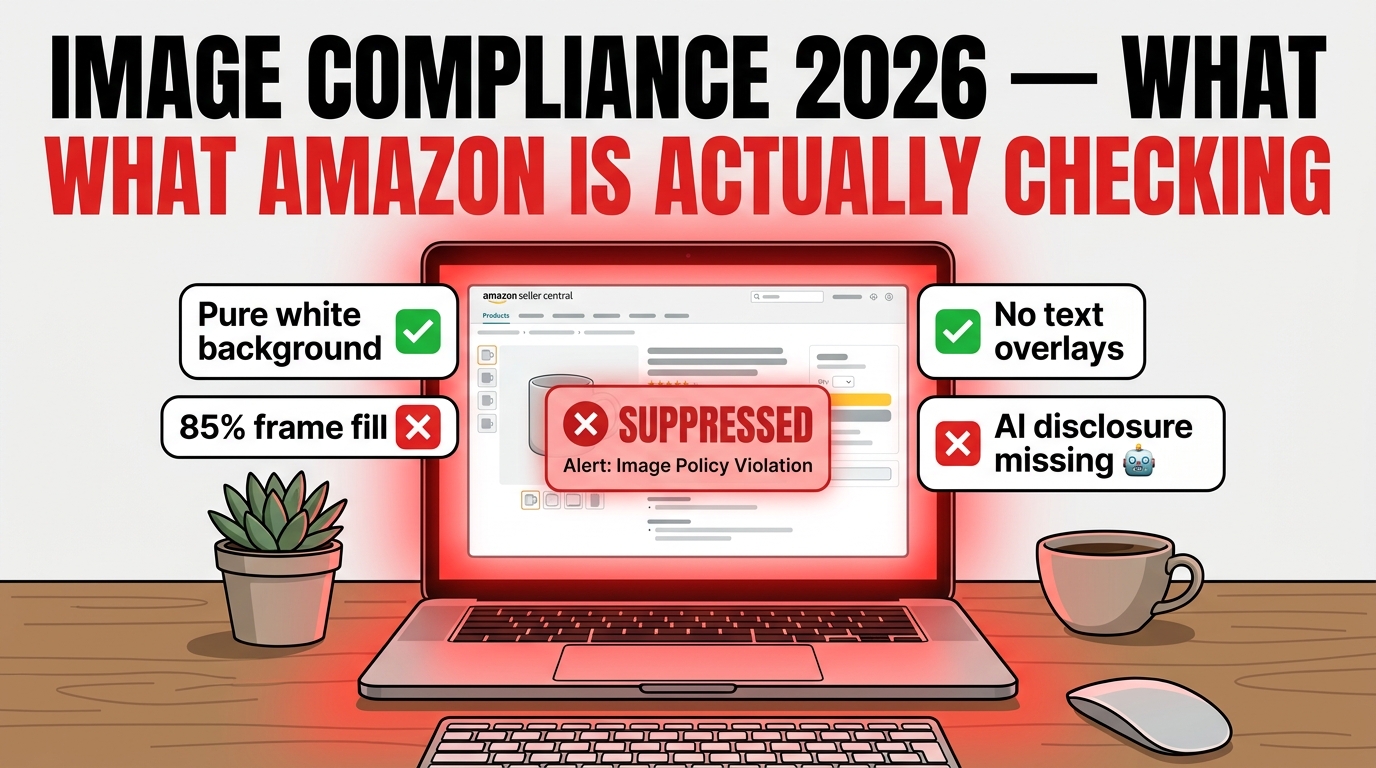
One morning your listing is ranking. By afternoon it’s gone. No email. No policy violation notice in Account Health. Just — gone. You check Seller Central and find the word Suppressed sitting next to your best-selling ASIN, and the only clue is a vague reference to “image quality standards.”
This is the reality of Amazon’s 2026 image compliance environment. The checks are faster, the enforcement is more automated, and the consequences cascade further into your catalog health than most sellers realize. What used to be a straightforward set of pixel rules has become a layered compliance system — one that now includes AI-generated content disclosure requirements, stricter background purity enforcement, and a tighter link between image status and your overall listing quality score.
The challenge isn’t that the rules are secret. Amazon publishes most of them. The challenge is understanding which violations get caught automatically and which require human review, how long suppression actually lasts before it starts doing structural damage to your ranking, and where sellers consistently stumble despite thinking they’ve checked every box.
This guide works through all of it — the technical pipeline behind Amazon’s checks, the specific violations most likely to trigger suppression in 2026, the new AI disclosure rules that came into effect in July 2026, category-specific differences, the real suppression-to-recovery timeline, and a practical audit workflow you can run on your catalog before Amazon finds the problem first.
How Amazon’s Image Compliance System Actually Works
Most sellers imagine Amazon’s image review as something like a human reviewer glancing at their photos. The reality is far more automated, and far faster than that.
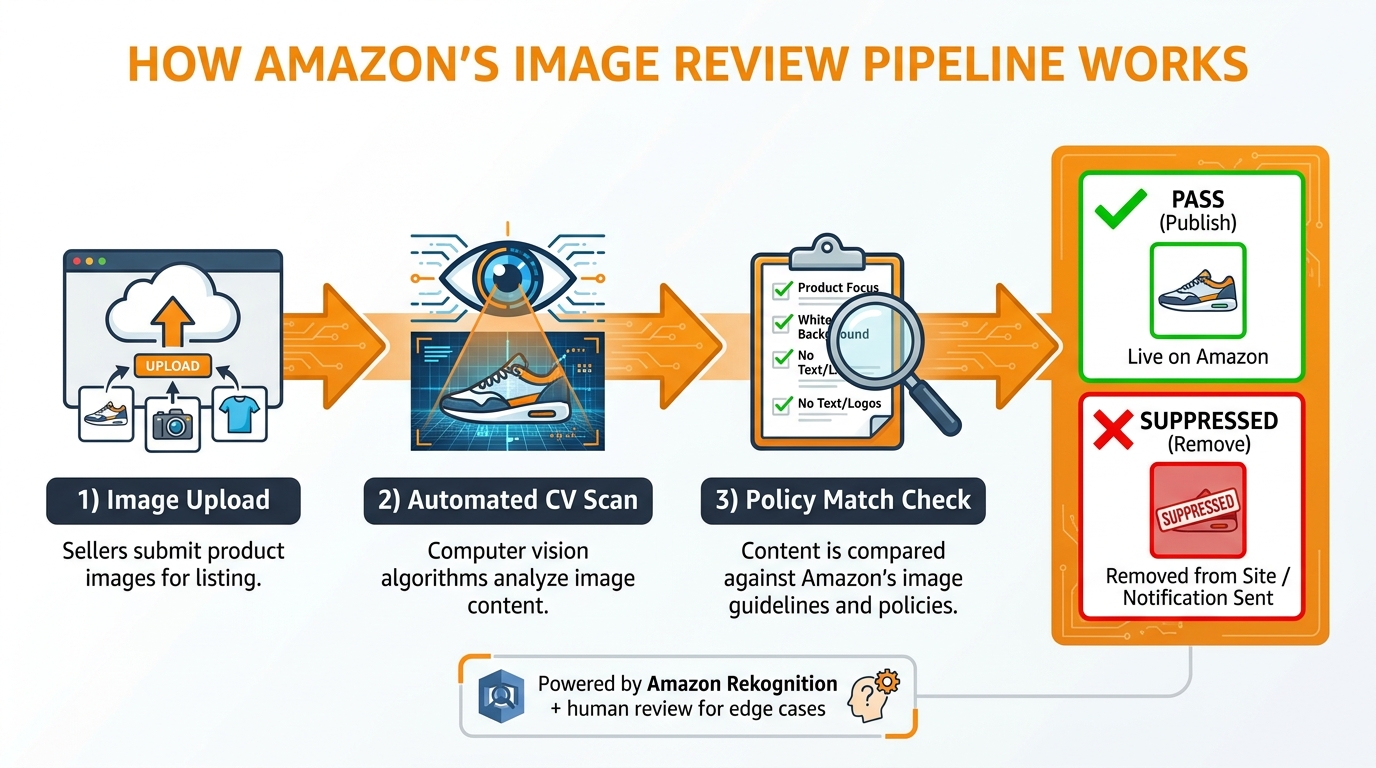
Amazon’s image compliance pipeline operates as a multi-stage automated system. When a seller uploads an image to Seller Central — whether through the Manage Inventory interface, a flat file feed, or a third-party integration — the file enters an automated review queue almost immediately. The system checks the image against a structured set of technical requirements and policy rules before the asset is accepted into the catalog. Images that fail hard technical requirements, such as an unsupported file format or a file that exceeds the size ceiling, are blocked from upload entirely. Images that pass technical intake but may violate policy rules proceed into a secondary compliance layer.
The Role of Computer Vision
Amazon’s image moderation infrastructure is built on computer vision tooling closely related to the services available through Amazon Web Services (AWS). Amazon Rekognition, AWS’s image and video analysis service, provides the underlying capability for detecting objects, scenes, unsafe content, and image attributes at scale. Amazon applies a similar stack to Seller Central image review — using automated models to analyze uploaded images for compliance signals: background color purity, the presence of text or graphic overlays, watermarks, logos, and whether the product occupies sufficient frame space.
These models don’t review images the way a human would. They analyze pixel data, detect color values, identify regions of the frame that are occupied by the product versus empty or background space, and flag anomalies against a compliance ruleset. The process is largely instantaneous for standard checks. Edge cases — images where the automated system can’t make a confident determination — are escalated to human review, which is where timelines extend from minutes to days.
The Two-Layer Enforcement Model
It helps to think of Amazon’s enforcement model as having two distinct layers. The first is pre-upload validation: technical format checks that happen the moment a file is submitted. This layer catches issues like wrong file types, files that are too small in pixel dimensions, or filename formats that don’t match Amazon’s identifier-based naming convention. These rejections happen before your image ever appears in the catalog.
The second layer is post-upload compliance review: the more consequential checks that examine whether an accepted image actually meets policy standards. A listing can appear live for hours or days before this layer catches a violation, which is why sellers are often blindsided. The image uploaded fine, the listing went live, and then the automated compliance pass — which may run on a scheduled cycle rather than real-time — flags the image and triggers suppression.
This second-layer timing is one of the most commonly misunderstood aspects of how Amazon enforces image standards. Compliance isn’t a single gate at upload. It’s an ongoing check that can surface violations in images that have existed in your catalog for months.
The Main Image Rules That Trigger Automatic Suppression
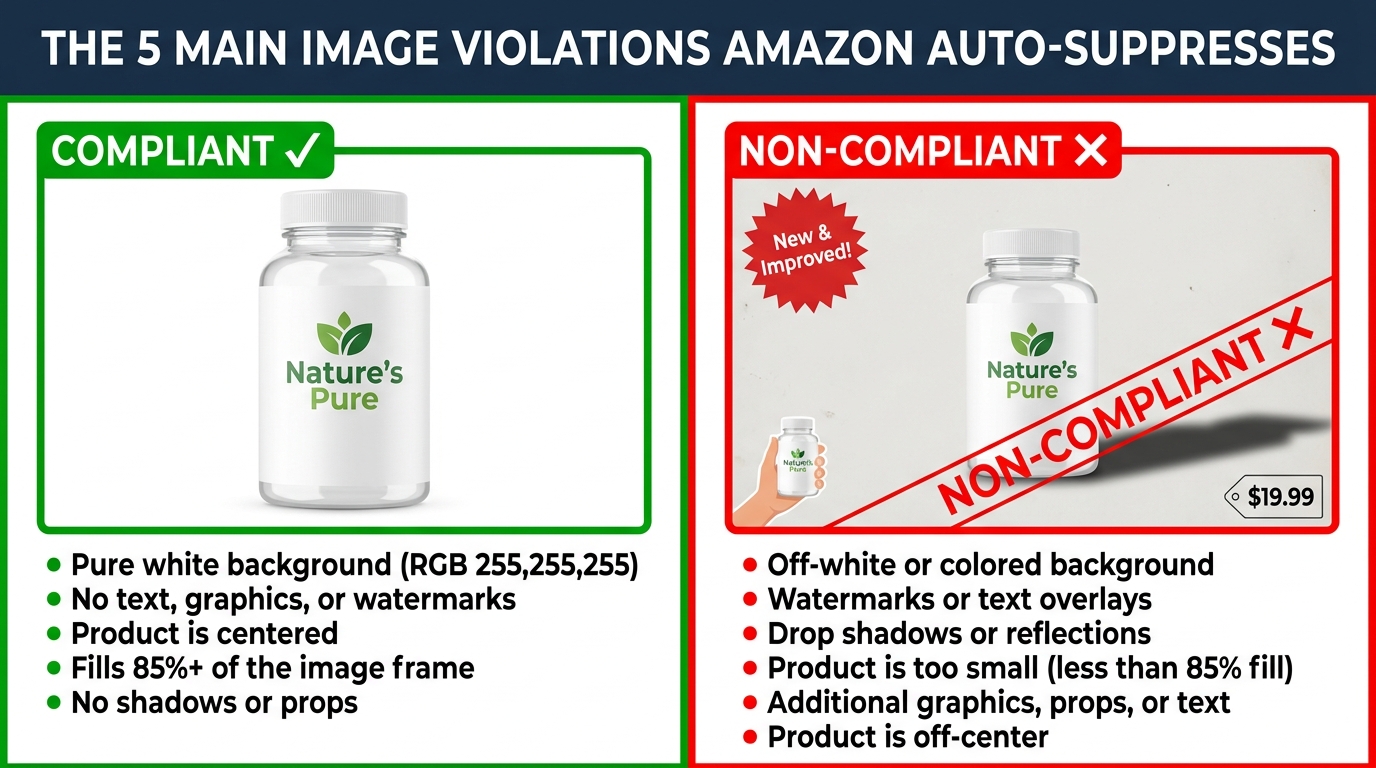
The main product image — the first image shoppers see in search results and at the top of the detail page — carries the strictest compliance requirements of any image type in Amazon’s catalog. Most suppression events in 2026 trace back to main image violations, and the majority of those violations cluster around five recurring failure modes.
1. Background Purity: Pure White or Nothing
Amazon’s product image requirements are unambiguous on this point: the main image background must be pure white, defined as RGB (255, 255, 255). Not off-white. Not eggshell. Not a very-light gray that looks white on a laptop screen. Pure white — the exact hex value #FFFFFF.
This is the single most common source of automated suppression in 2026. Off-white or slightly gray backgrounds often enter catalogs through photographers shooting on white seamless paper that picks up color from studio lighting, or through background removal tools that replace the original background with a near-white rather than a true white. The images look correct to the human eye, but Amazon’s automated checks read the RGB values precisely. A background that registers as RGB (250, 250, 250) or (245, 245, 248) fails the standard, even though it’s visually indistinguishable from compliant white in most display environments.
Drop shadows that extend to the edges of the image create a similar problem. A subtle shadow below a product — one that fades out before reaching the edge — is generally acceptable. A shadow gradient that bleeds into the background and pulls it away from pure white is not. The same applies to vignettes, subtle gradients, and edge blurring effects used by some photography workflows to create depth.
2. Frame Fill: The 85% Minimum
Amazon’s guidelines state that the product should occupy approximately 85% of the image frame. In practice, this means the product needs to be close-cropped and large within the image canvas. A product image where the item sits small in the center of a large white expanse will fail. This rule exists partly for visual consistency across search results and partly because the zoom function on product detail pages requires sufficient pixel density around the product itself to function effectively.
Frame fill violations commonly occur when sellers use images originally produced for other channels — websites, print catalogs, trade show materials — that were composed with generous white space around the product. Resizing the image without recomposing it doesn’t solve the problem; the product-to-frame ratio stays the same regardless of pixel dimensions.
3. Text, Logos, Watermarks, and Graphics
Main images must show the product, and only the product. No text overlays. No brand logos. No promotional badges — not “New Arrival,” not “Best Value,” not an award badge from a trade publication. No watermarks, including copyright watermarks. No borders, frames, or decorative graphic elements.
This rule is well-known but still routinely violated, most often by sellers who inherit images from manufacturers or brand partners whose standard creative assets include a logo watermark or a brand name superimposed in a corner. The violation isn’t intentional, but Amazon’s automated system doesn’t distinguish between deliberate and inadvertent. The flag fires the same either way.
4. Resolution and Pixel Dimensions
Amazon requires images to be at least 500 pixels on the longest side, but sellers operating at this floor are taking unnecessary risk. For a listing to support Amazon’s built-in product zoom feature — which has a measurable positive effect on conversion — images should be at least 1,000 pixels on the longest side, and ideally 2,000 pixels or higher. Images below the zoom threshold won’t be suppressed, but they will underperform. Images that fall below the absolute minimum are blocked at upload.
Amazon also enforces an upper ceiling of 10,000 pixels on the longest side. Files exceeding this aren’t a common problem, but some high-end photography and brand asset workflows produce extremely large files that need resizing before upload.
5. Image Accuracy and Product Misrepresentation
Amazon’s guidelines require that the main image shows the actual product being sold, as it would be received by a customer. This means no props that aren’t included in the purchase, no lifestyle context that makes a single product appear to be a bundle, and no rendering or illustration used in place of an actual product photo — unless the category specifically permits it (electronics and some home goods categories allow high-quality renders for main images).
The misrepresentation check is more complex than a pixel-level scan. It involves cross-referencing the visual content of the image with the listing’s product type, category, and ASIN attributes. This is one of the areas where human review plays a more significant role, particularly when the automated system flags a potential mismatch but can’t make a confident determination from image analysis alone.
The New AI-Generated Image Disclosure Requirement (July 2026)

The most significant new compliance requirement of 2026 has nothing to do with background color or pixel dimensions. In July 2026, Amazon announced a new disclosure requirement for product images, videos, and A+ Content that feature photorealistic AI-generated people. This requirement represents a structural shift in how image compliance intersects with creative production — and most sellers using AI imagery tools haven’t accounted for it yet.
What the Policy Actually Requires
Amazon’s July 2026 guidance, which was reported widely and tied to New York’s synthetic-performer disclosure law that took effect in June 2026, requires third-party sellers to add a specific metadata keyword to qualifying image and video files before upload. The required keyword is: contains-synthetic-performer.
This tag must be embedded in the file’s IPTC/XMP metadata in the dc:subject field — not added as a listing text field, not included in the product description, but embedded directly in the image file’s metadata before the file is uploaded to Seller Central. Amazon says it will surface a disclosure indicator to shoppers on qualifying listings where the tag is present and validated.
The requirement applies to any image or video that contains a photorealistic AI-generated person. This includes lifestyle product images featuring AI-generated human models, A+ Content module images featuring AI-generated people, and product videos that include synthetic human performers.
What the Policy Does Not Cover
The boundaries of this requirement are as important as the requirement itself. Amazon has confirmed the disclosure rule does not apply to:
- Real people whose images have been edited with AI — if a real human model was photographed and their image was subsequently retouched or modified using AI tools, the
contains-synthetic-performertag is not required. - Fictional characters — animated characters, illustrated figures, and non-photorealistic digital art don’t qualify as synthetic performers under this framework.
- Images with no people — product-only images, lifestyle shots without human models, and images featuring only hands or product-adjacent props (without a recognizable human figure) are not in scope.
- TV, video game, or movie characters — content already governed by other IP and disclosure frameworks is carved out of this requirement.
The Operational Compliance Challenge
The compliance burden here is genuinely new for most catalog and creative teams. Embedding metadata in image files before upload isn’t part of a typical product photography or image processing workflow. Most photo editing software — Adobe Photoshop, Lightroom, Capture One — supports IPTC/XMP metadata editing, but doing it consistently across a large catalog of assets requires either a manual per-file process or an automated tagging step built into the pre-upload workflow.
For sellers using AI image generation tools to create lifestyle imagery with human models — a practice that expanded dramatically as these tools became more accessible in 2024 and 2025 — this requirement means auditing the existing catalog for qualifying assets and retrofitting metadata tags before enforcement catches up with non-compliant files. Amazon has not published a hard enforcement start date for penalties against non-compliant assets at time of writing, but the metadata disclosure requirement is active, and enforcement cadence typically follows a policy announcement within 60 to 90 days.
Category-Specific Rules: Where the Baseline Doesn’t Apply
Amazon’s core image requirements provide a baseline that applies across the marketplace, but several major categories operate under supplemental rules that differ meaningfully from the standard. Understanding where your category diverges from the baseline is critical — what works for listing a kitchen gadget won’t necessarily work for listing an apparel item or a supplement.
Apparel and Footwear
Apparel is the most significant category departure from the standard white-background rule. For most clothing items, Amazon actually requires or strongly prefers that the main image feature a live model wearing the garment, or alternatively a ghost mannequin shot (an invisible mannequin technique that shows the garment’s fit and shape without a visible model). Flat-lay photography — the product laid out on a flat surface — is generally acceptable for some accessory and basic apparel categories but is less preferred and may underperform in search results for fashion-forward or fit-sensitive categories.
The purpose is practical: apparel shoppers make purchase decisions based on fit and drape, and a model or ghost mannequin image communicates fit information that a flat product image simply cannot. Amazon’s image compliance checks for apparel therefore include an additional assessment of whether the presentation appropriately represents how the garment would be worn.
Jewelry
Jewelry main images typically follow a stricter product-only standard — no model, no lifestyle context, no props. The product itself, centered on a pure white background, filling the frame at the correct ratio. Jewelry categories benefit from high-resolution images even more than most product types because the zoom function matters significantly to shoppers evaluating texture, finish, and detail at the level a physical examination would provide. Images below 2,000 pixels on the longest side leave conversion on the table in this category even when they clear the compliance minimum.
Beauty and Personal Care
Beauty categories follow the standard white-background rules for main images, but face particularly strict scrutiny on one dimension that’s distinct from other categories: image-to-product accuracy. Amazon’s compliance checks in beauty cross-reference visible label claims on the product in the image with the claims made in the listing. If the product packaging visible in the image conflicts with listing attributes — different size, different formulation claim, different featured ingredient — this can trigger a suppression or a more serious policy review.
Beauty sellers who use “hero” product images that were photographed for a previous packaging version and not updated after a reformulation or rebrand face meaningful suppression risk under this cross-referencing check. The image doesn’t need to look wrong; it needs to accurately represent the specific product being sold today.
Dietary Supplements and Health Products
Dietary supplement images are reviewed with an additional layer of scrutiny tied to Amazon’s broader regulated products compliance framework. Images of supplement products that feature visible label text with structure/function claims — statements about what the product does for the body — are cross-referenced with the listing’s product description and bullet points. Discrepancies can trigger compliance holds. Amazon also applies automated checks for label readability and accuracy in this category, making it one of the few product types where the text visible within the product image (on the label) is part of the compliance check, not just the decorative elements around the image.
Secondary Images and A+ Content: Different Standards, Distinct Risks
Main image requirements get the most attention from sellers and compliance guides, but the secondary image slots and A+ Content modules operate under their own distinct rule sets — and violations in these areas carry real consequences even though they don’t immediately suppress a listing the way a main image violation does.
Secondary Images: More Flexibility, Same Scrutiny
Secondary images — the additional product photos displayed in the image carousel on a detail page — have significantly more flexibility than main images. Lifestyle photography, in-use shots, size comparison images, product detail close-ups, and infographic-style images with text overlays are all permitted in secondary slots. Props that aren’t included in the purchase are allowed. Background colors other than white are permitted. This creative latitude is where sellers can show product context, demonstrate use cases, and communicate the features a pure product shot can’t convey.
However, secondary images aren’t a compliance-free zone. They must still accurately represent the product. They cannot include false or misleading claims — price claims, performance guarantees, unsubstantiated comparative statements, or regulatory claims that Amazon’s policies prohibit. Lifestyle images must not depict scenarios that imply the product does something it doesn’t.
The minimum technical requirements for secondary images include: supported formats (JPEG is recommended; PNG and TIFF are accepted), a minimum of 1,000 pixels on the longest side for zoom functionality, and sRGB color space. Secondary images don’t require a white background, but they do require that the product being sold is clearly identifiable in the image.
A+ Content: Stricter Technical Rules, Unique Content Requirement
A+ Content images have their own technical specification that differs from the standard listing image requirements. Amazon’s A+ Content guidelines require:
- Static images only — no animated GIFs, no moving elements
- Supported formats: JPEG, PNG, or BMP
- Color space: RGB only — CMYK files are not supported and will fail on upload
- File size: under 2 MB per image
- Minimum resolution: 72 dpi
- No watermarks, QR codes, hyperlinks, or animated elements
- No pricing or promotional claims embedded in images
One compliance requirement that catches sellers and agencies off guard: A+ Content images and text must be unique to A+. Amazon’s guidelines state that you should not reuse images already present in the standard product image gallery within A+ Content modules. This is both a content quality requirement and a compliance issue — A+ is intended to add value beyond the standard listing, not replicate it.
The CMYK color space issue is particularly common when A+ Content is designed by an agency or design team that works primarily with print materials. Print workflows default to CMYK; digital workflows default to RGB. An asset that looks identical on a design monitor can fail on upload purely due to the embedded color profile, with no visual indication that anything is wrong until the upload error appears.
The Real Suppression-to-Recovery Timeline
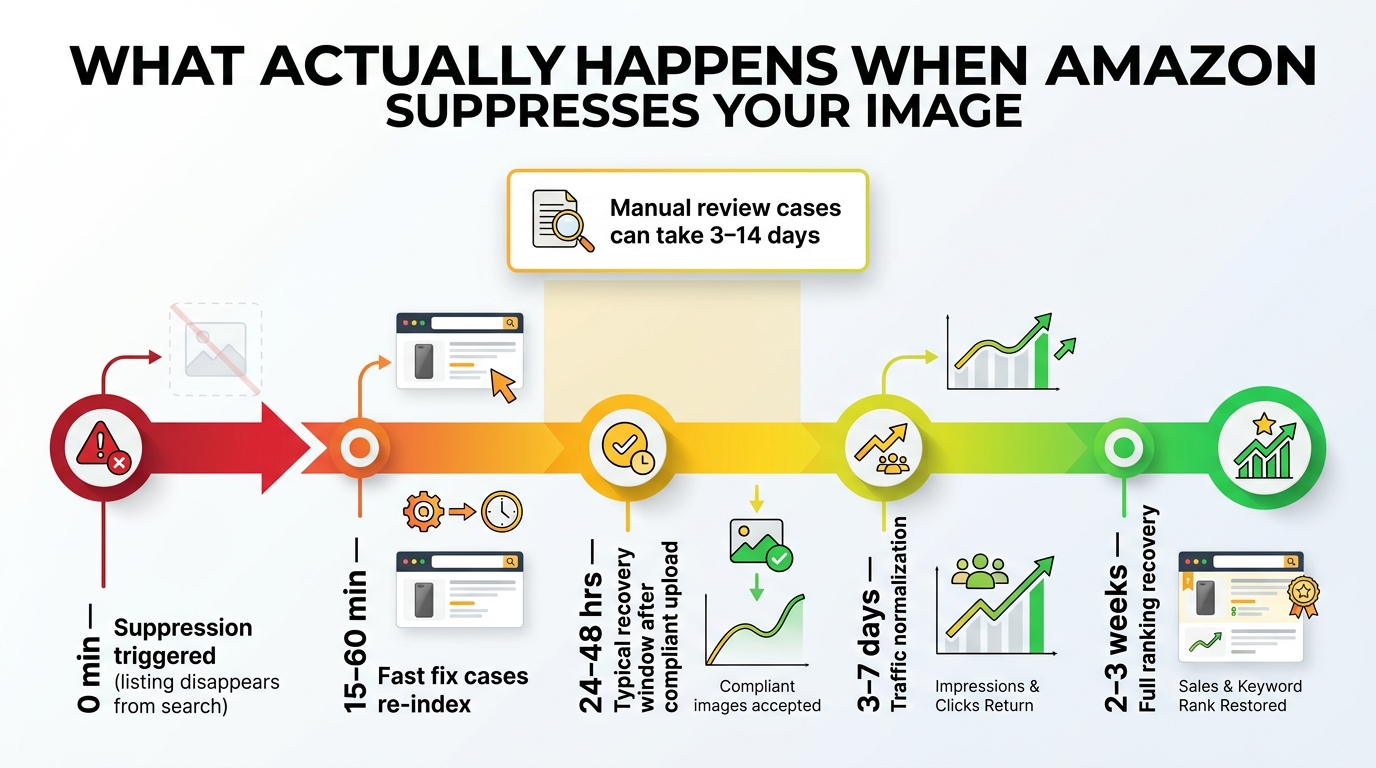
Understanding the mechanics of suppression is one thing. Understanding how long it actually takes to recover — and what the recovery looks like in terms of real sales and ranking impact — is something sellers often underestimate until they’ve lived through it.
The Suppression Event
When Amazon’s automated compliance system flags a main image violation, suppression can be near-immediate. Seller reports from 2026 describe listings disappearing from search results within minutes of a compliance flag firing — sometimes during a peak sales period with no advance warning. The listing technically still exists in the catalog, but it’s been removed from search and browse indexing, which means it generates zero organic traffic until the violation is resolved.
Amazon does not reliably send proactive notification of image suppression at the moment it occurs. Sellers who monitor their Account Health dashboard or use third-party listing management tools that poll Seller Central status will catch it faster. Sellers who check their account weekly might not notice for days — by which point they’ve lost significant revenue and the suppression may have begun affecting ranking signals.
The Recovery Window
Recovery timelines vary based on the type of violation and whether the case involves automated or manual review. Seller experience and 2026 guidance consistently points to three distinct scenarios:
Fast-track recovery (15 minutes to 24 hours): Straightforward technical violations — background color, frame fill, resolution — that can be resolved by uploading a compliant replacement image. Once a valid compliant image is in the system, Amazon’s review cycle typically re-evaluates and restores the listing’s search eligibility within this window. Some sellers report restoration in under an hour for simple fixes.
Standard recovery (24 to 72 hours): The most common outcome for most image compliance violations. After uploading a corrected image, sellers should expect to wait one to three days for Amazon to process the change, update the listing status, and allow re-indexing to propagate through search. During this window, the listing remains suppressed even though the compliant image has been submitted.
Extended review (3 to 14 days or more): Cases that involve Amazon’s manual review process — typically triggered by content violations, suspected misrepresentation, AI disclosure issues, or repeat violations on the same ASIN — take significantly longer. These cases may require escalation through Seller Support, and the outcome isn’t always restoration without additional documentation or account-level review.
Traffic and Ranking Recovery Lag
Here’s the part most guides don’t cover: even after a listing is reinstated — the suppression cleared, the image accepted, the ASIN back in search results — the ranking and traffic don’t recover immediately. Data from seller experience and 2026 field reports suggests that traffic normalization takes three to seven days after reinstatement. Full ranking recovery, particularly for ASINs that were suppressed during a high-sales period or for long enough to accumulate a negative sales velocity signal, can take two to three weeks.
This recovery lag matters because it shapes how sellers should think about the cost of suppression. The direct revenue loss during the suppressed period is the visible cost. The indirect cost — the slower organic recovery, the paid traffic required to compensate while ranking rebuilds, the potential loss of category rank position to competitors who filled the gap — is often larger than the direct loss and much harder to recover from quickly.
How Image Violations Interact With Catalog Health
In earlier years, image compliance was largely treated as a listing-level issue: a problem with an individual ASIN that was resolved when the image was fixed. In 2026, the relationship between image violations and broader catalog health metrics is more complex and consequential.
The Listing Quality Dashboard Connection
Amazon’s Listing Quality Dashboard has become an increasingly central tool for sellers managing large catalogs. The dashboard scores ASINs on attribute completeness, content quality, and compliance status. ASINs with image violations feed into this scoring in a way that wasn’t consistently present in earlier versions of the dashboard. A catalog with multiple suppressed or non-compliant images will see its aggregate listing quality score decline, which can affect how Amazon treats the catalog’s organic performance more broadly.
Field data from July 2026 indicates that ASINs falling below a 65% attribute completeness score — a threshold that image violations contribute to — lost an average of 4.2 organic positions over a 21-day period. In regulated and competitive categories, the threshold for Buy Box suppression based on listing quality concerns appeared around the 60% mark. These numbers underscore that image compliance isn’t just about individual listing status — it’s about how your catalog signals quality and trustworthiness to Amazon’s ranking and eligibility systems.
Account Health Rating (AHR): The Indirect Effect
Image compliance violations don’t directly lower your Account Health Rating in the same way that policy violations, late shipment rates, or order defect rates do. AHR is driven by a distinct set of performance metrics. However, the relationship is indirect rather than absent. Repeat image violations on the same ASIN, particularly if they involve suspected misrepresentation or prohibited content rather than purely technical issues, can escalate from a listing-level suppression to a policy warning that does register in Account Health.
More practically: a suppressed listing reduces sales velocity on affected ASINs, which can cascade into revenue-per-session metrics, conversion rate signals, and category rank position — all factors that influence how Amazon’s systems allocate organic visibility across the catalog. The account health impact is indirect but real, especially for sellers where suppressed ASINs represent a meaningful share of catalog revenue.
Building an Operational Image Compliance Audit Workflow
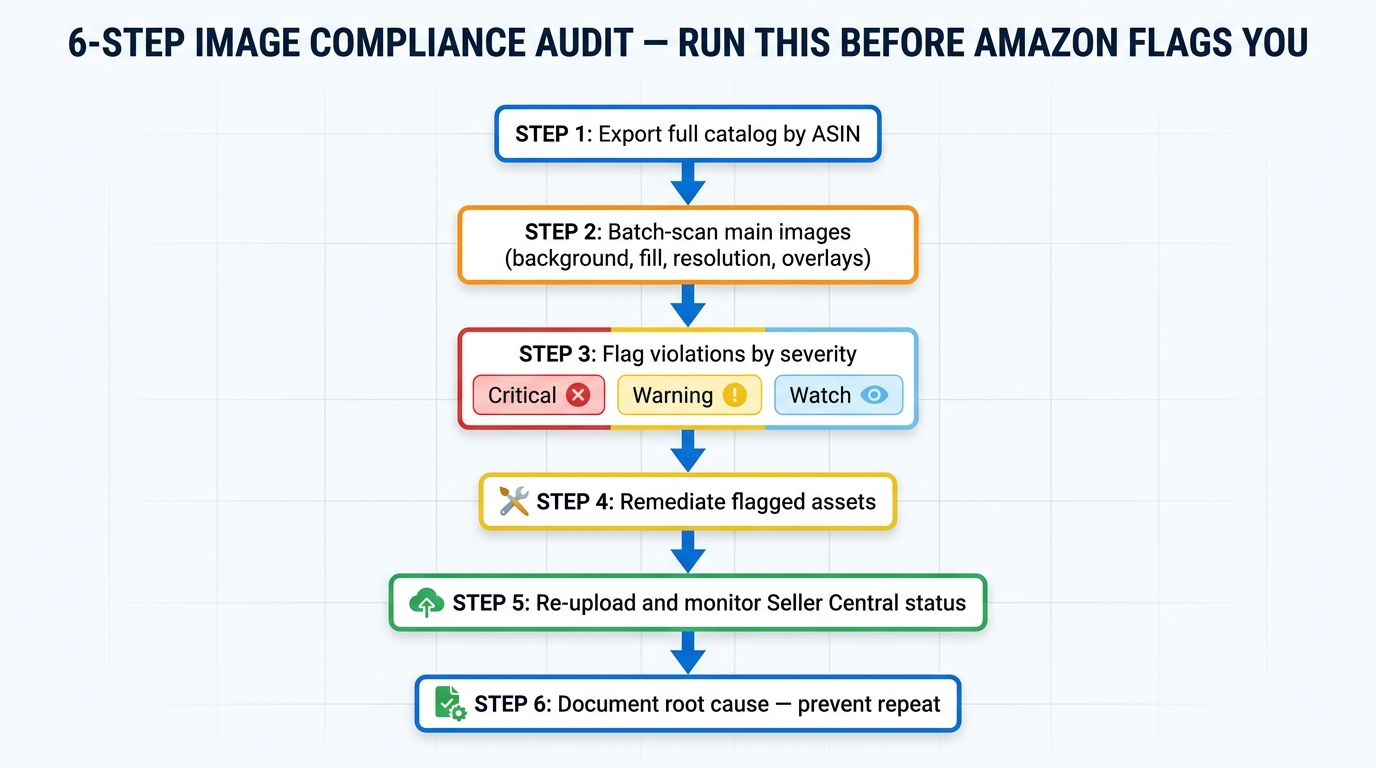
The difference between sellers who get hit repeatedly by image suppression and those who don’t usually comes down to process — specifically, whether they have a proactive audit workflow or a reactive one. The following six-step process represents the operational standard for managing image compliance at catalog scale in 2026.
Step 1: Export and Organize Your Catalog by ASIN
Start with a full catalog export from Seller Central. Use the Inventory Report or the Listing Quality Report to pull your complete ASIN list with current status. Organize assets by ASIN, with each ASIN’s image URLs captured and mapped to image slot position (main image, image 2, image 3, etc.). For large catalogs, this is best handled with a spreadsheet or catalog management tool rather than manually browsing Seller Central.
At this stage, flag any ASINs already showing a “Suppressed” or “Inactive” status for immediate priority remediation. These are the fires burning now. The rest of the audit is about finding the smoke before it ignites.
Step 2: Batch-Scan Main Images for Technical Violations
Run each main image through a systematic compliance check. The specific checks to prioritize are:
- Background RGB value — Is it exactly (255, 255, 255)? Tools like Adobe Photoshop’s eyedropper, online color analyzers, or bulk image processing scripts can check this across hundreds of images efficiently.
- Frame fill estimation — Does the product occupy approximately 85% or more of the frame? This can be checked visually in batches or with automated tools that measure non-background pixel area.
- Resolution — Is the longest side at least 1,000 pixels (ideally 2,000+)?
- Text and overlay detection — Are any text elements, logos, watermarks, or graphic elements present in the image?
- Shadow and gradient audit — Do any shadows or gradients extend to the image edge, pulling the background away from pure white?
In 2026, a growing number of sellers are using AI-assisted batch image auditing tools — either standalone software or custom scripts built around computer vision APIs — to run these checks at scale without manual image-by-image review. For catalogs under a hundred ASINs, manual review is feasible. For catalogs of several hundred to thousands of SKUs, automated scanning is the only practical approach.
Step 3: Flag Violations by Severity
Not all compliance issues carry the same urgency. Categorize flagged issues into three tiers:
- Critical — Violations that will trigger or are already triggering automated suppression: non-white backgrounds, text/logo overlays on main image, missing AI disclosure metadata on qualifying assets. These need immediate remediation, measured in hours not days.
- Warning — Violations that may not trigger immediate suppression but create risk: low resolution, borderline frame fill, shadows near the image edge. These need remediation within the current week.
- Watch — Borderline cases or secondary image issues that don’t meet the threshold for likely suppression but represent quality concerns. Schedule for next review cycle.
Step 4: Remediate Flagged Assets
Remediation approach depends on the violation type. Background corrections — converting near-white backgrounds to true white — are straightforward in image editing software and can be batched efficiently. Frame fill issues require recomposing or recropping images, which may need a brief photography or editing session for products where the existing image simply doesn’t contain enough product-fill data to crop correctly without degrading quality.
Text and overlay removal requires clean editing to preserve the underlying product image, particularly for images where the original photo file without the overlay may not be available. Watermark removal from inherited manufacturer images sometimes requires going back to the manufacturer for clean originals.
For AI-generated people disclosure: embed the contains-synthetic-performer tag in IPTC/XMP metadata using image editing software or a metadata management tool before re-upload. This is a non-destructive process that doesn’t alter the visual content of the image.
Step 5: Re-Upload and Monitor Status
Re-upload corrected images through Seller Central — either individually through the Manage Inventory image editor or in bulk via flat file. After upload, monitor the listing status in Seller Central over the following 24 to 72 hours. A listing that was suppressed due to an image violation should show a status change once Amazon’s system processes the compliant replacement. If the status doesn’t change within 72 hours of uploading a compliant image, escalate through Seller Support with documentation showing the corrected image and the violation that was addressed.
Step 6: Document Root Cause and Prevent Recurrence
This step is the one most sellers skip, and it’s why they face the same violations repeatedly. For each remediated violation, document the root cause: where did this image come from? What process or source produced a non-compliant asset? What change is needed to prevent the same issue from recurring in future catalog additions?
Common root causes include photography vendors who produce near-white rather than true-white backgrounds, design teams working in CMYK for A+ Content, manufacturer-provided images with embedded watermarks, and image generation workflows that produce AI people imagery without a metadata tagging step. Solving the root cause at the source prevents the same compliance review cycle from repeating every quarter.
The Compliance Mistakes That Fly Under the Radar
Beyond the high-profile, well-documented violations, a set of subtler compliance mistakes consistently surfaces in seller catalog audits — the kind that don’t trigger immediate suppression but create vulnerability as Amazon’s automated checks become more sophisticated over time.
The “Looks White to Me” Trap
Display calibration and ambient lighting conditions mean that an image appearing perfectly white on one monitor looks slightly gray on a calibrated display or in a direct color-value check. Design teams working on uncalibrated monitors or in environments with warm ambient lighting are particularly prone to this. The only reliable check is reading the actual RGB values of the background — not looking at it. Build the RGB check into your standard image QA process and remove reliance on visual judgment for background color.
Inherited Catalog Images from Brands or Wholesale Suppliers
Sellers who list products from multiple brands or who operate as wholesale resellers frequently rely on manufacturer-provided or brand-provided images rather than producing their own. These images were not produced for Amazon. They were produced for brand websites, print catalogs, trade shows, or retail display. They routinely have branded watermarks, color backgrounds, insufficient frame fill, or embedded logos. The listing compliance responsibility sits with the seller regardless of image source — and the catalog review cycle doesn’t care who took the photo.
Seasonal and Promotional Overlays on Main Images
Holiday promotional images — a product image with a “Great Gift!” badge or a “Limited Edition” holiday banner — are common in the weeks leading up to peak sales periods, particularly Q4. Sellers applying these overlays to main images are in direct violation of the no-text-on-main-image rule. Amazon’s automated checks don’t make exceptions for promotional seasons, and the suppression risk during the highest-revenue period of the year is particularly damaging. Promotional context belongs in A+ Content and Enhanced Brand Content, not the main image.
Images Updated Elsewhere But Not on Amazon
Sellers who maintain product imagery across multiple channels — their own website, retail partners, online marketplaces — sometimes update images on those other channels without updating Amazon separately. This most commonly happens when a product undergoes a packaging update: the new packaging goes live on the brand website, but the Amazon listing still shows the old packaging. Over time, this creates a growing gap between what Amazon shows and what the customer receives — a gap that Amazon’s cross-referencing checks are increasingly capable of detecting in regulated categories.
A+ Content Duplicate Images
Uploading the same images from the standard listing gallery directly into A+ Content modules is a compliance violation under Amazon’s uniqueness requirement — and it undermines the conversion purpose of A+ Content simultaneously. Build A+ assets as purpose-built module images, not repurposed versions of images already in the image carousel.
A Practical Compliance Checklist: Run This Before Amazon Does
The following checklist consolidates the compliance requirements covered in this guide into an actionable reference. Run this against your catalog on a regular cadence — quarterly at minimum, monthly for high-velocity or rapidly-growing catalogs.
Main Image Checklist
- ☐ Background is pure white: RGB (255, 255, 255) — verified by color value check, not visual inspection
- ☐ Product fills approximately 85% or more of the image frame
- ☐ No text, logos, watermarks, or graphic overlays present
- ☐ No borders, vignettes, or shadows reaching the image edge
- ☐ Longest side is at least 1,000 pixels (2,000+ recommended for zoom support)
- ☐ Image accurately represents the product as currently sold — no outdated packaging
- ☐ File format is JPEG, PNG, TIFF, or non-animated GIF
- ☐ File is named with the product identifier (ASIN, UPC, or EAN) followed by the variant code
- ☐ For categories requiring model presentation (apparel): model or ghost mannequin present
AI Disclosure Checklist
- ☐ Does the image contain a photorealistic AI-generated person? If yes:
- ☐ Has the
contains-synthetic-performerkeyword been embedded in the file’s IPTC/XMPdc:subjectmetadata field before upload? - ☐ Has the A+ Content or video asset been similarly tagged if applicable?
- ☐ Real people edited with AI, fictional characters, and images without people: confirm these are NOT tagged (incorrect tagging creates its own compliance signal)
Secondary Images and A+ Content Checklist
- ☐ A+ Content images are in JPEG, PNG, or BMP format — not CMYK, not animated GIF
- ☐ A+ files are under 2 MB each
- ☐ A+ images are unique to A+ — not duplicated from the standard image carousel
- ☐ No QR codes, hyperlinks, or pricing/promotional claims embedded in A+ images
- ☐ Secondary images don’t include unsubstantiated performance claims or prohibited regulatory statements
- ☐ Secondary images accurately represent the product (no bundle implication for single-unit listings)
Conclusion: Compliance as a Proactive Discipline, Not a Reactive Fix
Amazon’s 2026 image compliance environment is more automated, more integrated with catalog health scoring, and more consequential than most sellers have historically treated it. A listing that goes dark due to a background color check failing is a solvable problem. A catalog where multiple ASINs have accumulated image compliance risk, where suppression events have quietly accumulated ranking damage over weeks, and where new creative workflows are producing AI-generated imagery without proper disclosure metadata — that’s a structural problem that doesn’t resolve itself when you fix one image.
The July 2026 AI synthetic performer disclosure requirement is the clearest signal that Amazon’s image compliance framework is no longer just about technical image quality. It now intersects with regulatory law, content authenticity, and buyer transparency in ways that require creative teams, catalog managers, and compliance functions to coordinate in ways they previously haven’t had to.
The sellers who are least affected by image compliance enforcement are the ones who treat it as a proactive, recurring operational discipline rather than a problem they address after Seller Central flags them. That means scheduled catalog audits, documented image quality standards for every creative source in the workflow, root-cause remediation for violations rather than just fixing the symptom, and a clear internal process for new content types — including AI-generated imagery — that builds compliance into the creation step rather than bolting it on at the end.
Suppression will happen. Amazon’s systems catch things that human QA processes miss. The goal isn’t to eliminate every possible compliance event — it’s to catch them yourself first, fix them faster when they do occur, and prevent the same root causes from generating the same violations repeatedly across your catalog.
The core principle is straightforward: compliance isn’t what you do when Amazon catches you. It’s what you build into the workflow so that Amazon’s check is a confirmation, not a surprise.
Leave a Reply