Most of the conversation about AI and Amazon product images orbits one narrow question: which tool should I use? Sellers swap tool recommendations, test backgrounds in Photoroom, run a few prompts through Midjourney, and declare the experiment a success or a failure based on whether the first few outputs looked good. That framing misses the actual problem.
The AI image tools themselves — the generators, editors, and background removers — are the easy part. They are commoditised, widely accessible, and improving every month. What separates the sellers and brands running AI image production at catalog scale from the ones stuck in a loop of manual rework is not which tool they picked. It is whether they built a pipeline.
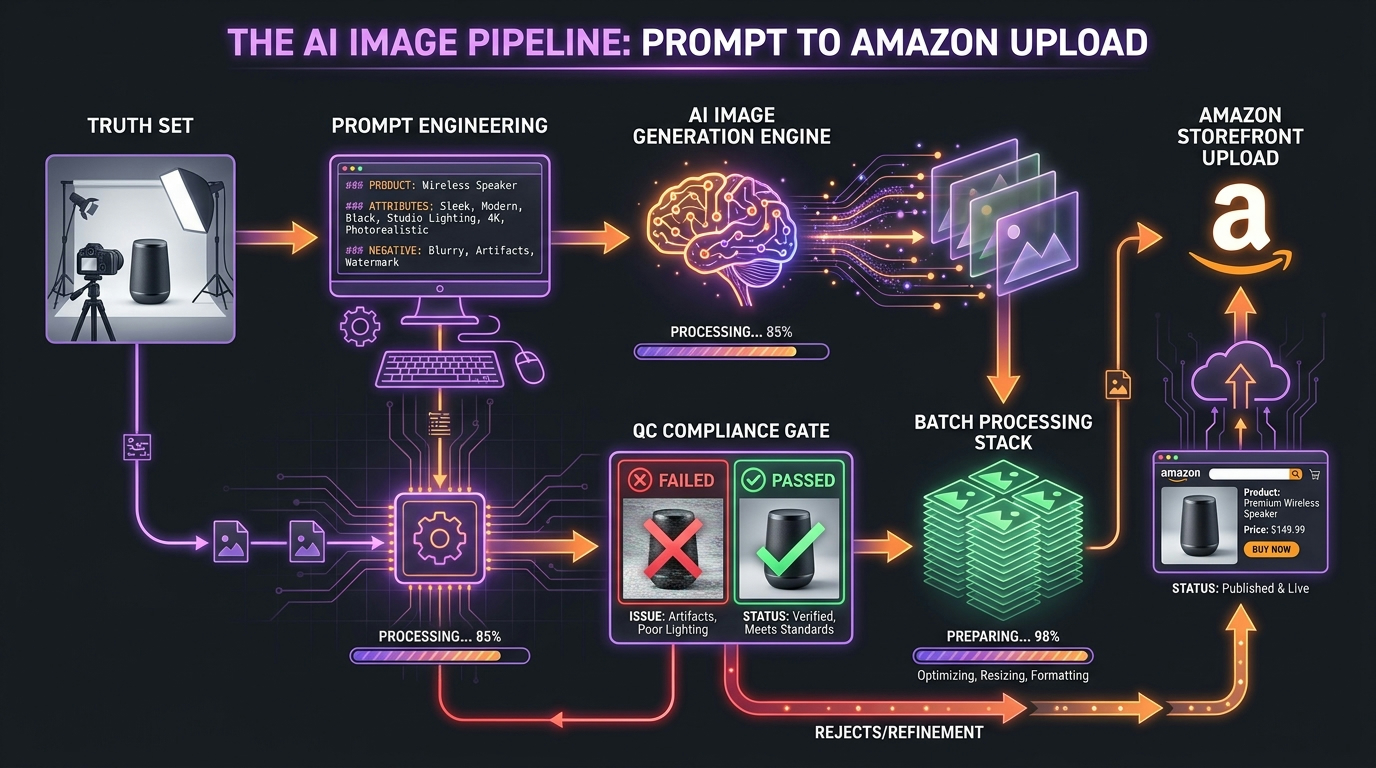
A pipeline is a sequenced system: structured inputs at one end, compliant, high-converting Amazon assets at the other, with defined checkpoints, automated gates, and clear human handoff points in between. Without that architecture, AI image generation creates a different kind of chaos than traditional photography — faster, cheaper chaos, but chaos all the same.
This guide is an operator’s manual for building that system. It covers every stage of the pipeline in sequence: what to capture before the AI touches anything, how to write prompts that produce repeatable outputs, which tools own which stages, how automated compliance checking actually works, how to structure batch processing across hundreds of SKUs, and how to connect the output directly to Amazon’s listing infrastructure through the Selling Partner API. We will also catalogue the failure modes that break pipelines in production — not in theory — and give you the cost model to know what a mature system should actually deliver.
Whether you are running 50 SKUs or 50,000, the pipeline logic is the same. The scale just changes the urgency of getting it right.
Why This Is a Pipeline Problem, Not a Prompt Problem
It is worth being precise about what breaks when people treat AI image generation as a one-step activity. The assumption is: write a good prompt, get a good image, upload it. In practice, that chain has at least eight distinct failure points before the image reaches a live listing — and most of them have nothing to do with the quality of the prompt itself.
The Single-Shot Fallacy
Single-shot AI image workflows collapse under three pressures that do not exist when you are generating one or two test images. The first is consistency across variants. A product that comes in six colorways needs six images where the only variable is the color — not the angle, not the shadow, not the scene composition, not the background tone. Prompt-to-prompt variation in most AI models makes this extremely difficult without a systematic approach to seed management, reference images, and model settings.
The second pressure is compliance at volume. Amazon’s main image requirements are strict: pure white background (RGB 255, 255, 255), product filling at least 85% of the frame, no text or watermarks, no props in the primary slot, no borders, no additional products. A single noncompliant image on one ASIN is a minor problem. The same error pattern running across 200 SKUs is a catalog management crisis that can trigger suppression at scale.
The third pressure is upload and activation at speed. Generating images is one activity. Getting them correctly named, correctly sized, correctly formatted, and correctly associated with the right ASINs in Amazon’s catalog is a completely separate workflow — and one that breaks constantly when teams treat it as an afterthought.
What a Pipeline Actually Solves
A structured pipeline solves all three problems by separating them. Each stage has defined inputs, defined outputs, defined success criteria, and a defined owner — human or automated. Nothing moves to the next stage until the previous stage passes its gate. That sounds obvious. It is surprisingly rare in practice.
The pipeline described in this guide has six functional stages: Truth Set capture, Prompt Architecture, Tool-Stage Matching, Compliance QC, Batch Processing, and Upload Infrastructure. Each section below covers one stage in depth.
Stage 1 — The Truth Set: What AI Actually Needs From You

Every AI image pipeline starts with a human activity: capturing a controlled set of real product photographs that will serve as the ground truth for everything that follows. This is the Truth Set, and it is the most important stage in the pipeline — precisely because skipping it is so tempting.
Why You Cannot Skip the Truth Set
Amazon’s image policy is unambiguous on one point: the product shown in any listing image must accurately represent the item being sold. That means AI cannot be used to fabricate a product — it can only be used to place, enhance, and present a product that you have accurately documented first. This is not just a policy constraint. It is a practical one: AI models are very good at generating plausible-looking products, and very bad at generating your specific product with your specific label, in your specific colorway, with your specific hardware and finishing details, without a reference.
Without a Truth Set, you end up with images that look like your product the way a description sounds like it — roughly right, with details that drift. A button moves. A logo blurs. A color shifts two shades. These are not edge cases; they are the default output behavior of any generative model working without a grounding reference.
What the Truth Set Capture Requires
The standard recommendation from practitioners running production pipelines is 10 to 15 raw reference photographs per SKU. These do not need to be studio-quality finished images. They need to be technically clean: consistent lighting (preferably diffuse white light in a lightbox), no harsh shadows, neutral background, sharp focus across the product surface, and coverage of every angle and detail the AI will need to reference.
The minimum angle coverage for a typical physical product should include: front face (the primary view), back face, left and right profiles, 45-degree hero angle, top-down, detail close-ups of key features, and any openings, closures, or functional elements. For apparel or accessories, flat-lay and hanging shots should be included. For products with packaging, capture both packaged and unpackaged states.
Organizing the Truth Set for Pipeline Use
The Truth Set is not just an image library — it is a structured data asset. Each SKU’s reference images should be stored with consistent naming conventions that link them back to the catalog: ASIN or parent SKU identifier, angle code, variant code, and capture date. This metadata becomes essential at the batch processing stage, when the pipeline needs to know which reference files map to which output requirements.
A practical naming convention looks like: [ASIN]_[ANGLE]_[VARIANT]_[DATE].jpg — for example, B09XZ12345_HERO_RED_20260315.jpg. Simple, machine-readable, and traceable. Teams that skip this step create a bottleneck at batch time that costs far more in manual rework than the time they saved by not naming files properly at capture.
One more thing: the Truth Set should be treated as a versioned asset, not a static archive. When a product changes — a packaging update, a component revision, a regulatory label change — the Truth Set gets updated, and the AI generation run is re-executed against the new reference. This traceability is what keeps your catalog images accurate over time, not just at launch.
Stage 2 — Prompt Architecture: Writing for Repeatability, Not Artistry
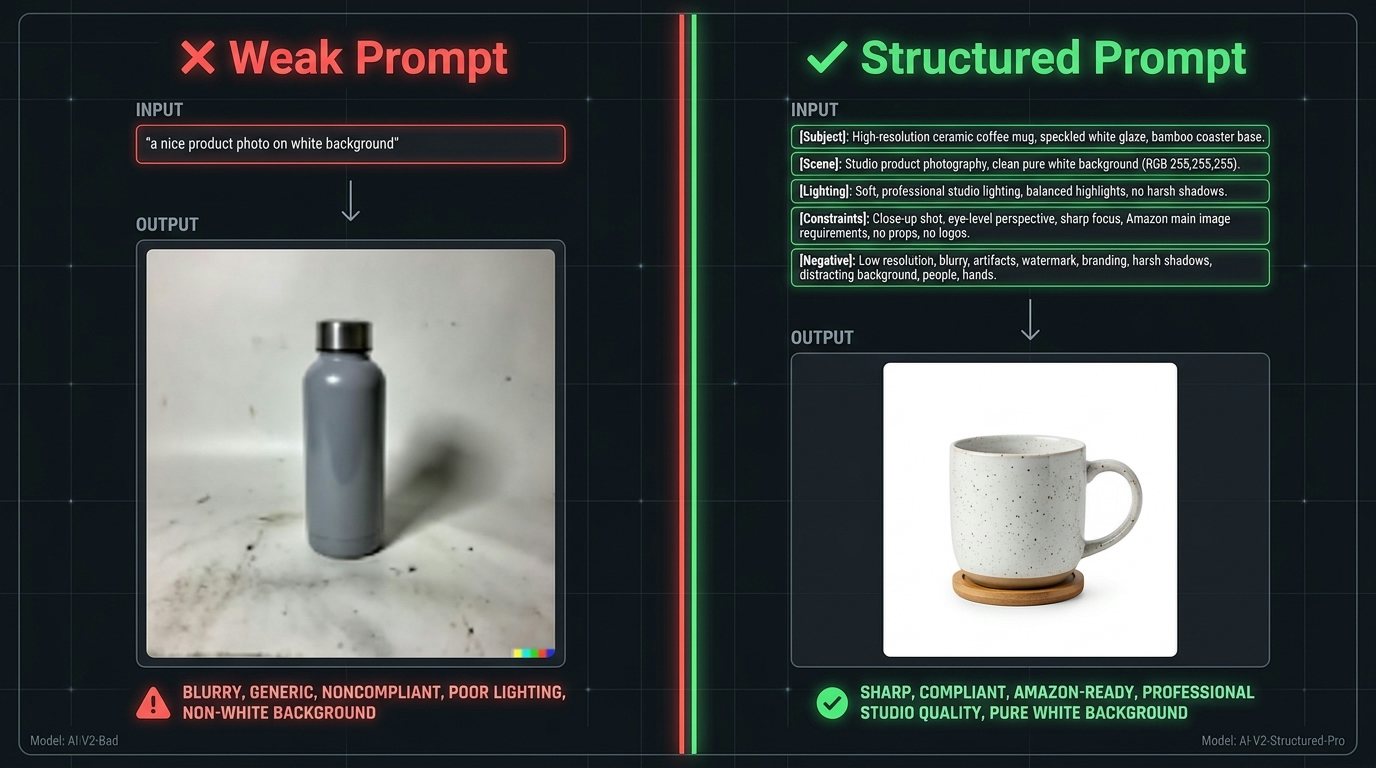
Most prompt-engineering advice for AI image generation is written for creative exploration: how to get interesting, beautiful, surprising results. Amazon product photography needs almost the opposite quality — you want prompts that produce predictable, consistent, constrained results that land within a compliance envelope every time. The prompt architecture for a production pipeline is engineered, not improvised.
The Five Fields of a Structured Product Prompt
A well-structured product image prompt for Amazon use should cover five distinct fields, regardless of which AI model you are using:
- Subject: A precise description of the product, referencing the actual item — not a generic category. “A 32oz stainless steel water bottle with a matte black finish, single-color logo on the front, and a rubberized flip-top lid” is a subject field. “A water bottle” is not.
- Scene: The environment, surface, and context the product should appear in. For main images, this is always “pure white seamless background.” For lifestyle secondaries, describe the scene as specifically as possible — “a natural oak wood table near a window with soft morning light, green plants in background, shallow depth of field.”
- Lighting: Direction, quality, and color temperature. “Soft diffuse studio lighting, slight highlight on product left edge, no harsh shadows, white light temperature” is functional. “Good lighting” is not. For lifestyle images, “natural window light, warm, golden hour” works well.
- Technical constraints: Resolution guidance, camera angle specification, framing requirements. “Product centered, occupying approximately 90% of frame, shot at eye level, landscape format 2000x2000px” removes most of the compositional drift that causes compliance failures.
- Negative constraints: What must not appear in the image. This field is underused and critically important. “No text, no watermarks, no additional products, no hands, no props, no border, no vignette, no background gradients” reduces artifact and compliance failures substantially.
Amazon’s Own Prompt Guidelines
Amazon’s guidance for its native image generation tools — inside Ads Console and Creative Studio — is instructive even when you are using third-party generators. Amazon recommends keeping prompts concise, describing the product as already present in the scene, and avoiding action verbs and negative phrasing. Their approach favors scene-first descriptions: rather than “remove the background and place the product on a table,” write “the product sitting on a natural wood surface with soft studio lighting.”
This scene-first framing works because it gives the model a complete picture to generate toward, rather than a set of operations to perform. Operations are instructions; scenes are targets. Models respond better to targets.
Building a Prompt Template Library
In a production pipeline, prompts should not be written from scratch for each SKU. The correct approach is to build a prompt template library — a set of validated, tested prompt structures for each image type you produce. Common types include: white-background main image, hero lifestyle (indoor), hero lifestyle (outdoor), detail or close-up, infographic overlay, comparison, and packaging shot.
Each template has fixed fields (scene, lighting, constraints) and variable fields (subject description, specific background elements). New SKUs get the template applied with their subject description filled in. This reduces prompt variation, which reduces output variation, which reduces compliance failures and rework at QC.
Version-control your prompt templates the same way you version-control software. When a template change improves output quality, document what changed and why. When Amazon updates its image policy, review your templates against the new requirements before the next batch run. Your prompt library is an operational asset — treat it as one.
Stage 3 — Tool-Stage Matching: Which AI Tool Owns Which Part of the Pipeline
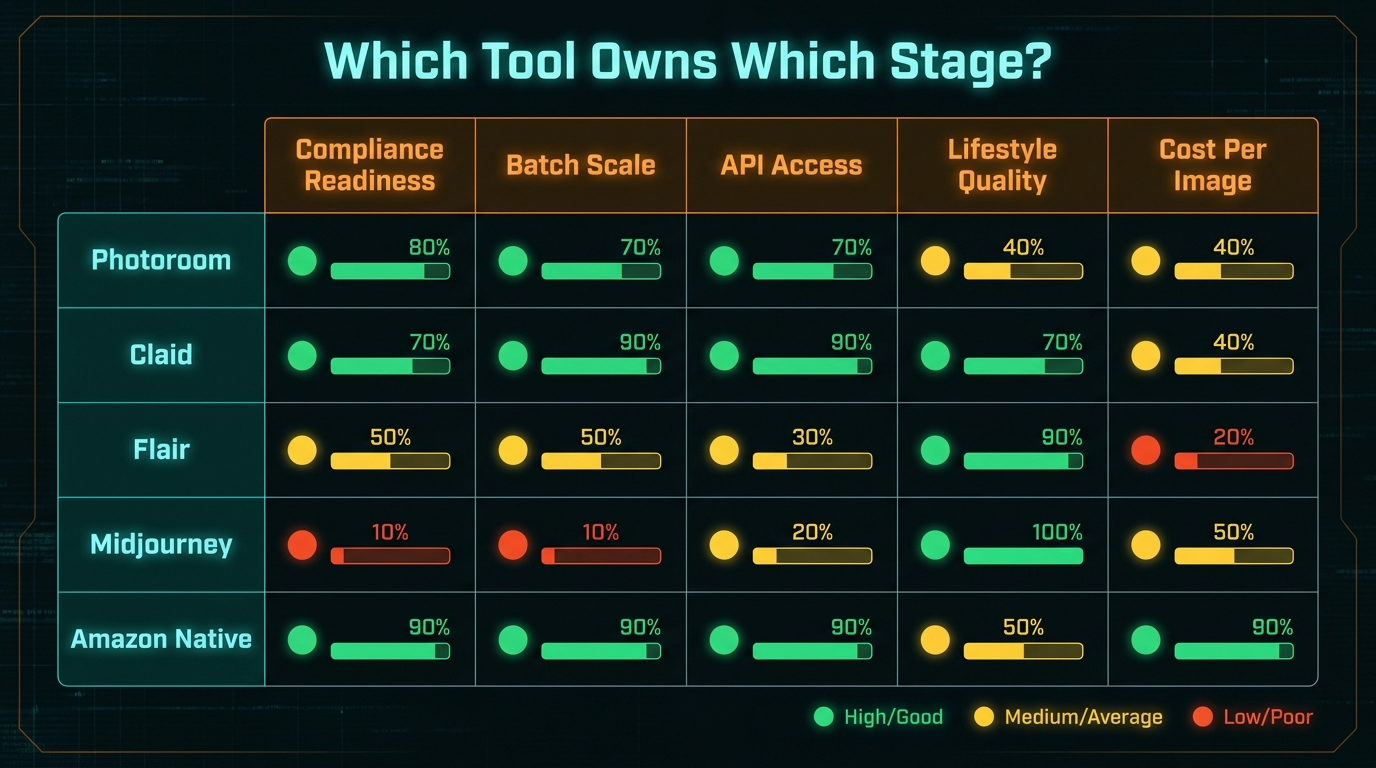
One of the most persistent misconceptions about AI image pipelines is that you need one tool that does everything. The reality in 2026 is that the best-performing pipelines use a deliberately tiered tool stack — different tools at different stages, chosen for specific capabilities rather than general versatility. Here is how the major tools map to pipeline stages.
Photoroom: The Ecommerce Workhorse
Photoroom is consistently positioned as the most practical choice for teams that need fast, marketplace-ready outputs from existing product photographs. Its background removal is reliable, its batch processing handles large image sets without per-image manual intervention, and its export formatting handles marketplace specifications — JPEG, correct dimensions, file size constraints — without additional post-processing steps.
Where Photoroom fits best in the pipeline: main image production from Truth Set references (background removal and cleanup on real photographs), batch formatting and resizing, and rapid secondary image creation for sellers who need clean packshots without complex scene generation. Its lifestyle generation is improving but remains secondary to its core packshot strengths. For teams that primarily need to clean and format real product photos at scale, Photoroom is often the only tool they need.
Claid: The API-First Catalog Engine
Claid is the strongest choice for programmatic, API-driven workflows at catalog scale. Its differentiator is that it was built specifically for product photography — the model is trained on ecommerce imagery, which means it preserves product details, logos, and surface textures significantly better than general-purpose generators when working with reference inputs. The tradeoff is that it is less flexible for creative lifestyle generation and more optimized for enhancement, cleanup, and compliant reformatting of existing product images.
Claid’s API is the right choice when the pipeline needs to process hundreds or thousands of SKUs programmatically — ingesting product images via API call, running background replacement and enhancement automatically, and returning processed assets without manual steps. Customer data from Claid’s own case studies reports 42% time savings on editing workflows and onboarding speed improvements for marketplace sellers managing large catalogs.
Where Claid fits in the pipeline: high-volume automated enhancement, API-driven background removal and replacement, and catalog-scale quality standardisation. It is the production workhorse for teams running SKU counts in the hundreds or thousands.
Flair: Structured Scene Composition
Flair’s differentiator is its canvas-based drag-and-drop interface for product scene composition. Rather than describing a scene in text, you place the product image on a canvas and drag in background elements, props, and lighting references. This approach gives more direct compositional control than pure text prompting, which makes it useful for teams that need to match specific brand aesthetic guidelines or produce consistent-looking lifestyle scenes across a product line.
Its weakness, which is consistently flagged in practitioner comparisons, is product fidelity at the edges: fine details, complex textures, and small text elements can drift in Flair’s outputs. This makes human review mandatory for anything going to a main image slot. Where Flair fits: lifestyle secondary image creation where the art director needs more compositional control than text prompting allows, and ad creative generation for Sponsored Brand campaigns where aesthetic consistency matters.
Midjourney: Ideation and Editorial Concept
Midjourney produces the most aesthetically compelling images of any tool in this comparison, and it is the least appropriate choice for production Amazon catalog work. Its outputs are striking one-offs with significant visual drift between generations — which means you cannot reliably produce the same scene twice, making it unsuitable for variant consistency or catalog-scale production runs.
Where Midjourney fits: creative direction and concept development at the start of a product launch. Use it to establish the visual language for a new brand or product line — lighting direction, color palette, scene vocabulary — then translate that visual direction into prompt templates for Claid or Photoroom. Midjourney is the creative brief tool, not the production tool.
Amazon Native Tools: Ads Console and Creative Studio
Amazon’s own AI image generation, embedded inside the Ads Console and Creative Studio, is increasingly the right first choice for lifestyle images used in Sponsored Brand ads, Posts, and Brand Store assets. It generates imagery that is natively compliant with Amazon’s own ad specifications, integrates directly with campaign management, and requires no export or format conversion steps. The prompt guidance is minimal — describe the scene, reference the product — and the outputs are optimized for Amazon’s ad surfaces.
The limitation is scope: Amazon’s native tools are built for ad creative, not catalog image production. You cannot use them to generate the main image for a product listing, and they do not support programmatic batch processing for catalog-scale operations. Use them for ad and storefront creative; use the other tools for listing images.
Stage 4 — Compliance Gates: Automated QC Before Anything Touches a Listing
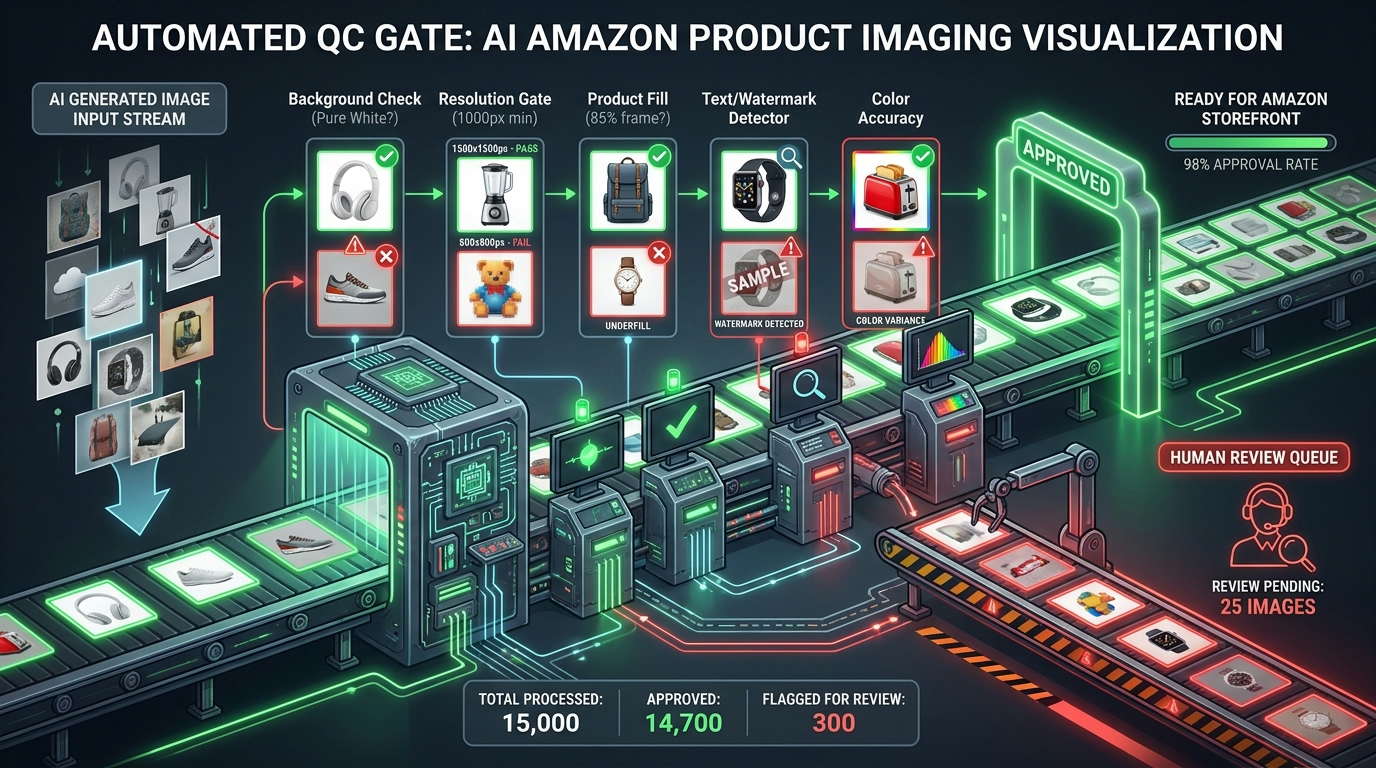
The compliance gate is the stage most teams skip, cut short, or treat as optional — and it is the stage that determines whether an AI image pipeline is actually safe to run at scale. Without automated QC, every image that fails Amazon’s requirements creates a manual problem: a suppressed listing, a catalog flag, or a customer complaint about misrepresented product details. At scale, those manual problems accumulate faster than any team can manage them.
What Automated Compliance Checking Actually Tests
A production-grade compliance gate for Amazon main images runs a series of automated checks that correspond directly to Amazon’s published image requirements. Each check should produce a binary pass/fail output, a confidence score, and a failure reason code that routes the image to the correct remediation path.
The minimum set of automated checks for main images:
- Background purity check: Measures average pixel values in the background region and flags any background that deviates from RGB 255, 255, 255 by more than a defined tolerance. Even a slight gray tinge — RGB 240, 240, 240 — is technically non-compliant and can create problems at scale.
- Resolution gate: Confirms the image’s longest side is at least 1,000 pixels (required for zoom activation) and not more than 10,000 pixels. Flags images that are too small to qualify for zoom, which meaningfully affects conversion rate. Recommended minimum for new listings in 2026: 2,000 pixels on the longest side.
- Product fill analysis: Uses object detection to estimate what percentage of the frame is occupied by the product. Amazon requires at least 85%. Images where the product occupies significantly less should be flagged for reframing, not just approved at the margin.
- Text and watermark detection: OCR and visual detection for any text, logos, watermarks, or overlay graphics in the image. Amazon prohibits text on main images, and AI-generated images frequently produce hallucinated text artifacts — especially near labels, buttons, or branded surfaces.
- Color accuracy check: Compares key product color regions against the reference values from the Truth Set metadata. A product listed as “navy blue” that generates as “royal blue” or “dark purple” in the AI output is a misrepresentation failure even if everything else is technically compliant.
- Duplicate product check: Amazon prohibits showing the product more than once in the main image. Object detection should flag any image where the product appears multiple times.
Routing Logic and Confidence Thresholds
A functional compliance gate does not just run checks — it routes outputs intelligently based on results. A recommended routing architecture uses three lanes:
Auto-approve: All checks pass with confidence scores above threshold (typically 90%+). Image proceeds directly to batch export and upload queue. No human review required.
Auto-reject with remediation: One or more checks fail with a clear, objective failure reason — background too gray, resolution too low, text detected. Image is returned to the generation stage with the failure reason appended to the prompt as a corrective constraint. System retries automatically before escalating to human review.
Human review queue: One or more checks return ambiguous results (confidence 60–90%), or the failure type requires visual judgment — color accuracy borderline, product fill at exactly 85%. These images go to a human reviewer with the failure code and the specific concern highlighted.
The goal is to minimize the human review queue by making auto-approve and auto-reject lanes as effective as possible. Practitioners running production pipelines report that a well-calibrated gate routes approximately 70–80% of images to auto-approve, 15–20% to auto-reject with retry, and only 5–10% to human review. That ratio is the operational target.
Secondary Image Compliance Checks
Secondary (non-main) images have more latitude under Amazon’s policy — backgrounds can be non-white, props are allowed, lifestyle scenes are encouraged — but they still need compliance checking. The checks for secondary images focus on: no explicit prohibited content, correct image dimensions, product present and clearly identifiable, no competitor branding visible, and no misleading claims that conflict with the listing copy. These checks are lighter than main image checks but still need to be automated rather than handled manually at scale.
Stage 5 — Batch Architecture: Processing Hundreds of SKUs Without Chaos
Batch processing is where the pipeline either proves itself or reveals its weaknesses. The transition from “this works for 10 SKUs” to “this works for 500 SKUs” is not linear — it requires deliberate architectural decisions about batch sizing, manifest structure, error handling, and processing order. Get these right and the pipeline scales smoothly. Get them wrong and you end up with orphaned files, ASIN mismatches, and partial uploads that corrupt catalog data.
Batch Sizing: Why 25–100 Images Per Run Is the Practical Standard
Production pipelines do not process entire catalogs in a single run. The standard batch size reported by practitioners in 2026 is 25 to 100 images per run — large enough to amortize the setup overhead of each run, small enough to make failure recovery manageable. If something goes wrong in a 50-image batch, you can identify, remediate, and reprocess the problem SKUs without losing the entire run. In a 2,000-image batch, a systematic failure in the compliance check or the upload step creates a much larger recovery problem.
The recommended approach is to organize batches by product category, not arbitrarily by ASIN range. Category-based batching has a practical advantage: products within the same category tend to have similar image requirements, similar visual contexts, and similar prompt templates. Processing them together reduces prompt variation, which improves consistency within the batch.
The SKU Manifest: The Operational Document That Holds Everything Together
Every batch run should start from a SKU manifest — a structured data file (CSV or JSON) that defines every image to be generated in the run, with all the metadata needed to produce and route it correctly. A well-designed manifest includes:
- ASIN or parent/child SKU identifiers
- Image type required (main, lifestyle-1, lifestyle-2, detail-1, infographic)
- Reference file paths for Truth Set images
- Prompt template ID to apply
- Variant-specific variables (color name, size designation)
- Target output dimensions and format
- Upload destination (marketplace, store region, ASIN slot)
- Required completion date and priority level
The manifest is the contract between the input stage and the output stage of the pipeline. When something goes wrong — an image fails QC, a file is orphaned, a batch run is interrupted — the manifest is the source of truth for what was supposed to happen and what actually happened. Without it, debugging batch failures is an archaeology exercise. With it, it is a straightforward reconciliation against a known record.
Error Handling and Retry Logic
Batch pipelines fail. AI models return unexpected outputs. Network timeouts interrupt file transfers. Compliance checks flag entire runs when a prompt template has a systematic flaw. A production pipeline needs explicit error handling for each of these scenarios, with documented retry limits and escalation paths.
A practical pattern: three automatic retries on any single-image failure before escalating to human review. If more than 15% of a batch fails QC in the same check category, pause the batch and flag for template review — that threshold indicates a systematic prompt problem, not random variation. If the batch completes with a 5% or lower failure rate, proceed to upload. Log every failure, retry, and resolution for post-batch analysis.
Stage 6 — Upload Infrastructure: Getting Images Into Amazon’s Catalog
The upload stage is where most technically capable teams encounter their most operationally frustrating problems. Amazon’s image ingestion system has multiple pathways with different capabilities, different latencies, and different failure modes — and the right choice depends entirely on your volume and your technical stack.
The Three Upload Pathways
Seller Central Bulk Upload (UI): The direct manual pathway. Amazon’s Seller Central supports bulk image upload via Catalog > Upload Images, accepting individual files or ZIP archives up to 1GB containing up to 1,000 images per session. This works well for low-to-medium volume operations — under 500 images per month — where a semi-manual workflow is acceptable. The limitation is that it is a human-driven step: it cannot be fully automated and requires manual matching of images to ASINs through Amazon’s interface.
JSON_LISTINGS_FEED via SP-API: The programmatic pathway for bulk catalog updates. Amazon discontinued legacy XML and flat-file listing feeds on July 31, 2025. The current standard for bulk programmatic updates is the JSON_LISTINGS_FEED submitted through the Selling Partner API (SP-API). This feed can carry both listing data and image attributes in the same payload, supports batch updates across large ASIN sets, and returns processing status notifications. Images are supplied as publicly accessible HTTPS URLs — the feed references the image location, and Amazon fetches the image from that URL at processing time.
Listings Items API (putListingsItem / PATCH): The real-time programmatic pathway for single-ASIN or small-set updates. The Listings Items API supports individual ASIN image updates via PUT or PATCH operations, with near-real-time processing and status responses. This is the right choice when you need to update one or a handful of ASINs immediately — for example, after a product revision that requires updated images on specific listings without running a full catalog batch.
Image Hosting for Programmatic Upload
Because SP-API image workflows work by URL reference — Amazon fetches your image from a URL you provide, rather than you pushing binary data through the API — you need a publicly accessible image hosting location. The practical options are:
- Amazon S3 + CloudFront: The most common production choice for teams already on AWS infrastructure. Images are uploaded to S3 after the compliance gate, served through CloudFront for fast and reliable access, and the CloudFront URL is passed to the Listings Items API or JSON feed. This approach integrates cleanly with automated pipeline orchestration.
- CDN-backed file storage: Any CDN with stable, publicly accessible URLs works. The key requirements are HTTPS, no authentication on the URL (Amazon’s crawler cannot authenticate), and URLs that remain stable after the initial upload — no expiring signed URLs.
- Third-party image hosting: Acceptable for lower-volume operations, but introduces a dependency on an external service’s uptime and URL stability that can create silent failures at the upload stage.
Naming Conventions and ASIN Mapping
One of the most common failure modes at the upload stage is incorrect ASIN-to-image mapping — images uploaded to the wrong listing, or images that cannot be matched to a listing because the file naming does not correspond to any ASIN in the catalog. The SKU manifest from Stage 5 is the solution: the manifest defines the mapping, the upload process reads from the manifest, and post-upload reconciliation verifies that every image in the manifest has a corresponding confirmed upload record.
Amazon’s file naming format for Seller Central uploads follows a required structure: [ASIN].[extension] for main images, with a variant suffix for secondary images. For programmatic upload via SP-API, the ASIN-to-image association is defined in the payload structure rather than the filename — but consistent naming in your own storage system still matters for traceability and debugging.
The Failure Mode Catalog: Eight Ways This Pipeline Breaks in Production
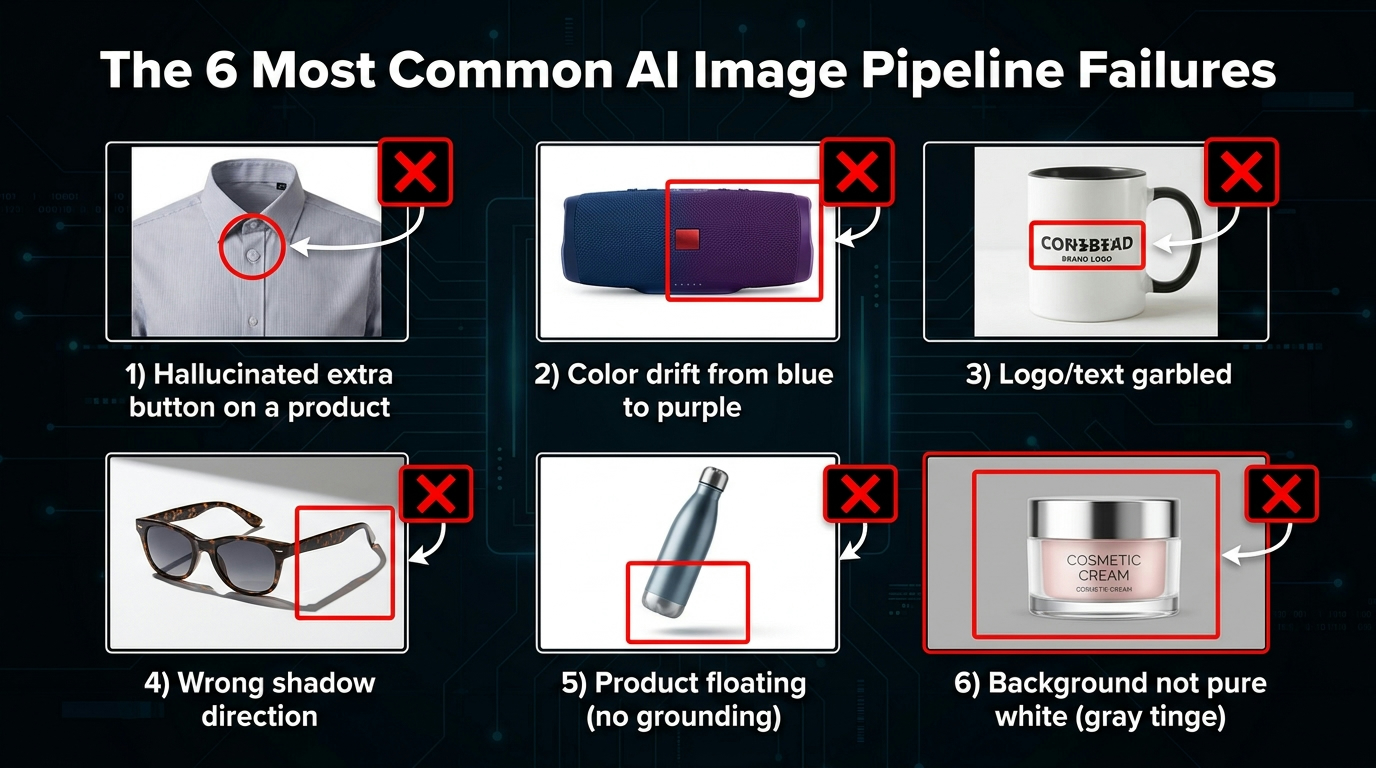
Even well-designed pipelines break. The following failure modes are drawn from practitioner experience running production AI image pipelines at catalog scale. Knowing them in advance allows you to build specific defenses into your pipeline architecture.
Failure 1 — Feature Hallucination
AI models add, remove, or alter product features that are not in the prompt. An extra button appears on a device. A zipper moves from one side to the other. A measurement marking disappears from a bottle. This failure mode is most dangerous for regulated products — supplements, medical devices, electronics with specific technical specifications — where product accuracy is a legal requirement, not just an aesthetic one. Defense: Truth Set reference images used as model inputs, not just as creative inspiration. Color accuracy and feature-presence checks in the QC gate.
Failure 2 — Color Drift
The AI renders a product in a different color than the listed variant. This is one of the most common failures and one of the most commercially damaging — a customer who buys “navy blue” and receives a product that matches the “dark purple” image in the listing will return it. Defense: Explicit color specification in prompts, colorimetric comparison against Truth Set reference in the QC gate, and variant-specific prompt variables that include precise color descriptions.
Failure 3 — Text and Logo Artifacts
AI models hallucinate text on product surfaces — particularly near labels, buttons, ports, and branded areas. Generated text is frequently garbled, misspelled, or stylistically inconsistent with the actual product branding. This is both a compliance issue (Amazon prohibits text on main images unless it is part of the actual product) and an accuracy issue. Defense: Negative constraint in all prompts (“no text overlays, no watermarks”), OCR-based text detection in QC gate, manual spot-check of all images with complex label surfaces.
Failure 4 — Shadow and Lighting Inconsistency
Images within the same catalog batch have inconsistent shadow directions, creating a “pasted-in” appearance that reduces perceived image quality. This matters most for lifestyle images, where shadow consistency is part of scene realism. Defense: Explicit lighting direction specification in every prompt, template standardisation of lighting parameters across a product line, and visual review of batch outputs for shadow consistency before upload.
Failure 5 — Background Non-Compliance
The “white” background is not actually pure white. This happens because many AI models default to very slight gray or warm-tinted backgrounds that look white on casual inspection but fail automated background purity checks and can cause issues with Amazon’s image processing. Defense: Explicit “pure white background, RGB 255 255 255, no gradients, no vignette” in every main image prompt, background purity check in QC gate with a tight tolerance.
Failure 6 — ASIN Mapping Errors
Images are uploaded to the wrong ASIN — usually because the manifest was not followed, filenames were ambiguous, or a batch was partially reprocessed after a failure without proper tracking. This is a catalog data integrity problem, not an image quality problem, but it can create serious listing confusion and customer complaints. Defense: Strict manifest discipline, post-upload reconciliation check against the manifest, and human sign-off on any batch that was interrupted and restarted mid-run.
Failure 7 — Resolution Creep
Images that passed the initial resolution check get downsized during export or format conversion, ending up below the 1,000px minimum for zoom activation. This happens when export settings in the tool or post-processing step are not explicitly locked to the required output dimensions. Defense: Resolution check as the last automated check before upload, not before export. Check the final file, not the pre-export output.
Failure 8 — Prompt Template Drift
Over time, prompt templates are modified informally — someone tweaks a constraint, removes a negative term, changes a lighting description — without updating the template record. The next batch run produces different outputs than the previous one for the same product type, creating catalog inconsistency. Defense: Prompt templates stored in version-controlled repository. No changes made to production templates without review and a documented version increment. Batch run records include the template version used, so any inconsistency can be traced to a specific change.
Where Human Review Actually Belongs in the Pipeline
One of the most common mistakes in designing AI image pipelines is misplacing human review. Teams either review everything — which defeats the efficiency purpose of automation — or review nothing — which creates a compliance liability. The right answer is neither: humans should review precisely the outputs that automated checks cannot confidently adjudicate, and nothing else.
The Right Human Checkpoints
Truth Set sign-off: A human — specifically someone who knows the product well — reviews and approves the Truth Set before the pipeline runs. This is the most important human checkpoint in the entire workflow because it validates the ground truth everything else is built on. This review happens once per SKU, not once per image.
Prompt template validation: When a new template is created or an existing one is materially changed, a human reviews a sample output set — typically 10 to 20 images — before the template enters production. This catches template-level problems before they affect an entire batch.
Compliance gate exception queue: The 5–10% of images that the automated compliance checks cannot confidently resolve go to a human reviewer. The reviewer sees the image, the specific check that flagged it, and the confidence score. Their decision is recorded and used to improve the QC thresholds over time.
Random spot-check: A 10–15% random sample of auto-approved images should receive human review on a rolling basis. This is not rework — it is a calibration mechanism. If the spot-check consistently finds no problems, you can tighten the auto-approve threshold. If it finds systematic issues, you have caught a pipeline problem before it reaches Amazon.
New category or product type launch: The first batch run for any new product category or image type gets full human review regardless of QC scores. Edge cases and category-specific compliance nuances appear in the first run, not in subsequent ones. Review the first batch completely, then revert to standard exception-based review for subsequent runs.
What Human Review Should Not Cover
Human reviewers should not be re-checking things that automated systems can check objectively. Background purity, resolution, file format — these are binary measurements that a script handles faster and more consistently than a person. Using human attention on pixel-level objective checks is a waste of reviewer capacity and creates inconsistency. Build the automation for objective checks; reserve humans for judgment calls.
The Cost Model: What a Mature Pipeline Actually Delivers
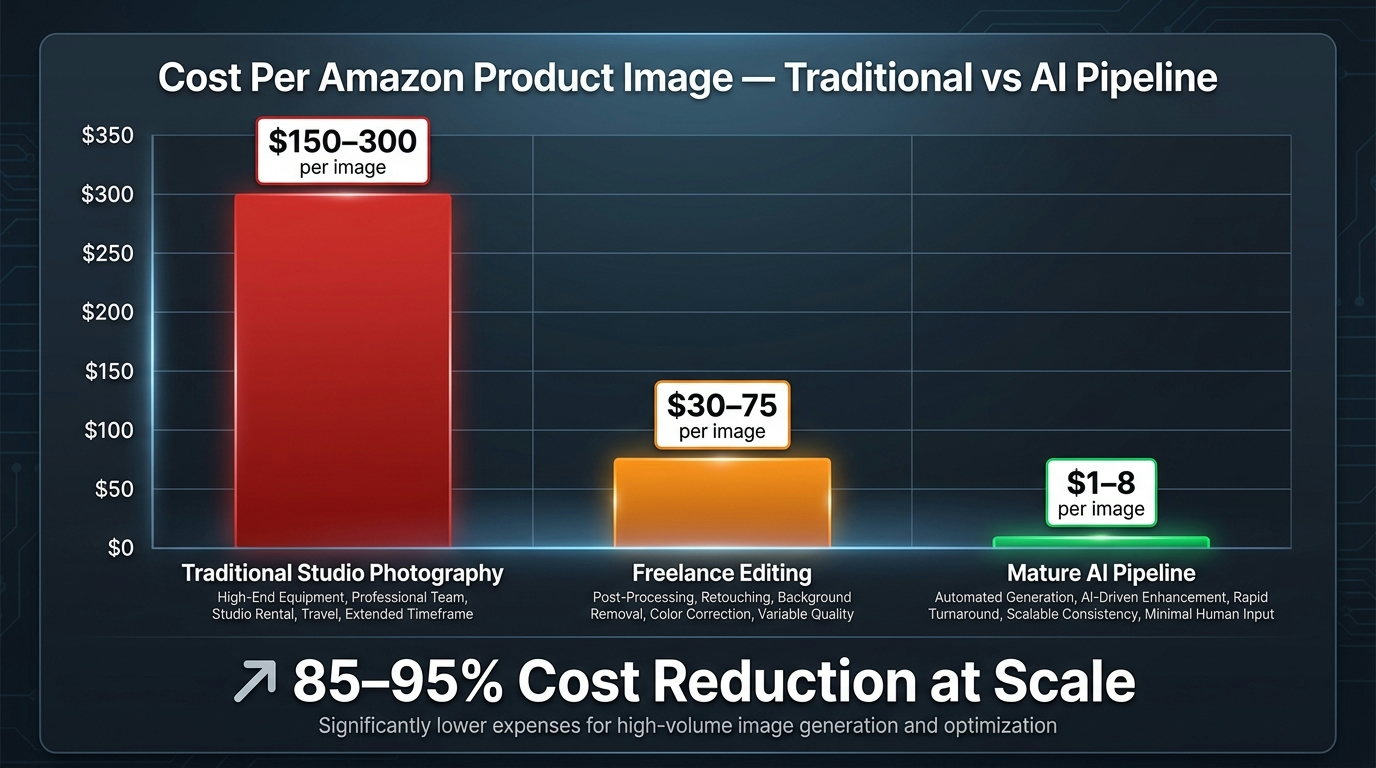
The financial case for AI image pipelines is strong, but it is often overstated in the early stages and understated at maturity. Understanding the real cost model — including the costs that are rarely discussed — helps set accurate expectations and avoid the disappointment of underperforming ROI projections.
The Realistic Cost Breakdown
Traditional studio product photography in 2026 costs approximately $75 to $300 per finished image, depending on product complexity, studio location, and whether the cost includes editing and formatting. Freelance editing of brand-supplied photography runs $30 to $75 per image. These are the baselines against which AI pipeline costs should be compared.
A mature AI image pipeline operating at catalog scale delivers a per-image cost of approximately $1 to $8, depending on the tool stack, volume, and the complexity of the QC and upload automation. The range is wide because the cost model has two distinct components that mature at different rates:
Variable costs: Per-image AI generation fees — typically $0.01 to $0.50 per image depending on tool and plan — cloud storage and hosting, API call costs for SP-API operations. These scale with volume but decrease on a per-image basis as volume increases and tool pricing tiers kick in.
Fixed costs: Pipeline development and maintenance, typically the equivalent of 0.5 to 1.0 FTE for initial build and 0.1 to 0.25 FTE for ongoing maintenance. Truth Set capture — a one-time cost per SKU that amortizes across the pipeline’s lifecycle. Prompt template library maintenance. QC threshold calibration. These are front-loaded and do not scale with image volume.
The Amortization Curve
The practical implication of this cost structure is that AI image pipelines have an amortization curve — they cost more than traditional photography on a per-image basis for the first few dozen SKUs, and significantly less for every SKU thereafter. The breakeven point varies by pipeline complexity and tooling choices, but practitioners commonly report it at around 50 to 100 SKUs processed. Below that threshold, traditional photography or freelance editing may be more cost-effective. Above it, the pipeline consistently wins on cost per image.
The secondary benefit — faster time-to-market — has its own financial value that the pure cost comparison understates. A product that reaches its listing with compliant, high-quality images two weeks faster than a competitor’s equivalent product captures sales during that window. At any meaningful sales velocity, that acceleration has value that compounds over the product’s listing lifetime. At catalog scale, the compound effect of faster image production on overall revenue is substantial.
What the Oneisall Case Study Illustrates
Amazon’s own case study data on its native AI image generation tools notes that Oneisall, a brand that adopted Amazon’s Creative Studio AI capabilities, achieved a 50% increase in sales attributed to improved creative quality and production speed while simultaneously reducing creative production costs. The figure is Amazon-reported and should be interpreted with that context in mind, but it aligns with the directional pattern seen across multiple brands: the pipeline’s value is not just cost reduction — it is the combination of cost reduction and faster creative iteration that together produce better commercial outcomes. More images, more testable variations, faster reactions to seasonal or competitive changes — that is where the compounding advantage actually lives.
Building the Pipeline Incrementally: A Practical Starting Sequence
Every operational consideration in this guide applies at full scale. But full-scale pipelines are not built in a week, and attempting to build all six stages simultaneously before testing any of them is a reliable way to create a system that is theoretically complete and practically broken.
The right sequence is incremental: build one stage at a time, test it thoroughly against a small SKU set, resolve its failure modes, then connect it to the next stage. The recommended starting sequence is:
- Start with Truth Set capture for 10–20 pilot SKUs. Get the capture protocol right, the naming convention established, and the metadata structure defined. Do not write a single prompt until the Truth Set for the pilot is complete and approved.
- Build and test two or three prompt templates — a white-background main image template and one lifestyle template — against the pilot SKUs. Generate 20 to 30 images per template and evaluate them manually. Refine templates until output quality and consistency meet your standard.
- Implement the QC gate for main images only, covering the five core checks: background, resolution, fill, text, and color. Test it against your pilot outputs and calibrate thresholds against the outcomes you agree are correct.
- Run the first batch of 25 SKUs through Truth Set → Prompt → Generation → QC, and track every failure mode and routing decision. Fix systematic issues before scaling.
- Build the upload workflow for your volume level — Seller Central UI for low volume, SP-API for high volume. Test with five ASINs end-to-end before running the full pilot batch.
- Scale to your full catalog only after the pilot batch completes with acceptable QC pass rates and zero ASIN mapping errors. Scale reveals problems that small-batch testing does not — run the second batch at 100 SKUs, then 250, then full catalog, with a review checkpoint at each step.
This sequence takes longer than deploying everything at once. It also produces a pipeline that actually works at the end of it, rather than one that requires emergency rework after a failed full-catalog run.
Catalog Velocity as a Durable Competitive Advantage
The discussion around AI image pipelines typically focuses on cost and compliance — two operational factors. The strategically more important implication is speed: specifically, the speed at which a catalog can be built, refreshed, tested, and iterated.
A seller with a mature AI image pipeline can launch a new SKU with a full image set — main image, five lifestyle secondaries, an infographic image, and two ad creative variations — in hours rather than weeks. They can test two different lifestyle backgrounds against each other on a live listing and rotate to the winner within a single week’s data. They can update an entire product line’s secondary images when a seasonal campaign brief changes, without scheduling a photography session.
None of these things are impossible without a pipeline. But without one, each requires individual attention, manual coordination, and a lead time that creates organizational inertia. The pipeline converts image production from a project-managed activity into an operational one — something that happens continuously, systematically, and at a speed that the underlying business can actually take advantage of.
That speed advantage compounds in categories where creative freshness matters — lifestyle goods, wellness products, home décor, apparel accessories — and where competitors are still on two-week photography cycles. The pipeline is not just about producing images faster; it is about making faster decisions about which images drive results, and acting on those decisions before the window closes.
Conclusion: Six Principles of a Pipeline That Holds at Scale
The specifics in this guide — batch sizes, API pathways, QC thresholds, tool selections — will continue to evolve as the tools and Amazon’s own infrastructure change. What will not change is the underlying architecture: a structured sequence of stages, each with defined inputs, outputs, and gates, that converts raw product references into compliant, high-quality Amazon assets at catalog scale.
Six principles should guide every pipeline build, regardless of what tools or integrations you are working with:
- Ground truth first. The Truth Set is not optional. AI cannot accurately represent what it has not seen. Capture it systematically before generation begins.
- Prompts are engineering artifacts, not creative experiments. Template them, version-control them, and treat changes to production templates as changes to production code — with the same rigor and review process.
- Match tools to stages, not to brand loyalty. No single tool dominates every stage of a production pipeline. Use each tool where it genuinely leads and do not force one tool to cover territory it was not built for.
- Automate the objective; preserve humans for the judgment calls. Background purity, resolution, fill percentage — these are measurements. Build automation for them. Color accuracy at a borderline, feature presence on a novel product type — these are judgment calls. Reserve human attention for them.
- The manifest is the source of truth. Every batch run should be traceable back to a SKU manifest that defines what was supposed to happen. Post-run reconciliation against the manifest is not optional — it is the mechanism that keeps catalog data clean.
- Build incrementally, scale after validation. The pipeline that scales well is the one that was tested rigorously at each increment before moving to the next one. Speed to full deployment is a false efficiency if it creates a system that fails at scale.
The AI image tools will keep getting better. The pipeline discipline is what ensures that improvement translates into better catalog outcomes, not just more impressive demo outputs. Build the system, not just the workflow — and the system will still be delivering value when the tools have changed three more times.
Leave a Reply